
Construction Management & Project Management
Construction ProjectManagement SoftwareBuilt for Complete Control
Schedules, tasks, meetings, risks and documents on one connected data layer, so AI can act on them. It turns meeting notes into assigned tasks, flags schedule risk early, and your team approves in one click.
- 50% less admin work
- 10× process improvement
- 90% risk reduction
- AI agents on live project data via native MCP
Capabilities
Built for how construction projects actually run.
Every tool your team needs to manage complex builds — tasks, schedules, risks, and decisions — connected in one platform.
- 01Task ManagementAssign, track and close tasks across every party — in one place, not scattered across email threads.
- 02Schedule & MilestonesKeep every phase on track with shared timelines visible to every stakeholder on the project.
- 03Risk ManagementIdentify, log and monitor project risks with ownership, mitigation plans, and resolution tracking built in.
- 04Meeting MinutesCapture decisions, action items and attendees in one place. No more lost notes or missed follow-ups.
- 05Document ControlOne source of truth for drawings, specs and contracts. Always the latest version, always accessible.
- 06Cross-Party CollaborationGC, Owner, Architect — every stakeholder connected in one workspace with role-based access.
Product Tour Videos
See Project ManagementFeatures in Action.
Watch short product teasers for project management workflows your team manages every day.
 DocumentsKeep project files organized, searchable, and connected to the work happening across your projects.Watch →
 Task ManagementKeep project teams aligned, assign work clearly, track progress in real time, and make sure every task moves from open to done without getting lost.Watch →
 Meeting MinutesSee how to efficiently capture, organize, and share meeting notes to ensure accountability and clear communication across your project team.Watch →
Your project's financial health,schedule, and risk.All scored. All visible.
No more pulling reports. The dashboard surfaces what needs attention before it becomes a problem.
Request Demo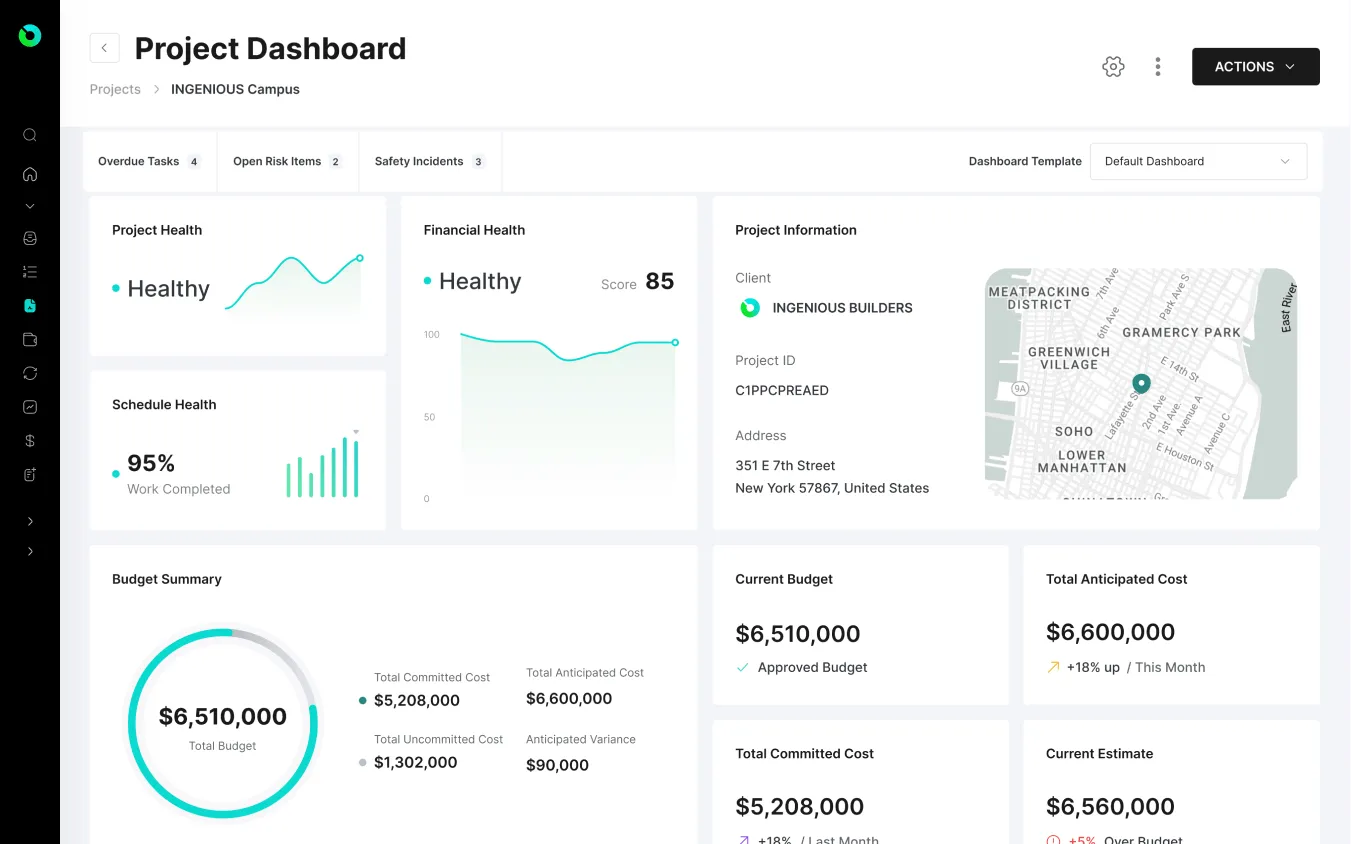
Run Every Project withClarity, Control, and Confidence
See how INGENIOUS helps construction teams stay on schedule, align stakeholders, and manage every moving part from pre-con to closeout.
Available to download on both iOS and Android.


FAQs
Everything you need to know about managing construction projects in INGENIOUS.BUILD.
Your Project Management questions, answered.
Can project teams collaborate, comment and assign tasks in real time?
Yes. INGENIOUS.BUILD enables real-time construction project collaboration across every party — Developers, GCs, Subs, Architects and Owner's Reps can comment, assign tasks and stay aligned throughout every phase, all within a single connected platform. No email chains, no siloed tools.
Can I connect project tasks to construction schedules and meeting documentation?
Yes. INGENIOUS.BUILD links task management directly to construction project scheduling and meeting minutes — so every task carries timeline context and a clear owner. Tasks created during meetings stay permanently connected to that meeting record, giving teams a full audit trail from discussion to completion.
Can I manage multiple construction projects at once from a central dashboard?
Yes. INGENIOUS.BUILD provides a centralized dashboard where project managers can oversee unlimited active construction projects — tracking timelines, budgets, RFIs, submittals and team activity across all jobs in a single view, without switching between tools or platforms.
Can I customize workflows for different project types or teams?
Yes. INGENIOUS.BUILD allows teams to tailor workflows for any construction process — from submittal reviews and RFI routing to punch list management and approval chains — so each project type runs exactly the way your team works.
Is INGENIOUS.BUILD mobile-friendly for project managers and field teams?
Yes. INGENIOUS.BUILD is fully mobile-optimized and available on iOS and Android, giving project managers and field teams instant access to tasks, documents, punch items, RFIs and live project updates — from anywhere on or off the jobsite, even in low-connectivity environments.