
AI Construction Project Management PlatformFaster delivery. Less risk. Powered by AI.
Construction project management software that controls every dollar and decision, from pre-con through closeout. Financials, project management and construction administration on one connected platform, with built-in AI for every user and a native MCP server in Pro, so your own AI works across every company on the project.
- Owners
- Developers
- Owner's Reps
- GCs
- Architects
- Engineers
- Specialty Trades
- 6+ hrs saved daily
- AI built in, MCP in Pro
- You own your records
- Transparent pricing





















Who's INGENIOUS for
Every Stakeholder. One Connected Project.
Every company on the project gets its own secure workspace and permissions, while the data they share stays connected in real time. No duplicate entry, no version confusion.
- Owners & DevelopersLive budgets, change orders and approvals across your portfolio.
- Owner's RepsRun every client's projects from one workspace.
- General ContractorsPay apps, RFIs and change orders without re-keying.
- Specialty TradesPay apps, change orders and approvals without the chase.
- Architects & EngineersRFIs, submittals and CA in one shared record.
What is INGENIOUS.BUILD
Construction management software, from budget to closeout.
Replace the spreadsheets, inboxes and disconnected tools your team juggles today with one platform every company on the project shares.
Project Financials
Control budgets, commitments and change orders before risk gets expensive.
- Master budget & cost forecasting
- Change orders, invoices & pay apps
- Two-way ERP & accounting sync
Project Management
Keep schedules, tasks, documents and meetings on one shared timeline.
- Gantt schedules & milestones
- Tasks, daily logs & meeting minutes
- Documents, drawings & specs
Construction Admin
Move RFIs, submittals, punch lists and closeout out of inboxes.
- RFI & submittal tracking
- Punch lists & inspections
- Digital closeout packages
Capital Planning
Forecast and prioritize capital spend across your whole portfolio.
- Multi-year capital forecasting
- Funding source tracking
- Portfolio & scenario planning
INGENIOUS Workspaces
Your data moves between companies. Projects move faster.
Every firm keeps its own copy in its own secure workspace. Built-in AI reads each pay app, and your own AI checks every handoff through MCP.
- SOC 2 compliant
- ISO 27001 certified
- Role-based access
- Audit-ready logs
- Trade submits the pay appApex Mechanical$120,000
- AI check SOV and lien waiver matched
- GC invoices the ownerSummit Builders · incl. 7% GC fee$128,400
- AI check Markup within contract terms
- Owner's rep passes it onKeystone PM · incl. 1.5% rep fee$130,326
- AI check Rep fee in terms, budget OK
- Owner funds itNorthwindFunded
Every company keeps its own copy. No exports, no retyping.
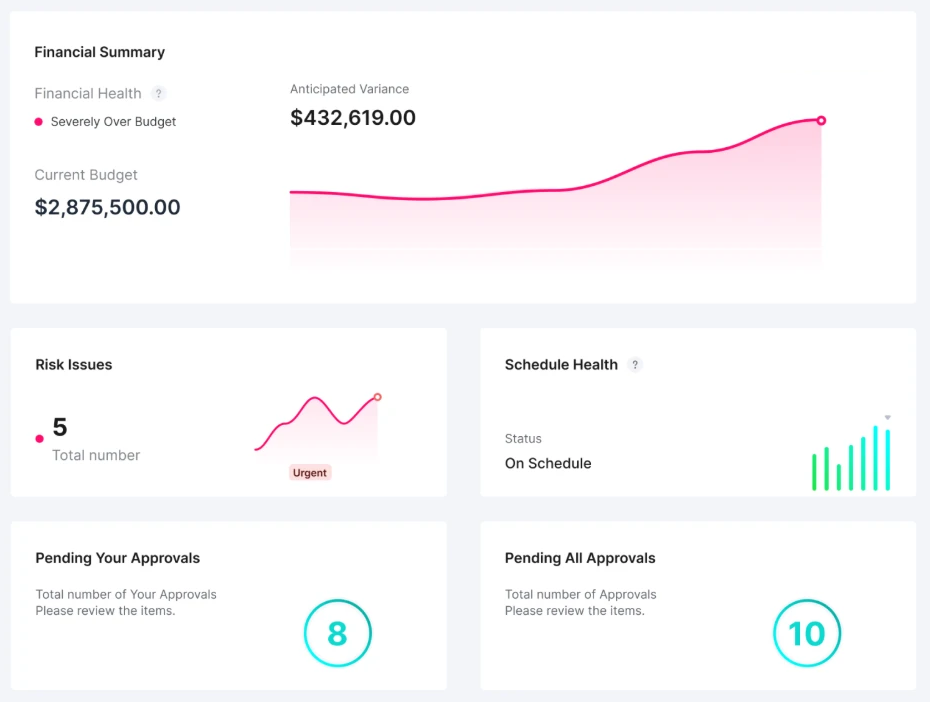
Project Dashboard
See every firm's work before it costs you.
Pay apps, submittals and change orders from every firm on the project land on your dashboard as they're submitted, tagged with who sent them.
Budget variance before you approve
Built-in AI reads every pay app, and your own AI checks it against your budget and contract through MCP, which is included in Pro, so over-billing shows up while you can still push back.
Risks and slips as they start
A late submittal or an open RFI flags the risk on the day it happens, not at the next OAC meeting.
One approval queue for every firm
Change orders, invoices and submittals from every company wait in one place, with the budget impact beside each.
Built-In AI + MCP
Your AI finally knows the whole story.
Most construction AI only sees one company's data. On INGENIOUS, built-in AI reads invoices, contracts, change orders, budgets and drawings and sends email summaries of your unread notifications for every user, even the collaborators you invite free. The native MCP server, included in Pro, lets Claude, ChatGPT, Gemini and any MCP-compatible AI draft RFIs, write up meetings and work from live project data you're authorized to access, with permissions intact.
See Built-In AI & MCP → Book A Demo
Watch the MCP server video (1:47)Explore built-in AI & MCPLearn more about INGENIOUS vs Procore AI MCP
Integrations
Works with what you already run.
Two-way sync with your accounting and ERP, so project financials and the books never drift apart.




INGENIOUS Pricing Calculator
See exactly what INGENIOUS costs.
Enter your team size. Get your per-user rate instantly.
- One platform. Replace the disconnected tools you're already paying for.
- Transparent, per-seat pricing. Unlike most construction platforms, you can see your per-user rate upfront. The more users, the lower your per-seat cost.
- Unlimited projects · Free external collaborators Invite stakeholders outside your org at no extra cost.
- Up and running in days. Not months.
Comparing tools?vs Procorevs Autodeskvs Smartsheet
Enter your user count above to see pricing.
Minimum 5 users. Showing pricing for 5 users.
Your rate
—per user / month
- Team size
- — users
- Total annual contract
- —
Billed annually · Annual contract required
* Capital Planning, Custom Reporting & Support are offered separately as advanced modules.
Available to download on both iOS and Android.


FAQs
Everything you need to know.
Answers about INGENIOUS.BUILD, the AI construction project management platform — pricing, integrations, built-in AI and MCP, security and setup.
What is INGENIOUS.BUILD, and who is it for?
INGENIOUS.BUILD is AI construction project management software that connects every company on a project in one platform, from pre-con through closeout. It is built for owners, developers, owner's reps, general contractors, architects, engineers and specialty trades.
How much does INGENIOUS.BUILD cost?
INGENIOUS.BUILD has transparent, per-user based pricing, billed annually. Projects are unlimited and external collaborators are free. Capital Planning, Custom Reporting and Support are offered separately as advanced modules.
How is INGENIOUS.BUILD different from Procore?
Procore charges an annual fee for each product, based on your annual construction volume, so its cost grows with your projects, and each company works in its own siloed account. INGENIOUS.BUILD charges per user, with unlimited projects and free external collaborators. Every company on the project gets its own connected workspace, and INGENIOUS moves data between them live, from the trade's pay app to the owner's funding.
Can owners, GCs and architects work in one construction platform?
Yes. INGENIOUS.BUILD gives every company on the project, from owner and developer to GC, architect, engineer and trade, its own connected workspace. RFIs, submittals, budgets, change orders and pay apps move between them live, so every party works from the same record, and the collaborators you invite are free.
Does INGENIOUS.BUILD work with ChatGPT, Claude and other AI tools?
Yes. Built-in AI works for every user, and INGENIOUS.BUILD Pro includes a native MCP server, so Claude, ChatGPT, Gemini and any other MCP-compatible AI can read live, structured project data from every workspace you are authorized to access. Role-based permissions stay intact.
What does INGENIOUS.BUILD integrate with?
INGENIOUS.BUILD syncs two ways with accounting and ERP systems, including QuickBooks, Xero, Sage Intacct, Microsoft Dynamics 365 Business Central, Microsoft Dynamics 365 Finance & Operations and Yardi Voyager.
Can we work with companies outside our organization?
Yes. Collaborators are free for the work you invite them to. Every stakeholder gets a private, secure workspace with role-based permissions, and you invite project parties when you need them. Shared documents, workflows, RFIs, submittals and financials stay connected in real time, and each firm keeps its own copy.
How does INGENIOUS.BUILD keep project data secure?
INGENIOUS.BUILD is SOC 2 compliant and ISO/IEC 27001 certified. Access controls and role-based permissions decide who sees what, and an audit-ready activity history shows who did what. For security questions, email security@ingenious.build.
Is there a mobile app?
Yes. INGENIOUS.BUILD is available on iOS and Android, so teams can work from the jobsite.
How long does implementation take?
Most teams are up and running in days, not months. Project data, contacts, documents and workflows are migrated so your team can adopt the platform quickly.
Get Started
Build the Future, Together.
See how your next project runs on one connected platform.
- 6+ hrs
- Saved daily on manual work & reporting
- 90%
- Decreased project risk
- 50%
- Less admin work
Reported by active INGENIOUS.BUILD users. Time savings figure reported by users with INGENIOUS AI enabled.