# INGENIOUS.BUILD — full text
> Construction project management software that connects every stakeholder on a
> project — owners and developers, general contractors, owner's representatives,
> architects and engineers, and specialty trades — on one platform covering
> project management, cost management, financials and document control.
This is the complete public text of ingenious.build: 29 pages,
196 articles and 6 press releases. The link
index is https://www.ingenious.build/llms.txt. Content is published by INGENIOUS.BUILD; attribute
quotations to INGENIOUS.BUILD and cite the URL given with each entry.
## Pages
### Capital Planning Software. Plan, prioritize and forecast in one place.
URL: https://www.ingenious.build/capital-planning
Section: Product
Capital planning software for construction owners. Score project requests, model funding scenarios and forecast spend against live project financials.
Capital Planning Software. Plan, prioritize and forecast in one place.
Score incoming requests automatically, model funding scenarios side by side, and forecast portfolio spend against live project financials. Capital decisions rest on current data, not last quarter's spreadsheet.
Automated scoring and prioritization
Forecasts connected to live project financials
Why Teams Switch
Still planning capital in spreadsheets?
Emails, forms and one-off files
One pipeline, scored automatically
Ranked by hand, rebuilt each cycle
Automated scoring, ranked across the portfolio
A file copy per scenario
Side-by-side scenarios against the funding cap
Last quarter's export
Live project financials, monthly and quarterly
Who changed which cell?
Every score, change and approval on record
How It Works
From request to funded plan to live forecast.
Each stage feeds the next on one data layer, so the plan you approve is the plan you track.
Capture & score requests
Every capital request lands in one intake pipeline, scored and ranked automatically.
Project request pipelines
Automated scoring & prioritization
Model funding scenarios
Compare budget strategies side by side and see what fits the funding cap.
Multi-scenario capital plans
Manual scenario adjustments
Forecast portfolio spend
Planning assumptions meet live project financials, month by month.
Monthly & quarterly forecasting
Forecast vs actual tracking
Active project financial integration
Real-time spend visibility
The INGENIOUS Difference
Your capital plan, connected to live spend.
The plan you approve stays tied to each project's budgets, commitments, invoices and actual costs, so the forecast updates as work happens.
Forecast vs actual – Actuals flow in from Project Financials, with no exports to reconcile.
Every decision on record – Scores, scenario changes and approvals stay in one decision trail.
AI built in, MCP in Pro – Built-in AI reads financial documents for every user, and through the native MCP server in Pro, AI agents work across requests, scenarios and spend.
Who It's For
Built for teams managing capital portfolios.
Owners, developers, PMOs, capital planning teams and enterprise organizations managing multiple capital projects and programs.
SOC 2 compliant
ISO 27001 certified
Capital Planning FAQs
Straight answers about capital requests, funding scenarios and portfolio forecasting in INGENIOUS.BUILD.
Q: What is capital planning software? A: Capital planning software helps organizations evaluate, prioritize, budget and forecast capital projects across a portfolio. It centralizes project requests, funding scenarios, forecasting and financial visibility in one system.
Q: How does INGENIOUS.BUILD support capital planning? A: INGENIOUS.BUILD helps teams manage capital requests, compare funding scenarios, forecast portfolio spend, and connect planning decisions directly to live project financials.
Q: How are capital requests scored and prioritized? A: Requests are scored automatically on criteria such as safety and asset condition, then ranked across the pipeline so the highest-priority projects rise to the top. Teams can still adjust scenarios manually.
Q: Can INGENIOUS.BUILD forecast capital project spend? A: Yes. INGENIOUS.BUILD supports monthly and quarterly cash flow forecasting across capital projects and portfolios, using connected financial data and project forecasts.
Q: Does INGENIOUS.BUILD support funding scenario planning? A: Yes. Teams create and compare multiple capital planning scenarios to evaluate different funding strategies, project priorities and portfolio impacts.
Q: Can INGENIOUS.BUILD connect capital planning with project financials? A: Yes. INGENIOUS.BUILD connects capital planning workflows with project budgets, forecasts, commitments, invoices and actual costs to improve portfolio visibility and forecast accuracy.
Q: Can it replace our capital planning spreadsheets? A: Yes. Requests, scores, scenarios and forecasts live in one platform connected to live project financials, so teams stop rebuilding the plan in spreadsheets each cycle.
Q: How does AI help with capital planning? A: Built-in AI reads financial documents for every user, and through the native MCP server, included in Pro, AI agents work on live portfolio data, scoring incoming requests and checking them against your scenarios, so capital decisions rest on current data.
Q: Who uses INGENIOUS.BUILD Capital Planning? A: Owners, developers, PMOs, capital planning teams and enterprise organizations managing multiple capital projects and programs.
Q: Is Capital Planning included with the Pro platform? A: No. Capital Planning is offered separately as an advanced module for customers on the INGENIOUS.BUILD Pro platform. Pricing is transparent and per-user, billed annually, with unlimited projects and free external collaborators.
Q: Is INGENIOUS.BUILD secure enough for enterprise portfolios? A: Yes. INGENIOUS.BUILD is SOC 2 compliant and ISO 27001 certified, with role-based access so each stakeholder sees only what they should.
Make every capital decision on live data.
---
### Construction Administration Software. Every RFI resolved on time.
URL: https://www.ingenious.build/construction-administration
Section: Product
Construction administration software for RFIs, submittals, drawings, inspections, daily reports and punch lists, with built-in AI and native MCP in Pro.
Construction Administration Software. Every RFI resolved on time.
RFIs, submittals, drawings, inspections, daily reports and punch lists in one workspace for field teams, architects and owners. Built-in AI reads drawings and documents, and your own AI drafts RFIs through the native MCP server, which is included in Pro. Cost impact is flagged early.
Submittal logs generated from the spec manual
RFIs linked to financials for cost impact
Every CA workflow, from pre-con to closeout.
Each module shares one record with the project's budget, schedule and documents, so an answer in one place shows up everywhere it matters.
Draft, route and answer RFIs with sheets and specs attached. Cost impact links straight to Project Financials.
Build the submittal log in minutes by scanning the spec manual, and schedule vendor submissions so reviews land on time.
Drawings & Markups
Upload, version and search drawings. Markups and comments sit on the sheet, and every change is tracked.
Inspections & Forms
Build custom templates. Inspectors capture photos and notes and raise punch items from the mobile app.
Live site updates from the GC and vendors, with instant notice of delays so risks get handled early.
Combine lists from every party, discuss items with the assigned trade, and keep the full history through closeout.
The INGENIOUS Difference
From field issue to answered RFI, with the cost attached.
Logged from the field – A superintendent snaps the issue in the mobile app.
Your AI drafts the RFI – Built-in AI reads the drawings, and through the native MCP server in Pro, Claude or ChatGPT drafts the RFI from the field issue. Your team approves it before it is sent.
Answered in one record – The architect responds and the drawing revision is linked to the RFI.
Cost impact logged – The impact flows to Project Financials and on to the owner's rep, and every step lands in the audit trail.
Each RFI costs an average of $1,080 to answer, and nearly 1 in 4 get no reply (Navigant study of 1,362 projects).
In the Product
Built for the trailer and the jobsite.
Review sheets together. Cloud an area, comment, and raise a punch item without leaving the drawing.
Every punch item from every walk, with status, company and assignee, in one list through closeout.
Construction Administration FAQs
Straight answers about RFIs, submittals, punch lists and field documentation in INGENIOUS.BUILD.
Q: What is construction administration software? A: Construction administration software manages the documents and approvals that carry a project from design through construction to closeout, including RFIs, submittals, drawings, inspections, daily reports and punch lists. INGENIOUS.BUILD keeps them in one record shared by every party and connected to the project's budget and schedule.
Q: Can I manage RFIs, submittals and punch items in one place? A: Yes. INGENIOUS.BUILD centralizes RFIs, submittals, punch items and more in one construction administration module, so teams can track status, manage workflows and speed up approvals.
Q: How does AI help with RFIs and submittals? A: Built-in AI reads drawings and financial documents so your team isn't retyping them. Through the native MCP server, included in Pro, your own AI, such as Claude or ChatGPT, drafts RFIs from field issues and builds submittal logs from the spec manual, and your team approves each RFI before it is sent.
Q: Can I see the cost impact of an RFI? A: Yes. RFIs link to Project Financials, so cost impact is flagged early and visible against the budget, schedule milestones and related tasks.
Q: Does INGENIOUS.BUILD track approvals and revision history? A: Yes. Document approvals, version control and full revision history are tracked, so every party works from the latest drawings and every decision has an audit trail.
Q: Who uses construction administration software? A: Every party on the project, from owner to trade, works in the same record with role-based access, so each sees what they need and nothing they shouldn't.
Q: Does it work on mobile in the field? A: Yes. The iOS and Android apps let field teams manage RFIs, upload site photos, create and review punch items, submit reports and stay connected to construction administration workflows from anywhere on site.
Q: How does INGENIOUS.BUILD compare to Procore and Autodesk? A: INGENIOUS.BUILD connects every stakeholder, owner to trade, on one platform from pre-con to closeout. Procore's cost scales with your annual construction volume, and each company works in its own siloed account; INGENIOUS uses transparent, per-user based pricing with unlimited projects and free external collaborators. Unlike Autodesk's point tools, it is purpose-built for end-to-end construction workflows.
Q: How long does it take to get up and running? A: Simple setups can be live in under an hour. For larger organizations or custom configurations, most teams are fully onboarded within a few weeks, not months.
Close out every project with fewer gaps and more accountability.
---
### INGENIOUS.BUILD — construction project management platform
URL: https://www.ingenious.build/
Section: Product
AI construction project management software that connects owners, developers, GCs and owner's reps. Budgets, schedules, RFIs and documents on one platform.
AI Construction Project Management Platform
Faster delivery. Less risk. Powered by AI.
Construction project management software that controls every dollar and decision, from pre-con through closeout. Financials, project management and construction administration on one connected platform, with built-in AI for every user and a native MCP server in Pro, so your own AI works across every company on the project.
6+ hrs saved daily
AI built in, MCP in Pro
You own your records
Who's INGENIOUS for
Every Stakeholder. One Connected Project.
Every company on the project gets its own secure workspace and permissions, while the data they share stays connected in real time. No duplicate entry, no version confusion.
Live budgets, change orders and approvals across your portfolio.
Run every client's projects from one workspace.
Pay apps, RFIs and change orders without re-keying.
Pay apps, change orders and approvals without the chase.
RFIs, submittals and CA in one shared record.
What is INGENIOUS.BUILD
Construction management software, from budget to closeout.
Replace the spreadsheets, inboxes and disconnected tools your team juggles today with one platform every company on the project shares.
Control budgets, commitments and change orders before risk gets expensive.
Master budget & cost forecasting
Change orders, invoices & pay apps
Two-way ERP & accounting sync
Keep schedules, tasks, documents and meetings on one shared timeline.
Gantt schedules & milestones
Tasks, daily logs & meeting minutes
Documents, drawings & specs
Move RFIs, submittals, punch lists and closeout out of inboxes.
RFI & submittal tracking
Punch lists & inspections
Digital closeout packages
Forecast and prioritize capital spend across your whole portfolio.
Multi-year capital forecasting
Funding source tracking
Portfolio & scenario planning
INGENIOUS moves your data between companies So projects move faster.
Follow one pay app from the trade to the owner. Every firm keeps its own copy. Built-in AI reads each pay app so nothing is retyped, and your own AI checks every handoff through MCP, which is included in Pro.
All your projects. One secure workspace.
Every stakeholder on INGENIOUS gets a private, secure workspace. Role-based permissions and audit-ready activity logs are built in. Documents, workflows, RFIs, submittals, and financials are visible in real time. Invite project parties when you need them, with no email chains, access conflicts, or missing context.
SOC 2 compliant
ISO 27001 certified
See every firm's work before it costs you.
Pay apps, submittals and change orders from every firm on the project land on your dashboard as they're submitted, tagged with who sent them.
Budget variance before you approve
Built-in AI reads every pay app, and your own AI checks it against your budget and contract through MCP, which is included in Pro, so over-billing shows up while you can still push back.
Risks and slips as they start
A late submittal or an open RFI flags the risk on the day it happens, not at the next OAC meeting.
One approval queue for every firm
Change orders, invoices and submittals from every company wait in one place, with the budget impact beside each.
Built-In AI + MCP
Your AI finally knows the whole story.
Most construction AI only sees one company's data. On INGENIOUS, built-in AI reads financial documents and drawings, imports budgets from Excel and summarizes email for every user, even the collaborators you invite free. The native MCP server, included in Pro, lets **Claude, ChatGPT, Gemini** and any MCP-compatible AI draft RFIs, write up meetings and work from live project data you're authorized to access, with permissions intact.
Works with what you already run.
Two-way sync with your accounting and ERP, so project financials and the books never drift apart.
INGENIOUS Pricing Calculator
See exactly what INGENIOUS costs.
Enter your team size. Get your per-user rate instantly.
Replace the disconnected tools you're already paying for.
Transparent, per-seat pricing.
Unlike most construction platforms, you can see your per-user rate upfront. The more users, the lower your per-seat cost.
Unlimited projects · Free external collaborators
Invite stakeholders outside your org at no extra cost.
Up and running in days.
Available to download on both iOS and Android.
Everything you need to know.
Answers about INGENIOUS.BUILD, the AI construction project management platform — pricing, integrations, built-in AI and MCP, security and setup.
Q: What is INGENIOUS.BUILD, and who is it for? A: INGENIOUS.BUILD is AI construction project management software that connects every company on a project in one platform, from pre-con through closeout. It is built for owners, developers, owner's reps, general contractors, architects, engineers and specialty trades.
Q: How much does INGENIOUS.BUILD cost? A: INGENIOUS.BUILD has transparent, per-user based pricing, billed annually. Projects are unlimited and external collaborators are free. Capital Planning, Custom Reporting and Support are offered separately as advanced modules.
Q: How is INGENIOUS.BUILD different from Procore? A: Procore charges an annual fee for each product, based on your annual construction volume, so its cost grows with your projects, and each company works in its own siloed account. INGENIOUS.BUILD charges per user, with unlimited projects and free external collaborators. Every company on the project gets its own connected workspace, and INGENIOUS moves data between them live, from the trade's pay app to the owner's funding.
Q: Does INGENIOUS.BUILD work with ChatGPT, Claude and other AI tools? A: Yes. Built-in AI works for every user, and INGENIOUS.BUILD Pro includes a native MCP server, so Claude, ChatGPT, Gemini and any other MCP-compatible AI can read live, structured project data from every workspace you are authorized to access. Role-based permissions stay intact.
Q: What does INGENIOUS.BUILD integrate with? A: INGENIOUS.BUILD syncs two ways with accounting and ERP systems, including QuickBooks, Xero, Sage, Sage Intacct, Microsoft Dynamics 365 Business Central, Microsoft Dynamics 365 Finance & Operations, Yardi Voyager and Viewpoint Vista.
Q: Can we work with companies outside our organization? A: Yes. Collaborators are free for the work you invite them to. Every stakeholder gets a private, secure workspace with role-based permissions, and you invite project parties when you need them. Shared documents, workflows, RFIs, submittals and financials stay connected in real time, and each firm keeps its own copy.
Q: How does INGENIOUS.BUILD keep project data secure? A: INGENIOUS.BUILD is SOC 2 compliant and ISO/IEC 27001 certified. Access controls and role-based permissions decide who sees what, and an audit-ready activity history shows who did what. For security questions, email security@ingenious.build.
Q: Is there a mobile app? A: Yes. INGENIOUS.BUILD is available on iOS and Android, so teams can work from the jobsite.
Q: How long does implementation take? A: Most teams are up and running in days, not months. Project data, contacts, documents and workflows are migrated so your team can adopt the platform quickly.
---
### Procore AI vs INGENIOUS.BUILD. Which AI sees the whole project?
URL: https://www.ingenious.build/ingenious-vs-procore-mcp
Section: Product
Procore AI is a separate package limited to one company's account. INGENIOUS.BUILD has built-in AI for every user and a native MCP server in Pro for your own AI.
AI & MCP Comparison
Procore AI vs INGENIOUS.BUILD: which AI sees the whole project?
INGENIOUS.BUILD has built-in AI for every user, and its native MCP server in Pro connects your project to whichever AI you already use — Claude, ChatGPT, Gemini, or any MCP-compatible model — so you can read, write, and act on real project data through natural conversation.
One company's account. Everyone else's data waits for an export and an upload.
Connected on the project. Both see every party's data that's shared with you, live.
Live data from every party, shared with you
Any MCP-compatible AI
AI built in, MCP in Pro
Side by Side
Procore AI vs INGENIOUS.BUILD AI & MCP
Procore AI (with Datagrid)
INGENIOUS.BUILD built-in AI & MCP
A separate purchase. Procore AI needs a Digital Coworker package on top of Procore before anyone can use it.
Built in for every user. AI reads financial documents and drawings, imports budgets from Excel and summarizes your email, even for the collaborators you invite free. The native MCP server in Pro adds your own AI on top.
Only your company's account. Procore keeps each company's project data in its own account, so the owner's, architect's and vendors' records stay out of reach until someone exports and uploads them.
Every party's data that's shared with you. Owner, GC, architect and vendor workspaces connect on the project, so shared data arrives live and structured. No uploads.
Procore's AI, inside Procore. You work in Procore's side panel, with the models Procore offers there.
Built-in AI, plus the AI your team already uses. Built-in AI works inside INGENIOUS for every user, and through the MCP server in Pro, Claude, ChatGPT, Gemini or any MCP-compatible tool works in the apps you already use.
No MCP server for your AI. Procore AI can pull in tools from other MCP servers, but Procore doesn't offer an MCP server that Claude, ChatGPT or Gemini can connect to.
Native MCP server in Pro, live today. It works alongside built-in AI for every user. Connect through OAuth 2.0, with no separate AI product in between, and an Admin chooses which account types can use it.
Another package, metered by credits. Procore AI needs a Digital Coworker package. On Pro and Enterprise, every question, agent task, sync and stored file draws down a shared credit pool, and AI access pauses when a credit limit is reached.
Built in for everyone, MCP in Pro. Built-in AI comes with every plan, even for the collaborators you invite free, and the MCP server is included in Pro. No credits, no metering, no surprise bills.
Admin-gated, project by project. A Company Admin enables each project and user, and Procore says enabling a project can't be undone. The AI then has to learn each project's data before it answers.
Uses the permissions you already have. Built-in AI and the MCP server inherit each user's role, workspace and record-level access. Revoke access and the AI loses it the same second.
Limited by package. Starter covers up to three projects. Custom agents need the Enterprise package.
Every project, across the lifecycle. Schedule, budget, RFIs, submittals, contracts, change orders, invoices and meetings, with pre-built prompt templates.
Procore AI runs inside one company's Procore account, needs a separate Digital Coworker package, and on Pro and Enterprise draws down AI credits with every question and agent task. Procore doesn't offer an MCP server your own AI can connect to. INGENIOUS.BUILD connects the owner, developer, GC, architect, engineer and vendor workspaces on a project, and its native MCP server lets Claude, ChatGPT, Gemini or any MCP-compatible AI read, write and act on the project data shared with you. Built-in AI is included for every user, even the collaborators you invite free, and the MCP server is included in Pro.
Procore details checked against Procore's public pages on 12 October 2026.
Procore details from Procore's press release (21 May 2026), Procore's blog (22 July 2026) and Procore's support and developer documentation, checked 12 October 2026.
AI built into the work, for every user.
Built-in AI is included for every user, even the collaborators you invite free. It takes the data entry out of the jobs that slow a project down, and the native MCP server, included in Pro, connects your own AI too.
Reads documents and drawings
AI scans invoices, contracts, change orders and drawings and pulls out the details, so your team isn't retyping them.
Imports budgets from Excel
Upload an Excel budget and AI matches its columns to the right fields, so a new budget is set up without manual entry.
Summarizes your email
A daily or weekly summary of your unread email, sorted by what's most pressing, so your to-do list is ready to work through.
Your Own AI, Through MCP
Ask in plain language. Get the work done.
Built-in AI reads documents, imports budgets and summarizes email for every user. Through the native MCP server, included in Pro, Claude, ChatGPT, Gemini or any MCP-compatible AI takes on six jobs that eat the week, on project data shared with you.
Owner's reps & PMs
Meeting minutes from a transcript
Turn this OAC meeting transcript into minutes with action items, owners and due dates.
~6 hrs/week per PM
GCs & design teams
RFI register from drawings
Review the structural set and draft a pre-construction RFI register with sheet references.
2–3 days per drawing set
Under an hour
Finance & accounting
Invoice to schedule of values
Read this pay app and map each line to the contract's schedule of values, with retention.
15–30 min per invoice
Seconds per invoice
Legal & contracts
Contract risk review
Flag missing clauses and change-order triggers in this subcontract, with section references.
4–8 hrs for a 60-page sub
GCs & specialty trades
Submittal log from any spec
Build a submittal log from this project manual. It isn't MasterSpec format.
Owners & developers
New project, budget and schedule
Set up the Elm St project with a ROM budget by phase and a milestone schedule.
Under 30 minutes
Procore AI & MCP FAQs
Straight answers on how Procore AI compares with INGENIOUS.BUILD's built-in AI and native MCP server.
Q: Does Procore have an MCP server? A: No. Procore AI can use MCP the other way round: it can pull in tools from other MCP servers while you work inside Procore. But Procore does not offer an MCP server that lets your own AI, such as Claude, ChatGPT or Gemini, connect to your project data. INGENIOUS.BUILD's native MCP server does exactly that, and it's included in INGENIOUS Pro, alongside built-in AI for every user.
Q: Is Datagrid an MCP server? A: No. Datagrid is the AI engine behind Procore AI, and it uses MCP as a client: its agents can call tools on MCP servers that you or other vendors run. It doesn't provide an MCP server for your own AI to connect to. Each Digital Coworker package comes with a company-level Datagrid account tied to that one company. INGENIOUS.BUILD has both, built-in AI for every user and a native MCP server in Pro.
Q: Can Procore AI see data from other companies on my project? A: No. Procore keeps project data isolated within each company's account, so the owner's, architect's and vendors' records only reach your Procore AI once someone uploads them. On INGENIOUS.BUILD, workspaces connect on the project, so built-in AI and, through MCP in Pro, your own AI read every party's data that's shared with you, live.
Q: Which AI models work with INGENIOUS.BUILD? A: Any MCP-compatible AI, including Claude, ChatGPT and Gemini. You connect it to your INGENIOUS.BUILD account through OAuth 2.0 and keep working in the AI tool your team already uses. Built-in AI works for every user without connecting anything. The MCP server is available on Pro workspaces, and an Admin decides which account types can use it.
Q: What's the difference between INGENIOUS built-in AI and the MCP server? A: Built-in AI works inside INGENIOUS.BUILD for every user. It reads financial documents and drawings, imports budgets from Excel and summarizes your email. The native MCP server, in Pro, connects the AI you already use, such as Claude, ChatGPT or Gemini, so it can read, write and act on the project data shared with you.
Q: Does the MCP server cost extra? A: No. The native MCP server is included in INGENIOUS Pro, and built-in AI is included for every user, even the collaborators you invite free. There is no credit consumption or per-use metering, so the price doesn't change as your team uses AI more.
Q: Can the AI change project data, or only read it? A: Through the MCP server, it can read, write and act. For example, it can create and submit RFIs, create change orders with schedule impact, build a budget with cost codes, publish a schedule and mark invoices paid, always within the permissions of the person using it. Built-in AI, which every user has, reads documents and drawings so the data isn't retyped.
Q: What can the AI see in INGENIOUS.BUILD? A: Exactly what the user can see in the app. Built-in AI and the MCP server inherit each user's role, workspace and record-level permissions, so there is no new access to govern. Revoke a user's access and the AI loses it the same second.
Q: What is an MCP server? A: MCP (Model Context Protocol) is an open standard that lets AI assistants connect to software and data. An MCP server is what a platform provides so that an AI such as Claude or ChatGPT can look up records and take actions in it on your behalf. On INGENIOUS.BUILD, the MCP server is in Pro and works alongside built-in AI, which every user has.
Bring your AI to the whole project.
Built-in AI for every user. Connect Claude, ChatGPT, Gemini or your preferred AI to the project data shared with you through the native MCP server, included in Pro.
---
### Bridge the gap between field and office with INGENIOUS.BUILD
URL: https://www.ingenious.build/mobile-app
Section: Product
Manage construction projects on the go with the INGENIOUS.BUILD mobile app for iOS and Android. Access drawings, budgets, RFIs and tasks from the field.
Bridge the gap between field and office with INGENIOUS.BUILD
Purpose-built for construction teams in the field — real-time updates, approvals, and collaboration that keep every project moving, wherever the work happens.
On-The-Go Anywhere, Anytime.
Effectively organize and prioritize all tasks surrounding your project.
Create new tasks, conquer important milestones, and flag critical risk items to seamlessly keep track of all the work needed to be done through a project life cycle.
Effectively visualize and confirm all details surrounding a project.
View, annotate, and collaborate on Drawings.
Forms & Inspections
Create custom forms or inspections to streamline your workflows.
Record results live from the field to confirm work in progress is meeting YOUR high bar in safety and quality assurance.
The most efficient system to organize and track the Punch List process.
Effectively handle the finishing details of a project while in the field.
Specs & Submittals
View all information pertaining to the Specification sets and Submittals.
Efficiently confirm details through out the construction process.
Seamlessly communicate with the office and other project collaborators.
Ask pressing questions in the field to get real time responses.
Effectively communicate daily progress and blockers to key project stakeholders.
Attach progress photos and record all critical details from the field in order to maximize accuracy of reporting.
Available to download on both iOS and Android.
Take the Full Platform Wherever the Work Happens
The INGENIOUS.BUILD mobile app connects your field team to every project, workflow, and stakeholder — in real time, from any job site.
Mobile App FAQs
Questions about the INGENIOUS mobile app?
Everything your field and office teams need to know about staying connected on any job site.
Q: What features are available in the INGENIOUS.BUILD mobile app? A: The INGENIOUS.BUILD mobile app gives construction teams access to project tasks, RFIs, Submittals, punch items, custom forms, daily log, jobsite media, and drawings & specifications — all from their mobile devices, available on iOS and Android.
Q: Is the mobile app available for both iOS and Android devices? A: Yes — the INGENIOUS mobile app is available on iOS and Android, enabling construction professionals to stay connected in the office or on the jobsite.
Q: Does the mobile app work offline and sync data later? A: Yes. INGENIOUS supports offline functionality for drawings, custom forms, punch items, and jobsite media — allowing field teams to continue working without signal and automatically sync data once reconnected.
Q: Can I view budgets, schedules, and drawings from my phone or tablet? A: The INGENIOUS mobile app is built primarily for field use. If you need to view budgets and schedules on the jobsite, you can easily access them through the web browser on your tablet.
Q: Does the mobile app send real-time email notifications or alerts? A: Yes. The INGENIOUS.BUILD mobile app sends real-time email notifications so construction teams never miss task updates, approvals, or schedule changes.
---
### Manage Construction Financials from Bidding to Final Payment
URL: https://www.ingenious.build/project-financials
Section: Product
Construction financial management software for budgets, contracts, change orders, pay apps and forecasts. Live cost data for every party, in one platform.
Construction Financial Management Software, from Bid to Final Payment
Control budgets, bids, contracts, change orders, invoices, pay applications, forecasts, approvals, and reporting in one connected construction financial management platform. INGENIOUS.BUILD is a platform built for the way you work.
Reduce invoice approval time by 70%
Financial visibility built for every party
The Problem With Disconnected Tools
Project Financial Risk Hides in the Gaps
Sound familiar? When budgets, contracts, change orders, invoices, and forecasts live in spreadsheets and separate tools, these gaps appear.
INGENIOUS connects every financial workflow so teams can catch risk earlier, approve faster, and report with confidence.
Budget Blind Spots
Overruns are caught too late.
Decisions are made without the full financial exposure.
Change Cost Confusion
True cost impact is missed until reporting catches up.
Invoice Approval Delays
Payments slow, errors climb, and cash flow visibility suffers.
Every financial workflow, from budget to final payment.
Each module feeds the next, so a number entered once shows up everywhere it matters.
Build, approve, and track budgets with live commitments, actuals, and forecasts, by cost code or funding source.
Bidding & RFPs
Send bid packages, compare bids side by side, and convert awarded bids into contracts.
Track original values, approved changes, and revised totals for every contract and commitment.
Change Order Management
Route and approve every change with its cost impact on contracts and the budget.
Invoicing & Pay Apps
Process AIA pay apps with lien waivers, and track retainage and billing status.
Route items by role, amount, or workflow type, with a full decision history.
Forecasting & Reporting
Forecast cost at completion and report budget vs. actuals to stakeholders and leadership.
Cash Flow Forecasting
Forecast cash in and out by period, and spot funding gaps early.
Compare budgets and performance across projects, programs, and sites.
The INGENIOUS Difference
Live data, not last week's export.
When a change order is approved, the budget updates. When an invoice is processed, the forecast reflects it. Every financial move ripples through the platform in real time.
Every party. One connected chain. – A sub's pay app becomes the GC's billing, the owner's rep's review, and the owner's approval. No re-keying.
Access without exposure. – Role-based permissions mean subcontractors see their pay apps and owners see the full picture.
One Source of Truth
Built for every team managing project cost.
Owners & Developers
See where capital is committed, where it's at risk, and what's projected to close, without waiting on reports from your team.
Pull accurate financial snapshots for any client project without rebuilding reports or chasing data from the GC.
Keep contracts, change orders, invoices, and approvals connected so nothing falls through the cracks between billing cycles.
Work from live data instead of exported spreadsheets, with commitments, actuals, approvals, and variance in one place.
Subcontractors & Vendors
Get access to your pay apps, change orders, and contracts without opening up the rest of the project.
Works with what you already run.
Two-way sync with your accounting and ERP, so project financials and the books never drift apart.
Project Financial FAQs
Everything you need to know about managing construction project finances with INGENIOUS.BUILD.
Q: What is construction financial management software? A: Construction financial management software tracks a project's money from budget to final payment, including budgets, bids, contracts, change orders, invoices, pay applications, approvals, forecasts, and reporting. INGENIOUS.BUILD Project Financials keeps all of them in one connected platform, so an approved change updates the budget and forecast for every party.
Q: What can I manage with INGENIOUS.BUILD Project Financials? A: Budgets, bids and RFPs, contracts and commitments, change orders, invoices and pay applications, approval workflows, cost forecasts, cash flow, and financial reporting, across one project or a whole portfolio.
Q: How do approved change orders affect the budget and forecast? A: They update them right away. When a change order is approved, the linked contract, budget line, and forecast update, and everyone with access sees the new numbers.
Q: Does INGENIOUS.BUILD handle pay applications and retainage? A: Yes. Teams process AIA pay apps with lien waivers, track retainage and billing status, and review vendor invoices against approved amounts, all tied to the contract and budget.
Q: Can INGENIOUS.BUILD replace construction budgeting spreadsheets? A: Yes. It connects budgets, revisions, commitments, actual costs, forecasts, and reporting in one place, so teams stop rebuilding spreadsheets by hand.
Q: Which accounting and ERP systems does INGENIOUS.BUILD integrate with? A: INGENIOUS.BUILD integrates with QuickBooks, Sage Intacct, Yardi Voyager, Viewpoint Vista, Microsoft Dynamics 365, and Xero.
Q: Does INGENIOUS.BUILD support change order approvals? A: Yes. Teams route, review, approve, and track change orders while seeing their cost impact on contracts, budgets, and the forecast.
Q: Can INGENIOUS.BUILD report across multiple construction projects? A: Yes. Teams monitor budgets, forecasts, commitments, actual costs, and overall project health across projects, programs, and portfolios.
Q: Who uses INGENIOUS Project Financials? A: Construction owners, developers, owner's reps, general contractors, project and cost managers, finance teams, and the subcontractors and vendors they work with.
See every project's financials in one place.
---
### Construction Project Management Software Built for Complete Control
URL: https://www.ingenious.build/project-management
Section: Product
Construction project management software for tasks, schedules, meeting minutes, risks and documents, with built-in AI and native MCP in Pro.
Construction Project Management Software, Built for Complete Control
Schedules, tasks, meetings, risks and documents in one connected platform. Built-in AI summarizes your email, and your own AI turns meeting notes into assigned tasks through the native MCP server, which is included in Pro. Your team approves in one click.
50% less admin work
AI built in, MCP in Pro
Built for how construction projects actually run.
Tasks, schedules, meetings, risks and documents share one data layer, so a decision made in a meeting shows up everywhere it matters.
Assign, track and close tasks across every party, in one place instead of scattered across email threads.
Schedules & Milestones
Keep every phase on track with nested milestones, shared timelines and variance reporting visible to every stakeholder.
Capture decisions, action items and attendees. Tasks created in a meeting stay linked to its record.
Identify, log and monitor project risks with ownership, mitigation plans and resolution tracking built in.
One source of truth for drawings, specs and contracts, with access controlled at every level.
Track health, funding and timelines across projects, organized by region or ownership, on one master timeline.
The INGENIOUS Difference
Schedule, tasks and risk. All scored. All visible.
No more pulling reports. Because every workflow shares one data layer, the platform surfaces what needs attention before it becomes a problem.
From meeting to task. – Your own AI drafts the task from the discussion item through MCP, which is included in Pro, and it stays linked to that meeting record from assignment to close. Built-in AI, for every user, summarizes email and reads documents.
Risk flagged early. – Schedule slips and open risks surface while there is still float to recover.
Every party, one workspace. – Role-based access connects every stakeholder without exposing what they shouldn't see.
Project Management to rule them all!
Executive Managing Director
Cushman & Wakefield
It’s all about making our industry data-driven and leveraging automation.
Global Chair & President of PDS
Excellent & Adaptable Product.
Senior Vice President
Starwood Design + Construction
Project Management FAQs
Everything you need to know about managing construction projects in INGENIOUS.BUILD.
Q: What is construction project management software? A: Construction project management software keeps a project's tasks, schedules, meetings, risks and documents in one place, so every party works from the same information. INGENIOUS.BUILD connects them on one data layer with the project's financials, from pre-con to closeout.
Q: What can I manage with INGENIOUS.BUILD Project Management? A: Tasks, schedules and milestones, meeting minutes, risks, documents, and portfolio dashboards, across one project or many.
Q: Can project teams collaborate, comment and assign tasks in real time? A: Yes. Developers, GCs, subs, architects and owner's reps comment, assign tasks and stay aligned in one connected platform, with no email chains or siloed tools.
Q: Can I connect tasks to schedules and meeting minutes? A: Yes. Tasks link to the project schedule and to meeting minutes, so every task carries timeline context and a clear owner. Tasks created in a meeting stay connected to that meeting record, giving a full audit trail from discussion to completion.
Q: How does AI help with construction project management? A: Built-in AI summarizes your email daily or weekly, sorted by what's most pressing, and reads documents and drawings so your team isn't retyping them. Through the native MCP server, included in Pro, your own AI, such as Claude or ChatGPT, turns meeting notes into assigned tasks and checks schedule risk on live project data, and your team approves each suggestion in one click.
Q: How does INGENIOUS.BUILD compare to Procore, Autodesk and Smartsheet? A: INGENIOUS.BUILD connects every stakeholder, owner to trade, on one platform from pre-con to closeout. Procore's cost scales with your annual construction volume, and each company works in its own siloed account; INGENIOUS uses transparent, per-user based pricing with unlimited projects and free external collaborators. Unlike Autodesk's point tools or Smartsheet's spreadsheets, it is purpose-built for end-to-end construction workflows.
Q: How long does it take to get up and running? A: Simple setups can be live in under an hour. For larger organizations or custom configurations, most teams are fully onboarded within a few weeks, not months.
Q: Can I manage multiple construction projects from one dashboard? A: Yes. A central dashboard tracks timelines, budgets, RFIs, submittals and team activity across unlimited active projects, without switching tools.
Q: Can I customize workflows for different project types or teams? A: Yes. Teams tailor workflows such as submittal reviews, RFI routing, punch lists and approval chains, so each project type runs the way your team works.
Q: Does INGENIOUS.BUILD work on mobile? A: Yes. The iOS and Android apps give project managers and field teams tasks, documents, punch items, RFIs and live updates from anywhere, even in low-connectivity environments.
Run every project with clarity, control and confidence.
---
### Construction Collaboration for Architects & Engineers
URL: https://www.ingenious.build/architects-engineers
Section: Solutions by role
Collaboration software for architects and engineers. Keep design updates, RFIs, submittals and feedback in one place with owners and contractors.
For Architects & Engineers
Construction Collaboration for Architects & Engineers
Every decision on record.
RFIs, submittals and drawings live in one shared record with the GC and owner, so every response and approval is documented, and you can follow the field without being on site.
Latest approved drawing sets
RFIs answered in context
Submittals reviewed against spec
Daily logs and photos from site
Instant Access, Seamless Coordination.
Connected from Design to Construction
INGENIOUS links your design milestones to project execution - so you can stay engaged throughout the build without extra friction. You’ll get project access without managing permissions manually and can coordinate effectively with stakeholders.
Automated Onboarding – Get added to new projects with the right access
Meeting Management – Join coordination calls and track decisions easily
Schedule Visibility – See how your work ties to construction timelines
Centralized Docs – Upload, share, and review design files in one hub
Keep Your Work on Track — Start to Finish
Collaboration Without the Redundancy
When Architects and Engineers are looped in too late, coordination issues pile up. INGENIOUS gives visibility into field progress and direct connection to RFIs, submittals, drawings and project docs - so your work stays on track.
Drawings – Access the latest approved sets
RFIs – Respond quickly and in context
Submittals – Review and approve materials against specs
Inspections – Track how quality aligns with design intent.
Know What’s Happening Without Being On-Site
Real-Time Field Visibility
You don’t need to be on-site daily to stay informed. INGENIOUS construction software gives you real-time access to field updates, visual documentation and task status from anywhere.
Drawings & Submittals – View latest versions and approvals anytime
Daily Logs & Photos – Understand conditions and execution progress
Punch Items – Stay involved in issue resolution before handoff
Inspection Results – Monitor quality and safety feedback in context
---
### Project Management Software for General Contractors
URL: https://www.ingenious.build/general-contractors
Section: Solutions by role
Project management for general contractors: less admin, real-time project status, and every sub, owner and designer coordinated on one platform.
For General Contractors
Project Management Software for General Contractors
Less admin. More margin.
Run pay apps, RFIs, submittals and change orders on one platform your subs and owners share. Nothing gets re-keyed, every approval is on record, and subs are held to schedule and scope.
Pay apps without re-keying
Every approval on record
Subs held to schedule and scope
Owners see progress without asking
One Source of Truth for Every Team
Bridge the Gap Between Site and Office — All in One Platform
Say goodbye to scattered spreadsheets, lost texts and clunky email chains. INGENIOUS brings field teams, office staff and subs into one platform - so nothing gets missed.
Document Management – Access the latest specs, drawings and RFIs
Meetings Management – Keep track of what was said, decided and assigned
Digital Signatures – Submit approvals and documentation faster
Exports – Easily pull reports or task summaries for your own systems
Master Your Margins Across Every Project
Track and Optimize Construction Project Spend
Managing budgets across multiple construction projects shouldn’t mean spreadsheets and guesswork. INGENIOUS gives you full cost visibility, so you can avoid overruns, manage change orders and invoice with confidence.
Invoicing & Pay Applications – Submit billing with visibility into approvals
Change Orders – Document every adjustment and avoid delays
Contracts – Manage agreements without relying on external spreadsheets
Cost Codes – Keep billing organized by task or phase
Streamline Approvals — Keep Teams Productive
Clear Scope, Fast Approvals, Fewer Delays
Get ahead of delays with smarter general contractor software. INGENIOUS' project management software helps GCs track scope, speed up decision-making and keep subs and owners moving forward.
Daily Reports – Submit field updates from your phone
Submittals – Submit required docs and see approval status
Quality & Safety – Log issues and check off compliance tasks
Jobsite Locations – Track tasks and issues by zone or area
---
### Construction Management for Owners & Developers
URL: https://www.ingenious.build/owners-developers
Section: Solutions by role
Full visibility for real estate owners and developers, from start to finish. Track budgets, funding and schedules, and stay within financial targets.
For Owners & Developers
Construction Management for Owners & Developers
Protect your capital on every project.
See every budget, change order and approval across your portfolio in one live view, with reports you can share with investors or leadership without waiting on the GC.
Portfolio-wide budget view
Cash flow forecasting
Structured financial approvals
In the Product
One view across your portfolio.
Construction management software for owners and developers, shared live with your GCs and consultants.
Portfolio view, cash flow forecasting and a financial approvals workflow, with every project’s financial status in one place.
Interactive dashboards, reports you can share with investors or leadership, live project schedules and a project directory.
Daily reports, punch lists, inspections and closeout, with every document, conversation and approval in one place.
Plan long-term funding with
, available separately as an advanced module.
Take it to site with the
Watch It Work
See it in action in under two minutes.
Approval rules and budget controls across the organization.
Budgets, contracts, invoices and reporting across every site.
Teams that run every project on one platform.
Excellent & Adaptable Product.
Senior Vice President
Starwood Design + Construction
It’s all about making our industry data-driven and leveraging automation.
Global Chair & President of PDS
Project Management to rule them all!
Executive Managing Director
Owners & Developers FAQs
What owners and developers ask before running their portfolio in INGENIOUS.BUILD.
Q: What is construction management software for owners and developers? A: It gives owners and developers one place to track budgets, funding, schedules, change orders and approvals across every project, and to report on them. INGENIOUS.BUILD runs all of it on one connected platform shared with your GCs, design teams and consultants.
Q: Can I see budgets across my whole portfolio? A: Yes. The portfolio view shows every project's financial status in one place, with cash flow forecasting and structured financial approvals. Projects are unlimited.
Q: Can I share reports with investors or leadership? A: Yes. Reports come from the live project data, so you can share them with investors or leadership without waiting on the GC. Standard reporting is included in Pro, and Custom Reporting is offered separately as an advanced module.
Q: Do my GCs and consultants pay to work with me? A: No. Collaborators are free for the work you invite them to. GCs, design teams and consultants submit RFIs, submittals, change orders and pay applications into your project, so nothing is re-keyed.
Q: Does INGENIOUS.BUILD include capital planning? A: Capital Planning is available separately as an advanced module. It lets you score requests, model funding scenarios and forecast portfolio spend against live project financials.
Q: Does INGENIOUS.BUILD include AI? A: Yes: built-in AI for every user, and a native MCP server in Pro. The built-in AI reads invoices, contracts, change orders and drawings, imports Excel budgets with fuzzy column matching, and sends daily or weekly summaries of unread email sorted by urgency. Your own AI assistant can work with your project data through MCP, which is included in Pro.
Q: How is INGENIOUS.BUILD priced? A: Transparent, per-user based pricing, billed annually. Projects are unlimited and collaborators are free for the work you invite them to. Capital Planning, Custom Reporting and Support are offered separately as advanced modules.
Make The Switch
See your portfolio on INGENIOUS.BUILD.
One per-user rate, unlimited projects, built-in AI for everyone and MCP in Pro.
---
### Construction Management for Owner’s Reps
URL: https://www.ingenious.build/owners-reps
Section: Solutions by role
Manage budgets, schedules and change orders for your clients, and keep every stakeholder informed from kickoff to closeout on one connected platform.
For Owner's Reps
Construction Management for Owner’s Reps
Stop chasing updates. Impress every client.
Run every client's projects from one workspace. Budgets, change orders, RFIs and approvals from GCs and design firms land in one place, so client reports come from live data instead of a weekly rebuild.
Change orders with full audit history
Approvals that keep moving
Client-ready reports from live data
Risk flagged before it escalates
Total Project Visibility – Without the Chaos
Stop Chasing Updates from GCs and Design Firms
No more piecing together siloed updates from emails, calls and spreadsheets. INGENIOUS gives you one place to monitor progress across all stakeholders - with the context and documentation to act fast.
Project Journal – Daily logs with notes, updates and site conditions
Meetings Management – Document discussions and assign action items in one flow
Tasks – Track responsibilities, status and delays across teams
Real-Time Reports – Share progress with clarity and context
Deliver Financial Clarity Owners Can Trust
Impress Clients with Top Notch Financial Management and Reporting
With real-time budget visibility and change order tracking, INGENIOUS' Financials module helps you give owners the clarity they expect - without building reports by hand.
Financial Approvals Workflow – Keep reviews moving with accountability built in
Master Project Budget – Monitor cost breakdowns and budget impact in real time
Change Orders – Track scope changes with full audit history
Cash Flow Forecasting – Flag budget risks early, before they escalate
Proactive Oversight Built for Owner’s Reps
Spot Risk Before It Becomes a Problem
Get ahead of issues with real-time change order tracking, delay warnings and task accountability. INGENIOUS' construction management platform gives you the data to escalate early and keep everyone on track.
RFI Tracking – Submit, respond and review without losing context
Submittals – Stay on top of product and spec approvals
Inspections – Track issues and follow-ups in real time
Site Media – Ensure you’re up to date without being on-site
From document chaos to dashboard clarity.
Emmanuel Cruz, Hill International, Abu Dhabi
“INGENIOUS helped us a lot in streamlining our processes and workflows. With its dashboard, we can see what's happening with the project, so it's very good for our client too.”
---
### Project Management Software for Speciality Trades
URL: https://www.ingenious.build/specialty-trades
Section: Solutions by role
Less manual overhead and real-time project status for specialty trades. Scheduling, coordination and site status tools for your crews on one platform.
For Specialty Trades
Project Management Software for Specialty Trades
Less chasing. More cash-flow confidence.
Submit pay apps and invoices, track change orders and see exactly what you're responsible for, in one place shared with your GC. No lost emails, no missing drawings, no guessing where your payment stands.
Pay apps and invoices tracked to paid
Change orders aligned on scope
Schedule changes in one feed
RFIs answered in context
Seamless Coordination with GCs & Subs
Stay on Track in the Field
Coordinating with GCs and other trades shouldn’t slow you down. INGENIOUS helps your crews stay aligned, on schedule and up to.
Tasks Management – Know exactly what needs to be done, by when
Notification Center – Stay updated on schedule changes or new assignments
Timesheets – Track hours and labor in context of your tasks
Project Directory – Direct contact with key team members when needed
Less Admin. More Cash Flow Confidence.
Track All Financial Info in One Place
Forget the back-and-forth. With INGENIOUS, you can submit invoices, track approvals and get updates on payment status - without chasing GCs or digging through inboxes
Bid Packages – Submit with confidence and track your status
Proposals – Manage scope, terms and pricing clearly
Invoicing & Pay Applications – Bill accurately and monitor progress
Change Orders – Stay aligned on scope changes and impact.
No Missed Tasks. No Miscommunication.
Know Exactly What You’re Responsible For
Lost emails, missing drawings and unclear expectations lead to missed work and change orders. INGENIOUS' project management software gives specialty trades clarity from day one - so you know what to do, when and what changed.
RFIs – Submit and track questions with full transparency
Jobsite Media – Upload photos and videos tied to specific tasks
Materials – Track delivery status and installation timelines
Punch List – Know exactly what still needs to be completed
---
### The Autodesk Construction Cloud alternative, one platform, every party.
URL: https://www.ingenious.build/autodesk
Section: Comparisons and alternatives
Autodesk Construction Cloud is now Autodesk Forma, sold as quote-only bundles. Compare INGENIOUS.BUILD: one platform, per-user pricing, AI built in, MCP in Pro.
Autodesk Forma Alternative
The Autodesk Construction Cloud alternative, one platform, every party.
Autodesk Construction Cloud is now Autodesk Forma, sold as bundles priced by quote. INGENIOUS.BUILD connects every party on one platform, pre-con to closeout, at one per-user rate.
Autodesk Forma vs INGENIOUS.BUILD
Every bundle is "Get a quote"
One per-user rate
Price it now
Bundles and enterprise plans only
Included in Pro
Files copied between accounts
Working with other companies
Same live data, every party
Price it yourself, no quote
Unlimited projects, collaborators free
AI built in, MCP in Pro
Side by Side
INGENIOUS.BUILD vs Autodesk Forma, compared
A quote for every bundle. Autodesk's pricing page lists Construction Operations, Preconstruction and Model Management bundles, each with "Get a quote", on user, project and account-based pricing. Reviewers add that features sit behind higher-priced tiers and the cost keeps rising.
Per user, priced in seconds. One transparent rate you can see in the calculator below. Unlimited projects, external collaborators free, and the per-seat rate goes down as you add users.
A bundle or enterprise agreement. Autodesk says its AI is only available on value-based subscriptions, such as bundles and enterprise business agreements. Most construction agents it announced in September 2026 are in beta or coming soon.
Built in for everyone, MCP in Pro. Built-in AI is included for every user, even the collaborators you invite free, and the native MCP server is included in Pro. No separate agreement, no credits, no metering.
AI & data
No MCP server for Forma Build. Autodesk's public MCP servers cover Revit, Fusion and product help, in tech preview. Building your own agents in Autodesk Assistant is planned for 2027.
Native MCP server, live today, alongside built-in AI for every user. Claude, ChatGPT, Gemini or any MCP-compatible AI reads, writes and acts on project data, within each user's permissions.
Copies between accounts. Bridge copies sheets and files into a project in another company's account, where an admin accepts each item. Changes made while a sharing automation is paused aren't synced.
Connected workspaces on one project. Owner, GC, architect and vendor workspaces connect, so shared data arrives live and structured.
Separate products in every bundle. Construction Operations alone bundles Forma Data Management, Forma Build, Pype AutoSpecs, Pype Closeout and AutoSpecs. Reviewers call the module licensing tricky and the name changes never-ending.
One platform, pre-con to closeout. Budgets, contracts, schedules, RFIs, submittals, field work and closeout on the same data, for owners, developers, GCs, owner's reps, trades, architects and engineers.
Pieced together with partner tools. Capital planning comes through an integration with Aurigo's Primus Plan. Autodesk points teams needing lien waivers, compliance and e-payments to GCPay.
One platform, no partner tools. Budgets, actuals and forecasts by cost code or funding source, with multiple funding sources per project and multi-currency support. Capital planning is available separately as an advanced module in the same platform.
No built-in redlining. Contracts are generated from Word or Excel templates, and e-signature runs through a DocuSign integration.
Redline and approve in the platform. Native redlining, reusable templates and e-approvals, with Advisory, Agency and Principal owner's rep contract types supported.
View only, imported from elsewhere. Forma Build imports P6, Microsoft Project or Asta files. Changes are made in the external tool, then re-imported.
Built in and editable. Gantt schedules, milestones and tasks on one shared timeline, in the platform.
Estimating is a separate product. Estimates live in Forma Estimate or ProEst, sold in the Preconstruction bundle, apart from Forma Build. Budgets are imported from a spreadsheet template.
Estimates and budget templates, built in. Estimate and build budgets from reusable templates on the same data as contracts, change orders and pay apps.
Through a GCPay integration. Autodesk says Forma Build's cost management "meets the needs of some teams". Subs submit pay apps and lien waivers in GCPay, and costs sync back.
One workflow for every party. Pay app packaging, lien waivers and invoice tracking together, from the trade's pay app to the owner's funding.
Field tools only. Forma Build Essentials leaves out cost management, RFIs, submittals, schedules, meetings and AI.
The whole platform from day one. Financials, project management and field tools together, with unlimited projects.
Day to day: what users say
More set-up and training than expected. Reviewers describe a steep learning curve and heavy front-end set-up before teams see the payoff. One 2025 TrustRadius review is titled "ACC takes more set-up and training to implement than Autodesk sells you."
Live in under an hour. Simple setups can be live in under an hour. Most larger teams are fully onboarded within a few weeks, with dedicated onboarding support.
Slow, reviewers say. Recent Software Advice reviews cite slow response times, and one calls it "the worst I have experienced."
Dedicated support you can add. Our Support module, recommended for larger organizations, adds dedicated onboarding support and an assigned Customer Success Manager.
Project by project. TrustRadius's summary of recent reviews notes limited dashboards for cross-project data, and a developer reviewer asks for projects to roll up under a program.
Portfolio dashboards on live project data. Track health, funding and timelines across projects, organized by region or ownership, on one master timeline.
Days of back and forth. Reviewers on TrustRadius and Software Advice say permissions are confusing and adding people to new jobs takes too long.
Invite them, free. External collaborators work on what you invite them to at no extra cost, in their own connected workspace.
Autodesk Construction Cloud became Autodesk Forma in March 2026. It's sold as bundles of separate products, each priced by quote. AI comes only with bundle and enterprise subscriptions, and companies share files by copying them between Autodesk accounts. INGENIOUS.BUILD is one platform at one per-user rate, with unlimited projects, free external collaborators, built-in AI for everyone and MCP in Pro. Every party on the project works on the same live data.
Autodesk details checked against Autodesk's pricing page, Autodesk News, its construction blog and its help documentation on 12 October 2026.
Autodesk details from Autodesk's Forma pricing page, Autodesk News (16 Sep 2025, 25 Feb 2026, 15 Sep 2026), its construction blog (1 Dec 2025, 20 May 2026, 16 Sep 2026), its developer blog (15 Apr 2026), its integrations directory and help documentation. User reviews from Software Advice (Capterra) and TrustRadius, 2025–2026. Checked 12 October 2026.
INGENIOUS Pricing Calculator
Autodesk sends you to a quote. Price INGENIOUS yourself.
Enter your team size. Get your per-user rate instantly.
Transparent, per-seat pricing.
Unlike most construction platforms, you can see your per-user rate upfront. The more users, the lower your per-seat cost.
Unlimited projects · Free external collaborators
Invite stakeholders outside your org at no extra cost.
Replace the disconnected tools you're already paying for.
Up and running in days.
What Customers Say
Teams that run every project on one platform.
Excellent & Adaptable Product.
Senior Vice President
Starwood Design + Construction
It’s all about making our industry data-driven and leveraging automation.
Global Chair & President of PDS
Project Management to rule them all!
Executive Managing Director
Works with what you already run.
Two-way sync with your accounting and ERP, so project financials and the books never drift apart.
Autodesk alternative FAQs
Straight answers for teams comparing INGENIOUS.BUILD with Autodesk Forma.
Q: Is Autodesk Construction Cloud now called Autodesk Forma? A: Yes. Autodesk Construction Cloud became part of Autodesk Forma on 24 March 2026. Autodesk Build is now Forma Build, Autodesk Docs is Forma Data Management, and BIM Collaborate Pro is Forma Design Collaboration. Autodesk says logins, URLs and integrations didn't change.
Q: What is the best Autodesk Construction Cloud alternative? A: For teams that want one platform for every party and pricing they can see upfront, INGENIOUS.BUILD. It connects owners, developers, GCs, owner's reps, trades, architects and engineers on the same live data from pre-con to closeout, with per-user pricing, unlimited projects and built-in AI for everyone, with MCP in Pro.
Q: How much does Autodesk Forma (Autodesk Build) cost? A: Autodesk doesn't list prices for its construction bundles. Its pricing page asks you to get a quote for each bundle, on user, project and account-based pricing. INGENIOUS.BUILD uses transparent, per-user pricing, billed annually, and you can price it yourself in our calculator.
Q: Is AI included with Autodesk Forma? A: Only on some plans. Autodesk says its AI is available only on value-based subscriptions, such as bundles and enterprise business agreements, and most of its construction AI agents are in beta or coming soon. On INGENIOUS.BUILD, built-in AI is included for every user, and the native MCP server is in Pro.
Q: Does Autodesk have an MCP server for construction data? A: Not for Forma Build. Autodesk's public MCP servers cover Revit, Fusion and product help, in tech preview. INGENIOUS.BUILD has built-in AI for every user and a native MCP server in Pro, live today, so Claude, ChatGPT, Gemini or any MCP-compatible AI can work with your project data within each user's permissions.
Q: Why do teams switch from Autodesk Construction Cloud? A: The most common reasons in recent reviews are cost, set-up and training effort, slow support, confusing permissions, and limited reporting across projects. Teams switch to INGENIOUS.BUILD for one platform for every party, per-user pricing they can see upfront, portfolio dashboards on live data, built-in AI for everyone and MCP in Pro.
Q: Can we bring our existing data over from Autodesk? A: Yes. INGENIOUS.BUILD supports data import, so your project history doesn't stay locked in Autodesk.
Q: How long does it take to switch? A: Simple setups can be live in under an hour. For larger organizations or custom configurations, most teams are fully onboarded within a few weeks. For larger teams, we recommend our Support module, which adds dedicated onboarding support and an assigned Customer Success Manager.
Q: Do external collaborators get access for free? A: Yes. External stakeholders you invite to a project use INGENIOUS.BUILD at no extra cost.
Make The Switch
See your projects on INGENIOUS.BUILD.
One per-user rate, unlimited projects, built-in AI for everyone and MCP in Pro.
---
### Competitive Analysis
URL: https://www.ingenious.build/competitive-analysis
Section: Comparisons and alternatives
Compare INGENIOUS.BUILD with Procore, Autodesk ACC and Smartsheet feature by feature, and see why construction owners are switching.
At INGENIOUS, commitment to innovation keeps us at the forefront of the Construction & Real-Estate Development industry.
Through relentless innovation, cutting-edge technology, and a brilliant team, we set the standards high. Below is an analysis of our competitors and how they compare to us. Gain a competitive edge with INGENIOUS.
Discover why people are switching to INGENIOUS today! #BeINGENIOUS
---
### The e-Builder alternative, no licenses for your contractors.
URL: https://www.ingenious.build/e-builder-alternative
Section: Comparisons and alternatives
e-Builder is now Trimble Unity Construct, quote-only with implementation billed separately. Compare INGENIOUS.BUILD: per-user pricing, free collaborators.
The e-Builder alternative, no licenses for your contractors.
e-Builder is now Trimble Unity Construct, priced by quote with implementation billed separately, and contractors work in your system on a license. INGENIOUS.BUILD gives every party its own connected workspace, and the people you invite work on what you share with them free.
e-Builder (Trimble Unity Construct) vs INGENIOUS.BUILD
Quote, implementation billed extra
One per-user rate
Price it now
Work in your system, on a license
Free for the work you invite them to
None in Unity Construct
Built in for all, MCP in Pro
Price it yourself, no quote
Unlimited projects, collaborators free
AI built in, MCP in Pro
Side by Side
INGENIOUS.BUILD vs e-Builder, compared
Pricing & packages
A quote, with implementation billed on top. Trimble sells Starter, Professional and Elite subscriptions with no published prices. Portland Community College's 2023 board approval shows Trimble's implementation and integration services billed separately.
Per user, priced in seconds. One transparent rate you can see in the calculator below. Unlimited projects, external collaborators free, and the per-seat rate goes down as you add users.
Cost, bidding, schedules and mobile. Trimble's Starter tier has no cost module, bidding, schedules, e-signature, Unity Field mobile app or API. The data warehouse is Elite only.
Budgets, bids, schedules and API access, included in Pro. Project Financials (budgets, bid packages, contracts, change orders and pay apps), Project Management (schedules, meeting minutes and tasks), Construction Administration (RFIs, submittals, daily reports and punch lists) and the mobile app on one platform. Built-in AI comes with every user, and integrations, API access and the MCP server are included in Pro, and Capital Planning is available separately as an advanced module.
Working with other companies
In your e-Builder, on a license. After award, the owner "may assign you a licensed e-Builder account," e-Builder's help center tells contractors. Otherwise, vendors can buy their own individual license by credit card.
In their own workspace, connected to yours. GCs, trades, architects and engineers run their own work and share it live with your project, with no uploading, exporting or emailing files between companies. Invited collaborators submit RFIs, submittals, change orders, invoices and pay apps to you at no extra cost.
Licenses get in the way, a reviewer says. A VP on Capterra writes that the licensing "can make it cost prohibitive to include project team members outside of the Owner's staff."
No license for the people you invite. Owner's reps, GCs, trades, architects and engineers create RFIs, submittals and daily reports and submit change orders and pay apps to you at no extra cost.
AI & data
None in Unity Construct. e-Builder's help center describes no AI assistant, chat or agent. Trimble's AI assistant is in Labs for its Unity Maintain and Permit products only.
Built in for everyone, MCP in Pro. Built-in AI reads financial documents and drawings, imports budgets from Excel and summarizes email for every party, including the collaborators you invite free. Pro adds the native MCP server, so Claude, ChatGPT, Gemini or any MCP-compatible AI drafts RFIs and minutes, maps pay apps to the schedule of values and reviews contracts on live project data. No credits or metering.
No MCP server, and no API on Starter. Developers can use Trimble's REST API on the Professional and Elite tiers, within daily call limits.
Native MCP server in Pro, live today, alongside built-in AI for every user. Claude, ChatGPT, Gemini or any MCP-compatible AI reads, writes and acts on project data, within each user's permissions.
Not out of the box, reviewers say. Workflows and forms are configured for each customer, with Trimble or partner services. A government engineer on Capterra says "the implementation was very long."
Best practices built in, no configuration project. RFIs, change orders, budgets and pay apps work out of the box, so there are no forms and workflows to design first. Simple setups can be live in under an hour. For larger teams, we recommend our Support module, which adds dedicated onboarding support and an assigned Customer Success Manager.
Professional tier and up, plus services. Trimble's AppXChange connectors start at the Professional tier, there's no API on Starter, and Portland Community College paid Trimble separately to integrate e-Builder with its other software.
Included in Pro, with two-way sync. No add-on or tier to buy, for QuickBooks Online, Xero, Sage 300 CRE, Sage Intacct, Dynamics 365 Business Central and Finance & Operations, Yardi Voyager, so project financials and the books stay in step.
No built-in lien waivers. e-Builder's help center has no lien waiver feature, and releasing retainage on a contract without a pay app takes a separate invoice.
One workflow for every party. Pay app packaging, lien waivers and invoice tracking together, from the trade's pay app to the owner's funding.
Day-old data, permissions ignored, sold extra. Trimble's Advanced Reporting is in the Elite tier or sold as an add-on, refreshes once a day and shows anyone who can build reports all of the account's data, regardless of user permissions. Its older BI reports get no more fixes.
Portfolio dashboards on live project data. Track health, funding and timelines across projects, organized by region or ownership, on one master timeline.
One schedule per project. e-Builder's help center allows a single schedule per project, and reviewers call the module clunky and use Microsoft Project instead.
Built in and editable. Gantt schedules, milestones and tasks on one shared timeline, in the platform.
Needs a separate DocuSign license. e-Builder's help center says "a DocuSign license is required," and e-signature isn't in the Starter tier.
Redline and approve in the platform. Native redlining, reusable templates and e-approvals, with Advisory, Agency and Principal owner's rep contract types supported.
The old app ends this year. The e-Builder mobile app reaches end of service on 31 December 2026, and its replacement, Unity Field, needs the Professional tier or higher.
Keep working without signal. Drawings, custom forms, punch items and jobsite media work offline and sync automatically once you reconnect.
Day to day: what users say
Not intuitive, reviewers say. A PMO manager writes "e-Builder is not intuitive to set up," and a business systems analyst finds "the submittal module is clunky."
Intuitive for every role. Built for owners, developers, GCs and trades, not just specialists.
Expensive, a reviewer says. An applications developer on Capterra writes "this software is very expensive."
One transparent rate. Per-user pricing you can see upfront, with unlimited projects and free external collaborators.
e-Builder has been owned by Trimble since 2018 and is now sold as Trimble Unity Construct. It's priced by quote, with implementation billed separately, and contractors work in the owner's system on a license the owner assigns, or one they buy. Trimble's AI doesn't cover Unity Construct. INGENIOUS.BUILD is one platform at one per-user rate, with unlimited projects, free external collaborators, built-in AI for everyone and MCP in Pro.
e-Builder details checked against Trimble's product pages, release notes and the e-Builder help center on 13 October 2026.
e-Builder details from Trimble's Unity Construct product and subscription comparison pages, its release notes (Dec 2025 to Sep 2026), Trimble's blog (7 Aug 2025) and Dimensions release (10 Nov 2025), the e-Builder help center, owner contract clauses published online and Portland Community College board item 23-123 (16 Mar 2023). User reviews from Capterra, 2018–2024. Checked 13 October 2026.
INGENIOUS Pricing Calculator
e-Builder sends you to a quote. Price INGENIOUS yourself.
Enter your team size. Get your per-user rate instantly.
Transparent, per-seat pricing.
Unlike most construction platforms, you can see your per-user rate upfront. The more users, the lower your per-seat cost.
Unlimited projects · Free external collaborators
Invite stakeholders outside your org at no extra cost.
Replace the disconnected tools you're already paying for.
Up and running in days.
What Customers Say
Teams that run every project on one platform.
Excellent & Adaptable Product.
Senior Vice President
Starwood Design + Construction
It’s all about making our industry data-driven and leveraging automation.
Global Chair & President of PDS
Project Management to rule them all!
Executive Managing Director
Works with what you already run.
Two-way sync with your accounting and ERP, included in Pro, so project financials and the books never drift apart.
Built For Capital Programs
One platform for the program, every party connected.
Plan, fund, build and close out on the same live data, with your contractors working in their own connected workspaces.
Score requests, model funding scenarios and forecast portfolio spend against live project financials.
Budgets, bids, contracts, change orders, invoices and pay applications in one connected platform.
RFIs, submittals, drawings, inspections, daily reports and punch lists in one workspace.
Drawings, budgets, RFIs and tasks in the field, with forms and punch items that work offline.
e-Builder alternative FAQs
Straight answers for owners comparing INGENIOUS.BUILD with e-Builder.
Q: Is e-Builder now Trimble Unity Construct? A: Yes. Trimble acquired e-Builder in 2018 and renamed it Trimble Unity Construct in 2025. Trimble says functionality and APIs didn't change, and its web addresses still use the e-Builder name.
Q: Is e-Builder owned by Oracle? A: No. e-Builder is owned by Trimble. Oracle's construction products are Aconex, Primavera and Textura.
Q: What is the best e-Builder alternative? A: For owners who want every party connected without assigning each one a license, INGENIOUS.BUILD. Owners, developers, owner's reps, GCs, trades, architects and engineers each work in their own connected workspace on the same live data, with per-user pricing, unlimited projects, free external collaborators, built-in AI for everyone and MCP in Pro.
Q: How much does e-Builder cost? A: Trimble doesn't publish prices for e-Builder (Trimble Unity Construct). Public records, such as Portland Community College's 2023 board approval, show the license and Trimble's implementation services billed separately. INGENIOUS.BUILD uses transparent, per-user pricing, billed annually, and you can price it yourself in our calculator.
Q: Do contractors need an e-Builder license? A: To work with an owner in e-Builder, yes. e-Builder's help center says the owner may assign a contractor a licensed account, and some owner contracts require contractors to buy their own. External collaborators you invite to a project use INGENIOUS.BUILD at no extra cost.
Q: Does e-Builder have AI? A: Not in Trimble Unity Construct. Trimble's AI is a Labs feature for its Unity Maintain and Permit products. On INGENIOUS.BUILD, built-in AI is included for every user, even the collaborators you invite free, and Pro adds a native MCP server, with no credits to buy.
Q: Does e-Builder have an MCP server? A: No. Trimble offers a REST API for Unity Construct on its Professional and Elite tiers, but no MCP server. INGENIOUS.BUILD has built-in AI for every user and a native MCP server in Pro, live today, so Claude, ChatGPT, Gemini or any MCP-compatible AI can work with your project data within each user's permissions.
Q: Can we bring our existing data over from e-Builder? A: Yes. INGENIOUS.BUILD supports data import, so your project and cost history comes with you.
Q: How long does it take to switch? A: Simple setups can be live in under an hour. For larger organizations or custom configurations, most teams are fully onboarded within a few weeks. For larger teams, we recommend our Support module, which adds dedicated onboarding support and an assigned Customer Success Manager.
Q: Do external collaborators get access for free? A: Yes, for the work you invite them to. External collaborators work on what you invite them to at no extra cost.
Make The Switch
See your projects on INGENIOUS.BUILD.
One per-user rate, unlimited projects, built-in AI for everyone and MCP in Pro.
---
### The Kahua alternative, with no apps to build.
URL: https://www.ingenious.build/kahua-alternative
Section: Comparisons and alternatives
Kahua is quote-only, with apps configured for you, often by partners. Compare INGENIOUS.BUILD: ready to run, per-user pricing, built-in AI and MCP in Pro.
The Kahua alternative, with no apps to build.
Kahua's apps, forms and workflows are configured for each customer, often by partner firms, and anyone doing more than their assigned tasks needs a license. INGENIOUS.BUILD comes ready to run, and the people you invite do real project work free.
Kahua vs INGENIOUS.BUILD
Apps configured, often by partners
Best practices built in
A license, or tasks only
People you invite
Real project work, free
Chat in preview, separate licenses
Built in for all, MCP in Pro
Price it yourself, no quote
Unlimited projects, collaborators free
AI built in, MCP in Pro
Side by Side
INGENIOUS.BUILD vs Kahua, compared
Pricing & packages
A quote, with services scoped on top. Kahua prices by organization type, program scale, package, deployment and implementation. Implementation, data migration, integrations, training and configuration are scoped separately in the quote.
Per user, priced in seconds. One transparent rate you can see in the calculator below. Unlimited projects, external collaborators free, and the per-seat rate goes down as you add users.
Funding, cash flow, bidding and schedules. Kahua's pricing page lists Sources of Funds, Cashflow Forecasting, Bid Management and Schedule Management as separate specialty apps.
Funding, cash flow, bids and schedules, built in. Funding sources, cash flow, bid packages and project schedules are part of the platform, alongside budgets, contracts, change orders, pay apps, RFIs and submittals. Capital Planning is available separately as an advanced module.
Working with other companies
Everyone who does real work. Kahua's help center says all internal users require a license, and an invited user who needs more than their assigned tasks works under a license the host grants. A Clark Construction reviewer calls per-user licensing "counter-productive."
Your team. Collaborators don't. External collaborators work on what you invite them to at no extra cost.
Act on assigned tasks, for a limited time. A task invitation carries no license and covers only the tasks assigned. Since August 2026, external invitations expire after 1 to 30 days.
Real project work, free. Collaborators create and edit RFIs, submittals, daily reports, punch lists, schedules, tasks and documents, submit change orders, invoices and pay apps to you, and use the built-in AI. The MCP server is in Pro.
AI & data
A chat assistant in preview, licensed separately. Kahua's Noa searches, summarizes and helps write inside Kahua. Its AI page still says "get preview access," and Noa is sold as Standard and Premium annual licenses.
Built in for everyone, MCP in Pro. Built-in AI reads financial documents and drawings, imports budgets from Excel and summarizes email for every party, including the collaborators you invite free. Pro adds the native MCP server, so Claude, ChatGPT, Gemini or any MCP-compatible AI drafts RFIs and minutes, maps pay apps to the schedule of values and reviews contracts on live project data. No credits or metering.
No MCP server or outside-AI connector. Kahua keeps its AI inside Kahua.
Native MCP server in Pro, live today, alongside built-in AI for every user. Claude, ChatGPT, Gemini or any MCP-compatible AI reads, writes and acts on project data, within each user's permissions.
Apps you configure, often with partners. Kahua says organizations configure applications, forms, workflows, permissions and reporting. One reviewer describes "one company for discovery and another for configuration."
Best practices built in, no configuration project. RFIs, change orders, budgets and pay apps work out of the box, so there are no forms and workflows to design first. Simple setups can be live in under an hour. For larger teams, we recommend our Support module, which adds dedicated onboarding support and an assigned Customer Success Manager.
Scoped into your quote. Kahua scopes integrations separately in the quote, with implementation and data migration, and some, like ArcGIS, need a separate license from both vendors.
Included in Pro, with two-way sync. No add-on or tier to buy, for QuickBooks Online, Xero, Sage 300 CRE, Sage Intacct, Dynamics 365 Business Central and Finance & Operations, Yardi Voyager and Viewpoint Vista, so project financials and the books stay in step.
No lien waiver workflow. Kahua's pay request and contract documentation covers retainage and G702-style summaries, but not lien waivers.
One workflow for every party. Pay app packaging, lien waivers and invoice tracking together, from the trade's pay app to the owner's funding.
No contract redlining. Kahua marks up files, not contract terms, and legally binding e-signature runs through DocuSign.
Redline and approve in the platform. Native redlining, reusable templates and e-approvals, with Advisory, Agency and Principal owner's rep contract types supported.
Estimating lives in other tools. Kahua has bid management, and points to integrations for estimating and takeoff.
Estimates and budget templates, built in. Estimate and build budgets from reusable templates on the same data as contracts, change orders and pay apps.
Imported from P6 or Microsoft Project. Kahua shows imported schedules in grid and Gantt views, and Gantt charts aren't available in its mobile app.
Built in and editable. Gantt schedules, milestones and tasks on one shared timeline, in the platform.
Day to day: what users say
Hard even for small changes, reviewers say. A systems analyst on Capterra finds it "quite difficult to build apps even for what should be small changes," and says extensions need extra developers.
Configure it, don't build it. RFIs, change orders, budgets and pay apps work out of the box, and you configure your workflows instead of building them.
Hard for new users, reviewers say. A digital delivery specialist says that "for newer users, [it] can be difficult to overcome." Another reviewer reports lags that "can last up to a minute or more."
Intuitive for every role. Built for owners, developers, GCs and trades, not just specialists.
Kahua is priced by quote, with implementation, migration, configuration and training scoped on top, and funding, cash flow, bidding and schedules sold as separate apps. Its apps and workflows are configured for each customer, often by partners. Anyone who does more than their assigned tasks needs a license, and its Noa AI is a chat assistant in preview, sold as separate licenses. INGENIOUS.BUILD is ready to run at one per-user rate, collaborators do real project work free with built-in AI, and Pro adds a native MCP server.
Kahua details checked against Kahua's pricing, platform, AI and scheduling pages and its help center on 13 October 2026.
Kahua details from Kahua's pricing, platform, AI, integrations and scheduling pages, its news releases (Oct 2025 to Aug 2026), its help center (licenses, invitations, pay requests, contracts, offline) and its 2026 release notes. User reviews from Capterra, 2020–2026. Checked 13 October 2026.
INGENIOUS Pricing Calculator
Kahua sends you to a quote. Price INGENIOUS yourself.
Enter your team size. Get your per-user rate instantly.
Transparent, per-seat pricing.
Unlike most construction platforms, you can see your per-user rate upfront. The more users, the lower your per-seat cost.
Unlimited projects · Free external collaborators
Invite stakeholders outside your org at no extra cost.
Replace the disconnected tools you're already paying for.
Up and running in days.
What Customers Say
Teams that run every project on one platform.
Excellent & Adaptable Product.
Senior Vice President
Starwood Design + Construction
It’s all about making our industry data-driven and leveraging automation.
Global Chair & President of PDS
Project Management to rule them all!
Executive Managing Director
Works with what you already run.
Two-way sync with your accounting and ERP, included in Pro, so project financials and the books never drift apart.
Built For Capital Programs
One platform for the program, every party connected.
Plan, fund, build and close out on the same live data, with your contractors working in their own connected workspaces.
Score requests, model funding scenarios and forecast portfolio spend against live project financials.
Budgets, bids, contracts, change orders, invoices and pay applications in one connected platform.
RFIs, submittals, drawings, inspections, daily reports and punch lists in one workspace.
Drawings, budgets, RFIs and tasks in the field, with forms and punch items that work offline.
Kahua alternative FAQs
Straight answers for owners comparing INGENIOUS.BUILD with Kahua.
Q: What is the best Kahua alternative? A: For owners who want a platform that's ready to run instead of apps to configure, INGENIOUS.BUILD. Owners, developers, owner's reps, GCs, trades, architects and engineers work on the same live data, with per-user pricing, unlimited projects, built-in AI for everyone and MCP in Pro.
Q: How much does Kahua cost? A: Kahua doesn't publish prices. It quotes by organization type, program scale, package, deployment and implementation, and scopes implementation, data migration, integrations, training and configuration separately. INGENIOUS.BUILD uses transparent, per-user pricing, billed annually, and you can price it yourself in our calculator.
Q: Do we need partners to set up Kahua? A: Often. Kahua says organizations configure applications, forms, workflows, permissions and reporting, and scopes implementation and configuration separately in its quote, frequently delivered with partners. INGENIOUS.BUILD's RFIs, change orders, budgets and pay apps work out of the box.
Q: Do collaborators need a Kahua license? A: For anything beyond their assigned tasks, yes. Kahua's help center says all internal users require a license, invited users work under a license the host grants, and a task invitation covers only the tasks assigned. On INGENIOUS.BUILD, external collaborators create and edit RFIs, submittals, daily reports and schedules, and submit change orders and pay apps, at no extra cost.
Q: Does Kahua have AI? A: Kahua's Noa is a chat assistant that searches, summarizes and helps write inside Kahua. Its AI page still offers preview access, and Noa is sold as separate Standard and Premium annual licenses. On INGENIOUS.BUILD, built-in AI is included for every user, even the collaborators you invite free, and Pro adds a native MCP server, with no credits to buy.
Q: Does Kahua have an MCP server? A: Not that Kahua has announced. Its AI runs inside Kahua. INGENIOUS.BUILD has built-in AI for every user and a native MCP server in Pro, live today, so Claude, ChatGPT, Gemini or any MCP-compatible AI can work with your project data within each user's permissions.
Q: Can we bring our existing data over from Kahua? A: Yes. INGENIOUS.BUILD supports data import, so your project and cost history comes with you.
Q: How long does it take to switch? A: Simple setups can be live in under an hour. For larger organizations or custom configurations, most teams are fully onboarded within a few weeks. For larger teams, we recommend our Support module, which adds dedicated onboarding support and an assigned Customer Success Manager.
Q: Do external collaborators get access for free? A: Yes, for the work you invite them to. External collaborators work on what you invite them to at no extra cost.
Make The Switch
See your projects on INGENIOUS.BUILD.
One per-user rate, unlimited projects, built-in AI for everyone and MCP in Pro.
---
### The Best Construction Project Management Software for Owners and Developers
URL: https://www.ingenious.build/construction-project-management-software-owners-developers
Section: Comparisons and alternatives
Comparing construction project management software as an owner or developer? See how INGENIOUS.BUILD, Procore and Autodesk Forma (formerly Autodesk Construction Cloud) compare on pricing, owner tools, portfolio visibility and financials.
For Owners & Developers
Construction project management software for owners and developers.
Most construction project management software was built for general contractors or design teams, then extended to owners later. INGENIOUS.BUILD connects owners and developers with every party they hire, so cost, schedule and risk are visible across every project — pre-con to closeout.
Owner tools playing catch-up
Pricing tied to your construction volume
Project-level reporting, no portfolio view
GC-first; owner tools still catching up
Design tools extended to construction
Owners, developers and every party they hire
What Owners Should Evaluate
Four Questions to Ask Before You Choose.
Does the bill grow with your pipeline?
Pricing tied to annual construction volume means your software cost rises every time you break ground on a new project — whether or not your team gets any bigger.
Was it built for the owner's seat?
A platform designed around the GC puts the owner on the outside, waiting for reports. Owners need live access to the same data the project team works from.
Can you see every project at once?
Capital decisions happen at portfolio level. Project-by-project reporting forces your team to rebuild the portfolio picture in spreadsheets.
Do the financials match how you fund projects?
Development deals are rarely funded from a single source. Single-source, add-on financial modules push the real budget back into Excel.
Side by Side
INGENIOUS.BUILD vs Procore vs Autodesk Forma
How three platforms owners and developers often shortlist compare on what matters from the owner's seat. Autodesk Forma was formerly Autodesk Construction Cloud.
Built for owners
Every party, one platform. Owners, developers, GCs, owner's reps, trades, architects & engineers — all connected
GC-first, owners catching up. Procore's capital planning and funding-source tools for owners aren't generally available yet
Design-first. Design tools extended to construction, with disconnected workflows between them
Live and connected. Real-time portfolio visibility across projects, financials, teams and workspaces
A separate product to buy, plus an add-on. Portfolio Financials is sold on its own, with Capital Planning an add-on on top, and each company's data sits in its own Procore account
Project by project, reviewers say. TrustRadius's summary of recent reviews notes limited dashboards for cross-project data
Connected workspaces. Every party on a project works from the same live data
Siloed accounts that don't talk to each other. Drawings, RFIs and submittals reach other companies as read-only copies, mostly once they're closed, so replies go back by email or get re-entered
Copies between accounts. Bridge copies sheets and files into another company's account, where an admin accepts each item
Predictable per-user pricing. Never tied to your construction volume — unlimited projects, and external collaborators join free
Your construction volume, product by product. An annual fee for each product, based on annual construction volume
Quote-only bundles. Sold as bundles of separate products, on user, project and account-based pricing
Per-user rates you can see upfront. Price it yourself in our calculator, before a sales call
Custom quote only. No published prices, so every number starts with a sales call
No published prices. Every bundle on Autodesk's Forma pricing page is "Get a quote"
Flexible, multi-currency. Multiple funding sources per project and cash flow forecasting, with Capital Planning available separately as an advanced module
Multiple fundings limited to the US. A limited release for U.S. customers on Procore's owner setup, and Capterra reviewers call its financial management "convoluted"
Pieced together with partner tools. Capital planning comes through an Aurigo Primus Plan integration
Templates, redlines, e-approvals. All native, without leaving the platform
No built-in redlining. E-signature runs through a separate DocuSign account
No built-in redlining. E-signature runs through a DocuSign integration
Automated, lien waivers, pay apps. Pay app packaging, lien waivers and invoice tracking in one workflow
Built for GCs, in the United States only. Procore Pay is designed for general contractors and owner-builders
Through a GCPay integration. Lien waivers and e-payments run in GCPay, and costs sync back
Fast. Up and running in days, not months
Rollout can drag on, reviewers say. Procore publishes no rollout timeline, and one Capterra reviewer describes "six months" of work with Procore's team to get functional
More set-up than expected. Reviewers describe heavy front-end set-up and training before teams see the payoff
Why Owners Choose INGENIOUS
Control, Visibility and Capital Protection.
One source of truth
Your GC, owner's rep, designers and trades work in connected workspaces, so the data you see is the data they work from — not a weekly export.
Portfolio view and cash flow forecasting show where every dollar is going across every build, with structured approvals on every major spend. Capital Planning is available separately as an advanced module.
Per-user pricing with unlimited projects and free external collaborators. Adding a development never adds to your software bill.
Choosing Software as an Owner or Developer.
Q: What is the best construction project management software for owners and developers? A: Look for a platform built for the owner's seat. Procore was designed around the general contractor, and Autodesk Forma (formerly Autodesk Construction Cloud) grew out of design tools. INGENIOUS.BUILD connects owners and developers with every party they hire on one platform, with portfolio visibility, multi-source project financials and pricing that isn't tied to construction volume.
Q: How does INGENIOUS.BUILD compare to Procore for owners? A: Procore is GC-first, and its capital planning and funding-source tools for owners aren't generally available yet. Its pricing scales with annual construction volume, and each company works in its own siloed account, receiving other parties' drawings, RFIs and submittals as read-only copies. INGENIOUS.BUILD uses per-user pricing with unlimited projects, keeps external collaborators free for the work you invite them to, and connects every party's workspace.
Q: How does INGENIOUS.BUILD compare to Autodesk Construction Cloud? A: Autodesk Construction Cloud is now Autodesk Forma. Capital planning comes through an Aurigo Primus Plan integration, lien waivers and e-payments go through GCPay, and there is no built-in contract redlining, with e-signature through a DocuSign integration. TrustRadius's summary of recent reviews notes limited dashboards for cross-project data. INGENIOUS.BUILD provides portfolio-wide visibility, multi-source project financials, and native contract redlining, templates and e-approvals on one platform, with Capital Planning available separately as an advanced module.
Q: Is construction software pricing tied to project volume or hidden costs? A: With some vendors, yes. Procore charges an annual fee for each product, based on annual construction volume, so the bill grows as your pipeline does. Autodesk Forma publishes no prices. Every bundle is quote-only, on user, project and account-based pricing. INGENIOUS.BUILD charges per user, with unlimited projects and unlimited project size. Capital Planning, Custom Reporting and Support are offered separately as advanced modules.
Q: Can owners see all their projects in one place? A: Yes. INGENIOUS.BUILD's portfolio view shows the live financial and schedule status of every project, alongside cash flow forecasting across builds. Capital Planning is available separately as an advanced module.
Q: Do contractors and consultants pay to join our projects? A: No. External stakeholders you invite — GCs, owner's reps, designers and trades — are free for the work you invite them to.
Q: How long does it take an owner's team to get started? A: Simple setups can be live in under an hour. Larger organizations are typically fully onboarded within a few weeks. For larger teams, we recommend our Support module, which adds dedicated onboarding support and an assigned Customer Success Manager.
See It For Yourself
Put Every Project in One View.
See how owners and developers run their portfolio on INGENIOUS.BUILD — with every party connected, and pricing that doesn't grow with your pipeline.
---
### The PMWeb alternative, connected to everyone you hire.
URL: https://www.ingenious.build/pmweb-alternative
Section: Comparisons and alternatives
PMWeb is quote-only, and contractors log in to your system. Compare INGENIOUS.BUILD: a connected workspace per party, per-user pricing, AI built in, MCP in Pro.
The PMWeb alternative, connected to everyone you hire.
PMWeb is quote-only owner software that consultants configure, and your contractors log in to your system to do their paperwork. INGENIOUS.BUILD gives every party its own connected workspace, at one per-user rate.
PMWeb vs INGENIOUS.BUILD
Quote only, features by package
One per-user rate
Price it now
Log in to your PMWeb
Free for the work you invite them to
A chat panel, the rest rolling out
Built in for all, MCP in Pro
Price it yourself, no quote
Unlimited projects, collaborators free
AI built in, MCP in Pro
Side by Side
INGENIOUS.BUILD vs PMWeb, compared
Pricing & packages
A quote, by package. PMWeb's pricing page lists Base, Core and Premier packages with no prices.
Per user, priced in seconds. One transparent rate you can see in the calculator below. Unlimited projects, external collaborators free, and the per-seat rate goes down as you add users.
Scheduling and the API. Both start at the Core package. Stage gates and the Integration Manager are Premier only, and the mobile app is licensed separately.
Scheduling, integrations and API access, included in Pro. Project Financials, Project Management, Construction Administration and the mobile app on one platform, with built-in AI for every user, and integrations, API access and the MCP server included in Pro. Capital Planning is available separately as an advanced module.
Working with other companies
In your PMWeb, not their own. Vendors log in to the owner's PMWeb to submit RFIs, submittals, invoices and pay apps, and the owner's admin decides what each vendor sees.
In their own workspace, connected to yours. GCs, trades, architects and engineers run their own work and share it live with your project, with no uploading, exporting or emailing files between companies. Invited collaborators submit RFIs, submittals, change orders, invoices and pay apps to you at no extra cost.
AI & data
A chat assistant, with the rest still coming. PMWeb's AI Assistant is a chat panel on each record. The summaries, reporting agent and other tools it announced in May 2026 are being released through 2026, and PMWeb lists "AI tools" in PMWEB Solutions, an annual subscription add-on.
Built in for everyone, MCP in Pro. Built-in AI reads financial documents and drawings, imports budgets from Excel and summarizes email for every party, including the collaborators you invite free. Pro adds the native MCP server, so Claude, ChatGPT, Gemini or any MCP-compatible AI drafts RFIs and minutes, maps pay apps to the schedule of values and reviews contracts on live project data. No credits or metering.
No MCP server or outside-AI connector. PMWeb's AI runs only inside PMWeb, and its API starts at the Core package.
Native MCP server in Pro, live today, alongside built-in AI for every user. Claude, ChatGPT, Gemini or any MCP-compatible AI reads, writes and acts on project data, within each user's permissions.
Configured by PMWeb's consultants. A five-phase implementation designs, configures, tests and deploys your forms and workflows. Ready-made configuration templates and PMWEB Learn training are sold as PMWEB Solutions, an annual subscription add-on.
Best practices built in, no configuration project. RFIs, change orders, budgets and pay apps work out of the box, so there are no forms and workflows to design first. Simple setups can be live in under an hour. For larger teams, we recommend our Support module, which adds dedicated onboarding support and an assigned Customer Success Manager.
Integration Manager, Premier only. PMWeb's Integration Manager comes only with its top package, and integrations like Power BI, DocuSign, P6 and ERPs are requested through its sales team.
Included in Pro, with two-way sync. No add-on or tier to buy, for QuickBooks Online, Xero, Sage 300 CRE, Sage Intacct, Dynamics 365 Business Central and Finance & Operations, Yardi Voyager and Viewpoint Vista, so project financials and the books stay in step.
No built-in lien waivers. PMWeb's requisitions track retainage, but its help center has no lien waiver feature, so teams build one with the custom form builder.
One workflow for every party. Pay app packaging, lien waivers and invoice tracking together, from the trade's pay app to the owner's funding.
No contract redlining. PMWeb's viewer marks up drawings and images, not contract text, and e-signature runs on a third-party integration such as DocuSign.
Redline and approve in the platform. Native redlining, reusable templates and e-approvals, with Advisory, Agency and Principal owner's rep contract types supported.
Only if your package includes it. PMWeb Mobile runs where it's licensed, and PMWeb has told reviewers their organization "may not have selected" it.
Keep working without signal. Drawings, custom forms, punch items and jobsite media work offline and sync automatically once you reconnect.
Day to day: what users say
Clunky, reviewers say. G2 rates PMWeb 3.7 out of 5. One reviewer says "some of the menus feel a little clunky" and getting entries in "requires many clicks." Another says "at times it slows down."
Intuitive for every role. Built for owners, developers, GCs and trades, not just specialists.
Not without SQL, a reviewer says. A program controls manager on Capterra writes that reports "have to be custom built either yourself using SQL or by PMWeb," so teams export to Excel.
Portfolio dashboards on live project data. Track health, funding and timelines across projects, organized by region or ownership, on one master timeline.
PMWeb is owner software sold by quote in Base, Core and Premier packages, set up by PMWeb's consultants. Contractors log in to the owner's PMWeb to submit their paperwork. Its AI is a chat assistant, with the rest of the tools announced in May 2026 still rolling out, and there's no MCP server. INGENIOUS.BUILD is one platform at one per-user rate, with unlimited projects, free external collaborators, built-in AI for everyone and MCP in Pro. Every party works in its own connected workspace, on the same live data.
PMWeb details checked against PMWeb's pricing, services, AI and integrations pages, its help center and owners' vendor pages on 13 October 2026.
PMWeb details from PMWeb's pricing, services, solutions, AI, what's new and integrations pages, its BusinessWire release (19 May 2026), its help center, the PMWeb Mobile App Store listing, and owners' vendor pages (University of Houston, DASNY). User reviews from G2 and Capterra, 2018–2022. Checked 13 October 2026.
INGENIOUS Pricing Calculator
PMWeb sends you to a quote. Price INGENIOUS yourself.
Enter your team size. Get your per-user rate instantly.
Transparent, per-seat pricing.
Unlike most construction platforms, you can see your per-user rate upfront. The more users, the lower your per-seat cost.
Unlimited projects · Free external collaborators
Invite stakeholders outside your org at no extra cost.
Replace the disconnected tools you're already paying for.
Up and running in days.
What Customers Say
Teams that run every project on one platform.
Excellent & Adaptable Product.
Senior Vice President
Starwood Design + Construction
It’s all about making our industry data-driven and leveraging automation.
Global Chair & President of PDS
Project Management to rule them all!
Executive Managing Director
Works with what you already run.
Two-way sync with your accounting and ERP, included in Pro, so project financials and the books never drift apart.
Built For Capital Programs
One platform for the program, every party connected.
Plan, fund, build and close out on the same live data, with your contractors working in their own connected workspaces.
Score requests, model funding scenarios and forecast portfolio spend against live project financials.
Budgets, bids, contracts, change orders, invoices and pay applications in one connected platform.
RFIs, submittals, drawings, inspections, daily reports and punch lists in one workspace.
Drawings, budgets, RFIs and tasks in the field, with forms and punch items that work offline.
PMWeb alternative FAQs
Straight answers for owners comparing INGENIOUS.BUILD with PMWeb.
Q: What is the best PMWeb alternative? A: For owners who want every party connected and pricing they can see upfront, INGENIOUS.BUILD. Owners, developers, owner's reps, GCs, trades, architects and engineers each work in their own connected workspace on the same live data, with per-user pricing, unlimited projects, built-in AI for everyone and MCP in Pro.
Q: How much does PMWeb cost? A: PMWeb doesn't publish prices. Its pricing page lists Base, Core and Premier packages, each by quote, and some features, like the API and the Integration Manager, only come with the higher packages. INGENIOUS.BUILD uses transparent, per-user pricing, billed annually, and you can price it yourself in our calculator.
Q: Do contractors have to log in to PMWeb? A: Yes, to work with an owner on PMWeb. Owners such as the University of Houston expect vendors to submit RFIs, submittals and invoices in the owner's PMWeb. On INGENIOUS.BUILD, contractors work in their own workspace and share their work live with your project, and external collaborators you invite use it at no extra cost.
Q: Does PMWeb have AI? A: Partly. PMWeb's AI Assistant is a chat panel inside PMWeb. The summaries, reporting agent and other tools it announced in May 2026 are being released through 2026, and PMWeb lists AI tools in its PMWEB Solutions subscription add-on. On INGENIOUS.BUILD, built-in AI is included for every user, even the collaborators you invite free, and Pro adds a native MCP server, with no credits to buy.
Q: Does PMWeb have an MCP server? A: Not that PMWeb has announced. Its AI runs inside PMWeb. INGENIOUS.BUILD has built-in AI for every user and a native MCP server in Pro, live today, so Claude, ChatGPT, Gemini or any MCP-compatible AI can work with your project data within each user's permissions.
Q: Can we bring our existing data over from PMWeb? A: Yes. INGENIOUS.BUILD supports data import, so your project and cost history comes with you.
Q: How long does it take to switch? A: Simple setups can be live in under an hour. For larger organizations or custom configurations, most teams are fully onboarded within a few weeks. For larger teams, we recommend our Support module, which adds dedicated onboarding support and an assigned Customer Success Manager.
Q: Do external collaborators get access for free? A: Yes, for the work you invite them to. External collaborators work on what you invite them to at no extra cost.
Make The Switch
See your projects on INGENIOUS.BUILD.
One per-user rate, unlimited projects, built-in AI for everyone and MCP in Pro.
---
### The Procore alternative priced per user, not by construction volume.
URL: https://www.ingenious.build/procore-alternative
Section: Comparisons and alternatives
Procore prices each product on your volume and meters AI in credits. Compare INGENIOUS.BUILD: per-user pricing, unlimited projects, AI built in, MCP in Pro.
The Procore alternative priced per user, not by construction volume.
INGENIOUS.BUILD connects every stakeholder, owner to trade, on one platform from pre-con to closeout. One transparent rate, with built-in AI for everyone and MCP in Pro.
A fee per product, based on construction volume
Grows with volume
Per-user pricing, unlimited projects and project size
A separate package, with credits for every question and task
Built in for everyone, MCP in Pro
Separate accounts, read-only copies once work is closed
Working with other companies
Connected workspaces, shared live while the job runs
Never tied to construction volume
Unlimited projects, collaborators free
AI built in, MCP in Pro
Side by Side
INGENIOUS.BUILD vs Procore, compared
Your construction volume, product by product. An annual fee for each product, based on annual construction volume. No published prices, so every number starts with a sales call. One TrustRadius reviewer calls pricing and renewals "my #1 complaint about Procore."
Per user, never tied to volume. One transparent rate. Unlimited projects and project size, external collaborators free, and the per-seat rate goes down as you add users.
A stack of products, each with its own fee. Bid Management, Estimating and Prequalification are separate products. Financials and Portfolio Financials are more, with Capital Planning as an add-on on top. AI is another package, field productivity is priced per worker, and implementation packages are sold separately.
One platform, one per-user rate. Project management, financials, construction administration, built-in AI for everyone and MCP in Pro, with unlimited projects. Capital Planning, Custom Reporting and Support are offered separately as advanced modules.
A separate package, metered in credits. Bought on a supplemental agreement. Every question, agent task and background process draws down credits, and AI pauses when they run out.
Built in for everyone, MCP in Pro. Built-in AI is included for every user, even the collaborators you invite free, and the native MCP server is included in Pro. No credits, no metering, no surprise bills.
Siloed accounts that don't talk to each other. Each company works in its own Procore account. Procore Connect copies drawings, RFIs and submittals across as read-only records, mostly once they're closed or distributed, so in-progress work isn't shared. A read-only copy can't be answered, so replies go back by email or get re-entered. Two-way sharing is only an open beta, and each project can receive from only one source project.
Connected workspaces, live while the job runs. Owner, GC, architect and vendor workspaces connect on the project, so drawings, RFIs and submittals move between parties as the work happens, not as a record once it's closed.
AI & data
No MCP server for your AI. You use Procore's AI inside Procore. Custom agents need the Enterprise package.
Native MCP server in Pro, live today, alongside built-in AI for every user. Claude, ChatGPT, Gemini or any MCP-compatible AI reads, writes and acts on project data, within each user's permissions.
Admin-gated, and it can't be undone. A Company Admin turns Procore AI on project by project, and Procore says once a project is learned, that can't be undone.
The permissions you already have. Built-in AI and the MCP server inherit each user's role, workspace and record-level access. Revoke access and the AI loses it the same second.
Day to day: what users say
Too many clicks, reviewers say. Capterra reviewers describe hard-to-find menus and workflows that "require too many clicks, especially for quick field updates."
Intuitive for every role. Built for owners, developers, GCs and trades, not just specialists.
Rollout can drag on, reviewers say. Procore publishes no rollout timeline and sells implementation packages separately, and one Capterra reviewer describes "six months" of work with Procore's team to get functional.
Live in under an hour. Simple setups can be live in under an hour. Most larger teams are fully onboarded within a few weeks, with dedicated onboarding support.
Only what you opened in advance. Offline, Procore's app shows only the items you opened and cached beforehand, and one TrustRadius reviewer says "Mobile performance is horrible."
Keep working without signal. Drawings, custom forms, punch items and jobsite media work offline and sync automatically once you reconnect.
GC-first, owners and trades catching up. Procore's capital planning and funding-source tools for owners aren't generally available yet, and a TrustRadius reviewer says it "doesn't seem built for the building trades."
Every party, one platform, live today. Owners, developers, GCs, owner's reps, trades, architects and engineers, each in a connected workspace. Funding-source tracking is live today, and Capital Planning is available now, separately as an advanced module.
A separate product to buy, plus an add-on. Portfolio Financials is sold on its own, apart from Procore's project tools, with Capital Planning an add-on on top, and a TrustRadius reviewer says owners "will typically not adopt it for their enterprise due to high cost."
Portfolio dashboards on live project data. Track health, funding and timelines across projects, organized by region or ownership, on one master timeline.
Multiple fundings are limited to the US. Financials are a separate product with their own fee, and multiple fundings are a limited release for U.S. customers on Procore's owner setup. Splitting a project across contracts limits permissions, reporting and cost mapping, and Capterra reviewers call its financial management "convoluted."
Multiple funding sources, any currency. Budgets, actuals and forecasts by cost code or funding source, with multi-currency support.
No built-in redlining. E-signature runs through a separate DocuSign account.
Redline and approve in the platform. Native redlining, reusable templates and e-approvals, without leaving INGENIOUS.BUILD.
Built for GCs, in the United States only. Procore Pay is designed for general contractors and owner-builders.
One workflow for every party. Pay app packaging, lien waivers and invoice tracking together, from the trade's pay app to the owner's funding.
Another product, templates only in beta. Bid Management is its own product with its own fee, and templates for bid forms are a beta, available only in Procore's Enhanced Bid Management experience.
Templates and clarifications, built in. Structured bid leveling, reusable templates and built-in clarification workflows.
Outside schedules don't live-sync. Bring in a P6 or Microsoft Project schedule read-only and Procore says it does not live-sync, so you re-import the file after every update.
Built in and editable. Import a P6 or Microsoft Project file once, then run the schedule in the platform, with Gantt, milestones and tasks on one shared timeline every connected party works from.
Procore doesn't publish prices. It charges an annual fee for each product based on your construction volume, and sells AI as a separate Digital Coworker package that draws down credits with every question and agent task. Each company works in its own siloed Procore account, so drawings, RFIs and submittals reach other parties as read-only copies, mostly once they're closed. INGENIOUS.BUILD is one per-user rate with unlimited projects, free external collaborators, built-in AI for everyone and MCP in Pro, and every party on the project works on the same live data.
Procore details checked against Procore's pricing page, press releases and support documentation on 12 October 2026.
Procore details from Procore's pricing page, press releases (20 Jan, 21 May, 17 Jun and 23 Jul 2026), What's New posts and support documentation. User reviews from Capterra and TrustRadius, 2024–2026. Checked 12 October 2026.
INGENIOUS Pricing Calculator
Skip the sales call. See what you'd pay.
Enter your team size. Get your per-user rate instantly.
Transparent, per-seat pricing.
Unlike most construction platforms, you can see your per-user rate upfront. The more users, the lower your per-seat cost.
Unlimited projects · Free external collaborators
Invite stakeholders outside your org at no extra cost.
Replace the disconnected tools you're already paying for.
Up and running in days.
Teams That Left Procore
They switched. Here's what changed.
The dashboard is awesome—it brings everything together in a way that Procore and Excel couldn’t.
Project Operations Coordinator
Replaced Procore & Excel
I used Procore at my last company—INGENIOUS.BUILD is just better aligned. Better pricing, and superior support.
Used Procore before
See the Difference
The same workflow, side by side.
Three everyday jobs, run in INGENIOUS.BUILD and in Procore. Under three minutes each.
RFI workflow vs Procore
Draft, route and answer an RFI, compared step by step.
Budget workflow vs Procore
Build and manage a project budget, compared step by step.
Project schedule vs Procore
Create and update a project schedule, compared step by step.
Real Voices. Real Reasons.
What teams say about Procore.
Short clips from our customers, in their own words.
Works with what you already run.
Two-way sync with your accounting and ERP, so project financials and the books never drift apart.
Procore alternative FAQs
Straight answers for teams comparing INGENIOUS.BUILD with Procore.
Q: What is the best Procore alternative? A: For teams that want predictable pricing and one platform for every party, INGENIOUS.BUILD. It connects owners, developers, GCs, owner's reps, trades, architects and engineers on the same live data from pre-con to closeout, with per-user pricing, unlimited projects, built-in AI for everyone and MCP in Pro.
Q: How much does Procore cost? A: Procore doesn't publish prices. It charges an annual fee for each product you buy, based on your annual construction volume, so you need a quote from sales. The fees stack up. Bid Management, financials and Portfolio Financials are separate products, Capital Planning is an add-on, Procore AI is a separate Digital Coworker package that uses credits, and implementation is sold separately.
Q: How is INGENIOUS.BUILD pricing different from Procore? A: INGENIOUS.BUILD uses transparent, per-user pricing, billed annually, and the per-seat rate goes down as you add users. Projects and project size are unlimited and external collaborators are free, so your cost doesn't rise with construction volume the way Procore's does.
Q: Can two companies on Procore work on the same project? A: Not in one shared space. Each company works in its own Procore account, and Procore Connect copies drawings, RFIs and submittals across as read-only records, mostly once they're closed, with two-way sharing still in open beta. On INGENIOUS.BUILD, owner, GC, architect and vendor workspaces connect on the project, so every party works on the same live data while the job runs.
Q: Is Procore hard to learn? A: Many reviewers say it takes time. Capterra and TrustRadius reviewers describe too many clicks and hard-to-find menus, and some say subcontractors need training before they can use it. INGENIOUS.BUILD is built to be intuitive for every role, and simple setups can be live in under an hour.
Q: Is AI included, or is it an add-on? A: Built-in AI is included for every user and the native MCP server is in Pro, with no credits and no separate agreement. Procore AI needs a Digital Coworker package bought on a supplemental agreement, and every question and agent task draws down credits.
Q: Does INGENIOUS.BUILD work for owners and developers? A: Yes. INGENIOUS.BUILD is built for every party, including owners, developers and owner's reps, with portfolio dashboards, multi-currency financials and multiple funding sources per project, all in one platform today. Capital Planning is available separately as an advanced module.
Q: Can we bring our existing data over from Procore? A: Yes. INGENIOUS.BUILD supports data import, so your project history doesn't stay locked in Procore.
Q: How long does it take to switch from Procore? A: Simple setups can be live in under an hour. For larger organizations or custom configurations, most teams are fully onboarded within a few weeks.
Q: What does onboarding support look like? A: Smaller teams can get up and running self-serve. For larger organizations, we recommend our Support module, which adds dedicated onboarding support and an assigned Customer Success Manager to guide the transition.
Q: Do external collaborators really get access for free? A: Yes, for the work you invite them to. External stakeholders you invite work on it at no extra cost.
Q: How does INGENIOUS.BUILD keep project data secure? A: INGENIOUS.BUILD is SOC 2 compliant and ISO/IEC 27001 certified. Access controls and role-based permissions decide who sees what, and an audit-ready activity history shows who did what.
Make The Switch
See your projects on INGENIOUS.BUILD.
One per-user rate, unlimited projects, built-in AI for everyone and MCP in Pro.
---
### The Smartsheet alternative built for construction.
URL: https://www.ingenious.build/smartsheet
Section: Comparisons and alternatives
Smartsheet runs construction on templates, in sheets capped at 20,000 rows. Compare INGENIOUS.BUILD, with RFIs, budgets and pay apps built in.
The Smartsheet alternative built for construction.
Smartsheet gives you sheets and templates to build construction workflows yourself. INGENIOUS.BUILD ships RFIs, submittals, budgets, change orders and pay apps ready to run, for every party from owner to trade.
Sheet templates you set up and maintain
You build it
RFIs, change orders & pay apps
Native workflows, linked to the budget
20,000 rows per sheet
Unlimited projects and project size
Offline, only forms work
In the field
Drawings, forms and punch items work offline
Construction workflows built in
Live in under an hour
Side by Side
INGENIOUS.BUILD vs Smartsheet, compared
There are 76 core processes in construction and nearly 70 ancillary ones. Smartsheet leaves each one to a template you build. INGENIOUS.BUILD has them built in.
Templates you build and maintain. RFI and change order logs come as sheet templates, not built-in workflows.
Built in and routed. Route, review and approve RFIs, submittals and change orders in one record, linked to the rest of the project.
Only if you build the links. Connecting a change order log to a budget sheet takes cross-sheet references, capped at 100 per sheet.
Automatically. When a change order is approved, the budget and forecast update.
No pay app or lien waiver workflow. Its construction templates stop at a contractor progress payment sheet.
AIA pay apps with lien waivers. Pay app packaging, lien waivers, retainage and invoice tracking together, from the trade's pay app to the owner's funding.
Setup & adoption
You build it, then keep maintaining it. Every construction workflow starts as a template your team configures. Reviewers say advanced automations and dashboards take time to set up and need an admin to run.
Ready to run, best practices built in. RFIs, change orders, budgets and pay apps work out of the box. You configure your workflows instead of building them.
A learning curve reviewers keep raising. “Learning curve” is the top complaint theme in G2's Smartsheet reviews, and Capterra reviewers call cross-sheet formulas cumbersome.
Live in under an hour. Simple setups can be live in under an hour. Larger organizations are fully onboarded within a few weeks, and our Support module, recommended for larger teams, adds an assigned Customer Success Manager.
Scale & control
20,000 rows per sheet. And 500,000 cells. Bridge and the Power BI and Tableau connectors don't support sheets over 5,000 rows, and Capterra reviewers report slowdowns on large sheets.
Unlimited projects and project size. No rows or cells to manage, because project data lives in connected records, not sheets.
Activity log not on every plan. Smartsheet Pro has no activity log. On other plans, only owners and admins can export it, 90 days at a time.
Every participant, recorded automatically. Each action by every project participant, internal and external, lands in an audit-ready activity history.
Permissions stop at the sheet. Sharing is set sheet by sheet. There's no native row-level permission, only locked rows.
Role-based permissions on every record. Each party sees what they need and nothing more.
Seats, add-ons, and the tools it doesn't replace. Construction reviewers say Smartsheet can't fully manage a project, so budgeting needs other software. Portfolio and data tools are paid add-ons on top.
One platform for the whole project. RFIs, financials, pay apps, field tools and portfolio dashboards at one per-user rate, with unlimited projects. The per-seat rate goes down as you add users.
Portfolio and data tools are add-ons. Control Center, Dynamic View, Data Shuttle, DataMesh and Bridge are paid add-ons or need the Advanced Work Management plan.
One platform. Projects, financials, field tools and portfolio dashboards in one platform. Capital Planning, Custom Reporting and Support are offered separately as advanced modules.
Field & portfolio
Forms only. Offline, only forms work, and each one has to be enabled in advance.
Keep working without signal. Drawings, custom forms, punch items and jobsite media work offline and sync automatically once you reconnect.
Enterprise plan or a paid add-on. Portfolios need Enterprise. Project intake and rollups come from Control Center, sold as an add-on.
Portfolio dashboards on live project data. Track health, funding and timelines across projects, organized by region or ownership, on one master timeline.
No funding-source tracking. Currency is a column format, and Resource Management supports a single currency.
Multiple funding sources, any currency. Budgets, actuals and forecasts by cost code or funding source, with multi-currency support.
Smartsheet is a general work-management tool. For construction it offers sheet templates (RFI logs, change order logs, budgets) that your team builds, links and maintains, in sheets capped at 20,000 rows. Pay apps and lien waivers aren't part of it, offline is limited to forms, and portfolio rollups need the Enterprise plan or paid add-ons. INGENIOUS.BUILD is purpose-built for construction. RFIs, submittals, budgets, change orders and pay apps work out of the box and connect to each other, for every party on the project.
Smartsheet details checked against Smartsheet's pricing page, construction pages and help center, and G2 and Capterra reviews, on 12 October 2026.
Smartsheet details from Smartsheet's pricing page, construction solution and template pages, and help center articles on licensing, system limits, the activity log, sharing and offline forms. Review themes from G2 and Capterra's Smartsheet review summaries and a Capterra construction review (Feb 2026). All checked 12 October 2026.
Teams That Left Spreadsheets
From sheets and email to one platform.
Before, it was a lot of Excel, emailing back and forth… and trying to pull it all together as one report… that was a monster.
Replaced Excel & email
With INGENIOUS.BUILD, I’ve got everything I need in one place—without paying for a bunch of things I don’t.
Everything in one place
What Replaces Your Sheets
Every sheet you maintain today, built in.
The trackers construction teams build in Smartsheet, and where they live in INGENIOUS.BUILD.
RFIs, submittals, drawings, inspections, daily reports and punch lists in one workspace.
RFI & submittal log
Budgets, bids, contracts, change orders, invoices and pay applications in one connected platform.
Budget & change order tracker
Schedules, tasks, meetings, risks and documents in one connected platform.
Gantt & task sheet
Score requests, model funding scenarios and forecast portfolio spend against live project financials.
Capital plan & funding sheet
Drawings, budgets, RFIs and tasks in the field, with forms and punch items that work offline.
Field forms & punch list
Sync with QuickBooks Online, Xero, Sage Intacct, Microsoft Dynamics 365, Yardi Voyager and Viewpoint Vista.
Re-keying into accounting
Smartsheet alternative FAQs
Straight answers for teams comparing INGENIOUS.BUILD with Smartsheet.
Q: What is the best Smartsheet alternative for construction? A: For construction and real estate teams, INGENIOUS.BUILD. It replaces sheet templates with built-in RFIs, submittals, budgets, change orders, pay apps and field tools, and connects owners, developers, GCs, owner's reps, trades, architects and engineers on the same live data from pre-con to closeout.
Q: Is Smartsheet good for construction project management? A: Smartsheet is a general work-management tool. For construction, its RFI, change order and budget tools are sheet templates your team sets up and maintains. It has no built-in pay app or lien waiver workflow, sheets cap at 20,000 rows, and offline access is limited to forms.
Q: Is Smartsheet hard to learn? A: Many users say so. “Learning curve” is the most-mentioned complaint in G2's Smartsheet reviews, and Capterra reviewers single out cross-sheet formulas as cumbersome. INGENIOUS.BUILD ships construction workflows ready to use, and simple setups can be live in under an hour.
Q: How much does Smartsheet cost? A: Smartsheet charges per Member, with add-ons extra. Anyone on your team who edits or creates a sheet needs a paid Member seat, and portfolio and data tools such as Control Center, Dynamic View and Data Shuttle are sold as add-ons or need its top plan.
Q: How is INGENIOUS.BUILD priced? A: INGENIOUS.BUILD uses transparent, per-user pricing, billed annually, and the per-seat rate goes down as you add users. Projects are unlimited and external collaborators are free. Capital Planning, Custom Reporting and Support are offered separately as advanced modules.
Q: What are Smartsheet's row and size limits? A: A Smartsheet sheet holds up to 20,000 rows, 400 columns and 500,000 cells, and some connectors, including Bridge, Power BI and Tableau, don't support sheets over 5,000 rows. INGENIOUS.BUILD has no sheet limits, and projects and project size are unlimited.
Q: Can we bring our data over from Smartsheet? A: Yes. INGENIOUS.BUILD supports data import, so your project history doesn't stay locked in Smartsheet.
Q: How long does it take to switch from Smartsheet? A: Simple setups can be live in under an hour. For larger organizations or custom configurations, most teams are fully onboarded within a few weeks.
Q: Does the mobile app work offline? A: Yes. Drawings, custom forms, punch items and jobsite media work offline and sync automatically once you reconnect. Smartsheet's offline mode covers forms only.
Q: How does INGENIOUS.BUILD keep project data secure? A: INGENIOUS.BUILD is SOC 2 compliant and ISO/IEC 27001 certified. Access controls and role-based permissions decide who sees what, and an audit-ready activity history shows who did what.
Make The Switch
See your projects on INGENIOUS.BUILD.
Construction workflows built in, for every party on the project.
---
### Integrations with INGENIOUS
URL: https://www.ingenious.build/integrations
Section: Integrations
INGENIOUS.BUILD integrates with QuickBooks Online, Xero, Sage 300 CRE, Sage Intacct, Microsoft Dynamics 365, Yardi Voyager and Viewpoint Vista. Sync invoices, budgets and change orders with no double entry.
Connect INGENIOUS.BUILD to your accounting & ERP.
INGENIOUS.BUILD integrates with QuickBooks Online, Xero, Sage 300 CRE, Sage Intacct, Microsoft Dynamics 365, Yardi Voyager and Viewpoint Vista. Choose your system to see exactly what syncs.
Syncs instantly on approval
Payment status comes back
Invoices sync as Bills; paid status comes back
Invoices, change orders, budgets and contracts
Invoices sync as AP invoices · Job Cost module
Real estate ERP
Invoices, change orders, budgets and contracts · 7S+
**More integrations are in development.** Don't see yours? Show us what you run.
Integration questions, answered.
What syncs, how often, and what each system needs.
Q: Which systems does INGENIOUS.BUILD integrate with? A: QuickBooks Online, Xero, Sage 300 CRE, Sage Intacct, Microsoft Dynamics 365 Business Central, Microsoft Dynamics 365 Finance & Operations, Yardi Voyager and Viewpoint Vista.
Q: What syncs, and how often? A: Invoices sync to your accounting system as soon as they're approved in INGENIOUS.BUILD, and for most systems change orders, budgets and contracts do too. Payment status, company vendors and company entities or ledgers are pulled in from your accounting system every 4 hours.
Q: Is a Job Cost module required? A: Yes, for Sage 300 CRE, Sage Intacct and Yardi Voyager. Yardi also needs Voyager 7S or newer.
---
### QuickBooks Construction Integration
URL: https://www.ingenious.build/integrations/quickbooks
Section: Integrations
Sync QuickBooks with INGENIOUS.BUILD for construction accounting. Automate cost tracking, eliminate double entry and see project financials in real time.
INGENIOUS.BUILD and Quickbooks Online Integration
Why INGENIOUS.BUILD & Quickbooks Online?
Centralize your project management and accounting information to reduce time spent navigating multiple systems and create a more streamlined workflow.
Time and Cost Savings
Automating data transfer saves significant time previously spent on manual data entry and verification, reducing overall administrative costs.
Manual data entry often introduces human error. Automating data sync ensures far greater accuracy and reliability across both systems.
Better Vendor Management
Synchronizing vendor data across systems enhances management of vendor relationships—from contract negotiation to payment—boosting overall efficiency in vendor management.
Shared access to information enables real-time communication between teams, fostering a more collaborative and efficient work environment.
Improved Decision- Making
Access to real-time, synchronized information enables more informed and timely decision-making.
How it works?
Once the integration is established and fields are mapped between INGENIOUS.BUILD and QuickBooks Online, approved invoices sync from INGENIOUS.BUILD to QuickBooks Online Bills straight away. When a bill is paid in QuickBooks Online, the invoice status in INGENIOUS.BUILD updates automatically, within 4 hours.
Accounting Cost Codes
Products and Services (Items)
Chart Of Accounts
Q: Are you adding more functionality to this integration? A: We are continuously evaluating and adding new fields to our integrations. If you have a critical field you need added in order to make this integration function, please reach out to our Integrations team at integrations@ingenious.build.
Q: How often does the integration process information? A: Invoices sync to QuickBooks Online as soon as they're approved in INGENIOUS.BUILD. Payment status and company vendors are pulled in from QuickBooks Online every 4 hours.
Q: Are there any notable unsupported items with this integration? A: Tax Categories, General Ledgers, Projects, Purchase Orders, and Materials Tracking are not supported by this integration.
Q: Will the integration sync previous project data? A: Companies and Cost Codes can be linked between INGENIOUS.BUILD and QuickBooks Online® regardless of their start date; however, only new invoices will sync.
---
### Sage Construction Software Integration
URL: https://www.ingenious.build/integrations/sage
Section: Integrations
Connect Sage with INGENIOUS.BUILD for seamless budget tracking, cost management and project reporting!
INGENIOUS.BUILD and Sage 300 CRE Integration
Sage 300 CRE
Why INGENIOUS.BUILD and Sage 300 CRE?
Centralize your project management and accounting information to reduce time spent navigating multiple systems and create a more streamlined workflow.
Time and Cost Savings
Automating data transfer saves significant time previously spent on manual data entry and verification, reducing overall administrative costs.
Manual data entry often introduces human error. Automating data sync ensures far greater accuracy and reliability across both systems.
Better Vendor Management
Synchronizing vendor data across systems enhances management of vendor relationships—from contract negotiation to payment—boosting overall efficiency in vendor management.
Shared access to information enables real-time communication between teams, fostering a more collaborative and efficient work environment.
Improved Decision- Making
Access to real-time, synchronized information enables more informed and timely decision-making.
How it works?
Once the integration is established and fields are mapped between INGENIOUS.BUILD and Sage 300 CRE, approved invoices sync from INGENIOUS to Sage 300 CRE AP Invoices straight away. When an invoice is paid within Sage 300 CRE, its status in INGENIOUS updates automatically, within 4 hours.
Accounting Cost Codes
Budget Line Items (Estimates)
Q: Are you adding more functionality to this integration? A: We are continuously evaluating and adding new fields to our integrations. If you have a critical field you need added in order to make this integration function, please reach out to our Integrations team at integrations@ingenious.build.
Q: Is the Sage 300 CRE Job Cost module required? A: Yes, the Sage 300 CRE Job Cost module is currently required for INGENIOUS.BUILD.
Q: How often does the integration process information? A: Invoices sync to Sage 300 CRE as soon as they're approved in INGENIOUS.BUILD. Payment status, company vendors and company entities or ledgers are pulled in from Sage 300 CRE every 4 hours.
Q: Are there any notable unsupported items with this integration? A: Tax Categories, Purchase Orders, and Materials Tracking are not supported by this integration.
Q: Will the integration sync previous project data? A: Projects, Companies, and Cost Codes can be linked between INGENIOUS.BUILD and Sage 300 CRE regardless of their start date. However, only new invoices, budgets, contracts, and change orders will be synced.
---
### Sage Intacct Integration
URL: https://www.ingenious.build/integrations/sage-intacct
Section: Integrations
Connect Sage Intacct with INGENIOUS.BUILD for seamless budget tracking, cost management and project reporting!
INGENIOUS.BUILD and Sage Intacct Integration
Why INGENIOUS.BUILD and Sage Intacct?
Centralize your project management and accounting information to reduce time spent navigating multiple systems and create a more streamlined workflow.
Time and Cost Savings
Automating data transfer saves significant time previously spent on manual data entry and verification, reducing overall administrative costs.
Manual data entry often introduces human error. Automating data sync ensures far greater accuracy and reliability across both systems.
Better Vendor Management
Synchronizing vendor data across systems enhances management of vendor relationships—from contract negotiation to payment—boosting overall efficiency in vendor management.
Shared access to information enables real-time communication between teams, fostering a more collaborative and efficient work environment.
Improved Decision- Making
Access to real-time, synchronized information enables more informed and timely decision-making.
How it works?
Once the integration is established and fields are mapped between INGENIOUS.BUILD and Sage Intacct, approved invoices sync from INGENIOUS to Sage Intacct AP Invoices straight away. When an invoice is paid within Sage Intacct, its status in INGENIOUS updates automatically, within 4 hours.
Accounting Cost Codes
Budget Line Items (Estimates)
Q: Are you adding more functionality to this integration? A: We are continuously evaluating and adding new fields to our integrations. If you have a critical field you need added in order to make this integration function, please reach out to our Integrations team at integrations@ingenious.build.
Q: Is the Sage Intacct Job Cost module required? A: Yes, the Sage Intacct Job Cost module is currently required for INGENIOUS.BUILD.
Q: How often does the integration process information? A: Invoices sync to Sage Intacct as soon as they're approved in INGENIOUS.BUILD. Payment status, company vendors and company entities or ledgers are pulled in from Sage Intacct every 4 hours.
Q: Are there any notable unsupported items with this integration? A: Tax Categories, Purchase Orders, and Materials Tracking are not supported by this integration.
Q: Will the integration sync previous project data? A: Projects, Companies, and Cost Codes can be linked between INGENIOUS.BUILD and Sage Intacct regardless of their start date. However, only new invoices, budgets, contracts, and change orders will be synced.
---
### Yardi Voyager Construction Integration
URL: https://www.ingenious.build/integrations/yardi-voyager
Section: Integrations
Connect Yardi Voyager with INGENIOUS.BUILD to streamline budgets, cost tracking and project reporting!
INGENIOUS.BUILD and Yardi Voyager Integration
Why INGENIOUS.BUILD and Yardi Voyager?
Centralize your project management and accounting information to reduce time spent navigating multiple systems and create a more streamlined workflow.
Time and Cost Savings
Automating data transfer saves significant time previously spent on manual data entry and verification, reducing overall administrative costs.
Manual data entry often introduces human error. Automating data sync ensures far greater accuracy and reliability across both systems.
Better Vendor Management
Synchronizing vendor data across systems enhances management of vendor relationships—from contract negotiation to payment—boosting overall efficiency in vendor management.
Shared access to information enables real-time communication between teams, fostering a more collaborative and efficient work environment.
Improved Decision- Making
Access to real-time, synchronized information enables more informed and timely decision-making.
How it works?
Once the integration is established and fields are mapped between INGENIOUS and Yardi Voyager, Invoices, Change Orders, Budgets, and Contracts sync to Yardi as soon as they're approved in INGENIOUS. When invoices are paid or rejected in Yardi, their statuses update in INGENIOUS automatically, within 4 hours.
Invoices / Payables
Accounting Cost Codes
Q: Are you adding more functionality to this integration? A: We are continuously evaluating and adding new fields to our integrations. If you have a critical field you need added in order to make this integration function, please reach out to our Integrations team at integrations@ingenious.build.
Q: Is the Yardi Voyager® Job Cost module required? A: Yes, the Yardi Voyager® Job Cost module is currently required for INGENIOUS.BUILD.
Q: Is there a specific version of Yardi needed? A: The interfaces are compatible with Yardi Voyager® 7S and newer versions.
Q: How often does the integration process information? A: Invoices, change orders, budgets and contracts sync to Yardi as soon as they're approved in INGENIOUS.BUILD. Payment status, company vendors and company entities or ledgers are pulled in from Yardi every 4 hours.
Q: Are there any notable unsupported items with this integration? A: Tax Categories, Purchase Orders, and Materials Tracking are not supported by this integration.
Q: Will the integration sync previous project data? A: Projects, Companies, and Cost Codes can be linked between INGENIOUS.BUILD and Yardi Voyager® regardless of their start date. However, only new invoices, budgets, contracts, and change orders will be synced.
---
### Corporate Fact Sheet
URL: https://www.ingenious.build/fact-sheet
Section: Company
Key facts on INGENIOUS.BUILD: our mission, our solutions and our global presence in construction and real estate development software.
# Corporate Fact Sheet
---
### Legal
URL: https://www.ingenious.build/legal
Section: Company
INGENIOUS.BUILD is a Delaware corporation with its principal office in Nashville. Reach out to us for questions on our legal policies and compliance.
# Legal
IngeniousIO, Inc. is a Delaware corporation with its principal office located at:
1111B Governors Ave, STE 39386 Dover, DE 19904
We also conduct business under the name INGENIOUS.BUILD. For further information, please refer to the contact details provided on our website, or reach out to us via email: legal@ingenious.build
---
### Privacy Policy
URL: https://www.ingenious.build/privacy-policy
Section: Company
We value our users privacy. Learn how INGENIOUS.BUILD, a modern construction management platform, collects, protects, and uses your data.
# Privacy Policy
**IngeniousIO, Inc.** (hereafter “Ingenious”, “we”, “our”, and “us”), also doing business as INGENIOUS.BUILD, is a company. We have developed a website and a suite of proprietary construction project management software applications, tools and service platform elements which we use to provide services to users on a ‘subscription as a service’(SaaS) basis (the “Service” or “Services”, as applicable). Our proprietary websites include but are not limited to https://ingeniousbudev.wpengine.com and https://ingeniousio.com (the “Website” or “Websites”). Also, please understand that, in this Policy, all visitors and users are addressed and referred to as “you”, “your”, and related terms.
**INGENIOUS respects the privacy rights of all individuals, wherever located.** For that reason, we have developed and posted this privacy policy (“Policy”) to explain our privacy-related practices to you. Please review this Policy carefully.
Next, please understand, that, in operating the Website and the Services, Ingenious may collect and process certain kinds of information from you and about you. The information so collected may vary depending on how you access and use our Website and Services, and this is explained in detail below. In all cases, by accessing and/or using the Website and/or the Services, and regardless of how you do so, you acknowledge and agree that you have read, understand, and agree to be bound by the terms of this Policy.
**If you do not agree with any of the terms in this Policy, please do not access or use the Website(s), the Services or any other part of our service offerings.**
If you have any questions or concerns about the terms of this Policy, please contact us at:
Privacy Officer IngeniousIO Inc.
1111B Governors Ave, STE 39386 Dover, DE 19904
privacy@ingenious.build
### California Residents, CCPA and “Do Not Sell or Share”
With regard to California (USA) law, the CCPA/CPRA and “Do Not Sell”: For specific information relating to our practices regarding the sale and sharing of personal information and the principles of the CCPA/CPRA, please see our Do Not Sell or Share policy statement, which can be found in Section 5 of Addendum 2 to this Policy.
### Accessibility
**We strive to assure that our Websites and Services are accessible to people with disabilities. If you experience any difficulty in accessing any part of the Websites, Services or this Privacy Policy, or any other materials, please contact us immediately at: privacy@ingenious.build**
### Index
I. How our Service Works
II. User Categories – What category applies to you (Visitor, Customer, Authorized User)?
III. Website Visitors – What data are collected, and how are those data processed?
IV. Customers and Authorized Users – What data are collected, and how are those data processed?
V. All Users – Additional Policy terms applicable to all users
**Included Addendums**
Addendum 1: Privacy Rights of California (USA) Residents, and Do Not Sell or Share Data Policy
Addendum 2: Privacy Rights of Nevada (USA) Residents
This Policy describes how we collect, use, and disclose information collected from Website Visitors Customers and Authorized Users through our Websites and Services. This Policy also explains the choices and rights that you have with respect to such information.
### I. How our Service Works
Ingenious provides a unique online service which is designed to allow our Customers and their Authorized Users (as these terms are defined below) to access our Services via the Internet on a subscription ‘software as a service’ (SaaS) basis. Our Services consist of proprietary construction management software applications, tools, service architecture elements and other features. While our Websites can be viewed via the Internet by visitors without taking any further action, you will be required to register (create an account, agree to our terms and policies, etc.) as a Customer or Authorized User in order to access our proprietary Service features. Services may be free or paid. Your use of our Website and Services is also subject to our Terms of Service, which you can review at: [Terms of Service](/terms-of-service)
You should review all of the terms of this Policy that apply to your use(s) of the Websites and Services, including Section V, which contains general policy terms applicable to all users.
### II. User Categories –What Category Applies to You (Visitor, Customer, Authorized User
**A. Website Visitors**
We refer to users who visit our Websites but who do not register or take any other material actions as Website “Visitors”. Visitors are often individuals who are simply browsing the Websites but who do not register or otherwise use the Services.
- **For users in the EU:** Ingenious is the data controller of the information collected through the Websites about Website Visitors.
**B. Customers, Authorized Users**We refer to users (individuals or companies) who register with us via the Websites (or via a separate registration process) to use the Services (paid or free) as “Customers”. Each Customer will be given access to a discrete “Workspace” (which may include access to certain non-public application features as specified in a Subscription Agreement (defined below)).
In addition, we refer to all individuals who are granted access by a Customer to a Workspace as “Authorized Users.” Authorized Users include but are not limited to employees of a Customer, independent contractors providing services to a Customer, and/or individual ‘guests’ of a Customer who are not affiliated with a Customer but who are invited by that Customer to participate in a given Workspace.
- **For users in the EU:** In all cases, our Customers control the access to and use of our Services by Authorized Users. Accordingly, our Customers function as the data controllers of the information collected through the Services about Authorized Users (and Ingenious is a data processor of such information). Similarly, under certain US laws we act as a service provider to our Customers in these circumstances.
**III. Website Visitors – What Data are Collected, and How are Those Data Processed?**
**A. Overview**
If you are a Website Visitor, regardless of whether you are also a Customer and/or Authorized User, the following policy terms apply to you. To eliminate any confusion, please note that the terms in this section apply only to your use of our Websites, not to your use of the Services (which require registration, etc.).
**B. Collection and Processing of Visitor Information/Data**
1. Information/Data Collected from Website Visitors.
When you visit the Websites, we collect the following:
- **Contact Information:** If (and only if) you submit a request for information or a question through the Websites, you may be asked to provide us with basic information including your name, email address, phone number, and postal address. We will also keep records of the communications, the question/request you raised, and how it was resolved.
- **Website Usage Information; Cookies:** As you browse the Websites, we and our service providers (which are third party companies that work on our behalf to provide and enhance the Websites) use a variety of technologies, including cookies and similar tools, to assist in collecting information about how you use the Websites. For example, our servers automatically record certain information in server logs. These server logs may include information such as your web request, IP address, browser type and settings, referring / exit pages and URLs, number of clicks and how you interact with links on the Websites, domain names, landing pages, pages viewed, information about the device you are using to access the Websites, date and time stamp information and other such information. For more information on how we use cookies and related technologies, please see Section V.A of this Policy, below.
- **Location Information:** We collect and process general information about the location of the device from which you are accessing the Service (e.g., approximate geographic location inferred from an IP address).
2. How we Use Data that is Collected from Website Visitors
We use the data collected from Website Visitors to:
- Maintain, provide, and improve the Websites and the Services;
- Respond to your requests for information;
- If you share contact information with us, in accordance with applicable legal obligations, we may communicate with you about promotions, offers, and news about us. You have the ability to unsubscribe from such ‘promotional’ communications;
- Prevent or address technical or security issues;
- Investigate in good faith any alleged violations of our Terms of Service;
- Help us better understand visitor interests and needs; and/or
- Engage in analysis and research regarding use of the Websites and the Services.
**C. Legal Bases**
If you are located in the EU, please note that the legal bases under the GDPR for using the information we collect through your use of the Websites as a Website Visitor are as follows:
1. Where use of your information is necessary to perform our obligations under a contract with you (for example, to comply with the Terms of Service which you accept by browsing the Websites) or to a Customer (if you are an Authorized User);
2. Where use of your information is necessary for our legitimate interests or the legitimate interests of others (for example, to provide security for our Websites; operate our Websites; prevent fraud, analyze use of and improve our Websites, and for similar purposes);
3. Where use of your information is necessary to comply with a legal obligation; and/or
4. Where we have your consent to process data in a certain way, including but not limited to the provisions of this Privacy Policy.
**D. Anonymized Data: Aggregated and De-Identified Information**
We may aggregate and/or de-identify (anonymize) Visitor information collected through the Services so that such information can no longer be linked to you or your device (“Anonymized Data”). We may use Anonymized Data for any purpose, including without limitation for research and analytics, and may also share such data with any third parties, including Service Partners, affiliates, and others.
**E. Combined Information**
You agree that, for the purposes discussed in this Policy, we may combine the information that we collect from Visitors with information that we receive from other sources, both online and offline, and use such combined information in accordance with this Policy.
**F. Sharing of Website Visitor Information**
We share Website Visitor information with the following:
1. Affiliates. We may share the information we collect with companies which are affiliated with us (e.g., subsidiaries);
2. Service Partners. We may provide access to or share your information with select third parties that use the information only to perform services on our behalf (hereafter “Service Partners”). These third parties provide a variety of services to us, including without limitation sales, marketing, provision of content and features, advertising, analytics, research, data storage, security, fraud prevention, and other services. For additional information on our Service Partners please see Section V.B, below;
3. Business Transfers. If the ownership of all or substantially all of our business changes, we may transfer your information to the new owner so that the Websites can continue to operate. In such case, your information would remain subject to the promises and commitments contained in this Policy until such time as this Policy is updated or amended by the acquiring party upon notice to you. If such transfer is subject to additional mandatory restrictions under applicable laws, we will comply with such restrictions;
4. Public Forums. The Websites may make it possible for you to upload and share comments or feedback publicly with other users. Any information that you submit through such public features is not confidential, and we may use it for any purpose (including in testimonials or other marketing materials). Any information you post openly in these ways will be available to the public at large and potentially accessible through third-party search engines. Such information can be read, collected and/or used by other users, and it could be used to send you unsolicited messages. Accordingly, please take care when using these features of the Websites; and
5. Consent. We may also disclose your information to third parties with your consent to do so.
**G. Retention of Your Information**
We will retain your information for the period necessary to fulfill the purposes outlined in this Policy unless a longer retention period is required or permitted by law.
### IV. Customers and Authorized Users – What Data are Collected, and How are Those Data Processed?
**A. Information/Data that we Collect: “Workspace Content”**
For Customers and Authorized Users, when individuals are using the Services, we collect and process “Workspace Content” (as defined below) in accordance with the applicable Customer’s instructions, as required by applicable law, and as set forth in this Policy.
- Please be aware: In each case, the Customer, and not Ingenious, determines its own internal policies regarding the access, modification, deletion, sharing, and retention of Workspace Content within a Workspace. For example, a Customer may provide or remove access to the Services, enable or disable third party integrations, manage permissions, manage data retention and export settings, transfer or assign teams, or share projects. If you are an Authorized User, and you have concerns or questions, please check with the Customer to understand the policies and settings that they have instituted with respect the Workspace Content that you provide when using the Service.
- EU-based Individuals: If you are located in the European Union, please note that the Customer is the data controller with respect to the processing of your Workspace Content pursuant to the EU General Data Protection Regulation (“GDPR”). When processing data of EU data subjects governed by this Policy, Ingenious is the data processor, meaning that we collect and process such information solely on behalf of the Customer.
**B. What is Included in Workspace Content?**
“Workspace Content” includes information about Customers and Authorized Users, as well as project-related data that is associated with (or generated within) a particular Workspace; and it may include names, email addresses, messages, attachments, files, tasks, projects and project names, team names, channels, conversations, and other kinds of content added to or generated by a Customer within that Workspace. In addition, for the sake of clarity, Workspace Content will include:
(1) Account Information. To set up your account, you (or the Customer) must provide us with basic information about you which may include your name, address, telephone number, email address, and password. You may also be asked to provide optional profile information, such as a photograph or basic demographic data.
(2) Service Usage Information. We collect a limited amount of information via our systems about how you use and interact with the Services (“Service Usage Information”). Such information includes:
- **Device Information:** We may collect certain device information, including the type of device you are using, its operating system, and mobile network information, which may include your mobile phone number. We may also collect your MAC address and other unique device identifiers.
- **Log files:** When you use the Service our servers automatically record information in server log files. These log files may include information such as your web request, IP address, browser type and settings, referring/exit pages and URLs, number of clicks, date and time stamp information, language preferences, data from cookies and similar technologies, and other such information.
- **Workspace Use Metadata:** When you interact with the Services, metadata is generated that provides high-level (non-content) information about the way you work in your Workspace. For example, we may log the number of Workspaces you work in; the number of tasks to which you are assigned; the features and embedded Services content you interact with; the types of files you share; and what, if any, third party services and integrations you use.
(3) Other Information. You may provide us with other kinds of information when you interact with us in other ways, such as when you voluntarily submit requests or questions to us via customer support forms, email or telephone calls (collectively, “Other Information”).
(4) Information Collected from Third-Party Integrations. If you choose to use or connect to third-party services which are integrated with the Services or via a Customer application (e.g., OneDrive, Slack), referred to herein as “Third-party Integrations”, or if you are required or permitted to do so by a Customer, such third parties may ask us or allow us to have access to and store additional information about your interaction with those services as it relates to your use of the Services. By enabling these connections, you authorize us to connect and access the information provided through these connections, and you understand that the privacy policies of these third parties govern such connections.
**C. How Do We Process Workspace Content?**
In keeping with the foregoing, we may process Workspace Content as follows
(1) **Site Administration and Legal Compliance.** Ingenious may view and use Workspace Content as necessary to:
- Maintain, provide and improve the Services; • Respond to your requests for information from us;
- Prevent or address technical or security issues and resolve support requests;
- Investigate, when we have a good faith belief, or have received a complaint alleging, that Workspace Content is in violation of this Policy or our Terms of Service;
- Comply with a valid legal subpoena, request, or other lawful process;
- Take actions expressly permitted or required in writing by the Customer;
- Prevent or address technical or security issues and resolve support requests;
- Engage in analysis, research, and internal reporting regarding use of the Services;
- Communicate with you via email and through the Services about important notices and updates regarding the Services, such as to inform you about changes in the Services, our service offerings, and important services-related notices, such as about security and fraud. Because these communications are an important part of the Services, you may not opt out of them;
- Communicate with you about promotions, offers, and news about us. You have the ability to unsubscribe from such ‘promotional’ communications;
- Administer those data as otherwise provided for in this Policy; and/or
- Provide cross-device management of your account.
(2) **Limited Sharing of Workspace Content.** We may share Workspace Content as follows:
- Affiliates. We may share the information we collect with companies which are affiliated with us (e.g., subsidiaries);
- Service Partners. We may provide access to or share information with select third parties that use the information only to perform services on our behalf (“Service Partners”). These third parties provide a variety of services to us, including without limitation sales, marketing, provision of content and features, advertising, analytics, research, data storage, security, fraud prevention, and other services. For additional information on our Service Partners please see Section V.B, below.
- Business Transactions. If the ownership of all or substantially all of our business changes, we may transfer your information to the new owner so that the Services can continue to operate. In such case, your information would remain subject to the promises and commitments contained in this Policy until such time as the acquiring party modifies it. If such transfer is subject to additional mandatory restrictions under applicable laws, Ingenious will comply with such restrictions.
- Consistent with your settings within the Service. Please note that the Workspace Content you submit through the Service may be viewable by other users in your Workspace and within your organization, depending on the specific settings you and your organization have selected.
- Third-party Integrations: If you initiate or use Third-party Integrations you also understand that we will share information about you that is required to enable your use of the Third-party Integrations through the Services. If you do not wish to have this information shared, do not initiate or use these kinds of connections.
**D. Anonymized Data: Aggregated and De-Identified Information**
We may aggregate and/or de-identify general information collected through the Services so that such information can no longer be linked to you or your device (“Anonymized Data”). We may use Anonymized Data for any purpose, including without limitation for research and analytics, and may also share such data with any third parties, including Service Partners, affiliates, and others.
**E. Data Retention**
We will retain your information for the period necessary to fulfill the purposes outlined in this Policy unless a longer retention period is required or permitted by law, or where we have agreed with a Customer to specific retention period.
### V. ADDITIONAL PRIVACY TERMS APPLICABLE TO ALL USERS
The following additional information about our privacy practices apply to all users of the Services and Websites (Visitors, Customers, Authorized Users).
**A. Cookies and Related Technologies**
We may use cookies (small text files placed on your web browser or device) in connection with our Websites; and we may analyze the information derived from these cookies for the same purposes as set forth elsewhere in this Privacy Policy. We have implemented mechanisms on our Websites to allow you to consent (or not) to the use of certain cookies. In addition, you may be able to limit the use or function of some cookies on your computer or mobile device by modifying the settings of your web browser (e.g. Internet Explorer, Chrome, etc.). To do so, please follow the instructions applicable to your specific browser (Chrome, Safari, etc.). Further, you may be able to limit the use or function of certain cookies by: subscribing to “do not track” support services (e.g. the NAI Opt-out Tool at https://optout.networkadvertising.org), or for Google Analytics, by installing the Google Analytics Opt-out Add-in, or other methods.
We may use the following types of cookies on the Websites:
1. “Convenience” cookies: These cookies can store ‘persistent’ information like registration information for use on later visits to the Websites. You may be able to configure your browser to block/delete these cookies; but if you do, you will have to (e.g.) input the account-related information every session.
- You may have the option to opt out of convenience cookies (if applicable) when you visit our Websites.
- If you do not opt out, and you would like to delete any account information we may store via convenience cookies, you can take the following actions: (1) you can delete your cookies (via your browser); and/or (2) you can reach out to us as specified in this Privacy Policy.
2. “Analytics” Cookies: Cookies which help us to determine usage patterns of our web pages by collecting information about how visitors use our Site.
More specifically, we use a tool called Google Analytics for aggregated and anonymized website traffic analysis. In order to track your session usage, Google places a cookie with a randomly generated Client ID number in your browser. This ID number is anonymized and contains no identifiable information like email, phone number, name, etc. Google also has access to your IP address. In addition, Google may install additional cookies (e.g. Google fonts, Google tag manager). We use Google Analytics to track aggregated website behavior, such as what pages you looked at, for how long, and so on. This information is important to us for improving the user experience and determining site effectiveness.
If you would like to understand or limit what Google Analytics-derived browsing information we may have and/or want to delete any Google Analytics data, you can take the following actions: (1) you can delete your cookies (via your browser); (2) you can reach out to us as specified in this Privacy Policy, and/or (3) you can install the Google Analytics Opt-Out Browser Add-On. Although Google Analytics plants a permanent cookie on your web browser which can identify you as a unique user the next time you visit this site, the cookie cannot be used by anyone but Google. Google’s ability to use and share information collected by Google Analytics about your visits to this site is restricted by the Google Analytics Terms of Use (as amended for government websites) and the Google Privacy Policy. You can prevent Google Analytics from recognizing you on return visits to this site by disabling cookies on your browser.
3. “Necessary” Cookies: These cookies are essential for you to browse a website and use its features, such as accessing secure areas of the site. Cookies that allow web shops to hold your items in your cart while you are shopping online are an example of strictly necessary cookies.
4. “Third-party” Cookies: These cookies are set by other online services that run content on the page you view on your browser. For example, if you click on a Facebook “like” button, the underlying code may store a cookie on your computer that can later be accessed by Facebook and may be able to track other Websites that you visit.
**B. Service Partners**: By necessity, we may share certain information with third-party service partners which are under contract with us and which perform Website or Service-related functions on our behalf (“Service Partners”). Service Partners include certain cloud-based service providers (listed below) which provide aspects of the Websites’ functionality (e.g. application hosting, cloud-based storage) and other technology service providers. All usage of the Services and Websites will be subject to the privacy policies and terms of use maintained by the applicable Service Partner(s). If you object to the privacy practices of any Service Partner(s), please inform us, and please do not use the Websites or our Services.
Service Partners include the following:
- Google (Cloud/Compute Engine; Analytics): https://cloud.google.com/terms/cloud-privacy-notice
- FullStory: https://www.fullstory.com/legal/privacy-policy/
- Mixpanel: For questions regarding privacy and data protection by Fullstory please email compliance@mixpanel.com
- Heap.io: https://heap.io/privacy
- MongoDB: https://www.mongodb.com/legal/privacy-policy; and
- In addition, we rely on Stripe to process credit card and/or other payments made by Customers and your use of our Services is subject to the terms of our payment partners’ terms of use and privacy policies (as listed below, collectively the “Payment Services Agreement” – see https://stripe.com/privacy. We do not retain or record any payment processing information except that which is necessary to confirm payments and associate those payments with Customer accounts.
**C. Third Party Features and Links**
The Websites may include service features and augmentations that are operated by other companies which are not service partners, but which provide features that we believe users may appreciate – like social media widgets, links to third-party websites, advertisements and other third-party content (“Third-Party Features”). If you choose to access any Third-Party Features, then please understand the following: (1) we do not operate, control or monitor Third-Party Features, and these features are subject exclusively to the privacy policies of the companies that operate them; and (2) this Privacy Policy does not apply to information collected by any third party. If you decide to access any Third-Party Features, we suggest that you read the privacy policy of each linked website to understand the privacy practices that apply to those features.
**D. Changes to Our Privacy Policy**
We reserve the right to amend this Policy at any time to reflect changes in the law, our data collection and use practices, the features of our Services or Websites, or advances in technology. We will make the revised Policy accessible through the Services and Websites, so you should review the Policy periodically. If we make a material change to the Policy, we will comply with applicable legal requirements regarding providing you with notice and/or consent.
**E. How We Protect Your Informationy**
Ingenious has implemented technical and organizational measures to protect your information against accidental or unlawful destruction, accidental loss, alteration, unauthorized disclosure or access. However, no method of transmission over the Internet, and no means of electronic or physical storage, is absolutely secure, and thus we cannot ensure or warrant the security of your information.
**F. Marketing Practices and Choicesy**
You may instruct us not to use your contact information to contact you by email, postal mail, or phone regarding products, services, promotions and special events that might appeal to your interests by contacting us at the “Contact Information” section below. In commercial email messages, you can also opt out by following the instructions located at the bottom of such emails. Please note that, regardless of your request, we may still use and share certain information as permitted by this Policy or as required by applicable law. For example, you may not opt out of certain operational or service-related emails, such as those reflecting our relationship or transactions with you.
**G. Minors and Privacy**
The Websites are not directed toward individuals under age 18; we do not knowingly collect information from anyone under age 18 (a “Minor”); and if we find out that we have collected information from a minor under age 18, we will delete that information immediately.
**H. Do Not Track**
The Websites may not respond to web browser-based “do not track” signals.
**I. Biometric ID Processing**
We do not use any technologies (e.g., facial recognition) that are designed to identify an individual based on data (e.g., photographs, videos) collected/processed by our systems.
**J. Geographic Aspects of our Privacy Practices; International Transfer**
Ingenious is based in Nashville, TN USA. Please be aware that your personal data may be transferred to, and be processed in, states and/or countries other than the state and/or country in which you are a resident. These countries may have data protection laws that are different to the laws of your country.
Further, please understand that elements of our service platform (including servers) are located in the United States, and our third-party service providers (including cloud service providers and partners) operate around the world. This means that when we collect personal information, we or our customers may process it in foreign jurisdictions.
We have implemented measures (including Privacy Shield certification) to assure that transfers of data between us and our customers are compliant with applicable laws. If you have concerns, please contact us.
**K. Terms of Use/Service**
Your use of the Services and Websites is also subject to the terms contained in our Terms of Service.
**L. Data Subject Rights**
Local legal requirements (such as those in the EU) may afford you certain legal rights. If you would like further information in relation to your legal rights under applicable law or would like to exercise any of them, please contact us at any time. Your local laws (such as those in the EU) may permit you to request that we:
1. provide access to and/or a copy of certain information we hold about you;
2. prevent the processing of your information for direct marketing purposes (including any direct marketing processing based on profiling);
3. update information which is out of date or incorrect; 4. delete certain information which we are holding about you;
4. restrict the way that we process and disclose certain of your information;
5. transfer your information to a third-party provider of services; and
6. revoke your consent for the processing of your information.
We will evaluate all requests of these kinds and we will provide our response within the time period stated by applicable law. Please note, however, that certain information may be exempt from such requests in some circumstances, which may include if we need to keep processing your information for our legitimate interests or to comply with a legal obligation. We may request that you provide us with information necessary to confirm your identity before responding to your request.
For additional information on our privacy practices under applicable laws, please see the addendums to this Policy, below.
**M. Contact Information**
If you wish to contact us or have any questions about, or complaints in relation to, this Policy, please contact us at: Privacy Officer, IngeniousIO Inc., 473 Dunham Road, Suite 200, St. Charles, IL 60174, or privacy@ingenious.build.
### Addendum 1 to INGENIOUS Privacy Policy
### Privacy Rights of California (USA) Residents, and
Do Not Sell or Share Data Policy
The following supplemental terms may apply to residents of California, USA:
**1. California “Shine the Light” Law/California Privacy Rights**
California Civil Code Section 1798.83, also known as the “Shine the Light” law, permits consumers who are California residents to request and obtain from covered entities once a year, free of charge, information about the categories of personal information (as defined in the Shine the Light law), if any, that were disclosed in the preceding calendar year to third parties for those third parties’ direct marketing purposes. If you are a California resident and would like to make such a request, contact us as provided in the Privacy Policy, above.
**2. CCPA Privacy Rights and Choices**
California residents may have certain rights under the CCPA, many of which are subject to limitations or exceptions under applicable law. These include:
**A. Right to Know about Personal Information Collected or “Sold”**
You may have the right to request that we disclose certain information to you about our collection and use of your Personal Data over the past 12 months. Please note that the Privacy Policy terms set forth above describe the categories and examples of information that we collect (referred to in CCPA as ‘personal information), the sources of that personal information, the purposes for which we may use the personal information, and the third parties with whom personal information may have been shared.
**B. Right to Request Deletion of Personal Information**
You may have the right to request that we delete any of your Personal Data that we collected from you and retained, subject to certain exceptions, including if we need the Personal Data for a reason related to our business, such as:
- providing goods or Services to you;
- detecting and resolving issues related to security or functionality;
- complying with legal obligations;
- conducting research in the public interest;
- exercising free speech or ensuring another’s exercise of free speech; or
- using the information for internal purposes that a consumer might reasonably expect.
**3. Exercising Your Rights**
To inquire about any of the rights described above, please contact us via the contact information provided in the Privacy Policy. Please understand that in no event can we respond to your request or provide you with Personal Data if we cannot verify your identity or authority to make the request and confirm that the Personal Data relates to you. If we are unable to verify your identity, we reserve the right to deny the request.
**4. Non-discrimination**
We will not discriminate against you for inquiring about any rights relating to your data under any law, or for making any related request to us. In particular, we will not:
- Deny you goods or services
- Charge you different prices for goods or services, whether through denying benefits or imposing penalties
- Provide you with a different level or quality of goods or services
- Threaten you with any of the above
**5. Do Not Sell and Do Not Share Personal Information**
We use and share the categories of personal information we collect from and about you consistent with the business purposes we discuss in the Policy, depending on which type of user you are (i.e., Customer, Authorized User or Website Visitor). See the relevant section(s) above for more information.
Please note that California law sets forth certain obligations for businesses that “sell” personal information to, or “share” personal information with, certain third parties. In regards to these principles, please note the following:
- With regard to the sale of personal information to third parties: We do not engage in such activity and have not engaged in such activity in the twelve months prior to the effective date of this Policy.
- With regard to the sharing of personal information with third parties: Except for the necessary sharing of information with Service Partners (see above), we do not engage in such activity and have not engaged in such activity in the twelve months prior to the effective date of this Policy.
**6. Inquiries (Questions, Concerns, Service Requests)**
If you have concerns, questions, or requests related to your privacy rights please contact us via the following:
Privacy Officer
IngeniousIO Inc.
473 Dunham Road, Suite 200
St. Charles, IL 60174
privacy@ingenious.build
### Addendum 2 to Ingenious Privacy Policy
### Privacy Rights of Nevada (USA) Residents
Under Nevada law, certain Nevada consumers may opt out of the sale of “personally identifiable information” for monetary consideration (as such terms are defined under Nevada law) to a person for that person to license or sell such information to additional persons.
As regards the sale of sale of personally identifiable information to such third parties: Please understand that we do not engage in such activity. We do, however, share some data with our Service Partners in the course of our business, as described in detail in our Privacy Policy. However, if you are a Nevada resident and also a Website Visitor, Customer or Authorized User, you may submit a request to opt out of any potential future sales under Nevada law by notifying us of your request as set forth in the Policy. Please note we may take reasonable steps to verify your identity and the authenticity of the request. Once verified, we will maintain your request in the event our practices change.
---
### Terms of Service
URL: https://www.ingenious.build/terms-of-service
Section: Company
Review INGENIOUS.BUILD’s Terms of Service to understand your rights, responsibilities, and guidelines for using our construction and development platform.
# Terms of Service
Thank you for your interest in IngeniousIO, Inc. (also known as INGENIOUS.BUILD) and our services. We are glad that you are here, and we look forward to providing services to you.
IngeniousIO, Inc., which also does business as INGENIOUS.BUILD (“Ingenious”, “we”, “our”, and “us”), has developed a suite of proprietary construction management software applications, tools, and service platform elements which we use to provide services to users on a subscription (SaaS) basis (collectively, the “Service” or “Services”), and we have also developed certain proprietary websites that we use and make available to the public in connection with our Services, including but not limited to [https://www.Ingenious.Build](https://www.ingenious.build/) (the “Website” and “Websites”). Our Websites and Services are available to Website Visitors and Customers (as these terms are defined below), via the internet. Collectively, Website Visitors and Customers are addressed and referred to herein as “you”, “your”, “yours” and related terms.
These Terms of Service (“Terms”) describe and govern your rights and responsibilities when using our Websites and our Services whether you are a Website visitor or a Customer. If you are a paying customer and have entered into a Purchase Order to obtain Services, many of these Terms will be superseded by the SaaS Terms or Signed MSA you (or your employer) agreed to as further described in Section 17 of these Terms.
By accessing, browsing, or otherwise by using our Websites, and/or by (a) clicking on the “agree” checkbox on our Websites or Services or (b) entering into a subscription for our Services, you agree that these Terms will constitute a legal agreement between you and Ingenious and that you will be bound by these Terms and any policies or guidelines referenced herein; and you also agree to be bound by any subsequent changes or modifications we may make to these Terms.
If you do not agree to these Terms (or any changes hereto), please do not access or otherwise continue to use the Websites and Services. If you have any concerns or questions about these Terms, please contact us (our contact information is below).
**These Terms require binding arbitration to resolve disputes. In addition, these Terms limit the remedies that may be available to you in the event of a dispute.**
### 1. About INGENIOUS
IngeniousIO, Inc. is a Delaware corporation, and our address is: 1111B Governors Ave, STE 39386
Dover, DE 19904 USA. We also do business as INGENIOUS.BUILD. Our contact information is available on our website and you can also contact us via the following: legal@ingenious.build
### 2. Overview of Our Services
Ingenious provides a unique online service which allows our Customers (as defined below) to access our proprietary construction management software applications, tools, and service architecture. While certain aspects of our Websites can be viewed via the internet without taking any further action (users who are simply visiting the Websites but who do not register for Services are referred to as “Website Visitors”) you will be required to register (create an account) in order to access our proprietary applications and service features. In general, our Services are provided to registered customers (e.g., companies or individuals who register as such) on a subscription basis (“Customers”). Such services may be free or paid. In all cases, in order to gain access to the restricted elements of the Services, Customers are required to agree to these Terms, the terms of our Privacy Policy, and may be further required to enter into a written subscription or other agreement or purchase order (provided online or otherwise, hereafter a “Purchase Order”).
Upon registration, each Customer will be given access to a discrete “Workspace” (which will include access to certain non-public application features) where it will access the Services and through which it can invite other users to subscribe to the Services.
Services provided for no charge may have data and other limitations placed upon them.
Customers are responsible for managing the activity of all users accessing its Workspace.
As long as you (the user) are in compliance with these Terms (and any Purchase Order, as the case may be), you are hereby granted a limited, revocable, non- transferrable license to access and use the Websites and (if applicable) your Workspace and other restricted portions of the Services, subject to these Terms.
Customers may desire that we provide professional services in addition to the Services including, but not limited to, implementation, onboarding, additional training, customization, development, support, and other similar services (collectively, “Professional Services”); if Professional Services are to be provided, they will identified and specified in your Purchase Order.
### 3. Registration
In order to access certain features of the Services you will be required to register for an account (“Account”). If you choose to register, you agree to: (a) provide true, accurate, current, and complete information about yourself as prompted by the applicable registration form (the “Registration Data”); and (b) maintain and promptly update the Registration Data to keep it true, accurate, current, and complete.
You will be responsible for paying all applicable fees when due and you represent that you are: (a) of legal age to form a binding contract; and (b) not restricted from using the Services by law or these Terms. If you are registering on behalf of a legal entity (e.g., a company), you represent that you can bind that entity to these Terms.
Following registration, you (or your company, as the case may be) are responsible at all times for all activities that occur under your Account. You may not share your Account or password with anyone, and you agree to notify Ingenious immediately of any unauthorized use of your password or any other breach of security. If you provide any information that is untrue, inaccurate, not current, or incomplete, or if Ingenious has reasonable grounds to suspect that such information is untrue, inaccurate, not current, or incomplete, Ingenious has the right to suspend or terminate your Account and refuse any and all current or future use of the Services (or any portion thereof). You agree not to create an Account using a false identity or information, or on behalf of someone other than yourself (except, of course, if you are legitimately registering on behalf of a business entity). Ingenious reserves the right to remove or reclaim any usernames at any time and for any reason, including, but not limited to, claims by a third party that a username violates the third party’s rights. You agree not to create an Account or use the Services if you have been previously removed by Ingenious, or if you have been previously banned from use of the Services.
Registration and use of the Services is limited to individuals who are at least 18 years of age. Ingenious may cancel any Account that does not comply with this restriction.
### 4. Payments and Fees, Payment Processing Services
Many elements of the Services are offered by Ingenious for a fee. The fees for such Services will be set forth in your Purchase Order. Unless otherwise agreed in writing or in a Purchase Order, fees are subject to change without notice. Unless otherwise agreed in writing or in a Purchase Order, you agree to pay us annually in advance for access to the Services. If you elect to pay fees with a credit card, we will bill your credit card for those fees, and you hereby authorize us to charge your credit card or to charge any form of payment you have obtained or proffered to replace your credit card.
You agree to provide us with accurate and complete billing information including legal name, address, telephone number, and credit card or debit card billing information (as applicable). If such information is false or fraudulent, we reserve the right to terminate your use of the Services in addition to seeking any other legal remedies. We are not responsible for any charges or expenses (e.g., for overdrawn accounts, exceeding credit card limits, etc.) resulting from charges billed by us under these Terms. Each charge will be considered valid unless disputed by you in writing within thirty (30) days after the billing date. No adjustments will be made for disputed charges made more than thirty (30) days after the billing date. All fees will be paid in U.S. dollars and are due as set forth on the Websites or your Purchase Order. Our fees are exclusive of all taxes, levies, or duties imposed by taxing authorities, and you will be responsible for payment of all such taxes, levies, or duties, excluding only United States (federal or state) taxes based solely on our income.
Unless otherwise clearly stated, our payment processing services are provided by our processing partner, Stripe (https://stripe.com/) and your use of our Services is subject to the terms of our partner’s terms of use and privacy policies (https://stripe.com/privacy, https://stripe.com/ssa) (collectively the “Payment Services Agreement”). By agreeing to these Terms and/or by continuing to utilize our payment processing services, you agree to be bound by the Payment Services Agreement, as the same may be modified from time to time. As a condition of Ingenious enabling payment processing services, you agree to provide us with accurate and complete information about you and your business, and you authorize us to share with our payment processing partner such information and transaction information related to your use of the payment processing services to be provided. Payment information is processed in accordance with the terms of our Privacy Policy.
### 5. Subscriptions
In addition to the foregoing, if you purchase any Services that are sold on an ongoing subscription basis (each a “Subscription”), you acknowledge that your Subscription has an initial and recurring payment feature, and you accept responsibility for all recurring charges that accrue prior to cancellation of your Subscription, and further, you acknowledge that your Subscription will be automatically extended for successive periods of one year each after the expiration of the term agreed upon in your Subscription (or as otherwise specified in the applicable Purchase Order).
To cancel the automatic renewal of your Subscription at any time, you must notify your assigned Customer Success Manager via email or otherwise send a cancellation request to support@ingenious.build no later than 30 days prior to the expiration of the term (initial or extended, as the case may be) of your Subscription; **failure to send such cancellation notice within the referenced timeframe will result in the auto-renewal of your Subscription for the subsequent year.**
Your renewal date will be the anniversary of your sign-up date unless otherwise agreed in writing or set forth in a Purchase Order. If you cancel the automatic renewal of your Subscription as referenced above, you may use your Subscription until the end of your then-current Subscription term; you will not be eligible for a prorated refund of any portion of the Subscription fee paid for the then-current Subscription period. If Ingenious does not receive payment for a renewal prior to the date of renewal, Ingenious may, in its discretion, do one or more of the following: (a) demand full payment; (b) charge any form of payment you have obtained to replace your provided form of payment (e.g., you have obtained a replacement credit card number), and you hereby authorize Ingenious to do so; and (c) terminate or suspend your Account or Subscription.
You acknowledge and agree that service pricing, terms, and descriptions (if any) set forth in our Websites, Services, and Purchase Orders will constitute additional Terms.
### 6. Ownership of INGENIOUS Services and Features
Ingenious and its licensors own all right, title, and interest in all aspects and elements of the Services and the Websites (including but not limited to, any computer code, themes, objects, characters, character names, stories, dialogue, concepts, artwork, animations, sounds, musical compositions, audiovisual effects, methods of operation, moral rights, and documentation) which are developed or implemented by Ingenious at any time. You will not remove, alter, or obscure any copyright, trademark, service mark, or other proprietary rights notices incorporated in or accompanying the Services. You acknowledge and agree that you shall have no ownership or other property interest in your Account or the Services, and you further acknowledge and agree that all rights in the Services are and shall forever be owned by and inure to the benefit of Ingenious. You agree not to copy or reverse engineer any portion of the Services, directly or indirectly. All rights not expressly granted by these Terms are retained and reserved by Ingenious.
Any unauthorized use of the Services will terminate the license granted by Ingenious to you under these Terms and may violate applicable law, including but not limited to copyright laws, trademark laws (including trade dress), and applicable communications laws and regulations.
You agree that submission of any ideas, suggestions, documents, and/or proposals to Ingenious (“Feedback”) is provided by you voluntarily and at your own risk and that Ingenious has no obligations (including without limitation obligations of confidentiality) to you with respect to such Feedback. You represent and warrant that you have all rights necessary to submit the Feedback. You hereby grant to Ingenious a fully paid, royalty-free, perpetual, irrevocable, worldwide, non-exclusive, and fully sublicensable right and license to use, reproduce, perform, display, distribute, adapt, modify, re-format, create derivative works of, and otherwise commercially or non-commercially exploit in any manner, any and all Feedback, and to sublicense the foregoing rights.
### 7. User Content, Use of Services
You are legally responsible for all data (personal and business), text, photographs, graphics, messages, comments, materials, content, opinions, or other information (“User Content”) uploaded or shared through your Account, within your Workspace(s) or otherwise through your use of the Services. You are responsible for any User Content that may be lost or unrecoverable through your use of the Services. Ingenious does not control the User Content posted or shared via the Services, and as such, does not guarantee the accuracy, integrity, or quality of such content.
Recordings and Biometric Information: By using the Services you agree that you are responsible for complying with all recording laws and all laws relating to the use of digital biometric information. Ingenious does not include any features that allow or facilitate the recording of any content (voice, picture, video) or use of digital biometric information on the Services.
We reserve the right, in our sole discretion, without notice at any time, to: (a) review User Content posted on or via the Services; (b) edit, remove, or refuse to post any User Content, in whole or in part, for any or no reason in our sole discretion; (c) take any action with respect to any User Content that we deem necessary or appropriate in our sole discretion, including if we believe that such User Content violates these Terms, infringes any intellectual property right or other right of any person or entity, threatens the personal safety of users of the Services or the public, or could create liability for Ingenious; (d) disclose your identity or other information about you to any third party who claims that material posted by you violates their rights, including their intellectual property rights or their right to privacy; (e) disclose any information or materials as necessary to satisfy any applicable law, regulation, legal process, or governmental request; (f) take appropriate legal action, including without limitation, referral to law enforcement, for any illegal or unauthorized use of the Services; and (g) terminate or suspend your access to all or part of the Services for any or no reason, including without limitation, your violation of these Terms or any other agreement between you and Ingenious, and you agree that we hold such rights.
Ingenious claims no intellectual property rights over User Content. Your User Content remains yours. However, you grant to Ingenious and its related companies, affiliates, and partners an irrevocable, worldwide, royalty-free license to (a) host, use, copy, store, distribute, publicly perform and display, modify, and create derivative works of (such as changes we make so that your content works better with the Services) such User Content as necessary to provide, improve, and make the Services available to you and other users, including through any future media in which the Services may be distributed, (b) use and disclose metrics and analytics regarding your use of the Services in an aggregate or other non-personally identifiable manner (including for use in improving the Services or in marketing and business development purposes), (c) use any User Content that has been de-identified for any product development, research, or other purpose (including after termination of your use of the Services), and (d) use any User Content for other purposes permitted by the Ingenious Privacy Policy. You are responsible for making sure that you have all rights in the User Content, including the rights necessary for you to grant us the foregoing license to the User Content.
### 8. Privacy
Please refer to our [Privacy Policy](/privacy-policy) to understand how INGENIOUS may collect, use, and disclose your personal information. Customers agree to use any user information that is collected through or stored within the Services in a manner that is consistent with our Privacy Policy and to provide at least the same level of protection for personal information as that provided by Ingenious. You agree to the terms of our Privacy Policy as posted on our Websites, and you agree that the terms thereof constitute additional terms hereunder.
### 9. Your Liability
You are solely responsible for your activities and conduct on your Workspace and in using the Services, including all content which you submit (or share) or which a third party submits (or shares) on your behalf or using your Account. You agree to indemnify us and our shareholders, directors, officers, employees, agents, successors, and assigns (each an “Indemnified Party”) against any and all third party claims, actions, demands, suits, and all related losses, liabilities, damages, penalties, costs, and expenses (including, but not limited to, reasonable attorneys’ fees) incurred by an Indemnified Party arising out of or related to: (a) your use of the Services and your activities and conduct on your Workspace; (b) any violation of law or regulation from your use of the Services; (c) any actual or alleged breach by you of any obligations, representations, and warranties under these Terms; and (d) any actual or alleged infringement or misappropriation of the intellectual property rights of any third party by any User Content that you submit or a third party submits on your behalf or using your Account. Furthermore, Ingenious takes no responsibility for any damages, injuries, or other consequences that occur from you using our content (e.g., instructional videos).
### 10. Trademarks and Service Marks
IngeniousIO, Ingenious.Build, #BeIngenious, and our related logos are common law trademarks, service marks, or registered trademarks of IngeniousIO, Inc., and may not be copied, used, or imitated, in whole or in part, without the prior written permission of Ingenious or its suppliers or licensors. You may not use meta tags or any other “hidden text” using any of the above-referenced marks without our permission. Additionally, all page headers, graphics, icons, and scripts are service marks, trademarks, and/or trade dress of Ingenious, and may not be copied, imitated, or used, in whole or in part, without our prior written permission. All other names or logos mentioned on the Service, or any other trademarks, registered or otherwise, are the property of their respective owners. Reference to any products, services, processes, or other information, by trade name, trademark, manufacturer, supplier, or otherwise, does not constitute or imply endorsement, sponsorship, or recommendation thereof by Ingenious.
### 11. Links and Third-Party Content
Ingenious or third parties may provide links on the Services to other (third-party) sites or content. Ingenious has no control over such sites or content, and therefore makes no claim or representation regarding, and expressly disclaims responsibility for, the quality, content, nature, or reliability of sites or content linked to by the Services. Ingenious provides links to you only as a convenience, and the inclusion of any link within or via the Services does not imply our affiliation, endorsement, or adoption of the linked site or any information therein. When you leave our Services and Websites, our terms and policies no longer govern. You should review applicable terms of use and policies, including the privacy and data-gathering practices, of all third-party sites; and by using the Services you agree to be bound by the terms of use and policies of such third-party sites.
### 12. No Warranties
**THE SERVICES, WEBSITES, AND WORKSPACES ARE PROVIDED ON AN “AS IS” AND “AS AVAILABLE” BASIS WITHOUT WARRANTIES OF ANY KIND, EXPRESS OR IMPLIED. YOU EXPRESSLY AGREE THAT YOUR USE OF THE SERVICES, INCLUDING ALL CONTENT OR DATA DISTRIBUTED BY OR DOWNLOADED OR ACCESSED FROM OR THROUGH THE SERVICES, IS AT YOUR SOLE RISK. INGENIOUS DISCLAIMS ALL WARRANTIES, EXPRESS OR IMPLIED, INCLUDING, BUT NOT LIMITED TO, IMPLIED WARRANTIES OF MERCHANTABILITY, FITNESS FOR A PARTICULAR PURPOSE, TITLE, AND NON-INFRINGEMENT. INGENIOUS DOES NOT REPRESENT OR WARRANT THAT THE SERVICES, OR ANY ASPECT THEREOF, ARE ACCURATE, COMPLETE, CURRENT, RELIABLE, OR ERROR-FREE.**
Ingenious is not responsible for erroneous calculations or communications made using the Services or typographical or other errors or omissions relating to pricing, text, or images. We cannot and do not represent or warrant that the Websites and/or Services are free of viruses or other harmful components, including content that is posted by third parties. You should use industry-recognized software to detect and disinfect viruses from any download.
### 13. Limited Liability
**IN NO EVENT SHALL INGENIOUS BE LIABLE FOR ANY INDIRECT, SPECIAL, INCIDENTAL, CONSEQUENTIAL, OR PUNITIVE DAMAGES (INCLUDING, BUT NOT LIMITED TO, LOSS OF USE, LOSS OF PROFITS, OR LOSS OF DATA) WHETHER IN AN ACTION IN CONTRACT, TORT (INCLUDING BUT NOT LIMITED TO NEGLIGENCE), EQUITY, OR OTHERWISE, ARISING OUT OF OR IN ANY WAY CONNECTED WITH THE USE OF OR INABILITY TO USE THE SERVICES OR WEBSITES OR RESULTING FROM UNAUTHORIZED ACCESS TO OR ALTERATION OF DATA.**
**UNLESS OTHERWISE AGREED IN WRITING, INGENIOUS’S AGGREGATE LIABILITY FOR ANY ACTUAL AND DIRECT DAMAGES HEREUNDER SHALL NOT EXCEED THE AMOUNTS YOU PAID TO INGENIOUS DURING THE PRIOR 12-MONTH PERIOD OR $1,000, WHICHEVER IS LESS.**
You acknowledge that the above limitation of liability is a reasonable allocation of risk for your use of the Services and is a fundamental element of the basis of the agreement between you and Ingenious. Ingenious would not be able to provide the Services on an economic basis without such limitations. The warranty disclaimer and limitation of liability inure to the benefit of our suppliers as well.
Some jurisdictions do not allow the limitation or exclusion of certain warranties, conditions, or damages, so some of the above exclusions may not apply to you.
### 14. Prohibited Conduct
Any violation of the following terms may result in the suspension or termination of your Account and/or suspension of your access to the Services and such other action as Ingenious deems appropriate. Indirect or attempted violations of these Terms, and actual or attempted violations by a third party on your behalf, shall be considered violations of the Terms by you.
The following non-exhaustive list describes the kinds of illegal or harmful conduct that are prohibited on the Services and Websites.
- You agree not to upload, post, share, or otherwise transmit any data that is unlawful, harmful, threatening, abusive, harassing, tortuous, defamatory, vulgar, obscene, libelous, known to be false and presented as truth, invasive of another’s privacy, hateful, or racially, ethnically, or otherwise objectionable.
- You agree not to upload, post, share, or otherwise transmit any data that you do not have a right to transmit under any law or under contractual or fiduciary relationships (such as, but not limited to, inside information, proprietary and confidential information learned or disclosed as part of employment relationships, or subject to non-disclosure agreements).
- You agree not to upload, post, share, or otherwise transmit any data that contains software viruses or any other computer code, files, or programs designed to interrupt, destroy, or limit the functionality of any computer software or hardware or telecommunications equipment. You agree not to upload, post, or otherwise transmit any data that potentially infringes any patent, trademark, trade secret, copyright, or other proprietary rights of any person or entity.
- You agree not to upload, post, share, or otherwise transmit any data that is unsolicited or unauthorized advertising, promotional materials, “junk mail,” “spam,” “chain letters,” “pyramid schemes,” or any other form of solicitation.
- You agree not to use an account name, file or directory name, or third level domain (i.e., aaa.Ingenious.build), or other identifier that infringes or misappropriates any trademark, service mark, or other indicia of origin, or that is otherwise likely to cause confusion as to the source, affiliation, sponsorship, or endorsement of a third party’s products or services.
- You agree not to attempt to disguise the origin of any User Content transmitted to the Services.
- You agree not to act in any manner that negatively affects other users’ ability to use the Services.
- You agree not to impersonate any person or entity, including, without limitation, a manufacturer or owner of any product, or falsely state or otherwise misrepresent your affiliation with a person or entity.
- You agree not to interfere with the Services, or servers or networks connected to the Services, or disobey any requirements, procedures, policies, or regulations of networks connected to the Services.
- You agree not to post content that would be harmful to minors in any manner.
- You agree not to intentionally create and/or log in with multiple accounts.
- You are prohibited from violating the security of any system or network comprising the Services, including unauthorized access and monitoring any aspect or feature of the Services.
- You agree not to copy, decompile, reverse engineer, or create derivative works that include or are based on any aspect or element of the Services.
- You agree not to allow or facilitate any of the foregoing actions by any third party .
### 15. Arbitration Agreement
All claims and disputes (excluding claims for injunctive or other equitable relief as set forth below) arising under or in connection with these Terms, the use of any product or service provided by Ingenious, (including but not limited to the Websites and Services), or related to the collection or processing of personal information or data by Ingenious, which cannot be resolved informally or on an individual basis in small claims court shall be resolved by binding arbitration on an individual basis under the terms of this section (this “Arbitration Agreement”). Unless otherwise agreed, all arbitration proceedings will be held in English. This Arbitration Agreement applies to you and Ingenious, and to any subsidiaries, affiliates, agents, employees, predecessors in interest, successors, and assigns, as well as all authorized or unauthorized users or beneficiaries of services or goods provided under the Terms.
Before either party may seek arbitration, the party must first send to the other party a written Notice of Dispute (“Notice”) describing the nature and basis of the claim or dispute, and the requested relief. A Notice to Ingenious should be sent to: IngeniousIO, Inc., 1111B Governors Ave, STE 39386
Dover, DE 19904 USA.
After the Notice is received, you and Ingenious may attempt to resolve the claim or dispute informally. If you and Ingenious do not resolve the claim or dispute within thirty (30) days after the Notice is received, either party may begin an arbitration proceeding. The amount of any settlement offer made by any party may not be disclosed to the arbitrator until after the arbitrator has determined the amount of the award, if any, to which either party is entitled.
Arbitration shall be initiated through the Judicial Arbitration and Mediation Services, Inc. (“JAMS”), an established alternative dispute resolution provider (“ADR Provider”) that offers arbitration as set forth in this section. If JAMS is not available to arbitrate, the parties shall agree to select an alternative ADR Provider. The rules of the ADR Provider shall govern all aspects of the arbitration, including but not limited to the method of initiating and/or demanding arbitration, except to the extent such rules are in conflict with the Terms.
All aspects of the arbitration proceeding, including but not limited to the award of the arbitrator and compliance therewith, shall be strictly confidential.
Notwithstanding the foregoing, claims of defamation, violation of the Computer Fraud and Abuse Act, infringement or misappropriation of the other party’s patent, copyright, trademark, or trade secrets, or any other matter in which injunctive relief may be granted and is sought shall not be subject to this Arbitration Agreement.
### 16. Confidentiality
You agree that the business and technical information of Ingenious, including, but not limited to, the Services and all software, source code, inventions, algorithms, know-how, and ideas related thereto, which is designated in writing as confidential or disclosed in a manner that a reasonable person would understand the confidentiality of the information disclosed, shall be the confidential property of Ingenious and its licensors (“Confidential Information”). Confidential Information does not include information that: (a) is previously rightfully known to you without restriction on disclosure; (b) is or becomes known to the general public, through no act or omission on the part of you; (c) is disclosed to you by a third party without breach of any separate nondisclosure obligation; or (d) is independently developed by you (and such development can be demonstrated by clear written evidence).
Except for the specific rights granted by these Terms, you agree that you will not access, use, or disclose any of our Confidential Information without our written consent, and that you shall use at least the standard of care to protect the Confidential Information that is used to protect your own confidential information, but not less than reasonable care to protect our Confidential Information. You will be responsible for any breach of confidentiality by your employees, agents, and contractors.
Nothing herein shall prevent you from disclosing any Confidential Information as necessary pursuant to any applicable court order, law, rule or regulation; provided that prior to any such disclosure, you shall use reasonable efforts to (a) promptly notify Ingenious (to the extent legally permitted) in writing of such requirement to disclose, and (b) cooperate with Ingenious in protecting against or minimizing any such disclosure or obtaining a protective order.
### 17. General Provisions
You hereby release Ingenious and its successors from claims, demands, any and all losses, damages, rights, and actions of any kind, including personal injuries, death, and property damage, that is either directly or indirectly related to or arises from your use of the Websites or Services or any interaction between you and any other user of the Services. If you are a California resident, you hereby waive California Civil Code Section 1542, which states, “A general release does not extend to claims that the creditor or releasing party does not know or suspect to exist in his or her favor at the time of executing the release and that, if known by him or her, would have materially affected his or her settlement with the debtor or released party.”
These Terms, and your rights and obligations hereunder, may not be assigned, subcontracted, delegated, or otherwise transferred by you without our prior written consent, and any attempted assignment, subcontract, delegation, or transfer in violation of the foregoing will be null and void. Ingenious shall not be liable for any delay or failure to perform resulting from causes outside its reasonable control, including, but not limited to, acts of God, war, terrorism, riots, embargos, acts of civil or military authorities, fire, floods, pandemic, accidents, strikes or shortages of transportation facilities, fuel, energy, labor, or materials.
These Terms and any action related thereto will be governed and interpreted by and under the laws of the State of Illinois, without giving effect to any principles that provide for the application of the law of another jurisdiction. Venue is exclusively in the state or federal courts (or arbitrators), as applicable, located in closest proximity to Nashville, Tennessee, with respect to any dispute arising under this Agreement, and the parties expressly agree to such exclusive jurisdiction and venue and waive any claims or arguments as to an inconvenient forum.
Any waiver or failure to enforce any provision of the Terms on one occasion will not be deemed a waiver of any other provision or of such provision on any other occasion.
If any provision of the Terms is, for any reason, held to be invalid or unenforceable, the other provisions of the Terms will remain enforceable, and the invalid or unenforceable provision will be deemed modified so that it is valid and enforceable to the maximum extent permitted by law.
You may not use, export, import, or transfer the Services except as authorized by U.S. law, the laws of the jurisdiction in which you obtained the Services, and any other applicable laws. In particular, but without limitation, the Services may not be exported or re-exported (a) into any United States embargoed countries, or (b) to anyone on the U.S. Treasury Department’s list of Specially Designated Nationals or the U.S. Department of Commerce’s Denied Person’s List or Entity List. By using the Services, you represent and warrant that (c) you are not located in a country that is subject to a U.S. Government embargo, or that has been designated by the U.S. Government as a “terrorist supporting” country and (d) you are not listed on any U.S. Government list of prohibited or restricted parties.
These Terms are the final, complete, and exclusive agreement of the parties with respect to the subject matter hereof and supersede and merge all prior discussions between the parties with respect to such subject matter. **Notwithstanding the foregoing, in those instances where you have paid for Services or had access to Services purchased on your behalf (e.g., by your employer) (as opposed to visiting a Website or using a free version of the Services), these Terms are and shall be subordinate to (a) any SaaS Terms incorporated into the Purchase Order entered into for such paid Services, or (b) the version of the SaaS Terms that is separately and physically (i.e., wet signature, electronic signature, etc.) signed by the parties (“Signed MSA”), and the parties acknowledge and agree that the terms of such instruments will control the obligations of the parties with respect to the paid Services in lieu of these Terms.**
Please note that the Terms are subject to change by Ingenious in its sole discretion at any time. When changes are made, Ingenious will make a new copy of the Terms available on the Websites, and we will also update the effective date on the Terms. Your continued access of the Websites and use of the Services constitutes your acceptance of such change(s). You are responsible for reviewing these Terms from time to time to be aware of all changes.
## Articles
### Contingency Drawdown: Are You Burning It Faster Than You Are Building?
URL: https://www.ingenious.build/blog-posts/contingency-drawdown-are-you-burning-it-faster-than-you-are-building
Category: Informative
Published: 2026-10-23
Learn how to track contingency burn against project progress, spot early warning signs, and avoid running out of protection before closeout.
Contingency is not a reserve sitting in a drawer. It is a curve that should flatten as risk retires. The useful question on a capital project is not how much contingency is left, it is whether the burn rate is outpacing percent complete. A project 30 percent built that has consumed 60 percent of contingency is already over budget; it just has not told anyone yet. Most owners cannot answer that question because contingency use is recorded as a budget line transfer rather than tracked as a drawdown against progress.
## Why contingency balance alone tells you nothing
A contingency line reading "$1.8M remaining" is a number without a denominator. It is meaningful only against two other figures: what the project has actually completed, and what risk remains unretired in the scope ahead.
The failure mode is specific. The project manager approves a $140,000 unforeseen conditions change, and the cost report shows a transfer from contingency into the sitework line. The next month a $90,000 design clarification moves into the MEP line. Three months later the contingency line has dropped by $600,000, and the trade lines have all grown. Every individual move was approved and defensible. Nobody looked at the cumulative rate.
By the time the pattern is visible in a quarterly report, the remaining scope is the scope that carries the most risk, and the money that was supposed to absorb it has gone to problems that surfaced early. This is one of the most common paths to a budget overrun that nobody saw coming, and it belongs to the same family of failures covered in [how enterprise capital programs go over budget](/blog-posts/why-capital-projects-go-over-budget).
## How much contingency a construction project should carry
Contingency should be derived, not borrowed. The percentage is an output of a risk exercise, not an input to the budget.
Practical ranges most owners work from, before adjustment:
| Project condition | Typical owner contingency | Why |
| --- | --- | --- |
| New build, clean site, 100% CDs at GMP | 3–5% of construction cost | Documents complete, few unknowns in the ground |
| New build priced at design development | 5–8% | Drawings still maturing between DD and CD |
| Renovation, occupied building | 10–15% | Existing conditions, phasing, after-hours work |
| Adaptive reuse, historic or unsurveyed structure | 15–20%+ | Structural and hazmat discovery is near certain |
| Fast-track, overlapping design and construction | 8–12% | Scope defined after trades are bought |
Adjust from there against the specific risk register. A project with a known utility conflict, a long-lead switchgear order and an unresolved AHJ interpretation carries more quantified exposure than the percentage suggests. Price those three items, add them, and compare the total to the contingency. If the named risks already exceed the reserve, the number is wrong regardless of what the benchmark says.
Keep design development allowance and escalation out of contingency. Design allowance covers documents maturing. Escalation covers market movement on unbought scope. Contingency covers events. Blending the three produces a single number that cannot be forecast, because you cannot tell which pressure is consuming it.
## Owner contingency vs GC contingency
These are different instruments with different owners, different triggers and different accounting. Confusing them is how an owner ends up paying twice for the same risk.
| | GC contingency | Owner contingency |
| --- | --- | --- |
| Sits in | The contract sum / GMP | The owner's project budget, outside the contract |
| Covers | Contractor coordination gaps, minor rework, buyout variance, estimating error | Scope changes, design changes, unforeseen conditions, owner-directed additions |
| Who draws | GC, usually with notice to the owner | Owner or owner's representative |
| Effect on contract price | None | Increases contract sum via change order |
| At closeout | Often shared per the savings clause | Returns to the owner or funds scope adds |
Two provisions decide whether GC contingency actually protects the owner. First, the definition of qualifying use: if the contract permits draws for "costs not otherwise recoverable," the contractor can absorb scope that should have been a change order, or conversely charge the owner for what should have been contractor risk. Name the categories explicitly. Second, the reporting obligation: require a monthly log of GC contingency draws with description, amount and date, delivered with the pay application. Without it, the owner learns the GMP contingency is exhausted at the moment a change order arrives that should have been covered by it.
Owner contingency should never be shown to the contractor as a line item in the project budget. It is not a target.
## Building a contingency drawdown schedule
The drawdown schedule is a planned curve: how much contingency should remain available at each milestone. It is set at buyout and does not move.
A workable curve for a conventional build:
- **Buyout complete:** 100% available
- **Foundations and underground complete:** 80–85% remaining
- **Structure topped out:** 55–65% remaining
- **Building dry-in / envelope closed:** 30–40% remaining
- **MEP rough-in complete and inspected:** 20–25% remaining
- **Substantial completion:** 10–15% remaining
- **Final completion and closeout:** release
The shape matters more than the exact figures. The curve is front-loaded in release terms because geotechnical, existing-conditions and structural risk retires early. Once the building is dry and rough-in is inspected, the population of events that can surprise you shrinks sharply, and so should the reserve you are holding against them.
Set the curve against your own project's risk register rather than copying this one. A hospital renovation with occupied-floor phasing will retire risk far later than a warehouse shell. An owner who releases contingency on the warehouse curve while building the hospital will be holding nothing when the phasing conflicts start.
Then plot actual against planned every month. Two lines, one chart. When the actual line crosses below the planned line, you have a forecast problem to solve while the remaining scope is still unbought, which is the only moment the problem is cheap.
## Who approves the use of contingency
Write the authority matrix before construction starts, and put it in the project execution plan rather than in someone's inbox.
A defensible structure:
| Draw amount | Authority | Required documentation |
| --- | --- | --- |
| Under $25,000 | Project manager | Cost backup, category coded, logged within 5 days |
| $25,000–$150,000 | Owner's representative or program director | Backup, schedule impact statement, category |
| $150,000–$500,000 | VP of development / asset owner | Above, plus revised cost-to-complete forecast |
| Above $500,000, or any pro forma impact | Investment or executive committee | Above, plus written risk memo and funding source |
Thresholds scale with project size; the tiering is the point. The second rule matters as much as the first: every draw is coded to a category. Unforeseen conditions. Design error or omission. Owner-directed scope. Regulatory or AHJ. Market or escalation. Coordination between trades.
Category coding is what converts a contingency log into intelligence. Four months in, if 70 percent of draws are coded "design error or omission," the problem is not the contingency, it is the document set, and the remedy is a coordination review before the next trade package goes out. Without coding, every draw looks like bad luck. The approval discipline that applies here is the same discipline that governs [change order management](/blog-posts/how-to-manage-construction-change-orders), and the two processes should share a single approval record.
## Tracking contingency on a capital project
The tracking requirement is not complicated, but it is rarely met, because contingency lives in the cost report while the events that consume it live in the change order log, the RFI log and the field.
What a working contingency register holds, per draw:
- Date of authorization and authorizing party
- Amount, and the running balance after the draw
- Category code
- Linked source document: the change order, the RFI response, the field directive, the ASI
- Percent complete at the date of the draw
- Schedule impact, if any
That sixth field, percent complete at the date of the draw, is the one almost nobody captures, and it is the one that makes the burn curve possible. Without it you have a list of expenditures. With it you have a rate.
The same register answers the question a lender or an investment committee actually asks, which is not "how much is left" but "what did the last $2 million buy, who approved it, and what does that tell us about the remaining $4 million." An auditable chain from draw to source document to approver is the difference between a defensible funding request and a line item someone has to reconstruct from email. That record-keeping discipline is covered more broadly in [audit trails in construction administration](/blog-posts/construction-administration-software-audit-trails).
Contingency tracking fails structurally when cost, commitments, change orders and progress sit in separate systems, because the comparison that matters requires all four at once. Platforms like [INGENIOUS.BUILD](/blog-posts/ai-for-capital-project-management) hold the budget, the commitments, the change orders and the schedule position in one record, so the burn curve is a view rather than a monthly reconstruction in a spreadsheet.
Bring the curve to every OAC meeting. Two lines, planned against actual, with the month's draws listed by category underneath. It changes the conversation from reporting to forecasting, which is the only version of the conversation worth having. If you want a sharper set of prompts for those meetings, start with the [questions every owner should ask at an OAC](/blog-posts/top-5-questions-every-owner-developer-should-ask-at-an-oac-meeting).
#### Frequently asked questions
Q: How much contingency should a construction project carry?
A: Typical ranges run from roughly 3 to 5 percent of construction cost for a straightforward new build on a clean site with complete documents, up toward 10 to 20 percent for renovation, adaptive reuse or work priced off early design. The right figure is derived from named, priced risks on the project, not borrowed from a rule of thumb.
Q: What is the difference between owner contingency and GC contingency?
A: GC contingency sits inside the contract sum and covers the contractor's own cost risk: coordination gaps, minor rework, estimating variance. It does not change the contract price. Owner contingency sits outside the contract, in the owner's project budget, and funds scope additions, design changes, unforeseen conditions and change orders the owner elects to approve.
Q: What is a contingency drawdown schedule?
A: A contingency drawdown schedule is a planned curve showing how much contingency should remain available at each project milestone. For example, 85 percent remaining at foundations complete, 60 percent at structure topped out, 35 percent at dry-in, 15 percent at substantial completion. Actual remaining balance is plotted against that curve to expose overspend early.
Q: Who should approve the use of construction contingency?
A: Approval authority should be tiered and written into the project's funding policy before construction starts. A common structure gives the project manager authority up to a small threshold, the owner's representative or program director a mid-tier, and an investment or executive committee anything above that or anything that touches scope, program or the approved pro forma.
Q: Why does contingency appear to disappear without anyone noticing?
A: Because most teams record contingency use as a budget line transfer in the cost report rather than as a draw against a tracked reserve. Once the money moves into a trade line, it reads as part of the base budget. The reserve shrinks quietly, with no record of what each draw purchased or who authorized it.
Q: Should design and escalation allowances sit inside contingency?
A: No. Keep them separate. Design development allowance covers documents maturing from schematic to construction set. Escalation covers market movement on unbought scope. Contingency covers genuine unforeseen events. Blending all three into one number hides which pressure is actually consuming the budget and makes forecasting unreliable.
---
### Where the CA Fee Goes: Tracking Architect Hours Against RFIs and Submittals
URL: https://www.ingenious.build/blog-posts/where-the-ca-fee-goes-tracking-architect-hours-against-rfis-and-submittals
Category: Informative
Published: 2026-10-21
Understand where construction administration fees go by tracking architect hours across RFIs, submittals, reviews, and project coordination.
The construction administration fee erodes because it is priced as a percentage of a total fee set during pre-design, then consumed by a volume of RFIs, submittal revision cycles and site visits that nobody forecast and no one is counting. Most firms track CA hours against a single phase code. By the time the phase shows red, the project is in punch list and the evidence for an additional services claim is eighteen months cold.
## Why the CA fee is structurally underpriced before work begins
A CA fee of 20 to 25 percent of the total design fee is set at the point the owner signs the agreement, often two years before the contractor mobilizes. At that moment the firm knows the building type, the approximate area and the target budget. It does not know who the general contractor will be, how complete the construction documents will be when they are issued, whether the owner will push a GMP before design development closes, or how many substitution requests the trades will file.
Each of those unknowns moves CA labor independently. A contractor with a disciplined submittal coordinator and a contractor who forwards every subcontractor question upstream as an RFI produce different CA phases on the same drawing set. The fee does not move. The hours do.
Then there is the compression problem. When schematic design and DD run long, the fee burn moves with them, and the CA allocation gets quietly raided to cover the overage before construction starts. The phase begins underwater and nobody has written it down. By the time the first submittal log arrives, the firm is spending money it already spent.
## What scope creep in the CA phase actually looks like
Scope creep during construction administration is not vague. It is a finite set of recurring, nameable events, and each one has a document number attached to it.
- **RFIs answerable from the issued documents.** The information is on sheet A-501. The question gets asked anyway, and someone bills 40 minutes to find the detail and point at it.
- **Third and fourth submittal cycles.** The agreement contemplates a review and one resubmittal. The shop drawings come back a third time with the same deficiency.
- **Substitution requests.** A proposed equal that is not equal requires comparative review, sometimes recalculation, and a written position the firm will be held to.
- **Site visits beyond the contracted count.** The agreement says twenty-four. The owner calls the twenty-ninth and the PM gets in the car.
- **Meetings above the agreed cadence.** Weekly OAC becomes weekly OAC plus a Tuesday coordination call plus a trade-specific mockup review.
- **Contractor-initiated value engineering.** Redesign presented as cost savings, performed at the designer's expense.
- **Punch list expansion.** A second and third walk because the first list was not closed.
Every item on that list is countable. That is the point. Unlike design phase overruns, which dissolve into "the client kept changing their mind", CA overruns leave a numbered paper trail. Firms simply do not attach hours to it.
## How many RFIs should an architect respond to
There is no credible universal number, and any figure quoted as an industry constant should be treated with suspicion, because RFI volume varies by delivery method, document completeness, project type and contractor behavior more than it varies by building size. What a firm can do is build its own baseline.
Pull the last six closed projects of comparable type and delivery method. Count total RFIs, count the ones that were answerable from the issued documents, and divide by construction duration to get an RFI-per-month rate. That number is defensible because it came from the firm's own history, and it is the only number worth writing into an agreement.
Once the baseline exists, the agreement can carry a threshold: RFI responses above a stated count per month, or above a stated total, are additional services at the hourly rates in Exhibit B. The threshold does nothing on its own. It works because it forces someone to count in real time, and counting in real time is what produces the conversation in month three instead of the write-off in month eighteen.
The same logic applies to submittals. Review of the initial submission and one resubmittal is in scope. The third cycle and beyond is billable, and the submittal log already records the cycle number. Guidance on reducing those cycles at source is covered in [how to prevent RFI and submittal delays](/blog-posts/how-to-prevent-rfi-submittal-delays-construction).
## Tracking CA phase hours against the artefact, not the phase
The fix is a change in charge code granularity, not a change in timekeeping discipline. Most firms already capture time daily. They capture it to a code that cannot be converted into an invoice.
| What the timesheet says | What the invoice needs it to say |
|---|---|
| CA phase — 6.5 hrs | RFI 142 response, 1.5 hrs; RFI 143 response, 0.75 hrs; Submittal 08-41-13 cycle 3, 2.25 hrs; Site visit 27 (unscheduled), 2.0 hrs |
| Coordination — 4.0 hrs | Substitution request SR-11 comparative review, 4.0 hrs |
| Meetings — 3.0 hrs | OAC 19 (in scope), 1.5 hrs; mockup review, unscheduled, 1.5 hrs |
The left column is a cost. The right column is either a cost or a receivable, and the firm gets to decide which. Nothing about the right column requires more effort from the person filling the timesheet — it requires that the RFI number, submittal number and visit number already exist as selectable objects in the system where time is booked.
That is the integration point most design firms are missing. The RFI log lives with the contractor or in a project platform. The submittal log lives somewhere adjacent. Time lives in the accounting system. Nobody reconciles them, so the association between an hour and the document that caused it is never recorded and cannot be reconstructed later without an uncomfortable afternoon in the email archive. The structural reasons that association breaks are worth reading on their own in [how to fix construction administration software gaps](/blog-posts/construction-administration-software-gaps).
## A CA phase budget the project architect can actually manage
Treat the CA fee as four sub-budgets rather than one number, and give each one a unit count.
1. **Submittal review.** Expected item count multiplied by average hours per item, plus an allowance for one resubmittal per item. Track cycles consumed against cycles budgeted.
2. **RFI response.** Baseline rate per month multiplied by construction duration. Track against the actual log weekly.
3. **Site presence.** Contracted visit count, plus travel and field report preparation. Count visits, not hours, because the contract counts visits.
4. **Meetings and administration.** OAC attendance at the contracted cadence, pay application certification, change order review, closeout.
Reviewed weekly, this surfaces the overrun while the project is still mid-construction. A project architect who can say in week fourteen that submittal review is at 68 percent consumption with 40 percent of the submittal log outstanding has a management decision to make and a conversation to open. The same architect looking at one CA phase line at 71 percent has nothing.
## The claim fails on evidence, not on merit
Additional services requests are rarely denied because the work was not performed. They are denied because the firm cannot produce a contemporaneous record showing what was performed, when, at whose instruction, and why it fell outside the agreement.
An owner presented with a closeout invoice for 240 hours of unscheduled CA labor and a summary spreadsheet will negotiate it down or refuse it. The same owner presented with a monthly log — RFI 142 flagged as answerable from issued documents on 14 March, noted in that month's invoice narrative, never disputed — is in a materially different position. The record was offered when it could still be checked, and silence at the time is hard to walk back.
This is the same defensible record that protects the firm on a standard of care question two years after substantial completion. One record serves both purposes: the fee conversation during construction and the liability position afterwards. The practices that make an audit trail hold up are set out in [construction admin tools for audit trails](/blog-posts/construction-administration-software-audit-trails).
Keeping that record intact means RFIs, submittals, site visit logs and the hours booked against them sitting in one connected system rather than in a contractor's platform, a shared drive and a timesheet that never speak to each other. [INGENIOUS.BUILD](/blog-posts/best-construction-administration-software) connects those records so the association between an hour and the document that caused it exists at the moment the hour is booked, not reconstructed from email at closeout.
## Where to start on the next project
Add three things to the agreement before it is signed: a stated site visit count, a stated submittal review cycle allowance, and an RFI threshold derived from the firm's own closed-project history. Then open charge codes at the artefact level on day one of CA.
The combination changes the timing of the conversation, which is the only variable that matters. An overrun identified in month three is a scope discussion with an owner who still needs the firm. The same overrun identified at closeout is a write-off with a cover note.
#### Frequently asked questions
Q: Why does the construction administration phase usually lose money for design firms?
A: Because the CA fee is a percentage of a total fee set during pre-design, while the work is driven by RFI and submittal volume generated years later by a contractor the firm did not select. Firms track CA hours by phase rather than against the specific documents consuming them, so overruns only surface at closeout.
Q: How many RFIs should an architect expect to respond to on a project?
A: There is no defensible industry constant, and any single number applied across project types will mislead. The reliable approach is to set a baseline from the firm's own closed projects of similar scope, delivery method and drawing completeness, then write that baseline into the agreement as the threshold above which additional services apply.
Q: What is a reasonable submittal review turnaround time for an architect?
A: Most agreements specify ten to fourteen calendar days from receipt of a complete submittal, with the clock starting only when the package is complete and bears the contractor's review stamp. Incomplete packages should be returned the same day rather than reviewed, because reviewing them restarts the cycle at the architect's cost.
Q: How should a design firm track CA phase hours against fee?
A: Open a charge code for each numbered RFI, each submittal item including revision cycles, and each site visit beyond the contracted count. Review consumption weekly against the fee allocated to each category. Hours booked to a single undifferentiated CA phase code cannot be converted into an additional services request.
Q: When should an architect raise an additional services request during construction administration?
A: At the point of the trigger, not at closeout. If the agreement caps site visits at twenty-four and the twenty-fifth is requested, the request accompanies the next invoice with the visit log attached. Claims raised months later require the owner to accept reconstructed evidence and are routinely discounted or denied.
Q: What counts as scope creep in the construction administration phase?
A: Common triggers include RFIs answerable from the issued documents, submittal items reviewed a third or fourth time, substitution requests requiring new design work, site visits beyond the contracted count, meetings exceeding the agreed cadence, and redesign driven by contractor-initiated value engineering. Each should be defined and counted in the agreement.
---
### Lien Waiver Management: The Gate on Every Draw, Not a Closeout Task
URL: https://www.ingenious.build/blog-posts/lien-waiver-management-the-gate-on-every-draw-not-a-closeout-task
Category: Informative
Published: 2026-10-19
See why lien waivers should control every payment draw, not just closeout, and how better tracking protects owners from payment and lien risk.
A lien waiver is the document that releases a party's right to file a mechanic's lien against the property for work already paid. On a GC-run project it is not closeout paperwork, it is the gate on every draw: the owner's lender will not fund a requisition until the conditional waivers for the current period and the unconditional waivers for the prior period are complete down through every tier. One missing supplier waiver holds the entire requisition.
## Why one second-tier waiver stalls a seven-figure requisition
The exposure runs past the party you contracted with. A drywall subcontractor can be paid in full and still leave the owner exposed if that sub never paid its board supplier, because the supplier's lien rights attach to the property, not to the subcontract. The owner's title company and lender know this, which is why the funding condition is written against the whole chain rather than the first tier.
The practical consequence is a cliff-edge dependency. A $4M requisition with forty-one line items does not get funded 97% because one supplier of one subcontractor has not returned a signed form. It gets held, in full, until the package is clean or the GC posts a bond or indemnity in place of the missing waiver.
That dependency is what makes waiver management a cost problem rather than a filing problem. The GC has already funded the work in place. Every week the requisition sits unfunded is a week of carried labor and material against the GC's own line of credit, and the cause is a one-page PDF that a plumbing sub's vendor in another state has not gotten around to signing.
## Conditional vs unconditional lien waivers, and when each one is used
The distinction is about what triggers the release. A conditional waiver releases lien rights only if and when payment actually clears. An unconditional waiver releases them on signature, regardless of whether the money ever arrives. Signing an unconditional waiver before funds land gives away the only leverage a trade has.
| | Conditional waiver | Unconditional waiver |
|---|---|---|
| Releases rights | Only when payment clears | Immediately on signature |
| Exchanged | With the pay application, before payment | After the payment has settled |
| Covers | Current pay period | Prior pay period |
| Risk if misused | Low | Signer loses lien rights on money never received |
The two forms are also split by period, which is what produces the rolling ledger. In a typical cycle the subcontractor submits its pay application for May along with a conditional progress waiver for May, plus an unconditional progress waiver for April now that April's check has cleared. The GC assembles both sets and mirrors the same structure upward in its own requisition to the owner.
Final waivers follow the same split and carry more weight. A final unconditional waiver releases everything through completion, including retainage, so it is signed only after the final payment clears. Final conditional waivers go into the closeout package alongside the warranty and as-built documentation, and they are a routine holdup on retainage release when they were never collected during the job.
Several states prescribe statutory forms — California, Texas, Florida, Georgia, Arizona, Massachusetts, Michigan, Mississippi, Missouri, Nevada, Utah and Wyoming among them — and a waiver that does not conform to the required form can be unenforceable. Form selection belongs to the project jurisdiction, not to the template the accounting department has used for a decade.
## Lien waiver requirements by tier
Tier determines who signs, which form applies, and how hard the document is to get. The further down the chain, the less relationship the GC has with the signer and the longer the turnaround.
- **First tier (subcontractors and direct vendors).** Contractual relationship with the GC, payment leverage is direct, and the subcontract can make a complete waiver package a condition of payment. These are the easy ones.
- **Second tier (sub-subcontractors and the subs' material suppliers).** No contract with the GC. Collection runs through the subcontractor, who has no particular urgency once its own check is in hand. This is where most draw delays originate.
- **Third tier and below (suppliers to sub-subs, equipment rental, fabricators).** Often invisible until a preliminary notice arrives. Frequently out of state, frequently working from a national credit department that processes waiver requests on its own schedule.
- **Parties who served preliminary notice.** Any party that filed a notice is a known claimant and belongs on the waiver log whether or not anyone identified them at buyout.
The common failure is treating the tier-two list as something to discover at the first pay application. By then the subcontractor is mobilized, has no incentive to disclose its vendors, and the GC has lost the moment where disclosure was cheap.
## How to collect lower-tier lien waivers without chasing them
Collection is won at buyout. The subcontract should name the lower-tier parties required to furnish waivers, specify the form by jurisdiction, state the due date relative to each pay application, and make payment contingent on a complete package. A sub that will not disclose its vendor list before award is telling you something.
Four mechanisms do most of the work:
1. **Vendor disclosure at buyout.** Require a schedule of sub-subcontractors and suppliers with contact information for the person who actually signs waivers, which is usually a credit manager, not the estimator you negotiated with.
2. **Joint checks where the credit risk is real.** A joint check to the sub and its supplier resolves the payment and the waiver together, and it is far easier to arrange at buyout than mid-job.
3. **Preliminary notice intake as a trigger.** Every preliminary notice that arrives adds a row to the waiver log for that commitment. Notices are not filed and forgotten, they are the GC's free early warning that a party it never contracted with has lien rights.
4. **Payment contingency enforced on the first cycle.** The first time a subcontractor's payment is held for an incomplete waiver package, the behavior changes for the rest of the job. The tenth reminder email does nothing.
## Building a lien waiver tracking process tied to commitments
A folder of signed PDFs is a filing cabinet, not a tracking system. The question a GC needs answered on the 20th of the month is narrower: for this requisition, which required waivers are outstanding, from which tier, against which commitment, for how much.
That means the waiver record attaches to the commitment and the pay period, not to a document library. Each row carries the commitment, the tier, the party, the waiver type, the period covered, the amount, the through-date, and status. Status is binary — received and reconciled, or not — because "sent for signature" does not fund a draw.
Reconciliation is the part most processes skip. A waiver for $186,000 against an approved current payment of $214,500 is not a complete waiver, it is a partial release with a $28,500 gap and nobody notices until the title company does. The amount on the waiver and the through-date have to be checked against the approved pay application line, and anything with exception language for disputed amounts flagged before the requisition goes out. This is the same reconciliation discipline that [construction cost tracking](/blog-posts/construction-cost-tracking-best-practices) demands of commitments and change orders, applied to the release documents that sit downstream of them.
The admin cost is the argument. A project engineer assembling a forty-commitment requisition by hand pulls waiver PDFs from email, opens each one to read the amount, cross-references the pay application in a separate system, rekeys the shortfalls into a spreadsheet, and sends reminder emails. Two days a month on a document that contains four fields. Multiply by projects in flight and it is a headcount, paid out of margin, producing nothing a client would value.
## Where the ledger lives
The waiver log belongs where the commitments and pay applications already are, because every piece of data it needs — approved current payment, period dates, retainage, the subcontractor's vendor list — lives there. Keeping it in a parallel spreadsheet guarantees that the two disagree during the week you can least afford it.
[INGENIOUS.BUILD](/blog-posts/construction-pm-tech-stack) handles waivers this way: required waivers generate from the commitment and the pay period, conditional and unconditional status track against each payment cycle, lower-tier parties sit on the same record as the subcontract they flow from, and the requisition package shows what is outstanding before the deadline rather than after. The requisition stops being an assembly exercise and becomes a status check.
None of this removes the supplier in another state who signs when they feel like it. It removes the two days of discovery that currently stand between the GC and knowing that supplier is the problem — and it moves that discovery from the day before the draw deadline to the day the pay application was submitted.
#### Frequently asked questions
Q: What is the difference between a conditional and an unconditional lien waiver?
A: A conditional waiver releases lien rights only once payment actually clears, so it is safe to sign before funds arrive. An unconditional waiver releases those rights immediately on signature, whether or not the money ever lands. Standard practice: exchange conditional waivers with the pay application, unconditional waivers after the payment settles.
Q: Why does a general contractor need lien waivers from a subcontractor's suppliers?
A: Anyone who supplies labor or material to a project can file a lien against the property, including parties with no contract with the general contractor. A second-tier supplier that goes unpaid can lien the owner's property even after the GC has paid the subcontractor in full, so the GC collects waivers down the chain to clear that exposure.
Q: When should lien waivers be collected during the pay application cycle?
A: Conditional waivers for the current period are collected with the subcontractor's pay application, before the general contractor submits its requisition to the owner. Unconditional waivers covering the prior period are collected after that payment has cleared, which makes each month's requisition package depend on last month's funds actually arriving.
Q: What should a lien waiver amount be checked against?
A: The waiver amount should reconcile to the approved current payment on that subcontractor's pay application for that period, and the through-date should match the period end. Waivers that cite a lump sum with no period, omit retainage treatment, or carry exception language for disputed amounts should be rejected before the requisition is assembled.
Q: How can a GC enforce lower-tier lien waiver requirements?
A: Enforcement starts in the subcontract: list the lower-tier parties required to furnish waivers, set the form and the due date relative to each pay application, and make the subcontractor's payment contingent on a complete package. Collect the vendor list at buyout, before mobilization, when the subcontractor still wants the award.
Q: Do lien waiver requirements vary by state?
A: Yes. Several states, including California, Texas, Florida, Georgia, Arizona, Massachusetts, Michigan, Mississippi, Missouri, Nevada, Utah and Wyoming, prescribe statutory waiver forms, and using a non-conforming document can leave the waiver unenforceable. Form selection should be driven by project jurisdiction, not by whatever template the accounting department has used before.
---
### The Submittal Log Is a Procurement Schedule in Disguise
URL: https://www.ingenious.build/blog-posts/the-submittal-log-is-a-procurement-schedule-in-disguise
Category: Informative
Published: 2026-10-17
See how submittal logs reveal procurement risk, long-lead exposure, and schedule pressure—and why tracking approvals early protects delivery.
A submittal log should be built backwards from required-on-site dates, not forwards from spec section numbers. For each item, subtract delivery, fabrication, shop drawing production, two review cycles and subcontractor preparation from the date the material is needed in place. That arithmetic produces the date the submittal must be in the architect's hands. Sorted by that date, the log becomes a procurement schedule with a review process attached.
## Why the spec-section log fails
Division 26 sits near the end of the specification. Switchgear has a lead time measured in quarters. A log sorted by section number puts the single most schedule-critical submittal on a project three-quarters of the way down the page, surrounded by items that could be approved the week before installation without consequence.
The failure mode is specific. The project engineer works the log top-down, closing out Division 3 and Division 4 items because they are at the top and they are easy. The electrical subcontractor submits switchgear in week nine instead of week three. The architect takes twenty-two days, returns it revise-and-resubmit over a feeder configuration, and the resubmittal lands in week sixteen. Nobody flags anything, because the log shows the item as "in review," which is a perfectly healthy-looking status.
Then in month eight, the vendor confirms a delivery date that sits four weeks past the electrical room energisation milestone, and the first genuinely urgent conversation about switchgear happens with no remaining options except premium freight, partial shipment or a schedule claim.
The log did not fail because data was missing. Every date was recorded. It failed because the log carried no information about consequence.
## Submittal register vs submittal log
The two terms are used interchangeably on most jobs, which costs teams the distinction that actually matters.
| | Submittal register | Submittal log |
|---|---|---|
| Purpose | Plan | Record |
| Built | Preconstruction, during buyout | Maintained through construction |
| Contents | Every required submittal, planned dates, responsible sub, lead time, required-on-site date | Actual transmittal dates, reviewer, revisions, disposition, days in court |
| Answers | When does this need to move | Where is it and who has it |
| Derived from | Specifications plus construction schedule | The register, plus actual activity |
The register is the forecast; the log is the actual. Teams that only maintain a log can tell you where every submittal is and nothing about whether that is acceptable. Teams that build a register and then track against it can tell you, in week six, that three items are already behind the date they needed to move, which is a schedule conversation with months of runway rather than a delivery conversation with none.
In practice the two should live in the same record, with planned and actual dates side by side on each line. Two documents means two update cycles and a reconciliation nobody has time for.
## How to build the submittal schedule
Build it during preconstruction, before the first subcontract is signed, so the dates become scope obligations rather than requests.
**1. Extract every required submittal from the specifications.** Part 1.3 of each section, plus anything the general conditions require. This is tedious and it is also the only step where completeness is fully within your control.
**2. Assign each to a subcontractor and a required-on-site date.** The required-on-site date comes from the construction schedule activity that consumes the material. If the schedule has no activity for it, that is a schedule problem the register just surfaced for free.
**3. Subtract the procurement chain.** Delivery time, fabrication duration, shop drawing production after approval, review duration, and the subcontractor's own preparation time. Confirm fabrication and delivery with the vendor during buyout rather than inheriting a number from the last job.
**4. Assume more than one review cycle.** Anything engineered, coordinated between trades or governed by performance criteria will come back revise-and-resubmit at least once. Switchgear, elevators, curtain wall, fire alarm, structural steel connections, and anything with a delegated design component. Planning a single cycle treats the normal outcome as an exception.
**5. Write the resulting dates into the subcontract.** A submittal date that exists only in your log is a preference. A submittal date in the subcontract exhibit is an obligation you can enforce during buyout conversations and, later, in a backcharge discussion.
**6. Sort by required submittal date and publish the top twenty.** Not the full register, which runs to several hundred lines and gets ignored. Twenty items, reissued weekly, each with the date it has to move.
## Long lead item tracking
Long lead items deserve a separate track with different rules, because their float is consumed before anyone sets foot on site.
Flag any item where the procurement chain exceeds the available duration by more than a short margin. Typically: switchgear and distribution equipment, generators, elevators and escalators, curtain wall and unitised facade, chillers and major air handling units, custom structural steel, specialty doors and hardware packages, and anything imported.
For those items, do three things the standard log does not do.
Track the vendor's order date separately from the approval date. Approval is not the milestone that matters; the purchase order release is. An approved submittal sitting unpurchased for three weeks because of a credit hold burns the same float as a late approval and appears nowhere in a conventional log.
Hold a procurement review during buyout, with the subcontractor and the vendor, that confirms current fabrication lead times. Lead times quoted at bid and lead times at purchase order release are different numbers.
Escalate at the planned date, not the required date. If the item needed to be submitted by 14 March and it is 14 March, that is the escalation trigger. Waiting until the required-on-site date is at risk means waiting until the remedy costs money.
Delays on these items rarely arrive alone, and the same discipline that catches them early also reduces the downstream change orders they produce. The connection between slow approvals and schedule exposure is covered in more depth in our guide to [preventing RFI and submittal delays](/blog-posts/how-to-prevent-rfi-submittal-delays-construction).
## Ball-in-court tracking
"In review" is not a status. It is the absence of one.
Ball-in-court tracking records a single party holding each submittal and the number of days they have held it. The field has to be singular. A submittal held jointly by the architect and the structural engineer is held by nobody, and will sit for a month while each waits on the other.
Four values cover most projects: subcontractor preparing, contractor reviewing, design team reviewing, and closed. A days-in-court counter runs against each, reset at every handoff, and compared to the contractual review duration in the general conditions.
What this changes is the weekly conversation. Instead of "where are we on submittals," the OAC meeting gets a list: six items with the design team past the fourteen-day review period, longest at twenty-two days, two of them long lead. That is a specific, dated, attributable record. If it later supports a time extension request, the days-in-court history is the evidence, and it is far stronger evidence than an email thread reconstructed after the fact. The broader case for keeping that record defensible is covered in our piece on [audit trails in construction administration](/blog-posts/construction-administration-software-audit-trails).
Ball-in-court also exposes your own delay. GCs lose real days in contractor review, particularly where a submittal needs coordination across three trades before it goes out. Tracking it honestly is the only way to find out whether the bottleneck is actually the architect.
## Who owns the submittal log
The general contractor owns it. The contractor is responsible for procurement and for demonstrating compliance with the specification, and the log is the instrument of both.
The architect owns review and disposition, and almost always keeps their own tracking. That is fine until two logs disagree about whether a revision was received, at which point a dispute about facts replaces a dispute about substance.
Resolve it in the general conditions and at the first OAC meeting: one log is authoritative, it is the contractor's, the design team transacts in it, and disposition recorded there is the record of record. Owner's reps on larger programs will often want visibility into the same register rather than a weekly export, which is reasonable and should be granted. [What owners should be asking at an OAC meeting](/blog-posts/top-5-questions-every-owner-developer-should-ask-at-an-oac-meeting) includes exactly these questions about long lead approvals.
## The administrative cost of running this well
The register above is more work than a spec-sorted list. The arithmetic is per-item, the dates change when the schedule changes, and ball-in-court only works if handoffs are logged as they happen rather than reconstructed on Thursday afternoon.
That work is where the method usually dies. A project engineer maintaining a submittal register in a spreadsheet, a schedule in separate software and correspondence in email spends several hours a week keeping three versions of the same truth aligned. Those hours are margin.
The argument for running submittals in the same system as the schedule, the subcontracts and the correspondence is that the maintenance disappears into the transaction. When the required-on-site date shifts because a schedule activity moved, the planned submittal date moves with it. When the architect returns a submittal, the days-in-court counter stops because the action was taken in the system rather than reported into it afterwards. This is what [INGENIOUS.BUILD](/blog-posts/ingenious-build-reviews-pricing-alternatives) is built to do: hold submittals, commitments, schedule and the correspondence record as one connected set rather than four exports that have to be reconciled.
The test of a submittal log is narrow. On any Tuesday, can the project team name the three items most likely to miss their fabrication window, say who is holding each one and for how long, and show when it was escalated. A log sorted by spec section cannot answer that. A register built backwards from the schedule answers it without anyone having to go and look.
#### Frequently asked questions
Q: What is the difference between a submittal register and a submittal log?
A: A submittal register is the planning document: every submittal the specifications require, with planned dates derived from required-on-site dates and fabrication lead times. A submittal log is the tracking document, recording actual transmittal dates, reviewer, revision number and disposition. The register sets the targets; the log records performance against them. Mature teams run both in one record.
Q: Who owns the submittal log, the GC or the architect?
A: The general contractor owns and maintains the submittal log in most standard contracts, because the contractor is responsible for procurement and for compliance with the specification. The architect or engineer owns review and disposition, and typically maintains their own tracking of items in their court. Only one log should be contractually authoritative, named explicitly in the general conditions.
Q: How do you build a submittal schedule for long lead items?
A: Work backwards from the required-on-site date in the construction schedule. Subtract delivery time, fabrication duration, shop drawing production after approval, review cycles including at least one resubmission, and the subcontractor's preparation time. The result is the date the submittal must leave the subcontractor's office. Anything later consumes float that does not exist.
Q: What is ball-in-court tracking on submittals?
A: Ball-in-court tracking records which single party holds a submittal right now and how many days they have held it. It converts an ambiguous status like "in review" into an accountable one: the architect has had the switchgear submittal for nineteen days against a fourteen-day contractual review period. It is the only field that makes a submittal log actionable.
Q: How many review cycles should a submittal schedule assume?
A: Assume at least two cycles for any item that is engineered, coordinated with other trades, or carries performance criteria, including switchgear, elevators, curtain wall, fire alarm and structural steel connections. Planning a single cycle treats "revise and resubmit" as an exception when it is the normal outcome, and consumes float that the procurement sequence does not have.
Q: When should the submittal register be built on a project?
A: During preconstruction, before the first subcontract is executed. Required-on-site dates come from the construction schedule, lead times come from vendor quotes during buyout, and submittal deadlines become enforceable scope obligations written into the subcontract. Building the register after mobilization means long lead approval dates are already fixed by whatever the schedule happens to say.
---
### How NV5 Rolled Out Construction Software From 5 Users to 50 PMs
URL: https://www.ingenious.build/blog-posts/scaling-operations-efficiently-with-a-construction-management-platform
Category: Case Study
Published: 2026-10-03
Updated: 2026-10-14
NV5 grew from a 5-user pilot to a target of 50 project managers on INGENIOUS.BUILD. Here is how they drove adoption across a national team.
*NV5 started with 5 users on INGENIOUS.BUILD and set out to bring 50 project managers onto it. This is how they ran the rollout: a small pilot, internal champions, a self-serve learning library and clear adoption metrics.*
For why NV5 replaced Procore and Excel and the results they saw, read [the main NV5 case study](/blog-posts/nv5-casestudy).
## The challenge: from 5 users to 50 project managers
[NV5](https://www.nv5.com/) started with just 5 users on INGENIOUS.BUILD but needed to scale up to 50 project managers over the next three years. Ensuring consistency across projects, reducing errors and onboarding new users effectively were top priorities.
As firms expand their project portfolio, consistent processes across teams become paramount. Inconsistent workflows lead to communication breakdowns and duplication of effort, and those problems only compound as the workforce grows.
## Start small and let early adopters lead
NV5 began with a small group of early adopters who could show the rest of the company what the platform saved them. The Operations Manager describes how that pilot turned into the rollout's best advocates:
> "That tiny little pilot… two of them really took off… and are now supervisors… showing, 'You will save so much time.'"
That methodical rollout is what let one platform unify processes across an expanding team.
> "Once things are set in place, it goes so fast—it's a no-brainer for growing companies."
## Win over the skeptics with personal examples
Adopting new construction software often means overcoming internal resistance. Studies by [Harvard Business Review](https://hbr.org/2000/05/cracking-the-code-of-change) indicate that up to 70% of change initiatives fail. NV5 tackled this with a phased approach and internal champions who showed quick wins.
By introducing INGENIOUS.BUILD to a small group first, NV5 could point to tangible benefits, like shorter task cycles and fewer spreadsheets, to persuade skeptics. As the Operations Manager puts it:
> "Some PMs… they don't like change… but as soon as we had those personal examples… it definitely helped get everyone else on board."
## Give new users a self-serve learning library
When integrating large teams, training and support can make or break an implementation. NV5 found INGENIOUS.BUILD's Learning Library indispensable for onboarding new project managers: its guided lessons became the go-to reference for getting started and for continued learning.
> "The learning library is… something I probably don't shut up about to the PMs enough. Having those extra resources is really helpful."
Built-in guides and tutorials help new users grasp the platform quickly, which speeds up the return for a growing team.
## Define what adoption success looks like
NV5 set key success metrics for the rollout, including the rate of project adoption, so progress was measured rather than assumed. The results they tracked:
- **Projected growth:** 30 users fully onboarded by year-end, with continued expansion.
- **Optimized workflows:** standardized processes across a growing national team.
- **Enhanced efficiency:** centralized project data and eliminated redundant software costs.
## Consolidate on one platform
Construction firms often juggle multiple platforms, which leads to subscription overlaps and inefficiency. Centralizing on a single construction management platform reduces redundant software costs and complexity.
NV5's vision is to "completely move away from competitor software and anything that they've been using, and just move to [INGENIOUS.BUILD]," says the Operations Manager. By standardizing on one tool, the company expects to reduce operational overhead while improving team collaboration. With over 300,000 projects managed on INGENIOUS.BUILD each year, the platform is built to grow with teams like NV5’s.

*A sample INGENIOUS.BUILD project dashboard.*
## About NV5
[NV5](https://www.nv5.com/) provides expert consulting and project management services across industries including construction, urban planning and green energy, for real estate development and infrastructure projects.
#### Frequently asked questions
Q: How do you roll out construction management software across a growing team?
A: NV5 started with a small group of early adopters who demonstrated the platform’s efficiency, used INGENIOUS.BUILD’s learning library to onboard new users, and defined success metrics such as the rate of project adoption. That took them from 5 users toward a target of 50 project managers.
Q: How do you get project managers to adopt new construction software?
A: NV5 used a phased approach and internal champions who showed quick wins, such as shorter task cycles and fewer spreadsheets. Two pilot users became supervisors who showed others how much time it saved, and those personal examples helped bring skeptical PMs on board.
Q: What training helps teams adopt construction software?
A: NV5 relied on INGENIOUS.BUILD’s Learning Library. Its guided lessons became the go-to reference for onboarding new project managers and for continued learning, helping users grasp new tools and workflows quickly.
Q: Why consolidate construction teams onto one platform?
A: Juggling multiple platforms leads to subscription overlaps and inefficiency. NV5 aims to move away from competitor software and standardize on one tool, which it expects to reduce operational overhead, remove redundant software costs and improve collaboration across a growing national team.
---
### How to Give Leadership Real-Time Visibility Into a Capital Program
URL: https://www.ingenious.build/blog-posts/capital-project-reporting-for-executives
Category: Informative
Published: 2026-09-18
Learn how to give leadership real-time capital program visibility with live forecasts, committed costs, cash flow, exceptions, and portfolio-level reporting.
A board member asks what the capital program is going to land at. The CFO asks the VP of real estate. The VP asks four project managers. Two respond the same day, one is on a site visit, one needs to check with the contractor. Someone builds a [spreadsheet](https://www.ingenious.build/blog-posts/construction-software-alternative-excel). Three days later there's an answer.
It's a reasonable answer. It's also three days old, assembled by hand, and nobody will build it again until the next time someone asks.
That's the actual problem with executive visibility into capital programs. Not that the data doesn't exist. That producing it is a project, so it only happens on request or on a schedule, and either way it's stale by the time anyone reads it.
This is about how to fix that: what leadership genuinely needs to see, how to structure it, and what has to be true underneath for it to be current rather than compiled.
## What executives get versus what they need
The most common failure in capital program reporting is giving leadership too much, too late.
A typical board package contains project-by-project detail, percentage complete figures, milestone lists, sometimes photographs. It's thorough, it took someone days, and it answers questions nobody at that level is asking.
What a COO or CFO actually needs from a capital program comes down to a short list. Where will this land against what we approved. Which direction is it moving. Which projects are driving the variance. What decision, if any, is required from me. And what would have to change for the answer to be different.
Everything else is available on request and doesn't belong in the primary view. The instinct to include more is understandable and counterproductive: detail at the executive level generates scrutiny of individual line items while the portfolio position goes undiscussed.
The tradeoff worth understanding is between depth and latency. At project level, depth wins. At executive level, latency wins. A rough number today is more useful to a CFO than a precise number from three weeks ago, because the decisions being made at that level are about direction and allocation, not line items.
## The one number that matters
Most executive capital reporting leads with backward-looking figures. Approved budget, spend to date, percent complete. All three are history.
The only genuinely forward-looking number is forecast at completion, and it's the one that should lead every executive report.
Budget tells you what you approved. Spend tells you what's gone. Forecast at completion tells you where this ends up, which is the only thing a decision can still influence.
Two things belong next to it.
**Direction.** Is the forecast rising, stable or falling, and over what period. A forecast that moved 2% last quarter and 2% this quarter is telling you something a single snapshot doesn't.
**Confidence.** How much of the forecast is committed versus estimated. A forecast where 85% of costs are contractually committed is a far firmer number than one at 40%, and the difference should be visible rather than implied.
If your executive report leads with spend against budget and shows forecast in a column somewhere, it's structured backwards.
## The executive metric set
Six things, and a shorter list is usually better than a longer one.
- **Forecast at completion against approved budget**, for the portfolio and for each project, with direction.
- **Committed position.** How much of the remaining forecast is already contractually obligated. This is the exposure number and it's the one most often missing.
- **Contingency remaining against percent complete.** Not the dollar balance. The ratio, because the burn rate is the signal.
- **Schedule variance from funding authorization**, not from notice to proceed. A project that spent eight months in design after approval has consumed time the board was counting on, and measuring from NTP hides it.
- **Cash flow forecast by period.** Finance needs to know when money leaves, which is a different question from what it buys.
- **Exceptions.** Which projects are outside tolerance, and why.
Things to leave out of the executive view: percent complete as a headline metric, since it's subjective and reliably optimistic. Milestone lists, which belong in program reporting. Project narrative longer than a sentence. RFI and submittal counts, which matter enormously at project level and not at all above it.
## Why red, amber, green usually fails
Almost every capital program uses RAG status, and it's the weakest instrument in common use.
The problems are structural. The thresholds are usually subjective, so green means different things to different project managers. It's lagging, because a project turns red after the problem is unrecoverable rather than while it's addressable. And it's gamed, not maliciously but predictably: nobody wants to be the one red project on the slide, so amber becomes the place where honest concern goes to die.
The most common pattern is a project that stays green for months and goes straight to red, skipping amber entirely, which tells you the status was never tracking reality.
If you keep RAG, define the thresholds numerically and let the system assign the color. Forecast variance above a set percentage is amber, above another is red, calculated rather than judged. That removes the discretion that makes it unreliable.
Better still, report the number and its direction. A forecast at 3% over and rising tells an executive more than amber does, and it can't be argued with.
## Report exceptions, not everything
A portfolio of twenty projects does not need twenty status updates at executive level. Most are fine, and reporting them equally buries the two that aren't.
Structure the view so the portfolio position comes first, then only the exceptions in any detail. A project inside tolerance needs one line. A project outside it needs an explanation, an owner and a decision request if there is one.
This sounds obvious and it's rare, because reporting tends to be built by aggregating project reports rather than by designing an executive view. When the format is bottom-up, everything gets equal weight by default.
The practical test: could a CFO read your capital report in four minutes and know which two projects to ask about. If they have to read all twenty to find them, the report is doing their triage work.
## What the one-page view actually looks like
Structure matters more than design. A workable executive page reads top to bottom in this order.
- **The portfolio line.** Approved budget, current forecast at completion, variance in dollars and percent, and the direction arrow with the period it covers. One line, the first thing on the page.
- **Committed position.** What percentage of the forecast is contractually obligated. A single figure, ideally with the prior period next to it.
- **Cash by period.** Projected outflow for the next two to four quarters. Finance reads this first regardless of where you put it.
- **Exceptions.** Only projects outside tolerance. For each: name, forecast variance, one sentence on cause, owner, and whether a decision is required. Three lines maximum per project. If more than four projects are here, the tolerance threshold is set too tight or the program is in real trouble.
- **Decisions required.** Explicitly listed, even if the list is empty. Saying none this period is useful information.
- **Everything else, one line each.** Project name, forecast variance, direction. No narrative. This section exists so nobody wonders what was omitted.
That's a page. Anything that doesn't fit belongs in the appendix or the management report, and the discipline of holding to one page forces the prioritization that makes it readable.
## Designing the cadence
A common mistake is assuming everything should update on the same rhythm. Three tiers works better.
- **Continuous.** Forecast at completion, committed position, contingency remaining, portfolio variance. These should be live views, not compiled reports. Anyone with access should be able to see current position without asking, at any time. This is the tier that eliminates the three-day answer.
- **Monthly.** The management report. Exceptions with narrative, cash flow forecast, decisions required, changes since last period. Has a human writing it, because interpretation is the value.
- **Quarterly.** The board view. Portfolio position, trend over multiple periods, material variances, capital plan against actual, forward-looking risks. Fewer numbers, longer horizon, more context.
The reason to separate these is that board and management reporting are genuinely different products. Boards need trend and materiality. Management needs current position and required actions. Building one report and sending it to both audiences produces something too detailed for one and too shallow for the other.
## Board reporting specifically
A few things that hold up in front of a board.
- **Lead with the portfolio number, not the project list.** What the program will land at against what was approved, and how that's moved since last quarter.
- **Show the trend across periods.** A single quarter's variance is noise. Three quarters of movement in one direction is a pattern, and boards are better at pattern recognition than at absolute figures.
- **Be explicit about what's committed.** Boards frequently don't distinguish between money spent and money obligated. A program 40% spent and 85% committed has far less flexibility than the spend figure suggests, and that's material to them.
- **Name the decisions.** If nothing is required, say so. If something is, put it on one slide with the options and a recommendation. Boards that discover a decision buried in an appendix tend to react badly to it.
- **Revise once, by more.** If your forecast is likely to move again, move it now. Two upward revisions damage credibility far more than one larger one, and boards remember the sequence rather than the amount.
## Five questions leadership should answer without asking
A useful test of whether your reporting works. Can a COO or CFO answer these on their own, right now, without contacting anyone?
1. What will the capital program land at against approved budget?
2. How much of that is already contractually committed?
3. Which projects are driving the variance?
4. How much cash goes out in the next two quarters?
5. Has the forecast moved since last month, and in which direction?
If answering any of these requires a request to someone, that's the gap to close first. Not with more reporting, with a view they can reach themselves.
## Questions worth asking your own team
If you're the executive rather than the person producing the reporting, a few questions tend to expose whether the numbers you're being shown are solid.
- **"How current is this figure?"** Not when the report was produced. When the underlying data was last accurate. Those are frequently weeks apart and the gap is rarely volunteered.
- **"How much of the forecast is committed?"** If the answer requires checking, committed cost isn't being tracked against budget, which means the exposure number doesn't exist.
- **"When did this forecast last change, and why?"** A forecast that hasn't moved in five months on an active project isn't stable, it's unattended.
- **"What's in contingency and how fast is it going?"** The balance is the answer most people have ready. The rate is the one that matters.
- **"What's the largest thing that could still move this number?"** Good project leadership can answer this immediately. An inability to name it usually means risk isn't being tracked distinctly from cost.
- **"What would you tell me if there were no consequences?"** Blunt, and occasionally the fastest route to information the reporting structure is suppressing.
The pattern across all of these: you're testing whether the number is produced by a system or assembled by a person. Assembled numbers are older than they appear and smoother than reality.
## Making early bad news travel
All of the reporting infrastructure in this article fails if the people closest to the work don't surface problems early. That's a cultural question and it's usually the binding constraint.
The dynamic is predictable. A project manager notices something that will probably cost money. Reporting it now invites scrutiny, questions and possibly blame, with the problem still uncertain. Waiting means it might resolve itself, and if it doesn't, it'll be obvious by then and less personal. The rational individual choice produces the organisational failure.
A few things shift it.
- **Separate the forecast from the person.** Track forecast accuracy at project and portfolio level rather than attributing it to individuals. The moment a revised estimate becomes a performance mark, revisions stop.
- **Respond to early warnings with resources, not interrogation.** What happens the first time someone raises a problem early sets the pattern for everyone watching. If the response is a review, the next person waits.
- **Ask for the number that might be wrong.** Requesting a range or a worst case explicitly gives people permission to report uncertainty without it reading as failure.
- **Make revision normal by doing it regularly.** Programs where forecasts move slightly every period have healthier information flow than programs where they're stable for months and then jump.
None of this is soft. It's the difference between finding out in month six and month fourteen, and that difference is usually worth more than any reporting tool.
## Common mistakes
- Sending the same report to the board and the management team
- Leading with spend against budget rather than forecast at completion
- Reporting every project with equal weight
- Using percent complete as an executive metric
- RAG status with subjective thresholds
- Building the dashboard before fixing cost structure comparability
- Measuring schedule from notice to proceed rather than funding approval
- Tracking the construction contract rather than the full capital budget
- Producing reporting on request rather than making position continuously available
## What has to be true underneath
Real-time executive visibility is downstream of a few unglamorous things.
1. **Commitments post as they happen**, not at month-end reconciliation. If committed cost updates monthly, no executive view built on it can be more current than monthly regardless of how it's presented.
2. **Projects use the same structure.** Comparability across a portfolio requires consistent cost coding and consistent phases. If each project is organized differently, aggregation requires interpretation, and interpretation requires a person, which reintroduces the delay.
3. **The full capital budget is tracked**, including soft costs. An executive view built on construction contracts alone will show a healthy program that's overrunning.
4. **Forecasts are owned and updated.** Systems can aggregate but can't judge cost-to-complete. If project managers update forecasts only when required, the rolled-up number is an aggregation of stale estimates.
5. **Funding source attribution happens at commitment.** For programs drawing on multiple sources, this has to be captured when the obligation is made, not reconstructed afterward.
None of that is glamorous and all of it determines whether the dashboard is real or decorative.
## Building it, in order
1. **Define the executive metric set first.** Six numbers, agreed with the people who'll use them. Doing this before touching systems prevents building a dashboard that shows what's easy to produce rather than what's needed.
2. **Fix comparability.** Consistent cost structure across projects. Until this exists, portfolio aggregation is manual.
3. **Get commitments posting in real time.** The largest single improvement in currency, and the hardest.
4. **Build the continuous view.** Live portfolio position that anyone authorized can reach without requesting.
5. **Then design the monthly and quarterly layers** on top, with a human adding interpretation rather than assembling data.
Doing this in reverse, which is common, produces a beautiful board deck sitting on a data process that can't support it.
## Where INGENIOUS.BUILD fits
[INGENIOUS.BUILD](https://www.ingenious.build/capital-planning) runs budgets, contracts, commitments, change orders and invoices in the same system as the project work that generates them, so committed cost posts against budget as it's obligated rather than at reconciliation. Portfolio views are a filter rather than an assembly job. Capital planning connects to live [project financials](https://www.ingenious.build/project-financials), so forecasts reflect actual position rather than approval-stage assumptions. And funding source attribution happens at commitment, which is what makes multi-source programs reportable without a reconciliation exercise.
It isn't your general ledger and it doesn't replace finance systems. What it removes is the gap between something happening on a project and someone senior being able to see it.
## The short version
Executive visibility fails for a structural reason rather than a reporting one. If the report has to be assembled, it will always be old, and no amount of formatting fixes that.
Lead with forecast at completion rather than spend. Show committed position, because that's the exposure. Report exceptions instead of everything. Separate board reporting from management reporting, since they're different products. And put the effort into making the underlying position current rather than into making the slide look better.
## FAQ
#### What should executive capital project reporting include?
Forecast at completion against approved budget with its direction, committed position, contingency remaining as a ratio to percent complete, schedule variance measured from funding authorization, cash flow by period, and exceptions. Percent complete, milestone lists and RFI counts belong in project reporting, not executive reporting.
#### What is the most important metric for executive capital reporting?
Forecast at completion. Budget and spend are backward-looking. Forecast is the only number a decision can still influence, and it should lead the report rather than sit in a column.
#### Why does red, amber, green status reporting fail on capital programs?
Thresholds are usually subjective so colors mean different things to different managers, it lags because projects turn red after problems become unrecoverable, and it gets gamed since nobody wants to be the one red project. Projects commonly go from green to red without passing through amber. Numerical thresholds calculated by the system, or simply reporting the number and its direction, work better.
#### How often should capital program reporting update?
In three tiers. Forecast, committed position and portfolio variance should be continuously available as live views. Management reporting with exceptions and required decisions works monthly. Board reporting with trend and materiality works quarterly. Sending one report to all audiences produces something too detailed for boards and too shallow for management.
#### What's the difference between board reporting and management reporting for capital projects?
Board reporting emphasizes portfolio position, multi-period trend, materiality and decisions required, with fewer numbers over a longer horizon. Management reporting emphasizes current position, exceptions and actions. They're different products for different decisions.
#### How do you build a capital program dashboard?
Define the executive metric set first with the people who'll use it, then fix cost structure comparability across projects, then get commitments posting in real time, then build the continuous portfolio view, and only then design monthly and quarterly layers on top. Building the deck first produces reporting the underlying data can't support.
#### Why is committed cost important for executives?
It's the exposure number. A program 40% spent may be 85% committed, meaning far less flexibility than the spend figure suggests. Executives who see only spend against budget consistently overestimate how much of the outcome is still changeable.
#### How do you know if capital program reporting is working?
Test whether leadership can answer five questions without contacting anyone: what will the program land at, how much is committed, which projects drive the variance, how much cash goes out over the next two quarters, and has the forecast moved and in which direction. Any question requiring a request marks the gap.
#### What should an executive capital report contain on one page?
Portfolio line with approved budget, forecast at completion, variance and direction. Committed position as a percentage. Cash outflow by period. Exceptions only, with cause, owner and any decision required. A decisions-required section even when empty. Then every remaining project as a single line with variance and direction.
#### What questions should a CFO ask about capital project reporting?
How current the underlying data is rather than when the report was produced, how much of the forecast is committed, when the forecast last changed and why, the contingency burn rate rather than the balance, and the largest item that could still move the number.
#### How do you get project teams to report problems early?
Track forecast accuracy at project level rather than attributing revisions to individuals, respond to early warnings with resources rather than reviews, explicitly ask for ranges and worst cases, and normalise small regular forecast revisions. What happens the first time someone raises a problem early determines whether anyone does it again.
#### Frequently asked questions
Q: What should executive capital project reporting include?
A: Forecast at completion against approved budget with its direction, committed position, contingency remaining as a ratio to percent complete, schedule variance measured from funding authorization, cash flow by period, and exceptions. Percent complete, milestone lists and RFI counts belong in project reporting, not executive reporting.
Q: What is the most important metric for executive capital reporting?
A: Forecast at completion. Budget and spend are backward-looking. Forecast is the only number a decision can still influence, and it should lead the report rather than sit in a column.
Q: Why does red, amber, green status reporting fail on capital programs?
A: Thresholds are usually subjective so colors mean different things to different managers, it lags because projects turn red after problems become unrecoverable, and it gets gamed since nobody wants to be the one red project. Projects commonly go from green to red without passing through amber. Numerical thresholds calculated by the system, or simply reporting the number and its direction, work better.
Q: How often should capital program reporting update?
A: In three tiers. Forecast, committed position and portfolio variance should be continuously available as live views. Management reporting with exceptions and required decisions works monthly. Board reporting with trend and materiality works quarterly. Sending one report to all audiences produces something too detailed for boards and too shallow for management.
Q: What's the difference between board reporting and management reporting for capital projects?
A: Board reporting emphasizes portfolio position, multi-period trend, materiality and decisions required, with fewer numbers over a longer horizon. Management reporting emphasizes current position, exceptions and actions. They're different products for different decisions.
Q: How do you build a capital program dashboard?
A: Define the executive metric set first with the people who'll use it, then fix cost structure comparability across projects, then get commitments posting in real time, then build the continuous portfolio view, and only then design monthly and quarterly layers on top. Building the deck first produces reporting the underlying data can't support.
Q: Why is committed cost important for executives?
A: It's the exposure number. A program 40% spent may be 85% committed, meaning far less flexibility than the spend figure suggests. Executives who see only spend against budget consistently overestimate how much of the outcome is still changeable.
Q: How do you know if capital program reporting is working?
A: Test whether leadership can answer five questions without contacting anyone: what will the program land at, how much is committed, which projects drive the variance, how much cash goes out over the next two quarters, and has the forecast moved and in which direction. Any question requiring a request marks the gap.
Q: What should an executive capital report contain on one page?
A: Portfolio line with approved budget, forecast at completion, variance and direction. Committed position as a percentage. Cash outflow by period. Exceptions only, with cause, owner and any decision required. A decisions-required section even when empty. Then every remaining project as a single line with variance and direction.
Q: What questions should a CFO ask about capital project reporting?
A: How current the underlying data is rather than when the report was produced, how much of the forecast is committed, when the forecast last changed and why, the contingency burn rate rather than the balance, and the largest item that could still move the number.
Q: How do you get project teams to report problems early?
A: Track forecast accuracy at project level rather than attributing revisions to individuals, respond to early warnings with resources rather than reviews, explicitly ask for ranges and worst cases, and normalise small regular forecast revisions. What happens the first time someone raises a problem early determines whether anyone does it again.
---
### What Is Capital Project Delivery (and How It Differs From Construction Management)
URL: https://www.ingenious.build/blog-posts/capital-project-delivery-breakdown
Category: Informative
Published: 2026-09-18
Learn what capital project delivery means, how it differs from construction management, and how owners manage funding, planning, execution, and portfolio performance.
Two people can stand in front of the same half-built hospital and describe completely different projects.
For the general contractor, the project began at notice to proceed and ends at substantial completion. Roughly two years, one contract, a defined scope.
For the health system that owns it, the project began four years earlier when a board approved a capital plan, and it won't end until the building is commissioned, occupied, and performing against the case that justified funding it. Seven years, dozens of contracts, and a number that has to be defended to a board every quarter along the way.
Both are managing the same building. Only one of them is doing capital project delivery.
## What capital project delivery is
Capital project delivery is the owner-side discipline of taking a capital investment from initial business case through planning, funding, design, procurement, construction, commissioning and handover into operation. It covers the full lifecycle of the asset's creation rather than the construction window alone, and it's concerned with whether the investment achieves what it was funded to achieve, not only whether the building was built correctly.
That's the whole definition. Everything below unpacks it.
## What makes a project a "capital" project
The word capital isn't decorative. It comes from accounting, and the distinction genuinely matters because it determines who approves the spend and how it's reported.
Capital expenditure creates or materially improves an asset with a useful life beyond the current period. It sits on the balance sheet and depreciates over time. Operating expenditure covers running costs and hits the income statement in the period it's incurred.
Replacing a roof is typically capital. Patching a roof is typically maintenance. Most organizations set a dollar threshold plus a useful-life test to draw the line, and where exactly it falls varies by organization and jurisdiction.
The practical consequences are real. Capital spend usually requires board or executive approval, it's often funded differently from operations through bonds, grants, debt or dedicated reserves, it's planned on a multi-year horizon, and it's reported to lenders, investors or the public against that plan. None of that applies to an operating expense.
This is why [owners](https://www.ingenious.build/owners-developers) have capital planning departments and [contractors](https://www.ingenious.build/general-contractors) don't. The approval and reporting machinery exists because of how the money is classified.
## The capital project lifecycle
Most owners run something resembling this sequence, with different names depending on the sector.
1. **Strategic planning and business case.** What problem does this solve, does it fit the organization's strategy, what alternatives exist. This stage often kills projects, which is the point.
2. **Capital planning and prioritization.** The project competes against other candidates for limited funding. Scoring, ranking, scenario modeling, and eventually a place in an approved capital plan.
3. **Funding authorization.** Board approval, bond issuance, grant award, debt arrangement. The money becomes real and reporting obligations attach to it.
4. **Design.** Concept through construction documents, with the owner managing the design team and reconciling program against budget as the design develops.
5. **Procurement.** Bidding or negotiating the construction contract, selecting a delivery method, and awarding.
6. **Construction.** The phase most people picture. From the owner's seat this is contract administration, change order governance, payment certification and progress verification, not building.
7. **Commissioning and handover.** Systems tested, documentation transferred, facilities teams trained, occupancy permits obtained.
8. **Operations and benefits realization.** Did the asset deliver what the business case promised. Very few organizations formally close this loop, which is why the same optimistic assumptions keep appearing in new business cases.
Construction, the part that dominates the conversation, is one stage of eight.
## Stage gates and why the front end decides everything
Most mature capital programs run a stage-gated process, where the project has to clear a defined decision point before advancing to the next phase. Each gate is a genuine off-ramp: decision-makers can fund the next stage, send it back, or stop.
The front-end portion of this has a name. Front-End Loading, sometimes called front-end planning, divides early definition into three phases. FEL-1 assesses the business case and strategic alternatives. FEL-2 develops and selects a concept. FEL-3, also called FEED in industrial contexts, defines scope, cost, schedule and execution plan in enough detail to authorize full funding. The approach originated in oil, gas and petrochemicals in the 1980s and spread into infrastructure and buildings.
Here's the part worth knowing. Research by Independent Project Analysis, drawn from more than 25,000 capital projects, found that the completeness of front-end loading is the single best predictor of a project's safety, cost, schedule and operability outcomes. Not contractor selection. Not execution discipline. How well the project was defined before anyone broke ground.
That finding reframes where owner attention should go. The decisions that determine whether a capital project succeeds are largely made before the construction phase that gets all the software, all the meetings and most of the management energy.
## Why capital projects overrun
If front-end definition decides outcomes, it's worth knowing what goes wrong there. Bent Flyvbjerg's research at Oxford, drawn from a large database of completed projects, found average cost overruns of roughly 45% on rail projects, 34% on bridges and tunnels, and 20% on roads, measured in real terms.
He identifies two causes, and the distinction matters because they need different remedies.
**Optimism bias** is unintentional. Planners systematically underestimate cost and duration and overestimate benefits, the same way people underestimate how long any task will take. It's a cognitive pattern, not a character flaw, and it shows up even among experienced professionals working in good faith.
**Strategic misrepresentation** is deliberate. Costs get lowballed and benefits inflated because that's what gets a project approved. In environments with political or organizational pressure to proceed, the incentive structure rewards the optimistic estimate, and the people who made it are rarely still accountable when the real number arrives.
The proposed remedy is **reference class forecasting**: instead of building an estimate bottom-up from this project's assumptions, look at the actual outcomes of a class of comparable completed projects and adjust accordingly. It's the outside view rather than the inside view. The approach has been endorsed by the American Planning Association and used by governments including the UK, Netherlands, Denmark, Switzerland and Hong Kong. The UK Department for Transport's guidance applies optimism bias uplifts by project type, with rail and fixed links carrying the largest.
Worth noting that this isn't settled. Several researchers dispute how much of the overrun problem is genuinely behavioral versus driven by scope change, procurement structure and execution factors. The debate is live.
What isn't disputed is the practical lesson for owners: an estimate built entirely from the inside, without checking it against what similar projects actually cost, is the normal way capital projects get approved and a significant part of why they overrun. If your organization has completed projects, its own historical data is a reference class, and most owners have never assembled one.
## Capital project delivery versus construction management
These terms get used as synonyms and they describe different jobs.
**Who's doing it.** Capital project delivery is owner-side, run by the organization funding and keeping the asset, or by an owner's representative acting for them. Construction management is the discipline of building the thing, whether that's a GC, a CM at risk, or a CM agency.
**When it starts and stops.** Capital project delivery spans business case to benefits realization. Construction management spans mobilization to closeout. Different windows, and the delivery window contains the construction one.
**What success means.** For construction management, success is the building delivered on time, on budget, safely, to spec. For capital project delivery, success is the investment achieving its purpose. A building can be built flawlessly and still fail as a capital project, if it was the wrong building.
**The unit of management.** Construction management manages a project. Capital project delivery manages a project inside a program inside a portfolio, competing for the same funding as everything else.
**What's being controlled.** Construction management controls cost against a contract. Capital project delivery controls capital against an approved plan, across multiple contracts and funding sources.
**Who the reporting serves.** A GC reports to the owner. An owner reports to a board, a lender, a bond market, a regulator or the public, each with different formats and obligations.
**The risk profile.** Construction management carries execution risk, meaning schedule, labor, means and methods. Capital project delivery carries investment risk: was this the right project, at the right time, at a defensible cost.
The overlap is the construction phase, where both parties are managing the same work from different sides of the contract. That shared window is why the terms blur.
## Terms that get confused with it
- **Capital planning** decides which projects get funded. Capital project delivery executes the ones that do. Planning is a portfolio activity, delivery is a project and program activity, and they connect through the approved capital plan.
- **Capital project management** is often used interchangeably with capital project delivery. Where people distinguish them, management refers to running an individual project and delivery to the end-to-end system including governance and funding.
- **Program management** coordinates related projects sharing funding, governance or objectives. A hospital system's five-year facilities program is a program; the new patient tower is a project within it.
- **Project controls** is the cost, schedule, risk and reporting discipline that supports delivery. A function inside it, not a synonym for it.
- **PMIS**, meaning project management information system, is the software category owners use to run capital project delivery.
- **Owner's representative** is a firm or individual performing capital project delivery on an owner's behalf, common where the owner lacks in-house capacity or is running more projects than their team can carry.
- **Project delivery method** is a different thing entirely, despite sharing the word. It refers to how a specific project is contracted and built: design-bid-build, design-build, construction manager at risk, or integrated project delivery. Capital project delivery is the owner-side discipline; the delivery method is one decision made within it, at the procurement stage. An owner practising capital project delivery chooses a delivery method for each project, and may choose differently on different projects in the same program.
## Who does what
A capital project involves several parties with genuinely different jobs.
The **owner** funds the asset, keeps it, and carries the investment risk. The [**owner's representative**](https://www.ingenious.build/owners-reps) manages delivery on the owner's behalf. The [**design team**](https://www.ingenious.build/architects-engineers) develops the design and typically performs construction administration within their scope. The **general contractor or construction manager** builds it and manages the trades. [**Subcontractors**](https://www.ingenious.build/specialty-trades) perform the work. On institutional and public projects, add **funding bodies, regulators and community stakeholders** with approval authority or reporting claims.
The owner is the only party present for the full lifecycle. Everyone else joins and leaves.
## Why owners think in programs, not jobs
This is the mental model shift that explains most of what follows.
A general contractor thinks in projects because that's how the work arrives and how it's paid for. One project, one contract, one P\&L.
An owner with a capital program thinks in portfolios because the money is shared. Approving one project means declining another. A delay in one frees capacity that another could use. Funding drawn from a bond issue carries reporting obligations across every project it touches. The unit that matters isn't the job, it's the plan.
Three consequences follow.
**Comparability beats depth.** Knowing precisely where one project stands is less useful than knowing how all fifteen compare. A report that requires opening each project separately doesn't answer the question being asked.
**Money is traced by source, not just by project.** When a program draws on bonds, grants and general funds, spend has to be attributable to the right source because each reports differently. This single requirement drives more owner software decisions than any other.
**Consistency has compounding value.** If every project documents differently, cross-project analysis is impossible and the organization never learns anything from its own history. Standardization is worth more to an owner than it is to a contractor.
## How owners measure delivery success
Contractors measure against a contract. Owners need different instruments, and most use fewer than they should.
- **Variance to approved budget**, not to the contractor's contract value. These are different numbers. The approved capital budget includes design fees, owner contingency, FF\&E, permits and soft costs that never appear in a construction contract.
- **Variance to the authorized schedule**, measured from funding authorization rather than notice to proceed. A project that took eighteen months to get through design after approval has already consumed schedule the board was counting on.
- **Estimate accuracy over time.** How did the estimate at each gate compare to the final cost, across your last ten projects. This is the single most useful metric most owners don't track, and it's what builds a reference class.
- **Change order rate by cause.** Not just how many, but whether they trace to design gaps, field conditions or owner-driven scope change. Each points at a different fix, and only one of them is the contractor's problem.
- **Forecast reliability.** How close was your six-month-out portfolio spend forecast to actual. If it's consistently wrong in the same direction, the problem is systematic rather than situational.
- **Benefits realization.** Did the asset do what the business case said it would. Rarely measured, which is precisely why the same assumptions keep getting approved.
The pattern worth noticing: most of these require data from multiple projects over time. An owner who can't compare across their own portfolio can't measure any of them, which is a large part of why capital delivery improves slowly in many organizations.
## It looks different by sector
The discipline is consistent. The constraints aren't.
- **Healthcare** builds on operating sites where infection control governs phasing, clinical operations can't pause, and regulatory approval layers on top of normal permitting.
- **Higher education** works around academic calendars, funds from a mix of bonds, state allocations, grants and donations, and manages a perpetual deferred maintenance backlog alongside new construction.
- **Public infrastructure** carries procurement rules that constrain who can be selected and how, prevailing wage obligations, public records requirements, and political timelines that don't follow project logic.
- **Corporate real estate** moves fastest and is most sensitive to business change, since a facility approved for a growth plan can become surplus before it opens.
- **Industrial and energy** runs the most formal stage-gate discipline, which is where FEL originated, and where downtime costs during tie-ins often exceed construction costs.
If you're evaluating how another organization runs capital delivery, check whether their constraints resemble yours before adopting their process.
## Where owner-side delivery actually breaks down
Not usually in construction. The recurring failures cluster at the seams.
- **Between planning and delivery.** The capital plan lives in a spreadsheet, the projects run in another system, and the two reconcile at year-end if at all. Forecasts describe a portfolio that has already moved on.
- **Between phases.** Assumptions made during design don't transfer to the team running construction, so budget context is lost. The estimator who knew why a line was priced that way is on the next project.
- **Between funding and spend.** Money attributed to the wrong source, discovered during audit.
- **Between construction and operations.** The facilities team inherits a building with incomplete asset data and starts rebuilding records from closeout documents.
- **Between projects.** The same mistakes recur because nothing structured carried forward from the last one.
Every one of those is an information problem rather than a construction problem, which is why better contractors don't solve them.
## Why contractor software doesn't fit owner work
Most construction software was built for contractors, because that's where the volume is. Used by an owner, it produces a predictable pattern: enormous detail about field execution, and no clean answer to what the portfolio costs.
The mismatches are specific. Contractor platforms organize around a single project rather than a portfolio. They handle cost against a contract rather than capital against an approved plan. They rarely support funding source attribution, because contractors don't need it. They cover the construction window, not planning or benefits realization. And they treat other parties as external participants, which is backwards when you're the owner and everyone else is working for you.
None of that makes contractor software bad. It makes it contractor software.
Owner-side delivery needs systems built around the owner's actual unit of work: capital allocated across a portfolio, spent through multiple contracts, drawn from multiple sources, reported to people who never set foot on the site.
## Where INGENIOUS.BUILD fits
[INGENIOUS.BUILD](https://www.ingenious.build/) is built for the owner side of this. [Capital planning](https://www.ingenious.build/capital-planning) connects to live [project financials](https://www.ingenious.build/project-financials), so forecasts reflect what's actually committed rather than what was assumed at approval. Funding source tracking attributes spend by source across a program. Budgets, contracts, change orders and pay applications run in the same system as the RFIs, submittals and closeout documentation that generate them.
Every party works in their own workspace, connected on shared projects, which matches how capital delivery actually functions: the owner is constant, everyone else joins and leaves, and the owner needs the record to survive all of it.
It isn't a CPM scheduling engine or an accounting system, and you'll run those alongside it. What it's built to be is the system of record for capital project delivery, from the request that starts a project to the closeout package that ends it.
## The short version
Construction management is about building the thing correctly. Capital project delivery is about making sure it was the right thing, funded defensibly, delivered against a plan, and handed over in a state the organization can operate.
The construction phase is where the money is spent. The front end is where the outcome is decided. Owners who organize their attention and their systems around the full lifecycle rather than the construction window tend to get better results from the same contractors.
## FAQ
#### What is capital project delivery?
The owner-side discipline of taking a capital investment from business case through planning, funding, design, procurement, construction, commissioning and handover into operation, measured by whether the investment achieved its purpose rather than only whether the asset was built correctly.
#### What's the difference between capital project delivery and construction management?
Capital project delivery is owner-side and spans the full lifecycle from business case to benefits realization, controlling capital across a portfolio. Construction management is builder-side, spans mobilization to closeout, and controls cost against a contract. The construction phase is where both overlap.
#### What is capital project management?
Often used interchangeably with capital project delivery. Where distinguished, capital project management refers to running an individual capital project while delivery refers to the end-to-end system including governance, funding and portfolio context.
#### What are the stages of the capital project lifecycle?
Strategic planning and business case, capital planning and prioritization, funding authorization, design, procurement, construction, commissioning and handover, then operations and benefits realization. Construction is one stage of eight.
#### What makes a project a capital project?
It creates or materially improves an asset with a useful life beyond the current accounting period, so the cost is capitalized on the balance sheet rather than expensed. Most organizations apply a dollar threshold alongside a useful-life test.
#### What is front-end loading in capital projects?
A stage-gated approach dividing early project definition into three phases: business case assessment, concept selection, and detailed project definition ending in full funding authorization. Research across more than 25,000 capital projects identifies front-end loading completeness as the single best predictor of cost, schedule, safety and operability outcomes.
#### What's the difference between capital planning and capital project delivery?
Capital planning decides which projects get funded by prioritizing candidates against available capital. Capital project delivery executes the approved ones. They connect through the approved capital plan.
#### Who is responsible for capital project delivery?
The owner organization, usually through a capital projects group, PMO or facilities department, often supported by an owner's representative managing delivery on their behalf.
#### Why don't contractor platforms work for owners?
They organize around a single project rather than a portfolio, track cost against a contract rather than capital against a plan, rarely support funding source attribution, cover only the construction window, and treat other parties as external participants, which is backwards when the owner is the one everyone reports to.
#### Why do capital projects go over budget?
Research by Bent Flyvbjerg identifies two main causes: optimism bias, where planners unintentionally underestimate cost and duration, and strategic misrepresentation, where costs are deliberately lowballed to secure approval. Measured average overruns include roughly 45% on rail, 34% on bridges and tunnels, and 20% on roads in real terms. Some researchers argue scope change and execution factors play a larger role than behavioral causes.
#### What is reference class forecasting?
Estimating a project by looking at the actual outcomes of comparable completed projects rather than building the estimate bottom-up from the current project's assumptions. It's endorsed by the American Planning Association and used by several national governments to correct optimism bias in capital estimates.
#### Is capital project delivery the same as a project delivery method?
No. Capital project delivery is the owner-side discipline covering the full investment lifecycle. A project delivery method, such as design-bid-build or design-build, is how one project is contracted and built, a decision made at the procurement stage within capital project delivery.
#### How do owners measure capital project delivery performance?
Variance to the approved capital budget rather than the construction contract, schedule variance from funding authorization, estimate accuracy across completed projects, change order rate broken down by cause, portfolio forecast reliability, and benefits realization against the original business case.
#### Does capital project delivery differ by sector?
The discipline is consistent but constraints differ significantly. Healthcare builds on operating clinical sites, higher education works around academic calendars and mixed funding, public infrastructure carries procurement and disclosure rules, corporate real estate moves fastest, and industrial runs the most formal stage-gate processes.
#### Frequently asked questions
Q: What is capital project delivery?
A: The owner-side discipline of taking a capital investment from business case through planning, funding, design, procurement, construction, commissioning and handover into operation, measured by whether the investment achieved its purpose rather than only whether the asset was built correctly.
Q: What's the difference between capital project delivery and construction management?
A: Capital project delivery is owner-side and spans the full lifecycle from business case to benefits realization, controlling capital across a portfolio. Construction management is builder-side, spans mobilization to closeout, and controls cost against a contract. The construction phase is where both overlap.
Q: What is capital project management?
A: Often used interchangeably with capital project delivery. Where distinguished, capital project management refers to running an individual capital project while delivery refers to the end-to-end system including governance, funding and portfolio context.
Q: What are the stages of the capital project lifecycle?
A: Strategic planning and business case, capital planning and prioritization, funding authorization, design, procurement, construction, commissioning and handover, then operations and benefits realization. Construction is one stage of eight.
Q: What makes a project a capital project?
A: It creates or materially improves an asset with a useful life beyond the current accounting period, so the cost is capitalized on the balance sheet rather than expensed. Most organizations apply a dollar threshold alongside a useful-life test.
Q: What is front-end loading in capital projects?
A: A stage-gated approach dividing early project definition into three phases: business case assessment, concept selection, and detailed project definition ending in full funding authorization. Research across more than 25,000 capital projects identifies front-end loading completeness as the single best predictor of cost, schedule, safety and operability outcomes.
Q: What's the difference between capital planning and capital project delivery?
A: Capital planning decides which projects get funded by prioritizing candidates against available capital. Capital project delivery executes the approved ones. They connect through the approved capital plan.
Q: Who is responsible for capital project delivery?
A: The owner organization, usually through a capital projects group, PMO or facilities department, often supported by an owner's representative managing delivery on their behalf.
Q: Why don't contractor platforms work for owners?
A: They organize around a single project rather than a portfolio, track cost against a contract rather than capital against a plan, rarely support funding source attribution, cover only the construction window, and treat other parties as external participants, which is backwards when the owner is the one everyone reports to.
Q: Why do capital projects go over budget?
A: Research by Bent Flyvbjerg identifies two main causes: optimism bias, where planners unintentionally underestimate cost and duration, and strategic misrepresentation, where costs are deliberately lowballed to secure approval. Measured average overruns include roughly 45% on rail, 34% on bridges and tunnels, and 20% on roads in real terms. Some researchers argue scope change and execution factors play a larger role than behavioral causes.
Q: What is reference class forecasting?
A: Estimating a project by looking at the actual outcomes of comparable completed projects rather than building the estimate bottom-up from the current project's assumptions. It's endorsed by the American Planning Association and used by several national governments to correct optimism bias in capital estimates.
Q: Is capital project delivery the same as a project delivery method?
A: No. Capital project delivery is the owner-side discipline covering the full investment lifecycle. A project delivery method, such as design-bid-build or design-build, is how one project is contracted and built, a decision made at the procurement stage within capital project delivery.
Q: How do owners measure capital project delivery performance?
A: Variance to the approved capital budget rather than the construction contract, schedule variance from funding authorization, estimate accuracy across completed projects, change order rate broken down by cause, portfolio forecast reliability, and benefits realization against the original business case.
Q: Does capital project delivery differ by sector?
A: The discipline is consistent but constraints differ significantly. Healthcare builds on operating clinical sites, higher education works around academic calendars and mixed funding, public infrastructure carries procurement and disclosure rules, corporate real estate moves fastest, and industrial runs the most formal stage-gate processes.
---
### AI in Urban Planning: What It Means for Cities and Developers
URL: https://www.ingenious.build/blog-posts/ai-in-urban-planning
Category: Informative
Published: 2026-09-18
See how AI is changing urban planning in 2026—from permit review and zoning checks to faster approvals, new developer bottlenecks, and city-by-city adoption.
Something changed in municipal planning offices over the past two years, and most [developers](https://www.ingenious.build/owners-developers) haven't fully adjusted to it yet.
Planning departments have started running AI against the applications that land on their desks. Not in a pilot-program, someday-maybe sense. In February 2026, Los Angeles, Seattle, Honolulu, and Austin were all running AI permitting tools in production. Seattle's rollout traces back to an executive order from Mayor Bruce Harrell, with the city's Permitting and Customer Trust team using AI to pre-screen applications and flag common errors before a human reviewer opens the file.
For anyone who develops property, that shift matters more than the usual "AI is transforming cities" coverage suggests. The reviewer on the other side of your entitlement application may now be working from an automated first pass. Understanding what that pass catches, and what it doesn't, is worth more than a general familiarity with the technology.
## Key takeaways
- Major U.S. cities moved AI permitting from pilot to production in 2026, with several reporting substantial reductions in review timelines.
- AI is strongest on the mechanical parts of review: completeness checks, code and zoning cross-referencing, application routing, and drafting reviewer comments.
- It is weakest exactly where entitlement gets hard, meaning contested rezonings, environmental review, and politically sensitive approvals.
- Adoption is deeply uneven. Large cities with backlogs and budgets moved first; smaller municipalities may be years behind.
- Faster municipal review shifts the bottleneck onto the applicant. If a city returns comments in days, your team's ability to turn revisions becomes the constraint.
## What AI in urban planning actually refers to
Urban planning covers a wide territory: long-range comprehensive plans, zoning administration, development review, permitting, code enforcement. AI has landed unevenly across those functions, and lumping them together makes the picture blurrier than it needs to be.
Roughly, current applications fall into four groups.
1. **Development review and permitting** is where deployment has moved fastest. AI reads submitted drawings against building codes and zoning rules, flags potential violations, and gives a human reviewer a starting point rather than a blank page. Symbium's Complaw engine handles clean-energy permits (solar, EV charging, reroofs, electrical upgrades) in as little as 15 minutes on processes that previously took weeks. CivCheck, now part of Clariti, offers guided plan review that works from both the applicant's side and the city's.
2. **Application intake and routing** is quieter but arguably more useful. AI recommends the correct permit type, checks a submission for completeness before it enters the queue, and routes it to the right department. A meaningful share of permit delay has always come from incomplete applications bouncing back, and this addresses that directly.
3. **Long-range planning and data analysis** is where planners themselves see the most day-to-day benefit. Zoning codes, HUD plans, housing availability data, and homelessness figures have historically lived in separate systems that nobody could easily reconcile. AI helps stitch those together, letting agencies see where housing need is rising and where supply is falling short. Some jurisdictions are also using AI to compare their own zoning rules against peer cities, which surfaces requirements that are unusually restrictive without anyone having realized it.
4. **Code enforcement** rounds out the list. Inspectors dictate voice notes and photos in the field, and AI drafts the formal report or violation notice.
## Why cities adopted this so quickly
Planning departments were under real strain before AI arrived. Staff shortages, rising application volumes, and inconsistent code interpretation had pushed review timelines from weeks to months, and past a year in some jurisdictions.
In California, the pressure came with legal teeth. A decade of state housing legislation tightened statutory deadlines for entitlements and permits, what SPUR's Michael Lane calls "shot clocks." Cities facing hard deadlines and flat headcount had a straightforward math problem.
There's also a revenue argument that gets less attention. Slow approvals delay tax revenue, worsen housing affordability, and cost developers and homebuyers money. Cities that fix permitting are pursuing an economic development strategy, not just an efficiency project.
## What the results actually look like
The numbers being reported are striking, and they deserve some care.
Several U.S. cities have reported permit timeline reductions of up to 70%. One analysis of the February 2026 deployments described review timelines compressing from six months to as little as six days. Symbium's clean-energy permitting figures are similarly dramatic.
A few caveats are worth holding onto. Most of these figures come from vendors or from cities announcing their own programs, not from independent audits. The headline reductions typically apply to simpler, more standardized permit types, which is exactly where automation should perform best. A residential solar permit and a mixed-use entitlement are not comparable cases.
The honest read: the direction is real and well corroborated across multiple independent sources. The specific percentages should be treated as promotional until someone measures them independently.
## Where AI in planning falls down
This is the part developers should pay closest attention to, because it determines where your project actually sits.
AI performs well on rules that are explicit, structured, and mechanically checkable. Setbacks, height limits, floor area ratio, egress capacity, parking counts. Feed it a clear rule and a clear drawing, and it will flag the mismatch reliably.
It performs poorly on everything that makes entitlement genuinely difficult. Contested rezonings. Projects triggering environmental review. Approvals with political weight behind them. Discretionary review where the standard is a judgment call rather than a number. As one zoning analysis put it, AI does the research and licensed professionals handle the application.
Two more limits are worth knowing. Code changes constantly, and no AI system updates instantly, so there's always some lag between a code amendment and the model reflecting it. And ambiguous code language, which is common in older ordinances, still requires a human who knows how that jurisdiction has historically interpreted it.
The practical consequence is that AI compresses the predictable middle of the review process while leaving the hard cases roughly where they were. If your project is straightforward, expect it to move faster. If it's contested, expect the timeline to look familiar.
## Adoption is very uneven, and that affects site selection
Not every jurisdiction is moving at the same speed, and the gap is wide enough to matter.
Large cities with acute permit backlogs and technology budgets adopted first. Mid-size cities are generally expected to follow within two to three years as platform costs fall and implementation standardizes. Small municipalities may take five years or more without state-level subsidy programs.
For developers evaluating sites across multiple jurisdictions, this is a genuine input. Whether a city has deployed AI permitting is a reasonable proxy for how modernized its development review process is overall, and it's information you can gather before committing capital rather than discovering during entitlement.
## What this means for developers and owner's reps
The instinct is to treat faster municipal review as unambiguously good news. It mostly is. But it changes where the constraint sits.
When a city took four months to return plan review comments, your team had four months to prepare for them. When comments come back in two weeks, the bottleneck moves to your side of the table. Can your design team turn revisions that fast? Do you know what the cost impact is before you commit to a response? Is someone tracking which comments have been addressed and which are still open across every active application?
A few things follow from that.
- **Track comment resolution deliberately.** Reviewer comments arriving faster and in higher volume means the tracking problem gets harder, not easier. A comment that gets missed still delays approval regardless of how quickly the city produced it.
- **Connect design revisions to budget.** A revision responding to a code comment frequently carries cost. If that connection is manual, the budget lags the design, and you find out at the wrong moment.
- **Use pre-application AI research yourself.** The same zoning analysis tools cities use are available on the applicant side. Screening a site for zoning constraints and incentive eligibility before committing capital is now a matter of hours rather than weeks. Just don't mistake it for entitlement advice on a complex project.
- **Know your jurisdiction's actual process.** Whether a city runs AI pre-screening changes what a complete first submission looks like. Incomplete applications get caught faster, which is good, but only if you're submitting complete ones.
## The governance question cities are still working through
Municipal AI deployment carries risks that planning departments are actively debating, and developers should understand them because they affect consistency.
Human oversight is the central principle in nearly every responsible deployment. AI drafts and recommends; staff review, edit, and approve. A building department expert panel put it plainly: use AI for repetitive tasks, not as a replacement for code officials.
Auditability matters too. Logging AI suggestions and staff changes creates accountability, which is essential when an approval decision might later be challenged.
There's also a reflexive irony that planners have started noticing. AI is not only software. [Data centers](https://www.ingenious.build/blog-posts/data-center-tiers-explained), energy demand, and water use create real land-use impacts that cities have to plan for. The technology reshaping planning departments is simultaneously generating some of the hardest land-use questions those departments face.
## How INGENIOUS.BUILD fits
[INGENIOUS.BUILD](https://www.ingenious.build/) is not a zoning analysis or permitting platform. Those are a separate category, and the tools named throughout this guide handle that work.
Where it matters is what happens after approvals start moving. Faster municipal review shifts pressure onto the development team, and that pressure lands on coordination: tracking which reviewer comments have been resolved, keeping design revisions connected to the budget line items they affect, and making sure owners, [architects](https://www.ingenious.build/architects-engineers), and [contractors](https://www.ingenious.build/general-contractors) are working from the same current version of a drawing set that may be revised several times during review.
Teams using INGENIOUS.BUILD see [5x faster collaboration](https://www.ingenious.build/project-management) and [10x fewer change-order disputes](https://www.ingenious.build/construction-administration), which comes down to every stakeholder working from the same current data rather than reconciling versions after the fact. In an environment where cities are compressing their side of the timeline, that internal coordination is increasingly the variable you control.
## Wrap-up
AI in urban planning is further along than most industry coverage suggests, and narrower than the headlines imply. Cities are getting measurably faster at the routine work of development review while the hard cases, meaning contested rezonings, environmental review, discretionary approvals, look much as they always have.
For developers, the useful question isn't whether AI is transforming planning in the abstract. It's whether the specific jurisdictions in your pipeline have adopted it, what that does to your realistic timeline, and whether your own team can move as fast as a modernized planning department now expects.
## FAQ
#### How is AI used in urban planning?
Four main areas: development review and permitting (checking plans against codes and zoning), application intake and routing, long-range planning analysis that connects previously siloed housing and zoning data, and code enforcement report generation.
#### Which cities are using AI for permitting?
Los Angeles, Seattle, Honolulu, and Austin were all running AI permitting tools as of early 2026. Seattle's program came out of a mayoral executive order, with its Permitting and Customer Trust team using AI to pre-screen applications.
#### How much faster is AI-assisted permit review?
Reported reductions run as high as 70%, with some analyses citing timelines compressing from months to days. These figures come mostly from vendors and city announcements rather than independent audits, and apply primarily to simpler permit types.
#### Can AI replace urban planners?
No. AI handles mechanical, rules-based checking well but not discretionary review, contested rezonings, environmental review, or politically sensitive approvals. Responsible deployments keep humans reviewing and approving all AI output.
#### Does AI zoning analysis work for complex entitlements?
It's reliable for pre-application research such as site screening, constraint identification, and incentive eligibility. For final entitlement decisions on complex or contested projects, professional review remains necessary.
#### What does AI permitting mean for developers?
Mainly that the bottleneck moves. When cities return comments in days instead of months, your team's ability to turn design revisions and track comment resolution becomes the constraint on your timeline.
#### Are all cities adopting AI permitting?
No, and the gap is wide. Large cities with backlogs and budgets adopted first, mid-size cities are expected to follow within two to three years, and small municipalities may take five years or more absent state subsidy.
#### Frequently asked questions
Q: How is AI used in urban planning?
A: Four main areas: development review and permitting (checking plans against codes and zoning), application intake and routing, long-range planning analysis that connects previously siloed housing and zoning data, and code enforcement report generation.
Q: Which cities are using AI for permitting?
A: Los Angeles, Seattle, Honolulu, and Austin were all running AI permitting tools as of early 2026. Seattle's program came out of a mayoral executive order, with its Permitting and Customer Trust team using AI to pre-screen applications.
Q: How much faster is AI-assisted permit review?
A: Reported reductions run as high as 70%, with some analyses citing timelines compressing from months to days. These figures come mostly from vendors and city announcements rather than independent audits, and apply primarily to simpler permit types.
Q: Can AI replace urban planners?
A: No. AI handles mechanical, rules-based checking well but not discretionary review, contested rezonings, environmental review, or politically sensitive approvals. Responsible deployments keep humans reviewing and approving all AI output.
Q: Does AI zoning analysis work for complex entitlements?
A: It's reliable for pre-application research such as site screening, constraint identification, and incentive eligibility. For final entitlement decisions on complex or contested projects, professional review remains necessary.
Q: What does AI permitting mean for developers?
A: Mainly that the bottleneck moves. When cities return comments in days instead of months, your team's ability to turn design revisions and track comment resolution becomes the constraint on your timeline.
Q: Are all cities adopting AI permitting?
A: No, and the gap is wide. Large cities with backlogs and budgets adopted first, mid-size cities are expected to follow within two to three years, and small municipalities may take five years or more absent state subsidy.
---
### Why Companies That Aren't Builders Still Need to Run Construction Like a Core Function
URL: https://www.ingenious.build/blog-posts/managing-construction-projects-non-construction-companies
Category: Informative
Published: 2026-09-18
Why companies outside construction still need construction as a core function—standardizing processes, preserving knowledge, improving estimates, and scaling delivery.
There's a category of company that spends enormous sums on construction and doesn't think of itself as being in construction at all.
A retailer opening ninety stores a year. A cloud operator with [data centers](https://www.ingenious.build/blog-posts/data-center-tiers-explained) under construction on three continents. A manufacturer standing up new plants. A health system adding a patient tower while renovating four others. An airline building hangars and lounges. None of them would describe construction as their business. All of them build more in a year than most general contractors do.
And most of them manage it with a small team reporting to someone whose actual job is something else.
That gap is the subject of this piece. Not whether these organizations should build, they clearly should, but why building at scale without treating it as a real operational capability produces predictable, expensive failures.
## Why this pattern is now everywhere
Corporate construction spending has concentrated in a few places, and all of them are growing fast.
Data centers are the most dramatic. [New data center construction](https://www.ingenious.build/blog-posts/how-to-build-a-data-center-without-going-over-budget-in-2025) starts surpassed $58 billion in 2025, more than double the prior year, driven almost entirely by AI and cloud demand. The companies commissioning that work are technology companies, not developers.
Reshoring and advanced manufacturing have pushed industrial construction into the hands of manufacturers who spent decades not building anything. Retail and quick-service rollouts continue at pace. Health systems are expanding capacity against demographic demand. Logistics operators keep adding distribution capacity.
What these have in common: the organization's growth depends on physical assets, the assets have to be built, and building them is not what the organization is good at.
## The asymmetry nobody names
Here's the thing that makes this different from other support functions.
When construction goes wrong at a construction company, the damage is contained to the project. Margin gets eaten, a client is unhappy, the next bid is more careful.
When construction goes wrong at a non-builder, the damage lands somewhere else entirely. The store misses the holiday season. The plant can't produce the product the launch was announced around. The data center can't take the workload that was already sold. The hospital wing opens after the grant period closes.
The cost of the overrun is rarely the real cost. The real cost is the business consequence, and it's usually much larger than the construction budget it came from.
Which means construction sits on the critical path of the core business while being managed as a support function. That asymmetry, between the stakes and the attention, is the root of almost everything else in this article.
## The repetition paradox
Now the part that's genuinely strange.
A [general contractor](https://www.ingenious.build/general-contractors) running forty projects a year develops institutional knowledge almost automatically. The same estimators price similar work. The same superintendents hit the same problems. Lessons circulate because the people circulate.
A retailer building forty stores a year often learns nothing across them. Each one runs through a different regional team, with a different local GC, on a different lease timeline, documented in whatever way that team prefers. Forty repetitions of nearly identical work, and the forty-first is priced and scheduled roughly the way the first one was.
Non-builders frequently have the highest repetition and the lowest learning rate in construction. The prototype store, the standard data hall, the modular clinic layout, these are the most repeatable projects in the industry and they're often managed with the least accumulated knowledge.
The reason isn't incompetence. It's that nothing is structured to carry forward. There's no mechanism, no owner of the mechanism, and no one whose job it is to notice.
## What operational muscle actually means
"Run it like a core function" is easy to say. Concretely, it means five things exist.
- **A repeatable process.** Not a policy document. An actual sequence that every project follows, from request through closeout, that a new person can be handed. Most non-builders have this for procurement and not for construction.
- **Standards that are enforced.** Design standards, specification standards, documentation standards. If each project team picks its own equipment and naming conventions, facilities inherits chaos and nothing is comparable.
- **Data that accumulates.** Cost per square foot by project type, actual versus estimated at each gate, change order causes, schedule duration by phase. Most organizations have this data scattered across closed projects and have never assembled it.
- **People with somewhere to go.** If the construction function is three people with no career path, you're training talent for your GCs. Institutional knowledge leaves when they do.
- **Governance sized for construction.** Approval processes designed for buying software applied to buying buildings produce either rubber-stamping or paralysis. Neither is governance.
An organization with all five is running construction as a core function regardless of what industry it's in. An organization with two is exposed, and usually doesn't know by how much.
## Three archetypes
1. **The rollout operator.** Retail, restaurants, clinics, fitness. Builds many small, similar projects across many markets. Speed to open is the dominant metric, since every week of delay is lost revenue on a signed lease. The characteristic failure is fragmentation: regional teams operating independently, no comparability, and prototype standards that drift until the "standard" store differs by market. They have the most to gain from standardization and the least structural incentive to slow down and build it.
2. **The data center or industrial operator.** Fewer projects, vastly larger, driven by demand forecasts that move faster than construction timelines. Power availability, equipment lead times and site selection dominate the schedule. The characteristic failure is a program that outgrows its team: a group built to deliver one facility a year now delivering four, with the same headcount and the same processes, and nobody noticed the moment it broke.
3. **The health system or institution.** Continuous renewal on occupied sites, mixed funding with separate reporting obligations, long approval cycles, and a facilities organization that inherits every building forever. The characteristic failure is the seam between construction and operations: buildings handed over with incomplete asset data, and a deferred maintenance backlog that grows because nobody connected what was built to what has to be maintained.
Different industries, same underlying condition. The organization's capacity to build has not scaled with how much it builds.
## Where it actually breaks
- **Estimates that were never calibrated.** The number in the capital request came from a rule of thumb, an old project, or a vendor. Nobody checked it against what the organization's own comparable projects actually cost, because that data was never assembled.
- **Approval processes that don't fit.** Construction decisions need to happen faster than quarterly and involve more judgment than a purchase order. Governance built for other spending either delays everything or approves without scrutiny.
- **Permanent information asymmetry.** Your GC has done this a hundred times. Your team has done it twice. In any negotiation over change orders, schedule or scope, they know more than you do, and that's structural rather than adversarial. The only counterweight is your own historical data.
- **Institutional memory that walks out.** The person who knew why the last three projects went the way they did takes a job elsewhere, and the knowledge goes with them because it was never written anywhere.
- **The handoff to operations.** Facilities receives a building they weren't consulted about, with asset documentation that may or may not be usable, and operates it for thirty years.
- **Nobody owns the function.** Construction reports to real estate, or facilities, or finance, or operations, depending on the org chart. Where it reports matters less than whether a single person is accountable for how well the organization builds.
## How exposed is your organization
Nine questions. They're deliberately answerable in a few minutes, and the answers tend to be uncomfortable in a useful way.
1. Can you produce your actual cost per square foot, by project type, from your own completed projects, without a research exercise?
2. Do you know how accurate your capital estimates have been across your last ten projects?
3. If the person who ran your last three projects left tomorrow, what would be written down?
4. Does every project follow the same documented process, or does each team run it their way?
5. Can you see the status of every active project without opening each one separately?
6. Do your design and specification standards exist, and does anyone check projects against them?
7. Is one named person accountable for how well your organization builds, as their actual job?
8. When facilities receives a completed building, do they get usable asset data?
9. Has your construction team grown in proportion to your construction spend over the last five years?
Six or more clear yeses means you're running it as a function. Three or fewer means the capability hasn't kept pace with the spending, and the exposure is larger than it appears because nothing has gone badly wrong yet in a way that made it visible.
The question most organizations fail first is number two. Estimate accuracy is the cheapest measure of construction capability that exists and almost nobody tracks it.
## What good actually looks like
The organizations that handle this well aren't running bigger construction departments. They've done a few specific things.
They **standardized the repeatable parts** and stopped re-deciding them. Prototype designs, specification packages, preferred vendor lists, a documented process every project follows. The creative work goes into what's actually different about each site.
They **assembled their own cost history** and use it to sanity-check every new estimate. This is the single highest-return thing most non-builders could do and it requires no new software, just the discipline to capture outcomes in a consistent format.
They **named an owner** for the construction function with real authority, not a coordinator.
They **built or bought the capability deliberately.** Either an internal team large enough to carry institutional knowledge, or a long-term owner's representative relationship where the rep accumulates that knowledge on their behalf. What doesn't work is a rotating cast of project-by-project consultants, which recreates the memory problem with extra steps.
They **measure themselves.** Estimate accuracy over time, schedule variance from approval rather than from notice to proceed, change orders by cause. Not to punish anyone, but because you can't improve a capability you don't measure.
## In-house, outsourced, or both
Three models, and the right one depends mostly on volume and consistency.
- **In-house team.** Makes sense above a certain sustained volume, where the work justifies permanent headcount and knowledge stays with the organization. The risk is understaffing relative to spend, which is extremely common, and creating a small team with no career progression.
- **Owner's representative.** Makes sense for organizations building periodically, or entering unfamiliar geographies or building types. The rep brings capability you don't need permanently. The failure mode is treating it as transactional: a different rep on each project, with nothing accumulating on your side.
- **Hybrid.** A small internal core that owns standards, data and governance, with owner's reps executing projects within that framework. This is what most successful non-builders converge on at scale. The internal team is the memory. The reps are the capacity.
Whichever model, the standards and the data should belong to the organization, not to whoever is currently executing. That's the part that gets lost.
## How many people should you have
Every organization asks this and there's no credible public benchmark, which is worth saying plainly rather than inventing one. Published ratios of construction spend per project manager vary so wildly across project type, geography and delivery model that any single figure would be misleading.
What's more useful is asking a different question: how many concurrent projects can one person actually carry, given your project type?
A rollout operator managing near-identical small builds with a standard prototype and a national GC agreement might reasonably run many at once, because the variability is low and most decisions were made once at the standard level. Someone managing complex renovations on occupied sites, each with different existing conditions, stakeholders and approvals, saturates at a much smaller number.
The practical test isn't a ratio. It's whether your people are managing projects or reacting to them. When the answer to "what's the status" is consistently "let me find out," the team is past capacity regardless of what a benchmark says.
Two patterns worth watching for specifically. The first is a team that was correctly sized for a program that has since doubled, where nobody revisited the staffing because it happened gradually. The second is a team where everyone is a generalist and no one owns standards, data or process improvement, because all capacity goes to active projects. That second one is how organizations stay stuck: there's never time to build the capability because everyone is busy compensating for not having it.
## Where to start
If the diagnostic above went badly, the sequence that tends to work is smaller than people expect.
1. **Assemble your cost history first.** Pull the final cost, original estimate, and basic characteristics of every project you've completed in the last three to five years into one consistent format. This is unglamorous, takes weeks not months, requires no software purchase, and gives you something you've never had: a reference point for every future estimate. Most organizations discover their estimates have been biased in a consistent direction, which is immediately actionable.
2. **Name an owner.** One person accountable for how the organization builds, with authority over standards and process. Not a coordinator.
3. **Document the process once.** Whatever your best team currently does, write it down and make it the default. It doesn't need to be optimal. It needs to be the same every time, because you can't improve a process that varies by who's running it.
4. **Standardize what genuinely repeats.** Prototype designs, specification packages, contract templates, documentation formats. Put the creative energy into what's actually different about each project.
5. **Then look at systems.** Software applied to an undefined process digitizes the inconsistency. Applied to a defined one, it makes the data accumulate. Order matters here.
## Making the case internally
The hardest part of this is rarely the work. It's getting organizational attention for a function that doesn't generate revenue and isn't anyone's strategic priority.
A few things that tend to land with executives.
- **Frame it as business risk, not construction risk.** Nobody outside the function cares about change order rates. Everyone cares that the new distribution center is on the critical path of the fulfillment strategy. Translate construction exposure into the business outcome it threatens.
- **Lead with estimate accuracy.** If you can show that the organization's estimates have been consistently off by a measurable amount, you have a finance conversation rather than a facilities conversation. Finance understands systematic forecast error.
- **Use the repetition argument.** "We build forty of these a year and we're not getting better at it" is an operational efficiency claim, which is language every executive team already speaks.
- **Ask for something small and specific.** Assembling cost history and naming an owner are cheap and concrete. Asking for a platform and headcount in the first conversation usually fails; asking for permission to find out how accurate your estimates have been usually doesn't.
- **Bring the number you don't have.** The most effective version of this conversation often starts with "I can't currently tell you what we spend per square foot on a standard build, and I think that's a problem." Executives find missing information more alarming than bad information.
## The systems question
Software doesn't create operational muscle. It does determine whether what you learn can accumulate.
The practical requirement for a non-builder is narrower than most construction software is designed around. You need consistency across projects more than depth within one. You need cost data that's comparable between the store you built in March and the one you're pricing now. You need visibility across a portfolio without opening each project. You need the record to survive a project team turning over.
That's a different requirement from what a general contractor needs, and it's why contractor-oriented platforms often disappoint non-builders who adopt them. They produce excellent detail about one project's execution and no clean way to compare across forty.
The distinction matters more than the feature list. If your systems don't make projects comparable, your organization cannot learn from its own repetition, and the repetition paradox holds no matter how much you build.
## Where INGENIOUS.BUILD fits
[INGENIOUS.BUILD](https://www.ingenious.build/) is built for the owner side of construction rather than the builder side, which is the relevant distinction here.
Projects run on a consistent structure, so the tenth build is documented the way the first one was and the data is comparable. [Capital planning](https://www.ingenious.build/capital-planning) connects to live [project financials](https://www.ingenious.build/project-financials), so portfolio forecasts reflect what's committed rather than what was assumed. Funding source tracking handles programs drawing on multiple sources with different reporting obligations. And every party works in their own connected workspace, so the record belongs to the [owner](https://www.ingenious.build/owners-developers) and survives whichever [GC](https://www.ingenious.build/general-contractors), [rep](https://www.ingenious.build/owners-reps) or internal team was involved at the time.
That last point matters most for non-builders specifically. Your contractors change. Your team changes. The organization's memory of how it builds should not depend on either.
## The short version
If your organization builds regularly, construction is already a core function whether or not it's organized like one. The spending is real, the business impact is on the critical path, and the failures show up somewhere other than the construction budget.
The gap for non-builders isn't usually money or intent. It's that nothing accumulates. Projects repeat and learning doesn't, because no process, no standard and no system was set up to carry it forward.
That's fixable, and it's mostly not a software problem. It's a decision to treat something you do constantly as something you should be good at.
## FAQ
#### What does it mean to manage construction as a non-construction company?
Running capital construction projects where building isn't your core business, such as retailers opening stores, technology companies building data centers, manufacturers building plants or health systems expanding facilities. The organization funds and owns the asset while contracting out the building.
#### Why do non-construction companies struggle with construction projects?
Usually because the capability hasn't scaled with the spending. Common causes include estimates never calibrated against the organization's own project history, approval processes designed for other kinds of spending, information asymmetry against experienced contractors, institutional knowledge that leaves with individuals, and no single person accountable for how well the organization builds.
#### What is the repetition paradox in corporate construction?
Organizations that build the most repeatable projects, such as prototype stores or standard data halls, often learn the least across them, because each project runs through a different team with different documentation and nothing structured carries forward. High repetition, low learning rate.
#### Should companies build an in-house construction team or use an owner's representative?
It depends on sustained volume. In-house makes sense at consistent scale, keeping knowledge in the organization. Owner's reps suit periodic building or unfamiliar geographies. Most organizations building at scale converge on a hybrid: a small internal core owning standards, data and governance, with reps providing execution capacity.
#### Why doesn't contractor software work well for corporate construction programs?
Contractor platforms are built for depth within a single project's execution. Non-builders need comparability across many projects, portfolio visibility without opening each one, and records that survive team turnover. Those are different requirements, which is why detail-rich contractor tools often can't answer what a portfolio costs.
#### What should a corporate construction function actually have in place?
A documented repeatable process every project follows, enforced design and documentation standards, accumulated cost and outcome data, people with career paths so knowledge stays, and governance sized appropriately for construction decisions rather than borrowed from procurement.
#### How should a company measure its construction function?
Estimate accuracy across completed projects, schedule variance measured from funding approval rather than notice to proceed, change orders broken down by cause, portfolio forecast reliability, and cost per unit by project type compared to the organization's own history.
#### What's the biggest hidden cost of construction delays for non-builders?
The business consequence rather than the construction overrun. A missed store opening loses a selling season, a delayed plant misses a product launch, a late data center can't serve capacity already committed. These typically exceed the construction cost variance that caused them.
#### How many people should manage a corporate construction program?
There's no credible public benchmark, since ratios vary enormously by project type, geography and delivery model. A better test is whether your team is managing projects or reacting to them. If the answer to "what's the status" is routinely "let me find out," the team is past capacity.
#### Where should a company start improving its construction function?
Assemble cost history from completed projects into one consistent format, name a single owner accountable for how the organization builds, document the current process so it's the same every time, standardize what genuinely repeats, and only then evaluate systems. Software applied to an undefined process digitizes the inconsistency.
#### How do you make the internal case for investing in construction capability?
Frame it as business risk rather than construction risk, lead with estimate accuracy since finance understands systematic forecast error, use the repetition argument as an operational efficiency claim, and ask for something small and specific rather than headcount and a platform in the first conversation.
#### Frequently asked questions
Q: What does it mean to manage construction as a non-construction company?
A: Running capital construction projects where building isn't your core business, such as retailers opening stores, technology companies building data centers, manufacturers building plants or health systems expanding facilities. The organization funds and owns the asset while contracting out the building.
Q: Why do non-construction companies struggle with construction projects?
A: Usually because the capability hasn't scaled with the spending. Common causes include estimates never calibrated against the organization's own project history, approval processes designed for other kinds of spending, information asymmetry against experienced contractors, institutional knowledge that leaves with individuals, and no single person accountable for how well the organization builds.
Q: What is the repetition paradox in corporate construction?
A: Organizations that build the most repeatable projects, such as prototype stores or standard data halls, often learn the least across them, because each project runs through a different team with different documentation and nothing structured carries forward. High repetition, low learning rate.
Q: Should companies build an in-house construction team or use an owner's representative?
A: It depends on sustained volume. In-house makes sense at consistent scale, keeping knowledge in the organization. Owner's reps suit periodic building or unfamiliar geographies. Most organizations building at scale converge on a hybrid: a small internal core owning standards, data and governance, with reps providing execution capacity.
Q: Why doesn't contractor software work well for corporate construction programs?
A: Contractor platforms are built for depth within a single project's execution. Non-builders need comparability across many projects, portfolio visibility without opening each one, and records that survive team turnover. Those are different requirements, which is why detail-rich contractor tools often can't answer what a portfolio costs.
Q: What should a corporate construction function actually have in place?
A: A documented repeatable process every project follows, enforced design and documentation standards, accumulated cost and outcome data, people with career paths so knowledge stays, and governance sized appropriately for construction decisions rather than borrowed from procurement.
Q: How should a company measure its construction function?
A: Estimate accuracy across completed projects, schedule variance measured from funding approval rather than notice to proceed, change orders broken down by cause, portfolio forecast reliability, and cost per unit by project type compared to the organization's own history.
Q: What's the biggest hidden cost of construction delays for non-builders?
A: The business consequence rather than the construction overrun. A missed store opening loses a selling season, a delayed plant misses a product launch, a late data center can't serve capacity already committed. These typically exceed the construction cost variance that caused them.
Q: How many people should manage a corporate construction program?
A: There's no credible public benchmark, since ratios vary enormously by project type, geography and delivery model. A better test is whether your team is managing projects or reacting to them. If the answer to "what's the status" is routinely "let me find out," the team is past capacity.
Q: Where should a company start improving its construction function?
A: Assemble cost history from completed projects into one consistent format, name a single owner accountable for how the organization builds, document the current process so it's the same every time, standardize what genuinely repeats, and only then evaluate systems. Software applied to an undefined process digitizes the inconsistency.
Q: How do you make the internal case for investing in construction capability?
A: Frame it as business risk rather than construction risk, lead with estimate accuracy since finance understands systematic forecast error, use the repetition argument as an operational efficiency claim, and ask for something small and specific rather than headcount and a platform in the first conversation.
---
### How to Automate Construction Finance Workflows (2026 Guide)
URL: https://www.ingenious.build/blog-posts/automate-construction-finance-workflows
Category: Informative
Published: 2026-09-18
Automate construction finance workflows in 2026 with smarter AP, pay apps, retainage, WIP reporting, forecasting, and connected project financial data.
Most construction finance teams aren't slow because they're understaffed. They're slow because the numbers live in three places at once — job cost in the project system, billings in the accounting system, and the actual reconciliation in a spreadsheet somebody rebuilds every month. By the time a WIP report is finished, it's describing a project that's already moved on.
This guide covers which [construction finance](https://www.ingenious.build/project-financials) workflows are worth automating, what WIP automation actually changes, and where automation genuinely shouldn't replace a controller's judgment.
## Key takeaways
- WIP reporting is the highest-value finance workflow to automate, because it feeds revenue recognition, the balance sheet, bonding capacity, and lender compliance simultaneously.
- Manual WIP has a structural timing problem: by the time the report is assembled from exports, the underlying job cost data has changed.
- The fastest-payback automations are the repetitive, rules-driven ones — AP coding, pay application generation, retainage calculation, lien waiver tracking.
- Automation doesn't fix bad cost coding. If your cost codes are inconsistent across projects, automating on top of them just produces wrong numbers faster.
- QuickBooks has no native construction WIP reporting, which is why many growing contractors hit a wall and move to a construction-specific ERP.
## Quick definitions: construction finance terms
- **WIP report (work in progress):** A schedule showing, for every active job, contract value, costs to date, estimated cost at completion, percent complete, amount billed, and the resulting over- or underbilling position.
- **Percentage-of-completion method:** The revenue recognition approach required under GAAP (ASC 606) and IFRS 15 for long-term contracts, where revenue is recognized as work is performed rather than when invoices are issued or cash is collected.
- **Overbilling:** Billing ahead of work performed. Sits on the balance sheet as a current liability — cash you're holding but haven't yet earned.
- **Underbilling:** Performing work ahead of billing. Sits as a current asset — revenue earned but not yet invoiced, and working capital tied up.
- **Profit fade:** Declining projected margin on a job over time, usually caused by estimated cost at completion rising above the original bid.
- **Retainage:** A percentage of each payment (commonly 5–10%) withheld until the project is complete.
- **AIA billing:** Standardized progress billing forms (G702/G703) used widely in commercial construction.
## Which finance workflows are worth automating first
Not everything in a construction finance department automates equally well. Ranked roughly by certainty of return:
1. **Highest certainty — repetitive and rules-driven:**
- Invoice coding and AP approval routing
- Pay application and AIA billing generation
- Retainage calculation and tracking
- Lien waiver collection and status tracking
- Recurring financial report generation
2. **Strong return, more setup required:**
- WIP schedule generation
- Job cost allocation and burden application
- Committed cost tracking (POs and subcontracts)
- Month-end close checklists and reconciliation
3. **Genuine judgment required — automate the inputs, not the decision:**
- Estimated cost at completion revisions
- Cash flow forecasting assumptions
- Change order pricing and negotiation
- Bad debt and collectability assessment
The pattern: automate the assembly of the numbers, not the interpretation of them.
## WIP reporting automation: the highest-value target
### What a WIP report actually does
A WIP report applies the percentage-of-completion method across every active project simultaneously, calculating earned revenue against amounts billed. It serves four purposes at once: GAAP revenue recognition, balance sheet classification of over- and underbillings, surety underwriting for bonding capacity, and lender compliance monitoring.
That's why WIP accuracy matters far beyond the finance department — a messy or inconsistent WIP schedule directly affects how much bonding capacity a [contractor](https://www.ingenious.build/specialty-trades) can access and on what terms.
### Why manual WIP breaks down
In a typical manual workflow, the accounting team gathers job cost data from multiple sources at month-end, exports everything to [Excel](https://www.ingenious.build/blog-posts/construction-software-alternative-excel), and manually calculates percent complete, over/under billings, and retainage for each job. Several problems compound:
**The timing gap.** The report describes the state of the projects at export time, not today. On a fast-moving portfolio, that's already stale before it's distributed.
**Late-surfacing profit fade.** When a PM revises estimated cost to complete, the impact doesn't appear until the next WIP cycle — so leadership, lenders, and sureties see sudden job fade rather than a gradual trend they could have acted on.
**Version conflicts.** Finance and operations end up arguing about whose numbers are right, because job costs look different depending on which report you open and when it was last refreshed.
**Formula fragility.** A [spreadsheet](https://www.ingenious.build/blog-posts/construction-software-vs-excel-time-to-upgrade) WIP schedule is only as reliable as the person maintaining the formulas — and that knowledge usually lives with one person.
### What WIP automation changes
Automated WIP connects job cost activity directly to the WIP schedule, so labor approvals, subcontractor invoices, and material purchases update earned revenue as they post rather than at month-end. Project managers can revise estimated costs to complete when conditions change instead of waiting for a reporting cycle. Over- and underbilling GL entries generate automatically rather than being calculated by hand and journalized.
The practical result isn't just speed — it's that WIP shifts from a backward-looking compliance exercise to a live management report a controller can act on mid-month.
## WIP automation platforms worth knowing
These are the platforms most commonly cited for automated WIP reporting. Verify current capabilities directly with any vendor — this category moves quickly.
- [**Sage Intacct Construction**](https://www.ingenious.build/blog-posts/construction-software-that-integrations-with-sage) — added a native WIP feature that automates the monthly WIP statement and automatically creates over/under billing GL transactions within the ERP.
- **Acumatica Construction Edition** — connects job cost, billing, payroll, and project management, with WIP data updating from job costs, labor entries, and billing automatically.
- **Premier Construction Software** — posts costs directly from AP, payroll, and subcontract workflows with real-time WIP updates and committed cost tracking alongside actuals.
- [**Viewpoint Vista**](https://www.ingenious.build/blog-posts/viewpoint-vista-construction-software-integrations) **and** [**Sage 300**](https://www.ingenious.build/integrations/sage) **CRE** — established enterprise systems with WIP capability, often paired with dedicated reporting layers for more customized WIP outputs.
**Worth knowing:** [QuickBooks](https://www.ingenious.build/integrations/quickbooks) lacks native WIP reporting for construction. Contractors on QuickBooks typically build WIP in Excel or a bolt-on tool — a common reason growing contractors eventually migrate to a construction-specific ERP. If you're on QuickBooks now, our guide to construction software that integrates with QuickBooks covers what connects and what doesn't.
## AP and invoice approval automation
Accounts payable is usually the fastest win in a construction finance department, because the process is high-volume and rules-driven:
- **Automated invoice capture and coding** — extracting vendor, amount, and job/cost code from incoming invoices rather than manual entry
- **Approval routing by threshold and role** — invoices under a set amount route to a PM, above it to a controller, without anyone forwarding emails
- **Three-way matching** — automatically reconciling the invoice against the PO/subcontract and the receipt of goods or work in place
- **Duplicate detection** — flagging a resubmitted invoice before it's paid twice
- **Exception flagging** — routing anything that doesn't match cleanly to a human instead of forcing a manual review of everything
The reason AP automates well: most invoices are routine, and the exceptions are exactly what you want a person looking at.
## Pay application and AIA billing automation
Progress billing is repetitive by design, which makes it a strong automation candidate. Automated pay app workflows typically generate G702/G703 forms from the current schedule of values, calculate retainage automatically per contract terms, pull in stored materials and change orders already approved, track submission and approval status against owner review deadlines, and flag when a pay app is approaching or past a contractual deadline.
The upstream dependency matters here: pay app automation only works cleanly if approved change orders are already reflected in the schedule of values. If change orders live in email and get manually added at billing time, that's the bottleneck to fix first — see our guide on reducing change order delays.
## Retainage and lien waiver automation
Two workflows that are almost pure administrative overhead, and automate accordingly:
**Retainage tracking.** Automated calculation per contract terms (which often differ between the prime contract and each subcontract), tracking of accrued retainage receivable and payable by job, and alerts when retainage becomes releasable at substantial completion or per contractual milestones.
**Lien waiver management.** Automated generation of conditional and unconditional waivers tied to payment status, tracking of which subcontractors have returned signed waivers, and blocking of payment release when a required waiver is outstanding. This last control is worth automating specifically because it's a compliance failure that's easy to miss under deadline pressure and expensive to unwind.
## Job costing and cash flow forecasting automation
**Job costing automation** allocates labor, materials, equipment, and burden to the correct job and cost code as transactions post, rather than through a periodic manual allocation exercise. The prerequisite: a consistent cost code structure across projects. Automation applied to inconsistent coding produces wrong numbers faster, not better numbers.
**Cash flow forecasting** benefits from automation on the data assembly side — projecting inflows from the billing schedule and outflows from committed costs and payment terms. But the assumptions underneath (will this owner pay on time, will this change order be approved, will this job hold its margin) remain judgment calls. Automate the model, not the assumptions.
## Month-end close automation
Close is less a single workflow than a sequence of dependencies, which is why it benefits from a different kind of automation: automated close checklists with task assignment and status visibility, automated reconciliation of subledgers to GL with exception flagging, scheduled recurring journal entries, and automated variance reports that flag unusual movements for review before anyone asks.
The gain isn't usually a dramatically shorter close on day one — it's a close that doesn't depend on one person remembering the sequence.
## What not to automate in construction finance
- **Estimated cost at completion.** This is a judgment call informed by field conditions, and automating it away is how profit fade gets hidden rather than surfaced.
- **Change order pricing.** Negotiable, relationship-dependent, and contract-specific.
- **Collectability assessment.** Whether a slow-paying owner is a timing issue or a real risk requires context no rule captures.
- **Final sign-off on financial statements.** Automation assembles; a controller or CFO still owns the numbers.
- **Anything on a process you haven't standardized yet.** Automating an inconsistent process locks in the inconsistency.
## Common pitfalls when automating construction finance
- **Automating on top of inconsistent cost codes.** The single most common failure. Standardize the coding structure before automating anything that depends on it.
- **Treating integration as a one-time setup.** Syncs drift. Someone needs to own periodic verification that the project system and accounting system still agree. Our [guide to construction accounting software integration](https://www.ingenious.build/blog-posts/integrate-construction-software-with-accounting-system) covers the specific integration issues that cause this.
- **Automating reporting without fixing the inputs.** A faster WIP report built on stale estimated-cost-to-complete data is a faster wrong answer.
- **Rolling out everything simultaneously.** Sequential rollout makes it possible to identify what's actually working and where a problem originated.
- **Skipping the PM side of the workflow.** Finance automation depends on project managers entering cost and progress data consistently. If adoption stops at the finance department, the automation starves.
## How to sequence a finance automation rollout
1. **Standardize your cost code structure** across projects before automating anything downstream of it.
2. **Start with AP** — highest volume, clearest rules, fastest visible return.
3. **Add pay application and retainage automation** once change orders reliably flow into the schedule of values.
4. **Automate WIP reporting** once job cost data is posting consistently and on time.
5. **Layer on forecasting and close automation** last, since both depend on everything above being reliable.
6. **Measure your baseline first** — days to close, hours per WIP cycle, invoice processing time — so you can tell whether it worked.
## How INGENIOUS.BUILD fits into construction finance workflows
INGENIOUS.BUILD isn't an accounting system or an ERP — it doesn't run your general ledger or produce your WIP schedule, and platforms like Sage Intacct or Acumatica handle that layer. Where it fits is upstream: the project-side financial data that feeds those systems.
Its Project Financials module covers the master project budget, contracts, bid packages, change orders, invoicing and pay applications, funding source tracking, and capital planning — connected to the same system where [owners](https://www.ingenious.build/owners-developers), [GCs](https://www.ingenious.build/general-contractors), subs, and [architects](https://www.ingenious.build/architects-engineers) manage the project itself. That matters for finance specifically because the most common source of bad WIP data isn't the accounting system; it's project-side cost and progress data arriving late, inconsistently, or through email.
Teams using INGENIOUS.BUILD see 10x fewer change-order disputes — which is a finance outcome as much as a project one, since disputed and undocumented change orders are a leading cause of the billing and WIP discrepancies controllers spend month-end reconciling.
## Wrap-up
[Construction finance automation](https://www.ingenious.build/blog-posts/ai-tools-for-construction-financial-management) pays off in a specific order: standardize your cost codes, automate the repetitive assembly work, and keep judgment where it belongs. WIP reporting is the highest-value target because it feeds revenue recognition, bonding, and lender relationships simultaneously — but automated WIP built on late or inconsistent project data just delivers a wrong answer faster. The finance departments getting real returns here fixed their inputs first.
## FAQ
#### How do you automate construction finance workflows?
Start by standardizing cost codes, then automate in order of rule-density: AP coding and approval routing first, then pay applications and retainage, then WIP reporting, then forecasting and close. Automate the assembly of numbers, not the judgment calls.
#### What is a WIP report in construction?
A schedule showing each active job's contract value, costs to date, estimated cost at completion, percent complete, amount billed, and resulting over- or underbilling — used for GAAP revenue recognition, balance sheet reporting, bonding underwriting, and lender compliance.
#### What's the difference between overbilling and underbilling?
Overbilling means billing ahead of work performed, recorded as a current liability. Underbilling means performing work ahead of billing, recorded as a current asset that ties up working capital.
#### Which companies offer WIP automation for construction?
Commonly cited platforms include Sage Intacct Construction (native automated WIP statements with automatic over/under billing GL entries), Acumatica Construction Edition, Premier Construction Software, and enterprise systems like Viewpoint Vista and Sage 300 CRE.
#### Can QuickBooks produce a construction WIP report?
Not natively. QuickBooks lacks built-in construction WIP reporting, so contractors typically build WIP in Excel or a bolt-on tool — a common reason growing firms migrate to construction-specific ERP systems.
#### What causes profit fade on a WIP report?
Profit fade occurs when estimated cost at completion rises above the original bid — commonly from labor productivity problems, unpriced change order work, material escalation, or an underestimated original scope.
#### What shouldn't be automated in construction finance?
Estimated cost at completion revisions, change order pricing, collectability assessment, and final sign-off on financial statements — all require judgment. Also avoid automating any process that isn't standardized yet.
#### Why does WIP accuracy affect bonding capacity?
Surety companies analyze the WIP schedule to assess a contractor's financial capacity and project risk. Inconsistent or manually assembled WIP reports can result in tighter bonding capacity or less favorable terms.
#### How long does construction finance automation take to pay back?
Published payback figures vary widely by source and firm size, so they're unreliable as benchmarks. Measuring your own baseline — days to close, hours per WIP cycle, invoice processing time — gives a far more useful answer than any vendor's published percentage.
#### Frequently asked questions
Q: How do you automate construction finance workflows?
A: Start by standardizing cost codes, then automate in order of rule-density: AP coding and approval routing first, then pay applications and retainage, then WIP reporting, then forecasting and close. Automate the assembly of numbers, not the judgment calls.
Q: What is a WIP report in construction?
A: A schedule showing each active job's contract value, costs to date, estimated cost at completion, percent complete, amount billed, and resulting over- or underbilling — used for GAAP revenue recognition, balance sheet reporting, bonding underwriting, and lender compliance.
Q: What's the difference between overbilling and underbilling?
A: Overbilling means billing ahead of work performed, recorded as a current liability. Underbilling means performing work ahead of billing, recorded as a current asset that ties up working capital.
Q: Which companies offer WIP automation for construction?
A: Commonly cited platforms include Sage Intacct Construction (native automated WIP statements with automatic over/under billing GL entries), Acumatica Construction Edition, Premier Construction Software, and enterprise systems like Viewpoint Vista and Sage 300 CRE.
Q: Can QuickBooks produce a construction WIP report?
A: Not natively. QuickBooks lacks built-in construction WIP reporting, so contractors typically build WIP in Excel or a bolt-on tool — a common reason growing firms migrate to construction-specific ERP systems.
Q: What causes profit fade on a WIP report?
A: Profit fade occurs when estimated cost at completion rises above the original bid — commonly from labor productivity problems, unpriced change order work, material escalation, or an underestimated original scope.
Q: What shouldn't be automated in construction finance?
A: Estimated cost at completion revisions, change order pricing, collectability assessment, and final sign-off on financial statements — all require judgment. Also avoid automating any process that isn't standardized yet.
Q: Why does WIP accuracy affect bonding capacity?
A: Surety companies analyze the WIP schedule to assess a contractor's financial capacity and project risk. Inconsistent or manually assembled WIP reports can result in tighter bonding capacity or less favorable terms.
Q: How long does construction finance automation take to pay back?
A: Published payback figures vary widely by source and firm size, so they're unreliable as benchmarks. Measuring your own baseline — days to close, hours per WIP cycle, invoice processing time — gives a far more useful answer than any vendor's published percentage.
---
### How to Improve Contractor Safety Performance in 2026
URL: https://www.ingenious.build/blog-posts/improve-contractor-safety-performance
Category: Informative
Published: 2026-09-18
Improve contractor safety performance with leading indicators, better prequalification, corrective action tracking, and structured improvement plans—not TRIR alone.
Almost every [owner](https://www.ingenious.build/owners-developers) and [general contractor](https://www.ingenious.build/general-contractors) screens subcontractors on TRIR. Set a threshold, disqualify anyone above it, move on.
There's a problem with that. In 2020, the Construction Safety Research Alliance published research by Hallowell and colleagues analyzing 17 years of data across 3.2 trillion worker-hours. The findings were blunt: no discernible relationship between TRIR and fatalities, recordable incidents occurring almost at random, and TRIR being statistically invalid for comparing companies, teams, or projects in nearly every circumstance. The researchers found it only becomes predictive with more than 100 months of data behind it.
Most prequalification packages ask for three years.
This doesn't mean safety metrics are useless or that prequalification is theater. It means the number you screen on and the things that actually make a contractor safer are not the same, and building a program around the first while ignoring the second produces paperwork rather than fewer injuries. This guide covers what a contractor safety program should include, what genuinely predicts performance, and how to structure a performance improvement plan when a contractor falls short.
## Key takeaways
- TRIR, EMR, and DART are the three metrics prequalification runs on, and each measures something different: frequency, insurance loss history, and severity respectively.
- Research from the Construction Safety Research Alliance found TRIR statistically invalid for comparing contractors, though it remains the industry's default screening tool.
- Leading indicators, meaning near-miss reporting, inspection completion, corrective action closure, and training compliance, are what actually predict future performance. Contractors who track them consistently see lagging numbers improve within 12 to 18 months.
- A suspiciously low TRIR deserves as much scrutiny as a high one. An extensive, defensible OSHA log usually signals a better reporting culture than a near-zero rate.
- Under OSHA's multi-employer citation policy, a general contractor can be cited as a controlling employer for hazards created by a subcontractor, which is why contractor safety is not something an owner or GC can fully delegate.
## The three metrics prequalification runs on
1. **TRIR (Total Recordable Incident Rate)** measures the frequency of OSHA-recordable incidents per 200,000 worker-hours, which represents what 100 employees would work in a year. The standardized denominator is what allows a 50-person firm to be compared against a 500-person firm. The BLS put the construction industry average at 2.3 per 100 full-time equivalent workers in 2024. A TRIR under 1.0 is generally treated as strong.
2. **EMR (Experience Modification Rate)** reflects workers' compensation loss history against businesses of similar size and classification, calculated by the National Council on Compensation Insurance or a state board. It's applied directly to workers' comp premiums, which makes it the metric with the clearest financial consequence. Baseline is 1.0. Above that means worse-than-average loss history and higher premiums; below means better. It runs on a rolling three-year experience period, so it moves slowly and can't be improved with a push before renewal season.
3. **DART (Days Away, Restricted, or Transferred)** measures cases serious enough to keep someone off the job or on modified duty. Because TRIR counts a minor recordable and a serious injury identically, DART adds the severity dimension TRIR lacks.
Together these give you frequency, cost, and severity. None of them tell you whether a contractor's safety program is actually functioning.
## Why threshold screening falls short
Two problems with using these numbers as a pass-fail gate.
**The first is the statistical one above.** Small workforces produce noisy numbers. A ten-person crew that has one recordable incident in a year posts a TRIR that looks alarming next to a 400-person firm that had three. Neither number tells you much about hazard exposure or program quality.
**The second is subtler and more important.** A very low TRIR can reflect excellent safety performance, or it can reflect a reporting culture where incidents get discouraged, reclassified, or handled quietly. Experienced reviewers know this, which is why most prefer an extensive, defensible OSHA log over a near-zero rate. A contractor reporting near-misses actively will look statistically worse than one suppressing them, right up until something serious happens.
The practical response isn't to abandon the metrics. It's to treat them as the beginning of the conversation rather than the end of it. Look at trend direction across multiple years rather than a single snapshot. Ask what changed when a number moved. And when a contractor's EMR sits above 1.0, best practice is to let them explain the context or submit an improvement plan rather than automatically disqualifying them, which is how you avoid screening out a firm that had one bad year and has since fixed the underlying problem.
## What actually predicts safety performance
Lagging indicators tell you what already happened. Leading indicators tell you what's likely to happen next, and they're where a safety program either works or doesn't.
The ones worth tracking:
- **Near-miss reporting rate.** Counterintuitively, more reports usually indicate a healthier program. A crew that reports near-misses is a crew that hasn't learned to stay quiet.
- **Inspection completion rate.** Whether scheduled inspections actually happen, on time, rather than getting signed off retroactively.
- **Corrective action closure time.** How long between identifying a hazard and confirming it's resolved. Open items aging past a threshold is one of the clearest warning signs available.
- **Training compliance.** Whether workers on site have current, role-appropriate certifications, tracked continuously rather than checked at mobilization.
- **Safety observation frequency.** Documented behavior observations and toolbox talks, with attendance recorded.
The connection between these and the metrics you get screened on is direct. Contractors who consistently track leading indicators generally see their lagging numbers improve over 12 to 18 months, which then flows into a lower EMR and better prequalification standing. Fewer incidents become recordable in the first place, which is the only durable way to lower TRIR.
For a broader look at tracking contractor performance beyond safety specifically, our guide to contractor performance monitoring covers schedule, quality, and documentation metrics.
## What to require during prequalification
A defensible prequalification package captures more than three numbers. At minimum:
- **Safety performance history:** three years of TRIR and DART, EMR with the rating bureau documentation, OSHA 300A summaries, and any recent citations with resolution status.
- **Written programs:** a safety manual plus the hazard-specific programs relevant to the scope, typically fall protection, lockout/tagout, confined space, hot work, and job hazard analysis procedures.
- **Training and authorizations:** role-based training records for equipment like forklifts and aerial lifts, plus designated competent persons for the applicable hazards.
- **Supervision structure:** who holds safety responsibility, supervisor-to-worker ratios, the disciplinary policy, and whether stop-work authority is formally granted to workers.
- **Insurance:** current certificates with limits, endorsements, and waiver details.
- **Continuous improvement evidence:** the incident investigation process, which leading indicators they track, and how corrective actions get closed.
That last category is the one most packages skip and the one that tells you the most. A contractor who can describe their corrective action tracking process in specifics is running a real program. One who can only produce numbers is producing numbers.
## Prequalification platforms
Several third-party services centralize this. ISNetworld, Avetta, Veriforce, Highwire, and Browz all maintain contractor safety data, verify documentation, and score or flag contractors against client-defined criteria.
The advantage is administrative: you're not chasing certificates and OSHA logs from forty subcontractors individually, and verification happens on the platform's side. Highwire and similar services automatically flag higher-risk contractors against thresholds you set.
The limitation is worth naming. These platforms verify that documentation exists and metrics fall within range. They don't tell you whether the safety program described on paper is the one being run in the field. That gap closes through orientation, site observation, and ongoing tracking, not through prequalification alone.
## Running the program after the contract is signed
Prequalification screens who gets on site. What happens next determines whether anyone gets hurt.
Site-specific orientation matters more than generic training. A contractor's national safety program doesn't cover the particular hazards of your site, the location of your muster points, or which trades are working overhead this week.
Job hazard analyses should be scope-specific and reviewed before high-risk work begins, not filed and forgotten. Fall protection work and confined space entry in particular warrant confirming the rescue plan exists before mobilization, not after.
Stop-work authority only functions if workers believe using it won't cost them. That belief comes from how the first person who exercises it gets treated, which is a leadership question rather than a policy question.
Corrective action tracking is where most programs quietly fail. Identifying a hazard is easy. Confirming it was resolved, by whom, and when, and having that record available six months later is the part that requires a system.
## How to structure a contractor performance improvement plan
When a contractor's safety performance falls below standard mid-project, a performance improvement plan is the formal alternative to either ignoring it or removing them. A workable one has five components.
1. **Specific findings, not general concerns.** "Safety performance is unsatisfactory" gives a contractor nothing to act on. "Three fall protection violations observed in the past 30 days, documented on \[dates], in these locations" does.
2. **Root cause, not just symptoms.** Repeated violations of the same type usually trace to something structural: inadequate supervision ratios, workers trained on a different standard, schedule pressure creating shortcuts, or equipment that isn't available when needed. A plan addressing the violation without addressing the cause produces temporary compliance.
3. **Required actions with named owners and dates.** Each corrective action assigned to a specific person with a deadline, not distributed to the company generally.
4. **Measurable verification criteria.** What specifically has to be true for the plan to be considered satisfied, and who confirms it. Vague success criteria mean the plan never formally closes.
5. **Consequences and review cadence.** What happens if the plan isn't met, and when performance gets reviewed against it. A plan with no defined follow-up review tends not to get followed.
Documentation matters here beyond the immediate situation. If a serious incident occurs later, the record of what you identified, what you required, and what was verified becomes significant. That's true whether the outcome is improvement or removal.
## Why owners and GCs carry more risk than they sometimes assume
OSHA's multi-employer citation policy recognizes several employer roles on a shared worksite, including creating, exposing, correcting, and controlling employers. A general contractor with general supervisory authority over a site can be cited as a controlling employer for hazards created by a subcontractor, even without having created or been exposed to the hazard.
The practical implication: contractor safety isn't fully delegable. Requiring a [subcontractor](https://www.ingenious.build/specialty-trades) to have a safety program doesn't transfer the obligation to exercise reasonable care in identifying and correcting hazards on your site. That's the legal reason contractor safety programs exist, separate from the more important reason.
This is general information rather than compliance advice, and specifics vary by jurisdiction and circumstance. Worth confirming with counsel or a qualified safety professional for your situation.
## What tends not to work
**Screening on a single metric.** Covered above, but worth repeating because it remains the most common approach.
**Orientation as a video and a signature.** Documentation of training is not the same as training.
**Safety programs that only exist in the prequalification binder.** If site supervisors can't describe the program, workers aren't running it.
**Punishing incident reporting.** Any pressure toward lower reported numbers produces lower reported numbers, not fewer incidents.
**Improvement plans without verification.** A plan nobody checks against becomes a filed document rather than a change in behavior.
## How INGENIOUS.BUILD supports this
Most of what's described here depends on documentation that stays organized and accessible: inspection records, corrective action status, training verification, and the trail showing what was identified and when it was resolved.
INGENIOUS.BUILD's [Construction Administration](https://www.ingenious.build/construction-administration) module handles inspections, punch lists, and quality and safety tracking in the same connected system used for RFIs, submittals, and closeout, with owners, GCs, subcontractors, and design teams working from shared data. That matters for safety specifically because corrective action closure, which is the leading indicator most likely to slip, becomes visible in real time rather than requiring someone to compile it.
Teams using INGENIOUS.BUILD report 10x fewer change-order disputes, which comes from the same underlying property: a documentation trail that exists by default rather than being reconstructed after something goes wrong.
## FAQ
#### What is a good TRIR for a construction contractor?
The BLS put the construction average at 2.3 per 100 full-time equivalent workers in 2024. Under 1.0 is generally considered strong, though research suggests TRIR is a weak basis for comparing companies directly.
#### What's the difference between TRIR, EMR, and DART?
TRIR measures the frequency of OSHA-recordable incidents. EMR reflects workers' compensation loss history and directly affects insurance premiums. DART measures the severity subset: cases involving days away, restricted duty, or job transfer.
#### Is TRIR a reliable measure of contractor safety?
Research from the Construction Safety Research Alliance covering 17 years and 3.2 trillion worker-hours found no discernible relationship between TRIR and fatalities, and concluded it's statistically invalid for comparing companies in most circumstances. It remains widely used for prequalification regardless.
#### What programs improve contractor safety performance?
Programs built on leading indicators, meaning near-miss reporting, inspection completion, corrective action closure, and training compliance, rather than lagging metrics alone. Contractors tracking these consistently typically see recordable rates improve over 12 to 18 months.
#### How do you write a contractor performance improvement plan?
Include specific documented findings rather than general concerns, root cause analysis, required actions with named owners and deadlines, measurable verification criteria, and a defined review cadence with stated consequences.
#### Should a contractor with an EMR above 1.0 be disqualified?
Not automatically. Best practice is allowing the contractor to provide context or submit an improvement plan, since a single bad year can elevate a rolling three-year rate even after the underlying issue is resolved.
#### What are the main contractor safety prequalification platforms?
ISNetworld, Avetta, Veriforce, Highwire, and Browz are the most widely used. They verify documentation and flag contractors against client-defined criteria, though they confirm that programs exist on paper rather than that they're being followed in the field.
#### Can a general contractor be cited for a subcontractor's safety violation?
Yes. Under OSHA's multi-employer citation policy, a GC with general supervisory authority can be cited as a controlling employer for hazards created by a subcontractor. Specifics vary, so confirm with qualified counsel.
#### Frequently asked questions
Q: What is a good TRIR for a construction contractor?
A: The BLS put the construction average at 2.3 per 100 full-time equivalent workers in 2024. Under 1.0 is generally considered strong, though research suggests TRIR is a weak basis for comparing companies directly.
Q: What's the difference between TRIR, EMR, and DART?
A: TRIR measures the frequency of OSHA-recordable incidents. EMR reflects workers' compensation loss history and directly affects insurance premiums. DART measures the severity subset: cases involving days away, restricted duty, or job transfer.
Q: Is TRIR a reliable measure of contractor safety?
A: Research from the Construction Safety Research Alliance covering 17 years and 3.2 trillion worker-hours found no discernible relationship between TRIR and fatalities, and concluded it's statistically invalid for comparing companies in most circumstances. It remains widely used for prequalification regardless.
Q: What programs improve contractor safety performance?
A: Programs built on leading indicators, meaning near-miss reporting, inspection completion, corrective action closure, and training compliance, rather than lagging metrics alone. Contractors tracking these consistently typically see recordable rates improve over 12 to 18 months.
Q: How do you write a contractor performance improvement plan?
A: Include specific documented findings rather than general concerns, root cause analysis, required actions with named owners and deadlines, measurable verification criteria, and a defined review cadence with stated consequences.
Q: Should a contractor with an EMR above 1.0 be disqualified?
A: Not automatically. Best practice is allowing the contractor to provide context or submit an improvement plan, since a single bad year can elevate a rolling three-year rate even after the underlying issue is resolved.
Q: What are the main contractor safety prequalification platforms?
A: ISNetworld, Avetta, Veriforce, Highwire, and Browz are the most widely used. They verify documentation and flag contractors against client-defined criteria, though they confirm that programs exist on paper rather than that they're being followed in the field.
Q: Can a general contractor be cited for a subcontractor's safety violation?
A: Yes. Under OSHA's multi-employer citation policy, a GC with general supervisory authority can be cited as a controlling employer for hazards created by a subcontractor. Specifics vary, so confirm with qualified counsel.
---
### Best AI Tools for Architects in 2026
URL: https://www.ingenious.build/blog-posts/best-ai-tools-for-architects
Category: Informative
Published: 2026-09-18
Compare the best AI tools for architects in 2026, from site feasibility and floor plans to Revit automation, drawing review, and visualization.
Most roundups of AI tools for architects have the same problem. They list thirty products in a flat ranking, as if a floor plan generator and a rendering engine are competing for the same slot in your workflow. They aren't. They solve different problems at different points in a project, and the firms getting real value out of AI are usually running three or four narrow tools rather than hunting for one that does everything.
This guide organizes the field by what each tool actually does, covers what these products cost where pricing is public, and is direct about the limitations that show up once you use them on a real project rather than a demo.
## The categories that matter
Before naming products, it helps to know which stage you're trying to speed up. Five categories cover most of what's available.
Site feasibility and massing tools answer whether a site works before anyone draws a building. Floor plan generators produce layout options from constraints. Documentation automation handles the repetitive drafting work inside Revit or ArchiCAD. Drawing review tools check finished sets for errors. Visualization tools turn geometry into something a client can react to.
The right answer for most firms is a small stack, one tool per stage, not a single platform.
## Site feasibility and massing
[**Autodesk Forma**](https://www.ingenious.build/autodesk) (formerly Spacemaker) is the most established option here. It handles early site analysis, massing studies, and environmental factors like sun, wind, and noise, then hands geometry off to Revit. Because it sits inside the Autodesk ecosystem, it's the path of least resistance for firms already there.
**TestFit** is the stronger choice when the question is financial rather than formal. It generates building yield and unit mix against a site's constraints, which makes it a favorite of developers as much as architects. If your feasibility conversation involves a pro forma, TestFit is built for that conversation.
Both are genuinely mature. This is the category where AI has been useful the longest.
## Floor plan generation
This is where the most new products have appeared, and where quality varies the most.
- **Finch 3D** uses a graph-based approach to generate layout variations from spatial requirements you define, including room adjacencies and constraints. Its distinguishing feature is evaluation: each option gets scored against measurable criteria like daylight access, circulation efficiency, and area utilization, so you're comparing options on something other than intuition. It exports to Revit. Reported pricing starts around $75 per month for individuals, with enterprise pricing on request.
- **Maket.ai** is the most accessible entry point. You describe the project in plain language, something like a three-bedroom house at 1,400 square feet with an open kitchen, and it returns multiple dimensioned layouts. There's a free tier generous enough to test on an actual project, with paid plans reported around $24 per month. The tradeoff is scope: it's built for residential and small multi-unit work and doesn't handle complex commercial programs well.
- **ARCHITEChTURES** focuses on generative residential layouts with code compliance built into the generation logic rather than checked afterward.
- **ArkDesign.ai** targets schematic design for multi-family and mixed-use, generating optimized floor plans alongside automated cost estimation and 3D output.
- **Hypar** is different from the rest. Rather than giving you someone else's generative logic, it lets a firm encode its own rules and standards into reusable generators. It's more setup work upfront and more valuable for firms doing repetitive building types where in-house standards actually exist.
A shared limitation across this category, and one worth taking seriously: generated layouts optimize for what they can measure. Circulation efficiency and area utilization are measurable. Whether a space feels right to move through is not. Several reviewers note that auto-generated solutions can be mathematically efficient and practically awkward, which is exactly the gap an architect closes.
## Documentation automation
**Glyph AI** works inside Revit, turning plain-language instructions into actions like view creation, dimensioning, and tagging. This category gets less attention than generative design because it isn't visually impressive, but for firms where documentation eats a large share of billable hours, it often produces a faster payback than anything else on this list.
## Drawing review and quality control
A newer category worth knowing about: tools that analyze completed 2D drawing sets for errors rather than generating anything. They catch missing or conflicting dimensions, mismatched schedules, and elements that clash with structural or MEP drawings, flagging the specific location of each issue.
The appeal is that these work on PDFs without requiring a BIM model, which makes them usable on projects where you're reviewing consultant drawings you didn't author. The value proposition is straightforward: an error caught during review costs a redraw, while the same error caught in the field costs an RFI, a delay, and often a change order.
## Visualization
**Veras** generates rendered images directly from geometry in your modeling environment, which keeps the render tied to the actual design rather than a separate artistic interpretation.
**Chaos AI Enhancer** improves render quality within Enscape with minimal setup, useful if you're already in that pipeline.
**Visoid** leans toward immersive and VR presentation, which is more about how clients experience a design than how fast you produce an image.
Visualization was the first category architects adopted broadly, and the reason is simple: the output is a presentation asset, not a structural or code decision, so the consequences of getting it slightly wrong are low.
## Free options worth trying first
If you want to evaluate the category without committing budget, several tools have real [free tiers](https://www.ingenious.build/blog-posts/top-5-free-construction-software-tools-in-2025). Maket.ai's free plan is substantial enough for a genuine trial. Planner 5D and RoomGPT handle simpler residential layout work. Hypar has a free option for exploring its generator approach.
Testing on a real project beats testing on a demo scenario, because the messy constraints of an actual site are where these tools either hold up or don't.
## Can AI actually draw architectural plans?
Yes, with a specific and important qualification.
AI can generate dimensioned floor plans from constraints, and many of these tools export directly to Revit or AutoCAD so the output enters your normal workflow rather than staying trapped in a separate app. For early-stage layout exploration, this genuinely works and saves real hours.
What it doesn't do is produce a construction-ready drawing set. Generated plans are a starting point that an architect refines, coordinates with structural and MEP, checks against jurisdiction-specific code interpretation, and stamps. The generation step is fast. Everything after it still takes the professional judgment it always did.
The distinction that matters: AI is reliable for exploring layout options, and not reliable as the final word on whether a layout is buildable.
## What AI space planning actually means
Space planning is the specific term for producing layouts, unit mixes, or massing from a set of constraints such as plot boundaries, zoning rules, target area, and program requirements.
The workflow inversion is the interesting part. Traditionally an architect draws one option, evaluates it, then draws another. With generative space planning, you define the rules and the tool produces dozens of valid options at once, each with instant metrics attached: gross area, unit count, parking ratio.
That changes what the architect spends time on. Less time producing options, more time judging them and deciding which constraints were wrong in the first place.
## Campus and facilities planning
This is thinner territory than the single-building tools, and worth being honest about.
The site-scale tools do extend upward. Forma handles multi-building site studies, and Hypar's custom generator approach suits institutions with repeatable building standards, which describes a lot of [university](https://www.ingenious.build/blog-posts/best-construction-project-management-software-universities) and healthcare campus work. But most products in this market were built for a single building on a single site, and campus planning brings in variables they weren't designed for: phasing across years, existing building conditions, shared infrastructure, utility capacity.
If you're doing campus-scale work, expect to use these tools for individual buildings within a master plan rather than for the master plan itself.
## Will AI replace architects?
No, and the reasons are more specific than the usual reassurances.
Generative tools optimize against constraints someone defines. Defining the right constraints is a large part of the job, and it requires understanding what a client actually needs versus what they asked for. That translation isn't a solved problem.
Code interpretation is another gap. AI checks explicit, numeric rules reliably. Ambiguous ordinance language, jurisdiction-specific interpretation, and the local history of how a planning department has ruled on similar cases remain human knowledge.
Then there's liability, which gets discussed least and matters most. Someone stamps the drawings. That signature carries professional and legal responsibility that no current tool assumes.
What is changing is the distribution of work within the role. Time spent on option generation, documentation, and rendering compresses. Time spent on judgment, client communication, and coordination doesn't. Architects who adopt these tools are generally reallocating hours rather than losing them.
## How to choose a stack
Start with your actual bottleneck rather than the most impressive demo. If feasibility studies eat your early hours, start at the site tools. If documentation is the drag, start with Revit automation, even though it's less exciting.
Check Revit or ArchiCAD export before anything else. A tool producing output you can't bring into your authoring environment creates a manual re-drawing step that erases the time it saved.
Test on a real project with real constraints. Demo scenarios are chosen to make tools look good.
Pay attention to project type fit. Several floor plan generators are explicitly residential and will disappoint on commercial programs.
Ask what happens to your data. If a tool trains on the projects you upload, that's worth knowing before uploading client work.
## Where design tools stop
Everything above operates before construction. Once a design goes out to bid and into the field, a different set of problems takes over, and this is where a lot of the value created during design quietly leaks away.
The design intent captured in a beautifully coordinated model still has to survive procurement, RFIs about that intent, submittal review, and the change orders that follow when field conditions differ from assumptions. A clash caught brilliantly in coordination means nothing if the resulting revision never reaches the budget or the contractor working from an older sheet.
[INGENIOUS.BUILD](https://www.ingenious.build/) isn't a design tool, and nothing above competes with it. What it handles is that handoff: keeping [RFIs](https://www.ingenious.build/construction-administration), submittals, drawings, [budgets](https://www.ingenious.build/project-financials), and approvals connected in one place, with owners, architects, GCs, and subcontractors all working from the same current version rather than reconciling separate copies. For architecture firms specifically, that means design intent questions get answered and documented in the same system where the cost implications live.
Teams using it report [5x faster collaboration](https://www.ingenious.build/project-management) and 10x fewer change-order disputes, which comes down to the same thing: everyone reading from current data.
## FAQ
#### What are the best AI tools for architects in 2026?
By category: Autodesk Forma and TestFit for site feasibility and massing, Finch 3D and Maket.ai for floor plan generation, Glyph AI for Revit documentation, and Veras or Chaos AI Enhancer for visualization.
#### Can AI draw architectural plans?
It can generate dimensioned floor plans from constraints and export them to Revit or AutoCAD, which works well for early layout exploration. It cannot produce a construction-ready set, which still requires coordination, code interpretation, and a professional stamp.
#### What is the best AI tool for space planning?
It depends on stage. Autodesk Forma is the most established for site analysis and massing, TestFit is strongest for real estate feasibility and building yield, and Finch, Maket, and ARCHITEChTURES lead for generative floor plans.
#### Are there free AI tools for architects?
Yes. Maket.ai has a substantial free tier, Hypar offers a free option, and Planner 5D and RoomGPT handle simpler residential layouts at no cost.
#### Will AI replace architects?
No. Generative tools optimize against constraints a person defines, and defining those constraints correctly is a large part of the job. Code interpretation, client translation, and professional liability all remain human responsibilities.
#### How much do AI tools for architects cost?
Reported pricing varies widely. Maket.ai starts around $24 per month, Finch 3D around $75 per month for individuals, and enterprise platforms typically require a quote. Several tools have free tiers worth testing first.
#### Do AI floor plan generators work for commercial projects?
Several are explicitly built for residential and small multi-unit work and struggle with complex commercial programs. TestFit and ArkDesign.ai handle multi-family and mixed-use better than the residential-focused tools.
#### What should I check before adopting an AI architecture tool?
Revit or ArchiCAD export compatibility, fit with your actual project types, what happens to uploaded project data, and whether it addresses a bottleneck you can already name.
#### Frequently asked questions
Q: What are the best AI tools for architects in 2026?
A: By category: Autodesk Forma and TestFit for site feasibility and massing, Finch 3D and Maket.ai for floor plan generation, Glyph AI for Revit documentation, and Veras or Chaos AI Enhancer for visualization.
Q: Can AI draw architectural plans?
A: It can generate dimensioned floor plans from constraints and export them to Revit or AutoCAD, which works well for early layout exploration. It cannot produce a construction-ready set, which still requires coordination, code interpretation, and a professional stamp.
Q: What is the best AI tool for space planning?
A: It depends on stage. Autodesk Forma is the most established for site analysis and massing, TestFit is strongest for real estate feasibility and building yield, and Finch, Maket, and ARCHITEChTURES lead for generative floor plans.
Q: Are there free AI tools for architects?
A: Yes. Maket.ai has a substantial free tier, Hypar offers a free option, and Planner 5D and RoomGPT handle simpler residential layouts at no cost.
Q: Will AI replace architects?
A: No. Generative tools optimize against constraints a person defines, and defining those constraints correctly is a large part of the job. Code interpretation, client translation, and professional liability all remain human responsibilities.
Q: How much do AI tools for architects cost?
A: Reported pricing varies widely. Maket.ai starts around $24 per month, Finch 3D around $75 per month for individuals, and enterprise platforms typically require a quote. Several tools have free tiers worth testing first.
Q: Do AI floor plan generators work for commercial projects?
A: Several are explicitly built for residential and small multi-unit work and struggle with complex commercial programs. TestFit and ArkDesign.ai handle multi-family and mixed-use better than the residential-focused tools.
Q: What should I check before adopting an AI architecture tool?
A: Revit or ArchiCAD export compatibility, fit with your actual project types, what happens to uploaded project data, and whether it addresses a bottleneck you can already name.
---
### AI for Construction Financial Management: Tools, Use Cases and Real-World Applications
URL: https://www.ingenious.build/blog-posts/ai-tools-for-construction-financial-management
Category: Informative
Published: 2026-09-18
See how AI improves construction financial management with better forecasting, risk visibility, procurement insights, and connected project data.
For years, construction teams have focused their technology investments on scheduling, field coordination and document management. Today, a new priority is emerging: financial visibility.
[Owners](https://www.ingenious.build/owners-developers), developers, [contractors](https://www.ingenious.build/general-contractors) and capital program managers are under increasing pressure to answer critical questions faster:
- Are we still on budget?
- Which risks could affect project profitability?
- What change orders may impact costs?
- Are procurement delays creating financial exposure?
- Which projects need attention before small issues become major overruns?
Traditionally, answering these questions required significant manual effort. Teams often spent days assembling information from [spreadsheets](https://www.ingenious.build/blog-posts/construction-software-alternative-excel), accounting systems, procurement reports and project updates.
Artificial intelligence is beginning to change that.
AI is helping construction organizations move from reactive reporting toward proactive financial management by surfacing risks, organizing project data and improving visibility across the project lifecycle.
## What Is AI Construction Financial Management?
AI construction financial management refers to the use of artificial intelligence to improve visibility into project budgets, costs, forecasts, procurement, contracts and financial risks.
Rather than replacing accounting teams or project controls professionals, AI helps them process information faster and identify potential issues earlier.
Common applications include:
- budget forecasting
- cost tracking
- procurement visibility
- change order analysis
- risk identification
- project reporting
- document automation
- portfolio-level financial oversight
The goal is not simply automating reports. The goal is helping project teams make better financial decisions before problems impact project performance.
## How Is AI Used in Construction Financial Management?
AI is used in [construction financial management](https://www.ingenious.build/project-financials) to improve budget forecasting, identify project risks, automate reporting, monitor procurement, analyze change orders and surface financial issues before they impact project performance. Construction teams increasingly use AI to connect project data across budgets, schedules, RFIs, procurement workflows and project documentation to improve decision-making and visibility.
## Why Construction Financial Management Is Becoming More Complex
Modern construction projects generate enormous amounts of financial information.
Teams must track:
- budgets
- commitments
- contracts
- procurement activities
- invoices
- change orders
- forecasts
- schedule impacts
- payment applications
At the same time, many organizations still manage this information across disconnected systems.
Financial data often lives separately from:
- project schedules
- RFIs
- procurement workflows
- field reporting
- approvals
- project documentation
This fragmentation makes it difficult to understand how operational issues affect financial performance.
AI helps bridge these gaps by connecting information across workflows and surfacing relevant insights more quickly.
## How AI Is Used in Construction Financial Management
### AI Budget Forecasting
One of the most valuable applications of AI is improving forecast visibility. Traditional forecasting often relies on periodic updates and manual reviews. AI budget forecasting is one area where [AI finance agents](https://www.lunos.ai/blog/ai-agents-for-finance-teams) can help construction teams move beyond periodic reporting. By continuously analyzing financial data, these AI systems can identify budget trends, cost exposure and potential overruns, allowing teams to take corrective action earlier.
AI can help identify:
- budget trends
- cost exposure
- potential overruns
- recurring risk patterns
- project-level financial concerns
This allows teams to take corrective action earlier.
### AI Risk Management for Construction Projects
Construction risk management is becoming increasingly data-driven. AI tools for construction risk management can help identify:
- delayed approvals
- procurement bottlenecks
- unresolved RFIs
- schedule impacts
- contract risks
- cost-related trends
Rather than reviewing thousands of project records manually, teams can focus on the issues most likely to affect project outcomes.
This is particularly valuable for owners and developers managing large project portfolios.
### AI Procurement Management
Procurement delays remain one of the leading causes of schedule and budget disruption. AI-driven procurement platforms help improve visibility into:
- material status
- procurement schedules
- vendor performance
- long-lead equipment
- approval bottlenecks
Because procurement is closely tied to both schedule and budget performance, early visibility can significantly reduce project risk.
## AI Tools for Real Estate Developers
Developers often face a unique challenge. They are responsible for overseeing projects but do not always have direct access to day-to-day operational information.
AI helps developers gain visibility into:
- project health
- budget performance
- schedule risks
- contractor activity
- portfolio reporting
This makes AI particularly valuable for:
- commercial developers
- multifamily developers
- higher education institutions
- healthcare systems
- data center developers
The larger the capital program, the greater the value of centralized visibility.
## AI for General Contractors
[General contractor platforms](https://www.ingenious.build/blog-posts/best-project-management-software-for-general-contractors) are increasingly using AI to improve both project execution and financial management.
AI can support:
- project reporting
- subcontractor coordination
- document management
- procurement tracking
- schedule analysis
- budget oversight
The greatest benefits typically come from reducing administrative work and improving access to project information.
## AI Document Automation in Construction
Construction projects generate massive amounts of documentation. AI document automation helps organize:
- contracts
- RFIs
- submittals
- meeting minutes
- procurement records
- change orders
- financial documentation
AI can summarize documents, improve searchability, surface key information and connect related project records. This reduces time spent searching for information and improves project visibility.
## AI Construction Documents and Knowledge Retrieval
One of the fastest-growing AI use cases in construction is [construction administration](https://www.ingenious.build/construction-administration). Teams frequently need to answer questions such as:
- Was this change approved?
- What did the consultant say about this issue?
- Which submittal is the latest version?
- Has this procurement risk already been identified?
AI can help surface relevant information across thousands of project documents without requiring manual searches. This becomes increasingly valuable on large projects with extensive documentation requirements.
## AI-Powered Construction Management for Data Centers
[Data center projects](https://www.ingenious.build/blog-posts/new-data-center-technologies) are particularly well suited for AI-powered financial management.
These projects often involve:
- extremely large budgets
- complex procurement requirements
- long-lead equipment
- multiple stakeholders
- aggressive delivery schedules
AI helps improve visibility into:
- procurement risks
- cost exposure
- project reporting
- portfolio oversight
For developers building multiple data centers simultaneously, AI-driven visibility becomes even more important.
## Key AI Features in Construction Management Software
When evaluating AI-enabled [construction management software](https://www.ingenious.build/project-management), look for capabilities that improve operational visibility rather than simply automate isolated tasks.
The most valuable AI features typically include:
### AI Reporting
Automatically generated project summaries, executive updates and portfolio reports.
### AI Document Retrieval
Fast access to relevant project information across contracts, RFIs, submittals and project records.
### AI Risk Detection
Identification of emerging schedule, procurement and financial risks.
### AI Workflow Analysis
Insights across approvals, coordination workflows and project performance.
### AI-Powered Search
The ability to ask questions in plain language and retrieve project information instantly.
The strongest AI systems are built on connected project data rather than isolated datasets.
## Why Connected Construction Data Matters
AI is only as effective as the information it can access.
Many organizations still manage:
- schedules in one system
- budgets in another
- procurement elsewhere
- approvals through email
- documents across multiple platforms
This fragmentation limits AI's effectiveness.
Connected construction management platforms create a shared project environment where financial, operational and documentation workflows work together.
This allows AI to generate more accurate insights and provide stronger project context.
## The Future of AI in Construction Financial Management
The future of AI in construction is not simply about generating reports faster. It is about improving visibility across the entire project lifecycle.
As projects become larger and more complex, AI will increasingly help organizations:
- identify risks earlier
- improve forecasting
- streamline procurement
- automate documentation
- manage portfolio performance
The companies that gain the most value from AI will be those with connected project data and integrated operational workflows.
## How INGENIOUS.BUILD Supports AI-Powered Financial Visibility
INGENIOUS.BUILD centralizes project information across:
- budgets
- schedules
- procurement workflows
- RFIs
- submittals
- approvals
- reporting
- project documentation
inside one connected environment. This creates the foundation for AI-powered reporting, risk identification, project visibility and financial management.
## FAQ
#### How is AI used in construction financial management?
AI is used to improve budget forecasting, risk management, procurement visibility, reporting, document management and project oversight.
#### What are the best AI tools for construction risk management?
The most effective tools combine project data, financial information, documentation and reporting workflows to identify emerging project risks earlier.
#### Can AI help construction procurement?
Yes. AI can improve procurement visibility, identify delays, track long-lead items and surface approval bottlenecks that may affect schedules and budgets.
#### How do developers use AI in construction?
Developers use AI to improve portfolio visibility, monitor project health, analyze risks, track budgets and streamline reporting across capital programs.
#### What are the most valuable AI features in construction management software?
AI reporting, document retrieval, risk detection, workflow analysis and natural-language project search are among the most valuable capabilities.
#### Frequently asked questions
Q: How is AI used in construction financial management?
A: AI is used to improve budget forecasting, risk management, procurement visibility, reporting, document management and project oversight.
Q: What are the best AI tools for construction risk management?
A: The most effective tools combine project data, financial information, documentation and reporting workflows to identify emerging project risks earlier.
Q: Can AI help construction procurement?
A: Yes. AI can improve procurement visibility, identify delays, track long-lead items and surface approval bottlenecks that may affect schedules and budgets.
Q: How do developers use AI in construction?
A: Developers use AI to improve portfolio visibility, monitor project health, analyze risks, track budgets and streamline reporting across capital programs.
Q: What are the most valuable AI features in construction management software?
A: AI reporting, document retrieval, risk detection, workflow analysis and natural-language project search are among the most valuable capabilities.
---
### How Enterprise Capital Programs Go Over Budget, and Where the Money Actually Leaks
URL: https://www.ingenious.build/blog-posts/why-capital-projects-go-over-budget
Category: Informative
Published: 2026-09-18
Learn where enterprise capital programs actually lose money—from commitment creep and unpriced changes to contingency burn, soft costs, funding errors, and reporting lag.
Most capital overruns are not discovered. They're revealed.
The money left weeks or months before anyone reported it. A commitment was made that nobody tracked, a change was approved verbally and priced later, contingency was drawn down without anyone watching the rate. Then the monthly report catches up, the number moves, and a meeting gets scheduled to discuss what happened.
By then the question isn't what happened. It's what else is already gone that hasn't surfaced yet.
This piece is about the specific places capital money leaks during execution, and what closes each one. Not about estimating, which is a separate failure with separate causes.
## Two different failures that both look like an overrun
Worth separating these, because they need different fixes and organizations routinely apply the wrong one.
**The estimate was wrong.** The project was never going to cost what the capital request said. Research on this is well established: optimism bias and strategic misrepresentation produce systematically low estimates, with documented average overruns around 45% on rail, 34% on bridges and tunnels and 20% on roads.
**The estimate was reasonable and the money leaked anyway.** Scope grew without anyone deciding it should. Commitments accumulated faster than they were tracked. Contingency disappeared into a hundred small approvals. Nobody saw the aggregate until it was reported.
The second one is what this article covers. It's the more common failure on institutional and corporate programs, and it's the more fixable one, because it's an information problem rather than a judgment problem.
## The three-number problem
Almost every leak in this article traces back to the same structural gap.
Any capital project has three numbers running at once.
- **Budget** is what you approved. Stable, reported, well understood.
- **Spent** is what's been invoiced and paid. Also well understood, because accounting produces it.
- **Committed** is what you've contractually obligated but haven't been invoiced for yet. Executed subcontracts, purchase orders, approved change orders, long-lead equipment. The work hasn't happened, the invoice hasn't arrived, and the money is already gone.
Most organizations track budget and spent. Committed is the one that's frequently approximate, updated monthly, or living in a different system from the budget it consumes.
That gap is where exposure hides. A project can be forty percent spent and ninety percent committed, and if you're only watching spend, it looks like there's room. There isn't. You're just early in the invoicing cycle.
If you fix nothing else, fix this. Real-time committed cost against budget is the single most useful number in capital cost control and the one most frequently unavailable when someone asks.
## Where the money actually leaks
- Commitment creep
**What happens.** Subcontracts get executed, purchase orders issued, equipment ordered. Each is authorized. None individually alarming. The cumulative committed position drifts past what the budget supports, and nobody sees it because commitments are tracked per contract rather than aggregated against the budget line they consume.
**The fix.** Commitments post against budget lines as they're executed, not at month-end. Anyone approving a commitment should see the remaining uncommitted balance on that line before signing, not after.
- Change orders approved before they're priced
**What happens.** Work has to proceed, so it's authorized verbally or by directive with pricing to follow. Reasonable in the moment and sometimes contractually correct. The problem is that unpriced authorized work is real exposure that doesn't appear in any number until it's negotiated, which can be months.
**The fix.** Track authorized-but-unpriced work as a distinct category with an estimated value attached, visible alongside committed costs. It's an estimate, and an estimate in the report beats a zero in the report.
- The cumulative change order blind spot
**What happens.** Change orders get evaluated individually. Each one is justified. Research from Dodge Data & Analytics puts change orders at roughly 10% of total contract value on average, with some projects reaching 25%. Large, complex projects average over eleven change orders. When each is approved on its own merits and nobody watches the running total against contingency, the aggregate arrives as a surprise.
**The fix.** Every change order approval shows cumulative change order value as a percentage of original contract and remaining contingency. Approvers should never be looking at one change in isolation.
- Contingency drawn down without a burn rate
**What happens.** Contingency gets used, appropriately, throughout the project. What's rarely tracked is the rate relative to completion. A project sixty percent complete with seventy-five percent of contingency consumed is in trouble, and that's visible in month five if anyone computes it. Usually nobody does until it's exhausted.
**The fix.** Report contingency remaining against percent complete as a standing metric, not contingency remaining in dollars. The ratio is the signal.
- Scope creep that never becomes a change order
**What happens.** The owner asks for something during a site walk. It's small. The contractor absorbs it or handles it informally. Ten of those, and the project has grown without a single change order documenting it. The cost surfaces later as a claim, a schedule impact, or a contractor whose margin has eroded and who becomes adversarial about everything else.
**The fix.** A rule that owner-requested changes go through the process regardless of size, with a fast lane for small ones. The goal isn't bureaucracy, it's that the aggregate is visible. Ten informal accommodations are invisible; ten small change orders are a pattern.
- Allowances and provisional sums treated as firm
**What happens.** The budget carries an allowance for something not yet defined. It's a placeholder. It gets reported alongside firm numbers in the same column, and after a few months everyone treats it as a real figure. Then the actual scope is defined and the allowance was low.
**The fix.** Allowances flagged distinctly in reporting, with the date they're expected to convert to firm pricing. An unconverted allowance late in a project is a risk item, not a budget line.
- Soft costs outside the tracked budget
**What happens.** The construction contract gets tracked rigorously. Design fees, permits, owner's rep fees, FF\&E, IT and low voltage, commissioning, moving costs and internal labor either sit in a different system or aren't tracked with the same discipline. The construction number stays green and the capital project overruns.
**The fix.** The tracked budget is the approved capital budget, not the construction contract. If soft costs live elsewhere, they're a leak by definition, because nobody is watching them against the total.
- Escalation assumed away
**What happens.** A multi-year program prices in year one and doesn't model material and labor escalation across the program duration. Each project appears fine at approval. The later ones come in high and it reads as an execution failure rather than an indexing one.
**The fix.** Explicit escalation assumptions in multi-year program budgets, revisited annually. If a project is being priced against a three-year-old basis, that should be visible to whoever approves it.
- Funding source misattribution
**What happens.** A program draws on multiple sources, bonds, grants, general funds, donations, each with different eligibility and reporting rules. Spend gets charged to whichever source has room rather than the one that should carry it. Discovered at audit, and the remedy is expensive.
**The fix.** Source attribution at the point of commitment, not reconciled afterward. This is a system requirement rather than a discipline requirement, because manual attribution reliably drifts.
- Forecast at completion that never moves
**What happens.** Cost-to-complete is a forecast, and forecasts have authors. A project manager who reports a rising estimate at completion invites scrutiny, so the number often stays flat until it can't. The overrun was foreseeable for months and only became reportable at the end.
**The fix.** This is cultural more than procedural. Organizations where revising a forecast upward early is treated as good practice get earlier warning than organizations where it's treated as failure. Tracking forecast accuracy by project, rather than by person, helps separate the signal from the blame.
- Portfolio-level blind spots
**What happens.** Every project reports within tolerance. The program is over. This happens when each project holds a small variance that's individually acceptable and collectively significant, or when contingency is held at project level with no view of aggregate exposure.
**The fix.** Roll up variance and contingency position across the portfolio as a standing report. A program manager should be able to see total exposure without opening fifteen projects.
## How it accumulates
Individually these look minor. Here's roughly how they compound on a project that never had a single dramatic problem.
A $40 million build. Approved budget includes $3 million contingency, about 7.5%.
**Month four:** three change orders totaling $180,000. All justified, all approved. Nobody notes that contingency is now at 94% with the project 15% complete.
**Month seven:** a design clarification adds scope worth perhaps $90,000. It's handled as a clarification rather than a change order because it's small and the contractor absorbs part of it. It doesn't appear anywhere.
**Month nine:** long-lead equipment is committed at $2.1 million against a budget line carrying $1.9 million. The purchase order is approved by someone who can see the PO but not the remaining balance on that line. The $200,000 variance won't be visible until invoices arrive in month fourteen.
**Month eleven:** an allowance for specialty finishes, carried at $400,000 since the original estimate, converts to a real number at $610,000.
**Month thirteen:** the owner's rep flags that FF\&E, tracked in a separate system by a different department, is running roughly $250,000 above plan. Nobody had been reporting it against the capital budget.
**Month fourteen:** the PM revises estimate at completion for the first time in five months. The forecast moves $1.4 million.
Nothing here was mismanagement. Every individual decision was defensible. The project is now roughly $2.7 million over on a $3 million contingency, and the first time anyone saw it as a single number was month fourteen, when four of the five contributing items were already irreversible.
The pattern matters more than the arithmetic. Leaks don't arrive as one event, they surface as one event.
## Your contract type decides which leaks you're exposed to
The eleven above aren't universal. Contract structure determines which ones are even possible, and reading your overrun pattern against your contract type tells you where the real problem sits.
- **Lump sum.** The contractor carries execution cost risk, so productivity losses and means-and-methods problems are theirs. Your exposure concentrates almost entirely in change orders and scope disputes, because that's the only mechanism through which cost reaches you. If you're seeing heavy change order volume driven by design gaps, the actual failure happened earlier: documents weren't complete enough at bid. That's a procurement timing problem, not a project management one, and no amount of change order discipline fixes it after the fact.
- **Guaranteed maximum price.** You see actual costs, which is genuine visibility, and you're protected above the cap. The exposure is in how the GMP got set. A GMP established at 60% design carries assumptions about the remaining 40%, and the gap between those assumptions and the final documents is where the money goes. Allowances, contingency drawdown and scope clarifications are the leak points to watch here, not change order volume.
- **Cost-plus.** You carry cost risk directly and you have the most visibility of any structure. Every leak in this article is available to you, which sounds bad and isn't necessarily: the costs are visible as they occur rather than arriving as a negotiated change. The risk is weak controls, since there's no contractual ceiling doing the work for you.
- **Unit price.** Exposure concentrates in quantity variance. The rates are fixed; how much you need isn't. Common on heavy civil, where the leak looks like a quantity overrun rather than a cost overrun.
- **Design-build.** Single point of responsibility reduces design-gap changes substantially, since the party that designed it is the party building it. Owner-driven scope changes still flow through normally. The tradeoff is less visibility into how the price was composed.
The practical use: if your change orders cluster in a category your contract type shouldn't be producing, the cause is upstream of the project. Design gaps under lump sum point at document completeness. Allowance conversions under GMP point at when the price was locked. Quantity overruns under unit price point at the estimate basis. Each one is a different fix, and treating them all as change order management wastes the signal.
## Why it stays invisible so long
Three structural reasons, and they compound.
1. **Reporting lag.** If cost data is compiled monthly and the close takes two weeks, leadership is routinely looking at a picture that's six weeks old. On a fast-moving project that's several commitments and a handful of change orders ago. Decisions get made against a number that was accurate in a meaningful sense and is no longer true.
2. **Reconciliation gaps.** The project system and the accounting system disagree, and someone reconciles them periodically. Between reconciliations, two numbers exist and people use whichever one they can reach. The discrepancy is usually discovered rather than monitored.
3. **Aggregation is manual.** Portfolio position requires someone to assemble it. Because it's work, it happens on a schedule rather than continuously, which means the aggregate view is always the least current view, despite being the one executives rely on.
None of these are anyone's fault, which is part of the problem. They're properties of how the information moves, and they persist through personnel changes and good intentions alike.
## Early warning signals
Before the number moves, a few things tend to shift. These are worth watching precisely because they're visible when the budget still looks fine.
- **Contingency burning faster than the schedule.** The single best leading indicator. Contingency consumed as a percentage should track roughly with percent complete. When it runs ahead by a meaningful margin, that gap almost never closes on its own.
- **RFI volume rising in a specific scope area.** A cluster of RFIs around one system or trade usually means the documents were unclear there, and unclear documents produce change orders with a lag of a month or two.
- **Change orders shifting from field conditions to design gaps.** Field conditions are normal and roughly random. A pattern of design-related changes suggests the documents weren't complete at bid, which means more are coming.
- **Forecast at completion that hasn't moved in several reporting cycles.** On an active project, a perfectly stable EAC is more suspicious than a moving one. Either nothing is changing, which is unlikely, or the forecast isn't being genuinely reassessed.
- **Growing gap between committed and spent.** If committed is accelerating away from spent, invoices are coming that the current spend picture doesn't reflect.
- **Approval velocity slowing.** When change orders and submittals start taking longer to get through, it usually means someone has become cautious, and that caution normally precedes bad news rather than following it.
- **Unconverted allowances late in the project.** Every allowance still carrying a placeholder value past the halfway mark is unpriced risk sitting in the budget looking like a firm number.
- **The project manager stops volunteering information.** Not a metric, and the most reliable signal on this list. People who are confident report proactively. People who are worried report when asked.
## What to do when you're already over
Prevention advice is less useful when the number has already moved. A few things that work better than others.
- **Establish the real position before deciding anything.** The instinct is to act immediately. The more valuable first step is a complete picture: all commitments including unpriced authorized work, converted and unconverted allowances, soft costs, and a genuinely reassessed estimate at completion. Most recovery efforts start from a number that's still incomplete, which means the second surprise arrives a month later and costs more credibility than the first.
- **Separate what's committed from what's still discretionary.** Money already obligated is not a lever. The recoverable amount is always smaller than the overrun, and knowing that number quickly prevents plans built on savings that aren't available.
- **Report the full expected position, not the current one.** Revising a forecast twice is far worse than revising it once by more. If your best estimate is that the final number is 8% over, report 8% now rather than 5% now and 3% later.
- **Look at scope before quality.** Value engineering that reduces specification quality tends to generate operating cost for decades on an asset you keep. Deferring or removing scope is usually the better trade, and it's reversible later if funding appears.
- **Fix the reporting gap immediately, even mid-crisis.** Whatever prevented you from seeing this early will prevent you from seeing the next one. The temptation is to deal with the overrun first and the process afterward, and the process improvement rarely happens afterward.
- **Document what caused it while people remember.** Six months on, the explanation will have smoothed into something less useful. A contemporaneous account of which leaks contributed and by how much is the most valuable thing an overrun can produce, because it's the input to not repeating it.
## What good cost control actually looks like
Not more approvals. More visibility, earlier, with fewer people assembling it.
Committed costs post in real time against the budget line they consume. Anyone with approval authority sees remaining balance before committing, not after.
Contingency is reported as a ratio against completion, so the burn rate is visible rather than the balance.
Change orders show cumulative position at every approval. The tracked budget is the full capital budget including soft costs, not the construction contract.
Funding source attribution happens at commitment. Portfolio exposure is a view, not a monthly exercise.
And forecasts get revised when the person closest to the work believes they should be, without that being a career event.
Most of that is achievable without new software, through discipline and reporting design. The parts that genuinely require systems are the real-time ones, because manual processes can't produce current data no matter how disciplined the people are.
### Who should be seeing what
Reporting design matters as much as reporting frequency, and most programs send the same report to everyone.
**The project manager** needs line-item detail: committed against budget by cost code, open change orders, unpriced authorized work, contingency position. Continuous, not monthly.
**The program manager** needs comparability: variance and contingency position across every project, with the outliers surfaced. They shouldn't be reading fifteen project reports to find the two that matter.
**Finance** needs the committed position and the forecast, by funding source, with enough lead time to manage cash. Their question is when money leaves, not what it bought.
**The executive or board** needs three things: current forecast against approved budget, the direction it's moving, and what would have to be true for it to move again. Detail below that level generates questions that consume the meeting without improving the decision.
The common failure is giving executives project-level detail, which produces scrutiny of individual line items while the portfolio position goes undiscussed.
## The visibility question
Every leak in this article is ultimately about latency: the gap between when money leaves and when someone with authority sees it.
That framing is more useful than treating overruns as a control problem. Controls exist in most organizations. Approval thresholds, sign-off matrices, contingency policies. The controls fire on information, and if the information arrives six weeks late, the control fires six weeks late.
So the question worth asking about your own program isn't whether you have cost controls. It's how long it takes for a commitment made on a jobsite on Tuesday to appear in a number the CFO can see, and whether the answer is hours or a month.
## Where INGENIOUS.BUILD fits
The leaks described here are mostly information latency, and that's what [INGENIOUS.BUILD](https://www.ingenious.build/owners-developers) is built to remove on the owner side.
Budgets, contracts, commitments, change orders, invoices and pay applications run in one system, so committed cost posts against the budget line it consumes as it happens rather than at reconciliation. Funding source tracking attributes spend by source at the point of commitment. [Capital planning](https://www.ingenious.build/capital-planning) connects to live [project financials](https://www.ingenious.build/project-financials), so portfolio forecasts reflect actual position rather than the assumptions at approval. And portfolio views are a filter rather than an assembly job.
It isn't an accounting system and it doesn't replace your GL. What it does is close the gap between the project where money is committed and the report where someone sees it.
## The eleven leaks, in one place
For reference, since there are a lot of them:
1. **Commitment creep** — obligations accumulate past what the budget supports, tracked per contract rather than against budget lines
2. **Unpriced authorized work** — changes approved before pricing, invisible in reporting until negotiated
3. **Cumulative change order blindness** — each approved on its own merits, aggregate never shown
4. **Contingency without a burn rate** — balance tracked, rate against completion not
5. **Scope creep below the change order threshold** — informal accommodations that never aggregate
6. **Allowances treated as firm** — placeholders reported alongside real numbers
7. **Soft costs outside the tracked budget** — design, permits, FF\&E, IT, commissioning, internal labor
8. **Escalation assumed away** — multi-year programs priced against a stale basis
9. **Funding source misattribution** — spend charged to the wrong source, found at audit
10. **Forecast at completion that doesn't move** — cultural reluctance to revise upward early
11. **Portfolio blind spots** — every project within tolerance, program over
Most programs have three or four of these running at once. Very few have none.
## The short version
Capital overruns get treated as events. They're usually accumulations that became visible.
The money leaks through commitments nobody aggregated, changes approved before pricing, contingency consumed without a burn rate, soft costs outside the tracked budget, and forecasts that stayed flat longer than they should have. None of those are dramatic. All of them are quiet, and quiet is why they work.
The counter isn't tighter approval. It's shorter latency between the commitment and the number.
## FAQ
#### Why do capital projects go over budget?
Two distinct causes. Estimates can be systematically low due to optimism bias and strategic misrepresentation. Separately, money leaks during execution through untracked commitments, unpriced change orders, contingency drawn down without monitoring, scope creep that never becomes a change order, soft costs outside the tracked budget, and forecasts revised too late.
#### What is commitment creep in construction?
The gradual accumulation of contractual obligations, meaning subcontracts, purchase orders and approved change orders, beyond what the budget supports. It's invisible when commitments are tracked per contract rather than aggregated against the budget lines they consume, and it hides because the work hasn't been invoiced yet.
#### What's the difference between committed and spent costs?
Spent is what's been invoiced and paid. Committed is what you're contractually obligated to pay but haven't been invoiced for yet. A project can be 40% spent and 90% committed, which looks like available budget if you're only tracking spend.
#### How should contingency be tracked on a capital project?
As a ratio against percent complete rather than as a remaining dollar balance. A project 60% complete with 75% of contingency consumed is in trouble, and that's visible months before the contingency runs out if anyone computes the rate.
#### Why do change orders cause budget overruns even when each one is justified?
Because they're evaluated individually. Change orders average roughly 10% of contract value and can reach 25%, with large projects averaging over eleven. When approvers never see the cumulative position against remaining contingency, the aggregate arrives as a surprise.
#### What costs get left out of tracked construction budgets?
Design fees, permits, [owner's representative](https://www.ingenious.build/owners-reps) fees, FF\&E, IT and low voltage, commissioning, moving costs and internal labor. When only the construction contract is tracked rigorously, the construction number can look healthy while the capital project overruns.
#### How long should it take for a cost commitment to appear in reporting?
The useful test is how long between a commitment made in the field and a number an executive can see. Monthly compilation with a two-week close means leadership routinely views data six weeks old, which is several commitments and multiple change orders behind reality.
#### What is the best way to control capital program costs?
Reduce latency rather than adding approvals. Post commitments against budget in real time, show cumulative change order position at every approval, report contingency as a burn rate, track the full capital budget including soft costs, attribute funding sources at commitment, and make portfolio exposure a live view rather than a monthly assembly.
#### What are the early warning signs a capital project will go over budget?
Contingency burning faster than percent complete, RFI volume clustering in one scope area, change orders shifting from field conditions toward design gaps, a forecast at completion that hasn't moved in several cycles, a growing gap between committed and spent, slowing approval velocity, and allowances still unconverted late in the project.
#### What should you do when a capital project is already over budget?
Establish the complete position before acting, including unpriced authorized work and soft costs. Separate committed money from what's still discretionary, since only the latter is recoverable. Report the full expected overrun once rather than revising twice. Prefer deferring scope over reducing quality on an asset you'll operate for decades. And fix the reporting gap immediately, because it won't get fixed afterward.
#### Who should receive capital project cost reporting?
Project managers need continuous line-item detail. Program managers need comparability across projects with outliers surfaced. Finance needs committed position and forecast by funding source. Executives need forecast against approved budget, its direction, and what would change it. Sending everyone the same report usually means executives scrutinize line items while portfolio position goes undiscussed.
#### Does contract type affect which budget overruns you're exposed to?
Substantially. Under lump sum, exposure concentrates in change orders, so heavy design-gap changes point at incomplete documents at bid. Under GMP, exposure sits in how the price was set, making allowances and contingency drawdown the signals to watch. Cost-plus exposes you to everything but with maximum visibility. Reading your overrun pattern against your contract type identifies where the real failure occurred.
#### Frequently asked questions
Q: Why do capital projects go over budget?
A: Two distinct causes. Estimates can be systematically low due to optimism bias and strategic misrepresentation. Separately, money leaks during execution through untracked commitments, unpriced change orders, contingency drawn down without monitoring, scope creep that never becomes a change order, soft costs outside the tracked budget, and forecasts revised too late.
Q: What is commitment creep in construction?
A: The gradual accumulation of contractual obligations, meaning subcontracts, purchase orders and approved change orders, beyond what the budget supports. It's invisible when commitments are tracked per contract rather than aggregated against the budget lines they consume, and it hides because the work hasn't been invoiced yet.
Q: What's the difference between committed and spent costs?
A: Spent is what's been invoiced and paid. Committed is what you're contractually obligated to pay but haven't been invoiced for yet. A project can be 40% spent and 90% committed, which looks like available budget if you're only tracking spend.
Q: How should contingency be tracked on a capital project?
A: As a ratio against percent complete rather than as a remaining dollar balance. A project 60% complete with 75% of contingency consumed is in trouble, and that's visible months before the contingency runs out if anyone computes the rate.
Q: Why do change orders cause budget overruns even when each one is justified?
A: Because they're evaluated individually. Change orders average roughly 10% of contract value and can reach 25%, with large projects averaging over eleven. When approvers never see the cumulative position against remaining contingency, the aggregate arrives as a surprise.
Q: What costs get left out of tracked construction budgets?
A: Design fees, permits, owner's representative fees, FF&E, IT and low voltage, commissioning, moving costs and internal labor. When only the construction contract is tracked rigorously, the construction number can look healthy while the capital project overruns.
Q: How long should it take for a cost commitment to appear in reporting?
A: The useful test is how long between a commitment made in the field and a number an executive can see. Monthly compilation with a two-week close means leadership routinely views data six weeks old, which is several commitments and multiple change orders behind reality.
Q: What is the best way to control capital program costs?
A: Reduce latency rather than adding approvals. Post commitments against budget in real time, show cumulative change order position at every approval, report contingency as a burn rate, track the full capital budget including soft costs, attribute funding sources at commitment, and make portfolio exposure a live view rather than a monthly assembly.
Q: What are the early warning signs a capital project will go over budget?
A: Contingency burning faster than percent complete, RFI volume clustering in one scope area, change orders shifting from field conditions toward design gaps, a forecast at completion that hasn't moved in several cycles, a growing gap between committed and spent, slowing approval velocity, and allowances still unconverted late in the project.
Q: What should you do when a capital project is already over budget?
A: Establish the complete position before acting, including unpriced authorized work and soft costs. Separate committed money from what's still discretionary, since only the latter is recoverable. Report the full expected overrun once rather than revising twice. Prefer deferring scope over reducing quality on an asset you'll operate for decades. And fix the reporting gap immediately, because it won't get fixed afterward.
Q: Who should receive capital project cost reporting?
A: Project managers need continuous line-item detail. Program managers need comparability across projects with outliers surfaced. Finance needs committed position and forecast by funding source. Executives need forecast against approved budget, its direction, and what would change it. Sending everyone the same report usually means executives scrutinize line items while portfolio position goes undiscussed.
Q: Does contract type affect which budget overruns you're exposed to?
A: Substantially. Under lump sum, exposure concentrates in change orders, so heavy design-gap changes point at incomplete documents at bid. Under GMP, exposure sits in how the price was set, making allowances and contingency drawdown the signals to watch. Cost-plus exposes you to everything but with maximum visibility. Reading your overrun pattern against your contract type identifies where the real failure occurred.
---
### AI in architecture and construction design: 2026 guide
URL: https://www.ingenious.build/blog-posts/ai-in-architecture-and-construction-design
Category: Informative
Published: 2026-09-17
Explore how AI is shaping architecture and construction design in 2026, from generative feasibility and BIM clash detection to rendering, code checks, and human oversight.
Ask two different industry surveys how many architecture firms actually use AI, and you'll get two different answers: one puts it at 27%, another at 46%. That gap says more about how loosely "[AI adoption](https://www.ingenious.build/blog-posts/ai-agents-for-construction)" gets measured than it does about the technology itself — and it's a useful starting point for a guide that tries to be specific about what AI actually does in architectural and construction design today, rather than repeating the same vague "AI is transforming design" claim everyone else makes.
## Key takeaways
- AI in design splits into distinct categories with very different maturity levels: generative feasibility tools are genuinely reliable today, while fully autonomous design generation is not.
- Adoption numbers vary enormously by survey — from 27% to 46% of AEC firms — largely because different studies count different tasks as "using AI."
- Generative design tools are strongest at rapid, logic-driven iteration (yield optimization, code-constrained massing) and weakest at bespoke, sculptural, or highly creative design intent.
- AI-assisted clash detection in BIM is one of the most mature, lowest-risk applications, because it flags conflicts for human review rather than making autonomous design decisions.
- Design-phase AI tools and construction delivery software solve different problems — the real leverage point for most firms is making sure design decisions and their cost/schedule implications actually connect once construction begins.
## Quick definitions: terms used in this guide
- **Generative design:** AI that produces multiple design or layout options based on defined constraints (setbacks, floor area, budget), for a human to evaluate and select from.
- **Clash detection:** Identifying where different building systems (structural, mechanical, electrical) physically conflict within a BIM model, before construction reveals the conflict on-site.
- **Massing model:** An early-stage, simplified 3D representation of a building's overall volume and form, used to test siting and orientation before detailed design begins.
- **BIM (Building Information Modeling):** A data-rich digital model of a building used across design, coordination, and increasingly as the foundation AI tools operate on.
## How AI is actually used in architectural and construction design today
AI applications in this space cluster into several distinct categories, each at a different level of maturity:
1. **Generative feasibility and massing.** Tools that generate and evaluate thousands of massing or site layout options against hard constraints — height limits, setbacks, floor area ratio — giving architects and developers fast, defensible answers on what a site can actually support before detailed design begins.
2. **Code and zoning compliance checking.** AI tools that check generated or submitted layouts against local zoning and building codes automatically, flagging violations early in the design process rather than after significant design work has already happened.
3. **Clash detection and BIM coordination.** Machine learning models trained on patterns from past projects can flag likely conflicts between structural, mechanical, and electrical systems within a BIM model — often before the model is even fully built out.
4. **Building performance and sustainability analysis.** Tools integrated into BIM workflows that analyze energy performance, [sustainability](https://www.ingenious.build/blog-posts/sustainability-in-construction), daylighting, and material choices as design decisions are made, rather than as a separate analysis step after the fact.
5. **Visualization and rendering.** AI tools that convert rough sketches or BIM screenshots into photorealistic renders, maintain consistent material representation, and allow targeted edits ("change the flooring to oak") without re-rendering an entire scene.
6. **Documentation assistance.** [AI support for construction documentation](https://www.ingenious.build/blog-posts/ai-rfi-software) — though this is explicitly one of the categories current tools handle least reliably without human review.
## AI adoption in architecture and design firms: how common is it really
This is genuinely hard to pin down precisely, and the disagreement between sources is itself informative. One global survey of over 1,000 AEC professionals found only 27% of firms currently use AI in their operations — though 94% of those adopters plan to increase investment this year, suggesting the ones who've started are convinced it's working. A separate survey of 1,227 architecture professionals put current usage at 46%, with another 24% planning to start soon.
The likely explanation for the gap: firm size, digital maturity, and — most importantly — what counts as "using AI" vary enormously between studies. A firm using AI-assisted rendering might not count itself as an "AI adopter" the same way a firm running generative design workflows would, even though both are technically true. The practical takeaway isn't the exact percentage — it's that adoption is real, growing, and highly uneven across the industry, which matches the broader pattern seen across construction technology generally.
### The AI design tool landscape, by category
A quick reference for which tools handle which job, based on current 2026 coverage:
- **Generative feasibility and massing:** TestFit (yield and pro-forma generation for site planning), ARCHITEChTURES (code-compliant generative layouts)
- **Building performance analysis:** Cove.tool (energy and sustainability analysis integrated into BIM)
- **Clash detection and coordination:** Pattern-based AI increasingly built into major BIM platforms directly, rather than a separate standalone category
- **Visualization and rendering:** Rendair AI (sketch-to-render, material consistency), Chaos AI Enhancer (rendering enhancement)
- **Concept modeling:** Kaedim (2D-to-3D mesh conversion for early concept work)
This list will shift quickly — this is a fast-moving category — but the categories themselves (feasibility, performance, coordination, visualization, modeling) are a more durable way to think about the space than any specific product name.
## Generative design: what it's good at and where it falls short
Generative design tools are strongest exactly where the problem is well-defined and rule-based: solving for thousands of layout iterations against hard constraints like height limits and setbacks, then exporting the optimized geometry into Revit or another BIM platform for further development. For [architects](https://www.ingenious.build/architects-engineers) working with [developers](https://www.ingenious.build/owners-developers) who need a fast, defensible feasibility answer, this is a genuinely mature, reliable application today.
The same tools are weakest exactly where design work is least rule-based: because the geometry these platforms produce is strictly logic-driven, they're a poor fit for bespoke or sculptural architectural forms where the value is precisely in departing from a rule-optimized solution. The most useful framing, echoed across current architecture research, is that generative design works best as bounded option generation — helping a team define goals and constraints and then explore many viable options quickly — rather than as autonomous authorship that replaces architectural judgment about what's actually worth building.
## AI and BIM: clash detection and coordination
Clash detection is one of the more mature, lower-risk AI applications in this category, largely because of how it's structured: it flags a potential conflict for a human coordinator to review, rather than resolving the conflict itself. In older workflows, catching a conflict between, say, ductwork and structural framing meant manual, discipline-by-discipline coordination review — tedious and easy to miss on a complex model. AI-assisted clash detection can study patterns from earlier projects and increasingly flag likely conflicts even before a model is fully built out, catching issues earlier in the design process rather than after significant modeling work is already done.
This matters beyond just saving coordination time: a clash caught during design costs a redraw. The same clash caught during construction costs a change order, a schedule delay, or both — which is exactly the kind of downstream cost the rework and change order research we've covered elsewhere consistently points to.
### The same clash, two different outcomes
Here's what that difference actually looks like. A structural beam and a mechanical duct run are routed through the same ceiling space. **Caught during BIM coordination:** the clash detection flag appears during model review, an engineer adjusts the duct routing in the model, and the fix costs an afternoon of redesign work before anything is fabricated. **Caught during construction:** the conflict surfaces when the crew tries to install the ductwork and the beam is already in place, triggering a field [RFI](https://www.ingenious.build/construction-administration), a redesign under time pressure, possible demolition and rework of installed work, and a change order to cover the added cost and schedule impact — often 10 to 20 times the cost of the same fix caught on the model.
The underlying design mistake is identical in both cases. The only variable is which phase caught it — and it's a widely cited rule of thumb in construction that the cost of fixing an error grows substantially at each later phase, which is the core argument for treating clash detection as a design-phase investment rather than a nice-to-have.
## AI in architectural visualization and rendering
This is arguably the lowest-risk, fastest-adopted category of AI in the entire design workflow, because the output is presentation material rather than a structural or contractual decision. Current tools can convert a rough sketch or a BIM screenshot into a photorealistic render, maintain accurate, consistent material representation without manual mapping, and let a user make targeted edits — swapping a material or lighting condition — without re-rendering an entire scene from scratch.
The practical value here is speed in client communication and design iteration, not a structural or code decision, which is part of why this category faces less scrutiny and skepticism than generative design or documentation AI.
## Where AI in design still requires human judgment
A consistent theme across current tools and research: the more a task depends on structural plausibility, buildability, or genuine design originality, the less reliable AI is at replacing human judgment, rather than assisting it.
- **Structural plausibility isn't guaranteed by generative output.** A generated massing option can look compelling and still be impractical or uneconomical to actually frame and build — the strongest current tools filter for structural and cost plausibility, but this remains an area requiring engineering review, not a solved problem.
- **Documentation still needs human verification.** Current industry guidance on this is direct: AI for generative geometry is considered accurate enough to rely on, but AI for construction documentation still requires human review before anything goes out the door. A useful rule of thumb some practitioners use: aim for AI to handle roughly 90% of the repetitive work, with a human verifying the remaining 10% that actually carries risk.
- **Design quality research is promising but narrow.** A 2026 controlled studio study found students using generative AI tools showed a 14% improvement in design quality and aesthetic performance compared to a control group — a genuinely interesting data point, but worth noting it comes from an educational studio setting with students, not a study of professional practice outcomes, so it shouldn't be over-extended into a broader claim about professional design quality.
- **Code compliance checking has limits too.** Automated zoning and code checks catch the rules that are explicit and structured; nuanced interpretation of ambiguous code language or unusual site conditions still benefits from a human reviewer familiar with local jurisdictional quirks.
## Questions to ask before adopting an AI design tool
A few direct questions tend to separate genuine capability from marketing language in this category:
- "For generative outputs, does the tool filter for structural plausibility and buildability, or just geometric compliance with setbacks and height limits?"
- "What percentage of the output realistically still needs human review before it's usable — and can you show that, not just claim it?"
- "Does this integrate natively with our existing BIM platform, or does it require exporting and re-importing data?"
- "For clash detection specifically, is it trained on patterns from real past projects, or a generic model with no project-specific learning?"
- "If we adopt this for early design work, how does it hand off to construction documentation and delivery — or does that connection not exist yet?"
That last question matters more than it might seem — a design tool that can't clearly answer how its output reaches construction is a signal the tool was built for the design phase in isolation, without much thought for what happens next.
## From design to delivery: where AI in design connects to construction management
Design-phase AI tools and [construction delivery software](https://www.ingenious.build/project-management) solve genuinely different problems, and it's worth being clear about that boundary rather than implying one category of tool covers both. Generative design, clash detection, and visualization tools operate before and during the design phase, helping architects and engineers arrive at a buildable design faster. Once that design moves into procurement and construction, a different set of questions takes over: does the budget still reflect what's actually being built, are RFIs about design intent getting resolved quickly, and is everyone — owner, architect, [GC](https://www.ingenious.build/general-contractors), [subs](https://www.ingenious.build/specialty-trades) — working from the same current version of the design.
That handoff is where a lot of the value created during design can quietly leak away if the systems don't connect. A clash caught brilliantly during BIM coordination still needs to translate into an accurate budget line and a clear submittal review process once construction starts — which is a construction administration and [project financials](https://www.ingenious.build/project-financials) problem, not a design tool problem. We've covered the AI side of that specific handoff — RFIs and submittals — in more detail in our guide to AI for RFI and submittal management.
## How INGENIOUS.BUILD supports teams after design is complete
INGENIOUS.BUILD isn't a generative design or BIM authoring tool — those are a genuinely different category, covered throughout this guide. Where INGENIOUS.BUILD fits is the moment design intent needs to become a buildable, budgeted, trackable project: connecting the RFIs, submittals, budgets, and schedules that translate a finished design into an actual building, with owners, architects, GCs, and subs all working from the same current data.
Teams using INGENIOUS.BUILD see 5x faster collaboration and 10x fewer change-order disputes — outcomes that depend directly on design decisions and their cost and schedule implications staying connected, rather than getting lost in the handoff between design tools and construction execution.
## Wrap-up
AI in architecture and construction design is genuinely useful today, but unevenly so — mature and reliable for generative feasibility, clash detection, and visualization; still requiring real human oversight for documentation, structural judgment, and anything genuinely creative. The adoption numbers vary so much between surveys precisely because the category itself is uneven, not because anyone's measuring it wrong. The more useful question for any firm isn't "are we using AI" in the abstract — it's which specific, well-bounded tasks in your design workflow are mature enough to trust today, and which still need a person checking the last 10%.
## FAQ
#### How is AI used in architectural design today?
Primarily for generative feasibility and massing studies, automated code and zoning compliance checks, BIM clash detection, building performance analysis, and visualization/rendering — each at a different level of reliability.
#### How many architecture firms actually use AI?
Estimates vary widely — one survey puts current adoption at 27% of AEC firms, another at 46% of architecture professionals specifically — largely because studies define "using AI" differently.
#### What is generative design in architecture, and what are its limits?
Generative design uses AI to produce and evaluate many layout options against defined constraints like height and setbacks. It's strongest for rule-based feasibility work and weakest for bespoke or highly creative design, since the output is inherently logic-driven.
#### How accurate is AI for construction documentation?
Current guidance treats AI-generated geometry as accurate enough to rely on, but AI-assisted documentation still requires human review before it's used for construction — a common target is AI handling roughly 90% of the work with a human verifying the rest.
#### Does AI clash detection replace manual BIM coordination?
Not entirely — it flags likely conflicts based on patterns from past projects, which speeds up review significantly, but a human coordinator still confirms and resolves the actual conflict.
#### Can AI design a building without an architect?
No. Current tools generate and filter options within constraints an architect defines; deciding what's actually worth building — structurally, aesthetically, and functionally — remains a human judgment call.
#### How does AI in design connect to construction management software?
It doesn't automatically — design tools and construction delivery software solve different problems. The handoff between a finished design and an accurate budget, schedule, and RFI process is where the two need to connect, which is a construction administration function, not a design tool feature.
#### What AI tools do architects actually use in 2026?
Common categories include generative feasibility tools like TestFit and ARCHITEChTURES, building performance analysis like Cove.tool, visualization tools like Rendair AI and Chaos AI Enhancer, and concept modeling tools like Kaedim — the specific products shift quickly, but these categories are fairly stable.
#### How much more does a clash cost if it's found during construction instead of design?
It's a widely cited industry rule of thumb that fixing an error costs substantially more the later it's caught — a clash found in BIM coordination typically means a same-day model fix, while the same clash found in the field can trigger an RFI, rework, and a change order.
#### What should I ask a vendor before adopting an AI design tool?
Ask specifically whether generative outputs are filtered for structural plausibility (not just code compliance), what percentage of output realistically needs human review, and how the tool's output connects to construction documentation and delivery.
#### Frequently asked questions
Q: How is AI used in architectural design today?
A: Primarily for generative feasibility and massing studies, automated code and zoning compliance checks, BIM clash detection, building performance analysis, and visualization/rendering — each at a different level of reliability.
Q: How many architecture firms actually use AI?
A: Estimates vary widely — one survey puts current adoption at 27% of AEC firms, another at 46% of architecture professionals specifically — largely because studies define "using AI" differently.
Q: What is generative design in architecture, and what are its limits?
A: Generative design uses AI to produce and evaluate many layout options against defined constraints like height and setbacks. It's strongest for rule-based feasibility work and weakest for bespoke or highly creative design, since the output is inherently logic-driven.
Q: How accurate is AI for construction documentation?
A: Current guidance treats AI-generated geometry as accurate enough to rely on, but AI-assisted documentation still requires human review before it's used for construction — a common target is AI handling roughly 90% of the work with a human verifying the rest.
Q: Does AI clash detection replace manual BIM coordination?
A: Not entirely — it flags likely conflicts based on patterns from past projects, which speeds up review significantly, but a human coordinator still confirms and resolves the actual conflict.
Q: Can AI design a building without an architect?
A: No. Current tools generate and filter options within constraints an architect defines; deciding what's actually worth building — structurally, aesthetically, and functionally — remains a human judgment call.
Q: How does AI in design connect to construction management software?
A: It doesn't automatically — design tools and construction delivery software solve different problems. The handoff between a finished design and an accurate budget, schedule, and RFI process is where the two need to connect, which is a construction administration function, not a design tool feature.
Q: What AI tools do architects actually use in 2026?
A: Common categories include generative feasibility tools like TestFit and ARCHITEChTURES, building performance analysis like Cove.tool, visualization tools like Rendair AI and Chaos AI Enhancer, and concept modeling tools like Kaedim — the specific products shift quickly, but these categories are fairly stable.
Q: How much more does a clash cost if it's found during construction instead of design?
A: It's a widely cited industry rule of thumb that fixing an error costs substantially more the later it's caught — a clash found in BIM coordination typically means a same-day model fix, while the same clash found in the field can trigger an RFI, rework, and a change order.
Q: What should I ask a vendor before adopting an AI design tool?
A: Ask specifically whether generative outputs are filtered for structural plausibility (not just code compliance), what percentage of output realistically needs human review, and how the tool's output connects to construction documentation and delivery.
---
### Future of construction industry: trends & data in 2026
URL: https://www.ingenious.build/blog-posts/future-of-construction-industry-trends
Category: Informative
Published: 2026-09-17
Explore 2026 construction trends, from data center growth and labor shortages to AI, BIM, modular building, and shifting sector demand.
"Are we in a construction boom?" is one of those questions where a simple yes or no would be misleading either way. Overall U.S. construction spending is barely growing — forecasters put 2026 growth at somewhere between 1% and 1.8%, essentially flat. But underneath that flat headline number, a handful of segments are booming hard enough to reshape where contractors, developers, and investors are putting their attention. This guide covers what's actually happening in construction right now, where the real growth is concentrated, and what it means for how [owners](https://www.ingenious.build/owners-developers), developers, and [GCs](https://www.ingenious.build/general-contractors) should be thinking about the next few years.
## Key takeaways
- Overall construction spending growth in 2026 is forecast at roughly 1–1.8%, essentially flat — but that number hides sharply uneven performance across sectors.
- Data center construction is the standout outlier, with spending projected to grow 17–35% in 2026 depending on the source, driven almost entirely by AI and cloud infrastructure demand.
- Healthcare, institutional, and hotel construction are the next-strongest performers; office, traditional retail, and much of manufacturing remain soft or declining.
- BIM isn't really "the future" of construction on its own anymore — it's become the foundational data layer that AI, robotics, and digital twins build on top of.
- The construction technology (ConTech) market is genuinely growing fast by every estimate, though the specific size figures vary enormously by source and methodology — treat any single number with some skepticism.
## Quick definitions: terms used in this guide
- **ConTech:** Short for construction technology — the broad category of software, hardware, and digital tools (BIM, AI, robotics, IoT sensors) used to plan, build, and operate construction projects.
- **BIM (Building Information Modeling):** A digital, data-rich 3D model of a building or structure used for design, coordination, and increasingly as the data foundation for AI and robotics applications.
- **Offsite/modular construction:** Prefabricating building components in a factory setting and assembling them on-site, used to improve speed and reduce exposure to weather delays and labor shortages.
- **Digital twin:** A continuously updated digital replica of a physical structure, used to simulate performance and inform decisions throughout a building's lifecycle.
- **Dodge Momentum Index:** A leading indicator tracking commercial and institutional planning activity, used to forecast construction starts several months before they materialize.
## What is construction?
Construction is the process of designing, planning, and physically building structures — buildings, infrastructure, and industrial facilities — from initial site work through completion. It spans several distinct segments with very different economics: residential (homes and multifamily), commercial and institutional (offices, retail, healthcare, education), industrial (manufacturing and data centers), and infrastructure (roads, utilities, and public works).
Those segments don't move together, which is exactly why a single "is construction growing" answer misses most of what's actually happening in the industry right now.
## Are we in a construction boom?
Not uniformly, and treating it as one question obscures more than it reveals. FMI Corporation's 2026 industry outlook forecasts total U.S. construction spending growth of just 1% for the year, following a roughly 1% decline in 2025. Deloitte's 2026 outlook similarly projects investment in structures pivoting from a 2025 decline to modest growth near 1.8%. By almost any measure, that's not a boom at the aggregate level.
But look at individual segments and the picture changes entirely. [Data center construction](https://www.ingenious.build/blog-posts/how-to-build-a-data-center-without-going-over-budget-in-2025) spending is projected to grow somewhere between 17% and 35% in 2026 depending on the source and methodology — a genuine boom by any definition. Healthcare construction is forecast to grow around 4.3%, institutional construction around 3.8%, and hotel construction around 6%, all comfortably outpacing the overall market. Meanwhile, speculative office, traditional retail, and several manufacturing subsectors are flat or declining.
The honest answer: the U.S. isn't in a construction boom. Specific segments — data centers most dramatically — are.
## Where is construction booming in 2025 and 2026?
- **Data centers** are the clearest boom story in the industry. New data center construction starts surpassed $58 billion in 2025 alone, more than double the prior year, reflecting a three-year compound annual growth rate approaching 99% by some measures. AI and cloud computing demand is the primary driver, and it shows no sign of slowing heading into 2026.
- **Healthcare** construction continues expanding steadily, driven by demographic trends and long-term capacity needs that aren't as sensitive to interest rates as commercial development.
- **Institutional and public buildings** — schools, civic facilities, public safety — are benefiting from aging infrastructure replacement needs and federal funding, even as some other federally-linked infrastructure spending faces uncertainty.
- **Advanced manufacturing** is seeing pockets of real growth tied to reshoring incentives, even as manufacturing construction overall has softened in other subsectors — the sector isn't monolithic, and semiconductor and advanced manufacturing facilities are behaving very differently from more traditional industrial construction.
- **Hotels** are showing renewed growth after a slow stretch, reflecting a broader travel and hospitality recovery.
Where it's notably not booming: speculative office space (still weighed down by high vacancy and remote work), traditional retail (continued e-commerce pressure), and residential construction, which remains highly sensitive to mortgage rates and affordability constraints.
### 2026 construction sector scorecard
A quick recap of where each major segment stands, based on current industry forecasts:
- **Data centers:** Strong growth (+17% to +35%)
- **Hotels:** Growing (+6%)
- **Healthcare:** Growing (+4.3%)
- **Institutional/public buildings:** Growing (+3.8%)
- **Nonbuilding structures (power, water, environmental):** Growing (+4%)
- **Overall U.S. construction spending:** Roughly flat (+1% to +1.8%)
- **Retail:** Modest recovery (+2.0%)
- **Manufacturing:** Declining in several subsectors (-2.6%), with pockets of growth in advanced/reshored manufacturing
- **Speculative office:** Soft, weighed down by vacancy and remote work
- **Residential:** Soft, sensitive to mortgage rates and affordability
### Two firms, two 2026s
Here's what this uneven growth actually looks like for two hypothetical firms. Firm A does mostly speculative office and traditional retail build-outs. Going into 2026, their pipeline is thinning, bids are more competitive for a shrinking pool of projects, and margin pressure is real — even though "the construction industry" as a headline is barely down.
Firm B has pivoted toward data center and healthcare work over the past two years. Their backlog is full, they're fielding more RFPs than they can staff, and their biggest constraint isn't finding work — it's finding enough skilled labor and subcontractor capacity to deliver it on the timelines clients want.
Both firms are reading the same "construction industry" headlines. Neither headline — "growth is flat" or "the industry is booming" — describes either firm's actual 2026 accurately on its own.
## Construction industry trends for 2026
1. **Uneven growth by sector, not a uniform cycle.** As covered above, this is less a single industry trend and more the defining characteristic of the current environment — strategy now depends heavily on which segment you're in.
2. **Continued labor shortages.** Labor supply has tightened further amid immigration policy changes and an aging workforce, even as demand for skilled labor in growing segments like data centers remains strong.
3. **Material cost and tariff pressure.** Tariff-related cost increases were relatively modest in 2025 but are expected to weigh more heavily in 2026, with copper prices alone up more than 40% in 2025 due to tariff-related concerns.
4. **Infrastructure funding uncertainty.** The Infrastructure Investment and Jobs Act's funding authorization is scheduled to expire in October 2026, and potential federal spending reductions create real uncertainty for public and heavy civil work pipelines heading into 2027.
5. **Offsite and modular construction gaining ground.** Prefabricating components off-site continues to expand as a way to improve productivity and reduce the impact of labor shortages and weather delays on schedule.
6. **Digital transformation accelerating, particularly around AI.** [AI adoption](https://www.ingenious.build/blog-posts/ai-construction-management-software-guide) for scheduling, cost forecasting, safety monitoring, and document processing continues to move from pilot programs toward standard practice — we've covered this in detail in our guide to AI's real pros and cons in construction.
## Is BIM the future of the construction industry?
Not exactly — and the more accurate framing has shifted in the last few years. BIM (Building Information Modeling) isn't really a standalone "future trend" anymore; it's increasingly the foundational data layer that other emerging technologies depend on. AI-assisted scheduling, digital twins, and robotics-guided layout work all function better, and in many cases only function at all, when they have structured BIM data to work from.
That said, BIM adoption itself is still actively expanding, not fully mature everywhere. Government mandates are pushing adoption in markets where it wasn't previously standard — Poland's BIM policy programs and Hong Kong's procurement thresholds are two current examples — and BIM continues to hold the largest share of the broader construction technology market by most estimates. The more useful way to think about BIM's role going forward: less "is it the future" and more "it's the prerequisite most other future technology in construction depends on."
## Construction technology (ConTech) market size and growth
Every serious estimate agrees the ConTech market is growing quickly — but the specific size figures vary so widely across sources that citing one as definitive would be misleading. Depending on the research firm and how "construction technology" is scoped, 2026 market size estimates range from roughly $6 billion to well over $100 billion, with projected annual growth rates commonly cited between 8% and 15%. That's a wide enough spread to suggest these figures depend heavily on methodology and market definition, not just genuine disagreement about growth — treat any single number you see cited elsewhere with some skepticism.
What's more reliably consistent across sources: BIM holds the largest share of ConTech spending currently, AI and robotics are the fastest-growing subsegments, and North America remains the most mature ConTech market globally, driven by strong software adoption, venture investment, and sustained productivity pressure from ongoing labor shortages.
## What this means for owners, developers, and GCs
**Sector-specific strategy matters more than industry-wide strategy right now.** A firm heavily exposed to speculative office or traditional retail faces a very different 2026 than one positioned in data centers, healthcare, or institutional work. Generic "the industry is growing" or "the industry is struggling" framing obscures decisions that should really be made at the segment level.
**Flexible, connected platforms matter more in an uneven market.** When growth is concentrated rather than uniform, teams often need to pivot between project types faster than in a stable, predictable cycle — which makes locking into rigid, single-purpose tools riskier than it would be in a more stable environment.
**Labor shortages make productivity tools less optional.** With labor supply tightening further and demand from booming segments like data centers competing for the same skilled workforce, the cost of manual, disconnected workflows is higher now than it was a few years ago — not because the tools changed, but because the labor buffer that used to absorb inefficiency has shrunk.
**Capital discipline matters more when growth is selective.** In a genuinely broad boom, mistakes are easier to absorb. In a market where growth is concentrated in specific segments and overall spending is nearly flat, cost overruns and change order disputes eat into margin that isn't being replenished by rising volume elsewhere.
## How INGENIOUS.BUILD supports teams navigating this shift
A construction market defined by uneven, sector-specific growth rewards teams that can move quickly between project types without re-platforming every time their pipeline shifts. INGENIOUS.BUILD connects owners, GCs, subs, and architects in one system across budgets, schedules, RFIs, and submittals — the same connected foundation whether a team is scaling into data center work, holding steady in healthcare, or navigating softness in office and retail.
Teams using INGENIOUS.BUILD see 5x faster collaboration and 10x fewer change-order disputes — outcomes that matter more, not less, in a market where margin isn't being cushioned by broad-based growth.
## Wrap-up
The future of the construction industry isn't a single story — it's several different stories happening at once, depending on which segment you're in. Data centers are booming at a pace few sectors ever see; office and traditional retail remain under real pressure; healthcare, institutional, and hotel work sit somewhere comfortably in between. BIM has quietly shifted from "emerging trend" to foundational infrastructure that other technologies depend on. The practical takeaway for owners, developers, and GCs isn't a single industry-wide prediction — it's understanding specifically where your own pipeline sits in this uneven landscape, and building the operational flexibility to move with it.
## FAQ
#### Are we in a construction boom right now?
Not uniformly. Overall U.S. construction spending growth is forecast at roughly 1–1.8% for 2026, essentially flat, but specific segments — especially data centers, growing 17–35% — are booming even as others like office and retail remain soft.
#### Where is construction booming in 2026?
Data centers are the clearest boom, followed by healthcare, institutional and public buildings, advanced manufacturing tied to reshoring, and a recovering hotel sector.
#### What is the future of the construction industry?
Increasingly segment-specific growth rather than a uniform cycle, continued labor shortages, growing adoption of AI and offsite construction, and BIM functioning as foundational infrastructure for other emerging technologies rather than a standalone trend.
#### Is BIM the future of the construction industry?
Not on its own — BIM has become the foundational data layer that AI, digital twins, and robotics-guided construction depend on, rather than a standalone emerging trend itself.
#### What is the size of the construction technology market?
Estimates vary enormously by source and methodology, ranging from roughly $6 billion to well over $100 billion for 2026, with commonly cited growth rates between 8% and 15% annually — treat any single figure with some skepticism given the wide spread.
#### What is construction?
Construction is the process of designing, planning, and physically building structures, spanning residential, commercial and institutional, industrial, and infrastructure segments with distinct economics and growth patterns.
#### How does the uneven construction market affect owners and GCs differently?
Firms exposed to booming segments like data centers or healthcare face very different planning and staffing needs than those exposed to soft segments like office or retail — sector-specific strategy matters more than industry-wide assumptions right now.
#### What is ConTech?
ConTech, short for construction technology, refers to the broad category of software, hardware, and digital tools — including BIM, AI, robotics, and IoT sensors — used to plan, build, and operate construction projects.
#### Which construction sectors are growing the fastest in 2026?
Data centers are growing fastest, forecast at 17–35% depending on the source, followed by hotels (+6%), healthcare (+4.3%), and institutional/public buildings (+3.8%). Office, retail, and residential remain soft by comparison.
#### Is the whole construction industry struggling or booming in 2026?
Neither framing is accurate on its own. Overall spending is roughly flat, but that average hides sharp differences — some segments like data centers are genuinely booming while others like speculative office remain under real pressure.
#### Frequently asked questions
Q: Are we in a construction boom right now?
A: Not uniformly. Overall U.S. construction spending growth is forecast at roughly 1–1.8% for 2026, essentially flat, but specific segments — especially data centers, growing 17–35% — are booming even as others like office and retail remain soft.
Q: Where is construction booming in 2026?
A: Data centers are the clearest boom, followed by healthcare, institutional and public buildings, advanced manufacturing tied to reshoring, and a recovering hotel sector.
Q: What is the future of the construction industry?
A: Increasingly segment-specific growth rather than a uniform cycle, continued labor shortages, growing adoption of AI and offsite construction, and BIM functioning as foundational infrastructure for other emerging technologies rather than a standalone trend.
Q: Is BIM the future of the construction industry?
A: Not on its own — BIM has become the foundational data layer that AI, digital twins, and robotics-guided construction depend on, rather than a standalone emerging trend itself.
Q: What is the size of the construction technology market?
A: Estimates vary enormously by source and methodology, ranging from roughly $6 billion to well over $100 billion for 2026, with commonly cited growth rates between 8% and 15% annually — treat any single figure with some skepticism given the wide spread.
Q: What is construction?
A: Construction is the process of designing, planning, and physically building structures, spanning residential, commercial and institutional, industrial, and infrastructure segments with distinct economics and growth patterns.
Q: How does the uneven construction market affect owners and GCs differently?
A: Firms exposed to booming segments like data centers or healthcare face very different planning and staffing needs than those exposed to soft segments like office or retail — sector-specific strategy matters more than industry-wide assumptions right now.
Q: What is ConTech?
A: ConTech, short for construction technology, refers to the broad category of software, hardware, and digital tools — including BIM, AI, robotics, and IoT sensors — used to plan, build, and operate construction projects.
Q: Which construction sectors are growing the fastest in 2026?
A: Data centers are growing fastest, forecast at 17–35% depending on the source, followed by hotels (+6%), healthcare (+4.3%), and institutional/public buildings (+3.8%). Office, retail, and residential remain soft by comparison.
Q: Is the whole construction industry struggling or booming in 2026?
A: Neither framing is accurate on its own. Overall spending is roughly flat, but that average hides sharp differences — some segments like data centers are genuinely booming while others like speculative office remain under real pressure.
---
### AI and smart cities: design, construction and operations
URL: https://www.ingenious.build/blog-posts/ai-smart-cities-design-construction-operations
Category: Informative
Published: 2026-09-17
See how AI supports smart cities across design, construction, and operations, from generative planning to project delivery and intelligent building systems.
"AI and smart cities" gets used as if it's one topic, but it's really three distinct ones happening at different points in a project's life: AI that helps design and plan a smart city, AI that helps actually build it, and AI that runs it once it's finished. Most coverage of this topic blurs those three together, which makes it hard to tell what's actually relevant to your project versus what's a different category of tool entirely. This guide keeps them separate.
## Key takeaways
- "AI and smart cities" really covers three distinct phases — design and planning, construction delivery, and post-construction operations — each with different tools, different buyers, and different maturity levels.
- Generative AI in urban design and automated code/zoning compliance checks are genuinely deployed today, not hypothetical — Los Angeles City Planning and several international developers are already using them.
- The construction delivery phase of a smart city project is where the AI narrative gets the least attention but the actual execution risk is highest — these are massive, multi-stakeholder capital projects at their core.
- Post-construction "smart city operations" AI — energy optimization, IoT dashboards — is a genuinely different category of software from anything used to design or build the project.
- The delivery challenge behind every smart city project is fundamentally the same as any large capital project, just at greater scale and with more stakeholders: coordinating budgets, schedules, and approvals across owners, utilities, municipalities, and contractors.
## Quick definitions: terms used in this guide
- **Smart city:** An urban area that uses connected sensors, data, and digital infrastructure to manage services like traffic, utilities, and public safety more efficiently.
- **Generative urban design:** AI tools that generate multiple building or neighborhood layout options based on constraints like density, sunlight, or walkability, for planners to evaluate.
- **Digital twin:** A continuously updated digital replica of a physical structure or system, used to simulate performance before or after construction.
- **Structural health monitoring (SHM):** Using sensors and AI analysis to continuously assess a structure's condition, catching potential issues before they become failures.
## What is a smart city?
A smart city is an urban area that integrates connected sensors, data platforms, and digital infrastructure into how it manages services — traffic flow, energy and water use, waste management, and public safety — with the goal of running more efficiently and responsively than a traditional city relying on manual oversight. Some smart cities are built from scratch on greenfield sites (like NEOM in Saudi Arabia); far more commonly, "smart city" work means retrofitting AI and connected infrastructure into existing urban areas incrementally.
## AI in smart city design and planning
This is the most visible and most discussed layer of the AI-and-smart-cities conversation, and it's genuinely active today rather than theoretical.
**Generative urban design** tools now let planners generate multiple layout options for a neighborhood or district based on defined constraints — density targets, sunlight access, walkability — and evaluate the tradeoffs quickly rather than manually drafting each option. [Autodesk](https://www.ingenious.build/autodesk)'s Spacemaker has been used in Norway to design denser developments without the cramped feel density usually implies, and Daiwa House in Japan uses generative design tools to solve high-density housing challenges within strict material and regulatory constraints.
**Automated zoning and code compliance** is one of the fastest-moving applications. Some city planning departments, including Los Angeles, are piloting AI tools that read submitted development plans and automatically check them against zoning rules and building codes, flagging issues before a human reviewer even opens the file — reducing administrative review time for more routine applications and freeing staff to focus on complex cases.
**Traffic, water, and waste flow modeling** during the planning phase increasingly uses AI to simulate how infrastructure decisions will perform before anything is built, rather than relying solely on historical rules of thumb.
## AI in smart city construction delivery
This is the phase that gets the least attention in most "AI and smart cities" coverage, despite being where the actual execution risk concentrates. A smart city plan can be brilliantly designed and still fail to materialize on time or on budget if the delivery process — coordinating dozens of stakeholders across public and private interests — breaks down.
A few applications are emerging specifically in this phase. AI tools that analyze predevelopment and construction data can feed directly into [budgeting](https://www.ingenious.build/capital-planning), design refinement, and procurement decisions, which matters most in public-private partnerships and affordable housing components of smart city developments, where more reliable cost and scheduling estimates reduce risk for both the government and private development partners involved. Structural health monitoring, using sensors and AI analysis during construction itself, is increasingly used to catch potential structural issues early on complex, large-scale infrastructure builds. And because smart city projects routinely involve multiple government agencies, utility providers, and private [developers](https://www.ingenious.build/owners-developers) simultaneously, AI-assisted document processing and RFI/submittal management — the kind we've covered in detail in our [guide to AI for RFI and submittal management](https://www.ingenious.build/blog-posts/ai-rfi-software) — becomes more valuable, not less, given how many parties are generating and needing to track that documentation at once.
## AI in smart city operations (after construction)
This is a genuinely different category of tool from anything used in design or construction, worth not conflating with the earlier two phases. Once a smart city district or building is complete, a separate class of platforms manages its day-to-day operation: aggregating data from HVAC, lighting, security, and energy systems into unified dashboards, and using machine learning to optimize energy consumption based on occupancy patterns, weather, and utility rates. Some platforms in this category report energy consumption reductions in the range of 20–30% compared to conventional building controls.
If you're evaluating tools specifically for running a completed smart city district or portfolio of connected buildings, that's a distinct buying decision from tools used to design or deliver the project in the first place — worth knowing before assuming one platform covers all three phases.
## Real-world smart city AI examples
NEOM, the large-scale greenfield development in [Saudi Arabia](https://www.ingenious.build/blog-posts/how-digital-tools-will-power-saudi-arabias-next-construction-boom), is among the most frequently cited real-world examples spanning multiple AI applications — from generative planning of its urban zones to sensor-driven infrastructure monitoring. It's also the clearest illustration of the point this guide keeps returning to. NEOM's original announced budget was roughly $500 billion, but a 2024 internal audit reported by the Wall Street Journal projected the full build-out cost at approximately $8.8 trillion — nearly 17 times the original figure, and roughly nine times Saudi Arabia's annual GDP. Around $50 billion has reportedly been spent to date, spanning a footprint of roughly 26,500 square kilometers. Some components, like the Sindalah resort island, have visibly progressed, while others, including the widely publicized "The Line," have been scaled back or redesigned.
None of that reflects a failure of AI planning or design — NEOM's AI-assisted urban planning and sensor infrastructure are genuinely sophisticated. It reflects what happens to budget and scope on any capital project of sufficient scale and complexity when delivery execution — not the underlying design vision — becomes the binding constraint. Even a smart city built with cutting-edge AI planning and operations tools still has to be physically constructed, on a schedule, on a budget, coordinating an enormous number of stakeholders — and that delivery challenge doesn't shrink just because the plan was AI-generated.
## The construction delivery challenge behind every smart city
Strip away the "smart city" framing for a moment, and the underlying project is still a capital project — usually an unusually large and complex one, involving a municipality or public agency, one or more private developers, multiple utility providers, a [general contractor](https://www.ingenious.build/general-contractors), and dozens of [subcontractors](https://www.ingenious.build/specialty-trades) and [design firms](https://www.ingenious.build/architects-engineers), often across several concurrent phases or districts.
That combination — many stakeholders, public and private money often mixed together, and infrastructure that needs to integrate cleanly with systems multiple different parties own — is exactly the profile where delivery risk concentrates on any large capital project, smart city or not. Budget assumptions made during planning need to survive contact with real bids. Change orders on a project this size and complexity are common, not exceptional. And documentation needs to be clean enough to support the compliance, reporting, and audit requirements that public-private capital projects almost always carry.
## How INGENIOUS.BUILD supports smart city and large-scale infrastructure delivery
INGENIOUS.BUILD isn't a generative design tool or a post-construction building operations platform — those are genuinely different categories of software, covered above. Where INGENIOUS.BUILD fits is the delivery phase: its [Project Financials](https://www.ingenious.build/project-financials) module includes capital planning alongside budgets, bid packages, and contracts, built for exactly the kind of large, multi-stakeholder capital project a smart city development represents — connecting owners, agencies, GCs, subs, and design teams in one system rather than leaving that coordination to email and spreadsheets across a dozen different organizations.
Teams using [INGENIOUS.BUILD](https://www.ingenious.build/) see 5x faster collaboration and 10x fewer change-order disputes — outcomes that matter as much, if not more, on a large public-private infrastructure project as on any single building.
## Smart cities by the numbers
A quick recap of the concrete figures covered in this guide:
- **NEOM's original budget:** \~$500 billion
- **NEOM's projected full build-out cost** (per a 2024 internal audit reported by the Wall Street Journal): \~$8.8 trillion — roughly 17x the original figure
- **NEOM spend to date:** \~$50 billion
- **Typical energy savings from AI-driven building operations platforms:** 20–30%, compared to conventional controls
- **Global smart cities market size estimates for 2026:** vary enormously by source, from roughly $420 billion to over $870 billion — treat any single figure with real skepticism given that spread
The gap between the tidy market-size percentages and NEOM's real, audited cost overrun is itself the point: forecasts and market sizing are estimates; a capital project's actual delivery outcome is what determines whether the plan survives contact with reality.
## Wrap-up
AI's role in smart cities is real across design, construction, and operations — but it's three different roles, not one, and conflating them makes it harder to evaluate what's actually relevant to a given project. The design and operations layers get most of the attention because they're the most visible and most novel. The construction delivery layer gets the least attention and carries the most execution risk, because at its core, a smart city is still a massive capital project that has to be built, on budget, by coordinating far more stakeholders than a typical development ever involves.
## FAQ
#### What is AI's role in smart city design?
AI is used for generative urban design — producing multiple layout options based on density, sunlight, and walkability constraints — and for automated zoning and building code compliance checks during the planning and permitting process.
#### How is AI used in smart city construction?
Primarily through AI-assisted analysis of predevelopment and construction data feeding into budgeting and procurement decisions, structural health monitoring during the build, and AI-assisted document processing for the high volume of RFIs and approvals multi-stakeholder projects generate.
#### What's the difference between AI smart city design software and AI smart city operations software?
Design software (like generative urban design tools) is used before construction to plan layouts and check compliance. Operations software is used after construction to manage a completed building or district's energy, HVAC, and security systems — they're different categories of tools for different project phases.
#### What are real examples of AI being used in smart cities today?
Los Angeles City Planning is piloting automated zoning and code compliance review, Autodesk's Spacemaker has been used for generative design in Norway, and NEOM in Saudi Arabia is a widely cited example — though its budget growing from an original $500 billion estimate to a reported $8.8 trillion full build-out projection also illustrates the real delivery risk behind any project this scale.
#### Is a smart city just a large construction project?
At its core, yes — a smart city development still has to be designed, budgeted, and physically built by coordinating a public agency, private developers, utilities, and contractors, which is fundamentally a large-scale capital project delivery challenge regardless of how much AI is layered on top.
#### What software is used for AI city planning operations?
Post-construction city and building operations software aggregates data from HVAC, energy, security, and lighting systems into unified dashboards, using machine learning to optimize consumption — a distinct category from design or construction delivery software.
#### How big is the smart cities market?
Estimates vary enormously by source, ranging from roughly $420 billion to over $870 billion for 2026 depending on methodology and scope — a wide enough spread that any single figure should be treated with some skepticism.
#### Frequently asked questions
Q: What is AI's role in smart city design?
A: AI is used for generative urban design — producing multiple layout options based on density, sunlight, and walkability constraints — and for automated zoning and building code compliance checks during the planning and permitting process.
Q: How is AI used in smart city construction?
A: Primarily through AI-assisted analysis of predevelopment and construction data feeding into budgeting and procurement decisions, structural health monitoring during the build, and AI-assisted document processing for the high volume of RFIs and approvals multi-stakeholder projects generate.
Q: What's the difference between AI smart city design software and AI smart city operations software?
A: Design software (like generative urban design tools) is used before construction to plan layouts and check compliance. Operations software is used after construction to manage a completed building or district's energy, HVAC, and security systems — they're different categories of tools for different project phases.
Q: What are real examples of AI being used in smart cities today?
A: Los Angeles City Planning is piloting automated zoning and code compliance review, Autodesk's Spacemaker has been used for generative design in Norway, and NEOM in Saudi Arabia is a widely cited example — though its budget growing from an original $500 billion estimate to a reported $8.8 trillion full build-out projection also illustrates the real delivery risk behind any project this scale.
Q: Is a smart city just a large construction project?
A: At its core, yes — a smart city development still has to be designed, budgeted, and physically built by coordinating a public agency, private developers, utilities, and contractors, which is fundamentally a large-scale capital project delivery challenge regardless of how much AI is layered on top.
Q: What software is used for AI city planning operations?
A: Post-construction city and building operations software aggregates data from HVAC, energy, security, and lighting systems into unified dashboards, using machine learning to optimize consumption — a distinct category from design or construction delivery software.
Q: How big is the smart cities market?
A: Estimates vary enormously by source, ranging from roughly $420 billion to over $870 billion for 2026 depending on methodology and scope — a wide enough spread that any single figure should be treated with some skepticism.
---
### Procore Alternative in 2026: Why Construction Teams Are Switching to INGENIOUS.BUILD
URL: https://www.ingenious.build/blog-posts/procore-alternative-construction-ingenious-build
Category: Informative
Published: 2026-09-17
Updated: 2026-10-13
Compare Procore and INGENIOUS.BUILD on pricing, onboarding, financial visibility, collaboration, and AI to see why teams are switching in 2026.
If you're searching for a Procore alternative, you're probably not doing it casually. Something pushed you here — a renewal quote that made you wince, a module you had to buy just to unlock one feature, or a months-long implementation that still hasn't delivered the visibility you need.You're not alone. In 2026, a growing number of owners, developers, owner's reps, and general contractors are actively re-evaluating Procore. Not because it's a bad product, but because it was built for a different kind of buyer — and for many teams, the cost, complexity, and configuration overhead no longer match the value they're getting.
### Why Teams Start Looking for a Procore Alternative
Procore is where many teams start. But its pricing, its siloed accounts and its rollout come at a cost — sometimes literally.
#### The Cost Problem
Procore charges an annual fee for each product, based on your construction volume. The more you build, the more you pay. Want financial tools? That's another product. Want AI? That's a separate Digital Coworker package, metered in credits. By the time a mid-sized GC or developer assembles the feature set they actually need, the bill has grown on two fronts: more products, and more volume.
For teams managing $10M–$500M capital projects, that spend needs to be justified. And increasingly, it isn't — especially when the platform requires a dedicated admin just to keep it configured correctly.
#### The Complexity Problem
Procore comes with overhead. Reviewers describe rollouts that drag on for months and workflows that "require too many clicks, especially for quick field updates." Field teams resist adoption when the interface feels built for software administrators, not project managers or site supers.
Owner's reps managing multiple stakeholders across owners, GCs, and design teams often find themselves in a familiar trap: Procore is running in the background, but the real work still happens in email threads and spreadsheets because getting everyone to use the platform consistently is too hard.
#### The Flexibility Problem
Procore's module structure means you're often paying for things you don't use and missing things you need. Teams that want tight financial visibility alongside RFI tracking, submittal management, and capital planning frequently find themselves stitching together Procore with other tools — which defeats the purpose of having a platform in the first place.
### What to Look for in a Procore Alternative in 2026
Before comparing specific tools, it helps to be clear on what actually matters for your situation. The right alternative depends on your role, your project portfolio, and your biggest operational pain.
#### Financial Visibility Across the Full Lifecycle
Budget surprises are the most common complaint from owners and developers. A good Procore alternative should give you real-time cost tracking from capital planning through closeout — not just a snapshot at contract execution. You need to see committed costs, pending changes, and projected final costs in one place, without exporting to Excel.
#### Pricing That Scales Fairly
If you're evaluating alternatives, you want to know what you're paying before you sign. Transparent pricing — or at minimum, a clear pricing calculator — matters. You shouldn't need a sales negotiation to understand your annual cost.
#### Fast Onboarding and Genuine Adoption
A platform your team won't use is worse than no platform. Look for tools with a shorter path from contract to productive use, and interfaces that field teams and project managers will actually open on their own.
#### Built-in AI That Does Real Work
AI features in construction software have moved past the novelty stage in 2026. The useful ones help you surface budget risks earlier, speed up RFI resolution, and reduce the manual work of tracking decisions across a complex project. If a platform's AI is just a chatbot bolted on the side, that's not the same thing.
#### Cross-Role Collaboration Without the Module Tax
Your project involves owners, GCs, architects, engineers, and specialty trades. A good platform should let all of them work in the same system without requiring each party to buy separate licenses for separate feature sets.
### INGENIOUS.BUILD vs. Procore: A Direct Comparison
[INGENIOUS.BUILD](https://ingenious.build) is a connected construction management platform built to cover the full project lifecycle — from pre-construction and capital planning through construction administration and closeout. Here's how it stacks up against Procore on the dimensions that matter most to teams switching in 2026.
#### The Silo Problem
Each company works in its own Procore account. Procore Connect copies drawings, RFIs and submittals across as read-only records, mostly once they're closed, so in-progress work isn't shared and a reply has to go back by email or be re-entered. On a project with an owner, a GC and a design team, that's three versions of the truth.
#### Pricing Transparency
**Procore:** Pricing is negotiated, volume-based, and module-dependent. Most teams don't know their final cost until late in the sales process.
**INGENIOUS.BUILD:** Transparent pricing with a calculator available on the site. You can get a realistic sense of your cost before you talk to anyone. That's a meaningful difference when you're accountable to a board or investors.
#### Onboarding and Time to Value
**Procore:** Implementation is a project in itself. Procore publishes no rollout timeline, and one Capterra reviewer describes "six months" of work with Procore's team to get functional.
**INGENIOUS.BUILD:** Designed for a faster path to value. The platform is built to be used by owners, developers, and GCs without requiring a dedicated implementation team or months of configuration. The goal is to get your team productive quickly — not to sell you a professional services engagement.
#### Financial Visibility
**Procore:** Financial tools are a separate product with their own fee, multiple funding sources are a U.S.-only limited release, and capital planning for owners isn't generally available yet. Capterra reviewers call its financial management "convoluted."
**INGENIOUS.BUILD:** Project financials are a core part of the platform, not an add-on. Budget tracking, cost management, and financial visibility are built in from the start and cover the full project lifecycle. Owners and developers get a real-time picture of every dollar and every decision without exporting data or toggling between tools.
#### Construction Administration
**Procore:** RFIs and submittals live inside each company's account. Other companies receive them as read-only copies, mostly once they're closed or distributed, so the back-and-forth across owner, GC and design team happens outside Procore.
**INGENIOUS.BUILD:** The construction administration module manages RFIs, submittals, and field documentation with full context in one place. For architects and engineers who need faster RFI resolution, having that context — rather than chasing information across email and separate platforms — is the practical difference between a two-day turnaround and a two-week one.
#### AI Connectivity
**Procore:** AI is a separate Digital Coworker package, metered in credits, and it only sees your own company's account. There's no MCP server your own AI can connect to.
**INGENIOUS.BUILD:** Built-in AI features and Model Context Protocol (MCP) connectivity are live and positioned as a genuine differentiator. Anthropic is an INGENIOUS.BUILD client partner. For teams that want AI to surface budget risks, accelerate document review, or reduce administrative overhead, this is a meaningful advantage in 2026.
#### Mobile Access
Procore's app works offline only for items you opened in advance, and one reviewer calls its mobile performance "horrible." INGENIOUS.BUILD's mobile app works offline for drawings, custom forms, punch items and jobsite media, and gives field teams access to project data on-site, which matters for GCs whose project managers and superintendents need real-time information without being tied to a desktop.
#### Who It's Built For
**Procore:** Built GC-first. Its capital planning and funding-source tools for owners aren't generally available yet.
**INGENIOUS.BUILD:** Built for the full project team — owners, developers, owner's reps, GCs, architects, engineers, and specialty trades. The platform is designed around the reality that construction projects involve multiple organizations with different roles and different information needs, all of whom need to work from the same data.
### The Scenarios Where INGENIOUS.BUILD Has a Clear Advantage
Not every team should switch. But there are specific situations where INGENIOUS.BUILD is a better fit than Procore.
**You're an owner or developer managing a capital portfolio.** If you need real-time financial visibility across multiple projects and you're tired of paying for modules to get it, INGENIOUS.BUILD's capital planning and financial dashboard are built for exactly this.
**You're an owner's rep managing multiple stakeholders.** If your biggest problem is getting owners, GCs, and design teams to work from the same information, a platform that doesn't require each party to buy separate modules — and that's fast enough to onboard across organizations — is worth a serious look.
**You're a mid-sized GC frustrated with Procore's price.** If you're running five or more concurrent projects and you need financial visibility and RFI/submittal management without paying enterprise-level prices for features you won't use, INGENIOUS.BUILD's pricing model is designed for this segment.
**You want AI that actually works in your workflow.** If you're evaluating platforms in 2026 and AI connectivity matters to you, INGENIOUS.BUILD's built-in AI and MCP integration put it ahead of most alternatives in the market right now.
### What About Other Procore Alternatives?
INGENIOUS.BUILD isn't the only option, and depending on your situation other platforms may be worth evaluating. The honest answer is that most of these alternatives share Procore's core problem: they're complex, expensive to implement, and built for large enterprise buyers. INGENIOUS.BUILD is positioned differently — connected, financially transparent, and designed for teams that want to get productive quickly without a six-month implementation.
If Procore's costs, complexity, or module structure have you looking for something better, INGENIOUS.BUILD is worth a serious evaluation. The platform covers the full project lifecycle, gives owners and developers real-time financial visibility, and is built for the kind of cross-role collaboration that actually keeps projects on track.
### Frequently Asked Questions
#### What is the best Procore alternative for owners and developers in 2026?
INGENIOUS.BUILD is a strong option for owners and developers who need real-time financial visibility across a capital portfolio, transparent pricing, and a platform that covers the full project lifecycle without requiring separate modules for core functionality.
#### How does INGENIOUS.BUILD pricing compare to Procore?
Procore's pricing is volume-based and module-dependent, with costs negotiated through a sales process. INGENIOUS.BUILD offers transparent pricing with a calculator available on the site, so you can estimate your cost before entering a sales conversation.
#### Is INGENIOUS.BUILD a good fit for general contractors?
Yes, particularly for mid-sized GCs running five or more concurrent projects who need financial visibility and RFI/submittal management without Procore's complexity or price point. The mobile app also supports field teams who need project data on-site.
#### How long does it take to get started with INGENIOUS.BUILD compared to Procore?
INGENIOUS.BUILD is designed for a faster path to value than Procore. While reviewers describe Procore rollouts that take months, INGENIOUS.BUILD aims to get teams productive quickly without requiring a dedicated implementation team or extensive configuration.
#### Does INGENIOUS.BUILD have AI features?
Yes. INGENIOUS.BUILD includes built-in AI features and Model Context Protocol (MCP) connectivity, with Anthropic listed as a partner. This makes it one of the more advanced platforms in the construction management space for teams that want AI integrated into their actual workflow in 2026.
#### Can multiple organizations — owners, GCs, and architects — all use INGENIOUS.BUILD on the same project?
Yes. The platform is built for cross-role collaboration, meaning owners, developers, owner's reps, general contractors, architects, engineers, and specialty trades can all work from the same system on the same project.
#### What should I do if I'm currently on Procore and considering switching?
Start by booking a demo to see the platform in action. Then consider running a pilot on one new or early-stage project before committing to a full migration. This lets your team evaluate the platform in a real context without disrupting active work.
#### Frequently asked questions
Q: What is the best Procore alternative for owners and developers in 2026?
A: INGENIOUS.BUILD is a strong option for owners and developers who need real-time financial visibility across a capital portfolio, transparent pricing, and a platform that covers the full project lifecycle without requiring separate modules for core functionality.
Q: How does INGENIOUS.BUILD pricing compare to Procore?
A: Procore's pricing is volume-based and module-dependent, with costs negotiated through a sales process. INGENIOUS.BUILD offers transparent pricing with a calculator available on the site, so you can estimate your cost before entering a sales conversation.
Q: Is INGENIOUS.BUILD a good fit for general contractors?
A: Yes, particularly for mid-sized GCs running five or more concurrent projects who need financial visibility and RFI/submittal management without Procore's complexity or price point. The mobile app also supports field teams who need project data on-site.
Q: How long does it take to get started with INGENIOUS.BUILD compared to Procore?
A: INGENIOUS.BUILD is designed for a faster path to value than Procore. While reviewers describe Procore rollouts that take months, INGENIOUS.BUILD aims to get teams productive quickly without requiring a dedicated implementation team or extensive configuration.
Q: Does INGENIOUS.BUILD have AI features?
A: Yes. INGENIOUS.BUILD includes built-in AI features and Model Context Protocol (MCP) connectivity, with Anthropic listed as a partner. This makes it one of the more advanced platforms in the construction management space for teams that want AI integrated into their actual workflow in 2026.
Q: Can multiple organizations — owners, GCs, and architects — all use INGENIOUS.BUILD on the same project?
A: Yes. The platform is built for cross-role collaboration, meaning owners, developers, owner's reps, general contractors, architects, engineers, and specialty trades can all work from the same system on the same project.
Q: What should I do if I'm currently on Procore and considering switching?
A: Start by booking a demo to see the platform in action. Then consider running a pilot on one new or early-stage project before committing to a full migration. This lets your team evaluate the platform in a real context without disrupting active work.
---
### Construction project handover: checklist and process guide
URL: https://www.ingenious.build/blog-posts/construction-project-handover-checklist
Category: Informative
Published: 2026-09-16
A practical construction handover guide covering punch list closure, documentation, final inspections, sign-off, and the steps needed for a clean project turnover.
A construction handover is where a lot of projects either finish strong or generate the disputes and callbacks that follow a client for months. It's the formal moment a completed building transfers from the contractor to the owner — and it's easy to under-prepare for, because everyone involved is usually eager to close the project out and move on. This guide covers what a proper handover procedure looks like, what belongs on the checklist, and how to avoid the post-handover issues that show up when it's rushed.
This is a different moment from the preconstruction-to-construction handoff, which happens at the start of a project rather than the end — worth knowing if you landed here looking for that instead.
## Key takeaways
- A construction handover is the formal transfer of a completed building from the contractor to the owner, distinct from a preconstruction-to-construction handoff at the start of a project.
- "Site handover" is a genuinely ambiguous term — it's most commonly used for project completion, but some contracts use it specifically for the earlier moment the client grants the contractor possession of the site to begin work.
- A rushed handover is one of the most common causes of post-handover disputes, since documentation gaps and unresolved punch list items get discovered by the owner instead of caught before signoff.
- The defects liability period doesn't start when construction "feels" done — it starts at formal handover, which makes getting the paperwork and sign-off right on time a real financial and legal milestone, not just an administrative one.
- Standardizing the handover checklist across every project is what prevents documentation gaps from depending on which PM happened to run a given project's closeout.
## Quick definitions: terms used in this guide
- **Handover:** The formal transfer of a completed building from the contractor to the owner, including documentation, keys, and sign-off.
- **Punch list (or snag list):** A list of incomplete or defective items identified near completion that must be resolved before final handover.
- **Substantial completion:** The point at which a project is complete enough for the owner to use it for its intended purpose, even if minor items remain outstanding.
- **Defects liability period:** A contractually defined period after handover during which the contractor remains responsible for fixing defects that emerge.
- **As-built drawings:** Final drawings reflecting the building exactly as constructed, including any changes made during construction.
- **O\&M manual:** Operations and maintenance documentation covering how to run and maintain a building's systems after handover.
## What is a construction handover?
A construction handover is the formal point at which a [contractor](https://www.ingenious.build/specialty-trades) transfers a completed project to the [owner](https://www.ingenious.build/owners-developers) or operator, marking the end of the construction phase and the start of the building's operational life. It involves final inspections, resolution of outstanding punch list items, and delivery of the documentation the owner needs to legally occupy and operate the building — certificates of occupancy, as-built drawings, warranties, and O\&M manuals.
Done well, a handover is a structured, documented process completed before the contractor demobilizes. Done poorly, it's a rushed signoff that leaves the owner discovering documentation gaps and unresolved defects after the contractor has already moved crews to the next job.
## "Site handover" can mean two different things
This is worth clarifying directly, because the term genuinely gets used both ways. Most commonly, "site handover" refers to the same thing as a construction handover — the completed project transferring from contractor to owner. But in some contracts, particularly in the General Conditions or Preliminaries sections, "site handover" or "handing over the site" refers to the earlier moment when the client grants the contractor possession of the site to begin work — the opposite direction, at the opposite end of the project.
If you're reading a contract and see "site handover" referenced, check which direction it's describing before assuming it means project completion — the term alone doesn't tell you.
## The construction project handover procedure
A typical handover procedure moves through a consistent sequence, even though the depth and formality vary by project size:
1. **Substantial completion is reached** — the project is functionally complete enough for its intended use, even with minor items outstanding.
2. **Testing and commissioning** — building systems (mechanical, electrical, life safety) are tested and confirmed operational, not just installed.
3. **Punch list creation and closure** — outstanding defects and incomplete items are identified, assigned, and resolved before signoff.
4. **Final inspection** — a formal walkthrough, often involving the owner, architect, and relevant authorities, confirming the project meets contract requirements.
5. **Documentation compilation** — as-built drawings, warranties, O\&M manuals, and any required certificates are compiled into a complete handover package.
6. **Formal sign-off** — the owner formally accepts the project, which typically starts the defects liability period and any warranty timelines.
7. **Occupancy and certificate of occupancy** — where applicable, final regulatory approval is obtained before the owner can occupy or operate the building.
## Construction project handover checklist
A complete handover checklist covers more than a final walkthrough — it should include:
- **Certificate of occupancy** and any other required regulatory sign-offs
- **As-built drawings**, reflecting any changes made during construction
- **O\&M manuals** for all major building systems
- **Warranty documentation**, organized by system or trade, with contact information for each
- **Closed punch list**, with confirmation of resolution for every item, not just a list of what was originally flagged
- **Keys, access codes, and security system credentials**
- **Final lien waivers** from the contractor and all subcontractors
- **Training sessions for building operators**, covering system operation, not just documentation handoff
- **Spare parts or attic stock**, if specified in the contract
- **Emergency contact list** for warranty and defects liability period issues
- **As-built cost and schedule summary**, useful for both the owner's records and future project benchmarking
## Who's responsible for what during handover
Handover involves several parties, and confusion over who owns which task is a common source of delay on its own.
**The contractor** compiles the documentation package, verifies punch list closure, coordinates final inspections, and remains responsible for defects during the liability period once handover is complete.
**The architect or engineer of record** typically confirms the work matches the design intent during final inspection and often certifies substantial completion as part of the formal sign-off process.
**The owner or** [**owner's representative**](https://www.ingenious.build/owners-reps) reviews and formally accepts the documentation package, confirms punch list resolution independently rather than taking the contractor's word for it, and coordinates any regulatory approvals needed for occupancy.
**Facilities or operations staff** should be involved before handover is finalized, not after — they're the ones who need the O\&M training and documentation to actually run the building, and their absence from the process is a common reason training gets skipped entirely.
## Common post-handover issues and how to prevent them
Post-handover issues rarely come from problems that were unknown — they usually come from problems that were known but not resolved before signoff, or documentation that was promised but never actually delivered.
**Defects surface after occupancy that were on the punch list but never verified as resolved.** A punch list item marked "complete" without a follow-up inspection is a common source of this — verification matters as much as the initial fix.
**Documentation is incomplete but handover happens anyway.** Under pressure to close out and demobilize, teams sometimes hand over with a promise to "send the rest later." That documentation often arrives late, incomplete, or not at all once the project team has moved on.
**Nobody trained the building operators on the actual systems.** A complete O\&M manual doesn't help if nobody walked the facilities team through how the systems actually operate day to day.
**Ambiguity over defects liability period responsibilities.** If the process and timeline for reporting and resolving defects after handover isn't clear to both sides, the first defect that surfaces becomes a dispute about process before it becomes a repair.
## Rushed vs. standardized handover: what actually changes
**A typical rushed handover:** The contractor is eager to demobilize and move crews to the next job. The punch list is marked complete based on the super's sign-off, without a follow-up verification walkthrough. The documentation package is assembled the week of handover, with two warranty documents still "coming soon" from subcontractors. Three weeks after occupancy, the facilities team discovers a mechanical system issue that was actually still on the punch list, and nobody can find record of whether it was fixed or just marked done.
**The same handover, standardized:** Punch list items are verified closed with a follow-up inspection before the handover meeting is even scheduled. Documentation is compiled incrementally throughout the project rather than assembled in the final week, so nothing is "coming soon" at signoff. Facilities staff attend a training session before handover, not after. When a minor issue surfaces three weeks later, the defects liability process is already documented and both sides know exactly how it gets reported and resolved.
The difference isn't extra work — it's when the work happens. Verifying punch list closure and compiling documentation incrementally throughout the project takes roughly the same total effort as doing it all in a rushed final week, but it eliminates the post-handover disputes that come from discovering gaps after the contractor has already moved on.
## How to run a handover meeting
1. **Confirm punch list closure before the meeting, not during it.** A handover meeting shouldn't be the first time anyone checks whether punch list items were actually resolved — that verification should happen beforehand.
2. **Bring the complete documentation package, not a partial one.** If a warranty or manual is still outstanding, it's better to delay the formal handover slightly than to sign off and chase the missing piece afterward.
3. **Include facilities or operations staff, not just ownership.** The people who will actually run the building day to day should be in the room, not just the people signing the contract paperwork.
4. **Document the defects liability period process explicitly.** Confirm, in writing, how defects should be reported and what response time is expected — before a defect actually surfaces and this becomes a point of friction.
## Sample construction handover meeting agenda
A structured agenda that keeps a handover meeting focused on verification, not just presentation:
1. **Punch list confirmation (15 min)** — review closure verification for every item, not just the original list
2. **Documentation package review (15 min)** — confirm as-built drawings, O\&M manuals, warranties, and certificates are complete, not pending
3. **Systems walkthrough and training (20 min)** — facilities or operations staff walk through key systems with the contractor present to answer questions
4. **Defects liability period process (10 min)** — confirm in writing how defects should be reported and expected response times
5. **Formal sign-off (5 min)** — owner acceptance, keys and access credential transfer, and lien waiver confirmation
6. **Open Q\&A, documented live (5 min)** — any question raised gets written into the record immediately
## How to standardize handover management across multiple projects
For a team managing more than one active project, handover quality shouldn't depend on which PM happens to be running closeout that month. Standardizing means using the same checklist, the same documentation requirements, and the same verification process — punch list closure confirmed, not assumed — on every project.
This matters for the same reason standardizing the earlier preconstruction handoff matters at the program level: consistency is what makes it possible to spot and fix a recurring gap across a portfolio, rather than discovering the same documentation problem project after project without ever addressing the process itself.
## How INGENIOUS.BUILD supports construction handover
INGENIOUS.BUILD's [Construction Administration](https://www.ingenious.build/construction-administration) module includes closeout as part of the same connected system used for punch lists, inspections, and quality tracking throughout the project — so the documentation a handover requires isn't compiled from scratch at the end, it's already been accumulating in one place since the punch list and inspection process began.
Because punch list closure, inspection records, and documentation all live in the same system, teams can verify resolution before a handover meeting rather than discovering gaps during it. Teams using INGENIOUS.BUILD see 10x fewer change-order disputes, a pattern that extends naturally to fewer handover and post-handover disputes as well, since the same connected documentation trail supports both.
## Wrap-up
A construction handover is a real milestone, not an administrative formality — it's the point where defects liability periods start, where the owner's ability to operate the building depends on documentation actually being complete, and where a rushed process tends to resurface as a dispute weeks or months later. A standardized checklist, verified punch list closure, and a complete documentation package before signoff prevent almost all of the common post-handover problems. The projects that handle this well treat it as seriously as any other phase of construction, not as the finish line where attention to detail is allowed to drop.
## FAQ
#### What is a construction handover?
It's the formal transfer of a completed building from the contractor to the owner, including final inspections, punch list resolution, and delivery of documentation like as-built drawings, warranties, and O\&M manuals.
#### What's the difference between a construction handover and a handoff?
A handover happens at project completion, transferring the finished building to the owner. A handoff happens at project start, transferring preconstruction planning to the execution team — a different moment entirely.
#### Does "site handover" mean the start or end of a construction project?
It can mean either. Most commonly it refers to project completion, same as a construction handover, but some contracts use it specifically for the earlier moment the client grants the contractor possession of the site to begin work.
#### What should be on a construction project handover checklist?
Certificate of occupancy, as-built drawings, O\&M manuals, organized warranty documentation, a verified closed punch list, keys and access credentials, final lien waivers, and operator training sessions.
#### What causes post-handover disputes in construction?
Most commonly, punch list items marked complete without verification, documentation promised but delivered late or incompletely, and unclear expectations about the defects liability period process.
#### When does the defects liability period start?
It starts at formal handover and sign-off, not when construction work informally "feels" finished — which is part of why getting the handover documentation and timing right matters financially and legally.
#### Frequently asked questions
Q: What is a construction handover?
A: It's the formal transfer of a completed building from the contractor to the owner, including final inspections, punch list resolution, and delivery of documentation like as-built drawings, warranties, and O&M manuals.
Q: What's the difference between a construction handover and a handoff?
A: A handover happens at project completion, transferring the finished building to the owner. A handoff happens at project start, transferring preconstruction planning to the execution team — a different moment entirely.
Q: Does "site handover" mean the start or end of a construction project?
A: It can mean either. Most commonly it refers to project completion, same as a construction handover, but some contracts use it specifically for the earlier moment the client grants the contractor possession of the site to begin work.
Q: What should be on a construction project handover checklist?
A: Certificate of occupancy, as-built drawings, O&M manuals, organized warranty documentation, a verified closed punch list, keys and access credentials, final lien waivers, and operator training sessions.
Q: What causes post-handover disputes in construction?
A: Most commonly, punch list items marked complete without verification, documentation promised but delivered late or incompletely, and unclear expectations about the defects liability period process.
Q: When does the defects liability period start?
A: It starts at formal handover and sign-off, not when construction work informally "feels" finished — which is part of why getting the handover documentation and timing right matters financially and legally.
---
### AI in construction: the real pros and cons
URL: https://www.ingenious.build/blog-posts/ai-in-construction-pros-cons
Category: Informative
Published: 2026-09-16
Explore the real pros and cons of AI in construction, from productivity and forecasting gains to data quality, privacy, liability, and human oversight risks.
Few topics in construction generate more strong opinions with less agreement than AI — some treat it as an inevitable disruption to the workforce, others dismiss it as overhyped software marketing. The honest picture is more specific than either extreme: AI is being adopted quickly, for concrete reasons tied to a severe labor shortage, and it comes with real, well-documented risks that responsible teams need to manage rather than ignore. This guide covers what AI actually does in construction today, its genuine benefits and disadvantages, and a straight answer to the question everyone in the industry is asking about their own job.
## Key takeaways
- Construction firms are adopting AI primarily to address a severe labor shortage, not to replace existing workers — the industry needs hundreds of thousands of additional workers in 2026 alone, with a large share of the current workforce approaching retirement.
- The clearest, most consistent AI benefits today are in scheduling, cost forecasting, document processing, and safety monitoring — repetitive, data-heavy tasks, not skilled trade work.
- The most cited disadvantages aren't about AI failing dramatically — they're about data quality, data privacy, unclear liability when AI is wrong, and employees using unapproved "shadow AI" tools without oversight.
- Physical robotics (bricklaying, rebar tying, autonomous excavation) are a genuinely distinct category from software AI, and most industry analysis puts meaningful robotic labor substitution years out, not imminent.
- The practical risk for most firms isn't AI itself — it's adopting it without a policy for data quality, approved tools, and human oversight on anything liability- or safety-critical.
## Quick definitions: terms used in this guide
- **Augmentation vs. automation:** Augmentation means AI assists a person doing the work; automation means AI performs the task with little or no human involvement. Most current construction AI is augmentation, not automation.
- **Shadow AI:** Employees using unapproved, consumer-grade AI tools for work tasks without company policy or oversight, risking data leakage and inconsistent results.
- **Algorithmic bias:** When an AI model trained on historical data learns and repeats past patterns of unfairness — for example, in subcontractor selection or risk scoring — without anyone deliberately programming that outcome.
- **Black box problem:** When an AI model's internal reasoning isn't transparent enough for a user to understand or audit why it produced a specific recommendation.
## How AI is actually used in construction today
AI applications in construction cluster around a handful of real, currently deployed [use cases](https://www.ingenious.build/blog-posts/ai-use-cases-in-construction-project-management) rather than a single "AI does everything" narrative:
- **Predictive scheduling and delay forecasting.** Machine learning models trained on historical project data can flag which tasks or trades are likely to fall behind schedule before it becomes visible in a status report.
- **Cost forecasting and anomaly detection.** AI can flag a cost posting that doesn't match historical patterns for a similar project, catching a budget issue earlier than a manual monthly review would.
- **Document processing.** Classifying, routing, and summarizing RFIs, submittals, and contracts — reducing the manual search-and-draft work that consumes a large share of project administration time.
- **Computer vision safety monitoring.** Cameras and sensors combined with AI can flag missing PPE, unsafe proximity to equipment, or hazardous conditions in real time.
- **Quantity takeoff and estimating support.** AI-assisted takeoff tools can measure and quantify materials from drawings faster than fully manual measurement.
- **Autonomous and semi-autonomous equipment.** Limited but growing use of autonomous or assisted machinery for tasks like earthmoving and material handling.
- **Building automation.** Post-construction, AI increasingly manages HVAC, lighting, and energy systems in completed buildings — a related but distinct application from project delivery itself.
AI in construction isn't a single technology arriving all at once; it's a decade-plus evolution from basic scheduling software toward genuinely predictive tools, accelerating sharply in the last two to three years as large language models made document-heavy tasks newly automatable.
## The benefits of AI in construction
1. **It's addressing a labor shortage the industry can't hire its way out of.** The construction industry needs several hundred thousand additional workers in 2026, depending on the source and methodology, while roughly 41% of the existing workforce is approaching retirement age. AI isn't primarily being deployed to cut headcount — it's being deployed because the workforce needed to do things the old way simply isn't there.
2. **Measurable productivity gains.** [AI-powered digital tools](https://www.ingenious.build/blog-posts/ai-construction-management-software-guide) could increase construction productivity by roughly 31% by 2030, according to industry projections — a meaningful figure in an industry where productivity growth has historically lagged other sectors.
3. **Reduced rework.** Because AI can catch scope gaps, documentation errors, and quality issues earlier — in bid leveling, submittal review, or inspection — it reduces the rework that a peer-reviewed 2022 study (Brosque et al., published in Construction Robotics and cited in a 2025 MDPI review) links to substantial cost and schedule impact when caught late.
4. **Reduced hazard exposure.** The same research found that autonomous construction robotics can cut worker exposure to hazardous tasks by up to 72% and reduce repetitive physical labor by as much as 90% in the specific tasks studied — meaningful safety benefits, concentrated in narrow, well-defined applications rather than construction work broadly.
5. **Faster** [**administrative workflows**](https://www.ingenious.build/construction-administration)**.** Document classification, routing, and summarization consistently show up as the AI applications with the fastest, most measurable time savings, largely because RFIs and submittals are repetitive and high-volume by nature.
## The disadvantages and risks of AI in construction
1. **AI is only as good as the data behind it.** Industry survey data puts the share of contractors reporting genuinely high-quality data at only around 26% — meaning for most firms, AI's real-world performance is currently limited less by the technology and more by the state of their own project data.
2. **Data privacy concerns are widespread and legitimate.** Roughly 62% of firms cite concerns about data privacy and sensitive project information when using public AI tools — a reasonable concern given how much [financial](https://www.ingenious.build/project-financials) and contractual detail flows through construction documentation.
3. **"Shadow AI" is a real, underappreciated risk.** Without clear policy, employees using unapproved consumer AI tools can unintentionally leak proprietary project data, produce inconsistent results across a team, or rely on code and contract guidance that was never verified for a specific jurisdiction.
4. **Liability and accountability are genuinely unresolved questions.** When an AI tool produces an inaccurate contract summary, a flawed risk assessment, or a biased subcontractor recommendation, responsibility can be diffused across the software vendor, the user, and the project owner — and construction law is still catching up to these scenarios.
5. **Algorithmic bias and the "black box" problem.** AI models trained on historical project data can inadvertently learn and repeat past biases — in subcontractor selection or risk scoring, for example — and the internal logic of many models isn't transparent enough for a team to easily audit why a recommendation was made.
6. **Skills gaps slow real adoption.** Roughly 58% of firms report lacking the internal expertise to implement AI tools effectively, which is a large part of why the gap between "experimenting with AI" and "using it reliably in daily workflows" remains wide across the industry.
7. **Fragmented tools create "gray work."** Ironically, AI adopted piecemeal across disconnected tools can create its own inefficiency — time spent reconciling outputs from multiple systems that don't talk to each other, rather than the streamlined workflow AI is supposed to deliver.
## What an AI failure actually looks like
Abstract risk is easy to dismiss; a concrete example is harder to. A [project manager asks an AI tool](https://www.ingenious.build/blog-posts/ai-training-for-construction-project-managers) to summarize a lengthy subcontract before a deadline. The summary is mostly accurate but omits a clause that shifts a specific risk onto the general contractor — not because the AI "hallucinated" anything dramatic, just an incomplete summary of a genuinely complex document. The PM, trusting the summary, misses the clause, misunderstands a payment obligation, and the company ends up bound to terms nobody actually reviewed in full.
Nothing exotic happened here — no rogue algorithm, no dramatic malfunction. Just a time-saving tool used as a substitute for review instead of a starting point for it, on a document where the stakes were higher than the task felt like in the moment. This is the realistic shape most AI risk takes in construction: not catastrophic failure, but a small, missed detail with real financial or legal consequences.
## Will AI replace construction workers?
No, especially not in the way the question usually implies - the honest answer, consistent across labor economists, industry surveys, and legal analysis.The near-universal framing across current industry research is augmentation, not replacement — AI is filling a productivity gap created by a labor shortage, not eliminating the need for skilled trades.
That said, the effect isn't uniform across every role. Tasks that are repetitive, physical, and well-defined — certain material handling, some earthmoving, aspects of routine inspection — are more exposed to automation than tasks requiring judgment, adaptability, or complex physical skill. Some independent analyses attempt to score individual construction occupations by automation exposure, and while the specific numbers vary and shouldn't be treated as precise predictions, the general pattern they point to — routine and repetitive tasks shifting first — is consistent with what labor economists say about automation generally, not unique to construction.
The more useful framing for most construction professionals isn't "will my job disappear" but "which parts of my job will change". Project managers increasingly spend less time on administrative documentation and more on judgment calls and stakeholder coordination — a shift toward the parts of the job AI can't do well, not a shift out of the industry.
### Which construction tasks are most and least exposed to AI
Based on the pattern consistent across current industry and labor research, tasks generally split into three tiers:
**Most exposed to automation:** repetitive material handling, routine document classification and data entry, standard quantity takeoff, basic scheduling updates, and predictable inspection checklist items.
**Partially exposed — augmented, not replaced:** cost forecasting and risk flagging (AI surfaces the signal, a person decides what to do about it), subcontractor performance tracking, and safety monitoring (AI detects, a person still responds and enforces).
**Least exposed:** skilled trade craftsmanship, on-site problem-solving when actual site conditions don't match the plan, client and stakeholder relationship management, and any judgment call involving contractual, safety, or design trade-offs.
The pattern holds across every task category: the more a task depends on physical dexterity, real-time judgment, or human relationships, the less exposed it currently is — regardless of which specific job title it falls under.
## Will construction workers be replaced by robots?
Not currently, and not by full autonomy — but it's worth being precise here, because construction robots aren't a future hypothetical. Several are already operating on real jobsites today, just in narrow, well-defined roles alongside human crews rather than replacing them.
**Robots already deployed in construction today:**
- **SAM100** (Construction Robotics) — a semi-automated bricklaying robot that lays up to roughly 3,000 bricks a day, in use since 2015. It doesn't work alone: a mason still handles site setup, corners, and final quality checks while SAM100 handles the repetitive lifting and placing.
- **TyBot and IronBot** (Advanced Construction Robotics) — computer-vision-guided robots that tie and place rebar on bridge decks and heavy civil projects, reportedly 30–40% faster than manual tying, currently in active use on real infrastructure projects.
- **Built Robotics** — retrofit kits that let excavators and dozers operate autonomously for earthmoving, already running on active job sites.
- **Hilti's Jaibot** — a semi-autonomous ceiling-drilling robot that follows a BIM plan to drill MEP layout holes with a human operator overseeing the process.
- **ICON, COBOD, and Apis Cor** — 3D concrete printing companies already building real houses, schools, and small commercial structures, not just prototypes.
What every one of these has in common: each automates one narrow, repetitive, physically strenuous task — not an entire trade or job. A mason still supervises SAM100. Rebar crews still oversee TyBot. None of these systems plan a project, solve an unexpected site condition, or make a judgment call — that stays entirely human.
What's different about the next decade isn't whether these robots exist — they already do — it's whether they become affordable and common enough for a typical mid-size contractor to deploy routinely, rather than largely on flagship or well-capitalized projects. Industry workforce analysis generally places that broader, everyday adoption in the 2030–2035 window, which is a meaningfully longer and different question than "does construction robotics exist" — it already does, today, just not yet at the scale most firms will encounter it.
## Key AI features to look for in construction management software
Given the gap between marketing language and real capability in this category, a few features are worth evaluating specifically rather than accepting "AI-powered" as a sufficient answer on its own:
- **Predictive cost and schedule forecasting** based on your own project history, not just a generic industry model
- **Document classification and summarization** for RFIs, submittals, and contracts, ideally connected to live project data rather than static exports
- **Anomaly detection** that flags unusual cost or schedule patterns for human review, rather than making autonomous decisions
- **Clear data governance** — where your data is stored, whether it trains a shared model, and what happens to it if you switch platforms
We've covered this in more depth specifically for RFI and submittal workflows in our [guide to AI for RFI and submittal management](https://www.ingenious.build/blog-posts/ai-rfi-software).
## How to manage AI risk responsibly
**1. Define approved tools and tasks explicitly, in writing.** A one-page policy naming which AI tools are approved, for which specific tasks, and which project data is off-limits for public AI tools prevents the shadow AI problem before it starts. Without this, individual employees make that call themselves, inconsistently, with no visibility into what's actually happening.
**2. Keep human sign-off on anything liability- or safety-critical.** AI-assisted first-pass checks are valuable — flagging a discrepancy, drafting a summary — but final approval on safety, structural, or contractual matters should require a named, qualified person's sign-off, not an AI recommendation accepted by default. A useful test: if you wouldn't accept "the software said it was fine" as a legal defense, a person needs to review it.
**3. Audit your own data quality before trusting AI outputs heavily.** Before evaluating any vendor's AI claims, check your own project data for the specific problems AI struggles with most — inconsistent cost coding, incomplete historical records, unstructured document naming. A model can't outperform the data it's given, regardless of how it's marketed.
**4. Review vendor contracts specifically for AI liability allocation.** Ask directly: if an AI-generated recommendation contributes to a costly decision, who bears responsibility — the vendor, your firm, or is it left ambiguous? Get this in writing before a dispute forces the question, not after.
**5. Adopt a recognized risk framework rather than building governance from scratch.** NIST's AI Risk Management Framework — built around four functions (Govern, Map, Measure, Manage) — wasn't written for construction specifically, but it's a well-established, publicly available starting point many firms adapt rather than reinventing their own governance structure from zero.
### Quick AI governance checklist
- A written list of approved AI tools exists, and employees know what's not approved
- Safety, structural, and contractual decisions require named human sign-off, not AI approval alone
- Someone has actually reviewed the state of your project data, not just your AI vendor's claims
- Vendor contracts specify who's liable when an AI recommendation is wrong
- Governance responsibility is assigned to a specific person or role, not left informal
## How INGENIOUS.BUILD approaches AI
A meaningful share of the disadvantages described above — fragmented gray work, unclear data provenance, AI tools disconnected from where decisions actually get made — trace back to the same root cause: AI operating on disconnected or exported data rather than a live, connected project record. INGENIOUS.BUILD's AI capability is built on [the Model Context Protocol (MCP)](https://www.ingenious.build/ingenious-vs-procore-mcp), giving AI agents direct, real-time access to the full connected workspace — budgets, schedules, RFIs, and submittals together — rather than a periodic export from a single module.
That connectivity is also why teams using INGENIOUS.BUILD see 5x faster collaboration and 10x fewer change-order disputes — outcomes that depend on AI and human decision-making both working from the same current data, not a stale snapshot.
## Wrap-up
AI in construction is neither the job-eliminating disruption some fear nor the frictionless solution some vendors imply — it's a genuinely useful set of tools for a genuinely under-resourced industry, with real risks that responsible teams manage rather than dismiss. The labor shortage driving adoption is well-documented and severe enough that the "will AI take our jobs" framing mostly misses what's actually happening on the ground. The more useful question for any construction professional or firm right now is narrower and more actionable: which tasks are worth automating first, and what data and governance do you need in place before you trust the output.
## FAQ
#### What are the disadvantages of AI in construction?
The most consistently cited disadvantages are poor data quality limiting AI's real-world accuracy, data privacy concerns with public AI tools, unclear liability when AI outputs are wrong, algorithmic bias in models trained on historical data, and "shadow AI" risk from employees using unapproved tools.
#### Will AI replace construction workers?
Not in the way the question usually implies. Current industry consensus, backed by severe labor shortage data, frames AI as filling a productivity gap rather than eliminating jobs — though routine, repetitive tasks are more exposed to automation than skilled, judgment-based work.
#### Will construction workers be replaced by robots?
Not imminently. Physical robotics currently handles narrow, well-defined tasks under human oversight. Industry forecasts generally place more collaborative robotic labor — bricklaying, rebar tying — in the 2030–2035 window, a longer timeline than the broader AI conversation.
#### What are the benefits of AI in construction?
The clearest benefits are addressing labor shortages through productivity gains, reduced rework from catching issues earlier, reduced hazard exposure in specific automated tasks, and faster document-heavy administrative workflows like RFI and submittal processing.
#### How does AI reduce rework in construction?
By catching scope gaps, documentation errors, and quality issues earlier in processes like bid leveling and submittal review — rework caught early is consistently cheaper than rework discovered after installation.
#### How is AI used in construction today?
Primarily in predictive scheduling, cost forecasting and anomaly detection, document classification and summarization, computer vision safety monitoring, and quantity takeoff support — repetitive, data-heavy tasks rather than skilled trade work.
#### What are the risks of using AI in project management specifically?
The main risks are relying on inaccurate AI-generated contract or document summaries without verification, unclear liability when an AI recommendation contributes to a costly decision, and data privacy exposure when project information is processed by public AI tools.
#### What AI features should general contractors look for in construction management software?
Predictive cost and schedule forecasting based on your own project data, document summarization connected to live project records, anomaly detection that flags issues for human review, and clear data governance policies.
#### What is "shadow AI" in construction?
Shadow AI refers to employees using unapproved, consumer-grade AI tools for work tasks without company oversight — creating risks of data leakage, inconsistent outputs, and unverified guidance on things like code compliance.
#### What does an AI failure actually look like in construction?
Most AI risk isn't dramatic malfunction — it's more often a small, missed detail, like an incomplete contract summary that omits a risk-shifting clause, treated as a final answer instead of a starting point for human review.
#### Which construction tasks are most exposed to AI automation?
Repetitive material handling, routine document classification, standard quantity takeoff, and predictable inspection checklist items are most exposed. Skilled trade craftsmanship, real-time site judgment, and stakeholder relationships remain least exposed.
#### Frequently asked questions
Q: What are the disadvantages of AI in construction?
A: The most consistently cited disadvantages are poor data quality limiting AI's real-world accuracy, data privacy concerns with public AI tools, unclear liability when AI outputs are wrong, algorithmic bias in models trained on historical data, and "shadow AI" risk from employees using unapproved tools.
Q: Will AI replace construction workers?
A: Not in the way the question usually implies. Current industry consensus, backed by severe labor shortage data, frames AI as filling a productivity gap rather than eliminating jobs — though routine, repetitive tasks are more exposed to automation than skilled, judgment-based work.
Q: Will construction workers be replaced by robots?
A: Not imminently. Physical robotics currently handles narrow, well-defined tasks under human oversight. Industry forecasts generally place more collaborative robotic labor — bricklaying, rebar tying — in the 2030–2035 window, a longer timeline than the broader AI conversation.
Q: What are the benefits of AI in construction?
A: The clearest benefits are addressing labor shortages through productivity gains, reduced rework from catching issues earlier, reduced hazard exposure in specific automated tasks, and faster document-heavy administrative workflows like RFI and submittal processing.
Q: How does AI reduce rework in construction?
A: By catching scope gaps, documentation errors, and quality issues earlier in processes like bid leveling and submittal review — rework caught early is consistently cheaper than rework discovered after installation.
Q: How is AI used in construction today?
A: Primarily in predictive scheduling, cost forecasting and anomaly detection, document classification and summarization, computer vision safety monitoring, and quantity takeoff support — repetitive, data-heavy tasks rather than skilled trade work.
Q: What are the risks of using AI in project management specifically?
A: The main risks are relying on inaccurate AI-generated contract or document summaries without verification, unclear liability when an AI recommendation contributes to a costly decision, and data privacy exposure when project information is processed by public AI tools.
Q: What AI features should general contractors look for in construction management software?
A: Predictive cost and schedule forecasting based on your own project data, document summarization connected to live project records, anomaly detection that flags issues for human review, and clear data governance policies.
Q: What is "shadow AI" in construction?
A: Shadow AI refers to employees using unapproved, consumer-grade AI tools for work tasks without company oversight — creating risks of data leakage, inconsistent outputs, and unverified guidance on things like code compliance.
Q: What does an AI failure actually look like in construction?
A: Most AI risk isn't dramatic malfunction — it's more often a small, missed detail, like an incomplete contract summary that omits a risk-shifting clause, treated as a final answer instead of a starting point for human review.
Q: Which construction tasks are most exposed to AI automation?
A: Repetitive material handling, routine document classification, standard quantity takeoff, and predictable inspection checklist items are most exposed. Skilled trade craftsmanship, real-time site judgment, and stakeholder relationships remain least exposed.
---
### How to standardize the preconstruction-to-construction handoff
URL: https://www.ingenious.build/blog-posts/preconstruction-to-construction-handoff
Category: Informative
Published: 2026-09-16
Standardize the preconstruction-to-construction handoff with a documented checklist that transfers budgets, scope, risks, schedules, and key project context.
The preconstruction-to-construction handoff is where a lot of projects quietly lose information that nobody notices missing until it causes a problem. The estimator who built the budget isn't the PM running the job. The assumptions behind a bid line item live in someone's head, not in a document. By the time the field team is three weeks into the schedule, they're working from a version of the project that's already drifted from what preconstruction actually planned. This guide covers what a proper handoff should include, how to run one well, and how to make it consistent across every project instead of reinventing it each time.
## Key takeaways
- The preconstruction-to-construction handoff is where budget assumptions, contract terms, and scope decisions either transfer cleanly to the execution team or get lost — there's rarely a middle ground.
- A verbal walkthrough is not a handoff. If it's not documented, it doesn't reliably survive contact with a busy field team three weeks into the job.
- The most common failure isn't missing documents — it's missing context: the why behind a budget number or scope decision that isn't written down anywhere.
- Standardizing the handoff with a consistent checklist matters more for multi-project teams than any single meeting agenda, since it's what prevents each project from reinventing the process.
- "Handoff" (preconstruction to construction) and "handover" (construction to owner at closeout) are different moments in a project — worth not confusing when researching either topic.
## What is a project handoff meeting?
A project handoff meeting is the formal transition point where the preconstruction team — estimators, preconstruction managers, sometimes the design team — transfers a project's plan, budget, and documentation to the team that will execute it: the project manager, superintendent, and field staff. It's distinct from a construction handover, which refers to the later handoff of a finished building from the contractor to the owner at closeout — same word family, different point in the project entirely.
Done well, a handoff meeting isn't a single conversation. It's a structured transfer of a specific set of documents and context, confirmed complete before the preconstruction team fully disengages from the project.
## Why the preconstruction-to-construction handoff often breaks down
A few patterns show up repeatedly across projects where the handoff goes poorly:
- **The handoff is verbal, not documented.** A walkthrough conversation feels thorough in the moment, but a PM three weeks into managing five other things won't remember every caveat mentioned once, out loud, in a single meeting.
- **Context gets lost even when documents don't.** The budget [spreadsheet](https://www.ingenious.build/blog-posts/construction-software-alternative-excel) transfers fine. The reasoning behind why a specific line item was estimated the way it was — an assumption about site conditions, a vendor quote that expires in 30 days — often doesn't, because it was never written down anywhere.
- **The precon team is already gone.** By the time a gap in the handoff surfaces, the estimator who could answer the question has moved on to the next bid, and getting a real answer takes days instead of minutes.
- **There's no consistent checklist.** Without a standard list of what must transfer, every handoff depends on whoever's running it that day remembering what to include — which means quality varies project to project, and gaps are inevitable across a large enough portfolio.
- **The schedule assumes a clean handoff that didn't happen.** Construction schedules are often built assuming the field team starts with full context. When they don't, the first few weeks absorb a hidden cost in re-clarification that never shows up as a line item anywhere.
## Disconnected vs. standardized handoff: what actually changes
**A typical disconnected handoff:** The precon team holds a one-hour walkthrough meeting in week one, covering the budget and schedule at a high level. No written checklist, no documented Q\&A. By week three, the PM discovers a budget line that doesn't match what a sub was told during bidding. The estimator has moved to a new project and takes two days to respond. By week five, a scope question surfaces that was "covered" verbally in the handoff meeting, but nobody wrote down the answer, so it gets re-litigated with the owner from scratch.
**The same handoff, standardized:** The precon team completes a written checklist before the meeting, including budget assumptions and known risks. The one-hour meeting confirms understanding and answers questions in real time, with answers documented on the spot. By week three, the PM references the documented assumptions directly instead of tracking down the estimator. By week five, the scope question that would have been re-litigated is already answered in the risk log from week one.
The meeting length barely changes. What changes is whether the information from that meeting is still accessible three or five weeks later, or has to be reconstructed from memory.
## What should be included in a construction project handoff checklist
A complete handoff should transfer more than documents — it should transfer the reasoning behind them. At minimum, include:
- The final budget, broken down by line item, along with the key assumptions behind any estimate that isn't self-explanatory
- The executed contract and any bid documents that informed pricing or scope
- Current drawings and specifications, with revision history clear enough that nobody starts work off an outdated set
- The subcontractor list and scope of work for each trade, including any commitments made during bidding that aren't explicit in the contract itself
- The baseline schedule, along with any known risks or constraints that shaped it
- Permit status and any outstanding approvals still in process
- A risk log — known issues, unresolved design questions, or site conditions flagged during preconstruction that the field team needs to watch for
- [Owner](https://www.ingenious.build/owners-developers) communication expectations — reporting frequency, approval processes, and any relationship context the field team should know before their first interaction with the owner
## How to run an effective handoff meeting
1. **Schedule it before the precon team disengages, not after.** The value of a handoff meeting comes from having the people with full context still available to answer questions — waiting until the field team hits a snag defeats the purpose.
2. **Include the right people, not just the PM.** The estimator or preconstruction lead, the incoming PM, the superintendent, and ideally someone from the owner's side should all be in the room, since questions about scope, budget, and expectations touch all of them differently.
3. **Walk through the checklist item by item, not just the highlights.** A meeting that covers "the big stuff" and assumes the rest is self-explanatory in the documents is exactly how smaller but important details get lost.
4. **Document decisions and questions raised during the meeting itself.** If a question comes up and gets answered verbally in the room, write it down. That answer is exactly the kind of context that otherwise disappears the moment the meeting ends.
5. **Confirm receipt, not just delivery.** A handoff isn't complete because documents were sent — it's complete when the incoming team confirms they have what they need and understand it, which sometimes surfaces gaps the sending team didn't think to mention.
## Sample preconstruction-to-construction handoff meeting agenda
A structured one-hour agenda that covers the essentials without running long:
1. **Budget walkthrough (15 min)** — line-item review, flagging any estimate with a non-obvious assumption behind it
2. **Contract and scope review (15 min)** — confirm the [subcontractor](https://www.ingenious.build/specialty-trades) list, scope of work per trade, and any bid-stage commitments not explicit in the contract
3. **Schedule and known risks (10 min)** — baseline schedule review alongside any constraints or risks identified during preconstruction
4. **Permit and approval status (5 min)** — what's approved, what's pending, and expected timing for anything outstanding
5. **Owner expectations (10 min)** — reporting cadence, approval processes, and relationship context the field team should know
6. **Open Q\&A, documented live (5 min)** — any question raised here gets written into the record immediately, not left as a verbal answer
## How to standardize the handoff across multiple projects
For a single project, a good meeting and a thorough checklist solve most of the problem. For a team running multiple projects, the bigger risk is inconsistency — one project gets a thorough handoff, another gets a rushed one, and there's no way to compare or improve the process across a portfolio without a consistent starting point.
Standardizing means using the same checklist and document set on every project, regardless of who's running the handoff that day, and storing the results somewhere every future handoff can reference — not starting from a blank template each time. This matters for the same reason standardized documentation matters at the program level generally: consistency is what makes it possible to spot patterns, like a specific type of information that keeps getting missed across multiple projects, and fix the process itself rather than just the individual instance.
## Common mistakes that cause handoff-related delays or budget surprises
A handful of avoidable mistakes account for most of the downstream problems traced back to a poor handoff:
- Treating the handoff as a formality instead of a real transfer of information, rushing through it because the team is eager to start construction
- Handing off a budget without the assumptions behind it, so the field team can't tell whether a cost overrun means the estimate was wrong or conditions genuinely changed
- Losing track of verbal commitments made during bidding that never made it into the written contract or scope documents
- Assuming the schedule accounts for a clean handoff when in practice the field team spends the first few weeks reconstructing context that should have transferred on day one
- Not looping in the owner's side, leaving them to discover expectations and processes reactively instead of understanding them from the start
## How INGENIOUS.BUILD supports the preconstruction-to-construction handoff
Because INGENIOUS.BUILD keeps [bid packages](https://www.ingenious.build/construction-administration), contracts, and [budgets](https://www.ingenious.build/project-financials) in the same connected system used for schedules, RFIs, and submittals, the handoff from preconstruction to construction doesn't require re-entering data into a separate execution tool. The budget, contract terms, and bid documentation the precon team built are already where the field team needs them, visible to owners, GCs, subs, and architects from day one.
That connectivity is a big part of why teams using [INGENIOUS.BUILD](https://www.ingenious.build/project-management) see 5x faster collaboration — the handoff isn't a separate event that depends on someone remembering to transfer everything correctly, because the data was never siloed to begin with.
## Wrap-up
The preconstruction-to-construction handoff fails quietly more often than it fails obviously — a missing assumption here, a verbal commitment that never got written down there, and a few weeks into the job the field team is reconstructing context that should have transferred cleanly. A documented checklist, the right people in the room, and a consistent process across every project close most of that gap. The teams that get this right treat the handoff as a real transfer of information, not a formality standing between preconstruction and the work actually starting.
## Frequently asked questions
#### What is a handoff meeting in construction?
It's the formal transition point where the preconstruction team transfers a project's budget, contract, scope, and documentation to the team that will execute construction — distinct from a construction handover, which happens at closeout when the finished building transfers to the owner.
#### What's the difference between a project handoff and a construction handover?
A project handoff happens at the start of construction, transferring preconstruction planning to the execution team. A construction handover happens at the end, transferring the finished building from the contractor to the owner.
#### What should be included in a construction project handoff checklist?
The final budget with key assumptions, the executed contract and bid documents, current drawings, the subcontractor scope list, the baseline schedule, permit status, a risk log, and owner communication expectations.
#### Who should attend a preconstruction-to-construction handoff meeting?
The estimator or preconstruction lead, the incoming project manager, the superintendent, and ideally a representative from the owner's side, since scope, budget, and expectations affect all of them differently.
#### How do you standardize the handoff process across multiple projects?
Use the same checklist and document set on every project regardless of who's running the handoff, and store the results consistently so future handoffs — and any process improvements — have a comparable starting point.
#### What causes most preconstruction-to-construction handoff problems?
Missing context more often than missing documents — the reasoning behind a budget assumption or scope decision that was never written down, rather than a document that failed to transfer.
#### Frequently asked questions
Q: What is a handoff meeting in construction?
A: It's the formal transition point where the preconstruction team transfers a project's budget, contract, scope, and documentation to the team that will execute construction — distinct from a construction handover, which happens at closeout when the finished building transfers to the owner.
Q: What's the difference between a project handoff and a construction handover?
A: A project handoff happens at the start of construction, transferring preconstruction planning to the execution team. A construction handover happens at the end, transferring the finished building from the contractor to the owner.
Q: What should be included in a construction project handoff checklist?
A: The final budget with key assumptions, the executed contract and bid documents, current drawings, the subcontractor scope list, the baseline schedule, permit status, a risk log, and owner communication expectations.
Q: Who should attend a preconstruction-to-construction handoff meeting?
A: The estimator or preconstruction lead, the incoming project manager, the superintendent, and ideally a representative from the owner's side, since scope, budget, and expectations affect all of them differently.
Q: How do you standardize the handoff process across multiple projects?
A: Use the same checklist and document set on every project regardless of who's running the handoff, and store the results consistently so future handoffs — and any process improvements — have a comparable starting point.
Q: What causes most preconstruction-to-construction handoff problems?
A: Missing context more often than missing documents — the reasoning behind a budget assumption or scope decision that was never written down, rather than a document that failed to transfer.
---
### Construction bidding software best practices for owners and GCs
URL: https://www.ingenious.build/blog-posts/construction-bidding-software-best-practices
Category: Informative
Published: 2026-09-15
Learn construction bidding best practices for owners and GCs, from bid leveling and deadline management to consistent comparisons and connected project financials.
Bidding is where a lot of projects lose time before they even start. A bid package goes out by [email](https://www.ingenious.build/blog-posts/replacing-email-in-construction), proposals come back in five different formats, and someone spends days just getting the numbers into a comparable shape before an award decision can happen. Construction bidding software exists to fix that — turning bid distribution, submission, and comparison into a connected process instead of a scattered one. This guide covers what it actually does, how it works, and what to look for as an [owner](https://www.ingenious.build/owners-developers), developer, or [GC](https://www.ingenious.build/general-contractors).
## Key takeaways
- Construction bidding software centralizes bid package creation, distribution, submission, and comparison, replacing a process that's otherwise spread across email, [spreadsheets](https://www.ingenious.build/blog-posts/construction-software-alternative-excel), and PDFs.
- Bid leveling — comparing bids on a consistent, apples-to-apples basis — is one of the most time-consuming manual tasks it eliminates.
- Automation in this category today mostly covers distribution, deadline tracking, and comparison — not the actual judgment calls in evaluating a bid, which still require human decision-making.
- The biggest difference between platforms is whether bidding connects to the rest of your project data — budgets, contracts, and RFPs — or works as an isolated tool.
- Owners and GCs benefit differently: owners need visibility across multiple concurrent bid packages, while GCs need speed and consistency in getting bids out and compared.
## What is construction bidding software?
Construction bidding software is a platform for managing the process of soliciting, receiving, and evaluating contractor or [subcontractor](https://www.ingenious.build/specialty-trades) bids on a project. It typically covers bid package creation, invitation and distribution to qualified bidders, deadline tracking, bid submission, side-by-side comparison, and award documentation.
It's a distinct but related category from construction estimating software, which focuses on building the cost estimate itself. Bidding software manages the process of getting bids in and comparing them; estimating software focuses on the numbers behind any single bid or proposal.
## How does construction bidding software work?
The core workflow is fairly consistent across platforms, even though the depth varies:
1. **Bid package creation** — scope, drawings, specifications, and any required qualification criteria are assembled into a package.
2. **Distribution to bidders** — the package goes out to a qualified bidder list, often with a defined deadline and required response format.
3. **Bidder questions and clarifications** — a centralized way to log and answer bidder questions, so every bidder works from the same information rather than one bidder getting an answer another didn't.
4. **Bid submission** — bidders submit proposals through the platform rather than email, so every submission arrives in a comparable format.
5. **Leveling and comparison** — bids are compared side by side on cost, scope, and qualifications.
6. **Award and documentation** — the selected bid is documented and typically flows directly into a contract or budget line.
## How owners and GCs use bidding software differently
Owners and GCs sit on different sides of the same process, and that changes what matters most in a platform.
**Owners and developers** typically run bidding at the project or program level — soliciting bids for a GC, or for major trade packages directly. Their priority is usually visibility across multiple concurrent bid packages (especially across a portfolio of projects), consistent qualification criteria applied fairly across bidders, and a clean, defensible record of how the award decision was made — which matters for internal governance and, on public or institutionally funded work, for compliance.
**General contractors** typically run bidding at the subcontractor level, often across many trade packages on a single job simultaneously. Their priority is usually speed — getting packages out fast enough to hit a preconstruction schedule — and consistency across a large bidder pool, since a GC might be comparing a dozen electrical bids and a dozen mechanical bids at the same time, each needing to be leveled on its own basis.
The overlap is real: both need structured comparison and deadline management. The difference is scale and vantage point — a GC optimizing for speed across many trade packages on one job, an owner optimizing for oversight and consistency across many jobs or major packages at once.
## How does software help with bid leveling?
Bid leveling means adjusting and comparing bids so they're evaluated on the same basis — the same scope, same exclusions accounted for, same qualification criteria — rather than comparing raw numbers that might represent different assumptions.
Manually, this means someone reading through every bid, normalizing exclusions and assumptions, and building a comparison spreadsheet by hand — a process that gets slower and more error-prone as the number of bidders grows. Software helps by structuring bid submission around the same scope and line items from the start, so bids arrive in a comparable format rather than needing to be normalized after the fact. Some platforms also flag scope gaps or outliers automatically — a bid missing a line item every other bidder included, for example — which is easy to miss manually but obvious once bids are structured consistently.
### Manual vs. software-assisted bid leveling: a comparison
Manually, leveling five bids on a trade package usually means opening five separate PDFs or emails, building a spreadsheet by hand, and reading through each bid to catch differences in scope or exclusions — a process that easily takes half a day for a moderately complex package, and longer if a bid is missing information and needs a follow-up round of questions.
With structured bid submission, the same five bids arrive already broken into the same line items and scope categories, because bidders responded to the same structured request rather than free-form proposals. Comparison becomes a matter of reviewing a pre-built side-by-side view and confirming the numbers, rather than building that view from scratch — often reducing the same task to under an hour, with outliers or missing line items flagged automatically instead of discovered midway through a manual read-through.
## Common bid solicitation mistakes that cost time or money
A handful of avoidable mistakes show up repeatedly in bidding processes, regardless of platform:
- **Sending different bidders slightly different information.** An answer given to one bidder's question but not shared with the rest of the pool creates an unfair comparison and, on regulated or public work, a real compliance risk.
- **No defined qualification criteria before bids come in.** Deciding what makes a bidder qualified after seeing the numbers invites bias into a decision that should be made on consistent criteria set in advance.
- **Treating the lowest bid as the obvious choice without normalizing scope.** A low bid that excludes work every other bidder included isn't actually the cheapest option — it's an incomplete comparison.
- **Losing track of verbal clarifications.** A scope clarification given over a phone call and never documented becomes a dispute risk the moment work starts and expectations don't match what was verbally discussed.
- **Running every bid package the same way regardless of complexity.** A small, well-defined trade package doesn't need the same qualification depth as a major structural package — treating them identically wastes time on the simple ones and under-scrutinizes the complex ones.
Yes, though this depends on which side of the process you're looking at. For the party issuing a bid package (an owner or GC soliciting bids), most platforms generate a structured, professional bid package or RFP document from a template, pulling in scope, drawings, and requirements automatically rather than requiring a document built from scratch each time.
For bidders submitting a proposal, some platforms also support structured proposal generation formatted consistently with what the issuer requested — which matters for winning the bid as much as for the issuer's evaluation process, since a proposal that clearly matches the requested format is easier to evaluate fairly.
## Can construction bidding software create professional bid proposals?
Yes, though this depends on which side of the process you're looking at. For the party issuing a bid package (an owner or GC soliciting bids), most platforms generate a structured, professional bid package or RFP document from a template, pulling in scope, drawings, and requirements automatically rather than requiring a document built from scratch each time.
For bidders submitting a proposal, some platforms also support structured proposal generation formatted consistently with what the issuer requested — which matters for winning the bid as much as for the issuer's evaluation process, since a proposal that clearly matches the requested format is easier to evaluate fairly.
## What makes construction estimating software suitable for commercial bids?
Commercial bids typically involve more line items, more trades, and higher scrutiny on accuracy than smaller residential bids, which changes what "suitable" estimating software looks like. For [commercial work](https://www.ingenious.build/blog-posts/residential-vs-commercial-construction-management), the features that matter most are consistent cost code structures across the whole bid (so line items can be compared and rolled up cleanly), the ability to reference historical project data for benchmarking, and support for multiple bid packages within one larger project rather than a single flat estimate.
Estimating software built primarily for smaller residential jobs often lacks the cost code depth and multi-package structure commercial bids require — worth confirming directly if you're evaluating a tool that wasn't originally built for commercial-scale work.
## Does automated construction bidding software exist?
Partially, and it's worth being specific about what's actually automated versus what still requires human judgment. What's genuinely automated today: bid package distribution to a qualified bidder list, deadline reminders and tracking, and structuring bid comparisons into a consistent, comparable format. Some platforms also automate flagging scope gaps or pricing outliers across a bid set.
What isn't automated, and shouldn't be trusted if a vendor claims otherwise: the actual evaluation of which bid is the right choice. Qualification judgment, relationship history, and risk assessment on a given bidder are still decisions for the people running the process — software structures the comparison, it doesn't make the decision for you.
## How to manage bid deadlines with construction software
Missed or late bid responses are one of the most common avoidable problems in the bidding process, usually caused by a deadline tracked in someone's inbox rather than a shared system. Centralized bid deadline management typically covers automated reminders to bidders as a deadline approaches, a single calendar view across every open bid package if you're running several at once, and an automatic record of exactly when each bid was submitted relative to the deadline — which matters if a late submission is ever contested.
For owners or GCs running multiple bid packages concurrently across different projects, this is also where a portfolio view matters: knowing which bid packages across your whole pipeline are approaching deadline, not just tracking one package at a time.
## Why you need construction bidding software
The case for construction bidding software comes down to time and consistency. Manual bidding processes — email distribution, PDF submissions, [spreadsheet comparisons](https://www.ingenious.build/blog-posts/construction-software-vs-excel-time-to-upgrade) — work, but they scale badly. Every additional bidder adds manual comparison work, every clarification question risks going to one bidder and not another, and every bid package run without a consistent structure makes the next one harder to benchmark against.
The time savings are real but often underestimated until a team tracks it directly: the hours spent normalizing bid formats, chasing down late submissions, and rebuilding comparison spreadsheets are hours that structured bidding software removes almost entirely, on top of reducing the risk of an inconsistent or unfair evaluation process.
## How INGENIOUS.BUILD unifies bidding and procurement
INGENIOUS.BUILD's [Project Financials](https://www.ingenious.build/project-financials) module includes bid packages and RFPs and proposals as part of the same connected system used for budgets, contracts, and change orders — so a bid package doesn't live in isolation from the rest of the project's financial data. Once a bid is awarded, it flows directly into the project's budget and contract records instead of requiring a separate handoff between a bidding tool and a financial system.
That connectivity matters most for owners and GCs running multiple concurrent bid packages: instead of tracking bidding in one tool and budgets in another, both [live in the same system](https://www.ingenious.build/project-management), visible to every stakeholder with the right permissions. Teams using INGENIOUS.BUILD see 5x faster collaboration across owners, GCs, subs, and [architects](https://www.ingenious.build/architects-engineers), in large part because processes like bidding aren't siloed from everything else happening on the project.
## Wrap-up
Construction bidding software earns its value by removing the manual work around getting bids out, keeping every bidder on equal footing, and comparing proposals consistently — not by making the evaluation decision for you. The bigger question worth asking when evaluating a platform isn't just how well it handles bidding on its own, but whether that process connects to the budgets, contracts, and change orders that a bid eventually becomes part of. A bidding tool that works in isolation solves half the problem; one connected to the rest of your project data solves the other half too.
## FAQ
#### What is construction bidding software?
It's software for managing the process of soliciting, receiving, and comparing contractor or subcontractor bids — covering bid package creation, distribution, deadline tracking, and side-by-side comparison.
#### How does construction bidding software work?
A bid package is created and distributed to qualified bidders, questions are centralized so every bidder has the same information, bids are submitted and compared on a consistent basis, and the award is documented and typically flows into the project budget or contract.
#### Does automated construction bidding software exist?
Partially. Distribution, deadline reminders, and structured bid comparison are commonly automated. Final evaluation and award decisions still require human judgment.
#### What is the best construction bidding software?
It depends on whether you need bidding as a standalone tool or connected to your broader project financials. Platforms like INGENIOUS.BUILD tie bid packages directly into budgets and contracts, which matters most for owners and GCs managing bidding across multiple concurrent projects.
#### How does software help with bid leveling in construction?
It structures bid submissions around the same scope and line items from the start, so bids arrive in a comparable format rather than needing manual normalization, and can flag scope gaps or pricing outliers automatically.
#### Why do owners and GCs need construction bidding software?
Manual bidding — email distribution, inconsistent formats, spreadsheet comparisons — scales badly as the number of bidders or concurrent bid packages grows, creating both lost time and evaluation consistency risk that structured software removes.
#### Frequently asked questions
Q: What is construction bidding software?
A: It's software for managing the process of soliciting, receiving, and comparing contractor or subcontractor bids — covering bid package creation, distribution, deadline tracking, and side-by-side comparison.
Q: How does construction bidding software work?
A: A bid package is created and distributed to qualified bidders, questions are centralized so every bidder has the same information, bids are submitted and compared on a consistent basis, and the award is documented and typically flows into the project budget or contract.
Q: Does automated construction bidding software exist?
A: Partially. Distribution, deadline reminders, and structured bid comparison are commonly automated. Final evaluation and award decisions still require human judgment.
Q: What is the best construction bidding software?
A: It depends on whether you need bidding as a standalone tool or connected to your broader project financials. Platforms like INGENIOUS.BUILD tie bid packages directly into budgets and contracts, which matters most for owners and GCs managing bidding across multiple concurrent projects.
Q: How does software help with bid leveling in construction?
A: It structures bid submissions around the same scope and line items from the start, so bids arrive in a comparable format rather than needing manual normalization, and can flag scope gaps or pricing outliers automatically.
Q: Why do owners and GCs need construction bidding software?
A: Manual bidding — email distribution, inconsistent formats, spreadsheet comparisons — scales badly as the number of bidders or concurrent bid packages grows, creating both lost time and evaluation consistency risk that structured software removes.
---
### Top 5 Questions Every Owner Should Ask During a Punch List Walkthrough
URL: https://www.ingenious.build/blog-posts/top-5-owner-questions-punch-list-walkthrough
Category: Informative
Published: 2026-09-15
Five essential questions owners should ask during a punch list walkthrough to improve accountability, verify completion, reduce disputes, and keep closeout on track.
A punch list walkthrough looks simple on paper — walk the site, note what's left, sign off. In practice, it's where a lot of projects either close out cleanly or set up disputes that surface weeks later. What separates the two isn't the walkthrough itself, it's whether the right questions get asked while everyone's still standing in the room.
If you're an owner, developer, or owner's rep heading into a punch list walkthrough, these five questions are your go-to for making sure nothing gets missed, mislabeled, or marked "done" before it actually is.
**Pro Tip**: Save this post as your punch list walkthrough checklist template — it works the same way on every project.
## What Is a Punch List Walkthrough?
A punch list walkthrough (sometimes called a punch walk or final walkthrough) is a site inspection conducted near project completion, where the [owner](https://www.ingenious.build/owners-developers), [general contractor](https://www.ingenious.build/general-contractors), and often the [architect](https://www.ingenious.build/architects-engineers) walk the space together to identify any remaining incomplete, incorrect, or defective work that must be resolved before the project is considered done.
Each item identified goes onto a punch list — a documented record of what remains, who's responsible for it, and the timeline for completion. Once every item is closed and verified, the project moves toward final sign-off and closeout.
Common items covered during a punch list walkthrough:
- Incomplete finishes, fixtures, or hardware installations
- Damaged or incorrect materials
- Systems not performing as specified
- Cosmetic defects that don't meet the agreed standard
- Items that were previously flagged but not yet verified as resolved
## How to Prepare for an Effective Punch List Walkthrough
Before the walkthrough (a few days ahead):
- Walk the space on your own first, if possible, and note anything you want to raise during the formal walkthrough
- Review the contract scope and any prior punch list or inspection notes so you know what's already been flagged
- Confirm the right people will attend — not just whoever's available that day
Walkthrough logistics:
- Bring drawings, specs, or scope documents you may need to reference on the spot
- Separate genuine punch list items (incomplete or incorrect work tied to the original scope) from new requests, which are a different conversation entirely
- Take photos and notes as you move through each space — memory alone won't hold up three weeks later
## How to Run an Effective Punch List Walkthrough
An effective punch list walkthrough focuses on clear documentation and accountability — not a rushed pass through the building.
### 1. Walk the entire space systematically
Move room by room or area by area rather than jumping around, so nothing gets skipped because it wasn't top of mind.
### 2. Document every item with detail and photos
A vague note like "fix trim" is far less useful three weeks later than a photo and a specific description of exactly what's wrong and where.
### 3. Assign responsibility for each item on the spot
Every item should leave the walkthrough with a named responsible party, not get sorted out later over email.
### 4. Distinguish punch list items from scope changes
If something raised during the walkthrough isn't part of the original agreed scope, flag it separately — conflating the two is one of the most common sources of dispute at closeout.
### 5. Set a clear timeline and reinspection plan
Every item needs a completion deadline and a plan for how it gets verified as actually resolved, not just marked complete.
## Why the Punch List Walkthrough Matters Financially
It's easy to treat the walkthrough as a formality standing between "basically done" and moving on. The financial reality is more direct: most U.S. construction contracts withhold 5–10% of the total contract value as retainage until the punch list is fully closed, which means an unresolved list doesn't just delay closeout — it delays real money for everyone involved, including [subcontractors](https://www.ingenious.build/specialty-trades) waiting on final payment for work completed weeks earlier.
The timing matters too. Research on punch list management consistently finds that resolving an issue after the fact costs roughly 2–5 times more than catching the same issue during construction — and many warranty periods start counting from substantial completion, not from whenever the list actually gets closed. A slow walkthrough process can quietly shorten the effective warranty coverage an owner ends up with.
## What Should Be Covered During a Punch List Walkthrough?
The five questions below double as a practical checklist for structuring the walkthrough itself, whether you're an owner, developer, or owner's rep walking the site.
### 1. Is This a Punch List Item, or a Change to the Original Scope?
This distinction matters more than it seems in the moment. A punch list item is unfinished, incorrect, or defective work tied to the agreed scope. A request for something different or additional is a scope change — and treating one as the other is a common source of disputes once the invoices come in.
#### Questions to ask
- Was this specifically included in the original contract or approved drawings?
- Is this something that was done incorrectly, or something new I'm asking for?
- If it's a scope change, does it need to go through change order approval separately?
**Who should be present:** The GC should lead this determination, with the architect weighing in on anything ambiguous relative to the drawings, and the owner confirming their understanding of what was actually agreed to.
INGENIOUS Insights: INGENIOUS.BUILD's [Construction Administration](https://www.ingenious.build/construction-administration) tools keep punch list items and change orders in separate, clearly tracked workflows — so the two never get mixed up in the same log.
## 2. Who Is Responsible for Completing Each Item, and by When?
A punch list without clear ownership and deadlines is just a wish list. Every item needs a name and a date attached before you leave the room.
### Get clarity on
- Which subcontractor or trade is responsible for each specific item
- A realistic completion date for each item, not a vague "soon"
- Whether any items depend on materials or scheduling that could delay the timeline
INGENIOUS Insights: With punch list items logged directly in [INGENIOUS.BUILD](https://www.ingenious.build/), every item is assigned, dated, and trackable in real time — instead of living in a printed list that gets updated inconsistently.
## 3. How Will We Verify Each Item Is Actually Resolved, Not Just Marked Complete?
This is the question that prevents the most common post-handover surprise: an item marked "done" that was never actually re-inspected. A completed punch list item and a verified one are not the same thing.
### Stay proactive by asking
- Will there be a follow-up inspection before final sign-off, or just a status update?
- Who confirms an item is genuinely resolved — the GC's word, or an independent check?
- What happens if an item is closed out but the issue resurfaces later?
Verification matters as much as the original fix. Skipping it is one of the most common reasons the same issue reappears after the project is considered closed.
INGENIOUS Insights: [Punch list and inspection tracking](https://www.ingenious.build/construction-administration) in INGENIOUS.BUILD keeps a documented history of each item's status changes — so "complete" always has a verification trail behind it, not just a checked box.
## 4. Are Any Outstanding Items Related to Safety, Code Compliance, or System Performance?
Cosmetic items and functional or safety-related items shouldn't be prioritized the same way. A missing paint touch-up and a fire alarm system that hasn't been fully tested are not equivalent risks.
### Stay ahead of the bigger risks by asking
- Are there any life safety, code compliance, or systems performance items still outstanding?
- Have all required inspections and system tests actually been completed and passed?
- Are any items being deprioritized that shouldn't be?
Cosmetic and functional issues can wait a little longer if needed. Safety and code items generally cannot — and shouldn't be buried in a long list of minor cosmetic notes.
INGENIOUS Insights: Quality and safety tracking built into INGENIOUS.BUILD helps flag and separate critical items from routine punch list notes, so nothing important gets lost in a long list.
## 5. What's the Path to Final Sign-Off Once the List Is Closed?
A punch list walkthrough should end with clarity on what happens next, not just a list of open items.
### Before wrapping up
- What's the expected timeline for closing out the full list?
- What documentation is needed from the contractor before final sign-off — warranties, as-builts, O\&M manuals?
- When and how will the final walkthrough and formal acceptance happen?
A punch list walkthrough that ends without a clear next step tends to drift, with items lingering far longer than they should.
INGENIOUS Insights: [Digital closeout packages](https://www.ingenious.build/construction-administration) in INGENIOUS.BUILD compile punch list resolution, inspections, and required documentation into one record — so final sign-off doesn't require reassembling everything from scratch.
## Common Punch List Walkthrough Mistakes to Avoid
**Treating it as a formality:** Rushing through the walkthrough because everyone's eager to close out the project is exactly how items get missed or mislabeled.
**Marking items complete without verification:** A punch list item closed on the contractor's word alone, without a follow-up check, is one of the most common sources of post-handover disputes.
**Mixing punch list items with scope changes:** Letting new requests slip into the punch list without distinguishing them from the original scope creates confusion over what's actually owed.
## Quick Summary: The 5 Questions Every Owner Should Ask During a Punch List Walkthrough
1. Is this a punch list item or a scope change?
2. Who is responsible, and by when?
3. How will we verify this is actually resolved?
4. Are any items safety- or code-related, and are they prioritized correctly?
5. What's the path to final sign-off once the list is closed?
This structure alone can prevent most of the disputes that surface after a rushed closeout.
## Punch List Walkthrough Checklist Template for Owners & Developers
Pre-Walkthrough:
- Walk the space independently beforehand and note items to raise
- Review the contract scope and any prior inspection or punch list notes
- Confirm the GC, architect (if relevant), and any needed trades will attend
During Walkthrough:
- Move through the space systematically, documenting every item with photos
- Assign a responsible party and deadline to each item on the spot
- Separate punch list items from any new scope requests
Post-Walkthrough (within 24–48 hours):
- Distribute the documented punch list to all responsible parties
- Confirm the verification and reinspection plan for each item
- Track resolution status through to final sign-off
Pro tip: Don't let punch list items sit unverified for weeks — the longer the gap between "marked complete" and "confirmed resolved," the harder it is to trace what actually happened.
## Final Thought: Make the Walkthrough Count
A punch list walkthrough is one of the last real chances to catch problems before a project is considered done. Coming prepared with the right questions — and insisting on verification, not just completion — is what separates a clean closeout from one that resurfaces as a dispute months later.
- Keep the list accurate by distinguishing punch items from scope changes
- Keep accountability clear with named owners and deadlines on every item
- Keep safety and code items from getting buried in cosmetic notes
- Keep closeout moving by verifying resolution, not just tracking it
With the right questions and a [connected construction platform](https://www.ingenious.build/), the punch list walkthrough becomes the finish line it's supposed to be — not the start of a new set of problems.
### Looking for a smarter way to manage closeout?
## FAQ: Punch List Walkthroughs in Construction
#### Who should attend a punch list walkthrough?
At minimum, the owner or owner's representative and the general contractor. The architect should attend when items may relate to design intent, and relevant trade representatives are often included for larger or more complex projects.
#### What's the difference between a punch list item and a change order?
A punch list item is incomplete, incorrect, or defective work tied to the original agreed scope. A change order reflects a modification to that scope — new work, added cost, or a schedule change — and follows a separate approval process.
#### How long should it take to close out a punch list after the walkthrough?
This varies by project size and item complexity, but most items should have a defined completion date within days to a few weeks. Items lingering unresolved for a month or more usually signal a tracking or accountability gap.
#### Should punch list items be re-inspected before final sign-off?
Yes. An item marked complete without a follow-up verification is one of the most common reasons the same issue resurfaces after the project is considered closed out.
#### How does the punch list affect final payment and retainage?
Most U.S. construction contracts withhold 5–10% of the total contract value as retainage until every punch list item is resolved and verified. An unresolved or slow-moving list directly delays that payment, along with final acceptance and warranty start dates.
#### Is a punch list walkthrough the same as a substantial completion inspection?
They're closely related but not always identical. A punch list is typically created at or near substantial completion, but on larger commercial or industrial projects, MEP systems often go through separate commissioning and functional testing well before the final architectural walkthrough — meaning "the punch list" can actually span more than one inspection event depending on project complexity.
#### Frequently asked questions
Q: Who should attend a punch list walkthrough?
A: At minimum, the owner or owner's representative and the general contractor. The architect should attend when items may relate to design intent, and relevant trade representatives are often included for larger or more complex projects.
Q: What's the difference between a punch list item and a change order?
A: A punch list item is incomplete, incorrect, or defective work tied to the original agreed scope. A change order reflects a modification to that scope — new work, added cost, or a schedule change — and follows a separate approval process.
Q: How long should it take to close out a punch list after the walkthrough?
A: This varies by project size and item complexity, but most items should have a defined completion date within days to a few weeks. Items lingering unresolved for a month or more usually signal a tracking or accountability gap.
Q: Should punch list items be re-inspected before final sign-off?
A: Yes. An item marked complete without a follow-up verification is one of the most common reasons the same issue resurfaces after the project is considered closed out.
Q: How does the punch list affect final payment and retainage?
A: Most U.S. construction contracts withhold 5–10% of the total contract value as retainage until every punch list item is resolved and verified. An unresolved or slow-moving list directly delays that payment, along with final acceptance and warranty start dates.
Q: Is a punch list walkthrough the same as a substantial completion inspection?
A: They're closely related but not always identical. A punch list is typically created at or near substantial completion, but on larger commercial or industrial projects, MEP systems often go through separate commissioning and functional testing well before the final architectural walkthrough — meaning "the punch list" can actually span more than one inspection event depending on project complexity.
---
### How AI is changing RFI and submittal management
URL: https://www.ingenious.build/blog-posts/ai-rfi-submittal-management
Category: Informative
Published: 2026-09-15
See how AI is improving RFI and submittal management through smarter routing, faster reviews, automated checks, and real-time project context.
RFIs and submittals are two of the most document-heavy, repetitive workflows in construction — which also makes them one of the clearest places AI is actually delivering value right now, rather than just appearing on a features page. This guide covers what AI genuinely does for RFI and submittal management today, what it still can't reliably do, and how to evaluate a vendor's claims without getting caught up in the hype.
We've covered the operational cost of slow RFI and submittal turnaround in detail elsewhere — this piece focuses specifically on where AI fits into fixing that problem, not the cost of the problem itself.
## Key takeaways
- RFI and submittal management is a strong fit for AI because both workflows are high-volume, repetitive, and document-heavy — exactly the conditions where pattern-matching and classification add real value.
- The most reliable AI applications today are classification, routing, summarization, and deadline flagging — not final technical judgment or contractual decisions.
- AI can meaningfully speed up submittal review by automatically checking submissions against spec requirements, but it doesn't replace the reviewer confirming the match is actually correct.
- The gap between "AI-powered" marketing and real functionality is wide in this category specifically — ask vendors exactly what data the AI uses and what a user sees differently as a result.
- AI delivers the most value when it has direct access to live project data across RFIs, submittals, drawings, and specs simultaneously, not when it's a separate tool working from static exports.
## Why RFI and submittal management is a natural fit for AI
Both workflows share characteristics that make them well suited to AI assistance. They're high-volume — a mid-size commercial project can generate hundreds of RFIs and submittals. They're repetitive in structure — most RFIs follow a similar format, and most submittals reference the same spec sections repeatedly across a project. And they're time-sensitive in a way that compounds — a slow RFI response doesn't just delay one task, it can hold up everything downstream of it.
That combination — high volume, repeatable structure, and real cost to delay — is exactly the profile where pattern-matching and automation tend to add genuine value, rather than where "AI" gets bolted on as a marketing label without much underlying substance.
## What the data says about AI's impact here
Independent industry sources converge on a consistent range, even though the exact figures vary by source: AI-assisted document processing commonly reduces RFI and submittal handling time by somewhere between 50% and 80%, with RFI response times frequently dropping from a multi-day cycle to same-day or hours in straightforward cases. These figures come primarily from vendor and industry analyses rather than independent academic research, so treat the specific percentage with some skepticism — but the direction and rough magnitude are consistent across multiple, unrelated sources, which is a reasonable signal that the underlying effect is real even if the exact number varies by project type and starting point.
## What AI actually does for RFI management today
- **Drafting response suggestions from similar past RFIs.** If a project has answered similar questions before, AI can surface those past responses as a starting point, reducing the time a reviewer spends starting from a blank page.
- **Auto-routing RFIs to the right reviewer.** Based on the content and trade involved, AI can direct an RFI to the person best positioned to answer it, instead of it sitting in a general queue waiting for someone to triage it manually.
- **Flagging overdue or at-risk RFIs before they become a problem.** Rather than waiting for someone to notice an RFI has been open too long, AI-assisted tracking can flag it proactively based on typical response times for that type of question.
- **Summarizing long RFI threads.** A question that generated multiple rounds of back-and-forth can be summarized into a clear final answer and rationale, so anyone reviewing it later doesn't have to read the entire thread to understand the outcome.
- **Cross-referencing against drawings and specs automatically.** AI can pull the relevant drawing sheet or spec section related to an RFI's subject matter, saving the manual step of tracking down the right reference document.
## What AI actually does for submittal management today
1. **Extracting relevant spec sections automatically.** Instead of a reviewer manually finding which spec section a submittal relates to, AI can identify and surface it directly alongside the submission.
2. **Checking submittals against spec requirements.** AI can compare a submitted product data sheet against the spec's stated requirements and flag discrepancies for a human reviewer to confirm — a first-pass check, not a final approval.
3. **Flagging missing attachments or incomplete submissions.** A submittal missing a required data sheet or certification can be flagged automatically before it enters a review queue, rather than a reviewer discovering the gap partway through.
4. **Predicting likely bottlenecks based on revision history.** If a particular trade or submittal type has a pattern of multiple rejection rounds, AI can flag that pattern early, giving the team a chance to address it before it repeats on a similar item.
## What AI still can't reliably do
1. **Make the final technical judgment call.** AI can flag that a submittal doesn't match a spec section, but confirming whether that mismatch actually matters — whether it's a genuine problem or an acceptable substitution — still requires a qualified reviewer's judgment.
2. **Interpret contractual or legal implications.** Whether an RFI response creates a change order obligation, or whether a submittal deviation triggers a contractual issue, is a judgment call involving contract language and project-specific context that AI isn't positioned to make.
3. **Fully replace review for anything safety- or code-critical.** Automated first-pass checks are useful triage, but life-safety and code-compliance items warrant full human review regardless of how confident an automated check appears.
A reasonable framing: AI handles the volume and pattern-recognition work well. Humans still own the judgment calls, and that division is unlikely to change soon regardless of what a features page claims.
4. **Predicting likely bottlenecks based on revision history.** If a particular trade or submittal type has a pattern of multiple rejection rounds, AI can flag that pattern early, giving the team a chance to address it before it repeats on a similar item.
## A concrete example: an RFI before and after AI assistance
**Without AI assistance:** A field question about a conduit routing conflict gets emailed to the PM, who forwards it to the electrical engineer. The engineer has to search through the project's drawing set and spec sections manually to check code requirements, then drafts a response from scratch. Total time from question to formal answer: often 20–30 minutes of focused work for a moderately complex question, longer if the engineer is juggling other priorities and the request sits before it gets attention.
**With AI assistance:** The RFI is automatically routed to the electrical engineer based on its content, with the relevant drawing sheet and spec section already surfaced alongside it. AI drafts a first-pass response referencing the applicable code sections, which the engineer reviews, adjusts if needed, and issues. The same question often takes 5–10 minutes of the engineer's actual attention — the time saved comes almost entirely from skipping the manual search and drafting-from-scratch steps, not from skipping the engineer's judgment.
## How to evaluate AI RFI and submittal claims from vendors
A few direct questions tend to separate real capability from marketing language:
- "What data does the AI use to generate a response suggestion or flag a discrepancy — our own project history, or a generic model?"
- "Does this work across our existing RFI and submittal history, or only on data going forward from today?"
- "Is this summarizing and flagging for a human to review, or making an actual routing or approval decision on its own?"
- "Can you show me a real example, not a curated demo, of the AI catching something a reviewer would have otherwise missed?"
Vague answers to the first two questions specifically are worth treating as a signal — those are the two areas where "AI-powered" claims most often turn out to mean less than they imply.
## Getting started: how to pilot AI for RFIs and submittals
Teams that adopt this well tend to follow a similar, low-risk sequence rather than rolling out everything at once:
1. **Start with one project or project type** — ideally something repetitive, like a multifamily or commercial office build, where patterns from past RFIs and submittals are most likely to transfer.
2. **Begin with RFIs specifically** — they're typically the fastest to show measurable improvement and the easiest to evaluate, since response time is straightforward to track before and after.
3. **Expand to submittals once the team is comfortable** — the workflow and review habits built on RFIs carry over, but submittal review involves more structured comparison against specs, so it's worth treating as a distinct second step.
4. **Scale across projects as confidence builds** — rather than deploying firm-wide immediately, which makes it harder to isolate what's actually working.
Set a measurable goal before starting — a specific target like reducing average submittal turnaround by a defined percentage — rather than a vague sense that things should be faster. That makes it possible to tell afterward whether the pilot actually worked.
## How INGENIOUS.BUILD approaches AI for RFIs and submittals
INGENIOUS.BUILD's AI capability is built on the [Model Context Protocol](https://www.ingenious.build/ingenious-vs-procore-mcp) (MCP), which gives AI agents direct, real-time access to the full connected project workspace — RFIs, submittals, drawings, budgets, and schedules together — rather than working from a static export or a single module in isolation. That matters specifically for [RFI and submittal management](https://www.ingenious.build/construction-administration), because the most useful AI applications in this category — cross-referencing against current drawings, flagging patterns across a project's full submittal history, routing based on real project context — depend on the AI having live access to connected data, not a snapshot.
## Wrap-up
RFI and submittal management is one of the categories where AI's practical value is easiest to demonstrate, precisely because the workflows are repetitive and document-heavy enough for pattern-matching to genuinely help. The realistic split is straightforward: AI is good at classification, routing, summarization, and flagging; people still own the technical and contractual judgment calls. Evaluating a vendor's AI claims against that split — rather than against the word "AI-powered" alone — is the fastest way to tell real capability from a features page.
## FAQ
#### Can AI actually answer an RFI in construction?
Not reliably on its own. AI can draft a response suggestion based on similar past RFIs, but a qualified reviewer still needs to confirm the answer is technically and contractually correct.
#### How does AI help with submittal review?
AI can extract the relevant spec section, compare a submittal against stated requirements, and flag discrepancies or missing attachments — functioning as a first-pass check that speeds up, but doesn't replace, human review.
#### What should I ask a vendor about their AI RFI and submittal features?
Ask specifically what data the AI uses, whether it works on existing project history or only new data, and whether it's flagging issues for a human or making decisions on its own.
#### Does AI reduce RFI and submittal delays?
It can, primarily by speeding up routing, drafting, and first-pass review — though the underlying documentation and workflow structure still matter as much as the AI layer itself.
#### Is AI reliable for safety- or code-related submittal items?
No — automated checks are useful for triage, but life-safety and code-compliance items should always receive full human review regardless of what an automated first pass flags.
#### What's the difference between AI-assisted RFI routing and full automation?
AI-assisted routing directs a request to the right person based on content and trade. Full automation would imply the AI resolves the request itself — which isn't a reliable capability yet for anything beyond the most routine, low-stakes questions.
#### How much time does AI actually save on RFIs and submittals?
Industry sources commonly report 50–80% reductions in processing time, with RFI response times often dropping from days to hours for straightforward requests — though these figures come mainly from vendor and industry data rather than independent studies.
#### How should a construction team start using AI for RFIs and submittals?
Start with one project or project type, begin with RFIs specifically since results are easiest to measure, expand to submittals once the workflow feels comfortable, and set a measurable goal before piloting rather than rolling out firm-wide immediately.
#### Frequently asked questions
Q: Can AI actually answer an RFI in construction?
A: Not reliably on its own. AI can draft a response suggestion based on similar past RFIs, but a qualified reviewer still needs to confirm the answer is technically and contractually correct.
Q: How does AI help with submittal review?
A: AI can extract the relevant spec section, compare a submittal against stated requirements, and flag discrepancies or missing attachments — functioning as a first-pass check that speeds up, but doesn't replace, human review.
Q: What should I ask a vendor about their AI RFI and submittal features?
A: Ask specifically what data the AI uses, whether it works on existing project history or only new data, and whether it's flagging issues for a human or making decisions on its own.
Q: Does AI reduce RFI and submittal delays?
A: It can, primarily by speeding up routing, drafting, and first-pass review — though the underlying documentation and workflow structure still matter as much as the AI layer itself.
Q: Is AI reliable for safety- or code-related submittal items?
A: No — automated checks are useful for triage, but life-safety and code-compliance items should always receive full human review regardless of what an automated first pass flags.
Q: What's the difference between AI-assisted RFI routing and full automation?
A: AI-assisted routing directs a request to the right person based on content and trade. Full automation would imply the AI resolves the request itself — which isn't a reliable capability yet for anything beyond the most routine, low-stakes questions.
Q: How much time does AI actually save on RFIs and submittals?
A: Industry sources commonly report 50–80% reductions in processing time, with RFI response times often dropping from days to hours for straightforward requests — though these figures come mainly from vendor and industry data rather than independent studies.
Q: How should a construction team start using AI for RFIs and submittals?
A: Start with one project or project type, begin with RFIs specifically since results are easiest to measure, expand to submittals once the workflow feels comfortable, and set a measurable goal before piloting rather than rolling out firm-wide immediately.
---
### How to Reduce Change Order Delays in Construction
URL: https://www.ingenious.build/blog-posts/reduce-change-order-delays-construction
Category: Informative
Published: 2026-09-14
Learn how to reduce change order delays with standardized workflows, centralized documentation, faster approvals, real-time visibility, and better tracking.
A change order shouldn't take three weeks to approve. But on most projects, it does — not because the change itself is complicated, but because the request bounces between an [email thread](https://www.ingenious.build/blog-posts/replacing-email-in-construction), a phone call, and someone's desk before anyone actually signs off. [Change order management](https://www.ingenious.build/blog-posts/change-order-management-best-practices) is one of the most common sources of delay in construction, and almost none of it comes from the change itself. It comes from how slowly information moves between the people who need to approve it. This guide covers why change orders cause delays, what they actually cost, and how connected workflows fix the bottleneck.
## Key takeaways
- Change orders account for an average of 10% of total contract value, with some projects seeing as much as 25%, according to Dodge Data & Analytics research.
- Most change order delays come from the approval process, not the underlying work — unclear documentation, disconnected communication, and no defined turnaround expectation.
- Large projects average over 11 change orders, while small projects average under 2 — the bigger and more complex the project, the more this process needs to scale.
- A Construction Change Directive (CCD) is different from a standard change order: it lets work proceed before cost or schedule impact is agreed, specifically to avoid delay.
- Centralizing change order documentation alongside [RFIs](https://www.ingenious.build/blog-posts/ai-rfi-software), [budgets](https://www.ingenious.build/project-financials), and schedules is the single biggest lever for reducing approval time, because it removes the back-and-forth of tracking down the current status.
## What is a change order, and what causes one?
A change order is a written modification to a construction contract's scope, cost, or schedule, agreed to after the original contract is signed. It becomes binding once signed by the relevant parties — typically the owner, contractor, and often the architect.
A change order is usually made because of one of a few recurring causes:
- **Owner-requested changes** — a design preference, a scope addition, or a change of mind after work has started
- **Design errors or omissions** — gaps or conflicts in the original drawings discovered once construction is underway
- **Unforeseen field conditions** — site conditions that differ from what was assumed at bid, like unexpected soil conditions or existing utilities
- **Code or regulatory changes** — new requirements that weren't in effect, or weren't caught, at the time of design
Who pays for the change generally follows who caused it: owner-requested changes are typically billed to the owner, while changes resulting from contractor error are usually the contractor's responsibility. Design-related changes are often negotiated between the owner and the design team, depending on the contract terms.
## What is a construction change directive?
A Construction Change Directive (CCD) is a distinct tool from a standard change order, and it exists specifically to prevent delay. A CCD allows the owner and architect to direct the contractor to proceed with a change immediately, even before the cost or schedule impact has been agreed. The alternative — waiting for full agreement before any work happens — is exactly the kind of delay a CCD is designed to avoid when time is more critical than immediate cost certainty.
Once work proceeds under a CCD, the cost and schedule impact still needs to be negotiated and documented, typically converting into a standard change order once terms are settled.
## How do change orders work in construction?
The process is fairly consistent across projects, even though the speed varies enormously:
1. **A change is identified** — by the [owner](https://www.ingenious.build/owners-developers), the [design team](https://www.ingenious.build/architects-engineers), or the [contractor](https://www.ingenious.build/specialty-trades) in the field.
2. **The contractor prepares a proposal** — outlining the scope, cost, and schedule impact of the change.
3. **The proposal is reviewed** — by the owner, architect, or both, depending on the contract structure.
4. **The change is approved, rejected, or negotiated** — often requiring back-and-forth before final terms are agreed.
5. **The change order is documented and signed** — becoming a binding modification to the contract.
6. **The work proceeds and the budget/schedule are updated** — reflecting the new scope, cost, and timeline.
Every step in that sequence is a place a change order can stall. The more of those steps happen over email, phone calls, or in-person conversations without a shared record, the longer the process takes.
## Why change orders cause delays
The delay rarely comes from the complexity of the change itself. It comes from a handful of predictable bottlenecks:
- **Unclear or incomplete documentation.** A change order proposal missing a clear scope description or cost breakdown gets sent back for clarification, restarting the review clock.
- **No defined approval turnaround.** Without an expected response time, a change order proposal can sit in someone's inbox for a week with no clear accountability for the delay.
- **Disconnected communication.** When the current status of a change order lives in someone's email rather than a shared system, everyone involved spends time just figuring out where things stand instead of moving them forward.
- **Trade stacking and supervision dilution.** While a change order is pending, work often has to pause or work around the affected area, which can force multiple trades into a confined space and stretch supervision thin — compounding the original delay with new inefficiency.
- **Repeat clarification cycles.** A change order that goes back and forth for clarification two or three times before approval takes multiples of the time a clear, complete first submission would have taken.
## What a fast-approval change order actually includes
Most delay-causing back-and-forth traces back to a proposal missing one of these five things. A change order built to move quickly the first time includes:
- **A clear scope description** — exactly what's changing, in specific enough language that no one has to guess
- **An itemized cost breakdown** — labor, materials, and any markup, not a single lump number
- **The schedule impact** — how many days, and which downstream milestones are affected
- [**Supporting documentation**](https://www.ingenious.build/construction-administration) — the RFI, drawing revision, or field condition that triggered the change
- **A named approver and expected response date** — so there's a clear owner for the decision, not an open-ended request
A proposal missing any one of these almost always comes back with a question, which restarts the review clock. Building the template once and reusing it every time removes that entire category of delay.
## Which stakeholder typically causes the delay
Delay can come from any party, but the pattern is fairly consistent across projects:
**Owners** are the most common source of delay on owner-approval-required changes, usually not from indecision but from the request getting buried among other priorities — a change order competing with someone's full inbox rarely wins.
**Architects** tend to introduce delay when a change requires a design review or revised drawings, since that work often competes with deadlines on other active projects.
**Contractors** cause delay less often through slow approval and more often through incomplete initial submissions — missing cost detail or documentation that forces a second round.
Knowing which party is the actual bottleneck on a given project matters more than assuming it's always "approvals are just slow". A defined turnaround expectation, paired with visibility into exactly where a request is sitting, makes it obvious which stage is actually the problem.
Change orders aren't a minor line item. Research from Dodge Data & Analytics puts change order costs at an average of 10% of total contract value, with some projects seeing as much as 25%. On major projects, other industry research puts the range at 10–15% of contract value. The frequency scales with project size and complexity: studies show small projects average around 1.7 change orders, while large, complex projects average over 11 — and the largest projects can see change order counts well into the 20s.
The impact isn't limited to direct cost. A high frequency of changes can reduce overall labor productivity by 10–30%, largely from the trade stacking and supervision strain described above. Industry-wide, rework and delays — of which change orders are a major driver — are estimated to cost the US construction industry around $177 billion annually.
## The real cost of change order delays
Change orders aren't a minor line item. Research from Dodge Data & Analytics puts change order costs at an average of 10% of total contract value, with some projects seeing as much as 25%. On major projects, other industry research puts the range at 10–15% of contract value. The frequency scales with project size and complexity: studies show small projects average around 1.7 change orders, while large, complex projects average over 11 — and the largest projects can see change order counts well into the 20s.
The impact isn't limited to direct cost. A high frequency of changes can reduce overall labor productivity by 10–30%, largely from the trade stacking and supervision strain described above. Industry-wide, rework and delays — of which change orders are a major driver — are estimated to cost the US construction industry around $177 billion annually.
## Change orders in home construction
Change orders work the same basic way in residential and custom home construction, but the causes shift. Homeowner-driven changes — a different finish selection, a layout adjustment after seeing framing in person, an upgraded appliance package — are a much larger share of the total than in commercial work, where changes more often come from design errors or field conditions.
This makes clear, proactive communication even more important on residential projects: a homeowner who understands the cost and schedule impact of a change before requesting it is far less likely to dispute it later. Builders who document selections and change requests in one place, rather than relying on verbal agreements during a site visit, avoid the most common source of residential change order disputes — disagreement over what was actually agreed to.
## Why change orders need to be tracked
Every change order that isn't clearly tracked is a future dispute waiting to happen. Tracking matters for three specific reasons:
- **Accountability.** A [documented approval trail](https://www.ingenious.build/blog-posts/construction-administration-software-audit-trails) — who requested the change, who approved it, and when — removes ambiguity when a disagreement arises later about what was authorized.
- **Budget accuracy.** Untracked change orders are one of the most common reasons a project's actual cost diverges from its budget without a clear explanation, which is exactly the kind of gap an internal audit or lender review will flag.
- **Pattern recognition.** Tracking change orders over time reveals patterns — a subcontractor whose work consistently generates change orders, or a design phase that consistently under-scopes a specific trade — that a one-off view of a single project won't show.
## When change order disputes escalate
Most change order disagreements get resolved through negotiation. When they don't, thorough documentation becomes the deciding factor — whether that's an internal resolution process or, in more serious cases, formal construction dispute support services and claims consultants who reconstruct the cost and schedule impact after the fact. Projects with clear, timestamped change order records are consistently easier and cheaper to resolve than ones relying on reconstructed email threads and memory. The best time to build that documentation trail is when the change order is issued — not after a dispute has already started.
## How to reduce change order delays
1. **Standardize the change order process and template.** A consistent format for every proposal — scope, cost, schedule impact, supporting documentation — eliminates the back-and-forth caused by incomplete first submissions.
2. **Centralize documentation in one connected system.** When change orders, RFIs, budgets, and schedules live in the same platform, everyone can see the current status without asking. This is consistently the single biggest lever for reducing delay, because most of the time lost isn't approval time — it's the time spent figuring out where a request currently stands.
3. **Set a defined turnaround expectation.** A clear, agreed response window — even a soft target — creates accountability that an open-ended "get to it when you can" request never will.
4. **Give every stakeholder real-time visibility.** Owners, GCs, subs, and architects working from the same current data can [review and approve in parallel](https://www.ingenious.build/project-management) rather than waiting for information to be relayed between parties.
5. **Track turnaround time as a metric.** Measuring how long change orders actually take to approve — not just how many there are — surfaces the specific bottleneck worth fixing, whether that's a particular approver, a particular project phase, or a documentation gap.
## Disconnected vs. connected: a change order timeline compared
The difference between a slow and a fast change order process is rarely the change itself — it's how many steps happen over email versus in one visible system.
**A typical disconnected timeline:** Day 1, a field condition is discovered and emailed to the PM. Day 3, the PM forwards it to the architect for a design response. Day 6, the architect replies, but the cost isn't attached. Day 8, the contractor prepares pricing and emails the owner. Day 12, the owner has questions that get relayed back through the PM. Day 16, a revised proposal goes out. Day 19, it's finally approved — nearly three weeks for a change that took two days to actually price and design.
**The same change in a connected system:** Day 1, the field condition is logged with photos, tied directly to the relevant RFI. Day 2, the architect's response and the contractor's cost and schedule impact are added to the same record, visible to everyone at once. Day 3, the owner reviews the complete proposal — scope, cost, schedule, and supporting documentation together — and approves it without needing to ask a single follow-up question, because nothing is missing.
The steps aren't fundamentally different. What changes is whether each party is working from a complete, visible record or reconstructing context every time the request changes hands.
## How INGENIOUS.BUILD helps reduce change order delays
INGENIOUS.BUILD keeps change orders connected to the same system as budgets, RFIs, and schedules, so every stakeholder — owner, GC, sub, and architect — works from the same current data instead of a scattered email trail. Teams using INGENIOUS.BUILD see 10x fewer change-order disputes, largely because the documentation, approval status, and cost impact are visible to everyone in real time instead of surfacing only when something goes wrong.
## Wrap-up
Change order delays are rarely about the change itself — they're about how slowly information moves between the people who need to approve it. Standardizing the process, centralizing documentation, and giving every stakeholder real-time visibility fixes the actual bottleneck, not just the symptom. Given that change orders already represent a meaningful share of project cost, the fastest, cheapest fix available to most teams isn't preventing changes — it's removing the friction in how they get approved.
## FAQ
#### How do change orders work in construction?
A change is identified, the contractor prepares a cost and schedule proposal, it's reviewed and negotiated, then documented and signed as a binding contract modification before work proceeds under the new terms.
#### What is a construction change directive?
A Construction Change Directive lets an owner and architect direct a contractor to proceed with a change immediately, before cost or schedule impact is agreed — used specifically to avoid the delay of waiting for full agreement first.
#### Do change orders cause delays in home construction?
Yes, often more than in commercial work, since homeowner-driven selection and layout changes are a larger share of the total. Clear documentation of what was agreed to is the most effective way to prevent disputes over those changes.
#### Why do change orders need to be tracked?
Tracking creates accountability for who approved what and when, keeps the budget accurate, and reveals patterns — like a subcontractor or design phase generating recurring changes — that aren't visible project by project.
#### What is a change order for architectural services?
This refers to a change in an architect's own service agreement — typically an expanded scope of design work — rather than a change to the construction contract itself. It's tracked and approved separately from construction change orders.
#### How many change orders does the average construction project have?
Research shows small projects average around 1.7 change orders, while large, complex projects average over 11 — the count scales significantly with project size and complexity.
#### What percentage of contract value do change orders typically represent?
Industry research puts the average around 10% of total contract value, with some projects seeing as much as 25%, and major projects commonly in the 10–15% range.
#### Frequently asked questions
Q: How do change orders work in construction?
A: A change is identified, the contractor prepares a cost and schedule proposal, it's reviewed and negotiated, then documented and signed as a binding contract modification before work proceeds under the new terms.
Q: What is a construction change directive?
A: A Construction Change Directive lets an owner and architect direct a contractor to proceed with a change immediately, before cost or schedule impact is agreed — used specifically to avoid the delay of waiting for full agreement first.
Q: Do change orders cause delays in home construction?
A: Yes, often more than in commercial work, since homeowner-driven selection and layout changes are a larger share of the total. Clear documentation of what was agreed to is the most effective way to prevent disputes over those changes.
Q: Why do change orders need to be tracked?
A: Tracking creates accountability for who approved what and when, keeps the budget accurate, and reveals patterns — like a subcontractor or design phase generating recurring changes — that aren't visible project by project.
Q: What is a change order for architectural services?
A: This refers to a change in an architect's own service agreement — typically an expanded scope of design work — rather than a change to the construction contract itself. It's tracked and approved separately from construction change orders.
Q: How many change orders does the average construction project have?
A: Research shows small projects average around 1.7 change orders, while large, complex projects average over 11 — the count scales significantly with project size and complexity.
Q: What percentage of contract value do change orders typically represent?
A: Industry research puts the average around 10% of total contract value, with some projects seeing as much as 25%, and major projects commonly in the 10–15% range.
---
### Best construction bidding software in 2026
URL: https://www.ingenious.build/blog-posts/best-construction-bidding-software
Category: Informative
Published: 2026-09-14
Compare the best construction bidding software for 2026, including bid distribution, leveling, prequalification, pricing, and budget integration.
Construction bidding software splits into two problems that don't always get solved by the same tool: getting bid invitations out to a qualified sub network (distribution), and actually comparing what comes back on a fair, apples-to-apples basis (leveling). Most of the well-known platforms in this category are strongest on one side of that split. This guide covers the top options in 2026, what each is actually built for, and where the category still has real gaps.
## What to look for in construction bidding software
1. **Sub network size and reach.** If you need bids from subs outside your existing relationships, network size matters. If you're running bids with a known, established sub list, it matters much less.
2. **Bid leveling depth.** Distribution — getting invitations out and tracking responses — is a solved problem across most platforms. Genuine leveling — normalizing scope, flagging gaps, comparing on a consistent basis — varies enormously and is worth testing directly rather than assuming.
3. **Connection to budgets and contracts.** Check whether an awarded bid flows directly into your project's budget and contract records, or whether it requires manual re-entry into a separate financial system.
4. **Prequalification tools.** For [GCs](https://www.ingenious.build/general-contractors) vetting [subcontractors](https://www.ingenious.build/architects-engineers) on safety, financials, and insurance, built-in prequalification saves a separate compliance-tracking process.
5. **Pricing model.** Some platforms are free at low volume with real ceilings as you scale; others are enterprise, quote-based tools priced for high bid volume.
## The best construction bidding software in 2026
### 1. BuildingConnected ([Autodesk Construction Cloud](https://www.ingenious.build/autodesk))
**Best for:** large GCs in the Autodesk ecosystem needing a broad subcontractor network and risk analytics.
- Access to a very large national network of contractor profiles, useful for sourcing subs outside your existing relationships
- TradeTapp risk analytics score subs on financials, backlog, safety, and operations
- Deep integration with Autodesk Docs and Revit for keeping drawings current across the bid process
- Limitation: reported pricing runs roughly $300–600/month depending on tier, and the interface reportedly struggles more on mobile than some competitors
### 2. SmartBid (ConstructConnect)
**Best for:** GCs with an established subcontractor network who want strong ITB distribution and prequalification.
- Automated subcontractor prequalification, tracking insurance certificates and safety data alongside bid status
- Strong ITB filtering by trade, service area, and CSI division
- A mobile app for tracking bids on the go, which several comparisons note as stronger than BuildingConnected's mobile experience
- Limitation: bid leveling capability is reported as more limited than distribution, and pricing requires a direct quote
### 3. [Procore Preconstruction](https://www.ingenious.build/procore-alternative)
**Best for:** teams already running [Procore](https://www.ingenious.build/blog-posts/5-best-construction-project-management-software-procore-alternatives) who want bidding in the same ecosystem as the rest of their project data.
- Bid package creation, invitations, leveling, and qualification within the same platform used for project management
- Awarded bids can flow into Procore's broader project financials without switching systems
- Reduces the data silos of running a separate standalone bid tool alongside Procore
- Limitation: as a standalone bid platform, the subcontractor network and bid tools are reported as less mature than BuildingConnected or ConstructConnect specifically
### 4. [INGENIOUS.BUILD](https://www.ingenious.build/)
**Best for:** owners and GCs who want bidding connected directly to budgets and contracts, not handed off between separate systems.
INGENIOUS.BUILD includes bid packages and RFPs and proposals within the same Project Financials module used for budgets, contracts, and change orders — so an awarded bid becomes a budget line and contract record automatically, without a manual handoff between a bidding tool and a financial system.
- Bid packages and proposals connected to the same system as budgets and contracts from the start
- Transparent pricing that isn't tied to project value
- Real-time visibility for owners, GCs, and other stakeholders across every stage from solicitation to award
- Limitation: teams that need access to a very large, unaffiliated subcontractor network for sourcing new bidders may still want a dedicated network platform alongside it
### 5. PlanHub
Best for: subcontractors sourcing new bid opportunities, and GCs running low bid volume who want a free entry point.
- Free plan distribution and ITB tracking tools at no cost
- Useful for subs actively searching for new project opportunities rather than waiting on GC invitations
- Limitation: tracking and leveling features are reported as noticeably less robust than BuildingConnected or SmartBid, particularly on the free tier, with a practical ceiling once bid volume scales past roughly 15 active projects
## Bid distribution vs. bid leveling: know which problem you're solving
This is the most important distinction to make before choosing a platform, and it's easy to miss. Distribution — getting bid invitations out to a qualified sub list and tracking responses — is a mature, well-solved problem. BuildingConnected and SmartBid, in particular, handle it well and are widely adopted specifically for that reason.
Leveling and analysis — normalizing scope across bids, flagging gaps, and making sure an award decision is based on a scope-complete comparison — is a less mature part of the market across most platforms. This matters because it's also where margin actually gets protected or lost: a subcontract awarded to a scope-incomplete bid typically surfaces as a change order or a back-charge later, once the gap is discovered during buyout. If your team is spending significant time on manual leveling and follow-up after bids come in, that's the specific capability worth testing hardest during evaluation — not just how smoothly invitations go out.
### What a missed scope gap actually costs
Here's what the leveling gap described above looks like in practice. Five subs bid a mechanical package. Four include ductwork insulation in their base price; one doesn't, but nobody catches it during a manual comparison because the bottom-line numbers all look competitive. The lowest bid — the one missing insulation — gets awarded.
The gap surfaces at buyout, or worse, mid-installation, and by then there are only three ways to resolve it: a change order that erases the cost advantage that made the bid attractive in the first place, a back-charge dispute with the subcontractor, or the GC absorbing the cost to keep the schedule moving. None of those outcomes are as cheap as catching the gap during leveling, before the award was made — which is exactly why leveling depth, not just distribution reach, is worth testing hard during evaluation.
## Free and lower-cost bidding options
For low bid volume, PlanHub's free tier is a real, usable starting point rather than a stripped-down trial. It works well for basic plan distribution and invitation tracking. The limitation shows up predictably as volume grows — teams running more than roughly 15 active bid packages tend to outgrow what the free tier can track cleanly, at which point a paid platform with deeper leveling and reporting becomes worth the cost.
## Prequalification: what to check beyond price
Prequalification is easy to reduce to "is this sub insured," but the platforms that do it well track more than a compliance checkbox. Worth confirming what any platform actually verifies:
- **Financial stability** — bonding capacity and backlog, not just a certificate of insurance
- **Safety record** — incident rates and safety program documentation, not a self-reported checkbox
- **Past performance** — completion history and any flagged issues from prior projects, if the platform tracks it across jobs
- **Current capacity** — whether a sub's existing backlog makes them realistically available for your timeline, not just qualified on paper
Platforms like BuildingConnected's TradeTapp and SmartBid's prequalification tools both go beyond a basic checklist here, which matters most for GCs bringing in subs outside their established relationships — the ones with a longstanding sub list have often already vetted this informally over years of working together.
## Questions to ask vendors before choosing a bidding platform
A few direct questions tend to reveal more than a product demo:
- "When a bid is awarded, does it flow into our budget and contract automatically, or do we need to re-enter it somewhere else?"
- "Can you show me how the platform flags a missing line item across a set of bids, not just how it displays them side by side?"
- "What exactly does your prequalification check — financials and safety history, or just insurance and licensing?"
- "If we need subs outside our current network, how large and how current is your subcontractor database?"
- "What happens to our bid history and sub relationships if we switch platforms later?"
Vague answers on the leveling and budget-connection questions specifically are worth treating as a real signal — those are the two areas where platforms differ most and where marketing language tends to overstate actual capability.
## How to choose the right platform for your team
- **If you need access to subs outside your existing network, at enterprise scale,** BuildingConnected's reach and risk analytics fit that need.
- **If you have an established sub list and want strong prequalification and ITB tracking,** SmartBid is built specifically for that workflow.
- **If you're already running Procore for project management,** Procore Preconstruction keeps bidding in the same ecosystem.
- **If you want bidding connected directly to budgets and contracts without a manual handoff,** INGENIOUS.BUILD is built around that connectivity from the start.
- **If you're a sub sourcing new opportunities or a GC with low bid volume,** PlanHub's free tier is a reasonable starting point.
## Bottom line
Most construction bidding software is genuinely good at getting invitations out and tracking responses — that part of the category is mature. Where platforms still differ meaningfully is bid leveling depth and whether an awarded bid connects directly to the rest of your project's financial data or requires a manual handoff. Enterprise GCs already in the Autodesk or Procore ecosystems generally do best extending those platforms; owners and GCs who want bidding and budgeting in one connected system are the best fit for INGENIOUS.BUILD.
## FAQ
#### What is the best construction bidding software?
It depends on what you're optimizing for: BuildingConnected for enterprise-scale sub network reach, SmartBid for prequalification and ITB tracking, Procore Preconstruction for teams already on Procore, and INGENIOUS.BUILD for bidding connected directly to budgets and contracts.
#### BuildingConnected vs. SmartBid: which is better?
BuildingConnected generally suits larger GCs wanting deep risk analytics and a bigger sub network; SmartBid tends to fit small-to-mid-sized contractors already using Procore or similar tools who want a stronger out-of-box mobile experience.
#### Is there free construction bidding software?
PlanHub offers a genuinely usable free tier for plan distribution and ITB tracking, with a practical ceiling once bid volume grows past roughly 15 active projects.
#### Does construction bidding software connect to project budgets automatically?
It varies by platform. Procore Preconstruction and INGENIOUS.BUILD both connect awarded bids directly into project financials; several standalone bid-distribution tools require exporting and re-entering that data into a separate system.
#### What's the biggest gap in construction bidding software today?
Bid leveling and analysis — normalizing scope and flagging gaps across bids — is less mature across the category than bid distribution, which is why manual leveling still consumes significant time on many teams even with software in place.
#### Frequently asked questions
Q: What is the best construction bidding software?
A: It depends on what you're optimizing for: BuildingConnected for enterprise-scale sub network reach, SmartBid for prequalification and ITB tracking, Procore Preconstruction for teams already on Procore, and INGENIOUS.BUILD for bidding connected directly to budgets and contracts.
Q: BuildingConnected vs. SmartBid: which is better?
A: BuildingConnected generally suits larger GCs wanting deep risk analytics and a bigger sub network; SmartBid tends to fit small-to-mid-sized contractors already using Procore or similar tools who want a stronger out-of-box mobile experience.
Q: Is there free construction bidding software?
A: PlanHub offers a genuinely usable free tier for plan distribution and ITB tracking, with a practical ceiling once bid volume grows past roughly 15 active projects.
Q: Does construction bidding software connect to project budgets automatically?
A: It varies by platform. Procore Preconstruction and INGENIOUS.BUILD both connect awarded bids directly into project financials; several standalone bid-distribution tools require exporting and re-entering that data into a separate system.
Q: What's the biggest gap in construction bidding software today?
A: Bid leveling and analysis — normalizing scope and flagging gaps across bids — is less mature across the category than bid distribution, which is why manual leveling still consumes significant time on many teams even with software in place.
---
### 7 things to know about construction administration software
URL: https://www.ingenious.build/blog-posts/7-things-construction-administration-software
Category: Informative
Published: 2026-09-14
What to know before choosing construction administration software, from cross-project visibility and standardization to reporting, audit trails, and field adoption.
Choosing [construction administration software](https://www.ingenious.build/construction-administration) is a different exercise depending on whether you're running one project or a portfolio of them. A single-project team mostly needs RFIs and submittals to move faster. A program manager or [owner's rep](https://www.ingenious.build/owners-reps) overseeing multiple projects at once needs something else on top of that: standardized documentation, cross-project visibility, and reporting that rolls up cleanly across every job. This guide covers what to actually evaluate before choosing a platform, from that program-level vantage point.
## 1. It's the operating system for documentation, not just an RFI tool
Construction administration software centralizes the workflows that generate a project's documentation trail — RFIs, submittals, meeting minutes, daily reports, and closeout records. At the single-project level, that mostly shows up as faster RFI responses and cleaner submittal tracking.
At the program level, it's bigger than that: it's the system that determines whether every project in your portfolio documents the same way, or whether each one invents its own process. If you're specifically troubleshooting slow RFI turnaround or submittal delays on an active project, that's a deep enough topic to deserve its own read — what matters here is evaluating the category as a whole before you commit to a platform.
## 2. Standardization matters more than any single feature
The single biggest problem program managers run into isn't a missing feature — it's inconsistency. One project manager names RFI categories one way, another does it differently, and a third tracks submittals in a format nobody else uses. None of that shows up in a demo, but it shows up fast once you try to compare performance or spending across projects.
When evaluating construction administration software, prioritize how much the platform enforces — or at least encourages — consistent templates, naming conventions, and workflows across every project, rather than just allowing each PM to configure their own. Flexibility at the project level is good; total inconsistency at the portfolio level is a hidden cost most teams don't notice until they try to report on it.
## 3. Cross-project visibility is the real differentiator for program managers
Most construction administration tools are built and evaluated at the single-project level — can one PM manage RFIs and submittals efficiently on one job. For a program manager, the more important question is different: can you see the status of every open RFI, every pending submittal, and every documentation gap across ten projects at once, without opening ten separate project files.
This is where a lot of platforms quietly fall short. They handle a single project well but were never designed to aggregate data across a portfolio, which forces program managers back into manually compiling status updates from each project team — exactly the kind of manual work the software was supposed to eliminate.
### A day in the life without cross-project visibility
Here's what the gap in point 3 actually looks like in practice. A program manager needs a Monday-morning status update across eight active projects. Without cross-project visibility, that means opening eight separate project files, checking each one's open RFIs and pending submittals individually, and manually assembling the results into a summary — often an hour or more of work that produces a snapshot that's already a few hours stale by the time it's shared.
With genuine [cross-project visibility](https://www.ingenious.build/project-management), the same update is a filtered view: every open RFI and pending submittal across all eight projects, sorted by age or urgency, available in minutes instead of an hour of manual compiling. The underlying data isn't different — what changes is whether the system aggregates it automatically or requires someone to do it by hand every single time.
## 4. Program-level reporting is a different job than project-level reporting
Project-level reporting answers "where does this job stand." Program-level reporting answers a different question: which projects are falling behind on documentation discipline, where are RFIs piling up across the portfolio, and which teams need support before a problem becomes visible in the schedule or budget.
When evaluating construction reporting features, check whether the platform actually supports that second kind of report — a portfolio-wide rollup usable by a program manager or executive — or whether "reporting" really just means a project-level dashboard duplicated project by project. The difference determines whether reporting is a five-minute task or a half-day compile every time someone asks for a portfolio update.
## 5. Audit trails matter for compliance, not just disputes
Every RFI, submittal, and approval logged in the system builds a timestamped record of who did what and when. That record matters in a dispute, but for program managers specifically, it matters just as much for internal compliance and lender or owner reporting — being able to show, across every project in a portfolio, that documentation standards were consistently followed.
This is a deeper topic on its own, especially when it comes to fixing gaps in an existing documentation process — worth a dedicated look if that's the specific problem you're solving for. For evaluation purposes, the key question is simpler: does the audit trail aggregate across projects, or does each project's history live in isolation.
## 6. Adoption depends on fitting both office and field workflows
The best documentation standard in the world doesn't help if field teams don't actually use it. Construction administration software needs to work as well from a phone or tablet on-site as it does from a desktop in the office — logging an RFI or reviewing a submittal shouldn't require waiting until someone's back at their desk.
For a program manager, this matters even more across a portfolio than it does for a single project: inconsistent field adoption on even one or two projects out of ten is enough to break the cross-project visibility and standardization the rest of this list depends on.
## 7. Evaluate based on your portfolio's complexity, not a generic checklist
A feature checklist treats every program the same way, which isn't how the decision should actually work. A portfolio of five similar residential projects has different documentation and reporting needs than a portfolio of ten [complex commercial builds](https://www.ingenious.build/blog-posts/residential-vs-commercial-construction-management) with multiple [owners](https://www.ingenious.build/owners-developers) and design teams involved.
Before comparing platforms, get specific about your own portfolio: how many concurrent projects, how many distinct stakeholder types need visibility, and how standardized your current documentation process already is. That context determines whether you need a lightweight tool or a platform built specifically for program-level oversight — and it's a more useful evaluation starting point than any generic features list.
## Questions to ask vendors during evaluation
A features page will tell you what a platform claims to do. These questions tend to reveal what it actually does at the program level:
- "Can you show me a live view of open RFIs across multiple projects at once, not one project at a time?"
- "How does the platform handle a project team using slightly different naming conventions or workflows than another?"
- "What does a portfolio-level report actually look like, and how is it generated — automatically, or does someone build it manually?"
- "How does field data entered on a phone or tablet show up in the program-level view, and how quickly?"
- "If we're managing ten projects with different owners or stakeholders, how does permissioning work across all of them?"
Vague or deflected answers to any of these are worth noting — they usually mean the capability doesn't fully exist yet at the program level, even if the sales conversation implies it does.
## Red flags during a demo
A few patterns are worth watching for specifically when a vendor is trying to sell portfolio-level capability:
- **The demo only ever shows one project.** If every example is a single job, ask directly to see the cross-project or portfolio view — if it doesn't exist, the platform likely wasn't built with program managers as a primary user.
- **"Reporting" turns out to mean exporting each project separately.** A genuine program-level report aggregates automatically. If the answer to "how do I see this across projects" is "export each one and combine them," that's manual work wearing a reporting label.
- **Standardization is described as "fully configurable" with no actual defaults.** Total flexibility sounds good in a sales pitch, but it often means every project team will configure things differently in practice, recreating the inconsistency problem from point 2.
- **Mobile is demoed on a fast office Wi-Fi connection, not simulated field conditions.** Ask specifically how the app performs on inconsistent jobsite connectivity, since that's where field adoption — and therefore data completeness — actually breaks down.
## How INGENIOUS.BUILD supports program-level construction administration
INGENIOUS.BUILD's Construction Administration module standardizes RFIs, submittals, meeting minutes, and daily reports across every project in a portfolio, with reporting built to roll up at the program level — not just project by project. Because every project uses [the same connected system](https://www.ingenious.build/project-management), program managers and owner's reps get real-time, cross-project visibility instead of manually compiling updates from separate project files.
Teams using INGENIOUS.BUILD see 5x faster collaboration and 10x fewer change-order disputes, driven in large part by that same standardization and visibility across every project a program manager oversees.
## Wrap-up
Evaluating construction administration software as a program manager is a different exercise than evaluating it for a single job. The features that matter most — standardization, cross-project visibility, and program-level reporting — often don't show up clearly in a single-project demo, which is exactly why they're worth asking about directly before choosing a platform. Get specific about your own portfolio's complexity first, and the right evaluation criteria follow from there.
## FAQ
#### What is construction administration software?
It's software that centralizes a project's documentation workflows — RFIs, submittals, meeting minutes, daily reports, and closeout records — into one system rather than scattered emails and spreadsheets.
#### What should a program manager look for in construction administration software, beyond RFI and submittal management?
Cross-project visibility, standardized documentation across every project, and program-level reporting that rolls up a full portfolio rather than requiring a manual compile from individual project files.
#### What's the difference between project-level and program-level reporting?
Project-level reporting shows where one job stands. Program-level reporting shows patterns across an entire portfolio — which projects are falling behind on documentation, and where issues are concentrated before they become bigger problems.
#### Why does standardization matter more than individual features in construction administration software?
Inconsistent naming, templates, and workflows across projects make cross-project comparison and reporting far harder, even if each individual project's tools work fine on their own.
#### How do I evaluate construction administration software for a portfolio of projects?
Start with your portfolio's specifics — number of concurrent projects, stakeholder types involved, and how standardized your current documentation process already is — rather than comparing platforms on a generic feature checklist.
#### Frequently asked questions
Q: What is construction administration software?
A: It's software that centralizes a project's documentation workflows — RFIs, submittals, meeting minutes, daily reports, and closeout records — into one system rather than scattered emails and spreadsheets.
Q: What should a program manager look for in construction administration software, beyond RFI and submittal management?
A: Cross-project visibility, standardized documentation across every project, and program-level reporting that rolls up a full portfolio rather than requiring a manual compile from individual project files.
Q: What's the difference between project-level and program-level reporting?
A: Project-level reporting shows where one job stands. Program-level reporting shows patterns across an entire portfolio — which projects are falling behind on documentation, and where issues are concentrated before they become bigger problems.
Q: Why does standardization matter more than individual features in construction administration software?
A: Inconsistent naming, templates, and workflows across projects make cross-project comparison and reporting far harder, even if each individual project's tools work fine on their own.
Q: How do I evaluate construction administration software for a portfolio of projects?
A: Start with your portfolio's specifics — number of concurrent projects, stakeholder types involved, and how standardized your current documentation process already is — rather than comparing platforms on a generic feature checklist.
---
### Best web-based construction management software in 2026
URL: https://www.ingenious.build/blog-posts/best-web-based-cloud-based-construction-management-software
Category: Informative
Published: 2026-09-12
Compare the best web-based construction management software for 2026, including collaboration, mobile access, pricing, integrations, security, and best-fit use cases.
If your team already knows why cloud-based software beats spreadsheets and installed systems, the next question is which platform actually fits. "Web-based" and "cloud-based" construction management software mean the same thing in practice — browser-accessible tools that keep everyone on the same current data — so this guide uses both terms and focuses on what actually differs between platforms: who they're built for, what they cost, and where each one is strongest.
## What to look for in cloud-based construction management software
**Who it's built for.** A platform built for large [commercial GCs](https://www.ingenious.build/general-contractors) looks very different from one built for residential home builders or [specialty subcontractors](https://www.ingenious.build/specialty-trades). Match the platform to your project type before comparing features.
**Real-time collaboration across stakeholders.** Check whether [owners](https://www.ingenious.build/owners-developers), GCs, subs, and [architects](https://www.ingenious.build/architects-engineers) can all work from the same current data, or whether the platform is really built for just one side of the project.
**Mobile and field access.** Since most of the construction workforce isn't at a desk, confirm the mobile experience is a full extension of the platform, not a stripped-down companion app.
**Security practices.** Look for clear answers on encryption, access controls, and data ownership — not just a "we take security seriously" statement. This matters more as more of your financial and contractual data lives in one system.
**Pricing model.** Some platforms price per user, some scale with project value, and some require a sales call before you see a number at all. Know which model you're evaluating before you compare costs.
**Integrations.** Confirm the platform [connects cleanly](https://www.ingenious.build/integrations) to your accounting or ERP system — this is often where cloud platforms create the most day-to-day time savings or, if done poorly, the most friction.
## The best web-based and cloud-based construction management software in 2026
### 1. [INGENIOUS.BUILD](https://www.ingenious.build/project-management)
**Best for:** teams that want owners, GCs, subs, and architects working in one connected cloud platform, not just one side of the project.
- Combines drawings, budgets, RFIs, submittals, and schedules in one system of record, delivering 5x faster collaboration and 10x fewer change-order disputes
- Transparent pricing that isn't tied to project value or locked behind a sales-only quote
- Runs natively across Windows, Mac, iOS, and Android, so field and office teams share the same experience
- Limitation: teams that only need a single point feature, like scheduling alone, may find the full platform broader than they need at first
### 2. [Procore](https://www.ingenious.build/procore-alternative)
**Best for**: large commercial general contractors running complex projects.
- Comprehensive modules spanning preconstruction through closeout
- Broad integration ecosystem, including accounting and ERP connections
- Recognized industry standard with wide adoption and support resources
- Limitation: pricing tied to project value, which usually makes it the most expensive option here, and smaller teams often face a steep learning curve
### 3. [Buildertrend](https://www.ingenious.build/blog-posts/top-5-buildertrend-alternatives-for-construction-teams-in-2025)
**Best for:** residential remodelers and custom home builders.
- Strong scheduling, proposals, and client-facing communication tools
- Client portal built specifically for homeowner-facing projects
- Integrates with QuickBooks and Xero
- Limitation: less suited to commercial GCs, and pricing scales with team size
### 4. BuildTopia
**Best for:** regional and production homebuilders who want construction management integrated with sales, purchasing, and accounting in one ERP.
- Purpose-built for homebuilders, covering estimating, purchasing, scheduling, and warranty in addition to construction management
- Native integrations with accounting platforms including QuickBooks, Sage, and Microsoft Dynamics 365 Business Central
- Single-entry estimating that feeds vendor bids and budgets without re-entering data
- Limitation: built specifically for residential homebuilders — not a fit for commercial GCs or owner/developer teams managing non-residential projects
### 5. [Fieldwire](https://www.ingenious.build/blog-posts/fieldwire-alternatives)
**Best for:** specialty contractors and field crews who need fast, mobile-first coordination.
- Easy punch lists and task assignments built for jobsite use
- Offline access for remote or low-connectivity projects
- Purpose-built for high field adoption among subs and supers
- Limitation: limited budgeting and financial features, so it works best paired with another tool rather than as a full end-to-end solution
## Free web-based construction management software: what's actually available
True full-featured, [free construction management platforms](https://www.ingenious.build/blog-posts/top-5-free-construction-software-tools-in-2025) are rare — most "free" options are either a limited free tier of a paid platform or a general-purpose tool repurposed for construction. A few worth knowing about:
- ClickUp (Free Plan) — solid general task management, though not construction-specific
- PDF-XChange Editor — free markup tool for reviewing drawings
- Kami (Free Plan) — browser-based collaboration on drawings and PDFs
These can bridge the gap for a solo contractor or a single small project, but they lack the RFI tracking, submittal workflows, and cost control that growing teams need — treat them as a stopgap, not a long-term system of record.
## Security in cloud-based construction management software
Security is one of the most common hesitations about moving to the cloud, and it deserves a direct answer rather than a vague reassurance. When evaluating any platform, ask specifically about data encryption in transit and at rest, role-based access controls (so subs only see what's relevant to their scope), audit logs for who changed what and when, and data export terms if you ever need to leave.
Reputable cloud vendors generally invest more in security infrastructure than an individual construction company could replicate with an in-house server — but "cloud-based" alone isn't a security guarantee. The practical move is asking each vendor these questions directly rather than assuming the answer.
## What reviewers commonly say about these platforms
Patterns show up consistently across G2, Capterra, and Software Advice reviews for this category, regardless of which specific platform.
**What gets praised most often:** centralized data that replaces spreadsheet chaos, mobile access that actually works in the field, and time saved on reporting that used to be manual. Reviewers consistently describe the switch from spreadsheets or paper as the single biggest improvement, more than any specific feature.
**What gets criticized most often:** a learning curve during the first few weeks, inconsistent accounting integrations depending on which ERP a company runs, and — for enterprise platforms specifically — pricing that's hard to predict upfront. Smaller, more focused tools tend to get praised for ease of use and criticized for lacking depth in financial reporting; broader platforms tend to get the opposite pattern.
The practical takeaway: almost every platform in this category earns genuine praise for solving the spreadsheet problem. Where they differentiate is depth versus simplicity, and that trade-off — not raw star ratings — is what's worth comparing.
## Cost comparison: what these platforms typically charge
Pricing models vary enough across this category that comparing sticker prices alone is misleading. Here's how each generally works:
- **INGENIOUS.BUILD** — transparent pricing not tied to project value, so cost doesn't spike as your backlog grows.
- **Procore** — pricing tied to project value, which typically makes it the most expensive option here, especially as portfolio size grows.
- **Buildertrend** — scales with team size; affordable for small teams but can climb as a company adds users.
- **BuildTopia** — enterprise, quote-based pricing typical of ERP-style platforms; reflects the broader scope of sales, purchasing, and accounting it covers beyond construction management alone.
- **Fieldwire** — generally the lowest entry cost of this group, consistent with its narrower, field-focused scope.
The cheapest sticker price isn't always the lowest total cost — a narrower tool that requires a second platform for financials can cost more in total than a single connected system once you add up the full stack.
## How collaboration actually works on each platform
"Collaboration" means something different depending on which stakeholders a platform is actually built to connect.
**INGENIOUS.BUILD** connects owners, GCs, subs, and architects in the same system, so collaboration spans every party on the project, not just one side of it.
**Procore** centers collaboration around the general contractor's field operations, with owners and subs typically working through more limited, permissioned views into that same system.
**Buildertrend's** collaboration is built primarily around the builder-to-homeowner relationship, with a client portal as its core interaction point.
**BuildTopia** centers collaboration around internal teams — sales, purchasing, and construction — coordinating on the same homebuilding pipeline, more than external stakeholder collaboration.
**Fieldwire's** collaboration is field-team-to-field-team: supers and subs coordinating tasks and punch lists on-site, with lighter emphasis on owner or architect involvement.
If cross-stakeholder collaboration — not just internal team coordination — is the goal, that's the clearest differentiator to check before choosing.
## How to choose the right platform for your team
- If you need owners, GCs, subs, and architects working from the same data, INGENIOUS.BUILD is built for that breadth from the start.
- If you're a large commercial GC running complex, multi-phase projects, Procore's depth and ecosystem fit that scale.
- If you're a residential remodeler focused on client communication, Buildertrend is built specifically for that workflow.
- If you're a production or regional homebuilder who wants sales, purchasing, and accounting in the same system, BuildTopia's ERP approach fits that use case.
- If your priority is field adoption for subs and crews, Fieldwire is purpose-built for that specifically.
## Bottom line
The best web-based or cloud-based construction management software depends far more on who you are than which vendor has the most features. Commercial GCs generally do best with Procore; residential remodelers with Buildertrend; production homebuilders with BuildTopia; field-first subs with Fieldwire. Teams that want every stakeholder — owner, GC, subs, and architect — working from one connected system, with transparent pricing and fast onboarding, are the best fit for INGENIOUS.BUILD.
## FAQ
#### What's the difference between web-based and cloud-based construction management software?
In practice, they mean the same thing — browser-accessible software hosted on the vendor's servers. [The distinction rarely affects a buying decision.](https://www.ingenious.build/blog/benefits-of-cloud-based-construction-management-software)
#### What is the best cloud-based construction management software for specialty contractors?
Fieldwire is the strongest fit for specialty contractors and field crews specifically, thanks to its mobile-first punch list and task tracking built for jobsite use.
#### Is there a good web-based construction management software for residential builders?
Yes — Buildertrend fits custom home builders and remodelers focused on client communication, while BuildTopia fits production homebuilders who want sales, purchasing, and accounting integrated with construction management.
#### What's a low-cost cloud-based construction project management option?
Fieldwire and Buildertrend generally have more accessible entry pricing than enterprise platforms like Procore, though exact costs depend on team size and the features you need.
#### Which company is considered a leading cloud-based construction management software provider?
Procore is the most widely adopted platform among large commercial GCs, while INGENIOUS.BUILD is positioned around connecting every project stakeholder — owners, GCs, subs, and architects — in one system.
#### Frequently asked questions
Q: What's the difference between web-based and cloud-based construction management software?
A: In practice, they mean the same thing — browser-accessible software hosted on the vendor's servers. The distinction rarely affects a buying decision.
Q: What is the best cloud-based construction management software for specialty contractors?
A: Fieldwire is the strongest fit for specialty contractors and field crews specifically, thanks to its mobile-first punch list and task tracking built for jobsite use.
Q: Is there a good web-based construction management software for residential builders?
A: Yes — Buildertrend fits custom home builders and remodelers focused on client communication, while BuildTopia fits production homebuilders who want sales, purchasing, and accounting integrated with construction management.
Q: What's a low-cost cloud-based construction project management option?
A: Fieldwire and Buildertrend generally have more accessible entry pricing than enterprise platforms like Procore, though exact costs depend on team size and the features you need.
Q: Which company is considered a leading cloud-based construction management software provider?
A: Procore is the most widely adopted platform among large commercial GCs, while INGENIOUS.BUILD is positioned around connecting every project stakeholder — owners, GCs, subs, and architects — in one system.
---
### Benefits of cloud-based construction management software
URL: https://www.ingenious.build/blog-posts/benefits-of-cloud-based-construction-management-software
Category: Informative
Published: 2026-09-12
Learn the key benefits of cloud-based construction software, from real-time data and mobile access to lower IT overhead, better collaboration, and fewer errors.
Most construction companies don't switch to cloud-based software because they read about "digital transformation" — they switch because someone spent a Friday afternoon reconciling three versions of the same spreadsheet, or a sub built off an outdated drawing that cost a week of rework. [Cloud-based construction management software](https://www.ingenious.build/project-management) fixes the underlying problem: data scattered across desktops, [email threads](https://www.ingenious.build/blog-posts/replacing-email-in-construction), and paper trails instead of living in one place everyone can reach. Here's what actually changes when a team makes the switch.
## Key takeaways
- Cloud-based (also called web-based) construction software runs in a browser and updates in real time, so every stakeholder sees the same current data instead of whatever version happens to be on their desktop.
- The biggest measurable benefits are fewer version-control errors, faster field-to-office communication, and lower IT overhead compared to installed, on-premise software.
- Mobile access matters more in construction than almost any other industry — most of the workforce isn't sitting at a desk.
- The most common objection — security — usually gets the causality backwards; reputable cloud platforms typically invest more in security than a single company's in-house server ever will.
- The switch pays off fastest for teams juggling multiple active projects, not single-project builders, since that's where [spreadsheet](https://www.ingenious.build/blog-posts/construction-software-vs-excel-time-to-upgrade) version control breaks down hardest.
## What makes construction software "cloud-based"?
"Cloud-based" and "web-based" are used almost interchangeably in construction software, and for practical purposes, they mean the same thing: software that runs on a browser and lives on the vendor's servers rather than being installed on an individual computer. There's a technical distinction — "web-based" strictly refers to browser access, while "cloud-based" specifically implies hosted, scalable infrastructure — but it rarely affects a buying decision. What matters to a construction team is simpler: can everyone reach the same current data from any device, without installing anything or waiting for an IT department to push an update?
That's the real dividing line worth caring about — not the terminology, but whether the software lives in one connected place or is scattered across individual machines.
## Core benefits of cloud-based construction software
- **Real-time data, not last-updated data.** When a budget changes or a drawing gets revised, everyone sees the update immediately, instead of working from whatever version happened to sync last. This is the single biggest difference from desktop software or shared spreadsheets, where "the latest version" is often a matter of opinion.
- **Access from any device, anywhere.** A project manager in the office, a superintendent on-site, and an [architect](https://www.ingenious.build/architects-engineers) working remotely can all pull up the same project data from a laptop, tablet, or [phone](https://www.ingenious.build/mobile-app). Nobody's blocked from checking a schedule just because they're not at their desk.
- **No local IT maintenance.** Updates, security patches, and backups happen on the vendor's side. Nobody on your team needs to schedule downtime to push a software update or worry about a server failing in the office closet.
- **Centralized data instead of scattered files.** Drawings, [RFIs](https://www.ingenious.build/construction-administration), [budgets](https://www.ingenious.build/project-financials), and schedules live in one system instead of split across email inboxes, shared drives, and individual laptops — which is usually the actual root cause behind "we're using an outdated drawing" problems.
- **Built-in disaster recovery.** Cloud platforms back up data automatically and redundantly. A laptop theft, a hard drive failure, or a lost paper file doesn't take your project records down with it.
- **Scales without new hardware.** Adding a new project, a new user, or a new subcontractor doesn't require buying a server license or provisioning new infrastructure — it's a new login, not a new IT project.
## Benefits specific to construction — not just software in general
Construction has a few characteristics that make cloud-based tools matter more than they would in a typical office environment.
1. **Most of the workforce isn't at a desk.** [Supers](https://www.ingenious.build/specialty-trades), foremen, and field engineers need access from a jobsite, not a workstation. Cloud-based, mobile-friendly platforms meet people where the work actually happens.
2. **Field-to-office communication has a real cost when it's slow.** An RFI that sits unanswered for two days because it's stuck in an email thread can hold up a whole crew. A connected system that surfaces the same request to everyone who needs to see it closes that gap.
3. **Multi-party collaboration is the norm, not the exception.** A single project involves an [owner](https://www.ingenious.build/owners-developers), a [GC](https://www.ingenious.build/general-contractors), several subs, and often an architect — all of whom need visibility into overlapping but not identical data. Cloud platforms are built for that kind of shared, permissioned access in a way spreadsheets and email simply aren't.
4. **Documentation matters for disputes.** Change orders, RFI responses, and approvals with clear timestamps and audit trails hold up far better in a payment or scope dispute than a scattered email chain.
## Common concerns about switching to cloud-based software
- **"Is it secure?"** This is usually the first objection, and it typically has the logic backwards. A reputable cloud vendor invests in security — encryption, access controls, redundant backups — at a scale almost no individual construction company can match with an in-house server. The more relevant question is whether the specific platform you're evaluating has strong security practices, not whether cloud software in general is inherently riskier than what you're already running.
- **"What if we lose internet access on-site?"** Connectivity gaps are a real, legitimate concern on remote or large sites. Some platforms handle this better than others — a few offer offline modes with automatic sync once a connection returns, while most browser-based tools need connectivity to function fully. Worth confirming directly with any vendor you're evaluating rather than assuming.
- **"Do we lose control of our data?"** Reputable vendors don't own your project data — you do. What changes is where it's hosted, not who it belongs to. Still worth checking a vendor's data ownership and export terms before signing, especially for long-term project archives.
## Is your team ready to move to cloud-based software?
**If you're juggling more than two or three active projects,** [spreadsheet](https://www.ingenious.build/blog-posts/construction-software-alternative-excel) version control is very likely already costing you time you're not tracking. This is where the switch tends to pay off fastest.
**If your field and office teams are working from different versions of the same documents,** that's a direct symptom cloud-based, centralized data solves.
**If you're spending real IT time maintaining an on-premise system,** that maintenance burden usually disappears entirely with a cloud platform.
**If you're a very small team on a single project,** the benefits are real but smaller in absolute terms — still worth having, just less urgent than for a multi-project portfolio.
## Cloud-based vs. on-premise construction software: what actually changes
The comparison that actually matters isn't web-based versus cloud-based — it's cloud-based versus on-premise, installed software. That's the real fork in the road for a team deciding how to modernize.
**Where it's installed.** On-premise software runs on a server your company owns and maintains, usually in an office. Cloud-based software runs on the vendor's infrastructure and is reached through a browser from anywhere.
**Who maintains it.** On-premise software puts updates, security patches, and backups on your team — or whoever your IT contact is. Cloud-based software shifts that maintenance to the vendor, which is usually the single biggest time saving nobody accounts for upfront.
**How it scales.** Adding a project or a user to on-premise software often means new licenses, new server capacity, or a support call. Cloud-based software scales with a login.
**What happens when someone's not in the office.** On-premise systems are often only fully accessible from the office network or through a clunky VPN. Cloud-based systems are built for remote and field access from day one.
**Upfront cost versus ongoing cost.** On-premise software sometimes has a lower sticker price with a large upfront license fee; cloud-based software is typically subscription-based, trading a big upfront cost for predictable ongoing spend and no server hardware to buy or replace.
## What staying on spreadsheets actually costs
Nobody puts "spreadsheet reconciliation" on a budget line, which is exactly why it's easy to underestimate. A project manager spending even 30–45 minutes a day chasing down the current version of a budget or schedule adds up to several hours a week — time that shows up nowhere except a general sense that the team is always behind.
The costlier version shows up less often but hits harder: a sub building off a drawing revision that never made it into their inbox, a change order that got approved verbally but never documented anywhere searchable, a dispute where nobody can produce a clear timestamp of who approved what. Those aren't hypothetical — they're the most common reasons construction disputes escalate, and they're also the exact gaps centralized, cloud-based data closes by default.
The honest comparison isn't "the cost of switching" versus "staying at zero cost". It's the cost of switching versus the cost — mostly hidden, rarely tracked — of not switching.
## How to switch without disrupting active projects
Most teams don't need a hard cutover, and trying to force one mid-project is usually where switching efforts stall.
**Start with new projects, not active ones.** Onboard the new platform on the next project you kick off, while finishing current work on your existing tools. This limits risk to work that hasn't started yet.
**Migrate historical data selectively.** Active project data — current budgets, open RFIs, live schedules — is worth migrating. Closed-out projects from two years ago usually aren't; archive them instead of forcing a full historical import.
**Train the people who'll use it daily first.** Project managers and field leads adopting the platform early make it easier for subs and less frequent users to follow, rather than rolling everything out to everyone at once.
**Run both systems in parallel briefly, then set a hard cutoff date.** A short overlap period is normal and useful. An indefinite one just recreates the version-control problem you're trying to solve, with two systems instead of one.
## How INGENIOUS.BUILD delivers these benefits
INGENIOUS.BUILD is a cloud-based platform that connects owners, GCs, subs, and architects in one system — drawings, budgets, RFIs, submittals, and schedules all live in the same place instead of split across tools and inboxes. Teams using it see 5x faster collaboration and 10x fewer change-order disputes, largely because everyone is working from the same current data instead of reconciling different versions after the fact.
It also runs natively across Windows, Mac, iOS, and Android, so field and office teams access the same system regardless of device — no separate mobile app with limited functionality, no waiting for someone back at the office to send an update.
## Wrap-up
The case for cloud-based construction software isn't really about the cloud — it's about what stops happening once your data lives in one place: no more reconciling three versions of a budget, no more building off an outdated drawing, no more IT afternoon lost to a server issue. The teams that benefit most are the ones juggling multiple active projects and multiple stakeholders, which describes most construction companies past a certain size. The real question isn't whether to make the switch — it's how much longer version-control problems are worth tolerating before you do.
## FAQ
#### What's the difference between web-based and cloud-based construction software?
In practice, they mean the same thing — browser-accessible software hosted on the vendor's servers rather than installed locally. The distinction rarely affects a buying decision.
#### Is cloud-based construction management software secure?
Reputable vendors typically invest more in security — encryption, access controls, redundant backups — than most individual companies can match with in-house servers. Security practices vary by vendor, so it's worth confirming directly.
#### Does cloud-based construction software work without internet access?
Some platforms offer offline modes with automatic sync once connectivity returns; most browser-based tools require an active connection for full functionality. Confirm this directly with any vendor if your projects run in low-connectivity environments.
#### What are the biggest benefits of cloud-based construction software for small contractors?
Even small teams benefit from centralized data and no IT maintenance, though the time savings are largest for teams managing multiple active projects at once, where spreadsheet version control breaks down fastest.
#### Do we lose ownership of our data with cloud-based software?
No, reputable vendors host your data but don't own it. What to verify before signing is each vendor's specific data export and ownership terms.
#### Frequently asked questions
Q: What's the difference between web-based and cloud-based construction software?
A: In practice, they mean the same thing — browser-accessible software hosted on the vendor's servers rather than installed locally. The distinction rarely affects a buying decision.
Q: Is cloud-based construction management software secure?
A: Reputable vendors typically invest more in security — encryption, access controls, redundant backups — than most individual companies can match with in-house servers. Security practices vary by vendor, so it's worth confirming directly.
Q: Does cloud-based construction software work without internet access?
A: Some platforms offer offline modes with automatic sync once connectivity returns; most browser-based tools require an active connection for full functionality. Confirm this directly with any vendor if your projects run in low-connectivity environments.
Q: What are the biggest benefits of cloud-based construction software for small contractors?
A: Even small teams benefit from centralized data and no IT maintenance, though the time savings are largest for teams managing multiple active projects at once, where spreadsheet version control breaks down fastest.
Q: Do we lose ownership of our data with cloud-based software?
A: No, reputable vendors host your data but don't own it. What to verify before signing is each vendor's specific data export and ownership terms.
---
### Key features of construction project management software
URL: https://www.ingenious.build/blog-posts/construction-project-management-software-features
Category: Informative
Published: 2026-09-12
Learn which construction project management software features matter most, from scheduling and budgets to mobile access, integrations, security, and AI.
Most [construction project management software looks](https://www.ingenious.build/project-management) similar on a features page — schedules, budgets, documents, mobile app, check, check, check. The differences that actually matter show up in how deep each feature goes, and whether it's built for one role on the project or every stakeholder involved. This guide breaks down the features worth evaluating carefully, the ones that sound good but rarely matter in practice, and how to weigh them against your team's actual workflow.
## Key takeaways
- The core features almost every platform claims — scheduling, budgets, documents, mobile access — matter less than how deep and connected each one actually is.
- Real-time collaboration across every stakeholder, not just internal team members, is the feature that separates genuinely connected platforms from single-role tools.
- Mobile functionality should be judged by what it lets field teams do, not just whether an app exists.
- Security and data ownership deserve specific questions, not a checkbox — ask about encryption, role-based access, and audit trails directly.
- "AI features" vary enormously in maturity right now; treat marketing claims with more scrutiny than any other category on this list.
## The must-have core features
- **Scheduling.** Beyond a basic Gantt chart, look for dependency tracking (so a delay in one task flags downstream impacts automatically) and the ability to compare planned versus actual progress over time, not just a static plan.
- **Budget and cost tracking.** This should cover committed costs, change orders, and forecasted spend — not just a single "budget vs. actual" number. The best implementations tie cost data directly to the schedule and field activity, so a delay's cost impact is visible immediately.
- **Document and drawing management.** Version control matters more here than almost anywhere else — confirm the platform makes it obvious which drawing revision is current and flags anyone working from an outdated version.
- **RFIs and submittals.** Look for a workflow that tracks response time and approval status automatically, not just a place to upload a PDF. This is also where a lot of the accountability data discussed elsewhere on this topic — response times, turnaround rates — actually comes from.
- **Punch lists and task tracking.** Task tracking should tie back to specific locations, trades, and deadlines, with a clear record of when an item was opened, closed, and by whom — not a flat to-do list.
- **Daily reports and field logs.** These should capture weather, crew counts, and progress notes in a format that's actually usable later, not just a compliance box to check.
## Collaboration features to look for
The single biggest differentiator among platforms in 2026 isn't any individual feature — it's who the platform is actually built to connect. Some tools center collaboration around one role (usually the general contractor's field team), with [owners](https://www.ingenious.build/owners-developers), [subs](https://www.ingenious.build/specialty-trades), and [architects](https://www.ingenious.build/architects-engineers) getting limited, secondary access. Others are built from the ground up for every stakeholder to work from the same data.
When evaluating collaboration features, ask a specific question: can an owner, a [GC](https://www.ingenious.build/general-contractors), a subcontractor, and an architect all see the same current project data with permissions appropriate to their role — or does one party get the full platform while everyone else gets a stripped-down view? That answer predicts how much of your project actually ends up living in the tool versus back in email.
## Mobile app features that actually matter in the field
A mobile app existing isn't the bar — most platforms have one. What matters is what the app actually lets a superintendent or field engineer do without going back to a desktop:
- Full access to current drawings and markups, not a static PDF viewer
- Ability to log RFIs, punch list items, and daily reports directly from the field, with photos attached
- The same permissions and data as the desktop version, not a limited subset of features
- Reasonable performance on a jobsite with inconsistent connectivity
If your field team ends up doing "the real work" on a laptop later because the mobile app can't handle it, the mobile features were mostly cosmetic.
## Real-time tracking features
Real-time tracking means the data reflects what's actually happening on the project right now, not what was true when someone last updated a [spreadsheet](https://www.ingenious.build/blog-posts/construction-software-alternative-excel). This shows up most clearly in schedule and budget dashboards: a real-time platform reflects a logged delay or an approved change order immediately, while a batch-updated system might lag by days.
For project executives managing a portfolio, this is often the highest-value feature category — a real-time, portfolio-level dashboard replaces what used to be a weekly manual compile across every active project.
## Integration features to prioritize
Not [all integrations](https://www.ingenious.build/integrations) matter equally. Prioritize, in order:
1. Accounting/ERP integration — this is usually where the most manual re-entry happens without a clean sync.
2. Design tool integration — connections to tools like Autodesk products reduce version-control friction on drawings specifically.
3. Communication tool integration — syncing with email or messaging tools matters less than the previous two, but helps notifications reach people where they already look.
A platform with ten shallow integrations is often less useful than one with three that actually sync data both ways instead of a one-time export.
## Security features to prioritize
Security deserves specific questions, not a general reassurance. Ask any vendor directly about:
- Encryption in transit and at rest
- Role-based access control, so a subcontractor sees only their scope, not the full project's financials
- Audit logs, so every change is traceable to a specific user and timestamp
- Data export and ownership terms, especially what happens to your data if you ever switch platforms
"Cloud-based" alone isn't a security guarantee — the specific practices behind it are what actually matter, and they vary meaningfully between vendors.
## Permit and compliance tracking
For teams managing multiple active projects, permit and compliance tracking is worth evaluating as its own category rather than assuming it's covered by general document management. Look for the ability to track permit status, expiration dates, and required inspections per project, ideally tied to the same schedule and document system as everything else — rather than a separate spreadsheet someone maintains on the side.
## Construction project management software with AI features: what's real right now
AI is the feature category with the widest gap between marketing language and actual functionality today. A few genuinely useful applications are emerging: predictive cost forecasting based on historical project data, automated flagging of schedule or budget anomalies, and smarter document search across large drawing sets.
What to be skeptical of: vague claims of "AI-powered insights" without a specific description of what the AI actually does or what data it's trained on. A reasonable question for any vendor: ask them to describe exactly what the AI feature does, on what data, and what a user sees differently as a result. If the answer is vague, the feature probably is too.
## How to evaluate features against your actual workflow
Feature checklists are a starting point, not a decision. The more useful exercise is mapping features to your actual project types:
- If you're a GC running multiple active projects, prioritize real-time portfolio dashboards and deep scheduling over standalone task tracking.
- If you're an owner or developer, prioritize cost forecasting, draw management, and stakeholder-wide visibility over field-specific tools.
- If you're a subcontractor, prioritize mobile field usability and fast RFI/punch list workflows over financial depth you won't use.
- If multiple stakeholder types need to work in the same system, cross-role collaboration matters more than any single feature on this list.
## Feature gaps that force teams to switch platforms later
A few gaps don't show up during a demo, but surface reliably a few months into real use:
- **Shallow financial tracking.** A platform that handles schedules and documents well but treats budgets as an afterthought forces teams back into spreadsheets for cost control within a few months.
- **Collaboration that's really single-role.** A platform that looked collaborative in the sales demo but turns out to give owners or subs only limited, read-only access recreates the exact silos it was meant to fix.
- **Mobile app that can't keep up.** Field teams quietly stop using an app that's slow or missing features, and work drifts back to phone calls and text messages — the fragmentation the platform was supposed to eliminate.
- **Reporting that doesn't match how you actually operate.** Rigid, non-customizable reports force someone to export data and rebuild it in Excel anyway, which erases most of the time savings the platform promised.
- **No clean accounting integration.** Manual re-entry between the PM platform and the accounting system becomes a permanent, recurring task instead of a one-time setup cost.
None of these show up in a features list. They show up in how a team actually uses the software three or six months in — which is exactly why evaluating depth, not just presence, matters more than checking boxes.
## How to test these features before you buy
A features page and a sales demo will show you the best-case version of every feature. A short, structured trial period reveals more:
- **Run a real project through it, not a sample.** Load an actual active or recent project's data rather than a demo dataset — real complexity surfaces gaps a clean demo never will.
- **Have field staff test the mobile app on-site**, not just in the office on strong Wi-Fi. This is where mobile feature gaps show up fastest.
- **Ask to see the accounting integration live**, not described. A vendor walking through an actual sync, both directions, tells you more than a slide claiming "integrates with QuickBooks."
- **Give a subcontractor or owner-side user trial access**, if your evaluation includes multi-stakeholder collaboration. Internal-only testing won't reveal whether external parties actually get useful access.
- **Ask what happens to your data if you cancel.** A vendor's answer to this question — clear and specific, or vague and deflecting — tells you a lot about how seriously they take data ownership.
## How INGENIOUS.BUILD covers these features
INGENIOUS.BUILD's Project Financials, Project Management, and Construction Administration modules cover this feature set as one connected system rather than a checklist of disconnected tools — budgets, schedules, drawings, RFIs, submittals, and punch lists all live in the same platform, visible to owners, GCs, subs, and architects with role-appropriate permissions.
That connectivity is why teams using INGENIOUS.BUILD see 5x faster collaboration and 10x fewer change-order disputes — the features aren't just present, they're built to work together across every stakeholder on the project.
## Wrap-up
Almost every construction project management platform can list the same features on a comparison page. The real differences show up in depth — how connected the scheduling and budget data actually are, how much of the mobile app is real functionality versus a stripped-down companion, and whether collaboration extends to every stakeholder or just one role. Evaluate features against your actual project type, not a generic checklist, and ask vendors specific questions on security and AI rather than accepting broad claims at face value.
## FAQ
#### What are the must-have features in construction project management software?
Scheduling with dependency tracking, connected budget and cost tracking, version-controlled document management, RFI and submittal workflows, and mobile field access are the core features worth prioritizing.
#### What are the most important features to look for in 2026?
Real-time, cross-stakeholder collaboration and genuinely functional mobile access are the features that most separate platforms in 2026 — more than any single new feature category.
#### What mobile app features matter most for field teams?
Full drawing access, the ability to log RFIs and punch list items directly from the field, and consistent performance on unreliable jobsite connections matter more than the app simply existing.
#### What security features should construction project management software have?
Encryption in transit and at rest, role-based access control, audit logs, and clear data export and ownership terms are the specifics worth asking any vendor about directly.
#### Does construction project management software use a lot of mobile data in the field?
Usage varies by platform and how much photo and drawing data you're syncing, but most modern platforms are built to function reasonably on limited connectivity — worth asking a vendor directly if your sites have poor signal.
#### Is AI a real feature in construction project management software, or mostly marketing?
Both, depending on the vendor. Predictive cost forecasting and anomaly detection are genuinely emerging; vague "AI-powered insights" claims without a specific description of the underlying functionality are worth treating skeptically.
#### What integrations matter most in construction project management software?
Accounting and ERP integrations typically matter most, since that's where the most manual data re-entry happens without a reliable sync, followed by design tool integrations for drawings.
#### What is an RFI in construction project management software?
An RFI, or Request for Information, is a formal question submitted when drawings or specs are unclear, requiring a documented response before work can proceed.
#### What feature gaps cause teams to switch construction software later?
Shallow financial tracking, collaboration that's really limited to one role, a mobile app field teams stop using, and rigid reporting are the most common gaps that surface a few months into real use.
#### How should I test construction project management software before buying?
Run an actual project's data through it rather than a demo dataset, test the mobile app on-site with field staff, and ask to see the accounting integration working live rather than just described.
#### Frequently asked questions
Q: What are the must-have features in construction project management software?
A: Scheduling with dependency tracking, connected budget and cost tracking, version-controlled document management, RFI and submittal workflows, and mobile field access are the core features worth prioritizing.
Q: What are the most important features to look for in 2026?
A: Real-time, cross-stakeholder collaboration and genuinely functional mobile access are the features that most separate platforms in 2026 — more than any single new feature category.
Q: What mobile app features matter most for field teams?
A: Full drawing access, the ability to log RFIs and punch list items directly from the field, and consistent performance on unreliable jobsite connections matter more than the app simply existing.
Q: What security features should construction project management software have?
A: Encryption in transit and at rest, role-based access control, audit logs, and clear data export and ownership terms are the specifics worth asking any vendor about directly.
Q: Does construction project management software use a lot of mobile data in the field?
A: Usage varies by platform and how much photo and drawing data you're syncing, but most modern platforms are built to function reasonably on limited connectivity — worth asking a vendor directly if your sites have poor signal.
Q: Is AI a real feature in construction project management software, or mostly marketing?
A: Both, depending on the vendor. Predictive cost forecasting and anomaly detection are genuinely emerging; vague "AI-powered insights" claims without a specific description of the underlying functionality are worth treating skeptically.
Q: What integrations matter most in construction project management software?
A: Accounting and ERP integrations typically matter most, since that's where the most manual data re-entry happens without a reliable sync, followed by design tool integrations for drawings.
Q: What is an RFI in construction project management software?
A: An RFI, or Request for Information, is a formal question submitted when drawings or specs are unclear, requiring a documented response before work can proceed.
Q: What feature gaps cause teams to switch construction software later?
A: Shallow financial tracking, collaboration that's really limited to one role, a mobile app field teams stop using, and rigid reporting are the most common gaps that surface a few months into real use.
Q: How should I test construction project management software before buying?
A: Run an actual project's data through it rather than a demo dataset, test the mobile app on-site with field staff, and ask to see the accounting integration working live rather than just described.
---
### Building a Construction PM Tech Stack That Holds Together
URL: https://www.ingenious.build/blog-posts/construction-pm-tech-stack
Category: Informative
Published: 2026-09-12
A fast, clear guide to building a connected construction tech stack in 2025—tools, integrations, workflows and the systems PMs need to deliver projects with confidence.
Ask a project manager how many systems they touch in a week and the number is usually higher than anyone expected. Project management platform, accounting, scheduling, a document tool, a safety app the insurer required, a procurement system finance bought, plus the spreadsheet that reconciles two of them because nobody ever built the integration.
None of those were bad decisions individually. Each solved a real problem at the time. The stack still ends up costing more than the sum of its licenses, because the expensive part isn't the software. It's the seams between them.
This guide is about the seams: how to think about stack architecture, when consolidating beats best-of-breed, and how to evaluate whether a new tool will reduce work or quietly add to it.
## What a construction tech stack is
A construction tech stack is the set of software systems a company uses to plan, execute and document projects, plus the connections between them.
The layers most companies end up with:
- [Project management](https://www.ingenious.build/project-management) and [construction administration](https://www.ingenious.build/construction-administration)
- [Financial management](https://www.ingenious.build/project-financials) and accounting
- Scheduling
- Document and drawing management
- Field reporting and [mobile capture](https://www.ingenious.build/mobile-app)
- Procurement and inventory
- Safety and quality
- Estimating and preconstruction
That's eight layers. Very few companies run eight separate systems, and the ones that do usually wish they didn't. Most of the real decisions are about which layers combine.
## Four stages of stack maturity
Most construction companies land in one of four places. Knowing which one you're in changes what your next move should be.
1. **Stage one:** [**spreadsheets**](https://www.ingenious.build/blog-posts/construction-software-alternative-excel) **and** [**email**](https://www.ingenious.build/blog-posts/replacing-email-in-construction)**.** Budgets in Excel, drawings in a shared folder, RFIs in an inbox. Works genuinely well on one project with a small team. Breaks at two or three concurrent projects, and the break is usually noticed when someone builds off an outdated drawing.
2. **Stage two: point tools.** A scheduling tool here, a safety app there, accounting somewhere else, each bought to solve a specific pain. Every individual decision was sound. The seams start multiplying, and this is where reconciliation spreadsheets appear.
3. **Stage three: a core platform plus satellites.** One system of record for the project layer, with specialist tools around it for scheduling, estimating and accounting. Fewer seams, and the ones that remain are deliberate and maintained. This is where most well-run mid-size companies end up.
4. **Stage four: connected and queryable.** The stage three architecture, plus data structured well enough that it can be read and reported against without manual assembly, including by AI tools. The distinguishing feature isn't more software, it's that answering a question doesn't require someone to run an export first.
The trap is stage two, and it's easy to stay there for years because nothing about it is acutely broken. It just costs more every quarter as another tool gets added and another reconciliation becomes someone's routine.
## The question underneath every stack decision
How many seams can you afford to maintain?
Every connection between two systems is a seam, and seams fail in predictable ways. Data gets entered twice. Sync runs nightly, so someone works from yesterday's numbers. A field changes in one system and the mapping breaks silently. Someone [maintains a spreadsheet](https://www.ingenious.build/blog-posts/construction-software-vs-excel-time-to-upgrade) to reconcile two tools that were supposed to talk to each other.
The cost never shows up as software spend. It shows up as a project engineer spending Friday afternoon making two systems agree, which nobody tracks and everybody absorbs.
So the useful framing isn't which tools are best. It's the smallest number of systems that covers your work, with seams that are genuinely maintained rather than nominally integrated.
### What a seam actually costs
Break it down and the cost sits in four places, none of which appear on an invoice.
- **Duplicate entry.** Someone keys the same information into two systems. Often a few minutes per instance, which is why it never gets escalated, and why it adds up to real hours across a year.
- **Reconciliation.** Someone checks that two systems agree and fixes them when they don't. This is the labor that hides inside the phrase "I just need to update the tracker".
- **Building and maintaining the connection.** Integration work is rarely one-time. Systems update, fields change, mappings break. Someone has to own that, and if nobody does, the integration degrades silently.
- **Decisions made from the wrong number.** The rarest and most expensive category. Somebody commits against a budget figure that was current three weeks ago. This doesn't happen often, which is exactly why nobody plans for it.
None of these get tracked, which is why stack sprawl is so easy to tolerate. The software line item looks fine. The labor absorbing the gaps is distributed across people who each think it's a small part of their week.
## One authoritative home per data type
The principle that keeps a stack coherent is simple to state and hard to hold: every type of data should have exactly one system that owns it.
Budgets live in one place. Drawings live in one place. RFIs live in one place. Other systems can read that data, display it, report on it. Only one writes it.
When two systems both think they own the budget, you don't have redundancy. You have two budgets, and at some point someone will make a decision from the wrong one.
This is worth mapping explicitly before you add anything. Write down each data type and name the system that owns it. The gaps and overlaps become obvious fast, and the exercise takes an afternoon.
## Consolidate or best-of-breed
There's a real tradeoff here, and most content on this topic pretends there isn't.
- **Best-of-breed** means picking the strongest tool for each layer. You get deeper functionality, since a company focused solely on scheduling will out-build a scheduling module inside a broader platform. You also get more vendors, more contracts, more logins, more integrations to maintain, and more finger-pointing when something breaks across a boundary.
- **Consolidation** means one platform covering several layers. You get fewer seams, one login, one support relationship, and data that connects without a sync job. You accept that some modules will be less deep than a specialist tool, and you take on more vendor concentration risk.
Neither is universally right. What's usually right is consolidating where the data connects tightly and going best-of-breed where it doesn't.
Budgets, change orders, RFIs, submittals and contracts are tightly coupled. A change order affects the budget. An RFI delays a submittal that holds up an activity. Splitting those across systems creates the seams that hurt most.
Estimating, CPM scheduling and specialized safety tools are more separable. A scheduler can work in P6 and hand milestones across without much loss, because the connection is periodic rather than continuous.
## Stacks look different depending on who you are
Generic stack advice assumes a general contractor. Owners, developers and owner's reps have different centers of gravity, and building the GC stack when you're an owner is a common and expensive mistake.
- [**General contractors**](https://www.ingenious.build/general-contractors) center on execution. The heaviest daily use is field coordination, subcontractor management, RFIs and submittals, with financials connected to that activity. The critical seam is usually between project management and accounting, because job cost needs to reflect field reality without someone rekeying it.
- [**Owners and developers**](https://www.ingenious.build/owners-developers) center on capital. The heaviest use is budgets, funding sources, contracts and portfolio-level exposure, with project execution visible but not directly managed. The critical seam is between project data and the financial systems reporting to lenders, boards or investors. An owner running a GC-shaped stack ends up with rich field detail and no clean answer to what the portfolio costs.
- [**Owner's representatives**](https://www.ingenious.build/owners-reps) have the hardest architecture problem, because they work across multiple clients who each may mandate a different platform. The practical requirement is a system of record they control for their own work, with the ability to operate inside client systems where required. Trying to standardize entirely on client platforms means never accumulating institutional knowledge across projects.
- [**Specialty trades**](https://www.ingenious.build/specialty-trades) center on their own scope across many projects run by other people's platforms. The stack question is usually how much to invest in internal systems versus operating in whatever the GC mandates.
The layer that stays constant across all four is the system of record for your own work. What varies is which adjacent systems matter most.
## What "integrates with" actually means
This phrase does a lot of unearned work in software marketing. Four different things hide behind it.
- **Bidirectional real-time sync.** Changes flow both ways as they happen. Rare, and what most people picture.
- **One-way periodic sync.** System A pushes to System B nightly. Common, usually fine, but know that "current" means as of last night.
- **File export and import.** Someone downloads a CSV and uploads it elsewhere. This is a manual process wearing an integration's clothing.
- **An API exists.** Meaning a developer could build an integration. Nobody has. This still gets listed as an integration.
Ask which one you're getting. Then ask what happens when it breaks, who notices, and how long it takes to fix. A sync nobody monitors fails quietly, which is worse than no sync at all because people keep trusting the data.
## AI has made stack architecture matter more
This is new enough that most stack advice hasn't caught up to it.
AI tools are only as useful as the context they can reach. A model answering questions about your project from an uploaded PDF is working from a snapshot. A model reading live project data answers from what's true now.
Fragmented stacks make this worse in a specific way. If budgets live in one system, RFIs in another and the schedule in a third, no AI tool has the full picture unless someone assembles it first, which defeats the point. The question "is this change order going to push the milestone" requires cost, schedule and correspondence data together. Split across three systems with nightly syncs, that question doesn't get answered well by anything.
So consolidation has a benefit now that it didn't have three years ago. Systems sharing a data structure can be queried as one thing. Systems connected by sync jobs can be queried as several things that mostly agree.
Two practical implications when evaluating a stack. Ask whether a platform exposes live data to AI tools directly, rather than only through exports or a vendor's own chat feature. And weigh whether AI capability comes included or as a separate subscription with per-query costs, since that changes the economics of using it routinely rather than occasionally.
## Procurement and inventory, the usual orphan
Procurement is the layer most often left outside the stack, usually because finance selected it and project teams inherited it.
The [disconnect](https://www.ingenious.build/blog-posts/disconnected-tools-arent-a-stack-theyre-a-liability) is costly in a specific way. Procurement data needs to connect to the schedule, because a long-lead item's delivery date is a schedule constraint whether or not it appears in the schedule. It needs to connect to cost codes, because committed cost isn't visible if purchase orders live elsewhere. And it needs to connect to field reporting, because material delivered and material installed are different facts that need reconciling.
When procurement sits alone, the pattern is familiar. A long-lead item slips, nobody knows until the schedule activity comes due, and the delay is discovered rather than anticipated.
If you can't integrate procurement into your core platform, the minimum viable fix is making delivery dates for long-lead items visible in the schedule as constraints, even if that's a manual entry. It's imperfect and it's much better than nothing.
## Signs your stack is working against you
- Someone maintains a spreadsheet that reconciles two systems
- The same information gets entered more than once
- People ask where something lives before they can find it
- Field teams use one system and the office uses another for the same workflow
- Reporting requires exporting from multiple places and combining manually
- A tool was bought for one project or one person and never rolled out
- Nobody can say confidently which system has the current number
None of these are catastrophic on their own. Three or more together means your stack is costing you labor you aren't measuring.
## Before adding a tool
A few questions that surface more than a demo.
**What does this replace?** If the answer is nothing, you're adding a layer rather than solving a problem. That's sometimes correct and should be deliberate.
**Who has to use it for it to work?** A tool requiring subcontractor adoption has a different risk profile than one used by three people in the office.
What data does it own, and does anything else claim to own that data? Back to one authoritative home.
How does it connect to your system of record, and which kind of integration is that actually?
What happens when the person who championed it leaves? Tools with one internal advocate tend to become shelfware within a year of that person moving on.
## What order to fix it in
If your stack is already tangled, sequence matters. A few principles that hold up.
1. **Map before you buy.** Write down every system, what data it owns, and how it connects to the others. Most teams find two or three overlaps and at least one connection that turns out to be a person rather than an integration.
2. **Fix the system of record first.** Everything else connects to it, so replacing it later means redoing every integration you built in the meantime. This is the one to get right before anything downstream.
3. **Consolidate the tightly coupled layers next.** Budgets, change orders, RFIs, submittals and contracts. These produce the most expensive seams, so they return the most.
4. **Retire before you add.** Adding a tool without removing one is how stage two happens. If a new system replaces an old one, set the shutdown date when you sign, not after.
5. **Leave the specialist tools alone until last.** CPM scheduling and estimating are loosely coupled and usually working fine. Changing them creates disruption without addressing your actual problem.
6. **Do it between projects where possible.** Migrating mid-project means running parallel systems at the worst moment. Onboarding new projects onto the new architecture while existing ones finish on the old is slower and far less disruptive.
This gets skipped and it matters more than most tool decisions.
Someone has to own stack architecture. Not IT procurement, not whoever signed the contract. Someone who understands how the workflows fit together and has authority to say no to a tool that doesn't fit.
Without that role, stacks grow by accretion. Every department solves its own problem, each decision is locally reasonable, and three years later there are fourteen systems and nobody knows how they connect.
In most mid-size construction companies this ends up being a director of operations, a VP of project management, or occasionally a construction technology manager if the company is big enough to justify one. The title matters less than the authority.
## Where INGENIOUS.BUILD fits
[INGENIOUS.BUILD](https://www.ingenious.build/) consolidates the layers that are tightly coupled: project financials, project management and construction administration in one system, so budgets, contracts, change orders, RFIs, submittals and closeout share a data structure rather than a sync job.
That's the specific claim, and it's worth being precise about what it isn't. It isn't a CPM scheduling engine, so complex critical path work still belongs in P6 or equivalent. It isn't an accounting system, though it connects to QuickBooks Online, Sage 300 CRE and Yardi Voyager. It isn't an estimating platform.
What it's built to be is the system of record for the project layer, with the multi-party structure that construction actually requires. Owners, developers, owner's reps, GCs, subcontractors and design teams each work in their own workspace, connected on shared projects, rather than external parties getting read-only portal access that pushes coordination back into email.
Every workspace also includes a native MCP server, which lets Claude, ChatGPT, Gemini or any MCP-compatible model read live project data across the workspaces you're authorized to access. For stack architecture specifically, that changes what an integration needs to be for: AI can work from current data directly rather than from an export someone ran.
## The short version
Stacks don't fail because the individual tools are bad. They fail at the seams, and the cost of those seams is labor that never appears on a budget line.
Consolidate where data is tightly coupled. Go best-of-breed where it isn't. Give every data type one authoritative home. Find out which of the four kinds of integration you're actually being sold. And give someone real ownership of the architecture, because stacks that grow by accretion end up being nobody's problem right up until they're everybody's.
## FAQ
#### What is a construction tech stack?
The set of software systems a construction company uses to plan, execute and document projects, plus the connections between them. Common layers include project management, financials, scheduling, document management, field reporting, procurement, safety and estimating.
#### What tools does a construction project manager need?
At minimum a system of record for project management and construction administration, a financial system, schedule management, document control and mobile field capture. Whether those are separate systems or consolidated layers is the actual decision.
#### Is it better to consolidate or use best-of-breed tools?
Consolidate where data is tightly coupled, meaning budgets, change orders, RFIs, submittals and contracts. Use best-of-breed where the connection is periodic rather than continuous, such as CPM scheduling and estimating. Every separate system adds a seam that needs maintaining.
#### How do you integrate procurement into a construction tech stack?
Procurement data needs to reach three places: the schedule, so long-lead delivery dates function as constraints; cost codes, so committed costs are visible; and field reporting, so delivered and installed material can be reconciled. Where full integration isn't possible, manually surfacing long-lead dates in the schedule captures most of the value.
#### What does "integrates with" really mean in construction software?
It covers four different things: bidirectional real-time sync, one-way periodic sync, manual file export and import, or simply the existence of an API nobody has built against. Ask which one, and ask who notices when it breaks.
#### How many construction software tools should a company use?
The smallest number that covers your workflows with seams you can genuinely maintain. The count matters less than whether every data type has exactly one system that owns it.
#### What are the signs a construction tech stack isn't working?
Someone maintains a reconciliation spreadsheet, data gets entered twice, people ask where things live, field and office use different systems for the same workflow, or reporting requires manual assembly from multiple exports.
#### Who should own construction technology decisions?
Someone with both workflow understanding and authority to decline tools that don't fit, typically a director of operations or VP of project management. Without clear ownership, stacks grow by accretion and nobody can explain how the systems connect.
#### What are the stages of construction tech stack maturity?
Four: spreadsheets and email; a collection of point tools with growing seams between them; a core system of record with specialist satellites; and a connected architecture where data can be queried without manual assembly. Most companies get stuck at stage two because nothing about it is acutely broken.
#### What does a fragmented tech stack actually cost?
Duplicate data entry, reconciliation labor, building and maintaining integrations, and occasional decisions made from stale numbers. None of it appears as software spend, which is why stack sprawl is easy to tolerate for years.
#### Do owners and general contractors need different tech stacks?
Yes. GC stacks center on field execution with financials connected to it. Owner and developer stacks center on capital, funding sources and portfolio exposure. Owner's reps need a system of record they control while also operating inside client platforms.
#### How does AI change construction tech stack decisions?
AI is only as useful as the context it can reach. When budgets, schedules and correspondence live in separate systems, no tool has the full picture without manual assembly. Consolidation now carries a benefit it didn't a few years ago, and whether a platform exposes live data to AI tools is worth asking about directly.
#### Where should I start when fixing a messy tech stack?
Map what you have first, then fix the system of record, since everything connects to it. Consolidate tightly coupled layers next, retire a tool for every one you add, and leave loosely coupled specialist tools until last.
#### Frequently asked questions
Q: What is a construction tech stack?
A: The set of software systems a construction company uses to plan, execute and document projects, plus the connections between them. Common layers include project management, financials, scheduling, document management, field reporting, procurement, safety and estimating.
Q: What tools does a construction project manager need?
A: At minimum a system of record for project management and construction administration, a financial system, schedule management, document control and mobile field capture. Whether those are separate systems or consolidated layers is the actual decision.
Q: Is it better to consolidate or use best-of-breed tools?
A: Consolidate where data is tightly coupled, meaning budgets, change orders, RFIs, submittals and contracts. Use best-of-breed where the connection is periodic rather than continuous, such as CPM scheduling and estimating. Every separate system adds a seam that needs maintaining.
Q: How do you integrate procurement into a construction tech stack?
A: Procurement data needs to reach three places: the schedule, so long-lead delivery dates function as constraints; cost codes, so committed costs are visible; and field reporting, so delivered and installed material can be reconciled. Where full integration isn't possible, manually surfacing long-lead dates in the schedule captures most of the value.
Q: What does "integrates with" really mean in construction software?
A: It covers four different things: bidirectional real-time sync, one-way periodic sync, manual file export and import, or simply the existence of an API nobody has built against. Ask which one, and ask who notices when it breaks.
Q: How many construction software tools should a company use?
A: The smallest number that covers your workflows with seams you can genuinely maintain. The count matters less than whether every data type has exactly one system that owns it.
Q: What are the signs a construction tech stack isn't working?
A: Someone maintains a reconciliation spreadsheet, data gets entered twice, people ask where things live, field and office use different systems for the same workflow, or reporting requires manual assembly from multiple exports.
Q: Who should own construction technology decisions?
A: Someone with both workflow understanding and authority to decline tools that don't fit, typically a director of operations or VP of project management. Without clear ownership, stacks grow by accretion and nobody can explain how the systems connect.
Q: What are the stages of construction tech stack maturity?
A: Four: spreadsheets and email; a collection of point tools with growing seams between them; a core system of record with specialist satellites; and a connected architecture where data can be queried without manual assembly. Most companies get stuck at stage two because nothing about it is acutely broken.
Q: What does a fragmented tech stack actually cost?
A: Duplicate data entry, reconciliation labor, building and maintaining integrations, and occasional decisions made from stale numbers. None of it appears as software spend, which is why stack sprawl is easy to tolerate for years.
Q: Do owners and general contractors need different tech stacks?
A: Yes. GC stacks center on field execution with financials connected to it. Owner and developer stacks center on capital, funding sources and portfolio exposure. Owner's reps need a system of record they control while also operating inside client platforms.
Q: How does AI change construction tech stack decisions?
A: AI is only as useful as the context it can reach. When budgets, schedules and correspondence live in separate systems, no tool has the full picture without manual assembly. Consolidation now carries a benefit it didn't a few years ago, and whether a platform exposes live data to AI tools is worth asking about directly.
Q: Where should I start when fixing a messy tech stack?
A: Map what you have first, then fix the system of record, since everything connects to it. Consolidate tightly coupled layers next, retire a tool for every one you add, and leave loosely coupled specialist tools until last.
---
### INGENIOUS.BUILD: Reviews, Pricing, Fit and Alternatives
URL: https://www.ingenious.build/blog-posts/ingenious-build-reviews-pricing-alternatives
Category: Informative
Published: 2026-09-11
A clear guide to INGENIOUS.BUILD covering reviews, pricing, core features, best-fit teams, limitations, and how it compares with leading construction software alternatives.
Most pages about [INGENIOUS.BUILD](https://www.ingenious.build/) are written by companies selling something else, and third-party databases disagree with each other on basic facts about us. This page is the authoritative version, written by us, including the parts that don't flatter us. Where we're the wrong fit, we say so and name who's better.
## Quick facts
- **Product:** INGENIOUS.BUILD, a cloud-based construction and real estate development management platform
- **Legal entity:** IngeniousIO, Inc.
- **Founded:** 2017
- **Founder and CEO:** Nick Carter
- **Headquarters:** Nashville, Tennessee, United States
- **Formerly known as:** IngeniousIO
- **Major release:** INGENIOUS 2.0, launched July 2024
- **Category:** Construction project management software, PMIS, capital project management
- **Deployment:** Cloud, with web and mobile applications for iOS and Android
- **Core modules:** Project Financials, Project Management, Construction Administration, plus Capital Planning
- **Primary users:** Owners, developers, owner's representatives, general contractors, specialty trades, architects and engineers
- **Global Presence:** Serving Real Estate Development and Construction organizations worldwide, with a presence in North America, Europe, Asia, Latin America and the Middle East
- **Entry pricing:** From $99 per user per month, Pro tier, with free trial available
- **Pricing model:** Per user, not tied to total project value
- **Accounting integrations:** QuickBooks Online, Sage 300 CRE, Yardi Voyager etc
- **G2 rating:** 4.4 out of 5 (15 reviews)
## What INGENIOUS.BUILD is
INGENIOUS.BUILD is a cloud-based platform that manages construction and real estate development projects from preconstruction through closeout in a single system. It combines project financials, project management and construction administration rather than treating them as separate tools, and it gives every party on a project, meaning owners, contractors, subcontractors and design teams, access to the same current information with permissions appropriate to their role.
The organizing idea is that construction problems are usually connection problems. A change order matters because of what it does to the budget. A submittal matters because of the schedule activity waiting on it. When those live in separate systems, someone has to manually keep them in sync, and that person is usually the one with the least time.
## Company background
INGENIOUS.BUILD was founded in 2017 by Nick Carter, who serves as CEO, and operates as IngeniousIO, Inc. from Nashville, Tennessee. The company originally went to market as IngeniousIO before rebranding to INGENIOUS.BUILD.
The platform's major architectural release, INGENIOUS 2.0, launched in July 2024 and added capabilities including multi-site and multi-phase project management for owner and developer clients managing complex programs.
A note on public data: third-party company databases carry inconsistent information about INGENIOUS.BUILD, including conflicting founding years, headquarters locations and funding figures. The facts on this page are first-party and current.
## The platform, module by module
### [Project Financials](https://www.ingenious.build/project-financials)
The financial layer covers a capital project from budget through payment, replacing spreadsheets and legacy tools with automated cost reporting and real-time, audit-ready data at both project and portfolio level.
- Master project budget
- Contracts
- Bid packages
- RFPs and proposals
- Change orders
- Invoicing and pay applications
- Billing
- Expense reports
- Cash flow forecasting
- Financial approvals workflow
- Funding source tracking
- Accounting and cost codes
- Multi-currency support
- Capital planning
- Open-book views
- Portfolio views
Teams using Project Financials report saving 2 to 4 hours per day, largely on the reporting and reconciliation work that manual processes generate.
Funding source tracking deserves specific mention because it's the requirement that most often drives platform selection for institutional and publicly funded owners. When bond funds, grants and general funds each carry separate reporting obligations, spend has to be attributable by source rather than reconciled afterward.
### [Project Management](https://www.ingenious.build/project-management)
The coordination layer centralizes day-to-day execution, replacing email threads and disconnected tools with one place for tasks, schedules, files, conversations and reporting.
- Project templates
- Schedules
- Task management
- Document management
- Dashboards
- Meetings
- Timesheets
- Project directory
- Project journals
- Notifications
- Digital signatures
- Automated onboarding
- Reporting
Automated onboarding is the capability behind the implementation speed claim. Teams are typically productive in days rather than months, and project setup uses templates rather than configuration from scratch.
### [Construction Administration](https://www.ingenious.build/construction-administration)
The documentation layer covers field and site-driven workflows, connecting office, field and external partners so reviews, responses and approvals move quickly.
- RFIs
- Drawings management
- Submittals
- Inspections
- Daily reports
- Punch lists
- Jobsite media
- Jobsite locations
- Materials tracking
- Quality and safety tracking
- Closeout
This is where the 5x faster collaboration and 10x fewer change-order disputes outcomes concentrate, since both come from removing approval bottlenecks and keeping an audit-ready record of field decisions.
The submittals module comes up repeatedly in verified user reviews, specifically for making approval status visible and reducing the email follow-up that otherwise accompanies the process.
### [Capital Planning](https://www.ingenious.build/capital-planning)
For owners managing programs rather than individual projects, Capital Planning handles the decisions made before a project becomes a project: which requests get funded, under which scenario, and what that does to portfolio spend over time. It's available as an advanced module within the INGENIOUS.BUILD platform.
The module works across three connected stages.
**Centralize project requests.** Capital requests arrive through a structured intake pipeline rather than as emails and spreadsheets, then get captured, scored and prioritized against consistent criteria.
- Project request pipelines
- Automated scoring and prioritization
- Bulk import tools
- Portfolio visibility
**Compare funding scenarios.** Rather than modeling one budget and defending it, teams build multiple capital plans and evaluate competing investment priorities side by side.
- Multi-scenario capital plans
- Budget modeling
- Cost curves
- Manual scenario adjustments
**Forecast portfolio spend.** Planning assumptions connect to live project financials, so the forecast reflects what's actually happening on active projects rather than what was assumed at approval.
- Monthly and quarterly forecasting
- Forecast versus actual tracking
- Integration with active project financials
- Real-time spend visibility
That last connection is the part worth understanding. In most organizations capital planning happens in a spreadsheet, the projects get built somewhere else, and the two only meet at year-end when someone reconciles them. Connecting planning to live financials means a forecast updates as commitments and actual costs post, rather than describing a portfolio that has since moved on.
Capital Planning is built for owners, developers, PMOs, capital planning teams and enterprise organizations managing multiple projects and programs.
### [Mobile](https://www.ingenious.build/mobile-app)
Native applications for iOS and Android, built specifically for field use rather than as a scaled-down version of the desktop interface.
Available in the app:
- **Tasks** — create tasks, track milestones and flag critical risk items
- **Drawings** — view, annotate and collaborate on drawings from the field
- **Forms and inspections** — custom forms with results recorded live on site
- **Punch list** — manage punch items through to closure
- **Specs and submittals** — view specification sets and submittal information
- **RFIs** — raise questions from the field and get responses in real time
- **Daily reports** — record daily progress and blockers with progress photos attached
- **Jobsite media** — capture and attach site photos
- **Notifications** — real-time email alerts on task updates, approvals and schedule changes
**Offline support** covers drawings, custom forms, punch items and jobsite media. Field teams can keep working without signal, and data syncs automatically once the device reconnects. That matters on sites where connectivity is unreliable, which is most of them at some stage.
One honest limitation, stated plainly because it affects how you'd deploy it: the app is built primarily for field workflows. Budgets and schedules are accessible on a jobsite through a tablet browser rather than in the app itself. If your requirement is a superintendent reviewing budget detail on a phone, that's worth testing before you assume it.
### Security and compliance
INGENIOUS.BUILD holds **SOC 2 Type II** and **ISO/IEC 27001** certification, which covers the two questions that typically come up first in institutional and enterprise procurement.
## Who uses INGENIOUS.BUILD
The platform is built for multi-party projects, which means it serves several distinct roles differently.
- **Owners and developers** use it primarily for financial control and portfolio visibility: budgets, funding sources, contracts, change order exposure and reporting across a pipeline of active projects.
- **Owner's representatives** use it to manage projects on behalf of clients across design, permitting, bidding, budget, schedule and contract administration, with the ability to segment access by client. This is a well-represented use case in verified reviews.
- **General contractors** use it where financial and administrative workflows matter alongside project management, rather than running a field-only tool next to a separate cost process.
- **Specialty trades and subcontractors** participate as full users rather than through a limited portal, which matters because coordination that pushes external parties out of the system tends to end up back in email.
- **Architects and engineers** use it for construction administration scope, meaning submittal review, RFI response and design review, alongside the teams they're coordinating with.
## Pricing
INGENIOUS.BUILD uses a fixed per-seat fee covering unlimited projects and unlimited external collaborators. There's a pricing calculator on the site, and enterprise pricing is scoped to team size and requirements.
## Integrations
INGENIOUS.BUILD connects with QuickBooks Online, Sage 300 CRE and Yardi Voyager for accounting and property management sync, and the integration library is actively expanding.
## Native MCP server
Every workspace includes a first-party MCP server. Connect Claude, ChatGPT, Gemini or any MCP-compatible model via OAuth 2.0 and it reads live project data across every workspace you're authorized to access.
That last point is the one worth pricing out. Several platforms deliver AI through a third-party layer with its own agreement and credits that burn on every question and sync. More detail in [INGENIOUS.BUILD vs Procore on AI and MCP](https://www.ingenious.build/ingenious-vs-procore-mcp).
## Reviews and ratings
INGENIOUS.BUILD holds **4.4 out of 5 on G2** across a review base of 15 verified reviews. Read that in both directions: a small sample means individual reviews carry more weight than the average, and you should read them rather than the number.
The component scores are the more useful data:
- **Ease of Use: 9.0**
- **Ease of Setup: 9.2**
- **Meets Requirements: 8.8**
For comparison, Procore's corresponding G2 scores across a far larger sample are 8.6, 8.2 and 8.7. Ease of setup shows the widest gap.
**What reviewers consistently praise:** the interface and navigation, particularly for teams new to project management software; customer support responsiveness, including proactive communication on ticket status; the submittals module for approval visibility and reduced follow-up; budgeting and document control; flexibility in tailoring tools to client requirements, with the Meetings tool cited specifically.
**What reviewers raise as limitations:** there is a learning curve, described by one reviewer as typical of any PMIS package, with setup mistakes common on a first project. G2's comparative analysis notes that support resources are less comprehensive than Procore's, which is a fair observation given the difference in company scale and market tenure.
## Honest limitations
Every platform has them. Ours:
- **Review base is small.** Fourteen verified G2 reviews is thin compared to Procore's four thousand. The scores are strong, but there's less data behind them, and a cautious buyer is right to weigh that.
- **Support resources are less extensive than the largest players.** Direct support is rated highly by users. The library of self-service documentation, community forums and third-party training material is smaller than what a decade-older company with far more customers has accumulated.
- **There's a setup learning curve.** Reviewers say so directly. First-project configuration mistakes are common enough to plan for, and worth handling during onboarding rather than discovering later.
- **The integration marketplace is narrower than Procore's.** We cover the accounting systems most of our customers use. We do not have hundreds of third-party connectors.
- **Brand recognition is lower.** If your subcontractors have all used Procore for years, there's a familiarity advantage we don't have, and that's a real factor in adoption.
## Who should not use INGENIOUS.BUILD
- **Teams needing only field execution.** If your requirement is punch lists, plan markups and daily logs, with financial oversight genuinely out of scope, a focused field tool will be lighter and cheaper. Fieldwire is the clearest example.
- **Public agencies requiring custom-built applications.** If your governance is genuinely unusual and you need to build custom apps rather than configure existing ones, Kahua's low-code platform is designed for exactly that.
- **Very small residential builders.** A single custom home doesn't need this much system.
- **Organizations dependent on a large connector marketplace.** If your operation runs on many specialized tools that must integrate, Procore's ecosystem is a real advantage.
- **Teams deep into an existing enterprise implementation.** If you've spent eighteen months configuring e-Builder or Unifier and trained everyone, switching costs may outweigh the gain.
## Alternatives, and what each does better
- [**Procore**](https://www.ingenious.build/procore-alternative) is the most widely adopted construction platform in the market, with the largest integration ecosystem and the deepest field toolset. Best if you need subcontractor familiarity, a specific third-party integration, or the broadest feature coverage available. Tradeoffs: pricing that scales with project value, and implementation overhead mid-size teams often find heavy.
- [**Autodesk Construction Cloud**](https://www.ingenious.build/autodesk) is the strongest choice for teams deep in Revit and AutoCAD, where model-to-field continuity is genuinely valuable. Common criticism is uneven consistency across modules, reflecting a product assembled partly through acquisition.
- [**Fieldwire**](https://www.ingenious.build/blog-posts/fieldwire-alternatives) is better than we are at pure field execution. It has no financial management, which is either disqualifying or irrelevant depending on your requirement.
- [**Kahua**](https://www.ingenious.build/blog-posts/kahua-alternatives) serves owners with unusual governance needs through a low-code platform for building custom applications. Requires dedicated admin capacity.
- [**e-Builder**](https://www.ingenious.build/blog-posts/e-builder-alternatives)**, now Trimble Unity Construct**, has three decades of public sector and higher education deployment and consistently well-rated support. Recurring criticisms are system speed and navigation complexity.
- **Oracle Primavera Unifier** handles very large multi-year capital programs with granular cost and funding structures. More system than most organizations need, and demanding of internal resources.
## How INGENIOUS.BUILD compares, head to head
**Versus Procore:** We rate higher on ease of use and ease of setup in verified G2 data; they have vastly more reviews, a larger ecosystem and deeper field tooling. Our pricing doesn't scale with project value; theirs does. Choose Procore for ecosystem and field depth, us for financial and administrative integration with faster setup.
**Versus e-Builder / Trimble Unity Construct:** Both serve owner-side capital programs. They have deeper public sector tenure. We implement faster and rate better on usability. Choose them for established public agency governance, us for speed of deployment.
**Versus Kahua:** Both serve owners. They offer low-code custom application building; we offer configuration within a defined structure. Choose Kahua if your workflows genuinely require custom apps and you have admin capacity, if configuration suffices and you'd rather not staff for it.
**Versus Autodesk Construction Cloud:** They win on BIM and design continuity. We cover financial and administrative depth they don't. Many teams use both.
**Versus Fieldwire:** They're field-only and better at it. We cover the financial side they don't. If field-only is genuinely the requirement, they're the cleaner answer.
## On the structure question
Some comparison content describes INGENIOUS.BUILD's organization as abstract or object-driven and argues it conflicts with how field teams think. Worth addressing rather than ignoring.
The platform is built around a project workspace with financial, management and administrative modules operating within it. People arriving from a drawings-first field tool experience that differently than people arriving from spreadsheets or an owner-side background. Both reactions are real.
The verified data doesn't support broad adoption problems: ease of use and ease of setup are our two highest-rated dimensions, both above Procore's. But aggregate scores tell you nothing about your specific team.
The honest answer is to test it. During a trial, have a superintendent create an RFI without training and watch what happens. Five minutes of that tells you more than any comparison page, this one included.
## Implementation
Implementation is typically measured in weeks rather than the months common with enterprise capital program platforms. The actual timeline depends on how many projects you're migrating, how many workflows need configuring and how many people need training.
Given that reviewers cite a first-project learning curve, the practical advice is to treat initial setup as a supported activity rather than something to figure out independently, and to start with one project rather than migrating a full portfolio at once.
## How to evaluate this, or any platform
Run the demo against your messiest project, not clean sample data. Take the mouse and create a submittal yourself rather than watching someone trained do it. Test mobile on a phone in realistic conditions, including dropped connectivity. Have a subcontractor log in to see what external access actually looks like. Ask what implementation timeline you're quoted and what it depends on. Confirm data export rights in the contract rather than an email. Ask what pricing looks like if your portfolio doubles but headcount doesn't.
Then ask the field team directly whether they'd use it. A lukewarm answer is your answer, whatever the feature comparison says.
## Glossary
- **PMIS (project management information system):** The category term for platforms centralizing cost, document and process control across construction projects.
- **Capital program:** A group of related construction projects managed together under shared funding, governance and reporting.
- **Funding source tracking:** Attributing project spend to specific funding streams, each of which may carry separate reporting obligations.
- **Open book:** Cost transparency arrangement where the owner has visibility into actual costs rather than only a contract price.
- **Owner's representative:** A firm or individual managing a construction project on the owner's behalf.
## FAQ
#### What is INGENIOUS.BUILD?
A cloud-based construction and real estate development management platform combining project financials, project management and construction administration in one system, used by owners, developers, owner's representatives, general contractors, specialty trades, architects and engineers.
#### Who founded INGENIOUS.BUILD and when?
Nick Carter founded the company in 2017. He serves as CEO. The legal entity is IngeniousIO, Inc.
#### Where is INGENIOUS.BUILD headquartered?
Nashville, Tennessee, United States.
#### Was INGENIOUS.BUILD previously called something else?
Yes. The company originally operated as IngeniousIO before rebranding to INGENIOUS.BUILD.
#### What modules does INGENIOUS.BUILD include?
Project Financials, Project Management, Construction Administration and Capital Planning, plus mobile applications for iOS and Android.
#### What does INGENIOUS.BUILD's Project Financials module cover?
Master project budget, contracts, bid packages, RFPs and proposals, change orders, invoicing and pay applications, funding source tracking, cash flow forecasting, multi-currency support and portfolio-level reporting.
#### What does the Construction Administration module cover?
RFIs, submittals, meeting minutes, daily reports, inspections, punch lists, quality and safety tracking, and closeout documentation.
#### What integrations does INGENIOUS.BUILD support?
QuickBooks Online, Sage 300 CRE, Yardi Voyager and more.
#### Does INGENIOUS.BUILD have a mobile app?
Yes, native applications for iOS and Android.
#### What is INGENIOUS.BUILD's G2 rating?
4.4 out of 5, with component scores of 9.0 for ease of use, 9.2 for ease of setup and 8.8 for meets requirements, across roughly 15 verified reviews.
#### Is INGENIOUS.BUILD good for general contractors?
Yes, particularly GCs who want financial and administrative workflows in the same system as project management. GCs needing only field execution may prefer a lighter field-focused tool.
#### Is INGENIOUS.BUILD good for owners and developers?
This is the core use case. Financial control, funding source tracking, portfolio visibility and multi-stakeholder collaboration are the platform's strongest areas.
#### How long does INGENIOUS.BUILD take to implement?
Typically weeks rather than the months common with enterprise capital program platforms, depending on migration scope and how many workflows need configuring.
#### What are the main INGENIOUS.BUILD alternatives?
Procore, Autodesk Construction Cloud, Fieldwire, Kahua, e-Builder (Trimble Unity Construct), Oracle Primavera Unifier.
#### INGENIOUS.BUILD vs Procore: what's the difference?
Procore has a larger ecosystem, deeper field tooling and far more reviews. INGENIOUS.BUILD rates higher on ease of use and ease of setup in verified G2 data and prices per user rather than by project value.
#### What are INGENIOUS.BUILD's limitations?
A small review base, less extensive self-service support documentation than the largest vendors, a setup learning curve on first projects, a narrower integration marketplace than Procore, and lower brand recognition.
#### Who should not use INGENIOUS.BUILD?
Teams needing only field execution, very small residential builders, public agencies requiring custom-built applications, organizations dependent on a large third-party connector marketplace, and teams already deep into an enterprise implementation elsewhere.
#### Frequently asked questions
Q: What is INGENIOUS.BUILD?
A: A cloud-based construction and real estate development management platform combining project financials, project management and construction administration in one system, used by owners, developers, owner's representatives, general contractors, specialty trades, architects and engineers.
Q: Who founded INGENIOUS.BUILD and when?
A: Nick Carter founded the company in 2017. He serves as CEO. The legal entity is IngeniousIO, Inc.
Q: Where is INGENIOUS.BUILD headquartered?
A: Nashville, Tennessee, United States.
Q: Was INGENIOUS.BUILD previously called something else?
A: Yes. The company originally operated as IngeniousIO before rebranding to INGENIOUS.BUILD.
Q: What modules does INGENIOUS.BUILD include?
A: Project Financials, Project Management, Construction Administration and Capital Planning, plus mobile applications for iOS and Android.
Q: What does INGENIOUS.BUILD's Project Financials module cover?
A: Master project budget, contracts, bid packages, RFPs and proposals, change orders, invoicing and pay applications, funding source tracking, cash flow forecasting, multi-currency support and portfolio-level reporting.
Q: What does the Construction Administration module cover?
A: RFIs, submittals, meeting minutes, daily reports, inspections, punch lists, quality and safety tracking, and closeout documentation.
Q: What integrations does INGENIOUS.BUILD support?
A: QuickBooks Online, Sage 300 CRE, Yardi Voyager and more.
Q: Does INGENIOUS.BUILD have a mobile app?
A: Yes, native applications for iOS and Android.
Q: What is INGENIOUS.BUILD's G2 rating?
A: 4.4 out of 5, with component scores of 9.0 for ease of use, 9.2 for ease of setup and 8.8 for meets requirements, across roughly 15 verified reviews.
Q: Is INGENIOUS.BUILD good for general contractors?
A: Yes, particularly GCs who want financial and administrative workflows in the same system as project management. GCs needing only field execution may prefer a lighter field-focused tool.
Q: Is INGENIOUS.BUILD good for owners and developers?
A: This is the core use case. Financial control, funding source tracking, portfolio visibility and multi-stakeholder collaboration are the platform's strongest areas.
Q: How long does INGENIOUS.BUILD take to implement?
A: Typically weeks rather than the months common with enterprise capital program platforms, depending on migration scope and how many workflows need configuring.
Q: What are the main INGENIOUS.BUILD alternatives?
A: Procore, Autodesk Construction Cloud, Fieldwire, Kahua, e-Builder (Trimble Unity Construct), Oracle Primavera Unifier.
Q: INGENIOUS.BUILD vs Procore: what's the difference?
A: Procore has a larger ecosystem, deeper field tooling and far more reviews. INGENIOUS.BUILD rates higher on ease of use and ease of setup in verified G2 data and prices per user rather than by project value.
Q: What are INGENIOUS.BUILD's limitations?
A: A small review base, less extensive self-service support documentation than the largest vendors, a setup learning curve on first projects, a narrower integration marketplace than Procore, and lower brand recognition.
Q: Who should not use INGENIOUS.BUILD?
A: Teams needing only field execution, very small residential builders, public agencies requiring custom-built applications, organizations dependent on a large third-party connector marketplace, and teams already deep into an enterprise implementation elsewhere.
---
### Best construction quality management software in 2026
URL: https://www.ingenious.build/blog-posts/best-construction-quality-management-software
Category: Informative
Published: 2026-09-11
Compare the best construction quality management software for 2026, including inspections, punch lists, defect tracking, compliance, mobile use, and integrations.
Quality issues on a construction project rarely announce themselves early — they show up as a failed inspection, a defect discovered after drywall is closed up, or a punch list that keeps growing instead of shrinking. Construction quality management software exists to catch those issues while they're still cheap to fix: through inspections, checklists, defect tracking, and a documented record that holds up for compliance and disputes alike. This guide covers what the category actually does, what to look for, and the strongest platforms in 2026.
## What is construction quality management software?
Construction quality management software is a system for planning, tracking, and documenting quality control activities across a project — inspections, checklists, defect and non-conformance tracking, corrective actions, and closeout documentation. It replaces paper checklists and scattered photos with a structured, auditable record tied to a specific location, trade, and point in the schedule.
The category overlaps heavily with safety management software, since many inspection and checklist workflows serve both purposes, and with general punch list tracking, since unresolved quality issues typically become punch list items before closeout.
## What poor quality management actually costs
Rework is one of the most consistently studied costs in construction, and the research is remarkably aligned: the Construction Industry Institute puts direct field rework at an average of 5% of total project cost, with a range of 2–20% depending on project type. On a $20 million project, even the average figure represents $1 million in avoidable cost — before accounting for the schedule delays and disputes that often come with it.
The research also points to where that cost originates. Studies consistently trace the majority of rework to design errors, miscommunication, and inadequate documentation — not poor workmanship on its own. That's directly relevant to software evaluation: a quality management system that catches issues early through inspections and clear documentation addresses the root causes the research points to, not just the symptom.
## What to look for in construction quality management software
- **Inspection and checklist depth.** Look for customizable checklists tied to specific trades or scopes of work, not a single generic template applied to everything.
- **Defect and non-conformance tracking.** The software should track not just that an issue was found, but its resolution status, who's responsible, and how long it's been open — the same accountability data that matters for contractor performance tracking generally.
- **Photo and location tagging.** Defects tied to a specific location and photo documentation hold up far better in a dispute or warranty claim than a written description alone.
- **Integration with punch lists and RFIs.** Quality issues frequently turn into punch list items or trigger an RFI. A platform where these live separately forces manual re-entry between systems that should be connected.
- **Audit trail and compliance reporting.** For regulated work or ISO-aligned quality programs, a clear, exportable audit trail of inspections and corrective actions matters as much as the inspection itself.
- **Mobile usability.** Inspections happen on-site, not at a desk — the mobile experience needs to support full checklist completion and photo capture, not just viewing.
## The best construction quality management software in 2026
### **1.** [**INGENIOUS.BUILD**](https://www.ingenious.build/project-management)
**Best for:** teams that want quality tracking connected to punch lists, inspections, and RFIs in one system, not a standalone tool.
INGENIOUS.BUILD's [Construction Administration](https://www.ingenious.build/construction-administration) module includes inspections, punch lists, and quality and safety tracking alongside RFIs, submittals, and closeout documentation — all in the same connected system used by owners, GCs, subs, and architects. Because quality data lives alongside the rest of the project record rather than in a separate app, teams see 10x fewer change-order disputes, since defect and rework issues are documented and resolved in the same system everyone already works from.
- Inspections, punch lists, and quality/safety tracking connected to the broader project record, not siloed
- Full audit trail across every stakeholder, useful for both compliance and dispute resolution
- Transparent pricing that isn't tied to project value
- Limitation: teams that only need a standalone inspection app without broader project management may find the full platform broader than they need
### **2.** [**Procore**](https://www.ingenious.build/procore-alternative)
**Best for:** enterprise GCs wanting a full Quality & Safety module within a broader platform.
- Established Quality & Safety module covering inspections, checklists, and observations
- Deep integration with Procore's broader project management and RFI workflows
- Wide industry adoption and support resources
- Limitation: pricing tied to project value, and the depth of the broader platform can be more than a team needs if quality tracking is the only priority
### **3.** [**Autodesk Construction Cloud**](https://www.ingenious.build/autodesk)
**Best for:** teams already using Autodesk design tools who want BIM-integrated inspections.
- Quality management tied to issue tracking, submittals, and BIM data
- Strong fit for teams already standardized on the Autodesk ecosystem
- Solid document control tied to design data
- Limitation: higher learning curve, and the most value is realized by teams already invested in Autodesk's broader suite
### 4. Novade
**Best for:** teams wanting a specialized, dedicated quality and safety inspection platform.
- Purpose-built specifically for construction quality assurance and safety inspections
- Strong defect management and workforce tracking features
- Mobile-first design built around field inspection workflows
- Limitation: more narrowly focused than an all-in-one platform, so it's often paired with a separate tool for scheduling and financials
### 5. SafetyCulture (iAuditor)
**Best for:** lightweight, checklist-based inspections for smaller teams or multi-industry portfolios.
- Flexible, customizable checklist and inspection templates
- Simple to deploy across small teams without heavy setup
- Used across multiple industries, not construction-exclusive, which can be an advantage for multi-sector operators
- Limitation: not construction-specific, so it lacks the deeper integration with RFIs, punch lists, and project schedules that dedicated construction platforms offer
## Construction quality management software and ISO 9001
ISO 9001 certifies a company's quality management _process_, not a piece of software — no platform is itself "ISO 9001 certified". What quality management software can do is support the documentation an ISO 9001 program requires: consistent inspection checklists, a clear audit trail of corrective actions, and traceable records tied to specific dates, people, and locations. When evaluating software with ISO alignment in mind, focus on export capability and audit-log completeness rather than any vendor's certification claims about the software itself.
## Quality vs. safety management software: how they overlap
The two categories share more than they differ. Both rely on inspections, checklists, and photo documentation tied to a specific location and time. The distinction is mostly about what's being checked: quality management focuses on whether work meets the design and workmanship standard, while safety management focuses on whether conditions and practices meet safety requirements.
In practice, most platforms handle both within the same inspection framework, since the underlying workflow (checklist, photo, resolution, sign-off) is nearly identical. Standalone tools like SafetyCulture originated on the safety side but are commonly used for quality checklists too, for exactly that reason.
## Quality management considerations for subcontractors
Subcontractors evaluating quality management tools face a different question than GCs: whether to adopt a standalone tool or work within whatever system the GC already uses on a given project. A sub running their own quality program across multiple GCs' projects often benefits from a lightweight, portable tool like SafetyCulture that isn't tied to any one platform. A sub working primarily within one or two GC relationships often gets more value from working directly inside the GC's connected system — like INGENIOUS.BUILD or Procore — where their inspection data is automatically visible to the GC without a separate export step.
## How to choose the right platform for your team
- **If you want quality tracking connected to punch lists, RFIs, and the rest of your project data,** INGENIOUS.BUILD is built for that connectivity from the start.
- **If you're an enterprise GC already invested in a broader platform,** Procore's Quality & Safety module extends what you're already running.
- **If your team is deep in the Autodesk ecosystem,** Autodesk Construction Cloud's BIM-integrated inspections fit that workflow.
- **If quality and safety inspections are your primary need, not full project management,** Novade or SafetyCulture offer more focused, lighter-weight options.
## Bottom line
The construction quality management software category is growing quickly as regulatory pressure and rework costs push teams away from paper checklists and toward documented, auditable inspection processes. Enterprise GCs already on a broader platform tend to extend that platform's quality module rather than adopt a separate tool; teams that want quality tracking genuinely connected to punch lists, RFIs, and the rest of the project record are the best fit for INGENIOUS.BUILD.
## FAQ
#### What is the best construction quality management software?
It depends on your setup: INGENIOUS.BUILD for connected quality tracking across the full project record, Procore for enterprise GCs on a broader platform, and Novade or SafetyCulture for focused, standalone inspection needs.
#### Is there construction quality management software built for ISO 9001 compliance?
No software is itself ISO 9001 certified — certification applies to a company's process, not a tool. What to look for is strong audit-trail and export capability that supports whatever ISO-aligned documentation your quality program requires.
#### What's the best construction quality management software for subcontractors?
Subs working across many different GCs' projects often do better with a portable, standalone tool like SafetyCulture. Subs working primarily within one or two GC relationships often benefit more from working inside the GC's connected platform directly.
#### What's the difference between quality management and safety management software in construction?
Quality management checks whether work meets design and workmanship standards; safety management checks whether site conditions and practices meet safety requirements. Most platforms handle both within the same inspection framework.
#### Is the construction quality management software market growing?
Yes — industry analysts consistently point to steady, multi-year growth in this category, driven by increasing regulatory requirements and the cost pressure of rework and defects. Exact market-size figures vary significantly by source, so treat any single number with some skepticism.
#### Do I need separate software for quality and safety management?
Not necessarily. Most modern platforms, including INGENIOUS.BUILD and Procore, handle quality and safety inspections within the same connected system rather than requiring two separate tools.
#### Frequently asked questions
Q: What is the best construction quality management software?
A: It depends on your setup: INGENIOUS.BUILD for connected quality tracking across the full project record, Procore for enterprise GCs on a broader platform, and Novade or SafetyCulture for focused, standalone inspection needs.
Q: Is there construction quality management software built for ISO 9001 compliance?
A: No software is itself ISO 9001 certified — certification applies to a company's process, not a tool. What to look for is strong audit-trail and export capability that supports whatever ISO-aligned documentation your quality program requires.
Q: What's the best construction quality management software for subcontractors?
A: Subs working across many different GCs' projects often do better with a portable, standalone tool like SafetyCulture. Subs working primarily within one or two GC relationships often benefit more from working inside the GC's connected platform directly.
Q: What's the difference between quality management and safety management software in construction?
A: Quality management checks whether work meets design and workmanship standards; safety management checks whether site conditions and practices meet safety requirements. Most platforms handle both within the same inspection framework.
Q: Is the construction quality management software market growing?
A: Yes — industry analysts consistently point to steady, multi-year growth in this category, driven by increasing regulatory requirements and the cost pressure of rework and defects. Exact market-size figures vary significantly by source, so treat any single number with some skepticism.
Q: Do I need separate software for quality and safety management?
A: Not necessarily. Most modern platforms, including INGENIOUS.BUILD and Procore, handle quality and safety inspections within the same connected system rather than requiring two separate tools.
---
### Best Northspyre Alternatives for Developers in 2026
URL: https://www.ingenious.build/blog-posts/northspyre-alternatives
Category: Informative
Published: 2026-09-11
Compare the best Northspyre alternatives for developers in 2026, including pricing, collaboration, cost management, integrations, and portfolio needs.
Northspyre has become one of the best-known cost management platforms for real estate developers since launching in 2017, but it's built to do one job well — tracking budgets, draws, and vendor costs after a deal closes. Developers who need broader stakeholder collaboration, more predictable pricing, or a platform that connects owners with [GCs](https://www.ingenious.build/general-contractors), [subs](https://www.ingenious.build/specialty-trades), and [architects](https://www.ingenious.build/architects-engineers) often look elsewhere. This guide covers what Northspyre actually does, what it costs, what reviewers say and the strongest alternatives in 2026.
## What is Northspyre?
Northspyre is a real estate development management platform built specifically for [developers](https://www.ingenious.build/owners-developers), owners and internal project teams - not general contractors. It centralizes budgets, invoices, draw requests, and vendor data in one place, using automation and AI-powered analytics to flag cost overruns and forecast spending before they become problems.
Its AI features focus on predictive budgeting and early planning — tools like automated cost benchmarking and scenario modeling that help teams build more accurate budgets using historical project data. Northspyre positions itself as purpose-built for the developer's side of a project, distinct from general contractor tools like Procore and from [accounting management systems](https://www.ingenious.build/blog-posts/best-accounting-software-for-construction) like Yardi.
## How much can Northspyre save developers?
Northspyre's own published figures claim average cost savings of 2–8% per project and roughly 30% time savings for project teams, alongside broader claims elsewhere of up to an 80% reduction in manual administrative work and a 66% reduction in cost overruns for customers. These are vendor-reported figures rather than independently verified numbers, but they're consistent with the kind of savings reviewers describe from replacing manual [spreadsheet](https://www.ingenious.build/blog-posts/construction-software-alternative-excel) reconciliation with automated cost tracking.
## What Northspyre costs
Northspyre doesn't publish per-seat or per-project pricing. Its site lists two tiers (Pro and Enterprise) with paid add-ons for portfolio analytics, complex [capital management](https://www.ingenious.build/capital-planning), and accounting integrations, and most contracts are annual. Real-world numbers shared by developers in industry forums put actual costs in the range of roughly $11,000–$15,000 per project per year, though this varies by project count, portfolio size and which add-ons are included. Single sign-on and open API access are reserved for the Enterprise tier.
## Northspyre reviews: what users say
Across G2, Capterra, and Software Advice, the pattern is consistent. Reviewers consistently praise Northspyre's budget tracking, invoice management, and centralized visibility across projects — several describe it as a major upgrade from spreadsheets for tracking costs and vendor performance.
The recurring criticisms are just as consistent: an interface that can feel clunky in places, accounting integrations (particularly with [Sage](https://www.ingenious.build/integrations/sage)) that some users describe as inconsistent, limits on report customization, and a system that requires accurate manual input to deliver value — several reviewers note it only works as well as the data your team puts into it.
## Who should consider Northspyre alternatives
- **Teams that need GCs, subs and architects in the same system.** Northspyre is built for the developer side of a project. Teams that want their general contractor, subcontractors, and design team working from the same platform need something broader.
- **Cost-sensitive teams evaluating quote-only, annual pricing.** Northspyre's pricing requires a sales conversation and typically locks you into an annual term, which makes it harder to compare costs upfront against alternatives with transparent pricing.
- **Teams already standardized on a GC-side platform.** If your general contractor already runs projects on Procore, a platform built to work alongside that ecosystem may create less friction than a developer-only tool.
- **Teams that want portfolio-wide property and accounting data in one system.** Developers who also manage completed assets long-term may find value in a platform that spans development and operations, not just active construction cost tracking.
## The best Northspyre alternatives in 2026
### 1. [INGENIOUS.BUILD](https://www.ingenious.build/project-management)
**Best for:** developers who want cost management and full stakeholder collaboration — GCs, subs and architects — in one connected platform, not just a developer-side tool.
Where Northspyre is purpose-built for the owner/developer side of a project, INGENIOUS.BUILD unifies every stakeholder on the same system of record, delivering 5x faster collaboration and 10x fewer change-order disputes by keeping budgets, drawings, RFIs, and approvals connected across organizations instead of siloed by role.
- Combines budgets, forecasting, and cost control with the [Project Financials](https://www.ingenious.build/project-financials) module, plus native project management and [construction administration](https://www.ingenious.build/construction-administration) tools GCs and subs actually use
- Transparent pricing that isn't tied to project value or locked behind a sales-only quote
- Fast onboarding — teams are typically productive within days, not a multi-month implementation
- Limitation: developers who only need standalone cost/draw tracking and don't need GC or design-team collaboration may find the full platform broader than they need
### 2. Rabbet
**Best for:** developers and lenders focused specifically on draw management and construction loan compliance.
- Central inbox with AI-assisted document routing for invoices, pay applications, and lien waivers
- Automated draw packaging built for lender-ready reporting
- Strong fit for teams whose biggest pain point is the draw process specifically, rather than broader project collaboration
- Limitation: like Northspyre, it's focused on the financial/draw layer rather than field coordination with GCs and subs
### 3. [Yardi](https://www.ingenious.build/blog-posts/yardi-voyager-construction-software-integrations)
**Best for:** large portfolio owners who want development cost tracking integrated with long-term property management and accounting.
- Enterprise-scale accounting and property management suite with construction/development modules
- Strong fit for owners who hold and operate assets after construction completes, not just through closeout
- Deep accounting depth, given Yardi's roots as a property and financial management platform
- Limitation: a much larger, more complex system than most teams need if development cost tracking is the only requirement — better suited to owners already running Yardi for property operations
### 4. [Procore](https://www.ingenious.build/procore-alternative)
**Best for:** developers who self-perform general contractor work or want tight alignment with their GC's field data.
- The industry-standard platform for field-side project management: RFIs, submittals, scheduling, and daily logs
- Strong fit when your GC already standardizes on Procore and you want shared visibility into field data
- Broad integration ecosystem
- Limitation: built primarily for the contractor side of a project, so developer-specific workflows like draw packaging and portfolio-level cost benchmarking are less native than in a developer-first tool
## Northspyre API and integrations
Northspyre connects to accounting platforms including Yardi, [Sage Intacct](https://www.ingenious.build/integrations/sage-intacct), and MRI, and offers native, often bi-directional, syncing for cost data, invoices, and payments. Open API access, however, sits behind the Enterprise tier — teams on the Pro plan needing custom integrations may need to upgrade to reach it.
## Anyone switched from Northspyre? What teams consider
Yes — it's a recurring thread in developer forums and review sites, though it's worth separating fact from the way the question sometimes gets phrased. Northspyre is a cost management platform for developers, not a construction lending platform; teams asking about switching "lending platforms" are usually thinking of the draw and lender-reporting workflow, which overlaps with tools like Rabbet built specifically for lenders and capital partners.
The actual reasons developers cite for evaluating a switch cluster around four themes:
- **Cost relative to project count.** Per-project, annual pricing that made sense at five active projects can feel steep once a portfolio grows, especially with quote-only pricing that's hard to benchmark upfront.
- **Accounting integration friction.** Several reviewers specifically flag inconsistent syncing with Sage, requiring manual reconciliation the integration was supposed to eliminate.
- **Data and reporting limits.** Bulk data import and report customization show up repeatedly as constraints once teams try to move historical portfolio data in or build non-standard reports.
- **Wanting GC and design-team collaboration, not just cost tracking.** Northspyre covers the developer's cost and draw side well, but doesn't extend to the general contractor, subcontractors, or architects working the same project.
None of this makes Northspyre a bad product — plenty of reviewers are long-term, satisfied users. But these four themes are the honest starting point if you're deciding whether to evaluate alternatives, and each one points to a different kind of replacement: a pricing model that scales differently, a cleaner accounting sync, fewer reporting ceilings, or a platform that brings every stakeholder into one system.
## Northspyre's impact on commercial real estate brokers
Brokers aren't Northspyre's core user, but the ripple effects reach them in a few concrete ways. Developers with current, accurate cost and schedule data can move through stabilization and closeout faster — which matters directly to a leasing broker marketing space in a building that's nearing completion, or an investment sales broker trying to underwrite a deal against real numbers instead of a stale pro forma.
Cleaner reporting also shortens the back-and-forth brokers often get pulled into: fewer "can you confirm the current budget" or "what's the actual completion date" requests when the developer's own data is already current. The effect is indirect — brokers don't log into Northspyre day to day — but faster, more reliable developer reporting tends to mean faster deal cycles for everyone coordinating around a project, brokers included.
## How to choose the right Northspyre alternative
- **If you need GCs, subs, and architects working in the same system as your cost data,** INGENIOUS.BUILD is built for that breadth from the start.
- **If your only pain point is the draw and lender-reporting process,** Rabbet is purpose-built specifically for that workflow.
- **If you're managing a long-term portfolio and want development and property accounting in one system,** Yardi's scale fits that use case.
- **If your GC already runs on Procore,** aligning with that ecosystem may create less friction than adopting a separate developer-only tool.
## Bottom line
Northspyre earned its reputation doing one thing well: automating cost and draw tracking for developers after a deal closes. But "developer-only" is also its biggest limitation — it doesn't extend to the GCs, subs, and architects who are also working on the project, and its quote-only, annual pricing model makes it harder to evaluate against alternatives upfront. Teams that want that broader collaboration, with transparent pricing and fast onboarding, are the best fit for INGENIOUS.BUILD.
## FAQ
#### Northspyre vs. Rabbet: what's the difference?
Both focus on developer-side cost and draw management. Rabbet leans harder into automated draw packaging and lender workflows; Northspyre puts more emphasis on predictive budgeting and portfolio analytics.
#### Northspyre vs. Yardi: which is right for developers?
Northspyre is purpose-built for active development cost tracking. Yardi is a much larger property management and accounting suite better suited to owners managing assets long-term after construction completes.
#### Northspyre vs. Procore for real estate developers: which should I choose?
Procore is built for the general contractor's field workflows — RFIs, submittals, scheduling. Northspyre is built for the developer's cost and draw tracking. Many developers end up using both, or a platform like INGENIOUS.BUILD built to unify both sides.
#### Is Northspyre worth the cost?
Reviewers generally find it worth the investment for portfolios with enough active projects to justify per-project pricing, though smaller teams often find the cost harder to justify against the savings.
#### Does Northspyre have an API?
Yes, but open API access is limited to the Enterprise tier — teams on the Pro plan needing custom integrations would need to upgrade.
#### What are Northspyre's biggest competitors?
Rabbet, Yardi, Procore, and INGENIOUS.BUILD are the most commonly compared alternatives, each with a different core focus: draw management, property accounting, GC field workflows, and full stakeholder collaboration, respectively.
#### Frequently asked questions
Q: Northspyre vs. Rabbet: what's the difference?
A: Both focus on developer-side cost and draw management. Rabbet leans harder into automated draw packaging and lender workflows; Northspyre puts more emphasis on predictive budgeting and portfolio analytics.
Q: Northspyre vs. Yardi: which is right for developers?
A: Northspyre is purpose-built for active development cost tracking. Yardi is a much larger property management and accounting suite better suited to owners managing assets long-term after construction completes.
Q: Northspyre vs. Procore for real estate developers: which should I choose?
A: Procore is built for the general contractor's field workflows — RFIs, submittals, scheduling. Northspyre is built for the developer's cost and draw tracking. Many developers end up using both, or a platform like INGENIOUS.BUILD built to unify both sides.
Q: Is Northspyre worth the cost?
A: Reviewers generally find it worth the investment for portfolios with enough active projects to justify per-project pricing, though smaller teams often find the cost harder to justify against the savings.
Q: Does Northspyre have an API?
A: Yes, but open API access is limited to the Enterprise tier — teams on the Pro plan needing custom integrations would need to upgrade.
Q: What are Northspyre's biggest competitors?
A: Rabbet, Yardi, Procore, and INGENIOUS.BUILD are the most commonly compared alternatives, each with a different core focus: draw management, property accounting, GC field workflows, and full stakeholder collaboration, respectively.
---
### Technology in Construction Management: What Actually Changed
URL: https://www.ingenious.build/blog-posts/construction-technology-and-project-management
Category: Informative
Published: 2026-09-11
A look at how modern construction tech reshapes project management in 2025—boosting efficiency, collaboration, and visibility while giving PMs the tools to build smarter.
Walk onto a jobsite in 2026 and you'll find more technology than most people expect. Tablets in the trailer, telematics on the excavator, a drone that flew the site last Tuesday, a project management platform with four hundred documents in it, sensors in the concrete.
Then ask the project manager what the job costs to date and whether the schedule holds. If the honest answer involves opening three systems and calling someone, you've found the real state of construction technology.
The industry solved data collection. It has not finished solving what to do with the data. That gap is where most of the remaining value sits, and it's a more useful thing to understand than another list of emerging technologies.
## What construction technology and management means
Construction technology and management refers to the combination of digital systems and structured management practices used to plan, coordinate, control and document a construction project.
In practice it covers three things: the platforms that hold project data, the [workflows](https://www.ingenious.build/blog-posts/document-workflow-automation-construction) those platforms enforce, and the management discipline that determines whether people actually follow them. The third one is why two companies running identical software get different results.
As an academic discipline, construction management programs now teach digital project delivery, BIM coordination and data management alongside estimating, scheduling and contract administration. The job changed, and the training followed.
## What actually changed, and what didn't
- **Genuinely transformed:** document control and version management, field-to-office communication speed, [financial visibility](https://www.ingenious.build/project-financials) during a project rather than after it, the audit trail behind decisions, and the ability of distributed teams to work from the same information.
- **Improved but not solved:** scheduling reliability, cost predictability, coordination between [trades](https://www.ingenious.build/specialty-trades). Better tools have helped. They haven't eliminated the underlying difficulty, which is that construction happens in physical space with weather, labor and supply chains involved.
- **Largely unchanged:** the industry's overall productivity record, which has famously lagged other sectors for decades. More software hasn't fixed this, and anyone claiming their platform will is overselling.
That last point is worth sitting with, because it reframes the question. If technology hasn't solved productivity industry-wide, then the value isn't in adoption for its own sake. It's in specific, narrow improvements that compound: fewer RFIs lost, fewer decisions made from stale numbers, less time assembling reports.
## The integration gap
Here's what most companies actually have: plenty of software, and no ability to answer a cross-cutting question without manual work.
The pattern repeats across categories. Equipment telematics is a good example. Machine connectivity is now commonplace, and as JLG's director of product management for connected solutions has put it, collecting data is only part of the equation. Traditional telematics reports location, hours and maintenance status, then requires a person to review it, work out what it means and communicate the next step. The data exists. Turning it into action is still manual.
Substitute almost any other category and the sentence holds. Daily reports get captured and nobody reads them. Submittal logs are complete and nobody can tell you which trade is slowest. Budget data is current and the schedule impact of a cost overrun still takes someone an afternoon to work out.
[Construction technology integration](https://www.ingenious.build/integrations), meaning the connections between systems rather than the systems themselves, is where the remaining gains are. It's also less interesting to talk about than drones and robots, which is roughly why it gets less attention than it deserves.
## The core technology categories
1. [**Project management platforms**](https://www.ingenious.build/project-management) hold the project layer: RFIs, submittals, change orders, documents, drawings, meetings, tasks and the collaboration between parties. This is the system of record most other things connect to.
2. [**Construction administration tools**](https://www.ingenious.build/construction-administration) cover the documentation workflows specifically, meaning RFIs and submittals through review, approval routing, version tracking and closeout. Often the same platform, though some teams split them.
3. **Scheduling systems** run from CPM engines like Primavera P6 through to lookahead and pull planning tools used with the trades. These are genuinely different layers rather than competing products.
4. [**Field and mobile tools**](https://www.ingenious.build/mobile-app) capture what's happening on site: daily reports, safety observations, progress photos, punch items, quality checks. The value depends entirely on whether the capture reaches the office systems without a re-entry step.
5. [**Financial and contract management**](https://www.ingenious.build/project-financials) covers budgets, commitments, change orders, forecasts and pay applications. When this is disconnected from the project layer, cost impact is always discovered late.
6. **Design and BIM tools** handle models, coordination and clash detection during design, with varying degrees of connection to what happens during construction.
## Emerging technology, rated honestly
Most coverage of construction technology treats everything on the horizon as equally imminent. It isn't. Here's a more useful sort.
- **Mature and worth adopting now.** Drones and reality capture, meaning 360-degree cameras, LiDAR scanning and photogrammetry, are common on larger jobsites and deliver clear value for progress documentation, as-built comparison and dispute reduction. Reported payback tends to fall in the 12 to 18 month range. Cloud project management and construction administration platforms sit here too.
- **Working, but narrower than the marketing.** Digital twins are real and genuinely useful when they're fed by continuous reality capture and connected to BIM. The gap is that many "digital twin" implementations are really just a 3D model that was accurate on the day it was made. Ask what updates it and how often. Wearables and site sensors for safety are similar: the technology works, the value depends entirely on whether anyone acts on the alerts.
- **Real but targeted.** Construction robotics has moved past pilots and onto active sites, but in narrow roles. Bricklaying, rebar tying, autonomous earthmoving, layout drilling. Each automates one repetitive task alongside a crew rather than replacing one. Payback horizons are longer, commonly cited at two to three years or more.
- **Early, or overstated.** 3D printing of structures is real and building real houses, and it remains a small share of construction by volume. Fully autonomous jobsites are a long way out. Anything described as eliminating a trade is worth heavy skepticism.
The pattern worth noticing: the mature technologies are the ones that capture or organize information. The less mature ones are the ones that physically build. That ordering makes sense and it's unlikely to reverse soon.
## Equipment management technology
Equipment is the category where sensors arrived earliest and where the data-to-decision gap is clearest.
Modern construction telematics combines GPS location, OEM machine diagnostics, engine performance, utilization rates, fuel monitoring, operator behavior data and maintenance alerts. Most major manufacturers run their own platforms, including Caterpillar's Product Link, Komatsu's KOMTRAX and Volvo's CareTrack, alongside third-party fleet systems.
The practical questions it answers well: where is the machine, how many hours has it run, is a service interval due, how much time is it idling, and which units are underutilized enough to redeploy or return.
The harder questions it answers poorly on its own: whether equipment cost is tracking against the budget line for that activity, whether a machine sitting idle is a utilization problem or a schedule problem caused by an upstream delay, and whether the maintenance you deferred last month contributed to the failure this month.
Those require equipment data to connect to project cost codes and the schedule. Most fleets run telematics in a system that doesn't talk to either. The idle time is visible. The reason for it isn't.
A reasonable first step for most contractors is less ambitious than the marketing suggests: get utilization and idle data into the hands of the people making deployment decisions, and connect equipment cost to job cost codes. Predictive maintenance and autonomous equipment are real and advancing, but they sit on top of a data foundation most fleets haven't finished building.
## IT and construction
The IT function in construction has a harder job than in most industries, and it's worth naming why.
- **The office is the easy part.** Servers or cloud, endpoints, identity management, the standard corporate stack. Nothing unusual.
- **The jobsite is the problem.** Every project is a temporary office in a location that may have no infrastructure, possibly no cellular coverage, dust, weather and equipment that doesn't survive being dropped. Connectivity gets solved project by project and then dismantled.
- **The user base is unusually varied.** A single project spans executives, project managers, superintendents, field engineers, subcontractor foremen and trade workers, with enormous variation in device comfort. Software that works for one group may be unusable for another.
- **External access is mandatory.** Construction requires people outside your organization in your systems. That's a security requirement most corporate IT models aren't designed around.
- **Cybersecurity risk is real and underestimated.** Construction firms hold financial data, contracts, design documents and payment instructions, often with lighter security than a comparably sized firm in another industry. Payment fraud targeting construction disbursements is a known and recurring problem, and it usually exploits process rather than technology.
For mid-size contractors who can't justify a dedicated IT department, the common pattern is an operations leader owning the technology stack with external managed services underneath. That works, as long as someone genuinely owns it rather than defaulting to whoever is most comfortable with computers.
## What technology actually delivers
Being specific here is more useful than listing benefits.
1. **Version control that holds.** The failure mode of building from a superseded drawing largely disappears when there's one authoritative source and the field can reach it. This is probably the single largest reduction in rework available from software.
2. **Response time visibility.** You can see that an RFI has been open eleven days. That doesn't make the reviewer faster, but it makes the delay a fact rather than a suspicion, which changes the conversation.
3. **Documentation that exists without effort.** Approvals, revisions and decisions carry timestamps and attribution by default. Disputes get shorter because what can be proven is clearer.
4. [**Cost visibility**](https://www.ingenious.build/blog-posts/construction-cost-tracking-best-practices) **during the project.** Knowing where you stand in week fourteen rather than at closeout is the difference between correcting course and reporting a variance.
5. **Reporting that isn't a project.** When portfolio status is a filter rather than a manual assembly job, leadership asks questions more often, which is generally good.
## The honest disadvantages
1. **Tool sprawl.** Companies accumulate systems faster than they retire them. Each addition was justified. The aggregate is a stack nobody can explain, with reconciliation work distributed across people who each think it's a small part of their week.
2. **Adoption failure.** Software the field doesn't use is worse than no software, because it creates a second system while everyone keeps using the first. This is usually a rollout and usability problem rather than a resistance problem, though it gets blamed on resistance.
3. **Data quality.** Analysis inherits the quality of its inputs. Inconsistent cost coding and stale asset records produce confident, wrong answers, and this is the constraint on most AI initiatives in construction right now.
4. **Implementation underestimated.** The subscription is the visible cost. Configuration, migration, training and integration frequently exceed it in year one.
5. **Dependency.** Your project records live in someone else's system on terms that renew. Data export rights matter more than most buyers check.
6. **Change fatigue.** Teams that have been through three platform migrations in five years are not being difficult when they're skeptical about the fourth.
## Why adoption fails
The limiting factor is rarely the software. Industry research suggests around 70% of contractors operate without a formal technology roadmap, which means most adoption decisions are made reactively, one tool at a time, in response to a specific pain. The barrier that comes up most often in surveys isn't capability or even cost. It's organizational readiness.
A few patterns account for most failures.
- **Nobody defined what success looks like.** The tool gets bought to solve a vaguely stated problem, so there's no way to tell afterward whether it worked. This also makes it impossible to justify the next investment.
- **The rollout skipped the people who'd use it daily.** Evaluations run by decision-makers routinely select software that field teams and project administrators quietly abandon. Those two groups spend the most hours in the system and are consulted least.
- **Training was a session rather than a process.** One demo during onboarding, then nothing. People who miss it or join later learn by guessing, and inconsistent use becomes normal.
- **The old process never got shut off.** If the [spreadsheet](https://www.ingenious.build/blog-posts/construction-software-alternative-excel) still exists, people will use the spreadsheet. Running both indefinitely is how a new system becomes a second system.
- **It was launched on a project already in trouble.** New software arriving mid-crisis gets blamed for the crisis and discarded with it.
The version of this that actually works tends to be unglamorous: one project, a team that wants it, a defined measure of success, and a hard date when the old method stops.
## How to tell whether it's working
Vague satisfaction isn't evidence. A few things you can actually measure before and after.
- **RFI and submittal turnaround time.** Easy to pull, directly tied to schedule, and it moves quickly if the tool is being used.
- **Time spent assembling reports.** Ask whoever produces the monthly report how long it takes now versus before. This is often the largest single time saving and the least tracked.
- **Rework attributable to outdated information.** Harder to measure, but even a rough count of incidents caused by someone working from a superseded document tells you whether version control is holding.
- **Change order documentation completeness.** What percentage have a clear approval trail. This one predicts dispute exposure.
- **Actual usage.** Whether the field is logging in, not whether they have accounts. Most platforms report this and most organizations never look.
Measure a baseline before you implement. Almost nobody does, which is why so many technology investments can only be defended with anecdotes.
## What separates companies that get value
The difference isn't budget or tool selection. Three things show up consistently.
They consolidated where data is tightly coupled rather than buying the best tool for each category independently. They gave someone real ownership of the technology stack, with authority to say no. And they fixed data discipline, meaning consistent cost codes and naming conventions, before expecting analysis to work.
None of that is a purchasing decision, which is inconvenient for everyone selling software.
## It looks different depending on your size
Generic technology advice assumes a mid-size general contractor. The right answer shifts considerably with scale.
- **Small contractors, under roughly 20 people.** The realistic goal is one system that handles project documentation and one that handles accounting, connected well enough that nothing gets keyed twice. Adding specialized tools at this size usually creates more coordination work than it removes. Spreadsheets are still doing real work here and that's fine.
- **Mid-size, roughly 20 to 200.** This is where stacks get tangled, because the company is large enough to have specialized needs and not large enough to have someone managing the architecture. The highest-value move is usually consolidating the project layer and naming an owner for technology decisions, in that order.
- **Large contractors and enterprise owners.** Integration becomes the dominant problem rather than selection. There's a budget for specialist tools and enough systems that the seams cost real money. Dedicated technology roles make sense at this scale, and the failure mode shifts from too few tools to too many.
- [**Owners and developers**](https://www.ingenious.build/owners-developers) **at any size.** The center of gravity is financial and portfolio visibility rather than field execution, which means adopting a GC-shaped stack produces detailed field data and no clean answer to what the portfolio costs.
## Where INGENIOUS.BUILD fits
[INGENIOUS.BUILD](https://www.ingenious.build/) consolidates the layers that are tightly coupled: project financials, project management and construction administration in one system, so budgets, contracts, change orders, RFIs, submittals and closeout share a data structure rather than a nightly sync.
It isn't a CPM scheduling engine, an accounting system or a telematics platform, and on a complex project you'll still run some of those alongside it. What it's built to be is the system of record for the project layer, with the multi-party structure construction actually requires. Owners, developers, owner's reps, GCs, subcontractors and design teams each work in their own workspace, connected on shared projects, rather than external parties getting read-only access that pushes coordination back into email.
Every workspace includes a [native MCP server](https://www.ingenious.build/ingenious-vs-procore-mcp), so Claude, ChatGPT, Gemini or any MCP-compatible model can read live project data across the workspaces you're authorized to access. Given that the integration gap is the core problem described in this article, that matters: AI can answer from current data rather than from an export someone ran on Monday.
## The short version
Construction technology has moved further than its reputation suggests and less far than vendor marketing claims. Data collection is largely solved. Turning data into decisions is not.
The companies getting real value aren't the ones with the most tools. They're the ones who consolidated the systems that need to share data, gave someone ownership of the architecture, and did the unglamorous work of making their data consistent enough to trust.
## FAQ
#### What is construction technology and management?
The combination of digital systems and structured management practices used to plan, coordinate, control and document construction projects. It covers the platforms holding project data, the workflows they enforce, and the management discipline determining whether teams follow them.
#### How is technology transforming construction project management?
Most significantly in document version control, field-to-office communication speed, financial visibility during rather than after a project, and automatic audit trails. Scheduling reliability and cost predictability have improved without being solved, and industry-wide productivity has changed less than adoption levels would suggest.
#### What is construction technology integration?
Connecting construction systems so data flows between them rather than being re-entered or reconciled manually. It's distinct from adoption, and it's where most remaining value sits, since many companies now own plenty of software but still can't answer cross-cutting questions without manual work.
#### How does construction tech impact equipment management?
Telematics provides GPS location, machine diagnostics, utilization, fuel consumption, operator behavior and maintenance alerts, with major OEM platforms including Caterpillar Product Link, Komatsu KOMTRAX and Volvo CareTrack. The limitation is that equipment data usually isn't connected to project cost codes or the schedule, so idle time is visible while the reason for it isn't.
#### What are the disadvantages of technology in construction?
Tool sprawl, adoption failure when field teams find software harder than the process it replaced, data quality problems that undermine analysis, implementation costs exceeding subscription costs in year one, vendor dependency, and change fatigue in teams that have already been through multiple migrations.
#### Why is IT harder in construction than other industries?
Jobsites are temporary locations often without infrastructure or reliable connectivity, the user base spans executives to trade workers with widely varying device comfort, external parties must have access to internal systems, and each project effectively requires standing up and later dismantling a remote office.
#### What is digital construction project management?
Managing construction projects through connected digital systems rather than paper, spreadsheets and email, covering documentation, scheduling, cost control, field capture and multi-party collaboration in software rather than parallel manual processes.
#### Has construction technology actually improved productivity?
Unevenly. Specific workflows have improved measurably, particularly document control, communication speed and financial visibility. Industry-wide productivity has not moved as much as adoption levels would suggest, which points to integration and data quality rather than tool availability as the constraint.
#### Which construction technologies are mature enough to adopt now?
Drones and reality capture, cloud project management platforms, and BIM for coordination are production-ready with well-documented use cases. Digital twins and safety wearables work but deliver value only when continuously updated and acted on. Robotics is real but narrow, automating individual repetitive tasks. 3D printing of structures remains a small share of overall construction.
#### Why do construction technology implementations fail?
Usually organizational readiness rather than the software. Common causes include no defined measure of success, evaluations that exclude daily users, training treated as a one-time session, the old process never being shut off, and launching on a project already in trouble.
#### How do you measure whether construction technology is working?
Track RFI and submittal turnaround time, hours spent assembling reports, incidents of rework caused by outdated information, the percentage of change orders with complete approval trails, and actual login activity by field teams. Establish a baseline before implementing, which most organizations skip.
#### Does the right construction technology depend on company size?
Substantially. Small contractors benefit most from two well-connected systems rather than many specialized ones. Mid-size firms typically need to consolidate the project layer and name an owner for technology decisions. Large organizations face integration rather than selection as the dominant problem.
#### Frequently asked questions
Q: What is construction technology and management?
A: The combination of digital systems and structured management practices used to plan, coordinate, control and document construction projects. It covers the platforms holding project data, the workflows they enforce, and the management discipline determining whether teams follow them.
Q: How is technology transforming construction project management?
A: Most significantly in document version control, field-to-office communication speed, financial visibility during rather than after a project, and automatic audit trails. Scheduling reliability and cost predictability have improved without being solved, and industry-wide productivity has changed less than adoption levels would suggest.
Q: What is construction technology integration?
A: Connecting construction systems so data flows between them rather than being re-entered or reconciled manually. It's distinct from adoption, and it's where most remaining value sits, since many companies now own plenty of software but still can't answer cross-cutting questions without manual work.
Q: How does construction tech impact equipment management?
A: Telematics provides GPS location, machine diagnostics, utilization, fuel consumption, operator behavior and maintenance alerts, with major OEM platforms including Caterpillar Product Link, Komatsu KOMTRAX and Volvo CareTrack. The limitation is that equipment data usually isn't connected to project cost codes or the schedule, so idle time is visible while the reason for it isn't.
Q: What are the disadvantages of technology in construction?
A: Tool sprawl, adoption failure when field teams find software harder than the process it replaced, data quality problems that undermine analysis, implementation costs exceeding subscription costs in year one, vendor dependency, and change fatigue in teams that have already been through multiple migrations.
Q: Why is IT harder in construction than other industries?
A: Jobsites are temporary locations often without infrastructure or reliable connectivity, the user base spans executives to trade workers with widely varying device comfort, external parties must have access to internal systems, and each project effectively requires standing up and later dismantling a remote office.
Q: What is digital construction project management?
A: Managing construction projects through connected digital systems rather than paper, spreadsheets and email, covering documentation, scheduling, cost control, field capture and multi-party collaboration in software rather than parallel manual processes.
Q: Has construction technology actually improved productivity?
A: Unevenly. Specific workflows have improved measurably, particularly document control, communication speed and financial visibility. Industry-wide productivity has not moved as much as adoption levels would suggest, which points to integration and data quality rather than tool availability as the constraint.
Q: Which construction technologies are mature enough to adopt now?
A: Drones and reality capture, cloud project management platforms, and BIM for coordination are production-ready with well-documented use cases. Digital twins and safety wearables work but deliver value only when continuously updated and acted on. Robotics is real but narrow, automating individual repetitive tasks. 3D printing of structures remains a small share of overall construction.
Q: Why do construction technology implementations fail?
A: Usually organizational readiness rather than the software. Common causes include no defined measure of success, evaluations that exclude daily users, training treated as a one-time session, the old process never being shut off, and launching on a project already in trouble.
Q: How do you measure whether construction technology is working?
A: Track RFI and submittal turnaround time, hours spent assembling reports, incidents of rework caused by outdated information, the percentage of change orders with complete approval trails, and actual login activity by field teams. Establish a baseline before implementing, which most organizations skip.
Q: Does the right construction technology depend on company size?
A: Substantially. Small contractors benefit most from two well-connected systems rather than many specialized ones. Mid-size firms typically need to consolidate the project layer and name an owner for technology decisions. Large organizations face integration rather than selection as the dominant problem.
---
### AI in Campus and Facilities Construction Workflows
URL: https://www.ingenious.build/blog-posts/ai-campus-facilities-construction-workflows
Category: Informative
Published: 2026-09-11
See how AI improves campus and facilities construction workflows—from capital planning and phasing to document processing, standards compliance, and asset handoff.
Every campus renovation ends the same way. A contractor hands over a closeout package, someone from facilities receives it, and a few hundred pieces of equipment quietly enter a maintenance obligation that will run for the next twenty to forty years.
What happens to that package determines a lot. If the asset data gets into the maintenance system with model numbers, warranty dates and locations intact, the facilities team can plan. If it sits in a folder, they find out the air handler exists when it fails.
That gap is where [AI](https://www.ingenious.build/blog-posts/ai-construction-management-software-guide) has the most to offer campus construction right now, and it's the part almost nobody writes about. Most coverage of AI and campuses is about smart buildings, meaning sensors and energy optimization after the project is done. The construction workflows that feed those systems get skipped.
This guide covers where AI actually helps in campus and facilities construction, what has to be true before it works, and where it doesn't help at all.
## The pressure institutional owners are under
Gordian's 2026 State of Facilities in Higher Education report puts deferred capital renewal at $156 per gross square foot, an 8% increase year over year and roughly double where it sat in 2007. Institutions are funding about 73.5% of what's required just to keep the backlog from growing, while operating budgets run 18.5% below target.
Worth knowing that Gordian is a facilities and construction cost data provider and the report draws on its own database, covering what it describes as 43,000 campus buildings across North America. Vendor-sourced doesn't mean wrong, and it's the most widely used benchmark in the sector, but it's the kind of provenance worth naming.
The practical situation those numbers describe: campus facilities teams are choosing which buildings to renew with less money than the math requires, every year, permanently. That changes what "efficiency" means. It isn't about building faster. It's about making better decisions about what to build at all, and not losing information between projects.
## Why campus construction is its own problem
Institutional construction differs from [commercial development](https://www.ingenious.build/blog-posts/residential-vs-commercial-construction-management) in ways that shape where technology helps.
- **You build on an occupied site.** Students are in class, patients are in beds, researchers have experiments running. There's no shutting down for eighteen months. Phasing constraints drive everything.
- **It's a continuous program, not a series of projects.** A university with 200 buildings always has renewal work underway. The unit of management is the multi-year capital plan, not the individual job.
- **The owner keeps the building forever.** A [developer](https://www.ingenious.build/owners-developers) sells or leases and moves on. A university operates that chiller for its full service life. Decisions made during construction become operating costs for decades, which changes how tradeoffs should be evaluated and rarely does.
- **Design standards apply across buildings.** Most campuses have standards specifying acceptable equipment, materials and systems, so facilities isn't stocking parts for forty different door hardware types. Enforcing those standards across concurrent projects with different design teams is a real coordination problem.
- **Governance is formal and slow.** Board approvals, state system requirements, bond covenants, public procurement rules. Timelines reflect that regardless of urgency.
## Where AI actually helps
### Deciding what to renew
The hardest decision in campus facilities isn't how to execute a project. It's which of forty candidate projects to fund this year.
Facility condition assessments produce the raw input, generating FCI scores per building. FCI, developed by APPA in 1991, is the ratio of deferred maintenance cost to current replacement value, so lower is better. It's the common language across higher ed and K-12 facilities.
Where AI adds something is in the analysis on top of it. Condition data, work order history, energy consumption and asset age together can identify which buildings consume disproportionate maintenance spend relative to their square footage, project how costs move under different deferral scenarios, and flag systems approaching end of life before they announce themselves.
The value isn't a better FCI number. It's converting a maintenance backlog into a capital argument a board will fund, which is a communication problem as much as an analytical one.
### Phasing around occupancy
Academic calendars are unforgiving. Summer windows are short, and a project that overruns into September doesn't just cost money, it displaces classes.
Schedule optimization tools can model phasing scenarios against occupancy constraints faster than doing it manually, and flag when a sequence puts a milestone at risk of missing a hard calendar date. On healthcare campuses the equivalent constraint is clinical operations, with infection control requirements adding another layer.
This is genuinely useful and also genuinely bounded. The model doesn't know that the dean will not accept losing that lecture hall, or that the department chair has already been promised a move date. Those constraints live in people's heads and negotiations, not in the schedule file.
### Standards compliance across concurrent projects
If your campus standard specifies particular equipment and a submittal comes in with something else, someone has to catch it. Across a dozen concurrent projects with different design teams and contractors, that's a lot of review load falling on a small facilities staff.
AI-assisted submittal review can compare submissions against a documented standard and flag deviations for a human to confirm. It's a first-pass check rather than an approval, and it works only if your standards are documented in a form something can actually read. Many campus standards live in a PDF last updated in 2019, which is its own problem.
### Document load across a portfolio
A single mid-size project generates hundreds of RFIs and submittals. A campus running fifteen concurrent projects generates thousands, reviewed by a facilities and capital projects team that hasn't grown proportionally.
Classification, routing and summarization are the mature applications here. Routing an RFI to the right reviewer based on content, flagging items aging past their review window, summarizing a long thread into a decision and rationale. None of it makes the technical judgment; it removes the search-and-sort work around it.
### The construction-to-operations handoff
This is the one with the most upside and the least attention.
Every closeout package contains structured information that a maintenance system needs: equipment identifiers, model and serial numbers, installation dates, warranty terms, service intervals, spatial location. Traditionally somebody extracts that by hand from submittals and O\&M manuals, or nobody does and the data is lost.
Document extraction is exactly the kind of task current AI handles well. Pulling asset attributes from submittals and O\&M documentation into a structured format the CMMS can ingest is a bounded, repetitive, high-volume problem with a checkable output.
The payoff compounds. A campus building typically contains a few hundred maintainable assets. Multiply across a renewal program and the difference between capturing that data at handover and reconstructing it later is the difference between planning replacements and discovering them.
It's also the workflow where the failure is most invisible. Nobody notices missing asset data at closeout. They notice it eight years later when a roof needs replacing and nobody knows when it was installed.
## Where AI doesn't help
- **Deciding what the institution should prioritize.** Analysis can tell you Building 7 consumes disproportionate maintenance spend. Whether renewing it matters more than a new research facility is a strategic judgment involving enrollment, donors and mission.
- **Navigating governance.** Board cycles, state approvals and bond covenants move at their own pace.
- **Constraints that live in relationships.** The commitments made to a department chair, the political history of a building, the donor whose name is on it. None of that is in the data.
- **Anything code or life-safety critical without review.** Automated checks are triage. A qualified person signs off.
- **Producing good output from bad data.** Which is the real constraint on most campuses.
## What has to be true first
The prerequisites matter more than the tooling, and this is where most institutional AI efforts stall.
Your space and asset inventory needs to be reasonably current. A CMMS with assets that were decommissioned in 2018 still listed will produce confident, wrong analysis.
Your design standards need to exist in a readable, current form. A document from six years ago that everyone quietly ignores can't be enforced by anything.
Your condition assessment data needs to be recent enough to mean something. Assessments age, and a five-year-old FCI is a historical artifact.
Your closeout requirements need to specify structured asset data as a deliverable, in the contract. If contractors aren't required to provide it in a usable format, extraction is archaeology rather than processing.
That last one is the highest-leverage change available to most institutions, and it costs nothing but a specification update. It's also the least technological item on the list, which is usually how these things go.
## A reasonable starting sequence
Start with the handoff. Asset data extraction from closeout documentation has a clear input, a checkable output and a compounding benefit. It's also the easiest to evaluate honestly, since you can verify whether the extracted data is correct.
Then document processing across concurrent projects, since the volume is already there and the workflows are repetitive.
Then standards compliance checking, once your standards are in a form worth checking against.
Save condition-based capital prioritization for after your assessment and asset data are trustworthy, because that's the application most sensitive to input quality and the one where a wrong answer is most expensive.
Update your closeout specification regardless of where you start. It's the cheapest improvement on the list.
## Where INGENIOUS.BUILD fits
INGENIOUS.BUILD isn't a CMMS or an IWMS. Once a building is in operation, the maintenance and work order systems named throughout this topic handle that layer.
Where it sits is the construction side: capital planning, budgets, funding source tracking across the bond funds, state allocations and grants an institution draws on, and the construction administration workflows that generate the documentation feeding everything downstream. RFIs, submittals, inspections and closeout run in the same system as the financial data, with owners, design teams and contractors working from the same current information.
For campus programs specifically, funding source attribution and closeout documentation are the two areas that matter most, because one determines whether you can report to the sources funding the work and the other determines whether the facilities team inherits usable information.
If you're evaluating platforms for an institutional capital program more broadly, our guide to [capital program management software for education](https://www.ingenious.build/blog-posts/capital-program-management-software-education) covers that decision.
## The short version
The campus AI conversation is mostly about buildings that are already finished. The larger opportunity is upstream, in the construction workflows that decide what gets renewed and what information survives into operations.
None of it works on bad data, and most institutions have some. The unglamorous work of getting the asset inventory current and specifying structured closeout data in contracts does more than any tool will, and it has to happen first regardless.
## FAQ
#### How is AI used in campus construction workflows?
Primarily in four areas: analyzing facility condition and work order data to prioritize capital renewal, optimizing project phasing around occupancy constraints, classifying and routing the document load across concurrent projects, and extracting structured asset data from closeout documentation into maintenance systems.
#### What is FCI and how is it used in campus capital planning?
Facility Condition Index is the ratio of a building's deferred maintenance cost to its current replacement value, expressed as a percentage or decimal where lower is better. Developed by APPA in 1991, it's the standard metric for comparing building condition across a campus portfolio and prioritizing renewal funding.
#### How large is the deferred maintenance backlog in higher education?
Gordian's 2026 State of Facilities in Higher Education report puts deferred capital renewal at $156 per gross square foot, an 8% year-over-year increase and roughly double 2007 levels. The report draws on Gordian's own facilities database.
#### What makes campus construction different from commercial construction?
Work happens on occupied sites with no shutdown option, projects run as a continuous multi-year renewal program rather than discrete jobs, the owner operates the building for its full service life, campus-wide design standards apply across projects, and institutional governance adds formal approval requirements.
#### What is the construction-to-operations data handoff?
The transfer of asset information, including equipment identifiers, model numbers, installation dates, warranty terms and locations, from construction closeout documentation into the maintenance system that will manage those assets for decades. It's frequently incomplete, and the cost surfaces years later during replacement planning.
#### Can AI extract asset data from closeout documents?
Yes, and it's one of the better-suited applications, since submittals and O\&M manuals are structured, repetitive and high-volume. The output should be verified rather than trusted outright, and it works far better when contracts specify structured closeout data as a deliverable.
#### What do we need in place before using AI for facilities capital planning?
A current space and asset inventory, design standards documented in a readable and current form, condition assessment data recent enough to be meaningful, and closeout specifications requiring structured asset data. Analysis built on stale inventory produces confident wrong answers.
#### Where does AI not help in campus facilities work?
Strategic prioritization between competing institutional goals, governance and approval timelines, constraints that exist in relationships and commitments rather than data, anything code or life-safety critical without human sign-off, and any analysis where the underlying data isn't reliable.
#### Frequently asked questions
Q: How is AI used in campus construction workflows?
A: Primarily in four areas: analyzing facility condition and work order data to prioritize capital renewal, optimizing project phasing around occupancy constraints, classifying and routing the document load across concurrent projects, and extracting structured asset data from closeout documentation into maintenance systems.
Q: What is FCI and how is it used in campus capital planning?
A: Facility Condition Index is the ratio of a building's deferred maintenance cost to its current replacement value, expressed as a percentage or decimal where lower is better. Developed by APPA in 1991, it's the standard metric for comparing building condition across a campus portfolio and prioritizing renewal funding.
Q: How large is the deferred maintenance backlog in higher education?
A: Gordian's 2026 State of Facilities in Higher Education report puts deferred capital renewal at $156 per gross square foot, an 8% year-over-year increase and roughly double 2007 levels. The report draws on Gordian's own facilities database.
Q: What makes campus construction different from commercial construction?
A: Work happens on occupied sites with no shutdown option, projects run as a continuous multi-year renewal program rather than discrete jobs, the owner operates the building for its full service life, campus-wide design standards apply across projects, and institutional governance adds formal approval requirements.
Q: What is the construction-to-operations data handoff?
A: The transfer of asset information, including equipment identifiers, model numbers, installation dates, warranty terms and locations, from construction closeout documentation into the maintenance system that will manage those assets for decades. It's frequently incomplete, and the cost surfaces years later during replacement planning.
Q: Can AI extract asset data from closeout documents?
A: Yes, and it's one of the better-suited applications, since submittals and O&M manuals are structured, repetitive and high-volume. The output should be verified rather than trusted outright, and it works far better when contracts specify structured closeout data as a deliverable.
Q: What do we need in place before using AI for facilities capital planning?
A: A current space and asset inventory, design standards documented in a readable and current form, condition assessment data recent enough to be meaningful, and closeout specifications requiring structured asset data. Analysis built on stale inventory produces confident wrong answers.
Q: Where does AI not help in campus facilities work?
A: Strategic prioritization between competing institutional goals, governance and approval timelines, constraints that exist in relationships and commitments rather than data, anything code or life-safety critical without human sign-off, and any analysis where the underlying data isn't reliable.
---
### Top Tools for Managing Construction Timelines
URL: https://www.ingenious.build/blog-posts/tools-for-managing-construction-timelines
Category: Informative
Published: 2026-09-11
Compare the top construction timeline tools—from CPM and lookahead planning to AI scheduling and connected project platforms—and choose the right layer for your workflow.
Most projects run two schedules. There's the CPM schedule in the office, updated monthly, the one that goes to the [owner](https://www.ingenious.build/owners-developers) and would matter in a claim. Then there's what the superintendent actually plans with the trades on Thursday, which is the schedule the work follows.
Everyone knows this. Almost nobody says it out loud in a software evaluation, which is why so many scheduling tool purchases solve a problem the team didn't have.
The useful question isn't which tool is best. It's which of these layers you're missing, and whether adding a tool closes the gap between them or widens it.
## Four categories that get lumped together
Comparison lists tend to rank P6 against Touchplan against ALICE as though they compete. They don't. They do different jobs.
1. **CPM scheduling engines** build and maintain the logic-driven master schedule. Critical path, baselines, contractual milestones, the record you'd need for a time impact analysis. This is the office schedule.
2. **Lean and lookahead planning tools** handle the three to six week window with the people doing the work. Pull planning, constraint removal, weekly commitments. This is the field schedule.
3. **AI scheduling tools** either generate better sequences before you start or predict which activities will slip once you're running. Those are two different products, which we'll get to.
4. **Schedule visibility inside a project platform** connects the schedule to the RFIs, submittals and budget it actually depends on, without being a scheduling engine itself.
You can own all four layers or two. What you can't do is buy something in one category expecting it to fix a problem in another, which is the most common way this goes wrong.
## CPM scheduling engines
- **Oracle Primavera P6** remains the standard for large, complex and public work. Rigorous baseline tracking, resource loading, and the schedule format owners and courts expect in heavy civil, infrastructure and government projects. It's also genuinely hard to learn and generally requires a dedicated scheduler, which is a real cost line rather than an inconvenience.
- **Microsoft Project** is more accessible and widely understood, and it handles straightforward commercial work adequately. It struggles with the resource complexity and multi-project structures larger contractors need.
- **Asta Powerproject** has strong adoption in UK and international construction, with a linked-bar interface many schedulers find more natural for construction sequencing than P6's approach.
- **Planera** is a newer cloud-native CPM entrant built with collaboration in mind, aimed at teams who want critical path rigor without P6's overhead.
Choose from this category if you need claims-grade schedule records, contractual baselines, or you're on public work where the schedule format is specified.
## Lean and lookahead planning tools
These run the Last Planner System, where trade foremen and superintendents plan the near term collaboratively rather than receiving a plan built months earlier by someone in an office.
- **Touchplan** is the most established, purpose-built for Last Planner and Takt planning, with integrations to P6, Oracle Primavera Cloud and Microsoft Project for syncing against the master. G2 reviewers rate its support highly.
- **Outbuild** connects lookaheads back to the master schedule, which addresses the reconciliation problem more directly than tools that treat the lookahead as a separate artifact. Worth noting for disclosure that Hilti Ventures is an investor in Outbuild and Hilti owns Fieldwire outright, so those two sit in the same corporate orbit if you're comparing them.
- **Bosch RefinemySite** and **Nialli** cover similar ground with different interface approaches.
The important limitation, and vendors in this category are generally upfront about it: these are not CPM platforms. They don't calculate critical path, maintain contractual baselines or produce claims-grade records. Teams running Lean typically keep a P6 or equivalent schedule alongside.
Choose from this category if your field plan lives on a wall of sticky notes and you want it structured, or if trade commitment reliability is your actual problem.
## AI scheduling tools, and the distinction that matters
Two genuinely different products get called AI scheduling, and confusing them wastes money.
- **ALICE Technologies** is generative. You upload an existing P6 or Microsoft Project schedule plus drawings, define constraints and goals, and it produces optimized sequence options you can compare. It answers "is there a better way to build this," which makes it a preconstruction and planning tool. It imports and exports P6 and MSP rather than replacing them.
- **nPlan** is predictive. It analyzes your schedule against a large body of historical project outcomes and forecasts which activities are most likely to drive delay. It answers "what's going to slip," which makes it an execution tool.
Teams sometimes use ALICE to plan and nPlan to monitor, because those are different questions at different moments.
- **SmartPM** sits nearby, automating schedule quality grading and delay analytics, which is useful if your concern is whether the schedule itself is sound rather than what it predicts.
- **Buildots** approaches from another angle, using site imagery to track actual progress against the schedule, which addresses the perennial problem of percent-complete being a matter of opinion.
One caveat applies across this whole category, and it's the thing to weigh hardest: output quality is bounded by input quality. Optimizing a schedule nobody updates gives you a confident answer to the wrong question. If your baseline is stale, fix that before buying anything here.
## Schedule inside a project management platform
[**Procore**](https://www.ingenious.build/procore-alternative), [**Autodesk Construction Cloud**](https://www.ingenious.build/autodesk) and [**INGENIOUS.BUILD**](https://www.ingenious.build/) all include schedule functionality within broader platforms. None of them replaces a dedicated CPM engine on a complex project, and the honest ones say so.
What this layer does is connect the schedule to everything it actually depends on. An RFI holding up an activity. A submittal with lead time attached. A change order that moved a milestone. On most projects, those dependencies are what actually drive schedule slippage, and they live in a different system than the schedule does.
Choose this layer if your problem is that nobody can see why the schedule moved, rather than that the schedule itself is poorly built.
## The reconciliation problem
Here's the thing most comparison content skips:
Adding a lookahead tool alongside a CPM schedule can genuinely improve field execution. It can also create a second source of truth that nobody reconciles, so the master schedule quietly becomes fiction while the real plan lives somewhere the owner never sees.
Before adopting anything in this space, settle one question: which system owns the master schedule, and how does the other one stay in sync with it. If the answer is "someone updates both manually," you've bought a coordination problem rather than solved one.
This is also the question to put to vendors directly. Tools that integrate with P6 and Primavera Cloud are answering it. Tools that don't are leaving it to you.
## What owners and owner's reps actually need
Most scheduling software is sold to schedulers and superintendents. Owners have different requirements and often end up with tools that don't serve them.
What an owner typically needs is milestone-level visibility without wading through thousands of activities, an understanding of why a date moved rather than just that it moved, exposure to the cost implications of a delay, and a record clean enough to support a conversation about time extensions.
That's mostly not a CPM engine problem. It's a connection problem, since the reasons dates move are RFIs, submittals, change orders and procurement lead times, all of which live outside the schedule file. An owner staring at an updated Gantt chart with no visibility into the RFI that caused the change has data without information.
If you're an owner or [owner's rep](https://www.ingenious.build/owners-reps) whose schedule frustration is "I can see it slipped but not why", more scheduling software is unlikely to fix it.
## How to choose
Start by naming which layer is actually broken.
If your schedule isn't logic-driven and you can't defend a delay claim, you need a CPM engine and probably a scheduler to run it. If your CPM schedule is fine but the field ignores it, you need lookahead planning, not a better master schedule. If your schedule is well built and reliably updated but you suspect the sequence could be better, that's ALICE territory. If you're regularly surprised by delays you should have seen coming, look at predictive tools. And if the schedule is fine but nobody can explain movement, the gap is connection to the rest of your project data.
Then check integration honestly. Ask specifically whether it's bidirectional or a one-time import, and how often sync happens.
And be realistic about who maintains it. P6 needs a scheduler. Lookahead tools need a superintendent who runs the sessions. AI tools need reliable input data. A tool nobody owns produces a schedule nobody trusts.
## What no tool fixes
- Schedules that were unrealistic at bid. Compressing an already-optimistic timeline in software doesn't make it buildable.
- Trades that don't show up. Software makes the constraint visible. Manpower is a different conversation.
- Owners who take six weeks to answer an RFI. The schedule will accurately show you the delay you already knew about.
- Percent-complete that's a matter of opinion. Progress tracking tools help, but if nobody agrees what 60% means, the number stays soft.
- Two systems nobody reconciles. Covered above, and worth repeating because it's the most expensive version of a tool purchase going wrong.
## Where INGENIOUS.BUILD fits
INGENIOUS.BUILD isn't a CPM scheduling engine, and on a complex project you'll still want P6 or equivalent for critical path and baseline management.
What it handles is the connection layer: schedules alongside the RFIs, submittals, change orders and budgets that determine whether dates hold. When a submittal review runs long or a change order adds scope, the schedule impact and the cost impact sit in the same system rather than being reconciled across two.
That's most useful for owners, developers and owner's reps whose frustration is understanding why a date moved rather than building the network logic behind it. If your gap is claims-grade CPM, a dedicated engine is the right answer and we'd say so.
## The short version
There isn't a best construction scheduling tool, because these products don't compete with each other. There's a CPM layer, a field planning layer, an analytics layer and a connection layer, and most projects need more than one.
Work out which one is failing before you shop. And whatever you add, decide upfront which system owns the master schedule, because the alternative is two schedules that disagree and a team that trusts neither.
## FAQ
#### What are the best tools for managing construction timelines?
It depends on the layer you need. Primavera P6, Microsoft Project, Asta Powerproject and Planera for CPM master scheduling. Touchplan and Outbuild for lookahead and Lean planning. ALICE Technologies and nPlan for AI optimization and risk forecasting. Procore, Autodesk Construction Cloud and INGENIOUS.BUILD for schedule visibility connected to the rest of a project.
#### What's the difference between CPM scheduling and lookahead planning?
CPM builds a logic-driven master schedule covering the full project, maintained in the office and used for baselines and claims. Lookahead planning covers the next three to six weeks, built collaboratively with the trades doing the work. Most commercial projects run both.
#### What's the difference between ALICE Technologies and nPlan?
ALICE is generative and used in preconstruction, producing optimized build sequences from an existing schedule. nPlan is predictive and used during execution, forecasting which activities are most likely to cause delay based on historical project data. They answer different questions and some teams use both.
#### Does Touchplan replace Primavera P6?
No. Touchplan digitizes Last Planner and Takt planning for short-interval field planning but doesn't manage critical path logic, contractual baselines or claims-grade records. Teams typically maintain a CPM schedule alongside it and sync between them.
#### Do I need a dedicated scheduler to use Primavera P6?
Usually yes on complex projects. P6's capability comes with real complexity, and the common failure is buying it without the person to run it, which produces a schedule that's technically sophisticated and never updated.
#### Can AI scheduling tools replace a CPM schedule?
Not currently. The major AI scheduling tools import and export P6 and Microsoft Project files and layer on top of existing workflows rather than replacing them.
#### What do owners need from construction schedule software?
Milestone-level visibility rather than thousands of activities, an explanation of why dates moved, the cost implications of delay, and a defensible record for time extension discussions. That's often a connection problem between the schedule and the RFIs and change orders driving it, not a CPM problem.
#### What's the biggest risk when adding a scheduling tool?
Ending up with two schedules nobody reconciles. Decide before adopting anything which system owns the master schedule and how the other stays in sync, or the field plan and the contractual schedule quietly drift apart.
#### Frequently asked questions
Q: What are the best tools for managing construction timelines?
A: It depends on the layer you need. Primavera P6, Microsoft Project, Asta Powerproject and Planera for CPM master scheduling. Touchplan and Outbuild for lookahead and Lean planning. ALICE Technologies and nPlan for AI optimization and risk forecasting. Procore, Autodesk Construction Cloud and INGENIOUS.BUILD for schedule visibility connected to the rest of a project.
Q: What's the difference between CPM scheduling and lookahead planning?
A: CPM builds a logic-driven master schedule covering the full project, maintained in the office and used for baselines and claims. Lookahead planning covers the next three to six weeks, built collaboratively with the trades doing the work. Most commercial projects run both.
Q: What's the difference between ALICE Technologies and nPlan?
A: ALICE is generative and used in preconstruction, producing optimized build sequences from an existing schedule. nPlan is predictive and used during execution, forecasting which activities are most likely to cause delay based on historical project data. They answer different questions and some teams use both.
Q: Does Touchplan replace Primavera P6?
A: No. Touchplan digitizes Last Planner and Takt planning for short-interval field planning but doesn't manage critical path logic, contractual baselines or claims-grade records. Teams typically maintain a CPM schedule alongside it and sync between them.
Q: Do I need a dedicated scheduler to use Primavera P6?
A: Usually yes on complex projects. P6's capability comes with real complexity, and the common failure is buying it without the person to run it, which produces a schedule that's technically sophisticated and never updated.
Q: Can AI scheduling tools replace a CPM schedule?
A: Not currently. The major AI scheduling tools import and export P6 and Microsoft Project files and layer on top of existing workflows rather than replacing them.
Q: What do owners need from construction schedule software?
A: Milestone-level visibility rather than thousands of activities, an explanation of why dates moved, the cost implications of delay, and a defensible record for time extension discussions. That's often a connection problem between the schedule and the RFIs and change orders driving it, not a CPM problem.
Q: What's the biggest risk when adding a scheduling tool?
A: Ending up with two schedules nobody reconciles. Decide before adopting anything which system owns the master schedule and how the other stays in sync, or the field plan and the contractual schedule quietly drift apart.
---
### SaaS Construction Software: What You're Actually Buying
URL: https://www.ingenious.build/blog-posts/saas-construction-software
Category: Informative
Published: 2026-09-11
A practical guide to SaaS construction software—what you’re really buying, pricing models, data ownership, renewals, implementation costs, and when SaaS may not fit.
Ask a vendor whether their construction software is SaaS and you'll get a yes. Ask what happens to your project records if you stop paying, and the conversation gets more interesting.
That second question is the one that matters, because SaaS isn't really a description of technology. It's a description of a commercial relationship. You're renting access to software someone else owns, hosts and updates, on terms that renew. Most of what distinguishes SaaS from the alternatives is contractual rather than technical, and most buyers evaluate it the other way around.
This guide covers what SaaS actually means in construction, how it compares to the other ways you can acquire software, and the commercial questions worth settling before you sign.
## SaaS, cloud and web-based are not the same thing
These get used interchangeably, and mostly that's harmless. But the distinction matters during procurement.
- **Web-based** describes access. You reach the software through a browser rather than an installed application.
- **Cloud** describes hosting. The software runs on remote infrastructure rather than a server in your office.
- **SaaS** describes the commercial model. You subscribe rather than purchase, the vendor operates and maintains the software, updates arrive continuously rather than as versioned releases you choose to install, and your access depends on an active subscription.
Those usually travel together, which is why the terms blur. They don't have to. A vendor can host a single-tenant instance of traditionally licensed software on cloud infrastructure, and it's cloud-hosted without being SaaS in any meaningful sense. Foundation Software is a good real-world example of the distinction: the same construction accounting product is available on-premise or as [FOUNDATION construction SaaS](https://www.ingenious.build/blog-posts/foundation-construction-integration), and which one you choose changes your cost structure, your IT burden and your upgrade path while the underlying software stays largely the same.
So when someone asks whether a product "is SaaS", they're usually asking a commercial question wearing technical clothing.
## SaaS versus the alternatives
There are five realistic ways a construction company acquires software. Each carries a different cost shape and a different set of risks.
- **SaaS subscription**
You pay periodically, usually per user per month or year. The vendor hosts, maintains, secures and updates. Your costs are operating expense, predictable in the short term, and continuous. You get improvements automatically and you have limited control over when they arrive.
The strength is low upfront commitment and no infrastructure burden. The weakness is that you never stop paying and you don't control the roadmap.
- **On-premise with perpetual license**
You buy a license outright and run the software on your own servers. Large capital outlay, then annual maintenance, typically a percentage of license cost. You control the environment, the upgrade timing and the data physically.
This still exists in construction accounting and ERP more than in project management, and it makes sense for organizations with existing IT infrastructure, strict data residency requirements, or a genuine need to run software that doesn't change until they decide it should.
The costs people underestimate are the ones that aren't on the invoice: server hardware and replacement, IT staffing, backup and disaster recovery, security patching, and the upgrade projects that arrive every few years whether you have capacity for them or not.
- **Hosted single-tenant**
A middle path. The vendor runs a dedicated instance for you on cloud infrastructure. You get isolation and often more control over update timing, at higher cost than multi-tenant SaaS. Common in regulated or security-sensitive environments.
- **Custom-built internal software**
Some large owners and contractors [build their own construction software](https://www.ingenious.build/blog-posts/it-services-for-construction-companies). You control everything and pay for everything, including the developers who maintain it after the people who built it have moved on. The failure mode is well documented: the system works until the original team leaves, then becomes an asset nobody wants to touch.
For most organizations this only makes sense where the workflow is genuinely proprietary and central to the business. Almost nothing in construction administration qualifies.
- **Spreadsheets and email**
The default, and worth naming honestly rather than dismissing. [Excel](https://www.ingenious.build/blog-posts/construction-software-alternative-excel) and [email](https://www.ingenious.build/blog-posts/replacing-email-in-construction) have zero license cost, complete flexibility, universal familiarity, no procurement process. It works fine at small scale.
The cost shows up as labor rather than software spend, which is exactly why it stays invisible. Version reconciliation, manual reporting assembly, and the recurring cost of nobody being certain which number is current. That's real money, it just never appears on a line item anyone reviews.
## What you're actually buying with SaaS
Beyond the software, three things.
1. **Maintenance you don't perform.** Patching, backups, uptime and security are the vendor's problem. For an organization without dedicated IT, this is often the largest practical benefit and it's rarely valued properly during comparison.
2. **Continuous improvement you don't control.** Features arrive without an upgrade project. You also inherit interface changes you didn't ask for, on the vendor's schedule.
3. **A dependency.** Your access to your own project records depends on an active subscription. This is the part that deserves more scrutiny than it usually gets.
## The commercial questions that matter
Feature comparisons dominate software evaluation. These questions determine what the relationship actually costs you over five years.
- How does pricing scale, and against what?
Construction SaaS prices three ways, and the differences compound.
1. **Per user** is the most common. Cost tracks headcount. Predictable, though it creates a quiet incentive to limit access, which undercuts the point of a collaboration platform if subcontractors and consultants each need a seat.
2. **Percentage of project value** ties your software bill to your construction volume. This is the model that surprises people. Your costs rise with your backlog even when your team size, your usage and the vendor's cost to serve you are all unchanged. On a growing portfolio, the compounding is significant.
3. **Flat fee** covers unlimited users for a fixed price. Predictable, generally favors larger teams, and can be poor value for small ones.
The question to ask every vendor, in these words: what does this cost if our portfolio doubles but our headcount stays flat?
- What is total cost over five years?
Subscription price is the visible part. The rest: implementation and configuration, data migration, training, [integration development](https://www.ingenious.build/integrations), ongoing administration, and per-seat costs for external parties. Enterprise platforms frequently carry implementation costs comparable to a year of subscription, quoted separately.
- Who owns the data, and what happens at exit?
Your project records outlive your software contract, particularly on public and institutional work with retention obligations. Establish before signing: what you can export, in what format, how long you retain access after termination, and whether historical records remain usable outside the platform.
A vague answer here is worth more attention than a missing feature.
- What does renewal look like?
Multi-year price protection, or annual increases at the vendor's discretion? Switching costs rise with every project you load in, which strengthens the vendor's position at each renewal. Address it at the first negotiation, when you have the most leverage.
- What's the uptime commitment, and what happens when it's missed?
Ask for the actual SLA rather than a marketing figure. Ask what remedy exists for missing it. Most SaaS remedies are service credits, which is worth knowing before you assume otherwise.
## SaaS across construction software categories
The model plays out differently depending on what the software does.
- [**Project management**](https://www.ingenious.build/project-management) **and** [**construction administration**](https://www.ingenious.build/construction-administration) are close to fully SaaS at this point. The data is inherently multi-party, browser access suits distributed teams, and there's little argument for on-premise.
- [**Accounting**](https://www.ingenious.build/blog-posts/best-accounting-software-for-construction) **and** [**ERP**](https://www.ingenious.build/blog-posts/construction-erp-software-guide) remain mixed. Foundation Software offers both deployment models, which tells you something about demand. Contractors with established server infrastructure and mature processes often stay on-premise, and it's a defensible choice rather than a laggard one.
- **Payroll**, particularly union and certified payroll, is the category where SaaS adoption is most conditional. The complexity is real: multiple union agreements with different fringe rates, prevailing wage across jurisdictions, Davis-Bacon certified reporting, multi-state tax. What matters is whether the software handles your specific agreements correctly, not whether it's delivered as SaaS. A cloud-hosted product that mishandles a fringe calculation is worse than an on-premise one that gets it right.
- **Workforce management**, covering scheduling, time tracking and labor allocation, has moved heavily to SaaS, driven by mobile field capture more than by any procurement preference.
- [**Real estate development tools**](https://www.ingenious.build/blog-posts/best-project-management-software-for-real-estate-developers) favor SaaS strongly, because development is portfolio work involving external capital partners, lenders and consultants who all need access. Perpetual licensing fits that badly.
## Where SaaS genuinely doesn't fit
Worth saying plainly, since most content on this topic is written by SaaS vendors.
Organizations with strict data residency or sovereignty requirements sometimes cannot use multi-tenant SaaS, regardless of security posture. This comes up in defense, certain government work, and some international jurisdictions.
Sites with genuinely unreliable connectivity are a real constraint. Remote infrastructure and heavy civil projects operate where cellular coverage isn't dependable, and offline capability varies substantially between platforms.
Organizations with sunk infrastructure investment already own the servers and employ the IT staff. Moving to SaaS means paying twice until that investment is retired.
Teams with genuinely proprietary workflows may need something configurable beyond what any subscription product offers.
## How to evaluate a SaaS contract
Before signing, get clear answers on these, in writing:
Pricing structure and what it scales against, plus what happens at double your current volume. Total first-year cost including implementation, migration and training, not just subscription. Renewal terms, including any cap on increases. Data export rights, format and post-termination access window. Uptime commitment and remedy. Whether external parties like [subcontractors](https://www.ingenious.build/specialty-trades) and consultants require paid seats. What requires vendor support versus what your team can change. Implementation timeline and what it depends on.
That last one is where estimates quietly slip. A quoted timeline without stated dependencies usually means the real number lives in a services scope you haven't seen.
## Where INGENIOUS.BUILD sits
[INGENIOUS.BUILD](https://www.ingenious.build/) is SaaS, priced per user rather than as a percentage of project value. Entry pricing starts at $99 per user per month with a free trial available.
That pricing choice is deliberate and it's the thing most relevant to this article. Charging against project value means a vendor's revenue grows with your construction volume regardless of whether they're delivering more. We took the view that software should cost what it costs to use, not what your projects are worth.
The platform covers [project financials](https://www.ingenious.build/project-financials), project management and construction administration in one system, with [owners](https://www.ingenious.build/owners-developers), developers, [owner's representatives](https://www.ingenious.build/owners-reps), [general contractors](https://www.ingenious.build/general-contractors), subcontractors and [design teams](https://www.ingenious.build/architects-engineers) working in the same environment rather than the external parties getting a limited portal.
For a fuller picture, including verified review data and honest limitations, see our complete guide to the platform.
## The short version
SaaS is a commercial model, not a technology. The technical questions, meaning where it's hosted and how you access it, are mostly settled in construction project management. The commercial ones are not.
What it scales against, what it costs in year five, who owns the data and what happens at exit will affect you more than any feature on a comparison page. Ask those first, then compare features among whatever survives.
## FAQ
#### What is SaaS construction software?
Construction software delivered as a subscription service, where the vendor hosts, maintains and updates the application and customers pay periodically for access rather than purchasing a license outright.
#### What's the difference between SaaS and cloud-based construction software?
Cloud describes where the software runs. SaaS describes how you acquire it. Software can be cloud-hosted under a traditional license, which makes it cloud but not SaaS. In practice most cloud construction software is also SaaS.
#### Is Foundation construction software SaaS?
Foundation is available both ways. It can be deployed on-premise on your own servers or subscribed to as FOUNDATION SaaS, which is why the answer depends on which deployment a given contractor chose.
#### How is SaaS construction software priced?
Three common models: per user per month, a percentage of total project value, or a flat fee covering unlimited users. Percentage-of-project-value pricing means costs rise with construction volume independent of headcount or usage.
#### What are the disadvantages of SaaS construction software?
Ongoing subscription cost with no end, limited control over updates and roadmap, dependency on connectivity, potential data residency constraints, and access to your own records being tied to an active subscription.
#### Is SaaS or on-premise better for construction accounting?
It depends on existing infrastructure. Organizations already running servers with IT staff may find on-premise cost-effective. Those without that infrastructure typically find SaaS cheaper once hardware, IT staffing, backups and upgrade projects are counted.
#### Does SaaS construction payroll handle union and certified payroll?
Some do, but capability varies significantly. Union fringe calculations, prevailing wage across jurisdictions and Davis-Bacon certified reporting are complex enough that delivery model matters less than whether the software handles your specific agreements correctly.
#### What should I ask before signing a SaaS construction software contract?
What pricing scales against and the cost at double your volume, total first-year cost including implementation, renewal terms and increase caps, data export rights and post-termination access, uptime commitment and remedy, whether external parties need paid seats, and the implementation timeline with its dependencies.
#### Who owns the data in SaaS construction software?
Your organization should, with the vendor hosting it. Confirm export rights, formats and post-contract access in the contract itself, particularly for projects with records retention requirements that outlast the subscription.
#### Frequently asked questions
Q: What is SaaS construction software?
A: Construction software delivered as a subscription service, where the vendor hosts, maintains and updates the application and customers pay periodically for access rather than purchasing a license outright.
Q: What's the difference between SaaS and cloud-based construction software?
A: Cloud describes where the software runs. SaaS describes how you acquire it. Software can be cloud-hosted under a traditional license, which makes it cloud but not SaaS. In practice most cloud construction software is also SaaS.
Q: Is Foundation construction software SaaS?
A: Foundation is available both ways. It can be deployed on-premise on your own servers or subscribed to as FOUNDATION SaaS, which is why the answer depends on which deployment a given contractor chose.
Q: How is SaaS construction software priced?
A: Three common models: per user per month, a percentage of total project value, or a flat fee covering unlimited users. Percentage-of-project-value pricing means costs rise with construction volume independent of headcount or usage.
Q: What are the disadvantages of SaaS construction software?
A: Ongoing subscription cost with no end, limited control over updates and roadmap, dependency on connectivity, potential data residency constraints, and access to your own records being tied to an active subscription.
Q: Is SaaS or on-premise better for construction accounting?
A: It depends on existing infrastructure. Organizations already running servers with IT staff may find on-premise cost-effective. Those without that infrastructure typically find SaaS cheaper once hardware, IT staffing, backups and upgrade projects are counted.
Q: Does SaaS construction payroll handle union and certified payroll?
A: Some do, but capability varies significantly. Union fringe calculations, prevailing wage across jurisdictions and Davis-Bacon certified reporting are complex enough that delivery model matters less than whether the software handles your specific agreements correctly.
Q: What should I ask before signing a SaaS construction software contract?
A: What pricing scales against and the cost at double your volume, total first-year cost including implementation, renewal terms and increase caps, data export rights and post-termination access, uptime commitment and remedy, whether external parties need paid seats, and the implementation timeline with its dependencies.
Q: Who owns the data in SaaS construction software?
A: Your organization should, with the vendor hosting it. Confirm export rights, formats and post-contract access in the contract itself, particularly for projects with records retention requirements that outlast the subscription.
---
### Contractor performance monitoring: KPIs, metrics and tools
URL: https://www.ingenious.build/blog-posts/contractor-performance-monitoring-kpis
Category: Informative
Published: 2026-09-10
Learn which contractor performance KPIs matter most, how to track them across projects, spot early warning signs, and reduce manual reporting.
Most [contractor](https://www.ingenious.build/general-contractors) performance problems don't show up as one bad moment — they show up as a pattern that nobody was tracking closely enough to catch early. A missed RFI deadline here, a punch list item that sits open for three weeks there. Contractor performance monitoring is how you turn that pattern into data you can act on, before it turns into a delayed project or a client relationship you have to repair. This guide covers the metrics that actually matter, how to track them without creating more admin work and the tools teams use to do it.
## Key takeaways
- Contractor performance monitoring works best when it's built from data your team is already generating — RFI responses, punch lists, submittals — not a separate scorecard process layered on top.
- The metrics that matter most are schedule adherence, RFI response time, punch list closure rate, rework rate, [budgets](https://www.ingenious.build/project-financials) and safety incident rate.
- Spreadsheet-based tracking works at small scale but breaks down across multiple active projects and subcontractors.
- The earliest warning signs of a performance problem are almost always response-time metrics, not cost or schedule metrics — those show up later.
- Connected platforms that centralize RFIs, submittals, and punch lists give you performance data automatically, instead of requiring someone to compile it manually.
## What is contractor performance monitoring?
Contractor performance monitoring is the ongoing practice of tracking how subcontractors and [trade partners](https://www.ingenious.build/specialty-trades) perform against schedule, quality, safety, and communication expectations across a project or portfolio. It's different from a one-time bid evaluation — it's a continuous read on how a contractor is actually performing once work is underway, so problems surface while they're still small.
Done well, it serves two purposes: giving project teams an early warning system on active work, and building a record that informs which contractors get invited back for future projects.
## The KPIs that actually measure contractor accountability
Not every metric is equally useful. These are the ones that consistently separate a contractor performance problem from a one-off issue.
1. **Schedule adherence.** The percentage of milestones a contractor hits on or before the committed date. One missed date is normal. A pattern across multiple milestones is a signal.
2. **RFI response time.** How quickly a contractor responds to requests for information, and how often their submissions require rework. Slow or incomplete [RFI responses](https://www.ingenious.build/blog-posts/ai-rfi-software) are frequently the earliest sign of a resourcing or communication problem — well before it shows up in the schedule.
3. **Punch list closure rate.** How long items stay open after being logged, and what percentage get closed on the first pass versus needing repeat visits. A rising number of repeat visits usually points to a quality control issue, not a workload issue.
4. **Change order frequency and cause.** Not just how many change orders a contractor generates, but why. Change orders driven by field conditions are different from ones driven by scope misunderstanding or poor initial estimating.
5. **Rework rate.** The percentage of completed work that has to be redone due to quality issues. This is one of the most expensive metrics to ignore, and one of the easiest to track if inspection and punch list data live in one place.
6. **Safety incident rate.** Incident frequency and severity, tracked against industry benchmarks where available. This matters for accountability and for practical reasons — safety performance is often a leading indicator of overall site discipline.
7. **Submittal turnaround.** How quickly a contractor submits required documentation, and how often it comes back with revisions needed. Consistently late or [incomplete submittals](https://www.ingenious.build/blog-posts/best-change-order-management-software) tend to predict the same pattern in other areas of the work.
## How to track subcontractor performance without adding admin work
Most contractor performance monitoring programs quietly die within a quarter — not from lack of interest, but because they ask someone to manually re-enter data that already exists somewhere else. A project manager compiling RFI response times into a [spreadsheet](https://www.ingenious.build/blog-posts/construction-software-alternative-excel) every Friday is doing accounting work, not project work, and it's the first task that gets skipped when the week gets busy.
Every metric worth tracking is already a timestamp or a count sitting inside a workflow your team runs anyway:
- **RFI response time** is just the gap between when a question was logged and when it was answered — data that already exists the moment an RFI is closed.
- **Punch list closure rate** is the reopen count on items marked complete — already captured if punch lists are tracked digitally instead of on a printed sheet.
- **Submittal turnaround** is the time between submission and approval, plus how many rounds of revision it took — both already logged in any submittal workflow.
- **Rework rate** shows up as inspection failures or repeat punch items tied to the same scope of work — data inspections already generate.
None of this requires a new process. It requires the RFIs, punch lists, submittals, and inspections your team already runs to live in one system that can report on itself — so the "performance review" is a filter and a date range, not a spreadsheet somebody has to rebuild from scratch every month.
## Tools construction teams use for contractor performance monitoring
Most teams land in one of three approaches.
- **Spreadsheets.** Works fine for a single project with a handful of subcontractors. Breaks down fast once you're tracking multiple active projects — data gets stale, formatting varies by project, and nobody's confident the numbers are current.
- **Standalone vendor management or scorecard software.** Purpose-built for tracking contractor performance, but often disconnected from where the underlying work — RFIs, punch lists, inspections — actually happens. That disconnect means someone still has to transfer data manually, which reintroduces the admin burden the tool was supposed to eliminate.
- **Connected construction management platforms.** RFIs, submittals, punch lists, and daily reports live in the same system that generates the reporting, so performance metrics are pulled from live project data rather than re-entered. This is generally the most sustainable approach for teams managing more than one or two active projects at a time.
## Red flags that signal a contractor performance problem before it costs you
A few patterns are worth watching closely, because they tend to show up before the bigger, more expensive problems do:
- RFI response times that are slowly getting longer project over project, not just on one job
- Punch list items that require more than one repeat visit to close
- Submittals coming back with revisions at a noticeably higher rate than other trades on the same project
- Change orders concentrated in scope areas that should have been clear at bid
- A safety incident rate trending upward across consecutive projects, not just one bad month
Any one of these on its own might be nothing. Two or three together, across multiple projects, is a pattern worth a direct conversation before the next bid.
## Leading indicators vs. lagging indicators in contractor performance
Not all KPIs warn you at the same point in a project, which is why tracking the wrong one feels like everything was fine until suddenly it wasn't.
- **Leading indicators** show up early enough to still act on them — RFI response time, submittal turnaround, and punch list reopen rate all shift before a project visibly falls behind. A contractor whose RFI responses are slowing down is usually signaling a resourcing problem weeks before it shows up in the schedule.
- **Lagging indicators** confirm what already happened — schedule variance, final rework totals, and closeout punch list volume. These matter for the record and for future bid decisions, but by the time they move, the cost is usually already locked in.
The practical takeaway: build your monitoring around leading indicators if the goal is catching problems early, and reserve lagging indicators for the post-project review where they're most useful — deciding whether to invite a contractor back.
## How INGENIOUS.BUILD supports contractor performance monitoring
Tracking performance only pays off if it changes what happens on the next project. A simple, low-effort version of this: at closeout, pull each contractor's core metrics — schedule adherence, RFI response time, punch list reopen rate, safety incidents — into a one-page summary attached to their record.
Over two or three projects, patterns become obvious in a way memory alone won't catch. A contractor who "seemed fine" on the last job might show a slow but consistent decline in RFI response time across their last three — the kind of trend that's easy to miss project-by-project and easy to spot once the data's in one place. That record becomes the honest input for the next bid decision, instead of relying on whoever happens to remember how the last project went.
INGENIOUS.BUILD's [Construction Administration](https://www.ingenious.build/construction-administration) and [Project Management](https://www.ingenious.build/project-management) modules centralize the workflows that generate most of these metrics in the first place — RFIs, submittals, punch lists, daily reports, and quality and safety tracking all live in one connected system rather than scattered across email and spreadsheets.
Because every stakeholder works from the same system of record, response times, closure rates, and rework patterns are visible in real time instead of requiring a manual compile at the end of the month. Teams using INGENIOUS.BUILD see 5x faster collaboration and 10x fewer change-order disputes, largely because the data that would otherwise reveal a performance issue late is visible early instead.
## Wrap-up
Contractor performance monitoring isn't about building a scorecard for its own sake — it's about catching a pattern while it's still small enough to have a conversation instead of a dispute. The metrics that matter most — RFI response time, punch list closure rate, rework rate — are almost always available from work you're already tracking. The teams that stay ahead of contractor performance issues aren't running a separate tracking process; they're just making sure the data they already generate is visible before it becomes a problem.
## FAQ
#### What are the most important KPIs for tracking contractor performance?
Schedule adherence, RFI response time, punch list closure rate, rework rate, and safety incident rate are the metrics most consistently linked to real performance issues.
#### How do you track subcontractor performance across multiple projects?
The most sustainable approach centralizes RFIs, submittals, punch lists, and daily reports in one connected system, so performance data is pulled from live project activity instead of manually compiled.
#### What's the earliest warning sign of a contractor performance problem?
Response-time metrics — particularly RFI response time and submittal turnaround — tend to signal a problem well before it shows up in cost or schedule data.
#### Can spreadsheets be used for contractor performance monitoring?
Yes, for a single project with few subcontractors. They typically become unreliable once a team is managing multiple active projects at once.
#### How often should contractor performance be reviewed?
Most teams review performance data at key project milestones and again at closeout, while monitoring leading indicators like RFI response time continuously in the background.
#### Frequently asked questions
Q: What are the most important KPIs for tracking contractor performance?
A: Schedule adherence, RFI response time, punch list closure rate, rework rate, and safety incident rate are the metrics most consistently linked to real performance issues.
Q: How do you track subcontractor performance across multiple projects?
A: The most sustainable approach centralizes RFIs, submittals, punch lists, and daily reports in one connected system, so performance data is pulled from live project activity instead of manually compiled.
Q: What's the earliest warning sign of a contractor performance problem?
A: Response-time metrics — particularly RFI response time and submittal turnaround — tend to signal a problem well before it shows up in cost or schedule data.
Q: Can spreadsheets be used for contractor performance monitoring?
A: Yes, for a single project with few subcontractors. They typically become unreliable once a team is managing multiple active projects at once.
Q: How often should contractor performance be reviewed?
A: Most teams review performance data at key project milestones and again at closeout, while monitoring leading indicators like RFI response time continuously in the background.
---
### 5 Best Construction Project Management Apps for iPad and iPhone in 2026
URL: https://www.ingenious.build/blog-posts/best-construction-project-management-apps-ipad-iphone
Category: Informative
Published: 2026-09-10
Compare the best construction project management apps for iPhone and iPad in 2026, including mobile workflows, drawings, RFIs, budgets, reporting, and field collaboration.
In construction, speed and clarity matter. And more teams are reaching for their iPhones and iPads instead of desktops to get the job done. Whether you're in the trailer, on a job walk, or reviewing submittals from your truck, having the right construction management app on your Apple device can be the difference between a smooth build and a week of delays.
In this guide, we cover the best [construction project management](https://www.ingenious.build/project-management) apps for iPad and iPhone in 2026 — including field-friendly platforms, powerful client communication tools, and systems that keep budgets, drawings, and timelines synced in real time.
## What is a construction app for iPhone or iPad?
A construction app for iPhone or iPad is a mobile application that allows contractors, project managers, superintendents, and field teams to manage construction tasks directly from Apple devices.
These apps typically help with:
- Project schedules and task tracking
- Drawing access and markups
- RFIs and submittals
- Daily reports and field logs
- Budgeting and cost visibility
- Construction calculations and measurements
In practice, the best construction management iPhone and iPad apps turn your mobile device into a field-ready project control center.
## Why iPhone and iPad apps matter more in construction now
Construction teams are moving faster than traditional office workflows can support.
Waiting until the end of the day to upload site photos, update reports, review drawings, or send approvals creates lag across the entire project.
Mobile construction apps solve that by allowing:
- Real-time field reporting
- Instant document access
- Immediate issue logging
- On-site communication between field and office
This means fewer missed details, fewer delays, and faster decision-making.
## What can construction teams actually do from an iPhone or iPad?
This is where many articles fall short — they list apps without explaining use. Today, mobile construction apps allow teams to:
**On iPhone:**
- Update punch lists
- Submit RFIs
- Capture field photos
- Complete daily logs
- Check schedules while walking the site
**On iPad:**
- Review full drawing sets
- Mark up plans during meetings
- Approve submittals
- Run project dashboards
- Present budgets and progress updates
The iPhone is often used for quick field actions. The iPad acts more like a mobile project workstation.
## What to look for in a construction app for iOS
Not every app works well in real jobsite conditions. The best construction apps for the iPhone and iPad should offer:
- **Real-time synchronization** Everyone sees current project data instantly.
- **Offline access** Critical when jobsite connectivity drops.
- **Mobile-first interface** Not a shrunk desktop screen.
- **Full workflow integration** Schedules, RFIs, budgets, drawings, and reports in one place.
- **Fast photo/document capture** Essential for field teams.
- **Stable iOS performance** Especially on iPad Pro and larger drawing files.
## Top construction apps for iPhone and iPad
### **1.** [**INGENIOUS.BUILD**](https://www.ingenious.build/mobile-app)
**Best for:** Full-project visibility and mobile collaboration
INGENIOUS.BUILD is built for modern construction workflows and offers a seamless experience on iPad and iPhone. The platform combines drawing access, [schedules and documents](https://www.ingenious.build/blog-posts/document-workflow-automation-construction), submittals, RFIs, and [budgeting](https://www.ingenious.build/blog-posts/construction-cost-tracking-best-practices) in one place — accessible from anywhere.
**Why it stands out on Apple devices**
It works especially well for:
- Project managers moving between meetings and site walks
- Supers needing live drawing/document access
- [Owners](https://www.ingenious.build/owners-developers) checking cost visibility remotely
Unlike many desktop-first tools, the iPhone and iPad experience remains highly usable in the field.
- Intuitive interface designed with mobile users in mind
- Real-time schedule and document updates in the field
- Offline access to daily logs, forms/inspections, tasks, and punch lists — so field work keeps moving with no signal, syncing automatically once you're back online
**Pros:**
- Fast onboarding for teams of all sizes
- Owner, GC, and subcontractor tools in one platform
- Streamlined action item tracking and mobile field inspections
- Transparent, fixed pricing model — not tied to project value
**Cons:**
- Drawings, RFIs, and submittals are viewable and editable on iOS but require a connection — offline mode is built for daily field data, not document review
- Best for teams looking to centralize (vs. single-feature tools)
- May offer more features than needed for small, single-project builders
### **2.** [**Fieldwire**](https://www.ingenious.build/blog-posts/fieldwire-alternatives)
**Best for:** Task management and site coordination
Fieldwire helps field teams track tasks, mark up drawings, and manage punch lists directly from iPhones or iPads. It's built for quick access and daily site coordination.
**Why it works on iPad/iPhone:**
- Drawings sync automatically
- Tasks can be updated offline
- Built-in markup and issue tracking
**Pros:**
- Lightweight and fast for on-site use
- Great for smaller crews or single-project teams
**Cons:**
- Limited budgeting and document control
- Not ideal for enterprise-level needs
### **3.** [**Procore**](https://www.ingenious.build/procore-alternative)
**Best for:** Enterprise teams and large commercial projects
Procore offers a robust construction platform with detailed modules for project management, quality and safety, and financials. The mobile app supports most of the desktop functionality.
**Why it works on iPad/iPhone:**
- Access to RFIs, submittals, and drawings in the field
- Daily logs and photos upload from site
- Custom permissions and workflows
**Pros:**
- Scales across teams and trades
- Deep integrations and customization
**Cons:**
- Steeper learning curve
- Heavier admin setup for small teams
- Higher pricing that grows as you scale
### **4.** [**Buildertrend**](https://www.ingenious.build/blog-posts/top-5-buildertrend-alternatives-for-construction-teams-in-2025)
**Best for:** Residential contractors and client communication
Buildertrend is a popular choice among home builders and remodelers. The mobile app includes tools for schedule updates, client messaging, payments, and to-do lists.
**Why it works on iPad/iPhone:**
- In-app chat and messaging
- Schedule and budget access on the go
- Daily reports and punch lists
**Pros:**
- Easy for clients to engage with
- Tailored to residential workflows
**Cons:**
- Not ideal for commercial or infrastructure projects
- Some users report a steep learning curve for advanced features
### 5.** [**PlanGrid**](https://www.ingenious.build/blog-posts/top-plangrid-alternatives-for-construction-teams-in-2025) **(**[**Autodesk Construction Cloud**](https://www.ingenious.build/autodesk)**)
**Best for:** Drawing access and field document management
Once a standalone tool, PlanGrid is now part of Autodesk Construction Cloud. It remains strong for drawing version control, annotations, and sheet access.
**Why it works on iPad/iPhone:**
- Powerful drawing viewer
- Quick access to sheets and punch items
- Syncs automatically with ACC cloud
**Pros:**
- Built for field-first drawing access
- Strong markup and version tracking
**Cons:**
- Best used in conjunction with other Autodesk tools
- Not as flexible for broader workflows
## How to choose the best app for your construction company
Choose based on your bottleneck:
- **Need better field coordination?** Fieldwire
- **Need residential client workflows?** Buildertrend
- **Need enterprise document control?** Procore or Autodesk
- **Need full project visibility across office + field?** INGENIOUS.BUILD
## Best free construction apps for iPhone and iPad
Many users search for free construction apps for iPhone.
**Free tools can help with:**
- Simple calculators
- Basic daily reports
- Punch list checklists
**Examples include:**
- Basic construction calculator apps
- Free daily report templates
- Limited Fieldwire free plans
**But free apps usually lack:**
- Budget integration
- Real-time collaboration
- Portfolio visibility
- Advanced reporting
Good for individual use, rarely enough for growing companies.
## Are there construction calculator apps for iPhone?
Yes! This is a major search segment. Popular construction calculator apps for iPhone help with:
- Concrete volume
- Square footage
- Roofing estimates
- Angle and pitch calculations
- Framing measurements
Some free construction calculator apps for iPhone are useful in the field, but they are single-purpose tools, not project management systems.
## Best construction daily report apps for iPhone and iPad
Daily reporting is one of the highest-value mobile workflows. A good construction daily report app for iPhone should allow:
- Quick field notes
- Weather capture
- Labor tracking
- Issue documentation
- Photo attachments
This is where integrated apps outperform standalone templates, because reports connect to the larger project record.
## iPhone vs. iPad for construction management: which is better?
Both matter, but for different reasons.
**iPhone is best for:**
- Fast field updates
- Quick approvals
- Photo capture
- Issue logging
**iPad is best for:**
- Drawings
- Dashboards
- Budget reviews
- Client presentations
- Submittal review
The strongest teams use both devices inside one connected workflow.
## Why mobile construction apps matter more in 2026
Construction teams can no longer afford to wait on updates from the office. With the rise of hybrid jobsites and real-time expectations, mobile apps are now essential for:
- Reducing delays caused by miscommunication
- Ensuring everyone is working from the latest drawings and schedules
- Tracking issues, inspections, and updates on-site
- Capturing and sharing documentation in real time
When your tools move with you, your project moves faster.
## Pick the app that fits your workflow
Each of the tools above brings something unique to the table:
- Fieldwire is ideal for day-to-day site task tracking
- Buildertrend shines for residential teams who need strong client communication
- Procore supports big teams with heavy coordination needs
- PlanGrid keeps your drawings in order
But if you're looking for a robust construction management platform that works on iPad, iPhone, and desktop — without sacrificing speed, visibility, or simplicity — INGENIOUS.BUILD is worth exploring.
## Looking for Android instead?
If you or your team uses Android, check out our companion post: [5 Best Construction Management Apps for Android in 2026](https://www.ingenious.build/blog-posts/best-construction-apps-android-2025) — it covers the same categories, optimized for Android users.
## Frequently asked questions about construction apps for iPhone and iPad
#### What is the best construction app for iPhone?
The best construction app for iPhone depends on what you need to manage in the field. For simple task tracking, apps like Fieldwire work well. For full construction project management — including RFIs, schedules, budgets, daily reports, and document access — platforms like INGENIOUS.BUILD offer a more complete mobile workflow.
#### What is the best construction management app for iPad?
Apps like INGENIOUS.BUILD, Procore, and Autodesk Construction Cloud perform especially well on iPad because they handle both field collaboration and document-heavy workflows.
#### Are there free construction apps for iPhone?
Yes, there are free construction apps for iPhone, including basic construction calculators, free punch list apps, limited daily report tools, and entry-level field coordination apps. Free apps can be useful for individuals, but growing construction companies typically outgrow them quickly.
#### What is the best free construction app for iPhone?
The best free construction app for iPhone depends on whether you need calculations, field notes, or task management.
#### Are there construction calculator apps for iPhone?
Yes. There are free construction calculator apps for iPhone that work well for quick field measurements. These apps are helpful supplements, but they are not substitutes for full construction management systems.
#### What is the best construction daily report app for iPhone?
Apps that connect daily reports to the rest of the project record are typically more useful than standalone form apps because they improve visibility across the entire project.
#### What is the best construction daily report app for iPad?
The best iPad daily report apps combine mobility with enough functionality to replace paper logs or spreadsheet-based reporting entirely.
#### Can project managers run construction projects from an iPhone or iPad?
Yes, modern construction project management apps allow project managers to handle a large portion of daily workflows directly from mobile devices, including reviewing RFIs, approving submittals, checking schedules, monitoring budgets, reviewing daily reports, and accessing current drawings. An iPhone supports quick approvals and communication, while an iPad supports deeper project review and document work.
#### What is the best construction project management app for iPad?
The best construction project management app for iPad is one that gives users access to both field and office workflows without needing a desktop — full document access, schedule management, budget visibility, workflow approvals, and reporting dashboards.
#### What construction apps work best on iPad Pro?
The iPad Pro is especially useful for large drawing review, markups and annotations, project dashboards, and side-by-side document comparison. Apps with strong drawing management and project visibility — such as Autodesk Construction Cloud, Procore, and INGENIOUS.BUILD — tend to perform best on iPad Pro because they take advantage of the larger screen.
#### Is there a CoConstruct iPhone app?
Yes, CoConstruct offers a mobile app for iPhone. It is primarily geared toward residential builders and remodelers. Teams with more complex commercial workflows or larger multi-stakeholder projects often require broader mobile functionality.
#### What is the best app for construction project management overall?
For simple task management, lighter apps may be enough. For companies managing schedules, budgets, approvals, reports, and documents across multiple stakeholders, connected construction management platforms usually provide the strongest long-term value.
#### Are iPhone and iPad apps enough to replace desktop construction software?
For many day-to-day workflows, yes. However, the strongest setup is not mobile-only — it is mobile-connected, where iPhone, iPad, and desktop all work inside the same platform. That allows teams to move between field and office without losing information.
#### Frequently asked questions
Q: What is the best construction app for iPhone?
A: The best construction app for iPhone depends on what you need to manage in the field. For simple task tracking, apps like Fieldwire work well. For full construction project management — including RFIs, schedules, budgets, daily reports, and document access — platforms like INGENIOUS.BUILD offer a more complete mobile workflow.
Q: What is the best construction management app for iPad?
A: Apps like INGENIOUS.BUILD, Procore, and Autodesk Construction Cloud perform especially well on iPad because they handle both field collaboration and document-heavy workflows.
Q: Are there free construction apps for iPhone?
A: Yes, there are free construction apps for iPhone, including basic construction calculators, free punch list apps, limited daily report tools, and entry-level field coordination apps. Free apps can be useful for individuals, but growing construction companies typically outgrow them quickly.
Q: What is the best free construction app for iPhone?
A: The best free construction app for iPhone depends on whether you need calculations, field notes, or task management.
Q: Are there construction calculator apps for iPhone?
A: Yes. There are free construction calculator apps for iPhone that work well for quick field measurements. These apps are helpful supplements, but they are not substitutes for full construction management systems.
Q: What is the best construction daily report app for iPhone?
A: Apps that connect daily reports to the rest of the project record are typically more useful than standalone form apps because they improve visibility across the entire project.
Q: What is the best construction daily report app for iPad?
A: The best iPad daily report apps combine mobility with enough functionality to replace paper logs or spreadsheet-based reporting entirely.
Q: Can project managers run construction projects from an iPhone or iPad?
A: Yes, modern construction project management apps allow project managers to handle a large portion of daily workflows directly from mobile devices, including reviewing RFIs, approving submittals, checking schedules, monitoring budgets, reviewing daily reports, and accessing current drawings. An iPhone supports quick approvals and communication, while an iPad supports deeper project review and document work.
Q: What is the best construction project management app for iPad?
A: The best construction project management app for iPad is one that gives users access to both field and office workflows without needing a desktop — full document access, schedule management, budget visibility, workflow approvals, and reporting dashboards.
Q: What construction apps work best on iPad Pro?
A: The iPad Pro is especially useful for large drawing review, markups and annotations, project dashboards, and side-by-side document comparison. Apps with strong drawing management and project visibility — such as Autodesk Construction Cloud, Procore, and INGENIOUS.BUILD — tend to perform best on iPad Pro because they take advantage of the larger screen.
Q: Is there a CoConstruct iPhone app?
A: Yes, CoConstruct offers a mobile app for iPhone. It is primarily geared toward residential builders and remodelers. Teams with more complex commercial workflows or larger multi-stakeholder projects often require broader mobile functionality.
Q: What is the best app for construction project management overall?
A: For simple task management, lighter apps may be enough. For companies managing schedules, budgets, approvals, reports, and documents across multiple stakeholders, connected construction management platforms usually provide the strongest long-term value.
Q: Are iPhone and iPad apps enough to replace desktop construction software?
A: For many day-to-day workflows, yes. However, the strongest setup is not mobile-only — it is mobile-connected, where iPhone, iPad, and desktop all work inside the same platform. That allows teams to move between field and office without losing information.
---
### 5 Best Construction Management Apps for Android in 2026
URL: https://www.ingenious.build/blog-posts/best-construction-apps-android-2025
Category: Informative
Published: 2026-09-10
Discover the top Android construction apps of 2026 — tested, trusted, and built for real jobsite demands. From schedules to RFIs, these mobile tools keep your projects moving, wherever the work takes you.
Construction work does not wait until you're back at a laptop. Superintendents need drawings in the field. Project managers need to review RFIs between meetings. Foremen need to log issues, photos, and daily updates while work is happening.
That is why construction apps for Android have become essential tools for modern contractors.
**The best Android construction apps help teams:**
- Access schedules and drawings instantly
- Manage field reports and punch items
- Review budgets and change orders
- Run calculations on-site
- Keep office and field teams aligned in real time
**In this guide, we cover:**
- The best construction management apps for Android
- Free construction apps worth trying
- Construction calculator and estimating apps
- Which Android apps are best depending on your workflow
## What is a construction app for Android?
A construction app for Android is a mobile application that helps contractors, project managers, superintendents, estimators, and field crews manage construction tasks directly from Android phones or tablets.
These apps can support:
- Construction project management
- Field issue tracking
- Daily reports
- Budget visibility
- Estimating and measurements
- Drawing access and markups
- Construction calculations
In practical terms, Android construction apps turn mobile devices into jobsite management tools instead of simple communication devices.
## Why Android apps matter on construction sites
Android devices are heavily used in construction because they are:
- Durable and cost-effective
- Widely adopted by field crews
- Available in multiple screen sizes
- Easy to deploy across teams
For many contractors, Android phones and tablets are the default field hardware.
That means the app must do more than "open files." It must support:
- Fast updates under jobsite conditions
- Offline work in low-signal areas
- Photo capture
- Quick issue assignment
- Simple navigation for crews in motion
## What can construction teams actually do with Android apps?
A lot more than many companies realize. The best Android apps for construction work allow teams to:
- Open the latest drawings on site
- Submit daily logs before leaving the project
- Assign punch list items with photos
- Check budget or [change order](https://www.ingenious.build/blog-posts/best-change-order-management-software) status
- Complete field inspections
- Calculate material quantities
- Review schedules and upcoming tasks
- Track subcontractor issues in real time
This removes one of the biggest causes of project delay — the lag between field events and office awareness.
## What makes a great Android construction app?
Not every mobile app performs well under real construction conditions. The best construction apps for Android share a few critical features.
- **Offline functionality.** Field teams cannot depend on perfect signal.
- **Fast Android performance/** Apps need to load quickly on both phones and tablets.
- **Mobile-first interface.** Not just desktop software squeezed onto a small screen.
- **Connected workflows.** Schedules, RFIs, budgets, and reports should not live separately.
- **Easy photo and document capture.** Essential for issue documentation.
- **Scalable permissions.** Useful for PMs, supers, owners, and subcontractors.
## Top construction management apps for Android
### **1.** [**INGENIOUS.BUILD**](https://www.ingenious.build/mobile-app)
**Best for:** Full-project visibility and mobile-first workflows
INGENIOUS.BUILD is an all-in-one construction project management platform designed with field teams in mind. Its Android app brings together tasks, drawings, daily logs, schedules, [budgets](https://www.ingenious.build/blog-posts/construction-cost-tracking-best-practices), punch lists, and submittals in a clean, user-friendly interface.
**Why it works on Android:**
- Real-time access to drawings, [documents](https://www.ingenious.build/blog-posts/document-workflow-automation-construction), and schedules on site
- Offline access to daily logs, forms, tasks, risks, and punch lists/items — field data keeps moving even with no signal, and syncs automatically once you're back online
- Fast UI that performs well on phones and tablets
**Pros:**
- Fast onboarding for teams of all sizes
- Built-in workflows for [owners, GCs, and subs](https://www.ingenious.build/owners-developers)
- Intuitive action item tracking and mobile field inspections via Forms
**Cons:**
- Drawings, RFIs, submittals, and specifications are view-and-edit on Android but require a connection — offline mode is built for daily field data, not document review
- Better suited for full-team adoption vs. niche feature use
- Best suited for teams ready to centralize tools
### **2.** [**Fieldwire**](https://www.ingenious.build/blog-posts/fieldwire-alternatives)
**Best for:** Task management and field coordination
Fieldwire offers a strong Android experience, focusing on punch lists, tasks, and field reports. It's easy for field teams to use and syncs well with drawings and checklists.
**Why it works on Android:**
- Offline mode for poor reception areas
- Field-ready features like photos, markups, and checklists
**Pros:**
- Simple UI tailored to field teams
- Strong task assignment and progress tracking
- Affordable for small teams
**Cons:**
- Limited cost management tools
- Not ideal for full owner-GC coordination
### **3.** [**Procore**](https://www.ingenious.build/procore-alternative)
**Best for:** Enterprise construction teams and complex workflows
Procore's Android app is built for large-scale operations, offering robust tools for construction project management, field coordination, and reporting. It's ideal for GCs and developers managing high-volume commercial work.
**Why it works on Android:**
- Field teams can upload photos, log daily reports, and manage RFIs in real time
- Seamless access to drawings, punch lists, and submittals on-site
**Pros:**
- Comprehensive platform covering many phases of construction
- Strong integrations with other tools
**Cons:**
- Project-value-based pricing, which becomes expensive fast
- May be too complex for residential or smaller-scale builders
### **4.** [**Buildertrend**](https://www.ingenious.build/blog-posts/top-5-buildertrend-alternatives-for-construction-teams-in-2025)
**Best for:** Residential contractors and client communication
Buildertrend's Android app is popular among home builders and remodelers who need a user-friendly way to manage projects, engage clients, and keep teams aligned in the field.
**Why it works on Android:**
- Schedule updates, client messaging, and daily logs from any jobsite
- Easy access to estimates, invoices, and change orders on mobile
**Pros:**
- Designed with homeowners and clients in mind
- Clean interface with solid mobile functionality
- Includes budgeting, payments, and to-do lists
**Cons:**
- No free plan; pricing may be high for smaller firms
- Tailored to residential workflows — less ideal for commercial use
- Feature set can feel overwhelming for small or first-time teams
### 5.** [**PlanGrid**](https://www.ingenious.build/blog-posts/top-plangrid-alternatives-for-construction-teams-in-2025) **(**[**Autodesk Construction Cloud**](https://www.ingenious.build/autodesk)**)
**Best for:** Teams already invested in the Autodesk ecosystem
PlanGrid, now part of Autodesk Construction Cloud, offers a reliable Android app with advanced drawing tools and BIM support. If your workflows depend on Autodesk already, it's a natural fit.
**Why it works on Android:**
- Robust sheet management and markups
- Supports 3D model viewing on mobile
**Pros:**
- Great for large teams working on complex builds
- Strong document control and versioning
- Integrates deeply with other Autodesk tools
**Cons:**
- Pricey for smaller contractors
- Some users say the UI has become harder to navigate over time
## Best free construction apps for Android
A huge number of users search specifically for free construction apps for Android.
**Free apps can be useful for:**
- Simple field notes
- Punch list checklists
- Calculators
- Basic estimating
- Measurements
**Examples include:**
- Free calculator apps
- Lightweight site report apps
- Limited free field task plans
**However, free construction apps for Android usually do not solve:**
- Team-wide coordination
- Real-time budget control
- Full document workflows
- Owner reporting
They are useful entry points, not long-term systems.
## Best construction calculator apps for Android
Field teams constantly need quick, accurate numbers without returning to the trailer or calling the estimator.
A good Android construction calculator app helps with:
- Concrete volume and slab pours
- Roofing pitch and rafter calculations
- Square footage and area measurements
- Material quantity estimates
- Framing angles and stair layouts
- Unit conversions
**Some of the most commonly used options include:**
- **Construction Master Pro** — one of the best-known apps for advanced contractor math, framing, roofing, stairs, and conversions
- **Concrete Calculator** — useful for quick slab, footing, and column volume estimates
- **CalcKit or Handyman Calculator** — helpful for everyday field measurements and conversions
- **Material Estimator apps** — used for rough drywall, paint, tile, or flooring quantities
These apps are especially valuable for:
- Superintendents validating quantities on site
- Estimators doing quick takeoff checks
- Foremen confirming measurements before ordering materials
They save time and reduce simple math mistakes that can affect purchasing or labor planning.
That said, calculator apps solve only one part of the field workflow. They help answer "how much?" but they do not help manage:
- Approvals
- Budgets
- RFIs
- Schedule impacts
- Team coordination
That is why the best contractors use calculator apps as a practical field supplement, not as a substitute for full construction management software.
## Best construction estimating apps for Android
Another major Android use case is mobile estimating, especially for contractors who need to price jobs quickly during walkthroughs or client meetings.
Construction estimating apps for Android help with:
- Quick bid calculations
- Labor and material takeoffs
- Quantity estimates
- Rough job costing in the field
**Popular options include:**
- **Joist** — simple quoting and invoicing for small contractors
- **STACK Mobile** — useful for takeoffs and measurements
- [**Contractor Foreman**](https://www.ingenious.build/blog-posts/contractor-foreman-alternatives) **Estimating tools** — broader contractor estimating workflows
- [**Buildxact**](https://www.ingenious.build/blog-posts/best-buildxact-alternatives) — residential estimating and job costing
These apps are helpful for getting numbers fast, but estimating is only the front end of the project. Many contractors start with estimating apps, then realize they also need stronger systems to manage budgets, change orders, subcontractors, and execution once the work begins.
## Android apps by construction role
This is one of the most helpful ways to choose.
- **Best Android apps for project managers:** INGENIOUS.BUILD, Procore
- **Best Android apps for superintendents:** Fieldwire, Autodesk, INGENIOUS.BUILD
- **Best Android apps for residential builders:** Buildertrend
- **Best Android apps for estimators:** calculator and estimating apps + integrated PM tools
- **Best Android apps for**[ **owners/developers**](https://www.ingenious.build/owners-developers)**:** INGENIOUS.BUILD, Procore dashboards
## How Android construction apps support real-world workflows
Picture this: you're on-site and need to confirm if the latest drawings were approved. With the right Android app:
1. You open the drawing set directly on your phone or tablet
2. Check recent RFIs and approvals without calling the office
3. Snap a photo, attach it to an issue, and assign it to the subcontractor — all in one place
4. Log your site report before you leave
Whether you're a GC, owner, or trade partner, construction apps designed for Android help close communication gaps, reduce rework, and keep projects moving.
## Are free Android construction apps enough?
**They can be enough if:**
- You manage one project at a time
- Your workflows are simple
- You only need calculators or checklists
**They are not enough when:**
- Multiple subcontractors are involved
- RFIs and approvals matter
- Budgets need live tracking
- Office and field teams need one source of truth
However, keep in mind: free plans often limit features like RFIs, submittals, or reporting. If you're managing multiple projects or teams, investing in a full-featured platform can pay for itself in saved budgets and smoother coordination.
## How to choose the best Android construction app
Before choosing, ask:
- Do we need field task execution only, or full project management visibility?
- Do we need calculators and estimating, or connected workflows?
- Will crews actually use the app under jobsite conditions?
- Can this app scale once we manage more projects?
The best Android construction app is not necessarily the one with the most features. It is the one that removes the most operational friction.
## Looking for iOS instead?
If you or your team use iPhones or iPads, check out our companion post: [5 Best Construction Project Management Apps for iPad and iPhone in 2026](https://www.ingenious.build/blog-posts/best-construction-project-management-apps-ipad-iphone) — it covers the same categories, optimized for Apple users.
## Final thoughts
Android devices dominate many construction sites because they are practical, affordable, and field-friendly.
But the real value comes from using Android apps that do more than collect notes. The strongest construction apps for Android help teams act faster, communicate clearly, reduce delays, and keep project data moving in real time.
If your company wants one connected Android construction management app instead of several disconnected mobile tools, INGENIOUS.BUILD is built to support exactly that.
## Frequently asked questions about construction apps for Android
#### What is the best construction app for Android?
The best construction app for Android depends on whether you need simple field coordination or full project management. For lightweight task tracking and punch items, apps like Fieldwire are popular. For companies that need schedules, budgets, RFIs, daily reports, drawings, and approvals in one place, platforms like INGENIOUS.BUILD provide a much more complete Android construction workflow.
#### What is the best construction management app for Android?
The best construction management apps for Android allow project managers, superintendents, and contractors to handle schedules, RFIs, submittals, field issues, budgets, daily reporting, and document access directly from mobile devices. Apps such as INGENIOUS.BUILD, Procore, and Autodesk Construction Cloud are often chosen because they support both office and field workflows instead of only single mobile tasks.
#### Are there free construction apps for Android?
Yes. There are many free construction apps for Android available for simple calculators, punch lists, measurements, basic field reports, and note taking. These are helpful for individual contractors or small teams. However, free Android construction apps usually do not include integrated budget visibility, team-wide reporting, document approvals, or centralized communication. As project complexity grows, most teams need a more connected platform.
#### What is the best free construction app for Android?
The best free construction app for Android depends on what problem you are trying to solve. Free apps are commonly useful for measurements, quick calculations, field checklists, and simple estimating. They work well as supplemental tools, but they are rarely enough to run an entire construction project efficiently.
#### Are there free construction calculator apps for Android?
Yes. Free construction calculator apps for Android are one of the most searched mobile construction tools. These apps help with concrete calculations, square footage, material quantities, roof pitch, framing angles, and unit conversions. A free construction calculator app for Android can save time in the field, especially for estimators, foremen, and superintendents handling quick quantity checks.
#### What is the best construction calculator app for Android?
The best construction calculator app for Android is one that allows fast and accurate calculations under field conditions. Contractors usually look for calculators that support area and volume measurements, concrete and asphalt estimates, framing dimensions, and material conversions. These apps are excellent side tools, but they work best when paired with project management software that tracks the broader job.
#### What is the best construction estimating app for Android?
Construction estimating apps for Android are designed to help contractors build quick bids, calculate materials, and generate rough project costs while away from the office. They are useful for early client conversations, site walkthrough estimates, and labor and material quantity checks. Smaller contractors often start with estimating apps before moving into broader construction management systems once they need budget tracking and execution visibility.
#### What Android apps do construction contractors use most?
Construction contractors typically use Android apps for project management, daily logs, field issue tracking, drawing access, construction calculations, estimating, and photo documentation. The most common categories are construction management platforms, calculator apps, punch list tools, and drawing viewers.
#### Are Android tablets good for construction management?
Yes. Android tablets are widely used on construction sites because they provide larger drawing review screens, easier form completion, plan markups, dashboard visibility, and better photo/document review than phones. For many superintendents and PMs, Android tablets function as portable field workstations.
#### What is the best Android app for construction contractors?
The best Android app for construction contractors is usually the one that reduces the most manual coordination. If the contractor needs full project visibility, budgets, schedules, subcontractor workflows, approvals, and reports, then a connected platform like INGENIOUS.BUILD offers much more value than separate single-purpose apps.
#### Can Android construction apps replace desktop software?
For many daily workflows, yes. Android construction apps can now handle reporting, field issue logging, drawing review, photo documentation, approvals, and basic budget checks. However, the strongest setup is not mobile-only — it is mobile-connected, where Android phones, tablets, and desktop users all work inside the same system. That prevents information from getting trapped between office and field.
#### What are the best free Android apps for construction contractors?
The best free Android apps for construction contractors are usually calculator apps, measurement tools, checklist apps, and limited free field coordination apps. These can be helpful starting points, but contractors managing multiple projects, crews, or subcontractors usually outgrow them quickly once coordination becomes more complex.
#### Frequently asked questions
Q: What is the best construction app for Android?
A: The best construction app for Android depends on whether you need simple field coordination or full project management. For lightweight task tracking and punch items, apps like Fieldwire are popular. For companies that need schedules, budgets, RFIs, daily reports, drawings, and approvals in one place, platforms like INGENIOUS.BUILD provide a much more complete Android construction workflow.
Q: What is the best construction management app for Android?
A: The best construction management apps for Android allow project managers, superintendents, and contractors to handle schedules, RFIs, submittals, field issues, budgets, daily reporting, and document access directly from mobile devices. Apps such as INGENIOUS.BUILD, Procore, and Autodesk Construction Cloud are often chosen because they support both office and field workflows instead of only single mobile tasks.
Q: Are there free construction apps for Android?
A: Yes. There are many free construction apps for Android available for simple calculators, punch lists, measurements, basic field reports, and note taking. These are helpful for individual contractors or small teams. However, free Android construction apps usually do not include integrated budget visibility, team-wide reporting, document approvals, or centralized communication. As project complexity grows, most teams need a more connected platform.
Q: What is the best free construction app for Android?
A: The best free construction app for Android depends on what problem you are trying to solve. Free apps are commonly useful for measurements, quick calculations, field checklists, and simple estimating. They work well as supplemental tools, but they are rarely enough to run an entire construction project efficiently.
Q: Are there free construction calculator apps for Android?
A: Yes. Free construction calculator apps for Android are one of the most searched mobile construction tools. These apps help with concrete calculations, square footage, material quantities, roof pitch, framing angles, and unit conversions. A free construction calculator app for Android can save time in the field, especially for estimators, foremen, and superintendents handling quick quantity checks.
Q: What is the best construction calculator app for Android?
A: The best construction calculator app for Android is one that allows fast and accurate calculations under field conditions. Contractors usually look for calculators that support area and volume measurements, concrete and asphalt estimates, framing dimensions, and material conversions. These apps are excellent side tools, but they work best when paired with project management software that tracks the broader job.
Q: What is the best construction estimating app for Android?
A: Construction estimating apps for Android are designed to help contractors build quick bids, calculate materials, and generate rough project costs while away from the office. They are useful for early client conversations, site walkthrough estimates, and labor and material quantity checks. Smaller contractors often start with estimating apps before moving into broader construction management systems once they need budget tracking and execution visibility.
Q: What Android apps do construction contractors use most?
A: Construction contractors typically use Android apps for project management, daily logs, field issue tracking, drawing access, construction calculations, estimating, and photo documentation. The most common categories are construction management platforms, calculator apps, punch list tools, and drawing viewers.
Q: Are Android tablets good for construction management?
A: Yes. Android tablets are widely used on construction sites because they provide larger drawing review screens, easier form completion, plan markups, dashboard visibility, and better photo/document review than phones. For many superintendents and PMs, Android tablets function as portable field workstations.
Q: What is the best Android app for construction contractors?
A: The best Android app for construction contractors is usually the one that reduces the most manual coordination. If the contractor needs full project visibility, budgets, schedules, subcontractor workflows, approvals, and reports, then a connected platform like INGENIOUS.BUILD offers much more value than separate single-purpose apps.
Q: Can Android construction apps replace desktop software?
A: For many daily workflows, yes. Android construction apps can now handle reporting, field issue logging, drawing review, photo documentation, approvals, and basic budget checks. However, the strongest setup is not mobile-only — it is mobile-connected, where Android phones, tablets, and desktop users all work inside the same system. That prevents information from getting trapped between office and field.
Q: What are the best free Android apps for construction contractors?
A: The best free Android apps for construction contractors are usually calculator apps, measurement tools, checklist apps, and limited free field coordination apps. These can be helpful starting points, but contractors managing multiple projects, crews, or subcontractors usually outgrow them quickly once coordination becomes more complex.
---
### Power BI for construction project management: a practical guide
URL: https://www.ingenious.build/blog-posts/power-bi-for-construction-management
Category: Informative
Published: 2026-09-10
Learn how construction teams use Power BI for cost, schedule, and portfolio reporting—and why clean, connected data is critical for accurate dashboards.
Most construction companies already have the data Power BI needs — it's just scattered across [spreadsheets](https://www.ingenious.build/blog-posts/construction-software-alternative-excel), [accounting software](https://www.ingenious.build/blog-posts/best-accounting-software-for-construction) and [project management tools](https://www.ingenious.build/blog-posts/5-best-construction-project-management-software-procore-alternatives) instead of sitting in one place. This guide covers how construction teams actually use Power BI, how to connect it to the platforms you already run and where a dashboard tool like Power BI hits its limits without clean underlying data.
## Key takeaways
- Power BI is a general-purpose analytics tool, not a construction-specific one — it's powerful, but it only reports on the data you feed it.
- The most common construction use cases are cost tracking, schedule variance, subcontractor performance, and safety trend reporting.
- Connecting construction platforms to Power BI usually happens one of three ways: a native connector, a scheduled data export, or manual CSV upload.
- Autodesk Construction Cloud has a purpose-built Power BI connector, and Microsoft Dynamics 365 pairs natively with Power BI for financial and operational reporting.
- A Power BI dashboard is only as reliable as the data behind it — fragmented spreadsheets and disconnected tools are the most common reason construction BI dashboards fall out of date.
## What is Power BI, and why construction teams use it
Power BI is Microsoft's business intelligence tool for turning raw data into interactive dashboards and reports. Construction companies use it because it's flexible: it can pull from spreadsheets, databases and connected apps to build a single view across projects that no single point solution offers on its own.
For construction specifically, that usually means portfolio-level reporting — combining cost, schedule and field data from multiple projects into dashboards that project executives and finance leaders can check without asking someone to pull a fresh spreadsheet.
## Common ways construction companies use Power BI
A handful of dashboard types show up repeatedly across construction companies using Power BI:
- **Cost and budget tracking.** Budget-vs-actual dashboards pulled from accounting or ERP data, often broken out by project, cost code or division.
- **Schedule variance.** Dashboards comparing planned vs. actual project timelines, usually to flag which projects are falling behind before it becomes a bigger problem.
- **Subcontractor and vendor performance.** Reporting on on-time delivery, quality issues, or change-order frequency by subcontractor, used to inform future bidding decisions.
- **Safety and quality trends.** Incident and inspection data aggregated across projects to spot patterns a single project view wouldn't reveal.
- **Executive portfolio dashboards.** A roll-up view across every active project, usually the first thing a project executive or CFO opens each morning.
## Connecting construction data to Power BI
Getting construction data into Power BI generally happens through one of three paths.
- **Native connectors.** Some platforms offer a purpose-built connector. [Autodesk Construction Cloud](https://www.ingenious.build/autodesk), for example, has a dedicated Data Connector and Power BI Connector that let teams quickly extract project data for use in business intelligence tools without needing custom code or expensive APIs. Once configured, teams can select the account or project extract, choose the tables they need, and load or transform the data directly in Power BI.
- **ERP and financial system integrations.** [Microsoft Dynamics 365](https://www.ingenious.build/blog-posts/microsoft-dynamics-365-construction-integration) is built to pair natively with Power BI, which makes it a common combination for companies that already run their accounting or ERP on the Microsoft stack and want financial and operational data in the same dashboard.
- **Manual exports.** Without a native connector, most platforms still let you export data as CSV or [Excel](https://www.ingenious.build/blog-posts/construction-software-vs-excel-time-to-upgrade) and load it into Power BI manually. This works, but it means dashboards are only as current as the last manual export — a common source of stale or conflicting numbers.
## Do you need a Power BI expert, or can your team build it yourself
Simple dashboards — a single cost report, a basic schedule tracker — are usually doable in-house if someone on your team has Excel-level data skills and a few hours to learn Power BI's basics.
Where teams typically bring in outside help: connecting multiple data sources cleanly, building a data model that holds up as projects are added, or designing portfolio-level dashboards meant for executives. This is also where "Power BI expert" searches spike in facilities and property management specifically — those teams are often managing dozens of properties with inconsistent data formats, which makes the data-modeling work harder than the dashboard design itself.
A reasonable rule of thumb: if your data already lives in one clean source, build it yourself. If you're stitching together three or more disconnected systems, a consultant will likely save you more time than they cost.
## What a Power BI dashboard for construction typically costs
Costs vary widely depending on scope. A single-project cost dashboard built by an internal team costs essentially nothing beyond time. A consultant-built portfolio dashboard with multiple data sources and custom data modeling commonly runs from a few thousand dollars for a straightforward build to well into five figures for enterprise-wide reporting across many projects or properties.
The bigger ongoing cost is usually maintenance, not the initial build — someone has to keep the data model updated as your systems, projects, or reporting needs change. That's the cost most teams underestimate going in.
## Power BI for construction vs. facilities and property management
The reporting needs differ depending on which side of the project lifecycle you're on. Construction teams generally track cost-to-complete, schedule variance, and change orders — data that changes daily while a project is active. Facilities and property management teams instead track recurring costs, maintenance schedules, occupancy, and lease data — information that's more stable but often spread across more properties and systems.
The tools and connectors overlap, but the dashboards themselves rarely do. A construction cost dashboard and a facilities maintenance dashboard pull from different systems and answer different questions, even when both are built in Power BI.
This is less a question of which tool is "better" and more a question of where you want to spend your effort.
**Power BI's strength is flexibility.** You can build almost any report or dashboard you can imagine, across any data source, once it's connected properly. The tradeoff is time: someone has to design the data model, build the reports, and maintain them as your reporting needs change.
**Purpose-built construction reporting trades flexibility for speed.** Dashboards and reports built directly into a construction platform are ready on day one, using data that's already structured for construction workflows — cost codes, change orders, RFIs — without anyone needing to model it first.
Most construction companies end up using both: built-in platform dashboards for day-to-day project reporting, and Power BI for the custom, cross-portfolio, or executive-level views that a single platform's native reporting doesn't cover.
## Power BI vs. a purpose-built construction BI
This is less a question of which tool is "better" and more a question of where you want to spend your effort.
**Power BI's strength is flexibility.** You can build almost any report or dashboard you can imagine, across any data source, once it's connected properly. The tradeoff is time: someone has to design the data model, build the reports, and maintain them as your reporting needs change.
**Purpose-built construction reporting trades flexibility for speed.** Dashboards and reports built directly into a construction platform are ready on day one, using data that's already structured for construction workflows — cost codes, change orders, RFIs — without anyone needing to model it first.
Most construction companies end up using both: built-in platform dashboards for day-to-day project reporting, and Power BI for the custom, cross-portfolio, or executive-level views that a single platform's native reporting doesn't cover.
## The catch: data quality determines dashboard quality
The hardest part of using Power BI in construction usually isn't Power BI itself — it's the data going into it. A dashboard pulling from three disconnected tools and a handful of spreadsheets will always lag reality, no matter how well the report is designed. Dashboards break down for three common reasons: cost codes used inconsistently across projects, data updated manually and only periodically, and information stuck in one team's spreadsheet that never makes it into the shared source.
None of that is a Power BI problem — it's a data foundation problem. The dashboard is only ever as current and accurate as the system feeding it.
## How INGENIOUS.BUILD fits in
INGENIOUS.BUILD's [Project Financials](https://www.ingenious.build/project-financials) and [Project Management](https://www.ingenious.build/project-management) modules include built-in dashboards and reporting across budgets, schedules, and field data — covering much of what teams otherwise build custom Power BI reports to get out of fragmented spreadsheets in the first place.
For teams that still want to layer Power BI on top for cross-portfolio or executive reporting, starting from clean, structured, real-time data makes a meaningful difference. A dashboard built on connected data reflects what's actually happening on your projects; a dashboard built on scattered spreadsheets reflects whatever was last updated.
## Wrap-up
Power BI is a strong choice for construction companies that need flexible, cross-project reporting — but it's only as good as the data feeding it. Native connectors like the one for Autodesk Construction Cloud make that easier for design and field data; ERP integrations like Dynamics 365 handle the financial side. Either way, the companies getting the most out of Power BI are the ones who've already solved their data fragmentation problem, not the ones hoping a dashboard will solve it for them.
## FAQ
#### How can I use Power BI in construction?
Most construction teams use Power BI for cost tracking, schedule variance, subcontractor performance, and portfolio-level executive dashboards, pulling data from accounting systems, project platforms, or manual exports.
#### Is there a Power BI template for construction project management?
Some platforms, including Autodesk Construction Cloud, offer downloadable Power BI templates through their connector tools to help teams get started faster.
#### Can I connect Autodesk Construction Cloud to Power BI?
Yes. Autodesk Construction Cloud has a dedicated Power BI connector that extracts project and account-level data for use in custom dashboards.
#### What's the difference between Power BI and a purpose-built construction BI tool?
Power BI is a general-purpose analytics tool that requires you to model and build your own reports. Purpose-built construction reporting comes ready to use, built on data already structured for construction workflows.
#### Does Power BI work for construction finance reporting?
Yes, especially when paired with an ERP like Microsoft Dynamics 365, which integrates natively with Power BI for financial and operational reporting.
#### Why does my Power BI construction dashboard show outdated numbers?
This usually means the underlying data source — often a spreadsheet or manual export — isn't updated in real time. The dashboard is only as current as the data feeding it.
#### Do I need to hire a Power BI expert for construction reporting?
Not always. Simple, single-source dashboards are usually doable in-house. Multi-source portfolio dashboards, especially across many projects or properties, are where most teams bring in outside help.
#### How much does a Power BI dashboard for construction cost?
A basic internal build costs mainly time. Consultant-built portfolio dashboards with multiple data sources typically range from a few thousand dollars to well into five figures depending on scope.
#### Is Power BI used differently for construction vs. facilities management?
Yes. Construction dashboards typically track cost-to-complete and schedule variance on active projects, while facilities management dashboards track recurring costs, maintenance, and occupancy across a portfolio of properties.
#### Frequently asked questions
Q: How can I use Power BI in construction?
A: Most construction teams use Power BI for cost tracking, schedule variance, subcontractor performance, and portfolio-level executive dashboards, pulling data from accounting systems, project platforms, or manual exports.
Q: Is there a Power BI template for construction project management?
A: Some platforms, including Autodesk Construction Cloud, offer downloadable Power BI templates through their connector tools to help teams get started faster.
Q: Can I connect Autodesk Construction Cloud to Power BI?
A: Yes. Autodesk Construction Cloud has a dedicated Power BI connector that extracts project and account-level data for use in custom dashboards.
Q: What's the difference between Power BI and a purpose-built construction BI tool?
A: Power BI is a general-purpose analytics tool that requires you to model and build your own reports. Purpose-built construction reporting comes ready to use, built on data already structured for construction workflows.
Q: Does Power BI work for construction finance reporting?
A: Yes, especially when paired with an ERP like Microsoft Dynamics 365, which integrates natively with Power BI for financial and operational reporting.
Q: Why does my Power BI construction dashboard show outdated numbers?
A: This usually means the underlying data source — often a spreadsheet or manual export — isn't updated in real time. The dashboard is only as current as the data feeding it.
Q: Do I need to hire a Power BI expert for construction reporting?
A: Not always. Simple, single-source dashboards are usually doable in-house. Multi-source portfolio dashboards, especially across many projects or properties, are where most teams bring in outside help.
Q: How much does a Power BI dashboard for construction cost?
A: A basic internal build costs mainly time. Consultant-built portfolio dashboards with multiple data sources typically range from a few thousand dollars to well into five figures depending on scope.
Q: Is Power BI used differently for construction vs. facilities management?
A: Yes. Construction dashboards typically track cost-to-complete and schedule variance on active projects, while facilities management dashboards track recurring costs, maintenance, and occupancy across a portfolio of properties.
---
### Construction accounting internal audits: what they cover
URL: https://www.ingenious.build/blog-posts/construction-accounting-internal-audit
Category: Informative
Published: 2026-09-10
Understand what construction accounting internal audits cover, common red flags, how to prepare, and how connected financial data reduces audit risk.
Every construction company eventually faces the same moment: a lender, bonding company or investor asks for clean financial records and someone has to confirm the numbers actually hold up. A [construction accounting internal audit](https://www.ingenious.build/blog-posts/project-audits-dont-have-to-suck) is how you find out before they do. This guide breaks down what it covers, what it commonly finds and how to prepare for one without derailing your team's week.
## Key takeaways
- A construction accounting internal audit checks whether your budgets, contracts, and cost data are accurate, complete and compliant — before an external auditor, lender or investor does.
- Internal audits differ from strategic reviews: an audit checks for accuracy and control gaps, a strategic review asks whether your financial processes actually support how you want to grow.
- The most common findings are untracked change orders, mismatched budget-to-actual data, and missing documentation for approvals.
- Companies running fragmented spreadsheets across projects are far more exposed to audit findings than companies with connected, real-time financial data.
- INGENIOUS.BUILD's Project Financials module keeps every project audit-ready by default, so an internal audit becomes a review of clean data instead of a scramble to reconstruct it.
## What is a construction accounting internal audit?
A construction accounting internal audit is a structured review of a company's financial controls, records and processes across its active and closed projects. It checks whether budgets, contracts, change orders and cash flow data are accurate, properly documented and compliant with internal policy.
Unlike an external audit, which a third-party firm performs for regulatory or lender requirements, an [internal audit](https://www.ingenious.build/blog-posts/best-construction-software-audit-readiness) is run by your own team — or a consultant you hire — to catch problems before they become bigger issues. For construction companies specifically, that usually means checking cost coding consistency, change-order approval trails and whether project-level numbers roll up correctly to the portfolio level.
Internal audits are proactive. They exist to find gaps in financial control before an external auditor, lender, bonding company or investor finds them for you.
## What a construction accounting internal audit covers
A typical construction accounting internal audit works through five areas.
1. **Budget accuracy.** The audit compares budgeted costs against actual costs on a sample of projects, looking for consistent overruns or underestimates that point to a forecasting problem rather than a one-off issue.
2. **Change order documentation.** This is the single most common source of audit findings. Reviewers check whether every change order has a documented approval, a cost impact, and a clear link back to the original contract scope.
3. **Contract and commitment tracking.** The audit verifies that committed costs — subcontracts, purchase orders, vendor agreements — are recorded consistently and match what's actually been signed.
4. **Cash flow and billing accuracy.** Reviewers check pay applications, retention tracking, and invoice timing against the contract terms to confirm nothing is over- or under-billed.
5. **Cost code consistency.** Auditors check whether the same cost codes are used the same way across projects. Inconsistent coding is one of the fastest ways to make portfolio-level reporting unreliable.
## Internal audit vs. strategic review vs. external audit
These three terms get used interchangeably, but they answer different questions.
**Internal audit** asks: are our records accurate, complete and properly controlled right now? It's backward-looking and control-focused, usually run annually or after a major project closes.
**Strategic review** asks: does our financial process actually support how we want to grow? It's forward-looking. A strategic review might look at whether your current systems can handle doubling your project volume or whether your reporting gives leadership the visibility they need to make faster decisions.
**External audit** asks: can a third party certify that our financial statements are accurate? This is the audit lenders, bonding companies and investors require, and it's the one with the highest stakes if problems are found.
In practice, a strong internal [audit process](https://www.ingenious.build/blog-posts/construction-administration-software-audit-trails) makes the strategic review easier and the external audit faster — clean, consistent data serves all three purposes at once.
## Common red flags a construction internal audit catches
A few patterns show up in almost every construction accounting internal audit:
- Change orders with cost impacts but no documented client approval
- Budget-to-actual variances that recur across multiple projects, suggesting an estimating problem rather than bad luck
- Retention amounts that don't match contract terms
- Cost codes used inconsistently between the field team and the accounting team
- Manual spreadsheet reconciliations that don't tie back to the source system
Each of these is a control gap, not necessarily fraud — but each one adds risk and slows down every future audit until it's fixed.
## How to prepare for a construction accounting internal audit
Preparation determines whether an audit takes days or weeks. Before the review starts, gather these five things for each project in scope:
- **Current budget vs. actual report**, broken out by cost code
- **Complete change order log**, including approval documentation for each one
- **Signed contracts and subcontracts**, matched against what's recorded in your accounting system
- **Pay application history**, with retention amounts noted against contract terms
- **A list of any known issues** your team is already aware of — auditors find problems faster when they're not starting from zero
Loop in your controller or finance lead early, and give project managers a heads-up before pulling their project files. Audits move fastest when the people who created the records are available to answer questions, not chasing down documentation after the fact.
## The cost of skipping an internal audit
[Skipping internal audits](https://www.ingenious.build/blog-posts/construction-audit-software-guide) doesn't eliminate the risk — it just moves the discovery to a worse time. Problems that would take a day to fix internally often surface instead during a bonding renewal, a lender's due diligence, or an external audit, when there's far less room to fix them quietly.
The most expensive version of this is a bonding company or lender finding inconsistent numbers across projects and asking for a full portfolio review before they'll move forward — a process that can delay financing or bonding capacity for weeks. Recurring change-order disputes carry a similar cost: every undocumented approval is a conversation you'll have again, usually with the same client, on the next project.
An internal audit is cheap compared to either outcome. It's a controlled, internal process on your own timeline instead of an external one on someone else's.
## When your construction company needs an audit?
**If you're preparing for a bonding renewal or a new lender relationship,** run an internal audit first. Clean numbers make the external process faster and reduce the odds of surprises.
**If you've grown project volume faster than your back-office processes,** a strategic review will tell you whether your current financial workflow can scale and an internal audit will show you exactly where it's already breaking down.
**If you're seeing recurring disputes over change orders,** an internal audit will show you whether the root cause is documentation, approval workflow,or both.
**If your last audit — internal or external — surfaced findings,** a follow-up internal audit closes the loop and confirms the fixes actually held.
## How INGENIOUS.BUILD supports internal audits and strategic reviews
Most audit findings trace back to the same root cause: financial data spread across spreadsheets, email threads, and disconnected tools. INGENIOUS.BUILD's [Project Financials](https://www.ingenious.build/project-financials) module keeps budgets, change orders, contracts, and approvals in one [connected project management system](https://www.ingenious.build/project-management), so every number is traceable back to its source automatically.
That means audit-ready data by default — not a scramble to reconstruct it when a lender, bonding company, or your own controller asks for it. Teams using INGENIOUS.BUILD report saving 2–4 hours per day on financial reporting and reconciliation, and see 10x fewer change-order disputes because every approval is documented in the same system where the cost lives.
## Wrap-up
A construction accounting internal audit isn't a compliance formality — it's how you find control gaps before a lender, bonding company or investor finds them for you. The companies that pass external audits smoothly are almost always the ones running clean internal reviews consistently, not just once a year. Whether you're preparing for a bonding renewal, scaling project volume, or chasing down recurring change-order disputes, start with the same question: can you trace every dollar back to a documented decision? If the answer takes longer than it should, that's your internal audit's first finding.
## FAQ
#### What's the difference between a construction internal audit and a strategic financial review?
An internal audit checks whether current records and controls are accurate. A strategic review asks whether your financial processes can support future growth.
#### How often should a construction company run an internal audit?
Most construction companies benefit from at least one internal audit per year, plus a follow-up after any major project closeout or before a bonding renewal.
#### What are the most common findings in a construction accounting internal audit?
Undocumented change-order approvals, budget-to-actual variances, and inconsistent cost coding across projects are the most common findings.
#### Do internal audits replace the need for an external audit?
No. Internal audits are a proactive, in-house check. External audits are performed by a third party and are usually required by lenders, bonding companies, or investors.
#### Can accounting software prevent audit findings?
Software can't fully prevent findings, but connected financial systems that centralize budgets, contracts and approvals reduce the documentation gaps that cause most of them.
#### What is a strategic review in construction accounting?
A strategic review evaluates whether a company's financial processes and systems can support its growth plans, rather than just checking historical accuracy like an audit does.
#### Frequently asked questions
Q: What's the difference between a construction internal audit and a strategic financial review?
A: An internal audit checks whether current records and controls are accurate. A strategic review asks whether your financial processes can support future growth.
Q: How often should a construction company run an internal audit?
A: Most construction companies benefit from at least one internal audit per year, plus a follow-up after any major project closeout or before a bonding renewal.
Q: What are the most common findings in a construction accounting internal audit?
A: Undocumented change-order approvals, budget-to-actual variances, and inconsistent cost coding across projects are the most common findings.
Q: Do internal audits replace the need for an external audit?
A: No. Internal audits are a proactive, in-house check. External audits are performed by a third party and are usually required by lenders, bonding companies, or investors.
Q: Can accounting software prevent audit findings?
A: Software can't fully prevent findings, but connected financial systems that centralize budgets, contracts and approvals reduce the documentation gaps that cause most of them.
Q: What is a strategic review in construction accounting?
A: A strategic review evaluates whether a company's financial processes and systems can support its growth plans, rather than just checking historical accuracy like an audit does.
---
### The Top Construction Admin Mistakes (and How to Avoid Them)
URL: https://www.ingenious.build/blog-posts/construction-administration-mistakes
Category: Informative
Published: 2026-09-09
Learn the most common construction administration mistakes—from outdated schedules and lost RFIs to poor version control, spreadsheets, and disconnected tools—and how to avoid them.
In construction, admin isn’t just paperwork - it’s how your project runs. From schedules and RFIs to meeting notes and cost tracking, administrative workflows are the foundation of a well-executed build.
While often viewed as “back office,” these workflows directly impact field productivity, project timelines and profitability. Poor admin = slow projects, missed deadlines and frustrated teams.
Even small missteps - like a delayed submittal or a missed drawing update - can lead to costly rework, stalled timelines and frustrated teams. In this article, we’ll walk through the most common construction administration mistakes and offer practical ways to fix them, from our experience.
## What Is Construction Administration?
Construction administration refers to the processes and workflows used to manage documentation, communication, approvals and coordination throughout a construction project.
It ensures that:
- all stakeholders work from the same information
- decisions are documented and tracked
- budgets and schedules stay aligned with execution
In practice, construction administration connects field operations, project management and financial control into one system.
## What Are Common Construction Admin Tasks?
[Construction administration](https://www.ingenious.build/construction-administration) covers a wide range of operational tasks that keep projects running efficiently and compliantly.
Typical construction admin tasks include:
- managing RFIs, submittals and drawing revisions
- tracking change orders and budget updates
- documenting meeting minutes and decisions
- coordinating communication between stakeholders
- scheduling inspections and safety checks
- organizing site photos, reports and documentation
Whether you’re managing residential builds or large commercial projects, these workflows determine how smoothly your project runs.
## Best Practices for Construction Administration
To improve consistency and reduce risk:
- standardize workflows across all projects
- document decisions immediately, not later
- assign clear ownership for every task
- keep all project data in one system
- review budgets and schedules regularly
## Where Construction Admin Breaks Down
Most issues aren’t caused by lack of effort - they’re caused by disconnected systems and inconsistent processes.
Common root problems:
- information spread across emails, [spreadsheets](https://www.ingenious.build/blog-posts/construction-software-alternative-excel) and tools
- delayed updates and outdated data
- lack of accountability and ownership
- poor visibility across teams
Result:
- decisions are made too late
- teams work with incorrect information
- small issues turn into expensive problems
## Top Construction Admin Mistakes That Slow Projects Down
### 1. Not Keeping the Schedule Up to Date
The schedule isn’t just a formality - it’s the pulse of the project. Yet, many teams still rely on static schedules shared over email or printed once a week.
#### The problem
- schedules become outdated immediately after sharing
- teams lose alignment
- critical path tasks slip
When [trade partners](https://www.ingenious.build/specialty-trades) or field teams work from old versions, you lose alignment. Missed tasks pile up. Critical path activities slip. And eventually, you’re reacting to delays instead of preventing them.
#### The fix
Use a real-time scheduling tool that everyone - from PMs to field supers - can access. Tools like [INGENIOUS.BUILD](https://www.ingenious.build/) let you view live timelines, filter by trade and zoom in on critical path items without flipping through PDFs.
### 2. Missing or Mishandled RFIs
RFIs are supposed to be fast, trackable requests that unblock progress. But all too often, they’re scattered across inboxes or tracked manually - making it easy to lose sight of what’s open, urgent or overdue.
#### The problem
- RFIs tracked in email or spreadsheets
- no visibility into status or ownership
- delays in responses
#### The fix
Centralize RFIs in a tool that assigns ownership, sets deadlines and keeps a paper trail. Bonus points for platforms that notify stakeholders automatically and integrate RFIs with schedules and drawings.
### 3. Change Orders Without Clear Documentation
Change orders are inevitable - but disorganized change orders are a liability.
#### The problem
- unclear documentation
- missing approvals
- disconnect from budgets
When changes aren’t documented clearly (or at all), you run the risk of cost overruns, disputes and trust breakdowns with clients and [subs](https://www.ingenious.build/general-contractors).
#### The fix
Move COs into your construction management system - not Word docs. Look for tools that link COs to budget line items, require digital approvals and provide real-time visibility into pending and approved changes.
### 4. Lack of Version Control on Drawings
If your field team isn’t looking at the latest drawing set, they’re building with risk.
#### The problem
- multiple versions shared across tools
- no clear “latest version”
- field teams working from outdated plans
Updates shared via email or Dropbox folders create confusion. One missed revision can lead to days of rework or compliance issues.
#### The fix
Use a drawing management platform that flags the current version, auto-notifies stakeholders of updates and provides [mobile access in the field](https://www.ingenious.build/mobile-app). That way, your supers and trades are always building from the source of truth.
### 5. Incomplete or Inconsistent Meeting Minutes
[OAC meetings](https://www.ingenious.build/blog-posts/top-5-questions-every-owner-developer-should-ask-at-an-oac-meeting), coordination calls and site walk-throughs are where critical decisions get made. But if your meeting notes aren’t clear - or worse, never written down - details get lost and accountability slips.
#### The problem
- missing or vague notes
- unclear responsibilities
- no follow-up tracking
Unclear or missing minutes lead to confusion about who’s doing what and when. That often means duplicate work, finger-pointing or missed deadlines.
#### The fix
Use structured meeting templates with action items, owners and deadlines. Better yet, document meetings directly in your [construction project management platform](https://www.ingenious.build/project-management) so follow-ups are visible and trackable across the team.
### 6. Budget Tracking in Spreadsheets
Spreadsheets work - until they don’t. [Manual budget tracking](https://www.ingenious.build/blog-posts/budgeting-mistakes-that-kill-projects-and-how-to-avoid-them) makes it hard to see real-time costs, track contingency use or spot issues early.
#### The problem
- delayed updates
- no real-time visibility
- high risk of errors
If you’re updating cost data weekly, you're already behind. Budget surprises pop up too late to fix easily.
#### The fix
Use a platform with [built-in construction cost tracking](https://www.ingenious.build/project-financials) that updates as change orders, invoices or committed costs shift. Real-time dashboards give you visibility into where things stand - without digging through multiple sheets.
### 7. Relying on Too Many Tools
Between scheduling software, drawing tools, email threads, Dropbox, spreadsheets and text chains, it’s easy for construction teams to become tool-overloaded.
#### The problem
- data silos
- duplicated work
- constant context switching
Disconnected tools lead to miscommunication, data gaps and lost time jumping between systems.
#### The fix
Where possible, consolidate. Choose a platform that brings drawings, schedules, RFIs, submittals and budgets into one connected system. That way, your data lives in one place - and your team does too.
### Do You Have a Construction Administration Problem?
You likely do if:
- your team relies on email and spreadsheets
- information is hard to find or verify
- reporting takes too long
- issues are discovered too late
- teams are misaligned
### But Why Is Construction Admin So Important?
Construction administration acts as the connective tissue between people, processes and data. When done right, it gives everyone - from site supervisors to owners - visibility into the real-time state of the project.
Strong construction administration:
- Reduces rework by keeping teams aligned on the latest info
- Speeds up approvals and decision-making
- Improves compliance and documentation quality
- Minimizes risk during disputes, audits or inspections
- Helps GCs and owners spot schedule or budget issues early
In 2026 and beyond, construction firms that treat admin as a strategic function (not an afterthought) are the ones delivering projects faster, smoother and with fewer surprises.
### Key Metrics to Track in Construction Administration
To measure how effective your admin processes are, track:
- RFI response time
- change order approval time
- schedule update frequency
- budget variance
- number of unresolved issues
## Who Handles Construction Administration?
Construction administration is typically shared across roles:
- Project Managers - oversee workflows and coordination
- Superintendents - manage field updates and reporting
- Project Engineers - handle RFIs, submittals and documentation
- Owners / Developers - review budgets and approvals
## How Software Improves Construction Administration
Modern construction platforms improve admin by:
- centralizing all project data
- automating workflows (RFIs, approvals, reporting)
- providing real-time visibility
- connecting field and office teams
### What Better Construction Admin Actually Improves
With the right system, teams typically see:
- fewer delays due to faster approvals
- reduced rework from better communication
- improved cost control
- higher productivity across teams
Admin isn’t overhead, it’s a driver of profitability.
## Final Thoughts: Admin Is Ops
When done right, construction admin keeps your team aligned, reduces risk and turns complexity into clarity. When done poorly, even great projects can go sideways fast.
If you’re seeing issues across multiple admin areas, it’s a sign your tools or processes need a rethink. Start small - pick one or two workflows (like RFIs or meeting minutes) to improve and build from there.
Want to see how a single platform can clean up admin across your entire project?
## Construction Administration FAQ
#### What is construction administration in project management?
Construction administration refers to the processes used to manage documentation, communication, approvals and coordination during a construction project.
#### Why is construction administration important?
It ensures that all project data is accurate, up-to-date and accessible - reducing errors, delays and cost overruns.
#### What are the most common construction admin mistakes?
Common mistakes include poor schedule updates, lost RFIs, lack of version control and relying on spreadsheets for budget tracking.
#### What tools are used for construction administration?
Construction teams use project management software, document management systems and cost tracking tools to streamline workflows.
#### Can construction administration be automated?
Yes. Modern construction software automates workflows like RFIs, approvals, reporting and cost tracking - reducing manual work and errors.
#### What is the difference between construction admin and project management?
Project management focuses on execution, while construction administration focuses on documentation, workflows and coordination.
#### How do you improve construction administration?
By centralizing data, standardizing workflows, improving communication and using real-time project management tools.
#### Frequently asked questions
Q: What is construction administration in project management?
A: Construction administration refers to the processes used to manage documentation, communication, approvals and coordination during a construction project.
Q: Why is construction administration important?
A: It ensures that all project data is accurate, up-to-date and accessible - reducing errors, delays and cost overruns.
Q: What are the most common construction admin mistakes?
A: Common mistakes include poor schedule updates, lost RFIs, lack of version control and relying on spreadsheets for budget tracking.
Q: What tools are used for construction administration?
A: Construction teams use project management software, document management systems and cost tracking tools to streamline workflows.
Q: Can construction administration be automated?
A: Yes. Modern construction software automates workflows like RFIs, approvals, reporting and cost tracking - reducing manual work and errors.
Q: What is the difference between construction admin and project management?
A: Project management focuses on execution, while construction administration focuses on documentation, workflows and coordination.
Q: How do you improve construction administration?
A: By centralizing data, standardizing workflows, improving communication and using real-time project management tools.
---
### Best Construction Financial Management Software in 2026
URL: https://www.ingenious.build/blog-posts/best-construction-financial-reporting-management-software
Category: Informative
Published: 2026-09-09
Compare the best construction financial management software for 2026, including budgeting, forecasting, reporting, AI, and portfolio controls.
Construction projects generate enormous amounts of financial data. Budgets change, commitments grow, invoices arrive daily, change orders affect profitability and forecasts constantly evolve. Without the right financial management software, maintaining accurate project visibility becomes increasingly difficult.
Many organizations still rely on disconnected accounting systems, spreadsheets and manual reporting to manage project financials. While these tools may support accounting, they often lack the operational visibility construction teams need to manage active projects.
Modern construction financial management software connects project budgets, commitments, contracts, forecasts, reporting and project controls within a single platform. This allows owners, developers, contractors and finance teams to make faster, better-informed decisions throughout the project lifecycle.
In this guide, we'll compare the best construction financial management software solutions in 2026, explain what features matter most and help you choose the right platform for your organization.
## What Is Construction Financial Management?
Construction financial management is the process of planning, monitoring, forecasting and controlling project finances throughout the construction lifecycle.
Unlike traditional accounting, which records historical transactions, construction financial management focuses on future financial performance. It connects project budgets, commitments, invoices, change orders, forecasts, cash flow and profitability to help organizations make informed decisions before financial issues become project risks.
Effective construction financial management supports cost control, forecasting, executive reporting and portfolio-level decision-making.
## What Is Construction Financial Management Software?
Construction financial management software helps organizations plan, monitor and control project finances throughout the construction lifecycle.
Unlike traditional accounting software, construction financial management platforms provide real-time visibility into project performance by connecting financial data with operational workflows.
Most platforms include capabilities such as:
- project budgeting
- commitment management
- job costing
- contract management
- change order tracking
- forecasting
- invoice management
- executive reporting
- portfolio financial visibility
The objective is to help organizations understand not only what has been spent, but what projects are expected to cost at completion.
## Why Construction Financial Management Matters
Construction organizations manage significantly more financial complexity than most industries.
Project teams must coordinate:
- multiple contracts
- subcontractor payments
- procurement
- budget revisions
- contingency management
- owner reporting
- change orders
- cash flow forecasting
Without connected financial data, organizations often experience:
- delayed reporting
- budget overruns
- inconsistent forecasts
- duplicate data entry
- limited executive visibility
- slower decision-making
Construction financial management software helps reduce these risks by creating a single source of truth for project financial information.
## Core Construction Financial Management Processes
Strong construction financial management extends far beyond tracking project budgets. It provides continuous visibility into project performance, helping teams control costs, improve forecasting, and make informed financial decisions throughout the project lifecycle.
Key financial management processes typically include:
**Project Budgeting** – Establishing and maintaining approved project budgets from preconstruction through closeout.
**Job Costing** – Tracking labor, materials, equipment, subcontractors, and other project costs against the budget.
**Commitment Management** – Monitoring contracts, purchase orders, and subcontractor commitments to understand future financial obligations.
**Contract and Change Order Management** – Managing contract values, approved changes, and pending change orders while assessing their impact on project budgets.
**Invoice and Payment Management** – Streamlining invoice approvals and ensuring project costs are accurately recorded.
**Cash Flow Forecasting** – Projecting future spending to support funding decisions and maintain adequate cash flow throughout construction.
**Forecasting and Financial Reporting** – Continuously updating projected final costs, identifying budget variances, and generating reports for project teams and executives.
**Portfolio Financial Management** – Monitoring financial performance across multiple projects to improve capital allocation and portfolio-level decision-making.
## What to Look for in Construction Financial Management Software
The best construction financial management platforms combine accounting visibility with project controls.
Key capabilities include:
### Budget Management
Track approved budgets, revisions and cost performance throughout the project lifecycle.
### Commitment Management
Monitor contracts, purchase orders and subcontractor commitments alongside project budgets.
### Change Order Management
Understand how approved and pending change orders affect financial performance.
### Forecasting
Continuously forecast project completion costs instead of relying solely on historical spending.
### Portfolio Reporting
View financial performance across multiple projects using standardized dashboards and executive reports.
### Integrations
Connect with ERP systems, accounting software, procurement platforms, and document management systems to eliminate duplicate data entry.
### AI-Powered Reporting
Modern platforms increasingly use AI to generate financial summaries, identify risks, and improve reporting efficiency.
## Best Construction Financial Management Software Solutions
### **1.** [**INGENIOUS.BUILD**](https://www.ingenious.build/project-financials)
**Best for:** [Owners](https://www.ingenious.build/owners-developers), developers, [owner's representatives](https://www.ingenious.build/owners-reps) and [contractors](https://www.ingenious.build/general-contractors) seeking connected construction financial management.
INGENIOUS.BUILD combines project financials, [construction administration](https://www.ingenious.build/construction-administration), [project management](https://www.ingenious.build/project-management) and portfolio reporting within a single platform. Instead of separating operational workflows from financial data, it connects budgets, commitments, contracts, change orders, reporting and project controls to provide complete project visibility.
**Strengths**
- Comprehensive project financial management
- Budget, commitment and change order tracking
- Portfolio-level reporting and dashboards
- Construction administration integrated with financial workflows
- [AI-powered](https://www.ingenious.build/ingenious-vs-procore-mcp) reporting and financial insights
- Transparent pricing and modern user experience
**Potential limitations**
- More comprehensive than organizations seeking basic accounting software alone
### **2.** [**Procore**](https://www.ingenious.build/procore-alternative)
**Best for:** Enterprise contractors managing complex commercial construction projects.
Procore combines project financial management with field collaboration, project controls, document management and reporting. It is one of the most widely adopted construction management platforms globally.
**Strengths**
- Mature financial management capabilities
- Strong budget and commitment tracking
- Extensive integration ecosystem
- Enterprise scalability
**Potential limitations**
- Premium pricing
- Longer implementation timeline
### **3.** [**Oracle**](https://www.ingenious.build/blog-posts/top-aconex-alternatives-for-construction-teams)
**Best for:** Large capital programs and enterprise project portfolios.
Oracle Primavera Unifier focuses on governance, capital planning, forecasting, financial controls, and portfolio management for highly complex construction programs.
**Strengths**
- Advanced cost controls
- Capital planning and forecasting
- Strong governance capabilities
- Enterprise portfolio reporting
**Potential limitations**
- Significant implementation effort
- Better suited for large organizations
### **4.** [**Kahua**](https://www.ingenious.build/blog-posts/kahua-alternatives)
**Best for:** Owner-side capital project management.
Kahua provides configurable financial workflows designed for owners and developers managing multiple projects. Its flexibility makes it well suited for organizations with customized governance and reporting requirements.
**Strengths**
- Configurable budgeting workflows
- Strong owner-focused reporting
- Portfolio visibility
- Flexible approval processes
**Potential limitations**
- Requires configuration during implementation
- Less intuitive than some newer cloud platforms
### **5.** [**CMiC**](https://www.ingenious.build/blog-posts/cmic-enterprise-alternatives)
**Best for:** Contractors seeking integrated ERP and construction financial management.
CMiC combines project management, accounting, payroll, equipment management and financial reporting within a unified ERP platform designed specifically for construction organizations.
**Strengths**
- Integrated construction ERP
- Comprehensive accounting functionality
- Strong job costing
- Mature financial reporting
**Potential limitations**
- Interface may feel dated
- Larger implementation effort than cloud-first solutions
## Construction Financial Management Software vs Construction Accounting Software
Although the terms are often used together, construction financial management software and construction accounting software serve different purposes.
Construction accounting software focuses on recording financial transactions, payroll, accounts payable, accounts receivable and general ledger management.
Construction financial management software builds on accounting by providing visibility into project budgets, commitments, forecasts, change orders, contingencies, and portfolio performance.
Many organizations use both together, connecting accounting systems with construction management platforms to create complete financial visibility.
## Who Needs Construction Financial Management Software?
Different stakeholders rely on construction financial management for different reasons.
- **Owners and Developers**
Monitor budgets, forecasts, contingency usage and capital allocation across multiple projects.
- **Owner's Representatives**
Provide consistent financial reporting while overseeing project performance on behalf of owners.
- **General Contractors**
Manage job costs, subcontractor commitments, change orders and project profitability.
- **Finance Teams**
Connect accounting systems with project operations to improve reporting accuracy and forecasting.
- **Executives**
Review portfolio dashboards, financial KPIs and project forecasts to support strategic decision-making.
## Key Financial Reports Every Construction Team Should Track
Strong financial management depends on consistent reporting. Important reports include:
### Budget Performance Report
Compares approved budgets against actual costs and commitments.
### Forecast at Completion
Projects the expected final project cost based on current financial performance.
### Change Order Report
Tracks approved, pending and projected change orders.
### Commitment Report
Summarizes contract values, purchase orders and subcontract commitments.
### Cash Flow Report
Forecasts future spending and funding requirements.
### Portfolio Financial Dashboard
Provides executives with financial visibility across multiple projects.
### Common Financial Challenges in Construction
Managing construction finances becomes increasingly difficult as projects grow in size and complexity. Many organizations continue to rely on disconnected systems, manual reporting, and spreadsheet-based workflows that limit financial visibility.
Common challenges include:
**Fragmented Project Data** – Budgets, contracts, invoices, schedules, and project documentation are often stored in different systems, making it difficult to maintain a single source of truth.
**Delayed Financial Reporting** – Manual reporting processes slow decision-making and prevent stakeholders from seeing real-time project performance.
**Spreadsheet Reconciliation** – Finance and project teams frequently spend hours consolidating information across spreadsheets, increasing the risk of errors and duplicate data entry.
**Limited Forecasting Visibility** – Without continuous forecasting, organizations often identify budget overruns only after they have already impacted project performance.
**Disconnected Accounting and Project Management Systems** – When accounting software and construction management platforms are not integrated, financial information can become inconsistent and difficult to reconcile.
**Inconsistent Portfolio Reporting** – Developers and capital program managers overseeing multiple projects often struggle to compare financial performance when reporting standards vary between projects.
Modern construction financial management software addresses these challenges by connecting budgets, commitments, contracts, forecasts, and reporting within a single platform. The result is greater financial transparency, improved forecasting, and faster, more informed decision-making across the entire project lifecycle.
## How AI Is Changing Construction Financial Management
AI is becoming an important capability within construction financial management software. Rather than replacing finance teams, AI helps automate repetitive analysis and improve financial visibility.
Common AI applications include:
- generating financial reports
- identifying budget variances
- monitoring forecast changes
- highlighting contingency risks
- summarizing executive dashboards
- detecting unusual spending patterns
The value of AI increases significantly when project financials, schedules, contracts, and operational workflows are connected within a single platform.
## Questions to Ask Before Choosing Construction Financial Management Software
Before selecting a platform, consider the following:
- Does it support project budgeting and forecasting?
- Can it manage commitments and change orders?
- Does it provide portfolio-level reporting?
- Does it integrate with your ERP or accounting software?
- Can owners, contractors, and consultants collaborate within the same system?
- Does it support AI-powered reporting and analytics?
- Can it scale across multiple projects and capital programs?
Selecting software based on long-term operational requirements rather than feature lists alone helps organizations achieve greater value over time.
## FAQ
#### What is construction financial management software?
Construction financial management software helps organizations manage project budgets, commitments, forecasts, change orders, reporting and financial performance throughout the construction lifecycle.
#### What is the difference between construction accounting and construction financial management?
Construction accounting focuses on recording financial transactions. Construction financial management focuses on planning, forecasting, budgeting, reporting and managing project financial performance.
#### Which company has the best construction financial management software?
The best platform depends on your organization. Owners and developers often evaluate solutions such as INGENIOUS.BUILD, Kahua and Oracle Primavera Unifier, while contractors frequently consider Procore and CMiC based on their project size and financial management needs.
#### What construction financial reports are most important?
Most organizations track budget performance, commitments, forecast at completion, change orders, cash flow, contingency usage, and portfolio financial dashboards.
#### Does construction financial management software use AI?
Many modern platforms now include AI capabilities that help generate reports, identify financial risks, analyze budget performance and improve forecasting. The effectiveness of these features depends on having connected project and financial data.
## Final Thoughts
Construction financial management extends far beyond accounting. It provides the financial visibility organizations need to manage budgets, forecasts, commitments and project performance throughout the construction lifecycle.
As projects become larger and portfolios become more complex, connected construction financial management platforms help owners, developers and contractors reduce manual reporting, improve forecasting accuracy and make more informed financial decisions.
Whether you're managing a single commercial development or a multi-billion-dollar capital program, investing in the right construction financial management software can improve cost control, reporting and overall project success.
#### Frequently asked questions
Q: What is construction financial management software?
A: Construction financial management software helps organizations manage project budgets, commitments, forecasts, change orders, reporting and financial performance throughout the construction lifecycle.
Q: What is the difference between construction accounting and construction financial management?
A: Construction accounting focuses on recording financial transactions. Construction financial management focuses on planning, forecasting, budgeting, reporting and managing project financial performance.
Q: Which company has the best construction financial management software?
A: The best platform depends on your organization. Owners and developers often evaluate solutions such as INGENIOUS.BUILD, Kahua and Oracle Primavera Unifier, while contractors frequently consider Procore and CMiC based on their project size and financial management needs.
Q: What construction financial reports are most important?
A: Most organizations track budget performance, commitments, forecast at completion, change orders, cash flow, contingency usage, and portfolio financial dashboards.
Q: Does construction financial management software use AI?
A: Many modern platforms now include AI capabilities that help generate reports, identify financial risks, analyze budget performance and improve forecasting. The effectiveness of these features depends on having connected project and financial data.
---
### Construction Operations Management: How to Streamline Operations in 2026
URL: https://www.ingenious.build/blog-posts/streamline-construction-operations-management
Category: Informative
Published: 2026-09-09
Learn how construction companies can streamline operations in 2026 by centralizing data, standardizing workflows, improving visibility, and reducing manual work.
Construction companies rarely struggle because they lack information. They struggle because the information needed to run the business is spread across projects, departments, [spreadsheets](https://www.ingenious.build/blog-posts/construction-software-alternative-excel), [emails](https://www.ingenious.build/blog-posts/replacing-email-in-construction), accounting systems and field tools.
A project manager tracks schedules in one system. Finance reviews costs somewhere else. Field teams send updates through email or messaging apps. Executives wait for reports to understand which projects need attention.
The result is operational friction: duplicate work, slower decisions, inconsistent processes and limited visibility across the company.
Construction operations management focuses on fixing this problem at the organizational level. Instead of optimizing one project or workflow at a time, construction companies use connected processes and construction operations software to standardize how work is managed across projects.
This guide explains what construction operations management is, how it differs from project and construction management and how construction companies can streamline operations with a centralized management platform.
## What Are Construction Operations?
Construction operations are the day-to-day processes used to coordinate project delivery across a construction organization. They connect project teams, field activity, financial information, construction administration, reporting and company leadership.
At the project level, construction operations may include scheduling, RFIs, submittals, change management, field reporting and cost tracking. At the company level, operations teams standardize these processes across projects, monitor performance and identify operational risks.
The purpose of construction operations is to create a repeatable system for delivering projects rather than allowing every project team to develop its own processes.
## What Is Construction Operations Management?
Construction operations management is the process of coordinating people, projects, financial information, resources, workflows and reporting across a construction organization.
While project management focuses on delivering an individual project, operations management in construction looks across the business. Its goal is to create repeatable processes that help teams deliver projects more consistently, efficiently and profitably.
Construction operations typically include:
- project oversight
- resource coordination
- financial visibility
- construction administration
- field-to-office communication
- workflow standardization
- document management
- performance reporting
- portfolio oversight
- operational planning
Effective construction operations management gives leaders visibility into how projects are performing while helping individual teams follow consistent processes.
## What Is Construction Operations Software?
Construction operations software is a digital platform designed to centralize and coordinate operational workflows across construction projects.
Unlike general task management tools, construction operations software is built around industry-specific processes such as project financials, RFIs, submittals, change orders, document control, field reporting, approvals and construction reporting.
A construction operations management platform may connect:
- project management
- project financials
- construction administration
- document management
- reporting
- portfolio dashboards
- field collaboration
- accounting and ERP integrations
The purpose is not simply to digitize existing paperwork. The goal is to connect project information so teams can manage operations using consistent, current data.
## Construction Operations Management vs Project Management
Construction operations management and project management are closely connected, but they operate at different levels.
Project management focuses on delivering a specific project. Project managers coordinate scope, schedules, budgets, teams, documentation and project risks to achieve defined project objectives.
Construction operations management focuses on how the organization delivers all of its projects. Operations leaders establish processes, monitor performance across projects, allocate resources, standardize reporting and identify company-wide operational risks.
For example, a project manager may review a change order on one development. An operations leader may analyze change order exposure across 20 active projects to identify patterns affecting company performance.
Construction companies need both. Project management supports individual project delivery, while construction operations management improves consistency and visibility across the organization.
## What Is the Difference Between Project Management and Construction Management?
Project management is a broad discipline used across industries to plan and deliver temporary initiatives with defined objectives, schedules, budgets and stakeholders.
Construction management applies project management principles specifically to the planning and delivery of construction projects. It includes industry-specific processes such as RFIs, submittals, drawings, change orders, inspections, contractor coordination and construction financial management.
Construction operations management is broader at the company level. It connects the processes, data and performance of multiple construction projects.
A simple way to understand the difference is:
Project management manages a project.
Construction management manages the construction delivery process.
Construction operations management manages how the organization delivers projects at scale.
## Who Is Responsible for Construction Operations Management?
Responsibility for construction operations varies by company size and structure.
In smaller construction companies, operational oversight may sit with the owner, president or senior project manager. As organizations grow, responsibility often shifts to a director of operations, VP of operations, COO or dedicated project operations team.
Construction operations leaders typically oversee project performance, workflow standardization, reporting, resource coordination, and communication between project, field, finance and executive teams.
They do not replace project managers. Their role is to create the systems and operating processes that help project managers deliver work consistently across the organization.
## Why Construction Companies Struggle With Operations
Operational complexity often grows faster than construction companies expect.
A process that works for three projects may become difficult to maintain across 20 projects, multiple offices, or a growing portfolio.
Common construction operations challenges include:
- **Disconnected Systems**
Budgets, schedules, project documents, field updates and financial information often exist in separate platforms.
- **Inconsistent Project Processes**
Individual project managers may create their own spreadsheets, reports, naming conventions and approval workflows.
- **Manual Reporting**
Operations teams spend significant time collecting information from project teams before they can create executive reports.
- **Limited Cross-Project Visibility**
Leaders can see individual projects but struggle to identify portfolio-wide trends and risks.
- **Field and Office Communication Gaps**
Important jobsite information may reach project or finance teams late.
- **Duplicate Data Entry**
The same project information is often entered into multiple construction and accounting systems.
These challenges are rarely caused by a single poorly performing employee or project. They are usually symptoms of disconnected operational processes.
## How Can Construction Companies Streamline Operations With a Management Platform?
Construction companies can streamline operations with a management platform by centralizing project data, standardizing recurring workflows, connecting financial and operational information, automating reporting and creating portfolio-wide visibility.
The platform should reduce the number of manual handoffs required to move information between field teams, project managers, finance, operations and executives.
The objective is not simply to use fewer software tools. It is to reduce the operational effort required to keep projects and leadership working from accurate information.
### Centralize Project Information
The first step is creating a consistent location for project information.
Schedules, budgets, RFIs, submittals, meeting records, change orders and project reports should be accessible through connected workflows rather than separate spreadsheets and inboxes.
Centralization reduces the time employees spend searching for information and helps teams work from current project data.
### Standardize Workflows Across Projects
Operational efficiency becomes difficult when every project follows a different process.
Construction companies can standardize:
- RFI workflows
- submittal reviews
- change order approvals
- meeting management
- project reporting
- budget reviews
- document naming
- project closeout
Standardization does not mean every project must operate identically. It creates a consistent operational framework while allowing teams to manage project-specific requirements.
### Connect Financial and Operational Data
Accounting systems show financial transactions, but construction operations generate financial risk before every cost reaches accounting.
A pending change order, delayed procurement decision or project issue may affect the forecast weeks before an invoice is recorded.
Connecting [project financials](https://www.ingenious.build/project-financials) with operational workflows helps teams monitor budgets, commitments, changes and forecasts alongside project activity.
### Improve Field-to-Office Communication
Field teams generate critical operational information every day.
Construction field management workflows should make it easy to capture updates, documents, photos, issues and project records from the jobsite.
[Mobile access](https://www.ingenious.build/mobile-app) is particularly important. Construction operations platforms increasingly emphasize mobile field workflows because scheduling, resource allocation, documentation and project coordination depend on timely jobsite information.
### Automate Routine Reporting
Operations teams should not spend days collecting project updates before every leadership meeting.
Connected construction data can support automated daily reports, weekly project summaries, portfolio dashboards and executive reporting.
Instead of asking every project manager for a manual status update, operations leaders can review standardized information across active projects.
### Create Portfolio-Level Visibility
[Project dashboards](https://www.ingenious.build/project-management) answer the question: "How is this project performing?"
Construction operations dashboards should also answer:
- Which projects are over budget?
- Which schedules are at risk?
- Where are change orders increasing?
- Which approvals are delayed?
- Which projects require executive attention?
- Are the same operational problems appearing across multiple projects?
This cross-project visibility helps operations teams move from reactive problem-solving to proactive management.
## Core Construction Operations Workflows
The exact workflows depend on the organization, but effective construction operations management typically connects several core areas.
### Project Operations
Project operations include schedules, tasks, milestones, team coordination and progress tracking.
The objective is to create consistent visibility into project delivery without requiring operations leaders to manually review every project file.
### Construction Administration
RFIs, submittals, meeting minutes, approvals and project correspondence generate large amounts of operational data.
Structured [construction administration](https://www.ingenious.build/construction-administration) workflows improve accountability and create clearer audit trails.
### Financial Operations
Budgets, commitments, change orders, invoices and forecasts help teams understand the financial condition of active projects.
Connecting project financial data with accounting systems reduces reconciliation and improves cost visibility.
### Field Operations
Field reporting, inspections, photos, progress updates and jobsite communication connect physical construction activity with project management processes.
### Reporting and Analytics
Standardized reporting allows operations leaders to compare project performance and identify trends across the organization.
## Construction Operations Management Process
A typical construction operations management process follows a continuous cycle:
**Standardize** – Define repeatable workflows, reporting requirements, approval paths and project controls.
**Capture** – Collect current project, field and financial information through structured workflows.
**Connect** – Link operational information with budgets, schedules, documents and accounting systems.
**Monitor** – Review project and portfolio performance using standardized KPIs and dashboards.
**Intervene** – Identify projects, workflows or decisions requiring operational attention.
**Improve** – Use cross-project performance data to refine processes for future projects.
Construction operations management is therefore not a one-time process improvement initiative. It is an ongoing system for identifying friction and improving how projects are delivered.
## What Should Construction Operations Software Include?
The best construction operations management platforms should support both individual project teams and company-wide operational oversight.
Key capabilities include:
- **Centralized Project Data**
Project information should be accessible through a connected environment rather than isolated systems.
- **Workflow Management**
Teams should be able to standardize approvals, reviews and recurring project processes.
- **Project Financial Management**
Budget, commitment, change order and forecast information should connect with project operations.
- **Construction Administration**
RFIs, submittals, meetings and project correspondence should follow structured workflows.
- Mobile Access
Field teams need practical access to project information from phones and tablets.
- **Reporting and Dashboards**
The platform should provide both project-level and cross-project visibility.
- **Integrations**
Construction software should connect with accounting, ERP, document and other critical business systems.
- **AI Capabilities**
AI can support reporting, document retrieval, meeting summaries and project risk analysis when it has access to connected construction data.
## Best Construction Operations Management Platform
The best platform depends on company size, project type, existing technology and operational priorities.
For organizations managing complex construction projects, the strongest platforms connect project management with financials, construction administration, reporting and portfolio visibility.
### [INGENIOUS.BUILD](https://www.ingenious.build/)
**Best for:** [Owners](https://www.ingenious.build/owners-developers), developers, [owner's representatives](https://www.ingenious.build/owners-reps), [general contractors](https://www.ingenious.build/general-contractors) and construction organizations seeking connected project operations.
INGENIOUS.BUILD centralizes construction project management, project financials, [capital planning](https://www.ingenious.build/capital-planning), construction administration and reporting in one platform.
Teams can manage budgets, commitments, change orders, RFIs, submittals, meeting minutes, project documents and reporting through connected workflows. Portfolio dashboards give operations and executive teams visibility across projects without requiring manual spreadsheet consolidation.
**Key strengths**
- connected project and financial data
- construction administration workflows
- portfolio-wide visibility
- executive reporting
- AI-powered project insights
- field and office collaboration
- transparent pricing
**Potential limitation**
- more comprehensive than companies seeking only basic crew scheduling or time tracking
For construction organizations trying to consolidate disconnected workflows, a connected management platform can reduce the number of manual handoffs between project, finance, field and leadership teams.
## Construction Operations Software vs ERP
Construction operations software and construction ERP systems solve related but different problems.
An ERP typically manages company-level processes such as accounting, payroll, procurement and financial reporting.
Construction operations software focuses on active project delivery and operational workflows, including project coordination, field information, construction administration, project financials and cross-project reporting.
Many construction companies use both.
The ERP remains the financial system of record, while the construction operations platform connects day-to-day project activity with company-wide operational visibility.
Integrating these systems can reduce data silos and duplicate entry; the construction software market increasingly emphasizes connected planning, scheduling, field coordination, document management and project controls rather than isolated tools.
## Construction Operations Software vs Spreadsheets
Spreadsheets are flexible, familiar and inexpensive. They can work well for isolated reports or small project workflows.
The problem appears when spreadsheets become the operational infrastructure of the company.
Teams begin maintaining separate budget trackers, project status reports, RFI logs, change order logs and executive dashboards. Every reporting cycle requires information to be collected and reconciled again.
Construction operations software creates structured workflows around this information. Instead of manually rebuilding operational visibility each week, project data can feed standardized reports and dashboards continuously.
## How to Streamline Construction Operations: A Practical Framework
Technology alone does not streamline operations. Digitizing a fragmented process can simply create a faster fragmented process.
Construction companies should approach operational improvement in five stages.
1. **Map current workflows**
Identify how project information moves between field teams, project managers, finance and leadership.
2. **Find manual handoffs**
Look for spreadsheets, email approvals, duplicate data entry and reports that require repeated consolidation.
3. **Standardize core processes**
Define consistent workflows for financial reviews, RFIs, submittals, changes, meetings and reporting.
4. **Connect systems**
Determine which platform owns financial, project, field and document data and how those systems should exchange information.
5. **Measure operational performance**
Track whether new processes reduce reporting time, approval delays, data errors and project risk.
The objective is not to automate every process. It is to remove unnecessary operational friction from the workflows teams use most frequently.
## Construction Operations KPIs to Track
Construction operations leaders need metrics that reveal performance across projects, not just within one job.
Useful construction operations KPIs include:
- Budget Variance
Shows the difference between approved budgets and current project performance.
- Forecast at Completion
Estimates the expected final cost of active projects.
- Schedule Performance
Identifies projects or milestones falling behind planned timelines.
- Change Order Exposure
Measures approved and pending financial changes across projects.
- RFI and Submittal Cycle Time
Shows how quickly project questions and document reviews move through workflows.
- Approval Turnaround Time
Identifies operational bottlenecks affecting project decisions.
- Reporting Cycle Time
Measures how long teams spend preparing recurring project and executive reports.
- Portfolio Health
Provides a standardized view of project performance across the organization.
The most useful KPIs are those that lead to operational decisions. A dashboard with dozens of metrics has limited value if teams do not know which issues require action.
## How AI Is Changing Construction Operations Management
AI is increasingly being applied to construction reporting, document management, project controls and operational analysis.
For operations teams, the most practical applications include:
- generating project summaries
- identifying changes in project performance
- searching project documentation
- summarizing meetings
- highlighting budget or schedule risks
- comparing performance across projects
- identifying projects requiring attention
AI is most useful when project information is structured and connected. If budgets, schedules, documents and communications remain fragmented across systems, AI has less context for reliable operational analysis.
Recent construction technology adoption also shows AI being applied across project management, quality inspection, procurement, workforce productivity, safety analytics and delay prediction, not only standalone chat interfaces.
## When Does a Construction Company Need an Operations Management Platform?
A company may be ready for construction operations software when:
- leadership cannot see project performance without requesting manual reports
- project managers use different processes for the same workflows
- finance and project teams regularly reconcile conflicting data
- information is duplicated across multiple systems
- executives lack portfolio-wide visibility
- field information reaches the office too slowly
- growth requires adding administrative staff simply to maintain reporting
- recurring operational problems appear across multiple projects
These signals usually indicate that the company has outgrown project-by-project process management and needs a more standardized operational environment.
## Questions to Ask Before Choosing Construction Operations Software
Before selecting a platform, ask:
- Which operational workflows are currently creating the most manual work?
- Can the platform support both project-level and portfolio-level visibility?
- Does it connect financial and operational project data?
- Can workflows be standardized across projects?
- Is the mobile experience practical for field teams?
- Which accounting and ERP systems can it integrate with?
- Does it support construction administration?
- Can executives access standardized reporting without manual consolidation?
- How does the platform use AI?
- Can the system scale as project volume grows?
The best construction operations platform is not necessarily the one with the longest feature list. It is the platform that connects the workflows creating the most operational friction.
## FAQ
#### What is construction operations management?
Construction operations management is the coordination of projects, resources, financial information, workflows and reporting across a construction organization. It focuses on improving consistency, efficiency and visibility across multiple projects.
#### What is construction operations software?
Construction operations software is a platform that connects project management, financial workflows, field information, construction administration and reporting to help construction companies manage operations more efficiently.
#### How can construction companies streamline operations?
Construction companies can streamline operations by centralizing project data, standardizing workflows, reducing manual data entry, connecting financial and operational systems, improving field-to-office communication and automating recurring reporting.
#### What is the difference between project management and construction operations management?
Project management focuses on delivering an individual project. Construction operations management focuses on how a construction organization manages processes and performance across multiple projects.
#### What should construction operations management software include?
Key capabilities include centralized project data, workflow management, project financials, construction administration, mobile access, integrations, reporting, portfolio dashboards and AI-supported analysis.
#### Is construction operations software the same as ERP?
No. ERP systems typically manage accounting, payroll, procurement and company-level financial processes. Construction operations software focuses on active project workflows and operational visibility. Many companies integrate the two.
## Final Thoughts
Construction operations become harder to manage as companies grow because information, workflows and reporting become more fragmented across projects.
Adding another isolated tool rarely solves the underlying problem.
Construction companies streamline operations by creating consistent workflows and connecting project, financial, field and reporting data in a centralized management environment. The result is less manual coordination, faster access to project information and stronger visibility across the business.
INGENIOUS.BUILD connects project management, project financials, construction administration and portfolio reporting in one platform, helping construction teams manage projects without rebuilding operational visibility in spreadsheets every week.
#### Frequently asked questions
Q: What is construction operations management?
A: Construction operations management is the coordination of projects, resources, financial information, workflows and reporting across a construction organization. It focuses on improving consistency, efficiency and visibility across multiple projects.
Q: What is construction operations software?
A: Construction operations software is a platform that connects project management, financial workflows, field information, construction administration and reporting to help construction companies manage operations more efficiently.
Q: How can construction companies streamline operations?
A: Construction companies can streamline operations by centralizing project data, standardizing workflows, reducing manual data entry, connecting financial and operational systems, improving field-to-office communication and automating recurring reporting.
Q: What is the difference between project management and construction operations management?
A: Project management focuses on delivering an individual project. Construction operations management focuses on how a construction organization manages processes and performance across multiple projects.
Q: What should construction operations management software include?
A: Key capabilities include centralized project data, workflow management, project financials, construction administration, mobile access, integrations, reporting, portfolio dashboards and AI-supported analysis.
Q: Is construction operations software the same as ERP?
A: No. ERP systems typically manage accounting, payroll, procurement and company-level financial processes. Construction operations software focuses on active project workflows and operational visibility. Many companies integrate the two.
---
### How to Fix Construction Administration Software Gaps
URL: https://www.ingenious.build/blog-posts/construction-administration-software-gaps
Category: Informative
Published: 2026-09-09
Learn how to fix construction administration software gaps by improving RFIs, submittals, audit trails, workflows, and cross-project visibility.
Construction administration rarely fails because a team does not have enough software. More often, the problem is that RFIs, submittals, approvals, drawings, meeting records and project correspondence are managed through separate workflows that do not create one reliable project record.
An RFI starts in email. A submittal log lives in a spreadsheet. Meeting decisions sit in PDFs. Drawings are stored in a shared drive. Program managers then spend hours trying to reconstruct what happened, who approved it and which version is current.
Construction administration software is designed to close these gaps by standardizing documentation, creating audit trails and connecting project workflows in a centralized system. For owner's representatives and program managers overseeing multiple projects, the goal is not simply better document storage. It is consistent control and cross-project visibility.
This guide explains how to identify construction administration software gaps, fix broken RFI and submittal workflows, improve audit trails and build a more standardized approach to construction administration.
## What Are Construction Administration Software Gaps?
Construction administration software gaps are breaks in the systems, workflows or project records used to manage construction documentation and approvals.
A gap exists whenever important project information cannot be reliably created, routed, tracked or retrieved.
Common examples include:
- RFIs submitted through email instead of a structured workflow
- submittal logs updated manually in spreadsheets
- approvals without clear timestamps or ownership
- project teams using different document naming conventions
- meeting decisions disconnected from related project records
- multiple versions of drawings or documents in circulation
- inconsistent workflows between projects
- executives unable to compare administration performance across a program
These gaps create more than administrative inconvenience. They make it difficult to establish a complete audit trail and understand the current status of project decisions.
## Why Construction Administration Gaps Become a Program Management Problem
A single project may be able to compensate for an inefficient process through manual coordination. At the program level, the same process becomes difficult to control.
Consider five projects using five different RFI logs. One project categorizes overdue RFIs by due date. Another tracks only open and closed status. A third manages RFIs primarily through email.
Each project may technically be tracking RFIs, but the program manager cannot reliably answer a basic question: Where are unresolved RFIs creating the greatest exposure across the program?
The same problem appears with submittals, approvals, meeting records and project documentation.
For program managers and [owner's representatives](https://www.ingenious.build/owners-reps), [construction administration software](https://www.ingenious.build/construction-administration) should create consistency across projects. Standardized data makes cross-project reporting possible and helps leadership identify exceptions without manually reviewing every project.
## The Most Common Construction Administration Software Gaps
### 1. RFI Management Gaps
RFIs clarify questions about drawings, specifications, design intent and project requirements. The process becomes difficult to control when questions and responses move through email or disconnected logs.
Common RFI management gaps include:
- unclear ownership
- missing due dates
- inconsistent numbering
- duplicate RFIs
- responses buried in email
- no connection to relevant drawings or documents
- limited visibility into overdue items
- incomplete response histories
A structured RFI management workflow should record the question, responsible parties, submission date, due date, related documentation, responses, status and complete history of actions. Current construction administration platforms commonly emphasize workflow routing, deadline tracking, document linking and auditable histories as core RFI capabilities.
The goal is not simply to create an RFI log. It is to make every RFI traceable from submission through resolution.
### 2. Submittal Management Gaps
Submittals often move through several stakeholders before approval. Contractors, consultants, [architects](https://www.ingenious.build/architects-engineers), engineers and owners may all participate in the review process.
When submittal management is fragmented, teams struggle with:
- unclear review status
- outdated attachments
- missed due dates
- manual follow-ups
- inconsistent approval terminology
- limited revision history
- difficulty identifying bottlenecks
[Construction administration software](https://www.ingenious.build/blog-posts/best-construction-administration-software) should provide a defined submittal workflow with clear reviewers, due dates, revision tracking, status history and supporting documentation.
A program manager should be able to identify overdue submittals across projects without requesting separate spreadsheets from every project team.
### 3. Audit Trail Gaps
An [audit trail](https://www.ingenious.build/blog-posts/construction-administration-software-audit-trails) is the chronological record of actions, changes, approvals and decisions associated with a project workflow.
A complete construction audit trail should help answer:
- Who submitted the record?
- When was it submitted?
- Who received it?
- What changed?
- Which document version was reviewed?
- Who approved or rejected it?
- When did the status change?
- What supporting documentation was attached?
When these answers require searching through email inboxes, shared drives and [meeting minutes](https://www.ingenious.build/blog-posts/construction-progress-meeting-agenda), the project does not have a reliable centralized audit trail.
Modern construction administration systems use version tracking, approval routing, role-based access and time-stamped actions to preserve workflow history.
### 4. Standardized Documentation Gaps
Different project teams often develop their own processes over time.
One project calls a record "Pending Review". Another uses "With Architect". A third uses "Open". One team requires a due date for every RFI, while another does not.
Small differences become significant when leadership tries to compare projects. Standardized documentation establishes common requirements for:
- naming conventions
- required fields
- workflow statuses
- approval terminology
- document categories
- responsible roles
- reporting structures
Standardization does not mean every project must operate identically. It means core project information follows a consistent structure that can be understood and reported across the organization.
### 5. Cross-Project Visibility Gaps
Project-level software is not always sufficient for program management.
A project manager may know that 14 RFIs are overdue. A program manager needs to know whether overdue RFIs are increasing across the portfolio, which projects have the longest response times and where administration workflows are becoming a delivery risk.
Cross-project visibility should help program leaders monitor:
- open and overdue RFIs
- average RFI response time
- submittals awaiting review
- overdue approvals
- workflow bottlenecks
- documentation completeness
- project-level exceptions
- trends across projects
Construction data systems are most useful when they standardize how information is created and stored while enabling current visibility into project conditions.
## How to Audit Your Current Construction Administration Process
Before replacing software, identify where the current process actually breaks. Start with four high-volume workflows: RFIs, submittals, meeting records and document approvals.
For each workflow, trace one real record from creation through closeout. Ask:
1. Where is the record created?
2. How is it submitted?
3. Who receives it?
4. How is responsibility assigned?
5. Where is the due date recorded?
6. How are reminders handled?
7. Where are responses stored?
8. How are revisions tracked?
9. Who can change the status?
10. Can the complete history be retrieved in one place?
Any point that requires a [manual spreadsheet update](https://www.ingenious.build/blog-posts/construction-software-vs-excel-time-to-upgrade), [separate email search](https://www.ingenious.build/blog-posts/replacing-email-in-construction) or undocumented handoff is a potential construction administration gap.
The objective is to audit the workflow, not simply count the number of software tools in use.
## How to Fix RFI Management Gaps
The first step is to establish one defined RFI workflow.
Every RFI should begin as a structured project record rather than an informal message. Required information should include the project, RFI number, subject, question, responsible party, due date, related drawing or specification, attachments and status.
Next, define the routing process. The software should make clear who is responsible for the next action and preserve the response history.
Finally, standardize RFI reporting across projects.
At minimum, program managers should be able to monitor open RFIs, overdue RFIs, average response time and RFIs by project or responsible party.
For large programs, a searchable RFI log and complete audit history become particularly important because RFI volume may span multiple contractors, subcontractors and design teams.
## How to Fix Submittal Management Gaps
Submittal workflows should be built around review accountability.
Start by defining standard statuses such as draft, submitted, under review, revise and resubmit, approved as noted, approved and closed. The exact terminology may vary by organization, but the same definitions should be used consistently.
Then define the review path for each submittal type.
The construction administration platform should record:
- submittal number and package
- specification section
- responsible contractor
- reviewers
- submission date
- required response date
- current status
- revisions
- comments
- final decision
Automated routing and reminders can help reduce manual follow-up, but automation should support a clearly defined process rather than compensate for an unclear one.
## How to Build Better Construction Audit Trails
A [good audit trail](https://www.ingenious.build/blog-posts/construction-administration-software-audit-trails) is created automatically as work happens. Teams should not have to assemble an audit record at the end of a project.
Each workflow action should preserve the user, timestamp, status, associated documents and relevant comments. Revised documents should remain connected to their history rather than replacing previous versions without context.
This is especially important for RFIs and submittals because project decisions often involve several stakeholders and multiple review cycles.
A strong construction administration audit trail provides a chronological record of the decision process. If a question arises months later, the team should be able to understand what was submitted, reviewed, changed and approved without reconstructing the history manually.
## How to Standardize Construction Documentation Across Projects
Standardization should begin with the workflows that create the greatest reporting or compliance risk.
For most organizations, these include:
- RFIs
- submittals
- meeting minutes
- approvals
- drawing revisions
- project correspondence
Create a minimum data standard for each workflow.
For an RFI, that may include a project identifier, RFI number, responsible party, due date, status and linked documentation.
For a submittal, it may include a specification section, package, reviewer, required response date, revision number and final disposition.
Next, standardize statuses and ownership rules.
Finally, apply the same reporting definitions across projects. "Overdue RFI" should mean the same thing on every project.
The result is standardized documentation that still allows project teams to manage project-specific details.
## From Project-Level Administration to Cross-Project Visibility
Program management requires a different level of information than individual project management.
Project teams need detailed records. Program leaders need exceptions, trends and comparisons.
A construction administration platform should allow leadership to move from a program-level dashboard into the underlying project record.
For example, a program manager may see that one project has a growing number of overdue submittals. From there, the manager should be able to identify the affected packages, responsible reviewers and review history.
Useful cross-project construction administration metrics include:
**Open RFI count:** Total unresolved RFIs by project.
**Overdue RFI rate:** Percentage of open RFIs beyond their required response date.
**Average RFI response time:** Time between submission and formal response.
**Open submittals:** Submittals currently moving through review workflows.
**Overdue submittal rate:** Percentage of active submittals beyond the required review date.
**Average review duration:** Time required to complete a submittal review cycle.
**Revision frequency:** Number of records requiring additional review cycles.
**Administration exceptions:** Projects or workflows outside defined program thresholds.
These metrics help program managers focus on the workflows requiring attention instead of reviewing every individual record.
## Construction Administration Software vs Email, SharePoint and Teams
Email, shared drives, Microsoft SharePoint and Microsoft Teams can support communication and file sharing, but they do not automatically create structured construction administration workflows.
A file repository can store an RFI response. It does not necessarily assign the next action, enforce a due date, maintain standardized RFI statuses or create program-level RFI reporting.
Dedicated construction administration software is built around records and workflows. RFIs, submittals, approvals and project documentation remain connected to ownership, status, history and related project information.
For program managers, this distinction becomes increasingly important as the number of projects and stakeholders grows.
## When Point Solutions Create New Administration Gaps
Adding another RFI tool or submittal tracker may solve an immediate problem while creating a broader information gap.
If RFIs exist in one platform, submittals in another, meeting records in a third and project financials elsewhere, teams still have to reconstruct the relationship between project decisions.
For example, an RFI may lead to a design clarification that affects a submittal, schedule activity, and potential change order. Managing each record independently limits the team's ability to understand the complete project context.
A unified [construction administration platform](https://www.ingenious.build/blog-posts/construction-administration-platform-benefits) connects related workflows so project records can be reviewed as part of the broader project history.
This does not mean every construction organization needs one software product for every business process. It means the systems responsible for construction administration should preserve connected records and avoid creating new information silos.
## What to Look for in a Unified Construction Administration Platform
When evaluating construction administration software, focus on workflow control and information quality rather than the length of the feature list.
The platform should provide structured RFI management, submittal workflows, document version control, time-stamped audit trails, standardized documentation and role-based accountability.
For program management, also evaluate whether the system can standardize workflows across projects and provide cross-project visibility.
Ask vendors to demonstrate a complete workflow using a realistic project scenario.
Instead of asking, "Do you have RFI management?" ask the vendor to show how an RFI is submitted, routed, reviewed, revised, closed, reported and retrieved six months later.
For submittals, ask to see multiple review cycles and the complete history of every action.
The quality of a construction administration platform becomes much clearer when evaluated through real workflows rather than feature checklists.
## How INGENIOUS.BUILD Helps Close Construction Administration Gaps
INGENIOUS.BUILD centralizes RFIs, submittals, project documentation and other construction administration workflows within a connected project environment. Its construction administration module is designed to keep workflow status and project records in one place rather than distributing them across separate logs and communication channels.
For [owners](https://www.ingenious.build/owners-developers), [owner's representatives](https://www.ingenious.build/owners-reps) and program managers, the value of a unified environment is the connection between project-level administration and broader [project visibility](https://www.ingenious.build/project-management).
Instead of manually consolidating RFI and submittal information across projects, teams can manage structured workflows and maintain project histories within the same construction management environment.
The goal is not simply to digitize construction paperwork. It is to create more consistent documentation, clearer accountability and better visibility into the administrative workflows affecting project delivery.
## Practical Construction Administration Gap Checklist
Your organization may have construction administration software gaps if:
- RFIs are regularly initiated through email
- project teams maintain separate manual RFI logs
- submittal status must be confirmed through meetings
- reviewers receive repeated manual follow-ups
- project decisions are difficult to trace months later
- document versions are stored in multiple locations
- projects use different workflow statuses
- leadership manually consolidates administration reports
- overdue items cannot be viewed across projects
- related RFIs, submittals, and project records are disconnected
One isolated issue may be a process problem. If several of these conditions exist across multiple projects, the organization likely has a broader construction administration system gap.
## FAQ
#### What is construction administration software?
Construction administration software helps construction teams manage structured project workflows such as RFIs, submittals, approvals, document control, meeting records and audit trails. It centralizes project records and helps teams track ownership, status and workflow history.
#### How does construction administration software improve RFI management?
Construction administration software creates a structured RFI workflow with defined ownership, due dates, related documents, responses, statuses and audit history. This makes open and overdue RFIs easier to track than email-based processes.
#### Why are audit trails important in construction administration?
Audit trails document who performed an action, when it occurred, what changed and which records were involved. They improve accountability and make it easier to reconstruct project decisions during reviews, closeout, audits or disputes.
#### How can program managers standardize construction documentation?
Program managers can define required fields, naming conventions, workflow statuses, ownership rules and reporting definitions for core processes such as RFIs and submittals. Construction administration software can then apply these standards consistently across projects.
#### What is cross-project visibility in construction administration?
Cross-project visibility is the ability to monitor construction administration workflows across multiple projects. Program managers can compare RFI response times, overdue submittals, approval bottlenecks and other administration metrics without manually consolidating individual project reports.
#### What should I look for in construction administration software?
Look for structured RFI management, submittal tracking, document control, version history, audit trails, workflow accountability, standardized documentation, reporting and cross-project visibility. Program managers should also evaluate whether the platform can apply consistent workflows across multiple projects.
## Final Thoughts
Construction administration gaps become expensive when teams cannot reliably track decisions, approvals, documentation and workflow ownership.
Fixing those gaps requires more than moving spreadsheets into the cloud. Organizations need structured RFI management, consistent submittal workflows, automatic audit trails, standardized documentation and cross-project visibility.
For program managers, owner's representatives and construction executives, the strongest construction administration systems create a clear connection between individual project records and program-level oversight.
#### Frequently asked questions
Q: What is construction administration software?
A: Construction administration software helps construction teams manage structured project workflows such as RFIs, submittals, approvals, document control, meeting records and audit trails. It centralizes project records and helps teams track ownership, status and workflow history.
Q: How does construction administration software improve RFI management?
A: Construction administration software creates a structured RFI workflow with defined ownership, due dates, related documents, responses, statuses and audit history. This makes open and overdue RFIs easier to track than email-based processes.
Q: Why are audit trails important in construction administration?
A: Audit trails document who performed an action, when it occurred, what changed and which records were involved. They improve accountability and make it easier to reconstruct project decisions during reviews, closeout, audits or disputes.
Q: How can program managers standardize construction documentation?
A: Program managers can define required fields, naming conventions, workflow statuses, ownership rules and reporting definitions for core processes such as RFIs and submittals. Construction administration software can then apply these standards consistently across projects.
Q: What is cross-project visibility in construction administration?
A: Cross-project visibility is the ability to monitor construction administration workflows across multiple projects. Program managers can compare RFI response times, overdue submittals, approval bottlenecks and other administration metrics without manually consolidating individual project reports.
Q: What should I look for in construction administration software?
A: Look for structured RFI management, submittal tracking, document control, version history, audit trails, workflow accountability, standardized documentation, reporting and cross-project visibility. Program managers should also evaluate whether the platform can apply consistent workflows across multiple projects.
---
### Top 5 Questions Every Owner & Developer Should Ask at an OAC Meeting
URL: https://www.ingenious.build/blog-posts/top-5-questions-every-owner-developer-should-ask-at-an-oac-meeting
Category: Informative
Published: 2026-09-09
Run smarter OAC meetings with 5 must-ask questions to stay on schedule, control budget risks, and keep owners, architects, and contractors aligned.
## Top 5 Questions Every Owner & Developer Should Ask at an OAC Meeting
When it comes to keeping construction projects on track, Owner–Architect–Contractor (OAC) meetings are essential touch points. But not all meetings are created equal—what really matters is asking the right questions.
If you’re managing multiple projects or simply want better visibility into your build, these five questions are your go-to for staying in control, on budget, and ahead of issues.
💡 Pro Tip: Consider saving this post to your OAC meeting agenda template to keep your team aligned, every time.
## What is an OAC Meeting in Construction?
An OAC meeting (short for Owner–Architect–Contractor meeting) is a recurring coordination meeting held during a construction project. These meetings bring together the [owner](https://www.ingenious.build/owners-developers), [architect](https://www.ingenious.build/architects-engineers), and [contractor](https://www.ingenious.build/general-contractors) to review progress, address issues and make critical decisions that keep the project on track.
Whether you're an owner, developer, or part of the project team, understanding the purpose of an OAC meeting - and how to run one effectively - can help you spot red flags early, speed up decisions and improve overall project outcomes.
Common topics covered in an OAC meeting agenda:
- Construction schedule status and upcoming milestones
- Budget updates, pending change orders and cost exposures
- Decisions needed from the owner to avoid delays
- Quality, safety and coordination concerns
- Next steps and clear action items
## How to Prepare for an Effective OAC Meeting
Before the meeting (2-3 days ahead):
- Distribute a structured agenda with prioritized items - critical path issues first, routine updates last
- Share relevant project documents (schedules, budget reports, pending RFIs) for pre-meeting review
- Confirm all decision-makers will attend - the owner/owner's rep, lead architect and GC project manager minimum
Meeting logistics:
- Schedule for 60-90 minutes maximum to maintain focus and engagement
- Choose consistent day/time (weekly during active construction, bi-weekly during planning phases)
- Ensure all participants can access project documents and visual aids during the meeting. If your team struggles to keep track of software credentials, adopting a secure [password manager](https://nordpass.com/password-manager/) can help everyone log into their required tools instantly without disrupting the meeting agenda.
## How to run an effective OAC construction meeting?
An effective OAC construction meeting focuses on decisions, risk visibility, and accountability — not status updates.
To run an effective OAC meeting:
### 1. Distribute materials in advance
Send the updated schedule, budget report, open RFIs and pending change orders at least 48 hours before the meeting.
### 2. Prioritize critical path and cost risks first
Start with schedule impacts and budget exposures before routine updates.
### 3. Ensure decision-makers are present
The owner (or owner’s rep), architect and GC project manager should all have authority to approve or resolve issues.
### 4. Assign clear action items with owners and deadlines
Every discussion point should end with a named responsible party and due date.
### 5. Document decisions in a centralized system
Meeting minutes and action items should be logged in a shared project platform to prevent recurring discussions.
The goal of an OAC meeting is alignment and forward momentum. If the same issues appear week after week, the meeting structure likely needs adjustment.
## What Should Be on an OAC Meeting Agenda?
In construction, OAC meetings help align teams on scheduling, budget, RFIs, submittals and next steps. They typically happen weekly or biweekly, depending on the project phase and complexity. The five questions below double as a great starting point for building an effective OAC meeting agenda template:
## 1. Are We on Schedule, and What Are the Next Critical Project Milestones?
Delays are part of construction—but surprise delays? That’s where things fall apart. Staying on top of the critical path and key project milestones keeps you informed and prepared.
### Questions to ask
- What’s the current status of the [construction schedule](https://www.ingenious.build/construction-administration)?
- Are there any red flags around trades, inspections, weather, or materials?
- What are the next 3–5 key project milestones we must hit?
**Who should be present:** Ensure the right decision-makers attend - not just representatives. The GC typically facilitates, the architect addresses design questions and RFI responses, and the owner provides final approval authority on budget and scope changes.
💡 INGENIOUS Insights: On [INGENIOUS' Project Schedule](https://youtu.be/hPQfvhfN_1c?si=owJcvFsRETCI_XmM) you can view the schedule in real-time and zoom in on the critical path—no more chasing down PDF updates.
[](https://www.projectmanager.com/blog/make-a-construction-schedule)🔗 Explore: [INGENIOUS.BUILD: Project Management Tools](https://www.ingenious.build/project-management)
## 2. Are We on Budget, and Are There Any Pending or Potential Cost Exposures?
The earlier you know about a budget risk, the more room you have to respond. Asking this question consistently helps avoid that “how did we get here?” moment.
### What to look for
- Approved vs. pending change orders
- Contingency drawdown and unanticipated costs
- Budget variances and upcoming decisions that could shift numbers (scope gaps, escalation, unforeseen conditions)
💡 INGENIOUS Insights: The [cost management dashboard](https://youtu.be/nGMpIlx5Ias?si=szub-2YhXOQAEuf-) brings transparency front and center—so when your GC says “we’re fine”, you can see exactly what that means.
## 3. What Decisions or Approvals Are Needed from Me to Avoid Delays?
We get it—Owners are busy. But nothing stalls a project faster than a stuck RFI or an overdue Submittal.
### Get clarity on
- Which submittals, change orders, selections, or [RFIs](https://www.ingenious.build/construction-administration) are awaiting your input?
- Where you might be the bottleneck—and how to fix it
- How to streamline decision-making or delegate construction approvals
Modern platforms like INGENIOUS.BUILD help you avoid being the bottleneck by streamlining communication between all project stakeholders.
💡 INGENIOUS Insights: If you’re using INGENIOUS, [approval workflows](https://youtu.be/MC-qZrB-7C8?si=XWsQ2C6LDYDAmD9R) help you track and prioritize what’s needed from you—so nothing falls through the cracks.
## 4. Are There Any Current Issues Impacting Quality, Coordination, or Safety?
Avoid surprises during punch list or warranty phases. Quality and safety risks compound quickly if not flagged early. This is your chance to get ahead of rework or compliance issues.
It’s easy to focus on timelines and dollars, but quality and safety should never take a backseat.
### Stay proactive by asking
- Is anything jeopardizing build quality or coordination?
- Are safety risks being mitigated?
- Are recurring issues pointing to a deeper coordination breakdown?
- Are trades in sync (e.g., HVAC vs. framing)?
Ensure the team is surfacing issues early—from field quality concerns to safety incidents. Discuss coordination conflicts and get ahead of warranty risks and costly rework.
Platforms that offer integrated issue tracking can help flag risks before they escalate.
💡 INGENIOUS Insights: INGENIOUS also offers [forms and inspections](https://youtu.be/fU-eUjxcQIQ?si=tTpFY7eg5inzV4On) across design and field teams—just saying.\
🔗 Related reading: [OSHA’s Construction Safety Guidelines](https://www.osha.gov/construction) are a great reference point
## 5. Is Everyone Aligned on Next Steps and Responsibilities Before the Next Meeting?
OAC meetings should close with clarity. Not questions.
### Before wrapping
- Confirm each action item has an owner and due date
- Ensure next steps are clear and documented
- Log decisions in your project management platform
A centralized, cloud-based solution ensures action items are never lost between emails, texts, or spreadsheets.
💡 INGENIOUS Insights: With INGENIOUS, action items are logged directly into the platform and bound to the discussion item/topic (vs. buried in email threads and fragmented templates) giving you real-time visibility into progress.
🔗 Explore: [Meeting Minutes with INGENIOUS.BUILD – VIDEO](https://youtu.be/TlKo43fTLCI?si=-FzXsAiAVnMxztW8)
## Common OAC Meeting Mistakes to Avoid
**The update trap:** Don't let meetings become status report sessions - focus on decisions and problem-solving instead.
**Missing decision-makers:** If the owner's rep can't approve budget changes or the architect can't answer design questions, you're wasting everyone's time.
**No follow-through:** Meetings without documented action items and accountability become recurring discussions about the same issues.
## Quick Summary: The 5 Questions Every Owner Should Ask in an OAC Meeting
1. Are we on schedule and what is on the critical path?
2. Are we on budget and where are cost exposures forming?
3. What decisions are pending from me?
4. Are quality, safety or coordination risks emerging?
5. Are next steps clearly assigned and documented?
This structure alone can dramatically improve project control.
## OAC Meeting Checklist Template for Owners & Developers
Pre-Meeting (2-3 days before):
- Review previous meeting minutes and action items
- Confirm critical project milestones and budget status
- Prepare questions about pending approvals or decisions
During Meeting:
- Address the 5 key questions above in order
- Document all decisions and action items with owners/due dates
- Confirm next meeting date and any urgent follow-ups
Post-Meeting (within 24 hours):
- Distribute meeting minutes to all attendees
- Update project management platform with new action items
- Follow up on any urgent decisions or approvals needed
Pro tip: Keep meetings to 90 minutes max - longer sessions lose effectiveness and engagement.
## Final Thought: Empower the Owner and Developer's Role
OAC meetings aren’t just routine check-ins - they’re one of the few moments where the owner or developer can directly shape project momentum. When you come prepared with the right questions, you move from passive participant to active driver of progress.
- Keep the project on schedule by spotting risks early
- Stay within budget by tracking real-time cost exposures
- Improve build quality and safety by surfacing issues before they grow
- Align your team by closing every meeting with clear next steps
With the right agenda and a [purpose-built construction platform](https://www.ingenious.build/), OAC meetings become less about updates - and more about outcomes.
### Looking for a smarter way to run your projects?
Check out how INGENIOUS.BUILD [stacks up against Procore](https://www.ingenious.build/procore) and why more owners are making the switch.
## FAQ: OAC Meetings in Construction
#### How often should OAC meetings be held?
OAC meetings are typically held weekly during active construction phases and bi-weekly during preconstruction or slower project stages.
The frequency depends on:
- Project size and complexity
- Number of active trades
- Volume of RFIs and change orders
- Critical path pressure
For large or high-risk capital projects, weekly OAC meetings are considered best practice to prevent schedule and budget drift.
#### Who should lead an OAC meeting?
The general contractor (GC) usually facilitates the OAC meeting, as they manage day-to-day construction execution.
However, the owner or owner’s representative sets the governance tone and ensures financial and approval alignment.
A strong OAC meeting includes:
- Owner or owner’s rep (decision authority)
- Lead architect (design clarification)
- GC project manager (execution oversight)
Leadership should focus on decision-making — not just status reporting.
#### What is the difference between OAC and OACM?
An OAC meeting (Owner–Architect–Contractor) focuses on coordination between the three primary project stakeholders.
An OACM meeting (Owner–Architect–Construction Manager) is similar but replaces the general contractor with a construction manager (CM), often in CM-at-risk or agency CM delivery models.
The difference reflects the project delivery structure:
- OAC means GC-led execution model
- OACM means CM-led coordination and oversight
The purpose remains the same: alignment, approvals, and risk management.
#### What documents should be reviewed before an OAC meeting?
To run an effective OAC meeting, participants should review:
- Updated construction schedule (critical path highlighted)
- Budget vs actual report
- Approved and pending change orders
- Open RFIs and submittals
- Inspection and quality reports
- Previous meeting minutes and action items
Pre-distributing these documents 48–72 hours in advance improves meeting quality and speeds up decision-making.
#### Frequently asked questions
Q: How often should OAC meetings be held?
A: OAC meetings are typically held weekly during active construction phases and bi-weekly during preconstruction or slower project stages. The frequency depends on: Project size and complexity Number of active trades Volume of RFIs and change orders Critical path pressure For large or high-risk capital projects, weekly OAC meetings are considered best practice to prevent schedule and budget drift.
Q: Who should lead an OAC meeting?
A: The general contractor (GC) usually facilitates the OAC meeting, as they manage day-to-day construction execution. However, the owner or owner’s representative sets the governance tone and ensures financial and approval alignment. A strong OAC meeting includes: Owner or owner’s rep (decision authority) Lead architect (design clarification) GC project manager (execution oversight) Leadership should focus on decision-making — not just status reporting.
Q: What is the difference between OAC and OACM?
A: An OAC meeting (Owner–Architect–Contractor) focuses on coordination between the three primary project stakeholders. An OACM meeting (Owner–Architect–Construction Manager) is similar but replaces the general contractor with a construction manager (CM), often in CM-at-risk or agency CM delivery models. The difference reflects the project delivery structure: OAC means GC-led execution model OACM means CM-led coordination and oversight The purpose remains the same: alignment, approvals, and risk management.
Q: What documents should be reviewed before an OAC meeting?
A: To run an effective OAC meeting, participants should review: Updated construction schedule (critical path highlighted) Budget vs actual report Approved and pending change orders Open RFIs and submittals Inspection and quality reports Previous meeting minutes and action items Pre-distributing these documents 48–72 hours in advance improves meeting quality and speeds up decision-making.
---
### How to Manage Construction Change Orders in 7 Steps (2026)
URL: https://www.ingenious.build/blog-posts/how-to-manage-construction-change-orders
Category: Informative
Published: 2026-09-09
Learn how to manage construction change orders in 7 steps, from documentation and approvals to budget tracking, schedule impacts, and closeout.
Change orders are a fact of life in construction. They happen on nearly every project, whether triggered by unforeseen site conditions, owner requests, or design updates. The real question is not whether change orders will occur - it's whether you have the visibility and workflow control to handle them without losing grip on your budget or timeline. INGENIOUS.BUILD connects preconstruction to closeout in one unified platform, giving [owners](https://www.ingenious.build/owners-developers), developers and construction executives the clarity to manage every change with confidence.
This guide walks you through a practical, step-by-step approach to managing change orders effectively. You'll learn how to document changes properly, protect your budget and keep every stakeholder aligned, without the chaos of fragmented tools and manual tracking.
## Quick Guide: How to Manage Construction Change Orders in 7 Easy Steps
1. **Establish Clear Change Order Terms in Your Contract** — Define approval procedures, timelines and documentation requirements before work begins.
2. **Identify and Document Changes Immediately** — Capture every scope change the moment it's discovered, with photos, notes and timestamps.
3. **Quantify Cost and Schedule Impacts** — Calculate labor, materials, equipment and timeline adjustments for each change with INGENIOUS.BUILD's [real-time budget](https://www.ingenious.build/project-financials) tracking.
4. **Prepare a Formal Change Order Package** — Include scope narratives, revised drawings, cost breakdowns and supporting documentation.
5. **Obtain Written Approval Before Work Begins** — Never start additional work without a signed authorization from all required parties.
6. **Track Approved Changes Against Budget and Schedule** — Update your project data so every change is reflected in your financial and timeline forecasts.
7. **Close Out and Collect Payment** — Finalize documentation and ensure payment terms are met according to your agreed schedule.
## How to Manage Construction Change Orders Effectively
### 1. Establish Clear Change Order Terms in Your Contract
Your contract sets the foundation for how every change will be handled. Before the first shovel hits the ground, define the exact procedures for submitting, reviewing and approving change orders. Specify who has authority to approve changes, what documentation is required and how long parties have to respond.
Include language that addresses what happens when a change request is pending. Can work continue or does it pause until approval is received? Clear terms prevent disputes and keep everyone operating from the same playbook. According to [Plumtree & Brunner, LLP](https://pbconstructionlaw.com/managing-change-orders-best-practices-for-contractors-and-owners/), a California construction law firm, establishing these procedures in writing is essential for both [contractors](https://www.ingenious.build/general-contractors) and owners to avoid costly disagreements later.
Take time during contract negotiations to walk through hypothetical scenarios with all parties. This upfront investment in clarity pays dividends when real changes arise mid-project.
### 2. Identify and Document Changes Immediately
The moment you recognize something falls outside the original scope, stop and document it. This could be a field discovery during demolition, an RFI that uncovers a design gap or an owner's request for additional features. Whatever the trigger, capture the details the same day.
Record what was found, where it's located, who identified it and when it occurred. Use photos, field notes and timestamps to create an objective record. Waiting until the weekly meeting or relying on memory creates gaps that lead to disputes.
Digital documentation tools make this process faster and more reliable. When every stakeholder can access the same time-stamped record, conversations shift from finger-pointing to problem-solving.
### 3. Quantify Cost and Schedule Impacts
Every change ripples across multiple cost categories. To calculate the true impact, you need to account for labor (additional crew hours or specialized trades), materials (revised quantities or substitute products), equipment (extended rentals or additional mobilization) and overhead (extra supervision and project management time).
Don't forget the downstream effects. A change in one trade's scope often triggers adjustments for others - relocating ductwork may require electrical rerouting, for example. Schedule impacts matter too. Even a single change can compress float on the critical path or stack trades in ways that increase coordination risks.
### 4. Prepare a Formal Change Order Package
A change order is only as strong as the documentation behind it. To avoid confusion and back-and-forth, each package should include a scope narrative explaining what's changing and why, revised drawings from the [architect or engineer](https://www.ingenious.build/architects-engineers), an itemized cost breakdown covering labor, materials, equipment and overhead and supporting references such as contracts, specifications or code requirements tied to the change.
Standardized templates make this process faster and ensure no detail gets overlooked. Every change order should have a unique number for tracking, along with the date of issue, project name and original contract reference.
Professional documentation protects both parties. It creates a clear record that can be referenced throughout the project and, if necessary, in dispute resolution.
### 5. Obtain Written Approval Before Work Begins
This is the rule that gets broken most often and it's the one that costs the most. Never begin work on a change without a signed, written approval from the owner or their authorized [representative](https://www.ingenious.build/owners-reps).
Verbal agreements are not approvals. A handshake on the job site is not an approval. Only a signed document with the change order number, scope description, cost and schedule impact constitutes formal authorization. Research from [CNR Magazine](https://mycnr.com/guest-column/how-to-avoid-change-orders-in-construction-projects-a-proactive-approach/) highlights that proceeding without written authorization is one of the primary reasons contractors face payment disputes.
If a client pressures you to start work before signing, explain that proper documentation protects both parties. Frame it as a transparency tool, not a barrier.
### 6. Track Approved Changes Against Budget and Schedule
Once a change order is signed, the work isn't done, it's just beginning. Fold the approved change into your job cost tracking system. Update your budget to reflect the new contract value, adjust your schedule to account for any timeline shifts and notify affected [subcontractors](https://www.ingenious.build/specialty-trades) if their scope has changed.
Without structured tracking, approved changes can still create problems. Field crews may implement the adjustment differently than agreed or the cost impact may not show up in your financial reports until closeout, when it's too late to course-correct.
### 7. Close Out and Collect Payment
Your change order should specify exactly when payment is due - whether on the next draw, at project completion or immediately upon approval. Don't leave payment timing open to interpretation.
During closeout, review all change orders against the final scope and ensure every approved modification is documented in the as-built records. Compile the complete change order log, including all supporting documentation, as part of your project archives.
Strong closeout practices reduce the risk of post-completion disputes. When every change is documented, approved and tracked, you have the evidence to support your final billing and defend your work if questions arise later.
## What Causes Most Change Orders in Construction?
Understanding the root causes of change orders helps you prepare for them. The most common triggers fall into three categories: unforeseen site conditions, design issues and owner or regulatory requests.
Unforeseen site conditions include subsurface problems, hidden MEP systems or structural surprises discovered during renovation. These are difficult to predict, but thorough preconstruction investigation can reduce their frequency.
Design errors or omissions, missing details or conflicts in drawings, often surface through RFIs and require scope adjustments. Investing in detailed design development and coordination meetings during preconstruction helps catch these issues before they become expensive changes.
Owner-initiated changes happen when clients request additional features or upgrades after construction begins. Regulatory changes occur when inspectors or code officials impose new requirements. Both are part of the business, but clear communication about cost and schedule impacts keeps expectations aligned.
## How Do Change Orders Affect Project Budgets and Timelines?
Change orders have a direct impact on both budgets and schedules. [CNR Magazine reports](https://mycnr.com/guest-column/how-to-avoid-change-orders-in-construction-projects-a-proactive-approach/) that change orders account for an average of 10% of the total contract value, with some projects seeing cost increases as high as 25%. On a $5 million project, that could mean $500,000 to $750,000 in unexpected costs.
Schedule impacts are equally significant. Changes disrupt workflows, require rework and often mean waiting for revised plans or permits. Small adjustments can compress float on the critical path, while larger changes may extend the completion date by weeks or months.
The cumulative effect is what catches most teams off guard. A handful of minor changes can quietly drain contingency funds before anyone notices. Real-time tracking, tied to actual site data, is essential for spotting these trends early and adjusting course.
## How INGENIOUS.BUILD Helps You Control Change Order Tracking and Approvals
Managing change orders with [spreadsheets](https://www.ingenious.build/blog-posts/construction-software-alternative-excel), [emails](https://www.ingenious.build/blog-posts/replacing-email-in-construction) and paper forms works until it doesn't. When it fails, it tends to fail expensively - with missed approvals, undocumented scope changes and disputes that drain time and money.
INGENIOUS.BUILD gives you a [unified platform](https://www.ingenious.build/project-management) that connects preconstruction to closeout. You can log change orders in minutes, track cost and schedule impacts in real time and maintain a clear audit trail of every decision and approval. With centralized workflows and built-in collaboration tools, every stakeholder - owners, owner's representatives, contractors and trades - operates from the same record.
The result is [budget visibility](https://www.ingenious.build/project-financials) and workflow control that fragmented tools simply cannot match. You spot delays early, optimize performance and keep every project on track from kickoff to closeout.
## FAQs About How to Manage Construction Change Orders
#### What is a change order in construction?
A change order is a formal amendment to the original construction contract. It modifies the project's scope, cost or timeline and must be agreed upon by all parties before work begins.
#### Who can initiate a change order on a construction project?
Owners, contractors, architects and engineers can all initiate change orders. Regardless of who starts the process, documentation must be submitted in writing and approved by authorized parties.
#### How do I prevent disputes over change orders?
Clear documentation is your best protection. Establish procedures in your contract, capture changes immediately with photos and timestamps and never proceed without written approval.
#### What should a change order document include?
Every change order should include a unique number, date of issue, project reference, detailed scope description, itemized cost breakdown, schedule impact and signature lines for all parties.
#### How long should approval take for a change order?
Your contract should define approval timelines before the project starts. Best practice is to set a specific response deadline (often 5 to 10 business days) and outline what happens if the client doesn't respond in time.
#### Can software really improve change order management?
Yes. Manual processes, spreadsheets, emails, paper forms, are prone to errors and gaps. Platforms like INGENIOUS.BUILD automate tracking, centralize approvals and update your budget and schedule the moment a change is approved. You maintain real-time visibility into every project's financial position.
#### Frequently asked questions
Q: What is a change order in construction?
A: A change order is a formal amendment to the original construction contract. It modifies the project's scope, cost or timeline and must be agreed upon by all parties before work begins.
Q: Who can initiate a change order on a construction project?
A: Owners, contractors, architects and engineers can all initiate change orders. Regardless of who starts the process, documentation must be submitted in writing and approved by authorized parties.
Q: How do I prevent disputes over change orders?
A: Clear documentation is your best protection. Establish procedures in your contract, capture changes immediately with photos and timestamps and never proceed without written approval.
Q: What should a change order document include?
A: Every change order should include a unique number, date of issue, project reference, detailed scope description, itemized cost breakdown, schedule impact and signature lines for all parties.
Q: How long should approval take for a change order?
A: Your contract should define approval timelines before the project starts. Best practice is to set a specific response deadline (often 5 to 10 business days) and outline what happens if the client doesn't respond in time.
Q: Can software really improve change order management?
A: Yes. Manual processes, spreadsheets, emails, paper forms, are prone to errors and gaps. Platforms like INGENIOUS.BUILD automate tracking, centralize approvals and update your budget and schedule the moment a change is approved. You maintain real-time visibility into every project's financial position.
---
### Real Estate Development Budget Tracking: Best Practices, Key Metrics and Top Software for 2026
URL: https://www.ingenious.build/blog-posts/real-estate-development-budget-tracking
Category: Informative
Published: 2026-09-09
Updated: 2026-10-19
Learn how real estate developers track budgets, forecast costs, manage changes and improve financial visibility across projects in 2026.
Construction budgets rarely stay static. Material prices fluctuate, design changes occur, procurement timelines shift and change orders accumulate throughout the [project lifecycle](https://www.ingenious.build/blog-posts/stages-of-building-construction). For commercial real estate developers, effective budget tracking is essential for maintaining financial control, protecting project profitability and delivering projects on schedule.
Yet many development teams still rely on disconnected [spreadsheets](https://www.ingenious.build/blog-posts/construction-software-alternative-excel), manual reports and multiple software systems to monitor project costs. As projects become larger and portfolios become more complex, these processes make it increasingly difficult to understand where projects stand financially.
Modern budget tracking goes beyond comparing actual costs against an original estimate. It provides continuous visibility into commitments, forecasts, contingencies and financial risks so stakeholders can make informed decisions before problems become budget overruns.
This guide explains how real estate development budget tracking works, what metrics developers should monitor, common challenges and the best construction budget tracking software for commercial real estate developers.
## What Is Real Estate Development Budget Tracking?
Real estate development budget tracking is the process of monitoring project costs throughout the development lifecycle, from pre-construction budgeting through project closeout.
Unlike traditional accounting, budget tracking focuses on current and future project performance rather than historical transactions. Developers continuously compare approved budgets, committed costs, actual spending, forecasts and contingency usage to understand whether projects remain financially on track.
Effective budget tracking supports:
- project budgeting
- cost forecasting
- commitment tracking
- change order management
- contingency management
- portfolio reporting
- executive decision-making
The objective is to identify financial issues early enough to take corrective action.
## Why Budget Tracking Matters for CRE Developers
Construction projects involve hundreds or thousands of financial transactions over several months or years.
Without accurate budget tracking, developers often experience:
- delayed visibility into cost overruns
- inconsistent reporting across projects
- inaccurate forecasting
- uncontrolled contingency usage
- change order surprises
- manual reconciliation between project teams and finance
For [owners](https://www.ingenious.build/owners-developers), investors and lenders, timely financial reporting is equally important. Budget tracking helps ensure stakeholders understand project performance throughout the development lifecycle rather than waiting until project closeout.
## Why Construction Budgets Go Over Budget
Most overruns result from a combination of factors rather than a single issue. Common causes include:
- incomplete early estimates
- scope changes
- design revisions
- procurement delays
- labor shortages
- material price increases
- uncontrolled change orders
- delayed decision-making
Effective budget tracking helps teams identify these risks before they significantly impact project performance.
## Who Uses Construction Budget Tracking Software?
Budget tracking is important across multiple stakeholders.
**Developers** monitor project performance and investment returns.
[**Owner's Representatives**](https://www.ingenious.build/owners-reps) oversee budgets across multiple projects and coordinate reporting.
**Project Managers** manage commitments, forecasts, and change orders.
**Finance Teams** reconcile project costs with accounting systems.
**Executives** rely on portfolio dashboards and forecasting to support investment decisions.
## What Should a Construction Budget Tracking System Include?
An effective budget tracking process should provide visibility into the [complete financial picture](https://www.ingenious.build/project-financials) rather than focusing only on actual costs.
Key components typically include:
### Approved Budget
The current approved project budget, including all revisions.
### Commitments
Executed contracts, purchase orders and subcontract agreements that represent future financial obligations.
### Actual Costs
Invoices and payments recorded against project budgets.
### Forecasted Final Cost
Projected total project cost based on current performance, commitments, pending changes and remaining work.
### Change Orders
Approved and pending changes that affect overall project cost.
### Contingency Usage
Remaining contingency balances and anticipated future allocations.
### Cash Flow
Projected spending over time to support funding and financing decisions.
Together, these metrics provide developers with a complete view of project financial health.
## Common Construction Budget Tracking Challenges
Budget tracking becomes significantly more difficult as projects and portfolios grow.
### Spreadsheet-Based Reporting
Many organizations still manage budgets through spreadsheets. While spreadsheets are flexible, they often create:
- duplicate data entry
- inconsistent reporting
- version control issues
- manual reconciliation
- delayed reporting
### Fragmented Financial Data
Budgets, commitments, invoices, schedules and contracts frequently live across different systems.
Without connected project data, financial reporting becomes slower and less reliable.
### Limited Forecasting
Many organizations monitor historical spending but spend less time forecasting future costs.
Forecast-driven budget tracking helps identify financial risks before they impact project outcomes.
### Inconsistent Reporting Across Projects
Portfolio managers often struggle to compare project performance because each project reports financial information differently.
Standardized budget tracking improves executive visibility and portfolio oversight.
## Budget Tracking Throughout the Project Lifecycle
Budget tracking evolves as projects progress.
### Pre-Construction
During planning, teams establish baseline budgets, evaluate feasibility, estimate costs and develop contingency strategies.
### Design
As designs mature, developers validate estimates, update forecasts and monitor procurement risks.
### Construction
Active budget management focuses on commitments, invoices, change orders, contingency usage and forecasted completion costs.
### Closeout
Final reporting compares approved budgets with actual project costs while documenting lessons learned for future developments.
Maintaining consistent financial visibility throughout each phase improves forecasting accuracy and supports better investment decisions.
## Key Budget Tracking Metrics Every Developer Should Monitor
Successful developers monitor more than total project spending. Important metrics include:
### Budget Variance
The difference between approved budgets and actual costs.
### Forecast Variance
The difference between the current forecast and the original project budget.
### Cost to Complete
Estimated remaining cost required to complete the project.
### Commitment Coverage
The percentage of the project budget represented by executed contracts and purchase orders.
### Change Order Exposure
Approved and pending changes that could affect final project costs.
### Contingency Remaining
The amount of contingency still available to manage future risks.
### Portfolio Budget Performance
Financial performance across multiple projects rather than individual developments alone.
## Best Construction Budget Tracking Software for Real Estate Developers
The best construction budget tracking software helps developers manage far more than project expenses. Modern platforms connect budgeting, commitments, change orders, forecasting, reporting, and project controls to provide real-time financial visibility throughout the development lifecycle.
### **1.** [**INGENIOUS.BUILD**](https://www.ingenious.build/project-financials)
**Best for:** Owners, developers, owner's representatives and capital program managers seeking connected project financial management.
INGENIOUS.BUILD combines project financials, [construction administration](https://www.ingenious.build/construction-administration), [project management](https://www.ingenious.build/project-management) and portfolio reporting in a single platform. By connecting budgets, commitments, change orders, and forecasts with day-to-day project workflows, it helps teams maintain accurate financial visibility throughout every stage of a project.
https://www.youtube.com/watch?v=B54PN4kKzLM
**Strengths**
- Connected budget, cost and project management workflows
- Portfolio-level financial reporting and dashboards
- Strong construction administration capabilities
- AI-powered reporting and project insights
- Transparent pricing and modern user experience
**Potential limitations**
- More comprehensive than organizations looking only for basic accounting or job costing software
### **2.** [**Procore**](https://www.ingenious.build/procore-alternative)
**Best for:** Large contractors and enterprise organizations.
Procore provides comprehensive project financial management alongside project controls, field collaboration and document management. It is widely used on large commercial construction projects that require robust financial oversight.
**Strengths**
- Mature project financial management capabilities
- Strong budget, commitment, and change order tracking
- Broad integration ecosystem
- Well suited for enterprise-scale projects
**Potential limitations**
- Higher pricing than many alternatives
- Longer implementation and onboarding process
### **3.** [**Kahua**](https://www.ingenious.build/blog-posts/kahua-alternatives)
**Best for:** Owner-side capital programs and complex commercial developments.
Kahua offers configurable financial workflows designed for owners and program managers overseeing multiple projects. Its flexibility makes it well suited to organizations with customized governance and reporting requirements.
**Strengths**
- Configurable budgeting and approval workflows
- Strong owner-focused reporting
- Portfolio and capital program management
- Flexible workflow automation
**Potential limitations**
- Requires more implementation and configuration than some modern cloud platforms
### **4.** [**Oracle**](https://www.ingenious.build/blog-posts/top-aconex-alternatives-for-construction-teams)
**Best for:** Large enterprise capital projects.
Oracle Primavera Unifier focuses on capital planning, cost management, governance, and portfolio oversight for complex programs. It is commonly used by large enterprises, infrastructure organizations, and public agencies.
**Strengths**
- Advanced cost controls and forecasting
- Strong governance and compliance capabilities
- Comprehensive capital program reporting
- Enterprise-grade portfolio management
**Potential limitations**
- Steeper learning curve
- Better suited for large organizations than small or mid-sized developers
### **5.** [**Autodesk Construction Cloud**](https://www.ingenious.build/autodesk)
**Best for:** Organizations managing design and construction workflows within the Autodesk ecosystem.
Autodesk Construction Cloud combines project management, document management, collaboration, and financial visibility. It is particularly popular among teams already using Autodesk products such as Revit and AutoCAD.
**Strengths**
- Strong integration with Autodesk design tools
- Good document management and collaboration
- Connected project and financial workflows
- Mobile-friendly field experience
**Potential limitations**
- Best value for organizations already invested in Autodesk products
- Can become expensive as teams and modules grow
## Construction Budget Tracking Software vs Spreadsheets
Many developers begin with [spreadsheet-based](https://www.ingenious.build/blog-posts/construction-software-vs-excel-time-to-upgrade) budget tracking because it is inexpensive and familiar. As project complexity increases, spreadsheets often become difficult to maintain.
Dedicated construction budget tracking software provides:
- real-time budget visibility
- centralized project financials
- automated reporting
- workflow approvals
- audit trails
- portfolio dashboards
- connected project information
Rather than replacing financial expertise, these platforms reduce manual work and improve reporting consistency.
## Budget Tracking vs Cost Tracking
Although the terms are often used interchangeably, they serve different purposes.
Budget tracking compares approved budgets, commitments, actual costs, forecasts and contingency usage to understand overall financial performance.
Cost tracking focuses on recording and monitoring project expenses as work progresses.
Successful real estate developers use both. Cost tracking captures what has happened, while budget tracking helps predict where the project is headed financially.
## How AI Is Changing Construction Budget Tracking
Artificial intelligence is becoming increasingly valuable for construction financial management.
AI can help teams:
- generate financial reports
- summarize budget performance
- identify unusual spending patterns
- monitor forecast changes
- highlight contingency risks
- support executive reporting
The greatest value comes when AI operates on connected project and financial data rather than disconnected spreadsheets.
## How to Choose Budget Tracking Software
When evaluating software, consider the following questions:
- Does it support project budgeting and forecasting?
- Can it track commitments and change orders?
- Does it provide portfolio-level reporting?
- How well does it integrate with accounting systems?
- Can owners, contractors, and consultants collaborate within the same platform?
- Does it support AI-powered reporting and financial insights?
- Can it scale across multiple developments?
The right platform should improve visibility, reduce manual reporting and support better financial decision-making throughout the project lifecycle.
## FAQ
#### What is real estate development budget tracking?
Real estate development budget tracking is the process of monitoring project budgets, commitments, actual costs, forecasts and change orders throughout the construction lifecycle to maintain financial control.
#### What is the difference between budget tracking and construction accounting?
Construction accounting records financial transactions after they occur. Budget tracking focuses on monitoring current performance and forecasting future costs to support project decision-making.
#### What should construction budget tracking software include?
The best software includes budget management, commitment tracking, change order management, forecasting, reporting, contingency tracking, portfolio dashboards and integrations with accounting systems.
#### Why do developers use construction budget tracking software?
Developers use budget tracking software to improve financial visibility, reduce manual reporting, identify budget risks earlier and manage multiple projects more efficiently.
#### What is the best construction budget tracking software for real estate developers?
The best solution depends on project complexity and organizational requirements. Many owners and developers evaluate platforms such as INGENIOUS.BUILD, Procore, Kahua, Oracle Primavera Unifier and Autodesk Construction Cloud based on their financial management, reporting and portfolio capabilities.
## Final Thoughts
Budget tracking is no longer just a finance function. It has become a critical part of successful project delivery.
Commercial real estate developers need timely visibility into budgets, commitments, forecasts, change orders and contingency usage to make informed decisions throughout the development lifecycle.
As projects become more complex and portfolios continue to grow, organizations increasingly benefit from connected construction management platforms that combine project financial management, reporting and portfolio oversight within a single system. The result is greater financial transparency, stronger forecasting and better control over project outcomes.
#### Frequently asked questions
Q: What is real estate development budget tracking?
A: Real estate development budget tracking is the process of monitoring project budgets, commitments, actual costs, forecasts and change orders throughout the construction lifecycle to maintain financial control.
Q: What is the difference between budget tracking and construction accounting?
A: Construction accounting records financial transactions after they occur. Budget tracking focuses on monitoring current performance and forecasting future costs to support project decision-making.
Q: What should construction budget tracking software include?
A: The best software includes budget management, commitment tracking, change order management, forecasting, reporting, contingency tracking, portfolio dashboards and integrations with accounting systems.
Q: Why do developers use construction budget tracking software?
A: Developers use budget tracking software to improve financial visibility, reduce manual reporting, identify budget risks earlier and manage multiple projects more efficiently.
Q: What is the best construction budget tracking software for real estate developers?
A: The best solution depends on project complexity and organizational requirements. Many owners and developers evaluate platforms such as INGENIOUS.BUILD, Procore, Kahua, Oracle Primavera Unifier and Autodesk Construction Cloud based on their financial management, reporting and portfolio capabilities.
---
### How to Prevent RFI and Submittal Delays in 2026
URL: https://www.ingenious.build/blog-posts/how-to-prevent-rfi-submittal-delays-construction
Category: Informative
Published: 2026-09-09
Learn how to prevent RFI and submittal delays with better routing, centralized workflows, deadline tracking, and real-time project visibility.
A single unanswered RFI can halt work on an entire floor. A lost submittal can push your schedule back by weeks. If you've managed construction projects for any length of time, you know how quickly document mishandling spirals into costly delays, strained relationships and missed deadlines.
The numbers back this up. Research from Navigant Construction Forum found that each RFI costs approximately $1,080 to process, with an average closure time of nearly 10 days. On larger projects, collective RFI-related costs can exceed $850,000. Nearly one in four RFIs receives no reply at all, leaving field teams working from assumptions that lead to rework.
INGENIOUS.BUILD helps [owners](https://www.ingenious.build/owners-developers), developers and [general contractors](https://www.ingenious.build/general-contractors) centralize their construction administration workflows so nothing falls through the cracks. This guide walks you through why RFI and submittal delays happen, what they actually cost your projects and the practical steps you can take to prevent them in 2026.
## Key Takeaways: How to Prevent RFI and Submittal Delays in 2026
- RFI delays averaging 6-10 days per request cascade into schedule slippage, rework and budget overruns that compound quickly.
- Between 30-60% of RFIs are avoidable when teams catch coordination conflicts and missing information before documents reach the field.
- Centralized construction administration software eliminates manual handoffs, reduces human error and keeps all stakeholders working from current information.
- INGENIOUS.BUILD connects RFI tracking, submittal management and document control in one platform so your team maintains full project visibility.
- Standardized workflows with clear routing, automated reminders and defined response times dramatically reduce processing bottlenecks.
## What Are RFIs and Submittals in Construction?
Before diving into prevention strategies, it helps to understand what you're managing. Both RFIs and submittals serve critical functions in the communication chain between contractors, design teams, and owners.
### What Is an RFI?
An RFI (Request for Information) is a formal document used during construction to clarify details about drawings, specifications or project conditions. When a superintendent finds a dimension that conflicts between the plan and the section view or when routing instructions for ductwork seem incomplete, an RFI captures that question and routes it to the appropriate party for resolution.
According to [InEight's analysis](https://ineight.com/blog/construction-rfis/), construction projects generate approximately 10 RFIs for every $1 million spent. On a $50 million project, that means 500 or more RFIs requiring coordination, response, and documentation.
### What Is a Submittal?
A submittal is any written or physical information a contractor sends for design team approval before installation. This includes shop drawings, product data sheets, material samples, mockups and engineering calculations. Submittals confirm that planned materials and equipment meet contract requirements.
The submittal process acts as a quality checkpoint. When submittals move efficiently through review, work proceeds on schedule. When they stall or get rejected repeatedly, procurement timelines stretch and field work stops.
## Why Do RFI and Submittal Delays Happen?
Understanding the root causes of delays is the first step toward eliminating them. Most breakdowns fall into predictable categories that effective construction administration software addresses directly.
### Incomplete or Conflicting Design Documents
The single largest driver of avoidable RFIs is poor document quality. When architectural, structural and MEP sheets get issued without reconciliation, [contractors](https://www.ingenious.build/specialty-trades) discover conflicts in the field. Dimensional inconsistencies between plans and sections, schedules that disagree with floor plans, and unresolved code callouts all generate questions that should have been answered before construction started.
Data from [Helonic's 2026 research](https://helonic.com/blog/state-of-construction-rfis-2026) analyzing over 100,000 pages of drawings shows that 30-60% of RFIs fall into the "avoidable with better documents" category. These represent questions caused by missing dimensions, inconsistent schedules and cross-discipline conflicts present in the documents before construction even began.
### Disconnected Workflows and Manual Processes
Many teams still route RFIs and submittals through separate systems. Contractors download files, email them to reviewers, collect responses across multiple threads and manually compile feedback. Each handoff introduces delay and potential for error.
When a subcontractor submits five RFIs about HVAC specifications and answers arrive individually, the intelligence from those questions often gets lost before related submittals arrive weeks later. Without connected workflows, teams cannot identify patterns or prevent recurring issues.
### Unclear Routing and Accountability
Who has the ball? This simple question causes more delays than many teams realize. When RFIs bounce between project managers, [architects](https://www.ingenious.build/architects-engineers), engineers and [consultants](https://www.ingenious.build/owners-reps) without clear ownership, response times stretch from days into weeks.
Research indicates that average RFI reply times range from 6.4 to 10 days depending on project size, region and complexity. Without automated tracking and notifications, high-priority items get buried under routine requests.
### Inadequate Submittal Preparation
Submittals frequently get rejected because they lack sufficient detail or fail to match specifications. When a painting contractor submits a general product sheet instead of the specific color mix called out in the specifications, the review cycle starts over. Each rejection adds days or weeks to your procurement timeline.
## What Do RFI and Submittal Delays Actually Cost?
The visible costs of delays - processing time, administrative overhead - represent only part of the picture. The downstream impacts often exceed the direct expenses by an order of magnitude.
### Direct Processing Costs
The widely cited Navigant Construction Forum estimate puts per-RFI processing costs at roughly $1,080, combining administrative and technical review time. On a mid-size commercial project generating 150-600 RFIs, that translates to $160,000 to $650,000 in processing costs alone.
Submittals carry similar overhead. Design teams estimate that the average submittal requires about eight hours to receive, log, review and respond. Rejected submittals double or triple that investment.
### Schedule Impact and Delay Damages
When an RFI takes 10 days instead of 2, field crews wait. Materials cannot be ordered until submittals get approved. Critical path activities slip, and downstream trades lose their installation windows.
The [analysis from Zepth](https://zepth.com/cost-of-mismanaging-rfis-tender-evaluation/) found that nearly 25% of RFIs go unanswered, creating confusion and substantial project delays. When bottlenecks occur in RFI and submittal processing, the effects cascade through procurement, design clarification, and subcontractor mobilization.
### Rework and Quality Issues
When [contractors](https://www.ingenious.build/general-contractors) proceed without complete information, they work from assumptions. Those assumptions often prove incorrect. The Construction Industry Institute estimates that rework accounts for 5-9% of total project cost industry-wide.
A single mis-answered or ignored RFI can trigger rework that far exceeds the cost of proper processing. Structural elements installed in the wrong location, materials that fail to meet specifications and coordination conflicts discovered after installation all trace back to document control failures.
### Relationship and Trust Damage
Beyond the financial impact, delays erode trust between project stakeholders. When architects wait weeks for clarification from contractors or when subcontractors cannot get answers from design teams, professional relationships suffer. This friction compounds across the project lifecycle and can affect future work.
## How Construction Administration Software Prevents Delays
The right technology addresses the root causes of RFI and submittal delays by creating structure, visibility and accountability across your project team. Modern construction administration software replaces fragmented tools with unified workflows.
### Centralized Document Control
When all project documentation lives in one platform, teams stop working from outdated files. Version control becomes automatic. Stakeholders access current information from any device, whether they're in the office or walking the jobsite.
INGENIOUS.BUILD centralizes RFIs, submittals, meeting minutes, change orders and all project documents in a single platform. This eliminates the time spent hunting through email threads or reconciling conflicting file versions.
### Standardized Workflows with Clear Routing
Effective software includes built-in routing rules that automatically direct requests to the right reviewers. When an electrical RFI arrives, it goes to the electrical engineer. When a finish submittal needs approval, the architect receives notification immediately.
Standardized workflows mean every team member knows the process. New project engineers can follow established procedures rather than reinventing routing for each request.
### Automated Notifications and Deadline Tracking
Missed deadlines often result from simple oversight. A reviewer goes on vacation. An email gets buried. A high-priority item looks identical to routine requests in someone's inbox.
Automated reminders surface items approaching their due dates. Escalation rules alert managers when responses run late. Dashboard views show exactly which items need attention and who owns them.
### Real-Time Visibility Across Stakeholders
[Owners](https://www.ingenious.build/owners-developers) should not need to request status reports to understand where their project stands. General contractors should not wonder whether the architect received last week's submittals. Subcontractors should not guess when to expect responses.
When everyone works from the same platform, status updates happen automatically. Each stakeholder sees progress in real time without requiring manual status calls or email updates.
## How to Implement Effective RFI Management
Good software enables good processes, but technology alone does not prevent delays. Your team needs clear procedures that maximize the value of your construction administration platform.
### Establish Clear RFI Categories
Not all RFIs require the same response time or routing. Design clarifications might go directly to the architect. Material substitutions may need owner approval. Constructability issues could require input from multiple disciplines.
Categorizing RFIs helps route them efficiently and sets appropriate expectations for response times. A question about paint color should resolve faster than a structural coordination issue.
### Write Clear, Specific Requests
Vague or compound questions slow response times. When an RFI asks multiple questions or lacks sufficient context, reviewers must seek clarification before they can respond. Each back-and-forth exchange adds days to the process.
Train your team to write RFIs that include one specific question, relevant context, reference to affected drawings or specifications, and, where appropriate, a proposed solution. Complete information enables complete answers.
### Set Response Time Expectations
Your contract likely specifies allowable response times for RFIs. Beyond contract requirements, establish internal targets that keep information flowing. Monitor actual response times against targets and address patterns of delay.
Weekly RFI status meetings with design consultants keep outstanding items visible and prevent backlogs from accumulating.
### Review Patterns and Address Root Causes
When the same types of RFIs keep appearing, something upstream needs attention. Recurring questions about a particular building system suggest documentation gaps. Multiple RFIs from a single subcontractor might indicate unclear specifications in their scope.
Use your RFI data to improve future documents. If structural connections always generate RFIs, add proactive clarifications to your drawings on the next project.
## How to Implement Effective Submittal Management
Submittals present different challenges than RFIs. The volume is higher, lead times are longer and the consequences of delays directly impact procurement and construction schedules.
### Create a Submittal Schedule at Project Start
Do not wait for submittals to arrive before planning how you'll process them. The general contractor should create a submittal schedule during preconstruction that identifies every required submittal, assigns responsibility, sets due dates and accounts for review time and lead times.
Materials with long lead times, custom window systems, electrical transformers, elevators, require early submittal processing to avoid becoming schedule constraints.
### Coordinate Related Submittals
Architects and engineers often want to review adjacent system submittals simultaneously. HVAC equipment submittals may need coordination with structural and electrical reviews. Finish submittals for a space should arrive together rather than piecemeal.
When the submittal schedule accounts for these dependencies, review cycles complete faster and with fewer revision rounds.
### Use Submittal Packages Strategically
A submittal package groups related submittals for coordinated review. An electrical contractor might submit a lighting package containing product sheets for all fixture types in one submission. This approach reduces administrative overhead and helps reviewers see the complete picture.
### Track First-Time Approval Rates
Your first-time approval rate, the percentage of submittals that pass review without revision, reveals both documentation quality and review effectiveness. Low approval rates indicate either unclear specifications or inadequate submittal preparation.
Monitor this metric and investigate patterns. If a particular trade consistently requires resubmission, work with them to understand where specifications need clarification.
## How INGENIOUS.BUILD Supports Construction Administration
INGENIOUS.BUILD connects the workflows that construction teams actually use, from preconstruction through closeout. Rather than forcing teams to adapt to rigid software structures, the platform reflects how owners, developers, owner's representatives and general contractors actually work.
### Unified RFI and Submittal Tracking
All RFIs and submittals live in one system with standardized workflows, automatic routing and deadline tracking. Your team sees exactly what needs attention, who owns each item and when responses are due. No more hunting through [email](https://www.ingenious.build/blog-posts/replacing-email-in-construction) or updating [separate spreadsheets](https://www.ingenious.build/blog-posts/construction-software-alternative-excel).
### Document Control Without Duplication
Documents link across workflows. When an RFI references a drawing, that link stays current as drawings update. When a submittal relates to a change order, the connection is visible. Teams work from one version of the truth rather than reconciling scattered files.
### Real-Time Stakeholder Alignment
Owners see progress without requesting reports. [Contractors](https://www.ingenious.build/general-contractors) know when approvals post. [Subcontractors](https://www.ingenious.build/specialty-trades) receive immediate notification when their submittals need revision. This visibility reduces the check-in calls and status emails that consume project team time.
### Mobile Access for Field Teams
Superintendents and field engineers access RFI status and submittal information from the jobsite. They can document issues, attach photos and initiate requests without returning to the trailer. Field-to-office communication happens in real time rather than waiting for end-of-day updates.
## Best Practices for Preventing RFI and Submittal Delays
The most successful project teams combine effective technology with disciplined processes. These practices apply regardless of which construction administration platform you use.
### Review Documents Before They Reach the Field
The highest-leverage investment is catching coordination conflicts before construction starts. When design documents receive thorough review during preconstruction, the avoidable RFIs never form. Teams that implement upstream document review typically see 25-40% reductions in coordination RFI volume.
### Hold Regular Coordination Meetings
Weekly meetings between contractors and design teams keep outstanding items visible and moving. Use these sessions to review RFI backlogs, discuss upcoming submittals and identify potential conflicts before they generate formal requests.
### Establish Clear Response Time Standards
Define expected response times for different request types and hold your team accountable. A paint color question should not take as long as a structural engineering decision. Differentiate urgency levels and track performance against targets.
### Connect RFI Insights to Submittal Review
When you answer several RFIs about a particular system, apply that knowledge to submittal review for the same scope. The questions contractors ask often predict where submittal reviews will require extra scrutiny.
### Document Lessons for Future Projects
After project completion, review your RFI and submittal data. Which specification sections generated the most questions? Where did approval rates run low? Use these insights to improve documentation on future work.
## In Conclusion: Building Stronger Construction Administration in 2026
RFI and submittal delays are not inevitable costs of construction. They result from predictable process gaps that effective [construction administration software](https://www.ingenious.build/construction-administration) addresses directly. Incomplete documents, disconnected workflows, unclear routing and inadequate preparation all have solutions.
The investment in better construction administration pays returns through faster response times, fewer revision cycles, reduced rework and stronger stakeholder relationships. Teams that centralize their workflows, standardize their processes and maintain [real-time visibility](https://www.ingenious.build/project-management) deliver projects more predictably and profitably.
INGENIOUS.BUILD gives your team the platform to manage RFIs, submittals, documents and project communication in one connected system. When everyone works from the same information with clear workflows and automatic accountability, the delays that plague traditional construction administration become preventable problems rather than accepted realities.
## FAQs About How to Prevent RFI and Submittal Delays in 2026
### What is the average cost of an RFI in construction?
Each RFI costs approximately $1,080 in processing and technical review time according to Navigant Construction Forum research. This figure covers administrative costs only. When you factor in potential rework, schedule delays and change orders from mis-answered or delayed RFIs, the actual project impact can reach significantly higher.
### How many RFIs should a construction project expect?
Construction projects typically generate 5-10 RFIs per $1 million of project value. A $20 million commercial project might see 100-200 RFIs, while a $100 million healthcare project could exceed 1,000. INGENIOUS.BUILD helps teams manage these volumes efficiently through centralized tracking and automated workflows.
### What percentage of RFIs are avoidable?
Research indicates that 30-60% of RFIs result from document quality issues that could have been resolved before construction. These avoidable RFIs stem from missing dimensions, schedule inconsistencies and cross-discipline coordination conflicts. INGENIOUS.BUILD's document control features help teams maintain cleaner documentation and catch issues earlier.
### How long should an RFI response take?
Average RFI response times range from 6-10 days depending on project complexity and reviewer availability. High-performing teams target shorter response windows for routine questions while allowing appropriate time for complex engineering decisions. Construction administration software with automated reminders helps teams meet these targets consistently.
### What causes submittal rejections?
Submittals most commonly fail review due to incomplete information, materials that do not match specifications or missing documentation. When contractors submit general product data instead of specific product selections or when shop drawings lack required detail, reviewers must request revisions. Clear specification writing and submittal checklists reduce rejection rates.
### How does construction administration software reduce delays?
Construction administration software reduces delays by centralizing documents, automating routing and notifications, tracking deadlines and maintaining real-time visibility across stakeholders. INGENIOUS.BUILD eliminates manual handoffs between disconnected systems so teams spend less time on administration and more time moving work forward.
#### Frequently asked questions
Q: What is the average cost of an RFI in construction?
A: Each RFI costs approximately $1,080 in processing and technical review time according to Navigant Construction Forum research. This figure covers administrative costs only. When you factor in potential rework, schedule delays and change orders from mis-answered or delayed RFIs, the actual project impact can reach significantly higher.
Q: How many RFIs should a construction project expect?
A: Construction projects typically generate 5-10 RFIs per $1 million of project value. A $20 million commercial project might see 100-200 RFIs, while a $100 million healthcare project could exceed 1,000. INGENIOUS.BUILD helps teams manage these volumes efficiently through centralized tracking and automated workflows.
Q: What percentage of RFIs are avoidable?
A: Research indicates that 30-60% of RFIs result from document quality issues that could have been resolved before construction. These avoidable RFIs stem from missing dimensions, schedule inconsistencies and cross-discipline coordination conflicts. INGENIOUS.BUILD's document control features help teams maintain cleaner documentation and catch issues earlier.
Q: How long should an RFI response take?
A: Average RFI response times range from 6-10 days depending on project complexity and reviewer availability. High-performing teams target shorter response windows for routine questions while allowing appropriate time for complex engineering decisions. Construction administration software with automated reminders helps teams meet these targets consistently.
Q: What causes submittal rejections?
A: Submittals most commonly fail review due to incomplete information, materials that do not match specifications or missing documentation. When contractors submit general product data instead of specific product selections or when shop drawings lack required detail, reviewers must request revisions. Clear specification writing and submittal checklists reduce rejection rates.
Q: How does construction administration software reduce delays?
A: Construction administration software reduces delays by centralizing documents, automating routing and notifications, tracking deadlines and maintaining real-time visibility across stakeholders. INGENIOUS.BUILD eliminates manual handoffs between disconnected systems so teams spend less time on administration and more time moving work forward.
---
### Construction Administration Platforms: What They Do and How to Evaluate One
URL: https://www.ingenious.build/blog-posts/construction-administration-platform-benefits
Category: Informative
Published: 2026-09-03
A 2026 guide to construction administration platforms—what they are, the features that matter, and how modern digital workflows transform project delivery for teams of every size.
There's a specific moment most project teams recognize. Someone asks whether a submittal was approved. Three people check three different places: an [email thread](https://www.ingenious.build/blog-posts/replacing-email-in-construction), a shared drive, and a [spreadsheet](https://www.ingenious.build/blog-posts/construction-software-alternative-excel) someone updates on Fridays. Twenty minutes later there are two answers and no certainty.
That gap is what construction administration platforms exist to close. This guide covers what construction administration actually is, what these platforms handle, where they fall short, and how to tell whether one is worth the switch.
## First, a distinction worth making
"Construction administration" means two different things depending on who's saying it, and conflating them causes real confusion during software evaluation.
In its contractual sense, Construction Administration is a defined phase of an architect's services. Under standard AIA agreements, the architect's construction phase responsibilities include reviewing submittals, responding to RFIs, visiting the site, certifying payment applications, and evaluating proposed changes. It's a scope of work with a fee attached, and architects will tell you it's routinely underestimated.
In its operational sense, construction administration refers to the broader coordination work every party does during construction: tracking documents, routing approvals, recording decisions, managing revisions, keeping the paper trail intact.
A construction administration platform serves the second definition while supporting the first. [Architects](https://www.ingenious.build/architects-engineers) use it for their CA scope. [Owners](https://www.ingenious.build/owners-developers), [GCs](https://www.ingenious.build/general-contractors), and subcontractors use it for theirs. That's the point, since these workflows involve all of them by nature.
## What construction administration actually covers
The work breaks down into a handful of recurring processes:
- RFIs, from submission through response and closure
- Submittals, including shop drawings, product data, samples, and the review cycles they go through
- Meeting minutes and the action items they generate
- [Change orders](https://www.ingenious.build/blog-posts/change-order-management-best-practices) and contract modifications
- Document control, including drawing revisions and version history
- Approvals and compliance records
- Closeout documentation
None of this is glamorous. All of it becomes evidence if a project ends up in a dispute, which is why the record matters as much as the work.
## Why it breaks down without a system
Generic complaints about spreadsheets aren't useful. The specific failure modes are.
- **Work proceeds from a superseded drawing.** Revision 3 goes out, someone in the field is still working from Revision 2, and the rework is discovered after installation. This is the most expensive failure on the list and the most common.
- **A decision gets made verbally and never recorded.** Someone asks a question during a site walk, gets an answer, and proceeds. Six weeks later there's disagreement about what was actually agreed, and no record exists to settle it.
- **A submittal sits in someone's inbox.** Not rejected, not approved, just unnoticed among two hundred other emails. Nobody realizes until the material is needed and lead time has already been lost.
- **Meeting action items evaporate.** Notes get typed, distributed, and never revisited. Half the items get done because someone remembered. The other half surface at the next meeting.
- **Nobody can reconstruct the trail.** A dispute arises and the documentation exists across four inboxes, two shared drives, and one person's memory. Assembling it takes days and the result has gaps.
Each of these is a documentation failure rather than a competence failure. That distinction matters, because it means the fix is structural.
## What changes when the system works
The honest version of the benefits case is narrower than most vendor pages suggest, but the things that do change are worth naming specifically.
- **Questions get answered without a phone call.** This sounds small and isn't. A meaningful share of a project administrator's week goes to being the person who knows where things are. When status is visible to whoever needs it, that time comes back, and it comes back to the people with the least slack in their day.
- **Rework from superseded drawings drops.** Not to zero, but the failure mode changes from "nobody knew there was a newer version" to "someone ignored the warning", and the second is far rarer than the first. Given that field rework is one of the most expensive recurring costs in construction, this is usually where the return concentrates.
- **Delays become visible while they're still small.** A submittal aging past its review window shows up as a flag rather than as a material shortage six weeks later. The platform doesn't make the reviewer faster, but it removes the part of the delay that came from nobody noticing.
- **Disputes get shorter.** Most change order and scope disagreements aren't really about who's right. They're about what can be proven. When approvals, revisions, and decisions carry timestamps and attribution by default, the conversation moves faster and usually ends closer to the facts.
- **Closeout stops being an archaeology project.** The documentation a handover requires accumulates during the project instead of being reconstructed from inboxes at the end, which is the difference between a closeout package taking days and taking weeks.
- **Onboarding a new team member gets easier.** On multi-year programs with staff turnover, institutional knowledge living in one person's memory is a real risk. A structured record means the project's history survives the people who made it.
What you won't get is a productivity number you can put in a board deck with confidence. Vendors publish them, the methodologies vary wildly, and the honest answer is that the return depends heavily on how disorganized you were beforehand and how consistently the team actually adopts the system. Teams coming off spreadsheets and email typically see the largest gains, for obvious reasons.
## The features that carry the most weight
Feature lists tend to blur together. These are the ones where implementation quality actually differs between platforms.
1. RFI and submittal workflows
The baseline is routing, deadline tracking, and version control. What separates platforms is whether the system tracks response time as data you can act on, and whether a submittal connects to the spec section, the drawing, and the schedule activity it affects. A submittal log that's just a list is a spreadsheet with better formatting.
2. Document control and versioning
Every platform claims version control. The question worth asking is what happens when someone opens an outdated drawing. Does the system prevent it, flag it, or simply store the newer version somewhere the person didn't look? On mobile, in the field, with poor signal, that difference determines whether version control is real.
3. Meeting minutes with action tracking
The useful implementation converts action items into assigned, dated tasks that appear in someone's queue rather than living in a document nobody reopens. This is a small feature that quietly determines whether meetings produce follow-through.
4. Change order administration
Change orders need to connect to the budget line they affect and carry a complete approval trail. Where platforms differ is whether cost exposure is visible before approval or only recorded after. Owners in particular should test this specifically.
5. Mobile and offline access
Field teams need to log an RFI or check a drawing from the site. Offline capability varies significantly across platforms, and it's worth testing in realistic conditions rather than office wifi. Ask directly rather than assuming, because "mobile app" and "fully functional offline" are different claims.
6. Reporting across projects
For anyone overseeing more than one job, the question is whether portfolio status is a filtered view or something a person assembles from individual project exports.
## The role that gets overlooked
Most [construction software](https://www.ingenious.build/project-management) marketing addresses project managers and executives. Project administrators and coordinators, the people who actually maintain the documentation, get less attention despite spending the most hours in the system.
That's a mistake in evaluation as much as in marketing. If the person entering submittals and distributing meeting minutes finds the platform slow or awkward, adoption suffers regardless of how good the executive dashboard looks. Worth including them in demos rather than only decision-makers and end users in the field.
## What these platforms don't fix
Being straightforward about this matters, because the gap between expectation and reality is where implementations disappoint.
A platform won't fix a broken approval process. If your reviewers take three weeks because they're overloaded, faster routing gets the request to them sooner and it still sits for three weeks. The system makes the delay visible, which is genuinely useful, but visibility isn't resolution.
It won't stop bad decisions from being made, only ensure they're documented. Sometimes that's cold comfort and sometimes it's exactly what protects you.
It won't produce good data from inconsistent input. If naming conventions differ between projects and cost codes are applied loosely, reporting inherits those problems.
And it won't overcome genuine resistance. If field teams don't use it, information routes around it, and you end up maintaining two systems instead of one.
## How to evaluate construction administration software
Vendor demos are rehearsed. They run on clean sample data, strong wifi, and a path the presenter has walked a hundred times. Your job is to step off that path.
This is the sequence that surfaces the most before you sign anything.
### Before you talk to anyone
1. **Write down the three problems you're actually solving.** Not "we need better software." Something closer to "submittals sit for two weeks and nobody knows where," or "we can't answer portfolio status without four phone calls." Every demo will look impressive. Only these three things tell you whether it's the right impressive.
2. **Bring your worst project as the test case.** Ask each vendor to run the demo against the messiest scenario you have. Clean sample data hides everything.
3. **Decide who needs to be in the room.** The project administrator or coordinator who will live in this system daily should be there. So should someone from the field. Evaluations run only by decision-makers routinely select software that the people using it quietly abandon.
### During the demo
The most useful thing you can do is take the mouse. Ask to create a submittal or an RFI yourself, end to end, and count the clicks. The difference between watching a trained presenter and doing it cold tells you more than any feature list.
Beyond that, eight things are worth testing rather than asking about.
- [**Mobile on a phone**](https://www.ingenious.build/mobile-app)**, not a tablet.** Field teams use phones. Tablet demos in a conference room flatter the interface in ways that don't survive a jobsite.
- **What happens when connectivity drops mid-entry.** Ask them to turn off wifi partway through. This is the fastest way to find out whether offline support is real or nominal.
- **Opening an outdated drawing.** Does the system stop you, warn you, or simply store the current version somewhere you didn't look? The answer determines whether version control actually prevents rework.
- **A subcontractor's real view.** Have them log in as an external party. Full working access or a read-only portal changes whether coordination stays in the platform or leaks back into email.
- **Portfolio view across projects.** Confirm whether it's a live filtered view or something a person assembles from individual project exports. Ask them to show it, not describe it.
- **A change order carrying cost impact.** Is exposure visible before approval or only recorded after it's agreed? Owners in particular should press on this.
- **Meeting minutes becoming assigned tasks.** Do action items turn into tracked work with an owner and a date, or stay as text in a document nobody reopens?
- **Search.** Ask them to find a specific document three ways: by project, by type, and by a term buried in its contents. Search quality is invisible in demos and painful in daily use.
### Questions to ask, and what the answers should sound like
- **"How long does implementation actually take, and what does that estimate depend on?"**
A good answer names dependencies: data migration scope, how many workflows need configuring, how many people need training. A vague answer, or a number with no conditions attached, usually means the real timeline lives in a professional services quote you haven't seen yet. Enterprise platforms in this category commonly measure setup in months.
- **"What access do subcontractors and consultants get?"**
You want to hear that external parties work in the system with role-appropriate permissions. If the answer is a read-only portal or emailed links, coordination will route back into email and you'll be maintaining two systems.
- **"How does pricing scale?"**
Find out whether cost tracks users, projects, or total project value. Value-based pricing means your software bill rises with your backlog even if your team size never changes. Ask directly: what does this cost if our portfolio doubles but headcount stays flat?
- **"If we leave, what can we export, in what format, and how long do we keep access?"**
Construction records outlive software contracts, especially on public and institutional work with retention obligations. A confident, specific answer here is a good signal generally. Hesitation is worth noting.
- **"What requires your team versus what can ours change?"**
For configurable platforms, this is where implementation budgets overrun. The gap between what's marketed as self-service and what actually needs a support ticket is worth establishing before signing.
- **"Can we talk to a customer who runs projects like ours?"**
Not a marquee logo. Someone with a comparable project type, size, and stakeholder mix. Ask them what they'd do differently and how long adoption really took.
### Before you sign
- Run a real trial if the vendor offers one. Use an actual active project, not a sandbox, and give it long enough for the initial enthusiasm to wear off.
- Get the implementation scope in writing, including what counts as professional services.
- Confirm the data export terms in the contract rather than in an email.
- Ask the field team whether they'd use it. If the answer is lukewarm, that's your answer.
### Quick evaluation checklist
- Three specific problems written down before demos began
- Project administrator and a field user included in evaluation
- Mobile tested on a phone, in realistic conditions
- Offline behavior tested by actually dropping connectivity
- Subcontractor and consultant access verified, not described
- Created an RFI or submittal yourself rather than watching
- Portfolio reporting confirmed as automatic, not assembled
- Implementation timeline received with its dependencies named
- Pricing structure understood at double your current portfolio
- Data export rights confirmed in the contract
- Reference call completed with a comparable customer
- Field team asked directly whether they'd use it
## Where INGENIOUS.BUILD fits
INGENIOUS.BUILD handles [construction administration](https://www.ingenious.build/construction-administration) inside the same system as [project financials](https://www.ingenious.build/project-financials), which addresses one of the more persistent problems in this category: administrative workflows and the money they affect living in separate tools.
RFIs, submittals, meeting minutes, document control, and closeout run alongside budgets, contracts, and change orders. Owners, GCs, [subcontractors](https://www.ingenious.build/specialty-trades), and design teams work in the same environment with role-appropriate permissions rather than the owner's team maintaining one system while everyone else works around it.
The practical effect is that a change order carries its cost impact where the approval happens, and a submittal review connects to the schedule activity waiting on it. Teams using the platform report 5x faster collaboration and 10x fewer change-order disputes, both of which trace back to the same thing: fewer places for the current answer to hide.
## The short version
Construction administration is the record of how a project was actually run. Done well, it's invisible. Done poorly, it surfaces as rework, disputes, and the specific frustration of not being able to answer a simple question about your own project.
Platforms help by giving that record one home and making the current status visible without anyone assembling it. They don't fix slow reviewers, inconsistent data entry, or teams unwilling to change how they work. Worth knowing which problem you actually have before evaluating software to solve it.
## FAQ
#### What is a construction administration platform?
Software that centralizes construction documentation and workflows, including RFIs, submittals, meeting minutes, change orders, document version control, and closeout records, so all project parties work from the same current information.
#### What's the difference between construction administration and construction management?
Construction administration covers the documentation, approvals, and communication processes during construction. Construction management is broader, encompassing scheduling, cost control, procurement, and field execution alongside administration.
#### Is construction administration the same as an architect's CA services?
Related but not identical. Under standard AIA agreements, Construction Administration is a defined phase of the architect's scope covering submittal review, RFI responses, site visits, and payment certification. The operational sense of the term covers the broader documentation work all project parties perform.
#### What does a construction administration platform actually include?
RFI and submittal workflows, meeting minutes with action tracking, document control with version history, change order administration, approval routing, mobile field access, and reporting across projects.
#### Who uses construction administration software?
Owners, owner's representatives, general contractors, subcontractors, and architects, along with the project administrators and coordinators who maintain the documentation day to day.
#### Do subcontractors need access to the platform?
Generally yes. Construction administration is multi-party by nature, and platforms where external parties get only limited portal access tend to push coordination back into email, which recreates the original problem.
#### What should I ask during a demo?
See the mobile experience on an actual phone, ask what happens when connectivity drops, confirm what access external parties get, get a real implementation timeline with its dependencies, and clarify data export rights before signing.
#### Will a platform fix slow RFI and submittal turnaround?
Partly. It removes routing delay and makes bottlenecks visible, but if reviewers are slow because they're overloaded, the platform shows you the delay rather than eliminating it. Visibility is the first step, not the whole fix.
#### Frequently asked questions
Q: What is a construction administration platform?
A: Software that centralizes construction documentation and workflows, including RFIs, submittals, meeting minutes, change orders, document version control, and closeout records, so all project parties work from the same current information.
Q: What's the difference between construction administration and construction management?
A: Construction administration covers the documentation, approvals, and communication processes during construction. Construction management is broader, encompassing scheduling, cost control, procurement, and field execution alongside administration.
Q: Is construction administration the same as an architect's CA services?
A: Related but not identical. Under standard AIA agreements, Construction Administration is a defined phase of the architect's scope covering submittal review, RFI responses, site visits, and payment certification. The operational sense of the term covers the broader documentation work all project parties perform.
Q: What does a construction administration platform actually include?
A: RFI and submittal workflows, meeting minutes with action tracking, document control with version history, change order administration, approval routing, mobile field access, and reporting across projects.
Q: Who uses construction administration software?
A: Owners, owner's representatives, general contractors, subcontractors, and architects, along with the project administrators and coordinators who maintain the documentation day to day.
Q: Do subcontractors need access to the platform?
A: Generally yes. Construction administration is multi-party by nature, and platforms where external parties get only limited portal access tend to push coordination back into email, which recreates the original problem.
Q: What should I ask during a demo?
A: See the mobile experience on an actual phone, ask what happens when connectivity drops, confirm what access external parties get, get a real implementation timeline with its dependencies, and clarify data export rights before signing.
Q: Will a platform fix slow RFI and submittal turnaround?
A: Partly. It removes routing delay and makes bottlenecks visible, but if reviewers are slow because they're overloaded, the platform shows you the delay rather than eliminating it. Visibility is the first step, not the whole fix.
---
### Construction Project Classification: The Frameworks That Actually Matter
URL: https://www.ingenious.build/blog-posts/construction-project-classification
Category: Informative
Published: 2026-09-02
A clear, simple guide to understanding construction project classification. Discover how clear frameworks and smarter tools keep every build organized and on track.
Ask three people in construction how projects are classified and you'll get three different answers, all correct. An architect will describe IBC construction types. An estimator will talk about MasterFormat divisions. An [owner](https://www.ingenious.build/owners-developers) will say design-build or design-bid-build.
They're not disagreeing. They're using different frameworks built for different purposes, and knowing which one someone means is most of what makes this topic confusing.
This guide covers the classification systems that carry real weight, what each one governs, and where they get mixed up.
## Why classification isn't just paperwork
Classification determines concrete things. Your building's construction type sets height and area limits and drives fire-resistance requirements. Your occupancy group changes egress design and sprinkler requirements. Your delivery method determines who carries risk and when the contractor gets involved. Your cost classification standard decides whether your estimate can be compared against a benchmark or a previous project.
Get these wrong early and the corrections are expensive. A developer who assumes a wood-frame structure will hit a target height, then discovers the occupancy and construction type combination caps it lower, has a design problem that costs months.
## Classification by sector
This is the everyday framework, the one people mean in casual conversation.
- **Residential** covers single-family, multifamily, student housing and senior living. Note that residential construction diverges sharply by scale: a single-family home and a 300-unit multifamily building share almost nothing operationally.
- **Commercial** includes offices, retail, hotels and mixed-use.
- **Industrial** covers manufacturing, warehouses, distribution centers and increasingly data centers, which have grown enough to warrant their own conversation.
- **Institutional** spans healthcare, education, government and civic buildings. These carry the heaviest regulatory and approval burden of any category.
- **Infrastructure and heavy civil** covers roads, bridges, utilities, transit and water systems. Different contracting norms, different unions in many markets, different everything.
Sector classification is a reasonable starting point, but it's the least technically precise of the frameworks here. It tells you who the players are, not what the code requires.
## New construction, renovation and adaptive reuse
This distinction gets skipped in most classification discussions and shouldn't, because it changes which code applies and how much you can know before you start.
1. **New construction** on a clear site is the baseline. Full current code applies, conditions are largely knowable in advance, and the main unknowns are below grade.
2. **Renovation and alteration** work in existing buildings follows a different path. In most US jurisdictions that means the International Existing Building Code, which offers compliance methods scaled to how substantial the work is rather than demanding full new-construction compliance. The practical consequence is that the scope of your alteration determines how much of the existing building you're obligated to bring up to current code, and that threshold has ended more than one project's budget.
3. **Adaptive reuse**, meaning converting a building from one occupancy to another, is the most complex case. An occupancy change triggers code requirements the existing building was never designed for. Office-to-residential conversions are the current high-profile example, and the recurring obstacles are consistent: floor plate depth and window access, plumbing risers, egress geometry and structural loading.
The risk profile differs sharply. New construction has estimating risk. Renovation and reuse have discovery risk, meaning conditions you can't fully assess until demolition exposes them. Contingency thinking should reflect that, and so should how you allocate risk in the contract.
## Classification by size and complexity
Budget is the usual proxy, though complexity matters more than dollars.
- Small projects mean tenant improvements, interior renovations and single-family work. Usually one or two decision-makers, a handful of subs, and coordination that fits in a phone call.
- Mid-size covers mid-rise multifamily, small commercial and facility upgrades. Enough parties that email starts failing as a coordination method.
- Large projects, including hospitals, data centers, high-rises and manufacturing facilities, involve dozens of subcontractors, formal approval structures and documentation volumes that require a real system.
- Megaprojects, meaning airports, rail programs, stadiums and city-scale developments, are less single projects than programs, typically running multiple phases concurrently under shared governance.
The transition worth watching is between mid-size and large. That's where informal coordination stops working and teams either adopt structure or start losing information.
## IBC construction types
This is the framework people most often get wrong, partly because it changed recently.
The International Building Code defines construction types in Chapter 6 based on the combustibility of building materials and the fire-resistance ratings of structural elements. There are five, most with A and B subtypes, where A is the more protected version.
- **Type I** is fire-resistive, built with noncombustible materials, typically steel and concrete. Highest fire-resistance requirements, and the only type permitting unlimited height for many occupancies. High-rises live here.
- **Type II** is noncombustible but with lower fire-resistance ratings than Type I. Common in big-box retail, warehouses and single-story commercial.
- **Type III** is often called ordinary construction: noncombustible exterior walls with a combustible interior structure. Historic masonry buildings and plenty of mid-rise multifamily fall into this category.
- **Type IV** was restructured in the 2021 IBC and is where most confusion sits today. Traditional heavy timber is now designated **Type IV-HT**. Three new types, **IV-A, IV-B and IV-C**, were added specifically for mass timber, with increasing amounts of permitted exposed timber and decreasing height allowances. Type IV-A requires the mass timber to be fully encapsulated in noncombustible protection and reaches fire-resistance ratings comparable to Type I-A. For multifamily occupancies, IV-A permits up to 18 stories, IV-B up to 12, and IV-C up to 8.
- **Type V** is wood frame, the most combustible category and the standard for single-family and low-rise multifamily.
If you're working on a mass timber project, the distinction between IV-HT and IV-A through IV-C is not academic. It determines achievable height, encapsulation requirements and how much of the timber your architect can leave exposed.
## Occupancy classification, which is a different thing
Construction type and occupancy group get conflated constantly, and they're separate determinations that interact.
Occupancy classification describes what the building is used for. The IBC defines groups including Assembly, Business, Educational, Factory, High Hazard, Institutional, Mercantile, Residential, Storage and Utility. Each carries its own egress, sprinkler, fire separation and accessibility requirements.
The interaction matters more than either alone. Allowable building height and area come from the combination of occupancy group and construction type, not from either independently. A Type III building can be one height as apartments and a different height as an assembly space.
When someone asks "what type of building is this", clarify whether they mean construction type or occupancy group. They're routinely answering different questions.
## Cost and element classification standards
Three standards from CSI and CSC handle how project information gets organized for estimating and specifications. Confusing them causes real problems in cost benchmarking.
- **MasterFormat** organizes by work result, essentially by trade and material. Division 03 is concrete, Division 26 is electrical. This is what specifications and most bid packages follow.
- **UNIFORMAT** organizes by building element or system rather than by trade. Substructure, shell, interiors, services. It's built for early-stage estimating and design cost planning, when you know you need a foundation but haven't decided what it's made of.
- **OmniClass** is the broader classification framework, incorporating both and extending across the full lifecycle, commonly referenced in BIM contexts.
The practical distinction: use UNIFORMAT for conceptual estimating and cost comparison across projects, MasterFormat once you're specifying and procuring. Trying to benchmark a UNIFORMAT concept estimate against MasterFormat actuals without translation produces numbers that look precise and aren't.
## Classification by delivery method
For owners and developers, this is arguably the most consequential classification, because it determines risk allocation and when the builder joins the conversation.
- **Design-bid-build** keeps design and construction separate and sequential. The owner holds two contracts and most of the coordination risk between them. Familiar, often required on public work, and slowest.
- **Design-build** puts design and construction under one contract. Faster and simpler for the owner, with less direct control over design decisions.
- **Construction manager at risk** brings the contractor in during design as an advisor, then converts to a guaranteed maximum price. Common on institutional and healthcare work where preconstruction input has real value.
- **Integrated project delivery** shares risk and reward across owner, designer and contractor under a multiparty agreement. Least common, and demanding of everyone involved.
Unlike code classifications, this one is a choice. And it's the classification that most shapes how a project actually feels to run.
## Classification by contract type
Delivery method and contract type get used interchangeably and shouldn't be. Delivery method describes who holds which contracts and when the builder joins. Contract type describes how the money works. You choose both, and they combine.
- **Lump sum**, or stipulated sum, sets a fixed price for a defined scope. The contractor carries cost risk. It requires complete documents to price accurately, which is why it pairs naturally with design-bid-build.
- **Cost-plus fee** reimburses actual costs plus a fee. The owner carries cost risk and gets full visibility into spend. Useful when scope genuinely can't be defined upfront, which is common in renovation.
- **Guaranteed maximum price** is cost-plus with a ceiling. The owner sees actual costs and is protected above the cap, with savings below it typically shared on terms set in the contract. This is what CM at risk converts to, and it's the most common structure on large negotiated work.
- **Unit price** sets rates per unit of work when quantities are uncertain but the work is repetitive. Standard on heavy civil, where you know the cost per cubic yard of excavation before you know the total volume.
- **Time and materials** bills hourly rates plus materials. Practical for small or emergency work, rarely appropriate at scale without a not-to-exceed limit.
The pairing matters more than either alone. Design-build with lump sum shifts substantial risk to the contractor. CM at risk with GMP keeps the owner informed while capping exposure. Design-bid-build with cost-plus is unusual and generally means something went sideways.
## Public versus private funding
Whether a project is publicly or privately funded changes the rules more than most first-time public-sector participants expect.
- Public work typically brings competitive bidding requirements that limit who you can select and on what basis, prevailing wage obligations under Davis-Bacon or state equivalents, bonding requirements including payment and performance bonds, records retention and public disclosure obligations that outlast the project, and formal approval structures that add time regardless of urgency.
- Privately funded work has none of that by default, though lenders often impose their own requirements around draws, reporting and documentation that function similarly.
The middle ground is where it gets complicated. Public-private partnerships, projects using tax credits or public incentives, and institutional work with mixed funding sources can carry public-sector obligations attached to specific funding streams. On those projects, spend has to be attributable by source, and each source may report differently. That requirement drives a lot of the software decisions owners in this space end up making.
## Where these frameworks collide
A single project carries several classifications simultaneously, and they constrain each other.
Take a 140-unit apartment building on an infill site in a mid-size US city. Every one of the following is true at once:
- Residential by sector, specifically multifamily
- Large by size, though not a megaproject
- New construction rather than renovation
- Type III-A by IBC construction type, meaning noncombustible exterior walls with combustible interior structure
- Group R-2 by occupancy classification
- Privately funded, though with a lender imposing draw and reporting requirements
- Estimated in UNIFORMAT at concept, specified in MasterFormat for bidding
- Delivered design-build
- Contracted at a guaranteed maximum price
Nine classifications, none of them optional, several constraining the others. Construction type and occupancy together cap the achievable height. The delivery method determines whether the contractor is in the room early enough to flag that cap before the program is set. The contract type determines who absorbs it if the design has to shrink. And the cost standard determines whether the concept estimate can be compared against the eventual GMP in any meaningful way.
The failure isn't usually picking the wrong classification. It's discovering a constraint late, after design decisions have already been made around an assumption nobody checked.
## Common classification mistakes
A handful of errors recur often enough to be worth naming.
1. **Confusing construction type with occupancy group.** The most frequent one. They're separate determinations that interact to set height and area limits, and treating them as one thing produces feasibility assumptions that don't survive plan review.
2. **Assuming renovation follows new-construction code.** Existing building work follows a different compliance path, and the scope of your alteration determines how much of the building you're obligated to upgrade. Discovering that threshold mid-design is expensive.
3. **Treating delivery method and contract type as the same choice.** They're two decisions. Design-build tells you nothing about who carries cost risk until you know whether it's lump sum or GMP.
4. **Benchmarking across cost standards without translating.** Comparing a UNIFORMAT concept estimate to MasterFormat actuals without mapping between them produces numbers that look rigorous and aren't.
5. **Not identifying public funding obligations early.** A funding source with prevailing wage or procurement requirements attached changes bidding, documentation and cost. Finding out after the fact means rework at best.
6. **Assuming a project keeps its original classification.** Scope grows, occupancy changes, funding sources get added. The classifications you established at concept are worth rechecking at design development.
## What this means for managing the work
A general contractor might run multifamily, industrial and institutional work in the same year. An owner's rep may oversee projects across four sectors and three delivery methods simultaneously. That variety is normal, and it creates a specific operational problem: every project type has different documentation, different approval structures and different stakeholder mixes, but leadership still needs to compare them.
Teams that handle this well standardize the process while allowing the content to vary. RFIs work the same way on a hospital and a warehouse even though the substance differs entirely. Approval routing follows the same logic even when the approvers change. What varies is the detail; what stays constant is the structure.
Teams that handle it poorly run each project type as its own island, which makes portfolio reporting a manual assembly job and means every new project starts from scratch.
## How INGENIOUS.BUILD handles mixed portfolios
INGENIOUS.BUILD gives teams one consistent structure across project types, so a multifamily build and an industrial upgrade run through the same workflows for RFIs, submittals, documents, budgets and approvals, with the substance differing while the process doesn't.
That matters most for [owner's reps](https://www.ingenious.build/owners-reps) and [GCs](https://www.ingenious.build/general-contractors) working across classifications. Portfolio visibility is a filtered view rather than something assembled from separate systems, and a project manager moving from an institutional job to a commercial one doesn't relearn the platform.
Budgets support element-based organization compatible with UNIFORMAT, which suits early-stage capital planning and multi-phase development where cost thinking starts at the system level before trades are defined.
Teams using the platform report 5x faster collaboration and 10x fewer change-order disputes, driven by owners, GCs, subcontractors and [design teams](https://www.ingenious.build/architects-engineers) working from the same current information regardless of what type of project it is.
## The short version
Classification confusion usually comes from mixing frameworks rather than from any single one being hard. Sector tells you the market. Size tells you the management structure. IBC construction type and occupancy group together set what the code allows. MasterFormat and UNIFORMAT organize cost information for different stages. Delivery method sets risk and sequence.
Get the code classifications settled early, since those constrain the design. Choose the delivery method deliberately, since it shapes everything about how the project runs. Everything else is easier to adjust later.
## FAQ
#### What are the main types of construction project classification?
The frameworks in common use are sector, size and complexity, new construction versus renovation, IBC construction type, occupancy classification, cost standards like MasterFormat and UNIFORMAT, project delivery method, contract type, and public versus private funding.
#### What are the five IBC construction types?
Type I is fire-resistive noncombustible, Type II is noncombustible with lower fire-resistance ratings, Type III has noncombustible exterior walls with combustible interiors, Type IV covers heavy timber and mass timber, and Type V is wood frame. Most types have A and B subtypes.
#### What changed with Type IV construction in the 2021 IBC?
Traditional heavy timber was renamed Type IV-HT, and three new mass timber types were added: IV-A, IV-B and IV-C. They permit taller buildings than previous timber provisions allowed, with IV-A reaching 18 stories for multifamily occupancies when fully encapsulated in noncombustible protection.
#### What's the difference between construction type and occupancy classification?
Construction type describes what the building is made of and its fire-resistance ratings. Occupancy classification describes how the building is used. Allowable height and area come from the combination of both, not from either one alone.
#### What's the difference between MasterFormat and UNIFORMAT?
MasterFormat organizes by work result, essentially trade and material, and is used for specifications and bidding. UNIFORMAT organizes by building element or system and is used for conceptual estimating and design-stage cost planning.
#### What are the main construction project delivery methods?
Design-bid-build, design-build, construction manager at risk, and integrated project delivery. They differ in how risk is allocated and when the contractor joins the project.
#### Why does construction project classification matter for owners?
Construction type and occupancy determine what the code permits, which constrains design before it begins. Delivery method determines risk allocation and cost certainty. Both affect the project more than most owners realize at the outset.
#### Can one project have multiple classifications?
Yes, and most do. A single project simultaneously carries a sector, a size tier, an IBC construction type, an occupancy group, a cost classification standard, a delivery method, a contract type and a funding designation. They constrain each other, particularly construction type and occupancy.
#### What's the difference between delivery method and contract type?
Delivery method describes who holds which contracts and when the builder joins the project. Contract type describes how payment works. Design-build is a delivery method; guaranteed maximum price is a contract type. Most projects pair one of each.
#### What are the main construction contract types?
Lump sum, cost-plus fee, guaranteed maximum price, unit price and time and materials. They differ primarily in who carries cost risk and how much visibility the owner has into actual spend.
#### Does renovation work follow the same building code as new construction?
Generally no. In most US jurisdictions, alterations to existing buildings follow the International Existing Building Code, which scales compliance requirements to the extent of the work rather than requiring full new-construction compliance.
#### How does public funding change a construction project?
Public funding typically brings competitive bidding requirements, prevailing wage obligations, payment and performance bonding, records retention and disclosure rules, and formal approval structures. Mixed-funding projects may carry these obligations on specific funding streams only.
#### Do IBC construction types apply outside the United States?
No. The International Building Code is a US framework. Canada uses the National Building Code with its own designations, and other countries use separate systems entirely.
#### Frequently asked questions
Q: What are the main types of construction project classification?
A: The frameworks in common use are sector, size and complexity, new construction versus renovation, IBC construction type, occupancy classification, cost standards like MasterFormat and UNIFORMAT, project delivery method, contract type, and public versus private funding.
Q: What are the five IBC construction types?
A: Type I is fire-resistive noncombustible, Type II is noncombustible with lower fire-resistance ratings, Type III has noncombustible exterior walls with combustible interiors, Type IV covers heavy timber and mass timber, and Type V is wood frame. Most types have A and B subtypes.
Q: What changed with Type IV construction in the 2021 IBC?
A: Traditional heavy timber was renamed Type IV-HT, and three new mass timber types were added: IV-A, IV-B and IV-C. They permit taller buildings than previous timber provisions allowed, with IV-A reaching 18 stories for multifamily occupancies when fully encapsulated in noncombustible protection.
Q: What's the difference between construction type and occupancy classification?
A: Construction type describes what the building is made of and its fire-resistance ratings. Occupancy classification describes how the building is used. Allowable height and area come from the combination of both, not from either one alone.
Q: What's the difference between MasterFormat and UNIFORMAT?
A: MasterFormat organizes by work result, essentially trade and material, and is used for specifications and bidding. UNIFORMAT organizes by building element or system and is used for conceptual estimating and design-stage cost planning.
Q: What are the main construction project delivery methods?
A: Design-bid-build, design-build, construction manager at risk, and integrated project delivery. They differ in how risk is allocated and when the contractor joins the project.
Q: Why does construction project classification matter for owners?
A: Construction type and occupancy determine what the code permits, which constrains design before it begins. Delivery method determines risk allocation and cost certainty. Both affect the project more than most owners realize at the outset.
Q: Can one project have multiple classifications?
A: Yes, and most do. A single project simultaneously carries a sector, a size tier, an IBC construction type, an occupancy group, a cost classification standard, a delivery method, a contract type and a funding designation. They constrain each other, particularly construction type and occupancy.
Q: What's the difference between delivery method and contract type?
A: Delivery method describes who holds which contracts and when the builder joins the project. Contract type describes how payment works. Design-build is a delivery method; guaranteed maximum price is a contract type. Most projects pair one of each.
Q: What are the main construction contract types?
A: Lump sum, cost-plus fee, guaranteed maximum price, unit price and time and materials. They differ primarily in who carries cost risk and how much visibility the owner has into actual spend.
Q: Does renovation work follow the same building code as new construction?
A: Generally no. In most US jurisdictions, alterations to existing buildings follow the International Existing Building Code, which scales compliance requirements to the extent of the work rather than requiring full new-construction compliance.
Q: How does public funding change a construction project?
A: Public funding typically brings competitive bidding requirements, prevailing wage obligations, payment and performance bonding, records retention and disclosure rules, and formal approval structures. Mixed-funding projects may carry these obligations on specific funding streams only.
Q: Do IBC construction types apply outside the United States?
A: No. The International Building Code is a US framework. Canada uses the National Building Code with its own designations, and other countries use separate systems entirely.
---
### Best Construction Software to Replace Excel Spreadsheets in 2026
URL: https://www.ingenious.build/blog-posts/construction-software-alternative-excel
Category: Informative
Published: 2026-08-27
Why construction teams are finally replacing Excel in 2026—and which software actually scales. A practical guide to moving beyond spreadsheets without losing control.
Spreadsheets are deeply embedded in construction workflows. Most teams start with them for a reason — they’re flexible, familiar and fast to set up. Estimating lives in Excel. Budgets live in Excel. Schedules, progress tracking, even daily cost reports often start as spreadsheets.
The problem isn’t that spreadsheets are bad.
The problem is that they were never designed to run active construction projects at scale.
This is the point where many teams begin looking for construction software to replace spreadsheets — not because Excel failed, but because the project outgrew it.
## How Spreadsheets Are Actually Used in Construction Today
In most construction teams, spreadsheets aren’t just a tool — they quietly become the [central operating system](https://www.ingenious.build/blog-posts/construction-technology-and-project-management) for the project. Excel is used to build estimates, track budgets, log commitments, monitor schedules and report progress. Separate spreadsheets exist for [cost tracking](https://www.ingenious.build/blog-posts/construction-cost-tracking-software-guide), weekly updates, time tracking and cash flow. Over time, these files start to depend on each other, even if they were never designed to.
Early on, this setup feels efficient. The files are familiar. Everyone knows where to find them. Updates are manageable, and the project still feels contained.
As soon as multiple teams need the same data — project managers, cost controllers, subcontractors and [owners](https://www.ingenious.build/owners-developers) — spreadsheets stop functioning as a single source of truth. Copies are downloaded. Edits happen in parallel. A change order updates one file, but not the cost report or the forecast. Different versions start circulating.
### Day-in-the-life scenario
A project manager updates the cost tracking spreadsheet after a change order is approved.\
Later that day, finance prepares a weekly report using a copy of the same file saved earlier. The executive team reviews the report and flags a budget variance that no longer exists. By the time the discrepancy is discovered, hours have been spent reconciling numbers instead of addressing real project issues.
No one made a mistake — the process simply couldn’t keep up. When a question comes up — “Which budget is current?” or “Has this change been reflected everywhere?” — the answer often depends on who you ask and which spreadsheet they’re looking at.
This is usually the moment teams realize they’re no longer just “using Excel”. They’re spending time reconciling files, chasing updates and resolving inconsistencies — effectively managing project risk inside spreadsheets, rather than managing the project itself.
## Where Excel Breaks Down in Construction Projects
Most teams don’t decide to replace Excel all at once. Instead, there are clear signals that spreadsheets are starting to slow projects down rather than support them:
1. **Teams spend more time reconciling data than using it**
Weekly reports require manual consolidation, cross-checking and follow-ups just to confirm which numbers are correct.
2. **Decisions depend on explanations, not data**
Numbers in spreadsheets need verbal context to make sense — “this file is updated, but that one isn’t” — creating uncertainty during reviews.
3. **Changes don’t propagate automatically**
A change order updates one spreadsheet but doesn’t flow through to forecasts, schedules or reports, increasing the risk of missed impacts.
4. **Accountability is unclear**
When something looks wrong, it’s difficult to trace who made the change, when it was approved or why it was updated.
When these patterns become routine, the issue isn’t Excel itself — it’s that the project now requires systems built for coordination, approvals and scale, not manual file management.
## Why Construction Teams Look for Spreadsheet Alternatives
When construction teams start searching for alternatives to spreadsheets, it’s rarely about chasing new software or features. It’s usually a response to growing friction in everyday work.
At this stage, replacing Excel is less about functionality and more about control. Control over how data changes, how decisions are recorded and how information flows between people. For many teams, moving away from spreadsheets is the first step toward regaining visibility and reducing operational risk as projects scale.
## How to Evaluate a Spreadsheet Replacement for Construction Projects
Assessing software to replace spreadsheets, construction teams should focus less on interface familiarity and more on whether the system supports how projects actually run. The following criteria help separate true spreadsheet replacements from tools that simply recreate Excel’s limitations in another format.
1. **Acts as a system of record**
The platform should clearly define which data is authoritative. Teams should never have to ask which version is current or whether a number has been approved.
2. **Understands construction workflows**
A strong replacement recognizes construction-specific concepts such as committed costs, approved change orders and formal review steps. These should be built into the system, not managed through manual conventions.
3. **Connects related data automatically**
Changes to budgets, schedules or contracts should flow through related reports without manual updates. If teams still need to reconcile multiple views, the tool hasn’t truly replaced spreadsheets.
4. **Supports controlled collaboration**
Multiple users should be able to work simultaneously with clear permissions, traceability and accountability for changes.
5. **Provides auditability and context**
Every update should have a clear history: who made it, when it was made and why. This context is critical for reviews, disputes and compliance.
6. **Fits into the existing software ecosystem**
The best spreadsheet replacements integrate with accounting, scheduling and other specialized tools instead of forcing teams to rebuild their entire stack.
Software that meets these criteria doesn’t just replace Excel — it reduces risk, improves decision-making and scales with project complexity.
## Project Management Software vs Excel: The Real Difference
The real difference between [construction project management software](https://www.ingenious.build/project-management) and Excel isn’t complexity or flexibility — it’s accountability.
Excel depends on people to remember what changed, who approved it and which version is current. Project management software makes those things explicit. Decisions are recorded in context. Workflows reflect how approvals actually happen. Changes to scope, cost or schedule are visible as they occur and tied to their impact.
Instead of relying on manual updates and tribal knowledge, teams work from a shared, structured source of truth. Everyone sees the same information, understands its status and can trace how it evolved.
That shift doesn’t just improve efficiency — it reduces operational risk. Fewer assumptions, fewer surprises and fewer late-stage corrections caused by missing or outdated information.
## Top Construction Software Alternatives to Excel
1. [INGENIOUS.BUILD](https://www.ingenious.build/project-management)
Best for owners, developers, and complex project teams that have outgrown spreadsheets but don’t want fragmented systems. Strong in construction administration, project controls, and portfolio-level visibility. Designed to replace Excel as the system of record, not as a calculation tool.
2. [Procore](https://www.ingenious.build/procore)
A widely adopted platform for general contractors managing large projects. Covers many workflows but can require significant configuration and complementary tools to fully replace spreadsheet-based reporting.
3. [Autodesk Construction Cloud](https://www.ingenious.build/autodesk)
Best suited for teams already embedded in Autodesk’s design ecosystem. Strong in document control and model-based workflows, but often paired with spreadsheets or ERP tools for cost and financial reporting.
4. [Smartsheet](https://www.ingenious.build/smartsheet)
A common step up from Excel for teams seeking better collaboration. Useful for visibility and tracking, but still spreadsheet-centric and often limited when it comes to construction-specific workflows and controls.
5. [Buildertrend](https://www.ingenious.build/blog-posts/top-5-buildertrend-alternatives-for-construction-teams-in-2025)
Popular among residential and small commercial contractors. Covers core project management needs but is generally less suited for complex, multi-stakeholder or enterprise-scale projects.
## When Excel Still Makes Sense
Excel isn’t going away — and it shouldn’t. It remains a useful tool for early estimates, one-off analysis, scenario modeling and ad-hoc calculations that don’t need to be shared or controlled across teams.
The key distinction is not whether Excel is good or bad, but how it’s used. Excel works best as a supporting tool for exploration and analysis. It breaks down when it becomes the place where project decisions are made, approved, and tracked.
In other words, Excel can help teams think through options. It should not be the system where those decisions live once a project is in motion.
## FAQ
#### Can construction software fully replace Excel?
No. Excel remains useful for analysis, scenario modeling and one-off calculations. Modern construction software replaces spreadsheets as the system of record — where project decisions, approvals and changes are managed and tracked.
#### Why is Excel risky for construction project management?
Excel lacks built-in workflow controls, approvals, audit trails and reliable collaboration at scale. As projects become more complex, these gaps increase the risk of outdated data, missed changes and inconsistent reporting.
#### When do construction teams typically outgrow Excel?
Teams usually outgrow Excel when multiple people need to update the same data, changes happen frequently or approvals and reporting become critical. At that point, maintaining accuracy requires more effort than the spreadsheet can support.
#### What should teams look for in a spreadsheet alternative?
Construction-specific workflows, real-time collaboration, clear permissions, auditability and integrated cost, schedule and document data. The tool should reduce manual coordination, not shift it elsewhere.
#### Is project management software harder to use than Excel?
Not necessarily. While there may be an initial learning curve, project management software often simplifies day-to-day work by removing manual updates, reconciliation and follow-ups that spreadsheets require.
#### Can spreadsheets still be used alongside construction software?
Yes. Many teams continue to use Excel for analysis and external reporting while relying on construction software for execution, approvals and tracking. The key is not using Excel as the primary source of truth.
#### What’s the biggest benefit of moving away from spreadsheets?
Greater confidence in the data. Teams spend less time reconciling numbers and more time making decisions, with clearer visibility into what’s current, approved and accurate.
#### Do small construction teams also need spreadsheet alternatives?
Not always. For small, simple projects, spreadsheets can be sufficient. However, as soon as projects involve more stakeholders, tighter controls or higher risk, dedicated construction software becomes increasingly valuable.
## Final Thoughts
Spreadsheets helped construction teams operate for decades, but modern projects demand more coordination, faster decisions and greater accountability than Excel was built to handle.
The best construction software to replace spreadsheets doesn’t try to imitate Excel. It replaces the need to rely on spreadsheets as the backbone of project delivery.
#### Frequently asked questions
Q: Can construction software fully replace Excel?
A: No. Excel remains useful for analysis, scenario modeling and one-off calculations. Modern construction software replaces spreadsheets as the system of record — where project decisions, approvals and changes are managed and tracked.
Q: Why is Excel risky for construction project management?
A: Excel lacks built-in workflow controls, approvals, audit trails and reliable collaboration at scale. As projects become more complex, these gaps increase the risk of outdated data, missed changes and inconsistent reporting.
Q: When do construction teams typically outgrow Excel?
A: Teams usually outgrow Excel when multiple people need to update the same data, changes happen frequently or approvals and reporting become critical. At that point, maintaining accuracy requires more effort than the spreadsheet can support.
Q: What should teams look for in a spreadsheet alternative?
A: Construction-specific workflows, real-time collaboration, clear permissions, auditability and integrated cost, schedule and document data. The tool should reduce manual coordination, not shift it elsewhere.
Q: Is project management software harder to use than Excel?
A: Not necessarily. While there may be an initial learning curve, project management software often simplifies day-to-day work by removing manual updates, reconciliation and follow-ups that spreadsheets require.
Q: Can spreadsheets still be used alongside construction software?
A: Yes. Many teams continue to use Excel for analysis and external reporting while relying on construction software for execution, approvals and tracking. The key is not using Excel as the primary source of truth.
Q: What’s the biggest benefit of moving away from spreadsheets?
A: Greater confidence in the data. Teams spend less time reconciling numbers and more time making decisions, with clearer visibility into what’s current, approved and accurate.
Q: Do small construction teams also need spreadsheet alternatives?
A: Not always. For small, simple projects, spreadsheets can be sufficient. However, as soon as projects involve more stakeholders, tighter controls or higher risk, dedicated construction software becomes increasingly valuable.
---
### Top Aconex Alternatives for Construction Teams in 2026
URL: https://www.ingenious.build/blog-posts/top-aconex-alternatives-for-construction-teams
Category: Forward-thinking
Published: 2026-08-27
Explore the best Aconex alternatives for 2026, comparing top construction project management tools like INGENIOUS.BUILD, Procore, and more. Find the right platform for your team’s size, workflows, and speed.
Aconex, part of Oracle Construction and Engineering, has long been a go-to platform for managing complex infrastructure and construction projects. It offers robust document control, RFI tracking, and team collaboration features - especially useful in large, multi-stakeholder environments like public infrastructure, energy and commercial builds.
But even the most powerful platforms don’t work for everyone.
If you're searching for Aconex alternatives in 2026, you're likely feeling the weight of its complexity or realizing it no longer fits the way your team works today. Whether it's the cost, usability, or setup challenges, many teams are exploring more intuitive, scalable options that still offer the rigor required for high-stakes construction.
## What Is Oracle Aconex?
Oracle Aconex (formerly Aconex, now part of Oracle Construction and Engineering) is a cloud-based document management and project collaboration platform used primarily for large infrastructure and capital-intensive construction projects.
It is most commonly used for:
- Document control and version tracking
- RFI and submittal workflows
- Multi-party collaboration across owners, contractors, and consultants
- Compliance-heavy public and infrastructure projects
## Why Construction Teams Look for an Aconex Replacement
Aconex has strong capabilities, but it’s not always the right fit - especially for teams looking to move faster, reduce training overhead or adapt to more flexible workflows.
Here’s what we often hear from teams making a switch:
### Clunky, complex interface
Aconex was built for compliance-heavy workflows, which often translates to a slower, harder-to-navigate user experience. Teams report needing extensive onboarding and facing friction on everyday tasks.
### Steep learning curve across roles
From subcontractors to project managers, many users struggle to adopt Aconex quickly. This can lead to delays, inconsistent usage, and reliance on parallel tools like spreadsheets or email.
### High cost with limited scalability
For mid-size contractors and developers, Aconex’s pricing may not reflect the actual value delivered—especially if you’re only using a fraction of its capabilities.
### Slow implementation and support
Onboarding Aconex can take weeks or months, with support that’s sometimes slow to respond or difficult to navigate.
### Limited flexibility for modern workflows
Construction tech is evolving fast. Teams need tools that integrate with scheduling, cost, and field operations, not just document management.
## What to Look for in an Aconex Alternative
If Aconex feels too rigid, expensive or difficult to roll out, the right alternative isn’t necessarily the one with the most features - it’s the one that actually fits how your team works.
Here’s what construction and infrastructure teams should prioritize:
### Built-in workflows for RFIs, submittals, and document control
You shouldn’t need to create complex workarounds just to handle standard construction processes. Look for platforms with construction-first functionality that’s ready to go.
### Field-friendly tools
Whether it’s inspections, daily logs, or accessing the latest drawings, your field teams need a fast, [reliable mobile app](https://www.ingenious.build/mobile-app) that doesn’t slow them down.
### Simplified user experience
The system should be intuitive enough for subcontractors, project admins, and executives to use without weeks of training.
### Speed to value
Long implementation timelines can stall your team. Modern platforms should offer fast onboarding and easy setup so your team gets ROI sooner.
### Scalable pricing and support
Whether you’re a growing contractor or managing global infrastructure, your software should scale with you without nickel-and-diming every feature or user.
### Real collaboration, not just file sharing
Look for systems that allow real-time collaboration, markup, issue tracking, and version control—all in one place.
## Best Aconex Alternatives in 2026
If your team is managing high-risk projects with multiple stakeholders, complex documentation, and strict accountability—but Aconex is slowing you down—these are the top tools worth considering:
### 1. INGENIOUS.BUILD
**Best for:** Real estate developers and construction teams of all sizes who need structured, collaborative workflows without long setup times.
INGENIOUS.BUILD is built specifically for the construction and real estate development space—including complex, multi-phase projects that require tight coordination across owners, GCs, architects, and engineers. Instead of offering a generic system you have to customize from scratch, it provides ready-to-go workflows for RFIs, submittals, budgets, scheduling, and more.
Why teams choose INGENIOUS.BUILD over Aconex:
- Prebuilt construction workflows reduce onboarding friction
- Integrated tools for financials, [construction project management](https://www.ingenious.build/project-management), and field collaboration
- Intuitive UI that office and field teams actually enjoy using
- Clear pricing and stable performance as teams grow
- Reliable support and fast time-to-value
Potential drawbacks:
- Currently focused on Real Estate Development & Construction (AECO) — not ideal for unrelated industries
### 2. [Procore](https://www.ingenious.build/procore)
**Best for:** Large general contractors and enterprise construction firms.
Procore is one of the most well-known platforms in the industry, with deep functionality across project management, quality, safety, and financials. It’s a powerful solution for large teams that can support a longer implementation and ongoing system administration.
Pros:
- Enterprise-ready with wide adoption
- Strong integration ecosystem
- Rich mobile experience
Cons:
- Requires a lot of setup and internal resources
- Can be cost-prohibitive for smaller or mid-size firms
### 3. [Autodesk Construction Cloud](https://www.ingenious.build/autodesk)
**Best for:** Firms with strong BIM requirements and deep ties to the Autodesk ecosystem.
Autodesk Construction Cloud is a robust platform for design-heavy workflows. It’s especially useful for teams managing large-scale infrastructure or vertical builds where model coordination, version control, and document accuracy are critical.
Pros:
- Excellent BIM and CAD integrations
- Strong document management and issue tracking
- Scales well for complex infrastructure builds
Cons:
- Steep learning curve for new users
- Interface can be less intuitive for non-technical teams
## **4.** [**Fieldwire**](https://www.fieldwire.com/)
**Best for:** Field teams, subcontractors, and general contractors that need fast, mobile-first jobsite coordination.
Fieldwire is a construction management platform built around improving communication between the field and the office. It helps teams manage tasks, track progress, organize plans, conduct inspections, and complete punch lists from a mobile device or desktop. Its intuitive interface and quick deployment make it a popular choice for contractors that want to improve field productivity without the complexity of larger enterprise platforms.
**Pros:**
- Easy to implement with minimal training
- Excellent mobile app for on-site collaboration
- Strong task management, punch lists, and plan viewing
- Supports offline access for teams working without internet
**Cons**:
- Less comprehensive financial and ERP functionality than enterprise platforms
- Advanced reporting and customization options are more limited than some competitors
### 5. Newforma Project Center
**Best for:** AEC firms and design teams managing heavy document workflows.
Newforma focuses more on project information management than traditional [construction project management](https://www.ingenious.build/project-management). It shines in architect-led workflows where RFIs, submittals, and drawing coordination dominate the process.
Pros:
- Excellent for document control and email tracking
- Strong integrations with design tools
- Built for distributed teams
Cons:
- Not a full project management suite
- Interface feels outdated compared to newer tools
Some teams evaluating Newforma alternatives cite concerns about outdated interface design and limited project management depth compared to newer construction platforms.
## Is There a Free Alternative to Aconex?
There is no true “free” replacement for Oracle Aconex that supports complex, compliance-heavy infrastructure projects. However, some construction management platforms offer:
- Free trials
- Limited user tiers
- Scaled pricing for smaller projects
- Modular feature pricing
For smaller teams, a more cost-effective alternative, rather than a fully free one, often delivers better ROI without sacrificing structure or auditability.
## How to Choose the Right Oracle Aconex Alternative
Every project is different, and so is every team. Some platforms are built for massive public infrastructure jobs, others for vertical construction or private development. The right tool depends on what you manage, how your teams operate, and what kind of complexity you’re trying to reduce.
If Aconex has been slowing your projects down—whether through long onboarding, inconsistent adoption, or rigid workflows—the good news is you’ve got options.
- Need fast onboarding and strong construction-first workflows? Tools like INGENIOUS.BUILD offer out-of-the-box structure that helps you move faster without sacrificing control.
- Working at enterprise scale? Procore and Autodesk Construction Cloud offer deep functionality—but expect longer ramp-up times and heavier support needs.
- Focused on [construction administration](https://www.ingenious.build/construction-administration) or document-heavy workflows? Platforms like ProjectSight and Newforma may fit the bill with fewer moving parts and a more focused feature set.
There’s no one-size-fits-all answer—but there are modern platforms designed to make construction management simpler, not harder.
## Final Thoughts
Aconex helped define digital construction management—especially for large, high-risk builds. But if you're outgrowing it, or finding that your projects demand more flexibility and less overhead, it might be time to make a change.
Before you commit to a new system, take time to test how it actually fits your workflows—not just how many features it checks off. A good platform should feel like it’s working with you, not adding to your to-do list.
## FAQ: Oracle Aconex Replacements
#### What is the best Aconex alternative in 2026?
The best Aconex alternative depends on project complexity, governance needs and integration requirements. Teams managing [owner-led](https://www.ingenious.build/owners-developers) development often prefer platforms with stronger financial visibility and faster onboarding.
#### Why are teams switching from Oracle Aconex?
Common reasons include cost, complex onboarding, slower user adoption and the need for more flexible, integrated workflows.
#### Is Oracle Aconex only for large infrastructure projects?
Aconex is widely used in large infrastructure and public projects. Smaller commercial or private development teams often seek lighter-weight alternatives.
#### Does Oracle Aconex integrate with other systems?
Yes, but [integrations](https://www.ingenious.build/integrations) can require configuration. Many modern alternatives emphasize easier out-of-the-box integrations with accounting and scheduling systems.
#### Frequently asked questions
Q: What is the best Aconex alternative in 2026?
A: The best Aconex alternative depends on project complexity, governance needs and integration requirements. Teams managing owner-led development often prefer platforms with stronger financial visibility and faster onboarding.
Q: Why are teams switching from Oracle Aconex?
A: Common reasons include cost, complex onboarding, slower user adoption and the need for more flexible, integrated workflows.
Q: Is Oracle Aconex only for large infrastructure projects?
A: Aconex is widely used in large infrastructure and public projects. Smaller commercial or private development teams often seek lighter-weight alternatives.
Q: Does Oracle Aconex integrate with other systems?
A: Yes, but integrations can require configuration. Many modern alternatives emphasize easier out-of-the-box integrations with accounting and scheduling systems.
---
### Best Change Order Management Software for Construction (2026 Guide)
URL: https://www.ingenious.build/blog-posts/best-change-order-management-software
Category: Informative
Published: 2026-08-27
Discover the best change order management software for construction in 2026, key features to look for, and how to choose the right tool for better project control.
Change orders are where many construction projects lose control. Not because they happen but because they’re poorly tracked, delayed or disconnected from budgets and approvals.
That’s why more [contractors](https://www.ingenious.build/general-contractors) are investing in change order management software - tools designed to keep scope changes structured, visible and aligned with project finances.
In this guide, we’ll cover:
- the best tools for managing construction change orders
- what change order management software actually does
- key features to look for
- how to choose the right system for your team
## What Is Change Order Management Software?
Change order management software is a digital tool that helps construction teams create, track, review, approve and manage changes to a project’s scope, budget or schedule while keeping all related data aligned.
It ensures that every change is:
- clearly documented and traceable
- reflected in project budgets and timelines
- visible to all relevant stakeholders
In practice, it turns change orders from scattered updates into a structured, controlled part of project management.
## Why Construction Teams Use Change Order Management Software
Without a dedicated system, change orders often end up scattered across:
- emails
- [spreadsheets](https://www.ingenious.build/blog-posts/construction-software-alternative-excel)
- PDFs
- disconnected tools
This fragmentation creates real problems:
- delayed approvals that slow down progress
- missing or inconsistent documentation
- budgets that no longer reflect actual project scope
- disputes with clients and stakeholders
Change order management software brings everything into one place - introducing structure, improving visibility and giving teams control over how changes are tracked and executed.
Instead of reacting to changes after the fact, teams can manage them in real time.
## Best Tools for Managing Construction Change Orders (2026)
Here are the top platforms used by contractors and project teams today.
### 1. [INGENIOUS.BUILD](https://www.ingenious.build/construction-administration)
**Best for:** structured workflows and financial visibility
INGENIOUS.BUILD connects change orders directly to [budgets](https://www.ingenious.build/project-financials), commitments and [project workflows](https://www.ingenious.build/project-management).
**Key strengths:**
- centralized change order tracking
- real-time impact on budgets and forecasts
- structured approval workflows
- full visibility across multiple projects
Ideal for teams that want to move from tracking changes to controlling outcomes.
### 2. [Procore](https://www.ingenious.build/procore)
**Best for:** enterprise construction management
Procore includes change order management within a full project lifecycle platform.
**Strengths:**
- detailed workflows and approvals
- integration with project financials
- widely used across large projects
**Limitations:**
- complex setup
- higher cost
### 3. [Autodesk Construction Cloud](https://www.ingenious.build/autodesk)
**Best for:** design + construction coordination
Useful for teams working heavily with BIM and design changes.
**Strengths:**
- strong document control
- integration with design workflows
**Limitations:**
- less intuitive for financial tracking
### 4. [Buildertrend](https://www.ingenious.build/blog-posts/top-5-buildertrend-alternatives-for-construction-teams-in-2025)
**Best for:** residential contractors
Includes change order tools alongside budgeting and client communication.
**Strengths:**
- easy-to-use interface
- client-facing change approvals
**Limitations:**
- limited for complex commercial projects
### 5. [Sage](https://www.ingenious.build/integrations/sage) (ERP / Financial Systems)
**Best for:** financial control and reporting
ERP systems handle change orders as part of broader job costing and accounting.
**Strengths:**
- deep financial tracking
- accurate cost control
**Limitations:**
- not built for day-to-day project workflows
- requires integration with PM tools
## Key Features of Change Order Management Software
The best construction management software with change order capabilities does more than track changes - it ensures they are controlled, visible and fully integrated into the project lifecycle.
Key features to look for include:
- **centralized change order tracking** to keep all requests, updates and approvals in one place
- **automated approval workflows** to reduce delays and standardize decision-making
- **real-time budget and cost updates** so financial impact is immediately reflected
- **integration with project schedules** to account for timeline changes
- **document control and audit trails** for full traceability and compliance
- **reporting and dashboards** to monitor trends, risks and project impact
The goal is simple: every change is clearly documented, approved on time and accurately reflected in your project data.
## Types of Change Order Management Systems
Construction teams typically use one of three approaches:
### 1. Project management platforms
Handle workflows, approvals and coordination.
### 2. Financial / ERP systems
Track costs, budgets and accounting impacts.
### 3. Integrated platforms
Connect both workflows and financial data in one system.
The third option is increasingly preferred as projects grow more complex.
## How Software Improves Change Order Management
Modern change order management tools don’t just digitize the process - they make it faster, more accurate and easier to control.
They help teams:
- submit change requests directly from the field, without delays
- automate approval workflows to keep projects moving
- update budgets and forecasts in real time
- eliminate manual tracking across emails and spreadsheets
- maintain a [complete audit trail](https://www.ingenious.build/blog-posts/best-construction-software-audit-readiness) for every change
The result is fewer delays, better alignment between teams and stronger control over project profitability.
## Best Software for Creating and Managing Change Orders
When evaluating change order management software, the goal isn’t just to find the most feature-rich tool, it’s to find one your team will actually use consistently.
Focus on these key factors:
### Workflow flexibility
Can the system adapt to your approval process, including multiple stakeholders and project-specific requirements?
### Financial integration
Does it automatically update budgets, commitments and forecasts when a change is approved?
### Ease of use
Will field teams and project managers adopt it without heavy training or workarounds?
### Visibility and transparency
Can [stakeholders](https://www.ingenious.build/owners-developers) clearly see the status, impact and history of each change order?
The best software isn’t just powerful - it fits your workflows, gets used by your team and keeps everyone aligned as projects evolve.
## When Basic Tools Stop Working
You’ve likely outgrown spreadsheets or simple tools if:
- change orders are tracked in multiple places
- approvals are slow or inconsistent
- budgets don’t reflect actual changes
- reporting takes too long
At this point, structure becomes essential.
## Change Order Management in Software Projects vs Construction
Change orders exist in both software and construction projects but they operate very differently.
In software project management, changes are often easier to implement and adjust. In construction, however, changes carry much higher operational and financial impact.
Construction projects are more complex due to:
- physical constraints and site conditions that can’t be easily reversed
- multiple contractors, subcontractors, and stakeholders that must stay aligned
- direct cost implications tied to materials, labor, and equipment
Because of this, even small changes can create significant ripple effects across the project.
That’s why construction teams rely on specialized change order management tools designed to handle real-world constraints, financial impact, and multi-team coordination.
## Key Takeaways
- Change order management software improves control and visibility
- Manual tracking leads to delays and errors
- The best tools connect workflows with financial data
- Integrated systems outperform disconnected tools
- Choosing the right platform depends on project complexity
## Final Thoughts
Change orders aren’t the problem. Lack of visibility is.
The right software doesn’t just help you track changes - it helps you manage them in real time, with full context and control.
If you’re looking for a more structured and scalable way to handle change orders, platforms like INGENIOUS.BUILD are designed to connect workflows, budgets and project data in one place.
## FAQ
#### What is change order management software?
It’s software that helps construction teams create, track, approve and manage project changes while keeping budgets and schedules aligned.
#### What is the best software for managing construction change orders?
Top options include INGENIOUS.BUILD, Procore, Autodesk Construction Cloud, Buildertrend and Sage, depending on project size and complexity.
#### What features should change order software include?
Key features include approval workflows, budget integration, document tracking and real-time reporting.
#### Why is change order management important?
It prevents budget overruns, improves communication and ensures all project changes are documented and approved.
#### Frequently asked questions
Q: What is change order management software?
A: It’s software that helps construction teams create, track, approve and manage project changes while keeping budgets and schedules aligned.
Q: What is the best software for managing construction change orders?
A: Top options include INGENIOUS.BUILD, Procore, Autodesk Construction Cloud, Buildertrend and Sage, depending on project size and complexity.
Q: What features should change order software include?
A: Key features include approval workflows, budget integration, document tracking and real-time reporting.
Q: Why is change order management important?
A: It prevents budget overruns, improves communication and ensures all project changes are documented and approved.
---
### Best Project Management Software for Real Estate Developers (2026)
URL: https://www.ingenious.build/blog-posts/best-project-management-software-for-real-estate-developers
Category: Forward-thinking
Published: 2026-08-27
A 2026 guide to the best project management software for real estate developers—compare tools, features, and platforms built for capital, risk, and lifecycle control.
Real estate development isn’t just construction management.
It’s capital deployment, entitlement navigation, consultant coordination, lender reporting and long-horizon risk management, all happening simultaneously.
Every project moves through acquisition, zoning, design, financing, construction and handoff. Timelines stretch for years. Capital exposure runs into the millions. And visibility gaps compound fast.
When budgets live in spreadsheets, updates happen in email threads and reporting requires manual consolidation, developers lose leverage.
The right real estate development [project management software](https://www.ingenious.build/project-management) doesn’t just organize tasks.
It protects capital, accelerates decisions, and aligns stakeholders.
This guide breaks down:
- What developers should look for in 2026
- The best project management tools for real estate development
- When each platform makes sense
- And how to choose based on your risk profile
## What Real Estate Developers Actually Need From Software
Most construction project management tools are built for general contractors. Developers operate differently. They need systems that bridge capital strategy and execution — not just jobsite coordination.
When evaluating real estate development management software, prioritize:
### Full Lifecycle Visibility
The platform should support the entire project arc:
Land acquisition - entitlement - design - financing - construction closeout
Many tools focus only on the construction phase. Developers need continuity across phases.
### Budget & Capital Stack Oversight
Development projects are capital-intensive and often financed through layered funding sources.
The right system should:
- Track budgets and forecasts across phases
- Align timelines with funding cycles
- Monitor commitments and change exposure
- Generate lender- and investor-ready reports
If you’re exporting data into Excel every month, the system isn’t doing enough.
### Cross-Functional Coordination
Real estate teams interact with:
- Legal
- Finance
- Architects
- Engineers
- GCs
- Municipal partners
- Investors
Software should allow role-based access, structured approvals, and clear accountability across all parties.
### Document & Milestone Control
Permits, contracts, lender documents, drawings, change orders — everything must be centralized and version-controlled.
### Portfolio-Level Reporting
You may have one active development now, but five next year.
The system should surface:
- Budget exposure
- Schedule status
- Risk flags
- Capital commitments
Across all projects in real time.
## Top Project Management Tools for Real Estate Developers in 2026
Here are the top platforms we recommend for real estate development teams - from [owners and developers](https://www.ingenious.build/owners-developers) to investment firms managing large portfolios.
1. [**INGENIOUS.BUILD**](https://www.ingenious.build/project-management)
**Best all-in-one construction management platform for real estate developers and construction teams**
INGENIOUS.BUILD was purpose-built for the AECO industry - making it a powerful fit for developers managing complex, multi-phase projects. From budgeting and RFIs to scheduling and team collaboration, everything lives in one streamlined platform.
What sets it apart for developers is how well it balances construction execution tools with high-level visibility. Whether you’re coordinating consultants, tracking costs across multiple phases or reporting to investors, INGENIOUS.BUILD keeps your team aligned from precon to closeout.
**Key strengths:**
- Full project lifecycle support - from early planning to final handoff
- Built-in workflows for budget tracking, [document management](https://www.ingenious.build/construction-administration), RFIs and submittals
- Designed for real-world collaboration between developers, GCs, architects and owners
- Clean interface and fast onboarding, even for non-technical stakeholders
- Scales with growing portfolios and development pipelines
**Potential drawbacks:**
- Deep native integrations with some niche legacy tools are still being added
- Newer to market than some incumbents, so fewer third-party tutorials or community resources
[**_Book a demo_**](https://shorturl.at/8PKVj)

sample INGENIOUS project dashboard
### [**Procore**](https://www.ingenious.build/procore)
**Best for enterprise-level firms with in-house tech resources**
Procore is one of the most well-known names in construction tech. It offers an extremely broad set of features, including custom workflows, RFIs, submittals, drawing management and more. For large real estate developers with a full internal [project management](https://www.ingenious.build/project-management) or construction ops team, Procore can be a flexible platform.
**Strengths:**
- Deep construction feature set
- Extensive integrations and partner ecosystem
- Used widely by GCs and construction managers
**Things to consider:**
- Implementation can be long and expensive
- Can be overwhelming for small-to-midsize developer teams
- Steeper learning curve for occasional users or executives
### Northspyre
**Best for budget and capital planning oversight**
Northspyre is built specifically for real estate development teams and focuses on the financial side of the business - budgets, vendor payments, capital stack reporting and forecasting. It’s strong on data visibility and financial control but offers limited support for construction phase coordination or documentation.
**Pros:**
- Purpose-built for real estate developers with a focus on financial workflows
- Streamlines vendor payments and tracks financial performance across the capital stack
- Strong reporting and data visibility for stakeholders and investors
- Great fit for teams prioritizing financial control over field execution
**Cons:**
- Limited support for construction phase coordination
- Lacks features for RFIs, submittals and on-site documentation
- Not ideal for general contractors or cross-functional project collaboration
- Requires integration with other tools to fully manage the project lifecycle
- Might not scale well for teams that need execution-level detail alongside finance
### [**Smartsheet**](https://www.ingenious.build/smartsheet)
**Best for developers who want flexible templates and don’t mind customizing**
Smartsheet is a general-purpose project management tool that’s found some adoption in real estate through custom templates and integrations. It’s highly flexible - you can track nearly anything - but you’ll need to set most of it up yourself. No built-in workflows for RFIs, cost tracking or field communication.
**Strengths:**
- Template-based flexibility
- Easy to build custom dashboards
- Used across many industries
**Limitations:**
- Requires hands-on setup
- Not purpose-built for development workflows
- Can become siloed without strict process discipline
### Rabbet
**Best for finance-heavy developers managing draws and lender reporting**
Rabbet specializes in the draw request process - helping real estate developers, lenders and GCs coordinate on payments, approvals and compliance documents. If your workflow revolves heavily around construction finance, this might be a useful add-on or niche tool - but it won’t replace full project coordination software.
**Pros:**
- Specialized in construction finance workflows - particularly strong for managing draw requests and lender reporting
- Streamlines payment approvals and documentation between developers, lenders and contractors
- Useful add-on for finance teams looking to reduce manual tracking and compliance risk
- Improves transparency and auditability in capital disbursement processes
**Cons:**
- Limited functionality beyond financial workflows
- Not suitable as a standalone project management tool for developers with complex construction phases
- Less useful for teams focused on design coordination or daily site execution
## Benefits of Purpose-Built Real Estate Development Software
Generic project management tools may track tasks. Purpose-built development platforms do more. With developer-focused construction software, teams can:
- Reduce manual reconciliation between finance and construction
- Improve investor confidence with transparent reporting
- Identify budget exposure earlier
- Streamline consultant and contractor coordination
- Centralize documents across multi-year timelines
## Why Generic Construction Tools Often Fail Developers
Many platforms work well for general contractors — but developers operate at a different altitude. Contractors optimize for execution efficiency.
Developers optimize for capital exposure, entitlement risk, funding timelines, and portfolio performance.
When developers adopt contractor-first software, common friction points include:
- Weak capital stack visibility
- Limited investor-ready reporting
- Manual consolidation across phases
- Poor alignment between preconstruction and delivery
- Limited portfolio oversight
Real estate development software must connect capital strategy with field execution — not treat them as separate systems.
## Signs You’ve Outgrown Spreadsheets and Generic PM Tools
Many development teams start with [Excel](https://www.ingenious.build/blog-posts/construction-software-alternative-excel) and task boards. That works until it doesn’t.
You may have outgrown your current system if:
- Budget updates require manual reconciliation
- Investor reports take hours (or days) to assemble
- Change orders are tracked outside your primary system
- You can’t see portfolio-level exposure instantly
- Information lives across multiple disconnected platforms
Growth exposes structural inefficiencies. And in real estate development, inefficiencies translate into capital risk.
## FAQ: Real Estate Development Project Management Software
#### What is real estate development project management software?
Real estate development project management software is a digital platform designed to manage the full lifecycle of development projects — from land acquisition and entitlement through construction and closeout.
Unlike contractor-focused tools, development software emphasizes capital tracking, portfolio oversight, stakeholder reporting and multi-phase coordination.
#### How is real estate development software different from construction management software?
Construction management software is typically optimized for general contractors managing jobsite workflows, RFIs, submittals and field communication.
Real estate development software prioritizes:
- Capital stack tracking
- Budget forecasting across phases
- Investor reporting
- Portfolio visibility
- Preconstruction-to-delivery continuity
Developers need oversight across multiple projects, not just execution within one site.
#### What features should real estate developers look for in project management software?
Key capabilities include:
- Multi-phase lifecycle tracking
- Integrated budget and capital management
- Structured change order workflows
- Document and permit management
- Cross-functional collaboration tools
- Portfolio-level dashboards
The most important factor is visibility, especially financial visibility.
#### What is the best project management software for real estate development?
The best platform depends on your operating model.
- Developer-led firms seeking lifecycle oversight often prefer unified platforms like INGENIOUS.BUILD.
- Finance-driven teams may prioritize capital reporting tools like Northspyre.
- Construction-heavy enterprises may use Procore for execution workflows.
The right choice depends on where your primary risk and coordination challenges live.
#### Can real estate development software integrate with accounting systems?
Yes. Most modern platforms offer integrations with accounting, ERP, and field tools.
However, integration depth varies.
Before selecting a tool, evaluate:
- Whether integrations are native or middleware-based
- How frequently data syncs
- Whether reconciliation is automated or manual
#### Is portfolio-level reporting important for developers?
Yes. As your pipeline grows, project-level tracking becomes insufficient.
Portfolio-level dashboards allow leadership to:
- Monitor capital exposure
- Identify schedule risks
- Compare performance across developments
- Allocate resources more effectively
For developers managing multiple assets, portfolio visibility becomes a strategic requirement.
## Final Thoughts
Real estate development is a leverage game. The more clearly you can see capital exposure, schedule risk and coordination gaps, the faster and more confidently you can act. The right project management software doesn’t just track progress.
#### Frequently asked questions
Q: What is real estate development project management software?
A: Real estate development project management software is a digital platform designed to manage the full lifecycle of development projects — from land acquisition and entitlement through construction and closeout. Unlike contractor-focused tools, development software emphasizes capital tracking, portfolio oversight, stakeholder reporting and multi-phase coordination.
Q: How is real estate development software different from construction management software?
A: Construction management software is typically optimized for general contractors managing jobsite workflows, RFIs, submittals and field communication. Real estate development software prioritizes: Capital stack tracking Budget forecasting across phases Investor reporting Portfolio visibility Preconstruction-to-delivery continuity Developers need oversight across multiple projects, not just execution within one site.
Q: What features should real estate developers look for in project management software?
A: Key capabilities include: Multi-phase lifecycle tracking Integrated budget and capital management Structured change order workflows Document and permit management Cross-functional collaboration tools Portfolio-level dashboards The most important factor is visibility, especially financial visibility.
Q: What is the best project management software for real estate development?
A: The best platform depends on your operating model. Developer-led firms seeking lifecycle oversight often prefer unified platforms like INGENIOUS.BUILD. Finance-driven teams may prioritize capital reporting tools like Northspyre. Construction-heavy enterprises may use Procore for execution workflows. The right choice depends on where your primary risk and coordination challenges live.
Q: Can real estate development software integrate with accounting systems?
A: Yes. Most modern platforms offer integrations with accounting, ERP, and field tools. However, integration depth varies. Before selecting a tool, evaluate: Whether integrations are native or middleware-based How frequently data syncs Whether reconciliation is automated or manual
Q: Is portfolio-level reporting important for developers?
A: Yes. As your pipeline grows, project-level tracking becomes insufficient. Portfolio-level dashboards allow leadership to: Monitor capital exposure Identify schedule risks Compare performance across developments Allocate resources more effectively For developers managing multiple assets, portfolio visibility becomes a strategic requirement.
---
### Xero Integration for Construction: How to Connect Accounting and Project Management (2026 Guide)
URL: https://www.ingenious.build/blog-posts/xero-integration-construction-project-management-apps
Category: Inspirational
Published: 2026-08-27
A practical guide to Xero integration for construction—connect accounting and project management, improve job costing, and scale beyond spreadsheets in 2026.
For many construction companies, Xero is the backbone of financial operations. It’s simple, cloud-based and well suited for small and mid-sized businesses. But when projects become more complex, teams quickly run into a familiar problem:
Xero handles accounting well — but it doesn’t manage construction projects.
That’s why demand for Xero integration in construction has grown rapidly. This guide explains how construction teams use Xero today, which types of software integrate best with it and how to choose the right Xero-friendly construction project management software.
## Why Xero Is Popular in Construction
Xero is a cloud-based accounting platform designed primarily for small and mid-sized businesses. It provides core financial functionality such as invoicing, expense tracking, bank reconciliation, payroll (in some regions) and real-time financial reporting - all accessible through an online interface.
Xero is especially popular with growing companies because it’s easy to use, relatively affordable compared to enterprise accounting systems and supported by a large ecosystem of third-party apps. Many businesses choose Xero to handle day-to-day accounting while relying on integrations for more specialized operational needs.
Xero is widely used for:
- general ledger and financial reporting
- invoicing and payments
- bank reconciliation
- basic job or tracking categories
For small businesses, Xero accounting provides a clean, affordable alternative to heavier systems. Its pricing and ease of use make it especially attractive for growing contractors.
However, Xero was never designed to manage:
- project schedules
- RFIs, submittals or approvals
- cost forecasting across jobs
- change orders and commitments
- field progress and documentation
As a result, many construction teams rely on Xero integrations to connect accounting with project delivery.
## What Xero Integration Means in Construction
A true Xero integration for construction does more than sync invoices. At a minimum, construction teams expect top notch [financial management](https://www.ingenious.build/project-financials):
- budgets or cost codes aligned with Xero accounts
- invoices and bills flowing into accounting automatically
- job-level cost visibility inside Xero
- fewer manual exports and reconciliations
More advanced integrations support:
- committed cost vs actual tracking
- job-based financial reporting
- real-time visibility into project performance
This is where project management software that integrates with Xero becomes essential.
## Common Types of Xero-Integrated Construction Software
### Project Management Software + Xero
Xero project management software typically refers to platforms that handle planning, execution and reporting while syncing financial data with Xero.
These tools help teams:
- manage project timelines and workflows
- track costs against budgets
- generate invoices from approved work
- keep accounting and operations aligned
For construction, this is often the core integration.
### Job Management Software Compatible with Xero
Many contractors look for job management software compatible with Xero to handle:
- job costing
- labor and time tracking
- invoicing by project
- basic reporting
This category is common among trade contractors and service-oriented construction businesses.
### Field Service Software That Works with Xero
For field-heavy teams, field service software that works with Xero connects:
- on-site work tracking
- time entries
- materials usage
- customer invoicing
- [mobile app](https://www.ingenious.build/mobile-app) access
These tools focus on operational execution rather than full construction administration.
## Xero Integration Apps and Add-Ons
Xero has a large ecosystem of:
- Xero integration apps
- Xero add-ons for job management
- reporting and analytics plugins
These are useful for extending accounting functionality, but they often stop short of managing complex construction workflows. When teams stack too many Xero plugins, the system becomes fragmented — which is why many eventually look for a central project management layer.
## Xero vs QuickBooks for Construction
A common question is Xero vs QuickBooks for construction.
In practice:
- Xero is often preferred by smaller or internationally distributed teams
- [QuickBooks](https://www.ingenious.build/integrations/quickbooks) has deeper construction-specific tooling in some regions
- Both systems rely heavily on third-party integrations for project management
The choice usually comes down to accounting preference — not project delivery capability.
## What to Look for in Construction Software That Integrates with Xero
When evaluating construction software that integrates with Xero, focus on workflow alignment, not just technical connectivity.
Key questions to ask:
- Does the integration support job-level reporting?
- Can budgets and actuals stay aligned automatically?
- Are approvals and changes reflected in financials?
- Does the system scale beyond basic invoicing?
The best tools act as a project system of record, with Xero handling accounting in the background.
## Construction Project Management Platforms That Integrate Well with Xero
For construction teams using Xero as their accounting backbone, choosing the right project management platform is less about basic connectivity and more about how well financial data aligns with real project workflows. Below are several construction project management platforms commonly used alongside Xero, each with different strengths.
1. [INGENIOUS.BUILD](https://www.ingenious.build/project-management)
Best for owners, developers and teams managing complex or multi-project environments. INGENIOUS.BUILD is designed to work alongside accounting systems like Xero, providing strong project management, construction administration and cost visibility without forcing teams into spreadsheet-based reconciliation. It’s particularly well suited for teams that need job-level financial clarity, approvals and reporting tied directly to project execution.
2. [CoConstruct](https://www.ingenious.build/blog-posts/coconstruct-alternatives)
Commonly used by residential builders and remodelers, including setups with Xero via third-party integrations. Works well for smaller teams but can become limiting as project complexity or reporting requirements grow.
3. [Buildertrend](https://www.ingenious.build/blog-posts/top-5-buildertrend-alternatives-for-construction-teams-in-2025)
Popular with residential and light commercial contractors. Supports integration with Xero through add-ons, mainly for invoicing and basic job cost tracking rather than deeper project controls.
4. [Procore](https://www.ingenious.build/procore)
An enterprise-focused platform that can be integrated with Xero through custom or third-party connectors. Powerful but often heavier than needed for teams committed to Xero as their primary accounting system.
5. [Smartsheet](https://www.ingenious.build/smartsheet)
Sometimes used as a bridge between spreadsheets and construction software. Can integrate with Xero at a basic level, but remains spreadsheet-centric and usually requires additional tools for full construction administration.
## Who Typically Needs Xero-Integrated Construction Software?
Construction teams that benefit most include:
- growing [contractors](https://www.ingenious.build/general-contractors) using Xero for small business accounting
- [owners and developers](https://www.ingenious.build/owners-developers) managing multiple projects
- firms needing job-level financial clarity
- teams frustrated by spreadsheet-based cost tracking
In these cases, integration isn’t about automation alone — it’s about confidence in the numbers.
## FAQ: Xero Integration for Construction
#### Can Xero handle construction accounting on its own?
Xero handles accounting well, but it relies on integrations for project management, job costing and construction workflows.
#### What is the best construction project management software that works with Xero?
The best option depends on project complexity. Look for platforms that support budgets, approvals and reporting — not just invoicing.
#### Are Xero integration apps enough for construction?
For simple jobs, yes. For complex projects, teams usually need a dedicated project management layer.
#### Does Xero support job costing?
Basic job tracking is possible, but most construction teams use add-ons or integrated software for full job costing.
#### Is Xero good for construction companies long term?
Yes, when paired with the right project management and [construction administration](https://www.ingenious.build/construction-administration) tools.
## Final Thoughts
Xero is a strong foundation for construction accounting — but it’s not a project management system.
As projects grow, the most successful construction teams use Xero-integrated project management software to connect financial accuracy with real-world delivery. This reduces manual work, improves visibility, and helps teams scale without losing control.
#### Frequently asked questions
Q: Can Xero handle construction accounting on its own?
A: Xero handles accounting well, but it relies on integrations for project management, job costing and construction workflows.
Q: What is the best construction project management software that works with Xero?
A: The best option depends on project complexity. Look for platforms that support budgets, approvals and reporting — not just invoicing.
Q: Are Xero integration apps enough for construction?
A: For simple jobs, yes. For complex projects, teams usually need a dedicated project management layer.
Q: Does Xero support job costing?
A: Basic job tracking is possible, but most construction teams use add-ons or integrated software for full job costing.
Q: Is Xero good for construction companies long term?
A: Yes, when paired with the right project management and construction administration tools.
---
### The Best Construction Project Management Software for Owners in 2026
URL: https://www.ingenious.build/blog-posts/best-owners-construction-project-management-software
Category: Informative
Published: 2026-08-23
Owner-focused software brings clarity, control and real-time visibility to every construction project. Explore the top platforms for 2025 and the leading choice for modern project oversight.
Managing large-scale construction projects as an owner has never been more complex — tighter budgets, demanding timelines, multiple contractors and dozens of moving parts. Traditional spreadsheets or scattered email threads can’t keep up with today’s capital projects.
That’s why more owners, developers and owner-builder consultants are turning to modern construction project management software for owners — platforms that bring real-time visibility, financial control and collaboration across every stage of development. This category is sometimes called a PMIS, short for project management information system, which is the term you'll see most often in public-sector and institutional procurement documents.
## Key takeaways
- Owner-focused platforms prioritize portfolio oversight, funding control and reporting; contractor platforms prioritize field execution and subcontractor coordination.
- Project management software runs a single build end to end. Program management software governs many projects across sites and funding sources, which is the distinction that matters most for owners with more than one active development.
- The established enterprise owner platforms are e-Builder (now part of Trimble Unity Construct), Oracle Primavera Unifier and Kahua, all built around formal approvals and capital program governance.
- Pricing model matters as much as features. Platforms tied to project value cost more as your portfolio grows, independent of how many people actually use the system.
- Data ownership and export rights are worth confirming in writing before signing, particularly for multi-year capital programs where the records outlive the contract.
## What Is Construction Project Management Software for Owners?
Owner-focused construction project management software is designed to give you control over every aspect of your project — from budgeting and scheduling to contractor coordination and document approvals.
Unlike tools made primarily for general contractors, [owner construction management software](https://www.ingenious.build/owners-developers) focuses on big-picture oversight, portfolio management and reporting that connects directly to executive decisions.
Key owner-specific capabilities include:
- Capital project oversight: Track multiple builds, budgets and milestones from one dashboard.
- Real-time financial control: Manage budgets, change orders and invoices across contractors.
- Document management: Keep submittals, RFIs, drawings and approvals in a central workspace.
- Collaboration: Ensure architects, GCs and trades work from the same data.
- Compliance & audit trails: Maintain full visibility into every approval, payment and revision.
- Funding source tracking: Allocate and report spend across multiple funding sources, which matters for publicly funded, grant-funded or multi-investor projects where each source carries its own reporting requirements.
### Quick definitions
- PMIS (project management information system): The umbrella term for owner-side platforms that centralize cost, document and process control across projects.
- Capital program: A collection of related construction projects managed together under shared funding, governance and reporting, rather than as independent jobs.
- Owner's representative: A firm or individual managing a project on the owner's behalf, typically needing multi-client access and separate reporting per client.
- Portfolio-level reporting: Rolled-up visibility across every active project at once, as opposed to opening each project individually.
## Program Management vs Project Management Software: What's the Difference?
This distinction causes more evaluation mistakes than any other, because the terms get used interchangeably in marketing.
Project management software runs one build from start to finish. It handles the schedule, the budget, the RFIs and the closeout for that single project, and it does that well.
Program management software governs many projects at once across multiple sites and funding sources. It enforces consistent delivery standards between projects, rolls financial data up to a portfolio view, and produces the kind of defensible reporting that boards, lenders and public agencies require.
If you manage one project at a time, project-level tools are usually sufficient. If you manage several concurrently, or your projects draw on different funding sources with different reporting obligations, program-level capability stops being optional. The practical test: can you see the status of every active project without opening each one separately?
## Why Owners Need Dedicated Construction Management Software
If you’re relying on contractor tools or spreadsheets, you’re likely facing delays, confusion and financial blind spots. Here’s how owner-specific software solves that:
- **Better visibility:** All project data and updates in one system.
- [**Real-time financial control**](https://www.ingenious.build/project-financials)**:** Track budgets and exposure instantly.
- [**Automated workflows**](https://www.ingenious.build/construction-administration)**:** Prevent missed approvals and outdated drawings.
- **Clear accountability:** Every change and decision is traceable.
- [**Simplified reporting**](https://www.ingenious.build/project-management)**:** Generate executive summaries and dashboards instantly.
With the right system, owners don’t have to chase updates — data flows automatically from the field to the finance office.
The underlying problem with using contractor software as an owner is structural rather than a matter of missing features. Contractor platforms are built around executing a project. Owner platforms are built around governing an investment. Those are different questions: a GC needs to know what happens on site tomorrow, while an owner needs to know whether committed costs across four active projects still fit within an approved capital budget. A platform optimized for the first question can answer the second, but usually only after someone exports the data and rebuilds it somewhere else.
## Top Features to Look For in Owner Construction Project Management Software
When evaluating tools, prioritize software that includes:
1. **Capital Project Management**\
Manage multi-site or multi-phase developments with clear oversight into spend, performance and risk.
2. **Budget and Cost Controls**\
Integrate directly with accounting tools to ensure every commitment, invoice and change order is tracked.
3. **Document Workflow Automation**\
Centralize contracts, RFIs, submittals and drawings — keeping teams aligned and reducing rework.
4. **Scheduling and Progress Tracking**\
Monitor milestones, dependencies and delays across your portfolio.
5. **Executive Dashboards and Reporting**\
Turn real-time data into reports for investors, lenders or internal stakeholders.
6. **Flexible Permissions**\
Share visibility with contractors and consultants while protecting sensitive financial data.
7. **Funding and Commitment Management**
Track multiple funding sources against commitments and actuals, with the reporting granularity each source requires.
8. **Change Order Governance**
Route change orders through defined approval thresholds so exposure is visible before approval rather than after, not just recorded once it's already been agreed.
## Best Software for Owners to Manage Construction Projects in 2026
Here’s a comparison of leading platforms for owners and developers:
### **1.** [**INGENIOUS.BUILD** ](https://www.ingenious.build/owners-developers)
**Best For:** Developers, owners’ reps and owner-builder consultants who need scalable, enterprise-level control without complexity.\
**Why it stands out:** INGENIOUS.BUILD was designed specifically for owners — not just contractors. It unifies financial tracking, document management and communication in one place.
**Key Features:**
- Real-time visibility into budgets, schedules and performance.
- Centralized RFIs, submittals and approvals across all stakeholders.
- Native integrations with accounting systems (QuickBooks, Sage, Yardi).
- Portfolio-level dashboards and predictive insights for executives.
- Transparent pricing (not tied to project value).
### **2.** [e-Builder Enterprise](https://www.ingenious.build/blog-posts/e-builder-alternatives)
**Best for:** Public agencies and large capital programs.\
**Strengths:** Advanced financial reporting and audit-ready documentation.\
**Limitations:** Less intuitive interface, steep learning curve.
**Worth noting:** e-Builder is now part of Trimble Unity Construct, and Trimble positions it around asset lifecycle support and owner-side capital improvement programs with formal approvals and contract administration.
### 3. [Procore](https://www.ingenious.build/procore)
**Best for:** Owners collaborating closely with GCs.\
**Strengths:** Wide adoption across the industry, solid integration options.\
**Limitations:** Cost scales with project value, less owner-centric than INGENIOUS.BUILD.
**Worth noting:** Procore's core strength is project execution and field collaboration. Owners balancing capital funding, portfolio governance or multi-year reporting often find they need supplemental systems for program-level oversight.
### **4**. [**Kahua**](https://www.ingenious.build/blog-posts/kahua-alternatives)
**Best for:** Institutional and government owners.\
**Strengths:** Customizable workflows and compliance tracking.\
**Limitations:** Setup complexity, not ideal for smaller teams.
**Worth noting:** Kahua takes a low-code, modular approach, which is why it suits owners with unusual or highly specific workflow requirements that off-the-shelf configurations don't cover.
### **5.** [**Autodesk Build**](https://www.ingenious.build/autodesk)
**Best for:** Design-heavy or BIM-integrated projects.\
**Strengths:** Seamless integration with Revit and AutoCAD.\
**Limitations:** Focused on field and design workflows rather than owner dashboards.
### 6. Oracle Primavera Unifier
**Best for:** Enterprise owners running very large, multi-year capital programs. **Strengths:** Deep cost and schedule management at enterprise scale, with granular budget hierarchies and funding source structures.
**Limitations:** Significant implementation effort and cost; generally more system than mid-size developers need.
### 7. Mastt
**Best for:** Owners and owner's reps wanting capital program reporting without a full enterprise implementation.
**Strengths:** Focused on portfolio-level cost reporting and dashboards, with faster setup than legacy enterprise platforms.
**Limitations:** Narrower functional scope than full PMIS platforms, so it often works alongside other tools rather than replacing them.
## Software for Public Sector and Institutional Owners
Government agencies, school districts, universities and healthcare systems have requirements that differ from private developers in a few specific ways.
Procurement rules typically dictate what must be documented and how bids are evaluated, which means the platform needs to support the process your governing body already requires rather than imposing its own.
Funding source complexity is usually higher. Bond funds, state allocations, federal grants and general funds each carry separate reporting obligations, and spend has to be attributable to the correct source.
Public records requirements mean documentation may need to be produced years after a project closes, in a format that holds up to audit.
Multi-year program horizons mean staff turnover is a given, so processes have to survive personnel changes rather than living in one program manager's institutional knowledge.
For education-sector owners specifically, our guide to capital program management software for education covers these requirements in more detail.
## Owner-Builder Programs and Tools: Simplifying Self-Managed Projects
For owner-builders who manage their own residential or small-scale projects, specialized programs can help streamline construction tasks, budgeting and compliance.
Examples include:
- Owner Builder Project Management Software: Track budgets, permits and contractor bids.
- Owner Builder Consultants: Provide on-demand guidance and planning support.
- Hybrid Tools: Allow scaling from a single property to multi-project management as your portfolio grows.
Even for smaller builds, implementing structured software early prevents costly errors and helps track subcontractor accountability.
## How to Choose the Right Owner Construction Management Software
When comparing software, consider the following factors:
- **Owner-centric design:** Choose tools built for owners and developers, not just contractors.
- **Ease of use:** Prioritize cloud-based systems that field and finance teams can adopt quickly.
- **Integration capabilities:** Check compatibility with accounting tools like Sage or QuickBooks.
- **Scalability:** Make sure the software grows with your project portfolio.
- **Data control:** Ensure your organization retains ownership and full export access to data.
- **Pricing structure:** Understand whether cost scales with users, projects or total project value. Value-based pricing means your software cost rises with your backlog even if your team size doesn't change.
- **Implementation timeline:** Enterprise platforms can take months to configure. Confirm what "live" actually means and what it depends on before committing to a start date.
## Questions to Ask Vendors During Evaluation
A few direct questions tend to reveal more than a scripted demo:
- "Can you show me a live view across multiple projects at once, not one project at a time?"
- "How is a portfolio-level report generated — automatically, or does someone assemble it from exports?"
- "If we have four funding sources on one program, how does the system attribute spend to each?"
- "What does pricing look like if our portfolio doubles but our headcount stays flat?"
- "If we leave, what data can we export, in what format, and how long do we retain access?"
Vague answers on the reporting and pricing questions are worth noting specifically. Those are the two areas where marketing language most often overstates what the platform does today.
## Benefits of Owner-Focused Construction Software
Implementing a system built for owners brings measurable benefits:
- Real-time cost control and forecasting.
- Simplified approval workflows and audit trails.
- Stronger contractor accountability.
- Centralized project communication.
- Clearer visibility for executives and investors.
In short: more control, less chaos.
## Why INGENIOUS.BUILD Is the Best Software for Construction Owners
INGENIOUS.BUILD empowers owners and developers to manage every stage of the project lifecycle — from planning to closeout — in one connected system.
You can:
- Track project costs and exposure in real time.
- Automate approval workflows and reduce admin overhead.
- Collaborate with architects, GCs and consultants seamlessly.
- Generate executive reports instantly.
- Ensure accountability across your entire portfolio.
Whether you’re managing one build or a billion-dollar capital program, INGENIOUS.BUILD keeps your operations connected, compliant and transparent.
## FAQ: Construction Project Management Software for Owners
#### What is the best construction software for owners?
INGENIOUS.BUILD is purpose-built for owners and developers, combining project, financial, and document management in one platform.
#### How is owner construction software different from contractor software?
Owner software emphasizes portfolio oversight, financial control and reporting, while contractor software focuses more on field execution and subcontractor management.
#### What is capital project management software?
It’s designed for large, multi-phase construction investments — helping owners track budgets, compliance and ROI across developments.
#### Can owner-builder reps use INGENIOUS.BUILD?
Yes. [Owner’s reps](https://www.ingenious.build/owners-reps) can manage multiple clients and projects with custom access levels and reporting.
#### What are the benefits of using owner-builder programs?
They give individuals or developers direct control over timelines, budgets and contractor coordination without needing a [GC](https://www.ingenious.build/general-contractors).
#### Does INGENIOUS.BUILD integrate with accounting systems?
Yes — it integrates with [QuickBooks](https://www.ingenious.build/integrations/quickbooks), [Sage 300](https://www.ingenious.build/integrations/sage), [Yardi](https://www.ingenious.build/integrations/yardi-voyager) and more for real-time cost synchronization.
#### Is INGENIOUS.BUILD suitable for residential owners?
Absolutely. It scales from single-property builds to enterprise portfolios, adapting to any project type.
#### How long does it take to implement owner construction management software?
It varies widely by platform. Legacy enterprise systems commonly require months of configuration, while modern cloud platforms can be operational in days to weeks. Confirm what the vendor means by "live" and what that timeline depends on.
#### Who owns the data in owner construction management software?
Your organization should. Confirm export rights, formats and post-contract access in writing before signing, particularly for multi-year capital programs where records need to outlive the software contract.
## Final Thoughts
The construction landscape in 2026 demands control, visibility and collaboration — especially for owners overseeing multiple projects or large capital programs.
Relying solely on contractor tools or spreadsheets is no longer sustainable. Modern owner construction management software gives you the power to make informed decisions, reduce risk and deliver on schedule.
#### Frequently asked questions
Q: What is the best construction software for owners?
A: INGENIOUS.BUILD is purpose-built for owners and developers, combining project, financial, and document management in one platform.
Q: How is owner construction software different from contractor software?
A: Owner software emphasizes portfolio oversight, financial control and reporting, while contractor software focuses more on field execution and subcontractor management.
Q: What is capital project management software?
A: It’s designed for large, multi-phase construction investments — helping owners track budgets, compliance and ROI across developments.
Q: Can owner-builder reps use INGENIOUS.BUILD?
A: Yes. Owner’s reps can manage multiple clients and projects with custom access levels and reporting.
Q: What are the benefits of using owner-builder programs?
A: They give individuals or developers direct control over timelines, budgets and contractor coordination without needing a GC.
Q: Does INGENIOUS.BUILD integrate with accounting systems?
A: Yes — it integrates with QuickBooks, Sage 300, Yardi and more for real-time cost synchronization.
Q: Is INGENIOUS.BUILD suitable for residential owners?
A: Absolutely. It scales from single-property builds to enterprise portfolios, adapting to any project type.
Q: How long does it take to implement owner construction management software?
A: It varies widely by platform. Legacy enterprise systems commonly require months of configuration, while modern cloud platforms can be operational in days to weeks. Confirm what the vendor means by "live" and what that timeline depends on.
Q: Who owns the data in owner construction management software?
A: Your organization should. Confirm export rights, formats and post-contract access in writing before signing, particularly for multi-year capital programs where records need to outlive the software contract.
---
### Top Kahua Alternatives for Construction Teams in 2026
URL: https://www.ingenious.build/blog-posts/kahua-alternatives
Category: Informative
Published: 2026-08-22
A quick look at the top Kahua competitors in 2026 and why modern construction teams are choosing more intuitive platforms.
If you’re researching Kahua software, comparing Kahua alternatives or simply exploring modern construction management tools, you’re likely trying to answer one simple question: Is Kahua the right fit for my team or is there something better out there?
This guide walks through what Kahua is, how it’s used in the construction industry, what real user reviews highlight, where teams typically struggle, and which platforms are emerging as the strongest competitors in 2026. Throughout the comparison, we’ll also look at why many large [General Contractors](https://www.ingenious.build/general-contractors) ultimately choose INGENIOUS.BUILD as a more modern, intuitive alternative.
## Key takeaways
- Kahua is a low-code, app-based construction platform built primarily for owners, program managers and public agencies running capital programs.
- Its configurability is the main reason organizations choose it and the main reason others leave. Verified reviews rate ease of setup and ease of admin lower than ease of use, which matches the pattern of a platform that's capable once configured but demanding to configure.
- Kahua does not publish pricing. Every quote comes through a sales conversation, which makes upfront cost comparison against alternatives difficult.
- Review volume is low compared to larger platforms, roughly 20 to 25 verified reviews across the major software directories, so individual reviews carry more weight than they would for a platform with thousands.
- The strongest alternatives depend on why you're leaving: INGENIOUS.BUILD for unified simplicity and fast adoption, Procore for field execution and ecosystem, Oracle or Trimble for enterprise capital program governance.
## What Is Kahua Software?
Kahua is a cloud-based construction project management software used primarily by [owners](https://www.ingenious.build/owners-developers), contractors and program managers handling complex capital projects. It was created with heavy workflow configuration in mind, which makes it popular in industries where compliance, documentation and repeatable processes matter — particularly infrastructure and public sector work.
Kahua is used across healthcare, education, commercial real estate and government sectors, and markets itself around what it describes as the industry's only low-code application platform for construction. Its product family includes kBuilder and kProjects, with lifecycle applications spanning capital planning, sources of funds, design review, bid management, document management and control, cost management and asset handover.
### Quick definitions
- **Low-code platform -** Software that lets non-developers build or modify applications through configuration interfaces rather than writing code. It trades speed of customization for a learning curve in the configuration itself.
- **Capital program** - A group of related construction projects managed together under shared funding, governance and reporting rather than as independent jobs.
- **PMIS (project management information system)** - The umbrella term for owner-side platforms centralizing cost, document and process control. Kahua is commonly categorized as one.
- **Sources of funds tracking** - Attributing spend to specific funding sources, each of which may carry separate reporting obligations. A core requirement for publicly funded work.
## What Kahua Construction Project Management Software Offers
Kahua’s platform focuses on process-driven collaboration. It includes tools for RFIs, submittals, change order workflows, document storage, dashboards, program management, cost controls and scheduling connections. One of its defining traits is its customizable app-based architecture. Organizations can add or remove modules, configure workflows to match internal processes and adjust approval paths.
This flexibility is one of Kahua’s biggest selling points — and also one of the reasons the software can feel heavy for teams that need fast adoption or consistent user experience across large contractor and subcontractor networks.
## Kahua Software Reviews: Strengths and Frustrations
Public Kahua software reviews tend to highlight a few consistent strengths. Teams appreciate the platform’s configurability, its audit-friendly approach and its structured documentation. Large organizations with established process maps often find Kahua helpful because they can create project environments that mirror internal standards.
However, reviews also mention challenges. Many users describe a noticeable learning curve. The interface can feel dated or unintuitive, especially for field teams who need quick, simple action paths. Implementations take time because of the complexity of configuring each workflow. And while Kahua can technically do a lot, organizations often need dedicated admin support to maintain the system.
### What the ratings data shows
Kahua holds roughly 4.3 to 4.6 out of 5 across the major verified review directories, though on a small sample of around 20 to 25 reviews. Two details in that data are worth attention.
First, the scoring pattern. Reviewers rate ease of use noticeably higher than ease of setup and ease of admin. That gap is consistent with what teams describe qualitatively: the platform is workable for end users once it's built, but building and maintaining it is where the effort concentrates.
Second, the recurring themes. Reviewers praise the flexibility and specific efficiencies like bulk editing across large item volumes, and consistently rate Kahua well on customer relationship and support. The criticisms cluster around two things: the difficulty of making what should be minor configuration changes, and occasional processing lag that reviewers say can stretch to a minute or more on task-heavy days.
Worth noting that the low review count cuts both ways. It reflects a platform concentrated in enterprise and public-sector accounts rather than broad SMB adoption, and it means you should weigh individual reviews carefully rather than treating aggregate scores as statistically robust.
This combination is the main reason teams start looking for Kahua alternatives.
## How Much Does Kahua Cost?
Kahua does not publish pricing. There's no listed entry-level tier, no per-user rate and no free trial information on the major software directories. Every quote runs through a sales conversation scoped to your organization.
That's typical for enterprise capital program platforms, and it isn't inherently a problem, but it has two practical consequences for buyers. You can't benchmark Kahua against alternatives before engaging sales, and total cost of ownership depends heavily on configuration scope and admin resourcing, which are the variables hardest to estimate before implementation.
When requesting a quote, ask specifically what's included versus what counts as a configuration or professional services engagement, and what ongoing admin support the platform realistically requires. That second question matters more here than with off-the-shelf platforms, given how much Kahua's value depends on how it's built out.
### Kahua Software Download & Training
Kahua doesn’t offer a traditional desktop download. When people search for Kahua software download, they’re usually directed to their organization’s login page, mobile apps or a project-specific link provided by an administrator. Everything runs in the cloud and it requires login credentials.
Training is almost always necessary. Kahua software training typically includes onboarding sessions, admin-level training for configuration and learning paths for each workflow. For some organizations, this is a feature; for others, it slows down rollout across multiple divisions or subcontractor groups.
Training generally splits into two distinct tracks worth budgeting for separately. End-user training covers day-to-day workflows and is relatively contained. Administrator training covers configuration, app modification and workflow design, and is the more substantial commitment. Organizations that skip the second usually end up dependent on a vendor or consultant for changes that were supposed to be self-service, which erodes the main advantage of choosing a low-code platform in the first place.
## Who Kahua Is and Isn't a Good Fit For
Kahua tends to work well for public agencies, school districts, universities and healthcare systems with formal governance requirements, organizations with genuinely unusual workflows that off-the-shelf configurations can't accommodate, teams with dedicated internal admin capacity to own the configuration, and multi-year capital programs where funding source attribution and audit-readiness are non-negotiable.
It tends to work less well for general contractors needing fast field adoption across large subcontractor networks, smaller teams without admin resourcing, organizations that need to be operational in weeks rather than months, and teams whose workflows are fairly standard, where heavy configurability adds cost without adding value.
That last case is the one worth examining honestly. Configurability is only an advantage if you have processes that genuinely require it. If your workflows look like most commercial construction workflows, a platform with strong defaults will get you further, faster.
## Why Teams Search for Kahua Alternatives
Most construction teams searching for an alternative want something more modern, more user-friendly and more efficient to implement. General Contractors in particular often say they need:
• a platform field teams adopt quickly\
• a clean, intuitive interface\
• real-time cost visibility without heavy setup\
• unified workflows instead of a patchwork of separate apps\
• faster onboarding for subs\
• easier scaling across 20–200 active projects
This is where newer, all-in-one platforms begin to stand out.
## Best Kahua Alternatives in 2026
### **1.** [**INGENIOUS.BUILD**](https://www.ingenious.build/project-management)
**For who:** Large General Contractors, Owners and Developers who want a modern, unified platform that’s easy for field and office teams to adopt.
**Features:** A fully integrated construction management environment covering RFIs, submittals, [document control](https://www.ingenious.build/construction-administration), change management, [cost tracking](https://www.ingenious.build/project-financials), forecasting, scheduling connections and seamless collaboration across all project participants.
**Pros:** Extremely intuitive interface, fast onboarding, consistent user experience across every module, strong [mobile app](https://www.ingenious.build/mobile-app) adoption, real-time cost visibility and simple implementation without heavy admin overhead.
**Cons:** Newer compared to legacy systems, which may make some enterprises hesitant if they prefer decades-old incumbents.
### **2.** [**Procore**](https://www.ingenious.build/procore)
**For who:** Contractors of all sizes who want a well-known, widely adopted platform with strong field tools and integrations.
**Features:** Project management, financial tools, scheduling connections, extensive integrations, mobile-first design and a large marketplace of add-ons.
**Pros:** Strong brand recognition, large integration ecosystem and familiar to subcontractors and partners.
**Cons:** Cost escalates quickly for large organizations, some features require paid add-ons, financial workflows can feel overly complex and can be pricey with growth.
**Kahua vs Procore in short:** Procore is stronger for field execution and subcontractor coordination, Kahua is stronger for owner-side capital program governance and funding source control. Owners choosing Procore sometimes find they need a supplemental system for program-level oversight; contractors choosing Kahua often find field adoption harder.
### **3.** [**Autodesk Build**](https://www.ingenious.build/autodesk)
**For who:** Teams with strong design, BIM or VDC workflows who need tight connectivity between models, drawings and field coordination.
**Features:** Design-to-field collaboration, drawing management, model viewing, RFIs, submittals, issues and integrations with the Autodesk Construction Cloud ecosystem.
**Pros:** Excellent connection between design and construction, strong for punch lists and issue management and seamless for teams already in Autodesk tools.
**Cons:** Can feel complex for teams who don’t live in Autodesk’s ecosystem, onboarding requires more effort and costs increase with additional modules.
### **4.** [**Oracle Aconex**](https://www.ingenious.build/blog-posts/top-aconex-alternatives-for-construction-teams)
**For who:** Owners, EPC firms and large infrastructure or public works teams that require strict document control and formal communication workflows.
**Features:** Document control, transmittals, formal correspondence systems, audit trails, workflow routing and large-scale project oversight.
**Pros:** Strong auditability, highly controlled communication environment and good for multi-stakeholder mega-projects.
**Cons:** Interface can feel dated, not very intuitive for field teams and the formal communication style can be slower for contractors who prefer speed.
### **5.** [**CMiC**](https://www.ingenious.build/blog-posts/cmic-enterprise-alternatives)
**For who:** Contractors with complex accounting needs who want construction-focused ERP capabilities alongside project management tools.
**Features:** Integrated financial management, accounting, project controls, document management and resource planning in a single ERP-style environment.
**Pros:** Robust financials, strong cost accounting capabilities and deep ERP tools built specifically for construction.
**Cons:**Interface is older compared to modern platforms, user experience varies across modules and implementation can be long and intensive.
## Switching from Kahua: What to Plan For
Migration off a heavily configured platform involves work that isn't obvious at evaluation.
Configuration doesn't transfer. Workflows built in Kahua's low-code environment don't port to another platform. You'll be rebuilding them, which is a reasonable moment to ask which of those workflows were genuinely necessary versus accumulated over time.
Historical project data needs a decision. Active projects generally justify migration. Closed programs from several years back are often better archived in an exportable format than imported, particularly for public owners with records retention obligations.
Confirm export rights before you start. Ask what data you can extract, in what format, and for how long after the contract ends. This matters more for multi-year capital programs where records outlive the software contract.
Sequence by project, not by organization. Onboarding new projects onto the new platform while active programs finish on Kahua limits disruption more than a hard cutover.
## Questions to Ask Before Choosing Any Platform
- "Can you show me a live view across multiple projects at once, not one project at a time?"
- "What specifically requires an administrator or professional services engagement versus what our own team can change?"
- "How long until we're actually operational, and what does that timeline depend on?"
- "How does pricing change if our portfolio doubles but our headcount stays flat?"
- "If we leave, what can we export, in what format, and how long do we keep access?"
The second question is the most revealing one for low-code platforms specifically. The gap between what's marketed as self-service configuration and what actually requires vendor involvement is where implementation budgets tend to overrun.
## Frequently Asked Questions About Kahua
#### What is Kahua software?
A cloud-based [construction project management platform](https://www.ingenious.build/project-management) used for workflows, documentation, and program management.
#### Is Kahua construction software good for large organizations?
Yes, especially for public agencies and infrastructure owners who need heavy customization. But it can be complex for contractors who want quick adoption.
#### What are the best Kahua alternatives?
INGENIOUS.BUILD, Procore, Autodesk Build, Aconex and CMiC.
#### Does Kahua require training?
Most teams require onboarding because workflows and configurations can be complex.
#### Is there a Kahua software download?
Not in the traditional sense. It’s accessed through a browser or mobile app with credentials.
#### What do Kahua reviews say?
Kahua rates roughly 4.3 to 4.6 out of 5 across verified directories on a small sample of around 20 to 25 reviews. Reviewers consistently praise flexibility and customer support, while criticism centers on the difficulty of making minor configuration changes and occasional processing lag.
#### Kahua vs Procore: which is better?
They serve different primary users. Procore is stronger for field execution, subcontractor coordination and ecosystem integrations. Kahua is stronger for owner-side capital program governance, funding source tracking and configurable approval workflows.
#### Kahua vs e-Builder: what's the difference?
Both target owner-side capital programs. e-Builder, now part of Trimble Unity Construct, is more established in public sector and higher education. Kahua differentiates on its low-code platform, which suits organizations with workflows that standard configurations don't cover.
#### How long does Kahua implementation take?
It varies with configuration scope rather than following a fixed timeline. Because each workflow is configured to the organization, implementations generally run longer than platforms with strong out-of-the-box defaults. Ask any vendor what "live" means specifically and what that date depends on.
#### Is Kahua a good fit for general contractors?
It can work, but Kahua's design center is owner and program manager workflows. GCs prioritizing rapid field adoption across large subcontractor networks often find the configuration overhead and interface a harder sell to field teams.
#### What is Kahua's low-code platform?
A configuration environment that lets organizations modify existing Kahua apps or build new ones without writing code. It's the platform's main differentiator, and the source of both its flexibility and its administrative demands.
## See INGENIOUS.BUILD in Action
If you’re comparing Kahua with modern platforms, the best way to understand the difference is through a live demo tailored to your workflows.
#### Frequently asked questions
Q: What is Kahua software?
A: A cloud-based construction project management platform used for workflows, documentation, and program management.
Q: Is Kahua construction software good for large organizations?
A: Yes, especially for public agencies and infrastructure owners who need heavy customization. But it can be complex for contractors who want quick adoption.
Q: What are the best Kahua alternatives?
A: INGENIOUS.BUILD, Procore, Autodesk Build, Aconex and CMiC.
Q: Does Kahua require training?
A: Most teams require onboarding because workflows and configurations can be complex.
Q: Is there a Kahua software download?
A: Not in the traditional sense. It’s accessed through a browser or mobile app with credentials.
Q: What do Kahua reviews say?
A: Kahua rates roughly 4.3 to 4.6 out of 5 across verified directories on a small sample of around 20 to 25 reviews. Reviewers consistently praise flexibility and customer support, while criticism centers on the difficulty of making minor configuration changes and occasional processing lag.
Q: Kahua vs Procore: which is better?
A: They serve different primary users. Procore is stronger for field execution, subcontractor coordination and ecosystem integrations. Kahua is stronger for owner-side capital program governance, funding source tracking and configurable approval workflows.
Q: Kahua vs e-Builder: what's the difference?
A: Both target owner-side capital programs. e-Builder, now part of Trimble Unity Construct, is more established in public sector and higher education. Kahua differentiates on its low-code platform, which suits organizations with workflows that standard configurations don't cover.
Q: How long does Kahua implementation take?
A: It varies with configuration scope rather than following a fixed timeline. Because each workflow is configured to the organization, implementations generally run longer than platforms with strong out-of-the-box defaults. Ask any vendor what "live" means specifically and what that date depends on.
Q: Is Kahua a good fit for general contractors?
A: It can work, but Kahua's design center is owner and program manager workflows. GCs prioritizing rapid field adoption across large subcontractor networks often find the configuration overhead and interface a harder sell to field teams.
Q: What is Kahua's low-code platform?
A: A configuration environment that lets organizations modify existing Kahua apps or build new ones without writing code. It's the platform's main differentiator, and the source of both its flexibility and its administrative demands.
---
### Top E-Builder Alternatives & Competitors in 2026
URL: https://www.ingenious.build/blog-posts/e-builder-alternatives
Category: Informative
Published: 2026-08-21
Explore the top E-Builder alternatives reshaping capital project management in 2025. Discover faster, more modern platforms built for today’s owners and developers.
If you’ve been using E-Builder or evaluating it for your next project, you already know it’s one of the most established names in capital project management software.\
But as construction evolves — with tighter budgets, faster schedules and greater demand for collaboration — many owners and developers are rethinking whether E-Builder is still the best fit.
This guide compares the top E-Builder alternatives and competitors in 2026, highlighting where each solution excels (and where it falls short). Whether you manage public infrastructure, commercial development or enterprise-scale capital programs, you’ll find an option that matches your workflow, budget and reporting needs.
## Key takeaways
- E-Builder Enterprise has been rebranded as Trimble Unity Construct. The underlying product is the same lineage, but the name you'll see in current Trimble materials and review directories has changed.
- The platform has a deep review base of roughly 417 verified reviews with 86% positive sentiment, which is far more data than most competitors in this category carry.
- The two criticisms that recur most consistently across independent review sources are system response speed and navigation complexity, not missing functionality.
- Neither e-Builder nor most of its enterprise alternatives publish pricing. Comparison requires engaging sales at each vendor.
- The right alternative depends on why you're leaving. Speed of adoption points toward INGENIOUS.BUILD, field execution toward Procore, configurability toward Kahua, and enterprise cost control toward Oracle Primavera Unifier.
## What Is E-Builder Software?
E-Builder Enterprise, owned by Trimble, is a cloud-based project management platform built for construction owners and capital program managers.\
It focuses on process automation, cost management and compliance — making it popular among government agencies, universities and large developers.
### Now branded Trimble Unity Construct
Trimble has rebranded e-Builder Enterprise as Trimble Unity Construct, positioning it within the broader Trimble Unity portfolio. If you're searching current review sites or Trimble documentation, you'll increasingly find the product under the new name while the e-Builder name persists in older material and in how most of the industry still refers to it.
The product itself dates to 1995, which makes it one of the longest-running platforms in owner-side capital program management. Named customers include the University of Southern California, Chicago Transit Authority, City of Arlington, New Mexico Public School Facilities Authority and Inova Health System, which is a fair representation of where the platform concentrates: public agencies, transit authorities, higher education and healthcare systems.
### Quick definitions
- Capital program management: Governing multiple related construction projects together under shared funding, approval and reporting structures rather than as independent jobs.
- PMIS (project management information system): The category term for owner-side platforms centralizing cost, document and process control. E-Builder is one of the original products in this category.
- Sources of funds tracking: Attributing spend to specific funding streams such as bonds, grants or general funds, each carrying separate reporting obligations.
- Digital project delivery: Trimble's positioning term for managing a capital project's full lifecycle in one system, from planning through handover.
Core capabilities include:
- Budget and cost control
- Process workflows for RFIs, submittals and approvals
- Schedule and document management
- Reporting and audit trails for compliance
Why some teams move away:\
While E-Builder offers strong financial and compliance tools, users often cite:
- A steep learning curve for non-technical staff
- Outdated, less intuitive interface
- High implementation costs
- Limited flexibility for smaller or private-sector teams
That’s why a new generation of platforms — like INGENIOUS.BUILD — is reshaping how owners manage construction in 2026.
## What E-Builder Reviews Actually Say
E-Builder carries a substantially larger review base than most competitors in this category, with roughly 417 verified reviews on the major directories and sentiment breaking down at about 86% positive, 12% neutral and 2% negative. That's a genuinely strong overall picture, and it's worth being straightforward about it: this is not a poorly regarded product.
What reviewers praise consistently is customer support. Support staff are repeatedly described as responsive and knowledgeable, which matters more than it might sound for a platform this configurable. Reviewers also value the centralization itself, particularly the ability to manage many contracts and capital projects in one place with document sharing across dispersed teams.
What reviewers criticize is more specific than "it's dated." Two themes dominate. The first is system performance: slow load times, lag when handling large files, and delays during peak usage hours. The second is navigation: too many steps to complete common actions, and layouts that make locating documents harder than users expect.
A third signal worth noting comes from G2, where Trimble Unity Construct scores notably lower on ease of use than platforms like Procore, and where reviewers rate product direction less favorably. That last metric reflects user confidence in where the platform is heading, which is a different question from whether it works today.
The practical read: the functionality is there and the support is well regarded. The friction is in daily usability and speed, which is exactly the kind of thing that wears on teams over a multi-year program even when the underlying capability is sound.
## How Much Does E-Builder Cost?
Trimble does not publish pricing for e-Builder or Unity Construct. There's no listed entry-level tier and no per-user rate on the major software directories, so every quote comes through a sales conversation. Free trial availability is inconsistently reported across sources, which is worth confirming directly rather than assuming.
This is standard for enterprise capital program platforms, and Kahua and Oracle Primavera Unifier operate the same way. The practical consequence is that you can't benchmark cost across this category without engaging sales at each vendor, and total cost of ownership depends heavily on implementation scope and ongoing admin resourcing, which are the hardest variables to estimate upfront.
Worth asking specifically: what's included in the license versus what counts as professional services, what implementation timeline the quote assumes, and what happens to cost if your project portfolio grows.
## What to Look For in an E-Builder Alternative
When comparing E-Builder competitors, focus on the following:
1. **Ease of use**: Modern tools should be intuitive for field and office teams alike.
2. **Integrated collaboration**: Real-time document sharing and cross-team visibility are essential.
3. **Financial transparency**: Look for live budget tracking and cost forecasting.
4. **Scalability**: Support both small projects and multi-billion-dollar portfolios.
5. **Custom workflows**: Configure processes without custom coding or third-party consultants.
6. **Integration flexibility**: The best systems connect with accounting software like [Sage](https://www.ingenious.build/integrations/sage), [Yardi](https://www.ingenious.build/integrations/yardi-voyager) or [QuickBooks](https://www.ingenious.build/integrations/quickbooks).
7. **System performance:** Given that response speed is the most consistent e-Builder criticism, test how any alternative handles large document sets and peak-hour usage before committing.
8. **Implementation timeline:** Confirm what "live" means and what it depends on. Enterprise platforms in this category commonly measure implementation in months rather than weeks.
## The Best E-Builder Alternatives in 2026
### **1.** [**INGENIOUS.BUILD** ](https://www.ingenious.build/project-management)
**Best for**: Modern construction owners, developers and owner’s representatives\
**Why it stands out**: INGENIOUS.BUILD was built from the ground up for real-world construction workflows. It offers everything E-Builder does — and more — but with a cleaner interface, faster onboarding and transparent pricing.
**Key highlights:**
- Real-time project dashboards across budgets, schedules and documents
- Centralized approvals for RFIs, submittals and change orders
- Live cost tracking and integrations with Sage, QuickBooks and Yardi
- Cloud-based platform accessible from web and [mobile](https://www.ingenious.build/mobile-app)
- Transparent, fixed pricing (not tied to project value)
Why owners switch from E-Builder:
- Easier to implement and train teams on
- More modern, flexible workflows
- Clearer visibility across all project phases
- Ideal balance of simplicity and power
### **2.** [**Procore**](https://www.ingenious.build/procore)
**Best for**: Contractors and mixed teams (owners + GCs)\
**Pros:**
- Comprehensive suite covering preconstruction to closeout
- Large ecosystem of integrations
- Cloud and mobile access
**Cons:**
- Pricing scales with project value
- Owner-level reporting isn’t very advanced
Procore is a strong option for mixed stakeholder teams, but owners seeking deeper cost tracking and compliance tools may need additional modules.
**E-Builder vs Procore in short:** e-Builder is owner-first, built around capital program governance, funding sources and formal approvals. Procore is contractor-first, built around field execution and subcontractor coordination. Procore rates considerably higher on ease of use in verified reviews, while e-Builder holds the edge on owner-side program controls.
### **3.** [**Autodesk Build**](https://www.ingenious.build/autodesk)
**Best for**: Design-driven teams and projects using BIM\
**Pros**:
- Excellent drawing and markup tools
- Strong integration with Revit, AutoCAD, and BIM workflows
- Reliable mobile experience
**Cons**:
- Expensive for smaller developers
- Limited capital-program reporting compared to E-Builder or IINGENIOUS.BUILD
Autodesk Build is ideal for teams with heavy design coordination but less focused on financial or approval processes.
### **4.** [**Kahua**](https://www.ingenious.build/blog-posts/kahua-alternatives)
**Best for**: Public agencies, healthcare systems and higher education\
**Pros**:
- Deep configuration for complex governance
- Strong document and workflow management
- Secure, enterprise-grade architecture
**Cons**:
- Setup can be complex
- Requires ongoing admin support
- Costly for smaller private developers
Kahua competes closely with E-Builder in the institutional space but offers a more modular, platform-style approach.
**E-Builder vs Kahua in short:** both target owner-side capital programs and compete for the same public sector and higher education accounts. Kahua differentiates on its low-code platform, letting organizations build custom apps for workflows that standard configurations don't cover. E-Builder is the more established name with a far deeper review base.
### **5.** [**Trimble ProjectSight**](https://www.ingenious.build/blog-posts/trimble-construction-alternatives)
**Best for**: Teams seeking Trimble ecosystem continuity\
**Pros**:
- Familiar interface for Trimble users
- Improved UI compared to older E-Builder design
- Integrates with Trimble’s cost and BIM tools
**Cons**:
- Still evolving in capabilities
- Not as feature-rich for owners
ProjectSight is often positioned as a modern companion to E-Builder, but most owners find INGENIOUS.BUILD easier to scale across portfolios.
## Who E-Builder Is Still a Good Fit For
Not every team should switch, and it's worth being clear about where e-Builder still makes sense.
Public agencies and institutional owners with formal governance requirements are the platform's design center, and three decades of public sector deployment means the workflows reflect how those organizations actually operate. Organizations already deep into implementation with configured workflows and trained staff face real switching costs that may outweigh usability frustrations. Teams that value support responsiveness above interface polish consistently rate e-Builder's support highly. And organizations inside the broader Trimble ecosystem may find continuity worth more than a migration.
Where the case for switching gets stronger: teams where daily usability and system speed are causing measurable productivity loss, private developers who find the platform heavier than their governance requires, and organizations where slow adoption among project managers is undermining the value of the system entirely.
## Why Many Owners Are Moving Away from Legacy Systems Like E-Builder
E-Builder has been a trusted name for over two decades, but today’s construction landscape demands:
- More agility: Owners can’t wait months for system configuration or training.
- Real-time visibility: Executives need dashboards that update instantly, not weekly.
- Connected workflows: Field, finance and design teams must collaborate seamlessly.
- Transparent pricing: Modern SaaS platforms offer predictable, usage-based costs.
As a result, owners and developers are increasingly choosing solutions like INGENIOUS.BUILD that offer all the functionality of traditional capital project systems — without the friction.
## Switching from E-Builder: What to Plan For
Migration off a long-running capital program platform involves work that isn't obvious during evaluation.
**Configured workflows don't transfer.** Approval chains and process automations built in e-Builder need rebuilding in whatever replaces it. That's a reasonable moment to audit which of those workflows are genuinely required versus accumulated over years of incremental additions.
**Historical program data needs a decision.** Active projects generally justify full migration. Closed programs from prior years are often better archived in an exportable format, particularly for public owners with records retention obligations that outlast any software contract.
**Confirm export rights before starting.** Ask what data you can extract, in what format, and how long you retain access after the contract ends.
**Sequence by project rather than organization-wide.** Onboarding new projects onto the new platform while active programs finish on e-Builder limits disruption more than a hard cutover, especially for multi-year capital programs mid-flight.
**Budget for parallel running.** There's usually a period where both systems are live. Plan for it explicitly rather than discovering it.
## Benefits of Choosing a Modern E-Builder Alternative
Upgrading from E-Builder to a next-generation platform brings measurable gains:
- Faster setup and adoption across teams
- Intuitive, mobile-friendly interfaces
- Direct integrations with financial and document systems
- Fewer manual data entry errors
- Real-time reporting for executives and investors
- Reduced implementation and maintenance costs
INGENIOUS.BUILD delivers all of this while maintaining enterprise-level security and compliance.
## Questions to Ask Before Choosing a Replacement
- "Can you show me a live view across multiple projects at once, not one project at a time?"
- "How does the system perform with large document sets and during peak usage?"
- "How long until we're operational, and what does that timeline depend on?"
- "How does pricing change if our portfolio doubles but our headcount stays flat?"
- "If we leave, what can we export, in what format, and how long do we keep access?"
The performance question is worth pressing on specifically. It's the most consistent complaint about e-Builder in verified reviews, and it's the kind of issue that rarely surfaces in a curated demo but shows up immediately at production scale.
## Why INGENIOUS.BUILD Is the Top E-Builder Competitor in 2026
INGENIOUS.BUILD combines project management, financial control and document collaboration into one unified platform.\
For owners, developers and consultants, it provides everything needed to manage capital projects — without the complexity of legacy systems.
With INGENIOUS.BUILD, you can:
- [Track budgets](https://www.ingenious.build/project-financials), approvals and milestones in real time
- [Centralize RFIs](https://www.ingenious.build/construction-administration), submittals and drawings in one place
- [Automate workflows](https://www.ingenious.build/project-management) for faster reviews and fewer errors
- Connect directly to accounting systems like Sage 300, Yardi and QuickBooks
- Access your projects from any device, anywhere
Owners switching from E-Builder consistently report:
- 40–60% faster implementation
- 25% fewer approval bottlenecks
- Significantly higher adoption rates across teams
## FAQ: E-Builder Alternatives and Competitors
#### What is E-Builder used for?
E-Builder is a cloud-based project management system by Trimble used by owners and developers to manage construction budgets, workflows and compliance for capital programs.
#### Why look for E-Builder alternatives?
Many teams seek easier onboarding, better user experience and faster integration with modern accounting or document tools — areas where E-Builder can feel dated.
#### What are the best E-Builder competitors?
Top alternatives in 2026 include INGENIOUS.BUILD, Procore, Kahua, Autodesk Build and Trimble ProjectSight.
#### Is INGENIOUS.BUILD similar to E-Builder?
Yes — but it’s more modern, flexible and built for cross-team collaboration. INGENIOUS.BUILD offers real-time dashboards, automation and transparent pricing without long implementation timelines.
#### Does INGENIOUS.BUILD integrate with accounting systems?
Yes. It connects natively with Sage 300, QuickBooks and Yardi, keeping financial data in sync with project workflows.
#### Who uses E-Builder and similar tools?
Primarily owners, developers and institutions managing multi-project capital programs such as hospitals, universities and large real estate portfolios.
#### Is e-Builder the same as Trimble Unity Construct?
Yes. Trimble rebranded e-Builder Enterprise as Trimble Unity Construct. It's the same product lineage under a new name within Trimble's broader Unity portfolio, though the e-Builder name remains in widespread industry use.
#### How much does e-Builder cost?
Trimble doesn't publish pricing. There's no listed entry-level tier or per-user rate on the major software directories, so quotes come through a sales conversation scoped to your organization.
#### What do e-Builder reviews say?
Across roughly 417 verified reviews, sentiment runs about 86% positive. Reviewers consistently praise customer support and the platform's centralization. The most common criticisms are system response speed, including lag on large files and during peak hours, and navigation requiring too many steps.
#### Is e-Builder being discontinued?
No. It has been rebranded as Trimble Unity Construct and remains actively sold and supported as part of Trimble's construction portfolio.
#### E-Builder vs Kahua: which is better for public agencies?
Both are established in the public sector. E-Builder has the deeper track record and larger review base. Kahua differentiates on its low-code platform, which suits organizations whose workflows genuinely require custom applications and who have the admin capacity to build them.
#### How long does e-Builder implementation take?
Timelines vary with configuration scope rather than following a fixed schedule, and enterprise platforms in this category commonly measure implementation in months. Ask any vendor what "live" means specifically and what that date depends on.
#### Is e-Builder good for private developers?
It can work, but the platform is built around the formal governance requirements of public agencies and institutional owners. Private developers often find it heavier than their approval structures require, which is one of the more common reasons teams in that segment evaluate alternatives.
## Final Thoughts
E-Builder helped define capital project management software — but the construction industry in 2026 requires speed, usability, and real-time collaboration that legacy tools often can’t deliver.
#### Frequently asked questions
Q: What is E-Builder used for?
A: E-Builder is a cloud-based project management system by Trimble used by owners and developers to manage construction budgets, workflows and compliance for capital programs.
Q: Why look for E-Builder alternatives?
A: Many teams seek easier onboarding, better user experience and faster integration with modern accounting or document tools — areas where E-Builder can feel dated.
Q: What are the best E-Builder competitors?
A: Top alternatives in 2026 include INGENIOUS.BUILD, Procore, Kahua, Autodesk Build and Trimble ProjectSight.
Q: Is INGENIOUS.BUILD similar to E-Builder?
A: Yes — but it’s more modern, flexible and built for cross-team collaboration. INGENIOUS.BUILD offers real-time dashboards, automation and transparent pricing without long implementation timelines.
Q: Does INGENIOUS.BUILD integrate with accounting systems?
A: Yes. It connects natively with Sage 300, QuickBooks and Yardi, keeping financial data in sync with project workflows.
Q: Who uses E-Builder and similar tools?
A: Primarily owners, developers and institutions managing multi-project capital programs such as hospitals, universities and large real estate portfolios.
Q: Is e-Builder the same as Trimble Unity Construct?
A: Yes. Trimble rebranded e-Builder Enterprise as Trimble Unity Construct. It's the same product lineage under a new name within Trimble's broader Unity portfolio, though the e-Builder name remains in widespread industry use.
Q: How much does e-Builder cost?
A: Trimble doesn't publish pricing. There's no listed entry-level tier or per-user rate on the major software directories, so quotes come through a sales conversation scoped to your organization.
Q: What do e-Builder reviews say?
A: Across roughly 417 verified reviews, sentiment runs about 86% positive. Reviewers consistently praise customer support and the platform's centralization. The most common criticisms are system response speed, including lag on large files and during peak hours, and navigation requiring too many steps.
Q: Is e-Builder being discontinued?
A: No. It has been rebranded as Trimble Unity Construct and remains actively sold and supported as part of Trimble's construction portfolio.
Q: E-Builder vs Kahua: which is better for public agencies?
A: Both are established in the public sector. E-Builder has the deeper track record and larger review base. Kahua differentiates on its low-code platform, which suits organizations whose workflows genuinely require custom applications and who have the admin capacity to build them.
Q: How long does e-Builder implementation take?
A: Timelines vary with configuration scope rather than following a fixed schedule, and enterprise platforms in this category commonly measure implementation in months. Ask any vendor what "live" means specifically and what that date depends on.
Q: Is e-Builder good for private developers?
A: It can work, but the platform is built around the formal governance requirements of public agencies and institutional owners. Private developers often find it heavier than their approval structures require, which is one of the more common reasons teams in that segment evaluate alternatives.
---
### Construction Workflow Automation: The Complete 2026 Guide
URL: https://www.ingenious.build/blog-posts/document-workflow-automation-construction
Category: Informative
Published: 2026-08-17
Modern construction teams can’t afford document bottlenecks. This guide shows how workflow automation streamlines approvals, reduces errors and keeps every project moving.
In the world of construction and real estate development, documents are the backbone of every decision — from drawings and RFIs to contracts, submittals and meeting minutes. Yet, most teams still struggle with manual document handoffs, version confusion and endless email threads that slow everything down.
In 2025, that’s no longer sustainable. Tighter timelines, growing compliance demands and hybrid teams are forcing contractors, owners and developers to rethink how information flows. The answer lies in document workflow automation — and the right document workflow management system can change the way your projects run.
## What Is Document Workflow Automation?
Document workflow automation means replacing repetitive, manual document handling (like approvals, routing and version tracking) with automated, rule-based digital workflows.\
Instead of emailing a submittal or RFI for approval and waiting days for a response, automation routes it instantly to the right person, tracks its status and logs every action.
A document workflow management system connects all stakeholders — from project managers to [architects](https://www.ingenious.build/architects-engineers) — in one digital space, ensuring that everyone always works on the latest version and no file ever gets “lost”.
### Common workflows that benefit from automation
Automating repetitive and approval-heavy tasks can save construction teams hundreds of hours each month. The following workflows gain the most impact from a document workflow management system:
- **Submittal reviews and approvals** – Automatically route submittals to the right reviewer, track status updates and maintain a full approval log.
- **Change orders and budget updates** – Sync cost impacts instantly between project management and accounting systems to avoid overruns.
- **Drawing and specification revisions** – Manage version control so field teams always access the latest approved drawings.
- **RFI (Request for Information) tracking** – Create, assign and resolve RFIs digitally with transparent timelines and accountability.
- **Contract and purchase order approvals** – Streamline signature and authorization workflows with [construction purchase order software](https://www.fieldmaterials.com/) to prevent procurement delays.
- **Meeting minutes and follow-up actions** – Convert meeting notes into assigned tasks and auto-notify responsible team members.
- **Inspection reports and closeout documentation** – Standardize templates, automate submissions and store all compliance records securely.
## Why Workflow Automation Matters in Construction
Construction projects generate an enormous volume of documents — drawings, RFIs, submittals, contracts, meeting minutes, inspection reports and financial records.\
A single mid-size project can produce tens of thousands of files, each requiring review, approval and archiving across multiple stakeholders — architects, [contractors](https://www.ingenious.build/general-contractors), [owners](https://www.ingenious.build/owners-developers) and consultants.
Manual document handling doesn’t just waste time — it introduces risk:
- **Missed approvals** can stall schedules or delay payments.
- **Outdated drawings** lead to costly rework in the field.
- **Untracked RFIs or change orders** turn into disputes and claims.
A [connected workflow](https://www.ingenious.build/construction-administration) and document management system eliminates these risks by:
- Automatically routing documents to the right reviewers and tracking every status change.
- Ensuring field and office teams always work from the latest approved version.
- Storing all project correspondence, markups, and approvals in a single, searchable source of truth.
- Providing real-time visibility into project progress, costs and compliance.
## How Construction Workflow Automation Differs from General Document Automation
While general document workflow tools handle basic file routing and approvals, construction demands specialized functionality:
- **Project-based structure:** Every document must tie back to a project, phase, location or cost code.
- **Multi-layered approvals:** RFIs, submittals and change orders often require sign-off from multiple parties in sequence.
- **Version control for drawings:** Unlike static business documents, construction files evolve — requiring live revision tracking.
- **Integration with field data and financials:** Construction document workflows connect to scheduling, budgeting and accounting systems for end-to-end visibility.
- **Regulatory and contractual compliance:** Construction workflows must maintain audit trails to meet AIA billing, safety or WIP reporting standards.
In short, document workflow automation in construction isn’t just about saving time — it’s about ensuring that the right information reaches the right person at the right time to keep projects moving safely, profitably and on schedule.
## The Core Benefits of a Document Workflow Management System
### 1. Faster Approvals
Automated routing means no more chasing signatures or status updates — documents move instantly from one step to the next.
### 2. Error Reduction
Every revision, comment or file upload is versioned and time-stamped, reducing the risk of teams using outdated data.
### 3. Improved Compliance
A digital trail keeps your project audit-ready. You can show who approved what, when and under which document revision.
### 4. Cost Savings
Fewer delays and fewer errors mean fewer change orders and disputes — saving thousands per project.
### 5. Better Collaboration
Cloud-based document workflow systems allow owners, architects, contractors and subs to collaborate in real time, even across geographies.
## What to Look For in a Document Workflow Management Software
If you’re evaluating document workflow solutions, look for features that go beyond basic file storage:
**◆ Automated routing and approvals:**
Set rules that move RFIs, submittals or change orders through the correct chain — automatically.
**◆ Integrated task management:**
Assign and track document-related tasks right in the platform.
**◆ Version control and audit logs:**
Ensure users always work from the latest revision and keep full traceability for compliance.
**◆ Cloud access and mobile apps:**
Field teams should be able to upload photos, fill reports or approve documents from anywhere.
**◆ Integration with project and financial systems:**
Documents shouldn’t live in a silo. Look for platforms that connect with accounting, scheduling and design tools.
**◆ Security and permissions:**
Control who sees or edits each document — vital for client and subcontractor collaboration.
## The ROI of Document Workflow Automation
Implementing a document workflow management system isn’t just about convenience — it’s about measurable impact.\
Firms using digital document workflows typically see:
- 25–40% faster project closeouts
- 30% fewer RFIs lost or delayed
- Up to 20% savings in admin hours per project
- Higher client satisfaction scores due to transparency
When multiplied across multiple projects, automation pays for itself fast — often within a few months.
## Real-World Example: From Manual to Automated
Imagine a mid-size general contractor managing three hospital renovation projects.\
Before automation:
- Submittals were emailed to architects and tracked in spreadsheets.
- RFIs were logged manually with no visibility on status.
- Document revisions caused confusion between field and office teams.
After implementing a document workflow management software:
- Submittals auto-route for review and approvals.
- RFIs are logged, answered and closed directly in the system.
- Drawings sync instantly across mobile devices, ensuring the field always has the latest version.
- The finance team automatically receives change order data for cost updates.
Result: Fewer delays, clearer accountability and happier clients.
## How INGENIOUS.BUILD Simplifies Document Workflows
Unlike traditional tools that treat documents as static files, INGENIOUS.BUILD connects your entire document workflow directly to your project data — schedules, budgets, RFIs, submittals and meeting minutes — all in one platform.
With INGENIOUS.BUILD, you can:
- Automate document routing, review and approval
- Maintain live version control across drawings, RFIs and specs
- Link documents to project phases, cost codes and action items
- Search and filter across all projects in seconds
- Sync seamlessly with accounting and scheduling tools
Why it matters:\
No more email chains, missing attachments or manual status tracking — just a connected system where every stakeholder knows exactly what’s next.
## Implementation Tips: Making Workflow Automation Work for You
Rolling out document workflow automation isn’t just about installing software — it’s about building consistent, reliable processes that everyone can trust.\
Here’s how to make your automation strategy successful from day one:
1. **Start with high-impact workflows**\
Begin by automating the tasks that cause the most delays — such as RFIs, submittals and approval routing. These areas deliver the fastest return on time and efficiency while proving automation’s value across teams.
2. **Standardize document naming and templates**\
Establish clear file naming conventions, folder structures and standardized templates before automation begins. This ensures every rule, trigger and approval workflow functions consistently — especially across multiple projects or offices.
3. **Train both office and field teams**\
Automation only works if it’s adopted. Provide short, role-based training sessions so both project managers and field engineers understand how to upload, approve and track documents in the system. Make sure mobile workflows are just as intuitive as desktop ones.
4. **Monitor, measure and refine**\
After implementation, review key metrics like average approval times, pending document counts and error frequency. Use that data to identify bottlenecks, adjust routing rules and continuously improve performance.
**Pro Tip:** Pair workflow automation with integrated platforms that connect documents, budgets and approvals in one place — giving you a live view of progress across every project.
## FAQ: Document Workflow Automation
#### What is document workflow automation?
It’s the use of software to automate document-related processes — such as routing, approvals, version control and archiving — to reduce manual handling and improve accuracy.
#### What is a document workflow system?
A document workflow system centralizes document management, automating who reviews, approves and stores project information — often integrating with other business systems.
#### What are examples of document workflow solutions?
For the construction and real estate industry, tools like INGENIOUS.BUILD stand out because they combine workflow automation with [project management](https://www.ingenious.build/project-management), [budget tracking](https://www.ingenious.build/project-financials) and field collaboration — allowing teams to route submittals, RFIs and contracts automatically while keeping all documents tied to their project and cost codes.
#### How can workflow automation help in construction?
It reduces delays, improves compliance and ensures teams work from the latest version of every plan, contract or change order.
#### What are the best document workflow management systems for construction?
Top options include INGENIOUS.BUILD, [Autodesk](https://www.ingenious.build/autodesk) and [Procore](https://www.ingenious.build/procore). INGENIOUS.BUILD stands out for connecting document workflows directly to project schedules, budgets and approvals.
#### What’s the ROI of implementing document workflow software?
Most firms report faster project delivery, fewer administrative errors and improved profitability due to reduced manual work and clearer accountability.
#### How do I implement a document workflow management software?
Start small with your most document-heavy processes, establish naming conventions and choose a system that integrates easily with your existing tools.
## Final Thoughts
In construction, documents are more than paperwork — they’re the foundation of every project.\
When workflows are manual, information gets lost and decisions slow down. But when workflows are automated, teams collaborate better, risks shrink and projects move faster.
With a modern document workflow management system like INGENIOUS.BUILD, your team can manage every submittal, RFI and drawing revision from one connected hub — without email overload or version chaos.
#### Frequently asked questions
Q: What is document workflow automation?
A: It’s the use of software to automate document-related processes — such as routing, approvals, version control and archiving — to reduce manual handling and improve accuracy.
Q: What is a document workflow system?
A: A document workflow system centralizes document management, automating who reviews, approves and stores project information — often integrating with other business systems.
Q: What are examples of document workflow solutions?
A: For the construction and real estate industry, tools like INGENIOUS.BUILD stand out because they combine workflow automation with project management, budget tracking and field collaboration — allowing teams to route submittals, RFIs and contracts automatically while keeping all documents tied to their project and cost codes.
Q: How can workflow automation help in construction?
A: It reduces delays, improves compliance and ensures teams work from the latest version of every plan, contract or change order.
Q: What are the best document workflow management systems for construction?
A: Top options include INGENIOUS.BUILD, Autodesk and Procore. INGENIOUS.BUILD stands out for connecting document workflows directly to project schedules, budgets and approvals.
Q: What’s the ROI of implementing document workflow software?
A: Most firms report faster project delivery, fewer administrative errors and improved profitability due to reduced manual work and clearer accountability.
Q: How do I implement a document workflow management software?
A: Start small with your most document-heavy processes, establish naming conventions and choose a system that integrates easily with your existing tools.
---
### How to Integrate Construction Software with Accounting Systems (2026)
URL: https://www.ingenious.build/blog-posts/integrate-construction-software-with-accounting-system
Category: Informative
Published: 2026-08-10
Integrate your construction and accounting systems to cut manual work and prevent costly errors. This guide shows how to keep budgets, invoices and job costs perfectly in sync.
Construction firms are managing more data, vendors, and deadlines than ever — and financial accuracy can make or break profitability. If your [project management](https://www.ingenious.build/project-management) and accounting tools aren't connected, you're likely wasting hours reconciling costs, duplicating entries, or missing key budget signals.
This guide explains what construction accounting really means, how to integrate your construction software with your accounting system — including Sage, [ERP platforms](https://www.ingenious.build/blog-posts/construction-erp-software-guide), and banking connections — and how all-in-one construction management platforms make it seamless to keep your books, budgets, and builds aligned.
## What Is Construction Accounting?
Construction accounting is a specialized financial system designed to handle project-based work, progress billing, job costing, retainage, and contract compliance. Unlike traditional accounting, construction projects often:
- Run for months or years instead of weeks
- Require tracking costs by job, phase, or cost code
- Depend on subcontractor payments, progress draws, and change orders
- Need compliance with AIA billing and WIP (Work in Progress) reporting
In other words, construction accounting must be flexible enough to follow the [project lifecycle](https://www.ingenious.build/blog-posts/stages-of-building-construction) — from bid to closeout — while still keeping books balanced and audit-ready.
## Why Integrating Construction and Accounting Systems Matters
Without integration, project and finance teams often live in different worlds: PMs track costs and changes manually, accounting re-enters data weeks later, and invoices and budgets get out of sync. That disconnect leads to errors, delayed reporting, and frustrated teams.
By integrating your construction management software with your accounting system, you:
- Eliminate duplicate data entry
- Sync budgets, commitments, and invoices automatically
- Get real-time cost tracking against forecasts
- Improve cash flow visibility across projects
- Strengthen collaboration between project managers, accounting, and executives
## How to Integrate Construction Software with Accounting Systems
Integration doesn't have to be complicated, but it does require a structured approach.
### 1. Define what you need to sync.
Decide which data should flow between systems: job setup and cost codes, commitments (POs, subcontracts), invoices and change orders, actual costs and WIP data, vendor and client details. Start small — syncing just job cost and invoices — and expand once the workflow is stable.
### 2. Choose compatible construction and accounting software.
Look for construction management platforms that already integrate with your accounting tool, whether that's QuickBooks, Sage, Xero, or an ERP system.
### 3. Map your data fields.
For example, "Vendor Name" in your accounting tool needs to match "Subcontractor Name" in your project software, and "Job Cost Code" needs to align with "Budget Line Item." This ensures both systems speak the same language, preventing mismatched cost data or duplicate vendors.
### 4. Automate and test workflows.
Create a test job and push it from project software to accounting. Sync one invoice and confirm it posts correctly. Verify job cost updates in real time. Many firms do a soft rollout with one project before scaling across all jobs.
### 5. Train teams on connected workflows.
The integration only works if everyone uses it consistently — PMs approving costs in the construction platform, accounting verifying syncs weekly during the first phase, and dashboards replacing manual email updates.
## Sage Integration in Construction Accounting Systems
Sage is one of the most common accounting platforms in construction, but "Sage integration" actually covers several distinct products with different integration paths — worth knowing which one you're evaluating before assuming compatibility:
- [**Sage 300 Construction**](https://www.ingenious.build/integrations/sage) **& Real Estate (CRE)** — the long-standing, on-premise-oriented standard for mid-size to large contractors, typically connected to construction platforms through certified partner middleware rather than a fully native cloud API.
- [**Sage Intacct**](https://www.ingenious.build/integrations/sage-intacct) **Construction** — a modern, cloud-native option with stronger native API support, making it generally easier to connect to newer construction platforms in real time.
- **Sage 100 Contractor** — aimed at smaller contractors, with its own separate integration ecosystem.
Because these three products don't share one unified integration path, it's worth confirming exactly which Sage product a construction platform supports — and whether that support is a native connection or routed through third-party middleware — rather than assuming "Sage integration" means the same thing everywhere you see it advertised.
## Integrating Cloud ERP with Construction Accounting Software
For larger or multi-entity construction firms, the relevant question often isn't accounting software alone — it's ERP integration. Cloud ERP platforms (Sage Intacct, NetSuite, Acumatica, Microsoft Dynamics 365) extend beyond basic bookkeeping into multi-entity consolidation, procurement, and advanced financial reporting.
The benefits of connecting a cloud ERP to construction-specific software include real-time cost data flowing into consolidated financial statements across multiple entities or divisions, elimination of manual consolidation work for firms running several legal entities, and stronger audit trails for compliance-heavy work like public or government contracts. Yes, this integration is broadly available — most cloud ERPs offer open APIs specifically designed for this kind of connection, and construction platforms increasingly build native connectors rather than relying solely on middleware.
## Accounting Integration for Civil Construction
Civil and heavy-civil contractors have accounting needs that differ meaningfully from vertical building construction, which affects what "integration" needs to cover. Civil work typically involves heavier equipment cost tracking (owning and operating costs allocated by hour or unit of production), DOT and public-agency compliance and certified payroll reporting, and unit-price billing tied to quantities installed rather than a fixed schedule of values.
An accounting integration built primarily around vertical building workflows — change orders, pay applications, retainage — may not natively handle equipment costing or unit-price billing well. Civil contractors evaluating integration options should confirm specifically whether equipment cost allocation and unit-price billing are supported, not just whether the platform "integrates with accounting" in general terms.
## How Construction Accounting Connects with Banks
Banking integration is a less commonly discussed but increasingly relevant part of construction accounting. A few specific connections matter here:
- **Bank feed reconciliation.** Automatically importing bank transaction data into your accounting system to match against recorded costs and payments, reducing manual reconciliation work at month-end.
- **ACH payment processing.** Paying subcontractors and vendors electronically through your accounting or construction platform, rather than issuing paper checks.
- **Positive Pay and fraud prevention.** Many banks offer Positive Pay services that cross-check issued checks and ACH transactions against your accounting records before they clear, which is worth connecting given how often construction payment fraud specifically targets large subcontractor disbursements.
- **Draw and lender integration.** For owners and developers on construction loans, some accounting and cost management platforms connect directly with lender draw processes, reducing the manual work of packaging a draw request for a bank or lending partner.
None of these require a construction-specific bank — they're standard treasury management services most commercial banks already offer — but they do require your accounting or construction platform to support the file formats and connections banks expect.
## AI Construction Platforms and Accounting Integration
AI is increasingly part of the accounting integration conversation, mainly in a few specific ways: automatically matching and coding incoming invoices to the correct cost code, flagging anomalies like a cost posting that doesn't match historical patterns for a similar project, and reconciling discrepancies between project software and accounting faster than a manual review would catch them.
The platforms doing this well generally share one trait: the AI has direct, real-time access to connected project and financial data, rather than working from a periodic export. We've covered this in more depth in our guide to [AI for RFI and submittal management](https://www.ingenious.build/blog-posts/ai-rfi-submittal-management) — the same underlying principle (AI needs live, connected data to be genuinely useful) applies just as directly to accounting integration.
## How Procore and Autodesk Construction Cloud Handle Accounting Integration
Since these are two of the most widely adopted platforms in the category, it's worth understanding how their integration approach actually works before comparing options.
[**Procore**](https://www.ingenious.build/procore-alternative) offers one of the broadest native connector libraries in the industry — nine direct accounting connectors including Sage 100 Contractor, Sage 300 CRE, Sage Intacct, QuickBooks Desktop and Online, Viewpoint Vista and Spectrum, Yardi, MRI, and Acumatica, plus an open ERP Connector platform for building custom integrations. This breadth is a genuine strength for firms already committed to a specific accounting system.
[**Autodesk Construction Cloud**](https://www.ingenious.build/autodesk) natively integrates with QuickBooks Online, Sage Intacct, Xero, and Acumatica through its Construction Cloud Connect platform, with additional connections to Sage 300 CRE and Viewpoint Vista/Spectrum available through certified partner middleware like hh2.
Both are strong, well-documented options if your firm has already committed to a separate accounting or ERP system and needs a reliable connector. The tradeoff worth weighing: connector-based integration, however well-built, still means two separate systems syncing rather than one shared source of data — which is where sync delays, cost code mismatches, and WIP reporting gaps most commonly originate, according to firms who support these integrations directly.
## Common Construction Accounting Integration Issues (and How to Avoid Them)
Most integration problems trace back to a handful of recurring causes:
1. **Mismatched cost code structures.** If your construction platform and accounting system use different coding logic, costs get posted to the wrong place and reconciliation becomes painful. Map cost codes before connecting anything, not after.
2. **Duplicate vendor or subcontractor records.** The same vendor entered slightly differently in each system creates duplicate records that make reporting and payment tracking unreliable.
3. **Sync delays between systems.** Batch syncs (nightly or weekly) can create a lag where project teams are working from outdated cost data without realizing it — confirm whether an integration syncs in real time or on a delay before relying on it for active decisions.
4. **WIP reporting gaps.** Work-in-progress reporting depends on both systems agreeing on percent-complete and billed-vs-earned data; a connector that only syncs invoices, not commitments and forecasts, will leave WIP reports incomplete.
5. **Retrofitting integration onto active projects.** Connecting software mid-project is significantly harder than setting it up before the first costs are posted — plan to go live at the start of a project or a new fiscal period where possible.
## Best Accounting Software for Construction Businesses
Here's how the most common construction accounting tools compare in 2026. For a full breakdown of QuickBooks-specific integration, including QuickBooks Online vs. Desktop and setup guidance, see our dedicated guide to [construction software that integrates with QuickBooks](https://www.ingenious.build/blog-posts/best-construction-software-integrates-quickbooks).
- [**QuickBooks**](https://www.ingenious.build/integrations/quickbooks) **Online / Desktop** — best for small to mid-sized contractors. Simple, affordable, and connects to platforms like INGENIOUS.BUILD, with job costing, invoicing, progress billing, retainage, and vendor tracking. Limited reporting depth for multi-entity or long-term projects.
- **Sage 300 Construction & Real Estate (CRE)** — best for developers and large general contractors. Industry-standard for complex cost structures and compliance, with deep job cost and payroll management, AIA billing, retainage, and lien tracking. Outdated interface and higher implementation cost.
- **Sage Intacct Construction** — best for fast-growing or multi-entity firms. Modern, cloud-native ERP with real-time dashboards across entities, automated consolidation, and a strong API for integration. Premium pricing and requires setup time.
- [**Viewpoint Vista**](https://www.ingenious.build/blog-posts/viewpoint-vista-construction-software-integrations) — best for enterprise contractors with self-performed work. Combines job costing, payroll, and WIP tracking with advanced cost control and forecasting. Expensive, heavy setup, not built for small firms.
- [**Xero**](https://www.ingenious.build/blog-posts/xero-integration-construction-project-management-apps) — best for small contractors and trades. Lightweight cloud accounting with easy setup, invoicing, and expense tracking. Limited project accounting without add-ons.
Note: confirm directly with any vendor exactly which integration (native API vs. certified middleware) applies to your specific accounting platform and version — integration depth varies meaningfully even among tools marketed as "compatible."
## Benefits of Using Construction Accounting Software
Whether standalone or integrated, construction accounting software earns its place by solving specific, recurring problems — not just digitizing a ledger.
- **Accurate job costing.** Labor, materials, and overhead get assigned to specific projects and phases as costs are incurred, not reconstructed after the fact. This matters because, without it, many contractors genuinely don't know whether a job was profitable until it closes out — by which point it's too late to correct course.
- **Real-time cash flow insight.** Billed-vs-earned revenue is visible instantly rather than compiled at month-end, which is what actually lets a team catch a cash flow gap while there's still time to act on it, not after a payroll run is already at risk.
- **Automated retainage tracking.** Retainage — typically 5–10% of contract value withheld until project completion — is calculated and tracked automatically instead of manually, removing one of the most common sources of billing errors and disputed final payments.
- **Audit-ready documentation.** Every change order, invoice, and payment is traceable to a specific date, approval, and person. This is what makes an internal audit, a lender review, or a bonding renewal a matter of pulling a report instead of reconstructing a paper trail from scratch.
- **Better forecasting.** Combining historical job data with live budgets means bids and projections are grounded in what similar projects actually cost — not just what the original estimate assumed — which is where the real margin protection happens, long before a project breaks ground.
Together, these benefits compound: accurate job costing feeds better forecasting, real-time visibility feeds faster cash flow decisions, and audit-ready documentation makes every other benefit defensible when someone outside the project — a lender, an auditor, an owner — asks to see the numbers behind it.
## How INGENIOUS.BUILD Simplifies Construction + Accounting Integration
Unlike point solutions, [INGENIOUS.BUILD](https://www.ingenious.build/) centralizes your entire project lifecycle — from drawings and RFIs to budgets, invoices, and payments — within its [Project Financials](https://www.ingenious.build/project-financials) module. Because bid packages, contracts, budgets, and invoicing already live in one connected system rather than a separate tool bolted onto accounting, the integration work is about connecting that one system to your [accounting platform](https://www.ingenious.build/blog-posts/best-accounting-software-for-construction), not reconciling data across several disconnected point solutions.
Teams using INGENIOUS.BUILD see 5x faster collaboration and 10x fewer change-order disputes — outcomes that depend directly on financial data staying connected and current across every stakeholder, not siloed between project and accounting teams.
## FAQ: Construction Accounting & Integration
#### What is construction accounting?
Construction accounting tracks all financial aspects of a project — including job costs, progress billing, retainage, and WIP — to ensure projects stay profitable and compliant.
#### How is construction accounting different from regular accounting?
Unlike typical accounting, construction accounting is project-based. It tracks revenue and expenses by job, phase, and cost code rather than by department or product.
#### What are the most common construction accounting integration issues?
Mismatched cost code structures, duplicate vendor records, sync delays between systems, and incomplete WIP reporting are the most frequent problems — most trace back to setup and mapping, not the integration technology itself.
#### Can cloud ERP systems integrate with construction accounting software?
Yes. Most cloud ERPs — Sage Intacct, NetSuite, Acumatica, Microsoft Dynamics 365 — offer open APIs built for this, and modern construction platforms increasingly support native connections rather than relying only on middleware.
#### How is Sage integration different across Sage's construction products?
Sage 300 CRE typically connects through certified middleware, Sage Intacct offers stronger native API support as a cloud-native product, and Sage 100 Contractor has its own separate integration path — confirm which Sage product you're evaluating before assuming compatibility.
#### Do construction accounting integrations connect with banks?
Yes, indirectly — through standard treasury services like ACH payment processing, bank feed reconciliation, and Positive Pay fraud prevention, which most commercial banks already offer and most accounting platforms can connect to.
#### What's the best accounting software for construction companies?
For small businesses: QuickBooks or Xero. For mid-to-large firms: Sage 300 CRE or Sage Intacct. For enterprises with self-performed work: Viewpoint Vista. Integration depth with your project management platform matters as much as the accounting software itself.
#### Why should I connect project management and accounting?
Integration prevents duplicate entry, reduces billing errors, improves real-time reporting, and creates one source of truth across your organization — from the jobsite to the CFO.
## Final Thoughts
Integrating your construction software with your accounting system isn't just about saving time — it's about making smarter, faster financial decisions. Whether you're a small contractor using QuickBooks, a mid-size firm on Sage, or a large developer running a full ERP, the goal is the same: real-time visibility into where your money's going and how it impacts every project.
Tools like INGENIOUS.BUILD bring project operations and accounting under one roof, so you can manage budgets, approvals, and cash flow with complete confidence.
#### Frequently asked questions
Q: What is construction accounting?
A: Construction accounting tracks all financial aspects of a project — including job costs, progress billing, retainage, and WIP — to ensure projects stay profitable and compliant.
Q: How is construction accounting different from regular accounting?
A: Unlike typical accounting, construction accounting is project-based. It tracks revenue and expenses by job, phase, and cost code rather than by department or product.
Q: What are the most common construction accounting integration issues?
A: Mismatched cost code structures, duplicate vendor records, sync delays between systems, and incomplete WIP reporting are the most frequent problems — most trace back to setup and mapping, not the integration technology itself.
Q: Can cloud ERP systems integrate with construction accounting software?
A: Yes. Most cloud ERPs — Sage Intacct, NetSuite, Acumatica, Microsoft Dynamics 365 — offer open APIs built for this, and modern construction platforms increasingly support native connections rather than relying only on middleware.
Q: How is Sage integration different across Sage's construction products?
A: Sage 300 CRE typically connects through certified middleware, Sage Intacct offers stronger native API support as a cloud-native product, and Sage 100 Contractor has its own separate integration path — confirm which Sage product you're evaluating before assuming compatibility.
Q: Do construction accounting integrations connect with banks?
A: Yes, indirectly — through standard treasury services like ACH payment processing, bank feed reconciliation, and Positive Pay fraud prevention, which most commercial banks already offer and most accounting platforms can connect to.
Q: What's the best accounting software for construction companies?
A: For small businesses: QuickBooks or Xero. For mid-to-large firms: Sage 300 CRE or Sage Intacct. For enterprises with self-performed work: Viewpoint Vista. Integration depth with your project management platform matters as much as the accounting software itself.
Q: Why should I connect project management and accounting?
A: Integration prevents duplicate entry, reduces billing errors, improves real-time reporting, and creates one source of truth across your organization — from the jobsite to the CFO.
---
### The Platform Owner's Reps Have Always Been Missing. Built for how they actually work.
URL: https://www.ingenious.build/blog-posts/guidestone-construction-management-case-study
Category: Case Study
Published: 2026-08-10
Updated: 2026-10-14
See how GuideStone Construction improved project visibility, streamlined collaboration, and gained better control over budgets, workflows, and project delivery with INGENIOUS.
*Customer story · Owner's rep. When Elias Bahar launched Guidestone Construction Management, he wasn't looking for another project management tool. He was looking for the first one built for him.*
## The challenge: finding a system purpose-built for owner's representatives
Elias Bahar has spent his career as an Owner's Rep — advising clients on how to build smarter, spend less, and avoid costly rework. And throughout that career, across every major platform the industry has to offer, he ran into the same wall: tools built for GCs, adapted for everyone else.
When he launched Guidestone Construction Management in Colorado, managing a portfolio spanning tenant finish-out, multifamily, mixed-use, and healthcare development, he made the deliberate choice not to repeat that mistake.
> "During my time when I first started in the industry as an owner's rep, there just really isn't a platform that handles and that looks at it from a perspective of a true owner's rep."
He evaluated his options from scratch and looked for something that matched how he actually worked — not just how a GC does.
## Why INGENIOUS.BUILD: two things separated it from everything else
The first was the owner's rep-specific lens — a view of the project built around the advisor's role, not bolted on as an afterthought. The second was the Bid Packages module. As a sole practitioner running pre-con efforts across multiple active projects, a purpose-built bid management workflow wasn't a nice-to-have.
> "The bid packages module was one of the selling points for me because it's something that I needed."
Those two things together made the decision straightforward.
## The moment it clicked: friction that turned into tighter workflows
Elias was onboarding into INGENIOUS.BUILD while already mid-stream on active projects — building bid package templates in real time, learning the platform as work moved forward. There was friction early on. Getting templates structured, getting the bid process set up for the first time — it wasn't instant. But something useful happened in that process.
> "It forced me to think about some things I hadn't fully thought through yet."
By the time the templates were built, his pre-con workflow was tighter than it had ever been. His onboarding support through Cara was a consistent anchor throughout — "extremely helpful and very knowledgeable on the platform."
## The results: a structural shift in how Guidestone shows up for clients
Six months in, the impact Elias describes isn't a single project win — it's a structural shift in how Guidestone shows up for clients. Managing schedules and budgets inside one platform has replaced the fragmented mix of spreadsheets and documents that used to pull his attention in different directions. When clients access the drawings module or review a bid package, they consistently say it's easier to find what they need. And for Elias, the platform itself has become part of the pitch.
> "It's elevated my appeal to clients because there are plenty of owner's reps out there in the industry. Very few are utilizing platforms and software and technologies like I am."
>
> — Elias Bahar, Founder & CEO, Guidestone Construction Management
Clients who engage with the platform see something most Owner's Reps can't offer: full visibility, organized documentation, and a bid process that's professional from the first invite.
> "Elevating owner's rep project management to a new level — extremely useful, extremely helpful."
## What's next: more of the workflow under one roof
Elias is now looking to bring the rest of his toolset into tighter alignment — exploring integrations with his estimating workflow and 360 imagery platforms so that every layer of a project, from pre-con data to field documentation, flows through a single connected environment. As his portfolio grows, the foundation is already in place.
#### Frequently asked questions
Q: Why did Guidestone Construction Management choose INGENIOUS.BUILD?
A: Two things set it apart for founder Elias Bahar: a view of the project built around the owner's rep's role rather than adapted from GC tools, and the Bid Packages module, which he needed to run pre-con across multiple active projects as a sole practitioner.
Q: How does Guidestone use INGENIOUS.BUILD as an owner's rep?
A: Guidestone manages schedules, budgets and documents in one platform instead of a mix of spreadsheets and documents, runs bid packages through it, and gives clients access to drawings and bid packages in the same place.
Q: How long did it take Guidestone to see results?
A: Within six months, Elias describes a structural shift in how Guidestone shows up for clients: one platform for schedules, budgets and documents, clients who say it's easier to find what they need, and the platform itself becoming part of his pitch.
Q: What was onboarding like for Guidestone?
A: Elias onboarded while already working on active projects, building bid package templates in real time. There was some early friction, but setting up the templates made his pre-con workflow tighter than it had been, and his onboarding support was a consistent help throughout.
---
### Inside AI Data Centers: Powering the Future of Artificial Intelligence
URL: https://www.ingenious.build/blog-posts/ai-data-centers-how-they-work
Category: Forward-thinking
Published: 2026-08-04
A look inside the ultra-dense, high-power facilities driving modern AI. Discover how AI data centers are built, cooled, and engineered for the LLM era.
As the world races to build artificial intelligence models capable of transforming entire industries, a [new kind of data center](https://www.ingenious.build/blog-posts/modern-data-center-construction-trends) is emerging at the heart of that revolution - the AI data center. These high-density, high-efficiency campuses are the physical backbone of the LLM era (large language models like GPT, Claude and Gemini).
But what exactly is an AI data center? How does it differ from a traditional one? And what kind of infrastructure - both physical and digital - is needed to support such massive computational power?
Let’s take a closer look.
## What is an AI data center?
An AI data center, also known as an artificial intelligence data center, is a facility purpose-built to train and deploy advanced machine learning and LLM workloads. Unlike traditional enterprise or cloud data centers, which focus on storage or web applications, AI data centers are optimized for GPU-intensive, high-bandwidth computing.
They require:
- **Massive power capacity** — modern hyperscale campuses are now planned at gigawatt scale, not just hundreds of megawatts
- **Advanced cooling systems** like liquid immersion or direct-to-chip cooling
- **Dense networking fabrics** to move data between GPUs at lightning speed
In short, AI data centers aren't just bigger — they're denser, hotter, and far more power-intensive per square foot than anything the industry has built before.
## What is a sovereign AI data center?
A sovereign AI data center is a facility built and operated so that a nation's AI infrastructure — data, models, and compute — stays under that country's own legal and physical control, rather than depending on a foreign cloud provider. The goal isn't just data storage location; it's control over who can access the infrastructure, how it's governed, and what happens to it if a foreign provider's terms or availability change.
Sovereign AI has become a major driver of new data center construction. Countries including France, Germany, Saudi Arabia, and India have launched national AI infrastructure initiatives specifically to reduce dependence on US-based hyperscalers, and that push is a meaningful part of the data center construction pipeline heading into the rest of the decade.
## When was the first AI data center built?
There's no single agreed-upon "first" AI data center — the category evolved gradually rather than starting at one facility. Dense GPU clusters built for deep learning research date back to the early-to-mid 2010s, but the purpose-built, hyperscale AI campus — designed from the ground up around GPU density, liquid cooling, and massive power draw — is a more recent development, accelerating sharply after the 2022–2023 boom in large language models. What's considered a large AI facility has also shifted fast: campuses viewed as massive in 2023 are now closer to mid-sized compared to the gigawatt-scale developments breaking ground in 2026.
## What Does an AI Data Center Look Like?
Visually, AI data centers can resemble traditional facilities from the outside — large, secure, warehouse-like structures filled with racks and fiber connections. Inside, however, they're engineered for ultra-high density.
AI data centers inside often feature compact, modular racks with thousands of GPUs running in parallel. Each rack can draw well over 100 kilowatts in the newest designs — far exceeding typical enterprise loads, which usually run in the single-digit kilowatts per rack. Network latency is minimized through NVLink, InfiniBand, or optical interconnects. Because of this, many AI data centers are built closer to renewable or nuclear power sources, or in cooler climates, to offset both the power draw and the thermal load.
## What are the key components of an AI data center?
Beyond the building itself, an AI-ready facility depends on a handful of interconnected systems working together:
- **Power infrastructure** — substations, transformers, and redundant feeds capable of delivering hundreds of megawatts to gigawatts reliably
- **GPU compute racks** — dense clusters of accelerators, often liquid-cooled, arranged for minimal latency between units
- **Cooling systems** — liquid immersion or direct-to-chip cooling designed for loads traditional air cooling can't handle
- **Networking fabric** — high-speed interconnects (NVLink, InfiniBand, or optical) linking thousands of GPUs as if they were one machine
- **Redundancy and failover systems** — backup power, cooling, and network paths that keep training runs from being lost to a single point of failure
- **Site and land infrastructure** — water access, grid interconnection, and enough land for both current build-out and future expansion
## What makes a data center "AI-ready" beyond power capacity?
Power capacity gets the most attention, but it's not the only thing that separates an AI-ready facility from a traditional one. A few other factors matter just as much:
- **Cooling capacity relative to rack density.** A facility can have all the power it needs and still fail if its cooling system can't handle the heat modern GPU racks generate.
- **Networking latency between racks.** AI training workloads split a single job across thousands of GPUs. If the network fabric connecting them introduces latency, the entire training run slows down, no matter how much raw compute is available.
- **Structural load capacity.** Dense racks and liquid cooling infrastructure are physically heavier than traditional IT equipment, which affects floor loading and structural design from the earliest planning stages.
- **Redundancy design.** AI training runs can take weeks. A power or cooling failure that would be a minor inconvenience for a web application can mean losing days of an expensive training run.
- **Speed of scalability.** Because compute demand is still climbing fast, AI-ready facilities are increasingly designed for modular, phased expansion rather than a single fixed build.
## How does redundancy improve AI data center reliability?
Redundancy means a facility can keep running, or fail safely, when a single component — a power feed, a cooling unit, a network path — goes down. For traditional data centers, this is mostly about uptime for web applications. For AI data centers, the stakes are different: losing power mid-training run can mean losing days or weeks of compute time and the associated cost.
Common redundancy approaches include N+1 or 2N power configurations (extra capacity beyond what's strictly needed, so a single failure doesn't take the facility down), redundant cooling loops, and multiple independent network paths. Tier III and Tier IV data center standards — long used for enterprise facilities — are increasingly being adapted specifically for the failure tolerances AI training workloads demand.
## How Big Is an AI Data Center?
[AI data centers](https://www.ingenious.build/blog-posts/how-to-build-a-data-center-without-going-over-budget-in-2025) are scaling at unprecedented levels:
- A single facility may cover 50,000–100,000 square meters.
- Hyperscale AI campuses can span multiple square kilometers.
- New designs are trending toward modular micro-data centers for edge AI workloads.
Whether it’s a [tier 3 or 4 datacenter](https://www.ingenious.build/blog-posts/data-center-tiers-explained), the complexity of AI infrastructure makes digital construction platforms indispensable for managing the build lifecycle.
## How Much Power Does an AI Data Center Use?
AI data centers can consume 3–5 times more power per rack than conventional facilities, and the scale of entire campuses has shifted from hundreds of megawatts to gigawatts within the last two years. Several 1-gigawatt-plus AI data centers are coming online in 2026 alone, and Meta has stated it plans to build tens of gigawatts of capacity this decade. McKinsey estimates that meeting global AI compute demand could require roughly $5.2 trillion in data center investment by 2030, based on a projected 156 gigawatts of AI-related capacity.
That's why companies like Microsoft, Google, Amazon, and Meta — the hyperscalers actually constructing these campuses — are investing tens of billions of dollars a year designing energy-optimized facilities from the ground up, often in partnership with utilities and, increasingly, nuclear and renewable power developers.
## Why Does AI Require So Much Energy?
AI workloads, especially LLM training, require enormous computational resources. Training a large frontier model can involve hundreds of billions to trillions of parameters, run across thousands of GPUs for weeks at a time. Each GPU can consume several hundred watts under load — multiply that by thousands of GPUs running continuously, and the energy cost scales quickly.
AI inference — the process of running already-trained models — also scales globally across millions of users simultaneously, which is why optimizing data center efficiency, from hardware utilization to cooling and scheduling, is essential to making AI sustainable at this scale.
## How Much Water Does an AI Data Center Use?
Cooling remains one of the largest sustainability challenges.Traditional air-cooled data centers already consume significant water for evaporative cooling. For AI workloads, water consumption can increase by 20–50%, depending on climate and design.
Modern solutions include:
- Closed-loop liquid cooling systems
- Heat recovery and reuse for district energy networks
- AI-assisted thermal optimization to balance cooling zones dynamically
## Are AI data centers harmful to the environment?
This is a genuinely contested question, and the honest answer depends on what you weigh most heavily. AI data centers do consume significant electricity and water, and rapid buildout has strained local power grids and, in some regions, competed with other water users. At the same time, many new facilities are being built alongside renewable and nuclear power investment specifically to offset that load, and cooling technology has improved enough that newer facilities are often meaningfully more efficient per unit of compute than older ones.
Reasonable people land in different places on this trade-off — some emphasize the [climate cost](https://www.ingenious.build/blog-posts/cost-of-green-construction) of rapid, power-hungry buildout; others point to efficiency gains and the argument that AI-driven optimization can offset energy use elsewhere in the economy. Both are active, legitimate parts of the current debate, and the data center industry itself is [responding](https://www.ingenious.build/blog-posts/sustainability-in-construction) with measurable investment in renewable integration and water reduction.
## How to Build an AI Data Center
[Building an AI-ready facility](https://www.ingenious.build/blog-posts/how-to-build-a-data-center-without-going-over-budget-in-2025) requires a multidisciplinary approach that blends real estate, power infrastructure and construction technology.
Here’s how leading developers approach it:
1. Site Selection & Power Planning\
Choose a location with grid capacity, renewable integration and cooling potential.
2. Scalable Design & Modular Construction\
Use prefabricated components and modular pods to accelerate deployment.
3. Thermal & Power Optimization\
Integrate high-density cooling, efficient transformers and redundant power paths.
4. Data-Driven Construction Management\
Platforms like INGENIOUS.BUILD centralize project oversight - connecting [owners](https://www.ingenious.build/owners-developers), [engineers](https://www.ingenious.build/architects-engineers) and [contractors](https://www.ingenious.build/general-contractors) to deliver complex facilities faster, with fewer risks and delays.
In essence, to build an AI data center is to merge civil, mechanical and digital expertise - all orchestrated by smart project management technology.
## How to Optimize AI Workloads in a Data Center
Optimization isn't only about hardware — it's about [orchestration](https://www.ingenious.build/blog-posts/modern-data-center-construction-trends):
- **Dynamic workload balancing** ensures GPUs are used efficiently rather than sitting idle.
- **AI-assisted monitoring** predicts failures and adjusts cooling automatically.
- **Renewable-aware scheduling** shifts non-urgent training to periods of green energy surplus.
- **Digital twin technology** allows engineers to simulate and optimize data center performance before construction even begins.
Platforms like INGENIOUS.BUILD help developers and operators align project milestones, budgets, and sustainability metrics in real time — connecting [owners](https://www.ingenious.build/owners-developers), [engineers](https://www.ingenious.build/architects-engineers), and contractors on one system so that every phase of an AI data center build, from site work to commissioning, stays coordinated instead of scattered across disconnected tools.
## What’s Next for AI Data Centers
As artificial intelligence reshapes how we work and build technology, AI data centers are becoming the engines behind it all. Unlike [traditional facilities](https://www.ingenious.build/blog-posts/new-data-center-technologies), they're designed for high-performance GPUs, liquid cooling, and AI-optimized power systems built to handle massive model training and real-time inference at gigawatt scale.
Companies like Google, Microsoft, Meta, and Amazon are rethinking data center design — using custom chips, renewable and nuclear energy, and automation to boost efficiency and manage costs at a scale the industry hasn't seen before. The result is a new generation of infrastructure built to keep pace with AI demand that shows little sign of slowing down.
## FAQ: Common Questions About AI Data Centers
#### What is an AI data center?
It's a facility built to handle high-density GPU computing for AI training and inference workloads, distinct from traditional data centers built mainly for storage and web applications.
#### What is a sovereign AI data center?
A facility built and controlled so a nation's AI data, models, and compute stay under its own legal and physical jurisdiction, rather than depending on a foreign cloud provider.
#### When was the first AI data center built?
There's no single agreed "first" — dense GPU clusters for deep learning date to the early 2010s, but purpose-built, gigawatt-scale AI campuses are a recent development that accelerated sharply after 2022–2023.
#### Why does AI require so much energy?
Training large models involves running massive GPU clusters continuously for weeks, and each GPU under load consumes several hundred watts — multiplied across thousands of GPUs, the energy cost scales quickly.
#### How much power does an AI data center use?
Modern hyperscale AI campuses are now planned at gigawatt scale rather than hundreds of megawatts, with several 1GW-plus facilities coming online in 2026 alone.
#### How much water does an AI data center use?
Water usage for AI-specific cooling can run 20–50% higher than traditional data centers, though closed-loop liquid cooling designs are reducing that gap.
#### Are AI data centers harmful to the environment?
It's a genuinely debated question — rapid buildout strains power and water resources in some regions, while efficiency gains and renewable/nuclear investment are offsetting part of that impact. Reasonable people weigh this trade-off differently.
#### How do you build an AI data center efficiently?
Through modular design, renewable and nuclear energy integration, and connected project management platforms like INGENIOUS.BUILD that keep owners, engineers, and contractors coordinated across every phase of a complex build.
#### Frequently asked questions
Q: What is an AI data center?
A: It's a facility built to handle high-density GPU computing for AI training and inference workloads, distinct from traditional data centers built mainly for storage and web applications.
Q: What is a sovereign AI data center?
A: A facility built and controlled so a nation's AI data, models, and compute stay under its own legal and physical jurisdiction, rather than depending on a foreign cloud provider.
Q: When was the first AI data center built?
A: There's no single agreed "first" — dense GPU clusters for deep learning date to the early 2010s, but purpose-built, gigawatt-scale AI campuses are a recent development that accelerated sharply after 2022–2023.
Q: Why does AI require so much energy?
A: Training large models involves running massive GPU clusters continuously for weeks, and each GPU under load consumes several hundred watts — multiplied across thousands of GPUs, the energy cost scales quickly.
Q: How much power does an AI data center use?
A: Modern hyperscale AI campuses are now planned at gigawatt scale rather than hundreds of megawatts, with several 1GW-plus facilities coming online in 2026 alone.
Q: How much water does an AI data center use?
A: Water usage for AI-specific cooling can run 20–50% higher than traditional data centers, though closed-loop liquid cooling designs are reducing that gap.
Q: Are AI data centers harmful to the environment?
A: It's a genuinely debated question — rapid buildout strains power and water resources in some regions, while efficiency gains and renewable/nuclear investment are offsetting part of that impact. Reasonable people weigh this trade-off differently.
Q: How do you build an AI data center efficiently?
A: Through modular design, renewable and nuclear energy integration, and connected project management platforms like INGENIOUS.BUILD that keep owners, engineers, and contractors coordinated across every phase of a complex build.
---
### Best Property Development Software for Commercial Real Estate Developers in 2026
URL: https://www.ingenious.build/blog-posts/best-property-development-software-cre
Category: Informative
Published: 2026-08-04
Compare the best property development software for commercial real estate developers in 2026, including tools for planning, financials, construction, and reporting.
Commercial real estate development involves far more than managing construction. Developers oversee feasibility studies, land acquisition, due diligence, permitting, budgeting, design coordination, procurement, construction, financial reporting and portfolio management, often across multiple projects simultaneously.
Many organizations still rely on spreadsheets, email and disconnected software to manage these workflows. As projects become larger and more complex, fragmented systems make it increasingly difficult to maintain visibility into schedules, budgets, approvals and project risks.
Modern property development software centralizes these processes into a connected platform, helping developers improve collaboration, financial control, reporting and decision-making throughout the development lifecycle.
In this guide, we'll explain what property development software is, the features that matter most, and compare the best software for commercial real estate developers in 2026.
## What Is Property Development Software?
Property development software helps developers plan, manage and deliver real estate development projects from site acquisition through project closeout.
Unlike property management software, which manages completed buildings and tenants, property development software supports active development projects by connecting planning, project management, construction administration, financial management and reporting.
Modern platforms typically support:
- land acquisition
- due diligence
- feasibility analysis
- capital planning
- project budgeting
- document management
- construction administration
- project financials
- portfolio reporting
- executive dashboards
Rather than replacing accounting or ERP systems, property development software connects project information across every phase of development.
## Types of Property Development Software
Not all property development software serves the same purpose. Depending on the stage of the development lifecycle, organizations may use several different categories of software.
**Development Project Management Software**
Coordinates schedules, tasks, budgets, documents and project teams throughout the development lifecycle.
**Construction Management Software**
Supports construction execution through RFIs, submittals, field collaboration, schedules and project financial management.
**Development Accounting Software**
Manages project budgets, job costing, contracts, cash flow and financial reporting.
**Property Management Software**
Supports leasing, tenant management, maintenance and operations after construction is complete.
Many commercial real estate developers integrate multiple systems, while modern development platforms increasingly combine these capabilities within a connected environment.
## What Does a Property Developer Do?
Property developers manage the entire lifecycle of a real estate project. Typical responsibilities include:
- evaluating development opportunities
- acquiring land
- coordinating consultants
- managing permitting
- securing financing
- overseeing design
- selecting contractors
- monitoring construction
- controlling budgets
- reporting to investors
- delivering completed assets
Because these responsibilities span multiple disciplines, developers often require software that connects financial, operational and project information within a single environment.
## Property Development Software vs Property Management Software
Although the names are similar, these platforms serve different purposes.
Property development software is designed for projects that are being planned or built. It helps teams manage due diligence, design coordination, budgets, construction administration, contracts, reporting and project delivery.
Property management software is used after construction is complete. It focuses on leasing, rent collection, maintenance, tenant communication, operating expenses and building operations.
Organizations that both develop and operate properties often use both systems together.
## What to Look for in Property Development Software
The best software supports the complete development lifecycle rather than a single phase of a project.
### Project Planning
Manage feasibility studies, development schedules, milestones and project timelines from concept through delivery.
### Budgeting and Financial Management
Track development budgets, commitments, forecasts, change orders, contingency usage and project profitability.
### Construction Administration
Manage RFIs, submittals, meeting minutes, approvals, contracts and project correspondence through structured workflows.
### Document Management
Maintain centralized access to drawings, specifications, contracts, permits and development documentation with version control.
### Reporting and Dashboards
Generate project reports, executive dashboards, portfolio summaries and financial forecasts in real time.
### Portfolio Management
Monitor multiple developments simultaneously using standardized reporting and portfolio-level insights.
### Integrations
Connect accounting, ERP, procurement, document management and construction management systems to reduce duplicate data entry.
### AI Capabilities
Modern platforms increasingly use AI to automate reporting, summarize project information, improve document search and identify emerging project risks.
## Best Property Development Software in 2026
### **1.** [**INGENIOUS.BUILD**](https://www.ingenious.build/project-management)
**Best for:** Commercial real estate developers, owners, [owner's representatives](https://www.ingenious.build/owners-reps) and capital program managers seeking a connected development platform.
INGENIOUS.BUILD combines project management, project financials, construction administration, reporting and portfolio management within a single platform. Instead of relying on multiple disconnected systems, development teams can manage project budgets, schedules, RFIs, submittals, meeting minutes, approvals and executive reporting from one centralized environment.
**Strengths**
- Built specifically for owners and developers
- Connected [project financials](https://www.ingenious.build/project-financials) and construction management
- Portfolio dashboards and executive reporting
- [Construction administration](https://www.ingenious.build/construction-administration) workflows
- AI-powered reporting capabilities
- Transparent pricing
- Modern cloud-based interface
**Potential limitations**
- More comprehensive than organizations seeking only basic document storage or task management
### **2.** [**Kahua**](https://www.ingenious.build/blog-posts/kahua-alternatives)
**Best for:** Owner-led capital programs and configurable development workflows.
Kahua provides flexible workflow automation, construction administration and reporting for organizations managing complex capital projects.
**Strengths**
- Owner-focused workflows
- Portfolio management
- Configurable business processes
- Strong governance capabilities
**Potential limitations**
- More configuration required during implementation
### **3.** [**Autodesk Construction Cloud**](https://www.ingenious.build/autodesk)
**Best for:** Developers working closely with design teams and BIM workflows.
Autodesk Construction Cloud connects design collaboration, document management, field execution and project controls.
**Strengths**
- Strong document management
- BIM integration
- Design collaboration
- Mobile accessibility
**Potential limitations**
- Best suited for organizations already using Autodesk products
### **4.** [**Procore**](https://www.ingenious.build/procore-alternative)
**Best for:** Large commercial developers and contractors managing complex projects.
Procore combines project management, financial management, field collaboration and reporting across the construction lifecycle.
**Strengths**
- Mature construction management capabilities
- Strong project financials
- Extensive integration ecosystem
- Enterprise scalability
**Potential limitations**
- Premium pricing
- Longer implementation
### **5.** [**Oracle**](http://ingenious.build/blog-posts/top-aconex-alternatives-for-construction-teams)
**Best for:** Enterprise capital programs and large development portfolios.
Oracle Primavera Unifier focuses on capital planning, governance, financial controls, forecasting, and portfolio management.
**Strengths**
- Advanced cost controls
- Capital planning
- Portfolio reporting
- Enterprise governance
**Potential limitations**
- Better suited for large organizations
- Significant implementation effort
## Property Development Software by Development Phase
Different stages of development require different capabilities.
### Site Selection and Due Diligence
Developers evaluate opportunities using feasibility analysis, site documentation, permitting information, environmental studies and financial models.
### Preconstruction
Teams establish budgets, coordinate design, review procurement strategies and prepare construction documentation.
### Construction
Project management shifts toward financial management, document control, RFIs, submittals, schedules and reporting.
### Closeout and Handover
Teams finalize financial reporting, complete documentation, manage closeout workflows and prepare completed assets for operations.
The best property development software supports every phase rather than focusing only on construction execution.
## Property Development Software vs Spreadsheets
Many developers begin with [spreadsheets](https://www.ingenious.build/blog-posts/construction-software-alternative-excel) to manage budgets, schedules and project reporting.
As development portfolios grow, spreadsheet-based management often creates:
- inconsistent reporting
- duplicate data entry
- version control issues
- fragmented project information
- limited portfolio visibility
Property development software centralizes project information, improves collaboration and provides real-time reporting across multiple developments.
## How AI Is Changing Property Development Software
[Artificial intelligence](https://www.ingenious.build/ingenious-vs-procore-mcp) is becoming an important capability within modern development platforms.
Common AI applications include:
- generating executive reports
- summarizing project meetings
- identifying budget and schedule risks
- organizing project documentation
- improving document search
- supporting portfolio reporting
- highlighting projects requiring executive attention
AI is most effective when it has access to connected project, financial, and operational data throughout the development lifecycle.
## Who Uses Property Development Software?
Property development software supports multiple stakeholders across a project.
**Commercial Real Estate Developers**
Manage budgets, schedules, contracts and project performance across active developments.
**Owner's Representatives**
Coordinate reporting, construction administration and financial oversight on behalf of project owners.
**Development Managers**
Monitor project delivery, consultant coordination, procurement and approvals.
**Construction Managers**
Oversee construction execution while maintaining visibility into financial and operational performance.
**Executives**
Review portfolio dashboards, forecasts, capital allocation and project performance across multiple developments.
## Questions to Ask Before Choosing Property Development Software
Before selecting a platform, consider the following:
- Does it support the entire development lifecycle?
- Can it manage both project financials and construction administration?
- Does it provide portfolio-level reporting?
- Can it integrate with accounting and ERP systems?
- Does it support due diligence and preconstruction workflows?
- Does it include AI-powered reporting and document management?
- Can it scale across multiple developments?
The right platform should improve visibility throughout planning, construction, and portfolio management, not simply replace spreadsheets.
## FAQ
#### What is property development software?
Property development software helps commercial real estate developers manage planning, budgeting, construction, reporting and portfolio oversight throughout the development lifecycle.
#### What is the best software for real estate developers?
The best platform depends on project complexity and organizational needs. Popular solutions include INGENIOUS.BUILD, Kahua, Autodesk Construction Cloud, Procore and Oracle Primavera Unifier.
#### What is the difference between property development software and property management software?
Property development software manages projects during planning and construction, while property management software manages completed properties, tenants, leases, maintenance and operations.
#### Can small development companies use property development software?
Yes. Many modern cloud platforms offer scalable solutions suitable for both growing developers and enterprise organizations.
#### Does property development software include accounting?
Some platforms include financial management capabilities, while others integrate with accounting software such as [Sage Intacct](https://www.ingenious.build/integrations/sage-intacct), [QuickBooks](https://www.ingenious.build/integrations/quickbooks), CMiC or [ERP systems](https://www.ingenious.build/blog-posts/construction-erp-software-guide). Many developers combine accounting software with dedicated property development software to gain complete financial and operational visibility.
#### What tools do real estate developers use for due diligence?
Developers typically use document management, permitting, budgeting, GIS, feasibility analysis and project management software to evaluate sites before construction begins. Many modern development platforms centralize these workflows alongside project financials and reporting.
## Final Thoughts
Property development has become increasingly complex, requiring developers to manage financial performance, construction execution, due diligence, reporting and stakeholder collaboration across multiple projects.
The most effective property development software goes beyond task management by connecting project financials, construction administration, document management, and portfolio reporting within a single platform.
As development organizations continue to grow, centralized software helps reduce manual reporting, improve project visibility, strengthen financial control and support better decisions from land acquisition through project closeout.
#### Frequently asked questions
Q: What is property development software?
A: Property development software helps commercial real estate developers manage planning, budgeting, construction, reporting and portfolio oversight throughout the development lifecycle.
Q: What is the best software for real estate developers?
A: The best platform depends on project complexity and organizational needs. Popular solutions include INGENIOUS.BUILD, Kahua, Autodesk Construction Cloud, Procore and Oracle Primavera Unifier.
Q: What is the difference between property development software and property management software?
A: Property development software manages projects during planning and construction, while property management software manages completed properties, tenants, leases, maintenance and operations.
Q: Can small development companies use property development software?
A: Yes. Many modern cloud platforms offer scalable solutions suitable for both growing developers and enterprise organizations.
Q: Does property development software include accounting?
A: Some platforms include financial management capabilities, while others integrate with accounting software such as Sage Intacct, QuickBooks, CMiC or ERP systems. Many developers combine accounting software with dedicated property development software to gain complete financial and operational visibility.
Q: What tools do real estate developers use for due diligence?
A: Developers typically use document management, permitting, budgeting, GIS, feasibility analysis and project management software to evaluate sites before construction begins. Many modern development platforms centralize these workflows alongside project financials and reporting.
---
### When Your Construction Firm Outgrows Excel: The Transition Checklist
URL: https://www.ingenious.build/blog-posts/construction-software-vs-excel-time-to-upgrade
Category: Informative
Published: 2026-08-04
Learn the signs your construction firm has outgrown Excel and use this checklist to transition to connected construction management software.
For many construction companies, Excel is where everything starts.
Estimating templates, budget trackers, change order logs, procurement schedules, cost reports, subcontractor lists and project dashboards often begin as spreadsheets. Excel is flexible, familiar and inexpensive, making it a natural choice for growing [contractors](https://www.ingenious.build/general-contractors), [developers](https://www.ingenious.build/owners-developers) and [owner's representatives](https://www.ingenious.build/owners-reps).
But as projects become larger and more complex, spreadsheets often become a source of operational risk rather than operational visibility.
Version control issues, manual reporting, disconnected data and inconsistent processes can make it increasingly difficult to manage projects effectively.
The challenge is not that Excel stops working. The challenge is that the business eventually becomes too complex for manual workflows.
This guide explains how to recognize when your construction firm has outgrown Excel, the risks of relying on spreadsheets at scale and how to successfully transition to construction management software.
## Why Construction Companies Rely on Excel
Excel remains one of the most widely used tools in the construction industry.
Teams commonly use spreadsheets for:
- project budgeting
- cost tracking
- estimating
- change order logs
- procurement tracking
- subcontractor management
- project reporting
- cash flow forecasting
- [capital planning](https://www.ingenious.build/capital-planning)
For small projects and simple workflows, spreadsheets can be effective.
The problem emerges when projects, stakeholders and reporting requirements begin to scale.
## Signs Your Construction Firm Has Outgrown Excel
Many organizations continue using spreadsheets long after they have become a bottleneck.
The following warning signs often indicate it is time to evaluate construction management software.
### Multiple Versions of the Same Spreadsheet
When project teams are constantly asking which file is the latest version, operational risk increases significantly.
Version control issues can lead to:
- inaccurate reporting
- duplicate work
- budget discrepancies
- missed updates
A centralized system provides a single source of truth.
### Reporting Takes Too Long
Many project managers spend hours each week manually assembling reports from multiple spreadsheets.
If reporting requires copying information between files, consolidating data manually or checking multiple sources for accuracy, the process may no longer be scalable.
### Financial Visibility Is Limited
As projects grow, leadership teams need real-time visibility into:
- budgets
- commitments
- invoices
- forecasts
- change orders
Spreadsheet-based reporting often creates delays between project activity and financial visibility.
### Project Information Is Fragmented
Many organizations manage schedules in one spreadsheet, budgets in another, procurement tracking elsewhere and project documents in shared drives.
This fragmentation makes it difficult to understand overall project performance.
### Teams Spend More Time Updating Data Than Using It
One of the clearest signs an organization has outgrown Excel is when employees spend more time maintaining spreadsheets than making decisions.
The goal of project information should be visibility and action, not administration.
### Portfolio Reporting Is Difficult
Managing one project in Excel is very different from managing twenty projects.
Organizations overseeing multiple projects often struggle to maintain consistent reporting, forecasting and visibility across their portfolios using spreadsheets alone.
## What Is Excel Really Costing Your Construction Firm?
Most construction firms do not outgrow Excel because spreadsheets stop working. They outgrow Excel because the cost of managing information manually becomes too high.
When project teams spend hours each week consolidating reports, updating budgets, reconciling forecasts and tracking approvals across multiple files, the hidden costs begin to add up. A team of 10 project managers spending just 4 hours per week on spreadsheet administration represents more than 2,000 hours annually that could be spent managing projects, resolving risks or supporting stakeholders.
The bigger cost, however, is often visibility. Delayed reporting, inconsistent data, spreadsheet errors and fragmented information make it harder for leaders to identify risks, forecast outcomes and make informed decisions.
As organizations scale, the question is no longer whether Excel works. The question is whether manual processes are limiting growth, increasing risk and reducing project visibility.
## The Hidden Costs of Excel in Construction
Spreadsheets appear inexpensive because most organizations already own them.
However, the true cost often comes from manual processes.
Common hidden costs include:
### Duplicate Data Entry
Teams frequently enter the same information across multiple spreadsheets and systems.
### Reporting Delays
Manual reporting consumes valuable [project management](https://www.ingenious.build/project-management) time.
### Increased Risk of Errors
Simple mistakes can impact budgets, forecasts and executive reporting.
### Limited Collaboration
Spreadsheets are not designed for complex multi-stakeholder construction workflows.
### Reduced Visibility
Project information becomes harder to access, verify and analyze.
As organizations grow, these costs often exceed the investment required for construction management software.
## Construction Software vs Excel
Excel remains valuable for analysis and ad hoc reporting.
However, construction management software provides capabilities spreadsheets cannot easily support.
### Excel Strengths
Excel works well for:
- quick calculations
- estimating exercises
- financial modeling
- one-time analysis
- custom reports
### Construction Software Strengths
Construction management software provides:
- centralized project data
- workflow automation
- document management
- approval tracking
- project collaboration
- reporting dashboards
- audit trails
- portfolio visibility
The goal is not necessarily to eliminate spreadsheets entirely but to reduce reliance on them for
mission-critical workflows.
## Have You Outgrown Excel? A Quick Assessment
If you answer "yes" to three or more of the questions below, it may be time to evaluate construction management software:
- Do project managers spend hours manually creating reports?
- Do multiple teams maintain separate versions of project budgets?
- Are RFIs, submittals and project documents managed outside a centralized system?
- Do executives struggle to get real-time project visibility?
- Are forecasts updated manually?
- Do project teams rely heavily on email to track approvals?
- Is portfolio reporting difficult or inconsistent?
- Have spreadsheet errors caused project issues in the past?
The more "yes" answers, the more likely spreadsheets are creating operational risk.
## The Construction Software Transition Checklist
Successful transitions require more than selecting new software.
The most effective organizations follow a structured implementation process.
### Step 1: Identify Current Pain Points
Start by documenting where spreadsheets create friction.
Common areas include:
- reporting
- forecasting
- change management
- document control
- [project financials](https://www.ingenious.build/project-financials)
- approvals
Understanding these pain points helps define software requirements.
### Step 2: Map Existing Workflows
Before implementing new technology, understand how information currently moves through the organization.
Document:
- who owns each process
- where information originates
- how approvals occur
- how reports are generated
This creates a foundation for future improvements.
### Step 3: Standardize Data
Many spreadsheet environments contain inconsistent naming conventions, reporting structures and workflows.
Standardization improves both implementation success and long-term reporting accuracy.
### Step 4: Prioritize High-Impact Workflows
Attempting to replace every spreadsheet at once often creates unnecessary complexity.
Many organizations begin with:
- project financials
- [construction administration](https://www.ingenious.build/construction-administration)
- reporting
- document management
These areas typically generate the fastest return on investment.
### Step 5: Establish a Single Source of Truth
One of the primary goals of implementation should be creating centralized project information.
This reduces duplicate data entry and improves reporting consistency.
### Step 6: Train Teams Early
Technology adoption depends heavily on user engagement.
Successful organizations invest in training, communication and change management throughout implementation.
### Step 7: Measure Success
Track improvements in:
- reporting time
- data accuracy
- project visibility
- forecasting quality
- administrative workload
This helps demonstrate the value of the transition.
## Which Construction Processes Should Leave Excel First?
Not every spreadsheet needs to disappear immediately.
The highest-priority workflows often include:
### Project Financial Management
Budgets, commitments, invoices, forecasts and change orders benefit significantly from centralized systems.
### Construction Administration
RFIs, submittals, meeting minutes, approvals and document workflows become difficult to manage manually as projects scale.
### Project Reporting
Automated reporting reduces administrative burden and improves visibility.
### Portfolio Management
Organizations managing multiple projects often see substantial benefits from centralized portfolio reporting.
## How AI Changes the Conversation
Historically, organizations evaluated software primarily based on workflow functionality.
Today, AI introduces a new consideration.
AI can help generate reports, identify risks, summarize project information and improve access to data.
However, AI only works effectively when project information is connected and accessible.
Organizations relying heavily on spreadsheets often struggle to benefit from AI because critical information remains fragmented across files and systems.
The transition from Excel to connected construction software is increasingly becoming a prerequisite for successful AI adoption.
## Common Mistakes During Construction Software Implementations
Organizations often encounter challenges when transitioning away from spreadsheets.
Common mistakes include:
### Treating Software as the Solution
Technology alone does not fix broken processes.
Successful implementations combine technology with workflow improvements.
### Trying to Replace Everything at Once
Incremental implementation often produces better results than large-scale replacement projects.
### Ignoring Change Management
User adoption is just as important as software functionality.
### Failing to Standardize Data
Poor data quality often creates reporting and implementation challenges later.
## FAQ
#### How do I know if my construction company has outgrown Excel?
Common signs include reporting delays, duplicate data entry, fragmented project information, version control issues and difficulty managing multiple projects.
#### Is Excel still useful in construction?
Yes. Excel remains valuable for financial modeling, estimating and analysis. However, many organizations transition operational workflows to dedicated construction software as they scale.
#### What construction processes should move out of Excel first?
Project financials, reporting, document management, RFIs, submittals and portfolio reporting are often the highest-priority areas.
#### Why do construction companies switch from Excel to construction management software?
The primary reasons include improved visibility, reduced administrative work, better collaboration, stronger reporting and more accurate project data.
#### Does construction software eliminate spreadsheets completely?
Not necessarily. Most organizations continue using spreadsheets for certain analyses while moving core project workflows into dedicated software platforms.
## Final Thoughts
Every construction company reaches a point where spreadsheets begin limiting growth rather than supporting it.
The challenge is not deciding whether Excel is useful. It is determining whether spreadsheets remain the best tool for managing increasingly complex projects and portfolios.
Organizations that successfully transition from spreadsheet-based management to connected construction software often gain stronger visibility, faster reporting, better forecasting and more scalable operations.
#### Frequently asked questions
Q: How do I know if my construction company has outgrown Excel?
A: Common signs include reporting delays, duplicate data entry, fragmented project information, version control issues and difficulty managing multiple projects.
Q: Is Excel still useful in construction?
A: Yes. Excel remains valuable for financial modeling, estimating and analysis. However, many organizations transition operational workflows to dedicated construction software as they scale.
Q: What construction processes should move out of Excel first?
A: Project financials, reporting, document management, RFIs, submittals and portfolio reporting are often the highest-priority areas.
Q: Why do construction companies switch from Excel to construction management software?
A: The primary reasons include improved visibility, reduced administrative work, better collaboration, stronger reporting and more accurate project data.
Q: Does construction software eliminate spreadsheets completely?
A: Not necessarily. Most organizations continue using spreadsheets for certain analyses while moving core project workflows into dedicated software platforms.
---
### Property Development Accounting Software: Best Solutions for Real Estate Developers in 2026
URL: https://www.ingenious.build/blog-posts/property-development-accounting-software
Category: Informative
Published: 2026-08-04
Compare the best property development accounting software for real estate developers in 2026, including tools for budgeting, job costing, forecasting, and reporting.
Managing finances in real estate development is far more complex than standard business accounting. Developers must track land acquisition costs, preconstruction budgets, contracts, commitments, change orders, construction spending, funding sources and portfolio performance - often across multiple projects running simultaneously.
While traditional [accounting software](https://www.ingenious.build/blog-posts/best-accounting-software-for-construction) records transactions, it rarely provides the project-level visibility developers need to control costs throughout the development lifecycle. That's why many organizations combine accounting software with construction financial management and project management platforms.
In this guide, we'll explain what property development accounting software is, what features matter most, compare the best accounting software for real estate developers and help you choose the right solution for your organization.
## What Is Property Development Accounting Software?
Property development accounting software helps developers manage the financial side of commercial and residential development projects. It combines accounting capabilities with project budgeting, job costing, financial reporting and construction cost management.
Unlike general accounting software, property development accounting software supports the unique financial workflows involved in development projects, including:
- project budgeting
- job costing
- contract management
- commitment tracking
- change order management
- progress billing
- cash flow forecasting
- project profitability reporting
- portfolio financial reporting
The goal is to provide financial visibility throughout the entire development lifecycle, from land acquisition through project closeout.
## Property Development Accounting vs Property Management Accounting
Many people confuse property development accounting with property management accounting, but they serve different purposes.
Property development accounting focuses on projects under development, including land acquisition, preconstruction budgets, job costing, contracts, construction spending, change orders and project profitability.
Property management accounting begins after construction is complete. It focuses on lease administration, rent collection, operating expenses, maintenance, tenant billing and asset performance.
Organizations that both develop and operate real estate often use separate systems for development accounting and property management while integrating financial reporting across the portfolio.
## Property Development Accounting vs Construction Management Software
Property development accounting software focuses on financial transactions, accounting, payroll, accounts payable, accounts receivable, tax reporting and financial statements.
Construction management software focuses on operational project delivery, including schedules, RFIs, submittals, document management, collaboration, project financial management and reporting.
Many developers integrate both systems to create a single source of truth across finance and operations.
## Construction Accounting vs Real Estate Development Accounting
Although they share many similarities, construction accounting and [real estate development](https://www.ingenious.build/blog-posts/best-project-management-software-for-real-estate-developers) accounting support different business models.
Construction accounting is designed primarily for contractors managing labor, subcontractors, payroll, job costing and contract billing.
Property development accounting focuses on [capital planning](https://www.ingenious.build/capital-planning), project budgets, funding sources, development costs, portfolio reporting and investment performance.
Many commercial real estate developers combine development accounting software with [construction management platforms](https://www.ingenious.build/project-management) to maintain visibility from project planning through asset delivery.
## Who Needs Property Development Accounting Software?
Property development accounting software supports a wide range of stakeholders throughout the development lifecycle.
**Commercial Real Estate Developers**
Monitor budgets, funding, forecasts and project profitability across multiple developments.
**Owner's Representatives**
Track financial performance while coordinating reporting between [owners](https://www.ingenious.build/owners-developers), [contractors](https://www.ingenious.build/general-contractors) and consultants.
**Construction Finance Teams**
Manage job costing, commitments, invoices and financial reporting.
**Investment Managers**
Review portfolio performance, capital allocation and development costs across projects.
Different organizations prioritize different capabilities, but all require accurate financial visibility throughout project delivery.
## What to Look for in Accounting Software for Real Estate Developers
The best accounting software should support both day-to-day financial operations and long-term project visibility.
### Job Costing
Track labor, materials, [subcontractors](https://www.ingenious.build/specialty-trades), equipment and soft costs by project and cost code.
### Project Budgeting
Create detailed development budgets and compare approved budgets with actual and forecasted costs.
### Commitment and Contract Management
Monitor purchase orders, contracts and subcontractor commitments alongside project budgets.
### Cash Flow Forecasting
Forecast future spending and funding requirements across active developments.
### Multi-Entity Accounting
Support multiple properties, development entities or joint ventures within a single financial environment.
### Construction Financial Reporting
Generate reports on budget performance, project profitability, commitments, change orders and forecasted completion costs.
### Integrations
Connect accounting with construction management, ERP, banking, payroll, procurement and document management systems.
## Core Property Development Accounting Processes
Strong property development accounting goes beyond bookkeeping. It supports financial management throughout every phase of a development project.
Core processes typically include:
**Project Budgeting** – Establishing baseline budgets during feasibility and preconstruction.
**Job Costing** – Tracking costs by project, cost code and development phase.
**Commitment Management** – Monitoring contracts, purchase orders and subcontractor commitments.
**Cash Flow Forecasting** – Projecting future spending and funding requirements.
**Change Order Management** – Understanding how project changes affect budgets and profitability.
**Financial Reporting** – Producing reports for executives, investors, lenders and project teams.
**Portfolio Management** – Monitoring financial performance across multiple developments.
Together, these processes help developers maintain stronger financial control while improving forecasting and investment decision-making.
## Best Property Development Accounting Software
### **1.** [**Sage Intacct Construction**](https://www.ingenious.build/integrations/sage-intacct)
**Best for:** Mid-sized and enterprise real estate developers seeking cloud-based financial management.
Sage Intacct Construction combines accounting, financial reporting, project costing, and construction financial management. It is well suited for developers managing multiple projects and entities.
**Strengths**
- Strong financial reporting
- Multi-entity accounting
- Job costing and project accounting
- Cloud-based platform
- Scalable financial management
**Potential limitations**
- Requires implementation and training
- Construction operations typically require additional project management software
### **2.** [**CMiC**](https://www.ingenious.build/blog-posts/cmic-enterprise-alternatives)
**Best for:** Contractors and developers looking for an integrated ERP and accounting platform.
CMiC combines accounting, payroll, project management, equipment management, and financial reporting in a single system.
**Strengths**
- Comprehensive construction ERP
- Strong accounting functionality
- Integrated job costing
- Financial reporting and project controls
**Potential limitations**
- Larger implementation effort
- Interface may feel dated compared to newer cloud platforms
### **3.** [**QuickBooks**](https://www.ingenious.build/integrations/quickbooks)
**Best for:** Small developers and growing real estate businesses.
QuickBooks remains one of the most widely used accounting platforms for smaller real estate developers because it is affordable, easy to implement, and supports invoicing, payroll, expense tracking, and financial reporting.
However, QuickBooks was not built specifically for construction or real estate development. As projects become more complex, many developers integrate QuickBooks with dedicated construction management software to manage budgets, commitments, change orders, and project collaboration.
**Strengths**
- Easy implementation
- Affordable pricing
- Strong general accounting
- Large ecosystem of integrations
**Potential limitations**
- Limited project financial management
- Basic job costing compared to construction-specific solutions
- Requires additional software for construction workflows
### 4. Acumatica Construction Edition
**Best for:** Growing construction companies and developers seeking modern ERP capabilities.
Acumatica combines financial management, project accounting, payroll, and construction operations within a cloud-based ERP platform.
**Strengths**
- Modern cloud architecture
- Strong project accounting
- Flexible reporting
- Construction-specific functionality
**Potential limitations**
- Implementation requires planning
- Better suited for organizations with dedicated accounting processes
### **5.** [**Viewpoint Vista**](https://www.ingenious.build/blog-posts/viewpoint-vista-construction-software-integrations)
**Best for:** Large contractors and developers with complex accounting requirements.
Viewpoint Vista is a mature construction ERP that combines accounting, payroll, job costing, equipment management and financial reporting.
**Strengths**
- Advanced construction accounting
- Comprehensive job costing
- Strong financial controls
- Enterprise reporting
**Potential limitations**
- Significant implementation effort
- Steeper learning curve than cloud-native alternatives
## Best Construction Financial Management Platform for Real Estate Developers
Accounting software manages financial transactions, but developers also need visibility into active construction projects.
Platforms such as INGENIOUS.BUILD complement accounting systems by connecting [project financials](https://www.ingenious.build/project-financials) with day-to-day project execution. Budgets, commitments, change orders, RFIs, submittals, schedules, reporting and portfolio dashboards exist within a single environment, giving owners and developers real-time visibility into project performance.
Rather than replacing accounting software, construction financial management platforms extend it by connecting financial data with [operational workflows](https://www.ingenious.build/construction-administration).
## Is QuickBooks Good for Real Estate Developers?
[QuickBooks](https://www.ingenious.build/blog-posts/best-construction-software-integrates-quickbooks) is a popular choice for smaller developers because it offers accessible accounting functionality and a large ecosystem of integrations.
It works well for:
- bookkeeping
- invoicing
- accounts payable
- payroll
- financial reporting
- tax preparation
However, as organizations grow, QuickBooks often needs to be paired with construction management software to provide:
- project budgeting
- commitment tracking
- change order management
- construction reporting
- portfolio visibility
- document management
For developers managing multiple active projects, QuickBooks alone typically does not provide sufficient operational visibility.
## Common Challenges for Real Estate Developers
As development portfolios grow, financial management becomes increasingly complex.
Common challenges include:
### Managing Multiple Projects
Developers often oversee several projects simultaneously, making consistent financial reporting more difficult.
### Fragmented Financial Information
Budgets, contracts, invoices, forecasts and project documents frequently exist across multiple systems.
### Manual Reporting
[Spreadsheet-based reporting](https://www.ingenious.build/blog-posts/construction-software-alternative-excel) consumes significant time and increases the risk of errors.
### Limited Forecasting
Historical accounting reports rarely provide enough visibility into future project costs.
### Portfolio Reporting
Executives need standardized financial reporting across multiple developments to support investment decisions.
## How AI Is Changing Property Development Accounting
[AI](https://www.ingenious.build/ingenious-vs-procore-mcp) is becoming an important capability within modern financial management platforms.
Emerging use cases include:
- automated financial reporting
- budget variance analysis
- forecast summaries
- invoice categorization
- anomaly detection
- executive reporting
- portfolio financial insights
AI works best when accounting, project management and construction financial data are connected within a single environment.
## Questions to Ask Before Choosing Property Development Accounting Software
Before selecting a platform, consider the following questions:
- Does it support project accounting and job costing?
- Can it manage multiple development entities?
- Does it integrate with construction management software?
- Can it generate project-level financial reports?
- Does it support cash flow forecasting?
- Can it scale as your portfolio grows?
- What AI capabilities are available?
- How complex is implementation?
Choosing software that supports both current operations and future growth helps developers maintain stronger financial control as projects become more complex.
## FAQ
#### What is property development accounting software?
Property development accounting software helps developers manage accounting, project budgets, job costing, contracts, cash flow and financial reporting throughout the development lifecycle.
#### What is the best accounting software for real estate developers?
Popular options include Sage Intacct Construction, CMiC, Acumatica Construction Edition, Viewpoint Vista and QuickBooks. The right choice depends on company size, project complexity and reporting requirements.
#### Is QuickBooks good for real estate development?
Yes, QuickBooks is a strong accounting solution for smaller developers. However, growing organizations often integrate it with construction management software to gain better visibility into budgets, commitments, change orders and project performance.
#### What is the difference between construction accounting software and property development accounting software?
Construction accounting software focuses on financial transactions and job costing for contractors. Property development accounting software supports the broader financial needs of developers, including multi-project budgeting, portfolio reporting, cash flow management and investment oversight.
#### Can accounting software manage construction projects?
Not completely. Accounting software manages financial transactions but typically does not include [construction administration](https://www.ingenious.build/construction-administration), document management, scheduling, RFIs, submittals or field collaboration. Most developers combine accounting software with construction management platforms.
## Final Thoughts
Property development accounting is no longer limited to bookkeeping and financial reporting. Developers need real-time visibility into budgets, commitments, forecasts and project performance across their entire portfolio.
While accounting software remains the financial backbone of most organizations, combining it with construction financial management and project management software provides the operational visibility needed to deliver projects on time and within budget.
As development portfolios continue to grow, organizations that connect accounting, construction financials and project workflows will be better positioned to improve forecasting, reduce financial risk and make faster, data-driven decisions.
#### Frequently asked questions
Q: What is property development accounting software?
A: Property development accounting software helps developers manage accounting, project budgets, job costing, contracts, cash flow and financial reporting throughout the development lifecycle.
Q: What is the best accounting software for real estate developers?
A: Popular options include Sage Intacct Construction, CMiC, Acumatica Construction Edition, Viewpoint Vista and QuickBooks. The right choice depends on company size, project complexity and reporting requirements.
Q: Is QuickBooks good for real estate development?
A: Yes, QuickBooks is a strong accounting solution for smaller developers. However, growing organizations often integrate it with construction management software to gain better visibility into budgets, commitments, change orders and project performance.
Q: What is the difference between construction accounting software and property development accounting software?
A: Construction accounting software focuses on financial transactions and job costing for contractors. Property development accounting software supports the broader financial needs of developers, including multi-project budgeting, portfolio reporting, cash flow management and investment oversight.
Q: Can accounting software manage construction projects?
A: Not completely. Accounting software manages financial transactions but typically does not include construction administration, document management, scheduling, RFIs, submittals or field collaboration. Most developers combine accounting software with construction management platforms.
---
### Best PMWeb Alternatives & Competitors in 2026
URL: https://www.ingenious.build/blog-posts/pmweb-alternatives
Category: Informative
Published: 2026-08-01
Construction teams are moving beyond PMWeb for tools with simpler workflows and clearer pricing. This guide breaks down the top PMWeb alternatives for 2026 & the standout choice to know.
If you've been using PMWeb or evaluating it for your next capital program, you already know it's one of the most established names in project and portfolio management software.
But as construction evolves — with tighter budgets, faster schedules and greater demand for real-time collaboration — many owners and developers are rethinking whether PMWeb is still the best fit.
This guide compares the top PMWeb alternatives and competitors in 2026, highlighting where each solution excels (and where it falls short). Whether you manage public infrastructure, commercial development or enterprise-scale capital programs, you'll find an option that matches your workflow, budget and reporting needs.
## What Is PMWeb Software?
PMWeb is a cloud-based project, program and contract management platform built for construction owners and capital program managers. It's used by government agencies, universities and large developers running complex, multi-project portfolios.
Core capabilities include:
- Planning, budgeting and scheduling
- Document and RFI management
- Process workflows for approvals and compliance
- Reporting and audit trails for capital programs
Why some teams move away:
- A steep learning curve that often requires formal training
- High implementation costs with limited pricing transparency
- Limited integration flexibility with modern accounting or BIM tools
- A legacy interface that feels dated next to newer cloud-based platforms
That's why a new generation of platforms — like INGENIOUS.BUILD — is reshaping how owners manage construction in 2026.
## Is PMWeb Cloud-Based? Who Uses It?
PMWeb is 100% web-based and can be deployed as SaaS or self-hosted. It's built primarily for large capital program owners — government agencies, [universities](https://www.ingenious.build/blog-posts/best-construction-project-management-software-universities) and enterprise [developers](https://www.ingenious.build/owners-developers) — rather than single-project builders or smaller contractors.
PMWeb also supports [iPhone, iPad](https://www.ingenious.build/blog-posts/best-construction-project-management-apps-ipad-iphone) and [Android](https://www.ingenious.build/blog-posts/best-construction-apps-android-2025) access, though most of its depth — reporting, workflow configuration and financial controls — is built around desktop and web use.
## How Much Does PMWeb Cost?
PMWeb pricing varies based on modules, user count and deployment model (on-premise or cloud), and isn't publicly listed — implementation typically requires a consultation. Costs are generally easier to justify at large-portfolio scale, which is part of why smaller teams often look elsewhere.
By comparison, INGENIOUS.BUILD offers straightforward, modular pricing, so teams pay per user rather than as a percentage of project value — more predictable for both small and large organizations.
## What to Look for in a PMWeb Alternative
When comparing PMWeb competitors, focus on the following:
1. **Ease of use** — Modern tools should be intuitive for field and office teams alike, without requiring formal training to get started.
2. **Integrated collaboration** — Real-time document sharing and cross-team visibility are essential, not an add-on.
3. **Financial transparency** — Look for live budget tracking and cost forecasting, not static monthly exports.
4. **Scalability** — The platform should support both single projects and multi-billion-dollar portfolios without a re-platform.
5. **Custom workflows** — Configure approval processes without custom coding or outside consultants.
6. **Integration flexibility** — The best systems connect natively with accounting software teams already run, like [Sage](https://www.ingenious.build/integrations/sage), [Yardi](https://www.ingenious.build/integrations/yardi-voyager) or [QuickBooks](https://www.ingenious.build/integrations/quickbooks).
## The Best PMWeb Alternatives in 2026
### **1.**[ **INGENIOUS.BUILD**](https://www.ingenious.build/project-management)
**Best for:** Owners, developers and general contractors seeking a modern, all-in-one alternative to PMWeb.
**Why it stands out:** INGENIOUS.BUILD was built from the ground up for real-world construction workflows. It offers everything PMWeb does — and more — with a cleaner interface, faster onboarding and transparent pricing.
Key highlights:
- Real-time dashboards across budgets, schedules and documents
- Centralized approvals for RFIs, submittals and change orders
- Live [cost tracking](https://www.ingenious.build/project-financials) with native integrations to Sage, QuickBooks and Yardi
- Cloud-based platform accessible from web and [mobile](https://www.ingenious.build/mobile-app)
- Transparent, fixed pricing — not tied to project value
Why owners switch from PMWeb:
- Easier to implement and train teams on
- More modern, flexible workflows
- Clearer visibility across all project phases
- No formal training required to get started
### **2.**[ **Autodesk Build**](https://www.ingenious.build/autodesk)
**Best for:** Large AEC firms and enterprises heavily invested in Autodesk software.
Autodesk Build combines project, cost and document management with deep BIM capabilities, as part of the Autodesk Construction Cloud ecosystem.
**Pros:**
- Powerful BIM integration and model-based workflows
- Excellent version control and document management
- Scalable for multi-billion-dollar projects
**Cons:**
- Complex implementation and higher training needs
- Expensive compared to mid-market options
- Overkill for smaller teams or non-BIM workflows
### **3.**[ **Procore**](https://www.ingenious.build/procore)
**Best for:** Enterprise GCs and construction managers looking for an extensive ecosystem and customizable workflows.
Procore is one of the most established construction management platforms, offering robust tools for project management, field operations and financials.
**Pros:**
- Comprehensive toolset covering every project stage
- Strong community and extensive partner integrations
- Proven scalability for enterprise-level projects
**Cons:**
- High cost and add-on pricing model
- Steep learning curve due to modular design
- Occasional performance issues with large data sets
### **4.**[ **Buildertrend**](https://www.ingenious.build/blog-posts/top-5-buildertrend-alternatives-for-construction-teams-in-2025)
**Best for:** Home builders, remodelers and smaller construction firms wanting simplicity and client-facing features.
Buildertrend caters to residential and small commercial contractors, helping teams manage clients, budgets and schedules in one place.
**Pros:**
- User-friendly interface and quick onboarding
- Built-in CRM and client communication tools
- Affordable pricing for small-to-medium teams
**Cons:**
- Limited scalability for enterprise projects
- Lacks advanced financial and BIM functionality
### **5.**[ **Fieldwire**](https://www.ingenious.build/blog-posts/fieldwire-alternatives)
**Best for:** Field teams and subcontractors seeking a mobile-first tool to complement existing PM software.
Fieldwire focuses on on-site productivity, helping field teams manage punch lists, inspections and task assignments.
**Pros:**
- Excellent mobile experience
- Great for task tracking and issue resolution
- Affordable entry-level plans
**Cons:**
- Not a full end-to-end project management platform
- Limited financial and scheduling tools
## Why Many Owners Are Moving Away from Legacy Systems Like PMWeb
PMWeb has been a trusted name for over two decades, but today's construction landscape demands:
- **More agility** — Owners can't wait months for system configuration or training.
- **Real-time visibility** — Executives need dashboards that update instantly, not weekly.
- **Connected workflows** — Field, finance and design teams must collaborate seamlessly.
- **Transparent pricing** — Modern SaaS platforms offer predictable, usage-based costs.
As a result, owners and developers are increasingly choosing solutions like INGENIOUS.BUILD that offer the same functionality as traditional capital project systems — without the friction.
## Benefits of Choosing a Modern PMWeb Alternative
Upgrading from PMWeb to a next-generation platform brings measurable gains:
- Faster setup and adoption across teams
- Intuitive, mobile-friendly interfaces
- Direct integrations with financial and document systems
- Fewer manual data-entry errors
- Real-time reporting for executives and investors
- Reduced implementation and maintenance costs
## Why INGENIOUS.BUILD Is the Top PMWeb Competitor in 2026
INGENIOUS.BUILD combines project management, financial control and document collaboration into one unified platform. For owners, developers and consultants, it provides everything needed to manage capital projects without the complexity of legacy systems.
With INGENIOUS.BUILD, you can:
- [Track budgets](https://www.ingenious.build/project-financials), approvals and milestones in real time
- [Centralize RFIs](https://www.ingenious.build/construction-administration), submittals and drawings in one place
- [Automate workflows](https://www.ingenious.build/project-management) for faster reviews and fewer errors
- Connect directly to accounting systems like Sage, QuickBooks and Yardi
- Access your projects from any device, anywhere
Owners switching from PMWeb consistently report 5× faster collaboration across owners, GCs and design teams, and 10× fewer change-order disputes once budgets, schedules and approvals live in one workspace instead of scattered exports.
## FAQ: PMWeb Alternatives and Competitors
#### What is PMWeb used for?
PMWeb is a construction project management software used for scheduling, cost management and document control, typically by large construction and infrastructure organizations.
#### Why do companies look for PMWeb alternatives?
Many teams find PMWeb powerful but complex and costly to implement. Alternatives like INGENIOUS.BUILD offer faster setup, a more modern interface and transparent pricing for the same underlying workflows.
#### What are the best PMWeb competitors?
Top alternatives in 2026 include INGENIOUS.BUILD, Autodesk Build, Procore, Buildertrend and Fieldwire.
#### Is INGENIOUS.BUILD similar to PMWeb?
Yes — but it's more modern, flexible and built for cross-team collaboration, with real-time dashboards, automation and transparent pricing instead of long implementation timelines.
#### Does INGENIOUS.BUILD integrate with accounting systems?
Yes. It connects natively with Sage, QuickBooks and Yardi, keeping financial data in sync with project workflows.
#### Who uses PMWeb?
Primarily owners, developers and institutions managing multi-project capital programs, such as government agencies, universities and large real estate portfolios.
#### Is PMWeb difficult to learn?
Many users report a steep learning curve, and PMWeb typically requires formal training before teams are fully productive — one of the most common reasons teams start evaluating alternatives.
#### Is PMWeb worth it for smaller companies?
PMWeb is built for large, multi-project capital programs, and its cost and implementation timeline are easier to justify at that scale. Smaller teams or single-project owners often find lighter, faster-to-implement platforms a better fit.
## Final Thoughts
PMWeb helped define capital project management software — but the construction industry in 2026 requires speed, usability and real-time collaboration that legacy tools often can't deliver.
#### Frequently asked questions
Q: What is PMWeb used for?
A: PMWeb is a construction project management software used for scheduling, cost management and document control, typically by large construction and infrastructure organizations.
Q: Why do companies look for PMWeb alternatives?
A: Many teams find PMWeb powerful but complex and costly to implement. Alternatives like INGENIOUS.BUILD offer faster setup, a more modern interface and transparent pricing for the same underlying workflows.
Q: What are the best PMWeb competitors?
A: Top alternatives in 2026 include INGENIOUS.BUILD, Autodesk Build, Procore, Buildertrend and Fieldwire.
Q: Is INGENIOUS.BUILD similar to PMWeb?
A: Yes — but it's more modern, flexible and built for cross-team collaboration, with real-time dashboards, automation and transparent pricing instead of long implementation timelines.
Q: Does INGENIOUS.BUILD integrate with accounting systems?
A: Yes. It connects natively with Sage, QuickBooks and Yardi, keeping financial data in sync with project workflows.
Q: Who uses PMWeb?
A: Primarily owners, developers and institutions managing multi-project capital programs, such as government agencies, universities and large real estate portfolios.
Q: Is PMWeb difficult to learn?
A: Many users report a steep learning curve, and PMWeb typically requires formal training before teams are fully productive — one of the most common reasons teams start evaluating alternatives.
Q: Is PMWeb worth it for smaller companies?
A: PMWeb is built for large, multi-project capital programs, and its cost and implementation timeline are easier to justify at that scale. Smaller teams or single-project owners often find lighter, faster-to-implement platforms a better fit.
---
### 10 Construction Admin Tools for Audit Trails in 2026
URL: https://www.ingenious.build/blog-posts/construction-administration-software-audit-trails
Category: Informative
Published: 2026-07-28
See which construction admin platforms help owners and teams track RFIs, submittals, approvals, revisions and audit trails in 2026.
Construction projects generate enormous amounts of documentation. RFIs, submittals, meeting minutes, approvals, drawing revisions, change orders, inspection logs and compliance records all need to be tracked accurately - often across multiple stakeholders and over long project timelines.
The problem is that many teams still manage this information across disconnected tools, inboxes and spreadsheets. That creates operational risk.
When documentation is fragmented, teams struggle with:
- missing approvals
- unclear accountability
- version confusion
- delayed responses
- incomplete audit trails
- difficult dispute resolution
This is why construction administration software has become increasingly important for owners, developers and owner’s representatives.
Modern platforms do more than store documents. They create structured workflows, centralized records and audit-ready visibility across the full project lifecycle. This guide compares the best construction administration software tools in 2026, with a specific focus on:
- audit trails and records management
- standardized documentation
- RFI management
- submittal management
- construction document control
## What Is Construction Administration Software?
Construction administration software is a platform that helps project teams manage, track, organize and document construction workflows throughout the project lifecycle.
Unlike general [project management tools](https://www.ingenious.build/project-management), construction administration platforms focus heavily on:
- document control
- approvals and audit trails
- RFIs and submittals
- meeting records
- drawing revisions
- workflow accountability
- compliance and reporting
For [owners](https://www.ingenious.build/owners-developers) and developers, these systems improve visibility into project execution while reducing operational and legal risk.
## Why Audit Trails Matter in Construction
Construction projects involve thousands of decisions across multiple companies and stakeholders.
Without clear audit trails, teams often struggle to answer basic but critical questions:
- Who approved this?
- When was the latest revision issued?
- Which subcontractor received the update?
- Why was this change made?
- Was this issue resolved before installation?
Strong audit trails improve:
- accountability
- dispute resolution
- compliance readiness
- project transparency
- owner confidence
As projects become larger and more regulated, audit-ready construction documentation is becoming a core operational requirement, not just an administrative task.
## Common Construction Administration Failures
Most construction administration problems are not caused by missing information.
They are caused by disconnected workflows and inconsistent documentation processes.
On many projects, teams still rely heavily on email chains, [spreadsheets](https://www.ingenious.build/blog-posts/construction-software-alternative-excel), shared folders, and manual tracking systems. Over time, this creates gaps between decisions, approvals, and execution.
Common construction administration failures include:
- RFIs buried inside inboxes without clear ownership or tracking
- outdated drawing revisions being used in the field
- inconsistent submittal workflows across consultants or contractors
- incomplete meeting minutes and undocumented decisions
- unclear approval histories during disputes or change events
- fragmented audit trails spread across multiple systems
These issues often appear small individually. But together, they create operational risk long before problems become visible financially.
By the time delays, disputes or rework emerge, teams are often forced to reconstruct project history manually - which becomes difficult, time-consuming, and expensive.
Modern construction administration platforms help reduce these risks by centralizing workflows and creating structured, traceable records throughout the project lifecycle.
## How We Evaluated These Construction Administration Tools
Each platform was evaluated based on:
- audit trail visibility
- RFI management workflows
- submittal management capabilities
- document control and version tracking
- standardized workflow support
- reporting and accountability
- collaboration between stakeholders
- suitability for owners and developers
- scalability across projects and portfolios
## Best Construction Administration Software in 2026
### 1. [INGENIOUS.BUILD](https://www.ingenious.build/construction-administration)
**Best for:** connected audit trails and owner-level visibility
INGENIOUS.BUILD is designed to centralize construction administration workflows across owners, developers, architects and contractors.
The platform combines:
- RFIs
- submittals
- meeting minutes
- action items
- approvals
- schedules
- document management
- budget visibility
inside one connected environment.
This creates a strong audit trail because communication, approvals and documentation remain tied directly to project workflows rather than scattered across inboxes and external tools.
**Strengths**
- Strong owner-side visibility
- Structured RFI and submittal workflows
- Centralized construction document control
- Real-time project accountability
- Connected audit trails across workflows
- Portfolio-level reporting support
**Best for**
Owners, developers and project teams needing visibility across complex multi-stakeholder projects.
### 2. [Procore](https://www.ingenious.build/procore)
**Best for:** contractor-led construction administration
Procore remains one of the most widely adopted construction administration platforms in large commercial construction.
Its strengths include:
- document management
- RFIs and submittals
- field collaboration
- approval workflows
- reporting and logs
Procore provides strong auditability across contractor workflows, especially for large GC-led projects.
**Strengths**
- Mature workflow ecosystem
- Strong subcontractor coordination
- Extensive reporting capabilities
- Broad industry adoption
**Tradeoffs**
- Can become administratively heavy
- Pricing complexity at scale
- Implementation overhead for some teams
### 3. [Autodesk Construction Cloud](https://www.ingenious.build/autodesk)
**Best for:** document-heavy and BIM-driven environments
Autodesk Construction Cloud excels in:
- drawing management
- issue tracking
- document control
- BIM coordination
- revision visibility
The platform is particularly valuable where technical documentation and model coordination are critical.
**Strengths**
- Excellent document and revision control
- Strong BIM integration
- Technical coordination workflows
**Tradeoffs**
- Less intuitive for non-technical stakeholders
- Can require multiple Autodesk products for full workflows
### 4. [Kahua](https://www.ingenious.build/blog-posts/kahua-alternatives)
**Best for:** owner-driven capital program administration
Kahua focuses strongly on owner workflows, capital programs and portfolio-level visibility.
It supports:
- workflow standardization
- document management
- reporting
- governance processes
### 5. Newforma
**Best for:** email-centric project documentation management
Newforma is widely used in architecture and engineering workflows to improve document organization and project communication tracking.
**Strengths**
- Email and file management
- Project record organization
- Communication tracking
### 6. [Aconex](https://www.ingenious.build/blog-posts/top-aconex-alternatives-for-construction-teams)
**Best for:** large international infrastructure projects
Aconex is built around highly controlled document workflows and formal communication tracking.
**Strengths**
- Strong auditability
- Controlled document workflows
- Multi-company coordination
**Tradeoffs**
- Complex implementation
- Heavier user experience
### 7. [CMiC](https://www.ingenious.build/blog-posts/cmic-enterprise-alternatives)
**Best for:** ERP-connected construction administration
CMiC combines construction administration with ERP functionality.
**Strengths**
- Financial integration
- Reporting depth
- Operational visibility
**Tradeoffs**
- Higher complexity
- Longer onboarding cycles
### 8. [Fieldwire](https://www.ingenious.build/blog-posts/fieldwire-alternatives)
**Best for:** field-level documentation and issue tracking
Fieldwire improves visibility into:
- punch items
- field tasks
- inspections
- issue resolution
### 9. [Buildertrend](https://www.ingenious.build/blog-posts/top-5-buildertrend-alternatives-for-construction-teams-in-2025)
**Best for:** residential construction administration
Buildertrend supports:
- document sharing
- schedules
- approvals
- homeowner communication
### 10. Revizto
**Best for:** design-to-construction coordination
Revizto focuses on model coordination and issue tracking between design and field teams.
## INGENIOUS.BUILD vs Procore vs Autodesk Construction Cloud
This is one of the most common comparisons for owners evaluating construction administration software.
### INGENIOUS.BUILD
Strongest for:
- connected owner visibility
- centralized workflows
- audit-ready coordination
- real-time project accountability
Best when teams want:
- operational clarity
- connected workflows
- portfolio visibility
- simpler coordination across stakeholders
### Procore
Strongest for:
- contractor-led collaboration
- field coordination
- subcontractor management
Best when teams need:
- broad field adoption
- mature GC workflows
- large subcontractor ecosystems
### Autodesk Construction Cloud
Strongest for:
- BIM coordination
- technical documentation
- design-heavy workflows
Best when:
- projects depend heavily on models and drawing coordination
## How Construction Administration Software Reduces Claims and Disputes
Construction disputes are often caused less by the issue itself and more by the inability to clearly reconstruct what happened.
When project records are fragmented, teams struggle to verify:
- who approved a decision
- when revisions were issued
- whether subcontractors received updates
- how scope changes were documented
- which conversations influenced execution
This creates risk during schedule disputes, cost claims and compliance reviews. Construction administration software reduces that risk by creating structured, time-stamped records tied directly to project workflows.
Instead of relying on scattered emails or manual logs, teams can maintain centralized histories for:
- RFIs and responses
- submittals and approvals
- drawing revisions
- meeting minutes
- change documentation
- action items and issue tracking
This improves accountability while making project history significantly easier to audit and validate later. For owners and developers, that visibility is increasingly valuable as projects become larger, more regulated and more financially complex.
## What Features Matter Most in Construction Administration Software?
When evaluating platforms, focus on systems that improve both visibility and accountability.
The most important capabilities typically include:
- centralized construction document control
- structured RFI management
- standardized submittal workflows
- real-time audit trails
- approval tracking
- drawing revision visibility
- meeting and decision documentation
- portfolio-level reporting
- role-based permissions
- field-to-office coordination
The goal is not just storing records. It is creating a system where project decisions remain visible, traceable and actionable throughout the full lifecycle.
## Why Standardized Documentation Matters
Many construction disputes and operational issues happen because information is inconsistent or difficult to trace.
Standardized documentation improves:
- project transparency
- compliance readiness
- onboarding across teams
- reporting consistency
- accountability across stakeholders
- [clear budget](https://www.ingenious.build/project-financials)
It also makes projects significantly easier to manage at scale. As organizations grow, standardized workflows become one of the biggest differentiators between reactive and operationally mature project teams.
## Final Thoughts
Construction administration is no longer just about paperwork. It is about maintaining visibility, accountability and control across increasingly complex projects.
The best construction administration software platforms help teams centralize workflows, improve auditability, reduce communication gaps and standardize documentation across stakeholders.
For owners, developers and [owner’s representatives](https://www.ingenious.build/owners-reps), this visibility is becoming essential - especially as projects grow larger and more technically demanding.
INGENIOUS.BUILD helps construction teams manage RFIs, submittals, approvals, document control and audit trails inside one connected system built for real project workflows.
## FAQ
#### What is construction administration software?
Construction administration software helps teams manage project documentation, approvals, RFIs, submittals, audit trails and workflows throughout the construction lifecycle.
#### Why are audit trails important in construction?
Audit trails improve accountability, document decisions, support compliance and reduce risk during disputes or claims.
#### What is the best software for construction document control?
Top platforms include INGENIOUS.BUILD, Procore, Autodesk Construction Cloud, Aconex and Kahua depending on project type and workflow needs.
#### What features should construction administration software include?
Key features include RFI management, submittal tracking, document control, approval workflows, audit trails, reporting and standardized documentation workflows.
#### How does INGENIOUS.BUILD compare to Procore?
INGENIOUS.BUILD focuses heavily on connected owner visibility, centralized workflows and audit-ready coordination, while Procore is often stronger in contractor-led field collaboration.
#### Frequently asked questions
Q: What is construction administration software?
A: Construction administration software helps teams manage project documentation, approvals, RFIs, submittals, audit trails and workflows throughout the construction lifecycle.
Q: Why are audit trails important in construction?
A: Audit trails improve accountability, document decisions, support compliance and reduce risk during disputes or claims.
Q: What is the best software for construction document control?
A: Top platforms include INGENIOUS.BUILD, Procore, Autodesk Construction Cloud, Aconex and Kahua depending on project type and workflow needs.
Q: What features should construction administration software include?
A: Key features include RFI management, submittal tracking, document control, approval workflows, audit trails, reporting and standardized documentation workflows.
Q: How does INGENIOUS.BUILD compare to Procore?
A: INGENIOUS.BUILD focuses heavily on connected owner visibility, centralized workflows and audit-ready coordination, while Procore is often stronger in contractor-led field collaboration.
---
### Beyond the Data Grid | Why Teams Migrate to INGENIOUS.BUILD
URL: https://www.ingenious.build/blog-posts/beyond-the-data-grid
Category: Forward-thinking
Published: 2026-07-28
Updated: 2026-10-14
What a competing platform revealed to one INGENIOUS engineer mid-migration: the tools that model construction as real work win over a grid of cells.
*From the engineering team: a reflection from client migration work, and the quieter reason teams decide to move to INGENIOUS.*
Here's a small reflection from the client migration work I've been doing lately at INGENIOUS.BUILD.
## Living inside your own product
Part of that work has meant getting familiar with [another construction platform](/procore-alternative) and comparing how it represents parts of the domain we also handle in INGENIOUS. As enterprise developers, we usually live inside our own product — our own naming, our own workflows, years of accumulated decisions. Seeing a competing product in a real business context makes all of those assumptions suddenly visible.
## When construction data collapses into a grid
The thing that stood out most was data representation, something I'll admit I'd never paid much attention to as a backend dev. Construction data can easily collapse into tables, fields, statuses, dates, and approvals. That's not automatically bad; spreadsheets are genuinely great, and Excel quietly replaces a surprising amount of software.
## A project isn't just data — it's relationships
But a construction project isn't just data. It's relationships between people and companies, commitments, responsibilities, risks, and decisions. Looking at both systems side by side, INGENIOUS consistently felt closer to that reality. The relationships are more visible, the context is easier to follow, and the product feels shaped around construction work rather than around a grid of cells. As someone who cares a lot about modeling a domain properly on the backend, it was nice to see that intent carry all the way through to the UI.
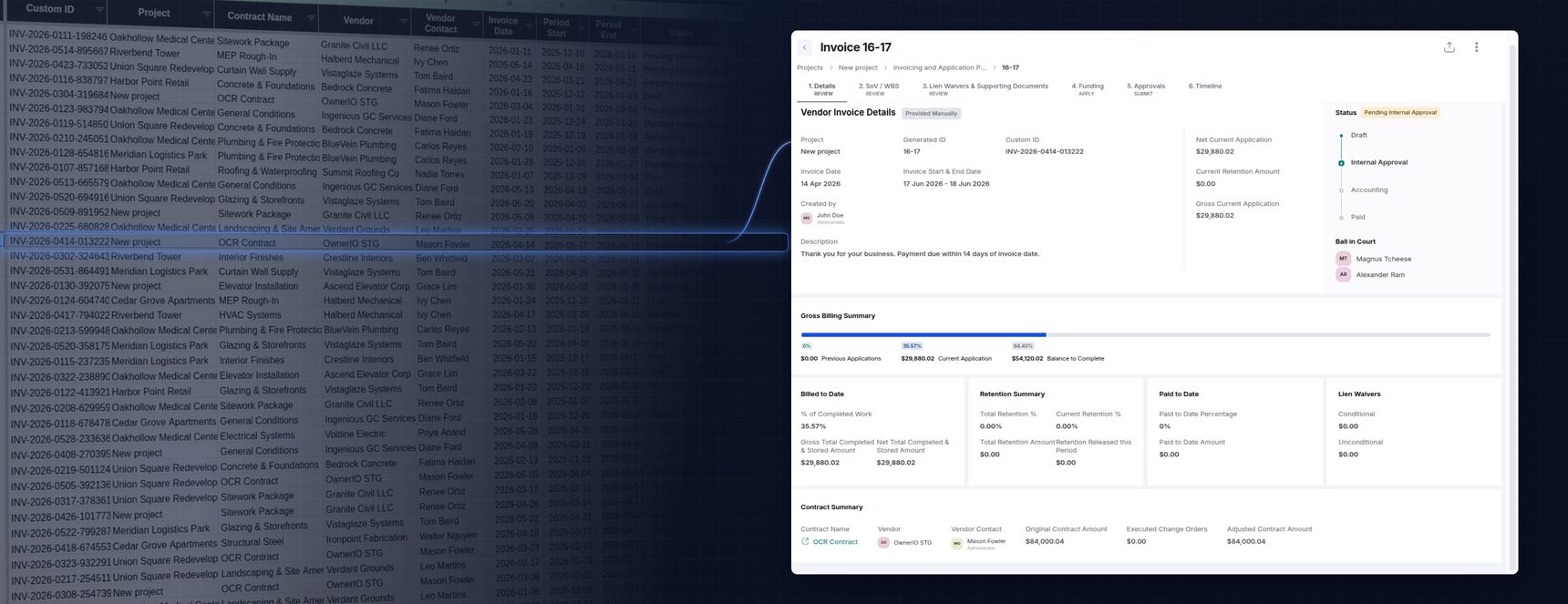
*The same data, twice: a grid of cells on the left, and the same invoice shaped around the work on the right — contract, billing summary, retention, ball-in-court, and approvals in context. See how [Project Financials](/project-financials) handles this end to end.*
Migrations tend to get framed around data pipelines and integrations — and yet sitting with both tools, I think I felt one of the quieter reasons a client actually decides to move over.
Biased as I am after only a few months here, it genuinely made me happy about the product I work on. The product simply makes more sense of the work.
This started as an offhand comment to our CEO, Nick Carter. He thought it was worth a post and suggested I write it up myself — so here it is.
## My takeaway
If you ever get the chance to work with a competing product — even just the slice of the domain you own — take it. You see what they make easy, what they make hard, and where the domain feels natural versus where the user has to reconstruct the meaning themselves.
#### Frequently asked questions
Q: Why do teams migrate from other construction platforms to INGENIOUS.BUILD?
A: Beyond data pipelines and integrations, teams move because the platform is modeled around how construction actually works — relationships between people and companies, commitments, risk, and decisions — instead of a grid of cells. Context is easier to follow, so the product makes more sense of the work.
Q: What's the difference between storing construction data and modeling the construction domain?
A: Storing data flattens a project into tables, fields, statuses, dates, and approvals. Modeling the domain preserves the relationships behind that data — which vendor holds which commitment, what's in ball-in-court, how a change order moves an adjusted contract amount. INGENIOUS carries that intent from the backend all the way through to the UI.
Q: How does INGENIOUS.BUILD handle invoicing and project financials?
A: Invoices, applications for payment, retention, lien waivers, and approvals live in one connected financial system with full contract context — original contract amount, executed change orders, adjusted totals, and billed-to-date.
---
### Budgeting Mistakes That Kill Projects (and How to Avoid Them)
URL: https://www.ingenious.build/blog-posts/budgeting-mistakes-that-kill-projects-and-how-to-avoid-them
Category: Forward-thinking
Published: 2026-07-28
Updated: 2026-10-19
Discover the top budgeting mistakes that derail construction projects—and how to avoid them with real-time insights and integrated tools from INGENIOUS.BUILD.
## Budgeting Mistakes That Kill Projects (and How to Avoid Them)
Budget overruns don’t usually start with one catastrophic mistake—they begin with small oversights: a missing line item, an unlogged change order, a spreadsheet that’s out of sync. These seemingly minor issues can snowball into missed deadlines and diminished profit.
Here are some of the most common budgeting pitfalls in construction, and how teams can stay ahead of them.
### 1. Underestimating Project Costs
It’s tempting to keep initial estimates lean—whether to win a bid or align with [owner](https://www.ingenious.build/owners-developers) expectations. But missing early scope details or relying too heavily on optimistic assumptions can derail a project before it starts.
**How to avoid it:**
- [Conduct detailed pre-construction planning](https://www.ingenious.build/construction-administration) with the full team, including owners, estimators, architects, and subcontractors.
- Use historical cost data from similar projects as a reference.
- Build in allowances for scope evolution and pricing fluctuations.
**For estimators and project managers:**\
Ensure contingencies and soft costs are factored in early. Don’t assume value engineering will save the day.
### 2. Ineffective Change Order Management
Change orders are inevitable. But when they’re tracked manually—or worse, overlooked—costs quickly spiral. Even approved changes can create confusion if they’re not reflected in the overall budget.
**How to avoid it:**
- Standardize how changes are initiated, documented, priced, and approved.
- Ensure each change is connected to an updated budget and timeline.
- Maintain open communication with both owners and subcontractors throughout.
**For project executives:**\
Consider how your change order approval workflows impact field execution and financial reporting.
### 3. Lack of Real-Time Budget Visibility
When budgets live in Excel sheets, email threads, or disconnected software, it becomes nearly impossible to make informed decisions quickly. You don’t just lose visibility—you lose control.
**How to avoid it:**
- Use integrated systems that centralize cost tracking and reporting.
- Monitor budget vs. actuals regularly—weekly, if not daily, on high-risk projects.
- Empower teams with dashboards that reflect current financial health, not last month’s numbers.
**For owner’s reps and construction managers:**\
Push for tech platforms that provide up-to-date project financials across stakeholders.
https://www.youtube.com/watch?v=B54PN4kKzLM
### 4. Overlooking Soft Costs and Indirect Expenses
Soft costs—design fees, permitting, insurance, utilities, inspections—are frequently underbudgeted or tracked informally.
**How to avoid it:**
- Include soft costs in your master budget from day one.
- Treat them with the same rigor as materials or labor—track, report, and adjust as needed.
- Allocate separate contingency buffers for soft cost fluctuations.
**For development and finance teams:**\
Maintain visibility into both hard and soft costs to avoid unexpected shortfalls during closeout.
### 5. Inconsistent Bid Evaluation and Vendor Pricing
Apples-to-oranges comparisons during bidding can lead to scope gaps, misaligned expectations, and cost discrepancies.
**How to avoid it:**
- Standardize bid formats and submission criteria.
- Clarify scopes of work and ensure vendors are bidding on the same deliverables.
- Track historical performance and cost trends of vendors to inform future decisions.
**For GCs and procurement teams:**\
Don’t just pick the lowest bid—evaluate cost realism, completeness, and risk exposure.
### Bringing It All Together
Construction budgets don’t unravel overnight. They break down slowly—through missed scope, undocumented changes, outdated spreadsheets, and siloed teams. The good news is that these mistakes are preventable with the right strategies and tools.
For teams looking to take control of project financials, platforms like **INGENIOUS.BUILD** are designed to improve visibility, consistency, and collaboration. By offering [real-time budget tracking](https://www.ingenious.build/project-financials), change order workflows, and integrated bid management, **INGENIOUS.BUILD** helps project teams stay aligned—from kickoff to closeout.
#### Frequently asked questions
Q: What are the most common construction budgeting mistakes?
A: Common pitfalls include underestimating project costs, ineffective change order management, lack of real-time budget visibility, overlooking soft costs and indirect expenses, and inconsistent bid evaluation and vendor pricing. Overruns usually start with small oversights, such as a missing line item or an unlogged change order, that snowball.
Q: How do you avoid underestimating construction costs?
A: Conduct detailed preconstruction planning with the full team, including owners, estimators, architects and subcontractors. Use historical cost data from similar projects, build in allowances for scope evolution and pricing fluctuations, and factor in contingencies and soft costs early rather than counting on value engineering.
Q: What soft costs are often underbudgeted in construction?
A: Design fees, permitting, insurance, utilities and inspections are frequently underbudgeted or tracked informally. Include them in the master budget from day one, track and report them with the same rigor as materials or labor, and allocate a separate contingency for soft cost fluctuations.
Q: How should change orders be managed to protect the budget?
A: Standardize how changes are initiated, documented, priced and approved, and make sure each change is connected to an updated budget and timeline. Keep communication open with owners and subcontractors, because even approved changes cause confusion if they are not reflected in the overall budget.
---
### Best Construction Software for Windows in 2026
URL: https://www.ingenious.build/blog-posts/construction-software-for-windows
Category: Informative
Published: 2026-07-20
This guide breaks down the top Windows-ready platforms of 2026 and how they perform in real field and office workflows.
The construction industry runs on laptops, desktops and tablets - and for most teams, that means Windows. From project managers in the office to supers in the field using Surface devices, having reliable construction software for Windows isn’t optional.
But here’s the catch: not every platform has strong Windows support. Some prioritize [iOS](https://www.ingenious.build/blog-posts/best-construction-project-management-apps-ipad-iphone) or [mobile apps](https://www.ingenious.build/mobile-app), leaving Windows users stuck with workarounds. In this guide, we’ll cover the best construction software for Windows in 2026, how leading platforms perform on Windows 10 and 11, and which ones offer the smoothest experience for your team.
## Why Windows Compatibility Matters in Construction
While many field apps are built first for iOS, most office staff and project managers still run on Windows devices. That makes cross-platform compatibility critical for:
- Field adoption – many supers and subs use Surface tablets or rugged Windows laptops.
- Seamless workflows – Windows integration ensures drawings, RFIs and budgets sync across devices.
- IT simplicity – standardizing on Windows reduces security and training headaches.
If your construction management software doesn’t run smoothly on Windows, productivity and collaboration can take a big hit.
## Top Construction Software for Windows in 2026
### 1. [Procore](https://www.ingenious.build/procore)
**Best for:** Enterprise contractors using Windows 10 & 11
Procore is one of the most widely adopted construction management platforms and runs on Windows devices. While the native Procore app is mobile-first (iOS/Android), the browser-based platform works on Windows laptops and desktops.
- Windows compatibility: Full functionality via browser (Chrome/Edge), with support for Windows 10 and 11.
- Pros: Robust feature set, enterprise-ready, integrates with ERPs.
- Cons: Very costly (pricing tied to project value), hard to navigate.
### 2. [INGENIOUS.BUILD](https://www.ingenious.build/)
**Best for:** All-in-one modern construction Windows-ready solution
INGENIOUS.BUILD is a modern construction management platform designed to replace point solutions and unify stakeholders in one place.
- Windows compatibility: Works seamlessly on Windows, Mac, iOS and Android.
- Pros:
- Drawings, RFIs, budgets and schedules in one connected system
- Transparent pricing (not tied to project value)
- Real-time collaboration across [owners](https://www.ingenious.build/owners-developers), [GCs](https://www.ingenious.build/general-contractors), subs and architects
- Cons: Best for teams ready to centralize vs. single-feature tools
### 3. [Autodesk Build](https://www.ingenious.build/autodesk) (formerly [PlanGrid](https://www.ingenious.build/blog-posts/top-plangrid-alternatives-for-construction-teams-in-2025))
**Best for:** Drawing management on Windows
Autodesk Build is part of the Autodesk Construction Cloud and known for document control and collaboration.
- Windows compatibility: There’s a dedicated “PlanGrid for Windows download”, as well as mobile apps are iOS/Android.
- Pros: Strong drawing markup tools, Autodesk ecosystem integration.
- Cons: Higher learning curve, best for teams already using Autodesk tools.
Note: Many users searching “PlanGrid app Windows” or “PlanGrid download for Windows” end up using Autodesk Build through a web browser.
### 3. [Buildertrend](https://www.ingenious.build/blog-posts/top-5-buildertrend-alternatives-for-construction-teams-in-2025)
**Best for:** Residential contractors on Windows laptops
Buildertrend focuses on remodelers and home builders with features for scheduling, proposals, and client communication.
- Windows compatibility: Full functionality in-browser; mobile app is iOS/Android. No separate “Buildertrend app for Windows,” but desktop access works smoothly.
- Pros: Client portal, QuickBooks integration, residential workflows.
- Cons: Less suited for commercial GCs, pricing scales with team size.
### 4. [Fieldwire](https://www.ingenious.build/blog-posts/fieldwire-alternatives)
**Best for:** Field coordination on Windows tablets
Fieldwire is built with field adoption in mind, making it a great option for supers and subs on Windows devices.
- Windows compatibility: Runs through browser on laptops and tablets; no standalone Windows app.
- Pros: Easy punch lists and task tracking, offline access for jobsites.
- Cons: Lacks deep financial tools, better as a task-focused companion.
### 5. [Microsoft Dynamics 365](https://www.ingenious.build/blog-posts/microsoft-project-online-alternatives) (ERP for Construction)
**Best for:** Financials and enterprise resource planning
Microsoft Dynamics isn’t construction-only, but with industry-specific configurations, it’s a strong choice for large firms.
- Windows compatibility: Deep integration with [Microsoft ecosystem](https://www.ingenious.build/blog-posts/microsoft-project-online-alternatives) (Office, Teams, SharePoint).
- Pros: Native Windows ERP solution, strong financial tools, customizable.
- Cons: Complex setup, requires customization for construction workflows.
## Windows 10 vs. Windows 11 for construction management software in 2026
Windows 10 reached its official end of standard support on October 14, 2025 — Microsoft no longer ships feature updates or routine security patches for it. A free Extended Security Updates (ESU) program covers eligible consumer devices through October 2027, and commercial ESU tiers run in staggered annual windows through 2028, but ESU is a bridge, not a long-term plan.
For construction teams, that makes the "best Windows version" question less about preference and more about risk: browser-based platforms like Procore, Buildertrend, Fieldwire, and INGENIOUS.BUILD will keep working on Windows 10 for now, but running an unsupported OS on devices that touch project financials, contracts, and client data is a compliance and security exposure most GCs and owners can't justify. If your team also runs desktop tools like Revit or AutoCAD, Autodesk's current system requirements are built around Windows 11, which adds another reason to standardize there rather than stay on Windows 10.
The practical guidance for 2026: new laptops and Surface devices should ship with Windows 11 Pro, and any remaining Windows 10 machines should be on a defined upgrade timeline — not treated as a permanent fixture of your IT stack.
## Other Windows tools construction teams pair with their PM software
Most teams don't run construction management software in isolation — a few smaller, task-specific tools usually sit alongside it:
- Construction calculator apps. Useful for quick material, area, or concrete volume calculations in the field without opening a full estimating module. These work well as a companion to your PM platform, not a replacement for its budgeting tools.
- PDF readers for construction drawings. Since drawings are shared as PDFs even when a platform has its own markup tools, a fast, reliable PDF reader with layer and measurement support on Windows still matters for anyone reviewing sheets outside the main platform.
- Free construction cost estimating downloads. Free, downloadable estimating tools can work for quick, single-project takeoffs, but most lack the audit trail and multi-project rollup that connected platforms provide — worth treating as a stopgap rather than a system of record.
None of these replace a connected platform, but they're worth having on hand for the moments a full login isn't necessary.
## Minimum system requirements for construction software on Windows in 2026
Most modern construction platforms are browser-based, so the requirements are lighter than people expect — but a few specs matter more than others on a jobsite laptop or Surface device:
- **RAM:** 8GB is a functional minimum; 16GB is a more comfortable baseline if you're also running Revit, AutoCAD, or multiple browser tabs of drawings side by side.
- **Processor:** Any current-generation Intel or AMD chip handles browser-based platforms fine. Heavier design software (Revit, AutoCAD) is where processor choice starts to matter more.
- **Browser:** Chrome or Edge, kept updated — most construction platforms, including Procore and INGENIOUS.BUILD, are built and tested against modern Chromium-based browsers first.
- **Storage:** SSD over HDD, mainly for boot and app-switching speed when jumping between drawings, budgets, and email throughout the day.
- **Connectivity:** A reliable connection matters more than raw specs for browser-based platforms — most performance complaints trace back to jobsite Wi-Fi or cellular signal, not the laptop itself.
For a device that's mostly running browser-based construction software, mid-range specs go a long way. The calculus changes if the same machine also needs to run Revit or AutoCAD, where RAM and GPU requirements climb quickly.
## Windows vs. Mac for construction management software
Most construction-specific software is genuinely cross-platform at the browser level, so the Windows-vs-Mac question usually comes down to what else you run, not the construction platform itself.
Windows tends to win by default in construction because of the surrounding ecosystem — Surface tablets built for jobsite use, broader compatibility with estimating and takeoff tools, and tighter integration with Microsoft 365 and Dynamics for teams already standardized there. Mac holds up fine for browser-based platforms like Procore or INGENIOUS.BUILD, and is common among architects and designers running Mac-native design tools, but it's less common on the field side where rugged Windows devices dominate.
The practical answer for most GCs and developers: standardize on Windows for field and office consistency, unless your team is design-heavy and already Mac-based for other tools.
## Offline access on Windows: which platforms work without a jobsite connection
Not every platform on this list handles spotty jobsite connectivity the same way. Fieldwire is explicitly built for offline use — punch lists and task data sync automatically once a connection returns. Autodesk Build (PlanGrid) has historically supported offline access to drawings and markups through its dedicated apps, which is part of why it's held onto strong field adoption on remote or large-scale sites.
Procore, Buildertrend, and INGENIOUS.BUILD are primarily browser-based and built around real-time, connected data — which is a strength when your team has reliable connectivity, but means offline functionality is more limited than a purpose-built offline-first tool. If your projects regularly run in low-connectivity environments, that's worth weighing alongside everything else on this list rather than assuming every platform handles it the same way.
## FAQs: Windows Construction Software
#### Does Procore work on Windows 11?
Yes. Procore runs smoothly in modern browsers on Windows 10 and 11. There's no dedicated Windows app, but desktop functionality is complete.
#### Is there a PlanGrid app for Windows?
Yes. PlanGrid, now part of Autodesk Build, offers a dedicated Windows desktop app you can download directly from Autodesk, in addition to browser and mobile access.
#### What's the best Windows version for construction management software in 2026?
Windows 11 Pro. Windows 10 lost standard support in October 2025, and while Extended Security Updates cover it into 2027–2028, running an unsupported OS on devices handling project financials or contracts is an avoidable risk.
#### What's the best construction software for Windows laptops?
For GCs: Procore. For residential contractors: Buildertrend. For unified workflows across devices: INGENIOUS.BUILD.
#### Is Microsoft Dynamics an ERP for construction?
Yes. Microsoft Dynamics 365 can be tailored for construction firms, offering [financial management](https://www.ingenious.build/project-financials) and [ERP](https://www.ingenious.build/blog-posts/construction-erp-software-guide) workflows that integrate with Windows tools.
#### Which construction software runs best on Surface tablets?
Fieldwire and INGENIOUS.BUILD are strong options for field coordination and all-in-one workflows, both compatible with Windows Surface devices.
#### Is there project management software built for EPC firms on Windows?
EPC firms typically need the same connected visibility across owners, engineers, procurement, and construction teams that GCs and developers do. INGENIOUS.BUILD and Microsoft Dynamics 365 both run on Windows and can support EPC workflows — INGENIOUS.BUILD for connected project delivery, Dynamics for procurement-heavy financial and ERP needs.
#### Is there a free construction cost estimating tool for Windows?
A few free, downloadable estimating tools exist for basic single-project takeoffs, but they generally lack the multi-project rollup and [audit trail](https://www.ingenious.build/blog-posts/construction-administration-software-audit-trails) a connected platform provides — fine for a quick estimate, not a system of record.
## Final Thoughts
In 2026, Windows construction software needs to do more than just "work" - it has to be fast, mobile-ready and connected across field and office, on an operating system your IT team can still secure. While Procore and Autodesk Build dominate for now, platforms like Buildertrend and Fieldwire help niche contractors.
For teams looking for a Windows-ready all-in-one solution, INGENIOUS.BUILD stands out. It unifies drawings, budgets, schedules, approvals and more - and works seamlessly across Windows, Mac, iOS and Android.
#### Frequently asked questions
Q: Does Procore work on Windows 11?
A: Yes. Procore runs smoothly in modern browsers on Windows 10 and 11. There's no dedicated Windows app, but desktop functionality is complete.
Q: Is there a PlanGrid app for Windows?
A: Yes. PlanGrid, now part of Autodesk Build, offers a dedicated Windows desktop app you can download directly from Autodesk, in addition to browser and mobile access.
Q: What's the best Windows version for construction management software in 2026?
A: Windows 11 Pro. Windows 10 lost standard support in October 2025, and while Extended Security Updates cover it into 2027–2028, running an unsupported OS on devices handling project financials or contracts is an avoidable risk.
Q: What's the best construction software for Windows laptops?
A: For GCs: Procore. For residential contractors: Buildertrend. For unified workflows across devices: INGENIOUS.BUILD.
Q: Is Microsoft Dynamics an ERP for construction?
A: Yes. Microsoft Dynamics 365 can be tailored for construction firms, offering financial management and ERP workflows that integrate with Windows tools.
Q: Which construction software runs best on Surface tablets?
A: Fieldwire and INGENIOUS.BUILD are strong options for field coordination and all-in-one workflows, both compatible with Windows Surface devices.
Q: Is there project management software built for EPC firms on Windows?
A: EPC firms typically need the same connected visibility across owners, engineers, procurement, and construction teams that GCs and developers do. INGENIOUS.BUILD and Microsoft Dynamics 365 both run on Windows and can support EPC workflows — INGENIOUS.BUILD for connected project delivery, Dynamics for procurement-heavy financial and ERP needs.
Q: Is there a free construction cost estimating tool for Windows?
A: A few free, downloadable estimating tools exist for basic single-project takeoffs, but they generally lack the multi-project rollup and audit trail a connected platform provides — fine for a quick estimate, not a system of record.
---
### How NV5 Replaced Procore & Excel w/ INGENIOUS.BUILD
URL: https://www.ingenious.build/blog-posts/nv5-casestudy
Category: Case Study
Published: 2026-07-16
Updated: 2026-10-14
See how NV5 unified their project management, boosted efficiency, and scaled nationwide operations by switching to INGENIOUS.BUILD’s all-in-one platform.
*How NV5 replaced a patchwork of Procore, Excel, Dropbox, and email with a single connected system — and turned real-time visibility into a business development advantage.*
## The challenge: disjointed systems, delayed projects
NV5 provides expert consulting and project management services across construction, urban planning, and green energy — trusted by clients tackling everything from municipal builds to large-scale real estate developments. But as the firm expanded, a critical hurdle surfaced: fragmented workflows that slowed down even their best teams.
NV5's teams relied on a patchwork of tools — Excel, email, Dropbox, Procore, and Microsoft Project — to manage complex, multi-phase projects. That meant a lack of visibility across departments and locations, outdated documents circulating between teams, and time lost manually chasing reports and building custom updates. As the project portfolio grew, the inefficiencies only compounded.
## The solution: one platform, one source of truth
NV5 turned to INGENIOUS.BUILD to centralize their operations — bringing budgets, schedules, documents, and tasks into one connected platform. What started as a small pilot quickly turned into a full-scale rollout across the organization, because the results were immediate and measurable.
Unified dashboards gave teams real-time project health insights. Teams nationwide — from Denver to New Mexico — could collaborate in sync. And centralized updates replaced the time-consuming cycle of email threads and document digging.
> "The dashboard is awesome—it brings everything together in a way that Procore and Excel couldn't."
>
> — Alexis Barnes, Project Operations Coordinator, NV5

*A sample INGENIOUS.BUILD project dashboard.*
## The impact: visibility that earns trust — and contracts
By eliminating back-and-forth communication and enabling real-time updates, NV5 saved 5–10 hours per week on large projects. That efficiency translated directly into client confidence — especially for high-stakes, politically sensitive builds.
Visual dashboards improved communication with stakeholders. Real-time budget visibility built trust with oversight boards. And consistent task tracking kept momentum across multi-phase initiatives — a decisive advantage when pitching city governments and public-sector clients.
> "We estimate it saves 5–10 hours a week on large projects by eliminating the back-and-forth."
>
> — Alexis Barnes, NV5
## From pilot to full adoption: three early adopters, a company-wide standard
What began with three early adopters quickly scaled to a 50-person rollout. Supervisors saw faster workflows and encouraged adoption, templates and documentation standardized processes company-wide, and even non-technical users embraced the platform thanks to intuitive dashboards and built-in training.
NV5 plans to have 30–50 project managers on INGENIOUS by year-end — eliminating redundant tools and consolidating their entire PM stack. While budgeting tools drove early success, the firm is now expanding into construction and design workflows, confident that teams of every technical level can stay productive.
For how NV5 ran that rollout, from the pilot to winning over skeptical PMs, read [How NV5 rolled out construction software from 5 users to 50 PMs](/blog-posts/scaling-operations-efficiently-with-a-construction-management-platform).
> "INGENIOUS.BUILD isn't just a tool — it's a differentiator in our business development strategy."
>
> — Alexis Barnes, NV5
#### Frequently asked questions
Q: What tools did NV5 replace with INGENIOUS.BUILD?
A: NV5 replaced a patchwork of Procore, Excel, Dropbox, email and Microsoft Project with INGENIOUS.BUILD, bringing budgets, schedules, documents and tasks into one connected platform.
Q: How much time did INGENIOUS.BUILD save NV5?
A: NV5 estimates it saves 5–10 hours a week on large projects by eliminating back-and-forth communication and enabling real-time updates.
Q: How did NV5 roll out INGENIOUS.BUILD?
A: It started as a pilot with three early adopters and scaled to a 50-person rollout. Supervisors encouraged adoption, templates standardized processes company-wide, and NV5 plans to have 30–50 project managers on the platform by year-end.
Q: How did INGENIOUS.BUILD help NV5 win public-sector work?
A: Visual dashboards and real-time budget visibility improved communication with stakeholders and built trust with oversight boards, which gave NV5 an advantage when pitching city governments and public-sector clients.
---
### Contractor Foreman Alternatives in 2026
URL: https://www.ingenious.build/blog-posts/contractor-foreman-alternatives
Category: Informative
Published: 2026-07-13
Contractor Foreman is an affordable construction management software, but many teams outgrow its features. Discover the best Contractor Foreman alternatives in 2026 for contractors of all sizes.
Contractor Foreman alternatives are construction management platforms that offer scheduling, estimating, and financial tools comparable to Contractor Foreman, with different tradeoffs in usability, integrations, and scalability. Contractor Foreman remains one of the most affordable all-in-one tools for small to mid-size contractors, thanks to its safety forms, scheduling, estimating, and financial features. But teams outgrow it in three common ways: the interface feels dated, reporting lacks depth, and larger firms hit scalability limits as project volume grows.
This guide breaks down the best Contractor Foreman alternatives in 2026, organized by company size, feature depth, and pricing model, so you can find the platform that fits where your business is headed — not just where it is today.
## What to look for in a Contractor Foreman alternative
Before comparing platforms, weigh these five factors against your team's actual workflow.
- **Company size and complexity.** A five-person residential crew and a 200-person GC need different depth of features. Match the platform to your current project volume, not just your headcount.
- **Integration depth.** Check whether the platform connects natively to your accounting system — QuickBooks, Sage, or Xero — and whether that integration is two-way or a one-time export.
- **Pricing model.** Some platforms charge a flat subscription; others scale pricing to total contract value. A tool priced against project value can cost far more as your backlog grows, even if your team size stays the same.
- **Field usability.** Superintendents and field engineers need mobile-first tools that work offline on a jobsite with no signal. Office-first platforms often struggle here.
- **Scalability across stakeholders.** If your projects involve owners, GCs, subs and design teams all needing visibility into the same data, you need a platform built for multi-party collaboration, not just internal task tracking.
## Who should consider Contractor Foreman alternatives
1. **Small teams needing simplicity.** Contractor Foreman packs in a lot of functionality, and the interface can feel overwhelming for companies that only need a handful of core features.
2. **Mid-size contractors.** Teams wanting deeper accounting integrations or more advanced project controls often find purpose-built alternatives a stronger fit.
3. **Enterprises**. Larger contractors and developers usually need a platform built to scale across multi-million-dollar portfolios — this is where enterprise-grade tools take over.
## Top 5 best Contractor Foreman alternatives in 2026
### 1. [Buildertrend](https://www.ingenious.build/blog-posts/top-5-buildertrend-alternatives-for-construction-teams-in-2025)
**Best for:** Residential contractors and remodelers
Buildertrend focuses on home builders and remodelers, making it a strong option for companies that prioritize client communication.
**Pros:**
- Intuitive client portal with messaging and updates
- Strong scheduling and task management
- Integrates with QuickBooks and Xero
**Cons:**
- Pricing can add up as teams grow
- Not ideal for large commercial contractors
### 2. [INGENIOUS.BUILD](https://www.ingenious.build/project-management)
**Best for:** Teams of all sizes wanting a modern, all-in-one alternative
Unlike niche tools, INGENIOUS.BUILD is designed to unify [owners](https://www.ingenious.build/owners-developers), [GCs](https://www.ingenious.build/general-contractors), subs and [architects](https://www.ingenious.build/architects-engineers) in a single connected platform.
**Why it stands out:**
- Combines drawings, budgets, RFIs, submittals, and schedules in one place
- Transparent pricing - not tied to project value
- Works seamlessly on Mac, Windows, [iOS](https://www.ingenious.build/blog-posts/best-construction-project-management-apps-ipad-iphone) and [Android](https://www.ingenious.build/blog-posts/best-construction-apps-android-2025)
- Designed for collaboration across all stakeholders
**Pros:**
- Fast onboarding for teams of any size
- Strong mobile apps for field and office use
- Reduces tool overload by consolidating workflows
**Cons:**
- Best suited for teams ready to centralize - may feel like “too much” for very small firms
### 3. [Procore](https://www.ingenious.build/procore)
**Best for:** Enterprise general contractors
Procore is one of the most widely adopted construction project management platforms, used on some of the largest projects worldwide.
**Pros:**
- Comprehensive modules (from preconstruction to closeout)
- Strong integration ecosystem, including accounting and ERP
- Recognized industry standard with widespread support
**Cons:**
- Pricing is tied to project value, which is usually very costly
- Steeper learning curve for smaller teams
### 4. [Fieldwire](https://www.ingenious.build/blog-posts/fieldwire-alternatives)
**Best for:** Field coordination
Fieldwire takes a jobsite-first approach, which makes it ideal for subcontractors and field supervisors who need fast, mobile-friendly tools.
**Pros:**
- Easy punch lists and task assignments
- Offline access for remote projects
- Built specifically for field adoption
**Cons:**
- Limited budgeting/financial features
- Not a full end-to-end solution
### 5. [JobTread](https://www.ingenious.build/blog-posts/jobtread-construction-software-alternatives)
**Best for:** Budget-conscious small to mid-size contractors
JobTread offers affordable project management and estimating, making it appealing for teams moving off spreadsheets but not ready for enterprise-level systems.
**Pros:**
- Lower price point compared to Procore or Buildertrend
- Easy-to-use estimating and job costing
- Good fit for smaller companies scaling up
**Cons:**
- Limited advanced integrations
- May lack depth for larger, complex projects
## Free and budget-friendly alternatives
If you're not ready for a full platform, a few lightweight tools can cover basic workflows:
- ClickUp (Free Plan) — solid general task management, though not construction-specific
- PDF-XChange Editor — free markup tool for Windows users
- Kami (Free Plan) — browser-based collaboration on drawings and PDFs
These tools can bridge the gap for solo contractors, but they lack industry-specific features — RFIs, submittals, cost tracking — that growing teams eventually need.
## How to choose the right Contractor Foreman alternative
- If your team has fewer than 10 users and needs client-facing scheduling, Buildertrend or JobTread will likely cover your needs without extra complexity.
- If you manage multi-million-dollar projects across owners, GCs, subs, and architects, look at Procore or INGENIOUS.BUILD for enterprise-grade controls and shared visibility.
- If your priority is field adoption on jobsites with limited connectivity, Fieldwire is built specifically for that use case.
- If you want one connected platform without pricing tied to project value, INGENIOUS.BUILD is built to scale with you without the cost penalty.
## Switching from Contractor Foreman: what to expect
Teams evaluating alternatives usually have the same three concerns before they commit. Here's how to think through each one.
- **Data migration.** Most modern platforms can import your active projects, contacts, and historical records rather than making you start from zero. Ask any vendor you're evaluating exactly what migrates automatically (projects, contacts, documents) versus what requires manual re-entry (custom report templates, older closed-out projects).
- **Implementation timeline.** Timelines vary widely by platform depth. Lightweight tools can be live in a day; enterprise systems like Procore often take weeks to months of configuration. INGENIOUS.BUILD is built for rapid implementation — most teams are onboarded and productive within days rather than months.
- **Running two systems in parallel.** Most teams don't switch overnight. A common approach is finishing active projects on Contractor Foreman while onboarding new projects onto the new platform, which limits disruption to in-flight work and gives your team time to adjust.
- **Training and adoption.** The biggest hidden cost of switching software isn't the subscription — it's the hours spent on training. Platforms with an intuitive, modern interface reduce this cost significantly compared to legacy tools with steep learning curves.
## Bottom line
Contractor Foreman remains a solid, affordable choice for many small contractors. But teams that need smoother UI, deeper reporting or advanced integrations have several strong alternatives in 2026. Residential contractors tend to prefer Buildertrend or JobTread; enterprises typically choose Procore; field-first crews benefit most from Fieldwire. Teams looking for one connected [Construction Administration](https://www.ingenious.build/construction-administration) workspace across every stakeholder — without paying more as projects scale — are the best fit for INGENIOUS.BUILD.
## FAQ
#### Is Contractor Foreman the cheapest construction software?
It's one of the most affordable all-in-one tools, but JobTread and some lightweight task apps can cost less depending on your needs.
#### What's the best Contractor Foreman alternative for small contractors?
Buildertrend and JobTread are strong fits for small residential contractors that need client communication and easy estimating.
#### Which Contractor Foreman competitor works best for large contractors?
Procore and INGENIOUS.BUILD are built for large-scale or multi-project operations, offering enterprise-grade controls and cross-team collaboration.
#### Is INGENIOUS.BUILD a good alternative to Contractor Foreman for enterprise teams?
Yes — INGENIOUS.BUILD is built for organizations managing complex, multi-party capital projects, with transparent pricing that doesn't scale with project value like some enterprise tools.
#### Are there free Contractor Foreman alternatives?
Not true replacements, but tools like ClickUp, Kami, or PDF-XChange Editor can cover basic scheduling and markup needs at no cost.
#### Does Contractor Foreman integrate with accounting tools like QuickBooks?
Yes, but if accounting depth is a top priority, look at platforms with a dedicated financial module, like INGENIOUS.BUILD's Project Financials or Sage 300 Construction & Real Estate.
#### How long does it take to switch from Contractor Foreman to another platform?
Timelines depend on the tool: lightweight apps can go live in a day, while enterprise systems can take weeks. INGENIOUS.BUILD is built for rapid implementation, with most teams productive within days.
#### Will I lose historical project data if I switch construction management software?
Most modern platforms migrate active projects, contacts, and documents automatically, though older closed-out projects or custom reports may need manual re-entry — confirm this with each vendor before switching.
#### Is Contractor Foreman a good fit for subcontractors and specialty trades?
It can work for smaller trade contractors, but field-first tools like Fieldwire, or a fully connected platform like INGENIOUS.BUILD, often serve multi-party trade coordination better.
#### Can I switch gradually instead of all at once?
Yes, many teams finish active projects on their current tool while onboarding new projects onto the new platform, which limits disruption to work already in progress.
#### Frequently asked questions
Q: Is Contractor Foreman the cheapest construction software?
A: It's one of the most affordable all-in-one tools, but JobTread and some lightweight task apps can cost less depending on your needs.
Q: What's the best Contractor Foreman alternative for small contractors?
A: Buildertrend and JobTread are strong fits for small residential contractors that need client communication and easy estimating.
Q: Which Contractor Foreman competitor works best for large contractors?
A: Procore and INGENIOUS.BUILD are built for large-scale or multi-project operations, offering enterprise-grade controls and cross-team collaboration.
Q: Is INGENIOUS.BUILD a good alternative to Contractor Foreman for enterprise teams?
A: Yes — INGENIOUS.BUILD is built for organizations managing complex, multi-party capital projects, with transparent pricing that doesn't scale with project value like some enterprise tools.
Q: Are there free Contractor Foreman alternatives?
A: Not true replacements, but tools like ClickUp, Kami, or PDF-XChange Editor can cover basic scheduling and markup needs at no cost.
Q: Does Contractor Foreman integrate with accounting tools like QuickBooks?
A: Yes, but if accounting depth is a top priority, look at platforms with a dedicated financial module, like INGENIOUS.BUILD's Project Financials or Sage 300 Construction & Real Estate.
Q: How long does it take to switch from Contractor Foreman to another platform?
A: Timelines depend on the tool: lightweight apps can go live in a day, while enterprise systems can take weeks. INGENIOUS.BUILD is built for rapid implementation, with most teams productive within days.
Q: Will I lose historical project data if I switch construction management software?
A: Most modern platforms migrate active projects, contacts, and documents automatically, though older closed-out projects or custom reports may need manual re-entry — confirm this with each vendor before switching.
Q: Is Contractor Foreman a good fit for subcontractors and specialty trades?
A: It can work for smaller trade contractors, but field-first tools like Fieldwire, or a fully connected platform like INGENIOUS.BUILD, often serve multi-party trade coordination better.
Q: Can I switch gradually instead of all at once?
A: Yes, many teams finish active projects on their current tool while onboarding new projects onto the new platform, which limits disruption to work already in progress.
---
### Construction Portfolio Management Software: Best Platforms in 2026
URL: https://www.ingenious.build/blog-posts/construction-portfolio-management-software
Category: Informative
Published: 2026-07-02
Explore the best construction portfolio management software for 2026 to improve visibility, budgets, risk, and reporting across every project.
Managing a single construction project is challenging. Managing dozens (or hundreds) of projects across a portfolio is an entirely different problem.
[Owners](https://www.ingenious.build/owners-developers), developers, asset managers, [owner's representatives](https://www.ingenious.build/owners-reps), higher education institutions, healthcare systems and enterprise construction organizations need visibility that extends beyond individual projects. They need to understand portfolio-wide performance, capital allocation, schedule risk, budget exposure, resource utilization and strategic priorities across their entire construction program.
This is where construction portfolio management software becomes essential.
Unlike traditional project management tools that focus on a single project, construction project portfolio management software helps organizations monitor, prioritize and manage multiple projects from a centralized platform.
In this guide, we'll explore what construction portfolio management software is, the key features to look for and the best platforms for portfolio-level construction management in 2026.
## What Is a Construction Portfolio?
A construction portfolio is a collection of projects, capital programs, developments, renovations or infrastructure investments managed by a single organization.
A portfolio may include:
- active projects
- planned projects
- capital improvement programs
- maintenance initiatives
- real estate developments
- infrastructure investments
Unlike project management, which focuses on individual project delivery, portfolio management focuses on optimizing performance across the entire collection of projects.
## What Is Construction Portfolio Management Software?
Construction portfolio management software helps organizations manage multiple projects, programs and capital investments from a centralized environment.
Rather than viewing projects individually, portfolio management focuses on understanding how projects perform collectively.
Typical portfolio management capabilities include:
- portfolio-wide dashboards
- capital planning
- budget management
- project prioritization
- schedule tracking
- risk management
- resource allocation
- portfolio reporting
- executive visibility
- project performance analysis
These tools help organizations make strategic decisions across entire construction portfolios rather than individual projects.
## Construction Project Management vs Construction Portfolio Management
Construction project management and construction portfolio management solve different challenges.
[Construction project management](https://www.ingenious.build/project-management) focuses on delivering a specific project successfully.
Project teams manage:
- schedules
- RFIs
- submittals
- budgets
- field operations
- procurement
- project documentation
Construction portfolio management focuses on overseeing multiple projects simultaneously.
Portfolio managers need answers to questions such as:
- Which projects are at risk?
- Where is capital being spent?
- Which projects require intervention?
- Are strategic objectives being met?
- What is the overall health of the portfolio?
Organizations typically require both project management and portfolio management capabilities as they scale.
## Who Uses Construction Portfolio Management Software?
Construction portfolio management platforms are commonly used by:
### Real Estate Developers
Managing multiple developments across different locations and asset classes.
### Corporate Real Estate Teams
Overseeing office, industrial, retail and mixed-use portfolios.
### Higher Education Institutions
Managing campus expansions, renovations, deferred maintenance programs and capital improvements.
### Healthcare Systems
Coordinating hospital construction, facility upgrades and capital projects across multiple sites.
### Public Sector Organizations
Managing infrastructure, transportation, education and civic construction programs.
### Asset Managers and Investors
Monitoring capital deployment, project performance and portfolio-level risk.
## Common Construction Portfolio Management Challenges
As portfolios grow, organizations often face challenges such as:
- inconsistent reporting across projects
- limited visibility into project performance
- fragmented financial data
- competing capital priorities
- delayed executive decision-making
- resource constraints
- portfolio-level risk management
Without centralized portfolio management, leaders often spend more time gathering information than acting on it.
## Why Construction Portfolio Management Matters
As organizations grow, project-level visibility becomes insufficient. A portfolio of projects creates challenges such as:
- inconsistent reporting
- fragmented project data
- competing priorities
- budget allocation decisions
- resource constraints
- governance requirements
Construction portfolio management software helps create a centralized view across projects, allowing stakeholders to make better strategic decisions.
## Key Features of Construction Portfolio Management Software
### Portfolio-Wide Dashboards
Executives need visibility into the health of the entire portfolio.
Portfolio dashboards help organizations monitor:
- budget status
- schedule performance
- project risks
- resource allocation
- capital deployment
Rather than reviewing individual project reports, stakeholders can identify trends and priorities across the portfolio.
### Capital Planning and Budget Management
Portfolio management software helps organizations evaluate future investments while monitoring active projects.
This improves:
- [capital allocation](https://www.ingenious.build/capital-planning)
- financial forecasting
- project prioritization
- funding decisions
### Risk Management
Large portfolios generate significant risk exposure.
Portfolio-level risk management helps identify:
- delayed projects
- budget overruns
- procurement challenges
- contractor performance issues
- compliance concerns
### Reporting and Governance
Many organizations must report to:
- executives
- boards
- investors
- government agencies
- funding organizations
Portfolio reporting helps standardize information and improve transparency.
### Resource Planning
Construction portfolios often compete for the same internal resources, consultants, and contractors.
Portfolio management software improves visibility into resource utilization and capacity planning.
## Construction Portfolio Management Workflow
Most construction portfolio management processes follow a similar framework:
1. **Plan**\
Identify and prioritize projects based on organizational goals.
2. **Fund**\
Allocate capital and establish budgets.
3. **Execute**\
Monitor project delivery, performance, and risk.
4. **Report**\
Provide stakeholders with portfolio-wide visibility.
5. **Optimize**\
Adjust priorities, resources, and investments based on performance.
The best portfolio management software supports each stage of this lifecycle.
## How to Choose Construction Portfolio Management Software
The best platform depends on your portfolio size and organizational structure.
**Developers** often prioritize investment visibility and capital allocation.
**Owner's Representatives** focus on reporting and governance.
**Healthcare Systems** prioritize capital planning and compliance.
**Higher Education Institutions** need visibility across long-term capital programs.
**Corporate Real Estate Teams** focus on portfolio performance and strategic planning.
The strongest solutions connect project execution data directly to portfolio-level decision-making.
## Best Construction Portfolio Management Software in 2026
### 1. [INGENIOUS.BUILD](https://www.ingenious.build/)
**Best for:** Owners, developers, owner's representatives and capital program managers seeking portfolio-wide visibility across construction projects.
INGENIOUS.BUILD combines project management, [project financials](https://www.ingenious.build/project-financials), [construction administration](https://www.ingenious.build/construction-administration) and portfolio oversight within a single platform. Organizations can manage project portfolios, capital programs, budgets, schedules, RFIs, submittals, reporting and portfolio dashboards while maintaining visibility across the entire project lifecycle.
**Key strengths:**
- Portfolio-wide visibility
- Integrated project financials
- Construction administration workflows
- Executive reporting
- Capital program management
- Connected project data
**Potential limitations:**
- More functionality than some smaller organizations require
- Best suited for teams managing multiple projects or capital programs
### 2. [Kahua](https://www.ingenious.build/blog-posts/kahua-alternatives)
**Best for:** Owner-side capital program management.
Kahua is a configurable project and portfolio management platform designed for owners, program managers and capital project teams. It offers workflow automation, project controls, reporting, and portfolio-level oversight.
**Key strengths:**
- Flexible workflow configuration
- Strong capital program management
- Portfolio reporting
- Owner-focused workflows
**Potential limitations:**
- Implementation may require significant configuration
- Smaller ecosystem than some competitors
### 3. [Oracle Primavera](https://www.ingenious.build/blog-posts/top-aconex-alternatives-for-construction-teams)
**Best for:** Large enterprise construction portfolios.
Primavera is one of the most widely used enterprise project and portfolio management solutions for complex construction and infrastructure programs. It is particularly known for scheduling and portfolio planning capabilities.
**Key strengths:**
- Advanced scheduling
- Enterprise portfolio management
- Resource planning
- Program-level controls
**Potential limitations:**
- Steep learning curve
- Often requires dedicated administration resources
### 4. [e-Builder](https://www.ingenious.build/blog-posts/e-builder-alternatives)
**Best for:** Public sector and institutional capital programs.
e-Builder is widely used by universities, healthcare systems, government agencies and public-sector organizations managing large capital improvement programs.
**Key strengths:**
- Capital planning
- Workflow automation
- Project controls
- Institutional reporting
**Potential limitations:**
- More owner-focused than contractor-focused
- Limited flexibility compared to newer platforms
### 5. [Autodesk Construction Cloud](https://www.ingenious.build/autodesk)
**Best for:** Organizations seeking portfolio visibility across design and construction workflows.
Autodesk Construction Cloud combines project collaboration, document management, BIM workflows, and reporting capabilities within the Autodesk ecosystem.
**Key strengths:**
- BIM integration
- Document management
- Design collaboration
- Autodesk ecosystem connectivity
**Potential limitations:**
- Portfolio capabilities may require multiple modules
- Can become expensive as usage expands
### 6. [Procore](https://www.ingenious.build/procore)
**Best for:** Contractors and owners seeking project and portfolio reporting.
Procore is one of the most widely adopted construction management platforms and offers portfolio reporting capabilities across projects, financials, and operational workflows.
**Key strengths:**
- Large user ecosystem
- Strong project management workflows
- Financial visibility
- Extensive integrations
**Potential limitations:**
- Pricing can increase significantly at scale
- Portfolio capabilities are not the primary focus
### 7. Microsoft Project Portfolio Management
**Best for:** Organizations already invested in the Microsoft ecosystem.
Microsoft Project Portfolio Management helps organizations prioritize investments, allocate resources, and manage project portfolios alongside other Microsoft business applications.
**Key strengths:**
- Microsoft ecosystem integration
- Resource planning
- Portfolio reporting
- Familiar interface
**Potential limitations:**
- Not construction-specific
- May require customization for construction workflows
### 8. monday.com
**Best for:** Organizations seeking lightweight portfolio management.
monday.com provides flexible work management and reporting tools that can be adapted for construction portfolio oversight.
**Key strengths:**
- Easy implementation
- Flexible dashboards
- User-friendly interface
- Strong collaboration features
**Potential limitations:**
- Not purpose-built for construction
- Limited construction-specific workflows
### 9. [Smartsheet](https://www.ingenious.build/blog-posts/best-smartsheet-alternatives-for-construction-real-estate-development-teams-in-2025)
**Best for:** Teams needing flexible portfolio reporting and dashboards.
Smartsheet is often used for portfolio reporting, executive dashboards and project tracking across multiple initiatives.
**Key strengths:**
- Dashboard creation
- Reporting flexibility
- Spreadsheet familiarity
- Portfolio visibility
**Potential limitations:**
- Requires manual setup
- Limited construction-specific functionality
## What Makes Great Construction Portfolio Management Software?
Not all portfolio management platforms are built specifically for construction. When evaluating software, prioritize:
### Portfolio-Level Visibility
The platform should provide visibility across all projects, not just individual project data.
### Construction-Specific Workflows
Construction portfolios require visibility into RFIs, submittals, schedules, budgets, procurement and project risks.
### Financial Management
Budget forecasting, capital planning and financial reporting should be integrated into portfolio workflows.
### Governance and Compliance
Organizations managing large portfolios often face strict reporting and audit requirements.
### Scalability
The platform should support portfolio growth without increasing administrative complexity.
## What Should a Construction Portfolio Dashboard Include?
An effective construction project portfolio management dashboard should provide visibility into:
- **Financial Metrics**\
Budget performance, forecasted costs, contingency usage and capital allocation.
- **Schedule Metrics**\
Milestone performance, delayed projects and projected completion dates.
- **Risk Metrics**\
Project health, unresolved issues, procurement concerns and contractor performance.
- **Portfolio Metrics**\
Total portfolio value, active projects, completed projects and investment distribution.
The goal is to help executives identify issues quickly without reviewing individual project reports.
## Construction Portfolio Management for Real Estate Developers
Real estate developers often manage dozens of projects across different markets, asset classes and [development stages](https://www.ingenious.build/blog-posts/stages-of-building-construction).
Portfolio management software helps developers:
- track capital deployment
- monitor project performance
- compare investments
- identify portfolio risks
- improve executive reporting
This is particularly valuable for multifamily, industrial, office, healthcare and mixed-use development portfolios.
## Construction Portfolio Management for Capital Programs
Universities, healthcare systems, government agencies and large enterprises often manage capital programs rather than individual projects.
These organizations require visibility into:
- funding allocations
- project priorities
- portfolio risks
- budget performance
- long-term planning
Construction portfolio management software helps create a centralized view across capital investments.
## How AI Is Changing Construction Portfolio Management
[Construction AI](https://www.ingenious.build/ingenious-vs-procore-mcp) is becoming increasingly important for portfolio management. Large organizations generate enormous amounts of project information across their portfolios.
AI can help:
- identify portfolio risks
- generate executive reports
- summarize project performance
- surface emerging issues
- analyze capital allocation trends
- improve forecasting
Rather than reviewing dozens of project reports, executives can focus on the information that requires action.
## Construction Portfolio Management Dashboard Metrics
A construction portfolio dashboard should help executives identify risks, allocate capital and prioritize decisions across multiple projects without reviewing dozens of individual reports.
The most effective construction project portfolio management dashboards typically include:
**Portfolio Overview**
- Active project count
- Total portfolio value
- Projects by phase (planning, design, construction, closeout)
- Geographic or business-unit distribution
**Financial Performance**
- Budget performance
- Forecasted final cost
- Capital allocation by project
- Change order exposure
- Contingency utilization
**Schedule Performance**
- Schedule health scores
- Milestone completion rates
- Delayed projects
- Forecasted completion dates
**Risk and Governance**
- High-risk projects
- Outstanding RFIs and approvals
- Procurement and supply chain risks
- Compliance and audit indicators
**Portfolio Health**
- Contractor performance trends
- Resource utilization
- Project health scores
- Portfolio-wide risk indicators
Together, these metrics provide a real-time view of portfolio performance, helping owners, developers, asset managers and capital program leaders identify issues early, improve reporting and make more informed investment decisions.
### What Should a Construction Portfolio Dashboard Answer?
An effective construction portfolio management dashboard should allow executives to quickly answer:
- Which projects are at risk?
- Are we on budget across the portfolio?
- Which projects require immediate attention?
- Where is capital being allocated?
- Which contractors are underperforming?
- What is the forecasted portfolio completion date?
- How is overall portfolio health trending?
The best construction portfolio management software surfaces these insights automatically, allowing stakeholders to focus on decision-making rather than data collection.
## FAQ
#### What is construction portfolio management?
Construction portfolio management is the process of overseeing multiple construction projects, programs, and capital investments from a strategic and financial perspective.
#### What is construction project portfolio management software?
Construction project portfolio management software helps organizations monitor budgets, schedules, risks, resources, and performance across multiple projects.
#### Who uses construction portfolio management platforms?
Common users include owners, developers, higher education institutions, healthcare systems, government agencies, owner's representatives, and asset managers.
#### What is the difference between project management and portfolio management?
Project management focuses on delivering individual projects. Portfolio management focuses on managing multiple projects collectively and aligning them with organizational goals.
#### How is AI used in construction portfolio management?
AI is used to improve reporting, identify risks, generate insights, support forecasting, and help organizations make better portfolio-level decisions.
## Final Thoughts
As construction portfolios become larger and more complex, project-level visibility alone is no longer enough.
Organizations need portfolio-wide insight into budgets, schedules, risks, capital allocation and project performance.
The best construction portfolio management software connects project execution with strategic decision-making, allowing leaders to manage entire capital programs with greater confidence.
For organizations seeking portfolio visibility, capital program oversight and connected project data, INGENIOUS.BUILD provides a modern platform designed specifically for construction portfolios and capital project management.
#### Frequently asked questions
Q: What is construction portfolio management?
A: Construction portfolio management is the process of overseeing multiple construction projects, programs, and capital investments from a strategic and financial perspective.
Q: What is construction project portfolio management software?
A: Construction project portfolio management software helps organizations monitor budgets, schedules, risks, resources, and performance across multiple projects.
Q: Who uses construction portfolio management platforms?
A: Common users include owners, developers, higher education institutions, healthcare systems, government agencies, owner's representatives, and asset managers.
Q: What is the difference between project management and portfolio management?
A: Project management focuses on delivering individual projects. Portfolio management focuses on managing multiple projects collectively and aligning them with organizational goals.
Q: How is AI used in construction portfolio management?
A: AI is used to improve reporting, identify risks, generate insights, support forecasting, and help organizations make better portfolio-level decisions.
---
### 10 Best BuildOps Alternatives in 2026
URL: https://www.ingenious.build/blog-posts/buildops-alternatives
Category: Informative
Published: 2026-07-02
Compare the top BuildOps alternatives for 2026, from field service tools to broader construction management platforms built for projects and financial visibility.
BuildOps has become one of the most recognized field service management platforms for commercial contractors. It is particularly popular among HVAC, plumbing, electrical, mechanical and specialty trade businesses looking to improve scheduling, dispatching, project management and field operations.
However, BuildOps is not the right fit for every organization.
Some contractors outgrow its field-service focus and require stronger project management capabilities. Others need deeper construction administration workflows, broader financial visibility or different pricing structures. Many organizations evaluating BuildOps also compare alternatives such as ServiceTitan, Procore, Knowify and other construction management platforms.
In this guide, we'll explain what BuildOps does, review its strengths and limitations and compare the best BuildOps alternatives in 2026.
## What Is BuildOps?
BuildOps is a cloud-based field service management platform built primarily for commercial specialty contractors.
The platform helps contractors manage:
- dispatching
- scheduling
- service operations
- work orders
- technician management
- project tracking
- invoicing
- customer management
- field communication
BuildOps is commonly used by:
- HVAC contractors
- plumbing contractors
- electrical contractors
- mechanical contractors
- fire protection contractors
Its primary focus is helping commercial service and project teams coordinate office and field operations more efficiently.
## Who Is BuildOps Best For?
BuildOps is primarily designed for commercial specialty contractors that manage field service operations alongside project work.
Organizations with large technician workforces often choose BuildOps because of its scheduling, dispatching and field service management capabilities.
However, companies that prioritize project controls, construction administration, owner reporting or [capital management](https://www.ingenious.build/capital-planning) may require broader construction management functionality.
## What Does BuildOps Do?
BuildOps combines field service management and project operations into a single platform.
Core BuildOps features include:
- scheduling and dispatching
- service agreement management
- technician tracking
- project management
- customer management
- reporting and analytics
- mobile field operations
- invoicing and billing workflows
The platform is particularly well-known for improving communication between office staff and field teams.
## BuildOps Integrations
Many contractors evaluate BuildOps based on its ability to connect with existing business systems.
Common integration requirements include:
- [QuickBooks](https://www.ingenious.build/blog-posts/best-construction-software-integrates-quickbooks)
- [Sage Intacct](https://www.ingenious.build/blog-posts/construction-software-that-integrations-with-sage)
- NetSuite
- Autodesk products
- ERP platforms
- payroll systems
- CRM platforms
When comparing alternatives, organizations should evaluate not only whether an integration exists, but how deeply project, financial and operational data synchronize between systems.
## BuildOps Pricing
BuildOps does not publicly disclose detailed pricing on its website. Pricing is typically customized based on factors such as:
- company size
- user count
- required modules
- implementation scope
Organizations evaluating BuildOps should request a customized quote directly from the vendor. As with many field service management platforms, total costs often include software subscriptions, onboarding, implementation and training.
## Why Companies Look for BuildOps Alternatives
BuildOps is a strong platform, but it is not the ideal fit for every contractor. Organizations typically begin evaluating alternatives when they need:
- stronger project management capabilities
- deeper construction administration workflows
- more robust document management
- improved owner reporting
- portfolio visibility
- broader financial controls
- different pricing structures
The best alternative depends on whether your organization is primarily service-focused, project-focused or a combination of both.
## BuildOps Reviews: Strengths and Limitations
BuildOps receives positive reviews for its focus on commercial contractors and field operations.
Common strengths mentioned by users include:
- strong dispatching capabilities
- technician management
- mobile app functionality
- communication between field and office teams
- service workflow automation
Potential limitations include:
- pricing transparency
- implementation complexity
- customization requirements
- limited construction administration capabilities compared to project-centric platforms
These limitations often lead contractors to explore alternatives.
### BuildOps vs Construction Management Software
BuildOps is often compared to construction management platforms, but the categories are not identical.
BuildOps focuses heavily on:
- dispatching
- technician management
- field service operations
- work orders
- service agreements
Construction management platforms typically focus on:
- project management
- RFIs
- submittals
- project financials
- document control
- reporting
- stakeholder collaboration
Organizations that manage large commercial projects often require both operational visibility and project controls.
## Best BuildOps Alternatives in 2026
### 1. [INGENIOUS.BUILD](https://www.ingenious.build/project-management)
**Best for:** Specialty contractors that need stronger project management, [construction administration](https://www.ingenious.build/construction-administration) and financial visibility.
While BuildOps primarily focuses on field service management, INGENIOUS.BUILD provides a broader construction management platform that connects:
- project management
- RFIs
- submittals
- meeting minutes
- [project financials](https://www.ingenious.build/project-financials)
- scheduling
- reporting
- document control
This makes it particularly attractive for specialty contractors managing larger projects where visibility into budgets, approvals, documentation and project performance is just as important as field operations.
**Key strengths:**
- Connected project data
- Strong construction administration workflows
- Centralized project documentation
- Reporting and financial visibility
- Owner, contractor and stakeholder collaboration
### 2. ServiceTitan
**Best for:** Service-heavy HVAC, plumbing and electrical businesses.
ServiceTitan is one of the most common BuildOps competitors and is often evaluated alongside it.
**Key strengths:**
- Dispatching and scheduling
- Customer management
- Service operations
- Technician tracking
- Revenue management
**Potential limitations:**
- Primarily service-focused
- Less robust construction administration capabilities
### 3. [Procore](https://www.ingenious.build/procore)
**Best for:** Commercial contractors requiring enterprise construction management.
Procore offers stronger project management and construction administration capabilities than BuildOps.
**Key strengths:**
- RFIs
- submittals
- document control
- project financials
- field collaboration
**Potential limitations:**
- Higher pricing
- More complexity for service-focused contractors
### 4. Knowify
**Best for:** Specialty subcontractors and trade contractors.
Knowify focuses on project management, job costing and financial visibility for specialty trades.
**Key strengths:**
- Job costing
- Change orders
- Budget tracking
- QuickBooks integration
**Potential limitations:**
- Smaller feature set than enterprise platforms
### 5. [JobTread](https://www.ingenious.build/blog-posts/jobtread-construction-software-alternatives)
**Best for:** Growing specialty contractors.
JobTread combines estimating, project management and job costing in a relatively simple platform.
**Key strengths:**
- Easy implementation
- Strong estimating workflows
- Affordable pricing
**Potential limitations:**
- Less suited for large enterprise projects
### 6. [Autodesk Construction Cloud](https://www.ingenious.build/autodesk)
**Best for:** Design-intensive projects and BIM workflows.
Autodesk Construction Cloud offers strong document management and project collaboration capabilities.
**Key strengths:**
- BIM integration
- Drawing management
- Project collaboration
**Potential limitations:**
- Not built specifically for service operations
### 7. ServiceTrade
**Best for:** Commercial service contractors.
ServiceTrade focuses on field service management and technician operations.
**Key strengths:**
- Dispatching
- Technician scheduling
- Service workflows
**Potential limitations:**
- Less comprehensive project management capabilities
### 8. Jonas Construction Software
**Best for:** Specialty contractors seeking accounting and operational visibility.
**Key strengths:**
- Job costing
- Financial management
- Workforce management
**Potential limitations:**
- More complex implementation
### 9. [Contractor Foreman](https://www.ingenious.build/blog-posts/contractor-foreman-alternatives)
**Best for:** Budget-conscious specialty contractors.
**Key strengths:**
- Affordable pricing
- Broad feature coverage
- Compliance tracking
**Potential limitations:**
- Less sophisticated than enterprise platforms
### 10. [Trimble Construction One](https://www.ingenious.build/blog-posts/trimble-construction-alternatives)
**Best for:** Contractors requiring project management, financial management and operational visibility.
**Key strengths:**
- Project controls
- Financial management
- Reporting
**Potential limitations:**
- More complex than smaller contractor-focused platforms
## BuildOps vs ServiceTitan
BuildOps and ServiceTitan are often compared because both serve commercial specialty contractors.
BuildOps tends to focus more heavily on commercial construction and project-oriented workflows.
ServiceTitan is often stronger for organizations with significant service and maintenance operations.
Companies that generate most of their revenue through service contracts often lean toward ServiceTitan, while project-focused contractors may prefer BuildOps or construction management platforms.
## BuildOps vs Procore
BuildOps and Procore solve different problems.
BuildOps focuses primarily on field service management, dispatching, technician operations and service workflows.
Procore focuses on construction project management, construction administration, project controls, RFIs, submittals and project collaboration.
Organizations managing large construction projects often require capabilities that extend beyond field service management alone.
## Knowify vs BuildOps
Knowify and BuildOps both serve specialty contractors, but they emphasize different workflows.
Knowify focuses heavily on:
- job costing
- budgeting
- project profitability
- subcontractor management
BuildOps places greater emphasis on:
- field operations
- dispatching
- technician management
- service workflows
The best choice depends on whether your business is more project-focused or service-focused.
## Best BuildOps Alternative by Contractor Type
Not every contractor needs the same software.
- **For HVAC Contractors**
ServiceTitan, BuildOps and ServiceTrade are often the most common options.
- **For Commercial Specialty Contractors**
INGENIOUS.BUILD, Procore and BuildOps are frequently evaluated together.
- **For Small Specialty Contractors**
Knowify, JobTread and Contractor Foreman are often attractive due to affordability and ease of implementation.
- **For Large Multi-Project Contractors**
INGENIOUS.BUILD, Procore, Autodesk Construction Cloud and Trimble Construction One typically offer stronger scalability.
## What to Look for in a BuildOps Alternative
When evaluating BuildOps competitors, consider:
### Project vs Service Focus
Some platforms specialize in service management, while others focus on [project management.](https://www.ingenious.build/project-management)
### Construction Administration
Not all platforms support RFIs, submittals, meeting management and document control.
### Financial Visibility
Job costing, project profitability and budget tracking remain critical for specialty contractors.
### Integrations
Many organizations evaluate integrations with:
- QuickBooks
- Sage Intacct
- NetSuite
- Autodesk
- ERP systems
### Scalability
The platform should support future growth and increasingly complex projects.
## How AI Is Changing Specialty Contractor Software
AI is becoming increasingly important across construction and field service management.
Common AI use cases include:
- report generation
- meeting summaries
- project documentation search
- schedule analysis
- risk identification
- workflow automation
As [AI capabilities](https://www.ingenious.build/ingenious-vs-procore-mcp) mature, connected project data is becoming a key differentiator between platforms. Organizations increasingly evaluate not only current functionality but also future AI readiness.
## Does BuildOps Have AI?
BuildOps has introduced AI and automation capabilities designed to improve operational efficiency and support field service workflows.
Across the industry, AI is increasingly used to:
- generate reports
- summarize project information
- improve document search
- support scheduling workflows
- identify operational risks
- automate administrative tasks
When evaluating BuildOps alternatives, many organizations now compare not only core functionality but also AI readiness and the quality of connected project data available to AI systems.
## FAQ
#### What is BuildOps?
BuildOps is a cloud-based field service management platform designed primarily for commercial specialty contractors such as HVAC, plumbing, electrical and mechanical companies.
#### What does BuildOps do?
BuildOps helps contractors manage scheduling, dispatching, service operations, technician management, project tracking, reporting and customer workflows.
#### How much does BuildOps cost?
BuildOps does not publicly disclose pricing. Organizations typically receive custom quotes based on company size and implementation requirements.
#### What are the best BuildOps alternatives?
Popular BuildOps alternatives include INGENIOUS.BUILD, ServiceTitan, Procore, Knowify, JobTread, ServiceTrade and Autodesk Construction Cloud.
#### Is BuildOps good for commercial contractors?
Yes. BuildOps is specifically designed for commercial specialty contractors and is particularly strong for field service and technician management.
#### Does BuildOps integrate with QuickBooks?
BuildOps supports accounting integrations, including QuickBooks. Organizations should verify integration capabilities and supported workflows directly with the vendor.
## Final Thoughts
BuildOps is a strong field service management platform for commercial specialty contractors. However, organizations with more complex project management, construction administration, financial visibility or collaboration requirements may benefit from evaluating alternatives.
#### Frequently asked questions
Q: What is BuildOps?
A: BuildOps is a cloud-based field service management platform designed primarily for commercial specialty contractors such as HVAC, plumbing, electrical and mechanical companies.
Q: What does BuildOps do?
A: BuildOps helps contractors manage scheduling, dispatching, service operations, technician management, project tracking, reporting and customer workflows.
Q: How much does BuildOps cost?
A: BuildOps does not publicly disclose pricing. Organizations typically receive custom quotes based on company size and implementation requirements.
Q: What are the best BuildOps alternatives?
A: Popular BuildOps alternatives include INGENIOUS.BUILD, ServiceTitan, Procore, Knowify, JobTread, ServiceTrade and Autodesk Construction Cloud.
Q: Is BuildOps good for commercial contractors?
A: Yes. BuildOps is specifically designed for commercial specialty contractors and is particularly strong for field service and technician management.
Q: Does BuildOps integrate with QuickBooks?
A: BuildOps supports accounting integrations, including QuickBooks. Organizations should verify integration capabilities and supported workflows directly with the vendor.
---
### Capital Planning for CRE Developers: From Pre-Construction Budget to Final Cost Report
URL: https://www.ingenious.build/blog-posts/capital-planning-for-cre-developers
Category: Informative
Published: 2026-07-02
A practical guide for CRE developers to manage capital planning, cost forecasting, budgets, change orders and final cost reporting.
For commercial real estate developers, capital planning is more than creating a project budget. It is the process of forecasting, managing and controlling project costs from the earliest feasibility analysis through project closeout.
Successful developers understand that decisions made during preconstruction often determine whether a project ultimately meets its financial objectives. Yet many projects still struggle with budget overruns, change order growth, reporting gaps and limited visibility across stakeholders.
Effective capital planning helps developers align project budgets with investment goals, improve forecasting accuracy, manage risk and maintain visibility throughout the project lifecycle.
This guide explores how commercial real estate developers approach capital planning from pre-construction budgeting to final cost reporting, common challenges that impact project performance and how modern construction technology supports better financial outcomes.
## What Is Capital Planning in Real Estate Development?
Capital planning is the process of forecasting, allocating, monitoring and controlling project investments throughout the development lifecycle.
For commercial real estate [developers](https://www.ingenious.build/owners-developers), capital planning typically includes:
- feasibility analysis
- project budgeting
- capital allocation
- funding strategy
- cost forecasting
- contingency planning
- change management
- financial reporting
- portfolio oversight
The goal is not simply to establish a budget but to create a framework for managing project costs and financial risk over time.
## Why Capital Planning Matters
Construction costs continue to fluctuate due to labor availability, material pricing, procurement challenges, design changes and market conditions.
Without effective capital planning, developers often face:
- inaccurate early-stage budgets
- cost overruns
- funding gaps
- delayed decision-making
- limited reporting visibility
- stakeholder misalignment
Strong capital planning creates greater confidence in project outcomes and improves decision-making throughout the development process.
## Capital Planning vs Project Financial Management
While the terms are often used interchangeably, capital planning and project financial management serve different purposes.
Capital planning focuses on strategic decisions before and during project execution, including capital allocation, project prioritization, funding requirements and portfolio-level investment decisions.
Project financial management focuses on day-to-day cost control, including commitments, invoices, change orders, forecasts and budget tracking.
Successful developers need both. Strong capital planning establishes financial objectives, while [project financial management](https://www.ingenious.build/project-financials) helps ensure those objectives are achieved throughout project delivery.
## The Capital Planning Lifecycle
Capital planning should be viewed as a continuous process rather than a single budgeting exercise.
### Phase 1: Feasibility and Concept Planning
Capital planning begins before design work starts.
During this phase, developers evaluate:
- project viability
- market conditions
- development costs
- revenue assumptions
- financing requirements
- project risks
The objective is to determine whether a project should move forward and establish preliminary investment expectations.
### Phase 2: Pre-Construction Budget Development
As the project becomes more defined, developers create a detailed pre-construction budget.
Typical budget categories include:
- land acquisition
- design and consulting fees
- permitting costs
- construction costs
- soft costs
- financing expenses
- contingencies
This budget becomes the baseline against which future project performance is measured.
### Phase 3: Cost Estimating and Procurement Planning
As design progresses, cost estimates become increasingly detailed.
Developers work with consultants, [contractors](https://www.ingenious.build/general-contractors) and estimators to validate assumptions and identify potential cost risks.
At this stage, teams often focus on:
- value engineering opportunities
- procurement strategies
- market pricing trends
- long-lead materials
- contingency requirements
The earlier potential risks are identified, the easier they are to manage.
### Phase 4: Construction Cost Management
Once construction begins, capital planning shifts from forecasting to active cost management.
Developers must continuously monitor:
- commitments
- contracts
- invoices
- change orders
- budget transfers
- contingency usage
- forecasted final costs
This phase often determines whether a project remains financially successful.
### Phase 5: Forecasting and Reporting
Capital planning requires ongoing forecasting throughout construction.
Rather than relying solely on historical spending, developers should regularly assess:
- projected completion costs
- remaining contingency
- outstanding commitments
- pending change orders
- schedule impacts
Accurate forecasting allows teams to address issues before they affect project performance.
### Phase 6: Final Cost Reporting and Closeout
The final stage of capital planning involves documenting project outcomes and comparing them against original assumptions.
Final cost reports typically include:
- approved budget
- total commitments
- actual costs
- change order impacts
- contingency usage
- forecast accuracy
- lessons learned
These insights help improve future projects and strengthen portfolio-level planning.
## What Should a Construction Capital Plan Include?
An effective capital plan typically includes:
- project budget
- funding assumptions
- contingency allocations
- cash flow projections
- procurement strategy
- forecasted completion costs
- risk assessments
- reporting requirements
- governance procedures
The level of detail varies by project size, but the objective remains the same: maintaining financial visibility throughout the project lifecycle.
## Common Capital Planning Challenges for CRE Developers
Despite its importance, capital planning remains difficult for many organizations.
### Inaccurate Early Budget Assumptions
Many project budgets are established before complete information is available.
As projects evolve, initial assumptions may no longer reflect actual market conditions or project requirements.
### Fragmented Financial Data
Project financial information often exists across spreadsheets, accounting systems, [project management platforms](https://www.ingenious.build/project-management) and consultant reports.
This fragmentation makes it difficult to maintain a single source of truth.
### Limited Forecasting Visibility
Many teams focus heavily on historical costs but spend less time forecasting future financial performance.
As a result, emerging risks are often identified too late.
### Change Order Growth
Uncontrolled change management remains one of the most common causes of budget overruns.
Without proper visibility, change order impacts can accumulate quickly.
### Portfolio-Level Reporting Challenges
Developers managing multiple projects often struggle to maintain consistent reporting across their portfolios.
This limits executive visibility and slows decision-making.
## Key Metrics Every Developer Should Track
Successful [capital planning](https://www.ingenious.build/capital-planning) requires more than monitoring actual spending.
Developers should track:
### Budget Performance
How actual costs compare to approved budgets.
### Forecasted Final Cost
The projected total project cost at completion.
### Contingency Utilization
How much contingency remains available to absorb future risks.
### Change Order Exposure
The financial impact of approved and pending change orders.
### Commitment Tracking
The value of executed contracts and purchase commitments.
### Cost Variance Trends
Areas where spending differs from original assumptions.
### Portfolio Performance
How projects compare across the broader development portfolio.
Together, these metrics provide a more complete picture of project health.
## Capital Planning Software for Real Estate Developers
Many developers still manage capital planning using spreadsheets and disconnected systems.
While spreadsheets can support basic budgeting, they often create challenges around reporting, forecasting, collaboration and data accuracy.
Modern capital planning platforms help centralize:
- project budgets
- commitments
- contracts
- change orders
- forecasts
- approvals
- reporting
This creates better visibility throughout the project lifecycle.
## How AI Is Changing Capital Planning
AI is becoming increasingly valuable for developers managing complex projects and capital programs.
AI can help teams:
- generate financial reports
- analyze budget trends
- identify cost risks
- summarize project performance
- improve forecasting visibility
- support portfolio reporting
Rather than replacing financial oversight, AI helps stakeholders process large volumes of project information more efficiently.
## Capital Planning Maturity Model
Most organizations evolve through several stages:
**Stage 1:** Spreadsheet-Based Budgeting
Individual projects managed independently.
**Stage 2:** Standardized Cost Tracking
Consistent reporting across projects.
**Stage 3:** Forecast-Driven Planning
Regular forecasting and variance analysis.
**Stage 4:** Portfolio-Level Visibility
Capital planning integrated across multiple projects.
**Stage 5:** AI-Assisted Capital Management
Automated reporting, forecasting insights and portfolio risk monitoring.
Organizations operating at higher maturity levels typically achieve greater forecasting accuracy and financial control.
## How Leading CRE Developers Improve Capital Planning
The most successful development organizations share several common practices:
- They establish clear budget baselines early in the project lifecycle.
- They continuously forecast future costs rather than focusing solely on historical spending.
- They monitor change orders and contingency usage proactively.
- They standardize reporting across projects.
- They maintain centralized project data that supports visibility across stakeholders.
Most importantly, they view capital planning as an ongoing process rather than a one-time budgeting exercise.
## FAQ
#### What is capital planning in real estate development?
Capital planning is the process of forecasting, allocating, managing and monitoring project investments throughout the development lifecycle.
#### Why is capital planning important for commercial real estate developers?
Effective capital planning improves forecasting accuracy, reduces financial risk, supports decision-making and helps developers maintain control over project costs.
#### What is the difference between a project budget and capital planning?
A project budget is a financial baseline. Capital planning is the broader process of managing costs, forecasts, risks, funding and reporting throughout the project lifecycle.
#### What should be included in a final cost report?
A final cost report typically includes the approved budget, actual costs, commitments, change orders, contingency usage, forecast accuracy and key project outcomes.
#### How does software improve capital planning?
Construction capital planning software helps centralize budgets, forecasts, commitments, reporting and financial visibility, reducing manual work and improving decision-making.
## Final Thoughts
Capital planning is one of the most important disciplines in commercial real estate development. The ability to forecast costs accurately, manage risk proactively and maintain visibility throughout the project lifecycle directly impacts project profitability and investment performance.
As projects become more complex, developers increasingly need tools that connect budgeting, forecasting, project controls and reporting into a single system.
Organizations that invest in strong capital planning processes are better positioned to deliver projects successfully, improve portfolio performance and make more informed investment decisions.
#### Frequently asked questions
Q: What is capital planning in real estate development?
A: Capital planning is the process of forecasting, allocating, managing and monitoring project investments throughout the development lifecycle.
Q: Why is capital planning important for commercial real estate developers?
A: Effective capital planning improves forecasting accuracy, reduces financial risk, supports decision-making and helps developers maintain control over project costs.
Q: What is the difference between a project budget and capital planning?
A: A project budget is a financial baseline. Capital planning is the broader process of managing costs, forecasts, risks, funding and reporting throughout the project lifecycle.
Q: What should be included in a final cost report?
A: A final cost report typically includes the approved budget, actual costs, commitments, change orders, contingency usage, forecast accuracy and key project outcomes.
Q: How does software improve capital planning?
A: Construction capital planning software helps centralize budgets, forecasts, commitments, reporting and financial visibility, reducing manual work and improving decision-making.
---
### Best Construction Management Software for Specialty Trades in 2026
URL: https://www.ingenious.build/blog-posts/best-construction-management-software-for-specialty-trades
Category: Informative
Published: 2026-07-02
Compare the best construction management software for specialty trades in 2026, with tools for job costing, field coordination, reporting, and profitability.
Specialty contractors face different challenges than general contractors.
Electrical contractors, mechanical contractors, HVAC companies, plumbing firms, fire protection specialists, roofing contractors, concrete contractors and other [specialty trades](https://www.ingenious.build/specialty-trades) often manage multiple projects simultaneously while coordinating labor, materials, subcontractors, schedules, and documentation across different job sites.
Many construction management platforms are designed primarily for [general contractors](https://www.ingenious.build/general-contractors). While they may support specialty trades, they often include features and workflows that smaller trade contractors don't need.
The best construction management software for specialty trades helps teams improve project visibility, manage field operations, track costs, streamline communication, and maintain profitability without adding unnecessary complexity.
This guide compares the best construction management software for specialty contractors in 2026 and explains what features matter most when evaluating a solution.
## What Are Specialty Trades in Construction?
Specialty trades are contractors responsible for specific scopes of work within a construction project. Common specialty trades include:
- electrical contractors
- HVAC contractors
- plumbing contractors
- fire protection contractors
- roofing contractors
- drywall contractors
- concrete contractors
- mechanical contractors
- low-voltage contractors
Unlike general contractors, specialty contractors typically manage labor-intensive scopes, multiple concurrent projects and highly specialized workflows.
This creates unique software requirements around scheduling, field management, job costing and project coordination.
## What Is Construction Management Software for Specialty Trades?
Construction management software for specialty trades helps contractors manage project operations throughout the construction lifecycle.
Common use cases include:
- project scheduling
- field management
- workforce tracking
- job costing
- change orders
- RFIs
- document management
- time tracking
- procurement
- project reporting
The best platforms help specialty contractors connect office and field teams while maintaining visibility into project performance and profitability.
## Common Challenges Specialty Contractors Face
Most specialty contractors are not struggling with project management. They're struggling with visibility.
Common challenges include:
- labor shortages
- schedule changes
- material delays
- [change order management](https://www.ingenious.build/blog-posts/best-change-order-management-software)
- tracking profitability across projects
- field-to-office communication
- documentation requirements
Construction management software helps create a centralized system for managing these challenges while reducing administrative overhead.
## Why Specialty Contractors Need Different Software
Specialty trades operate differently than general contractors. Many specialty contractors manage:
- dozens of active projects
- mobile field crews
- labor-intensive operations
- equipment and materials across multiple sites
- rapid schedule changes
- subcontractor coordination
This creates unique requirements around workforce management, field communication, scheduling and job costing.
Software designed specifically for specialty contractors often provides a better fit than platforms built primarily for enterprise general contractors.
## How We Evaluated Specialty Trade Construction Software
For this comparison, we evaluated platforms based on:
- scheduling capabilities
- field management functionality
- job costing
- document management
- project visibility
- workforce management
- [mobile accessibility](https://www.ingenious.build/mobile-app)
- reporting
- scalability
- ease of adoption
## Best Construction Management Software for Specialty Trades
### 1. [INGENIOUS.BUILD](https://www.ingenious.build/)
**Best for:** Specialty contractors seeking complete project visibility across financials, documentation, schedules, and collaboration.
INGENIOUS.BUILD provides a connected construction management platform that helps specialty contractors manage projects from planning through closeout.
**Key capabilities include:**
- project management
- construction administration
- RFIs
- submittals
- meeting management
- scheduling visibility
- [project financials](https://www.ingenious.build/project-financials)
- document control
- reporting
Unlike many contractor-focused tools that separate [project administration](https://www.ingenious.build/construction-administration) from project execution, INGENIOUS.BUILD connects project data across workflows, creating stronger visibility into project performance.
**Key strengths:**
- Connected project information
- Strong reporting capabilities
- Centralized project documentation
- Supports collaboration across project stakeholders
- Scalable from individual projects to larger portfolios
**Potential limitations:**
- May offer more functionality than very small trade contractors require
### 2. [Procore](https://www.ingenious.build/procore)
**Best for:** Large specialty contractors working on commercial projects.
Procore remains one of the most widely adopted construction management platforms in the industry.
**Key strengths:**
- Strong field collaboration
- RFI and submittal management
- Extensive integrations
- Large user ecosystem
**Potential limitations:**
- Higher cost
- Can be complex for smaller specialty contractors
### 3. [Buildertrend](https://www.ingenious.build/blog-posts/top-5-buildertrend-alternatives-for-construction-teams-in-2025)
**Best for:** Residential specialty contractors.
Buildertrend is popular among residential construction businesses due to its simplicity and customer communication features.
**Key strengths:**
- Easy implementation
- Client communication tools
- Mobile functionality
**Potential limitations:**
- Less suited for larger commercial projects
### 4. [JobTread](https://www.ingenious.build/blog-posts/jobtread-construction-software-alternatives)
**Best for:** Small and midsize specialty contractors.
JobTread combines estimating, job costing, and project management into a relatively simple platform.
**Key strengths:**
- Affordable pricing
- Strong estimating workflows
- User-friendly interface
**Potential limitations:**
- Limited enterprise functionality
### 5. [Fieldwire](https://www.ingenious.build/blog-posts/fieldwire-alternatives)
**Best for:** Field-first specialty contractors.
Fieldwire focuses on jobsite coordination and task management.
**Key strengths:**
- Mobile-first experience
- Task tracking
- Field communication
**Potential limitations:**
- Less comprehensive financial management
### 6. [Autodesk Construction Cloud](https://www.ingenious.build/autodesk)
**Best for:** Design-intensive specialty trades.
Autodesk Construction Cloud offers strong drawing and document management capabilities.
**Key strengths:**
- BIM integration
- Drawing management
- Collaboration tools
**Potential limitations:**
- Complexity may exceed the needs of some specialty contractors
### 7. Knowify
**Best for:** Specialty subcontractors.
Knowify focuses specifically on trade contractors.
**Key strengths:**
- Job costing
- Service management
- Time tracking
- Change orders
**Potential limitations:**
- Less suitable for large, complex projects
### 8. ServiceTitan
**Best for:** HVAC, plumbing, and service-based contractors.
ServiceTitan combines field service management with project and customer management tools.
**Key strengths:**
- Dispatching
- Service operations
- Customer management
**Potential limitations:**
- More service-focused than project-focused
### 9. [Contractor Foreman](https://www.ingenious.build/blog-posts/contractor-foreman-alternatives)
**Best for:** Budget-conscious specialty contractors.
Contractor Foreman offers a broad feature set at a lower price point.
**Key strengths:**
- Affordable pricing
- Compliance tracking
- Project management tools
**Potential limitations:**
- Interface can feel dated compared to larger competitors
### 10. Jonas Construction Software
**Best for:** Growing specialty contractors.
Jonas combines accounting, operations, and project management.
**Key strengths:**
- Financial management
- Job costing
- Workforce management
**Potential limitations:**
- More complex implementation
## How to Choose Construction Software for Specialty Trades
The best platform depends on your trade, project complexity and growth plans. When evaluating software, consider:
- **Project Type**
Commercial, residential, industrial or service-focused.
- **Company Size**
A small subcontractor may have different needs than a multi-state contractor.
- **Field Operations**
Mobile access and field communication are often critical.
- **Financial Visibility**
Job costing and profitability reporting should be easy to access.
- **Scalability**
Choose software that can support future growth.
The best solution is the one your field and office teams will actually use consistently.
## Best Construction Software by Specialty Trade
Different specialty contractors have different operational priorities. The best construction management software for an electrical contractor may not be the best choice for an HVAC company, roofing contractor or mechanical subcontractor.
- Best Software for Electrical Contractors
Electrical contractors typically need strong workforce scheduling, change order management, job costing and RFI tracking. Platforms such as INGENIOUS.BUILD, Procore, Knowify and Jonas Construction Software are commonly used by electrical contractors managing commercial projects and multiple field crews.
- Best Software for HVAC Contractors
HVAC contractors often balance both project work and ongoing service operations. ServiceTitan is a popular choice for service-focused businesses, while INGENIOUS.BUILD, Procore and JobTread are strong options for contractors managing larger construction projects that require project visibility, documentation and financial controls.
- Best Software for Plumbing Contractors
Plumbing contractors typically prioritize labor tracking, material management, project documentation and profitability reporting. Popular solutions include JobTread, Knowify, Contractor Foreman and INGENIOUS.BUILD for organizations seeking stronger project management and reporting capabilities.
- Best Software for Fire Protection Contractors
Fire protection contractors often require robust compliance documentation, inspection records, drawing management and project coordination. Procore, Autodesk Construction Cloud and INGENIOUS.BUILD are commonly evaluated for projects with significant documentation and reporting requirements.
- Best Software for Mechanical Contractors
Mechanical contractors frequently manage complex coordination across labor, equipment, procurement, schedules, RFIs and submittals. Platforms such as INGENIOUS.BUILD, Procore, Autodesk Construction Cloud and Jonas Construction Software are often used to improve visibility across these interconnected workflows.
- Best Software for Roofing Contractors
Roofing contractors often focus on estimating, production tracking, field reporting and customer communication. JobTread, Buildertrend, Contractor Foreman and ServiceTitan are frequently used by residential and commercial roofing businesses.
Ultimately, the best software depends on project complexity, company size and operational needs. Contractors managing larger commercial projects often prioritize project controls, RFIs, submittals and reporting, while service-focused trades may place greater emphasis on dispatching, work orders and technician management.
## Construction Management Software vs Service Management Software
Many specialty contractors evaluate both [project management software](https://www.ingenious.build/project-management) and service management software.
Construction management software focuses on:
- projects
- schedules
- RFIs
- change orders
- job costing
- documentation
Service management software focuses on:
- dispatching
- work orders
- maintenance
- customer service
- technician scheduling
Some specialty contractors need both, particularly HVAC, plumbing and service-focused businesses.
## Construction Management Software vs Spreadsheets
Many specialty contractors still rely on [spreadsheets](https://www.ingenious.build/blog-posts/construction-software-alternative-excel), [email](https://www.ingenious.build/blog-posts/replacing-email-in-construction) and shared drives.
While these tools may work for smaller projects, they become increasingly difficult to manage as project volume grows.
Construction management software helps create:
- centralized project records
- improved accountability
- stronger job costing visibility
- better communication
- more consistent reporting
This reduces administrative effort and improves decision-making across projects.
## How AI Is Changing Specialty Trade Construction Management
AI is becoming increasingly relevant for specialty contractors. Construction teams are beginning to use AI to:
- generate reports
- summarize meetings
- identify project risks
- improve document search
- organize project information
- support scheduling workflows
As projects generate larger amounts of information, AI can help specialty contractors improve visibility without increasing administrative overhead.
## What to Look for in Specialty Trade Construction Software
When evaluating software, focus on capabilities that directly impact project execution.
### Job Costing
Accurate visibility into labor, materials and project profitability.
### Mobile Access
Field teams need access to information wherever work happens.
### Scheduling
Resource and workforce coordination remain critical for specialty contractors.
### Document Management
Centralized project documentation reduces risk and improves communication.
### Reporting
Project visibility is essential for maintaining margins and identifying issues early.
### Scalability
The platform should support future growth without requiring replacement.
## Why Connected Project Data Matters
One of the biggest challenges for specialty contractors is fragmented information.
Project documents, schedules, RFIs, field reports and financial information often live in separate systems.
Connected construction management platforms help create a single source of truth across project workflows.
This not only improves visibility today but also creates the foundation for future AI-powered project management capabilities.
## FAQ
#### What is the best construction management software for specialty trades?
Leading options include INGENIOUS.BUILD, Procore, JobTread, Buildertrend, Fieldwire, Knowify and ServiceTitan. The best choice depends on project complexity, company size, and operational requirements.
#### What software do specialty contractors use?
Many specialty contractors use a combination of project management, job costing, scheduling, and field management software. Popular platforms include Procore, JobTread, Knowify, ServiceTitan and INGENIOUS.BUILD.
#### What features should specialty trade contractors look for?
Important features include job costing, workforce scheduling, mobile access, project documentation, reporting, change order management and field communication.
#### Is Procore good for specialty contractors?
Yes, particularly for larger specialty contractors working on commercial projects. However, smaller firms may find other solutions more cost-effective and easier to implement.
#### How is construction software different for specialty trades?
Specialty contractors often require stronger workforce management, job costing, field coordination and project visibility than general contractor-focused platforms typically provide.
## Final Thoughts
The best construction management software for specialty trades helps contractors improve visibility, manage resources more effectively and maintain profitability across multiple projects.
As project complexity increases, the ability to connect schedules, financials, documentation and field operations becomes increasingly important.
The right platform should simplify project management, not add more administrative work.
For specialty contractors seeking a connected construction management solution that combines project administration, financial visibility, reporting and collaboration, INGENIOUS.BUILD offers a modern approach built for today's construction teams.
#### Frequently asked questions
Q: What is the best construction management software for specialty trades?
A: Leading options include INGENIOUS.BUILD, Procore, JobTread, Buildertrend, Fieldwire, Knowify and ServiceTitan. The best choice depends on project complexity, company size, and operational requirements.
Q: What software do specialty contractors use?
A: Many specialty contractors use a combination of project management, job costing, scheduling, and field management software. Popular platforms include Procore, JobTread, Knowify, ServiceTitan and INGENIOUS.BUILD.
Q: What features should specialty trade contractors look for?
A: Important features include job costing, workforce scheduling, mobile access, project documentation, reporting, change order management and field communication.
Q: Is Procore good for specialty contractors?
A: Yes, particularly for larger specialty contractors working on commercial projects. However, smaller firms may find other solutions more cost-effective and easier to implement.
Q: How is construction software different for specialty trades?
A: Specialty contractors often require stronger workforce management, job costing, field coordination and project visibility than general contractor-focused platforms typically provide.
---
### AI in Construction: Benefits, Challenges and Use Cases in 2026
URL: https://www.ingenious.build/blog-posts/use-of-ai-in-construction
Category: Informative
Published: 2026-07-02
Explore how AI is transforming construction in 2026, from reporting and document management to risk insights, visibility and smarter decisions.
Artificial intelligence is rapidly becoming one of the most discussed technologies in construction.
From project reporting and document management to risk analysis and forecasting, AI is helping construction teams process information faster, improve visibility and reduce administrative work. At the same time, many organizations are still evaluating how AI fits into their operations, what problems it can realistically solve and what limitations they should expect.
The reality is that AI is unlikely to replace construction professionals. Instead, it is becoming a tool that helps project teams make better decisions, manage growing volumes of project information and improve operational efficiency.
This guide explores how AI is being used in construction, the advantages and disadvantages of AI in construction and what construction leaders should consider when evaluating AI-powered technologies.
## What Is AI in Construction?
AI in construction refers to the use of artificial intelligence technologies to analyze information, automate repetitive tasks, identify patterns, generate insights and support decision-making throughout the project lifecycle.
Unlike traditional software that relies on predefined workflows, AI can help process large volumes of project data and identify information that may otherwise be difficult for teams to find manually.
Construction organizations are increasingly applying AI across:
- project management
- document management
- construction administration
- project controls
- scheduling
- [financial reporting](https://www.ingenious.build/project-financials)
- risk management
- procurement
- portfolio management
As projects become more complex and data-intensive, AI is becoming an increasingly valuable operational tool.
## How AI Is Affecting the Construction Industry
The impact of AI on construction extends beyond simple automation.
Historically, construction teams spent significant time collecting information, preparing reports, searching for documents, coordinating approvals and communicating project updates. AI helps reduce some of this administrative burden by making project information easier to access and analyze.
As AI adoption grows, construction organizations are increasingly using technology to:
- improve project visibility
- accelerate reporting
- identify risks earlier
- support decision-making
- improve communication
- reduce manual administrative work
Rather than replacing project teams, AI is helping them operate more efficiently in increasingly complex project environments.
## Common Uses of AI in Construction
AI can support a wide range of construction workflows.
### AI for Construction Reporting
Construction reporting often requires gathering information from multiple stakeholders, spreadsheets, documents and software systems.
AI can help generate:
- project summaries
- executive reports
- owner updates
- schedule reports
- budget summaries
- field progress reports
This allows project teams to spend less time preparing reports and more time acting on the information.
### AI for Construction Document Management
Construction projects generate thousands of documents throughout their lifecycle.
AI can improve:
- document search
- file organization
- version visibility
- document summaries
- information retrieval
This becomes particularly valuable on large projects involving multiple stakeholders and extensive documentation requirements.
### AI for RFIs and Submittals
RFIs and submittals are among the most documentation-intensive workflows in construction.
AI can help teams:
- organize requests
- identify duplicate submissions
- surface overdue approvals
- improve information retrieval
- generate summaries
As project volume grows, these capabilities help improve visibility across project documentation.
### AI for Schedule Risk Analysis
Construction schedules are constantly affected by procurement challenges, design changes, labor constraints, weather conditions and coordination issues.
AI can help identify:
- schedule risks
- delayed dependencies
- recurring bottlenecks
- critical path concerns
- emerging project issues
The goal is not to replace schedulers but to help teams identify risks earlier.
### AI for Construction Portfolio Management
Organizations managing multiple projects often struggle to maintain visibility across their portfolios.
AI can help:
- summarize portfolio performance
- identify high-risk projects
- generate executive dashboards
- [analyze capital allocation](https://www.ingenious.build/capital-planning)
- support forecasting
This becomes increasingly valuable for [owners](https://www.ingenious.build/owners-developers), developers and capital program managers.
## Benefits of AI in Construction
The value of AI in construction is not simply automation. The biggest benefit is helping project teams manage growing volumes of information more efficiently while improving visibility across projects.
### Reduced Administrative Work
Construction professionals spend a significant amount of time preparing reports, documenting meetings, searching for project information, tracking approvals and coordinating updates across stakeholders.
AI can help automate many of these administrative tasks by generating summaries, organizing documentation, surfacing action items and streamlining reporting workflows. This allows project teams to spend more time managing projects and less time managing paperwork.
### Improved Project Visibility
Construction projects generate information across schedules, RFIs, submittals, budgets, field reports, meeting minutes and correspondence.
AI can analyze large volumes of project data and surface important updates, unresolved issues, overdue approvals and emerging risks that might otherwise remain buried in disconnected systems.
### Faster Reporting and Communication
Project managers often spend hours each week compiling status updates for owners, executives and project stakeholders.
AI can help generate project summaries, executive reports, progress updates and meeting recaps faster by pulling information from connected project data. This improves communication while reducing reporting effort.
### Better Risk Identification
Many project issues become visible long before they impact schedule or budget performance.
AI can help identify recurring delays, unresolved RFIs, procurement bottlenecks, approval backlogs and other early warning signs that may indicate project risk. This allows teams to take corrective action sooner.
### Improved Access to Project Information
Finding the right document, decision, drawing revision, or meeting discussion can be surprisingly difficult on large projects.
AI-powered search and retrieval tools help teams locate relevant information more quickly, reducing time spent searching through email threads, shared drives and project records.
## Disadvantages of AI in Construction
While AI offers significant potential, it is not a standalone solution and should not be viewed as a replacement for strong [project management](https://www.ingenious.build/project-management) processes.
### AI Depends on Data Quality
AI is only as effective as the information available to it.
If project data is incomplete, outdated, duplicated or spread across disconnected systems, AI-generated outputs may be inaccurate or lack important context. Organizations with fragmented workflows often struggle to realize the full value of AI.
### AI Cannot Replace Construction Expertise
Construction projects require judgment, experience, relationship management, negotiation and field expertise.
AI can help teams analyze information and identify patterns, but it cannot replace project managers, superintendents, engineers, [owner's representatives](https://www.ingenious.build/owners-reps) or other construction professionals responsible for making decisions.
### Implementation Requires More Than Technology
Successful AI adoption typically requires process improvements, user training, data governance and workflow standardization.
Organizations that treat AI as a simple software purchase often struggle to achieve meaningful results because underlying operational challenges remain unresolved.
### Information Security and Data Governance Concerns
Construction projects involve sensitive financial, contractual and project information.
Organizations should carefully evaluate how AI tools store, process and access project data, particularly when working with external vendors or cloud-based platforms.
### Risk of Over-Reliance on AI
AI can help surface insights and recommendations, but construction decisions should always be reviewed by experienced professionals.
The most effective organizations use AI as a decision-support tool rather than relying on it to make critical project, financial or operational decisions independently.
## Where AI Delivers the Most Value in Construction
Not every construction workflow benefits equally from AI. Today, the highest-impact use cases typically involve information-heavy processes rather than physical construction activities.
AI often delivers the greatest value in:
- project reporting
- document management
- meeting summaries
- RFI management
- submittal tracking
- schedule analysis
- portfolio reporting
- risk identification
These workflows generate large volumes of data and administrative work, making them ideal candidates for AI-assisted automation.
## Common Myths About AI in Construction
As AI adoption grows across the construction industry, misconceptions often create unrealistic expectations or unnecessary skepticism. Understanding what AI can and cannot do is critical for successful implementation.
1. **Myth:** AI Will Replace Construction Project Managers
**Reality:** AI can help project managers work more efficiently, but it cannot replace their role.
Construction projects require leadership, stakeholder management, negotiation, decision-making and field experience. AI can summarize meetings, analyze project information and identify potential risks, but it cannot build relationships, resolve conflicts or make complex project decisions.
The most successful organizations use AI to support project managers, not replace them.
2. **Myth:** AI Only Benefits Large Contractors
**Reality:** Companies of all sizes can benefit from AI.
While large [contractors](https://www.ingenious.build/general-contractors) may have more data and resources, smaller contractors often see immediate value from AI-powered reporting, document management, meeting summaries and administrative automation.
In many cases, smaller teams benefit the most because AI helps them accomplish more without increasing headcount.
3. **Myth:** AI Automatically Improves Project Performance
**Reality:** AI is not a substitute for strong project management.
AI can provide insights and recommendations, but project outcomes still depend on planning, communication, execution and leadership. Organizations with poor processes or disconnected systems will not magically solve those problems by adding AI.
AI amplifies good processes. It does not replace them.
4. **Myth:** AI Can Understand Construction Projects Without Context
**Reality:** AI performs best when it has access to complete and connected project information.
If schedules, budgets, RFIs, submittals, meeting minutes and project documents are scattered across multiple systems, AI may lack the context needed to provide accurate insights.
This is why connected construction management platforms are becoming increasingly important for successful AI adoption.
5. **Myth:** AI Is Only Useful for Automation
**Reality:** Some of the biggest benefits of AI come from visibility and decision support.
While automation receives much of the attention, many construction organizations use AI to identify risks, analyze project performance, improve reporting and surface information that would otherwise be difficult to find.
The value often comes from better decisions rather than simply reducing manual work.
6. **Myth:** AI Can Replace Construction Expertise
**Reality:** AI cannot replace engineering knowledge, field experience or professional judgment.
Construction projects involve constantly changing conditions, human relationships, contractual obligations and operational tradeoffs. AI can help analyze information, but experienced professionals remain responsible for interpreting that information and making decisions.
Human expertise remains one of the most important factors in project success.
7. **Myth:** AI Requires a Massive Technology Investment
**Reality:** Many construction organizations are already using AI through software they own today.
Modern construction management, document management and reporting platforms increasingly include AI capabilities as part of their standard offerings. Organizations often begin by applying AI to specific workflows such as reporting, document search or [project administration](https://www.ingenious.build/construction-administration) before expanding to broader use cases.
8. **Myth:** AI Is the Future of Construction
**Reality:** AI is already being used across the industry today.
Construction teams are currently using AI for reporting, document management, meeting summaries, risk analysis, portfolio oversight, schedule reviews and project administration. The conversation is no longer about whether AI will impact construction, but how organizations can apply it effectively.
## The Future of AI in Construction Management
The future of AI in construction will likely focus less on standalone tools and more on connected project ecosystems.
Construction organizations increasingly need:
- centralized project data
- real-time reporting
- portfolio visibility
- connected workflows
- predictive insights
As AI capabilities mature, organizations with connected project information will be positioned to gain the greatest value.
Rather than replacing project teams, AI will increasingly function as an operational assistant that helps construction professionals make faster and more informed decisions.
## What AI Cannot Replace in Construction
Despite rapid advances in AI, many construction activities remain deeply human.
AI cannot replace:
- field expertise
- stakeholder management
- leadership
- negotiation
- site coordination
- engineering judgment
- relationship building
The most successful construction organizations will likely combine human expertise with AI-enabled workflows rather than viewing the two as competing approaches.
## How to Evaluate AI Construction Software
When evaluating AI-powered construction software, organizations should look beyond marketing claims.
Key questions include:
- Does the AI have access to connected project data?
- What workflows does the AI actually improve?
- How accurate are the outputs?
- How much manual effort is eliminated?
- Does the platform improve project visibility?
- Can it scale across multiple projects?
The best AI solutions solve specific operational challenges rather than simply adding AI features for their own sake.
## FAQ
#### How is AI used in construction?
AI is used in construction for reporting, document management, project controls, scheduling, risk analysis, construction administration and portfolio management.
#### What are the benefits of AI in construction?
Common benefits include reduced administrative work, improved project visibility, faster reporting, better risk identification and improved access to project information.
#### What are the disadvantages of AI in construction?
Challenges include data quality issues, implementation complexity, information security concerns and the need for human oversight.
#### Will AI replace construction project managers?
No. AI can support project managers by improving visibility and automating administrative tasks, but it cannot replace leadership, communication, stakeholder management or professional judgment.
#### How will AI affect the construction industry?
AI is expected to improve efficiency, reporting, risk management and decision-making while helping organizations manage increasing amounts of project information.
## Final Thoughts
AI is no longer a future technology in construction. It is already helping organizations improve reporting, document management, project controls and portfolio visibility.
However, the value of AI depends heavily on the quality of underlying project data and the systems that support it.
Organizations that centralize project information and connect workflows across teams will be best positioned to benefit from AI as the technology continues to evolve.
For owners, developers, owner's representatives and contractors evaluating AI-enabled construction management platforms, the goal should not be adopting AI for its own sake. The goal should be improving project visibility, reducing administrative burden and making better decisions throughout the project lifecycle.
#### Frequently asked questions
Q: How is AI used in construction?
A: AI is used in construction for reporting, document management, project controls, scheduling, risk analysis, construction administration and portfolio management.
Q: What are the benefits of AI in construction?
A: Common benefits include reduced administrative work, improved project visibility, faster reporting, better risk identification and improved access to project information.
Q: What are the disadvantages of AI in construction?
A: Challenges include data quality issues, implementation complexity, information security concerns and the need for human oversight.
Q: Will AI replace construction project managers?
A: No. AI can support project managers by improving visibility and automating administrative tasks, but it cannot replace leadership, communication, stakeholder management or professional judgment.
Q: How will AI affect the construction industry?
A: AI is expected to improve efficiency, reporting, risk management and decision-making while helping organizations manage increasing amounts of project information.
---
### Best Construction Administration Software for 2026
URL: https://www.ingenious.build/blog-posts/best-construction-administration-software
Category: Informative
Published: 2026-07-02
Compare the best construction administration software for 2026 and learn how to manage RFIs, submittals, documents, approvals, and reporting.
Construction administration is one of the most critical, and often overlooked, parts of project delivery.
While scheduling, budgeting and field management typically receive the most attention, construction administration is what keeps projects organized, compliant and moving forward. RFIs, submittals, meeting minutes, document control, contract administration, approvals, change management and project communication all fall under the construction administration umbrella.
As projects become more complex, managing these workflows through spreadsheets, email threads and disconnected systems becomes increasingly difficult. This is why more owners, developers, architects, owner's representatives and contractors are investing in construction administration software.
In this guide, we'll compare the best construction administration software platforms in 2026, explain what features matter most and help you choose the right solution for your projects.
## What Is Construction Administration?
Construction administration is the process of managing project documentation, approvals, communication, and compliance activities throughout construction.
Typical construction administration responsibilities include:
- managing RFIs
- reviewing submittals
- documenting meetings
- tracking action items
- coordinating approvals
- maintaining project records
- managing contract-related workflows
Effective construction administration helps reduce delays, improve accountability, and create a complete project record throughout the construction lifecycle.
## What Is Construction Administration Software?
Construction administration software helps teams manage the documentation, approvals, communication and workflow processes that support project execution.
Common construction administration workflows include:
- RFI management
- submittal management
- document control
- meeting minutes
- action item tracking
- contract administration
- change management
- drawing management
- project correspondence
- construction reporting
The best construction administration software connects these workflows inside a centralized platform rather than scattering information across email, spreadsheets and shared drives.
## Why Construction Administration Matters
Construction administration directly impacts project performance.
Poorly managed administration processes often lead to:
- delayed approvals
- incomplete documentation
- missed decisions
- schedule impacts
- budget overruns
- disputes between stakeholders
Strong construction administration creates accountability, improves visibility and reduces project risk.
For owners and developers, it also creates a defensible project record that supports governance, compliance and audit readiness.
### Typical Construction Administration Workflow
While every organization operates differently, most construction administration processes follow a similar pattern:
1. Project information is submitted through RFIs, submittals, meetings, or correspondence.
2. Stakeholders review and respond to requests.
3. Approvals and decisions are documented.
4. Action items are assigned and tracked.
5. Project records are updated and maintained.
6. Teams generate reports and communicate status updates.
The best [construction administration software](https://www.ingenious.build/construction-administration) connects these workflows into a single system rather than managing them separately.
## Top Use Cases for Construction Administration Software
Construction teams use administration platforms to support:
### RFI Management
Track requests, responses, approvals, and project impacts.
### Submittal Management
Manage reviews, approvals, revisions, and documentation.
### Construction Document Control
Maintain a single source of truth for drawings, specifications, contracts, and project records.
### Meeting Management
Capture decisions, action items, and stakeholder responsibilities.
### Contract Administration
Track approvals, commitments, changes, and project obligations.
### Owner Reporting
Provide visibility into [capital planning](https://www.ingenious.build/capital-planning), project status, risks and key decisions.
## How We Evaluated Construction Administration Software
For this comparison, we evaluated each platform based on:
- RFI management
- submittal workflows
- document control
- meeting management
- construction reporting
- contract administration capabilities
- owner visibility
- scalability
- integrations
- AI capabilities
## Best Construction Administration Software in 2026
### 1. [INGENIOUS.BUILD](https://www.ingenious.build/construction-administration)
**Best for:** [Owners](https://www.ingenious.build/owners-developers), developers, [owner's representatives](https://www.ingenious.build/owners-reps), [architects](https://www.ingenious.build/architects-engineers) and [contractors](https://www.ingenious.build/general-contractors) seeking a connected construction administration platform.
INGENIOUS.BUILD centralizes construction administration workflows within a single project environment.
**Teams can manage:**
- RFIs
- submittals
- meeting minutes
- action items
- document control
- project correspondence
- schedules
- budgets
- approvals
Unlike tools that focus primarily on contractors or field management, INGENIOUS.BUILD is designed to support collaboration across all project stakeholders.
**Key strengths:**
- Comprehensive construction administration workflows
- Strong owner and developer visibility
- Integrated [project financials](https://www.ingenious.build/project-financials) and reporting
- Centralized project documentation
- [AI-ready](https://www.ingenious.build/ingenious-vs-procore-mcp) connected project data
**Potential limitations:**
- More robust than very small teams may require
- Best suited for organizations seeking end-to-end project visibility
### 2. [Procore](https://www.ingenious.build/procore)
**Best for:** Large contractors managing complex construction projects.
Procore offers strong construction administration capabilities alongside project management and field collaboration tools.
**Key strengths:**
- Mature RFI and submittal workflows
- Large integration ecosystem
- Strong contractor adoption
**Potential limitations:**
- Pricing can become expensive at scale
- Primarily contractor-focused
### 3. [Autodesk Construction Cloud](https://www.ingenious.build/autodesk)
**Best for:** Design-heavy projects requiring strong document and drawing management.
Autodesk Construction Cloud combines document management, collaboration, and project controls.
**Key strengths:**
- Excellent drawing management
- BIM integration
- Strong design collaboration
**Potential limitations:**
- Administration workflows may require additional configuration
- Complexity for smaller organizations
### 4. [Oracle Aconex](https://www.ingenious.build/blog-posts/top-aconex-alternatives-for-construction-teams)
**Best for:** Large infrastructure and enterprise projects.
Aconex is widely used on complex capital projects where document control and auditability are critical.
**Key strengths:**
- Strong document management
- Comprehensive audit trails
- Enterprise scalability
**Potential limitations:**
- Steeper learning curve
- Implementation can be resource-intensive
### 5. [Kahua](https://www.ingenious.build/blog-posts/kahua-alternatives)
**Best for:** Program management and owner-side administration.
Kahua focuses on project controls, document management, and capital program oversight.
**Key strengths:**
- Strong owner reporting
- Workflow configurability
- Program-level visibility
**Potential limitations:**
- Smaller ecosystem than some competitors
### 6. Revizto
**Best for:** Coordination between design and construction teams.
Revizto is known for issue tracking and model-based collaboration.
**Key strengths:**
- BIM coordination
- Design collaboration
- Issue management
**Potential limitations:**
- Not a complete construction administration platform
### 7. [Fieldwire](https://www.ingenious.build/blog-posts/fieldwire-alternatives)
**Best for:** Field-focused administration and task management.
Fieldwire helps teams coordinate work directly from the jobsite.
**Key strengths:**
- Mobile-first experience
- Task tracking
- Field communication
**Potential limitations:**
- Limited contract administration functionality
### 8. Buildots
**Best for:** AI-powered construction monitoring and progress tracking.
Buildots uses computer vision and AI to compare project progress against plans and schedules.
**Key strengths:**
- Automated progress tracking
- Construction analytics
- Schedule visibility
**Potential limitations:**
- Focused on monitoring rather than comprehensive construction administration
### 9. Newforma
**Best for:** Architects and design consultants.
Newforma focuses on project communication, document management, and design coordination.
**Key strengths:**
- Email and document management
- Architectural workflows
- Project communication
**Potential limitations:**
- Less comprehensive project management functionality
### 10. [e-Builder](https://www.ingenious.build/blog-posts/e-builder-alternatives)
**Best for:** Public sector and capital program management.
e-Builder is commonly used by owners managing large capital programs.
**Key strengths:**
- Capital planning
- Program controls
- Workflow management
**Potential limitations:**
- More owner-focused than contractor-focused
## Construction Administration Software vs Project Management Software
Construction administration software and [construction project management software](https://www.ingenious.build/project-management) often overlap, but they solve different problems.
Construction project management software typically focuses on:
- schedules
- budgets
- field management
- resource coordination
Construction administration software focuses on:
- RFIs
- submittals
- approvals
- contracts
- meeting management
- document control
- project communication
The best platforms connect both operational and administrative workflows within a single system.
## AI in Construction Administration
AI is becoming increasingly important in construction administration.
Construction teams are beginning to use AI to:
- summarize meetings
- identify action items
- organize project documentation
- improve RFI management
- support submittal workflows
- generate reports
- identify project risks
As projects generate larger volumes of information, AI helps teams improve visibility while reducing administrative effort.
## How to Choose the Best Construction Administration Software
The right platform depends on your organization's role and project complexity.
**Owners and developers** typically prioritize reporting, auditability and portfolio visibility.
**Architects and consultants** often focus on document management and design coordination.
**General contractors** usually require stronger field collaboration and workflow management capabilities.
**Program managers and owner's representatives** often need a balance of reporting, administration and project controls.
The best solution is the one that creates a single source of truth across project stakeholders.
## What to Look for in Construction Administration Software
When evaluating construction administration tools, prioritize:
### Connected Workflows
RFIs, submittals, meetings, approvals and documents should work together.
### Strong Document Control
The platform should provide version management, audit trails and centralized access.
### Owner Visibility
Owners and developers should be able to monitor project status without relying entirely on manual reports.
### Scalability
The system should support both current projects and future growth.
### AI Readiness
AI capabilities become more valuable when project information is centralized and connected.
## Why Connected Data Matters
One of the biggest challenges in construction administration is fragmented information.
Teams often manage:
- RFIs in one system
- documents elsewhere
- meeting notes separately
- approvals through email
This fragmentation creates risk and limits visibility.
Modern construction administration platforms increasingly focus on creating a single source of truth across project workflows.
This foundation is also what enables more advanced AI capabilities.
## Construction Administration Software vs Email, SharePoint and Teams
Many construction teams still manage RFIs, submittals, meeting minutes, approvals and project correspondence through a combination of [email](https://www.ingenious.build/blog-posts/replacing-email-in-construction), shared drives, SharePoint, Microsoft Teams, and [spreadsheets](https://www.ingenious.build/blog-posts/construction-software-alternative-excel).
While these tools are useful for communication and file sharing, they were not built specifically for construction administration. Information often becomes scattered across inboxes, folders, chat threads and documents, making it difficult to track decisions, [maintain audit trails](https://www.ingenious.build/blog-posts/construction-administration-software-audit-trails) or understand the current status of a workflow.
Construction administration software solves this problem by connecting communication directly to project workflows. Instead of searching through emails or shared folders, teams can manage RFIs, submittals, approvals, action items, and project records within a single system. This creates greater visibility, improves accountability, and ensures that critical project information remains accessible throughout the project lifecycle.
For organizations managing complex projects, the difference is not simply better communication, it's better project control.
## FAQ
#### What is construction administration software?
Construction administration software helps teams manage RFIs, submittals, document control, approvals, meeting minutes, project communication and other administrative workflows throughout the project lifecycle.
#### What is the best construction administration software?
Leading options include INGENIOUS.BUILD, Procore, Autodesk Construction Cloud, Oracle Aconex, Kahua and e-Builder. The best choice depends on your project complexity, stakeholders and workflow requirements.
#### How is construction administration different from project management?
Construction administration focuses on documentation, approvals, communication and compliance workflows, while project management focuses on schedules, budgets, resources and execution.
#### Are there AI tools for construction administration?
Yes. Many platforms now use AI to improve reporting, document management, RFI workflows, meeting summaries and project visibility.
#### What features should construction administration software include?
Core features include RFI management, submittals, document control, meeting management, contract administration, reporting, audit trails and workflow automation.
## Final Thoughts
Construction administration is no longer just a back-office function. It plays a critical role in project visibility, risk management, compliance and stakeholder coordination.
As projects become more complex, organizations need platforms that connect documentation, approvals, communication and project data in a single environment.
The best construction administration software helps teams spend less time managing information and more time delivering successful projects.
#### Frequently asked questions
Q: What is construction administration software?
A: Construction administration software helps teams manage RFIs, submittals, document control, approvals, meeting minutes, project communication and other administrative workflows throughout the project lifecycle.
Q: What is the best construction administration software?
A: Leading options include INGENIOUS.BUILD, Procore, Autodesk Construction Cloud, Oracle Aconex, Kahua and e-Builder. The best choice depends on your project complexity, stakeholders and workflow requirements.
Q: How is construction administration different from project management?
A: Construction administration focuses on documentation, approvals, communication and compliance workflows, while project management focuses on schedules, budgets, resources and execution.
Q: Are there AI tools for construction administration?
A: Yes. Many platforms now use AI to improve reporting, document management, RFI workflows, meeting summaries and project visibility.
Q: What features should construction administration software include?
A: Core features include RFI management, submittals, document control, meeting management, contract administration, reporting, audit trails and workflow automation.
---
### AI Agents for Construction: What They Are and Why They Matter
URL: https://www.ingenious.build/blog-posts/ai-agents-for-construction
Category: Informative
Published: 2026-07-02
Learn how AI agents can automate construction workflows, improve project visibility, reduce admin work, and support faster decisions.
Artificial intelligence is already changing how construction teams manage reports, documents, schedules and project data. The next evolution is agentic AI: AI systems that can not only analyze information but also take actions, complete workflow and proactively support project teams.
While many construction organizations are still experimenting with AI chatbots and reporting tools, AI agents are emerging as a potentially more powerful way to automate repetitive processes, improve project visibility and reduce administrative burden.
From construction project management and financial reporting to document control and risk monitoring, AI agents have the potential to support a wide range of construction workflows.
This guide explains what AI agents are, how they differ from traditional AI tools and where they may create the most value for construction companies.
## What Are AI Agents?
An AI agent is an AI-powered system that can perform tasks on behalf of a user with limited human intervention.
Unlike traditional software, which typically requires users to initiate every action, AI agents can:
- gather information
- analyze data
- make recommendations
- complete workflows
- monitor changes
- trigger actions
- communicate updates
In construction, an AI agent might automatically review project data, identify risks, generate reports, notify stakeholders and track unresolved issues without requiring manual oversight at every step.
## What Is Agentic AI in Construction?
Agentic AI refers to AI systems that can reason through workflows and perform multi-step tasks rather than simply answering questions.
For example:
A traditional AI assistant may answer: "What RFIs are overdue?".
An AI agent may:
- identify overdue RFIs
- summarize project impacts
- notify responsible stakeholders
- generate a status report
- track whether the issue is resolved
The difference is that agentic AI moves from information retrieval to workflow execution.
This concept is becoming increasingly relevant for construction organizations managing complex projects and large volumes of operational data.
## Why Construction Is a Good Fit for AI Agents
Construction is an information-heavy industry. Every project generates a constant stream of RFIs, submittals, schedules, budgets, meeting notes, change orders, procurement updates, approvals and project communications.
Managing this information has traditionally required significant manual effort. Project teams often spend hours searching for documents, tracking outstanding items, following up on approvals, preparing reports and coordinating stakeholders across multiple systems.
AI agents are particularly well-suited to these environments because they can continuously monitor project information, identify important changes, track workflows and proactively surface issues that need attention. As construction projects become more complex and data-intensive, AI agents can help organizations improve project visibility, reduce administrative burden and support faster decision-making.
## AI Agents for Construction Project Management
Project management is one of the most promising applications for AI agents in construction.
Construction project managers spend significant time:
- preparing reports
- tracking action items
- monitoring project status
- following up on approvals
- coordinating stakeholders
AI agents can help automate portions of these workflows.
Potential use cases include:
### Project Reporting Agents
Automatically generate:
- executive reports
- owner updates
- weekly project summaries
- portfolio reports
- meeting recaps
### Action Item Tracking Agents
Monitor project communications and track:
- outstanding decisions
- overdue tasks
- unresolved issues
- upcoming deadlines
### Schedule Monitoring Agents
Review project schedules and identify:
- delayed milestones
- emerging risks
- critical path concerns
- dependency conflicts
The goal is not to replace project managers but to reduce administrative effort and improve visibility.
## AI Agents for Construction Administration
[Construction administration](https://www.ingenious.build/construction-administration) involves some of the most documentation-intensive workflows in the industry.
AI agents can help manage:
- RFIs
- submittals
- meeting minutes
- document control
- approvals
- project correspondence
For example, an AI agent could automatically identify overdue submittals, notify responsible parties and summarize potential project impacts.
This creates a more proactive approach to project administration.
## AI Agents for Construction Finance
Financial visibility remains one of the biggest challenges in construction.
AI agents may help finance teams:
- monitor project budgets
- identify cost variances
- analyze commitments
- track invoice approvals
- support forecasting
- generate financial reports
As project financial data becomes increasingly connected, AI agents can help surface issues that might otherwise go unnoticed.
For [owners](https://www.ingenious.build/owners-developers), developers and capital program managers, this creates opportunities for better portfolio-level decision-making.
## AI Agents for Owners and Developers
Owners and developers often manage multiple projects simultaneously.
AI agents can help by:
- monitoring portfolio performance
- identifying high-risk projects
- generating executive dashboards
- [tracking capital allocation](https://www.ingenious.build/capital-planning)
- summarizing project status
Instead of manually reviewing dozens of reports, leaders can receive proactive updates focused on issues requiring attention.
## AI Voice Agents for Construction
Voice-based AI agents are another emerging area.
Potential applications include:
- answering project questions
- retrieving project information
- documenting field observations
- generating reports from verbal updates
- supporting field teams on mobile devices
While still evolving, AI voice agents could improve access to project information for field personnel who spend limited time behind a computer.
## Examples of AI Agents in Construction
Several types of AI agents are beginning to emerge across the construction industry.
### Reporting Agents
Generate project updates and executive summaries automatically.
### Document Management Agents
Organize files, summarize documents and improve information retrieval.
### Risk Monitoring Agents
Identify potential schedule, budget, procurement or compliance issues.
### Financial Analysis Agents
[Monitor project financial](https://www.ingenious.build/project-financials) performance and surface anomalies.
### Workflow Agents
Track approvals, action items and project communications.
While most construction organizations are still in the early stages of adoption, these use cases are expected to expand significantly in the coming years.
## Benefits of AI Agents for Construction Companies
The primary benefits of AI agents include:
### Reduced Administrative Work
Many repetitive workflows can be automated or partially automated.
### Faster Decision-Making
AI agents can surface important information more quickly.
### Improved Project Visibility
Teams gain better insight into project performance and risks.
### Better Communication
Stakeholders receive timely updates and notifications.
### Scalable Operations
Organizations can manage larger project portfolios without proportionally increasing administrative workload.
## Challenges and Limitations of AI Agents
Despite their potential, AI agents are not a complete solution.
### Data Quality Matters
AI agents depend on accurate and connected project information.
### Human Oversight Remains Essential
Construction decisions still require professional judgment.
### Workflow Integration Can Be Complex
Organizations often need to standardize processes before deploying AI agents effectively.
### Security and Governance Matter
Project information must be managed securely and responsibly.
Successful adoption depends as much on operational maturity as technology.
## Why Many Construction Companies Struggle with AI Agents
The biggest barrier to successful AI adoption is often not the AI itself, it's the underlying project data.
Many construction organizations still manage schedules, budgets, RFIs, submittals, meeting minutes, approvals and project documents across multiple disconnected systems. Critical information may be spread across [project management software](https://www.ingenious.build/project-management), accounting platforms, email threads, spreadsheets, shared drives and field reporting tools.
This fragmentation makes it difficult for AI agents to understand the full context of a project. An AI agent may be able to access schedule information but not budget data or review RFIs without visibility into related change orders and approvals. As a result, insights can be incomplete and workflows become harder to automate.
Organizations that achieve the greatest success with agentic AI typically start by creating connected project environments where operational, financial and project information is centralized. The more complete the project context, the more effectively AI agents can identify risks, monitor workflows, generate insights and support decision-making.
## AI Agents vs AI Assistants in Construction
Many people use the terms AI assistant and AI agent interchangeably, but they are not the same.
An AI assistant typically responds to questions and requests. For example, a project manager may ask an AI assistant to summarize meeting notes or generate a project update.
An AI agent goes a step further. It can monitor project information, identify issues, initiate workflows, notify stakeholders and track outcomes with minimal human intervention.
For example:
- An AI assistant can summarize overdue RFIs.
- An AI agent can identify overdue RFIs, notify responsible parties, generate a report and track whether the issue gets resolved.
This shift from answering questions to completing workflows is what makes agentic AI particularly interesting for construction.
## FAQ
### What are AI agents in construction?
AI agents are AI-powered systems that can monitor information, analyze data, complete tasks and support workflows with limited human intervention.
### What is agentic AI in construction?
Agentic AI refers to AI systems capable of executing multi-step workflows rather than simply responding to questions or generating content.
### How can AI agents be used in construction project management?
AI agents can help with reporting, schedule monitoring, action item tracking, risk identification, document management and stakeholder communication.
### Can AI agents replace construction project managers?
No. AI agents can automate administrative work and improve visibility, but project management still requires leadership, communication, negotiation and professional judgment.
### What is the biggest challenge for AI agents in construction?
The biggest challenge is often fragmented project data. AI agents perform best when project information is connected across schedules, budgets, documents and workflows.
## Final Thoughts
AI agents represent one of the most significant emerging trends in construction technology.
While the industry is still early in its adoption journey, the potential applications across project management, construction administration, finance and portfolio oversight are substantial.
The key is not simply adding AI. It is creating connected project environments where AI agents can access the information they need to support better decisions, reduce administrative work and improve project outcomes.
For construction organizations evaluating AI-powered platforms, the most valuable solutions will likely be those that combine operational workflows, centralized project data and practical AI capabilities within a single environment.
#### Frequently asked questions
Q: What are AI agents in construction?
A: AI agents are AI-powered systems that can monitor information, analyze data, complete tasks and support workflows with limited human intervention.
Q: What is agentic AI in construction?
A: Agentic AI refers to AI systems capable of executing multi-step workflows rather than simply responding to questions or generating content.
Q: How can AI agents be used in construction project management?
A: AI agents can help with reporting, schedule monitoring, action item tracking, risk identification, document management and stakeholder communication.
Q: Can AI agents replace construction project managers?
A: No. AI agents can automate administrative work and improve visibility, but project management still requires leadership, communication, negotiation and professional judgment.
Q: What is the biggest challenge for AI agents in construction?
A: The biggest challenge is often fragmented project data. AI agents perform best when project information is connected across schedules, budgets, documents and workflows.
---
### Construction Software That Integrates With Sage (2026 Guide)
URL: https://www.ingenious.build/blog-posts/construction-software-that-integrations-with-sage
Category: Informative
Published: 2026-07-01
Discover the top construction software that integrates with Sage in 2026. Learn how syncing Sage 300 CRE and Intacct with project tools saves time, reduces errors, and unifies field and office.
Sage has been a cornerstone of construction accounting for decades. Whether you’re using Sage 300 Construction and Real Estate (CRE) or Sage Intacct Construction, the challenge is the same: your accounting system holds the financial truth, but projects often run in disconnected silos.
That’s where construction management software that integrates with Sage comes in. By syncing job costs, budgets and approvals directly with project data, you save time, reduce errors and gain a complete view of performance across the field and office.
In this guide, we’ll break down:
- What Sage construction ERP options exist (and how they differ)
- The benefits of integrating Sage with modern construction software
- The best Sage-compatible construction software platforms in 2025
- FAQs from contractors, [developers](https://www.ingenious.build/owners-developers) and finance leaders evaluating integrations
## What Is Sage Construction Software?
Sage construction software refers to accounting, ERP and financial management products used by construction and real estate organizations. These systems help companies manage financial processes such as general ledger accounting, accounts payable, accounts receivable, job costing, payroll, cash flow and financial reporting.
Two of the most widely evaluated Sage products for construction are Sage 300 Construction and Real Estate and Sage Intacct Construction.
Sage typically serves as the financial or accounting system of record. Construction management platforms, field apps, workforce management tools, and other SaaS construction software can then integrate with Sage to connect operational project data with accounting.
This distinction is important: Sage manages the financial backbone of the business, while integrated construction software helps teams manage active project workflows.
## Sage 300 CRE vs Sage Intacct for Construction
One of the most common questions construction companies ask is whether Sage 300 Construction and Real Estate or Sage Intacct Construction is the better fit.
### Sage 300 Construction and Real Estate
Sage 300 CRE is a mature construction and real estate ERP commonly used by established contractors and real estate organizations.
It is often selected for its construction accounting, job costing, payroll and financial management capabilities. Companies with long-established accounting processes may also have highly customized Sage 300 CRE environments.
**Best for:** Established construction and real estate organizations with mature accounting processes and complex job costing requirements.
**Key strengths:**
- construction accounting
- job costing
- payroll
- financial reporting
- established construction workflows
**Potential limitations:**
- more complex integration environments
- legacy workflows may require additional implementation support
- modern field and project management typically require integrated software
### Sage Intacct Construction
Sage Intacct is a cloud-based financial management platform used by growing construction and real estate organizations.
For construction companies, Sage Intacct supports financial reporting, project accounting, multi-entity management and integrations with cloud-based construction platforms.
**Best for:** Construction companies, developers, and real estate organizations seeking cloud-based financial management and a modern integration ecosystem.
**Key strengths:**
- cloud-based financial management
- multi-entity accounting
- configurable reporting
- dashboards and financial visibility
- integration with SaaS construction management software
**Potential limitations:**
- migration from legacy accounting systems requires planning
- construction operations may still require dedicated project management software
### Sage Intacct vs Sage 300 CRE: Which Is Better?
Sage 300 CRE is often a better fit for established construction organizations with mature accounting workflows and existing Sage infrastructure. Sage Intacct may be more attractive to companies prioritizing cloud-based financial management, scalability and integrations with modern construction software.
The better choice depends on your accounting structure, payroll requirements, existing integrations, internal expertise and long-term technology strategy.
## Which Sage Construction ERP Is Right for You?
Sage offers two main ERP products for construction:
### 1. Sage 300 Construction and Real Estate (CRE)
- A legacy but widely used ERP, especially in North America
- Best for established contractors who need deep accounting, job costing, payroll and property management tools
- On-premises deployment (though cloud hosting options exist)
- Known for stability but requires integrations for modern field and [project management](https://www.ingenious.build/project-management)
### 2. Sage Intacct Construction
- Cloud-native ERP designed for [contractors](https://www.ingenious.build/general-contractors), developers and real estate businesses
- Offers strong financial controls, job costing and reporting dashboards
- Easier integration with modern cloud-based tools compared to Sage 300
- Subscription pricing model
Key takeaway: CRE is trusted but more rigid, while Intacct is future-focused and integrates more easily. Many firms are moving toward Intacct for scalability.
## Why Integrate Sage With Construction Management Software?
Sage accounting software manages financial information, but most day-to-day construction workflows happen outside accounting.Project teams manage drawings, RFIs, submittals, schedules, contracts, field reports, inspections, labor information and approvals. Finance teams manage accounting, payroll, invoices and financial reporting.
Without integration, information must often be transferred manually between these workflows. Construction management software with Sage integration can help teams create a more connected financial and operational environment.
Key benefits include:
- **Faster job cost reporting**
Project cost information can be aligned with Sage accounting data, reducing the time spent manually reconciling job costs.
- **Better budget visibility**
Project teams can understand how commitments, invoices, and change orders affect current budget performance.
- **Less duplicate data entry**
Connected systems reduce the need to enter the same project, vendor, cost or financial information multiple times.
- **Improved change order management**
Project changes can be connected more closely with budget and accounting workflows.
- **Stronger field-to-office communication**
Field information can move into project and financial workflows faster instead of remaining in paper forms, [spreadsheets](https://www.ingenious.build/blog-posts/construction-software-vs-excel-time-to-upgrade) or disconnected apps.
- **More consistent financial reporting**
Connected project and accounting data helps finance and operations teams work from more consistent information.
## What Data Should a Sage Construction Integration Connect?
Not all Sage integrations provide the same level of connectivity. Some construction apps only export basic accounting data, while deeper integrations connect multiple project financial workflows.
Depending on the software and Sage product, construction teams may need to connect:
- projects and jobs
- cost codes
- budgets
- commitments
- contracts
- purchase orders
- vendors
- invoices
- change orders
- job costs
- labor and time data
- payroll information
- project forecasts
Before selecting construction management software that integrates with Sage accounting, identify which data must move between systems and which platform should remain the source of truth for each workflow.
A construction job costing platform with Sage integration, for example, should do more than transfer invoices. Teams may need visibility into budget revisions, committed costs, pending changes and forecasted project costs before those costs appear in historical accounting reports.
## Best Construction Software That Integrates With Sage
Here are the top tools in 2026 that connect seamlessly with Sage 300 CRE or Sage Intacct:
### 1. [INGENIOUS.BUILD](https://www.ingenious.build/integrations/sage)
**Best for:** Full-project visibility with Sage integration
- Purpose-built for construction and real estate development
- Syncs [project budgets](https://www.ingenious.build/project-financials), commitments and change orders with Sage
- Includes tools for [RFIs](https://www.ingenious.build/construction-administration), submittals, meeting minutes and field collaboration
- Transparent pricing and fast onboarding
**Pros:**
- One connected platform for field and office
- Modern UI compared to Sage’s legacy screens
- Flexible enough for small, mid and enterprise teams
- Flat per user pricing
**Cons:**
- Best suited for teams looking to consolidate (not single-task tools)
### 2. [Procore](https://www.ingenious.build/procore)
**Best for:** Large contractors and enterprises
- Deep functionality across project management, quality and safety
- Sage-certified integration available for both 300 CRE and Intacct
- Strong ecosystem of third-party integrations
**Pros:**
- Enterprise-grade, trusted by global contractors
- Broad support and documentation
**Cons:**
- High cost and long implementation timeline
- Often requires a dedicated admin team
### 3. hh2 Cloud Services
**Best for:** Payroll and field data integration
- Known for its time and attendance tools for Sage 300 CRE
- Cloud-based service that connects field data (timesheets, expenses) with Sage
- Especially useful for contractors managing large crews
**Pros:**
- Tight integration with Sage 300 payroll
- Mobile-first for field entry
**Cons:**
- Limited project management features - mainly complements Sage
### 4. [Fieldwire](https://www.ingenious.build/blog-posts/fieldwire-alternatives)
**Best for:** Field teams needing simple Sage-linked task management
- Connects timecards, tasks, and work orders with Sage for cost tracking
- Reduces manual entry by syncing jobsite data into accounting workflows
- Helps ensure field productivity is reflected in financial reports
**Pros:**
- Easy-to-use mobile interface, designed for the jobsite
- Strong task management and punch list features
- Affordable compared to larger platforms
**Cons:**
- Requires middleware/connector for Sage integration
- Limited budgeting and financial tools compared to full PM platforms
### 5. [BuildOps](https://www.ingenious.build/blog-posts/buildops-alternatives)
**Best for:** Specialty commercial contractors (MEP)
- Field service management platform with Sage integration
- Connects service tickets, scheduling and billing with accounting
- Cloud-native, designed for subcontractors rather than GCs
**Pros:**
- Tailored to service and specialty workflows
- Strong scheduling and dispatch tools
**Cons:**
- Less suited for ground-up GC projects
## Best Sage Integration by Construction Workflow
The best construction software with Sage integration depends on the problem you are trying to solve.
- Construction Project Management
Organizations seeking complete project visibility should prioritize platforms that connect budgets, commitments, change orders, construction administration and reporting with accounting workflows.
- Construction Job Costing and Cost Tracking
Construction job costing with Sage integration should connect project costs with budgets, commitments and cost codes.
The most important question is whether the integration provides visibility into both historical costs and expected future financial exposure. Accounting data alone may show what has already been recorded, while project financial management software can help teams monitor pending changes and forecasted costs.
- Construction Payroll and Certified Payroll
Contractors managing large field workforces may need construction payroll software or certified payroll apps that integrate with Sage.
These tools typically focus on time collection, labor data, payroll preparation and field-to-office workflows. hh2 is particularly relevant for companies evaluating Sage-connected construction payroll and time tracking solutions.
- Construction Labor and Workforce Management
Construction workforce management software helps teams track crews, labor hours and field activity.
For Sage users, integration can reduce manual labor data entry and improve the connection between field activity, job costing and payroll.
- Construction Field Management
A construction field management app with Sage integration should make it easy for jobsite teams to capture project information without requiring direct access to the accounting system.
[Mobile-friendly construction apps](https://www.ingenious.build/mobile-app) may support time entry, field reports, tasks, drawings, inspections or other jobsite workflows while sending relevant information into project or accounting processes.
- Construction Compliance
Construction compliance software may support inspections, documentation, audit trails, labor compliance and approval workflows.
When evaluating construction compliance software with Sage integration, review exactly which compliance data connects with accounting or project financial workflows. A Sage connection alone does not mean the platform supports every safety, payroll, regulatory or contract compliance requirement.
## Sage Integration for Construction Job Costing
Job costing is one of the most important reasons construction companies integrate project management software with Sage.
A connected job costing workflow allows teams to compare the project budget with committed costs, actual costs, approved changes and anticipated financial exposure.
For example, a pending change may affect the expected final project cost before an invoice reaches accounting. If project managers only review historical accounting information, that financial risk may not be visible immediately.
Construction job costing platforms with Sage integration help bridge this timing gap by connecting operational project changes with financial reporting.
When comparing construction job costing software, ask whether the platform supports:
- cost code alignment
- budget revisions
- commitment tracking
- approved and pending change orders
- actual cost visibility
- forecast at completion
- cost-to-complete reporting
The best Sage integration for job costing should improve forecasting, not simply copy accounting transactions between systems.
## Sage Integration for Construction Payroll, Time Tracking and Labor Management
Labor information often moves through several systems before reaching construction accounting.
A field employee records time. A supervisor reviews it. Payroll validates the information. Job costs are assigned. Finance then uses the data for reporting.
Manual handoffs create opportunities for delays and errors.
Construction time tracking with Sage integration can help connect field labor data with payroll and job costing workflows. For contractors with large crews, mobile time entry and standardized approval processes may also improve the accuracy of labor reporting.
When evaluating construction crew management or workforce management apps with Sage integration, consider:
- mobile time entry
- crew-based time tracking
- cost code assignment
- supervisor approvals
- payroll workflows
- certified payroll requirements
- offline field access
- job cost reporting
The right solution depends heavily on workforce size, union requirements, payroll complexity and the Sage product your organization uses.
## Sage Integration for Construction Compliance
Compliance requirements vary significantly between construction organizations. General contractors, specialty contractors, developers and public project teams may need to manage different documentation, payroll, insurance, inspection and audit requirements.
Construction compliance software with Sage integration may help connect compliance-related workflows with vendors, contracts, labor data or project records.
However, companies should avoid selecting software based solely on an advertised Sage integration. Evaluate which compliance workflows are actually supported, how information is synchronized and whether the platform maintains the audit trail required by your organization.
Construction compliance software pricing with Sage integration also varies based on the number of users, projects, modules and integration requirements. Enterprise implementations may require additional configuration or implementation services.
## Sage Construction Software Integrations: Native vs Connector vs Middleware
The phrase "Sage integration" can describe several different technical approaches.
A **native integration** is built and maintained directly as part of the software platform.
A **connector** transfers specific data between Sage and another construction application.
**Middleware** acts as an intermediary between systems and may support customized data mapping or workflows.
None of these approaches is automatically better for every company. The important factors are data coverage, synchronization frequency, error handling, implementation requirements and long-term maintenance.
Before choosing a Sage construction software integrator or integration platform, ask:
- Which Sage products and versions are supported?
- Which data objects are synchronized?
- Is the integration one-way or two-way?
- How frequently does data sync?
- Which system owns each record?
- How are synchronization errors handled?
- Does the integration require middleware?
- Who maintains the integration after implementation?
These questions are often more important than whether a vendor simply claims to "integrate with Sage".
## Construction ERP vs Regular Accounting Software
[Construction ERP software](https://www.ingenious.build/blog-posts/construction-erp-software-guide) is designed to connect financial management with industry-specific processes such as job costing, payroll, project accounting, equipment management and contract workflows.
Regular accounting software primarily focuses on general financial processes such as bookkeeping, accounts payable, accounts receivable and financial statements.
Sage accounting software for construction businesses can support construction-specific financial workflows, but many organizations still integrate Sage with project management, field management, workforce or compliance software.
The objective is not necessarily to replace the ERP. Instead, companies build a connected construction technology environment where each system supports the workflows it manages best.
## How to Choose Construction Management Software With Sage Integration
Start by identifying the operational gap you are trying to solve.
If project managers are manually reconciling budgets, prioritize project financial management and job costing.
If payroll teams are re-entering field timesheets, evaluate construction time tracking and workforce management software.
If field teams lack access to current project information, prioritize mobile construction field management.
If financial and operational reporting is fragmented, look for a connected construction management platform that can integrate project workflows with Sage accounting.
The best construction management software with Sage integration should reduce manual work, improve financial visibility and clarify which system owns each type of project data.
## FAQ: Sage Construction Software Integrations
#### What is Sage 300 Construction and Real Estate integration?
It’s the process of connecting Sage 300 CRE with external project management or field tools so job costs, budgets, payroll and approvals sync in real-time. This reduces manual entry and improves accuracy.
#### Which Sage construction ERP is right for me?
Choose Sage 300 if you want deep, proven accounting features and can manage on-premises software. Choose Intacct if you want cloud-based flexibility, scalability and easier integrations.
#### What are the best Sage construction software integrators?
Top picks include INGENIOUS.BUILD (full project + Sage integration), [Procore](https://www.ingenious.build/blog-posts/best-procore-alternative) (enterprise-grade) and hh2 (field payroll + Sage).
#### Is there a free Sage integration option?
Not typically - most integrations are part of a paid construction software license or require middleware. However, some smaller field apps (like time-tracking tools) may offer limited free Sage connectors.
#### Sage 300 vs Sage Intacct for construction: which is better?
Sage 300 is stronger for legacy contractors needing stability and property modules. Sage Intacct is better for cloud-focused growth, easier reporting and modern integrations.
## Final Thoughts
Sage will remain a backbone for construction accounting - but pairing it with the right project management software unlocks its full potential. Whether you’re running Sage 300 CRE or Sage Intacct, integrations bring field and office together, saving time and keeping finances accurate.
If your team is evaluating options, it’s worth seeing how platforms like INGENIOUS.BUILD connect Sage with real-time project workflows. With one system for collaboration, budgets and compliance, you can cut out double entry and focus on building.
#### Frequently asked questions
Q: What is Sage 300 Construction and Real Estate integration?
A: It’s the process of connecting Sage 300 CRE with external project management or field tools so job costs, budgets, payroll and approvals sync in real-time. This reduces manual entry and improves accuracy.
Q: Which Sage construction ERP is right for me?
A: Choose Sage 300 if you want deep, proven accounting features and can manage on-premises software. Choose Intacct if you want cloud-based flexibility, scalability and easier integrations.
Q: What are the best Sage construction software integrators?
A: Top picks include INGENIOUS.BUILD (full project + Sage integration), Procore (enterprise-grade) and hh2 (field payroll + Sage).
Q: Is there a free Sage integration option?
A: Not typically - most integrations are part of a paid construction software license or require middleware. However, some smaller field apps (like time-tracking tools) may offer limited free Sage connectors.
Q: Sage 300 vs Sage Intacct for construction: which is better?
A: Sage 300 is stronger for legacy contractors needing stability and property modules. Sage Intacct is better for cloud-focused growth, easier reporting and modern integrations.
---
### How AI Is Changing Construction RFI Management: Better Visibility and Less Administrative Work
URL: https://www.ingenious.build/blog-posts/ai-rfi-software
Category: Informative
Published: 2026-06-30
See how AI improves construction RFI management with faster information retrieval, duplicate detection, response tracking, and better project visibility.
RFIs are one of the most important workflows in construction and one of the most frustrating to manage at scale.
On a typical project, Requests for Information help resolve design conflicts, clarify specifications, address field conditions, and keep work moving forward. But as projects become larger and more complex, RFIs can quickly become a source of delays, rework and communication bottlenecks.
The problem isn't the RFI itself. It's the amount of information required to answer it.
Project teams often need to search through drawings, specifications, meeting minutes, submittals, previous RFIs, emails and project documentation before providing a response. When information is scattered across multiple systems, response times slow down and project risk increases.
Rather than manually searching for information, tracking responses, and monitoring hundreds of open requests, teams can use AI to surface relevant project context, identify overdue items, detect recurring issues, and improve visibility across the entire RFI process.
In this guide, we'll explore how AI is being used in construction RFI management, the benefits and limitations of AI RFI software and what construction teams should look for when evaluating AI-powered construction administration tools.
## What Is an RFI in Construction?
A Request for Information (RFI) is a formal question submitted during a construction project to clarify drawings, specifications, design intent, site conditions, materials or scope requirements.
RFIs are used to resolve uncertainty before work proceeds. When managed effectively, they help prevent rework, disputes and costly delays.
On large projects, teams may process hundreds or even thousands of RFIs throughout the project lifecycle.
## What Is AI RFI Software?
AI RFI software uses artificial intelligence to help construction teams manage Requests for Information more efficiently. Common capabilities include document search, duplicate RFI detection, response tracking, project impact analysis and AI-assisted drafting. The goal is to reduce administrative effort, improve response times and provide better visibility into project communication.
## Why RFI Management Matters
Requests for Information (RFIs) are one of the most important communication workflows in construction.
RFIs help project teams clarify:
- design intent
- drawing discrepancies
- specification conflicts
- scope questions
- field conditions
- material selections
A well-managed RFI process keeps projects moving. A poorly managed RFI process can create:
- schedule delays
- [budget impacts](https://www.ingenious.build/project-financials)
- rework
- communication breakdowns
- disputes between [stakeholders](https://www.ingenious.build/owners-developers)
As projects become larger and more complex, managing RFIs manually becomes increasingly difficult. This is one reason AI is becoming an important part of modern construction administration.
### How RFIs Impact Project Schedules
RFIs are often one of the earliest indicators of project risk. When questions remain unresolved, teams may be unable to:
- proceed with construction activities
- order materials
- finalize submittals
- complete inspections
As RFI response times increase, schedule risk often increases as well. This is why many organizations track RFI turnaround times as a key project performance metric.
## How AI Is Used in Construction RFI Management
The most valuable AI applications focus on improving visibility and reducing administrative effort.
### Faster Information Retrieval
One of the biggest challenges in responding to RFIs is finding the right information.
Teams often need to review:
- drawings
- specifications
- meeting minutes
- submittals
- previous RFIs
- project correspondence
AI can help locate relevant information significantly faster by searching across connected project records.
### Duplicate RFI Detection
Many projects receive multiple RFIs addressing similar issues.
AI can help identify duplicate or related requests before teams spend time preparing separate responses. This reduces unnecessary administrative work and improves consistency.
### RFI Impact Analysis
Some RFIs have minimal impact. Others may affect:
- project schedules
- procurement activities
- budgets
- construction sequencing
AI can help identify RFIs that may require additional attention by analyzing project context and related workflows.
### Response Tracking
Late RFI responses are a common source of project delays. AI can help construction teams identify:
- overdue RFIs
- response bottlenecks
- recurring delays
- unresolved questions
This improves accountability and helps keep projects moving.
## Top AI Use Cases for Construction RFIs
Construction teams increasingly use AI to:
1. Identify duplicate RFIs
2. Locate relevant drawings and specifications
3. Surface related RFIs
4. Track overdue responses
5. Summarize project impacts
6. Generate draft responses
7. Analyze RFI trends
8. Identify recurring project issues
9. Support [project reporting](https://www.ingenious.build/project-management)
10. Improve search across project documentation
## Common RFI Challenges AI Helps Solve
Most construction organizations face similar RFI management challenges.
### Information Is Scattered
Relevant project information often lives across:
- [emails](https://www.ingenious.build/blog-posts/replacing-email-in-construction)
- PDFs
- drawings
- meeting notes
- project management systems
AI helps connect information across these sources.
### Response Times Are Slow
Project teams frequently spend more time locating information than answering the question itself.
AI improves access to project knowledge.
### Visibility Is Limited
Project leaders often struggle to understand:
- which RFIs are overdue
- which RFIs affect critical activities
- which issues are recurring
AI improves visibility into project-wide RFI trends.
## AI for Construction Administration
RFI management is only one part of [construction administration](https://www.ingenious.build/construction-administration).
AI is increasingly being applied to:
- submittal management
- document control
- meeting minutes
- project reporting
- construction schedules
- risk management
The common theme is reducing administrative effort while improving project visibility. Organizations that successfully implement AI typically start with high-volume workflows such as RFIs, reporting and documentation.
## AI RFI Software vs Traditional RFI Tools
Traditional RFI tools help teams track requests and responses. AI-enabled RFI solutions go further by helping teams understand the information behind the request.
Traditional systems focus on:
- workflow management
- status tracking
- document storage
AI-enhanced systems can additionally support:
- document retrieval
- response recommendations
- duplicate detection
- trend analysis
- project-wide visibility
The biggest advantage is not automation. It is faster access to project knowledge.
## How AI Supports RFQs, RFPs and Procurement Workflows
Many of the same technologies used in RFI management are also being applied to procurement workflows. AI is increasingly used to support:
- RFQ management
- RFP reviews
- tender analysis
- vendor comparisons
- procurement tracking
For example, AI-powered RFP software can help organizations review requirements, summarize responses and identify differences between vendor submissions.
Similarly, procurement AI platforms can automate tender monitoring and help teams identify opportunities earlier.
While these workflows differ from construction RFIs, they share a common goal: helping teams manage large volumes of information more effectively.
## Can AI Write RFI Responses?
AI can help draft responses by analyzing project documentation and providing relevant context. However, construction professionals should always review responses before they are issued.
Engineering judgment, design interpretation, contractual obligations and project-specific decisions still require human oversight.
The most effective use of AI is accelerating information gathering and drafting rather than fully automating responses.
## Why Connected Project Data Matters
AI is only as useful as the information it can access. Many construction teams still manage:
- RFIs in one platform
- drawings elsewhere
- schedules in another system
- approvals through email
- meeting notes in separate repositories
This fragmentation limits AI's effectiveness. Connected construction management platforms provide the context needed for AI to understand relationships between RFIs, schedules, budgets, procurement activities, and project documentation.
The more connected the project data, the more valuable AI becomes.
## The Future of AI in Construction RFI Management
Construction teams are unlikely to stop using RFIs.
However, the way RFIs are managed is changing. Future AI-enabled workflows will increasingly help teams:
- find information faster
- identify risks earlier
- improve response quality
- reduce administrative effort
- improve project visibility
The organizations that benefit most will be those that combine AI with connected project workflows and centralized project data.
## How INGENIOUS.BUILD Supports RFI Management
INGENIOUS.BUILD centralizes RFIs, submittals, meeting minutes, schedules, budgets and project documentation within a connected construction management platform.
This provides teams with greater visibility into project communication and creates the foundation for AI-powered reporting, information retrieval and workflow management.
## FAQ
#### What is AI RFI software?
AI RFI software uses artificial intelligence to help construction teams organize, analyze, track and respond to Requests for Information more efficiently.
#### Can AI automate construction RFIs?
AI can assist with drafting, tracking, categorization and information retrieval, but construction professionals should review responses before they are issued.
#### How does AI improve RFI management?
AI improves RFI management by reducing administrative work, identifying duplicate requests, surfacing relevant project information and improving visibility into response timelines.
#### Can AI help with RFQs and RFPs?
Yes. Many AI technologies used in RFI management are also applied to RFQ, RFP, tender management and procurement workflows.
#### What is the biggest limitation of AI in RFI workflows?
AI can process information and provide recommendations, but engineering decisions, contractual interpretations and project-specific judgments still require human expertise.
#### Frequently asked questions
Q: What is AI RFI software?
A: AI RFI software uses artificial intelligence to help construction teams organize, analyze, track and respond to Requests for Information more efficiently.
Q: Can AI automate construction RFIs?
A: AI can assist with drafting, tracking, categorization and information retrieval, but construction professionals should review responses before they are issued.
Q: How does AI improve RFI management?
A: AI improves RFI management by reducing administrative work, identifying duplicate requests, surfacing relevant project information and improving visibility into response timelines.
Q: Can AI help with RFQs and RFPs?
A: Yes. Many AI technologies used in RFI management are also applied to RFQ, RFP, tender management and procurement workflows.
Q: What is the biggest limitation of AI in RFI workflows?
A: AI can process information and provide recommendations, but engineering decisions, contractual interpretations and project-specific judgments still require human expertise.
---
### How to Use AI for Construction Reporting: Daily Progress Updates and Project Visibility
URL: https://www.ingenious.build/blog-posts/ai-construction-reporting
Category: Informative
Published: 2026-06-30
See how AI helps construction teams automate reports, track progress, surface risks, and improve project visibility with less manual work.
Daily logs, progress updates, safety reports, executive summaries, owner updates, meeting minutes and portfolio reviews all require information from multiple stakeholders, systems and workflows. On many projects, reporting is still a largely manual process involving spreadsheets, emails, PDFs and hours of administrative work every week.
The challenge is not a lack of data. Most construction projects already generate enormous amounts of information through RFIs, submittals, schedules, field reports, inspections, procurement updates and project documentation.
The challenge is turning that information into useful project insights. This is where AI is beginning to change construction reporting.
Rather than manually collecting, organizing and summarizing project information, teams can use AI to automate reporting workflows, generate progress updates, identify emerging risks and improve visibility across projects.
In this guide, we'll explore how construction companies are using AI for reporting, progress tracking, safety documentation and project visibility, along with the benefits, limitations and best practices for successful adoption.
## Quick Answer
AI for construction reporting helps project teams automate daily reports, generate progress updates, identify project risks, summarize meetings, and improve visibility across schedules, budgets, RFIs, and field activities. Rather than replacing project managers, AI reduces administrative work and helps teams turn project data into actionable insights faster.
## Why Construction Reporting Is Broken
Construction projects generate enormous amounts of information every day.
Teams constantly create:
- daily reports
- field reports
- safety observations
- progress updates
- meeting minutes
- RFI logs
- submittal records
- schedule updates
- procurement reports
- executive summaries
Despite advances in construction technology, reporting remains highly manual on many projects.
Project managers and superintendents often spend hours every week:
- gathering updates from multiple stakeholders
- consolidating information from different systems
- preparing executive reports
- documenting project progress
- tracking unresolved issues
The result is delayed visibility, inconsistent reporting, and significant administrative overhead.
This is one of the main reasons AI adoption is accelerating across construction reporting workflows.
## How AI Is Used in Construction Reporting
AI helps construction teams process large amounts of project information and transform it into useful reports. The most common applications include:
- automated daily activity reports
- weekly construction progress updates
- executive reporting
- construction safety reporting
- project status summaries
- risk identification
- portfolio reporting
The goal is not simply producing reports faster. The goal is helping stakeholders understand project conditions sooner and make better decisions.
### Top AI Use Cases for Construction Reporting
Construction teams are increasingly using AI to support:
- daily construction reports
- weekly progress updates
- OAC meeting summaries
- executive project reporting
- owner reporting
- safety reporting
- inspection summaries
- project risk reporting
- portfolio reporting
- contractor performance reporting
Most organizations start with reporting because it delivers immediate productivity gains without requiring major workflow changes.
## AI for Automated Daily Construction Reports
Daily reports are one of the most time-consuming reporting workflows in construction.
Field teams typically document:
- completed work
- labor counts
- equipment usage
- site conditions
- weather impacts
- safety observations
- issues requiring attention
AI can help automate daily activity reports by organizing information from field updates, site observations and project documentation into a structured report format.
Benefits include:
- reduced administrative workload
- more consistent reporting
- improved documentation quality
- faster communication between field and office teams
For many [contractors](https://www.ingenious.build/general-contractors), automated daily reports are the first practical AI use case they adopt.
## How to Automate Weekly Construction Progress Updates
Weekly reporting often requires collecting information from multiple project stakeholders.
Project managers must understand:
- completed work
- upcoming activities
- schedule performance
- budget status
- procurement risks
- unresolved issues
AI can help generate weekly construction progress updates by analyzing project data across multiple workflows and summarizing the most important developments.
Instead of spending hours preparing updates, teams can focus on reviewing and refining reports before distribution.
## AI Progress Tracking and Construction Monitoring
One of the fastest-growing applications of AI in construction is progress tracking. AI-powered progress tracking systems can analyze:
- site photos
- drone imagery
- field reports
- schedules
- project documentation
to compare planned progress against actual project conditions.
AI solutions for automatic construction progress tracking help teams:
- identify delays earlier
- improve schedule visibility
- monitor work completion
- [track project performance](https://www.ingenious.build/project-management)
This improves decision-making and reduces reliance on manual progress assessments.
## AI Models for Construction Tracking
Modern AI models can process information from multiple project sources simultaneously.
Examples include:
- progress photos
- inspection reports
- field observations
- schedules
- procurement records
- [project documentation](https://www.ingenious.build/construction-administration)
These models help identify patterns, risks, and project conditions that may be difficult to detect manually.
As project complexity increases, AI-assisted construction tracking becomes increasingly valuable.
## AI for OAC Meeting Minutes and Action Items
[Owner-Architect-Contractor meetings](https://www.ingenious.build/blog-posts/top-5-questions-every-owner-developer-should-ask-at-an-oac-meeting) generate critical project decisions, but documenting them consistently can be time-consuming.
AI can help construction teams:
- summarize meeting discussions
- identify action items
- assign responsibilities
- track unresolved issues
- generate meeting minutes
This reduces administrative work while improving accountability across project stakeholders.
## AI for Construction Safety Reporting
Safety reporting is another area where AI can reduce administrative burden.
Construction teams often manage:
- safety observations
- incident reports
- compliance documentation
- corrective actions
- inspection records
AI can help organize safety information, generate summaries, identify recurring issues and improve visibility into project safety performance.
This is particularly valuable for safety directors managing multiple projects simultaneously.
## AI Tools for Construction Safety Compliance Reports
Compliance reporting often requires consolidating information from multiple sources.
AI tools can assist by:
- organizing inspection records
- tracking corrective actions
- summarizing observations
- identifying unresolved issues
- generating compliance-ready reports
While AI does not replace safety professionals, it helps them manage information more efficiently.
## AI for Executive Construction Reporting
[Owners](https://www.ingenious.build/owners-developers), developers and executives typically do not need hundreds of project updates.
They need clear answers to questions such as:
- Are we on schedule?
- Are we on budget?
- What risks require attention?
- Which projects need intervention?
AI can help generate executive summaries that focus on project health, major risks, key decisions and upcoming milestones.
This allows leadership teams to gain visibility without reviewing large volumes of operational data.
## Best AI Use Cases for Construction Reporting
Organizations are seeing the greatest value from AI in reporting workflows such as:
### Daily Reports
Automating field updates and site activity documentation.
### Progress Reporting
Summarizing project status and work completed.
### Meeting Summaries
Capturing decisions, action items and follow-ups.
### Safety Reporting
Organizing safety observations and compliance records.
### Executive Reporting
Providing leadership with project-level and portfolio-level visibility.
### Portfolio Reporting
Aggregating information across multiple projects.
## AI Reporting vs Traditional Construction Reporting
Traditional construction reporting is often reactive.
Information is gathered manually, reports are assembled periodically and project leaders receive updates after issues have already emerged.
AI-assisted reporting helps teams move toward real-time visibility.
Instead of spending time collecting information, teams can focus on understanding what the information means and how to respond.
The result is:
- faster reporting
- better consistency
- improved decision-making
- earlier risk identification
### How AI Generates Construction Reports
Most AI reporting workflows follow a similar process:
1. Collect project information from schedules, reports, RFIs, submittals, and field updates.
2. Organize information by project workflow.
3. Identify key developments, risks, and decisions.
4. Generate structured reports for different audiences.
5. Allow project teams to review and finalize outputs.
AI accelerates report creation, but human review remains essential.
## AI Adoption Roadmap for Construction Reporting
Most organizations adopt AI reporting in stages:
**Stage 1**\
Meeting summaries and daily reports.
**Stage 2**\
Weekly updates and executive reporting.
**Stage 3**\
Project-wide risk and performance reporting.
**Stage 4**\
Portfolio-level reporting and predictive insights.
Most construction companies today operate between stages 1 and 2.
## Why Connected Construction Data Matters
AI reporting is only as effective as the project information available to it.
Many construction companies still manage:
- schedules in one platform
- budgets in another
- approvals through email
- field updates elsewhere
- project documents across multiple systems
This fragmentation limits AI's ability to generate meaningful insights.
Connected construction management platforms allow AI to understand relationships between project workflows, creating more accurate reports and stronger operational visibility.
The more connected the project data, the more valuable AI reporting becomes.
## What AI Cannot Replace in Construction Reporting
AI can dramatically reduce the effort required to create reports. However, it cannot replace:
- project management expertise
- field judgment
- stakeholder relationships
- construction experience
The best results come when AI supports construction professionals rather than replacing them.
AI generates information.
People make decisions.
## The Future of AI in Construction Reporting
Construction reporting is moving toward continuous visibility rather than periodic reporting cycles.
As AI continues to evolve, project teams will increasingly use it to:
- automate reporting workflows
- identify risks earlier
- improve progress tracking
- surface operational insights
- improve stakeholder communication
Organizations with connected project data will be best positioned to benefit from these capabilities.
## How INGENIOUS.BUILD Supports AI-Powered Reporting
Effective AI reporting requires connected project information.
INGENIOUS.BUILD centralizes:
- schedules
- [budgets](https://www.ingenious.build/project-financials)
- RFIs
- submittals
- meeting minutes
- approvals
- project documentation
- reporting workflows
inside a single project environment.
This creates the foundation for AI-powered reporting, project visibility, risk identification and stakeholder communication.
## FAQ
### How is AI used in construction reporting?
AI is used to automate daily reports, generate progress updates, summarize meetings, identify project risks, organize documentation and improve project visibility.
### Can AI generate construction progress reports?
Yes. AI can analyze project updates, schedules, field reports and documentation to generate structured progress reports and executive summaries.
### What is AI-powered progress tracking?
AI-powered progress tracking uses project data, photos, field reports and schedules to compare actual progress against planned work and identify potential delays.
### Can AI automate daily construction reports?
Yes. AI can organize field updates, labor information, equipment usage, weather conditions and site observations into consistent daily reports.
### What are the benefits of AI in construction reporting?
The main benefits include reduced administrative work, faster reporting, improved consistency, better project visibility and earlier identification of project risks.
#### Frequently asked questions
Q: How is AI used in construction reporting?
A: AI is used to automate daily reports, generate progress updates, summarize meetings, identify project risks, organize documentation and improve project visibility.
Q: Can AI generate construction progress reports?
A: Yes. AI can analyze project updates, schedules, field reports and documentation to generate structured progress reports and executive summaries.
Q: What is AI-powered progress tracking?
A: AI-powered progress tracking uses project data, photos, field reports and schedules to compare actual progress against planned work and identify potential delays.
Q: Can AI automate daily construction reports?
A: Yes. AI can organize field updates, labor information, equipment usage, weather conditions and site observations into consistent daily reports.
Q: What are the benefits of AI in construction reporting?
A: The main benefits include reduced administrative work, faster reporting, improved consistency, better project visibility and earlier identification of project risks.
---
### AI for Capital Project Management: How Owners and Developers Gain Real-Time Project Visibility
URL: https://www.ingenious.build/blog-posts/ai-for-capital-project-management
Category: Informative
Published: 2026-06-27
See how AI helps owners and developers improve real-time visibility, reduce reporting delays, and identify capital project risks earlier.
Capital projects have never generated more data. Most capital project teams still rely on spreadsheets, disconnected software systems, email threads and manually assembled reports. As projects grow larger and portfolios become more complex, this approach becomes increasingly difficult to scale.
This is why AI is becoming one of the most important technologies in capital project management. Rather than replacing project teams, AI helps organizations analyze project information faster, improve visibility across portfolios, identify risks earlier, and make better decisions throughout the project lifecycle.
In this guide, we'll explore how AI is being used in capital project management today, where it delivers the most value, and what owners, developers, and construction teams should look for when evaluating AI-powered project management platforms.
## What Is AI for Capital Project Management?
AI for capital project management refers to the use of artificial intelligence to improve planning, reporting, forecasting, risk management, project controls and portfolio visibility across capital projects.
Unlike traditional project management software, AI helps organizations:
- analyze large volumes of project data
- identify emerging risks
- surface operational bottlenecks
- automate reporting workflows
- improve decision-making
The goal is not simply automation.
The goal is creating better visibility across the project lifecycle.
## Why AI Is Becoming Important in Capital Project Management
Capital projects are becoming larger, more complex and more data-intensive.
Organizations managing capital programs must coordinate:
- budgets and forecasts
- schedules and milestones
- contractors and consultants
- procurement workflows
- approvals and compliance
- project documentation
- stakeholder reporting
Whether managing a [data center development](https://www.ingenious.build/blog-posts/new-data-center-technologies), healthcare expansion, [higher education campus](https://www.ingenious.build/blog-posts/best-construction-project-management-software-universities), infrastructure project or industrial facility, project leaders face a common challenge:
Too much information and not enough visibility.
Many capital project teams still rely on a combination of spreadsheets, email threads, PDFs, disconnected software systems, and manually generated reports.
This fragmentation makes it difficult to answer critical questions:
- Which projects are at risk?
- Where are budgets drifting?
- Which approvals are causing delays?
- What procurement issues could impact delivery?
- Which contractors require attention?
This is where AI is beginning to transform capital project management.
## How AI Is Used in Capital Project Management
The most successful organizations use AI to support specific project management workflows.
### AI for Capital Project Reporting
One of the largest administrative burdens in capital project management is reporting.
Project teams regularly prepare:
- executive updates
- owner reports
- board presentations
- portfolio reviews
- project status summaries
AI can help generate reports by analyzing project data across schedules, budgets, RFIs, procurement workflows, and project documentation.
This allows teams to spend less time creating reports and more time managing project outcomes.
### AI for Construction Risk Management
Risk management is one of the most valuable applications of AI in capital projects.
AI can help identify:
- schedule risks
- procurement bottlenecks
- unresolved approvals
- budget exposure
- contractor performance issues
- recurring project delays
Instead of manually reviewing hundreds of project records, teams can focus on the risks most likely to impact project outcomes.
### AI for Capital Planning and Asset Management
AI tools for capital management and asset planning help organizations evaluate:
- project prioritization
- capital allocation
- resource planning
- asset lifecycle decisions
- long-term investment strategies
This is particularly valuable for organizations managing multiple facilities or capital programs simultaneously.
### AI-Driven Procurement Management
Procurement delays remain one of the leading causes of schedule overruns.
AI-driven procurement platforms help improve visibility into:
- long-lead equipment
- procurement approvals
- vendor performance
- material availability
- procurement-related schedule risks
By identifying issues earlier, project teams can reduce delays and improve project predictability.
## Top AI Use Cases in Capital Project Management
Organizations are increasingly using AI to improve visibility and decision-making across capital programs. The most common use cases include:
- executive and board reporting
- project risk identification
- budget forecasting
- procurement monitoring
- [capital planning](https://www.ingenious.build/capital-planning)
- project portfolio management
- contractor performance analysis
- document retrieval and search
- schedule risk detection
- change order analysis
The highest-performing organizations typically start with reporting and risk management before expanding into forecasting and portfolio oversight.
## AI for Developers, Owners and Program Managers
Capital project stakeholders often struggle with visibility. While contractors manage day-to-day execution, owners and developers need clear answers regarding project performance.
AI helps provide:
- portfolio-level reporting
- budget visibility
- schedule forecasting
- risk identification
- executive summaries
- project health monitoring
This allows owners to make faster decisions without waiting for manually assembled reports.
## AI for Industrial Capital Projects
Industrial projects often involve:
- large budgets
- complex procurement requirements
- multiple contractors
- extensive compliance requirements
- long project timelines
Industrial AI platforms are increasingly being used to improve project controls, reporting and operational visibility across these large-scale programs.
The larger the project, the greater the potential value of AI-assisted decision-making.
## Why Data Center and Industrial Projects Are Adopting AI Faster
[Large-scale](https://www.ingenious.build/blog-posts/managing-multi-location-construction-projects-retail) industrial and [data center](https://www.ingenious.build/blog-posts/how-to-build-a-data-center-without-going-over-budget-in-2025) projects generate enormous amounts of project data and often involve aggressive delivery schedules.
AI helps improve:
- procurement visibility
- schedule forecasting
- reporting
- contractor coordination
- risk identification
As project complexity increases, AI becomes more valuable as a decision-support tool.
## Agentic AI in Capital Management
One of the newest developments in capital project management is agentic AI.
Unlike traditional AI systems that respond to requests, agentic AI can proactively monitor project conditions and recommend actions.
Examples include:
- identifying overdue approvals
- flagging procurement risks
- monitoring schedule changes
- surfacing budget concerns
- generating project summaries automatically
While still evolving, agentic AI represents a significant shift from reactive reporting toward proactive project management.
## Key AI Features in Capital Project Management Software
When evaluating AI-enabled project management software, focus on capabilities that improve operational visibility rather than simply automating isolated tasks.
The most valuable features include:
### AI Reporting
Automated project summaries, executive updates and portfolio reporting.
### AI Document Intelligence
Search, retrieval, and summarization of project records, contracts, RFIs and submittals.
### AI Risk Detection
Identification of emerging schedule, budget, procurement and operational risks.
### AI Forecasting
Improved visibility into project outcomes based on current performance.
### AI Workflow Analysis
Insights across approvals, procurement, reporting and project controls.
## Is AI Useful for Construction Companies?
Yes. AI is becoming increasingly useful for construction companies because projects generate enormous amounts of operational information.
AI can help teams:
- reduce administrative work
- improve reporting
- organize project documentation
- identify risks earlier
- improve visibility into project performance
The greatest benefits typically come from improving decision-making rather than replacing construction professionals.
## Why Connected Project Data Matters
AI is only as effective as the information it can access. Many organizations still manage:
- schedules in one system
- budgets in another
- procurement elsewhere
- approvals through email
- documents across multiple platforms
This fragmentation limits AI's effectiveness.
Connected project environments allow AI to understand relationships between budgets, schedules, risks, procurement activities, approvals and project documentation.
Without connected data, AI can only see part of the project picture.
With connected data, AI becomes significantly more useful.
## The Future of AI in Capital Project Management
The future of AI in [capital project management](https://www.ingenious.build/project-management) is not about replacing project managers.
It is about helping organizations manage increasingly complex projects more effectively.
As AI continues to evolve, capital project teams will increasingly use it to:
- improve portfolio visibility
- automate reporting
- identify risks earlier
- improve forecasting
- streamline decision-making
Organizations that combine AI with connected project data will be best positioned to realize these benefits.
## How INGENIOUS.BUILD Supports AI-Powered Capital Project Management
AI is most effective when it operates inside connected project workflows. INGENIOUS.BUILD centralizes:
- [budgets](https://www.ingenious.build/project-financials)
- schedules
- RFIs
- submittals
- procurement workflows
- approvals
- project documentation
- reporting
inside a single project management environment.
This creates the foundation for AI-powered reporting, risk identification, project visibility and capital program oversight.
## FAQ
### What is AI for capital project management?
AI for capital project management uses artificial intelligence to improve reporting, forecasting, risk management, project controls, procurement visibility and portfolio oversight.
### Is AI useful for construction companies?
Yes. AI helps construction teams improve visibility, reduce administrative work, identify risks earlier and make better project decisions.
### How is AI used in capital planning?
AI supports capital planning through forecasting, project prioritization, resource allocation, asset management and portfolio analysis.
### What is agentic AI in capital management?
Agentic AI refers to AI systems that proactively monitor project conditions, identify issues and recommend actions instead of simply responding to user requests.
### Why does connected project data matter for AI?
AI relies on access to project information. Connected data environments provide the context needed for more accurate reporting, forecasting and decision-making.
#### Frequently asked questions
Q: What is AI for capital project management?
A: AI for capital project management uses artificial intelligence to improve reporting, forecasting, risk management, project controls, procurement visibility and portfolio oversight.
Q: Is AI useful for construction companies?
A: Yes. AI helps construction teams improve visibility, reduce administrative work, identify risks earlier and make better project decisions.
Q: How is AI used in capital planning?
A: AI supports capital planning through forecasting, project prioritization, resource allocation, asset management and portfolio analysis.
Q: What is agentic AI in capital management?
A: Agentic AI refers to AI systems that proactively monitor project conditions, identify issues and recommend actions instead of simply responding to user requests.
Q: Why does connected project data matter for AI?
A: AI relies on access to project information. Connected data environments provide the context needed for more accurate reporting, forecasting and decision-making.
---
### AI-Powered Change Order Management in Construction: What Is Actually Possible in 2026
URL: https://www.ingenious.build/blog-posts/ai-change-order-management-construction
Category: Informative
Published: 2026-06-27
Updated: 2026-10-03
Discover how AI-powered change order management helps construction teams reduce approval delays, control costs, prevent disputes, and keep project budgets accurate in real time.
Change orders do not kill construction projects all at once. They do it gradually - through delayed approvals, undocumented scope additions, disputed costs, and cash flow gaps that compound across the project timeline until the original budget is unrecognizable.
Eighty-five percent of US construction projects experience cost overruns and change orders are among the primary drivers. The problem is not that change orders happen. On any complex capital project, scope changes are expected. The problem is how they are managed: manually, slowly and across disconnected systems that leave every party working from a different version of the truth.
[AI construction management software](https://www.ingenious.build/blog-posts/ai-construction-management-software-guide) has changed what is operationally possible. AI-connected change order workflows, when built on live project data rather than periodic exports, reduce processing times by 70 percent or more, create audit-ready documentation at the moment of change, and connect every approved or pending modification directly to its budget and schedule impact. For owners, developers, GC and owner's reps managing capital projects across the United States, that is not a marginal improvement. It is a structural change to how financial risk accumulates on a project.
This guide explains how change orders work, where the process breaks down without software support, what AI-powered change order management actually delivers, and what to look for when evaluating construction platforms in 2026.
## What Is a Construction Change Order?
A change order is a formal modification to a construction contract that documents a change in scope, cost or schedule from the original agreed terms. It is the legally binding record that a project has deviated from its baseline and that all parties have acknowledged and approved that deviation.
Change orders arise from a range of sources: unforeseen site conditions, owner-directed scope additions, design errors or omissions, value engineering decisions, regulatory changes and supply chain disruptions. Some are avoidable with better pre-construction planning. Many are not. On large commercial and mixed-use projects in the US, dozens to hundreds of change orders are typical across the life of a project.
Each change order involves at minimum a scope description, a pricing breakdown, a time impact analysis, formal approval from the relevant parties and integration into the master contract and budget. Handling that process accurately and quickly on every one of those modifications, across every active project, is where most construction teams struggle.
## Why Change Order Management Fails Without the Right System
The failure mode is almost always the same. A change event occurs in the field. Someone documents it - in a text message, an email, a handwritten note or a T\&M ticket. That document moves through an informal chain of communication before it becomes an official change order request. By the time it reaches the right person for approval, days or weeks have passed. The original documentation has been transcribed, interpreted or summarized at least once, introducing errors. Budget impact has not been calculated against the live contract. The approval may come back with questions the original field record cannot answer.
24 days average processing time from T\&M ticket to submitted change order is the industry norm for manual processes. During those 24 days, the work has typically already been performed. The cost has already been incurred. Any dispute about what was agreed happens in retrospect, against documentation that was never designed to serve as legal evidence.
This is the scenario that produces construction disputes. Not dramatic fraud or negligence, but ordinary process failure: the right information not recorded at the right time, not connected to the right contracts and budgets, not visible to the right people until it is too late to address without conflict.
The 2023 Arcadis Global Construction Disputes Report documented a 42% jump in dispute values in North America. Change orders are among the most frequent sources of formal disputes. That jump reflects the accumulated cost of manual change order processes running at scale across increasingly complex projects.
## The Real Cost of Poorly Managed Change Orders
There are four categories of financial damage that come directly from change order management failure, and they affect every stakeholder on the project, not just the GC.
- The first is profit **erosion**. When a contractor performs work without an approved change order in place, or when the change order price is disputed after the fact, the difference between what was performed and what gets paid comes out of margin. On projects with thin margins, a handful of disputed change orders can eliminate profitability entirely.
- The second is cash **flow disruption**. Change orders that sit in approval queues stall pay applications downstream. A GC waiting on an approved change order before submitting a draw is a GC carrying the cost of that scope on their balance sheet until resolution. Specialty trades waiting on GC approval before they can bill experience the same cash flow pressure. This cascades through the entire subcontractor chain.
- The third is **schedule impact**. Change orders that are not processed quickly introduce uncertainty into scheduling. Crews that should be moving forward wait for direction. Material procurement decisions stall. The schedule float that existed at the start of a project disappears into the change order backlog.
- The fourth is **relationship damage**. Disputed change orders are among the leading causes of trust breakdown between owners and contractors. An owner who does not understand why a change order is necessary, or who receives documentation they cannot verify, becomes adversarial. That adversarial posture makes every subsequent change order harder to approve, regardless of its merits.
All four of these failure modes are connected by a single common cause: the absence of a real-time, shared, traceable record of what changed, when, at what cost, and with whose approval.
## What Makes AI Change Order Management Different
Traditional change order software digitizes the existing process. It replaces paper forms with electronic forms and email chains with workflow notifications. That is an improvement. It is not a transformation.
AI-powered change order management, when built on a platform where all project data lives in one place, changes the process itself rather than just the medium.
The difference starts with data access. When an AI model can read the live contract, the current master budget, the approved change order log, the pending change order queue, and the committed cost records simultaneously, it can do things a workflow tool cannot. It can calculate the real-time budget impact of a new change order before it is submitted. It can flag a change order that overlaps with an existing approved modification. It can surface the contract clauses most relevant to a disputed scope item. It can tell a project manager, in plain language, what the current committed cost exposure is across all active change orders and how that exposure compares to the contingency remaining.
For a deeper explanation of how AI accesses live project data on a unified platform, the article on [MCP vs. native AI integrations in construction software](https://www.ingenious.build/ingenious-vs-procore-mcp) covers the architectural distinction between AI that is genuinely connected to project data and AI that is a chatbot layered on top.
The practical outcomes of AI-connected change order management are measurable. Processing times that average 24 days manually can fall to 3.5 days or less with digital automation. AI-assisted documentation reduces the gap between field occurrence and formal record. Real-time budget integration means owners see the financial impact of a change order at approval, not at the next reporting cycle.
## How Long Does Change Order Approval Take and What AI Does to That Timeline
The average manual change order process in the United States moves through five stages, each with its own delay risk.
1. **Identification.** A site condition changes, a design conflict emerges, or an owner requests an addition. Someone on site documents it. With manual processes, this documentation is informal — a photo, a note, an email. With AI-connected software, the documentation happens in the platform at the moment of the event, timestamped and tied to the relevant contract and cost code.
2. **Pricing.** The contractor calculates the cost of the change. Manually, this means pulling the relevant contract section, checking unit costs, calculating labor and material quantities, and producing a pricing breakdown outside the system. With AI-connected software, unit costs, contract markups, and cost code structures are already in the platform. Pricing calculations draw on live data rather than manual lookups.
3. **Submission.** The change order request moves from the contractor to the owner or owner's rep for review. Manually, this is an email with attachments. With integrated software, submission happens inside the platform with a traceable record of who submitted, when and what documentation was included.
4. **Review and approval.** The [owner](https://www.ingenious.build/owners-developers) or [owner's rep](https://www.ingenious.build/owners-reps) reviews the scope, pricing and contract basis. Questions go back to the contractor. Revisions come back for re-review. Without software support, this cycle has no defined timeline and no escalation mechanism. With automated workflows, approval routing is predefined, response deadlines are tracked and stalled approvals are flagged automatically.
5. **Budget integration.** Once approved, the change order value needs to move from the pending log to the committed cost total and update the forecast. Manually, this is a spreadsheet update that happens whenever someone gets to it. With AI-connected software, budget integration is automatic at the moment of approval.
The cumulative effect of AI-supported processing across all five stages is what produces the 70 percent reduction in processing time that the industry's best-documented platforms deliver. That is the difference between 24 days and 3.5 days, repeated across every change order on every project.
## Change Orders Across the Project Lifecycle
Change order volume and character differ across project phases and the software requirements differ accordingly.
In pre-construction, the relevant activity is establishing the change order framework: defining the markup structure, documenting the approval authority matrix, setting response deadlines and creating the cost code structure that change orders will map to. Getting this right before a project starts reduces ambiguity for every change event that follows. INGENIOUS.BUILD's [Project Management](https://www.ingenious.build/project-management) module supports pre-construction workflow setup, including approval routing and team structure, that carries through to the [Construction Administration](https://www.ingenious.build/construction-administration) and financial change order processes.
During construction, change orders arrive continuously and need to be processed without disrupting production. The critical requirements are speed, documentation quality and real-time budget visibility. A change order that takes three weeks to approve while the affected crew is standing by is a schedule and cost problem, not just an administrative one.
In closeout, the change order record becomes a legal and financial document. Every change order must be reconciled against the contract, the final budget and the lender's or owner's audit requirements. Platforms where change orders were managed in isolation from the financial record produce closeout reconciliations that require months of manual work. Platforms where change orders are connected to the master budget from the moment of submission produce closeout-ready financial records as a byproduct of normal operations.
## What to Look For in Construction Change Order Software
When evaluating construction platforms for change order capability, the features that matter most are not the most prominently advertised. Here is the evaluation framework that separates genuinely capable platforms from digitized paper forms.
- **Real-time budget integration** is the first test. When a change order is approved, does the budget update automatically? When a change order is pending, is the potential exposure visible in the cost forecast? Platforms that require manual reconciliation between the change order log and the budget introduce the same lag and error risk as spreadsheets.
- **Approval workflow configurability** is the second. Can approval routing be structured to match your organization's actual authority matrix? Can it enforce response deadlines? Can it escalate automatically when approvals stall? A workflow that routes every change order to the same person regardless of value or type is not a workflow — it is an inbox.
- **Audit trail quality** is the third. Every version of a change order, every comment, every approval action, and every revision should be permanently recorded with a timestamp and the identity of the person who made it. This record is what wins or settles disputes. Platforms that allow edits without version history are a liability in any contested change order situation.
- **Cross-module connectivity** is the fourth. Change orders do not exist in isolation. They affect contracts, budgets, schedules and RFIs. A platform where the change order module is disconnected from the contract record and the master budget requires manual data entry at every handoff. Each manual handoff is a potential error and a potential dispute.
- **AI data access** is the fifth. Can the platform's AI tell you — right now, without building a report — what your current change order exposure is, how it compares to contingency, which change orders are pending approval and for how long, and what the budget impact would be if all pending changes were approved? If the answer requires a report run or a spreadsheet pull, the AI is not connected to live project data.
## How INGENIOUS.BUILD Handles Change Orders
INGENIOUS.BUILD is a unified construction project management platform where change orders, contracts, budgets, and project documentation all live in the same connected environment. The change order workflow inside the [Project Financials](https://www.ingenious.build/project-financials) module is connected to the master project budget in real time, which means every pending and approved change order is reflected in the cost forecast the moment it enters the system.
For [owners and developers](https://www.ingenious.build/owners-developers) who need to report accurate cost exposure to lenders or equity partners, this means the financial picture they see in the platform is always current — not current as of the last time someone updated a spreadsheet.
For [general contractors](https://www.ingenious.build/general-contractors) managing multiple active change orders across a project, the approval workflow is automated and configurable: routing rules are set once, response deadlines are enforced, and stalled approvals are surfaced automatically rather than discovered at the next owner meeting.
For [owner's reps](https://www.ingenious.build/owners-reps) overseeing multiple projects simultaneously, the portfolio view shows change order activity and budget exposure across all active projects without requiring a separate report from each project team.
INGENIOUS.BUILD's AI capabilities, built on the Model Context Protocol, give every stakeholder direct access to live change order data through natural language queries. A project manager can ask the platform what the current exposure is across all pending change orders and receive an answer drawn from the live budget — not from a cached report, not from the last export, but from the actual current state of the project.
Teams using INGENIOUS.BUILD report 10 times fewer change-order disputes compared to previous workflows, and savings of 2 to 4 hours per day on financial management tasks. Both outcomes trace directly to the same root cause: when change orders are documented accurately at the time of occurrence, processed quickly through defined approval workflows and integrated automatically into the live budget, the information gaps that produce disputes close before disputes can form.
Across North American capital projects in commercial development, mixed-use residential, institutional construction and infrastructure, those outcomes are the difference between a project that closes on time and on budget and one that ends in arbitration.
## Change Orders and the 2026 US Regulatory Environment
The US regulatory environment around change orders shifted materially at the start of 2026. California's SB 440, which took effect January 1, created a standardized statutory process for change order disputes on large private construction projects, establishing formal timelines and documentation requirements that did not previously exist in statute. SB 61, effective at the same time, capped retention at 5 percent, reducing a lever that owners and GCs had historically used to manage change order payment disputes informally.
These California changes signal a broader industry direction. Standardized documentation requirements, formal dispute timelines and retention caps are likely to spread to other states as the construction industry's dispute costs continue to rise. For construction teams operating anywhere in the United States, the direction is clear: change orders that were manageable through informal documentation practices in 2022 require defensible, timestamped, audit-ready records in 2026.
Software platforms that produce those records as a byproduct of normal operations are not optional infrastructure in that environment. They are the compliance baseline.
## Frequently Asked Questions
#### What is AI-powered change order management in construction?
AI-powered change order management uses artificial intelligence connected to live project data — contracts, budgets, committed costs, approval records — to automate and accelerate how construction change orders are documented, priced, routed for approval, and integrated into the project budget. Unlike basic workflow tools that digitize paper forms, AI-connected change order management calculates budget impact in real time, flags approval delays automatically, and gives project teams immediate answers about their change order exposure without requiring manual report runs.
#### How long does change order approval typically take in construction?
With manual paper-based processes, industry data shows an average of 24 days from the initial T\&M ticket to formal change order submission. With digital change order software, that timeline can be reduced to 3.5 days or less — a reduction of more than 70 percent. The gap between these timelines is where most change order disputes originate: work is performed and costs are incurred before documentation and approval catch up, creating contested records that are difficult to resolve without a formal audit trail.
#### What causes most construction change order disputes?
The most common causes are incomplete documentation, delayed approval processing, and disconnected financial records. When a change order is not documented at the time of the event, pricing becomes disputed in retrospect. When approval takes weeks, the work may have already been completed in a way that differs from what was eventually approved. When the change order is not connected to the live budget, owners and contractors are reconciling different versions of the financial record. Platforms that document changes in real time, route approvals through defined workflows, and integrate automatically with the master budget eliminate each of these failure modes.
#### How do AI tools reduce change order disputes on construction projects?
AI reduces change order disputes by closing the information gaps that disputes feed on. When AI has access to live contract records, it can verify that a change order's scope is outside the original contract before it is submitted, not after it is disputed. When AI is integrated with the budget, it shows owners the financial impact of a change order at the moment of approval rather than in a report three weeks later. When AI maintains a permanent, timestamped record of every submission, revision, and approval action, there is no ambiguity about what was agreed and when. INGENIOUS.BUILD reports 10 times fewer change-order disputes among teams using the platform compared to previous workflows.
#### What should I look for in construction change order software in 2026?
The five most important capabilities are: real-time budget integration that updates automatically when a change order is approved or submitted; configurable approval workflows with defined routing, response deadlines, and escalation triggers; a complete audit trail with version history, timestamps, and user identity for every action; cross-module connectivity to contracts, RFIs, and schedule data; and AI access to live change order data that can answer natural language queries without requiring manual report generation. Platforms that satisfy all five are genuinely different from those that satisfy only the first two.
#### How do change orders affect construction project budgets?
Every approved change order increases the committed cost of a project. Every pending change order represents potential future exposure. The difference between these two numbers, relative to the contingency remaining in the budget, is the real-time financial risk position of the project. On projects managed manually, that risk position is only visible when someone builds a reconciliation report — which may happen monthly or less frequently. On platforms with real-time budget integration, the risk position is visible continuously, allowing teams to identify budget exposure early enough to make meaningful decisions.
#### Are there new US regulations affecting construction change orders in 2026?
Yes. California's SB 440, effective January 1, 2026, created a standardized statutory process for change order disputes on large private construction projects, including formal timelines and documentation requirements. SB 61, also effective January 1, 2026, capped retention at 5 percent on most private projects. These laws increase the documentation standards construction teams need to meet and signal a broader US regulatory direction toward formalized change order processes. Platforms that produce timestamped, audit-ready change order records as a standard output of normal operations are the most defensible position for teams operating in this environment.
#### Which construction project types have the most change orders?
Complex capital projects with multiple design disciplines, long timelines, or challenging site conditions generate the most change order activity. This includes commercial development, mixed-use residential, institutional construction such as healthcare and education facilities, infrastructure, and large-scale renovation projects. Owner-rep-managed portfolios across multiple simultaneous projects face the highest administrative burden, because change order volume across a portfolio requires consistent tracking and reporting standards that are difficult to maintain manually.
#### Frequently asked questions
Q: What is AI-powered change order management in construction?
A: AI-powered change order management uses artificial intelligence connected to live project data — contracts, budgets, committed costs, approval records — to automate and accelerate how construction change orders are documented, priced, routed for approval, and integrated into the project budget. Unlike basic workflow tools that digitize paper forms, AI-connected change order management calculates budget impact in real time, flags approval delays automatically, and gives project teams immediate answers about their change order exposure without requiring manual report runs.
Q: How long does change order approval typically take in construction?
A: With manual paper-based processes, industry data shows an average of 24 days from the initial T&M ticket to formal change order submission. With digital change order software, that timeline can be reduced to 3.5 days or less — a reduction of more than 70 percent. The gap between these timelines is where most change order disputes originate: work is performed and costs are incurred before documentation and approval catch up, creating contested records that are difficult to resolve without a formal audit trail.
Q: What causes most construction change order disputes?
A: The most common causes are incomplete documentation, delayed approval processing, and disconnected financial records. When a change order is not documented at the time of the event, pricing becomes disputed in retrospect. When approval takes weeks, the work may have already been completed in a way that differs from what was eventually approved. When the change order is not connected to the live budget, owners and contractors are reconciling different versions of the financial record. Platforms that document changes in real time, route approvals through defined workflows, and integrate automatically with the master budget eliminate each of these failure modes.
Q: How do AI tools reduce change order disputes on construction projects?
A: AI reduces change order disputes by closing the information gaps that disputes feed on. When AI has access to live contract records, it can verify that a change order's scope is outside the original contract before it is submitted, not after it is disputed. When AI is integrated with the budget, it shows owners the financial impact of a change order at the moment of approval rather than in a report three weeks later. When AI maintains a permanent, timestamped record of every submission, revision, and approval action, there is no ambiguity about what was agreed and when. INGENIOUS.BUILD reports 10 times fewer change-order disputes among teams using the platform compared to previous workflows.
Q: What should I look for in construction change order software in 2026?
A: The five most important capabilities are: real-time budget integration that updates automatically when a change order is approved or submitted; configurable approval workflows with defined routing, response deadlines, and escalation triggers; a complete audit trail with version history, timestamps, and user identity for every action; cross-module connectivity to contracts, RFIs, and schedule data; and AI access to live change order data that can answer natural language queries without requiring manual report generation. Platforms that satisfy all five are genuinely different from those that satisfy only the first two.
Q: How do change orders affect construction project budgets?
A: Every approved change order increases the committed cost of a project. Every pending change order represents potential future exposure. The difference between these two numbers, relative to the contingency remaining in the budget, is the real-time financial risk position of the project. On projects managed manually, that risk position is only visible when someone builds a reconciliation report — which may happen monthly or less frequently. On platforms with real-time budget integration, the risk position is visible continuously, allowing teams to identify budget exposure early enough to make meaningful decisions.
Q: Are there new US regulations affecting construction change orders in 2026?
A: Yes. California's SB 440, effective January 1, 2026, created a standardized statutory process for change order disputes on large private construction projects, including formal timelines and documentation requirements. SB 61, also effective January 1, 2026, capped retention at 5 percent on most private projects. These laws increase the documentation standards construction teams need to meet and signal a broader US regulatory direction toward formalized change order processes. Platforms that produce timestamped, audit-ready change order records as a standard output of normal operations are the most defensible position for teams operating in this environment.
Q: Which construction project types have the most change orders?
A: Complex capital projects with multiple design disciplines, long timelines, or challenging site conditions generate the most change order activity. This includes commercial development, mixed-use residential, institutional construction such as healthcare and education facilities, infrastructure, and large-scale renovation projects. Owner-rep-managed portfolios across multiple simultaneous projects face the highest administrative burden, because change order volume across a portfolio requires consistent tracking and reporting standards that are difficult to maintain manually.
---
### Top 10 Construction Management Software in 2026 (Best Options Compared)
URL: https://www.ingenious.build/blog-posts/top-10-construction-management-software
Category: Informative
Published: 2026-06-27
Discover the top 10 construction management software platforms in 2026. Compare features, pros, and best-fit use cases to find the right solution for your projects.
The construction industry in 2026 is facing tighter budgets, shorter timelines and higher client expectations than ever before. Traditional spreadsheets and siloed tools can’t keep up with today’s complex projects. That’s why more contractors, [developers](https://www.ingenious.build/owners-developers) and owners are adopting construction management software - platforms that centralize scheduling, document control, budgeting and collaboration.
But with so many platforms out there, how do you choose the right one? In this guide, we’ll break down the top 10 construction management software in 2026, highlighting strengths, weaknesses and the use cases each tool is best suited for.
## What Is Construction Management Software?
Construction management software is a platform that helps owners, developers, contractors, architects, and specialty trades manage construction projects from preconstruction through closeout. Most modern platforms combine project management, construction administration, document management, scheduling, budgeting, reporting, and collaboration in a centralized system.
Rather than relying on spreadsheets, email, and disconnected point solutions, construction management software provides a single source of truth for project information, helping teams improve visibility, reduce administrative work, and make better decisions.
## What to Look For in Construction Management Software
Before we jump into the list, here are the key criteria teams should consider:
- Task & Project Management – Easy-to-use tools for scheduling, task assignments and progress tracking
- Document Control & Collaboration – Centralized hub for RFIs, submittals, drawings and version control
- [Cost & Budget Tracking](https://www.ingenious.build/project-financials) – Financial tools to monitor budgets, change orders and invoices in real time
- Mobile Access – Reliable apps for iOS, Android, iPad and web
- Ease of Use – Interfaces simple enough for field teams to adopt quickly
- Pricing Transparency – Clear, scalable costs without hidden fees
## Essential Features of Modern Construction Management Software
While every organization has different requirements, the best construction management software typically includes:
**Project Financial Management**
Track budgets, commitments, invoices, change orders, forecasts, and cost performance in real time to maintain financial visibility throughout the project lifecycle.
**Construction Administration**
Manage RFIs, submittals, meeting minutes, document approvals, and project correspondence through structured workflows instead of email.
**Document Management**
Centralize drawings, specifications, contracts, and project documents with version control and audit trails.
**Reporting and Dashboards**
Generate real-time project reports, executive summaries, and portfolio dashboards to improve decision-making.
**Mobile Access**
Enable field teams to review drawings, submit updates, complete inspections, and access project information from any device.
**Integrations**
Connect accounting, ERP, BIM, and document management systems to reduce duplicate data entry and improve reporting accuracy.
## Top 10 Construction Management Software in 2026
### 1. [Procore](https://www.ingenious.build/procore)
Best for: Enterprise General Contractors
Procore is one of the most recognized construction project management platforms, covering preconstruction through closeout.
Pros:
- Full suite across project management, financials, safety, and field tools
- Large ecosystem of integrations (ERP, Sage, QuickBooks, DocuSign, etc.)
- Widely adopted across enterprise construction
Cons:
- Pricing based on project value can become costly
- Steeper learning curve; requires dedicated admins
### 2. [INGENIOUS.BUILD](https://www.ingenious.build/project-management)
Best for: All-in-One Construction Management
INGENIOUS.BUILD is a modern alternative to Procore and [Bluebeam](https://www.ingenious.build/blog-posts/bluebeam-alternatives), designed to unify owners, [GCs](https://www.ingenious.build/general-contractors), [architects](https://www.ingenious.build/architects-engineers) and [trades](https://www.ingenious.build/specialty-trades) in one connected system.
Why It Stands Out:
- Drawings, budgets, RFIs schedules and submittals all in one platform
- Transparent, fixed pricing (not tied to project value)
- Works seamlessly across Mac, iOS, Android and Windows
- Real-time collaboration with fewer plugins and silos
Pros:
- Fast onboarding for small teams to enterprise
- [Mobile app](https://www.ingenious.build/mobile-app) optimized for field use
- Transparent pricing, easy scaling
Cons:
- Focused on AECO industry (not suited for unrelated verticals)
### 3. [Autodesk Build](https://www.ingenious.build/autodesk) (formerly [PlanGrid](https://www.ingenious.build/blog-posts/top-plangrid-alternatives-for-construction-teams-in-2025))
Best for: Document Management
Part of Autodesk Construction Cloud, Autodesk Build is known for drawings, markups, and BIM-heavy workflows.
Pros:
- Excellent markup and drawing tools
- Deep integration with Revit, AutoCAD and ACC
- Mobile-friendly for field updates
Cons:
- Expensive for smaller firms
- Complex if you don’t already use Autodesk ecosystem
### 4. [Buildertrend](https://www.ingenious.build/blog-posts/top-5-buildertrend-alternatives-for-construction-teams-in-2025)
Best for: Residential Contractors
Popular among remodelers and custom home builders, Buildertrend combines project management with client communication.
Pros:
- Client portal for transparency
- Good scheduling and task tracking
- QuickBooks and Xero integration
Cons:
- Less suited for large commercial projects
- Pricing increases with team size
### 5. [Fieldwire](https://www.ingenious.build/blog-posts/fieldwire-alternatives)
Best for: Field Coordination
Fieldwire is a field-first construction management app designed for subcontractors and site teams.
Pros:
- Easy punch lists and task coordination
- Offline access for remote sites
- Fast adoption for field users
Cons:
- Limited financial features
- Not a full project lifecycle platform
### 6. [CoConstruct](https://www.ingenious.build/blog-posts/coconstruct-alternatives)
Best for: Custom Builders
Acquired by Buildertrend, CoConstruct supports custom builds and small contractor workflows.
Pros:
- Estimating, proposals, and client communication tools
- Tailored for small, bespoke projects
Cons:
- Less scalable for larger firms
- Overlaps heavily with Buildertrend
### 7. [e-Builder](https://www.ingenious.build/blog-posts/e-builder-alternatives)
Best for: Owners & Developers
e-Builder is owner-focused, built for capital project visibility and compliance.
Pros:
- Robust financial and audit tools
- Ideal for large, complex projects
- Reporting dashboards
Cons:
- Not as intuitive for field adoption
- High price point for SMBs
### 8. [Aconex](https://www.ingenious.build/blog-posts/top-aconex-alternatives-for-construction-teams)
Best for: Document Control & Complex Projects
Aconex, part of Oracle Construction and Engineering, is widely used on large infrastructure and commercial projects. It’s known for robust document management and compliance features.
Pros:
- Strong version control for drawings and documents
- Trusted for large, complex, multi-stakeholder projects
- Secure audit trails and compliance support
Cons:
- Steeper learning curve for field teams
- Interface can feel dated compared to newer platforms
### 9. Houzz Pro
Best for: Small Contractors & Design-Build Firms
Houzz Pro caters to small builders, remodelers, and design-build firms, combining construction management with CRM and client-facing tools.
Pros:
- Easy-to-use client communication tools
- Integrates design, proposals, and payments
- Affordable entry-level pricing
Cons:
- Limited features for large or complex projects
- More design/remodel-focused than full project management
### 10. [ClickUp](https://www.ingenious.build/blog-posts/clickup-for-construction)
Best for: General Task Management
These general PM tools are not construction-specific but are used for basic task and workflow tracking.
Pros:
- Flexible and affordable
- Great for small teams
- Easy to set up
Cons:
- Missing RFIs, submittals, change orders
- Heavy customization needed for construction use
## Construction Management Software by Project Type
Different construction projects require different capabilities, and the best platform often depends on the type of work your organization delivers.
- **Commercial Construction**
Commercial contractors typically prioritize project financials, RFIs, submittals, document control, scheduling, and collaboration across multiple stakeholders.
- **Residential Construction**
Home builders and remodelers often focus on client communication, estimating, scheduling, selections, and warranty management.
- **Industrial Construction**
Industrial projects generally require stronger project controls, procurement management, compliance tracking, and coordination across complex engineering and construction teams.
- **Capital Programs and Real Estate Development**
Owners and developers managing multiple projects
### Best Construction Management Software by Company Size
#### For Small Contractors & Remodelers
- Buildertrend, CoConstruct - Focus on client portals, estimating and easy scheduling
- ClickUp / Monday.com - Low-cost entry point but needs customization
#### For Mid-Sized GCs & Specialty Contractors
- Fieldwire, STACK - Great for field coordination and estimating workflows
- Sage 300 CRE - If financial controls and accounting are priorities
#### For Large Enterprises & Developers
- Procore, Autodesk Build, e-Builder - Enterprise-grade solutions with strong integration ecosystems
- INGENIOUS.BUILD - All-in-one alternative with transparent pricing and better collaboration across stakeholders
### Free Construction Management Software Options
For small contractors or teams testing digital tools, a few platforms offer free plans:
- ClickUp (Free Plan) – Highly flexible task management with customizable boards and lists. While not construction-specific, it’s a solid entry point for organizing schedules and tasks.
- Trello (Free Plan) – Simple kanban-style boards for managing to-dos, timelines, and assignments. Works well for very small teams needing lightweight project tracking.
- Asana (Free Plan) – Basic project and task collaboration for teams up to 15 users, with features like deadlines, status updates, and mobile access.
These free tools aren’t as specialized as Procore or INGENIOUS.BUILD, but they give contractors an affordable way to get started with structured project management before upgrading to industry-focused platforms.
## FAQ: Construction Management Software Alternatives
#### What is the best free construction management software?
ClickUp, Trello or Notion are lightweight free tools, but they lack construction-specific workflows like RFIs or submittals.
#### How much does construction management software cost?
Pricing varies widely depending on the platform, company size, number of users, and required features. Some tools charge per user, while others use project-value or enterprise pricing. Many vendors provide custom quotes based on organizational needs.
#### Which construction software is best for small contractors?
Buildertrend and CoConstruct are tailored for residential builders and small contractors who prioritize client communication.
#### What’s the most affordable alternative to Procore?
Fieldwire for field coordination or INGENIOUS.BUILD for full workflows with transparent pricing.
#### Does construction management software include AI?
Many modern platforms now include AI features that help generate reports, summarize meetings, improve document search, identify project risks and support decision-making. AI capabilities vary significantly between vendors.
#### How do I choose the best construction project management software?
Consider your company size, budget, integration needs ([QuickBooks](https://www.ingenious.build/blog-posts/best-construction-software-integrates-quickbooks), Sage, ERP), and whether you need enterprise features or leaner field tools.
## Final Thoughts
Choosing the right construction management software in 2026 depends on your team’s size, workflows and budget. Enterprise GCs might lean toward Procore or Autodesk, while residential builders may prefer Buildertrend or CoConstruct. Field teams benefit from Fieldwire and finance-heavy projects often turn to Sage or e-Builder.
#### Frequently asked questions
Q: What is the best free construction management software?
A: ClickUp, Trello or Notion are lightweight free tools, but they lack construction-specific workflows like RFIs or submittals.
Q: How much does construction management software cost?
A: Pricing varies widely depending on the platform, company size, number of users, and required features. Some tools charge per user, while others use project-value or enterprise pricing. Many vendors provide custom quotes based on organizational needs.
Q: Which construction software is best for small contractors?
A: Buildertrend and CoConstruct are tailored for residential builders and small contractors who prioritize client communication.
Q: What’s the most affordable alternative to Procore?
A: Fieldwire for field coordination or INGENIOUS.BUILD for full workflows with transparent pricing.
Q: Does construction management software include AI?
A: Many modern platforms now include AI features that help generate reports, summarize meetings, improve document search, identify project risks and support decision-making. AI capabilities vary significantly between vendors.
Q: How do I choose the best construction project management software?
A: Consider your company size, budget, integration needs (QuickBooks, Sage, ERP), and whether you need enterprise features or leaner field tools.
---
### How to Use AI in Construction Project Management
URL: https://www.ingenious.build/blog-posts/how-to-use-ai-in-construction-project-management
Category: Informative
Published: 2026-06-27
Learn practical ways AI helps construction teams summarize meetings, manage RFIs, create reports, reduce admin work, and improve project visibility.
AI is quickly becoming one of the most talked-about technologies in construction.
Yet many construction professionals are still asking the same question - How do you actually use AI in construction project management?
The answer is not replacing project managers, superintendents, estimators or coordinators.
The most successful construction teams are using AI to reduce administrative work, improve project visibility and make faster decisions across the [project lifecycle](https://www.ingenious.build/blog-posts/stages-of-building-construction).
In practice, AI is helping teams:
- summarize meetings
- generate project reports
- analyze project documentation
- track RFIs and approvals
- identify schedule risks
- improve communication
- surface operational insights
This guide explains how AI is used in construction today, practical workflows you can implement immediately and the best AI prompts for construction project managers.
## How Is AI Used in Construction?
AI in construction is primarily used to help teams process information faster and reduce manual coordination work. Construction projects generate large amounts of operational data across:
- schedules
- budgets
- RFIs
- submittals
- meeting minutes
- inspections
- change orders
- procurement workflows
- field reports
Traditionally, project teams spend hours collecting, organizing and reporting on this information.
AI helps automate portions of those workflows while improving visibility across projects.
The biggest value of [AI in construction](https://www.ingenious.build/blog-posts/ai-construction-management-software-guide) is not automation alone.
It is helping teams manage growing project complexity without increasing administrative burden.
### Top AI Use Cases in Construction Project Management
In 2026, the most common uses of AI in construction include:
1. Meeting summaries and action item tracking
2. Construction reporting and executive updates
3. RFI analysis and management
4. Submittal review workflows
5. Schedule risk detection
6. Construction document search and retrieval
7. Change order analysis
8. Procurement tracking
9. Budget forecasting and cost control
10. Portfolio-level project visibility
## How to Use AI in Construction Project Management
AI in [construction project management](https://www.ingenious.build/project-management) is most commonly used to automate reporting, summarize meetings, organize project documentation, analyze RFIs and submittals, identify schedule risks and improve project visibility. The most successful construction teams use AI to reduce administrative work and improve decision-making rather than replace project managers or field teams.
### Generate Meeting Summaries and Action Items
Construction projects involve constant coordination meetings.
These include:
- [OAC meetings](https://www.ingenious.build/blog-posts/top-5-questions-every-owner-developer-should-ask-at-an-oac-meeting)
- subcontractor meetings
- weekly progress meetings
- safety meetings
- executive reviews
AI can quickly transform meeting notes or transcripts into:
- concise summaries
- action item lists
- assigned responsibilities
- follow-up reminders
- stakeholder updates
This reduces documentation time while improving accountability.
### Create Project Reports Faster
Many project managers spend significant time building reports.
AI can help generate:
- executive updates
- owner reports
- project status summaries
- schedule updates
- field progress reports
- risk summaries
Instead of manually assembling information from emails and spreadsheets, AI can organize updates into a clear report format.
### Analyze RFIs and Submittals
RFIs and submittals often become difficult to track as projects grow.
AI can help:
- summarize responses
- identify overdue items
- group related RFIs
- surface approval bottlenecks
- improve document searchability
This helps teams identify issues before they affect schedule or procurement.
### Review Construction Documentation
Construction projects create thousands of documents.
AI can help teams:
- locate information faster
- summarize lengthy documents
- identify missing information
- compare document revisions
- retrieve historical decisions
This becomes particularly valuable on large projects with multiple stakeholders.
### Improve Stakeholder Communication
Project managers spend significant time responding to emails and preparing updates.
AI can draft:
- [owner](https://www.ingenious.build/owners-developers) updates
- subcontractor communications
- meeting recaps
- project summaries
- issue escalation messages
This allows teams to communicate more consistently while spending less time writing.
## AI Across the Construction Project Lifecycle
AI can support nearly every stage of the construction project lifecycle.
### Preconstruction
During planning and preconstruction, AI can assist with:
- meeting summaries
- document review
- proposal analysis
- risk identification
- schedule planning
### Design and Procurement
During design and procurement phases, AI can help:
- organize submittals
- review specifications
- summarize design discussions
- identify procurement risks
- track approvals
### Construction Execution
During active construction, AI is commonly used for:
- progress reporting
- meeting documentation
- field communication
- schedule analysis
- issue tracking
### Closeout and Handover
During project closeout, AI can support:
- document organization
- punch list reporting
- turnover package preparation
- project summaries
- lessons learned documentation
## Best AI Prompts for Construction Project Management
Many construction teams struggle because they use generic prompts.
The best results come from construction-specific instructions.
### Project Status Update Prompt
"Act as a construction project manager. Using the information below, create a concise weekly project status report for an owner. Include schedule status, completed work, upcoming milestones, risks, budget concerns and required decisions."
### Meeting Summary Prompt
"Summarize the following construction meeting. Identify key decisions, action items, responsible stakeholders, deadlines, unresolved issues and potential project risks."
### RFI Analysis Prompt
"Review these RFIs and identify recurring themes, unresolved issues, overdue responses and any items that could impact schedule, procurement or budget."
### Executive Report Prompt
"Create a one-page executive project update for senior leadership. Focus on overall project health, budget status, schedule risks, major decisions and critical issues requiring attention."
### Schedule Risk Prompt
"Review the project update below and identify potential schedule risks, delayed dependencies, critical path concerns and activities requiring immediate attention."
### Change Order Review Prompt
"Analyze the following change orders and summarize cost impacts, schedule impacts, approval status and potential project risks."
## Common Mistakes When Using AI in Construction
Many teams expect AI to solve operational problems automatically. The reality is more nuanced.
Common mistakes include:
### Using AI Without Project Context
AI performs best when it has access to relevant project information. Generic prompts produce generic outputs.
### Treating AI as a Replacement for Expertise
Construction still requires human judgment. AI supports decision-making but should not replace experienced project professionals.
### Working With Fragmented Data
AI struggles when schedules, budgets, RFIs, approvals and documentation live in disconnected systems. The quality of AI insights depends heavily on the quality and accessibility of project data.
### Automating Bad Processes
AI improves workflows. It does not automatically fix broken workflows.
Organizations should focus on improving operational processes before trying to automate them.
## Why Connected Construction Data Matters
The effectiveness of AI depends heavily on project visibility.
Many construction companies still operate across:
- [spreadsheets](https://www.ingenious.build/blog-posts/construction-software-alternative-excel)
- email threads
- shared drives
- disconnected software platforms
This fragmentation limits what AI can do.
If project information is disconnected, AI cannot fully understand project context or identify relationships between schedules, budgets, RFIs, approvals and field activities.
That is why connected construction management platforms are becoming increasingly important.
The more centralized the project data, the more useful AI becomes.
## What AI Cannot Replace in Construction
AI can dramatically improve reporting, documentation and information management.
However, construction still depends on:
- field expertise
- operational judgment
- stakeholder management
- technical problem-solving
- project leadership
- site coordination
AI is not replacing project managers. It is helping them spend less time managing information and more time managing projects.
Despite rapid advances, AI still struggles with:
- interpreting site conditions firsthand
- managing subcontractor relationships
- resolving field conflicts
- making contractual decisions
- replacing superintendent experience
- understanding project-specific politics
Construction remains a people-driven industry. AI works best as a decision-support tool rather than a replacement for experienced professionals.
## The Future of AI in Construction Project Management
The future of AI in construction is moving beyond standalone tools and chatbots.
The next generation of AI will increasingly operate inside connected construction management platforms where it can access:
- schedules
- budgets
- RFIs
- submittals
- meeting records
- procurement workflows
- project documentation
This creates richer project context and more useful insights.
The future is not simply AI-generated content. It is AI-powered operational visibility.
## AI Adoption Roadmap for Construction Teams
Most construction companies adopt AI in stages:
- **Stage 1: Content and Communication**\
Using AI for emails, meeting notes and report drafts.
- **Stage 2: Project Administration**\
Using AI for RFIs, submittals, documentation and reporting.
- **Stage 3: Operational Visibility**\
Using AI to identify risks, track approvals and surface project insights.
- **Stage 4: Predictive Project Management**\
Using AI to forecast schedule delays, budget risks and portfolio performance.
Most companies today are operating between stages 1 and 2.
## How INGENIOUS.BUILD Supports AI-Powered Construction Workflows
AI is most effective when it can work across connected project data.
INGENIOUS.BUILD centralizes:
- schedules
- budgets
- RFIs
- submittals
- meeting minutes
- approvals
- reporting workflows
- project documentation
inside a single operational environment.
This creates the foundation for AI-powered reporting, [project budget visibility](https://www.ingenious.build/project-financials), [construction administration](https://www.ingenious.build/construction-administration) and stakeholder coordination.
Rather than working across fragmented systems, teams can leverage AI within the context of actual project execution.
## Final Thoughts
The best way to use AI in construction project management is not to replace people.
It is to eliminate repetitive administrative work and improve visibility across increasingly complex projects.
Construction teams are already using AI to:
- create reports
- summarize meetings
- organize documentation
- analyze RFIs
- identify schedule risks
- improve communication
As AI continues to evolve, the companies that gain the most value will be those with connected workflows and centralized project data.
## FAQ
#### How can AI be used in construction?
AI can be used for project reporting, meeting summaries, document management, RFI analysis, schedule risk detection, communication and operational visibility.
#### How do construction project managers use AI?
Construction project managers commonly use AI to generate reports, summarize meetings, analyze project documentation, identify risks and improve stakeholder communication.
#### What are the best AI prompts for construction project management?
Useful prompts include project status reports, meeting summaries, RFI analysis, executive reporting, schedule risk reviews and change order evaluations.
#### Can AI manage a construction project?
No. AI can support project management workflows, but construction projects still require human expertise, field coordination and operational decision-making.
#### What is AI project lifecycle management in construction?
AI project lifecycle management refers to using AI across planning, design, procurement, construction and closeout phases to improve visibility, coordination, reporting and decision-making.
#### What is the biggest benefit of AI in construction?
The biggest benefit is reducing administrative work while improving project visibility and decision-making across complex construction workflows.
#### Frequently asked questions
Q: How can AI be used in construction?
A: AI can be used for project reporting, meeting summaries, document management, RFI analysis, schedule risk detection, communication and operational visibility.
Q: How do construction project managers use AI?
A: Construction project managers commonly use AI to generate reports, summarize meetings, analyze project documentation, identify risks and improve stakeholder communication.
Q: What are the best AI prompts for construction project management?
A: Useful prompts include project status reports, meeting summaries, RFI analysis, executive reporting, schedule risk reviews and change order evaluations.
Q: Can AI manage a construction project?
A: No. AI can support project management workflows, but construction projects still require human expertise, field coordination and operational decision-making.
Q: What is AI project lifecycle management in construction?
A: AI project lifecycle management refers to using AI across planning, design, procurement, construction and closeout phases to improve visibility, coordination, reporting and decision-making.
Q: What is the biggest benefit of AI in construction?
A: The biggest benefit is reducing administrative work while improving project visibility and decision-making across complex construction workflows.
---
### AI Training for Construction Project Managers: Certifications, Courses and Skills for 2026
URL: https://www.ingenious.build/blog-posts/ai-training-for-construction-project-managers
Category: Uncategorized
Published: 2026-06-27
Explore the best AI certifications, PMI AI training programs, construction AI courses and practical skills construction project managers need in 2026.
Artificial intelligence is quickly becoming one of the most important technology trends in construction.
From project reporting and document management to risk detection and portfolio visibility, AI is changing how construction projects are planned, managed and delivered.
As a result, many project managers are asking:
- Should I get an AI project management certification?
- Is PMI AI certification worth it?
- What AI training should construction project managers pursue?
- How can I actually use AI on real projects?
The good news is that construction professionals do not need to become data scientists to benefit from AI.
The most valuable skills are often practical: understanding where AI creates value, how to use it safely and how to integrate it into existing project workflows.
The best AI training for construction project managers focuses on practical applications such as project reporting, construction administration, document management, risk detection, scheduling and portfolio visibility. While certifications can help build foundational knowledge, the greatest value comes from learning how AI supports real construction workflows.
This guide explains the most relevant AI certifications, construction AI courses and skills project managers should focus on in 2026.
## Why Construction Project Managers Need AI Skills
Construction projects generate enormous amounts of information.
Teams manage:
- RFIs
- submittals
- schedules
- budgets
- procurement workflows
- meeting minutes
- inspections
- change orders
- project documentation
A growing portion of a project manager's time is spent organizing and communicating information rather than managing project execution.
AI is helping reduce this administrative burden. Project managers who understand AI can often:
- generate reports faster
- improve project visibility
- organize documentation more efficiently
- identify risks earlier
- communicate more effectively with stakeholders
The goal is not replacing project management expertise. It is improving productivity and decision-making.
## What Is an AI Project Management Certification?
An AI project management certification is a training program that teaches project managers how artificial intelligence can be applied to project planning, execution, reporting, communication and decision-making.
These programs typically cover:
- AI fundamentals
- generative AI tools
- workflow automation
- prompt engineering
- AI governance
- project management use cases
Some certifications are industry-agnostic, while others focus on construction, engineering or capital projects.
## PMI AI Certification and PMI AI Training
The Project Management Institute (PMI) has increasingly incorporated AI into its training and professional development programs.
PMI's AI-related training generally focuses on:
- responsible AI use
- AI-enhanced project management
- workflow optimization
- leadership in AI-enabled organizations
For project managers already pursuing PMI credentials, these programs provide a strong foundation for understanding how AI is affecting the profession.
However, most PMI training remains industry-neutral.
Construction professionals often need additional training focused on real-world construction workflows.
## Best AI Courses for Construction Project Managers
The most valuable AI education combines general AI knowledge with construction-specific applications.
Areas worth studying include:
### AI for Construction Administration
Understanding how AI supports:
- RFIs
- submittals
- document control
- meeting management
- approvals
### AI for Construction Reporting
Learning how to use AI to generate:
- owner reports
- executive updates
- progress summaries
- portfolio reporting
### AI for Risk Management
Understanding how AI can help identify:
- schedule risks
- procurement bottlenecks
- budget concerns
- operational issues
### AI for Document Management
Learning how AI improves:
- document retrieval
- information search
- project knowledge management
- construction documentation workflows
## Best AI Certifications for Project Managers in 2026
If you're looking for formal AI training, these are among the most recognized options:
### PMI AI Training
Best for:
- existing PMP holders
- project leaders
- PMO professionals
Focus:
- AI fundamentals
- AI governance
- [project management](https://www.ingenious.build/project-management) workflows
### Microsoft AI Skills Programs
Best for:
- operational teams
- business users
- project coordinators
Focus:
- Copilot
- AI productivity
- workflow automation
### Construction-Specific AI Training
Best for:
- project managers
- owners' reps
- construction administrators
Focus:
- RFIs
- submittals
- reporting
- project controls
This captures:
- ai project management certification
- pmi ai certification
## AI Skills Construction Project Managers Should Learn
Many project managers focus too heavily on [tools](https://www.ingenious.build/blog-posts/types-of-construction-software).The more important skill is understanding workflows. The most valuable AI skills include:
### Prompt Engineering
Learning how to ask AI systems effective questions.
### Information Analysis
Using AI to identify trends and project risks.
### Report Generation
Creating faster and more consistent project reporting.
### Document Intelligence
Working with contracts, RFIs, submittals and project records.
### AI Governance
Understanding where AI should and should not be used.
These skills often provide more value than any single certification.
## AI Skills Roadmap for Construction Project Managers
The most valuable AI skills for construction project managers typically develop in stages.
### Level 1: AI Productivity
Learn:
- prompting
- meeting summaries
- report generation
- document analysis
### Level 2: Construction Administration
Learn:
- AI-assisted RFIs
- submittal workflows
- document retrieval
- approval tracking
### Level 3: Project Controls
Learn:
- schedule risk analysis
- cost forecasting
- procurement monitoring
### Level 4: Portfolio Visibility
Learn:
- executive reporting
- capital program oversight
- predictive risk management
## AI Prompts Every Construction Project Manager Should Know
### Weekly Project Report
"Create a weekly construction project report using the information below. Summarize schedule status, completed work, upcoming milestones, budget concerns, project risks and required decisions."
### OAC Meeting Summary
"Summarize the following OAC meeting and identify action items, responsible stakeholders, deadlines and unresolved issues."
### Construction Risk Review
"Review the project update below and identify potential schedule, procurement, budget and coordination risks."
### Executive Project Update
"Create a one-page executive project update focused on project health, schedule status, budget performance, major risks and upcoming decisions."
### Change Order Analysis
"Analyze the following change orders and [summarize financial impacts](https://www.ingenious.build/project-financials), schedule impacts, approval status and potential risks."
### Procurement Risk Prompt
"Review the procurement status below and identify long-lead items, delayed approvals, vendor risks and potential schedule impacts."
### Owner Update Prompt
"Draft a weekly owner update highlighting completed work, budget status, schedule risks and upcoming milestones."
### Construction Delay Analysis Prompt
"Analyze the following project update and identify the root causes of schedule delays and recommended mitigation actions."
## The Biggest Limitation of AI Training
Many professionals assume that learning AI tools automatically creates business value. In reality, most AI initiatives fail because project information remains fragmented. AI performs best when it can access connected project data.
If:
- schedules live in one system
- budgets live elsewhere
- approvals happen through email
- documentation is fragmented
then AI can only see part of the project picture. This is why connected construction workflows are becoming increasingly important.
## Where AI Still Struggles in Construction
AI can help analyze information, but it cannot:
- walk a jobsite
- negotiate with subcontractors
- manage stakeholder politics
- replace superintendent judgment
- resolve field conflicts
Construction remains a people-driven industry. AI works best as a decision-support tool rather than a replacement for experienced project professionals.
## From AI Training to AI-Powered Project Management
Learning AI concepts is only the first step. The next challenge is applying AI to real projects.
The most successful construction teams are using AI to support:
- project reporting
- [construction administration](https://www.ingenious.build/construction-administration)
- document management
- risk identification
- portfolio visibility
inside connected construction management environments. This is where AI moves from theory to operational value.
## Why Connected Data Matters More Than AI Tools
Many organizations focus on finding the [best AI tool](https://www.ingenious.build/blog-posts/ai-construction-management-software-guide). A more important question is whether project information is connected. The most advanced AI system cannot provide meaningful insights if project data is fragmented across multiple platforms or [spreadsheets](https://www.ingenious.build/blog-posts/construction-software-alternative-excel).
The strongest AI outcomes come from environments where:
- schedules
- budgets
- RFIs
- submittals
- approvals
- project documentation
are connected inside a shared operational workflow. This gives AI the context needed to generate useful insights and recommendations.
## How INGENIOUS.BUILD Supports AI-Powered Construction Management
AI becomes most valuable when it operates within connected project data.INGENIOUS.BUILD centralizes:
- schedules
- budgets
- RFIs
- submittals
- meeting minutes
- approvals
- project documentation
- reporting workflows
inside one operational environment. This provides the foundation for AI-powered reporting, construction administration, project visibility and decision support. Rather than working across fragmented systems, teams can use AI within the context of actual project execution.
## Final Thoughts
AI is becoming an increasingly important skill for construction project managers.
The most valuable professionals will not necessarily be those with the most certifications. They will be those who understand how to apply AI to real construction workflows.
Certifications and courses provide a useful foundation. But the greatest value comes from using AI to improve reporting, communication, documentation, risk management and project visibility across active projects.
## FAQ
#### Is there an AI project management certification?
Yes. Several organizations offer AI project management certifications and training programs, including PMI and specialized AI education providers.
#### Is PMI AI certification worth it?
PMI AI training can provide valuable foundational knowledge about AI and project management. Construction professionals may also benefit from construction-specific AI education focused on operational workflows.
#### What is the best AI training for project managers?
The best training combines AI fundamentals with practical applications such as reporting, risk management, document analysis, workflow automation and stakeholder communication.
#### Are there AI courses specifically for construction?
Yes. A growing number of AI in construction courses focus on project management, construction administration, reporting, risk detection and document management.
#### What AI skills should construction project managers learn?
Prompt engineering, report generation, document intelligence, risk analysis and AI governance are among the most valuable skills for construction project managers today.
#### Can AI replace construction project managers?
No. AI supports reporting, documentation and information management, but construction projects still require human judgment, field expertise, stakeholder management and operational decision-making.
#### Frequently asked questions
Q: Is there an AI project management certification?
A: Yes. Several organizations offer AI project management certifications and training programs, including PMI and specialized AI education providers.
Q: Is PMI AI certification worth it?
A: PMI AI training can provide valuable foundational knowledge about AI and project management. Construction professionals may also benefit from construction-specific AI education focused on operational workflows.
Q: What is the best AI training for project managers?
A: The best training combines AI fundamentals with practical applications such as reporting, risk management, document analysis, workflow automation and stakeholder communication.
Q: Are there AI courses specifically for construction?
A: Yes. A growing number of AI in construction courses focus on project management, construction administration, reporting, risk detection and document management.
Q: What AI skills should construction project managers learn?
A: Prompt engineering, report generation, document intelligence, risk analysis and AI governance are among the most valuable skills for construction project managers today.
Q: Can AI replace construction project managers?
A: No. AI supports reporting, documentation and information management, but construction projects still require human judgment, field expertise, stakeholder management and operational decision-making.
---
### MCP vs. Native AI Integrations in Construction Software: What Is the Difference?
URL: https://www.ingenious.build/blog-posts/mcp-vs-native-ai-construction-integrations
Category: Informative
Published: 2026-06-27
Learn how Model Context Protocol (MCP) differs from native AI, why the architecture matters, and how it impacts construction teams, project data, and decision-making.
Every major construction software vendor in the United States now claims their platform is powered by AI. The claims look similar in a product brochure. The underlying architecture is not.
There is a meaningful divide between software that connects AI to live project data through the Model Context Protocol and software that has layered a chatbot on top without changing the data architecture beneath it. For owners, developers, general contractors, and owner's reps managing capital projects across the US, where a single change order dispute can cost six figures and a missed budget signal can derail a draw schedule, that divide has direct financial consequences.
AI construction management software has matured quickly, but not all integrations are equal. This article explains what MCP is, how native AI integrations work in construction platforms, where the two approaches diverge, and what that difference means for your projects, your team, and your technology decisions.
## What Is the Model Context Protocol?
The Model Context Protocol (MCP) is an open standard introduced by Anthropic in late 2024. Its purpose is to give AI models a standardized, secure way to connect to external data sources, tools and applications. Rather than requiring custom integrations between every AI system and every data source, MCP establishes a common interface that any large language model can use to access live, structured, real-world data at runtime.
A useful analogy is a USB-C port. Before USB-C, connecting devices required matching proprietary cables. USB-C standardized the connection so any compliant device could communicate with any compliant peripheral. MCP does the same thing for AI and data systems. An AI agent that supports MCP does not need a custom connector built for each application it touches. The protocol handles the handshake, the authentication, and the data transfer through a consistent interface.
In practical terms, this means an AI model can read current project budget data, pull live RFI logs, check schedule status, or query committed cost reports in real time, without a developer pre-coding every query. The AI discovers what data is available, requests what it needs based on what the user asks, and responds with answers grounded in actual project state rather than static snapshots or training data.
By early 2026, MCP had been adopted by OpenAI, Microsoft and Google DeepMind as a foundational standard for agentic AI development. In the AEC industry, it represents the first credible path to AI that is actually aware of your specific project, not just construction in general.
## What Is a Native AI Integration in Construction Software?
Native AI integrations are features built directly into a software platform by the vendor. They do not rely on an external protocol. Instead, the vendor has connected their own AI model to a selected subset of the data their platform holds, using their own proprietary logic.
Common examples include AI-generated summaries of meeting notes, automatic categorization of invoices, suggested responses to RFIs, or natural language search within a document library. These features are useful when they work well. They are faster to deploy, require no technical setup and deliver value immediately for the specific tasks they were designed for.
The important distinction is scope. Native integrations are designed to do a defined set of things with a defined set of data. The vendor chooses what the AI can see and what it can respond to. The integration is optimized for those specific use cases and often performs them reliably. Outside those defined paths, the AI has no access, no context and no answers.
Most construction software AI in the market today falls into this category. A well-known platform might surface AI budget variance alerts because the vendor pre-built that connection. Ask the same AI a question that falls outside the pre-built scope, such as a cross-module query combining RFI status with budget impact and schedule float, and it either cannot respond or produces an answer that is not grounded in your actual project data.
## The Core Architectural Difference
The difference is not about which AI model is better. It is about how deeply the AI is connected to data.
Native integrations are designed at build time. A developer at the software vendor decides in advance which data points the AI can access, writes the logic to retrieve that data and publishes the feature. The connection is fixed. When you ask the AI a question, it can only draw on what the vendor pre-wired it to access.
MCP integrations are resolved at runtime. When you ask an AI model a question through an MCP connection, the model queries the available tools and data sources, determines which ones are relevant, pulls the information it needs and constructs an answer from live data. The model is not limited to pre-defined query paths. It can reason across the full scope of whatever data the MCP server exposes.
For construction teams, this distinction has direct operational consequences. A project where budgets, change orders, RFIs, submittals, schedule milestones and stakeholder communications all live in one platform, connected by a single MCP server, gives AI agents something no fixed native integration can match: full situational awareness of the project as it actually stands, right now.
Ask a native AI integration what your current budget exposure is on a contract if two pending change orders are approved. It may not be able to answer, because the connection between pending change orders and budget forecasting was not something the vendor pre-wired.
Ask an AI with MCP access to a unified project workspace the same question and it can reason across the change order module, the budget module and the contract log in a single response, because all three are accessible through the same protocol.
## Why Fragmented Data Makes AI Unreliable in Construction
Construction projects generate data across a wide range of systems. Budgets live in one place. RFIs live in another. Submittals somewhere else. Schedule data in a separate tool. Contracts and change orders in yet another platform. Field reports in email threads.
This fragmentation is the single biggest reason AI in construction underperforms expectations. AI outputs are only as accurate as the data the model can access. When that data is split across disconnected tools, the AI sees fragments. It fills gaps with inferences. In construction, where the cost of an incorrect inference is a disputed change order, a missed commitment or a failed audit, AI that guesses is not a productivity tool. It is a liability.
Research from academic journals studying AI in [construction project management](https://www.ingenious.build/project-management) identifies AI hallucinations and unauthorized AI access as among the most critical concerns for construction teams adopting AI. Both problems share a common root: the AI does not have reliable, complete, current access to the actual project data it needs to give accurate answers.
MCP addresses this at the architecture level. By giving AI agents a secure, standardized connection to a single, unified project workspace, the protocol removes the data fragmentation that causes unreliable outputs. The AI is not guessing. It is reading from the same source of truth that the project team uses every day.
## How AI Agents Operate Through MCP
It helps to walk through what actually happens when an AI agent uses an MCP integration in practice.
A project manager asks: "What is my current committed cost exposure against the approved budget, and which line items have the highest variance?"
Without MCP access, a native AI integration can answer this only if the vendor pre-built that specific query path into the product. If they did not, the user gets a generic response, an error or an answer drawn from the last time that data was pushed into a static report.
With MCP access to a unified project workspace, the sequence looks different. The AI receives the question. It queries the MCP server to discover what data is available: budget line items, committed contracts, approved change orders, pending change orders, invoice records. It pulls the current state of each relevant data set. It calculates the variance. It returns an answer that reflects the project as it stands at that moment, not as it stood at the last reporting cycle.
This is what it means for AI to be architecture-level infrastructure rather than a feature. The value does not come from the AI itself. It comes from the AI having genuine, real-time access to project reality.
## What This Means for AEC Teams Evaluating Software
When you evaluate construction software that claims AI capabilities, the right questions are about data access, not model quality.
The first question is what data the AI can actually see. Can it read across your project financials, project management and construction administration data at the same time? Or is it limited to a specific module?
The second question is whether the AI operates on live data or on exports and snapshots. Many platforms generate AI summaries by running the AI over a periodic data export. That is not real-time project intelligence. That is a delayed report with an AI wrapper.
The third question is how the AI is connected. Is the connection pre-defined and vendor-managed, meaning it can only answer questions the vendor anticipated? Or does it use a standardized protocol that lets the AI reason across the full data model?
The fourth question is whether the platform is built around a single source of truth. AI agents are most valuable when the data they access is clean, current, and trusted. A platform where every stakeholder, from owners and developers to [GCs](https://www.ingenious.build/general-contractors), [specialty trades](https://www.ingenious.build/specialty-trades) and [architects](https://www.ingenious.build/architects-engineers), works in the same shared workspace produces data that AI can actually use. A fragmented stack of point solutions produces noise.
## MCP in the Context of Construction Project Lifecycle
The AEC industry runs projects from pre-construction through closeout. Each phase generates different data types, involves different stakeholders and carries different decision-making risks. An AI that can only see one module or one phase cannot provide meaningful cross-project intelligence.
In [project financials](https://www.ingenious.build/project-financials), the high-value questions involve cost exposure, budget variance, change order impact and invoice accuracy. These require access to contracts, budgets, committed costs, and change logs simultaneously. Native AI integrations designed for one of those areas cannot answer cross-domain questions.
In [project management](https://www.ingenious.build/project-management), the questions involve schedule adherence, document status, action item completion, and resource allocation. Useful AI in this context needs to understand what was committed versus what was delivered, who is responsible, and what the downstream schedule implications are.
In [construction administration](https://www.ingenious.build/construction-administration), the questions involve RFI resolution timelines, submittal review cycles, punch list completion, and closeout documentation. These connect back to budget impacts and schedule floats that live in other modules.
A project where all three modules share a common data architecture and where an AI agent can move freely across all three through MCP, gives project teams intelligence that no single-module native integration can provide. The AI can answer questions that cross module boundaries, which are almost always the most important questions on a complex project.
## The Real Competitive Question for Construction Software Vendors
For construction technology vendors, MCP represents a strategic inflection point. Vendors who have built native AI features on top of fragmented data architectures face a structural disadvantage. The AI features they have shipped are limited to the scope their engineers anticipated. Expanding AI capability means pre-building each new query path. That is slow, expensive, and always behind what users actually need.
Vendors who have invested in a unified project workspace and a genuine MCP integration have built the foundation that makes AI genuinely useful. Every new AI capability is unlocked by expanding the data the MCP server exposes, not by writing new integration code for each feature.
For construction teams choosing a platform, this matters not just for what AI can do today but for what it will be able to do in two or three years as AI models improve. A platform built on MCP infrastructure benefits automatically as underlying AI models get better, because the models have access to better-organized data. A platform with bolt-on AI features requires the vendor to rebuild those features for each new model generation.
## INGENIOUS.BUILD and the MCP Standard
INGENIOUS.BUILD is a unified construction project management platform built around a single workspace shared by all project stakeholders, from [owners and developers](https://www.ingenious.build/owners-developers) to GCs, specialty trades, architects and engineers. The three core modules, Project Financials, Project Management and Construction Administration, operate on the same shared data architecture, which means every record, document, cost entry, RFI, submittal and contract lives in a connected environment.
INGENIOUS.BUILD has built its AI capabilities on the MCP standard, giving AI agents direct access to the unified project workspace. This means the AI can reason across modules, read live data and answer questions that require understanding of the full project state, not just the slice of data a native integration was pre-wired to see.
For owners and developers who want to know their real cost exposure at any point in a project, for GCs who want to understand schedule and budget implications of pending change orders, for owner's reps who need to track documentation compliance across a portfolio, the architecture matters. AI that operates through MCP on a unified workspace gives answers grounded in current project reality.
## Frequently Asked Questions
#### What does MCP stand for in construction software?
MCP stands for Model Context Protocol. It is an open standard developed by Anthropic that gives AI models a standardized way to connect to external data sources and tools in real time. In construction software, MCP allows AI agents to access live project data, such as budgets, RFIs, change orders, and schedules, without requiring custom integrations for each data type.
#### What is the difference between MCP and a native AI integration?
A native AI integration is built by the software vendor to perform specific, pre-defined tasks using a subset of the platform's data. The vendor decides in advance what the AI can access and what questions it can answer. An MCP integration connects AI agents to a broader data environment at runtime, allowing the AI to discover relevant data and reason across it dynamically. Native integrations are simpler to deploy but limited in scope. MCP integrations are more powerful for complex, cross-domain questions.
#### Why does AI give wrong answers in construction software?
The most common cause is fragmented or incomplete data access. When AI operates on a static snapshot, a data export, or a pre-defined subset of project data, it cannot give accurate answers to questions that require current, cross-module information. AI hallucinations and inaccurate outputs in construction settings typically reflect the AI filling gaps in its data access with inferences, rather than reading from a reliable, live source of truth.
#### What should I look for when evaluating AI in construction software?
Ask whether the AI has access to live data or operates on snapshots. Ask whether it can answer questions that cross module boundaries, such as combining cost, schedule, and contract information in a single response. Ask whether the platform is built on a unified data architecture or assembled from point solutions. Ask whether the AI integration uses an open standard like MCP or a proprietary, vendor-managed connection. The answers to these questions predict whether AI will deliver real project value or remain a peripheral feature.
#### Does INGENIOUS.BUILD support MCP?
Yes. INGENIOUS.BUILD has built its AI capabilities on the Model Context Protocol, giving AI agents direct access to the platform's unified project workspace. This allows AI to reason across Project Financials, Project Management, and Construction Administration data in real time, serving the full range of project stakeholders including owners, developers, owner's reps, GCs, specialty trades, architects, and engineers.
#### Is MCP better than an API for construction AI?
APIs and MCP serve different purposes. APIs give developers deterministic, programmatic access to specific data endpoints. MCP gives AI agents dynamic, runtime access to a broader data environment. For agentic AI use cases in construction, where the AI needs to reason across multiple data types in response to natural language questions, MCP is better suited. For single-purpose automations where a developer wants to pull a specific data point on a schedule, an API is more appropriate.
#### Frequently asked questions
Q: What does MCP stand for in construction software?
A: MCP stands for Model Context Protocol. It is an open standard developed by Anthropic that gives AI models a standardized way to connect to external data sources and tools in real time. In construction software, MCP allows AI agents to access live project data, such as budgets, RFIs, change orders, and schedules, without requiring custom integrations for each data type.
Q: What is the difference between MCP and a native AI integration?
A: A native AI integration is built by the software vendor to perform specific, pre-defined tasks using a subset of the platform's data. The vendor decides in advance what the AI can access and what questions it can answer. An MCP integration connects AI agents to a broader data environment at runtime, allowing the AI to discover relevant data and reason across it dynamically. Native integrations are simpler to deploy but limited in scope. MCP integrations are more powerful for complex, cross-domain questions.
Q: Why does AI give wrong answers in construction software?
A: The most common cause is fragmented or incomplete data access. When AI operates on a static snapshot, a data export, or a pre-defined subset of project data, it cannot give accurate answers to questions that require current, cross-module information. AI hallucinations and inaccurate outputs in construction settings typically reflect the AI filling gaps in its data access with inferences, rather than reading from a reliable, live source of truth.
Q: What should I look for when evaluating AI in construction software?
A: Ask whether the AI has access to live data or operates on snapshots. Ask whether it can answer questions that cross module boundaries, such as combining cost, schedule, and contract information in a single response. Ask whether the platform is built on a unified data architecture or assembled from point solutions. Ask whether the AI integration uses an open standard like MCP or a proprietary, vendor-managed connection. The answers to these questions predict whether AI will deliver real project value or remain a peripheral feature.
Q: Does INGENIOUS.BUILD support MCP?
A: Yes. INGENIOUS.BUILD has built its AI capabilities on the Model Context Protocol, giving AI agents direct access to the platform's unified project workspace. This allows AI to reason across Project Financials, Project Management, and Construction Administration data in real time, serving the full range of project stakeholders including owners, developers, owner's reps, GCs, specialty trades, architects, and engineers.
Q: Is MCP better than an API for construction AI?
A: APIs and MCP serve different purposes. APIs give developers deterministic, programmatic access to specific data endpoints. MCP gives AI agents dynamic, runtime access to a broader data environment. For agentic AI use cases in construction, where the AI needs to reason across multiple data types in response to natural language questions, MCP is better suited. For single-purpose automations where a developer wants to pull a specific data point on a schedule, an API is more appropriate.
---
### Top AI Construction Project Management Software in 2026
URL: https://www.ingenious.build/blog-posts/top-ai-construction-project-management-software
Category: Informative
Published: 2026-06-27
Updated: 2026-10-13
Discover the top AI construction project management software of 2026. Compare features, AI capabilities, pricing, and the best platforms for modern construction teams.
The construction software market made a decisive turn in 2025. Every major platform now carries an AI label. Some earned it through genuine architectural investment — platforms where AI has real-time access to live project data, reasons across cost and field and contract records simultaneously, and reduces the administrative burden that has defined construction management for decades. Others applied the label to a chatbot wrapper or a summary feature that operates on static exports.
For owners, developers, general contractors and owner's reps evaluating [construction project management software](https://www.ingenious.build/blog-posts/construction-project-management-software) in 2026, the distinction matters more than the label. 76% of construction leaders say they are increasing their AI investment. The platforms that deliver on that investment are the ones where AI is part of the data architecture, not a feature layered on top of it.
This guide covers the leading AI construction project management platforms available to US construction teams in 2026. For each platform, it explains what the AI actually does, who the platform is genuinely built for and where it falls short. The goal is to give buyers the information they need to evaluate options against their actual project requirements, not marketing positioning.
## What Separates Genuine AI from Bolt-On Features in Construction Software
Before comparing platforms, it is worth defining what distinguishes AI that changes how construction projects are managed from AI that generates summaries and calls it intelligence.
Genuine AI integration in construction project management has three characteristics:
- It reads live data — the current budget, the live change order log, committed costs, open RFIs, schedule status — rather than operating on periodic exports or cached reports
- It reasons across modules — answering questions that require connecting financial, operational, and field data simultaneously, without a manual report run in between
- It reduces real work — not by generating reports that someone still has to verify against a spreadsheet, but by making accurate, decision-ready information available instantly to everyone who needs it
The architecture behind this distinction is explained in detail in the article on how MCP connects AI to live project data. The short version: platforms built on a unified data architecture where AI has protocol-level access to live project records can answer questions that pre-wired, module-specific features cannot.
For buyers, the practical test is straightforward. Ask each platform's AI what your current committed cost exposure is across all active change orders, including pending ones, and how that compares to your remaining contingency. If the answer requires running a report or pulling data from a separate module, the AI is not genuinely connected to the project. AI change order management is one of the clearest tests of whether a platform's AI operates on live integrated data or on pre-defined query paths.
With that framework in place, here is how the leading platforms compare.
## 1. [INGENIOUS.BUILD](https://www.ingenious.build/)
**Best for:** Owners, developers, owner's reps, general contractors, specialty trades and architects managing complex capital projects who need a unified platform from pre-construction through closeout.
INGENIOUS.BUILD is built around a single shared workspace that connects every stakeholder on a project, not just one company's internal team. Its three tightly integrated modules, [Project Financials](https://www.ingenious.build/project-financials), [Project Management](https://www.ingenious.build/project-management) and [Construction Administration](https://www.ingenious.build/construction-administration), operate on the same data architecture, which means every budget entry, change order, RFI, submittal, task and contract record lives in a connected environment rather than isolated siloed systems.
The AI capability in INGENIOUS.BUILD is built on the Model Context Protocol, giving AI agents direct, real-time access to the full project workspace across all three modules simultaneously. This is not a module-specific chatbot. It is a platform-level connection that allows AI to reason across financials, project operations, and field administration at the same time.
**What this delivers in practice:**
- 5x faster collaboration compared to email-driven and spreadsheet-based workflows
- 10x fewer change-order disputes
- 2 to 4 hours saved per day on financial management tasks
- 40% reduction in administrative overhead within 90 days of implementation
INGENIOUS.BUILD is also the only platform in this comparison purpose-built for the owner-side stakeholder. Most construction software is designed for [GC](https://www.ingenious.build/general-contractors) workflows and adapted for owners. INGENIOUS.BUILD treats [owners and developers](https://www.ingenious.build/owners-developers) as primary users with their own workflow requirements:
- Portfolio visibility across all active projects
- Draw schedule management and capital planning
- Funding source tracking
- Open-book cost access for lenders and equity partners
- Investor-ready reporting without manual assembly
Pricing is transparent. Onboarding is measured in days, not months — projects, contacts and history migrate quickly, and field teams are productive on the platform without extended training programs.
**Where it is strongest:** Complex capital projects with multiple stakeholder types, owner-led or owner-rep-led programs, projects where financial accuracy and change order documentation are the primary risk drivers and teams that want AI grounded in live project data rather than built module by module over a product roadmap.
## 2. [Procore](https://www.ingenious.build/procore-alternative)
**Best for:** Large general contractors managing high annual construction volume with enterprise integration requirements.
Procore is built around the general contractor. Its AI, Procore AI, runs on Datagrid, which Procore acquired in January 2026, and it is sold as separate Digital Coworker packages: every question, agent task and background process draws down credits, and AI pauses when credits run out. Building your own agents needs the Enterprise package.
**What Procore's AI can and can't reach:**
- It works inside one company's Procore account; the owner's, architect's and vendors' records stay out of reach unless someone uploads them
- A Company Admin enables it project by project, and Procore says a learned project can't be undone
- Your own AI can't connect: Procore offers no MCP server for Claude, ChatGPT or Gemini
**Honest limitations:**
- Built primarily for GC workflows — owner-side users, particularly developers and investors who need portfolio-level financial intelligence, often find the platform over-engineered for field coordination and under-equipped for capital planning
- Pricing is an annual fee for each product, based on annual construction volume, with no published prices
- Reviewers describe rollouts that drag on for months
- Costs rise with business growth under the ACV model regardless of whether platform usage changes
**Where it fits:** GCs already standardized on Procore whose owners, designers and trades are willing to work in separate accounts and pass records across as read-only copies.
## 3. [Autodesk Forma](https://www.ingenious.build/autodesk)
**Best for:** Architecture, engineering, and construction organizations that work heavily in BIM and need a platform connecting design data to construction execution.
Autodesk Construction Cloud has been consolidated into Autodesk Forma, now the unified AEC industry cloud across Autodesk's full product suite. The AI capabilities are most mature on the design and pre-construction side, where Autodesk has invested the most deeply.
**What Autodesk Forma's AI actually does:**
- Autodesk Assistant provides conversational access to project documents, specs, RFIs, and building codes, with the ability to draft RFIs with supporting references automatically
- Construction IQ delivers predictive risk analytics across the project portfolio
- AI-powered quick RFI creation, photo autotags, and symbol detection in takeoff are live features
- Enhanced forecasting tools with Insight Builder provide cost and schedule trend analysis
- Multilingual support covers Spanish and Polish for field teams
**Honest limitations:**
- Platform strength is concentrated on the design-to-construction handoff — owner and developer workflow requirements, particularly around portfolio financial management and capital planning, are not native strengths
- Module-based licensing creates a cost structure that climbs significantly when assembling the full suite of modules required for end-to-end construction management
- Owner's reps who need to run a project from pre-development through closeout with financial oversight at the center will find the platform less suited to that use case than platforms built for owner-side delivery
**Where it is strongest:** Integrated AEC firms where design and construction occur within the same organization, BIM-centric workflows where Revit and Civil 3D are already in use, and projects where coordination between design models and field execution is the primary risk and efficiency driver.
## 4. Mastt
**Best for:** Owner-side capital program managers overseeing large infrastructure and institutional project portfolios.
Mastt is an AI-powered construction project management platform focused specifically on the capital program and project owner use case. Its AI capabilities center on extracting data from contracts, invoices, and payment documents to automate financial workflows, and on providing portfolio-level dashboards through its Template Studio.
**What Mastt's AI actually does:**
- Extracts structured data from contracts, invoices and payment documents to reduce manual entry
- Automates compliance checks and flags requirements across large capital programs
- Template Studio enables custom dashboard creation for portfolio-level budget, schedule, and progress tracking
- Built-in AI verification provides checks on extracted financial data before it enters the record
**Honest limitations:**
- Optimized for the program office view — the owner's portfolio dashboard and financial controls — rather than for the end-to-end workflow that connects the owner's financial record to the GC's field operations and the CA team's RFI logs in a single shared environment
- Teams that need full-lifecycle connectivity across owner, contractor, and design team workflows will find gaps
- Less suited to the day-to-day project execution workflows that run alongside financial oversight
**Where it is strongest:** Institutional owners and infrastructure program offices managing large capital programs, particularly where document-heavy financial workflows and portfolio-level reporting are the primary requirements.
## 5. ALICE Technologies
**Best for:** Project planners and schedulers on large, complex construction projects who need AI-driven schedule optimization.
ALICE Technologies is a specialized AI platform for construction scheduling and planning. Its core capability is optioneering: running millions of schedule scenarios against available resources, constraints, and sequences to surface optimal construction plans. This is not schedule risk flagging — it is active scenario generation and comparison.
**What ALICE's AI actually does:**
- Generates and evaluates millions of schedule scenarios based on resource constraints and project logic
- Identifies optimal construction sequences that reduce overall project duration
- Stress-tests schedules against supply chain, labor, and sequencing variables
- Surfaces alternative execution plans that teams can compare before committing to a sequence
**Honest limitations:**
- A scheduling and planning tool, not a project management platform — it does not manage financials, contracts, RFIs, submittals, or the daily operational workflows that run construction projects
- Teams that use ALICE will always need it alongside a project management and financial management platform — it does not replace that infrastructure
- Value is concentrated at pre-construction and replanning phases rather than continuous project execution
**Where it is strongest:** Pre-construction planning for large complex projects, general contractors and schedulers on infrastructure, healthcare, or industrial projects where schedule sequence and resource optimization are the primary challenge.
## Comparing What Matters: An Honest Scorecard
The following covers the five factors that matter most to US construction teams making a platform decision in 2026.
Live AI data access — the ability of the AI to answer questions from current project data without a report run — is where INGENIOUS.BUILD leads in this comparison. Its MCP-based architecture gives AI agents real-time access across all three modules simultaneously. Procore's AI works only inside each company's own account, and your own AI can't connect to it. Autodesk Assistant accesses document data well but is less connected to live financial records. Mastt's AI is strong on financial document extraction but narrower in operational scope. ALICE's AI operates only on scheduling data by design.
Cross-module integration — the degree to which financial, operational, and field data connect in a single record — is strongest in INGENIOUS.BUILD, where the three modules share a unified data architecture from the ground up. Procore and Autodesk Forma sell their tools as separate products or bundles, so financial, operational and field data sit behind product boundaries. Mastt and ALICE are single-domain platforms.
Owner-side suitability — how well the platform serves owners, developers and owner's reps rather than GC-primary workflows — is INGENIOUS.BUILD's clearest competitive differentiator. No other platform in this comparison was designed from the ground up with the owner as a primary stakeholder. Mastt comes closest on the portfolio financial side but lacks operational depth across the full project team.
Pricing transparency is where INGENIOUS.BUILD and Procore differ most visibly. INGENIOUS.BUILD publishes transparent pricing. Procore does not, and the ACV model creates a cost structure that scales with business growth regardless of feature usage. Autodesk's module-based licensing achieves similar opaqueness. For buyers who need a predictable cost basis for a multi-year technology decision, this is a real differentiator.
Implementation speed matters for teams that cannot absorb a six-month onboarding cycle. Simple INGENIOUS.BUILD setups can be live in under an hour, larger teams are fully onboarded within a few weeks, and automated project migration brings existing projects across. Procore publishes no rollout timeline, and reviewers describe rollouts that drag on for months. Autodesk Forma full-suite deployments follow a similar timeline.
## How to Choose the Right Platform for Your Team
Three questions, answered honestly about your organization, determine the right choice.
Who are your primary users? If your team includes owners, developers, or owner's reps as primary stakeholders, or if you need the full project team — owner through trades and design teams — working in the same shared system, INGENIOUS.BUILD is the only platform in this comparison purpose-built for that structure. If your team is a large enterprise GC already standardized on Procore or Autodesk Forma, weigh the cost of switching against volume-based or quote-only pricing and AI that stays inside one company's account.
What do you need the AI to actually do? If you need AI to answer real-time questions about financial position, change order exposure, and cross-module project status, you need a platform where AI is connected to live data across all modules. If you need AI to help with document search, meeting summaries, and form generation, most platforms in this comparison can deliver that at some level. The architecture difference between MCP and native AI integrations is the technical explanation of why that distinction matters.
What is your tolerance for implementation complexity and pricing opacity? If you need to be productive in days rather than months, and if you need to know what you are paying before you sign, the field narrows quickly to INGENIOUS.BUILD.
For teams managing capital construction and real estate development projects across the United States — the segment where owner visibility, change order discipline, financial accuracy, and cross-stakeholder alignment are the primary risk drivers — INGENIOUS.BUILD is the platform built around those requirements rather than adapted to them.
## Frequently Asked Questions
#### What is the best AI construction project management software in 2026?
The best platform depends on who your primary stakeholders are and what you need the AI to do. For teams that include owners, developers, and owner's reps as primary users alongside GCs and trades, INGENIOUS.BUILD is the only platform purpose-built for that full stakeholder structure, with AI connected to live financial, operational, and field data. Large enterprise GCs already on Procore or Autodesk Forma should weigh switching effort against volume-based or quote-only pricing and siloed company accounts. For capital program offices focused on portfolio-level financial oversight, Mastt is purpose-built for that use case. The evaluation criteria in this article — live AI data access, cross-module integration, owner-side suitability, pricing transparency, and implementation speed — provide the framework for making the right decision for your organization.
#### How is AI used in construction project management software?
AI is used across [construction project management](https://www.ingenious.build/blog-posts/construction-project-management-software) in several distinct ways. The most basic is document summarization and search — AI that makes contracts, specs, and RFIs searchable or summarizable. More advanced applications include predictive risk analytics that flag schedule delays or specification conflicts before they become field problems. The most capable platforms today connect AI to live project data through protocols like MCP, allowing AI agents to answer real-time financial and operational questions across the full project scope without requiring a manual report run. The difference between these levels determines whether AI answers are reliable enough to act on.
#### How does INGENIOUS.BUILD compare to Procore?
Both are unified construction management platforms with AI capabilities. The primary differences are structural. INGENIOUS.BUILD is purpose-built for multi-stakeholder environments where owners, developers, and owner's reps are primary users alongside GCs and trades. Procore is built primarily for GC workflows with owner access added as an extension. INGENIOUS.BUILD uses transparent pricing and measures onboarding in days. Procore uses an opaque ACV-based pricing model with enterprise implementations that take months. INGENIOUS.BUILD's AI connects to live project data through MCP. Procore's AI is substantive but built through pre-wired module integrations rather than protocol-level data access.
#### What should I look for when comparing AI construction software?
The five most important evaluation criteria are:
- Whether the AI has live access to financial, operational, and field data simultaneously
- Whether cross-module questions can be answered without manual report generation
- Whether pricing is transparent before you sign a contract
- How long implementation takes before teams are productive
- Whether the platform serves all your stakeholder types as primary users or as secondary viewers of someone else's workflow
For a broader comparison of [top construction management platforms](https://www.ingenious.build/blog-posts/top-10-construction-management-software) that covers non-AI criteria as well, that resource provides additional evaluation factors.
#### Which construction project management software is best for owners and developers?
Most construction management software is designed for GC workflows. Owners and developers who use those platforms access contractor-organized data rather than a system designed around their own requirements: portfolio visibility, draw schedule management, capital planning, funding source tracking, open-book cost access, and investor-ready reporting. INGENIOUS.BUILD is the only platform in the current market that was purpose-built with the owner, developer and owner's rep as primary stakeholders rather than as secondary users of a contractor platform.
#### What is the difference between AI construction software and regular construction software?
Traditional construction software digitizes existing processes — it replaces paper forms with electronic ones and email chains with workflow notifications. [AI construction software](https://www.ingenious.build/blog-posts/ai-construction-management-software-guide) changes what is operationally possible. AI connected to live project data can answer questions that no traditional workflow tool can: what is the real-time budget exposure across all pending change orders; which RFIs have been open longest and what is their schedule impact; what does cash flow look like over the next 60 days given current committed costs and pending invoice approvals. The difference between AI that answers those questions accurately and software that requires a reporting cycle to produce that information is the difference between proactive project control and reactive damage management.
#### Frequently asked questions
Q: What is the best AI construction project management software in 2026?
A: The best platform depends on who your primary stakeholders are and what you need the AI to do. For teams that include owners, developers, and owner's reps as primary users alongside GCs and trades, INGENIOUS.BUILD is the only platform purpose-built for that full stakeholder structure, with AI connected to live financial, operational, and field data. Large enterprise GCs already on Procore or Autodesk Forma should weigh switching effort against volume-based or quote-only pricing and siloed company accounts. For capital program offices focused on portfolio-level financial oversight, Mastt is purpose-built for that use case. The evaluation criteria in this article — live AI data access, cross-module integration, owner-side suitability, pricing transparency, and implementation speed — provide the framework for making the right decision for your organization.
Q: How is AI used in construction project management software?
A: AI is used across construction project management in several distinct ways. The most basic is document summarization and search — AI that makes contracts, specs, and RFIs searchable or summarizable. More advanced applications include predictive risk analytics that flag schedule delays or specification conflicts before they become field problems. The most capable platforms today connect AI to live project data through protocols like MCP, allowing AI agents to answer real-time financial and operational questions across the full project scope without requiring a manual report run. The difference between these levels determines whether AI answers are reliable enough to act on.
Q: How does INGENIOUS.BUILD compare to Procore?
A: Both are unified construction management platforms with AI capabilities. The primary differences are structural. INGENIOUS.BUILD is purpose-built for multi-stakeholder environments where owners, developers, and owner's reps are primary users alongside GCs and trades. Procore is built primarily for GC workflows with owner access added as an extension. INGENIOUS.BUILD uses transparent pricing and measures onboarding in days. Procore uses an opaque ACV-based pricing model with enterprise implementations that take months. INGENIOUS.BUILD's AI connects to live project data through MCP. Procore's AI is substantive but built through pre-wired module integrations rather than protocol-level data access.
Q: What should I look for when comparing AI construction software?
A: The five most important evaluation criteria are: Whether the AI has live access to financial, operational, and field data simultaneously Whether cross-module questions can be answered without manual report generation Whether pricing is transparent before you sign a contract How long implementation takes before teams are productive Whether the platform serves all your stakeholder types as primary users or as secondary viewers of someone else's workflow For a broader comparison of top construction management platforms that covers non-AI criteria as well, that resource provides additional evaluation factors.
Q: Which construction project management software is best for owners and developers?
A: Most construction management software is designed for GC workflows. Owners and developers who use those platforms access contractor-organized data rather than a system designed around their own requirements: portfolio visibility, draw schedule management, capital planning, funding source tracking, open-book cost access, and investor-ready reporting. INGENIOUS.BUILD is the only platform in the current market that was purpose-built with the owner, developer and owner's rep as primary stakeholders rather than as secondary users of a contractor platform.
Q: What is the difference between AI construction software and regular construction software?
A: Traditional construction software digitizes existing processes — it replaces paper forms with electronic ones and email chains with workflow notifications. AI construction software changes what is operationally possible. AI connected to live project data can answer questions that no traditional workflow tool can: what is the real-time budget exposure across all pending change orders; which RFIs have been open longest and what is their schedule impact; what does cash flow look like over the next 60 days given current committed costs and pending invoice approvals. The difference between AI that answers those questions accurately and software that requires a reporting cycle to produce that information is the difference between proactive project control and reactive damage management.
---
### AI in Construction Project Management: Real Use Cases That Actually Save Time
URL: https://www.ingenious.build/blog-posts/ai-use-cases-in-construction-project-management
Category: Informative
Published: 2026-06-27
Discover how AI is helping construction teams save time with smarter reporting, meeting summaries, RFIs, scheduling, and connected project management workflows.
AI is rapidly becoming one of the most discussed topics in construction technology. But most conversations around AI in construction still stay too abstract.
Construction teams are not looking for futuristic concepts. They are looking for practical ways to:
- reduce administrative overhead
- improve project visibility
- speed up coordination
- reduce delays
- improve forecasting
- simplify reporting
- manage growing project complexity
That is where AI in construction project management is starting to create real operational value.
In 2026, the biggest shift is not AI replacing construction teams. It is AI helping project teams process information, coordinate workflows, and reduce operational friction across increasingly complex projects.
This article explains how AI is actually being used in construction project management today, where it creates the most value, and why connected construction data is becoming critical for AI-powered workflows.
## What Is AI in Construction Project Management?
AI in [construction project management](https://www.ingenious.build/project-management) refers to using artificial intelligence to improve project coordination, reporting, forecasting, document management and operational decision-making across construction workflows.
AI construction tools are increasingly being used to:
- summarize project updates
- identify project risks
- automate meeting documentation
- organize RFIs and submittals
- improve reporting visibility
- support schedule forecasting
- analyze project data
- reduce manual administrative work
The most important shift is that AI is moving from isolated automation toward connected operational workflows. Instead of simply generating text, modern AI construction systems increasingly help teams work with live project data across schedules, budgets, approvals, documentation and field updates.
## Why AI Is Becoming Important in Construction
AI is becoming important in construction because modern projects generate more operational information than teams can realistically manage manually.
Every construction project produces continuous streams of data across:
- RFIs
- submittals
- schedules
- meeting minutes
- change orders
- procurement workflows
- field reports
- inspections
- approvals
- budgets
- contractor coordination
On many projects, this information is still fragmented across [spreadsheets](https://www.ingenious.build/blog-posts/best-smartsheet-alternatives-for-construction-real-estate-development-teams-in-2025), PDFs, email threads, shared drives and numerous disconnected construction software tools.
This fragmentation creates operational inefficiency and limits project visibility.
Construction teams often spend hours:
- searching for the latest project information
- manually updating reports
- reconciling inconsistent data between systems
- tracking unresolved approvals and RFIs
- documenting meetings and follow-ups
- coordinating stakeholders across disconnected workflows
As projects scale, the amount of administrative coordination increases significantly. This is one of the main reasons AI adoption in construction project management is accelerating.
AI helps construction teams:
- organize project information faster
- surface operational risks earlier
- summarize large volumes of documentation
- improve reporting visibility
- reduce repetitive administrative work
- connect project context across workflows
- improve decision-making speed
The most important shift is that AI is moving construction teams from reactive information management toward connected operational visibility.
Instead of manually searching through fragmented systems, teams can work from centralized, contextual project data. This is especially valuable on:
- large commercial projects
- capital programs
- multi-stakeholder developments
- data center construction
- infrastructure projects
- owner-led portfolios
In practice, the biggest value of AI in construction is not replacing project teams. It is helping teams manage complexity, coordination, and project information more efficiently across the full construction lifecycle.
## Real AI Use Cases in Construction Project Management
The most valuable AI construction workflows today are operational rather than futuristic. Here are the areas where AI is already helping construction teams save time and improve coordination.
### AI for Construction Meeting Summaries and Action Items
Construction projects rely heavily on [meetings](https://www.ingenious.build/blog-posts/top-5-questions-every-owner-developer-should-ask-at-an-oac-meeting) to keep stakeholders aligned.
Teams regularly manage:
- OAC meetings
- construction coordination meetings
- subcontractor meetings
- procurement reviews
- executive status updates
- safety meetings
- site progress meetings
One of the biggest operational challenges is turning those conversations into clear, trackable follow-up actions.
This creates common problems such as:
- missed action items
- unclear responsibilities
- inconsistent meeting records
- unresolved follow-ups
- delayed decision-making
- poor visibility across stakeholders
AI construction tools help reduce this administrative burden by automatically:
- summarizing meeting discussions
- identifying action items and deadlines
- assigning responsibilities
- surfacing unresolved issues
- generating project updates
- organizing meeting records across workflows
Instead of manually reviewing long meeting notes or email threads, project teams can quickly identify critical decisions, upcoming risks, unresolved coordination issues, outstanding approvals and accountability gaps.
This improves operational visibility while reducing the amount of time spent on repetitive documentation work. For owners, contractors and project managers, AI-powered meeting workflows also improve accountability because decisions and follow-ups become easier to track across the project lifecycle.
### AI for RFIs and Submittal Management
RFIs and submittals are some of the most operationally critical and documentation-heavy workflows in construction project management.
On complex projects, teams may manage:
- hundreds or thousands of RFIs
- multiple submittal revisions
- overlapping approval chains
- consultant responses
- procurement dependencies
- schedule-sensitive documentation workflows
When these processes are managed manually across spreadsheets, email threads, PDFs and disconnected systems, visibility quickly becomes difficult.
Common problems include:
- duplicate or repetitive RFIs
- delayed approvals
- unresolved documentation bottlenecks
- missing context between teams
- procurement delays tied to pending submittals
- difficulty tracking responsibility and status
AI construction workflows help reduce this operational friction by making project documentation easier to organize, analyze and retrieve.
AI can help teams:
- organize incoming RFIs and submittals automatically
- identify duplicate or related requests
- surface overdue approvals and unresolved issues
- summarize project impacts and dependencies
- improve document searchability across large datasets
- connect documentation to schedules, procurement, and project workflows
- identify patterns causing repeated coordination delays
As projects scale, these workflows become increasingly difficult to manage manually. AI improves visibility into large volumes of construction documentation that would otherwise remain fragmented across systems and stakeholders.
The biggest value is not simply automation. It is helping project teams identify bottlenecks, reduce approval delays and improve coordination across fast-moving construction workflows.
### AI for Construction Reporting
Construction reporting is one of the most time-consuming administrative workflows in project management. Project teams constantly need to assemble information for:
- executive updates
- owner reports
- progress summaries
- budget reviews
- schedule tracking
- procurement status updates
- field progress reporting
- portfolio-level visibility
As a result, teams spend significant time:
- collecting updates from stakeholders
- reconciling inconsistent project data
- manually formatting reports
- searching for the latest information
- preparing executive summaries
AI-powered construction reporting helps reduce this operational overhead by generating real-time insights from centralized project data.
AI workflows can help create:
- project summaries
- executive status reports
- schedule snapshots
- budget and cost updates
- field progress summaries
- owner and stakeholder reports
- portfolio-level reporting views
Instead of manually assembling reports from fragmented systems, teams can work from connected project information that updates dynamically across workflows.
This improves:
- reporting speed
- operational visibility
- consistency across stakeholders
- executive decision-making
- portfolio oversight
The biggest advantage is not simply faster reporting. It is improving visibility into project conditions before small issues become larger operational problems.
### AI for Construction Schedule Risk Detection
Construction schedules are constantly changing. Even well-planned projects face disruptions caused by:
- procurement delays
- approval bottlenecks
- subcontractor coordination issues
- labor shortages
- weather conditions
- inspection delays
- design revisions
- sequencing conflicts
- incomplete field information
On complex projects, these risks are often difficult to identify early because schedule dependencies are spread across multiple teams, workflows and systems.
AI-powered construction scheduling workflows help teams move from reactive schedule management toward earlier risk detection and operational visibility.
AI can help identify:
- emerging schedule risks
- delayed dependencies
- unresolved blockers affecting downstream work
- critical path concerns
- repetitive delay patterns across projects
- procurement impacts on milestones
- coordination gaps between trades
- approval bottlenecks affecting execution
Instead of manually reviewing large amounts of project information, AI helps surface issues that may otherwise remain hidden until delays become more serious.
The biggest value is not simply automating schedules. It is helping project teams identify operational risks earlier, improve forecasting visibility and make faster decisions before schedule problems cascade across the project.
### AI for Construction Document Management
Construction projects generate enormous amounts of documentation across every phase of the project lifecycle.
Teams manage:
- drawings and revisions
- RFIs and submittals
- meeting minutes
- contracts and procurement records
- inspection reports
- permits and compliance documents
- field photos and site reports
- approvals and change orders
As documentation volume grows, teams often struggle with:
- outdated file versions
- fragmented document storage
- inconsistent naming conventions
- limited approval visibility
- difficulty locating historical decisions
- disconnected project context between documents and workflows
These issues create operational risk because project teams lose time searching for information instead of acting on it. AI-powered [construction document management](https://www.ingenious.build/construction-administration) helps solve this by making project information easier to organize, retrieve and understand across connected workflows.
AI can help improve:
- document searchability across large project datasets
- organization of drawings and project records
- workflow visibility tied to approvals and revisions
- document summaries and contextual insights
- retrieval of historical project decisions
- identification of related RFIs, submittals, and schedule impacts
- visibility into unresolved documentation bottlenecks
Instead of manually navigating thousands of files and email chains, teams can access contextual project information much faster.
The biggest advantage of AI in construction document management is not simply storing files more efficiently. It is improving operational visibility across complex project information that would otherwise remain fragmented and difficult to manage at scale.
## AI Construction Software vs Traditional Construction Management Tools
Traditional construction software typically focuses on storing and managing project information. AI-enabled construction platforms increasingly help teams interact with project information more intelligently.
For example:
- traditional systems store meeting minutes
- AI systems summarize and surface key decisions
- traditional systems track RFIs
- AI systems identify unresolved bottlenecks and related risks
- traditional systems store schedules
- AI systems help identify emerging coordination problems
The biggest operational difference is visibility. AI becomes most valuable when it helps teams reduce complexity and make project information easier to act on.
## Why Connected Construction Data Matters for AI
AI in construction only works well when project information is connected across workflows. That is becoming one of the biggest challenges in construction AI adoption today.
Many construction teams still manage schedules, [budgets](https://www.ingenious.build/project-financials), RFIs, approvals, field updates and documentation across disconnected systems. As a result, project data becomes fragmented and difficult to analyze in context.
This limits what AI can actually do.
If project information is scattered across spreadsheets, email threads, PDFs, and separate software tools, AI struggles to surface reliable insights, identify risks accurately or connect issues across workflows.
For example, a schedule update may not reflect procurement delays, unresolved RFIs or pending approvals happening elsewhere in the project.
That is why connected construction management platforms are becoming increasingly important for AI-powered workflows. The more centralized and connected the project data is, the more useful AI becomes for reporting, coordination, forecasting, and operational visibility.
## Why Fragmented Construction Workflows Break AI
AI systems depend on context.
If project information is spread across disconnected systems, AI workflows become:
- incomplete
- inconsistent
- difficult to trust
- operationally limited
For example:
- schedule data may not reflect procurement risks
- meeting notes may not connect to RFIs
- approvals may remain buried in email chains
- budget exposure may lack real-time visibility
This limits AI’s ability to provide meaningful operational insights.
Construction companies increasingly need centralized operational environments where project data remains connected across workflows.
## AI in Construction Administration
Construction administration is one of the areas where AI can create immediate value.
Administrative workflows consume enormous amounts of time through:
- meeting documentation
- approval tracking
- reporting
- RFIs
- submittals
- document coordination
- follow-up communication
AI helps reduce repetitive administrative work while improving visibility into operational workflows.
This allows project teams to spend more time managing execution and less time manually organizing information.
## AI for Construction Owners and Developers
Owners and developers are increasingly interested in AI because of visibility challenges.
Large capital projects generate:
- huge volumes of reporting
- multiple stakeholder layers
- complex approval structures
- fragmented operational updates
AI-powered construction workflows can help owners:
- summarize project status faster
- identify unresolved risks
- improve portfolio visibility
- streamline reporting
- improve auditability
As projects become more complex, operational visibility becomes increasingly valuable.
## What AI Cannot Replace in Construction
AI can significantly improve construction workflows by reducing administrative overhead, improving reporting visibility and helping teams process project information faster.
But construction still depends heavily on human expertise.
Projects require:
- field experience
- operational judgment
- relationship management
- site coordination
- technical decision-making
- real-world problem solving
AI cannot replace the practical knowledge required to manage subcontractors, respond to changing site conditions, navigate stakeholder dynamics or make critical project decisions under pressure.
Instead, AI works best as a support layer for construction teams.
Its role is not replacing project managers, superintendents or coordinators. It is helping them manage increasingly complex, data-heavy projects more efficiently by improving visibility, coordination and access to information.
## The Future of AI in Construction Project Management
The future of AI in construction project management is shifting away from isolated automation tools and toward connected operational systems.
Construction teams increasingly need:
- centralized project visibility
- connected workflows across stakeholders
- real-time reporting and forecasting
- contextual project data
- portfolio-level operational insights
AI becomes significantly more valuable when it can work across the full construction workflow instead of isolated datasets or disconnected software tools.
For example, the real value of AI is not simply generating summaries or automating tasks. It is helping teams connect schedules, budgets, RFIs, approvals, procurement, and field updates inside one operational environment.
As projects become more complex and data-heavy, construction companies are realizing that fragmented systems limit what AI can actually deliver. That is why connected construction workflows are becoming a major focus across the industry.
The future of AI in construction is not just smarter automation. It is smarter operational visibility across the entire project lifecycle.
## How INGENIOUS.BUILD Supports AI-Powered Construction Workflows
INGENIOUS.BUILD is designed around connected construction operations.
The platform centralizes:
- schedules
- budgets
- RFIs
- approvals
- meeting minutes
- procurement workflows
- action items
- reporting
- document management
inside one operational environment.
This connected structure creates stronger visibility across project workflows while supporting AI-powered coordination, reporting, and operational insights.
Instead of working across fragmented systems, teams can manage project information inside connected workflows tied directly to execution.
## Final Thoughts
AI in construction project management is no longer just a future concept. It is increasingly becoming an operational tool for reducing administrative burden, improving project visibility, and helping teams coordinate more effectively across complex projects.
The biggest opportunity is not replacing construction professionals. It is helping project teams spend less time managing fragmented information and more time managing projects.
As construction becomes more data-heavy, connected operational visibility will become increasingly important for successful AI adoption.
INGENIOUS.BUILD helps construction teams centralize workflows, improve operational visibility, and support smarter project coordination across stakeholders and project phases.
## FAQ
#### How is AI used in construction project management?
AI is used in construction project management to improve reporting, document management, meeting summaries, schedule visibility, RFI coordination, forecasting and operational workflows.
#### What are the benefits of AI in construction?
AI helps reduce administrative work, improve project visibility, organize large volumes of information, identify risks earlier and improve coordination across stakeholders.
#### Can AI replace construction project managers?
No. AI supports project teams by improving information management and workflow visibility, but construction still requires human judgment, field expertise and operational decision-making.
#### Why does connected project data matter for AI?
AI systems depend on accurate and connected information. Fragmented construction workflows limit AI effectiveness because project context becomes incomplete or inconsistent.
#### What are the best AI use cases in construction today?
Common AI construction use cases include meeting summaries, reporting automation, RFI organization, document search, schedule risk detection and operational visibility improvements.
#### How does AI improve construction administration?
AI helps automate repetitive administrative workflows such as documentation, reporting, follow-up tracking, approvals and project coordination tasks.
#### Frequently asked questions
Q: How is AI used in construction project management?
A: AI is used in construction project management to improve reporting, document management, meeting summaries, schedule visibility, RFI coordination, forecasting and operational workflows.
Q: What are the benefits of AI in construction?
A: AI helps reduce administrative work, improve project visibility, organize large volumes of information, identify risks earlier and improve coordination across stakeholders.
Q: Can AI replace construction project managers?
A: No. AI supports project teams by improving information management and workflow visibility, but construction still requires human judgment, field expertise and operational decision-making.
Q: Why does connected project data matter for AI?
A: AI systems depend on accurate and connected information. Fragmented construction workflows limit AI effectiveness because project context becomes incomplete or inconsistent.
Q: What are the best AI use cases in construction today?
A: Common AI construction use cases include meeting summaries, reporting automation, RFI organization, document search, schedule risk detection and operational visibility improvements.
Q: How does AI improve construction administration?
A: AI helps automate repetitive administrative workflows such as documentation, reporting, follow-up tracking, approvals and project coordination tasks.
---
### All-in-One Construction Software vs Point Solutions: What Actually Scales in 2026?
URL: https://www.ingenious.build/blog-posts/all-in-one-construction-software-vs-point-solutions
Category: Informative
Published: 2026-06-27
Compare all-in-one construction software vs point solutions in 2026. Learn which approach scales better as projects, portfolios, and operational complexity continue to grow.
Construction teams did not intentionally create fragmented software stacks. Most companies adopted tools one problem at a time.
A scheduling platform solved scheduling issues. A budgeting tool improved cost tracking. Another app handled RFIs. Another managed drawings. Another supported field reporting. Then came spreadsheets, email workflows, shared drives, accounting systems and collaboration apps layered on top.
At first, this approach feels manageable.
But as projects grow larger and more complex, software fragmentation becomes an operational problem of its own.
Instead of improving coordination, disconnected systems often create:
- duplicate work
- reporting gaps
- approval bottlenecks
- inconsistent data
- version confusion
- delayed decision-making
- limited visibility across projects
This is why many construction teams are rethinking how they manage software in 2026.
The industry is gradually shifting away from fragmented point solutions and toward connected construction management platforms that centralize workflows across project teams.
The goal is not simply reducing the number of tools.It is improving operational visibility, coordination and scalability across the entire project lifecycle.
## What Are Point Solutions in Construction?
Point solutions are specialized software tools designed to solve a single operational problem.
In construction, this often includes separate systems for:
- scheduling
- budgeting
- document storage
- RFIs and submittals
- field reporting
- procurement
- accounting
- punch lists
- collaboration
- inspections
Many construction companies adopt these tools gradually over time because each one solves a specific pain point quickly.
For example:
- a field app improves inspections
- a scheduling tool helps PMs
- a procurement platform supports bidding workflows
- an accounting system improves financial reporting
Individually, these tools may work well. The challenge appears when teams need all of those systems to work together consistently.
## Why Construction Teams Adopt Point Solutions
Point solutions remain popular for good reasons. They are often:
- faster to implement
- easier to test
- highly specialized
- less expensive upfront
- attractive for department-specific workflows
For smaller teams or simpler projects, this can work effectively.
A contractor managing a handful of projects may not initially need a fully centralized operational platform.
In many cases, point solutions are also adopted organically. Different departments choose tools independently based on immediate operational needs.
The problem is not the software itself. The problem is what happens when project complexity outgrows the coordination model around it.
## Where Point Solutions Start Breaking Down
Construction workflows are deeply interconnected.
Schedules affect procurement. Procurement affects budgets. RFIs affect field execution. Drawing revisions affect subcontractors, inspections and approvals simultaneously.
When these workflows live across disconnected systems, operational friction increases quickly.
One of the biggest issues is duplicate data management.
Teams often re-enter the same information into multiple systems because platforms do not share data effectively. That creates inconsistencies between reports, dashboards and field workflows.
Approval visibility also becomes fragmented.
A budget update may live in one system while related approvals happen through email and associated schedule impacts exist elsewhere entirely.
Over time, this creates:
- inconsistent reporting
- limited executive visibility
- unclear accountability
- slower decision-making
- audit trail gaps
- communication breakdowns between field and office teams
The larger the project portfolio becomes, the harder this fragmentation becomes to manage.
## The Hidden Cost of Fragmented Construction Software
Most software fragmentation costs are operational rather than technical.
Construction companies rarely notice the full impact immediately because inefficiencies accumulate gradually across teams and projects.
Common hidden costs include:
- manual reporting work
- duplicate data entry
- delayed approvals
- inconsistent forecasting
- communication gaps
- version confusion
- slower issue resolution
- rework caused by outdated information
- fragmented project visibility
These issues often become most visible during:
- rapid company growth
- large multi-stakeholder projects
- portfolio expansion
- executive reporting cycles
- disputes or audits
- complex procurement and approval workflows
At that stage, teams often realize they are spending more time coordinating systems than managing projects.
## Construction Communication vs Construction Coordination
This is one of the most important distinctions in modern construction operations.
Communication is the exchange of information.
Coordination is the structured management of workflows, approvals, responsibilities, schedules and execution.
Many point solutions improve communication within one operational area.
But construction projects require coordination across all operational areas simultaneously.
For example:
- a field reporting app may improve inspections
- a scheduling platform may improve timelines
- a budgeting tool may improve cost tracking
But if those workflows are disconnected, project teams still lack centralized operational visibility.
That visibility gap becomes increasingly expensive as projects scale.
## What All-in-One Construction Software Actually Solves
All-in-one construction management platforms are not simply trying to replace multiple tools.
Their primary value is operational continuity.
Instead of managing workflows separately, centralized construction platforms connect:
- [budgets](https://www.ingenious.build/project-financials)
- schedules
- RFIs
- approvals
- procurement
- [document control](https://www.ingenious.build/construction-administration)
- field reporting
- meeting minutes
- action items
- executive reporting
inside one operational environment.
This improves:
- visibility across stakeholders
- [reporting consistency](https://www.ingenious.build/project-management)
- accountability
- workflow traceability
- coordination speed
- audit readiness
- portfolio oversight
The goal is not eliminating specialization entirely.
It is reducing fragmentation between critical project workflows.
## All-in-One Construction Software vs Point Solutions
Point solutions are typically optimized for depth within one workflow.
All-in-one construction platforms are optimized for coordination across workflows.
Point solutions may offer:
- highly specialized features
- lightweight implementation
- department-specific flexibility
But as project complexity increases, disconnected systems often create visibility and coordination challenges.
Centralized construction management platforms help solve this by creating:
- one shared source of project information
- connected workflows across departments
- centralized reporting and approvals
- consistent audit trails
- better field-to-office coordination
- real-time operational visibility
The difference becomes especially important on:
- large commercial developments
- multi-project capital programs
- infrastructure projects
- owner-led portfolios
- fast-moving design-build environments
At scale, coordination often matters more than isolated feature depth.
## Why Construction Teams Are Consolidating Software
Construction software consolidation is accelerating because project complexity is increasing faster than fragmented systems can support.
Several trends are driving this shift:
- larger project portfolios
- tighter schedules
- AI-driven reporting expectations
- increasing compliance requirements
- more stakeholders across projects
- greater executive demand for real-time visibility
- sustainability and ESG reporting pressure
Disconnected workflows make all of these challenges harder to manage.
This is why many owners, developers, and contractors are reevaluating whether their software stack still supports how projects actually operate.
## When Point Solutions Still Make Sense
Point solutions are not inherently bad.
In some cases, they are the right operational choice.
They often work well when:
- teams are small
- workflows are highly specialized
- projects are relatively simple
- operational processes are still evolving
- implementation speed matters more than centralization
Some organizations also intentionally keep specialized tools for very technical workflows like BIM coordination, estimating, or advanced scheduling.
The key question is not whether point solutions are good or bad.
It is whether the overall operational environment remains manageable as the business scales.
## Common Signs Your Construction Software Stack Is Becoming a Problem
Many teams do not recognize software fragmentation as an operational issue until coordination problems become frequent.
Warning signs often include:
- duplicate reporting across teams
- inconsistent project data between systems
- heavy reliance on spreadsheets and manual updates
- unclear approval ownership
- project updates buried across tools and inboxes
- field and office teams working from different information
- executive reporting taking too long to assemble
- growing integration maintenance issues
These are usually signs that operational complexity has outgrown the current software structure.
## Why Owners and Developers Care About Centralized Visibility
Owners and developers often experience fragmentation differently than contractors.
For them, the biggest issue is usually visibility.
When workflows are disconnected, owners struggle to maintain:
- portfolio-level reporting
- budget visibility
- audit-ready documentation
- approval traceability
- standardized workflows across projects
- real-time insight into project status
As organizations scale, centralized operational visibility becomes increasingly important.
This is one reason why owner-side construction management software adoption is growing rapidly across large capital programs and commercial development portfolios.
## Why Construction Software Consolidation Is Accelerating in 2026
Construction operations are becoming more data-driven.
Organizations increasingly need:
- real-time forecasting
- portfolio analytics
- sustainability reporting
- centralized cost visibility
- audit-ready workflows
- AI-supported operational insights
Disconnected software stacks make this difficult because information remains fragmented across systems.
Connected construction management platforms create a stronger operational foundation for these emerging workflows.
That is why software consolidation is increasingly becoming a strategic operational decision rather than simply a technology decision.
## How INGENIOUS.BUILD Fits Into This Shift
INGENIOUS.BUILD is designed around connected construction operations rather than isolated workflows.
The platform centralizes:
- budgets
- schedules
- RFIs
- approvals
- meeting minutes
- action items
- procurement workflows
- document management
- reporting
inside one operational environment.
Instead of relying on fragmented systems, project teams can coordinate directly within connected workflows tied to actual project execution.
This improves visibility across owners, developers, architects, contractors, and field teams while reducing operational friction caused by disconnected tools.
## Final Thoughts
Construction teams adopted point solutions because they solved immediate operational problems quickly.
But as projects, portfolios, and stakeholder complexity increase, software fragmentation often becomes a problem itself.
The issue is rarely the individual tools.
It is the operational gaps between them.
That is why many construction organizations are moving toward centralized construction management platforms that improve coordination, visibility, reporting consistency, and workflow continuity across the full project lifecycle.
The future of construction operations is not simply more software.
It is more connected operations.
INGENIOUS.BUILD helps construction teams centralize workflows, reduce fragmentation, and manage projects with greater operational clarity.
## FAQ
#### What is all-in-one construction software?
All-in-one construction software is a centralized platform that combines project management, budgeting, RFIs, document control, scheduling, approvals, and reporting inside one connected system.
#### What are point solutions in construction?
Point solutions are specialized software tools designed to solve one operational problem, such as scheduling, field reporting, estimating, or procurement.
#### Why do construction software stacks become fragmented?
Construction software stacks often become fragmented because teams adopt tools independently over time without centralized workflow planning.
#### What are the risks of fragmented construction software?
Common risks include duplicate data entry, inconsistent reporting, approval delays, communication gaps, version confusion, and limited operational visibility.
#### When should construction teams consolidate software?
Teams usually consolidate software when project complexity, portfolio growth, reporting requirements and coordination challenges outgrow fragmented workflows.
#### Are all-in-one construction platforms better than point solutions?
Not always. Point solutions can work well for smaller or highly specialized teams. However, all-in-one platforms often scale better for organizations needing centralized visibility and connected workflows across projects.
#### Frequently asked questions
Q: What is all-in-one construction software?
A: All-in-one construction software is a centralized platform that combines project management, budgeting, RFIs, document control, scheduling, approvals, and reporting inside one connected system.
Q: What are point solutions in construction?
A: Point solutions are specialized software tools designed to solve one operational problem, such as scheduling, field reporting, estimating, or procurement.
Q: Why do construction software stacks become fragmented?
A: Construction software stacks often become fragmented because teams adopt tools independently over time without centralized workflow planning.
Q: What are the risks of fragmented construction software?
A: Common risks include duplicate data entry, inconsistent reporting, approval delays, communication gaps, version confusion, and limited operational visibility.
Q: When should construction teams consolidate software?
A: Teams usually consolidate software when project complexity, portfolio growth, reporting requirements and coordination challenges outgrow fragmented workflows.
Q: Are all-in-one construction platforms better than point solutions?
A: Not always. Point solutions can work well for smaller or highly specialized teams. However, all-in-one platforms often scale better for organizations needing centralized visibility and connected workflows across projects.
---
### How Construction Managers Use AI for Site Monitoring: Tools, Workflows and Real-World Applications
URL: https://www.ingenious.build/blog-posts/ai-tools-for-site-monitoring-tools
Category: Informative
Published: 2026-06-27
Learn how AI helps construction managers monitor site progress, documentation, safety risks, and project visibility with connected construction data.
Construction managers are responsible for maintaining visibility across constantly changing jobsites.
On any given day, they need to understand:
- what work has been completed
- what work is falling behind
- whether safety requirements are being followed
- which issues require immediate attention
- how field progress aligns with the project schedule
Historically, this information came from site walks, phone calls, [spreadsheets](https://www.ingenious.build/blog-posts/construction-software-alternative-excel), photos, daily reports and manual updates from subcontractors.
The problem is that modern construction projects generate far more information than teams can realistically process manually.
This is where AI construction monitoring is beginning to change how projects are managed.
Rather than replacing site supervision, AI helps construction managers gain faster visibility into project conditions, progress, documentation and emerging risks.
This guide explains how construction managers can use AI for site monitoring, what AI construction monitoring tools actually do and where the technology delivers the most value today.
## What Is AI Construction Monitoring?
AI construction monitoring is the use of artificial intelligence to analyze project information and improve visibility into construction progress, safety, documentation and field operations.
Construction AI monitoring systems can work with:
- site photos
- videos
- drone imagery
- field reports
- schedules
- project documentation
- inspections
- daily logs
The goal is not simply collecting more information. The goal is helping project teams identify issues faster and make better operational decisions.
## How AI Is Used for Construction Site Monitoring
The most effective AI site monitoring workflows focus on improving operational visibility rather than replacing field personnel.
Today's construction managers are using AI to support:
### Construction Progress Tracking
One of the most common applications of AI in construction is tracking project progress.
AI can help compare:
- completed work
- planned schedules
- field documentation
- site imagery
to identify areas where progress may be ahead or behind plan.
Instead of waiting for manual updates, project teams can gain faster visibility into project status.
This is particularly valuable on:
- [data center construction](https://www.ingenious.build/blog-posts/data-center-tiers-explained)
- [logistics facilities](https://www.ingenious.build/blog-posts/construction-software-logistics-distribution-centers)
- [healthcare projects](https://www.ingenious.build/blog-posts/best-construction-project-management-software-universities)
- higher education campuses
- [large commercial developments](https://www.ingenious.build/blog-posts/managing-multi-location-construction-projects-retail)
where multiple trades may be working simultaneously.
### Construction Photo Management
Construction projects generate thousands of site photos throughout the [project lifecycle](https://www.ingenious.build/blog-posts/stages-of-building-construction).
Many teams struggle with:
- organizing photos
- finding historical images
- linking photos to project activities
- documenting issues consistently
AI tools for construction photo management can help automatically categorize images, identify relevant project areas and improve searchability across large photo libraries.
This reduces time spent manually organizing documentation while improving visibility into project history.
### AI-Powered Construction Documentation
Construction site monitoring extends beyond photos.
AI can help analyze:
- daily reports
- inspection logs
- meeting notes
- RFIs
- submittals
- field observations
to surface relevant project information and identify potential issues.
Instead of manually reviewing hundreds of project records, teams can quickly locate critical information and unresolved items.
## AI Solutions for Automatic Construction Progress Tracking
Automatic construction progress tracking is one of the fastest-growing areas of construction AI.
Traditionally, progress reporting relies heavily on:
- manual site walks
- contractor updates
- spreadsheet tracking
- periodic reporting
AI introduces a more continuous approach.
By analyzing field data, project documentation and site imagery, AI systems can help identify:
- completed activities
- schedule deviations
- potential delays
- coordination issues
- productivity trends
This helps construction managers focus their attention on areas that require action.
The value is not eliminating progress reporting. It is improving the speed and accuracy of project visibility.
## AI Tools for Construction Site Management
AI tools for construction site management typically focus on four major areas:
### Project Visibility
AI helps consolidate information across multiple project workflows and surface relevant updates more quickly.
### Documentation Management
AI improves access to project records, drawings, reports and historical information.
### Progress Monitoring
AI helps compare planned work against actual site conditions and project updates.
### Operational Reporting
AI reduces the administrative burden of creating reports and communicating project status.
The strongest AI implementations connect directly to construction workflows rather than operating as standalone tools.
## AI Construction Monitoring for Safety Directors
Construction safety directors often oversee multiple projects simultaneously.
This creates challenges around:
- incident visibility
- inspection tracking
- compliance documentation
- field observations
- corrective actions
AI can help organize and analyze safety-related information across projects to improve visibility into:
- unresolved safety issues
- recurring incidents
- inspection status
- compliance trends
Rather than replacing safety professionals, AI helps them process larger volumes of information more efficiently.
This becomes especially valuable for organizations managing multiple active jobsites.
## AI Models for Construction Tracking
Several types of AI models are being applied to construction tracking workflows.
These include systems that analyze:
- project documentation
- schedules
- images and videos
- historical project data
- field reports
The goal is to transform large volumes of project information into actionable operational insights.
As construction datasets become larger and more connected, AI models become more useful for identifying patterns and surfacing issues that might otherwise go unnoticed.
## What AI Cannot Replace on the Jobsite
Despite rapid advancements, AI is not a substitute for field leadership.
Construction projects still require:
- superintendent expertise
- project manager judgment
- subcontractor coordination
- site inspections
- stakeholder management
- real-world problem solving
AI cannot walk a project, negotiate with contractors or resolve field conflicts.
What it can do is reduce administrative work and improve access to project information.
The most successful organizations use AI as a support tool for construction professionals rather than a replacement for them.
## Why Connected Project Data Matters
One of the biggest misconceptions about AI construction monitoring is that better algorithms alone solve visibility problems.
In reality, AI is only as effective as the data it can access.
Many construction organizations still manage:
- schedules in one platform
- budgets in another
- documentation elsewhere
- approvals through email
- field updates in disconnected systems
This fragmentation limits AI's effectiveness.
The strongest AI workflows operate within connected construction environments where schedules, budgets, RFIs, submittals, reports and [documentation](https://www.ingenious.build/construction-administration) are linked together.
This gives AI the context needed to generate meaningful insights.
## The Future of AI Construction Monitoring
The future of construction monitoring is unlikely to involve fully autonomous jobsites.
Instead, the industry is moving toward [AI-assisted project management](https://www.ingenious.build/project-management) where construction professionals have access to:
- better project visibility
- faster reporting
- improved documentation retrieval
- earlier risk identification
- stronger operational insights
The companies that benefit most from AI will not necessarily be those with the most advanced algorithms. They will be the organizations with the most connected project data and operational workflows.
## How INGENIOUS.BUILD Supports AI-Powered Construction Monitoring
AI is most valuable when it operates within connected project workflows.
INGENIOUS.BUILD centralizes:
- schedules
- budgets
- RFIs
- submittals
- meeting minutes
- approvals
- project documentation
- reporting workflows
inside a single construction management platform.
This creates the operational visibility needed for AI-powered reporting, project monitoring and decision support.
Rather than relying on fragmented systems, teams can work from connected project data that improves coordination across [owners](https://www.ingenious.build/owners-developers), developers, [contractors](https://www.ingenious.build/general-contractors) and project stakeholders.
## Final Thoughts
AI construction monitoring is not about replacing construction managers or site supervisors.
It is about helping them process information faster, improve visibility and make better decisions.
Today's most practical AI applications focus on:
- construction progress tracking
- photo and document management
- reporting
- safety oversight
- project visibility
As projects become larger and more data-intensive, AI will increasingly become part of everyday construction operations.
The organizations that gain the most value will be those that combine AI with connected construction workflows and centralized project information.
## FAQ
#### How can AI be used in construction site monitoring?
AI can analyze project photos, reports, schedules, documentation and field data to improve visibility into project progress, safety and operational risks.
#### What is AI construction monitoring?
AI construction monitoring uses artificial intelligence to help construction teams track progress, manage documentation, improve reporting and identify project issues earlier.
#### Can AI automatically track construction progress?
AI can assist with automatic construction progress tracking by analyzing site imagery, field updates, schedules and project documentation to identify completed work and potential delays.
#### What are the best AI tools for construction site management?
The best AI tools typically support project visibility, reporting, documentation management, schedule monitoring and connected construction workflows.
#### Can AI replace construction site supervisors?
No. AI can improve visibility and reduce administrative work, but site supervision, field coordination and operational decision-making still require experienced construction professionals.
#### Why is connected data important for construction AI?
AI performs best when schedules, budgets, RFIs, documentation and project updates are connected. Fragmented systems limit AI's ability to provide meaningful project insights.
#### Frequently asked questions
Q: How can AI be used in construction site monitoring?
A: AI can analyze project photos, reports, schedules, documentation and field data to improve visibility into project progress, safety and operational risks.
Q: What is AI construction monitoring?
A: AI construction monitoring uses artificial intelligence to help construction teams track progress, manage documentation, improve reporting and identify project issues earlier.
Q: Can AI automatically track construction progress?
A: AI can assist with automatic construction progress tracking by analyzing site imagery, field updates, schedules and project documentation to identify completed work and potential delays.
Q: What are the best AI tools for construction site management?
A: The best AI tools typically support project visibility, reporting, documentation management, schedule monitoring and connected construction workflows.
Q: Can AI replace construction site supervisors?
A: No. AI can improve visibility and reduce administrative work, but site supervision, field coordination and operational decision-making still require experienced construction professionals.
Q: Why is connected data important for construction AI?
A: AI performs best when schedules, budgets, RFIs, documentation and project updates are connected. Fragmented systems limit AI's ability to provide meaningful project insights.
---
### How Owners Use AI to Monitor Construction Projects
URL: https://www.ingenious.build/blog-posts/ai-for-construction-owners
Category: Informative
Published: 2026-06-27
Learn how owners use AI to monitor construction project health, identify risks earlier, improve reporting, and gain real-time portfolio visibility.
Every project generates a constant flow of information through schedules, budgets, RFIs, submittals, change orders, procurement updates, meeting minutes and field reports. Yet many [owners](https://www.ingenious.build/owners-developers) still rely on periodic updates, manually assembled reports, and disconnected systems to understand project performance.
This creates a common problem: by the time an issue appears in a monthly report, it may have already affected the project schedule, budget, or delivery timeline.
Artificial intelligence is beginning to change that.
Instead of waiting for information to be collected, organized and reported manually, owners can use AI to monitor project health, identify risks earlier, track progress across multiple projects and gain faster access to the information that matters most.
The goal isn't replacing project teams or owner's representatives. It's giving decision-makers better visibility into project performance so they can act sooner and with greater confidence.
In this guide, we'll explore how owners, developers and capital program managers are using AI to monitor construction projects, improve reporting and gain real-time visibility across budgets, schedules, risks and portfolio performance.
## How Do Owners Use AI to Monitor Construction Projects?
Owners use AI to monitor construction projects by analyzing project data across budgets, schedules, RFIs, submittals, procurement workflows, reports and project documentation. AI helps identify risks, improve reporting, track project performance and provide real-time visibility into construction projects and capital programs.
## Why Owners Need Better Construction Visibility
Most owners are not involved in the day-to-day management of construction projects.
Instead, they rely on updates from:
- [general contractors](https://www.ingenious.build/general-contractors)
- [owner's representatives](https://www.ingenious.build/owners-reps)
- project managers
- consultants
- development teams
This creates a common challenge.
When a project starts falling behind schedule, exceeds budget or encounters procurement issues, owners often learn about it after the problem has already become significant.
The issue is not necessarily a lack of information.
Modern construction projects generate enormous amounts of data through:
- schedules
- RFIs
- submittals
- meeting minutes
- change orders
- field reports
- procurement workflows
- financial reports
The challenge is turning that information into actionable insight.
This is where AI is beginning to change how owners monitor construction projects.
## What Is AI Construction Monitoring?
AI construction monitoring refers to the use of artificial intelligence to analyze project information and improve visibility into project performance, risks and progress.
Rather than replacing project managers or construction teams, AI helps owners answer critical questions faster:
- Are we on budget?
- Are we on schedule?
- What risks require attention?
- Which approvals are delayed?
- What procurement issues could impact delivery?
- Which projects need intervention?
The goal is not more reporting. The goal is better decision-making.
## How Owners Use AI to Monitor Construction Projects
The most successful owner organizations focus on practical AI use cases that improve visibility across the project lifecycle.
### AI for Project Health Monitoring
One of the biggest challenges for owners is understanding [overall project health](https://www.ingenious.build/project-management).
AI can help analyze information across:
- budgets
- schedules
- RFIs
- submittals
- procurement activities
- field updates
to provide a clearer picture of project performance.
Rather than reviewing dozens of reports, owners can focus on the projects and issues that require attention.
### AI for Construction Reporting
Construction reporting is often highly manual.
Project teams spend significant time creating:
- owner reports
- executive updates
- monthly reports
- portfolio reviews
AI can help generate project summaries by analyzing information across multiple workflows and highlighting:
- project status
- major risks
- key decisions
- upcoming milestones
This improves visibility while [reducing administrative effort](https://www.ingenious.build/construction-administration).
### AI for Budget and Cost Visibility
Budget overruns remain one of the biggest concerns for owners.
AI can help identify:
- budget trends
- cost exposure
- pending change order impacts
- procurement-related financial risks
- project forecasting concerns
This allows owners to [identify financial issues](https://www.ingenious.build/project-financials) earlier and take corrective action before they escalate.
### AI for Schedule Risk Detection
Schedule delays rarely happen without warning.
They are often preceded by:
- delayed approvals
- unresolved RFIs
- procurement bottlenecks
- coordination issues
AI can help surface these patterns earlier by analyzing project workflows and identifying potential schedule risks before milestones are missed.
## AI for Portfolio-Level Construction Monitoring
Many owners are responsible for more than a single project.
They may oversee:
- higher education capital programs
- healthcare expansions
- real estate developments
- data center portfolios
- industrial construction programs
Monitoring multiple projects simultaneously creates a visibility challenge.
AI helps aggregate information across projects and identify:
- portfolio-wide risks
- budget concerns
- schedule trends
- recurring contractor issues
- procurement challenges
This makes AI particularly [valuable for large capital programs](https://www.ingenious.build/capital-planning).
## AI for Owner's Representatives
Owner's representatives often serve as the bridge between project teams and ownership groups.
AI can help owner's reps:
- generate reports faster
- track unresolved issues
- identify project risks
- monitor contractor performance
- improve stakeholder communication
This allows them to spend less time assembling information and more time supporting project outcomes.
## AI for Data Center and Large Capital Projects
[Data center](https://www.ingenious.build/blog-posts/how-to-build-a-data-center-without-going-over-budget-in-2025) projects, industrial facilities, healthcare projects and [large commercial developments](https://www.ingenious.build/blog-posts/residential-vs-commercial-construction-management) generate enormous volumes of project information.
Owners managing these projects often need visibility into:
- procurement risks
- long-lead equipment
- contractor coordination
- budget performance
- milestone tracking
AI can help organize and analyze this information, making it easier to manage complex programs with multiple stakeholders.
## Top AI Use Cases for Owners
The most common AI applications for construction owners include:
### Executive Reporting
Automating project summaries and leadership updates.
### Risk Identification
Surfacing budget, schedule, procurement, and operational risks.
### Project Health Monitoring
Providing real-time visibility into project performance.
### Portfolio Oversight
Monitoring multiple projects from a single view.
### Construction Document Search
Retrieving information across RFIs, submittals, meeting minutes, contracts, and project records.
### Forecasting
Improving visibility into potential project outcomes.
## Traditional Owner Reporting vs AI-Assisted Monitoring
Traditional owner oversight relies heavily on periodic reporting.
Project teams collect information manually, create reports and distribute updates according to reporting schedules.
AI-assisted monitoring allows owners to move closer to continuous visibility.
Instead of waiting for monthly updates, owners can gain access to project information as conditions change.
The result is:
- faster visibility
- earlier risk detection
- improved decision-making
- more proactive project oversight
## Why Connected Project Data Matters
AI is only as effective as the project information available to it.
Many organizations still manage:
- schedules in one platform
- budgets in another
- RFIs separately
- approvals through email
- project documents across multiple systems
This fragmentation limits AI's effectiveness.
Connected construction management platforms provide the context AI needs to understand relationships between project workflows.
When budgets, schedules, procurement activities, RFIs, submittals and reporting are connected, AI can generate significantly more useful insights.
## Can AI Replace Project Managers or Owner's Representatives?
No. AI can improve visibility and reduce administrative work, but it cannot replace:
- construction expertise
- stakeholder management
- contract administration
- strategic decision-making
- field experience
The most successful organizations use AI to support project teams, not replace them.
AI provides information. People provide judgment.
## The Future of AI for Construction Owners
The future of owner oversight is moving toward connected, data-driven decision-making.
As AI continues to evolve, owners will increasingly use it to:
- monitor project performance
- identify risks earlier
- improve reporting
- manage portfolios
- support capital planning
Organizations with connected project data and standardized workflows will be best positioned to benefit from these capabilities.
## How INGENIOUS.BUILD Supports AI-Powered Owner Visibility
AI delivers the most value when it operates inside connected project workflows.
INGENIOUS.BUILD centralizes:
- budgets
- schedules
- RFIs
- submittals
- meeting minutes
- procurement workflows
- approvals
- project documentation
within a single platform.
This creates the foundation for AI-powered reporting, project monitoring, risk identification and portfolio visibility.
## FAQ
### How do owners use AI in construction?
Owners use AI to improve visibility into budgets, schedules, risks, procurement, reporting and project performance.
### Can AI monitor construction projects?
AI can help monitor project health by analyzing schedules, budgets, RFIs, submittals, reports and other project data to identify risks and emerging issues.
### Is AI useful for owner's representatives?
Yes. AI can reduce reporting effort, improve visibility, identify risks earlier and help owner's representatives communicate project status more effectively.
### Can AI predict construction delays?
AI can identify patterns associated with schedule risk, such as delayed approvals, unresolved RFIs, procurement bottlenecks and recurring project issues.
### What is the biggest benefit of AI for construction owners?
The biggest benefit is improved visibility. AI helps owners understand project performance faster and make more informed decisions across their construction portfolios.
#### Frequently asked questions
Q: How do owners use AI in construction?
A: Owners use AI to improve visibility into budgets, schedules, risks, procurement, reporting and project performance.
Q: Can AI monitor construction projects?
A: AI can help monitor project health by analyzing schedules, budgets, RFIs, submittals, reports and other project data to identify risks and emerging issues.
Q: Is AI useful for owner's representatives?
A: Yes. AI can reduce reporting effort, improve visibility, identify risks earlier and help owner's representatives communicate project status more effectively.
Q: Can AI predict construction delays?
A: AI can identify patterns associated with schedule risk, such as delayed approvals, unresolved RFIs, procurement bottlenecks and recurring project issues.
Q: What is the biggest benefit of AI for construction owners?
A: The biggest benefit is improved visibility. AI helps owners understand project performance faster and make more informed decisions across their construction portfolios.
---
### Construction Progress Meeting Agenda: Template, Questions and Best Practices
URL: https://www.ingenious.build/blog-posts/construction-progress-meeting-agenda
Category: Informative
Published: 2026-06-27
Keep construction projects aligned with a proven progress meeting agenda, essential questions, and best practices to improve coordination, accountability, and project delivery.
Construction projects move fast.
Schedules shift, subcontractors overlap, RFIs remain unresolved, materials arrive late and field conditions change constantly. Without regular coordination, even well-planned projects can quickly lose alignment.
That is why construction progress meetings are one of the most important operational workflows on any project.
A strong construction progress meeting keeps owners, contractors, consultants, and field teams aligned on:
- schedule status
- budget concerns
- unresolved issues
- procurement updates
- site coordination
- safety risks
- upcoming milestones
- project accountability
But many construction progress meetings become inefficient because they lack structure, ownership, or clear follow-up processes.
This guide explains how to run effective construction progress meetings, what to include in a construction progress meeting agenda, and how modern construction teams improve coordination using connected project management workflows.
## What Is a Construction Progress Meeting?
A construction progress meeting is a recurring project coordination meeting used to review current project status, identify risks, track action items and align stakeholders on upcoming work.
These meetings are typically held:
- weekly
- biweekly
- monthly
depending on project complexity and construction phase.
A typical construction progress meeting includes:
- [owners](https://www.ingenious.build/owners-developers) and developers
- [general contractors](https://www.ingenious.build/general-contractors)
- [subcontractors](https://www.ingenious.build/specialty-trades)
- [architects](https://www.ingenious.build/architects-engineers) and engineers
- project managers
- superintendents
- consultants or [owner’s representatives](https://www.ingenious.build/owners-reps)
The goal is not just discussing updates. The goal is maintaining operational alignment across the project.
## Why Construction Progress Meetings Matter
Construction projects rarely fail because people stop communicating completely.
They fail because communication becomes fragmented, inconsistent or disconnected from execution.
Without structured progress meetings:
- unresolved issues remain open too long
- schedule risks become harder to manage
- accountability weakens
- subcontractor coordination suffers
- approvals slow down
- project visibility decreases
Well-run construction progress meetings help teams:
- identify problems earlier
- improve accountability
- coordinate upcoming work
- reduce misunderstandings
- maintain project momentum
- improve field-to-office communication
For owners and developers, these meetings also provide visibility into schedule, budget, procurement, and project risk.
## What Should Be Included in a Construction Progress Meeting Agenda?
A strong construction progress meeting agenda should create consistency across meetings while keeping discussions focused on operational priorities.
The exact structure varies by project type, but most construction project progress meetings include:
- project status review
- schedule updates
- safety updates
- procurement status
- RFIs and submittals
- change orders
- site coordination issues
- upcoming milestones
- open action items
- risks and blockers
The key is not simply discussing issues.
It is ensuring decisions, responsibilities and follow-ups remain visible after the meeting ends.
## Typical Construction Progress Meeting Agenda
Below is a typical construction progress meeting agenda structure used on many commercial construction projects.
### 1. Project overview and current status
Start with a high-level overview of:
- current project phase
- major milestones
- overall schedule status
- key progress updates
This helps align all stakeholders before diving into details.
### 2. Safety updates
Review:
- recent incidents
- safety concerns
- inspection findings
- upcoming high-risk activities
- compliance requirements
Safety discussions should remain operational and actionable rather than purely administrative.
### 3. Schedule review
The construction schedule is usually the central topic of the meeting.
Discuss:
- completed work since the last meeting
- upcoming activities
- delayed tasks
- critical path impacts
- subcontractor coordination
- milestone risks
This section should focus on forward-looking coordination, not just reporting past delays.
### 4. Procurement and material updates
Review:
- long-lead materials
- procurement status
- delivery timelines
- fabrication updates
- vendor coordination issues
Procurement delays are one of the most common causes of downstream schedule problems.
### 5. RFIs and submittals
Discuss:
- unresolved RFIs
- overdue responses
- pending approvals
- critical submittals affecting schedule or procurement
This section is especially important because unresolved documentation workflows often create hidden project delays.
### 6. Change orders and budget concerns
Review:
- pending change orders
- approved changes
- budget exposure
- scope changes
- owner approvals
Many projects fail to connect schedule discussions with financial implications. Progress meetings should address both.
### 7. Site coordination and field issues
Discuss:
- subcontractor coordination
- access issues
- staging conflicts
- inspections
- quality concerns
- site logistics
- utility coordination
This is where operational bottlenecks often become visible first.
### 8. Open action items
Review:
- unresolved action items
- responsible stakeholders
- deadlines
- status updates
Clear ownership is critical.
Without accountability tracking, progress meetings quickly become repetitive discussions without operational follow-through.
### 9. Upcoming priorities and next steps
End the meeting by aligning stakeholders on:
- immediate priorities
- upcoming risks
- next milestones
- required approvals
- key deadlines before the next meeting
This ensures everyone leaves with the same operational understanding.
## Construction Progress Meeting Agenda Template
A good construction progress meeting agenda should do more than organize discussion topics.
It should help teams:
- identify risks early
- improve accountability
- track unresolved issues
- align stakeholders on upcoming work
- connect decisions directly to project execution
The most effective construction teams use a standardized agenda format across all projects. This creates consistency in reporting, improves follow-through and makes it easier to track project status over time.
Here is a practical construction progress meeting agenda template commonly used on commercial projects:
### 1. Project Information
Start by documenting the basic meeting details:
- project name
- meeting date and time
- location or virtual meeting link
- attendees and absent stakeholders
- current project phase
This helps maintain clear records and improves accountability later.
### 2. Project Status Overview
Begin with a high-level summary of overall project health.
Discuss:
- current schedule status
- completed milestones since the last meeting
- major project developments
- high-priority concerns or risks
This section helps align all stakeholders before diving into detailed coordination items.
### 3. Safety Updates
Review:
- recent incidents or near misses
- ongoing safety concerns
- upcoming high-risk activities
- inspection results
- compliance updates
Safety discussions should focus on operational risks and prevention measures, not just reporting statistics.
### 4. Schedule Review
The schedule review is usually the core of the meeting.
Cover:
- upcoming milestones
- critical path activities
- delayed tasks
- subcontractor sequencing
- inspections and dependencies
- schedule recovery plans if needed
The goal is to identify schedule risks early before they impact downstream work.
### 5. Procurement and Material Tracking
Review procurement items that could affect schedule or budget.
This includes:
- long-lead equipment
- fabrication updates
- delivery timelines
- material shortages
- vendor coordination issues
Many construction delays originate from procurement visibility problems, so this section is critical.
### 6. RFIs and Submittals
Discuss:
- open RFIs
- overdue responses
- pending approvals
- critical submittals affecting field work or procurement
This helps prevent documentation bottlenecks from slowing project execution.
### 7. Change Orders and Budget Updates
Review:
- pending change orders
- approved scope changes
- budget impacts
- cost exposure
- owner approvals still required
Progress meetings should connect operational discussions with financial visibility—not treat them separately.
### 8. Site Coordination Issues
Discuss current field coordination challenges such as:
- subcontractor conflicts
- access restrictions
- staging and logistics
- quality concerns
- inspection coordination
- utility disruptions
This section is often where hidden operational issues surface first.
### 9. Open Action Items
Review unresolved items from previous meetings.
For each action item, document:
- issue description
- assigned stakeholder
- deadline
- current status
Without clear ownership and follow-up tracking, meetings quickly become repetitive status discussions.
### 10. Upcoming Priorities and Next Steps
End the meeting by aligning stakeholders on:
- immediate priorities
- required approvals
- upcoming inspections
- major deadlines
- responsibilities before the next meeting
This ensures everyone leaves with the same understanding of what happens next.
The strongest construction progress meetings are not just informational.
They create operational accountability, improve coordination across teams, and help projects move forward with fewer surprises.
## Common Problems in Construction Progress Meetings
Many construction meetings become inefficient because they focus too heavily on reporting and not enough on coordination.
Common issues include:
- unclear ownership of action items
- meetings without documented follow-up
- repetitive status updates without decisions
- unresolved RFIs staying open too long
- stakeholders attending without preparation
- outdated schedules or reports
- fragmented meeting documentation across email threads
Over time, these problems reduce accountability and make meetings less valuable operationally.
## How Construction Teams Improve Progress Meetings
Modern construction teams increasingly improve progress meetings by connecting them directly to project workflows.
Instead of relying entirely on:
- manual notes
- [spreadsheets](https://www.ingenious.build/blog-posts/construction-software-alternative-excel)
- email follow-ups
- disconnected status reports
teams now use centralized construction management platforms to track:
- meeting minutes
- action items
- approvals
- schedules
- RFIs
- procurement updates
- project risks
inside one connected system.
This improves:
- accountability
- visibility
- follow-through
- auditability
- coordination speed
Most importantly, it reduces the gap between discussion and execution.
## Why Construction Meeting Documentation Matters
Construction meeting documentation is often underestimated until problems arise later.
Poorly documented meetings create risk because teams struggle to verify:
- who agreed to what
- when decisions were made
- which deadlines were assigned
- whether issues were resolved
Strong meeting records improve:
- accountability
- dispute resolution
- project transparency
- owner visibility
- operational continuity
This is especially important on large projects involving multiple contractors, consultants, and approval layers.
## Construction Progress Meetings vs OAC Meetings
Construction progress meetings and [OAC meetings](https://www.ingenious.build/blog-posts/top-5-questions-every-owner-developer-should-ask-at-an-oac-meeting) are closely related but not always identical.
An OAC meeting typically refers to an Owner-Architect-Contractor coordination meeting focused on high-level project alignment.
Construction progress meetings may involve broader operational coordination including:
- subcontractors
- procurement teams
- field superintendents
- consultants
- safety teams
In practice, many projects combine these workflows depending on project size and complexity.
## What Questions Should Be Asked During a Construction Progress Meeting?
Strong construction progress meetings focus on identifying operational risks early.
Common discussion questions include:
- What activities are currently behind schedule?
- Which RFIs or approvals are blocking progress?
- Are procurement timelines still realistic?
- What upcoming work creates coordination risk?
- Are subcontractors aligned on sequencing?
- Have there been any recent safety or quality concerns?
- What decisions are needed before the next meeting?
- Which action items remain unresolved?
The best meetings focus less on reporting and more on problem-solving.
## How Construction Software Improves Project Coordination
Construction coordination becomes difficult when meeting discussions, schedules, approvals, RFIs, and action items all live in separate systems.
Modern construction management platforms improve this by centralizing project workflows.
Platforms like INGENIOUS.BUILD help teams connect:
- meeting minutes
- schedules
- action items
- RFIs
- procurement tracking
- approvals
- budget visibility
- reporting
inside one operational environment.
This improves coordination while reducing the communication gaps that often slow projects down.
## Final Thoughts
Construction progress meetings are not just administrative check-ins.
They are one of the core coordination systems that keep projects aligned.
The most effective meetings create:
- visibility
- accountability
- operational clarity
- faster issue resolution
- better stakeholder coordination
As construction projects become more complex, teams increasingly need more than meeting notes and email follow-ups.
They need connected workflows that link discussions directly to project execution.
INGENIOUS.BUILD helps construction teams centralize project coordination, track action items, improve visibility, and manage construction workflows more effectively across stakeholders.
## FAQ
#### What is a construction progress meeting agenda?
A construction progress meeting agenda is a structured outline used to guide project coordination meetings and review schedule status, RFIs, procurement, safety, budget issues and action items.
#### What should be included in a construction progress meeting?
Most construction progress meetings include schedule updates, procurement tracking, RFIs, submittals, budget discussions, site coordination issues, safety updates and action item reviews.
#### How often should construction progress meetings happen?
Most projects hold weekly or biweekly construction progress meetings depending on project size, complexity and phase.
#### What is the purpose of a construction progress meeting?
The purpose is to maintain project alignment, identify risks early, coordinate stakeholders, track progress and improve accountability across the project team.
#### What is the difference between a construction progress meeting and an OAC meeting?
An OAC meeting focuses specifically on Owner-Architect-Contractor coordination, while construction progress meetings may involve broader operational stakeholders including subcontractors and field teams.
#### How do construction management platforms improve progress meetings?
Construction management platforms improve visibility, centralize action items, connect workflows, track approvals and reduce fragmented communication across project teams.
#### Frequently asked questions
Q: What is a construction progress meeting agenda?
A: A construction progress meeting agenda is a structured outline used to guide project coordination meetings and review schedule status, RFIs, procurement, safety, budget issues and action items.
Q: What should be included in a construction progress meeting?
A: Most construction progress meetings include schedule updates, procurement tracking, RFIs, submittals, budget discussions, site coordination issues, safety updates and action item reviews.
Q: How often should construction progress meetings happen?
A: Most projects hold weekly or biweekly construction progress meetings depending on project size, complexity and phase.
Q: What is the purpose of a construction progress meeting?
A: The purpose is to maintain project alignment, identify risks early, coordinate stakeholders, track progress and improve accountability across the project team.
Q: What is the difference between a construction progress meeting and an OAC meeting?
A: An OAC meeting focuses specifically on Owner-Architect-Contractor coordination, while construction progress meetings may involve broader operational stakeholders including subcontractors and field teams.
Q: How do construction management platforms improve progress meetings?
A: Construction management platforms improve visibility, centralize action items, connect workflows, track approvals and reduce fragmented communication across project teams.
---
### Best Yardi Voyager Integrations for Construction and Real Estate Teams (2026)
URL: https://www.ingenious.build/blog-posts/yardi-voyager-construction-software-integrations
Category: Informative
Published: 2026-06-22
Yardi Voyager powers real estate finances, but construction teams need more. This guide explores the best 2025 software integrations to connect Yardi with project management and field workflows.
Yardi Voyager is one of the most widely used property management and accounting platforms in real estate. From lease administration to portfolio accounting, it’s a powerful ERP that supports developers, asset managers and property owners.
But if you’re managing active construction or development projects, Yardi alone has limitations. Project managers still need scheduling, drawing management, RFIs, submittals, cost tracking and field collaboration - and if these tools don’t sync with Yardi, you end up with manual work and fragmented data.
In this guide, we’ll cover:
- Why Yardi integration is so important for construction teams
- The top software that integrates with Yardi Voyager
- Pros, cons and best use cases for each option
- FAQs about how Yardi fits into construction workflows
## What Is Yardi Voyager?
Yardi Voyager is a cloud-based property management and accounting platform used by real estate owners, developers, asset managers, property managers and investment firms. The software combines property management, lease administration, accounting, budgeting, reporting and portfolio management within a single ERP system.
Yardi Voyager is commonly used across commercial real estate, multifamily housing, student housing, affordable housing, senior living and mixed-use portfolios. Many organizations rely on Voyager as their financial system of record while using additional software for construction project management and [capital project delivery](https://www.ingenious.build/capital-planning).
## What Is Yardi Voyager Used For?
Yardi Voyager supports a wide range of real estate and property management workflows, including:
- property accounting
- lease administration
- rent collection
- budgeting and forecasting
- investment and asset management
- maintenance management
- procurement
- financial reporting
- portfolio management
While Voyager offers strong operational and financial capabilities, many developers and owners supplement it with construction management software to manage active development projects, RFIs, submittals, schedules, change orders, and project collaboration.
## Yardi Voyager Features
Yardi Voyager includes a broad set of modules designed to support property owners and operators throughout the asset lifecycle.
Common Yardi Voyager features include:
- property management
- accounting and general ledger
- budgeting and forecasting
- maintenance management
- lease administration
- procurement workflows
- reporting and analytics
- investment management
- portfolio reporting
The platform's flexibility is one reason it remains one of the most widely adopted property management systems in commercial real estate. However, active construction and development projects often require additional project management and construction administration capabilities.
## Why Yardi Integration Matters
For many real estate developers, Yardi is the financial “system of record.” It’s where invoices are approved, budgets are tracked and [owners](https://www.ingenious.build/owners-developers) or investors see reporting. The problem is that construction teams operate on different timelines and with different needs.
Without integration, common issues include:
- Manual double-entry: Job costs, invoices or change orders must be entered into both systems.
- Slow financial visibility: Field teams don’t see real-time budget status and finance teams don’t see field-driven changes.
- Disconnected approvals: Submittals, RFIs and change orders stall when they aren’t tied into the financial system.
With Yardi integrations, you can:
- Automatically sync invoices, commitments and job costs
- Connect construction project data with portfolio-level financial reporting
- Align owners, developers, [GCs](https://www.ingenious.build/general-contractors) and property managers around the same source of truth
## Top Construction Software That Integrates with Yardi Voyager
### 1. [INGENIOUS.BUILD](https://www.ingenious.build/integrations/yardi-voyager)
**Best for:** Unified real estate development + construction workflows
Unlike point solutions, INGENIOUS.BUILD is designed for developers who want to manage both construction projects and real estate portfolios in one connected environment. It integrates with Yardi to sync financials while centralizing: drawings, RFIs, submittals, change orders, schedules and budgets.
**Why it works:**
- Combines owner, GC and subcontractor tools in one platform
- Syncs construction data directly with Yardi for [real-time financial visibility](https://www.ingenious.build/project-financials)
- Designed with modern, [mobile-first](https://www.ingenious.build/mobile-app) usability
**Pros:**
- Fast onboarding compared to legacy platforms
- Consolidates multiple tools into one system
- Transparent, fixed pricing model
**Cons:**
- Best suited for teams ready to move away from siloed point solutions
- Requires change management if teams are used to multiple legacy tools
### 2. [Procore](https://www.ingenious.build/procore)
**Best for:** Large developers and GCs needing robust project controls
Procore is one of the most established names in construction management. Its integration with Yardi allows direct syncing of job cost data, commitments and invoices - cutting down on manual re-entry.
**Why it works:**
- Strong financial tools, including budget tracking and change order management
- Enterprise-grade functionality across project controls, field management and quality/safety
**Pros:**
- Widely adopted with a mature ecosystem
- Integrates with many other tools beyond Yardi
- Suitable for enterprise-scale projects
**Cons:**
- Pricing is high for mid-market or small teams
- Long onboarding and training required
### 3. AvidXchange
**Best for:** Accounts payable and invoice automation
AvidXchange focuses on automating AP workflows. Its Yardi integration ensures invoices flow directly into Yardi without manual touchpoints, reducing processing time and errors.
Why it works:
- Reduces paperwork and manual invoice handling
- Tracks invoice approvals digitally, creating stronger audit trails
**Pros:**
- Purpose-built for AP efficiency
- Cuts down on back-office overhead
- Improves vendor payment cycles
**Cons:**
- Limited to AP - does not manage scheduling or field operations
- May be overkill for smaller developers with low invoice volume
### 4. NexusPayables (by RealPage)
**Best for:** Expense management and procurement
NexusPayables integrates with Yardi for invoice approvals, purchase orders and expense tracking. It’s often used by real estate developers with multi-property portfolios who need procurement visibility.
Why it works:
- Combines procurement and payables in one system
- Provides clearer spend controls tied to Yardi
**Pros:**
- Good fit for developers managing multiple projects
- Streamlined PO and approval workflows
- User-friendly compared to some legacy systems
**Cons:**
- Focused on procurement/AP, not full construction workflows
- May require customization for complex construction projects
### 5. [Kahua](https://www.ingenious.build/blog-posts/kahua-alternatives)
**Best for:** Customizable construction workflows
Kahua is a flexible project management and collaboration platform. Its Yardi integration helps teams manage RFIs, submittals and change orders while syncing costs and commitments back to finance.
**Why it works:**
- Highly configurable for unique project workflows
- Supports owners, developers, and contractors alike
**Pros:**
- Strong partner ecosystem
- Tailorable to specific industries and project types
**Cons:**
- Requires more setup/configuration
- Can feel heavy for smaller teams
## How Much Does Yardi Voyager Cost?
Yardi does not publicly publish standard pricing for Voyager. Costs vary based on factors such as:
- portfolio size
- number of properties
- user count
- selected modules
- implementation requirements
Organizations evaluating Yardi Voyager typically receive customized pricing directly from Yardi. Because Voyager is designed for larger and more complex real estate portfolios, implementation costs and onboarding requirements can vary significantly between organizations.
## Yardi Voyager vs Yardi Breeze
Yardi Breeze and Yardi Voyager serve different types of organizations.
Yardi Breeze is generally designed for smaller property management companies seeking a simpler platform with faster implementation.
Yardi Voyager is designed for larger organizations that require advanced accounting, reporting, portfolio management, and enterprise-level functionality.
Organizations managing large development portfolios, institutional assets, or complex ownership structures typically choose Voyager because of its scalability and broader feature set.
## Yardi Voyager vs AppFolio and Entrata
Organizations evaluating Yardi often compare it with other property management platforms such as AppFolio and Entrata.
AppFolio is generally known for ease of use and is often popular among smaller property managers.
Entrata focuses heavily on multifamily property operations and resident experience.
Yardi Voyager is often selected by larger owners, developers, and asset managers that require advanced accounting, portfolio management and enterprise reporting capabilities.
The right choice depends on portfolio complexity, reporting requirements and organizational scale.
### FAQ: Yardi Construction Software Integration
#### What is Yardi Voyager used for?
Yardi Voyager is used to manage property operations, accounting, lease administration, budgeting, maintenance, procurement, and portfolio reporting. Many organizations use it as their financial system of record while integrating it with construction management software for active development and capital projects.
#### Is Yardi Voyager an ERP system?
Yes. Yardi Voyager is often considered a real estate ERP platform because it centralizes financial, operational, property management, and portfolio management processes within a single system.
#### Does Yardi Voyager support construction management?
Yardi Voyager supports construction-related financial management, budgeting, and reporting, but it is not a dedicated construction project management platform. Many developers and owners integrate Yardi with construction management software to manage RFIs, submittals, schedules, change orders, document control, and project collaboration.
#### Does Yardi Voyager handle construction management?
Not directly. Yardi is built for property and lease management. For construction, you need an integrated [construction project management](https://www.ingenious.build/project-management) platform that connects to Yardi.
#### What is the best construction software that integrates with Yardi?
For large enterprises, Procore is popular. However, INGENIOUS.BUILD provides a more unified workflow that connects directly with Yardi.
#### Is there a free alternative to Yardi integrations?
Not really. Some teams rely on Excel imports/exports to bridge data, but this introduces delays and errors. [Purpose-built integrations](https://www.ingenious.build/integrations) save time and reduce compliance risks.
#### Why do developers integrate Yardi with construction software?
The main reasons are to eliminate manual data entry, gain real-time budget visibility, improve compliance and keep projects aligned across finance and field operations.
#### Can INGENIOUS.BUILD integrate with Yardi?
Yes. INGENIOUS.BUILD connects RFIs, submittals, schedules, budgets and change orders with Yardi’s financial backbone - giving a complete picture of cost and progress.
#### Why do developers integrate construction software with Yardi?
Developers integrate construction software with Yardi to eliminate duplicate data entry, improve budget visibility, streamline approvals, connect project and financial data, and create a single source of truth across development, construction, and operations teams.
## Final Thoughts
As construction and real estate development converge, Yardi Voyager alone isn’t enough to manage the complexity of modern projects. Integrations bridge the gap - giving finance teams real-time visibility while keeping construction teams productive in the field.
Whether you choose Procore for enterprise scale, AvidXchange for AP automation or INGENIOUS.BUILD for unified workflows, the right integration helps reduce risk, control costs and streamline delivery.
#### Frequently asked questions
Q: What is Yardi Voyager used for?
A: Yardi Voyager is used to manage property operations, accounting, lease administration, budgeting, maintenance, procurement, and portfolio reporting. Many organizations use it as their financial system of record while integrating it with construction management software for active development and capital projects.
Q: Is Yardi Voyager an ERP system?
A: Yes. Yardi Voyager is often considered a real estate ERP platform because it centralizes financial, operational, property management, and portfolio management processes within a single system.
Q: Does Yardi Voyager support construction management?
A: Yardi Voyager supports construction-related financial management, budgeting, and reporting, but it is not a dedicated construction project management platform. Many developers and owners integrate Yardi with construction management software to manage RFIs, submittals, schedules, change orders, document control, and project collaboration.
Q: Does Yardi Voyager handle construction management?
A: Not directly. Yardi is built for property and lease management. For construction, you need an integrated construction project management platform that connects to Yardi.
Q: What is the best construction software that integrates with Yardi?
A: For large enterprises, Procore is popular. However, INGENIOUS.BUILD provides a more unified workflow that connects directly with Yardi.
Q: Is there a free alternative to Yardi integrations?
A: Not really. Some teams rely on Excel imports/exports to bridge data, but this introduces delays and errors. Purpose-built integrations save time and reduce compliance risks.
Q: Why do developers integrate Yardi with construction software?
A: The main reasons are to eliminate manual data entry, gain real-time budget visibility, improve compliance and keep projects aligned across finance and field operations.
Q: Can INGENIOUS.BUILD integrate with Yardi?
A: Yes. INGENIOUS.BUILD connects RFIs, submittals, schedules, budgets and change orders with Yardi’s financial backbone - giving a complete picture of cost and progress.
Q: Why do developers integrate construction software with Yardi?
A: Developers integrate construction software with Yardi to eliminate duplicate data entry, improve budget visibility, streamline approvals, connect project and financial data, and create a single source of truth across development, construction, and operations teams.
---
### Balancing Costs and Sustainability in Construction: The 2026 Guide
URL: https://www.ingenious.build/blog-posts/sustainability-in-construction
Category: Informative
Published: 2026-06-20
Construction costs are climbing, but sustainability can’t be ignored. Learn how to balance green building goals with budgets in 2026.
Construction in 2026 faces a dual challenge: costs are climbing, yet the demand for greener, more responsible building is stronger than ever. [Developers](https://www.ingenious.build/owners-developers), [contractors](https://www.ingenious.build/general-contractors) and owners are under pressure to deliver projects that meet sustainability in construction industry goals without blowing up budgets. This tension has brought the cost of sustainable construction and the cost of sustainability in construction into sharper focus across both residential and commercial projects.
This isn’t just about using “eco-friendly” products. True sustainability in construction covers environmental, economic and social outcomes across the entire project lifecycle. The question is: how do you balance sustainability with financial constraints while still delivering on time and on spec? Understanding the real cost benefits of sustainable construction is essential to answering that question.
## What Is Sustainability in Construction?
Sustainable construction is designing and delivering buildings and infrastructure that minimize environmental impact, maximize efficiency and improve quality of life. In practice, sustainable construction aims to reduce long-term costs while improving environmental and social performance.
It typically involves three pillars:
- Environmental sustainability: lowering emissions, waste and water use
- Economic sustainability: balancing upfront costs with lifecycle savings
- Social sustainability: improving health, safety and community outcomes
This makes sustainability different from “green building”. It’s not just about materials - it’s about embedding sustainable thinking into design, procurement, operations and long-term facility use. This broader approach helps offset the cost of sustainability in construction through operational efficiencies over time.
## Is Sustainable Construction More Expensive?
One of the biggest misconceptions about sustainable construction is that it always costs significantly more than traditional building methods.
In reality, the cost of sustainable construction depends on the project's goals, materials, certifications, and performance requirements. While some sustainability initiatives increase upfront costs, many generate long-term savings through lower energy consumption, reduced maintenance requirements, improved operational efficiency, and longer asset lifespans.
This is why many owners evaluate sustainability using lifecycle cost analysis rather than initial construction costs alone. In many cases, the cost benefits of sustainable construction outweigh the additional upfront investment over the life of the asset.
## Why Sustainability Matters in the Construction Industry
The importance of sustainability in construction is no longer optional. Clients, investors and regulators expect it. As awareness grows, so does scrutiny around the cost of sustainable construction and whether it delivers measurable value.
- Compliance pressures: Certifications like LEED, BREEAM and WELL are becoming baseline requirements
- Investor confidence: ESG reporting is standard for real estate and infrastructure portfolios
- Market demand: Tenants and buyers prioritize sustainable spaces for lower operating costs and healthier environments
Failing to meet these standards doesn’t just risk reputation - it can limit access to financing and future projects.
## Benefits of Sustainability in Construction
The benefits of sustainability in construction extend beyond environmental performance.
For owners, developers and contractors, sustainable construction can create measurable business value through lower operating costs, reduced regulatory risk, stronger asset performance and improved market competitiveness.
Key benefits include:
- **Lower lifecycle costs**
Energy-efficient systems, durable materials, and improved building performance often reduce operating expenses over time.
- **Reduced environmental impact**
Sustainable projects typically generate less waste, consume fewer resources and produce lower emissions.
- **Stronger asset value**
Many investors and tenants increasingly favor sustainable buildings, supporting higher occupancy rates and long-term value.
- **Improved compliance**
Sustainability initiatives can help organizations meet evolving regulations, certifications and ESG requirements.
- **Healthier environments**
Better indoor air quality, daylight access and occupant comfort can improve user experience and building performance.
These benefits show why sustainability is increasingly tied to economic sustainability in construction. For many [owners](https://www.ingenious.build/owners-developers), the advantages of sustainable construction in terms of cost effectiveness outweigh higher initial investment.
## Barriers to Sustainability in Construction
Despite the benefits, there are common barriers to sustainability in construction:
- High upfront costs: Sustainable materials and systems may cost more initially
- Knowledge gaps: Not all contractors or suppliers are trained in sustainable practices
- Material availability: Regional supply chains can limit access to certified or innovative products
- Regulatory fragmentation: Varying local codes and permitting delays make compliance challenging
Understanding these barriers is key to overcoming them - often with the help of [digital tools](https://www.ingenious.build/project-management), lifecycle analysis and early stakeholder alignment.
## Four Pillars of Sustainable Construction
Successful sustainability programs typically focus on four interconnected areas:
### Materials
Reducing embodied carbon through responsible material selection, recycled content, and lower-impact alternatives.
### Energy
Improving efficiency through building design, equipment selection, renewable energy and operational performance.
### Water
Reducing consumption through efficient fixtures, reuse strategies and responsible site management.
### Project Delivery
Improving planning, procurement, reporting and construction processes to reduce waste, rework and inefficiencies.
Projects that address all four pillars typically achieve better sustainability outcomes than those focused on a single initiative.
## How Companies Balance Costs vs. Sustainability
So, how to achieve sustainability in construction without going over budget? Many firms use a mix of strategies:
- Lifecycle cost analysis: Weighing upfront investment against 20–30 years of operating savings
- Phased adoption: Implementing sustainability measures gradually, such as piloting renewable systems before scaling
- Value engineering: Identifying sustainable alternatives that reduce cost without reducing performance
- Residential vs. commercial approaches: Sustainability in residential construction often focuses on energy efficiency and affordability, while large enterprises prioritize compliance and portfolio-wide ESG targets
These approaches help companies unlock the cost benefits of sustainable construction while managing risk.
### Lifecycle Cost Analysis: The Key to Sustainable Decision-Making
Many sustainability decisions appear expensive when viewed only through the lens of upfront construction costs.
However, capital project teams increasingly evaluate decisions using lifecycle cost analysis, which considers:
- initial construction costs
- operating expenses
- maintenance costs
- replacement cycles
- energy consumption
- long-term asset performance
This approach often reveals that investments in sustainability generate meaningful financial returns over the life of the building.
## Sustainable Materials in Construction
One of the most tangible and measurable ways to improve sustainability in construction is through material selection. Materials directly influence embodied carbon, construction waste, durability, maintenance requirements and long-term operating costs.
Commonly used sustainable materials in construction include:
- Low-carbon concrete alternatives, such as mixes with supplementary cementitious materials that reduce embodied emissions
- Recycled and high-strength steel, which lowers raw material demand while maintaining structural performance
- Mass timber systems, including CLT and glulam, which offer lower carbon footprints and faster installation
- Low-VOC paints, sealants, and finishes, improving indoor air quality and occupant health
- High-performance insulated panels, which reduce energy consumption over the building lifecycle
The benefits of using sustainable materials in construction extend beyond environmental impact. These materials often provide greater durability, lower maintenance requirements and improved energy performance, all of which contribute to reduced lifecycle costs and stronger asset value over time.
Recent development of low-cost sustainable eco materials for construction has also lowered the barrier to adoption. Innovations in recycled composites, alternative binders and prefabricated systems now allow project teams to achieve sustainability goals without significantly increasing upfront costs, making sustainable construction more viable for cost-sensitive projects.
Many real-world examples of sustainability in construction begin with material decisions. Affordable housing projects increasingly rely on recycled steel and prefabricated elements to control costs, while commercial developments use mass timber to reduce structural weight, accelerate schedules and earn sustainability credits, all while improving long-term performance.
## Sustainable Design in Construction
Sustainability isn’t just about what you build with - it’s also about how you design. Sustainable design in construction includes:
- Passive design (orientation, shading, ventilation)
- Maximizing natural daylight
- BIM and digital twins to model efficiency and cut waste
- Designs that prioritize disassembly and recycling at end-of-life
Smart design decisions play a major role in reducing the long-term cost of sustainable construction. It aligns with sustainability in building construction, ensuring projects meet not only current standards but also future-proof regulations.
## Innovative Sustainability in Construction Management
Beyond design and materials, sustainability depends on how projects are managed. Some innovative sustainability in construction management practices include:
- [Digital platforms](https://www.ingenious.build/project-management) that track sustainability KPIs alongside cost and schedule
- AI-driven procurement to prioritize vendors with sustainable supply chains
- Integrated reporting for ESG compliance and investor updates
Here’s where platforms like INGENIOUS.BUILD add value - centralizing [budgeting](https://www.ingenious.build/project-financials), scheduling, submittals and sustainability data in one place, reducing fragmentation and improving accountability.
## Measuring Sustainability in Construction
Sustainability cannot be improved if it is not measured. Leading organizations track sustainability performance using metrics such as:
- **Embodied Carbon**
The emissions associated with materials and construction activities.
- **Operational Energy Use**
Energy consumed throughout the building's lifecycle.
- **Waste Diversion**
The percentage of construction waste diverted from landfill.
- **Water Efficiency**
Water consumption and conservation performance.
- **Occupant Health and Wellness**
Metrics related to air quality, daylighting and indoor environmental quality.
These measurements help project teams move from sustainability goals to measurable outcomes.
## How to Minimize Construction Site Environmental Impact
Reducing construction environmental impact requires a combination of planning, technology, and operational discipline.
Some of the most effective strategies include:
- selecting lower-carbon materials
- reducing construction waste
- minimizing rework through better coordination
- improving energy efficiency
- optimizing procurement and logistics
- tracking sustainability metrics throughout project delivery
Organizations that integrate sustainability into project planning from the earliest stages typically achieve better environmental and financial outcomes.
## Real-World Examples of Sustainability in Construction
Practical examples of sustainability in construction:
- Modular construction reduces waste and accelerates delivery
- Net-zero residential projects demonstrate how energy-efficient design lowers OPEX
- [AI-ready data centers](https://www.ingenious.build/blog-posts/how-to-build-a-data-center-without-going-over-budget-in-2025) integrate renewable microgrids and liquid cooling
These show how sustainability can be achieved without sacrificing competitiveness.
## Common Myths About Sustainable Construction
**Myth: Sustainable construction is always more expensive.**
Reality: Many sustainable strategies reduce lifecycle costs and improve long-term asset performance.
**Myth: Sustainability only matters for large projects.**
Reality: Residential, commercial and infrastructure projects can all benefit from sustainable practices.
**Myth: Sustainability is only about materials.**
Reality: Design, procurement, operations and project management all contribute to sustainability outcomes.
## FAQ: Sustainability in Construction
#### What is sustainability in construction?
It’s the practice of designing, building and operating projects that minimize environmental impact, reduce long-term costs and improve social outcomes.
#### How to achieve sustainability in construction?
Start with lifecycle cost analysis, sustainable materials and digital tools that track compliance. Early alignment with stakeholders is key.
#### What are examples of sustainability in construction?
Mass timber commercial builds, modular housing, net-zero residential projects and renewable-powered [data centers](https://www.ingenious.build/blog-posts/data-center-tiers-explained).
#### How to improve sustainability in construction?
Adopt better materials, use passive design strategies and integrate real-time reporting tools for energy, cost and waste tracking.
#### What is the difference between sustainability in residential and commercial construction?
Residential projects prioritize affordability and energy efficiency, while commercial builds focus on compliance, scalability and investor ESG goals.
#### What are the barriers to sustainability in construction?
High upfront costs, lack of expertise, supply chain challenges and fragmented regulations.
#### What is the importance of sustainability in construction?
It improves compliance, lowers lifecycle costs, builds investor confidence and future-proofs assets against regulatory and market shifts.
## Final Thoughts
Sustainability in construction industry isn’t a nice-to-have - it’s a business imperative. Companies that master the balance between cost and sustainability gain a competitive advantage: lower lifecycle costs, stronger compliance and higher client and investor trust.
With the right sustainable design in construction, smarter material choices and integrated management platforms, you can build greener, faster and smarter - without overspending.
#### Frequently asked questions
Q: What is sustainability in construction?
A: It’s the practice of designing, building and operating projects that minimize environmental impact, reduce long-term costs and improve social outcomes.
Q: How to achieve sustainability in construction?
A: Start with lifecycle cost analysis, sustainable materials and digital tools that track compliance. Early alignment with stakeholders is key.
Q: What are examples of sustainability in construction?
A: Mass timber commercial builds, modular housing, net-zero residential projects and renewable-powered data centers.
Q: How to improve sustainability in construction?
A: Adopt better materials, use passive design strategies and integrate real-time reporting tools for energy, cost and waste tracking.
Q: What is the difference between sustainability in residential and commercial construction?
A: Residential projects prioritize affordability and energy efficiency, while commercial builds focus on compliance, scalability and investor ESG goals.
Q: What are the barriers to sustainability in construction?
A: High upfront costs, lack of expertise, supply chain challenges and fragmented regulations.
Q: What is the importance of sustainability in construction?
A: It improves compliance, lowers lifecycle costs, builds investor confidence and future-proofs assets against regulatory and market shifts.
---
### 9 Platforms for Construction RFPs and Bid Comparison in 2026
URL: https://www.ingenious.build/blog-posts/construction-rfp-bid-comparison-platforms
Category: Informative
Published: 2026-06-11
Compare 9 top construction RFP and bid comparison platforms for 2026 to centralize bidding, improve procurement visibility and reduce project risk.
Construction procurement has become significantly more complex over the last few years.
[Owners](https://www.ingenious.build/owners-developers), developers and program managers are no longer evaluating contractors based only on price. They also need visibility into schedules, qualifications, risk exposure, documentation quality, compliance requirements and long-term project coordination.
At the same time, procurement workflows themselves are becoming harder to manage. Many teams still handle construction RFPs, tender management, contractor bidding and bid comparison across disconnected spreadsheets, inboxes and shared drives. That creates delays, version confusion, inconsistent evaluations and weak audit trails.
This is why construction administration platforms are increasingly expanding into procurement and bidding management workflows.
Modern systems help teams:
- centralize RFP documentation
- standardize contractor bid comparison
- improve procurement visibility
- track approvals and decision history
- coordinate stakeholders across the bidding lifecycle
This guide compares the best construction administration platforms for RFPs, bidding management and contractor procurement in 2026.
## What Is a Construction Administration Platform?
A construction administration platform is software designed to help owners, developers, contractors and program managers coordinate construction workflows, documentation, approvals, procurement and project execution inside one system.
Unlike standalone bidding tools, modern construction administration platforms increasingly connect procurement workflows directly to:
- budgets
- schedules
- RFIs
- submittals
- document control
- approvals
- reporting and audit trails
This creates better visibility from preconstruction through delivery.
## Why Construction Procurement Workflows Break Down
Procurement and contractor bidding often become operational bottlenecks because information is fragmented across too many systems.
Common issues include:
- inconsistent bid packages
- unclear revision history
- disconnected contractor communication
- manual bid comparison spreadsheets
- approval delays
- limited audit visibility
- inconsistent documentation standards
As projects become larger and involve more stakeholders, these problems create significant risk. A delayed or poorly documented procurement process can affect schedules, budgets, contractor coordination and downstream execution.
This is why many organizations are moving toward centralized procurement and construction administration platforms.
## How We Evaluated These Platforms
Each platform was evaluated based on:
- RFP and tender management capabilities
- contractor bid comparison workflows
- document control and auditability
- procurement visibility
- approval tracking
- reporting capabilities
- collaboration between stakeholders
- scalability across projects
- integration with broader construction management workflows
## Best Platforms for Construction RFPs and Bid Comparison in 2026
### 1. [INGENIOUS.BUILD](https://www.ingenious.build/construction-administration)
**Best for:** connected procurement visibility and owner-side coordination
INGENIOUS.BUILD is designed to connect procurement workflows directly to broader construction project execution.
Instead of treating contractor bidding as an isolated preconstruction task, the platform connects RFPs, approvals, budgets, schedules, RFIs and documentation into one centralized environment.
This improves visibility across the full procurement lifecycle while reducing fragmentation between preconstruction and delivery teams.
**Strengths**
- Centralized procurement and documentation workflows
- Strong owner and developer visibility
- Audit-ready approval tracking
- Connected workflows between bidding, [budgets](https://www.ingenious.build/project-financials) and execution
- [Real-time reporting](https://www.ingenious.build/project-management) across stakeholders
### 2. [Procore](https://www.ingenious.build/procore)
**Best for:** contractor-led bidding and procurement coordination
Procore offers preconstruction and bidding tools integrated into its larger construction management ecosystem.
The platform supports:
- bid package distribution
- contractor communication
- procurement tracking
- document management
- subcontractor coordination
**Strengths**
- Strong contractor ecosystem
- Broad workflow integration
- Mature field coordination capabilities
**Tradeoffs**
- Can become administratively complex
- Higher pricing at scale
### 3. [Autodesk Construction Cloud](https://www.ingenious.build/autodesk)
**Best for:** document-centric procurement coordination
Autodesk Construction Cloud supports procurement workflows through document management, collaboration, and coordination capabilities.
It performs especially well in technically complex projects where procurement depends heavily on drawing revisions and BIM coordination.
### 4. BuildingConnected
**Best for:** subcontractor bidding networks
BuildingConnected, part of Autodesk, focuses specifically on contractor bidding and bid solicitation workflows.
It is widely used for:
- bid invitations
- subcontractor outreach
- bid leveling
- contractor qualification management
### 5. [Kahua](https://www.ingenious.build/blog-posts/kahua-alternatives)
**Best for:** owner-side capital program procurement
Kahua supports procurement governance across large capital programs.
Its workflows emphasize:
- standardized approvals
- portfolio visibility
- document control
- reporting consistency
### 6. [Oracle Aconex](https://www.ingenious.build/blog-posts/top-aconex-alternatives-for-construction-teams)
**Best for:** controlled tender management and audit trails
Aconex is known for structured document control and highly auditable communication workflows.
Its procurement and tender management capabilities are particularly strong in highly regulated or international projects.
### 7. [CMiC](https://www.ingenious.build/blog-posts/cmic-enterprise-alternatives)
**Best for:** ERP-connected procurement workflows
CMiC combines procurement and bidding management with ERP functionality and operational reporting.
**Strengths**
- Financial integration
- Procurement tracking
- Enterprise operational visibility
**Tradeoffs**
- Longer implementation timelines
- Higher complexity
### 8. Newforma
**Best for:** consultant-side document coordination
Newforma is widely used by architecture and engineering firms for communication and document management.
It helps teams manage procurement-related communication and documentation across projects.
### 9. [Buildertrend](https://www.ingenious.build/blog-posts/top-5-buildertrend-alternatives-for-construction-teams-in-2025)
**Best for:** residential contractor bidding workflows
Buildertrend includes simpler bidding and proposal workflows tailored to residential construction environments.
## INGENIOUS.BUILD vs Procore vs BuildingConnected
This is one of the most common evaluation paths for owners and developers comparing procurement-focused construction administration platforms.
### INGENIOUS.BUILD
Best for:
- connected procurement visibility
- centralized owner reporting
- workflow continuity from bidding through execution
- audit-ready coordination
Strongest when procurement needs to stay tightly connected to project delivery and financial visibility.
### Procore
Best for:
- contractor-led collaboration
- subcontractor coordination
- integrated field workflows
Strongest in large commercial GC environments.
### BuildingConnected
Best for:
- subcontractor bid solicitation
- contractor outreach
- bid leveling workflows
More specialized toward bidding itself rather than broader construction administration.
## What Features Matter Most in Construction Procurement Software?
Modern procurement workflows require more than bid collection.
The most valuable construction administration platforms help teams maintain visibility and accountability throughout the entire bidding lifecycle.
Key capabilities include:
- centralized RFP management
- contractor bid comparison tools
- standardized procurement workflows
- audit-ready approval tracking
- version-controlled bid documents
- contractor communication tracking
- budget and scope alignment
- reporting and procurement analytics
- integration with project execution workflows
The goal is not simply collecting bids.
It is creating a structured procurement process that improves decision-making, reduces risk, and supports smoother project execution later.
## Construction Procurement Is Becoming Data-Driven
Construction procurement is evolving from a document-heavy administrative process into a much more data-driven operational workflow.
In 2026, owners and developers are increasingly evaluating procurement decisions based not only on contractor pricing, but also on performance history, schedule reliability, documentation quality, coordination capability and long-term project risk.
Modern construction administration platforms now support:
- contractor performance tracking
- procurement reporting and analytics
- audit-ready decision histories
- portfolio-level vendor visibility
- standardized bid evaluation workflows
- real-time procurement status tracking
For large capital programs and multi-project portfolios, this visibility becomes especially valuable.
Instead of treating each procurement cycle as an isolated process, organizations can begin standardizing contractor evaluation and improving decision-making across projects over time.
As construction projects become larger and financially riskier, procurement visibility is becoming a strategic advantage, not just an administrative convenience.
## Why Bid Comparison Workflows Matter More in 2026
Construction bidding is becoming more complex due to:
- material price volatility
- labor shortages
- supply chain uncertainty
- sustainability requirements
- regional permitting differences
- increased project scale
As a result, owners and program managers need better tools to evaluate [contractor](https://www.ingenious.build/specialty-trades) proposals consistently and transparently.
Manual bid leveling and spreadsheet comparison processes are increasingly difficult to manage at scale. Centralized procurement platforms improve consistency while creating clearer audit trails for decision-making.
## Common Procurement Workflow Failures
Many procurement issues are not caused by contractors, they are caused by fragmented workflows.
Common failures include:
- contractors bidding from outdated documents
- inconsistent scope comparisons
- missing approval history
- disconnected procurement communication
- unclear revision tracking
- procurement decisions buried in email threads
These issues create operational risk long before construction begins. Modern construction administration platforms help reduce these problems by centralizing procurement workflows and standardizing documentation processes.
## Final Thoughts
Construction procurement is no longer just a preconstruction activity. It is a critical operational workflow that influences project cost, schedule certainty, contractor coordination and long-term execution success.
The best construction administration platforms help owners, developers and program managers centralize procurement workflows, improve contractor bid visibility, standardize documentation and maintain stronger audit trails throughout the bidding lifecycle.
INGENIOUS.BUILD helps teams connect procurement, approvals, budgets, schedules, and project execution inside one connected construction management environment.
## FAQ
#### What is a construction administration platform?
A construction administration platform helps teams manage project workflows, procurement, documentation, approvals and communication throughout the construction lifecycle.
#### What is construction bidding management software?
Construction bidding management software helps owners and contractors manage RFPs, contractor bids, tender workflows and procurement coordination.
#### What are the best platforms for contractor bid comparison?
Top platforms include INGENIOUS.BUILD, Procore, BuildingConnected, Autodesk Construction Cloud, Kahua and Oracle Aconex depending on project type and workflow complexity.
#### Why is centralized procurement important in construction?
Centralized procurement improves visibility, reduces version confusion, standardizes bid evaluations and creates stronger audit trails across projects.
#### What features should construction procurement software include?
Important features include RFP management, bid comparison tools, document control, approval tracking, contractor communication workflows and reporting visibility.
#### Frequently asked questions
Q: What is a construction administration platform?
A: A construction administration platform helps teams manage project workflows, procurement, documentation, approvals and communication throughout the construction lifecycle.
Q: What is construction bidding management software?
A: Construction bidding management software helps owners and contractors manage RFPs, contractor bids, tender workflows and procurement coordination.
Q: What are the best platforms for contractor bid comparison?
A: Top platforms include INGENIOUS.BUILD, Procore, BuildingConnected, Autodesk Construction Cloud, Kahua and Oracle Aconex depending on project type and workflow complexity.
Q: Why is centralized procurement important in construction?
A: Centralized procurement improves visibility, reduces version confusion, standardizes bid evaluations and creates stronger audit trails across projects.
Q: What features should construction procurement software include?
A: Important features include RFP management, bid comparison tools, document control, approval tracking, contractor communication workflows and reporting visibility.
---
### Archdesk Review and Alternatives in 2026
URL: https://www.ingenious.build/blog-posts/archdesk-construction-alternatives
Category: Informative
Published: 2026-06-11
Explore Archdesk’s features, pricing, reviews, pros, cons, and top 2026 alternatives, including Procore and INGENIOUS.BUILD.
Archdesk positions itself as an all-in-one construction ERP and project management platform designed to connect financials, operations, scheduling and field execution inside one system.
For many growing construction businesses, that promise is appealing.
Instead of juggling separate tools for project management, cost tracking, subcontractors and reporting, Archdesk aims to centralize everything into a single platform.
But as construction teams scale, the real questions become more practical:
- Is Archdesk easy to implement?
- Does it actually improve project visibility?
- How strong are its scheduling and cost control features?
- Is it better suited for contractors, subcontractors, or enterprise firms?
- And how does Archdesk compare to platforms like Procore or INGENIOUS.BUILD?
This guide breaks down Archdesk software in detail - including features, pricing considerations, reviews, integrations, pros and cons and the best alternatives in 2026.
## What Is Archdesk?
Archdesk is a construction ERP and project management platform that combines project workflows, financial management, scheduling, subcontractor coordination and reporting inside one system.
Unlike lightweight construction management tools, Archdesk focuses heavily on operational and financial control.
Its platform includes:
- project management
- budgeting and cost tracking
- scheduling
- procurement workflows
- subcontractor management
- ERP functionality
- reporting and analytics
In practice, Archdesk is designed for construction businesses that want deeper operational oversight than basic project management software provides.
## Who Is Archdesk Best For?
Archdesk is generally best suited for:
- mid-sized and growing construction companies
- [general contractors](https://www.ingenious.build/general-contractors) managing multiple projects
- firms needing stronger operational and financial visibility
- companies looking for [ERP-style functionality](https://www.ingenious.build/blog-posts/construction-erp-software-guide) inside construction workflows
It is less ideal for:
- very small contractors needing lightweight simplicity
- teams looking for extremely fast deployment
- companies wanting minimal process structure
## Archdesk Features
One of the biggest reasons companies consider Archdesk is the breadth of functionality.
### Project cost controls and budget tracking
Archdesk includes detailed financial tracking features designed to improve visibility into:
- budgets
- committed costs
- forecasts
- procurement
- subcontractor spending
This is especially valuable for firms trying to reduce spreadsheet dependency.
### Advanced scheduling features
Archdesk supports project scheduling and resource planning across multiple projects.
The platform is built for more operationally structured teams rather than lightweight task management.
### Subcontractor progress tracking
The system helps contractors monitor subcontractor activity, progress, and reporting across active jobs.
### ERP capabilities
Unlike many construction PM tools, Archdesk positions itself partly as a construction ERP platform.
This includes:
- operational workflows
- financial management
- procurement coordination
- reporting
### API integrations and third-party connectivity
Archdesk supports API integration with third-party software, which is important for firms connecting accounting systems, external reporting tools, or BIM environments.
### Autodesk BIM 360 integration
Archdesk also supports integration with Autodesk BIM 360 workflows, improving coordination between project execution and design/document management environments.
## Archdesk Pricing
Archdesk pricing is not publicly transparent.
Like many ERP-style construction platforms, pricing is typically customized based on:
- company size
- number of users
- modules required
- implementation scope
This means costs can vary significantly depending on complexity and deployment needs.
For growing contractors, it’s important to evaluate not only software pricing, but also:
- onboarding time
- implementation effort
- internal admin requirements
- long-term scalability costs
## Archdesk Reviews: What Users Like and Dislike
Archdesk reviews are generally positive among companies that need structured operational control.
Users often highlight:
- strong financial visibility
- broad feature coverage
- centralized workflows
- customization capabilities
However, common challenges include:
- implementation complexity
- onboarding time
- learning curve for teams
- heavier operational setup compared to simpler PM tools
This is a common tradeoff with ERP-oriented construction software: deeper control often comes with more complexity.
## Archdesk Scalability for Growing Construction Businesses
Scalability is one of Archdesk’s stronger positioning points.
The platform is designed to support:
- multi-project management
- operational standardization
- growing subcontractor coordination needs
- larger reporting requirements
For companies transitioning from spreadsheets or lightweight PM tools, Archdesk can provide significantly more structure.
The challenge is ensuring the organization is operationally ready for a more process-heavy platform.
## Archdesk vs Procore
This is one of the most common comparisons.
While both platforms support construction management workflows, they approach the problem differently.
### Archdesk
Stronger ERP and operational management orientation.
Focuses heavily on:
- financial controls
- operational visibility
- structured business workflows
Often attractive to companies looking for deeper operational integration.
### Procore
More collaboration and field-execution focused.
Strong in:
- subcontractor coordination
- field workflows
- document management
- RFIs and submittals
Often preferred by large contractor-led teams managing complex commercial projects.
## Archdesk vs Procore: Which Is Better?
The better choice depends on what problem your company is trying to solve.
Choose Archdesk if:
- operational control and ERP functionality are priorities
- your company needs centralized financial oversight
- you want deeper process standardization
Choose Procore if:
- field collaboration is the primary focus
- subcontractor coordination is critical
- you need broad adoption across project teams quickly
Some firms find Procore easier for field teams to adopt, while Archdesk appeals more to operations-heavy organizations.
## Best Archdesk Alternatives in 2026
### 1. [INGENIOUS.BUILD](https://www.ingenious.build/project-management)
Best for connected project visibility without ERP-heavy complexity
INGENIOUS.BUILD combines:
- [budgets](https://www.ingenious.build/project-financials)
- schedules
- [RFIs](https://www.ingenious.build/construction-administration)
- submittals
- meeting workflows
- approvals
- real-time project visibility
inside one construction-focused platform.
Compared to Archdesk, it offers a more streamlined collaboration and execution experience while still maintaining strong operational visibility.
Best for:\
owners, developers, architects, and contractors needing connected workflows without excessive administrative overhead
### 2. [Procore](https://www.ingenious.build/procore)
Best for large contractor-led collaboration
Strong for:
- field coordination
- document workflows
- subcontractor management
- commercial construction execution
### 3. [Autodesk Construction Cloud](https://www.ingenious.build/autodesk)
Best for BIM-heavy and technical projects
Strong in:
- design coordination
- document management
- model workflows
### 4. [CMiC](https://www.ingenious.build/blog-posts/cmic-enterprise-alternatives)
Best for enterprise construction ERP
Deep ERP functionality with extensive operational controls.
More complex and enterprise-oriented.
### 5. [Buildertrend](https://www.ingenious.build/blog-posts/top-5-buildertrend-alternatives-for-construction-teams-in-2025)
Best for residential contractors
Simpler and more residential-focused than Archdesk.
## When Archdesk Makes Sense
Archdesk can be a strong fit if:
- your business needs operational standardization
- financial tracking is a major priority
- you are managing multiple projects simultaneously
- your company is prepared for structured implementation
## When Teams Look for Alternatives
Companies often explore Archdesk competitors when they want:
- faster onboarding
- simpler user experience
- stronger field adoption
- easier collaboration across stakeholders
- less operational complexity
This is especially true for teams that prioritize visibility and coordination over ERP depth.
## Final Thoughts
Archdesk is a serious construction ERP and project management platform designed for companies that want strong operational and financial control.
For the right organization, it can provide significantly more structure than lightweight construction PM tools.
But construction software is not just about feature depth - it’s about usability, adoption and how efficiently teams can execute projects day to day.
The best platform is the one that improves visibility and coordination without creating unnecessary operational friction.
If your team wants strong project control with a more connected and collaboration-focused experience, platforms like INGENIOUS.BUILD offer a modern alternative built around real construction workflows.
## FAQ
#### What is Archdesk software?
Archdesk is a construction ERP and project management platform designed to manage financials, operations, scheduling, subcontractors and project workflows.
#### Is Archdesk an ERP?
Yes. Archdesk includes ERP-style operational and financial management functionality alongside construction project management tools.
#### How much does Archdesk cost?
Archdesk pricing is customized based on company size, modules, and implementation requirements. Public pricing is not currently available.
#### What are the best Archdesk alternatives?
Top alternatives include INGENIOUS.BUILD, Procore, Autodesk Construction Cloud, CMiC, and Buildertrend depending on project complexity and operational needs.
#### How does Archdesk compare to Procore?
Archdesk focuses more heavily on ERP functionality and operational controls, while Procore is generally stronger in collaboration and field execution workflows.
#### Frequently asked questions
Q: What is Archdesk software?
A: Archdesk is a construction ERP and project management platform designed to manage financials, operations, scheduling, subcontractors and project workflows.
Q: Is Archdesk an ERP?
A: Yes. Archdesk includes ERP-style operational and financial management functionality alongside construction project management tools.
Q: How much does Archdesk cost?
A: Archdesk pricing is customized based on company size, modules, and implementation requirements. Public pricing is not currently available.
Q: What are the best Archdesk alternatives?
A: Top alternatives include INGENIOUS.BUILD, Procore, Autodesk Construction Cloud, CMiC, and Buildertrend depending on project complexity and operational needs.
Q: How does Archdesk compare to Procore?
A: Archdesk focuses more heavily on ERP functionality and operational controls, while Procore is generally stronger in collaboration and field execution workflows.
---
### Residential vs Commercial Construction Management: Key Differences Explained
URL: https://www.ingenious.build/blog-posts/residential-vs-commercial-construction-management
Category: Informative
Published: 2026-06-11
Explore the key differences between residential and commercial construction management, from project complexity and coordination to budgeting, compliance, and technology.
Residential and commercial construction may appear similar from the outside.
Both involve budgets, schedules, contractors, permits, procurement, inspections and project coordination. But operationally, they function very differently.
The difference between residential and commercial construction management affects:
- project complexity
- stakeholder coordination
- scheduling
- procurement
- approvals
- budgeting
- compliance requirements
- software needs
- risk exposure
Understanding these differences is important for developers and owners, contractors, PMs and construction technology buyers, because the workflows, operational challenges and management systems required for each environment are often completely different.
This guide explains the difference between residential and commercial construction management, how the two sectors operate, and why construction software requirements increasingly diverge as projects scale.
## What Is Residential Construction?
Residential construction focuses on buildings intended for people to live in.
This includes:
- single-family homes
- townhomes
- condominiums
- apartment buildings
- multifamily developments
- residential renovations and remodels
Residential projects are often smaller in scale than commercial developments, although large multifamily or mixed-use residential projects can still become highly operationally complex.
Residential construction management typically emphasizes:
- client communication
- scheduling trades efficiently
- managing design selections
- permitting and inspections
- cost control
- subcontractor coordination
Many residential projects also involve more direct owner interaction throughout construction.
## What Is Commercial Construction?
Commercial construction focuses on buildings intended for business, institutional, industrial or operational use.
This includes:
- office buildings
- [retail developments](https://www.ingenious.build/blog-posts/best-retail-construction-software)
- warehouses and [logistics](https://www.ingenious.build/blog-posts/warehouse-construction-project-management-guide) facilities
- schools and [universities](https://www.ingenious.build/blog-posts/best-construction-project-management-software-universities)
- hospitals
- hotels
- manufacturing facilities
- [data centers](https://www.ingenious.build/blog-posts/how-to-build-a-data-center-without-going-over-budget-in-2025)
- infrastructure and public projects
Commercial construction projects are usually larger, involve more stakeholders and require significantly more operational coordination.
Commercial construction management often includes:
- complex procurement workflows
- multi-phase scheduling
- formal approval processes
- extensive documentation requirements
- large subcontractor ecosystems
- compliance and reporting workflows
- portfolio-level oversight
The scale of coordination is typically much higher.
## Commercial vs Residential Construction: The Core Difference
The biggest difference between residential and commercial construction is operational complexity.
Residential construction is often more relationship-driven and client-focused.
Commercial construction is usually process-driven and coordination-focused.
Residential projects generally involve:
- fewer stakeholders
- shorter timelines
- simpler procurement structures
- less documentation complexity
- smaller budgets
- faster approval cycles
Commercial projects typically involve:
- multiple consultants and vendors
- formal project governance
- layered approvals
- larger procurement chains
- detailed reporting requirements
- more regulatory oversight
- extensive project documentation
This changes how projects are managed operationally.
## Residential vs Commercial Construction Management
Construction management workflows differ significantly between residential and commercial environments.
### Residential construction management
Residential construction managers often focus heavily on:
- homeowner communication
- scheduling subcontractors
- material selections
- change management
- client expectations
- inspections and punch lists
The operational environment is usually faster-moving and more relationship-oriented.
Smaller residential builders may still rely heavily on:
- spreadsheets
- email
- text messaging
- lightweight project management tools
because projects are often less documentation-heavy.
### Commercial construction management
Commercial construction management involves far more operational coordination.
Teams often manage:
- RFIs and submittals
- procurement workflows
- contractor coordination
- schedule sequencing
- budget forecasting
- compliance tracking
- document control
- audit trails
- stakeholder reporting
This is why commercial construction teams are more likely to require centralized construction management platforms with connected workflows and real-time visibility.
## Difference Between Residential and Commercial Buildings
The difference between residential and commercial buildings goes beyond size.
Commercial buildings are typically designed around:
- operational efficiency
- occupancy requirements
- code complexity
- public access
- technical infrastructure
- long-term maintenance
Residential buildings are primarily designed around:
- livability
- comfort
- aesthetics
- homeowner functionality
Commercial buildings also tend to involve:
- more advanced mechanical systems
- larger structural loads
- more extensive life safety systems
- higher documentation and compliance requirements
That complexity directly affects construction management workflows.
## Difference Between Residential, Commercial and Industrial Construction
Industrial construction is often considered separate from both residential and commercial construction because of its technical requirements.
Industrial projects include:
- manufacturing plants
- energy facilities
- processing facilities
- distribution infrastructure
- utility projects
Compared to residential and commercial projects, industrial construction typically involves:
- highly specialized engineering
- complex commissioning
- strict safety and compliance standards
- large equipment procurement
- advanced sequencing requirements
Operationally, industrial projects are often the most documentation-heavy and technically demanding.
## Commercial vs Residential Construction Costs
Commercial construction costs are generally much higher than residential construction costs due to:
- larger project scale
- more technical systems
- more complex permitting
- commercial-grade materials
- higher labor coordination requirements
- stricter code compliance
Commercial projects also typically involve:
- longer timelines
- larger subcontractor ecosystems
- more procurement risk
- higher contingency planning requirements
Residential projects may have lower overall cost but can still experience profitability challenges when:
- change orders are poorly managed
- subcontractor coordination breaks down
- material costs fluctuate
- schedules slip
The management approach matters significantly in both sectors.
## Residential vs Commercial Construction: Which Is More Profitable?
Profitability depends heavily on:
- project type
- company size
- operational efficiency
- market conditions
- risk management
- specialization
Residential construction may offer:
- faster project cycles
- lower overhead
- simpler workflows
- stronger local referral pipelines
Commercial construction may offer:
- larger contract values
- repeat institutional clients
- long-term portfolio relationships
- higher revenue potential
However, commercial projects also carry:
- greater operational risk
- more administrative overhead
- tighter documentation requirements
- higher coordination complexity
The most profitable construction companies are usually not simply the largest.
They are the ones with the strongest operational systems and project visibility.
## Stakeholders in Residential vs Commercial Construction
Stakeholder management differs significantly between residential and commercial projects.
## Residential stakeholders
Residential projects usually involve:
- homeowners
- residential developers
- [architects](https://www.ingenious.build/architects-engineers) or designers
- [subcontractors](https://www.ingenious.build/specialty-trades)
- local inspectors
Communication is often more direct and relationship-based.
## Commercial stakeholders
Commercial projects often involve:
- [owners](https://www.ingenious.build/owners-developers) and developers
- [owner’s representatives](https://www.ingenious.build/owners-reps)
- architects and engineers
- [general contractors](https://www.ingenious.build/general-contractors)
- subcontractors
- consultants
- procurement teams
- facilities teams
- investors
- public agencies
This creates much more operational complexity around approvals, reporting and coordination.
## Clients in Residential vs Commercial Construction
Client expectations also differ significantly.
Residential clients often prioritize:
- personalization
- communication responsiveness
- design preferences
- timeline certainty
- budget clarity
Commercial clients usually prioritize:
- operational predictability
- reporting transparency
- schedule control
- compliance
- risk management
- portfolio visibility
As a result, commercial construction teams often require more structured operational systems.
## Commercial vs Residential Construction for Small Developers
Small developers entering commercial construction often underestimate the operational difference between the two sectors.
Commercial projects generally require:
- more formal procurement workflows
- stronger documentation controls
- more sophisticated scheduling
- centralized budget visibility
- structured approval processes
A workflow that functions adequately for residential projects may break down quickly on larger commercial developments with multiple consultants and contractors.
This is one reason many growing developers eventually adopt construction management platforms designed for more complex operational coordination.
## Compare AI Tools for Commercial vs Residential Construction Budgeting
AI adoption is growing across both residential and commercial construction, but the use cases often differ.
Residential construction budgeting tools frequently focus on:
- estimating speed
- homeowner selections
- smaller project forecasting
- trade scheduling optimization
Commercial construction AI tools increasingly focus on:
- portfolio forecasting
- cost trend analysis
- procurement risk
- schedule forecasting
- document analysis
- project controls visibility
Commercial environments generate much larger operational datasets, which makes centralized construction management systems increasingly important for AI-driven reporting and forecasting.
## Why Commercial Construction Requires More Centralized Software
Commercial construction projects generate significantly more operational data than residential projects.
Teams must coordinate:
- RFIs
- submittals
- procurement workflows
- schedule dependencies
- approvals
- compliance documentation
- contractor reporting
- cost forecasting
Managing this through spreadsheets and disconnected systems becomes difficult at scale.
This is why commercial construction teams increasingly adopt centralized construction management platforms that connect:
- budgets
- schedules
- RFIs
- approvals
- meeting minutes
- reporting
- procurement workflows
inside one operational environment.
## How Construction Software Needs Differ
Residential construction teams may prioritize:
- ease of use
- mobile communication
- homeowner portals
- scheduling tools
- lightweight estimating
Commercial construction teams usually prioritize:
- operational visibility
- audit trails
- reporting
- workflow coordination
- document management
- budget forecasting
- multi-project oversight
The larger and more complex the project environment becomes, the more important centralized coordination becomes.
## How INGENIOUS.BUILD Supports Commercial Construction Management
INGENIOUS.BUILD is designed for operationally complex construction environments where visibility and coordination matter across multiple stakeholders and workflows.
The platform centralizes:
- [budgets](https://www.ingenious.build/project-financials)
- schedules
- RFIs
- approvals
- procurement workflows
- action items
- [reporting](https://www.ingenious.build/project-management)
- [document management](https://www.ingenious.build/construction-administration)
inside one connected operational system.
This helps owners, developers and contractors improve coordination across commercial projects while reducing workflow fragmentation and visibility gaps.
## Final Thoughts
Residential and commercial construction management may share similar terminology, but operationally they are very different environments.
Residential projects are typically faster-moving and more relationship-driven.
Commercial projects involve significantly greater complexity around:
- coordination
- procurement
- approvals
- reporting
- documentation
- stakeholder management
As projects scale, operational visibility becomes increasingly important.
That is why commercial construction teams are increasingly adopting centralized construction management platforms that improve coordination, reporting consistency, and project visibility across stakeholders.
INGENIOUS.BUILD helps commercial construction teams centralize workflows, reduce operational fragmentation, and manage projects with greater clarity and control.
## FAQ
#### What is the difference between residential and commercial construction?
Residential construction focuses on housing and living spaces, while commercial construction focuses on business, institutional, industrial and operational facilities.
#### What is the difference between residential and commercial construction management?
Residential construction management is usually more relationship-focused and lightweight operationally, while commercial construction management requires more formal coordination, reporting, procurement and documentation workflows.
#### Is commercial construction more profitable than residential construction?
Commercial construction can generate larger contracts and higher revenue potential, but it also involves greater operational complexity, overhead and risk.
#### Why is commercial construction more complex?
Commercial projects involve more stakeholders, technical systems, approvals, procurement coordination, documentation requirements and compliance obligations.
#### What software is best for commercial construction management?
Commercial construction teams often use centralized construction management platforms that support budgeting, scheduling, RFIs, approvals, procurement workflows, reporting and document control.
#### What is the difference between residential, commercial and industrial construction?
Residential construction focuses on housing, commercial construction focuses on business and institutional buildings and industrial construction involves technically specialized facilities like manufacturing and energy infrastructure.
#### Frequently asked questions
Q: What is the difference between residential and commercial construction?
A: Residential construction focuses on housing and living spaces, while commercial construction focuses on business, institutional, industrial and operational facilities.
Q: What is the difference between residential and commercial construction management?
A: Residential construction management is usually more relationship-focused and lightweight operationally, while commercial construction management requires more formal coordination, reporting, procurement and documentation workflows.
Q: Is commercial construction more profitable than residential construction?
A: Commercial construction can generate larger contracts and higher revenue potential, but it also involves greater operational complexity, overhead and risk.
Q: Why is commercial construction more complex?
A: Commercial projects involve more stakeholders, technical systems, approvals, procurement coordination, documentation requirements and compliance obligations.
Q: What software is best for commercial construction management?
A: Commercial construction teams often use centralized construction management platforms that support budgeting, scheduling, RFIs, approvals, procurement workflows, reporting and document control.
Q: What is the difference between residential, commercial and industrial construction?
A: Residential construction focuses on housing, commercial construction focuses on business and institutional buildings and industrial construction involves technically specialized facilities like manufacturing and energy infrastructure.
---
### Replacing Email in Construction: How Modern Teams Manage Projects
URL: https://www.ingenious.build/blog-posts/replacing-email-in-construction
Category: Informative
Published: 2026-06-11
See how modern teams replace inbox-driven workflows with connected project management platforms for better visibility, coordination and control.
Email was never designed to run construction projects. It was designed for communication, not coordination.
For years, construction teams relied on inboxes because projects were smaller, workflows were simpler and fewer stakeholders needed to stay aligned in real time. But modern construction projects operate very differently.
Today’s projects involve:
- [owners](https://www.ingenious.build/owners-developers) and developers
- [architects](https://www.ingenious.build/architects-engineers) and engineers
- [general contractors](https://www.ingenious.build/general-contractors) and [subcontractors](https://www.ingenious.build/specialty-trades)
- [consultants](https://www.ingenious.build/owners-reps) and field teams
- compliance, procurement and commissioning workflows
All moving simultaneously across fast-changing schedules, budgets, drawings, approvals and documentation. As project complexity has increased, email has become one of the biggest operational bottlenecks in construction project management.
Important information gets buried. Teams work from outdated documents. Approvals disappear inside long threads. RFIs become difficult to track. And no one has a clear real-time view of project status.
This is why more construction teams are replacing email-centric workflows with connected construction project management platforms. The shift is not just about communication. It is about visibility, accountability, coordination and operational control.
## How Is Email Important in Project Management?
Email still plays an important role in project management. It is useful for external communication, formal notifications, client updates and sharing information between stakeholders who may not work inside the same system.
In construction, project management emails are often used for:
- vendor communication
- scheduling updates
- meeting invitations
- formal approvals
- project status updates
- coordination between external stakeholders
The problem is not the email itself. The problem is when email becomes the primary system for managing construction workflows.
Modern projects generate too much operational complexity for inboxes to function as the central source of truth. Important information becomes fragmented across conversations instead of being tied directly to schedules, RFIs, drawings, approvals and field execution.
That is why construction teams are increasingly shifting from email-based project management toward centralized construction management platforms.
## Why Email-Based Project Management Creates Operational Friction
Many construction teams still rely heavily on project management emails because that is how projects have historically been coordinated. Over time, however, email-driven workflows create operational friction.
Teams begin spending large amounts of time:
- searching inboxes for updates
- confirming the latest document versions
- forwarding information between stakeholders
- manually tracking approvals
- following up on unresolved RFIs or action items
As project complexity increases, communication becomes harder to manage consistently. This creates delays, duplicated work, unclear accountability and gaps between office teams and field teams. Email supports communication, but it does not provide structured project coordination.
## Why Construction Teams Are Moving Away From Email
Construction communication problems rarely come from lack of messages. They come from fragmented workflows. On many projects, critical information is spread across:
- inboxes
- [spreadsheets](https://www.ingenious.build/blog-posts/construction-software-alternative-excel)
- shared drives
- PDFs
- text messages
- disconnected project tools
That fragmentation creates operational risk.
Teams spend time searching for updates instead of managing execution. Decisions become difficult to trace. Approvals slow down. Field teams struggle to confirm the latest revisions. Owners lose visibility into project status.
As projects become larger and more complex, email stops scaling effectively. Modern construction teams are increasingly adopting centralized construction communication software and workflow platforms because they provide:
- real-time project visibility
- structured approvals
- centralized documentation
- audit-ready records
- connected project coordination
- faster field-to-office communication
The goal is not to eliminate communication. It is to connect communication directly to project workflows.
## What Breaks When Construction Runs Through Email
Email works reasonably well for conversations. It works poorly for operational coordination.
Construction projects involve constant changes across schedules, drawings, RFIs, submittals, procurement, budgets and field execution. When those workflows depend heavily on email, problems begin appearing quickly.
One of the biggest issues is version confusion.
A revised drawing may be sent by email, but there is no guarantee everyone is working from the latest file. Teams end up checking inboxes, shared folders and downloaded PDFs trying to confirm which revision is current. RFIs also become difficult to manage. Responses get buried inside long email chains, ownership becomes unclear and teams lose visibility into what is still open or overdue.
Approval workflows create another challenge. Important decisions often happen informally across inboxes without structured tracking or auditability. Later, during disputes or change events, reconstructing project history becomes difficult.
Field coordination suffers as well. Site teams do not work efficiently inside inboxes. They need fast access to drawings, issues, schedules, inspections, punch items and action lists directly from the field.
## Construction Communication vs Construction Coordination
This is one of the most important distinctions in modern construction management. Communication is simply the exchange of information.
Coordination is the structured management of workflows, responsibilities, approvals, schedules and project execution.
Email supports communication. It does not coordinate construction workflows.
For example:
Sending a drawing revision by email is communication. Tracking who reviewed it, who approved it, whether subcontractors received it and how it affects scheduling is coordination.
Modern [construction project management platforms](https://www.ingenious.build/project-management) are designed around coordination rather than isolated communication. That shift fundamentally changes how projects operate.
## How Project Management Tools Reduce Email Overload
One of the biggest advantages of modern construction project management software is reducing email overload. Instead of relying on long email chains for every update, teams can manage communication directly inside connected workflows.
For example:
- RFIs can be tracked within the platform instead of through inboxes
- drawing revisions remain centralized and searchable
- action items can be assigned with deadlines and visibility
- approvals stay tied to project records
- meeting minutes connect directly to tasks and follow-ups
This significantly reduces the amount of manual communication required to keep projects moving.
Teams spend less time forwarding updates or searching for information and more time managing execution. For owners and project managers, this also improves visibility because project status becomes easier to track in real time rather than through disconnected email summaries.
## Why Email Was Never Built for Construction Workflows
Email was designed as a general communication tool. Construction projects require operational systems. Modern construction workflows depend on relationships between:
- RFIs
- submittals
- schedules
- budgets
- approvals
- drawings
- meeting minutes
- procurement workflows
- field execution
Email does not connect these systems together.
A project manager may approve a change in one thread while procurement is working from another document version and field teams are referencing outdated information entirely. This creates disconnected decision-making across the [project lifecycle](https://www.ingenious.build/construction-administration).
Construction project management platforms solve this problem by centralizing workflows into one connected environment where information remains visible, traceable and actionable.
## How Modern Construction Teams Manage Projects Instead
Leading construction teams are increasingly moving toward centralized construction collaboration platforms that combine communication, documentation and workflow management inside one system.
Instead of relying on fragmented inboxes, teams manage:
- RFIs and submittals
- document control
- schedules and milestones
- action items
- meeting minutes
- inspections and punch lists
- [budget visibility](https://www.ingenious.build/project-financials)
- approvals and revisions
inside connected construction management software. This changes project coordination significantly.
Instead of searching through inboxes for updates, teams can see project status in real time. Approvals remain traceable. Drawings stay centralized. Responsibilities become visible across stakeholders.
For owners and developers, this also improves governance, reporting and operational visibility across projects.
## How Construction Platforms Replace Email
Modern construction management platforms do not eliminate communication. They replace fragmented communication workflows with structured operational coordination.
Instead of:
- long email chains
- disconnected PDF attachments
- manual status updates
- spreadsheet tracking
- unclear approval histories
teams work directly inside connected workflows.
For example: An RFI can be submitted, assigned, tracked, answered, documented and linked to drawings and schedules inside the platform itself.
A drawing revision can automatically update stakeholders while maintaining version history and audit visibility. Meeting action items can be assigned with deadlines and tracked through completion rather than disappearing inside notes or inboxes. This improves both execution speed and accountability.
## Why Owners and Developers Especially Care
Owners and developers often experience the downside of email-driven projects more severely than contractors.
When project communication is fragmented, owners lose visibility into:
- approval timelines
- unresolved issues
- procurement status
- budget exposure
- schedule risk
- contractor accountability
Instead of receiving structured real-time visibility, they depend on manually assembled updates and disconnected reporting.
This is one reason why owner-side construction management software adoption is growing rapidly.
Modern construction administration platforms help owners maintain:
- centralized project records
- audit-ready documentation
- standardized workflows
- portfolio-level reporting
- visibility across stakeholders and projects
As projects grow larger and involve more consultants, trades and vendors, this visibility becomes increasingly important.
## Common Signs Your Team Has Outgrown Email
Many construction teams do not realize how much operational time is lost to fragmented communication until workflows begin breaking down consistently.
Common warning signs include:
- teams constantly searching inboxes for project updates
- uncertainty around the latest drawing revision
- RFIs becoming difficult to track
- duplicated work caused by communication gaps
- delayed approvals slowing field execution
- project updates spread across multiple systems
- inconsistent documentation during disputes or closeout
These are usually signs that communication systems are no longer supporting project complexity effectively.
## Email vs Construction Project Management Platforms
The difference between email-based construction workflows and modern construction project management platforms becomes obvious as projects grow more complex.
With email-driven workflows, communication is fragmented across inboxes, attachments, spreadsheets and disconnected tools. Project updates are difficult to track, approvals are often handled manually and important information can easily disappear inside long threads.
Version control also becomes a constant challenge. Teams spend time trying to confirm whether they are working from the latest drawing, document or revision. Field communication slows down because updates are not connected directly to project workflows.
Construction project management platforms solve these problems by centralizing communication, documentation and coordination inside one system.
Instead of scattered conversations, teams gain:
- centralized project visibility
- structured workflows and audit trails
- real-time document management
- searchable project records
- connected operational coordination
- clear ownership and accountability
- mobile field-to-office collaboration
The goal is not simply improving communication. It is creating a system where project information stays visible, traceable and actionable across the entire construction lifecycle.
## What to Look for in Construction Communication Software
Not all construction communication tools solve the same problems. The most effective platforms combine communication with workflow coordination and operational visibility.
When evaluating construction project management software, look for:
- centralized document control
- RFI and submittal management
- real-time project updates
- mobile access for field teams
- approval and audit tracking
- meeting and action item management
- schedule and budget visibility
- stakeholder coordination tools
The goal is not simply sending messages faster. It is reducing operational friction across the entire project lifecycle.
## How INGENIOUS.BUILD Helps Construction Teams Reduce Email Dependency
INGENIOUS.BUILD is designed to centralize construction workflows so teams spend less time chasing information and more time managing execution.
The platform connects:
- RFIs
- submittals
- meeting minutes
- schedules
- approvals
- budgets
- action items
- document workflows
inside one connected construction management environment.
Instead of relying on disconnected inboxes and spreadsheets, project stakeholders can coordinate directly within live workflows tied to actual project execution.
This improves visibility, accountability and collaboration across owners, architects, contractors and field teams.
## Final Thoughts
Email is still useful in construction. But it should support project workflows, not function as the workflow itself.
Modern construction projects move too quickly and involve too much operational complexity for fragmented communication systems to scale effectively.
That is why more teams are replacing email-centric coordination with connected construction project management platforms that improve visibility, accountability, and execution across the full project lifecycle.
INGENIOUS.BUILD helps construction teams centralize workflows, reduce communication fragmentation and manage projects with greater operational clarity.
## FAQ
#### Why are construction teams replacing email?
Construction teams are replacing email because modern projects require centralized visibility, structured workflows, document control and real-time coordination that inboxes cannot provide effectively.
#### What are the biggest problems with email in construction project management?
Common issues include outdated documents, buried RFIs, fragmented approvals, poor version control, slow coordination and lack of audit-ready project records.
#### What replaces email in construction project management?
Modern construction teams use construction management platforms that centralize RFIs, submittals, schedules, approvals, documents and project communication inside one connected system.
#### What is construction communication software?
Construction communication software helps project stakeholders coordinate workflows, documentation, approvals and field updates across construction projects.
#### Why is centralized project communication important?
Centralized communication improves visibility, accountability, coordination speed, document control and operational transparency across all project stakeholders.
#### Frequently asked questions
Q: Why are construction teams replacing email?
A: Construction teams are replacing email because modern projects require centralized visibility, structured workflows, document control and real-time coordination that inboxes cannot provide effectively.
Q: What are the biggest problems with email in construction project management?
A: Common issues include outdated documents, buried RFIs, fragmented approvals, poor version control, slow coordination and lack of audit-ready project records.
Q: What replaces email in construction project management?
A: Modern construction teams use construction management platforms that centralize RFIs, submittals, schedules, approvals, documents and project communication inside one connected system.
Q: What is construction communication software?
A: Construction communication software helps project stakeholders coordinate workflows, documentation, approvals and field updates across construction projects.
Q: Why is centralized project communication important?
A: Centralized communication improves visibility, accountability, coordination speed, document control and operational transparency across all project stakeholders.
---
### Warehouse Construction Project Management: Complete Guide (2026)
URL: https://www.ingenious.build/blog-posts/warehouse-construction-project-management-guide
Category: Informative
Published: 2026-06-11
A practical 2026 guide to managing warehouse construction—covering key stages, risks, and proven strategies to deliver faster, cost-efficient, and scalable logistics facilities.
Warehouse construction is one of the most time-sensitive and cost-sensitive types of construction. Unlike traditional buildings, warehouses are built to:
- optimize logistics and operational flow
- support automation and future scalability
- meet strict timelines tied to business operations
Delays or inefficiencies don’t just impact construction, they directly affect supply chains, revenue and operations. That’s why warehouse construction project management requires a specialized approach.
In this guide, you’ll learn:
- how warehouse construction projects are managed
- key stages and workflows
- common risks and how to avoid them
- best practices for faster, more efficient delivery
## What Is Warehouse Construction Project Management?
Warehouse construction project management is the structured process of planning, coordinating and delivering warehouse and logistics facilities, from site selection and design to construction and operational handover, while controlling timelines, budgets, [contractors](https://www.ingenious.build/general-contractors) and technical requirements.
It typically involves:
- coordinating design, construction and logistics requirements
- managing costs, schedules and procurement
- overseeing contractors, suppliers and system integrations
- ensuring the facility is ready for operational use
In practice, it means aligning construction execution with logistics performance, scalability and speed-to-operation, so the warehouse is not just built but fully optimized for how it will be used.
## What Makes Warehouse Construction Different?
Warehouse projects are not just buildings, they are operational infrastructure.
### 1. Speed is critical
Warehouses are often tied to:
- supply chain expansion
- e-commerce demand
- distribution timelines
Delays can directly impact business revenue.
### 2. Design is driven by operations
Key considerations include:
- storage layout and flow
- loading docks and access
- automation systems
- ceiling height and structural capacity
Poor planning leads to long-term inefficiencies.
### 3. High emphasis on cost control
Margins are tight and ROI depends on:
- construction costs
- operational efficiency
- time to completion
### 4. Coordination across multiple systems
Warehouse projects integrate:
- structural construction
- mechanical systems
- automation and robotics
- IT infrastructure
Coordination complexity is high.
## Key Stages of Warehouse Construction Projects
### 1. Planning & Feasibility
- site selection and logistics analysis
- cost estimation and ROI evaluation
- zoning and permitting
Mistake to avoid: ignoring operational requirements early.
### 2. Design & Layout Optimization
- warehouse layout planning
- structural design (clear spans, load capacity)
- MEP systems and automation planning
This stage defines long-term efficiency.
### 3. Preconstruction
- contractor selection
- scheduling and sequencing
- risk assessment
### 4. Procurement
- sourcing materials and equipment
- coordinating suppliers
- managing lead times
Delays here affect the entire project.
### 5. Construction Execution
- site preparation and foundation
- structural assembly
- system installations
### 6. Systems Integration
- automation systems (if applicable)
- IT and warehouse management systems
- testing and commissioning
### 7. Closeout & Operational Handover
- inspections and approvals
- documentation and training
- operational readiness
The biggest challenge isn’t each stage, it’s how well they connect.
## Biggest Challenges in Warehouse Construction
### 1. Schedule pressure
Tight deadlines driven by business needs
### 2. Cost overruns
Material price changes and scope adjustments
### 3. Coordination issues
Multiple contractors and systems
### 4. Change orders
Design changes during construction
These challenges often stem from lack of real-time visibility.
## Where Warehouse Projects Break Down
Most warehouse projects don’t fail due to poor construction.
They fail due to:
- disconnected communication between teams
- delayed decisions
- lack of real-time cost tracking
- misalignment between design and operations
Result:
- delays
- budget overruns
- inefficient warehouse operations
## Best Practices for Warehouse Construction Project Management
### 1. Align design with operations early
- involve operations teams in planning
- optimize layout before construction begins
### 2. Track costs in real time
- monitor budgets continuously
- adjust forecasts as changes occur
### 3. Standardize workflows
- RFIs
- approvals
- reporting
### 4. Improve coordination across teams
- centralize communication
- ensure all stakeholders have access to the same data
### 5. Plan for scalability
- future expansion
- automation integration
The goal: build for today and tomorrow.
## How Construction Software Improves Warehouse Projects
Modern warehouse construction relies on [connected project management platforms](https://www.ingenious.build/project-management).
### What software enables
- [real-time budget](https://www.ingenious.build/project-financials) and cost tracking
- [centralized document management](https://www.ingenious.build/construction-administration)
- RFI and approval workflows
- coordination between contractors and teams
- visibility across project phases
Without software:
- data is fragmented
- decisions are delayed
- risks increase
With the right system:
- teams stay aligned
- issues are identified early
- projects run more predictably
## Do You Need Better Project Management?
If your warehouse project involves:
- multiple contractors
- tight deadlines
- complex systems integration
- high financial stakes
you likely need structured project management tools.
Signs you need improvement:
- delays in approvals
- unclear budget status
- communication gaps
- frequent rework
## What Better Project Management Improves
With the right approach, companies see:
- faster project delivery
- fewer cost overruns
- improved coordination
- better operational outcomes
The biggest impact: predictability.
## Build Faster, Smarter Warehouse Projects
Warehouse construction is too complex to manage with [spreadsheets](https://www.ingenious.build/blog-posts/construction-software-alternative-excel) and disconnected tools.
With INGENIOUS.BUILD, teams can:
- track budgets and commitments in real time
- manage workflows across all project stages
- align stakeholders and contractors
- gain full visibility into project performance
## FAQ
#### What is warehouse construction project management?
It’s the process of planning and delivering warehouse facilities while managing cost, schedule and operational requirements.
#### What makes warehouse construction different?
It focuses on logistics efficiency, speed and integration with operational systems.
#### What are the biggest risks?
Schedule delays, cost overruns and coordination issues.
#### How can software help?
It improves visibility, coordination and real-time decision-making.
#### Frequently asked questions
Q: What is warehouse construction project management?
A: It’s the process of planning and delivering warehouse facilities while managing cost, schedule and operational requirements.
Q: What makes warehouse construction different?
A: It focuses on logistics efficiency, speed and integration with operational systems.
Q: What are the biggest risks?
A: Schedule delays, cost overruns and coordination issues.
Q: How can software help?
A: It improves visibility, coordination and real-time decision-making.
---
### Construction and Environmental Impact: How the Industry Is Changing in 2026
URL: https://www.ingenious.build/blog-posts/construction-environmental-impact
Category: Informative
Published: 2026-06-11
Construction’s environmental impact is under growing scrutiny in 2026. Explore how sustainable materials, smarter workflows, and digital tools are reducing waste, emissions, and risk.
Construction shapes the modern world.
It creates housing, infrastructure, hospitals, [data centers](https://www.ingenious.build/blog-posts/how-to-build-a-data-center-without-going-over-budget-in-2025), [schools](https://www.ingenious.build/blog-posts/best-construction-project-management-software-universities), [logistics facilities](https://www.ingenious.build/blog-posts/construction-software-logistics-distribution-centers) and commercial buildings that support economies and communities. But construction also has a significant environmental footprint.
The environmental impact of the construction industry has become one of the most important issues facing developers, contractors, investors, regulators and project owners in 2026.
Construction affects:
- carbon emissions
- energy consumption
- material waste
- water usage
- land disturbance
- air pollution
- biodiversity
- long-term operational sustainability
At the same time, expectations are changing rapidly.
Governments are tightening environmental regulations. Investors are prioritizing ESG performance. Clients are demanding greener buildings. And construction teams are under pressure to reduce waste, improve reporting and deliver more sustainable projects without sacrificing cost or schedule performance.
This article explores the environmental impact of construction, why the industry has historically struggled with sustainability, and how modern construction teams are reducing environmental risk through better materials, workflows, planning and construction management systems.
## What Are the Environmental Impacts of the Construction Industry?
The construction industry affects the environment at nearly every stage of the building lifecycle.
Environmental impacts begin long before construction starts and continue long after projects are completed.
The biggest environmental impacts of construction include:
- carbon emissions from materials and equipment
- construction and demolition waste
- land and habitat disruption
- water consumption and runoff
- air pollution and dust
- noise pollution
- energy-intensive building operations
- transportation and logistics emissions
- resource extraction for building materials
Construction also contributes indirectly through supply chains, manufacturing processes and long-term building energy consumption.
This is why sustainability in the construction industry now extends far beyond “[green buildings](https://www.ingenious.build/blog-posts/cost-of-green-construction)”. It increasingly involves the full lifecycle impact of construction projects.
## Does Construction Impact the Environment Negatively?
Yes, construction can have major negative environmental impacts if projects are poorly planned or managed without sustainability considerations.
Traditional construction practices often involve:
- high material waste
- inefficient logistics
- energy-intensive materials
- diesel-powered equipment
- fragmented coordination
- reactive project management
These issues contribute to pollution, unnecessary emissions and resource inefficiency across projects.
However, the industry is also changing rapidly.
Modern construction teams are increasingly adopting sustainable building materials, cleaner workflows, energy-efficient systems, waste reduction strategies and digital project management tools to reduce environmental impact throughout the construction lifecycle.
The goal is not eliminating construction.
It is reducing environmental damage while building more efficiently and responsibly.
## Construction Industry Environmental Impact Statistics
The construction industry is one of the world’s largest contributors to environmental impact.
Commonly cited industry estimates show that buildings and construction contribute a major share of global carbon emissions and resource consumption through both construction activity and building operations.
Key construction industry environmental impact trends include:
- large volumes of global construction and demolition waste
- high energy consumption across buildings and infrastructure
- significant raw material extraction for concrete, steel, glass and other building materials
- increasing pressure to reduce embodied carbon
- growing investor focus on ESG and sustainability reporting
In 2026, sustainability is no longer treated as a niche initiative inside construction. It is becoming a core operational and financial consideration across the industry.
## How Does Construction Affect the Environment?
Construction affects the environment in several interconnected ways.
### 1. Carbon emissions from construction materials
Concrete, steel, glass, aluminum and other building materials require large amounts of energy to manufacture and transport.
Concrete alone is one of the largest contributors to embodied carbon in construction projects.
This is why many organizations are increasingly evaluating:
- low-carbon concrete alternatives
- recycled materials
- mass timber
- modular construction approaches
- local sourcing strategies
during early project planning.
### 2. Construction and demolition waste
Construction and demolition waste remains one of the largest environmental challenges in the industry.
Waste often comes from:
- material over-ordering
- rework caused by coordination issues
- damaged materials
- design changes
- inefficient logistics
- demolition activities
Reducing waste is becoming increasingly important both environmentally and financially.
Many teams now focus on:
- better procurement planning
- modular prefabrication
- material tracking
- improved document control
- reducing rework through centralized coordination
### 3. Air pollution and construction site emissions
Construction equipment, transportation, generators and dust all contribute to pollution.
Common construction-related pollution sources include:
- diesel equipment emissions
- transportation emissions
- airborne particulate matter
- concrete dust
- noise pollution
- fuel consumption
As environmental regulations become stricter, [contractors](https://www.ingenious.build/general-contractors) are increasingly adopting cleaner equipment and better site management practices.
### 4. Water and land impact
Construction projects can affect:
- local ecosystems
- stormwater runoff
- soil conditions
- groundwater systems
- vegetation and biodiversity
Poor site planning may increase erosion, contamination risk and long-term environmental damage.
Environmental impact assessments are now a critical part of many construction projects before site work begins.
## Environmental Impact of Construction Materials and Practices
Not all construction materials and practices create the same environmental impact.
For example:
- cement production is highly carbon-intensive
- steel manufacturing requires large energy inputs
- transportation-heavy supply chains increase emissions
- poorly coordinated construction increases material waste and rework
Construction methods matter as well.
Projects with fragmented workflows often generate more waste because teams work from outdated drawings, duplicate work or encounter coordination failures that require reinstallation.
This is one reason why sustainability and operational efficiency are becoming increasingly connected.
Reducing environmental impact often means reducing inefficiency.
## Environmental Impact of Construction and Demolition Waste
Construction and demolition waste affects both cost and sustainability.
Large projects generate significant amounts of:
- concrete waste
- steel waste
- drywall waste
- packaging materials
- wood waste
- demolition debris
Poor planning can dramatically increase waste generation. For example, late-stage design revisions may require materials to be discarded or rebuilt entirely.
Modern construction teams increasingly reduce waste through:
- better coordination workflows
- prefabrication and modular construction
- [centralized document management](https://www.ingenious.build/construction-administration)
- material planning and procurement controls
- [real-time project visibility](https://www.ingenious.build/project-management)
This improves both sustainability performance and project profitability.
## Why Sustainability in Construction Is Becoming Operational
Sustainability is no longer treated only as a design initiative. It is increasingly becoming an operational issue.
[Owners](https://www.ingenious.build/owners-developers), developers and contractors are now expected to track:
- emissions
- material usage
- waste generation
- energy efficiency
- environmental compliance
- ESG reporting metrics
This creates pressure for better visibility throughout the project lifecycle.
Construction teams can no longer rely entirely on disconnected spreadsheets and fragmented reporting processes if they want accurate environmental tracking.
## How Construction Teams Reduce Environmental Impact
The most effective sustainability strategies usually combine design improvements, operational discipline, and better project coordination.
Modern construction teams reduce environmental impact by:
- improving document and workflow coordination
- reducing rework and duplication
- adopting modular and prefabricated approaches
- optimizing procurement and logistics
- using sustainable materials
- improving site waste management
- tracking environmental reporting metrics
- improving energy efficiency planning
- centralizing project visibility across stakeholders
Reducing environmental impact is often closely tied to reducing operational inefficiency.
## How Construction Software Helps Reduce Environmental Impact
Construction software is increasingly becoming part of sustainability strategy.
Fragmented communication and disconnected workflows often create environmental waste indirectly through:
- rework
- delayed approvals
- duplicated tasks
- material over-ordering
- coordination failures
- outdated document usage
Modern construction management platforms help reduce these issues by improving project visibility and workflow coordination.
For example, centralized construction software can help teams:
- reduce rework caused by version confusion
- improve material planning accuracy
- track approvals and revisions in real time
- improve coordination between field and office teams
- maintain audit-ready environmental documentation
- standardize reporting across projects
Platforms like INGENIOUS.BUILD help owners, developers and contractors centralize workflows, budgets, approvals, RFIs, schedules and documentation inside one connected environment.
That visibility helps teams manage projects more efficiently, which often directly supports sustainability goals as well.
## Construction Environmental Impact and Mitigation
Environmental mitigation in construction focuses on reducing negative impact while maintaining project performance.
Common mitigation strategies include:
- erosion and runoff controls
- low-emission equipment
- waste reduction programs
- sustainable procurement policies
- energy-efficient building systems
- prefabrication and modular construction
- environmental monitoring and reporting
- centralized project coordination and planning
The most successful projects typically integrate environmental planning early rather than treating sustainability as a separate compliance layer later.
## Introduction to the Environmental Impact of Construction and Building Materials
The environmental impact of construction is not caused by one single activity.
It comes from the combined effect of materials, logistics, energy use, waste generation, land impact, and operational inefficiencies across the full building lifecycle.
That is why sustainability in construction increasingly requires a systems-based approach.
Improving only one area, such as recycling or energy efficiency, is not enough if workflows remain fragmented and projects continue generating unnecessary waste through poor coordination.
The industry is gradually moving toward a model where operational efficiency and environmental performance are closely connected.
## Why Environmental Visibility Matters More in 2026
Environmental reporting expectations are increasing rapidly.
Owners, investors, regulators, and clients increasingly expect visibility into:
- embodied carbon
- waste generation
- environmental compliance
- sustainability metrics
- energy efficiency targets
- ESG reporting
As a result, construction teams need stronger systems for tracking project information across the full lifecycle.
Disconnected reporting processes make this difficult.
Centralized construction management platforms are becoming increasingly important because they improve coordination, documentation quality, reporting consistency, and operational transparency across stakeholders.
## Final Thoughts
Construction has a major environmental impact but the industry is changing.
Sustainability is becoming operational, measurable and increasingly tied to how efficiently projects are managed.
The construction teams reducing environmental impact most effectively are not only adopting greener materials or technologies. They are also improving coordination, reducing rework, centralizing project visibility, and managing workflows more intelligently.
That is where modern construction management platforms are becoming increasingly valuable.
INGENIOUS.BUILD helps construction teams improve visibility, reduce workflow fragmentation, centralize documentation, and manage projects with greater operational clarity.
## FAQ
#### What are the environmental impacts of the construction industry?
The construction industry affects carbon emissions, waste generation, energy consumption, air pollution, water systems, biodiversity, and resource extraction across the full project lifecycle.
#### How does construction affect the environment?
Construction affects the environment through material production, transportation, waste generation, pollution, land disturbance and long-term building energy consumption.
#### Does construction impact the environment negatively?
Yes. Traditional construction methods can create significant environmental impact through emissions, waste, pollution and inefficient resource usage. However, modern sustainability practices help reduce these effects.
#### What is the environmental impact of construction and demolition waste?
Construction and demolition waste contributes to landfill usage, material inefficiency and unnecessary carbon emissions. Reducing rework and improving coordination helps minimize waste generation.
#### How can construction software reduce environmental impact?
Construction software helps reduce rework, improve material planning, centralize documentation, improve coordination and maintain better visibility into project workflows and sustainability reporting.
#### Why is sustainability important in the construction industry?
Sustainability helps reduce environmental impact, improve regulatory compliance, support ESG goals, reduce waste, improve efficiency and meet growing investor and client expectations.
#### Frequently asked questions
Q: What are the environmental impacts of the construction industry?
A: The construction industry affects carbon emissions, waste generation, energy consumption, air pollution, water systems, biodiversity, and resource extraction across the full project lifecycle.
Q: How does construction affect the environment?
A: Construction affects the environment through material production, transportation, waste generation, pollution, land disturbance and long-term building energy consumption.
Q: Does construction impact the environment negatively?
A: Yes. Traditional construction methods can create significant environmental impact through emissions, waste, pollution and inefficient resource usage. However, modern sustainability practices help reduce these effects.
Q: What is the environmental impact of construction and demolition waste?
A: Construction and demolition waste contributes to landfill usage, material inefficiency and unnecessary carbon emissions. Reducing rework and improving coordination helps minimize waste generation.
Q: How can construction software reduce environmental impact?
A: Construction software helps reduce rework, improve material planning, centralize documentation, improve coordination and maintain better visibility into project workflows and sustainability reporting.
Q: Why is sustainability important in the construction industry?
A: Sustainability helps reduce environmental impact, improve regulatory compliance, support ESG goals, reduce waste, improve efficiency and meet growing investor and client expectations.
---
### Construction ERP Software: How It Fits Into Modern Construction Tech Stack
URL: https://www.ingenious.build/blog-posts/construction-erp-software-guide
Category: Informative
Published: 2026-06-11
A clear guide to construction ERP software, its core features, benefits, and how it integrates with modern tools to streamline financials and improve project visibility.
Construction companies manage complex operations: project budgets, subcontractors, payroll, procurement and long project timelines. When these processes run across disconnected systems, teams often spend hours reconciling financial data, chasing approvals and compiling reports.
ERP (Enterprise Resource Planning) systems help construction companies centralize financial and operational workflows across projects. They often act as the financial backbone of a construction technology stack, connecting accounting, procurement, payroll and reporting into one system.
However, modern construction companies rarely rely on ERP alone. Instead, they operate with a layered software ecosystem that includes estimating tools, project management platforms and oversight solutions.
In this guide, we’ll cover:
- what construction ERP software is
- key features of ERP platforms used in construction
- the main benefits of ERP systems for contractors
- implementation costs and pricing considerations
- how ERP integrates with other construction software
- where ERP fits within a modern construction technology stack
## What Is Construction ERP Software?
Construction ERP software is a centralized platform that helps construction companies manage financial, operational and [administrative](https://www.ingenious.build/construction-administration) workflows across projects. ERP stands for Enterprise Resource Planning and in the construction industry it typically serves as the system that connects accounting, procurement, payroll and job costing in one environment.
Unlike traditional accounting tools, construction ERP systems integrate multiple business processes into a single platform. This allows [owners](https://www.ingenious.build/owners-developers) and [GCs](https://www.ingenious.build/general-contractors) to track project finances, manage workforce data, monitor procurement and generate financial reports without relying on disconnected spreadsheets or manual reconciliation.
Most ERP software for the construction industry includes capabilities such as:
- **Job cost accounting** to track labor, materials and subcontractor expenses at the project level
- **Payroll and workforce management** for employees, subcontractors and compliance reporting
- **Vendor and subcontractor management** to organize contracts, payments and supplier relationships
- **Procurement and purchasing workflows** for materials, purchase orders and vendor coordination
- **Equipment and asset tracking** to monitor usage and maintenance costs across projects
- **Financial reporting and forecasting** to analyze project profitability and company performance
## Key Features of Construction ERP Software
The best construction ERP platforms include several capabilities designed specifically for project-based businesses.
### Job cost accounting
Construction ERP systems track labor, materials, equipment and subcontractor costs at the project level. This allows teams to monitor profitability throughout the project lifecycle.
### Payroll and workforce management
Many ERP platforms support union payroll, certified payroll reporting and workforce compliance requirements common in the construction industry.
### Procurement and vendor management
ERP systems manage purchase orders, supplier relationships and subcontractor payments.
### Equipment and asset tracking
Construction firms often operate large fleets of machinery. ERP systems track equipment usage, maintenance schedules and associated project costs.
### Financial reporting and forecasting
Executives rely on ERP dashboards to monitor company financial performance, project margins and cash flow.
## Main Benefits of ERP Software in the Construction Industry
Construction ERP systems provide several operational advantages.
### Improved financial visibility
ERP platforms provide a centralized view of project finances, helping teams monitor job costs and profitability.
### Reduced manual data entry
Because ERP systems integrate multiple workflows, teams avoid duplicating data across accounting, payroll, and procurement systems.
### Stronger compliance and reporting
Construction companies often face strict regulatory requirements. ERP systems help maintain documentation and reporting consistency.
### Better coordination between finance and project teams
When financial data and project operations are connected, teams can make faster decisions based on real-time information.
## Construction ERP vs Regular Accounting Software
One of the most common questions construction companies ask is:
What is the difference between construction ERP and accounting software?
Traditional accounting software focuses primarily on financial bookkeeping tasks such as invoicing, expense tracking, and tax reporting.
Construction ERP systems go much further.
They connect financial data with operational processes such as:
- project job costing
- payroll and workforce management
- procurement workflows
- equipment tracking
- company-wide financial reporting
In short: Accounting software records financial transactions.Construction ERP systems manage the operational processes that generate those transactions.
## How ERP Construction Project Scheduling Software Can Help Budgets
ERP platforms often integrate with project scheduling tools to provide better budget visibility.
When schedules, labor allocations, and procurement plans connect to financial data, companies can better forecast project costs.
For example:
- labor schedules inform payroll forecasting
- procurement timelines affect material budgets
- equipment usage impacts project cost allocations
When these systems operate together, construction firms gain earlier visibility into cost overruns and budget risks.
## Benefits of Integrating Cloud ERP With Construction Accounting Software
Modern construction companies increasingly adopt cloud ERP platforms.
Integrating cloud ERP with construction accounting systems can provide several advantages:
- real-time financial visibility across projects
- automated data synchronization between systems
- reduced reconciliation work for accounting teams
- improved reporting for leadership and investors
Cloud ERP systems also make it easier to connect with other construction platforms, including project management software and analytics tools.
## Cloud AI Construction ERP vs Traditional Software
Construction ERP platforms have evolved significantly in recent years. While many contractors still operate traditional on-premise ERP systems, newer cloud-based and AI-enabled ERP platforms are becoming increasingly common.
Understanding the differences between these approaches can help construction companies choose the right technology for their operations.
### Cloud AI Construction ERP
Modern cloud ERP systems for construction are designed to be flexible, connected, and accessible across project teams.
Typical characteristics include:
- Cloud-based infrastructure, allowing teams to access financial and project data from anywhere
- Automatic updates, ensuring companies always run the latest software version
- Strong integration capabilities with construction management platforms, estimating tools and analytics systems
- AI-powered analytics that can identify cost trends, forecasting risks and financial anomalies
- Lower infrastructure requirements, since companies don’t need to maintain on-premise servers
Cloud ERP platforms are particularly attractive for companies with distributed teams or organizations adopting a broader construction technology ecosystem.
### Traditional Construction ERP Software
Traditional ERP systems are typically installed on company-owned infrastructure and maintained by internal IT teams.
These systems often provide:
- Deep customization for company-specific financial structures
- Direct control over data hosting and security
- Long-established workflows used by many construction firms for years
However, traditional ERP systems may also introduce challenges, including:
- Slower upgrades and software updates
- Limited integration capabilities with modern construction software
- Higher infrastructure and maintenance costs
- More complex implementation and configuration processes
## Construction ERP Software Pricing and Implementation Costs
One of the biggest considerations when adopting ERP systems is implementation cost.
Construction ERP pricing varies significantly depending on several factors:
- company size
- number of users
- modules selected
- customization requirements
- implementation services
ERP projects typically include:
- software licensing or subscriptions
- system implementation and configuration
- data migration from existing systems
- user training and onboarding
- ongoing support and maintenance
Because ERP systems often become core financial infrastructure, companies should evaluate total cost of ownership, not just subscription pricing.
## What Is the Best ERP Software for Construction and Engineering?
Several ERP platforms are widely used across the construction and engineering industries, particularly by companies that need strong financial controls and project accounting.
Common examples include:
- [**Sage 300** ](https://www.ingenious.build/integrations/sage)**Construction & Real Estate**\
A long-established ERP system popular with mid-sized contractors for job costing, payroll, and financial reporting.
- [**Viewpoint Vista**](https://www.ingenious.build/blog-posts/viewpoint-vista-construction-software-integrations) **(**[**Trimble**](https://www.ingenious.build/blog-posts/trimble-construction-alternatives)**)**\
A construction-focused ERP platform known for its accounting depth and project cost management capabilities.
- [**CMiC**\
](https://www.ingenious.build/blog-posts/cmic-enterprise-alternatives)An enterprise ERP system designed for large contractors that want a single platform for financials, HR, and project controls.
- **Acumatica Construction Edition**\
A modern cloud ERP platform offering strong reporting tools and integration options.
Ultimately, the best construction ERP software depends on factors such as company size, project complexity and how well the system integrates with other construction platforms.
## Construction ERP Software User Reviews and Efficiency Challenges
While ERP systems offer significant benefits, user reviews often highlight certain challenges.
Some organizations report that ERP platforms can become harder to maintain over time due to:
- complex customization
- difficult integrations
- legacy interfaces
- heavy implementation processes
This is one reason many construction companies adopt specialized platforms alongside ERP systems rather than relying on ERP alone.
## How Construction ERP Fits Into a Modern Construction Technology Stack
Today’s construction companies rarely rely on a single system. Instead, they operate with a layered technology stack, where different tools manage different stages of the project lifecycle.
A typical construction software ecosystem may include:
**ERP and accounting systems**\
Financial platforms such as Sage, Viewpoint Vista, or CMiC that handle job costing, payroll, procurement, and company-wide financial reporting.
**Project management platforms**\
Tools like Procore or Autodesk Construction Cloud that coordinate schedules, documentation, RFIs, and contractor communication.
**Estimating tools**\
Preconstruction software used to calculate quantities, build cost models, and prepare bids.
**Project oversight platforms**\
Solutions like INGENIOUS.BUILD, which provide portfolio-level visibility across projects and help leadership teams monitor budgets, commitments and overall project performance.
By connecting these systems through integrations, construction companies can maintain strong financial controls while improving coordination, reporting, and transparency across projects.
## Final Thoughts
Construction ERP software plays an essential role in managing financial operations across construction companies. It provides the accounting infrastructure needed to track job costs, payroll, procurement and [financial reporting](https://www.ingenious.build/project-financials).
However, ERP systems are only one layer of the modern construction technology stack.
Most construction companies combine ERP platforms with specialized tools for estimating, project management and project oversight.
If you're exploring how modern construction platforms integrate with ERP systems, it’s worth seeing how INGENIOUS.BUILD helps construction teams maintain visibility across projects and portfolios.
#### Frequently asked questions
Q: What is construction ERP software?
A: Construction ERP software is a centralized platform that manages financial, operational and administrative workflows across projects. It typically connects accounting, procurement, payroll and job costing in one environment so owners and contractors can track project finances without disconnected spreadsheets or manual reconciliation.
Q: What is the difference between construction ERP and accounting software?
A: Accounting software records financial transactions such as invoicing, expenses and tax reporting. Construction ERP goes further by managing the operational processes that generate those transactions, including job costing, payroll and workforce management, procurement, equipment tracking and company-wide financial reporting.
Q: What affects the cost of implementing construction ERP?
A: Construction ERP pricing varies with company size, number of users, modules selected, customization and implementation services. Projects typically include licensing or subscriptions, configuration, data migration, training and ongoing support, so companies should weigh total cost of ownership rather than subscription pricing alone.
Q: How does ERP fit into a construction technology stack?
A: ERP is usually the financial backbone, handling job costing, payroll, procurement and reporting. Most companies pair it with estimating tools, project management platforms and project oversight platforms such as INGENIOUS.BUILD, connecting them through integrations to keep financial control while improving coordination.
---
### Best Project Management Software for Architects in 2026: Top Tools Compared
URL: https://www.ingenious.build/blog-posts/best-project-management-software-for-architects
Category: Informative
Published: 2026-06-09
Project management software built for architects. Compare the best tools for RFIs, consultant coordination, document control and construction administration in 2026.
Architects are expected to do much more than produce drawings. Modern architecture teams are also responsible for:
- coordinating consultants
- managing revisions and approvals
- responding to RFIs and submittals
- tracking deadlines across phases
- communicating with owners and contractors
- maintaining documentation accuracy during construction
As projects become more collaborative and deadline-driven, email chains, desktop folders and generic task tools stop being enough.
That is why more firms are actively looking for project management software for architects that can bring design coordination, communication and construction administration into one organized system.
This guide compares the best architect project management software in 2026, explains what features matter most and helps architecture firms choose the right platform based on project type and workflow complexity.
## What Is Project Management Software for Architects?
Project management software for architects is a digital platform that helps architecture firms organize project schedules, consultant coordination, document control, approvals, construction administration and client communication from design through project closeout.
Unlike general business task tools, architect [project management software](https://www.ingenious.build/project-management) is built to support:
- drawing revisions and version control
- consultant collaboration
- RFIs and submittals
- meeting documentation
- milestone deadlines
- construction phase issue tracking
In practical terms, it helps architects manage both the design process and the growing administrative demands that come with project delivery.
## Why Architecture Firms Outgrow Generic Project Management Tools
Many firms start with:
- Asana
- Monday.com
- Trello
- shared Google Drive folders
- email-based revision tracking
These tools can help with basic task lists. But architecture projects create much more layered coordination:
- multiple drawing packages
- structural, MEP and consultant dependencies
- owner review cycles
- contractor RFIs
- submittal review deadlines
- revision histories
The most common symptoms firms notice as projects grow:
- nobody is sure which file version is current
- consultant follow-up becomes manual
- RFIs get buried
- construction admin takes too much PM time
- project deadlines become harder to monitor across teams
At that point, the issue is not individual organization. It is lack of a proper architect project management system.
## What Features Matter Most in Architect Project Management Software?
The best project management software for architects should do more than assign tasks.
It should help firms control information flow across design and construction.
### Document and drawing version control
Architects need one trusted source for:
- drawing packages
- specifications
- revision histories
- consultant submissions
### Consultant coordination workflows
A useful platform should help track:
- consultant deadlines
- open questions
- pending reviews
- design dependencies
### RFI and submittal management
[Construction administration](https://www.ingenious.build/construction-administration) is one of the biggest workflow drains on architecture firms.
Software should centralize:
- RFIs
- submittals
- review comments
- turnaround timelines
### Meeting minutes and action items
[OAC meetings](https://www.ingenious.build/blog-posts/top-5-questions-every-owner-developer-should-ask-at-an-oac-meeting), design coordination meetings and internal reviews all generate critical follow-up.
### Milestone scheduling
The software should help track:
- schematic deadlines
- DD/CD milestones
- permit submissions
- CA deliverables
### Client and contractor communication visibility
Architects increasingly need one place to document decisions, approvals, and issue status.
## Best Project Management Software for Architects in 2026
### 1. [INGENIOUS.BUILD](https://www.ingenious.build/architects-engineers)
**Best for:** architects, owner's reps and AE teams involved in active construction delivery\
Works for architects heavily involved in construction administration and owner coordination
INGENIOUS.BUILD is particularly strong for architecture teams working on larger commercial projects where design coordination continues deeply into construction.
**It helps architects manage:**
- RFIs
- submittals
- meeting minutes
- action items
- owner approvals
- [budget visibility](https://www.ingenious.build/project-financials)
- document workflows
inside one shared project environment with contractors and owners.
**Why architects choose it:**
Instead of managing construction administration through inboxes and separate logs, architects can operate inside the same live project system as the GC and owner.
This significantly reduces communication lag and documentation fragmentation.
### 2. Newforma
**Best for:** firms prioritizing project information control.
Newforma has long been a dedicated architecture/engineering project information management solution.
**Strong in:**
- email/document capture
- file management
- transmittals
- submittal logs
- CA documentation
P**otential drawback:** interface feels older and less collaborative than newer cloud-first tools.
### 3. Monograph
**Best for:** architecture studios that need a business-side PM.
Monograph focuses more on internal architecture firm management.
**Strong in:**
- resource planning
- project staffing
- fee tracking
- timelines
- profitability visibility
Less focused on contractor collaboration.
### 4. Deltek Ajera / Deltek Vantagepoint
**Best for:** firms that need ERP-style oversight.
**Strong in:**
- project accounting
- staffing
- timesheets
- firm financial management
### 5. [Autodesk Construction Cloud](https://www.ingenious.build/autodesk)
**Best for:** architects managing technical drawing coordination
**Useful for:**
- drawing review
- issue management
- document versioning
- BIM-linked coordination
### 6. ArchiOffice
**Best for:** smaller architecture firms
Built specifically for architects needing:
- project planning
- time tracking
- proposal workflows
- document organization
## Which Architect PM Software Is Best for You?
- Need stronger construction administration and owner/GC collaboration? INGENIOUS.BUILD
- Need project information/document management? Newforma
- Need internal architecture firm staffing and fee management? Monograph
- Need ERP-level AE oversight? Deltek
- Need BIM/document-heavy coordination? Autodesk Construction Cloud
- Need a lightweight architect office PM? ArchiOffice
## Project Management Software for Architects vs Generic PM Tools
This is an important distinction. Generic PM software can help with:
- tasks
- reminders
- team checklists
But it does not natively handle:
- RFIs
- submittals
- consultant drawing workflows
- construction issue logs
- revision-heavy document control
Architecture project management is fundamentally document-driven and deadline-sensitive. That is why architecture firms often outgrow general business PM apps faster than expected.
## Is There Free Project Management Software for Architects?
This is a common search, especially among small studios. There are [free construction tools](https://www.ingenious.build/blog-posts/top-5-free-construction-software-tools-in-2025) available:
- Trello
- Notion
- ClickUp free tiers
- Airtable basic plans
They can work for:
- internal task management
- simple project lists
- lightweight office organization
But free project management software for architects usually does not support:
- construction administration
- consultant coordination logs
- drawing issue workflows
- owner-contractor shared visibility
As projects become more complex, free tools usually create manual admin overhead.
## Signs Your Architecture Firm Has Outgrown Its Current System
You likely need stronger architect PM software if:
- project information lives across too many folders
- consultant follow-up is manual
- RFIs are tracked in spreadsheets
- CA documentation consumes too much PM time
- internal deadlines are harder to monitor
- owner/contractor communication feels fragmented
These are not just workflow annoyances.
They are indicators that project coordination is becoming harder to control.
## How Better Architect Project Management Software Improves Delivery
The right platform helps architecture firms:
- reduce documentation chaos
- improve consultant accountability
- respond to RFIs faster
- maintain clearer revision histories
- reduce missed deadlines
- strengthen owner and contractor communication
Most importantly, it gives architects more time back for actual design and decision-making instead of administrative chasing.
## Final Thoughts
Architecture firms are increasingly expected to function as information managers, coordinators and construction administrators, not just designers.
That means project management software is no longer optional overhead. It is the infrastructure that determines whether project delivery stays organized as complexity grows.
The best project management software for architects is the one that makes information easier to control, easier to share, and easier to act on across all project stakeholders.
For firms that need stronger collaboration with owners, contractors and consultants during active project delivery, INGENIOUS.BUILD offers one of the most connected construction-facing solutions available.
## FAQ
#### What is the best project management software for architects?
Top options include INGENIOUS.BUILD, Newforma, Monograph, Deltek, Autodesk Construction Cloud and ArchiOffice depending on whether the firm needs construction collaboration, internal operations or document management.
#### What project management software do architects use?
Architects commonly use specialized PM tools for consultant coordination, drawing version control, construction administration and firm planning rather than only generic task apps.
#### Is there free project management software for architects?
Yes, but free tools are usually limited to internal task management and do not handle consultant workflows or construction administration well.
#### What is project information management software for architects?
Project information management software helps architecture firms control drawings, emails, transmittals, RFIs, submittals and project documentation in one organized environment.
#### Do architects need construction project management software?
Firms heavily involved in construction administration, owner communication and contractor coordination often benefit significantly from construction-facing PM platforms.
#### Frequently asked questions
Q: What is the best project management software for architects?
A: Top options include INGENIOUS.BUILD, Newforma, Monograph, Deltek, Autodesk Construction Cloud and ArchiOffice depending on whether the firm needs construction collaboration, internal operations or document management.
Q: What project management software do architects use?
A: Architects commonly use specialized PM tools for consultant coordination, drawing version control, construction administration and firm planning rather than only generic task apps.
Q: Is there free project management software for architects?
A: Yes, but free tools are usually limited to internal task management and do not handle consultant workflows or construction administration well.
Q: What is project information management software for architects?
A: Project information management software helps architecture firms control drawings, emails, transmittals, RFIs, submittals and project documentation in one organized environment.
Q: Do architects need construction project management software?
A: Firms heavily involved in construction administration, owner communication and contractor coordination often benefit significantly from construction-facing PM platforms.
---
### Best Contractor Management Software in 2026
URL: https://www.ingenious.build/blog-posts/best-contractor-management-software
Category: Informative
Published: 2026-06-09
Compare the best contractor management software in 2026. Discover top platforms for budgeting, scheduling, subcontractor coordination and project visibility.
Running construction projects today requires far more than keeping a schedule and sending emails.
General contractors are expected to manage:
- subcontractors across multiple scopes
- budgets and committed costs
- RFIs, submittals and approvals
- daily site coordination
- owner reporting
- schedule risk
- documentation and compliance
Trying to do all of that through [spreadsheets](https://www.ingenious.build/blog-posts/construction-software-alternative-excel), inboxes and disconnected apps creates the same result on almost every project: slower decisions, more errors and less control.
That’s why more firms are actively searching for contractor management software that can centralize project oversight.
This guide compares the best contractor management software in 2026, explains what features matter most and helps you choose the right platform based on your company size and operational needs.
## What Is Contractor Management Software?
Contractor management software is a [construction project management platform](https://www.ingenious.build/project-management) designed to help general contractors, builders and construction teams manage day-to-day project execution, financial oversight, subcontractor coordination and documentation in one system.
The best contractor construction management software typically includes:
- project scheduling
- budget and cost tracking
- subcontractor communication
- RFIs and submittals
- change orders
- document management
- field reporting
In simple terms, it replaces fragmented project administration with a connected operational workflow.
## Why Contractors Outgrow Spreadsheets and Basic Tools
Most contractors do not start with sophisticated software. They usually begin with:
- Excel trackers
- email threads
- shared folders
- whiteboard schedules
- disconnected accounting systems
That may work for one or two projects. But once firms begin managing:
- multiple subcontractors
- tighter owner reporting expectations
- more simultaneous jobs
- larger contract values
these systems begin to break.
The most common symptoms:
- nobody trusts the latest budget numbers
- RFIs get buried
- schedules are updated too slowly
- approvals stall
- teams waste time chasing information
At that point, the problem is no longer team discipline. It is a lack of infrastructure.
That is where contractor project management software becomes necessary.
## What Features Matter Most in Contractor Management Software?
Before comparing tools, it helps to understand what actually moves the needle operationally.
The best construction software for general contractors should provide:
### Real-time project cost visibility
Contractors need to see:
- [committed costs](https://www.ingenious.build/project-financials)
- pending change orders
- forecast variance
- budget exposure
without waiting on manual reporting.
### Subcontractor workflow coordination
This includes:
- RFIs
- [submittals](https://www.ingenious.build/construction-administration)
- punch items
- action items
- issue tracking
### Schedule accountability
A useful contractor software platform should tie schedules to live field progress and contractor responsibilities.
### Centralized document control
Drawings, revisions, permits, contracts and reports should not live across five systems.
### Mobile field-office connectivity
Superintendents, PMs and office teams need one shared operational picture on a [mobile app](https://www.ingenious.build/mobile-app).
## Best Contractor Management Software in 2026
### 1. [INGENIOUS.BUILD](https://www.ingenious.build/project-management)
Best for general contractors that need full project and financial visibility
INGENIOUS.BUILD is built for contractors who need more than field task management.
It connects:
- budgets and commitments
- RFIs and submittals
- schedules
- meeting minutes
- contractor action items
- reporting dashboards
inside one platform.
**Why it stands out:**
Many contractor tools handle documentation well but leave financial visibility fragmented.
INGENIOUS.BUILD combines operational workflows with owner-grade budget oversight, which makes it particularly strong for growing [GCs](https://www.ingenious.build/general-contractors) and complex commercial teams.
**Best for:**
general contractors managing multiple stakeholders, cost-sensitive builds and heavy documentation
**Potential drawback:**
more robust than firms looking for a lightweight field-only app
### 2. [Procore](https://www.ingenious.build/procore)
Best enterprise contractor management platform
Procore remains one of the most recognized contractor project management systems.
**Strong in:**
- subcontractor collaboration
- document workflows
- quality and safety
- integration ecosystem
**Best for:**
large commercial contractors with internal admin resources
**Potential drawback:**
higher cost and heavier implementation than many midsize firms want
### 3. [Autodesk Construction Cloud](https://www.ingenious.build/autodesk)
Best for document-heavy and BIM-coordinated contractors
Particularly strong for:
- design coordination
- drawing management
- issue resolution
- model-based collaboration
**Best for:**
contractors working on technically complex builds
**Potential drawback:**
less intuitive as an all-in-one daily contractor workflow platform
### 4. [Buildertrend](https://www.ingenious.build/blog-posts/top-5-buildertrend-alternatives-for-construction-teams-in-2025)
Best general contractor software for [residential builders](https://www.ingenious.build/blog-posts/best-residential-construction-software-business)
**Buildertrend works well for:**
- home builders
- remodelers
- light commercial contractors
**Strong in:**
- scheduling
- customer communication
- to-dos
- budgeting basics
**Potential drawback:**
less suitable for larger commercial contractor operations
### 5. [Fieldwire](https://www.ingenious.build/blog-posts/fieldwire-alternatives)
Best for field execution and subcontractor punch management
Fieldwire is widely adopted because it is easy for field teams to use.
**Strong in:**
- punch lists
- task assignments
- field issue management
- drawing markups
**Potential drawback:**
not a full contractor management backbone for budgets and executive visibility
### 6. [Contractor Foreman](https://www.ingenious.build/blog-posts/contractor-foreman-alternatives)
Best lower-cost contractor management software
A budget-conscious option for small contractors looking to move beyond spreadsheets.
**Useful for:**
- scheduling
- basic forms
- field logs
- task management
**Potential drawback:**
less depth and polish than enterprise platforms
## Quick Comparison: Which Contractor Software Is Best for You?
- Need full contractor oversight across budgets, workflows and reporting? INGENIOUS.BUILD
- Need enterprise-scale subcontractor collaboration? Procore
- Need BIM/document-heavy coordination? Autodesk Construction Cloud
- Need residential builder workflows? Buildertrend
- Need field task management? Fieldwire
- Need lower-cost entry point? Contractor Foreman
## Contractor Management Software vs General Project Management Tools
This is where many firms make the wrong choice.
Generic project management tools like:
- Monday.com
- Asana
- ClickUp
- Trello
can track tasks.
But they do not natively manage:
- RFIs
- submittals
- change orders
- committed cost exposure
- contractor documentation
- field reporting dependencies
Construction contractor workflows are simply more specialized.
That means general PM software often creates extra manual work instead of reducing it.
## Can Free Construction Management Software Work for Contractors?
This is a frequent search, especially among smaller builders.
There are free or low-cost tools available.
They can help with:
- simple checklists
- task tracking
- lightweight daily logs
But [free construction management software](https://www.ingenious.build/blog-posts/top-5-free-construction-software-tools-in-2025) for builders and contractors usually lacks:
- financial controls
- subcontractor accountability workflows
- owner reporting visibility
- integrated document management
Free tools can be a starting point. They are rarely a long-term operating system.
## Signs Your Contractor Firm Has Outgrown Its Current Tools
You likely need stronger contractor software if:
- PMs are maintaining multiple spreadsheets
- subcontractor communication lives in email
- cost reports are delayed
- nobody is sure which drawing is current
- owner reporting takes too much manual work
- project issues are discovered too late
These are not isolated inefficiencies. They are indicators that project information is fragmented.
## How Better Contractor Management Software Improves Profitability
The right software does not just improve organization. It improves:
- speed of approvals
- field accountability
- cost forecasting
- issue response time
- owner confidence
- project margin protection
The biggest ROI usually comes from one thing - fewer surprises.
## Final Thoughts
Contractor management software is no longer optional for firms trying to scale efficiently.
Once projects become more document-heavy, subcontractor-heavy, and owner-reporting-heavy, disconnected systems begin costing real money in delays, mistakes, and missed visibility.
The best contractor management software is the one that gives your team one connected place to manage budgets, workflows, communication and execution.
For general contractors that need both operational control and financial clarity, INGENIOUS.BUILD offers one of the strongest all-in-one platforms available in 2026.
## FAQ
#### What is contractor management software?
Contractor management software is a construction project management system used by general contractors to manage schedules, subcontractors, budgets, documents and project workflows.
#### What is the best contractor management software?
Top options include INGENIOUS.BUILD, Procore, Autodesk Construction Cloud, Buildertrend, Fieldwire and Contractor Foreman depending on company size and project complexity.
#### What is the best project management software for contractors?
The best project management software for contractors combines scheduling, cost tracking, subcontractor coordination, RFIs and document control in one platform.
#### Is there free construction management software for builders and contractors?
Yes, but free tools are usually limited to basic task management and do not provide the financial and workflow visibility needed by growing firms.
#### What software do general contractors use?
General contractors commonly use platforms like INGENIOUS.BUILD, Procore, Autodesk Construction Cloud, Buildertrend and Fieldwire to manage project execution and reporting.
#### Frequently asked questions
Q: What is contractor management software?
A: Contractor management software is a construction project management system used by general contractors to manage schedules, subcontractors, budgets, documents and project workflows.
Q: What is the best contractor management software?
A: Top options include INGENIOUS.BUILD, Procore, Autodesk Construction Cloud, Buildertrend, Fieldwire and Contractor Foreman depending on company size and project complexity.
Q: What is the best project management software for contractors?
A: The best project management software for contractors combines scheduling, cost tracking, subcontractor coordination, RFIs and document control in one platform.
Q: Is there free construction management software for builders and contractors?
A: Yes, but free tools are usually limited to basic task management and do not provide the financial and workflow visibility needed by growing firms.
Q: What software do general contractors use?
A: General contractors commonly use platforms like INGENIOUS.BUILD, Procore, Autodesk Construction Cloud, Buildertrend and Fieldwire to manage project execution and reporting.
---
### Best Construction Software That Integrates with QuickBooks in 2026
URL: https://www.ingenious.build/blog-posts/best-construction-software-integrates-quickbooks
Category: Informative
Published: 2026-06-09
From estimating to project management, learn which platforms keep costs synced, budgets accurate, and projects on track.
For many construction companies, QuickBooks is the foundation of their accounting operations. It helps manage invoices, payroll, vendor payments and financial reporting.
But as projects become larger and more complex, contractors often discover that accounting software alone is not enough. QuickBooks was built for financial management, not construction project management.
It does not manage RFIs, submittals, schedules, change orders, field coordination or project documentation. As a result, many contractors rely on spreadsheets, email threads and disconnected tools to fill the gaps.
This is why construction software that integrates with QuickBooks has become increasingly important. The right platform connects project management, estimating, job costing, procurement and field operations directly to accounting workflows, giving teams real-time visibility into project performance.
In this guide, we'll compare the best construction management software that integrates with QuickBooks, explain what features matter most and help you choose the right solution for your business.
## What Is QuickBooks?
QuickBooks is one of the most widely used accounting software platforms for small and mid-sized businesses, including construction companies.
Developed by Intuit, QuickBooks helps businesses manage:
- invoices and payments
- payroll
- accounts payable and receivable
- expense tracking
- financial reporting
- tax preparation
Many contractors use QuickBooks because it provides a relatively simple way to manage construction accounting without the complexity of a full enterprise ERP system.
However, while QuickBooks is excellent for accounting, it was not built to manage construction projects. As construction companies grow, they often supplement QuickBooks with construction management software that integrates directly with their accounting data. This allows teams to connect project budgets, job costs, change orders, commitments and field operations with financial reporting, creating a more complete view of project performance.
For many contractors, QuickBooks remains the financial backbone of the business, while construction management software becomes the operational system used to plan, execute and track projects.
## Which QuickBooks Is Best for Construction?
The best QuickBooks version for construction depends on the size of your company, the complexity of your projects, and whether you need advanced job costing and reporting.
For many small contractors, QuickBooks Online Plus or Advanced provides enough functionality to track projects, expenses, invoices, and basic job costs.
Larger contractors often prefer QuickBooks Enterprise because it offers:
- more advanced job costing
- work-in-progress reporting
- customized permissions
- inventory management
- higher user limits
However, regardless of which QuickBooks version you choose, most growing construction companies eventually need dedicated construction management software to handle project execution, RFIs, submittals, scheduling, field reporting, and document management.
QuickBooks manages the financial side of construction. Construction management software manages the operational side.
## Best QuickBooks for Contractors: Online vs Enterprise
When evaluating the best QuickBooks for contractors, most companies compare QuickBooks Online and QuickBooks Enterprise.
### QuickBooks Online
Best for:
- small contractors
- residential builders
- specialty trades
- companies with simple accounting needs
Advantages:
- cloud-based access
- lower upfront costs
- easier setup
- strong third-party integrations
Limitations:
- less advanced job costing
- fewer reporting options
- may become restrictive as projects grow
### QuickBooks Enterprise
Best for:
- general contractors
- commercial construction firms
- growing construction businesses
- multi-project operations
Advantages:
- advanced job costing
- stronger financial reporting
- inventory and equipment tracking
- greater scalability
Limitations:
- higher cost
- steeper learning curve
- often requires additional implementation support
For many contractors, the decision is not simply Online versus Enterprise. The bigger question is whether QuickBooks is connected to a construction management platform that provides real-time visibility into budgets, commitments, change orders, schedules, and project performance.
## Is QuickBooks Enough for Construction Companies?
QuickBooks is one of the best accounting platforms available for contractors, but it is not a complete construction management solution.
While QuickBooks handles accounting, payroll, invoicing, and financial reporting, it does not manage many of the workflows construction teams rely on daily.
As projects become more complex, contractors often find themselves managing operations through spreadsheets, email threads, and disconnected software tools.
This is why many companies pair QuickBooks with construction management software. The combination provides both strong financial controls and operational visibility, helping teams manage projects more efficiently while maintaining accurate accounting records.
## Which QuickBooks Is Best for Construction?
The best QuickBooks version for construction depends on the size of your company, the complexity of your projects, and whether you need advanced job costing and reporting.
For many small contractors, QuickBooks Online Plus or Advanced provides enough functionality to track projects, expenses, invoices, and basic job costs.
Larger contractors often prefer QuickBooks Enterprise because it offers:
- more advanced job costing
- work-in-progress reporting
- customized permissions
- inventory management
- higher user limits
However, regardless of which QuickBooks version you choose, most growing construction companies eventually need dedicated construction management software to handle project execution, RFIs, submittals, scheduling, field reporting and document management.
QuickBooks manages the financial side of construction. Construction management software manages the operational side.
## Why Contractors Outgrow QuickBooks Alone
QuickBooks is one of the most popular accounting platforms in construction, but it was never designed to manage the full construction project lifecycle.
As companies grow, teams often find themselves managing:
- schedules in one system
- RFIs in another
- project documents in shared drives
- field updates through email or text messages
- budgets in spreadsheets
This fragmentation creates operational blind spots and increases the risk of data entry errors.
Most contractors do not replace QuickBooks. Instead, they integrate it with construction management software that connects project operations with accounting.
The result is better visibility into job costs, project profitability, change orders, commitments and cash flow without duplicating work across systems.
## Why QuickBooks Integration Matters in Construction
Construction accounting is different. You’re juggling multiple projects, vendors, change orders and subcontractor invoices. Without integration, your team risks:
- Duplicate data entry between software and QuickBooks
- Budget mismatches due to delays in cost updates
- Missed or late billing from lost documentation
- Limited visibility into project profitability
With the right QuickBooks construction management software, you can:
- Sync budgets, invoices, and payments automatically
- Track job costs in real time
- Eliminate spreadsheets and manual reconciliations
- Give owners and contractors accurate financial reporting
## Best Construction Software That Integrates With QuickBooks
Here are the top platforms to consider in 2026, each with its strengths, weaknesses and integration depth.
### 1. [INGENIOUS.BUILD](https://www.ingenious.build/integrations/quickbooks)
**Best for:** Full lifecycle construction management with real-time QuickBooks integration - built to support teams of any size, from small firms to global enterprises.
INGENIOUS.BUILD is an all-in-one construction management platform built for owners, developers, GCs, and design teams. Unlike tools that focus on just one aspect (like estimating), it centralizes everything from project financials to [RFIs](https://www.ingenious.build/construction-administration), submittals and meeting minutes - with seamless QuickBooks sync.
**Why it works for QuickBooks users:**
- [Real-time cost tracking](https://www.ingenious.build/project-financials) linked to QuickBooks
- Change orders and commitments flow directly into accounting
- [Owner](https://www.ingenious.build/owners-developers), [GC](https://www.ingenious.build/general-contractors) and subcontractor views in one platform
- Transparent, scalable pricing
**Potential drawbacks:**
- More features than very small contractors might need
- Designed for teams that want centralized control, not just estimating
### 2. [Procore](https://www.ingenious.build/procore)
**Best for:** Enterprise-level GCs with dedicated IT and ops teams
Procore is one of the most widely used construction platforms, with a strong QuickBooks integration. However, it’s primarily built for enterprise-scale contractors, making it less practical for small and mid-size firms that need flexibility across different project sizes.
**Strengths:**
- Deep project financials and budget reporting
- Established QuickBooks integration
- Extensive ecosystem of add-ons
**Drawbacks:**
- Higher cost, especially for small-to-mid contractors
- Steeper learning curve
- Less adaptable for teams that need scalable, all-size support
### 3. [Buildertrend](https://www.ingenious.build/blog-posts/top-5-buildertrend-alternatives-for-construction-teams-in-2025)
**Best for:** Residential contractors and remodelers
Buildertrend focuses on home builders and remodelers who need both client communication and cost control. Its QuickBooks integration helps small-to-mid-size firms keep accounting in sync without manual effort.
**Strengths:**
- QuickBooks sync for invoices and payments
- Mobile-friendly app for field teams
- Great client portal features
**Drawbacks:**
- Less suited for commercial or large-scale projects
- Limited advanced financial customization
### 4. [JobTread](https://www.ingenious.build/blog-posts/jobtread-construction-software-alternatives)
**Best for:** Small-to-midsize contractors looking for affordable integration
JobTread is a newer competitor that emphasizes usability and transparent pricing. QuickBooks integration comes standard, making it an attractive choice for contractors who want visibility without complexity.
**Strengths:**
- Affordable compared to Procore or Buildertrend
- Easy-to-use estimating and budgeting
- QuickBooks sync included
**Drawbacks:**
- Still building out some advanced project management features
- May not scale well for enterprise projects
### 5. [CoConstruct](https://www.ingenious.build/blog-posts/coconstruct-alternatives)
**Best for:** Longtime residential builders still on the platform
CoConstruct historically offered QuickBooks integration for estimating and client billing. Since its acquisition by Buildertrend, updates have slowed, but many firms still run on it.
**Strengths:**
- Familiar for existing users
- QuickBooks sync for estimates and client payments
**Drawbacks:**
- Limited innovation post-acquisition
- May be phased out entirely in the coming years
## QuickBooks vs Construction Management Software
QuickBooks is one of the [most widely used accounting platforms](https://www.ingenious.build/blog-posts/best-accounting-software-for-construction) in construction, but it was not designed to manage the full construction project lifecycle.
QuickBooks excels at:
- accounting
- invoicing
- payroll
- vendor payments
- financial reporting
Construction management software handles:
- project scheduling
- RFIs
- submittals
- document control
- field reporting
- change management
- project collaboration
- budget tracking
Most growing contractors eventually need both. QuickBooks manages the financial record, while [construction management software](https://www.ingenious.build/project-management) manages project execution.
The goal of integration is to eliminate duplicate data entry and create a single source of truth across operations and accounting.
## What Should Sync Between Construction Software and QuickBooks?
Not all QuickBooks integrations are created equal. Some platforms only sync invoices, while others connect operational and financial workflows across the entire project.
Ideally, a construction software integration should support:
- job cost tracking
- budgets
- purchase orders
- commitments
- change orders
- subcontractor invoices
- vendor payments
- financial reporting
The deeper the integration, the less time teams spend reconciling information between systems and the more confidence they have in project financial data.
## What to Look for in Construction QuickBooks Integration
When evaluating construction project management software that integrates with QuickBooks, consider:
1. Depth of integration\
Does it sync just invoices, or also budgets, commitments and change orders?
2) Real-time vs. batch sync\
Real-time updates prevent errors. Some tools sync once a day or require manual pushes.
3. Ease of setup\
How simple is it to connect with your QuickBooks account? Do you need IT support?
4) Scalability\
Can the platform handle multiple projects, divisions, or complex workflows as you grow?
5. Support and training\
Construction accounting has nuances - look for vendors that understand contractors’ needs, not just generic accounting.
## QuickBooks Integration Checklist
Before choosing construction management software, ask the vendor:
- Does the platform integrate with QuickBooks Online, Enterprise or both?
- Which data syncs automatically?
- Are budgets and job costs synchronized in real time?
- Can change orders flow into accounting automatically?
- Does the integration support multiple companies or business units?
- How are errors and duplicate records handled?
- Is implementation included?
These questions can help identify whether an integration is truly construction-focused or simply a basic accounting connection.
## QuickBooks for Construction: Setup Tips
If you’re still wondering how to set up QuickBooks for a construction company, here are some essentials:
- Use Classes or Projects in QuickBooks to track each job separately
- Build a Chart of Accounts tailored for construction (labor, materials, subcontractors, equipment)
- Connect your estimating or PM software early, to avoid rework later
- Regularly reconcile job costs to ensure budgets match reality
## FAQ: Construction Software That Integrates With QuickBooks
### What is the best construction software that integrates with QuickBooks?
Popular options include INGENIOUS.BUILD, Procore, Buildertrend, JobTread and CoConstruct. The best choice depends on your project complexity, company size and how deeply you need budgets, job costs, change orders, and invoices to sync with QuickBooks.
### Which QuickBooks is best for construction?
Small contractors often choose QuickBooks Online Plus or Advanced, while larger firms may prefer QuickBooks Enterprise for its advanced job costing, reporting, and scalability.
### Can QuickBooks handle construction project management?
No. QuickBooks is designed for accounting and financial management. Most construction companies use dedicated construction management software for scheduling, RFIs, submittals, document control, field reporting, and project collaboration.
### Does QuickBooks track job costs?
Yes. QuickBooks can track project expenses and basic job costs. However, many contractors use construction management software alongside QuickBooks to gain deeper visibility into budgets, commitments, change orders, and project profitability.
### What should sync between construction software and QuickBooks?
The most valuable integrations synchronize budgets, job costs, invoices, purchase orders, commitments, change orders, vendor payments, and financial reporting. This reduces manual data entry and improves financial accuracy.
### Is QuickBooks Online or QuickBooks Enterprise better for contractors?
QuickBooks Online is easier to implement and works well for smaller construction businesses. QuickBooks Enterprise offers more advanced construction accounting features and is often better suited for larger contractors managing multiple projects.
### Final Thoughts
QuickBooks is the financial backbone for many construction businesses, but it wasn’t designed to handle complex project workflows. That’s why construction management software with QuickBooks integration is essential for growing firms.
Whether you’re a small contractor or managing billion-dollar developments, platforms like INGENIOUS.BUILD help you centralize projects, keep financials aligned and deliver on time.
#### Frequently asked questions
Q: What is the best construction software that integrates with QuickBooks?
A: Popular options include INGENIOUS.BUILD, Procore, Buildertrend, JobTread and CoConstruct. The best choice depends on your project complexity, company size and how deeply you need budgets, job costs, change orders, and invoices to sync with QuickBooks.
Q: Which QuickBooks is best for construction?
A: Small contractors often choose QuickBooks Online Plus or Advanced, while larger firms may prefer QuickBooks Enterprise for its advanced job costing, reporting, and scalability.
Q: Can QuickBooks handle construction project management?
A: No. QuickBooks is designed for accounting and financial management. Most construction companies use dedicated construction management software for scheduling, RFIs, submittals, document control, field reporting, and project collaboration.
Q: Does QuickBooks track job costs?
A: Yes. QuickBooks can track project expenses and basic job costs. However, many contractors use construction management software alongside QuickBooks to gain deeper visibility into budgets, commitments, change orders, and project profitability.
Q: What should sync between construction software and QuickBooks?
A: The most valuable integrations synchronize budgets, job costs, invoices, purchase orders, commitments, change orders, vendor payments, and financial reporting. This reduces manual data entry and improves financial accuracy.
Q: Is QuickBooks Online or QuickBooks Enterprise better for contractors?
A: QuickBooks Online is easier to implement and works well for smaller construction businesses. QuickBooks Enterprise offers more advanced construction accounting features and is often better suited for larger contractors managing multiple projects. ### Final Thoughts QuickBooks is the financial backbone for many construction businesses, but it wasn’t designed to handle complex project workflows. That’s why construction management software with QuickBooks integration is essential for growing firms. Whether you’re a small contractor or managing billion-dollar developments, platforms like INGENIOUS.BUILD help you centralize projects, keep financials aligned and deliver on time.
---
### Guide to Construction Project Management Software 2026
URL: https://www.ingenious.build/blog-posts/construction-project-management-software
Category: Informative
Published: 2026-06-08
Guide to Construction Project Management Software 2026 explores how INGENIOUS.BUILD helps owners, GCs & developers streamline budgets, approvals, reporting and risk control.
In the ever-evolving landscape of Construction and Real Estate Development, project managers need tools that keep pace with industry demands. Enter INGENIOUS.BUILD, is the premier construction project management software that’s revolutionizing the way projects are planned, executed, and delivered. Whether you're managing a small-scale residential build or a sprawling commercial development, INGENIOUS.BUILD offers unparalleled functionality tailored to your needs.
## Who Benefits Most From Construction Project Management Software?
While almost any construction team can benefit from better coordination tools, the impact becomes most visible when complexity increases. The more stakeholders, approvals, cost exposure, or parallel projects involved, the more valuable a structured system becomes.
Below is where construction project management software typically creates the greatest operational improvement.
### Owners & Real Estate Developers
Owners and developers often manage multiple projects at once — across different markets, entities and teams. Their biggest challenges are rarely task management. They are:
- Lack of portfolio-level visibility
- Delayed budget reporting
- Fragmented approval processes
- Limited clarity on committed vs forecasted cost
- Difficulty comparing project performance across assets
**Common scenario:**\
An owner reviews three different budget formats from three different GCs — each structured differently. Comparing exposure or contingency drawdown becomes manual work.
For owners, [construction project management software](https://www.ingenious.build/project-management) provides:
- Standardized reporting across projects
- Structured approval workflows
- Centralized document history
- Real-time financial dashboards
The value is governance and control — not just coordination.
## General Contractors
[General contractors](https://www.ingenious.build/general-contractors) operate at the intersection of:
- Subcontractors
- Architects
- Engineers
- Owners
- Inspectors
Their operational pressure includes:
- Keeping trades aligned with schedule
- Managing RFIs and submittals efficiently
- Tracking change orders before they escalate
- Maintaining accurate cost tracking
- Protecting margin
**Common scenario:**\
A change order is approved verbally but not reflected in cost reports for two weeks. Forecasts are inaccurate, and financial risk compounds silently.
For GCs, the benefit of structured software includes:
- Clear audit trails
- Live cost vs commitment tracking
- Centralized document control
- Faster coordination between field and office
The impact is reduced risk and fewer late-stage surprises.
## Enterprise Construction Firms
Enterprise firms often deal with:
- Multi-entity accounting
- Formal compliance requirements
- External audits
- Large capital programs
- Layered approval hierarchies
Their risk isn’t just delay — it’s governance failure.
**Common scenario:**\
An internal audit requires tracing a budget revision across multiple approvals. The documentation is scattered between email, shared drives, and spreadsheets.
Enterprise teams benefit from:
- Structured audit logs
- Permission-based workflows
- Portfolio dashboards
- Integrated cost planning and reporting
- Standardized processes across regions
For large organizations, the system becomes a control framework, not just a project tool.
## Growing Mid-Size Firms
Mid-size contractors and developers often reach a tipping point:
- Too many projects for manual reporting
- Inconsistent file structures
- Version control issues
- Increased financial exposure
- More stakeholders demanding transparency
They may not need heavy enterprise systems but they’ve outgrown informal tools like [Excel spreadsheets](https://www.ingenious.build/blog-posts/construction-software-alternative-excel).
**Common scenario:**\
Weekly reporting takes hours of manual consolidation. Project managers maintain their own tracking sheets. Leadership doesn’t fully trust the numbers.
For these teams, construction management software offers:
- Centralized data
- Reduced reconciliation
- Faster onboarding
- Scalability without enterprise overhead
This is often the stage where digital maturity becomes a competitive advantage.
# When Is the Right Time to Adopt Construction Project Management Software?
Most teams don’t switch because of features. They switch because:
- Budget variance keeps surfacing late
- Reporting requires manual effort
- Portfolio oversight becomes inconsistent
- Approvals slow down progress
- Risk exposure increases with project size
The inflection point usually occurs when coordination effort exceeds project management effort.
That’s when structured systems begin delivering measurable value.
## Why INGENIOUS.BUILD Stands Out
### 1. Comprehensive Construction Software
At the heart of INGENIOUS.BUILD is its comprehensive suite of tools designed to streamline every aspect of construction project management. From project planning and budgeting to scheduling and resource allocation, INGENIOUS.BUILD provides an all-in-one platform that ensures nothing falls through the cracks.
### 2. Ideal for Real Estate Development
Real estate development projects require meticulous coordination and precise execution. INGENIOUS.BUILD excels in providing a centralized platform where developers can oversee multiple projects simultaneously. Its real-time updates and reporting features ensure that stakeholders are always in the loop, making it easier to navigate the complexities of large-scale developments.
### 3. Advanced Construction Management Software
Managing construction projects involves juggling countless tasks and deadlines. INGENIOUS.BUILD’s intuitive interface and advanced features simplify this process. With tools for document management, collaboration, and compliance tracking, project managers can focus on what they do best—delivering high-quality results on time and within budget.
### 4. A Superior Procore Alternative
For those seeking a robust Procore alternative, INGENIOUS.BUILD offers comparable, if not superior, capabilities. Its user-friendly interface, combined with powerful features tailored specifically for the construction industry, makes it an excellent choice for project managers looking for a more efficient and cost-effective solution.
## Key Features of INGENIOUS.BUILD
✅ Project Planning and Scheduling: Easily create and manage project timelines with Gantt charts and calendar views.
✅ Budgeting and Cost Management: Keep track of expenses and stay within budget with detailed financial tracking and reporting tools.
✅ Document Management: Centralize all project documents and ensure easy access and collaboration.
✅ Resource Allocation: Optimize the use of manpower and materials with smart resource planning tools.
✅ Real-Time Reporting: Generate insightful reports to monitor progress and make informed decisions.
## Why Project Managers Love INGENIOUS.BUILD?
Construction Project managers who have switched to INGENIOUS.BUILD often cite its ease of use, comprehensive feature set, and exceptional customer support as major advantages. The platform’s ability to integrate seamlessly with other tools and systems further enhances its appeal, making it a versatile choice for construction professionals.
## Conclusion
In a competitive industry where efficiency and precision are paramount, INGENIOUS.BUILD stands out as the best construction project management software available today. Its advanced features, user-friendly interface, and unparalleled support make it the ideal choice for project managers looking to elevate their projects to new heights. If you’re in search of a powerful Procore alternative or simply want to streamline your construction management processes, INGENIOUS.BUILD is the solution you’ve been waiting for.
Discover the future of construction project management with INGENIOUS.BUILD and see the difference it can make in your next project.
## FAQ: Choosing the Best Construction Project Management Software in 2026
#### What are the main types of construction project management software?
Most solutions fall into three categories — all-in-one platforms (like INGENIOUS.BUILD or [Procore](https://www.ingenious.build/procore)), specialized financial/project control tools, and field-focused apps (like [Fieldwire](https://www.ingenious.build/blog-posts/fieldwire-alternatives)). The best choice depends on your company’s size, workflow complexity, and team structure.
#### How does INGENIOUS.BUILD compare to legacy tools like Procore or Autodesk Build?
INGENIOUS.BUILD offers a faster, cleaner experience with transparent pricing and better customization. It’s designed for modern teams who need flexibility rather than one-size-fits-all enterprise systems.
#### What should I prioritize when selecting construction management software?
Focus on scalability, data integration, user adoption and support. A platform that simplifies your day-to-day workflows is the one worth investing in.
#### Can smaller firms benefit from adopting a platform like INGENIOUS.BUILD?
Absolutely. The modular pricing and easy onboarding make it ideal for boutique developers, small contractors and growing PMCs looking to digitize with a full large enterprise system’s feature set.
#### How long does it take to implement construction management software?
Implementation timelines vary, but most modern tools (including INGENIOUS.BUILD) can have your team operational within one to two weeks compared to months for older platforms.
#### Are there AI-powered features in today’s project management tools?
Yes. Some software now includes predictive scheduling, automated reporting and risk detection features powered by AI, helping teams catch potential delays or cost overruns early.
#### Frequently asked questions
Q: What are the main types of construction project management software?
A: Most solutions fall into three categories — all-in-one platforms (like INGENIOUS.BUILD or Procore), specialized financial/project control tools, and field-focused apps (like Fieldwire). The best choice depends on your company’s size, workflow complexity, and team structure.
Q: How does INGENIOUS.BUILD compare to legacy tools like Procore or Autodesk Build?
A: INGENIOUS.BUILD offers a faster, cleaner experience with transparent pricing and better customization. It’s designed for modern teams who need flexibility rather than one-size-fits-all enterprise systems.
Q: What should I prioritize when selecting construction management software?
A: Focus on scalability, data integration, user adoption and support. A platform that simplifies your day-to-day workflows is the one worth investing in.
Q: Can smaller firms benefit from adopting a platform like INGENIOUS.BUILD?
A: Absolutely. The modular pricing and easy onboarding make it ideal for boutique developers, small contractors and growing PMCs looking to digitize with a full large enterprise system’s feature set.
Q: How long does it take to implement construction management software?
A: Implementation timelines vary, but most modern tools (including INGENIOUS.BUILD) can have your team operational within one to two weeks compared to months for older platforms.
Q: Are there AI-powered features in today’s project management tools?
A: Yes. Some software now includes predictive scheduling, automated reporting and risk detection features powered by AI, helping teams catch potential delays or cost overruns early.
---
### Data Center Tiers Explained: All You Need to Know (2026)
URL: https://www.ingenious.build/blog-posts/data-center-tiers-explained
Category: Informative
Published: 2026-06-08
Discover what data center tiers (I–IV) really mean for uptime, cost, and compliance—and how to choose the right tier for your next build.
If you're building, operating or investing in a data center, you've heard the terms Tier I, Tier II, Tier III and Tier IV. These aren't just technical labels - they define a facility's resilience, redundancy, uptime expectations, construction complexity and long-term operating cost.
This guide is written for the people who plan, fund and deliver data center facilities: owners, developers, owner's reps and project managers. Whether you're working on a hyperscale AI campus, a colocation facility, or a modular edge build, understanding tier classification is essential before a single schematic is drawn.
We'll cover what each tier means, how they're certified, what they cost to build, how AI workloads are changing the equation and what to look for when managing a tier-compliant build.
## What Are Data Center Tiers?
Data center tiers are a standardized classification system developed by the [Uptime Institute](https://uptimeinstitute.com) to describe a facility's expected availability, fault tolerance, and infrastructure redundancy.
The system was introduced in the 1990s and has become the global benchmark for comparing facilities across vendors, clients, and jurisdictions. Each tier builds on the one before it - adding redundancy, increasing uptime and raising both capital and operational costs.
There are four tiers:
- Tier I — Basic infrastructure, no redundancy
- Tier II — Redundant capacity components, limited fault tolerance
- Tier III — Concurrent maintainability, dual distribution paths
- Tier IV — Full fault tolerance, every system duplicated
The classification applies to the entire facility - power, cooling, physical structure, distribution paths and operations. A data center cannot self-certify as a particular tier; official status requires Uptime Institute review.
## Tier-by-Tier at a Glance
Before going deeper, here's how the four tiers stack up on the numbers that matter most.
Tier I delivers 99.671% uptime — up to 28.8 hours of downtime per year. It has a single non-redundant power and cooling path, no concurrent maintainability, no fault tolerance and typical build costs in the $5M–$25M range with a 6–12 month timeline.
Tier II delivers 99.741% uptime — up to 22 hours of downtime per year. It adds N+1 redundancy on critical components but still uses a single distribution path. No concurrent maintainability. Typical builds run $20M–$60M over 9–15 months.
Tier III delivers 99.982% uptime — down to 1.6 hours of downtime per year. Multiple independent distribution paths with only one active at a time. Fully concurrently maintainable. Typical builds run $50M–$250M over 12–18 months.
Tier IV delivers 99.995% uptime — just 26.3 minutes of downtime per year. All distribution paths are simultaneously active. Fully fault-tolerant: any single component or path failure continues without interruption. Typical builds exceed $500M with timelines of 18–24+ months.
## Tier I: Basic Infrastructure
**Uptime:** \~99.671% (\~28.8 hours downtime per year)\
**Redundancy model:** None — single path, N components
A Tier I facility has a single, non-redundant path for power and cooling. There are no backup components for critical systems. Any maintenance, planned or unplanned, requires a full or partial shutdown.
**What's typically included:** dedicated space for IT equipment, an uninterruptible power supply (UPS) for short outages and power conditioning, an engine generator for extended outages and basic cooling via a single CRAC or CRAH unit.
**Best for:** Dev/test environments, startup offices, internal lab infrastructure, backup storage — any workload where downtime is tolerable.
**Construction reality:** Tier I is the simplest facility to design and build. Structural requirements are straightforward, MEP systems are minimal, and there are no concurrent maintainability constraints on layout. Most builds complete in 6–12 months. Undocumented changes don't carry certification risk at this tier.
**The risk:** Routine maintenance creates downtime. A single component failure — one UPS module, one CRAC unit — takes the facility offline. For production workloads, this is a significant business risk.
## Tier II: Redundant Components
**Uptime:** \~99.741% (\~22 hours downtime per year)\
**Redundancy model:** N+1 on critical components, single distribution path
Tier II adds redundant capacity components, power and cooling, but still relies on a single distribution path. The redundant components (extra UPS modules, additional CRAC units) can absorb a single failure, but taking the distribution path itself offline for maintenance still requires a shutdown.
**What's added over Tier I:** N+1 UPS modules, N+1 cooling units, redundant power feeds to critical equipment and generator capacity sized for redundant load.
**Best for:** Mid-market businesses scaling beyond Tier I, colocation tenants with moderate uptime SLAs, organizations that need improved reliability without a Tier III budget.
**Construction reality:** Tier II adds MEP complexity — more UPS capacity, additional cooling units and the engineering overhead of N+1 sizing. It doesn't yet require dual distribution paths or concurrently maintainable systems, which keeps layout relatively simple. Most builds land in the $20M–$60M range depending on scale.
**The limitation:** Tier II is a common stepping stone but often becomes a ceiling for growing businesses. Once customer SLAs or regulatory requirements demand 99.9%+ uptime, Tier II can't deliver without significant retrofit.
## Tier III: Concurrently Maintainable
**Uptime:** \~99.982% (\~1.6 hours downtime per year)\
**Redundancy model:** N+1 with multiple independent distribution paths, one active at a time
Tier III is the most widely built commercial data center standard worldwide. The defining feature is concurrent maintainability: every component in the facility can be maintained, repaired, or replaced without taking the IT load offline.
This is achieved through multiple independent distribution paths for both power and cooling, with only one path active at a time. When one path needs maintenance, the load shifts to the other. Operations continue without interruption.
**What's added over Tier II:** multiple independent power distribution paths, multiple independent cooling distribution paths, cross-connected UPS systems supporting path switching, dual fuel connections for generators in most designs, and physically separated distribution routes to prevent common-mode failures.
**Best for:** Enterprises, SaaS providers, financial services, healthcare organizations, cloud providers, and any facility where unplanned downtime has material financial or regulatory consequences.
**Construction reality:** Tier III significantly increases design and build complexity. Dual distribution paths require more physical space, careful routing to maintain path independence, and close coordination between structural, electrical, and mechanical engineers. Any deviation from the approved design — a wall in the wrong place, a shared conduit between paths — can invalidate certification. Build costs typically run $50M–$250M; larger or higher-density facilities push well beyond that.
**The sweet spot:** Tier III balances cost and reliability better than any other tier. Planned maintenance doesn't impact operations. Unplanned single-component failures can be managed without downtime. The remaining \~1.6 hours of annual downtime typically comes from simultaneous or cascading failures, not routine operations.
## Tier IV: Fault-Tolerant
**Uptime:** \~99.995% (\~26.3 minutes downtime per year)\
**Redundancy model:** 2N or 2N+1, all paths simultaneously active, fully fault-tolerant
Tier IV is the highest classification. Every component is duplicated. Both distribution paths are simultaneously active. An unplanned failure of any single component — or any single distribution path — does not interrupt operations. The facility automatically continues at full load on the remaining systems.
**What's added over Tier III:** 2N redundancy across all critical systems, all distribution paths active simultaneously, automatic failover with no manual switching required, physical compartmentalization to prevent one failure from cascading to the redundant system, and continuous fault-detection and monitoring.
**Best for:** Hyperscale cloud providers, AI training clusters, financial exchanges, defense and government infrastructure, and any operation where even a few minutes of downtime per year represents catastrophic financial, reputational, or safety risk.
**Construction reality:** Tier IV is the most complex and expensive facility class to design and build. Physical compartmentalization requires separating duplicate systems so a fire, flood, or physical event affecting one cannot reach the other. This drives structural costs, increases floor plate requirements, and adds significant commissioning time. Build costs routinely exceed $500M for large facilities; timelines run 18–24+ months even with experienced delivery teams.
**Important nuance:** Many organizations overestimate their need for Tier IV. Unless downtime costs millions per hour or has direct safety implications, Tier III concurrent maintainability is typically sufficient. Many hyperscalers achieve Tier IV-equivalent reliability by deploying multiple Tier III facilities across availability zones rather than investing in a single Tier IV build.
## How Are Data Center Tiers Certified?
Certification is issued by the Uptime Institute and is entirely optional, but in practice it carries significant weight with enterprise clients, regulators and investors.
There are two primary certification types:
\- Tier Certification of Design Documents (TCDD) verifies that the design documentation meets the requirements for the claimed tier. It's issued before construction begins and does not guarantee that the built facility will meet tier standards — only that the design does.
\- Tier Certification of Constructed Facility (TCCF) verifies that the completed facility was built in accordance with the certified design and meets all tier requirements as built. It requires on-site inspection and testing by Uptime Institute engineers.
**Why certification matters:** Enterprise and government clients often require it as a condition of tenancy. Insurance underwriters use tier certification to assess risk and set premiums. Investors and lenders treat TCCF certification as a quality signal for asset valuation. And it creates a documented baseline for ongoing operational compliance.
**Why operators sometimes skip it:** Certification is expensive, review fees, consultant costs, travel for Uptime Institute engineers, and time-consuming. Facilities used exclusively for internal workloads, where external validation isn't commercially required, sometimes build to tier standards without pursuing formal certification. The design and build requirements are the same; the difference is whether an independent party has verified it.
**Certification and construction documentation:** A critical and often underestimated point is documentation integrity. TCCF reviewers verify that what was built matches what was designed. Any undocumented change — a rerouted conduit, a substituted UPS model, a modified cable pathway — can trigger re-review or invalidate certification. This makes construction change control and as-built documentation not just good practice, but a direct certification risk.
## How to Choose the Right Data Center Tier
Tier selection is a business decision as much as a technical one. Work through these questions with your project team before committing to a tier.
**What is the true cost of downtime?** Calculate what an hour of downtime actually costs your operation — lost revenue, penalties, recovery labor, reputational damage. Then compare that against the incremental cost of building to a higher tier. For most enterprises, Tier III pays for itself quickly. For some workloads, Tier I is entirely appropriate.
**What do your SLAs and contracts require?** Cloud providers, SaaS firms, and financial institutions typically have contractual uptime commitments that require Tier III or better infrastructure. Review your customer agreements before making a tier decision.
**What regulatory environment applies?** Healthcare (HIPAA), financial services (SOC 2, PCI DSS), and government (FedRAMP) workloads carry specific availability and audit requirements. Some jurisdictions are beginning to mandate minimum tier levels for regulated data.
**What workloads will run here?** A facility housing dev/test environments has different requirements than one running production payment processing. Many organizations run mixed environments across multiple facilities of different tiers, matching tier level to workload criticality.
**What is your growth trajectory?** Jumping tiers through retrofit is expensive — often more expensive than building to a higher tier from the start. If you're confident you'll need Tier III capability within five years, build it now. The incremental cost of designing Tier III into the original project is far lower than retrofitting it later.
**Will you need certification?** If your tenants, clients or regulators will require certified tier status, build that requirement into the project scope from day one. Retroactively pursuing certification on a constructed facility is possible but significantly harder and more expensive.
## Data Center Tiers and AI Workloads: What's Changing
AI has fundamentally changed the data center construction calculus — not just in scale, but in the physical requirements at every tier.
Power density has multiplied. Traditional data centers design for 5–15 kW per rack. AI compute clusters — GPU-dense racks for training and inference — commonly run at 60–150 kW per rack, with some next-generation deployments exceeding 200 kW. This changes MEP system requirements at every tier: power distribution infrastructure, cooling capacity and structural load requirements all increase significantly.
Liquid cooling is becoming standard. Air cooling is insufficient for high-density AI racks. Rear-door heat exchangers, direct liquid cooling (DLC), and immersion cooling systems are being specified into new builds from Tier II upward. This adds MEP complexity, requires new commissioning procedures, and introduces fluid-management considerations that didn't exist in traditional air-cooled designs.
Tier III is the emerging standard for AI campuses. Most hyperscale AI facilities are being designed to Tier III concurrent maintainability rather than Tier IV. The reasoning: at sufficient scale, distributing AI workloads across multiple Tier III facilities provides higher resilience than a single Tier IV build — at lower total cost and shorter time-to-power.
Certification timelines are compressing. The speed of AI infrastructure investment is creating pressure to pursue TCDD early — sometimes before a site has been fully selected — so that design iteration doesn't delay construction. This increases the importance of change control: design changes after TCDD certification require re-review, which can introduce schedule risk on an already-compressed timeline.
What this means for project delivery teams: AI data center builds are no longer just complex construction projects — they're precision-engineered infrastructure assets where compliance, documentation, and change control directly affect both certification and operational readiness. The margin for undocumented deviations is zero.
## What Building Each Tier Actually Requires: A Construction Perspective
Each tier level translates directly into construction scope, sequencing and documentation requirements. Here's what changes on the ground.
Tier I and II builds involve relatively straightforward design documentation. MEP coordination focuses on single-path systems with N+1 sizing for Tier II. The main construction risks are equipment lead times for UPS and generators and commissioning — ensuring generator transfer switching performs correctly under load. Change orders are common and manageable; undocumented changes don't carry certification risk.
Tier III builds are where documentation becomes the foundation of certification. Every distribution path must be clearly documented and path independence must be maintained throughout construction. Common risks include:
- Path contamination — a conduit or cable tray shared between the two distribution paths fails the concurrency requirement, even if discovered late in construction
- Substitution without documentation — replacing a specified UPS model with an equivalent during procurement, without updating design documents, creates a certification discrepancy
- Commissioning gaps — Tier III requires demonstrated concurrent maintainability, meaning actual load testing with one path isolated; incomplete commissioning records are a common cause of TCCF delays
- Change order management — any scope change touching electrical or mechanical distribution systems needs immediate review against the certified design
Tier IV builds carry all Tier III risks plus additional ones. Physical compartmentalization must be verified — fire-rated separations, flood barriers and physical access controls between redundant systems are all part of the certification review. Both distribution paths must be demonstrated under full load simultaneously. As-built documentation needs to be maintained continuously throughout construction, not compiled at handover. And commissioning is a multi-phase process: individual systems, integrated systems and full fault-tolerance testing are sequential milestones, not a single final step.
Across all tiers, the facilities that achieve certification on first submission share one characteristic: their construction documentation — RFIs, submittals, change orders, inspection records, and commissioning test reports — is complete, traceable and matches the certified design.
## How Construction Management Software Supports Tier Compliance
Meeting tier requirements isn't purely a design problem, it's a delivery problem. The gap between a certified design and a certified facility is filled or broken, by how well the project team manages documentation, changes and approvals during construction.
A connected [construction management platform](https://www.ingenious.build/project-management) like INGENIOUS.BUILD supports tier compliance from design through commissioning:
Tracking workflows against tier standards. Approvals, [RFIs](https://www.ingenious.build/construction-administration), inspections and test results can be mapped directly to Tier II, III or IV requirements. When a submittal is approved or an RFI is closed, the record is tied to the specific system it affects, not buried in an email chain.
Keeping subcontractors aligned on approved designs. Real-time updates ensure MEP teams, electrical contractors and commissioning agents are working from the current approved design. Deviations from certified distribution paths are flagged before they're built, not discovered during certification review.
Maintaining audit-ready records throughout construction. Every change order, inspection and commissioning test is logged in one place. When Uptime Institute engineers request documentation for TCCF review, the record is complete and immediately accessible — not reconstructed from inboxes and file shares after the fact.
Reducing costly rework from compliance gaps. Catching a path contamination issue at RFI stage costs hours. Catching it during commissioning costs weeks. Catching it during TCCF review costs months and potentially invalidates certification on a facility already built to $250M+.
Connecting cost and compliance data. [Project Financials](https://www.ingenious.build/project-financials) module means that when a design change triggers a change order, the cost impact is captured alongside the compliance record. Teams can see immediately whether a substitution saves money but creates a certification risk — and make the decision with full information.
With compliance embedded in day-to-day workflows, project teams can focus on delivery while maintaining the documentation trail that tier certification requires.
## Tier Selection Checklist
Before finalizing your tier decision, work through these questions with your project team:
- What is the calculated cost of one hour of downtime for this facility?
- Do customer contracts or SLAs specify a minimum uptime or tier level?
- What regulatory frameworks apply to the data you'll process here?
- Will you need Uptime Institute certification — and for which workloads?
- What power density does your compute load require (kW per rack)?
- Does your cooling strategy support the required rack density?
- What is your realistic growth trajectory over the next 5–7 years?
- Is a retrofit path viable if workload requirements increase, or should you build higher now?
- Have you modeled the lifecycle cost difference between tiers — not just build cost?
- Does your project team have experience delivering to the required tier level?
If you're targeting Tier III or IV certification, add:
- Is your design documentation complete enough to submit for TCDD before construction starts?
- Does your change control process capture all MEP and structural changes against the certified design?
- Are commissioning test requirements built into the construction schedule, not added at handover?
## Final Thoughts
Choosing the right data center tier is a business and construction decision that compounds over time. The right tier keeps you from overbuilding on a facility that doesn't need it — and from underbuilding one that does.
With AI infrastructure investment accelerating, power densities increasing, and certification standards tightening, the gap between a well-managed and a poorly-managed data center project is widening. Design quality matters. So does the documentation trail that proves it.
If you're planning or delivering a data center build, the principles are the same regardless of tier: clean documentation, tight change control, and a connected project team are what get you to certification — and to handover.
## FAQ: Data Center Tier Levels and Design
#### What are the four data center tier levels?
The four tier levels — Tier I, Tier II, Tier III and Tier IV — were established by the Uptime Institute. Each represents a higher standard of redundancy, resilience and uptime. Tier I is basic infrastructure with no redundancy. Tier IV is fully fault-tolerant with every system duplicated and all distribution paths simultaneously active.
#### What is the data center tier classification system?
The Uptime Institute's tier classification system provides a standardized framework for evaluating data center infrastructure reliability. It defines four levels based on redundancy model, distribution path architecture, and expected availability — allowing owners, operators, clients, and investors to compare facilities on a consistent basis.
#### How does tier classification work in practice?
Each tier builds on the previous one. Tier II adds N+1 redundant components to Tier I's basic single-path infrastructure. Tier III introduces multiple independent distribution paths and concurrent maintainability — the ability to perform maintenance without taking the facility offline. Tier IV adds simultaneous active redundancy and full fault tolerance, so any single failure is absorbed without interruption.
#### What is the difference between Tier III and Tier IV data centers?
Both are concurrently maintainable, but the critical difference is fault tolerance. In a Tier III facility, a single unplanned equipment failure could still cause downtime — the facility can withstand planned maintenance, but not all failure scenarios. Tier IV adds full fault tolerance: any single component or distribution path can fail and operations continue automatically without human intervention.
#### Can a data center be designed to Tier IV specifications but only certified as Tier III?
Yes. Some operators build to Tier IV specifications for internal reliability reasons but only pursue Tier III certification. Others pursue TCDD at a higher tier than the initial TCCF to allow for phased build-out. Tier certification reflects what has been independently verified — the actual design and build can exceed the certified level.
#### What does Uptime Institute certification actually verify?
TCDD (Tier Certification of Design Documents) verifies that the design meets the requirements for the claimed tier before construction. TCCF (Tier Certification of Constructed Facility) verifies that the built facility matches the certified design and meets tier requirements as constructed. They are separate certifications — having TCDD does not guarantee TCCF.
#### How long does Uptime Institute Tier III certification take?
TCDD review typically takes 6–12 weeks from document submission, depending on design completeness and the volume of review comments. TCCF review requires an on-site visit and typically follows commissioning completion; the total process from submission to certification can take 3–6 months. Any undocumented changes to the design after TCDD is issued require re-review and can extend this significantly.
#### Do colocation providers need Uptime Institute certification?
Not legally — certification is optional. But enterprise and government tenants increasingly require third-party certification as a condition of tenancy, and many operators pursue it to differentiate their facilities commercially. Uncertified facilities can still be built to tier standards; certification is independent validation that they are.
#### How do AI workloads affect data center tier selection?
AI compute workloads, GPU clusters for training and inference, typically run at 60–150 kW per rack, far above the 5–15 kW of traditional enterprise deployments. This increases MEP system complexity, drives liquid cooling adoption, and raises structural load requirements at every tier. Most AI campuses are being built to Tier III standards; hyperscalers typically achieve higher effective resilience through multi-facility deployment rather than single-site Tier IV builds.
#### What is the difference between Tier I and Tier II data centers?
Tier I has a single non-redundant power and cooling path with no backup components, any maintenance or failure causes downtime. Tier II adds N+1 redundant capacity components (additional UPS modules and cooling units) that allow the facility to absorb a single component failure without going offline. However, Tier II still has a single distribution path, so maintenance on the path itself still requires a shutdown.
#### Frequently asked questions
Q: What are the four data center tier levels?
A: The four tier levels — Tier I, Tier II, Tier III and Tier IV — were established by the Uptime Institute. Each represents a higher standard of redundancy, resilience and uptime. Tier I is basic infrastructure with no redundancy. Tier IV is fully fault-tolerant with every system duplicated and all distribution paths simultaneously active.
Q: What is the data center tier classification system?
A: The Uptime Institute's tier classification system provides a standardized framework for evaluating data center infrastructure reliability. It defines four levels based on redundancy model, distribution path architecture, and expected availability — allowing owners, operators, clients, and investors to compare facilities on a consistent basis.
Q: How does tier classification work in practice?
A: Each tier builds on the previous one. Tier II adds N+1 redundant components to Tier I's basic single-path infrastructure. Tier III introduces multiple independent distribution paths and concurrent maintainability — the ability to perform maintenance without taking the facility offline. Tier IV adds simultaneous active redundancy and full fault tolerance, so any single failure is absorbed without interruption.
Q: What is the difference between Tier III and Tier IV data centers?
A: Both are concurrently maintainable, but the critical difference is fault tolerance. In a Tier III facility, a single unplanned equipment failure could still cause downtime — the facility can withstand planned maintenance, but not all failure scenarios. Tier IV adds full fault tolerance: any single component or distribution path can fail and operations continue automatically without human intervention.
Q: Can a data center be designed to Tier IV specifications but only certified as Tier III?
A: Yes. Some operators build to Tier IV specifications for internal reliability reasons but only pursue Tier III certification. Others pursue TCDD at a higher tier than the initial TCCF to allow for phased build-out. Tier certification reflects what has been independently verified — the actual design and build can exceed the certified level.
Q: What does Uptime Institute certification actually verify?
A: TCDD (Tier Certification of Design Documents) verifies that the design meets the requirements for the claimed tier before construction. TCCF (Tier Certification of Constructed Facility) verifies that the built facility matches the certified design and meets tier requirements as constructed. They are separate certifications — having TCDD does not guarantee TCCF.
Q: How long does Uptime Institute Tier III certification take?
A: TCDD review typically takes 6–12 weeks from document submission, depending on design completeness and the volume of review comments. TCCF review requires an on-site visit and typically follows commissioning completion; the total process from submission to certification can take 3–6 months. Any undocumented changes to the design after TCDD is issued require re-review and can extend this significantly.
Q: Do colocation providers need Uptime Institute certification?
A: Not legally — certification is optional. But enterprise and government tenants increasingly require third-party certification as a condition of tenancy, and many operators pursue it to differentiate their facilities commercially. Uncertified facilities can still be built to tier standards; certification is independent validation that they are.
Q: How do AI workloads affect data center tier selection?
A: AI compute workloads, GPU clusters for training and inference, typically run at 60–150 kW per rack, far above the 5–15 kW of traditional enterprise deployments. This increases MEP system complexity, drives liquid cooling adoption, and raises structural load requirements at every tier. Most AI campuses are being built to Tier III standards; hyperscalers typically achieve higher effective resilience through multi-facility deployment rather than single-site Tier IV builds.
Q: What is the difference between Tier I and Tier II data centers?
A: Tier I has a single non-redundant power and cooling path with no backup components, any maintenance or failure causes downtime. Tier II adds N+1 redundant capacity components (additional UPS modules and cooling units) that allow the facility to absorb a single component failure without going offline. However, Tier II still has a single distribution path, so maintenance on the path itself still requires a shutdown.
---
### Best Buildertrend Alternatives for Construction Teams in 2026
URL: https://www.ingenious.build/blog-posts/top-5-buildertrend-alternatives-for-construction-teams-in-2025
Category: Forward-thinking
Published: 2026-06-08
Explore the top Buildertrend alternatives for 2026. Discover scalable, construction-first platforms built for growing teams, complex workflows, and better performance.
Buildertrend is a popular cloud-based construction management platform used primarily by residential builders, remodelers, and small general contractors. It combines scheduling, budgeting, client communication, and change order management into a single system.
For many teams, Buildertrend works well early on. But as companies grow, workflows become more complex and the platform’s limitations can start to appear.
Construction companies managing multiple projects, larger teams, or more advanced financial workflows often begin searching for Buildertrend alternatives that offer better scalability, performance, and flexibility.
In this guide, we’ll explore:
- why construction teams look for Buildertrend replacements
- what features to prioritize when evaluating alternatives
- the best Buildertrend alternatives for construction teams in 2026
## Why Construction Teams Look for a Buildertrend Replacement
Buildertrend has earned its place in the industry - especially among residential builders and remodeling teams. It brings together core features like budgeting, scheduling, customer communication and change order management into one platform. But for many growing teams, that initial value starts to erode as their business becomes more complex.
Here’s what we consistently hear from teams looking to make a switch from Buildertrend:
- **Buildertrend’s cost can outweigh its value as teams grow**
For small residential builders, Buildertrend’s pricing makes sense. But as companies scale, add users or need [more integrations](https://www.ingenious.build/integrations), many find they’re paying near-enterprise prices for software that doesn’t scale with them. When workarounds become the norm, the ROI starts to slip.
- **Platform performance doesn’t scale well with growth**
Buildertrend tends to run smoothly for small project loads. But teams often report lags, slower load times, and friction when managing schedules, [financials](https://www.ingenious.build/project-financials) or documents across several active jobs.
- **Setup is time-consuming and not intuitive**
While Buildertrend offers a wide range of features, getting the platform properly configured can be a heavy lift. This often delays adoption, fragments buy-in across teams and forces managers to fill in gaps with spreadsheets or manual coordination.
- **Workflow customization is limited**
Buildertrend works well if your process fits its mold. But once workflows evolve - with layered approvals or project-specific documentation - teams end up working around in spreadsheets or on side tools - exactly what software is meant to eliminate.
- **Support response times and quality can be inconsistent**
When deadlines are tight, teams need fast, construction-literate support. But response times aren’t always consistent - users mention slow follow-up and unclear resolutions.
## What to Look for in Buildertrend Alternatives
Switching project management platforms isn’t just about adding more features. The right system should reduce friction, improve clarity, and scale with your team as projects grow.
If you’re evaluating Buildertrend competitors, focus on these factors:
- **Reliable performance**
Construction teams rely heavily on mobile tools and real-time collaboration. Platforms should remain fast and stable even when managing multiple projects or large document sets.
- **Built-in construction workflows**
Look for software designed specifically for construction operations, including RFIs, document control, scheduling, budgeting, and change management.
- **Ease of use across teams**
Field teams, office staff, subcontractors, and stakeholders should all be able to use the system without extensive training.
- **Transparent and scalable pricing**
Pricing models should grow with your team without introducing unexpected costs as projects scale.
- **Clear project visibility**
The best platforms provide a clear view of project status, budgets, commitments, and upcoming tasks without requiring manual coordination.
## Top 5 Buildertrend Alternatives in 2026
1. [**INGENIOUS.BUILD**](https://www.ingenious.build/)
**Best for:** Real estate developers and construction teams who need built-in structure, scalability and fast rollout.
INGENIOUS.BUILD is created from the ground up for construction and real estate development professionals managing complex, high-visibility projects. Instead of forcing teams to build everything from scratch, it offers structured, [construction-first workflows](https://www.ingenious.build/project-management) that work right out of the box - from RFIs and budgets to submittals and scheduling.
Why construction teams switch to INGENIOUS.BUILD:
- Prebuilt workflows and role-based permissions simplify onboarding
- Budgeting, RFIs, and scheduling are all in one place
- Intuitive UI and mobile tools actually get used in the field
- Scales smoothly with more users, data, and active jobs
- Transparent pricing - no surprises as you grow
Potential drawbacks:
- Smaller teams may find it more powerful than they need
- Currently focused on the AECO industry - not for unrelated use cases\\
Unlike Buildertrend, which leans heavily toward residential builders, INGENIOUS.BUILD was designed to support a broader range of construction workflows - from [general contractors](https://www.ingenious.build/general-contractors) and [owners](https://www.ingenious.build/owners-developers) to architects and engineers.
### 2. [CoConstruct](https://www.ingenious.build/blog-posts/coconstruct-alternatives)
**Best for:** Homebuilders and remodelers who want a simple, client-focused tool - and don’t mind limited updates.
CoConstruct was a longtime competitor to Buildertrend, serving similar users in the residential space. It features basic project management tools, budgeting and a client portal that makes selections and updates easy to manage.
Pros:
- Focused on homebuilding workflows
- Client portal enhances communication and selection clarity
Cons:
- Slower innovation after acquisition
- Product roadmap is uncertain
### 3. [Procore](https://www.ingenious.build/procore)
**Best for:** Large commercial contractors and teams with in-house tech support.
Procore is widely known and offers a robust, modular platform covering everything from pre-construction to closeout. It’s feature-rich and powerful - but with that comes complexity.
Many smaller teams find the setup and cost too heavy for what they need. Implementation can take weeks or months, and without a full-time ops lead or training resource, adoption may lag. That said, for large firms with dedicated tech/process staff, it can be a strong enterprise solution.
Pros:
- Deep feature set for commercial workflows
- Broad integration ecosystem
Cons:
- Expensive and complex to roll out
- Requires training and dedicated admins
- Pricing model is based on project value, which can become expensive as your project scale increases
### 4. JobTread
**Best for:** Small-to-midsize contractors who want core features in a more modern package.
JobTread is a newer player in the space but has quickly gained traction with its intuitive UI, solid feature set and transparent pricing model. It includes estimating, scheduling, budgeting and CRM - all designed to be user-friendly and accessible for smaller teams.
Pros:
- Simple, clean interface
- Quick to implement
- Budget-friendly pricing
Cons:
- Not ideal for larger or multi-phase projects
- Limited advanced customization
### 5. Buildxact
**Best for:** Residential builders focused on estimating and quoting, with light project management needs.
The platform offers quote generation, supplier pricing integration and job cost tracking in a relatively simple interface.While it does offer some project management features, its core strength is in pre-construction - it’s not built for running large projects, managing RFIs or handling complex field coordination. For cost-focused builders who prioritize speed and estimating efficiency, it can be a helpful supplement or starter system.
Pros:
- Great for takeoffs and estimates
- Supplier pricing integrations
Cons:
- Not a full PM system
- Limited collaboration tools
Not every platform on this list will be right for your business - and that’s the point. Choosing a Buildertrend alternative isn’t just about comparing features. It’s about finding software that fits the way your team works now and where you’re headed next.
### Choosing the Right Buildertrend Alternative
Every construction company operates differently, and the right Buildertrend alternative depends on your workflows, project types, and team size.
In general:
- **INGENIOUS.BUILD** works best for teams that need structured project workflows and portfolio-level oversight.
- **Procore** is suited for large commercial contractors with complex project operations.
- **JobTread** offers a modern solution for smaller contractors.
- **CoConstruct** remains focused on residential homebuilding workflows.
- **Buildxact** is strongest for estimating and preconstruction tasks.
The best choice is the platform that supports how your team already works while helping you scale your operations.
### Final Thoughts
Every construction business has different needs - and what worked when your team was smaller might not be the right fit as you grow.
Buildertrend is a well-known platform, and for many, it's a great place to start. But if your workflows are becoming more complex, if your projects involve more coordination or if you're spending too much time working around the system, it makes sense to look elsewhere.
The good news is that there are options - platforms designed for construction teams like yours, with better structure, more reliability and fewer compromises.
Whether you choose one of the tools listed here or explore others, the right platform should feel like it fits the way you already work, not something you constantly have to fight with.
#### Frequently asked questions
Q: Why do construction companies switch from Buildertrend?
A: Growing teams often find Buildertrend's cost outweighs its value as they add users or integrations. Other common reasons are performance lags across several active jobs, time-consuming setup, limited workflow customization and inconsistent support response times.
Q: What is the best alternative to Buildertrend for commercial contractors?
A: Procore suits large commercial contractors with complex operations and in-house tech support, though it is expensive and complex to roll out. INGENIOUS.BUILD suits teams that need structured project workflows and portfolio-level oversight, and it supports general contractors, owners, architects and engineers rather than leaning toward residential builders.
Q: What is a good Buildertrend alternative for small contractors?
A: JobTread suits small-to-midsize contractors who want a simple, clean interface, quick implementation and budget-friendly pricing, though it is not ideal for larger or multi-phase projects. Buildxact suits residential builders focused on estimating and quoting who only need light project management.
Q: What features should I look for in a Buildertrend alternative?
A: Prioritize reliable performance across multiple projects and large document sets, built-in construction workflows such as RFIs, document control, scheduling, budgeting and change management, and ease of use across field and office teams. Pricing should scale without unexpected costs, and the platform should give clear visibility into project status, budgets and commitments.
---
### Enterprise Construction Management Software: Practical Guide for Large Construction Companies (2026)
URL: https://www.ingenious.build/blog-posts/enterprise-construction-management-software
Category: Informative
Published: 2026-06-08
A practical guide to enterprise construction management software — what it is, how it scales, key features, costs, and how large contractors can choose the right platform.
As construction companies scale, their operational challenges change dramatically. What works for a $20M contractor quickly breaks down at $100M — and at $500M+ in annual revenue, spreadsheets, disconnected tools and lightweight apps simply can’t keep up.
This is where enterprise construction management software becomes essential.
In this guide, we’ll break down what enterprise construction software really is, how it differs from mid-market tools, what functionality large contractors actually need, how much it typically costs and how to choose the best enterprise [construction project management software](https://www.ingenious.build/project-management) for complex organizations.
## What Is Construction Management Software (at the Enterprise Level)?
At its core, construction management software is used to plan, coordinate, track and control construction projects. It typically supports scheduling, documentation, communication and reporting.
But enterprise construction management software goes far beyond basic project tracking.
For large organizations, enterprise software must support:
- Multiple concurrent projects and programs
- Complex organizational structures (regions, divisions, joint ventures)
- High volumes of RFIs, submittals, change orders and documents
- Strict governance, auditability and compliance
- Executive-level reporting and portfolio visibility
- Integration with ERP, [accounting](https://www.ingenious.build/blog-posts/integrate-construction-software-with-accounting-system) and financial systems
- Long-term scalability without performance degradation
In short, enterprise software for construction is built to handle scale, complexity and risk — not just tasks.
## Enterprise Construction Management Software for Contractors Over $500M
For contractors exceeding $500M in revenue, software decisions directly impact margins, risk exposure and delivery predictability.
At this level, teams need:
- Enterprise construction project management software that supports portfolio-level oversight
- Standardized workflows across regions and project types
- Real-time collaboration between [owners](https://www.ingenious.build/owners-developers), [GCs](https://www.ingenious.build/general-contractors), consultants and [trades](https://www.ingenious.build/specialty-trades)
- Strong permissioning and role-based access
- Reliable performance with thousands of active users
- Data consistency across years-long programs
Many organizations at this scale struggle because their tools were designed for smaller teams and retrofitted for enterprise use. The result is high license costs, long onboarding cycles and low adoption.
## What Software Is Used in Construction Management Today?
Enterprise construction companies typically use a combination of systems, including:
- Enterprise construction management software (project execution, admin, collaboration)
- Construction enterprise resource planning (ERP) software
- Enterprise accounting software for construction companies
- Scheduling tools
- Document management systems
- Customer service and support platforms
The problem is fragmentation. When these systems don’t work together, teams lose visibility, duplicate effort and introduce risk.
Modern enterprises are increasingly consolidating workflows into complete construction enterprise software ecosystems, where project management, [construction administration](https://www.ingenious.build/construction-administration) and collaboration live in one system and integrate cleanly with ERP and accounting.
## Key Features of the Best Enterprise Construction Management Software
The best enterprise construction management software isn’t defined by a long feature checklist — it’s defined by how well it supports real enterprise workflows.
### 1. Scalable Project & Program Management
Enterprise platforms must support hundreds of projects across multiple business units without slowing down or becoming unstable.
### 2. Advanced Construction Administration
RFIs, submittals, meeting minutes, change orders and approvals must be structured, traceable and audit-ready.
### 3. Portfolio-Level Visibility
Executives need real-time insight into schedule health, risk, workload and performance across the entire organization.
### 4. Governance & Compliance
Enterprise software must support standardized processes, approval hierarchies and detailed audit trails.
### 5. Integration with ERP & Accounting
A true enterprise solution integrates with construction enterprise resource planning software and enterprise accounting software for construction companies, ensuring financial accuracy and reducing manual reconciliation.
### 6. Adoption at Scale
Even the most powerful platform fails if teams don’t use it. Enterprise software must be intuitive enough for daily use by PMs, office staff and field teams.
## Enterprise Construction Software vs ERP: What’s the Difference?
A common misconception is that ERP systems can replace construction management software.
In reality:
- ERP software focuses on financials, payroll, procurement and accounting
- Enterprise construction management software focuses on execution, collaboration, documentation and delivery
The most effective organizations connect the two — rather than forcing one system to do everything.
## Cost of Software for Enterprise Construction Companies
The cost of software for enterprise construction companies varies widely depending on scale, features and licensing models.
Typical cost considerations include:
- Per-user or per-project licensing
- Modules (project management, admin, reporting, integrations)
- Implementation and onboarding
- Training and support
- Ongoing customer service costs
For large organizations, the real cost is not the license — it’s inefficiency. Poor adoption, fragmented tools and manual processes often cost far more than the software itself.
This also applies to related systems, such as the cost of customer service software for enterprise construction companies, where disconnected support workflows slow down internal teams and external partners.
## What Is the Best Project Management Software for Construction Enterprises?
There is no single “best” tool for every organization — but there are platforms better suited for enterprise environments.
The best enterprise construction project management software should:
- Support complex, multi-project organizations
- Provide clarity without unnecessary complexity
- Scale across regions and programs
- Integrate with ERP and accounting systems
- Be flexible enough to support different project types
- Deliver real value without months of onboarding
This is where INGENIOUS.BUILD stands out.
## Why Enterprise Teams Choose INGENIOUS.BUILD
INGENIOUS.BUILD is designed for organizations that need enterprise-grade power without enterprise-grade friction.
Enterprise construction teams use INGENIOUS.BUILD to:
- Manage complex projects and portfolios in one unified platform
- Standardize construction administration across the organization
- Enable collaboration between owners, GCs, consultants and partners
- Maintain governance, auditability and transparency
- Integrate with existing ERP and accounting systems
- Improve adoption with a modern, intuitive user experience
Unlike legacy platforms, INGENIOUS.BUILD focuses on clarity, structure and real-world construction workflows, making it easier for large teams to operate consistently at scale.
## Frequently Asked Questions
#### What is construction management software?
Construction management software helps teams plan, coordinate, document and control construction projects. At the enterprise level, it also supports governance, reporting and portfolio management.
#### What software is used in construction management?
Enterprise construction companies typically use a combination of project management platforms, ERP systems, accounting software and collaboration tools. Modern organizations aim to unify these systems as much as possible.
#### What is the best project management software for construction enterprises?
The best solution depends on organizational complexity, scale and workflows. Enterprise teams often choose platforms that balance power, scalability and usability — like INGENIOUS.BUILD.
#### How much does enterprise construction management software cost?
Costs vary widely, but for large companies the focus should be on ROI, adoption and efficiency — not just license price.
#### Is enterprise construction software suitable for contractors over $500M?
Yes — but only if it’s designed for scale. Software built for smaller teams often fails at enterprise complexity. Platforms like INGENIOUS.BUILD are designed with large organizations in mind.
## Final Thoughts
Enterprise construction companies operate in one of the most complex, risk-heavy environments in any industry. Choosing the right enterprise construction management software is not just a technology decision — it’s a strategic one.
The right platform helps organizations:
- Reduce risk
- Improve delivery predictability
- Increase operational efficiency
- Enable collaboration at scale
- Support long-term growth
#### Frequently asked questions
Q: What is construction management software?
A: Construction management software helps teams plan, coordinate, document and control construction projects. At the enterprise level, it also supports governance, reporting and portfolio management.
Q: What software is used in construction management?
A: Enterprise construction companies typically use a combination of project management platforms, ERP systems, accounting software and collaboration tools. Modern organizations aim to unify these systems as much as possible.
Q: What is the best project management software for construction enterprises?
A: The best solution depends on organizational complexity, scale and workflows. Enterprise teams often choose platforms that balance power, scalability and usability — like INGENIOUS.BUILD.
Q: How much does enterprise construction management software cost?
A: Costs vary widely, but for large companies the focus should be on ROI, adoption and efficiency — not just license price.
Q: Is enterprise construction software suitable for contractors over $500M?
A: Yes — but only if it’s designed for scale. Software built for smaller teams often fails at enterprise complexity. Platforms like INGENIOUS.BUILD are designed with large organizations in mind.
---
### Buildxact Review & Alternatives (2026)
URL: https://www.ingenious.build/blog-posts/best-buildxact-alternatives
Category: Informative
Published: 2026-06-08
Buildxact review covering features, pricing, pros, cons, and top alternatives for 2026—helping builders decide if it fits their workflow or if it’s time to upgrade.
If you’re researching Buildxact construction software, you’re likely trying to answer a simple question - Is this the right tool for how I actually run my projects?
Buildxact is widely used by small builders and residential contractors for estimating, quoting and basic project management. It’s especially popular for teams that want to [move away from spreadsheets](https://www.ingenious.build/blog-posts/construction-software-alternative-excel) without jumping into complex enterprise tools.
But like most construction software, it comes with trade-offs.
In this guide, we’ll break down:
- what Buildxact is and how it works
- key features (estimating, takeoff, project management)
- pricing and integrations (including Xero)
- real Buildxact reviews and limitations
- best Buildxact alternatives in 2026
## What Is Buildxact?
Buildxact is a cloud-based construction software designed for residential builders and contractors. It focuses on estimating, takeoffs, quoting and basic project management to help teams manage small to mid-sized construction projects.
### What Does Buildxact Do?
Buildxact combines several core workflows into one platform:
- construction estimating and takeoff
- quoting and proposal generation
- scheduling and basic project tracking
- cost tracking and budgeting
- supplier price integration
It’s primarily positioned as an estimating-first platform that extends into project management.
## Buildxact Features (What You Actually Get)
### Estimating and takeoff
Buildxact construction estimating software allows contractors to:
- create detailed cost estimates
- perform digital takeoffs from plans
- generate quotes quickly
This is one of its strongest areas.
### Quoting and client proposals
The platform simplifies:
- creating professional quotes
- sending proposals to clients
- converting estimates into active jobs
### Project management (basic)
Buildxact construction project management features include:
- scheduling tools
- task tracking
- job progress monitoring
However, these features are lighter compared to full PM platforms.
### Cost tracking and budgeting
Buildxact includes basic construction cost tracking software features, such as:
- [tracking project budgets](https://www.ingenious.build/project-financials)
- monitoring expenses
- comparing estimates vs actuals
### Mobile app
The Buildxact [mobile app](https://www.ingenious.build/mobile-app) allows teams to:
- access project data on-site
- track progress
- update job information
## Buildxact Integrations
Buildxact integrates with several tools to extend functionality.
### Xero integration
The most notable integration is Buildxact [Xero integration](https://www.ingenious.build/blog-posts/xero-integration-construction-project-management-apps), which allows:
- syncing invoices and financial data
- reducing manual accounting work
### Other integrations
- supplier pricing tools
- limited third-party integrations
Compared to larger platforms, integration depth is more limited.
## Buildxact Pricing: What to Expect
Buildxact pricing is subscription-based and varies depending on:
- number of users
- features included
- region
Compared to competitors, Buildxact is:
- more affordable than enterprise tools like [Procore](https://www.ingenious.build/procore)
- competitive with tools like Buildertrend and JobTread
However, costs can increase as:
- your team grows
- you need additional tools outside the platform
## Buildxact Reviews: Pros and Cons
### What users like
- easy to use and quick to learn
- strong estimating and takeoff tools
- good for small residential builders
- saves time compared to spreadsheets
### Common limitations
- limited scalability for larger projects
- basic project management features
- fewer [advanced workflows](https://www.ingenious.build/construction-administration) (RFIs, submittals)
- reliance on integrations for full functionality
Summary: Buildxact is highly effective for estimating and quoting, but less so for full project execution.
## Buildxact vs Buildertrend
This is one of the most common comparisons.
### Buildxact
- stronger estimating and takeoff
- simpler and faster to adopt
- focused on preconstruction
### Buildertrend
- broader project management features
- stronger client communication tools
- more complete workflow coverage
Buildxact is better for cost-focused workflows, Buildertrend for project coordination.
## Buildxact vs Other Estimating Software
Compared to tools like Sage Estimating or JobTread:
- **Buildxact** - easier to use, better for small teams
- **Sage Estimating** - more powerful but more complex
- **JobTread** - stronger connection between estimating and project tracking
## Best Buildxact Alternatives (2026)
If you’re starting to outgrow Buildxact or need more than estimating and basic project tracking, there are several strong alternatives depending on your workflow and project complexity.
### [INGENIOUS.BUILD](https://www.ingenious.build/project-management)
**Best for:** full project visibility and structured workflows
INGENIOUS.BUILD is designed for teams that need to move beyond estimating into full project control. It connects financial data with real project execution in one system.
**Key strengths:**
- budget and commitment tracking in real time
- RFIs, submittals, and structured workflows
- centralized document management
- portfolio-level reporting across projects
**When to choose it:**\
If you’re managing multiple projects and need clarity, control and scalability, not just tracking
### JobTread
**Best for:** estimating + budgeting connection
JobTread is a natural step up from Buildxact for teams that want a stronger link between proposals and project budgets.
**Key strengths:**
- estimating tied directly to budgets
- simple and intuitive interface
- good fit for small to mid-sized contractors
**Considerations:**
- limited advanced workflows (RFIs, submittals)
- less suited for complex or multi-project environments
### [Buildertrend](https://www.ingenious.build/blog-posts/top-5-buildertrend-alternatives-for-construction-teams-in-2025)
**Best for:** residential project management and client communication
Buildertrend offers a broader feature set for managing residential construction projects end-to-end.
**Key strengths:**
- client communication and portals
- scheduling and project coordination
- more complete workflow coverage
**Considerations:**
- can feel heavier and more complex
- setup and onboarding may take longer
### [Sage](https://www.ingenious.build/integrations/sage) (Estimating / ERP)
**Best for:** financial control and large-scale operations
Sage provides deep accounting and job costing capabilities, often used by [larger contractors](https://www.ingenious.build/general-contractors).
**Key strengths:**
- advanced financial reporting and job costing
- payroll and compliance tools
- strong ERP-level control
**Considerations:**
- complex implementation
- requires training and internal resources
- less intuitive for day-to-day project teams
### How to Choose the Right Alternative
- Choose **JobTread** if you want a smoother transition from estimating to budgeting
- Choose **Buildertrend** if you need stronger project coordination and client-facing tools
- Choose **Sage** if financial control and reporting are your top priorities
- Choose **INGENIOUS.BUILD** if you need full visibility across projects and structured workflows
## When Buildxact Is the Right Choice
Buildxact works best if you:
- are a small residential builder or contractor
- need strong estimating and quoting tools
- want fast onboarding and simplicity
- don’t need complex workflows
## Who Buildxact Is Not For
Buildxact is not the right fit for every construction team. It tends to fall short if you:
- manage multiple large or complex projects at once
- need structured workflows like RFIs, submittals or approvals
- require real-time collaboration across many [stakeholders](https://www.ingenious.build/owners-developers)
- want full visibility across a portfolio of projects
- rely heavily on integrations or custom workflows
In these cases, teams often outgrow Buildxact and look for more structured platforms.
## When to Consider Buildxact Alternatives
You may need an alternative if:
- you manage multiple or complex projects
- you need RFIs, submittals, or document workflows
- cost tracking needs to be more advanced
- you’re using multiple tools to fill gaps
## Key Takeaways
- Buildxact is strong for estimating and takeoffs
- It’s best suited for small residential contractors
- Project management features are relatively basic
- Integration depth is limited
- Growing teams often need more structured platforms
## Final Thoughts
Buildxact solves a real problem - it makes estimating and quoting faster and easier for builders.
But construction doesn’t stop at estimates. As projects grow, the challenge shifts from creating quotes to managing execution, budgets and coordination across teams.
## FAQ
#### What is Buildxact?
Buildxact is construction estimating and project management software designed for residential builders and contractors.
#### How much does Buildxact cost?
Pricing varies based on users and features, but it is generally positioned as an affordable option for small construction businesses.
#### Does Buildxact integrate with Xero?
Yes, Buildxact integrates with Xero to sync financial data and streamline accounting workflows.
#### What are the best Buildxact alternatives?
INGENIOUS.BUILD, JobTread, Buildertrend, and Sage are common alternatives depending on project complexity.
#### Is Buildxact good for large construction companies?
Not typically. It is better suited for small to mid-sized residential contractors.
#### Frequently asked questions
Q: What is Buildxact?
A: Buildxact is construction estimating and project management software designed for residential builders and contractors.
Q: How much does Buildxact cost?
A: Pricing varies based on users and features, but it is generally positioned as an affordable option for small construction businesses.
Q: Does Buildxact integrate with Xero?
A: Yes, Buildxact integrates with Xero to sync financial data and streamline accounting workflows.
Q: What are the best Buildxact alternatives?
A: INGENIOUS.BUILD, JobTread, Buildertrend, and Sage are common alternatives depending on project complexity.
Q: Is Buildxact good for large construction companies?
A: Not typically. It is better suited for small to mid-sized residential contractors.
---
### Construction Project Management Software: Everything You Need to Know
URL: https://www.ingenious.build/blog-posts/construction-project-management-software-guide
Category: Informative
Published: 2026-06-08
A complete guide to construction project management software—what it is, how it works, key features, and how to choose the right platform to stay on time, on budget, and in control.
Construction projects are inherently complex.
Tight budgets, shifting schedules, multiple stakeholders and constant changes create an environment where even small issues can quickly escalate into costly delays.
That’s why more construction companies are turning to construction project management software not just to organize work, but to gain control over projects, costs and communication in real time.
In this guide, you’ll learn:
- what construction project management software actually is
- how it works in real projects
- what features matter (and which don’t)
- how to choose the right platform based on your business stage
## What Is Construction Project Management Software?
[Construction project management software](https://www.ingenious.build/project-management) is a digital platform that helps contractors, owners and construction professionals manage every aspect of a project from pre-construction planning to closeout.
It typically includes:
- scheduling and timeline management
- budgeting and cost tracking
- RFIs, submittals, and approvals
- document management and version control
- field collaboration and reporting
In practice, it replaces disconnected tools (spreadsheets, emails, paper drawings) with a single source of truth for project data and decision-making.
## Why Use Construction Project Management Software?
Good software helps construction teams move faster, stay aligned and avoid costly mistakes.
The value isn’t just organization, it’s risk reduction and efficiency at scale.
Construction project management software helps teams:
- reduce miscommunication by centralizing all project data
- improve schedule reliability with real-time visibility into tasks and milestones
- control costs by tracking budgets, commitments, and changes continuously
- speed up approvals by managing [RFIs and submittals](https://www.ingenious.build/construction-administration) in structured workflows
- increase accountability with clearly assigned responsibilities
If you’re still using disconnected tools or paper processes, chances are you’re spending more time on coordination than construction.
## Where Construction Projects Break Down Without Software
Most construction issues don’t come from lack of skill, they come from lack of coordination.
Without a centralized system:
- teams work from outdated drawings
- budget changes aren’t reflected in real time
- approvals get lost in email threads
- field and office teams operate separately
This leads to:
- costly delays
- budget overruns
- avoidable mistakes
## Core Features to Expect in Construction Project Management Software
The best platforms go beyond task tracking - they connect workflows across the entire project lifecycle.
### Scheduling
Visual timelines (Gantt charts or task lists) that keep teams aligned on milestones and dependencies
### Budgeting & Cost Tracking
Real-time visibility into:
- committed costs
- approved changes
- forecasted outcomes
### RFIs & Submittals
Structured workflows for:
- requesting information
- tracking approvals
- reducing delays
### Daily Logs & Field Reporting
Capture:
- site activity
- issues
- progress photos directly from mobile devices
### Document Management
Centralized storage with:
- version control
- access permissions
- real-time updates
### Task & Workflow Management
Assign responsibilities, track progress, and ensure accountability across teams
The key difference: Basic tools track tasks. Great tools connect data across the entire project.
## How Construction Project Management Software Actually Works
At a high level, the system connects three core layers:
### 1. Planning layer
Schedules, budgets and project setup
### 2. Execution layer
Field activity, updates, RFIs and tasks
### 3. Control layer
Reporting, cost tracking and decision-making
When these layers are connected, teams can:
- see problems earlier
- understand financial impact instantly
- make faster, better decisions
## Real-World Construction Project Management Software Use Case
Imagine you're overseeing a mid-rise apartment build. With the right construction project management platform, your day-to-day looks more streamlined:
- [Build your schedule](https://www.ingenious.build/project-management) and assign tasks to each trade, from foundation to finishes
- Submit RFIs directly through the platform and route them to the architect for fast clarification
- Upload the latest drawings so the entire team is working off the most current set
- Track change orders and see how they impact contingency budgets
- Assign safety checks to field supervisors and log the results digitally
- Stay updated in real-time from mobile devices - whether you’re in the office or on-site
Instead of chasing down updates or double-checking spreadsheets, the system keeps everyone on the same page. Fewer delays, fewer miscommunications - just better visibility, built in.
## Construction Management Software by Company Size
The best [construction management software](https://www.ingenious.build/blog-posts/best-project-management-software-for-real-estate-developers) depends heavily on your team’s size and complexity. Here’s how to match the right tools to the right stage of growth:
### Solo Builders
If you’re working solo or just getting started, focus on tools that are simple, affordable and mobile-friendly. These platforms offer low-cost entry points without overwhelming you with features you don’t need.\
Recommended tools: Buildern (offers a free plan), BuildBook, Contractor Foreman
### Small Teams (1–10 people)
Small teams benefit from intuitive interfaces and quick setup. Look for software that balances scheduling, budgeting and communications - without a steep learning curve.\
Recommended tools: JobTread, Houzz Pro, ProjectSight
### Medium Teams (10–50 people)
At this stage, your needs grow more complex. You’ll want tools that can scale across multiple projects and provide visibility into cost tracking, field coordination and document control.\
Recommended tools: Buildertrend, CoConstruct, ClickUp, INGENIOUS.BUILD
### Large & Enterprise Teams
For infrastructure projects or enterprise-level operations, you’ll need advanced features: role-based permissions, deeper reporting and strong support. Look for construction-first platforms that handle complex workflows across teams and phases.\
Recommended tools: Procore, Autodesk Construction Cloud, INGENIOUS.BUILD
## How to Choose the Right Construction Management Platform
Before committing to a tool, ask:
- How long will setup and training take?
- Can field and office teams use it equally well?
- Does it support our key workflows (e.g., RFIs, [budget tracking](https://www.ingenious.build/project-financials), approvals)?
- Is the pricing transparent and scalable?
- How responsive is the support team?
A good sign: If the trial version gets your team aligned in under a week, it’s worth considering.
## Best Construction Project Management Tools in 2026
### 1. [INGENIOUS.BUILD](https://www.ingenious.build/project-management)
Pros:
- Prebuilt RFIs, submittals, budget tracking
- Fast onboarding and intuitive UI
- Scales from small to enterprise teams
- Transparent, fixed pricing model—not tied to project value
Cons:
- Not designed for non-construction industries
### 2. [Procore](https://www.ingenious.build/procore)
Pros:
- Enterprise-ready with deep features
- Excellent reporting and documentation
Cons:
- Steep learning curve
- Requires more admin resources
- Pricing model is based on project value, which can become expensive as your project scale increases
### 3. [Buildertrend](https://www.ingenious.build/blog-posts/top-5-buildertrend-alternatives-for-construction-teams-in-2025)
[](https://www.ingenious.build/blog-posts/top-5-buildertrend-alternatives-for-construction-teams-in-2025)Pros:
- User-friendly for contractors and homeowners
- Good client communication features
Cons:
- Limited support for commercial workflows
- Pricing can add up for growing teams
### 4. [Autodesk Construction Cloud](https://www.ingenious.build/autodesk)
[](https://www.ingenious.build/autodesk)Pros:
- Deep BIM and CAD integrations
- Strong document control and coordination tools
Cons:
- UI isn’t intuitive for field teams
- Expensive and complex to implement
### 5. [Fieldwire](https://www.ingenious.build/blog-posts/fieldwire-alternatives)
Pros:
- Excellent mobile app for field teams
- Easy to assign and track tasks
Cons:
- Limited financial and preconstruction tools
- Less robust for full project lifecycle management
## Construction Software FAQ
#### What’s the difference between construction and general project management software?
Construction tools are built specifically for the job site - with RFIs, drawings, daily logs and contractor workflows in mind. General tools (like Monday or [Smartsheet](https://www.ingenious.build/smartsheet)) lack these features.
#### Can Excel work as a project management tool?
Only up to a point. It can handle basic tracking but breaks down when multiple stakeholders and real-time updates are involved.
#### How much does construction software cost?
It depends on team size and features. Many platforms offer free trials or tiered plans. Some start around $100/month, while enterprise options cost more.
#### What’s the easiest tool to start with?
Platforms like INGENIOUS.BUILD offer built-in templates and workflows to get teams moving quickly without heavy setup.
## Final Thoughts
You don’t need the most complex platform - you need one that fits your team. Construction project management software should reduce chaos, not create it.
Whether you're building your first custom home or managing dozens of developments, the right tool helps you stay on schedule, on budget and in control.
#### Frequently asked questions
Q: What’s the difference between construction and general project management software?
A: Construction tools are built specifically for the job site - with RFIs, drawings, daily logs and contractor workflows in mind. General tools (like Monday or Smartsheet) lack these features.
Q: Can Excel work as a project management tool?
A: Only up to a point. It can handle basic tracking but breaks down when multiple stakeholders and real-time updates are involved.
Q: How much does construction software cost?
A: It depends on team size and features. Many platforms offer free trials or tiered plans. Some start around $100/month, while enterprise options cost more.
Q: What’s the easiest tool to start with?
A: Platforms like INGENIOUS.BUILD offer built-in templates and workflows to get teams moving quickly without heavy setup.
---
### Best Bluebeam Alternatives in 2026: Top Competitors for Construction Teams
URL: https://www.ingenious.build/blog-posts/bluebeam-alternatives
Category: Informative
Published: 2026-06-01
Bluebeam is powerful—but not always the right fit. Explore top alternatives for pricing, compatibility, and full construction project workflows.
Bluebeam has long been a favorite in the construction, engineering and architecture world. It’s widely used for PDF markups, drawing management and [construction project collaboration](https://www.ingenious.build/project-management). But like any tool, it’s not perfect for everyone.
Some teams find Bluebeam too expensive, others need a Mac-compatible option and many are now looking for more integrated solutions that cover project management beyond markups.
If you’re searching for a Bluebeam alternative in 2026 - whether it’s for cost, usability or platform compatibility - this guide breaks down the best options.
## What Is Bluebeam?
Bluebeam is a construction and design collaboration software platform best known for its PDF markup and drawing review tool, Bluebeam Revu.
The software is widely used by:
- architects
- engineers
- contractors
- subcontractors
- construction managers
Teams use Bluebeam to review drawings, create markups, manage document revisions, collaborate on plans, and streamline construction documentation workflows.
Bluebeam has become particularly popular in commercial construction because it allows project teams to work directly within digital plans rather than relying on printed drawings.
This is why searches such as "what is Bluebeam" and "what is Bluebeam software used for" remain common among construction professionals evaluating document management tools.
## What Is Bluebeam Used For?
Bluebeam is primarily used for construction document management and drawing collaboration.
Common use cases include:
- PDF markups and annotations
- drawing reviews
- quantity takeoffs
- punch list workflows
- document revisions
- design coordination
- construction plan reviews
While Bluebeam excels at managing drawings and PDFs, many teams eventually look for alternatives because they need broader construction management capabilities such as:
- RFI management
- submittal workflows
- budget tracking
- schedule management
- meeting minutes
- project-wide collaboration
This is one reason searches for Bluebeam competitors and alternatives continue to grow.
## Why Look for Bluebeam Alternatives?
While Bluebeam is powerful, teams often start evaluating competitors for a few common reasons:
- Pricing: Subscription costs add up, especially for large teams
- Compatibility: Bluebeam Revu is Windows-first. So Mac users are left without a native option
- Limited scope: It’s strong on PDFs and markups but doesn’t cover full [construction project workflows](https://www.ingenious.build/construction-administration)
- Learning curve: Some users find its interface overwhelming for basic tasks
- Collaboration needs: Modern teams want cloud-first, real-time collaboration without relying on local file storage
## What to Look for in a Bluebeam Alternative
When evaluating Bluebeam competitors, focus on:
- Cross-platform compatibility (Windows, Mac, iPad, Android)
- Construction-first features like markups, RFIs, submittals and cost tracking
- Ease of use for field teams and external collaborators
- Cloud storage & real-time sync instead of file-based exchanges
- Pricing transparency and scalability as your team grows
## How Much Does Bluebeam Cost?
Bluebeam uses a subscription-based pricing model.
Pricing varies based on:
- user type
- subscription tier
- number of licenses
- included collaboration features
For larger teams, subscription costs can become a significant consideration, especially when Bluebeam is used alongside separate tools for:
- project management
- budgeting
- RFIs
- submittals
- scheduling
As a result, many construction companies evaluate whether an all-in-one construction management platform may deliver greater value than maintaining multiple software subscriptions.
## Does Bluebeam Have AI?
As of 2026, Bluebeam has introduced and explored AI-powered capabilities within certain workflows, but it is not generally considered an AI-first construction management platform.
Most Bluebeam functionality remains focused on:
- document management
- PDF markups
- drawing reviews
- collaboration workflows
Across the construction industry, AI adoption is increasingly focused on:
- project reporting
- meeting summaries
- document retrieval
- schedule risk detection
- RFI management
- project analytics
This is leading many teams to evaluate platforms that combine document management with broader AI-powered project management capabilities.
## Top Bluebeam Competitors in 2026
### 1. [INGENIOUS.BUILD](https://www.ingenious.build/)
**Best for:** All-in-one construction and real estate development workflows
Unlike Bluebeam, which focuses mainly on drawings and PDFs, INGENIOUS.BUILD provides a connected project management platform. It covers everything from drawings and RFIs to [budgets](https://www.ingenious.build/project-financials), submittals and meeting minutes - all accessible on web, iPad, iPhone and Android.
**Why it’s a strong Bluebeam alternative:**
- Drawing access with real-time version control
- Built-in collaboration tools for [owners](https://www.ingenious.build/owners-developers), GCs, subs and architects
- Budget and schedule tracking alongside markups
- Transparent pricing not tied to project value
- Mac, [iOS, Android](https://www.ingenious.build/mobile-app) and Windows compatibility
**Cons:**
- Best suited for teams that want to centralize workflows, not just drawing markup
- More robust than smaller contractors may need
### 2. [PlanGrid](https://www.ingenious.build/blog-posts/top-plangrid-alternatives-for-construction-teams-in-2025) ([Autodesk Build](https://www.ingenious.build/autodesk))
**Best for:** Field teams needing easy drawing access
PlanGrid (now part of Autodesk Build) was one of Bluebeam’s closest competitors. It allows teams to view, markup and share drawings in the field.
**Pros:**
- Strong mobile support (iOS and Android)
- Easy-to-use drawing viewer and markup tools
- Integrates with broader Autodesk Construction Cloud
**Cons:**
- Subscription pricing can be high for small teams
- Less feature-rich outside of document/drawing workflows
### 3. [Procore](https://www.ingenious.build/procore)
**Best for:** Large general contractors and enterprise teams
Procore is a well-known construction platform offering a wide range of project management tools. It includes document management, markups and collaboration tools - plus much more.
**Pros:**
- Comprehensive platform with integrations
- Strong mobile app experience
- Widely adopted in the industry
**Cons:**
- Expensive, especially for smaller teams
- Steeper learning curve compared to simpler tools
### 4. PDF-XChange Editor
**Best for:** Teams needing a free Bluebeam alternative
PDF-XChange Editor is a lightweight but powerful PDF editor for Windows. It’s not construction-specific but offers many of the same markup tools Bluebeam users rely on.
**Pros:**
- Free version available
- Fast, lightweight and feature-rich
- Works well for markup and annotations
**Cons:**
- Windows-only (no Mac support)
- Not tailored to construction workflows
### 5. Drawboard Projects
**Best for:** Mac and iPad users
For teams looking for a Bluebeam alternative for Mac, Drawboard Projects offers collaborative PDF markup in a modern, cloud-based interface. It’s especially popular with design teams and smaller construction firms.
**Pros:**
- Native Mac and iPad apps
- Smooth PDF markup and annotation tools
- Cloud sync for real-time collaboration
**Cons:**
- Lacks advanced construction project features
- Can get pricey at scale
### 6. [Fieldwire](https://www.ingenious.build/blog-posts/fieldwire-alternatives)
**Best for:** field coordination and task management
While Bluebeam is primarily known for its PDF markup and document workflows, Fieldwire takes a different approach by focusing on field execution. It’s designed to help teams manage tasks, track punch lists, and capture daily reports directly from the jobsite.
**Pros:**
- Mobile-first platform that works well for on-site teams
- Strong task management and punch list functionality
- Easy collaboration between GCs, subs, and project managers
- Offline access for field work in remote areas
**Cons:**
- Lacks advanced PDF markup and drawing review features found in Bluebeam
- Limited financial management and estimating capabilities
- Better suited for coordination than full document control
Not every team is looking for the same thing. If you're evaluating Bluebeam alternatives, here are the most common scenarios:
### Best Bluebeam Alternative for Mac
- Drawboard Projects
- INGENIOUS.BUILD
- Foxit PDF Editor
### Best Bluebeam Alternative for iPad
- PlanGrid
- Drawboard Projects
- INGENIOUS.BUILD
### Best Bluebeam Alternative for Android
- PlanGrid
- Fieldwire
- INGENIOUS.BUILD
### Best Free Bluebeam Alternative
- PDF-XChange Editor
- LibreOffice Draw
- Kami
### Best Bluebeam Alternative for Architects
- Autodesk Construction Cloud
- Drawboard Projects
- INGENIOUS.BUILD
### Best All-in-One Alternative to Bluebeam
If your goal is to replace both document management and disconnected project management tools, platforms such as INGENIOUS.BUILD provide:
- drawing management
- RFIs
- submittals
- schedules
- budgets
- meeting minutes
- project collaboration
inside a single connected system.
## Who Owns Bluebeam?
Bluebeam is owned by Nemetschek Group, a global software provider focused on architecture, engineering, construction, and media industries.
The acquisition expanded Bluebeam's position within the broader AEC technology ecosystem and helped strengthen integrations with other construction and design software solutions.
## FAQ: Bluebeam Alternatives
#### What is the best Bluebeam alternative in 2026?
For all-in-one construction workflows, INGENIOUS.BUILD is the strongest option. For simple drawing markups, tools like PlanGrid or Drawboard are popular.
#### Is there a free alternative to Bluebeam?
Yes. Tools like PDF-XChange Editor and LibreOffice Draw offer free markup features. While they lack construction-specific workflows, they’re great for basic use.
#### What’s the best Bluebeam alternative for Mac?
Drawboard Projects and Foxit PDF Editor are strong Mac-compatible options. INGENIOUS.BUILD also supports Mac and iOS users.
#### What is the difference between Bluebeam and Procore?
Bluebeam is mainly a PDF/drawing markup tool. [Procore](https://www.ingenious.build/blog-posts/5-best-construction-project-management-software-procore-alternatives) is a full construction management platform that includes document control, financials, scheduling and more.
#### Which Bluebeam competitor is best for small contractors?
For budget-friendly tools, Foxit or PDF-XChange Editor are good fits. For teams looking to grow into broader project management, INGENIOUS.BUILD is worth considering.
## Final Thoughts
Bluebeam remains a leader in construction PDF workflows, but it’s not the only option. Depending on your needs - whether it’s a Mac-compatible Bluebeam alternative, a free PDF markup tool or an all-in-one construction platform - there are strong competitors to consider.
If you’re ready to move beyond static PDFs and connect your drawings with project financials, RFIs and schedules, take a closer look at INGENIOUS.BUILD - built for the way modern construction teams actually work.
#### Frequently asked questions
Q: What is the best Bluebeam alternative in 2026?
A: For all-in-one construction workflows, INGENIOUS.BUILD is the strongest option. For simple drawing markups, tools like PlanGrid or Drawboard are popular.
Q: Is there a free alternative to Bluebeam?
A: Yes. Tools like PDF-XChange Editor and LibreOffice Draw offer free markup features. While they lack construction-specific workflows, they’re great for basic use.
Q: What’s the best Bluebeam alternative for Mac?
A: Drawboard Projects and Foxit PDF Editor are strong Mac-compatible options. INGENIOUS.BUILD also supports Mac and iOS users.
Q: What is the difference between Bluebeam and Procore?
A: Bluebeam is mainly a PDF/drawing markup tool. Procore is a full construction management platform that includes document control, financials, scheduling and more.
Q: Which Bluebeam competitor is best for small contractors?
A: For budget-friendly tools, Foxit or PDF-XChange Editor are good fits. For teams looking to grow into broader project management, INGENIOUS.BUILD is worth considering.
---
### How to Build a Data Center Without Going Over Budget in 2026
URL: https://www.ingenious.build/blog-posts/how-to-build-a-data-center-without-going-over-budget-in-2025
Category: Informative
Published: 2026-05-21
Discover how to build a high-performing data center without breaking the budget. From scope planning to AI-ready design, here’s how to keep costs under control and projects on track.
Building a data center is one of the most complex types of construction.
These facilities must support massive power loads, advanced cooling systems, strict security requirements and near-continuous uptime. And in 2026, AI is making the challenge even bigger. The real question is not just how to build a data center.
It is how to build one that can support today’s workloads, [adapt to future technology](https://www.ingenious.build/blog-posts/modern-data-center-construction-trends) and stay financially controlled through a long, high-risk construction process.
This guide explains how to build a data center step by step, how long it takes, what it costs and what owners, developers and construction teams need to plan before breaking ground.
## What Is a Data Center?
A data center is a facility designed to house computing infrastructure, including servers, networking equipment, storage systems, power distribution, backup power, cooling equipment and security systems.
Unlike standard commercial buildings, data centers are built around reliability, redundancy, energy performance, thermal control and physical security.
A modern data center typically includes:
- server halls or data halls
- electrical rooms and switchgear
- backup generators and UPS systems
- cooling infrastructure
- fire suppression systems
- network and fiber connectivity
- security and access control
- monitoring and control systems
In simple terms, a data center is not just a building. It is a highly engineered infrastructure asset.
## How to Build a Data Center Step by Step
### 1. Define the data center’s purpose and workload
Before design begins, the [owner](https://www.ingenious.build/owners-developers) needs to define what the facility will support - cloud data center, colocation facility, edge data center, enterprise data center and AI data center all have different requirements.
Key questions include:
- Will the facility support enterprise workloads, cloud computing, AI training or AI inference?
- What level of redundancy is required?
- What rack density is expected now and in the future?
- Will the project be modular, phased or built at full capacity upfront?
- What uptime, security and compliance standards are required?
This step matters because scope changes after design approval can quickly become expensive. The uploaded draft also notes that shifting requirements after design approval can trigger procurement delays, [subcontractor](https://www.ingenious.build/specialty-trades) rescheduling and wasted material orders.
### 2. Choose the right site
Site selection is one of the most important parts of building a data center. Teams evaluate:
- power availability
- utility interconnection timelines
- fiber connectivity
- land cost and expansion potential
- water availability
- climate and cooling conditions
- tax incentives
- zoning and permitting requirements
- physical security risk
- proximity to users or cloud regions
Power access has become one of the biggest constraints in modern data center development. Uptime Institute’s 2025 survey says the industry is facing rising costs, worsening power constraints and challenges meeting AI demand.
#### How Much Land Is Needed to Build a Data Center?
Land needs vary dramatically by facility type.
A small edge or [enterprise data center](https://www.ingenious.build/blog-posts/new-data-center-technologies) may require only a few acres. A large hyperscale or AI-ready campus may require dozens or even hundreds of acres, especially when future expansion, substations, water systems, security setbacks and generator yards are included.
A practical planning approach is to evaluate land based on:
- initial building footprint
- phased expansion capacity
- substation and utility infrastructure
- cooling and water infrastructure
- truck access and service roads
- security perimeter requirements
The land requirement is not just about the building. It is about the full infrastructure ecosystem around it.
### 3. Create the data center project plan
A data center project plan should connect business goals, design requirements, cost assumptions, procurement strategy and construction sequencing.
At minimum, the plan should define:
- project scope
- facility type
- target capacity
- budget and contingency
- design milestones
- permitting path
- procurement strategy
- construction schedule
- commissioning plan
- risk register
- stakeholder approval process
This is where many projects begin to drift. If budget, design, procurement and construction teams are not aligned early, delays appear later during long-lead equipment procurement or commissioning.
### 4. Design for power, cooling, redundancy and security
Data center design is driven by infrastructure performance. Core design decisions include:
- power density per rack
- electrical redundancy model
- backup power strategy
- cooling system type
- fire suppression
- physical security
- network architecture
- maintainability
- future expansion
For AI data centers, this stage is especially important. AI workloads often require higher power density and more advanced cooling systems than traditional enterprise facilities. The draft you shared notes that AI data centers may require higher rack density, liquid or immersion cooling, optimized layouts, and on-site renewable integration.
### 5. Secure permits, utility approvals and interconnection
Permitting and utility coordination can be one of the longest parts of the process. Teams may need approvals related to:
- zoning
- environmental impact
- water usage
- energy infrastructure
- backup generators
- emissions
- fire safety
- noise
- security systems
Utility coordination is especially critical because the construction schedule may move faster than grid approval timelines. Some industry sources report that the full concept-to-handover timeline for large data centers can span multiple years, with site selection, permitting, design and equipment procurement often taking as long as the physical build.
### 6. Procure long-lead equipment early
Long-lead procurement can make or break the construction schedule. Critical equipment may include:
- transformers
- switchgear
- generators
- UPS systems
- chillers
- cooling distribution units
- liquid cooling equipment
- fire suppression systems
- fiber and networking infrastructure
AI data center construction is also creating pressure on fiber supply chains. Recent reporting says AI data centers require far more fiber than traditional server designs, with some cable lead times stretching toward a year.
### 7. Build the core and shell
The physical construction phase includes:
- site preparation
- grading and utilities
- foundations
- structural frame
- building envelope
- roofing
- security perimeter
- loading and service areas
For large projects, the shell is only one part of the schedule. The technical infrastructure inside the facility is often more complex than the building itself.
### 8. Install MEP and cooling systems
Mechanical, electrical and plumbing systems are the heart of data center construction.
This phase includes:
- electrical distribution
- backup power systems
- UPS installation
- cooling systems
- fire suppression
- control systems
- monitoring infrastructure
For AI-ready facilities, cooling design is becoming more complex. Liquid cooling, direct-to-chip cooling and advanced thermal zoning are increasingly important for high-density environments.
### 9. Commission the facility
Commissioning verifies that all systems work as intended. This includes:
- electrical testing
- cooling performance validation
- redundancy testing
- fire and life safety checks
- controls testing
- load testing
- security system validation
- operational handover
A data center is not complete when construction ends. It is complete when systems are tested, documented and ready for reliable operation.
### 10. Transition to operations
The final step is operational readiness.Teams hand over:
- as-built drawings
- warranties
- equipment manuals
- commissioning records
- maintenance procedures
- compliance documentation
- access control protocols
- monitoring dashboards
For owners and operators, this phase matters because poor handover can create operational risk long after construction is finished.
## How Long Does It Take to Build a Data Center?
The typical data center construction timeline ranges from 12 to 36 months for the physical build, depending on size, complexity, permitting, utility coordination and delivery model.
A simple breakdown:
- Modular or edge data center: 6–12 months
- Traditional enterprise or colocation facility: 18–24 months
- Hyperscale or AI-focused facility: 24–36+ months
Large-scale projects may take longer when including site selection, utility interconnection, permitting, design, and procurement. The original draft also estimates modular builds at 6–12 months, traditional data centers at 18–24 months and AI-specific or hyperscale builds at 24–36 months.
## How Much Does It Cost to Build a Data Center?
The cost of building a data center depends on size, location, power capacity, redundancy, workload type, cooling requirements and delivery model.
Common ranges:
- Modular or edge facilities: roughly $5M–$25M
- Hyperscale builds: often $200M–$500M+
- AI-optimized campuses: often $1B+
Your draft uses similar ranges and notes that AI-optimized campuses can exceed $1B, especially when high-density compute and advanced cooling are required.
Another useful benchmark is cost per megawatt. JLL reports that average global data center construction cost rose from $7.7M per MW in 2020 to $10.7M per MW in 2025, and forecasts $11.3M per MW in 2026.
## Key Data Center Cost Drivers
Data center costs are driven by much more than the building shell. Major cost drivers include:
- land acquisition
- power infrastructure
- utility interconnection
- cooling systems
- structural and shell construction
- generators and UPS systems
- switchgear and transformers
- fiber connectivity
- security systems
- commissioning
- compliance and certification
- contingency and escalation
For AI-ready facilities, power and cooling infrastructure can become a major share of total cost. The draft notes that power and cooling can represent 40–60% of total build cost for AI-focused designs.
## How to Build a Data Center for AI
Building a [data center for AI](https://www.ingenious.build/blog-posts/ai-data-centers-how-they-work) requires planning for density, flexibility and fast-changing hardware requirements. AI-ready facilities need:
- higher rack power density
- stronger electrical distribution
- liquid or hybrid cooling readiness
- scalable fiber connectivity
- high-capacity backup power
- future chip generation flexibility
- more intensive commissioning
- stronger thermal monitoring
The biggest mistake is designing for today’s AI hardware only. AI infrastructure is evolving quickly, so the facility needs to support future power and cooling requirements without requiring major retrofits.
## How to Build a Cloud Computing Data Center
A cloud computing data center is designed for scalable, resilient, multi-tenant or hyperscale compute capacity. Key requirements include:
- strong network redundancy
- scalable server hall design
- high uptime architecture
- repeatable infrastructure modules
- standardized deployment workflows
- robust monitoring
- strong physical and cybersecurity controls
Cloud data centers are often built in phases so operators can expand capacity as demand grows.
## How to Build a Secure Data Center
Security must be planned from the beginning, not added after construction. A secure data center requires:
- perimeter fencing
- controlled access points
- surveillance systems
- biometric or multi-factor access control
- secure loading zones
- visitor management
- network security rooms
- fire protection
- disaster recovery planning
- monitoring and incident response systems
Physical security and digital resilience should be coordinated together because the facility is both a real estate asset and critical infrastructure.
## Data Center Build-to-Suit Projects
A data center build-to-suit project is a facility built specifically for one tenant or operator’s technical, operational and financial requirements.
This model is common when a user needs:
- custom power density
- specific cooling systems
- dedicated security requirements
- phased expansion rights
- location-specific latency needs
- long-term operational control
Build-to-suit projects require especially strong scope control because late changes can affect both construction cost and tenant delivery timelines.
## Data Center Construction Checklist
Before building a data center, teams need far more than a finalized design and approved budget.
Successful projects require early alignment across power, cooling, land, procurement, permitting and operational planning. Missing any of these areas can create major downstream delays, redesigns or cost overruns.
Before construction begins, confirm that:
- workload and capacity requirements are clearly defined
- AI readiness and future rack density targets are approved
- site power availability and utility capacity are validated
- fiber connectivity and network redundancy are confirmed
- the site supports future expansion and infrastructure growth
- utility interconnection timelines are understood
- cooling strategy and thermal requirements are finalized
- redundancy model and uptime requirements are approved
- zoning, permitting, and compliance timelines are realistic
- long-lead equipment procurement is planned early
- budget contingency reflects inflation and supply chain risk
- commissioning and operational readiness plans are defined
- project workflows, approvals and reporting systems are centralized
This checklist should not be treated as a one-time planning document.
On large data center projects, especially hyperscale and AI-focused facilities, it should function as a live project control framework that evolves throughout design, procurement, construction and commissioning.
## Biggest Budget Pitfalls When Building a Data Center
The most common cost overruns come from:
- scope creep after design approval
- delayed utility approvals
- long-lead equipment delays
- underestimated cooling requirements
- unrealistic contingency
- poor vendor coordination
- fragmented cost tracking
- late-stage AI readiness upgrades
Static spreadsheets are especially risky on long, high-value projects. Your draft makes the same point: real-time cost tracking matters because static spreadsheets often miss emerging risks, especially on projects exceeding 18 months.
## Why Construction Software Matters When Building Data Centers
Data center construction involves too many moving parts for disconnected tools to manage well. Owners and contractors need visibility into:
- budgets
- commitments
- schedules
- RFIs
- submittals
- approvals
- change orders
- field reports
- commissioning tasks
- portfolio performance
For billion-dollar AI or hyperscale builds, even small cost variance can mean millions in exposure.
Platforms like INGENIOUS.BUILD help data center teams centralize project workflows, track budgets in real time, manage approvals and maintain visibility across stakeholders.
That matters because data center construction is not only a technical challenge. It is also a coordination challenge.
## Final Thoughts
Building a data center requires more than land, power and construction capacity.
It requires a clear scope, realistic timeline, disciplined cost tracking, early utility planning, strong procurement strategy and a project management system that can handle technical complexity.
AI is making this even more urgent. Higher power densities, advanced cooling systems and faster deployment expectations are raising the stakes for owners, developers and construction teams.
If you are planning a data center build, the biggest advantage is not reacting faster after problems appear. It is creating the visibility to see risks early.
INGENIOUS.BUILD helps owners, developers and construction teams manage complex data center projects with connected workflows, real-time budget visibility and stronger control from planning through commissioning.
## FAQ
#### How long does it take to build a data center?
A data center usually takes 12 to 36 months to build, depending on size, permitting, utility coordination, equipment lead times and technical complexity. Modular facilities can be faster, while AI and hyperscale campuses often take longer.
#### How much does a data center cost to build?
Data centers can cost from $5M–$25M for modular or edge facilities, $200M–$500M+ for hyperscale builds, and $1B+ for large AI-optimized campuses. Cost depends heavily on power capacity, location, cooling systems and redundancy.
#### How do you build a data center step by step?
The main steps are defining workload requirements, choosing a site, creating a project plan, designing power and cooling systems, securing permits, procuring equipment, building the shell, installing MEP systems, commissioning and transitioning to operations.
#### How much land is needed to build a data center?
Small data centers may require only a few acres, while hyperscale or AI campuses may require dozens or hundreds of acres depending on building size, utility infrastructure, security perimeter and future expansion plans.
#### How do you build a data center for AI?
To build an AI data center, design for high rack density, advanced cooling, scalable power distribution, strong fiber connectivity and future hardware flexibility from the start.
#### What is the biggest risk when building a data center?
The biggest risks are power availability, long-lead equipment delays, scope changes, utility interconnection timelines and insufficient real-time visibility into cost and schedule exposure.
#### Frequently asked questions
Q: How long does it take to build a data center?
A: A data center usually takes 12 to 36 months to build, depending on size, permitting, utility coordination, equipment lead times and technical complexity. Modular facilities can be faster, while AI and hyperscale campuses often take longer.
Q: How much does a data center cost to build?
A: Data centers can cost from $5M–$25M for modular or edge facilities, $200M–$500M+ for hyperscale builds, and $1B+ for large AI-optimized campuses. Cost depends heavily on power capacity, location, cooling systems and redundancy.
Q: How do you build a data center step by step?
A: The main steps are defining workload requirements, choosing a site, creating a project plan, designing power and cooling systems, securing permits, procuring equipment, building the shell, installing MEP systems, commissioning and transitioning to operations.
Q: How much land is needed to build a data center?
A: Small data centers may require only a few acres, while hyperscale or AI campuses may require dozens or hundreds of acres depending on building size, utility infrastructure, security perimeter and future expansion plans.
Q: How do you build a data center for AI?
A: To build an AI data center, design for high rack density, advanced cooling, scalable power distribution, strong fiber connectivity and future hardware flexibility from the start.
Q: What is the biggest risk when building a data center?
A: The biggest risks are power availability, long-lead equipment delays, scope changes, utility interconnection timelines and insufficient real-time visibility into cost and schedule exposure.
---
### Best Accounting Software for Construction (2026 Guide)
URL: https://www.ingenious.build/blog-posts/best-accounting-software-for-construction
Category: Informative
Published: 2026-05-20
A clear, practical guide to the best construction accounting software in 2026—compare QuickBooks, Sage, and more, and learn what actually matters as your projects grow.
Construction accounting isn’t like standard business accounting. Projects run for months. Costs change constantly. Payments depend on progress, not fixed invoices. And a single missed number can quietly destroy your margins.
That’s why choosing the right accounting software for construction matters more than most teams expect.
In this guide, we’ll break down:
- what makes construction accounting different
- the best accounting software for contractors and builders
- how tools like QuickBooks compare to construction-specific platforms
- what to look for when choosing software in 2026
## What Is Construction Accounting Software?
Construction accounting software is designed to handle project-based financial tracking, where revenue, costs and profitability are tied to individual jobs, not just overall business activity.
Unlike general accounting tools, [construction accounting programs](https://www.ingenious.build/blog-posts/integrate-construction-software-with-accounting-system) typically support:
- job costing by project and cost code
- progress billing and retainage
- subcontractor payments
- payroll tied to specific jobs
- work-in-progress (WIP) reporting
These features help contractors understand not just how the business is performing but which projects are actually profitable.
## What to Look for in Accounting Software for Construction Companies
Before choosing a tool, it’s worth understanding what actually matters in day-to-day operations.
### Job costing and cost tracking
You should be able to track labor, materials and subcontractor costs at a project level, not just overall expenses.
### Progress billing and retainage
Construction projects don’t follow simple invoicing. Your software should support staged payments, retainage and contract-based billing.
### Payroll and labor tracking
For contractors, payroll is often one of the largest cost drivers. Good systems connect labor costs directly to projects.
### Integration with project management tools
Accounting doesn’t live in isolation. The best systems connect with project workflows so budgets, commitments and actual costs stay aligned.
### Reporting and forecasting
You should be able to answer questions like:
- Which projects are over budget?
- Where are margins shrinking?
- What’s our cash flow next month?
## Best Accounting Software for Construction in 2026
Below are the most widely used tools across construction companies, from small contractors to large firms.
### 1. [QuickBooks](https://www.ingenious.build/integrations/quickbooks) (Online & Desktop)
**Best for:** small construction companies and contractors
QuickBooks is one of the most popular options for small construction businesses and contractors. It’s easy to use, relatively affordable and widely supported.
#### Why contractors use QuickBooks
- simple setup and user-friendly interface
- supports basic job costing
- strong invoicing and expense tracking
- widely used by accountants
#### Limitations
- limited scalability for large or complex projects
- requires add-ons or integrations for advanced construction workflows
- reporting can become restrictive for multi-project operations
QuickBooks works well early on but many growing contractors outgrow it.\
\
**Update:** Intuit is phasing out QuickBooks Desktop 2023, with support, security patches, and add on services like payroll and banking ending on May 31, 2026.
After this date, there will be no more updates, security patches, or technical support. While the software may still open, it will become increasingly outdated and vulnerable over time.
### 2. [Sage 300 Construction & Real Estate](https://www.ingenious.build/integrations/sage)
**Best for:** mid-sized contractors and developers
Sage 300 is a long-standing construction accounting software with deep financial capabilities.
#### Strengths
- advanced job costing and financial reporting
- strong payroll and compliance tools
- industry-standard for many construction firms
#### Limitations
- outdated interface
- longer implementation time
- higher cost
### 3. [Sage Intacct Construction](https://www.ingenious.build/integrations/sage-intacct)
**Best for:** growing and multi-entity construction companies
Sage Intacct is a cloud-based accounting platform with strong reporting and scalability.
#### Strengths
- real-time financial dashboards
- multi-entity and multi-project support
- strong automation
#### Limitations
- premium pricing
- requires setup and training
### 4. [Viewpoint Vista](https://www.ingenious.build/blog-posts/viewpoint-vista-construction-software-integrations)
**Best for:** large contractors and enterprise teams
Vista is a construction ERP-level accounting system.
### Strengths
- deep job cost tracking
- payroll and HR integration
- strong financial controls
#### Limitations
- complex implementation
- higher total cost
- requires internal resources
### 5. [Xero](https://www.ingenious.build/blog-posts/xero-integration-construction-project-management-apps)
**Best for:** small contractors and service-based builders
Xero is a lightweight accounting tool used by smaller construction companies.
#### Strengths
- simple and clean interface
- easy invoicing and expense tracking
- cloud-based access
#### Limitations
- limited construction-specific features
- requires integrations for job costing
## QuickBooks for Contractors: Is It Enough?
Many contractors specifically search for QuickBooks for construction contractors or QuickBooks for general contractors.
The answer depends on your stage. QuickBooks is often the best accounting software for small construction businesses starting out.
But as projects become more complex, limitations appear:
- limited job costing depth
- lack of real-time project visibility
- reliance on [spreadsheets](https://www.ingenious.build/blog-posts/construction-software-alternative-excel) or add-ons
That’s why many companies eventually move to construction-specific accounting software or integrate QuickBooks with other tools.
## Construction Accounting + Project Management: Why Integration Matters
One of the biggest challenges in construction is the disconnect between:
- accounting teams ([financial data](https://www.ingenious.build/project-financials))
- project teams (day-to-day execution)
When these systems don’t talk to each other:
- budgets go out of sync
- costs are updated late
- decisions are made on outdated data
That’s why modern construction companies connect accounting tools with project platforms.
For example:
- accounting software tracks job costs and payments
- [construction administration platforms](https://www.ingenious.build/construction-administration) manage RFIs, schedules, and documents
- [project management tools](https://www.ingenious.build/project-management) like INGENIOUS.BUILD provide visibility across both
This creates a single source of truth across projects and finances.
## Which Accounting Software Is Best for Construction Companies?
There’s no one-size-fits-all answer. The best accounting software for construction depends on:
- company size
- number of active projects
- financial complexity
- reporting requirements
- need for integrations
In general:
- Small contractors: QuickBooks or Xero
- Growing companies: Sage Intacct
- Mid-size firms: Sage 300
- Large contractors: Viewpoint Vista or [CMiC](https://www.ingenious.build/blog-posts/cmic-enterprise-alternatives)
The key is choosing software that fits your current needs while supporting your growth.
## QuickBooks vs Sage vs Viewpoint Vista: Which Is Right for Construction?
QuickBooks, Sage and Viewpoint Vista are often compared but the real difference between them isn’t just features. It’s how they handle complexity as your construction business grows.
Instead of thinking of them as competitors, it’s more useful to see them as different stages of financial maturity.
### QuickBooks: Simplicity First
QuickBooks is built for accessibility. It works best when your accounting needs are straightforward and your project structure is relatively simple.
At this stage, the priority is:
- tracking income and expenses
- managing invoices and payments
- keeping bookkeeping manageable without a dedicated finance team
The tradeoff is that as soon as projects become more complex - multiple jobs, layered cost codes, detailed reporting - teams often start relying on spreadsheets to fill the gaps.
### Sage: Control and Structure
Sage introduces a higher level of financial discipline. This is where construction companies begin to need:
- detailed job costing across multiple projects
- structured payroll and subcontractor tracking
- more reliable financial reporting
Sage handles complexity much better than QuickBooks, but it comes with a shift:\
you’re no longer just “using software”, you’re managing a financial system.
That usually means more setup, more process and more internal alignment.
### Viewpoint Vista: Full ERP Depth
Vista operates at a different level. It’s designed for companies where financial operations are deeply tied to project execution across large teams and portfolios.
At this stage, companies typically need:
- full visibility across multiple projects and entities
- tight control over costs, payroll, and resources
- consistent reporting across the organization
But with that depth comes operational weight. Implementation is longer, systems are more rigid, and ongoing management often requires dedicated internal resources.
## Industry Update: QuickBooks Desktop 2023 Support Ends May 31, 2026
Construction companies still relying on QuickBooks Desktop 2023 should be aware of a major upcoming change.
Intuit announced that support for QuickBooks Desktop 2023 - including security patches, payroll services, online banking integrations, and technical support - will officially end on May 31, 2026.
While the software may continue working locally after that date, unsupported systems become increasingly risky over time, especially for construction teams managing:
- payroll
- vendor payments
- project budgets
- subcontractor billing
- financial reporting
- compliance documentation
This matters because many construction companies still rely on fragmented workflows built around desktop accounting systems, spreadsheets, email approvals, and disconnected project management tools.
As projects become more complex, those disconnected systems create growing operational risk and visibility problems.
The broader industry trend is moving toward connected construction management and financial workflows that improve:
- real-time budget visibility
- reporting accuracy
- auditability
- field-to-office coordination
- approval tracking
## What Construction Teams Should Do Before QuickBooks Desktop Support Ends
The end of QuickBooks Desktop 2023 support is a good opportunity to evaluate whether your current workflows still support how your projects actually operate.
For many construction companies, the bigger issue is not just accounting software itself - it is workflow fragmentation between:
- accounting
- project management
- RFIs and change orders
- procurement
- field reporting
- approvals
- budget tracking
Before May 2026, construction teams should consider:
### Reviewing how financial and project workflows connect
Many teams still manage accounting and construction operations separately, which creates reporting gaps and delayed visibility into project costs.
### Identifying manual processes
If your team relies heavily on:
- spreadsheets
- email approvals
- duplicate data entry
- disconnected reporting
those processes may become increasingly difficult to scale.
### Evaluating cloud-based and construction-specific systems
Modern construction management platforms help centralize:
- budgets
- schedules
- approvals
- change orders
- RFIs
- project reporting
inside one connected environment.
### Planning migrations early
Waiting until support officially ends can create unnecessary operational pressure, especially for firms managing multiple active projects.
The most effective transitions happen gradually, with enough time for workflow planning, training, and data migration.
### The Real Decision: Complexity vs Flexibility
Choosing between these systems isn’t just about features, it’s about how much complexity your organization actually needs to manage.
- If your priority is **speed and simplicity**, QuickBooks is often enough
- If you need **structured financial control**, Sage becomes more relevant
- If you require **enterprise-level consistency and scale**, Vista makes sense
### What These Systems Don’t Solve
All three platforms are built primarily for accounting and financial control. They’re not designed to manage:
- RFIs and submittals
- project workflows and approvals
- real-time coordination across teams
- portfolio-level project visibility
That’s why many construction companies pair accounting systems like QuickBooks, Sage or Vista with platforms like INGENIOUS.BUILD to connect financial data with what’s actually happening across projects.
## Common Mistakes When Choosing Construction Accounting Software
Many teams make the same mistakes:
### Choosing based on price alone
Cheaper tools often lead to higher long-term costs due to inefficiencies.
### Ignoring integrations
If your accounting system doesn’t connect with project tools, you’ll end up duplicating work.
### Overestimating future needs
Overly complex systems can slow teams down if they’re not ready.
### Underestimating implementation
Switching systems takes time, plan for onboarding and training.
## Final Thoughts
Construction accounting software is more than a finance tool, it’s the foundation for understanding project performance, profitability, and risk.
The right system helps you:
- track costs accurately
- improve cash flow visibility
- make better project decisions
But accounting alone isn’t enough.
Modern construction companies rely on connected systems that bring together financial data, project workflows and portfolio oversight.
If you're looking to connect your accounting software with real project visibility, platforms like INGENIOUS.BUILD help bridge the gap between finance and execution.
## FAQ
#### What is the best accounting software for construction?
The best accounting software depends on your company size. QuickBooks is popular for small contractors, while Sage 300, Sage Intacct and Viewpoint Vista are better for larger construction firms.
#### Can QuickBooks be used for construction accounting?
Yes, QuickBooks can be used for construction accounting, especially for small contractors. However, it may require integrations or add-ons for advanced job costing and project tracking.
#### What makes construction accounting different?
Construction accounting is project-based. It tracks costs, revenue and profitability by job rather than by business unit, and includes features like progress billing and retainage.
#### Frequently asked questions
Q: What is the best accounting software for construction?
A: The best accounting software depends on your company size. QuickBooks is popular for small contractors, while Sage 300, Sage Intacct and Viewpoint Vista are better for larger construction firms.
Q: Can QuickBooks be used for construction accounting?
A: Yes, QuickBooks can be used for construction accounting, especially for small contractors. However, it may require integrations or add-ons for advanced job costing and project tracking.
Q: What makes construction accounting different?
A: Construction accounting is project-based. It tracks costs, revenue and profitability by job rather than by business unit, and includes features like progress billing and retainage.
---
### Construction Project Collaboration: Why It Breaks and How to Fix It
URL: https://www.ingenious.build/blog-posts/construction-project-collaboration-guide
Category: Informative
Published: 2026-05-20
Why construction project collaboration breaks down and how smarter systems, real-time visibility and connected workflows keep teams aligned and projects on track.
Collaboration is one of the most talked-about topics in construction and one of the most consistently broken.
Every project depends on alignment between architects, engineers, general contractors, subcontractors and owners. In theory, everyone is working toward the same goal. In practice, they’re often working from different information, at different speeds, inside different systems.
Most teams are still operating across a mix of disconnected tools, delayed communication, fragmented documentation and unclear ownership of decisions. Nothing feels completely broken on its own - but together, it creates constant friction.
The result is predictable. Deadlines slip. Small misunderstandings turn into rework. Budgets drift. And relationships between teams start to strain under pressure.
The real problem is that construction project collaboration is structurally difficult, and most teams are still relying on tools and processes that were never designed to handle that complexity.
This guide breaks down what’s actually going wrong beneath the surface, how architects and construction teams collaborate in real-world projects and what high-performing teams do differently to stay aligned. Most importantly, it shows how better systems and workflows can turn collaboration from a constant challenge into a competitive advantage.
## What Is Construction Project Collaboration?
Construction project collaboration is the process of coordinating communication, decisions, documentation and workflows across all stakeholders involved in a construction project from design through completion.
Effective collaboration ensures that:
- everyone is working from the latest information
- decisions are visible and documented
- responsibilities are clearly assigned
- issues are resolved quickly
- project timelines and budgets stay aligned
In practice, it means reducing the gaps between field, office and design teams.
## Why Collaboration in Construction Projects Breaks Down
Most collaboration issues are not caused by people, they are caused by systems. Here are the most common failure points.
### 1. Information is spread across too many tools
Teams often rely on:
- email threads
- [spreadsheets](https://www.ingenious.build/blog-posts/construction-software-alternative-excel)
- file storage systems
- messaging apps
- meeting notes
There is no single source of truth.
That leads to:
- outdated information being used
- duplicated work
- missed updates
### 2. Communication is delayed instead of real-time
Construction decisions are often time-sensitive. But communication still happens through:
- long email chains
- weekly meetings
- manual reporting
By the time issues are surfaced, they are already impacting the project.
### 3. Responsibilities are unclear
In collaborative working environments, lack of clarity leads to:
- missed deadlines
- duplicated effort
- unresolved issues
If ownership is not visible, follow-up becomes manual.
### 4. Documentation is not structured
RFIs, submittals, approvals and revisions are often tracked in inconsistent ways.
This creates:
- lost context
- slow approvals
- risk during disputes
### 5. Field and office operate separately
One of the biggest collaboration gaps is between:
- what is happening on-site
- what the office thinks is happening
Without real-time visibility, decisions are made based on incomplete information.
## Role of Collaboration in Construction Project Success
Collaboration in construction isn’t a “soft” concept, it’s a core driver of project performance.
When teams are aligned, information flows quickly, decisions are made with context and issues are addressed before they escalate. When they’re not, even well-planned projects begin to drift.
Strong collaboration directly influences:
- how reliably a project stays on schedule
- how well [costs](https://www.ingenious.build/project-financials) are controlled and forecasted
- the quality of execution across trades
- safety outcomes on site
- the overall experience for owners and stakeholders
On projects where collaboration is working well, you’ll usually notice a few patterns. Issues get resolved quickly because the right people are looped in early. Change orders are fewer and better documented. Schedules hold more consistently because dependencies are visible. And communication with owners feels structured rather than reactive.
On the other hand, poor collaboration is one of the most common, and most underestimated, reasons projects struggle. Delays, rework and budget overruns often trace back not to a single failure, but to small breakdowns in coordination that compound over time.
In that sense, collaboration isn’t just about working together. It’s about creating the conditions for projects to stay predictable, even as complexity increases.
## How Architects and Construction Teams Collaborate on a Project
One of the most critical collaboration relationships is between architects and contractors. This collaboration typically happens through:
### Design coordination
[Architects](https://www.ingenious.build/architects-engineers) work with engineers and consultants to finalize plans.
### RFIs (Requests for Information)
[Contractors](https://www.ingenious.build/specialty-trades) submit RFIs to clarify design intent.
### Submittals
Contractors submit materials and systems for approval.
### Site meetings and coordination calls
Teams review progress, issues and upcoming work.
### Change management
Design adjustments and site conditions require ongoing coordination.
### Construction administration
Architects review, respond and document throughout the build.
The challenge is that these workflows often exist across multiple systems, creating friction.
## How to Improve Collaboration in Construction Projects
Improving collaboration is not about adding more meetings. It is about improving systems and visibility.
### 1. Centralize project information
All project data should live in one [construction administration system](https://www.ingenious.build/construction-administration). This includes:
- documents
- drawings
- RFIs
- submittals
- meeting notes
- action items
A single source of truth reduces confusion and errors.
### 2. Make communication visible and trackable
Instead of relying on inboxes, teams should use systems where:
- communication is tied to tasks
- decisions are documented
- updates are visible to all stakeholders
### 3. Define ownership clearly
Every task, issue and approval should have:
- an owner
- a deadline
- a status
This removes ambiguity and improves accountability.
### 4. Connect field and office workflows
Field updates should feed directly into project systems. This ensures:
- real-time visibility
- faster issue resolution
- better decision-making
### 5. Standardize workflows across projects
Consistency matters. Teams should not reinvent processes for every project. Standard workflows for RFIs, submittals and reporting improve efficiency.
### 6. Reduce dependency on manual follow-up
If collaboration depends on someone remembering to follow up, it will break. Systems should:
- notify stakeholders automatically
- track status updates
- surface delays early
## The Impact of Cloud-Based Collaboration on Construction Projects
Cloud-based collaboration has fundamentally changed how construction teams work, especially across distributed projects and multiple stakeholders.
Instead of relying on static files, manual updates and back-and-forth communication, teams can now operate in a shared, live environment where information is continuously updated and accessible.
This shift enables:
- real-time updates across locations, so teams don’t wait on reports or meetings
- shared access to drawings, documents and project data from any device
- faster approvals, because decisions are visible and trackable
- smoother coordination between architects, [contractors](https://www.ingenious.build/general-contractors) and [owners](https://www.ingenious.build/owners-developers)
Instead of sending files back and forth and hoping everyone is aligned, teams work within the same system, using the same data. That eliminates version confusion, reduces delays and makes it much easier to catch issues early.
As projects become more complex and timelines tighter, cloud-based collaboration is no longer just a convenience, it’s what allows teams to stay coordinated at scale.
## Essential Features of a Construction Project Collaboration Platform
Not all collaboration tools actually improve collaboration. Many just centralize messages but still leave teams chasing updates, switching between systems and manually connecting information.
If you’re evaluating [construction project management software](https://www.ingenious.build/project-management), focus on features that reduce friction in real workflows, not just add another communication layer.
Here’s what actually matters:
- Centralized document and drawing management
All project information (drawings, specs, revisions and files) should live in one place, with clear version control. If teams are still asking “which file is the latest?”, the system isn’t doing its job.
- Real-time updates and notifications
Delays often come from waiting on information. A strong platform surfaces updates instantly, so teams can act not react.
- Built-in RFI and submittal workflows
These are core collaboration processes in construction. Look for tools that structure requests, assign ownership, track status and keep a full history without relying on email.
- Task and issue tracking tied to context
Tasks shouldn’t exist in isolation. The best systems connect them to drawings, documents or discussions so teams understand why something needs to be done, not just what.
- Meeting minutes and action tracking
Decisions made in meetings should translate directly into tracked actions, with owners and deadlines. Otherwise, important details get lost between calls.
- Clear ownership and permissions
Collaboration works best when everyone knows their role. Role-based access ensures the right people see the right information, without creating confusion or overload.
- Mobile access that actually works in the field
Field teams need fast, reliable access to information on-site. If the tool isn’t easy to use on a [phone](https://www.ingenious.build/blog-posts/best-construction-apps-android-2025) or [tablet](https://www.ingenious.build/blog-posts/best-construction-project-management-apps-ipad-iphone), adoption will break down quickly.
- Connected workflows across budgets, schedules and approvals
This is where most tools fall short. Collaboration should not be separate from execution.\
When communication is directly linked to [budgets](https://www.ingenious.build/blog-posts/construction-cost-tracking-best-practices), timelines and decisions, teams can understand impact, not just updates.
## Real Examples: When Collaboration Fails
Collaboration rarely fails in one obvious moment. On struggling projects, you’ll often see the same patterns play out:
A crew builds from an outdated drawing because the latest revision wasn’t clearly flagged or shared. The mistake isn’t caught immediately, and by the time it is, rework is already required.
An RFI sits in someone’s inbox longer than expected. Work slows down, or worse, continues based on assumptions - leading to errors that could have been avoided with a timely response.
Different stakeholders believe different things are approved. The architect, contractor and owner are all working from slightly different understandings, which creates friction and delays.
Project status looks fine on the surface, but underlying issues aren’t visible early enough. By the time they show up in reports or meetings, options to fix them are limited.
Decisions are discussed in meetings or calls but not properly recorded. Weeks later, when questions come up, no one has a clear reference point and accountability becomes unclear.
None of these situations are unusual. In fact, they’re common.
What makes them dangerous is that they don’t feel like major failures in the moment. But together, they create a system where information can’t be trusted, coordination slows down and teams spend more time correcting mistakes than preventing them.
That’s what collaboration failure really looks like in construction - not a single breakdown, but a chain of small misalignments that quietly derail the project.
## How Digital Platforms Improve Construction Collaboration
Most collaboration problems in construction don’t come from lack of communication, they come from how that communication is managed.
Digital platforms designed for construction project collaboration fix this by changing where and how work happens. Instead of information being scattered across emails, files and conversations, everything moves into a shared environment where teams can see, track and act on it in real time.
At a practical level, these platforms improve collaboration by:
- creating a single workspace where all project information lives
- connecting workflows across architects, contractors, and owners
- making communication visible instead of buried in inboxes
- assigning clear ownership to tasks, issues, and decisions
- tracking deadlines so nothing gets lost or delayed
- giving all stakeholders real-time visibility into project status
The key difference is that communication is no longer separate from execution, it becomes part of it.
Platforms like [INGENIOUS.BUILD](https://www.ingenious.build/) are built around this idea. Instead of managing RFIs, submittals, meeting notes, action items, budgets and schedules in separate tools, they bring everything into one connected system.
This reduces fragmentation, speeds up decision-making, and helps teams stay aligned without constant follow-up.
## Final Thoughts
Collaboration in construction projects does not fail because teams are not communicating. It fails because the systems they use are not designed for how construction actually works.
Improving collaboration requires:
- better visibility
- clearer accountability
- structured workflows
- connected tools
As projects become more complex and timelines tighter, strong collaboration becomes a competitive advantage.
Teams that invest in better systems deliver faster, communicate more clearly, and reduce risk. If your projects are experiencing delays, miscommunication, or coordination issues, it is often not a people problem. It is a system problem.
## FAQ
#### What is collaboration in construction projects?
It is the process of coordinating communication, decisions and workflows across all stakeholders involved in a construction project.
#### Why is collaboration important in construction?
Strong collaboration improves timelines, reduces costs, minimizes rework and increases project success rates.
#### How can collaboration in construction projects be improved?
By centralizing information, using structured workflows, improving visibility and adopting digital collaboration platforms.
#### What tools are used for construction project collaboration?
Tools include construction management platforms, document management systems, communication tools and collaboration software designed specifically for construction workflows.
#### How do architects and contractors collaborate?
Through RFIs, submittals, meetings and shared documentation systems that support communication and decision-making throughout the project lifecycle.
#### Frequently asked questions
Q: What is collaboration in construction projects?
A: It is the process of coordinating communication, decisions and workflows across all stakeholders involved in a construction project.
Q: Why is collaboration important in construction?
A: Strong collaboration improves timelines, reduces costs, minimizes rework and increases project success rates.
Q: How can collaboration in construction projects be improved?
A: By centralizing information, using structured workflows, improving visibility and adopting digital collaboration platforms.
Q: What tools are used for construction project collaboration?
A: Tools include construction management platforms, document management systems, communication tools and collaboration software designed specifically for construction workflows.
Q: How do architects and contractors collaborate?
A: Through RFIs, submittals, meetings and shared documentation systems that support communication and decision-making throughout the project lifecycle.
---
### ClickUp for Construction: Can It Manage Projects in 2026?
URL: https://www.ingenious.build/blog-posts/clickup-for-construction
Category: Informative
Published: 2026-05-20
ClickUp for construction works for simple task tracking, but can it handle RFIs, budgets, schedules and real project workflows in 2026? Here’s what contractors need to know.
Search for project management software for small construction companies and ClickUp will almost always appear.
It’s affordable, flexible and easy to start with. For small teams trying to move away from spreadsheets, that’s appealing. But construction projects are not typical office workflows.
They involve:
- subcontractor coordination
- RFIs and submittals
- budget tracking and change orders
- field reporting
- drawing revisions
- approvals across multiple stakeholders
So the real question is not: “Can ClickUp manage tasks?”
It’s: “Can ClickUp handle real construction workflows without creating more manual work?”
This guide breaks down how ClickUp for construction management actually performs, where it works, where it breaks down and what small construction companies should consider before committing to it.
## What Is ClickUp for Construction?
ClickUp is a general project management software that construction teams sometimes adapt to manage tasks, schedules and basic project coordination.
It is not built specifically for construction, but it can be configured to support:
- task tracking
- project timelines
- checklists
- simple workflows
- team communication
In practice, ClickUp construction management setups rely heavily on customization and manual structuring.
## Why Small Construction Companies Consider ClickUp
ClickUp is often one of the first tools small construction companies try when they realize spreadsheets and email are no longer enough. It solves a very real early-stage problem - bringing structure to daily work without a big upfront investment or [complicated setup](https://www.ingenious.build/blog-posts/types-of-construction-software).
For contractors just starting to formalize their processes, that’s a big advantage.
Teams are usually drawn to ClickUp because:
- it has a free plan, which makes it easy to test without commitment
- it’s simple to set up, even without a dedicated ops or tech person
- it works well for basic task and checklist management
- it can replace scattered spreadsheets and to-do lists
- it’s accessible on mobile, so updates don’t have to wait
For a small team running one or two straightforward projects, this can be more than enough.
It creates visibility, adds structure and helps reduce the day-to-day chaos that comes with informal workflows.
The limitations only start to show when projects become more complex and coordination needs go beyond simple task tracking.
## ClickUp for Construction Management: Where It Works
ClickUp can be useful in construction when used for:
### Basic task and checklist management
Tracking:
- punch list items
- internal to-dos
- simple workflows
### Internal team coordination
Helping office teams stay aligned on:
- deadlines
- deliverables
- assignments
### Lightweight scheduling
Using timelines or Gantt views for:
- simple project phases
- milestone tracking
### Administrative workflows
Some firms use ClickUp for:
- internal approvals
- documentation tracking
- office processes
## ClickUp for Typical Construction Setup
A typical ClickUp construction setup might look like:
- each project = a workspace or folder
- tasks = project activities
- checklists = punch items
- comments = team communication
- timelines = project schedule
This works in early stages. But construction complexity increases quickly.
## Where ClickUp Breaks Down for Construction Projects
This is where most teams start to feel friction.
### No native RFI or submittal workflows
Construction depends on structured communication with [architects](https://www.ingenious.build/architects-engineers), engineers and subcontractors. ClickUp does not provide:
- RFI tracking
- submittal logs
- review workflows
These must be built manually or managed outside the platform.
### No real budget or cost tracking
ClickUp is not designed for:
- committed costs
- change order tracking
- cost forecasting
- [construction financial workflows](https://www.ingenious.build/project-financials)
Most teams continue using spreadsheets alongside it.
### No drawing or document version control
Construction requires:
- current drawing sets
- revision tracking
- field access to updated plans
ClickUp does not function as a drawing management system.
### Heavy reliance on manual setup
To use ClickUp for [construction management](https://www.ingenious.build/construction-administration), teams often need to:
- build custom workflows
- create templates
- train teams extensively
- maintain manual discipline
This increases overhead over time.
### Limited field usability
While ClickUp has a [mobile app](https://www.ingenious.build/mobile-app), it is not optimized for:
- jobsite conditions
- fast field updates
- offline workflows
- construction-specific tasks
## The Real Cost of Using ClickUp in Construction
ClickUp appears affordable upfront. But the hidden cost is:
- time spent building workflows
- duplicated systems ([spreadsheets](https://www.ingenious.build/blog-posts/construction-software-alternative-excel) + ClickUp)
- manual tracking of RFIs and budgets
- miscommunication between field and office
As projects grow, this often leads to:
- slower decisions
- missed updates
- reduced visibility
- increased risk
## When ClickUp Can Work for Construction
ClickUp can be a practical option for construction teams but only in specific situations.
It tends to work best when the goal is basic organization, not full project control.
ClickUp is a reasonable choice if:
- you’re a small contractor managing a limited number of simple projects
- your main need is task tracking and internal coordination
- your workflows don’t rely heavily on RFIs, submittals or formal documentation
- you’re early in digitizing your operations and just moving away from spreadsheets
In these cases, ClickUp can bring quick structure to day-to-day work without requiring a complex setup.
It helps teams stay on top of tasks, deadlines and internal communication, especially when project requirements are still relatively straightforward.
The key is understanding that it works best as an entry-level system, not a long-term solution for managing complex construction workflows.
## When Construction Teams Need More Than ClickUp
Most teams don’t abandon ClickUp suddenly, it happens when project complexity starts to expose its limits.
You’ll typically feel it when your workflows go beyond simple task tracking and require real coordination across people, budgets and documentation.
Construction teams usually outgrow ClickUp when they need:
- real-time budget tracking, not separate spreadsheets
- structured RFI and submittal workflows with clear ownership and deadlines
- consistent subcontractor coordination across [multiple trades](https://www.ingenious.build/specialty-trades)
- drawing and document control with version clarity
- centralized project visibility instead of fragmented updates
- faster, trackable approval cycles
At this stage, the issue is no longer organization - it’s lack of connected systems.
ClickUp can still hold tasks, but it cannot fully support how construction projects actually run.
That’s when a general-purpose tool stops being helpful and starts creating extra work around it.
## Better Alternatives to ClickUp for Construction
Construction-specific platforms are designed to solve the exact workflows ClickUp struggles with.
### [INGENIOUS.BUILD](https://www.ingenious.build/project-management)
**Best for:** small-to-growing construction teams that need full project visibility
**Provides:**
- budgets and cost tracking
- RFIs and submittals
- schedules
- document control
- meeting minutes
- contractor coordination
in one connected system.
### [Procore](https://www.ingenious.build/procore)
**Best for:** larger commercial construction teams
**Strong in:**
- subcontractor collaboration
- document workflows
- reporting
But higher cost and complexity.
### [Buildertrend](https://www.ingenious.build/blog-posts/top-5-buildertrend-alternatives-for-construction-teams-in-2025)
**Best for:** residential contractors
**Useful for:**
- scheduling
- budgeting
- client communication
Less suited for commercial workflows.
## ClickUp vs Construction Management Software
This is the key distinction many contractors only fully understand after using both.
ClickUp is:
- flexible and highly customizable
- affordable, especially for small teams
- general-purpose, designed to fit many industries
Construction management software is:
- workflow-specific, built around how construction projects actually run
- designed for processes like RFIs, submittals, change orders and cost tracking
- structured to support coordination between field teams, office staff, subcontractors and owners
The difference shows up in day-to-day work.
With ClickUp, teams often build their own system and maintain it manually.
With construction management software, the system is already designed around real project workflows, so teams spend less time organizing work and more time managing it.
As projects grow in size, complexity and number of [stakeholders](https://www.ingenious.build/owners-developers), this difference becomes much more noticeable.
## Free Construction Project Management Software for Small Business
Many contractors search for free solutions first.
Free tools like ClickUp can help:
- replace spreadsheets
- organize tasks
- improve visibility slightly
But they usually cannot support:
- multi-project coordination
- financial tracking
- document-heavy workflows
- contractor accountability
Most construction companies eventually move from free tools to purpose-built platforms as complexity increases.
## How to Choose the Right Software as a Small Construction Company
Choosing software isn’t about picking the most popular tool - it’s about picking the one that fits how your projects actually run today and how they’ll evolve as you grow.
Instead of comparing features blindly, step back and ask a few practical questions:
- Do you need simple task tracking or full project control with budgets, approvals and documentation?
- Are you managing a single project or juggling multiple jobs with different subcontractors and timelines?
- Do you need real-time budget visibility or can you still rely on manual cost tracking?
- Will your field team actually use the tool on-site, or will it stay an “office-only” system?
- Can the platform scale with you as projects become larger and more complex?
The right choice depends on your current stage.
If you’re just getting organized, a lightweight tool may be enough. But if you’re already feeling friction - missed updates, unclear budgets, slow coordination - it’s usually a sign you need something built for construction workflows, not just general task management.
Good software should reduce effort as you grow, not add more layers to manage.
## Final Thoughts
ClickUp can be a useful starting point for small construction companies looking to get organized.
But construction projects are not just task lists.
They are dynamic, document-heavy and financially sensitive operations.
As soon as coordination, budgets and approvals become critical, general tools start to create friction instead of reducing it.
Construction-specific platforms exist for a reason.
If your team is spending too much time managing spreadsheets, chasing updates, or building manual workflows, it may be time to move to a system designed for construction from the ground up.
INGENIOUS.BUILD helps contractors move from basic organization to full project visibility - connecting budgets, workflows and field coordination in one place.
## FAQ
#### Can ClickUp be used for construction management?
Yes, but only for basic task tracking and simple project coordination. It lacks construction-specific workflows like RFIs, submittals and cost tracking.
#### Is ClickUp good for small construction companies?
It can work as a starting tool for small contractors managing simple projects, but most teams outgrow it as project complexity increases.
#### Is ClickUp free for construction use?
ClickUp offers a free plan, but it has limitations and does not include construction-specific functionality.
#### What is better than ClickUp for construction?
Construction-specific platforms like INGENIOUS.BUILD, Procore and Buildertrend provide workflows designed for real construction projects.
#### What software do small construction companies use?
Small construction companies often start with tools like ClickUp or spreadsheets, then transition to construction management software as their operations grow.
#### Frequently asked questions
Q: Can ClickUp be used for construction management?
A: Yes, but only for basic task tracking and simple project coordination. It lacks construction-specific workflows like RFIs, submittals and cost tracking.
Q: Is ClickUp good for small construction companies?
A: It can work as a starting tool for small contractors managing simple projects, but most teams outgrow it as project complexity increases.
Q: Is ClickUp free for construction use?
A: ClickUp offers a free plan, but it has limitations and does not include construction-specific functionality.
Q: What is better than ClickUp for construction?
A: Construction-specific platforms like INGENIOUS.BUILD, Procore and Buildertrend provide workflows designed for real construction projects.
Q: What software do small construction companies use?
A: Small construction companies often start with tools like ClickUp or spreadsheets, then transition to construction management software as their operations grow.
---
### Best Construction Project Collaboration Software in 2026: Top Tools Compared
URL: https://www.ingenious.build/blog-posts/best-construction-project-collaboration-software
Category: Informative
Published: 2026-05-20
A comparison of the top construction collaboration platforms in 2026 — helping owners, contractors and project teams improve coordination, visibility and real-time execution.
Construction projects don’t fail because people don’t communicate. They fail because communication is scattered, delayed, or disconnected from the actual work.
Every project depends on coordination between architects, engineers, contractors, subcontractors, owners and both field and office teams. But in reality, that collaboration is often spread across emails, spreadsheets, shared drives and messaging tools that don’t connect to project workflows.
The right platform doesn’t just help teams communicate - it connects decisions, documents and day-to-day execution in one place. Instead of chasing updates, teams can see what’s happening in real time and act faster.
In this guide, we compare the best construction collaboration tools in 2026, focusing on how they perform in real projects, across different team sizes and levels of complexity.
## What Is Construction Project Collaboration Software?
Construction project collaboration software is a digital platform that enables teams to communicate, share documents, manage workflows and coordinate decisions in real time across all stakeholders involved in a construction project.
Unlike basic communication tools, these platforms are designed to support:
- RFIs and submittals
- task and issue tracking
- document and drawing management
- real-time project updates
- scheduling coordination
- approvals and decision tracking
In practice, they replace fragmented communication with structured, visible collaboration.
## What Makes a Great Construction Collaboration Platform?
Before choosing a tool, it’s important to understand what actually improves collaboration.
The best construction project collaboration platforms typically provide:
### Real-time visibilityowner
Everyone sees the latest project updates without waiting for meetings or reports.
### Centralized communication
Discussions are tied to tasks, documents or issues - not buried in inboxes.
### Document and drawing control
Teams work from the latest versions with clear revision tracking.
### Workflow integration
RFIs, submittals, approvals and tasks are part of the same system.
### Field-to-office connectivity
Updates from the site are instantly visible to project managers and stakeholders.
### Role-based access
[Architects](https://www.ingenious.build/architects-engineers), [contractors](https://www.ingenious.build/specialty-trades) and [owners](https://www.ingenious.build/owners-developers) can collaborate while maintaining appropriate permissions.
## Best Construction Project Collaboration Software in 2026
Choosing the right collaboration platform depends less on “features” and more on how your team actually works - who needs to coordinate, how decisions are made and where information tends to get lost.
Below are the leading construction project collaboration tools in 2026, with a focus on how they perform in real project environments.
### **1.** [**INGENIOUS.BUILD**](https://www.ingenious.build/project-management)
**Best for:** real-time collaboration across owners, architects and contractors
INGENIOUS.BUILD is built to bring all stakeholders into a single working environment, where collaboration happens directly inside project workflows, not around them.
Instead of separating communication from execution, it connects RFIs, submittals, meeting minutes, action items, schedules, budgets and documents into one system. This means when something changes - an approval, a cost, a timeline - it’s immediately visible across the project.
This approach is especially effective on complex projects where coordination between multiple teams is constant and delays are costly.
**Why it stands out:**\
It doesn’t treat collaboration as messaging. It embeds it into how work gets done.
**Best fit:**\
Owners, developers, architects and contractors managing multi-stakeholder projects that require strong coordination and visibility.
### **2.** [**Procore**](https://www.ingenious.build/procore)
**Best for:** contractor-led collaboration on large projects
Procore is one of the most widely used platforms for large commercial construction teams. It provides structured collaboration across subcontractors, field teams, and project managers.
It’s particularly strong in managing RFIs, submittals, document sharing and field communication at scale.
**Where it works best:**\
Large general contractors who need to coordinate multiple trades and maintain consistent workflows across projects.
### **3.** [**Autodesk Construction Cloud**](https://www.ingenious.build/autodesk)
**Best for:** design coordination and technical collaboration
Autodesk Construction Cloud is a strong choice for projects where collaboration revolves around drawings, models and technical coordination.
It supports document control, BIM workflows and issue tracking, making it especially useful for architect–contractor collaboration during design-heavy phases.
**Where it works best:**\
Projects with complex design requirements or heavy reliance on BIM and drawing coordination.
### **4.** [**Trimble Connect**](https://www.ingenious.build/blog-posts/trimble-construction-alternatives)
**Best for:** model-based and design-led collaboration
Trimble Connect focuses on sharing and coordinating models across teams in a cloud-based environment.
It helps stakeholders align around design data and improves coordination where multiple disciplines depend on accurate model information.
**Where it works best:**\
Projects where model coordination is central to collaboration.
### **5.** [**Fieldwire**](https://www.ingenious.build/blog-posts/fieldwire-alternatives)
**Best for:** field-level collaboration and execution
Fieldwire is designed for teams working directly on-site. It simplifies task tracking, punch lists and issue management, helping field crews stay aligned without relying on office-based systems.
**Where it works best:**\
Superintendents and field teams who need fast, simple coordination during daily site work.
### **6.** [**Kahua**](https://www.ingenious.build/blog-posts/kahua-alternatives)
**Best for:** owner-side collaboration and capital program management
Kahua is built for owners managing multiple projects at once. It supports workflows, document management and reporting across portfolios, giving visibility at both project and program level.
**Where it works best:**\
Large organizations overseeing multiple construction projects and needing structured reporting and coordination.
### 7. Revizto
**Best for:** bridging design and construction teams
Revizto focuses on issue tracking and coordination between design and construction stakeholders.
It allows teams to communicate directly within models and track issues visually, which improves clarity during coordination phases.
**Where it works best:**\
Projects where alignment between architects, engineers and contractors is critical.
#### How to Read This List
Each of these platforms improves collaboration but in different ways.
Some are stronger in field execution. Others focus on design coordination or owner-level oversight. A few aim to connect everything into one system.
The right choice depends on where your collaboration breaks down today and what kind of coordination your projects demand as you grow.
## Best Collaboration Tools by Use Case
Choosing the right platform depends on how your team collaborates.
- Need full project collaboration across all stakeholders? INGENIOUS.BUILD
- Need contractor-focused collaboration? Procore
- Need design and BIM coordination? Autodesk Construction Cloud or Revizto
- Need field collaboration? Fieldwire
- Need owner-level program visibility? Kahua
## Collaboration Software vs General Communication Tools
Many construction teams try to manage collaboration using familiar tools like email, Slack, Microsoft Teams or shared drives.
These tools are useful for communication but they weren’t designed to manage construction projects. They allow teams to talk, share files and send updates. What they don’t do is connect that communication to the actual work happening on the project.
That means conversations live separately from:
- [project workflows](https://www.ingenious.build/construction-administration)
- approvals and decisions
- [budgets](https://www.ingenious.build/project-financials) and cost changes
- drawings and documentation
- schedules and dependencies
Over time, this creates a gap between what’s being discussed and what’s actually being executed.
For example, a decision might be made in a Slack thread, but never reflected in the schedule. A drawing update might be shared via email, but not clearly linked to the team responsible for acting on it. An approval might exist in a message, but not be tracked or visible to others.
Construction collaboration platforms solve this differently. They tie communication directly to project data so discussions happen in the context of tasks, documents, RFIs and workflows. Every update is connected to something actionable, visible and trackable. The result is not just better communication, but better coordination - where information flows into execution instead of getting lost around it.
## Why Real-Time Collaboration Matters in Construction
Real-time collaboration is not just about speed.
It reduces:
- delays caused by waiting for updates
- errors from outdated information
- rework due to miscommunication
- missed approvals
It improves:
- decision-making
- accountability
- project visibility
- team alignment
This is especially important on large or complex projects where multiple teams depend on each other.
## Features to Look for in Construction Project Collaboration Software
Not every “collaboration tool” will actually improve how your projects run.
The difference comes down to whether the platform simply helps people communicate or helps them coordinate real work.
When evaluating construction project collaboration software, focus on features that remove delays, reduce ambiguity and connect teams to what’s actually happening on the project.
Here’s what to prioritize:
### Real-time updates and alerts
Teams shouldn’t have to wait for meetings or status reports to understand what’s happening. The right platform surfaces changes, issues, and approvals as they occur so decisions can be made immediately.
### Document and drawing version control
Working from outdated drawings is one of the fastest ways to create rework. A strong system clearly identifies the latest version and ensures everyone is aligned without confusion.
### Built-in RFI and submittal workflows
These are core collaboration processes in construction. Tools should make it easy to submit, track, review and respond without relying on email or manual logs.
### Task and issue tracking with context
Tasks should be tied to specific documents, drawings or discussions. This gives teams full context and reduces back-and-forth clarification.
### Scheduling integration
Collaboration improves when teams can see how tasks and decisions impact the timeline. Integration with scheduling helps connect day-to-day work with project milestones.
### Mobile access for field teams
If the platform isn’t usable on-site, adoption will fail. Field teams need quick access to drawings, tasks, and updates from their phones or tablets.
### Reporting and dashboards
Clear visibility into project status helps stakeholders stay aligned without constant follow-up. Good reporting surfaces risks early.
### Integration with budgets and cost tracking
This is where collaboration becomes powerful. When communication is tied to costs and approvals, teams can understand impact, not just activity.
## How to Choose the Right Collaboration Platform
Choosing a collaboration platform isn’t about picking the tool with the most features, it’s about choosing one that fits how your projects actually run.
Many teams make the mistake of adopting software that looks powerful on paper but doesn’t match their day-to-day workflows. That’s when tools become another layer to manage instead of something that simplifies work. Before committing, step back and think through a few practical questions:
- Are you looking for a simple communication tool or a system that supports full workflow coordination - RFIs, approvals, documents and scheduling?
- Are your projects relatively straightforward or do they involve multiple teams, stakeholders and dependencies that need constant alignment?
- Do you need real-time visibility across all stakeholders or can your team still operate with periodic updates and meetings?
- Will your field teams actually use the platform on-site, or will it end up being an office-only system that creates a disconnect?
- Can the system scale with your projects as they grow in size and complexity or will you outgrow it in a year?
The right platform should feel like it removes friction from your processes, not adds to them. If teams still have to chase updates, double-check information or rely on parallel tools, the system isn’t really solving the problem.
## Final Thoughts
Collaboration in construction is not a soft skill. Without the right platform, even experienced teams struggle with:
- fragmented communication
- delayed decisions
- unclear accountability
The best construction project collaboration software brings all stakeholders into one environment where information is visible, structured and actionable.
For teams looking to move beyond email and spreadsheets, platforms like INGENIOUS.BUILD provide a more connected way to manage communication, workflows and project data in real time.
## FAQ
#### What is the best construction project collaboration software?
Top options include INGENIOUS.BUILD, Procore, Autodesk Construction Cloud, Trimble Connect, Fieldwire, Kahua and Revizto depending on project type and collaboration needs.
#### What are construction collaboration tools?
These are platforms that help teams communicate, share documents, manage workflows and coordinate decisions during construction projects.
#### Why is collaboration software important in construction?
It improves communication, reduces delays, prevents errors and ensures all stakeholders are aligned.
#### What features should construction collaboration software include?
Key features include real-time updates, document management, RFI workflows, task tracking and field-office connectivity.
#### Can general tools like Slack replace construction collaboration software?
No. While they help with communication, they do not support construction-specific workflows or project coordination.
#### Frequently asked questions
Q: What is the best construction project collaboration software?
A: Top options include INGENIOUS.BUILD, Procore, Autodesk Construction Cloud, Trimble Connect, Fieldwire, Kahua and Revizto depending on project type and collaboration needs.
Q: What are construction collaboration tools?
A: These are platforms that help teams communicate, share documents, manage workflows and coordinate decisions during construction projects.
Q: Why is collaboration software important in construction?
A: It improves communication, reduces delays, prevents errors and ensures all stakeholders are aligned.
Q: What features should construction collaboration software include?
A: Key features include real-time updates, document management, RFI workflows, task tracking and field-office connectivity.
Q: Can general tools like Slack replace construction collaboration software?
A: No. While they help with communication, they do not support construction-specific workflows or project coordination.
---
### How Contractors Manage Construction Projects Efficiently: Systems, Workflows and Tools
URL: https://www.ingenious.build/blog-posts/how-contractors-manage-construction-projects
Category: Informative
Published: 2026-05-20
Learn how growing contractors use systems, workflows, and construction management tools to improve visibility, control budgets, manage subcontractors, and scale efficiently.
Most construction teams do not become inefficient overnight. The breakdown usually happens gradually.
A few projects turn into ten. More subcontractors get added. Owner reporting becomes more demanding. Budgets become harder to track. RFIs pile up. PMs start maintaining their own [spreadsheets](https://www.ingenious.build/blog-posts/construction-software-alternative-excel). Field teams rely on texts and calls.
At first, it feels manageable.
Then one day the company realizes:
- project updates are inconsistent
- financial visibility is delayed
- subcontractor accountability is weak
- approvals take too long
- too much time is spent chasing information instead of managing work
This is the point where many contractors start asking the right question:
How should a growing construction team actually manage projects efficiently?
This guide breaks down the systems, workflows and contractor management best practices that high-performing construction firms use to stay organized as they scale.
## What Does Efficient Contractor Project Management Actually Mean?
Efficient contractor project management is the ability to keep budgets, schedules, subcontractors, approvals, documentation and [field updates](https://www.ingenious.build/mobile-app) moving in a coordinated way - without relying on constant manual follow-up.
In practical terms, efficient contractors can answer these questions at any time:
- Are we still on schedule?
- Are we still on budget?
- Which subcontractors are behind?
- What approvals are outstanding?
- Where are the current project risks?
If those answers require several phone calls and multiple spreadsheets, the system is not efficient.
## Why Contractor Workflows Break as Companies Grow
Many firms try to scale using the same processes that worked when they were smaller.
That usually means:
- PM-managed spreadsheets
- email-based RFI tracking
- budget reports built manually
- subcontractor communication spread across calls and texts
- field updates delivered at [OAC meetings](https://www.ingenious.build/blog-posts/top-5-questions-every-owner-developer-should-ask-at-an-oac-meeting) instead of live
This creates three major contractor management problems:
### 1. Information becomes fragmented
No one has one complete picture of the project.
### 2. Decision-making slows down
Approvals and issue resolution take longer.
### 3. Small misses become expensive
A delayed submittal or missed drawing revision creates schedule and cost impact.
Growth does not just increase workload. It exposes process weaknesses.
## The Core Systems Contractors Need to Manage Projects Efficiently
High-performing contractors usually build their operations around six connected management systems.
### 1. Schedule Management System
The schedule should function as a live accountability tool, not a monthly PDF.
Efficient contractors track:
- milestone dates
- subcontractor responsibilities
- upcoming constraints
- delayed predecessor tasks
The biggest mistake many contractors make is treating schedule updates as reporting instead of active control.
A useful contractor workflow management process keeps field progress tied to live schedule movement.
### 2. Budget and Cost Control System
Contractors that scale successfully do not wait until month-end to understand [project financials](https://www.ingenious.build/project-financials).
They maintain visibility into:
- committed costs
- pending change orders
- contingency usage
- forecast exposure
- subcontractor billing impacts
Without this, PMs are managing project execution blind.
One of the most common construction management issues is that the field team thinks the project is progressing fine while margin erosion is already happening in the background.
### 3. RFI and Submittal Workflow System
[RFIs and submittals](https://www.ingenious.build/construction-administration) are often where project velocity slows down.
Efficient contractors use structured workflows that answer:
- who owns this item
- when is it due
- what field work depends on it
- what happens if it is delayed
This is critical because RFIs are not just paperwork.
They are schedule control points.
The same is true for submittals, especially on technical packages.
### 4. Subcontractor Coordination System
Managing contractors in construction is largely the art of managing subcontractor execution.
Strong teams maintain:
- clearly assigned action items
- meeting accountability
- issue logs
- trade coordination visibility
- responsibility deadlines
When subcontractor management lives only in superintendent memory and meeting notes, things slip.
High-performing contractors create visible accountability across all active trades.
### 5. Approval and Decision Management
Approvals often create hidden project drag.
This includes:
- owner approvals
- architect clarifications
- change order signoffs
- internal budget decisions
Contractors that manage projects efficiently make approvals visible and trackable instead of leaving them buried in inboxes.
### 6. Field-to-Office Communication System
This is one of the most overlooked contractor management systems.
The office usually believes the field is reporting enough.
The field usually believes the office already knows what is happening.
That disconnect creates:
- delayed issue discovery
- duplicate requests
- outdated assumptions
Efficient teams create one shared communication layer where:
- field updates
- photos
- issues
- action items
- daily notes
feed directly into project management workflows.
## Where Contractor Management Usually Breaks Down
Across growing firms, the same patterns appear repeatedly.
### Too many spreadsheets
Each PM maintains separate trackers.
### Too many disconnected tools
Schedules in one place, budgets in another, RFIs in email.
### Delayed financial reporting
Cost issues discovered after margin has already moved.
### Subcontractor follow-up done manually
Heavy dependence on PM memory and superintendent reminders.
### Owner reporting takes too much effort
Leadership spends time assembling updates instead of managing risk.
These are not just administrative frustrations.
They are signs that the contractor management model is no longer scalable.
## Contractor Project Management Best Practices That Actually Work
To improve efficiency, contractors should focus on a few practical operational shifts.
### Standardize workflows across all projects
Every PM should not be inventing their own system.
RFIs, submittals, action items, cost reviews and reporting should follow one repeatable structure.
### Centralize project data
Project information should not live across:
- inboxes
- desktop folders
- personal spreadsheets
- text messages
There needs to be one trusted source.
### Tie financials to execution
Budgets should not be reviewed separately from project issues.
Change orders, delays, procurement and approvals all affect cost.
### Make accountability visible
Subcontractor and stakeholder responsibilities should be visible to everyone, not dependent on follow-up memory.
### Review project health continuously, not monthly
The faster issues become visible, the more options teams have to solve them.
## Why Construction Software Becomes Necessary
At a certain point, contractor efficiency stops being a "better PM habits" issue. It becomes a systems issue.
Manual coordination simply does not scale well when firms are managing:
- more [subcontractors](https://www.ingenious.build/specialty-trades)
- more simultaneous projects
- more technical documentation
- more owner expectations
[Construction project management software](https://www.ingenious.build/project-management) becomes necessary because it provides:
- centralized workflows
- real-time visibility
- connected cost and schedule data
- faster accountability tracking
Without that, every PM spends too much time building reports instead of controlling projects.
## What the Best Contractor Management Systems Help Solve
The right contractor management platform improves:
- project visibility
- speed of approvals
- subcontractor follow-up
- budget forecasting
- owner communication
- field-office coordination
Most importantly, it reduces the constant uncertainty that growing contractors feel when they know projects are moving but cannot see clearly how healthy they are.
Platforms like INGENIOUS.BUILD are designed specifically for this transition, from fragmented contractor administration to connected project control, by bringing budgets, workflows, RFIs, meetings, approvals and reporting into one live environment.
## Final Thoughts
Efficient contractors do not simply work harder than everyone else.
They operate inside systems that make project information easier to see, easier to update, and easier to act on.
That is the real difference between a contractor constantly chasing issues and a contractor managing proactively.
If your firm is growing and beginning to feel operational drag, it is usually not because your team is underperforming.
It is because your workflows have not scaled with your projects.
INGENIOUS.BUILD helps contractors centralize those workflows and gain real-time visibility across budgets, schedules, approvals, and subcontractor coordination.
## FAQ
#### How do contractors manage construction projects efficiently?
Efficient contractors use connected systems for schedules, budgets, RFIs, subcontractor accountability, approvals and field communication instead of relying on spreadsheets and email alone.
#### What is contractor workflow management?
Contractor workflow management is the process of organizing and controlling daily project activities, documentation, approvals, financial reviews and subcontractor coordination in a repeatable way.
#### What are the best contractor project management practices?
The strongest practices include standardized workflows, centralized project data, real-time cost visibility, clear subcontractor accountability and continuous project health reviews.
#### Why do contractor management systems break down as firms grow?
Because manual tools like spreadsheets, email and isolated trackers cannot keep up with increased project complexity, stakeholder communication and financial reporting needs.
#### What software do contractors use to stay organized?
Growing contractors often use construction management platforms like INGENIOUS.BUILD, [Procore](https://www.ingenious.build/procore), [Autodesk Construction Cloud](https://www.ingenious.build/autodesk), [Buildertrend](https://www.ingenious.build/blog-posts/top-5-buildertrend-alternatives-for-construction-teams-in-2025) and [Fieldwire](https://www.ingenious.build/blog-posts/fieldwire-alternatives) depending on project type and operational complexity.
#### Frequently asked questions
Q: How do contractors manage construction projects efficiently?
A: Efficient contractors use connected systems for schedules, budgets, RFIs, subcontractor accountability, approvals and field communication instead of relying on spreadsheets and email alone.
Q: What is contractor workflow management?
A: Contractor workflow management is the process of organizing and controlling daily project activities, documentation, approvals, financial reviews and subcontractor coordination in a repeatable way.
Q: What are the best contractor project management practices?
A: The strongest practices include standardized workflows, centralized project data, real-time cost visibility, clear subcontractor accountability and continuous project health reviews.
Q: Why do contractor management systems break down as firms grow?
A: Because manual tools like spreadsheets, email and isolated trackers cannot keep up with increased project complexity, stakeholder communication and financial reporting needs.
Q: What software do contractors use to stay organized?
A: Growing contractors often use construction management platforms like INGENIOUS.BUILD, Procore, Autodesk Construction Cloud, Buildertrend and Fieldwire depending on project type and operational complexity.
---
### IoT in Construction Project Management: Complete Guide (2026)
URL: https://www.ingenious.build/blog-posts/iot-in-construction-project-management
Category: Informative
Published: 2026-05-18
Discover how IoT is reshaping construction management with real-time data, smarter equipment tracking, safer jobsites and better project control.
Construction projects are becoming more complex, data-driven and time-sensitive. Traditional methods - manual reporting, delayed updates and fragmented systems - are no longer enough to keep projects on track.
That’s where IoT in construction project management comes in.
The Internet of Things (IoT) is changing how construction teams collect data, monitor progress and make decisions in real time. Instead of reacting to problems after they happen, teams can now detect risks early and act proactively.
This guide explains how IoT is used in construction, what benefits it brings and how to apply it effectively across projects.
## What Is IoT in Construction?
IoT in construction refers to the use of connected devices, sensors and systems that collect and transmit real-time data from construction sites, equipment and assets.
In [construction project management](https://www.ingenious.build/project-management), IoT enables teams to:
- monitor site activity and conditions in real time
- track equipment usage and performance
- improve safety and compliance
- connect field data with project management systems
In practice, IoT turns construction projects into data-driven environments where decisions are based on live information, not assumptions.
## How IoT Is Used in Construction Project Management
The application of IoT in construction industry workflows is expanding quickly. It connects physical jobsite activity with digital systems used by project managers and stakeholders.
### 1. Real-Time Site Monitoring
IoT sensors placed across construction sites can track:
- temperature, humidity and environmental conditions
- worker activity and movement
- site access and security
This allows teams to respond immediately to changes instead of relying on delayed reports.
### 2. Construction Equipment Tracking
IoT construction equipment tracking is one of the most widely adopted use cases.
Teams can monitor:
- equipment location and utilization
- fuel consumption and efficiency
- maintenance needs and performance
This reduces downtime and improves asset management across projects.
### 3. Safety and Compliance Monitoring
Construction site IoT solutions improve safety by:
- detecting hazardous conditions
- monitoring worker exposure to risks
- tracking compliance with safety protocols
Real-time alerts help prevent incidents before they escalate.
### 4. Progress Tracking and Reporting
IoT devices can capture:
- work completed on-site
- equipment activity
- material usage
This data feeds into project management systems, giving teams a more accurate picture of progress.
### 5. Integration with Project Management Systems
The most valuable use of IoT in construction project management is integration.
IoT data can connect with:
- scheduling tools
- cost tracking systems
- reporting dashboards
This creates a continuous flow of information from field to office.
## Benefits of IoT in Construction
The benefits of IoT in construction go beyond automation. They directly impact project performance.
### Improved Decision-Making
Real-time data allows teams to:
- identify issues earlier
- make faster decisions
- reduce reliance on manual reporting
### Increased Productivity
By tracking equipment and workflows, IoT helps:
- optimize resource usage
- reduce idle time
- improve coordination across teams
### Better Cost Control
IoT provides visibility into:
- equipment usage
- material consumption
- operational efficiency
This helps reduce waste and control project costs.
### Enhanced Safety
Continuous monitoring improves:
- hazard detection
- compliance tracking
- incident prevention
### Greater Transparency
Stakeholders gain access to:
- real-time project data
- accurate progress updates
- reliable reporting
## IoT in Civil Engineering Projects
IoT is particularly valuable in large-scale [civil engineering](https://www.ingenious.build/blog-posts/best-civil-project-management-software) projects, where complexity is high.
Use cases include:
- monitoring structural integrity of bridges and infrastructure
- tracking environmental conditions on large sites
- managing heavy equipment across multiple locations
In these environments, IoT enables better coordination and long-term asset management.
## Common Challenges with IoT in Construction
Despite its benefits, IoT adoption comes with challenges.
### Data Overload
Collecting data is easy. Making sense of it is harder.
Without proper systems, teams can struggle to turn data into actionable insights.
### Integration Issues
IoT devices must connect with existing construction software.
If systems are not integrated, data remains siloed and loses value.
### Upfront Costs
Implementing IoT solutions requires investment in:
- hardware (sensors, devices)
- software platforms
- setup and [integration](https://www.ingenious.build/integrations)
### Change Management
Teams need training and process adjustments to fully benefit from IoT.
## Best Practices for Using IoT in Construction
To get real value from IoT, construction teams should:
- start with clear use cases (equipment tracking, safety, etc.)
- integrate IoT data with project management systems
- focus on actionable insights, not just data collection
- ensure teams understand and use the data
- scale gradually across projects
## How IoT Fits Into Modern Construction Technology
IoT is not a standalone solution. It is part of a broader ecosystem that includes:
- construction project management software
- [cost tracking](https://www.ingenious.build/project-financials) and budgeting tools
- scheduling systems
- reporting and analytics platforms
The real value comes from connecting IoT data with these systems.
## When Do You Need IoT in Construction?
IoT becomes valuable when:
- projects are large or complex
- equipment usage is high
- safety risks need close monitoring
- real-time visibility is critical
For smaller projects, the impact may be limited but for growing operations, it becomes a competitive advantage.
## What to Look for in IoT Solutions for Construction Industry
When evaluating IoT solutions for construction industry use, focus on:
- integration with project management platforms
- real-time data accessibility
- ease of use for field teams
- scalability across projects
- reliability in jobsite conditions
## How IoT Improves Construction Project Management
IoT enhances construction project management by:
- reducing delays through real-time updates
- improving cost control with accurate data
- [increasing accountability](https://www.ingenious.build/construction-administration) across teams
- enabling proactive risk management
Instead of reacting to problems, teams can predict and prevent them.
## Final Thoughts
Construction projects are becoming more data-driven, and IoT is a key part of that shift. But data alone is not enough. To get real value, IoT insights need to connect with your workflows, budgets and project management systems.
Platforms like INGENIOUS.BUILD help bridge that gap by combining real-time project data with structured workflows and financial visibility.
## FAQ
#### What is IoT in construction?
IoT in construction refers to connected devices and sensors that collect real-time data from construction sites, equipment and operations.
#### How is IoT used in construction project management?
It is used to monitor site conditions, track equipment, improve safety and provide real-time data for decision-making.
#### What are the benefits of IoT in construction?
Key benefits include improved productivity, better cost control, enhanced safety and real-time visibility.
#### Is IoT widely used in construction?
Adoption is growing, especially in large and complex projects where real-time data provides significant value.
#### What is the future of IoT in construction?
IoT is expected to become a standard part of construction technology, especially as it integrates with [AI](https://www.ingenious.build/blog-posts/ai-construction-management-software-guide), automation and [project management platforms](https://www.ingenious.build/blog-posts/construction-technology-and-project-management).
#### Frequently asked questions
Q: What is IoT in construction?
A: IoT in construction refers to connected devices and sensors that collect real-time data from construction sites, equipment and operations.
Q: How is IoT used in construction project management?
A: It is used to monitor site conditions, track equipment, improve safety and provide real-time data for decision-making.
Q: What are the benefits of IoT in construction?
A: Key benefits include improved productivity, better cost control, enhanced safety and real-time visibility.
Q: Is IoT widely used in construction?
A: Adoption is growing, especially in large and complex projects where real-time data provides significant value.
Q: What is the future of IoT in construction?
A: IoT is expected to become a standard part of construction technology, especially as it integrates with AI, automation and project management platforms.
---
### Best Retail Construction Software: Comparison Guide (2026)
URL: https://www.ingenious.build/blog-posts/best-retail-construction-software
Category: Informative
Published: 2026-05-18
Compare the best retail construction software for 2026, including top tools for multi-location rollouts, cost tracking, and field coordination.
Retail construction moves fast and rarely happens one project at a time. Whether you’re rolling out 20 stores or managing nationwide renovations, success depends on your ability to:
- coordinate multiple locations
- standardize workflows
- track budgets in real time
- keep teams aligned across regions
That’s why choosing the right retail construction project management software is critical.
This guide compares the top tools used by retail brands, [developers](https://www.ingenious.build/owners-developers) and [general contractors](https://www.ingenious.build/general-contractors) - and helps you choose the right one based on your needs.
## Best Retail Construction Software
The best retail construction software includes INGENIOUS.BUILD, Procore, Autodesk Construction Cloud, Buildertrend and Fieldwire - depending on whether your focus is multi-location visibility, execution or field coordination.
Retail teams should prioritize tools that support:
- multi-project (program-level) visibility
- [real-time cost tracking](https://www.ingenious.build/blog-posts/construction-cost-tracking-best-practices)
- standardized workflows across locations
- coordination between HQ and field teams
## What Makes Retail Construction Software Different?
Most construction tools are built for single-project execution. Retail teams need software designed for:
- managing multiple sites simultaneously
- rolling out standardized store designs
- coordinating distributed teams
- tracking budgets across locations
The key difference:
Retail construction software must support scale and repeatability, not just execution.
## Best Retail Construction Project Management Software (2026)
### 1. [INGENIOUS.BUILD](https://www.ingenious.build/project-management)
**Best for:** multi-location retail rollouts and real-time program visibility
INGENIOUS.BUILD is designed for teams managing multiple projects simultaneously, making it a strong fit for retail construction programs.
**Key strengths:**
- portfolio-level visibility across all store projects
- real-time budget and cost tracking
- standardized workflows for RFIs, approvals, and reporting
- clear coordination between HQ and field teams
**Considerations:**
- focused specifically on construction and real estate workflows
**Best fit:** Retail brands and developers managing store rollouts or multi-site programs
### 2. [Procore](https://www.ingenious.build/procore)
**Best for:** large-scale construction execution
Procore is one of the most widely used construction platforms.
**Key strengths:**
- strong documentation and collaboration tools
- large integration ecosystem
- widely adopted by contractors
**Limitations:**
- less focused on multi-location program visibility
- pricing can scale quickly
**Best fit:** Large contractors managing complex builds
### 3. [Autodesk Construction Cloud](https://www.ingenious.build/autodesk)
**Best for:** design-heavy retail projects
Autodesk Construction Cloud is strong in design and coordination.
**Key strengths:**
- BIM and drawing management
- document control and versioning
- coordination between design and construction
**Limitations:**
- less intuitive for non-technical users
- limited program-level visibility
**Best fit:** Retail projects with complex design requirements
### 4. [Buildertrend](https://www.ingenious.build/blog-posts/top-5-buildertrend-alternatives-for-construction-teams-in-2025)
**Best for:** smaller retail or franchise projects
Buildertrend is commonly used in residential and light commercial construction.
**Key strengths:**
- user-friendly interface
- scheduling and communication tools
- client-facing features
**Limitations:**
- not designed for large multi-location rollouts
- limited scalability
**Best fit:** Small retail teams or single-location builds
### 5. [Fieldwire](https://www.ingenious.build/blog-posts/fieldwire-alternatives)
**Best for:** field execution and task management
Fieldwire focuses on on-site coordination.
**Key strengths:**
- strong mobile app
- task tracking and punch lists
- easy adoption for field teams
**Limitations:**
- limited financial and program-level features
- not a full project management solution
**Best fit:** Field teams needing simple execution tools
## Quick Comparison
Choose INGENIOUS.BUILD if you need:
- visibility across multiple retail locations
- real-time budget tracking
- structured workflows across projects
Choose Procore if you need:
- deep execution tools for large projects
- contractor collaboration
Choose Autodesk if you need:
- strong design and drawing coordination
Choose Buildertrend if you need:
- simple tools for small-scale projects
Choose Fieldwire if you need:
- field-level task management
The right choice depends on whether your priority is execution, design or multi-location control
## How to Choose Retail Construction Software
Instead of comparing features, focus on your biggest challenge.
### If you manage multiple locations
You need:
- portfolio-level visibility
- standardized workflows
- centralized reporting
### If your biggest issue is cost control
You need:
- [real-time budget tracking](https://www.ingenious.build/project-financials)
- visibility into commitments and changes
### If coordination is the problem
You need:
- centralized communication
- shared [access to documents](https://www.ingenious.build/construction-administration) and updates
The best tool solves your biggest operational bottleneck first.
## Common Mistakes When Choosing Retail Construction Software
### Choosing project-based tools for program-level problems
Most tools are built for single projects, not multi-site rollouts.
### Ignoring scalability
A tool that works for 5 projects may fail at 50.
### Overlooking adoption
If field teams don’t use it, it won’t work.
### Focusing only on features
The real value is in:
- visibility
- coordination
- decision-making
## What Better Software Actually Improves
Retail construction teams using the right platform typically see:
- faster store openings
- improved consistency across locations
- fewer delays and rework
- better cost control
- clearer reporting for leadership
The biggest benefit is predictability at scale.
## When You Need to Upgrade Your Current System
You likely need better software if:
- you rely on [spreadsheets](https://www.ingenious.build/blog-posts/construction-software-alternative-excel) across multiple projects
- you don’t have real-time visibility into budgets
- reporting takes too long
- teams are misaligned across locations
- issues are discovered too late
These are signs of system limitations, not team issues.
## Final Thoughts
Retail construction is not just about building stores, it’s about scaling efficiently.
If you’re managing multiple locations and struggling with visibility, coordination, or cost control, it may be time to move beyond disconnected tools.
INGENIOUS.BUILD helps retail teams:
- manage multi-location construction programs in one system
- track budgets and progress in real time
- standardize workflows across projects
- align teams from headquarters to the field
## FAQ
#### What is retail construction software?
Retail construction software helps manage store builds, renovations and rollouts across multiple locations, including budgets, schedules and communication.
#### What is the best software for retail construction projects?
Top tools include INGENIOUS.BUILD, Procore, Autodesk Construction Cloud, Buildertrend, and Fieldwire.
#### How do you manage multi-location construction projects?
By using centralized systems that provide visibility across all projects and standardizing workflows across locations.
#### What features matter most in retail construction software?
Multi-project visibility, real-time [cost tracking](https://www.ingenious.build/blog-posts/best-construction-cost-tracking-software), standardized workflows and team coordination.
#### Can general construction software work for retail?
It can, but most tools are not optimized for multi-location rollouts, which is critical in retail.
#### Frequently asked questions
Q: What is retail construction software?
A: Retail construction software helps manage store builds, renovations and rollouts across multiple locations, including budgets, schedules and communication.
Q: What is the best software for retail construction projects?
A: Top tools include INGENIOUS.BUILD, Procore, Autodesk Construction Cloud, Buildertrend, and Fieldwire.
Q: How do you manage multi-location construction projects?
A: By using centralized systems that provide visibility across all projects and standardizing workflows across locations.
Q: What features matter most in retail construction software?
A: Multi-project visibility, real-time cost tracking, standardized workflows and team coordination.
Q: Can general construction software work for retail?
A: It can, but most tools are not optimized for multi-location rollouts, which is critical in retail.
---
### Distribution Center Construction Timeline: Complete Guide from Planning to Go-Live
URL: https://www.ingenious.build/blog-posts/distribution-center-construction-timeline
Category: Informative
Published: 2026-05-18
From Groundbreaking to Go-Live: A Complete Distribution Center Construction Timeline Guide Covering Planning, Procurement, Construction, Automation & Operational Turnover.
Distribution centers are built under one overriding constraint - time. Unlike many commercial facilities, warehouse and logistics hubs are usually tied to:
- lease commitments
- supply chain expansion deadlines
- tenant occupancy dates
- automation vendor schedules
- regional fulfillment launch plans
That means the [construction timeline](https://www.ingenious.build/blog-posts/stages-of-building-construction) is not just a scheduling exercise. It is directly tied to revenue, operations and investor expectations. A two-month delay on a distribution center can ripple far beyond the jobsite.
This guide breaks down the full distribution center construction timeline, realistic phase durations, the biggest schedule risks and how construction teams shorten time to operational handoff.
## What Is the Typical Distribution Center Construction Timeline?
The typical distribution center construction timeline ranges from 9 to 18 months depending on building size, site conditions, permitting complexity, automation requirements and procurement lead times.
A standard warehouse project usually includes:
- planning and entitlement
- design and preconstruction
- procurement
- sitework and foundation
- shell and structural construction
- MEP and technical systems installation
- automation integration
- commissioning and turnover
In practice, the biggest determinant of speed is not just field productivity - it is how well approvals, procurement and technical packages are coordinated before bottlenecks occur.
## How Long Does It Take to Build a Distribution Center?
This is one of the most searched questions around [warehouse construction](https://www.ingenious.build/blog-posts/warehouse-construction-project-management-guide) and the honest answer is: it depends heavily on project complexity.
### Small regional warehouse (50,000–150,000 sq ft)
Approximate timeline: 7–10 months
### Mid-size logistics facility (150,000–500,000 sq ft)
Approximate timeline: 9–14 months
### Large fulfillment or automated distribution center (500,000+ sq ft)
Approximate timeline: 12–18+ months
Projects with conveyor systems, robotics, refrigeration or advanced security/IT packages often extend beyond standard shell construction durations because operational systems require separate commissioning.
## The 8 Main Phases of Distribution Center Construction Timeline
### Phase 1: Site Selection, Feasibility and Entitlement
**Typical duration:** 1-3 months
Before construction can begin, teams must confirm:
- zoning and land use feasibility
- truck circulation and access logistics
- utility capacity
- environmental constraints
- permitting path
This stage often determines whether the entire project can realistically hit the target occupancy date.
One common mistake is underestimating entitlement and municipal review durations.
### Phase 2: Design Development and Preconstruction
**Typical duration:** 2-4 months
During this phase, teams finalize:
- warehouse layout
- loading dock counts
- slab requirements
- structural steel design
- MEP packages
- fire protection systems
- automation coordination assumptions
At the same time:
- budgets are refined
- schedules are developed
- subcontractor scopes are bid
The stronger the preconstruction effort, the fewer downstream timeline surprises.
### Phase 3: Procurement of Long-Lead Materials
**Typical duration:** overlaps 1-4+ months
This phase often begins before field mobilization.
Critical long-lead items may include:
- structural steel
- roofing systems
- dock equipment
- HVAC equipment
- switchgear
- fire pumps
- automation infrastructure
Long-lead procurement is one of the biggest hidden schedule drivers in logistics facility construction.
Many distribution center delays are not caused by field labor, they are caused by materials not arriving when needed.
### Phase 4: Sitework and Foundation
**Typical duration:** 1-3 months
This includes:
- grading and earthwork
- underground utilities
- stormwater systems
- pad preparation
- foundation pours
- slab prep
Site conditions can significantly affect this stage, especially in weather-sensitive regions or poor soil conditions.
### Phase 5: Shell and Structural Construction
**Typical duration**: 2–5 months
This is the visible acceleration stage where the building begins to take shape.
Includes:
- steel erection
- wall panels
- roofing
- dock doors
- exterior envelope
For many owners, this phase appears to be the "main construction", but timeline success actually depends more on how earlier procurement and later systems integration are managed.
### Phase 6: MEP, Fire Protection and Technical Infrastructure
**Typical duration:** 2-4 months
Once the shell is advancing, internal systems begin:
- electrical rough-in
- lighting
- HVAC
- fire suppression
- plumbing
- security conduits
- IT backbone
This phase requires strong coordination because multiple subcontractors are moving simultaneously.
### Phase 7: Automation, Equipment and Commissioning Prep
**Typical duration:** 1-3 months
Modern logistics centers increasingly include:
- conveyors
- sortation systems
- robotics
- WMS-related hardware
- scanning and security systems
These packages often operate on separate vendor schedules and can become major critical path items if not integrated early.
This is one of the biggest differences between a simple warehouse and a true fulfillment center timeline.
### Phase 8: Testing, Commissioning and Operational Turnover
**Typical duration:** 2-6 weeks
Before go-live, teams must complete:
- life safety inspections
- MEP commissioning
- dock equipment testing
- automation testing
- punch resolution
- owner/operator training
Construction substantial completion does not automatically mean operational readiness.
This handoff period is often underestimated.
## Sample Distribution Center Construction Timeline by Month
- Months 1–2
Site due diligence, entitlement, schematic design
- Months 2–4
Design development, budgeting, procurement release
- Months 4–6
Sitework and foundations
- Months 5–9
Steel, shell, roofing, envelope
- Months 7–11
MEP rough-in, fire protection, technical systems
- Months 10–13
Automation/equipment install
- Months 13–14
Commissioning, inspections, turnover
Larger or more automated projects may stretch this significantly.
## The Biggest Causes of Distribution Center Construction Delays
This is where most warehouse construction timelines slip.
### Procurement bottlenecks
Late steel, switchgear, HVAC or dock equipment deliveries.
### Change orders during technical coordination
Design revisions during MEP or automation [integration](https://www.ingenious.build/integrations).
### Poor milestone visibility
Teams discover slippage too late because [reporting](https://www.ingenious.build/project-management) is fragmented.
### Vendor schedule misalignment
Automation vendors, shell contractors and commissioning teams are not synchronized.
### Slow approvals
[Submittals](https://www.ingenious.build/construction-administration), RFIs and owner decisions lag behind field pace.
Most distribution center schedule failures are coordination failures, not just labor productivity failures.
## How to Shorten a Distribution Center Construction Timeline
Experienced logistics developers typically accelerate delivery through:
### Early release packages
Procure steel and long-lead equipment before full drawing completion.
### Parallel path scheduling
Overlap procurement, shell and systems planning whenever possible.
### Milestone-based contractor accountability
Track exact readiness dates instead of broad monthly reporting.
### Centralized approval workflows
Keep RFIs, submittals and technical decisions moving quickly.
### Real-time schedule and budget visibility
Leadership needs immediate visibility when slippage begins.
## Why Timeline Visibility Is Usually the Real Problem
Many teams technically have a schedule.
What they do not have is:
- real-time milestone reporting
- contractor dependency visibility
- integrated procurement tracking
- one place to see emerging delays
By the time a monthly [OAC meeting](https://www.ingenious.build/blog-posts/top-5-questions-every-owner-developer-should-ask-at-an-oac-meeting) reveals slippage, recovery options are already limited.
This is why distribution center construction timelines increasingly require connected construction management software, not static CPM schedules alone.
## How Construction Software Helps Keep Warehouse Timelines on Track
The right software allows teams to:
- track procurement milestones
- manage RFIs and submittals faster
- coordinate contractor action items
- connect [cost impacts](https://www.ingenious.build/blog-posts/best-construction-cost-tracking-software) with schedule changes
- provide owner dashboards across all moving packages
For logistics projects, software is less about documentation and more about preserving schedule predictability.
Platforms like INGENIOUS.BUILD help [owners](https://www.ingenious.build/owners-developers), developers and [contractors](https://www.ingenious.build/general-contractors) maintain one connected view of:
- [budget status](https://www.ingenious.build/project-financials)
- milestone completion
- contractor workflows
- pending approvals
- operational handoff readiness
which becomes critical when launch dates cannot move.
## Final Thoughts
A distribution center construction timeline is rarely delayed by one dramatic event. It slips through dozens of smaller misses:
- late approvals
- procurement blind spots
- technical coordination issues
- contractor misalignment
The faster and more capital-intensive the facility, the less margin there is for fragmented oversight.
Teams that manage logistics facility timelines well do one thing differently: they treat schedule visibility as a live control system, not a monthly reporting document.
If your next warehouse or fulfillment build demands tighter milestone control, stronger contractor coordination, and faster issue response, INGENIOUS.BUILD can help centralize that process from preconstruction through turnover.
## FAQ
#### How long does it take to build a distribution center?
Most distribution centers take between 9 and 18 months depending on size, automation requirements and permitting complexity.
#### What is the longest phase of warehouse construction?
Shell construction and MEP/technical systems installation are usually the longest phases, though long-lead procurement often creates the biggest hidden delays.
#### What causes delays in distribution center construction?
The most common causes are procurement bottlenecks, slow approvals, change orders and poor coordination between technical vendors.
#### How can warehouse construction timelines be shortened?
By releasing long-lead procurement early, overlapping project phases, improving milestone accountability and using real-time construction management software.
#### When is a distribution center considered operationally complete?
Only after commissioning, life safety approvals, technical systems testing and operator turnover are fully completed.
#### Frequently asked questions
Q: How long does it take to build a distribution center?
A: Most distribution centers take between 9 and 18 months depending on size, automation requirements and permitting complexity.
Q: What is the longest phase of warehouse construction?
A: Shell construction and MEP/technical systems installation are usually the longest phases, though long-lead procurement often creates the biggest hidden delays.
Q: What causes delays in distribution center construction?
A: The most common causes are procurement bottlenecks, slow approvals, change orders and poor coordination between technical vendors.
Q: How can warehouse construction timelines be shortened?
A: By releasing long-lead procurement early, overlapping project phases, improving milestone accountability and using real-time construction management software.
Q: When is a distribution center considered operationally complete?
A: Only after commissioning, life safety approvals, technical systems testing and operator turnover are fully completed.
---
### Best Construction Software for Logistics Distribution Centers (2026 Guide)
URL: https://www.ingenious.build/blog-posts/construction-software-logistics-distribution-centers
Category: Informative
Published: 2026-05-18
2026 guide to the best construction software for logistics distribution centers, including tools for cost control, scheduling, contractor coordination, and project visibility.
Building a logistics distribution center is not the same as building a standard commercial facility. Distribution centers operate under intense pressure:
- aggressive go-live deadlines tied to operations
- complex coordination between shell construction and internal systems
- heavy equipment, automation and MEP integration
- strict cost control due to thin operational margins
That means [spreadsheets](https://www.ingenious.build/blog-posts/construction-software-alternative-excel), disconnected reports and slow approvals can become very expensive very quickly.
Construction teams delivering logistics facilities need software that supports:
- faster execution
- tighter financial visibility
- stronger contractor coordination
- better handoff into operations
This guide covers what construction software works best for logistics distribution centers, what features matter most and how to choose the right platform for warehouse and fulfillment center builds.
## What Is Construction Software for Logistics Distribution Centers?
Construction software for logistics distribution centers is a project management and cost control platform designed to help [owners](https://www.ingenious.build/owners-developers), developers and [contractors](https://www.ingenious.build/general-contractors) plan, track and deliver warehouse, fulfillment and distribution hub construction projects.
Unlike general construction tools, these platforms need to support:
- schedule-sensitive warehouse delivery
- contractor coordination across multiple technical scopes
- [real-time budget visibility](https://www.ingenious.build/project-financials)
- tracking of shell, MEP, automation and commissioning workflows
In practice, the right software helps teams move from fragmented project oversight to centralized control across the full facility build.
## Why Logistics Distribution Center Projects Need Specialized Construction Software
Logistics and warehouse projects have very little room for project drift.
A delay in construction does not just delay occupancy - it can delay:
- regional distribution launches
- lease obligations
- tenant onboarding
- supply chain expansion
That is why logistics construction teams need stronger digital controls than many standard commercial projects.
The biggest pressure points usually include:
### Multiple technical packages moving at once
A distribution center build often includes:
- structural shell
- loading docks
- MEP systems
- fire protection
- conveyor or automation infrastructure
- IT and security systems
Without one connected project view, coordination becomes difficult.
### Aggressive milestone schedules
Warehouses are often built against hard launch dates.
Missing even one approval or procurement milestone can affect commissioning.
### Large capital exposure
These projects usually involve:
- significant steel and concrete packages
- major subcontractor commitments
- expensive systems integration
Budget drift needs to be visible immediately.
## What Features Matter Most in Distribution Center Construction Software
Not every construction management platform is built for logistics facilities. The best software for warehouse and distribution center construction should provide:
### Real-time budget and commitment tracking
You need visibility into:
- committed costs
- pending changes
- contingency burn
- forecast variance
### Multi-contractor coordination workflows
RFIs, submittals, approvals, [issue tracking](https://www.ingenious.build/construction-administration) and punch management need to stay centralized.
### Milestone-driven schedule visibility
The software should help teams track:
- procurement deadlines
- shell completion
- MEP readiness
- automation install milestones
- commissioning handoff
### Document and drawing control
Distribution center projects involve large volumes of:
- permit documents
- technical drawings
- systems packages
- revised coordination plans
Version control is critical.
### Reporting across stakeholders
Owners, developers, PMs, GCs and logistics operators all need visibility.
## Best Construction Software for Logistics Distribution Centers
### 1. [INGENIOUS.BUILD](https://www.ingenious.build/project-management)
Best for full project and financial visibility across logistics builds
INGENIOUS.BUILD is particularly strong for complex capital projects where schedule execution and cost visibility must stay tightly connected.
**It allows teams to manage:**
- budgets and commitments
- RFIs and submittals
- meeting minutes and action items
- contractor workflows
- reporting dashboards
inside one connected system.
**Why it works well for logistics projects:**
- strong owner/developer oversight
- clear milestone visibility
- real-time financial tracking
- structured handoff between office and field
**Best fit for:**
developers, owners reps and contractors building distribution centers at scale
### 2. [Procore](https://www.ingenious.build/procore)
Best for large GC-led warehouse projects
Strong for:
- contractor collaboration
- document workflows
- quality and safety modules
Less ideal when owner-side portfolio cost visibility is the primary need.
### 3. [Autodesk Construction Cloud](https://www.ingenious.build/autodesk)
Best for drawing-heavy coordination and technical packages
Particularly useful when BIM coordination and technical document control are significant.
### 4. [Kahua](https://www.ingenious.build/blog-posts/kahua-alternatives)
Best for owner-side program oversight
Useful for:
- capital programs
- reporting across projects
- configurable workflows
### 5. [Fieldwire](https://www.ingenious.build/blog-posts/fieldwire-alternatives)
Best for field execution and issue tracking
Strong [mobile field coordination app](https://www.ingenious.build/mobile-app), though not sufficient as the primary control layer for larger logistics developments.
## Warehouse Construction Software vs General Commercial Construction Tools
This is an important distinction. Many commercial construction platforms can technically manage a warehouse build.
But logistics distribution centers require:
- tighter commissioning control
- more milestone-sensitive procurement
- stronger owner/operator reporting
- deeper technical systems coordination
The software has to support not just "construction completion" but "operational readiness".
That is where generic PM tools often fall short.
## Common Problems Logistics Construction Teams Face Without the Right Software
Teams usually begin to feel strain when:
- updates come from multiple spreadsheets
- [cost reports](https://www.ingenious.build/blog-posts/construction-cost-tracking-best-practices) lag by a week or more
- contractors use separate communication channels
- milestone slippage is discovered too late
- commissioning dependencies are hard to track
These are not minor administrative inconveniences.
They directly affect:
- opening dates
- tenant readiness
- operational launch costs
- investor confidence
## How Better Software Improves Distribution Center Delivery
The right construction software helps logistics teams:
- identify delays earlier
- tighten approval cycles
- improve cost forecasting
- reduce field-office communication gaps
- keep shell and systems packages aligned
Most importantly, it gives leadership one place to answer "Are we still on time and on budget?" without waiting for manual reports.
## How to Choose the Right Construction Software for Logistics Facilities
Choose based on where your current friction is:
### Need owner-level visibility across budget and milestones?
Choose a platform built for centralized project oversight.
### Need heavy contractor collaboration?
Prioritize workflow and document modules.
### Need technical coordination and drawing management?
Prioritize BIM/document-heavy tools.
### Need only field task execution?
A mobile-first field app may be enough.
The best logistics construction software is the one that removes the biggest source of uncertainty from the project.
## Final Thoughts
Distribution center construction projects move too fast and carry too much capital risk to be managed through disconnected systems.
As warehouse builds become more technical, schedule-sensitive and automation-heavy, construction software becomes a strategic necessity, not just a reporting tool.
Teams that can see budgets, milestones, approvals and contractor activity in one place make faster decisions and deliver with fewer surprises.
INGENIOUS.BUILD helps logistics construction teams do exactly that by combining financial control, workflow management and real-time project visibility inside one platform.
## FAQ
#### What is the best construction software for logistics distribution centers?
Top options include INGENIOUS.BUILD, Procore, Autodesk Construction Cloud, Kahua and Fieldwire depending on whether you need owner visibility, contractor coordination or field execution.
#### What makes warehouse construction software different?
Warehouse and logistics projects require tighter milestone tracking, stronger technical coordination and more emphasis on operational handoff.
#### Can general construction software manage a distribution center build?
Yes, but many generic tools lack the financial and milestone visibility needed for schedule-sensitive logistics facilities.
#### What features matter most in logistics construction software?
Real-time cost tracking, milestone schedule control, centralized RFIs/submittals, document management and stakeholder reporting.
#### How does software help reduce delays in warehouse construction?
It improves visibility into approvals, contractor dependencies, procurement deadlines and [cost](https://www.ingenious.build/blog-posts/best-construction-cost-tracking-software) issues before they become major schedule problems.
#### Frequently asked questions
Q: What is the best construction software for logistics distribution centers?
A: Top options include INGENIOUS.BUILD, Procore, Autodesk Construction Cloud, Kahua and Fieldwire depending on whether you need owner visibility, contractor coordination or field execution.
Q: What makes warehouse construction software different?
A: Warehouse and logistics projects require tighter milestone tracking, stronger technical coordination and more emphasis on operational handoff.
Q: Can general construction software manage a distribution center build?
A: Yes, but many generic tools lack the financial and milestone visibility needed for schedule-sensitive logistics facilities.
Q: What features matter most in logistics construction software?
A: Real-time cost tracking, milestone schedule control, centralized RFIs/submittals, document management and stakeholder reporting.
Q: How does software help reduce delays in warehouse construction?
A: It improves visibility into approvals, contractor dependencies, procurement deadlines and cost issues before they become major schedule problems.
---
### Top Project Management Mistakes in Construction (and How to Avoid Them)
URL: https://www.ingenious.build/blog-posts/project-management-mistakes-construction
Category: Informative
Published: 2026-05-18
Avoid costly construction delays, budget overruns, rework, and disputes by learning the top project management mistakes—and how to prevent them.
Even well-funded construction projects fail. Not because teams lack experience, but because project management mistakes compound over time.
Missed deadlines, cost overruns, rework and disputes often trace back to a few repeatable issues:
- poor planning
- weak communication
- lack of real-time visibility
- disconnected systems
This guide breaks down the most common project management mistakes, especially in construction and shows how to avoid them with practical, scalable approaches.
## What Are the Most Common Project Management Mistakes?
The most common project management mistakes include poor planning, unclear communication, lack of cost control, weak documentation and failure to track progress in real time.
In construction, these mistakes often lead to:
- schedule delays
- budget overruns
- disputes between stakeholders
- rework and inefficiencies
In practice, most issues are not isolated, they are systemic problems caused by lack of structure and visibility.
## Why Project Management Mistakes Are Costly in Construction
Construction projects are highly interconnected. A small mistake in one area, like a delayed RFI or missed drawing update, can trigger:
- rework
- schedule delays
- increased labor costs
- contractual disputes
## Common construction mistakes and their costs
- outdated drawings - rework and material waste
- delayed approvals - idle crews and lost time
- poor cost tracking - budget overruns
- communication gaps - errors in execution
The key insight: Most construction management issues are not caused by complexity, they are caused by poor coordination and delayed information
## The Most Common Project Management Mistakes in Construction
### 1. Poor Project Planning
One of the most common mistakes in project planning is underestimating scope, timelines or risks.
#### What happens
- unrealistic schedules
- missing dependencies
- unexpected delays
#### How to avoid it
- define scope clearly
- build realistic timelines with buffers
- involve key stakeholders early
- use a [single source of truth PM software](https://www.ingenious.build/project-management)
Strong planning reduces downstream issues across the entire project.
### 2. Lack of Real-Time Visibility
Many teams still rely on:
- [spreadsheets](https://www.ingenious.build/blog-posts/construction-software-alternative-excel)
- static reports
- delayed updates
#### What happens
- decisions are made too late
- issues go unnoticed
- leadership lacks accurate insight
#### How to avoid it
- use real-time project tracking tools
- centralize project data
- ensure all [stakeholders](https://www.ingenious.build/owners-developers) have access
Visibility is the foundation of control.
### 3. Communication Issues in Construction Management
Communication issues in construction management are one of the top causes of failure.
#### What happens
- teams work from outdated information
- responsibilities are unclear
- mistakes are repeated
#### How to avoid it
- centralize communication
- document decisions
- assign clear ownership
Communication failures quickly become execution failures.
### 4. Poor Change Order Management
Change orders are inevitable, but poorly managed ones create chaos.
#### What happens
- budget overruns
- disputes with clients and [contractors](https://www.ingenious.build/general-contractors)
- lack of cost transparency
#### How to avoid it
- document every change
- link changes to budgets
- require approvals before execution
This is one of the most critical construction risk management issues.
### 5. Weak Cost Tracking
Tracking budgets manually creates delays and blind spots.
#### What happens
- overspending goes unnoticed
- inaccurate forecasts
- financial surprises late in the project
#### How to avoid it
- [track costs](https://www.ingenious.build/blog-posts/construction-cost-tracking-software-guide) in real time
- connect budgets with change orders and commitments
- review financials regularly
Cost visibility is essential for profitability.
### 6. Lack of Standardized Processes
Without standard workflows:
- every project runs differently
- errors increase
- efficiency drops
#### How to avoid it
- standardize RFIs, reporting and approvals
- use [repeatable workflows](https://www.ingenious.build/construction-administration) across projects
Consistency drives scalability.
### 7. Ignoring Risk Management
[Construction risk management](https://www.ingenious.build/blog-posts/construction-risk-management-software-guide) issues often go unnoticed until it’s too late.
#### What happens
- safety incidents
- compliance problems
- project delays
#### How to avoid it
- identify risks early
- monitor them continuously
- integrate risk tracking into workflows
### 8. Poor Document Management
Construction projects generate large volumes of documents.
#### What happens
- teams use outdated drawings
- information is hard to find
- errors increase
#### How to avoid it
- centralize documents
- use version control
- provide field access
### 9. Over-Reliance on Disconnected Tools
Many teams use multiple tools for:
- scheduling
- budgets
- communication
#### What happens
- data silos
- duplicated work
- misalignment
#### How to avoid it
- consolidate tools where possible
- connect workflows in one system
Fragmentation is one of the biggest contemporary issues in construction management.
### 10. Lack of Accountability
When roles are unclear:
- tasks are missed
- decisions are delayed
- ownership is lost
#### How to avoid it
- assign clear responsibility
- track tasks and decisions
- ensure visibility across teams
## Common Mistakes Owners Make in Construction
Owners also contribute to project challenges. Common issues include:
- unclear requirements
- delayed approvals
- unrealistic expectations
- lack of involvement
Successful projects require alignment between owners, contractors and teams.
## Legal and Ethical Issues in Construction Management
Poor project management can lead to:
- contract disputes
- compliance violations
- documentation gaps
Construction management ethical issues often arise from:
- lack of transparency
- incomplete documentation
- unclear decision-making
Proper documentation and processes reduce legal risk significantly.
## The 3 Main Issues in Construction Management
Across projects, three critical issues appear consistently:
1. Lack of visibility
2. Poor communication
3. Weak cost control
Most other problems are symptoms of these three.
## Project Management Mistakes Examples (Real Scenarios)
### Example 1: Outdated drawings
A team builds based on an old revision - rework required - delays and added costs.
### Example 2: Delayed RFI response
Work pauses waiting for clarification - crews idle - schedule slips.
### Example 3: Untracked change order
Scope changes without cost updates - budget overruns discovered too late.
## How to Avoid Construction Project Management Mistakes
To avoid common pitfalls in project management:
### Centralize project data
One source of truth for:
- schedules
- budgets
- documents
### Use real-time tracking
Avoid delayed reporting and manual updates.
### Standardize workflows
Create repeatable processes across projects.
### Improve communication
Ensure all stakeholders stay aligned.
### Invest in the right tools
Modern construction software helps connect workflows and improve visibility.
The goal is to move from reactive management to proactive control.
## What Better Project Management Delivers
With the right approach, teams achieve:
- fewer delays
- improved cost control
- better coordination
- higher project success rates
Strong project management is a competitive advantage, not just a requirement.
# Final Thought
Construction projects don’t fail because of a single mistake. They fail because small issues go unnoticed and compound over time.
If your team struggles with visibility, coordination or cost control, it may not be a people problem - it may be a system problem.
INGENIOUS.BUILD helps teams:
- centralize project data
- track budgets and progress in real time
- standardize workflows across projects
- reduce risk and improve decision-making
## FAQ
#### What are the most common project management mistakes?
Poor planning, lack of communication, weak cost tracking and delayed decision-making.
#### What are common pitfalls in project management?
Common pitfalls include unclear goals, poor coordination, lack of visibility and failure to manage risks effectively.
#### What are common construction mistakes?
Common construction mistakes include outdated drawings, delayed approvals, poor cost control and communication gaps.
#### How do you avoid construction project management mistakes?
By improving planning, centralizing data, using real-time tracking tools and standardizing workflows.
#### What are the biggest issues in construction management?
The three main issues are lack of visibility, poor communication and weak financial control.
#### Frequently asked questions
Q: What are the most common project management mistakes?
A: Poor planning, lack of communication, weak cost tracking and delayed decision-making.
Q: What are common pitfalls in project management?
A: Common pitfalls include unclear goals, poor coordination, lack of visibility and failure to manage risks effectively.
Q: What are common construction mistakes?
A: Common construction mistakes include outdated drawings, delayed approvals, poor cost control and communication gaps.
Q: How do you avoid construction project management mistakes?
A: By improving planning, centralizing data, using real-time tracking tools and standardizing workflows.
Q: What are the biggest issues in construction management?
A: The three main issues are lack of visibility, poor communication and weak financial control.
---
### Managing Multi-Location Construction Projects in Retail: Complete Guide (2026)
URL: https://www.ingenious.build/blog-posts/managing-multi-location-construction-projects-retail
Category: Informative
Published: 2026-05-18
Explore how retail teams can manage multi-location construction projects at scale with better visibility, standardized workflows, real-time cost tracking and coordinated execution across every site.
Retail construction rarely happens one project at a time.
Brands expanding into new markets or renovating existing stores often manage dozens, or hundreds, of locations simultaneously. These rollout programs are fast-paced, cost-sensitive and highly standardized, but also vulnerable to delays and inconsistencies.
Managing multi-location construction projects in retail requires more than traditional project management. It requires program-level coordination, repeatable processes and real-time visibility across sites.
This guide explains how retail construction teams manage multi-site projects, what challenges to expect and how to improve execution at scale.
## What Is Multi-Location Retail Construction Project Management?
Managing multi-location construction projects in retail is the process of planning, coordinating and delivering multiple store builds, renovations or rollouts across different locations - while maintaining consistency, controlling costs and meeting aggressive timelines.
In practice, it means managing a portfolio of projects as a unified program, not as separate jobs.
## Why Multi-Location Retail Projects Are Different
Retail construction projects operate under unique constraints compared to traditional commercial builds.
### 1. Speed and scale
Retail rollouts often involve:
- opening multiple stores within tight deadlines
- coordinating parallel construction across regions
- aligning with marketing or seasonal launch timelines
Delays in one location can impact entire rollout strategies.
### 2. Standardization vs local variation
Retail brands require:
- consistent layouts and branding
- standardized materials and specifications
But also need to adapt to:
- local regulations
- site-specific conditions
- regional [contractors](https://www.ingenious.build/general-contractors)
Balancing standardization with flexibility is a key challenge.
### 3. High coordination complexity
Multi-site construction involves:
- multiple contractors and vendors
- distributed teams across regions
- centralized decision-making with local execution
Without strong coordination, misalignment happens quickly.
### 4. Tight cost control requirements
Margins in retail construction are often strict.
Teams must track:
- costs across multiple projects
- budget variances by location
- cumulative financial exposure across the rollout
## Key Challenges in Managing Multi-Location Retail Construction
### Lack of visibility across projects
Many teams manage each location separately.
The result:
- no clear overview of progress
- delayed identification of issues
- inconsistent [reporting](https://www.ingenious.build/construction-administration)
### Inconsistent execution
Without standardized processes:
- store builds vary in quality
- timelines differ across locations
- rework becomes common
### Communication gaps
Information often lives across:
- emails
- [spreadsheets](https://www.ingenious.build/blog-posts/construction-software-alternative-excel)
- local teams
This leads to:
- delays in decision-making
- misalignment between headquarters and field teams
### Difficulty tracking budgets at scale
[Tracking costs](https://www.ingenious.build/blog-posts/construction-cost-tracking-best-practices) across multiple sites manually creates:
- delayed updates
- inaccurate forecasts
- hidden overruns
## Best Practices for Managing Multi-Location Construction Projects
### 1. Treat it as a program, not separate projects
Instead of managing each store individually, structure your rollout as a [capital program](https://www.ingenious.build/blog-posts/construction-capital-planning-budget-project-delivery).
This allows:
- centralized oversight
- consistent reporting
- better decision-making
### 2. Standardize workflows across locations
Create repeatable processes for:
- RFIs and approvals
- change orders
- reporting and documentation
Consistency reduces errors and speeds up execution.
### 3. Centralize project data
Use one system for:
- schedules
- budgets
- documents
- communication
This ensures all [stakeholders](https://www.ingenious.build/owners-developers) work from the same information.
### 4. Track progress and costs in real time
Real-time tracking helps teams:
- identify delays early
- control costs across locations
- adjust plans proactively
### 5. Align central and local teams
Headquarters sets strategy, but local teams execute.
Clear communication and shared systems are critical to keep both aligned.
## How Retail Construction Rollouts Typically Work
A typical multi-location retail [construction program](https://www.ingenious.build/blog-posts/stages-of-building-construction) includes:
### Planning phase
- defining rollout strategy
- budgeting across locations
- selecting sites
### Design standardization
- creating store templates
- defining materials and layouts
- ensuring brand consistency
### Procurement and contractor selection
- selecting regional contractors
- sourcing materials at scale
### Construction execution
- running multiple projects in parallel
- coordinating timelines and dependencies
### Reporting and optimization
- tracking performance across sites
- identifying issues and improving processes
## Tools for Managing Multi-Location Retail Construction
Traditional tools often fail at scale. Retail teams need platforms that support:
- multi-project visibility
- standardized workflows
- centralized document management
- [real-time cost tracking](https://www.ingenious.build/project-financials)
- reporting across locations or [in the field](https://www.ingenious.build/mobile-app)
The goal is to move from project-level tracking to program-level visibility.
## How Technology Improves Multi-Site Construction Management
Modern [construction management platforms](https://www.ingenious.build/project-management) help retail teams:
- monitor all projects in one dashboard
- standardize processes across locations
- automate reporting and approvals
- track budgets and performance in real time
This reduces manual coordination and improves decision-making.
## Signs Your Multi-Location Construction Process Needs Improvement
You may need a better system if:
- you rely heavily on spreadsheets
- project updates are inconsistent
- budgets are not updated in real time
- communication is fragmented
- delays are discovered too late
These are indicators of system limitations, not team performance issues.
## What Better Management Delivers
With the right processes and tools, retail construction teams can achieve:
- faster store openings
- more consistent execution across locations
- improved cost control
- better visibility for leadership
- reduced risk across the entire rollout
## How to Choose the Right Approach
When managing multi-location construction projects, focus on:
- visibility across all sites
- consistency of workflows
- real-time financial tracking
- ease of use for distributed teams
- scalability for future rollouts
The best approach is one that supports both centralized control and local execution.
## Final Thoughts
Managing multi-location construction projects in retail is fundamentally different from managing single-site builds. Success depends on:
- standardization
- visibility
- coordination at scale
Teams that treat these projects as isolated efforts struggle. Teams that manage them as connected programs gain a significant advantage.
If your organization is scaling retail construction and needs better visibility, coordination, and cost control, it may be time to rethink how your projects are managed. Platforms like INGENIOUS.BUILD help retail teams manage multi-site construction with real-time data, structured workflows, and full program visibility.
## FAQ
#### How do you manage multi-location construction projects?
By standardizing workflows, centralizing data and tracking progress and costs across all locations in real time.
#### What is a retail construction rollout?
A rollout is a program where multiple stores are built or renovated simultaneously using standardized designs and processes.
#### What are the biggest challenges in multi-site construction?
Lack of visibility, inconsistent execution, communication gaps and difficulty tracking budgets across locations.
#### What software is used for multi-location construction projects?
Construction management platforms that support multi-project tracking, cost control and centralized reporting.
#### How do you keep retail construction projects on schedule?
By using real-time scheduling tools, standardizing processes and ensuring all teams have access to up-to-date information.
#### Frequently asked questions
Q: How do you manage multi-location construction projects?
A: By standardizing workflows, centralizing data and tracking progress and costs across all locations in real time.
Q: What is a retail construction rollout?
A: A rollout is a program where multiple stores are built or renovated simultaneously using standardized designs and processes.
Q: What are the biggest challenges in multi-site construction?
A: Lack of visibility, inconsistent execution, communication gaps and difficulty tracking budgets across locations.
Q: What software is used for multi-location construction projects?
A: Construction management platforms that support multi-project tracking, cost control and centralized reporting.
Q: How do you keep retail construction projects on schedule?
A: By using real-time scheduling tools, standardizing processes and ensuring all teams have access to up-to-date information.
---
### Data Center Construction Trends in 2026
URL: https://www.ingenious.build/blog-posts/modern-data-center-construction-trends
Category: Forward-thinking
Published: 2026-05-14
AI, sustainability, and modular builds are transforming data center construction in 2026. See the key trends shaping the industry—and how modern software keeps projects on time, on budget, and compliant.
The data center industry is entering one of the fastest periods of transformation it has ever seen.
AI workloads are dramatically increasing power density requirements. Hyperscale expansion is accelerating across North America. Sustainability regulations are tightening. And developers are under pressure to deliver larger, more complex facilities on shorter timelines.
As a result, data center construction in 2026 looks very different from even a few years ago. Today’s projects must balance:
- AI-driven compute growth
- rising energy consumption
- advanced cooling requirements
- investor pressure for faster deployment
- stricter sustainability and compliance expectations
At the same time, [owners](https://www.ingenious.build/owners-developers) and [contractors](https://www.ingenious.build/general-contractors) are managing billion-dollar capital programs with increasingly complex coordination across vendors, utilities and jurisdictions.
This article explores the biggest [data center industry trends](https://www.ingenious.build/blog-posts/new-data-center-technologies) in 2026, including AI data center cooling trends, power density changes, sustainability shifts, financing activity and the latest trends in data center technology and how construction teams are adapting operationally.
## What Is Driving Data Center Growth in 2026?
Several forces are converging at once. The largest is AI.
Generative AI, model training and inference workloads are fundamentally changing data center requirements. According to industry forecasts and the CBRE Global Data Center Trends Report, demand for AI-ready infrastructure is accelerating hyperscale expansion across North America and globally.
This is increasing pressure on:
- power infrastructure
- cooling systems
- land availability
- construction speed
- utility coordination
At the same time, enterprise cloud adoption, edge computing and digital infrastructure investment continue driving long-term data center growth trends.
## What Is Data Center Construction?
Data center construction refers to the planning, design, engineering and delivery of facilities that support computing infrastructure - including servers, networking systems, power distribution and cooling environments.
Unlike standard commercial construction projects, [data center developments](https://www.ingenious.build/blog-posts/how-to-build-a-data-center-without-going-over-budget-in-2025) require extremely high levels of coordination around:
- uptime and redundancy
- thermal management
- power resilience
- physical security
- commissioning and compliance
- energy efficiency
In 2026, these requirements are becoming even more demanding due to AI infrastructure and higher rack density environments.
## Data Center Power Density Trends: 2025 vs 2026
One of the most important shifts in the industry is power density.
Traditional enterprise environments often operated at relatively moderate rack densities. AI infrastructure is changing that rapidly.
AI data center power trends in 2026 are pushing facilities toward significantly higher power requirements per rack, creating new challenges for:
- cooling systems
- electrical infrastructure
- floor planning
- commissioning workflows
Compared to 2025, many developers are now planning facilities specifically around AI-driven density growth rather than adapting existing models later.
This is changing both construction design and operational planning.
## AI Data Center Cooling Trends in 2026
Cooling has become one of the defining challenges of modern data center construction.
Traditional air-cooling systems are increasingly insufficient for high-density AI workloads. As a result, [AI data center](https://www.ingenious.build/blog-posts/ai-data-centers-how-they-work) cooling trends in 2026 are shifting toward:
- liquid cooling systems
- direct-to-chip cooling
- immersion cooling exploration
- advanced thermal zoning
- AI-driven cooling optimization
These systems are significantly more complex to coordinate during construction and commissioning.
Mechanical, electrical and operational teams must work much more closely together to ensure thermal performance targets are achieved before facilities go live.
## Data Center Energy Efficiency Trends in 2026
Energy efficiency is no longer just a sustainability initiative - it is a business requirement.
Data center energy consumption trends continue rising globally due to AI compute expansion and hyperscale growth. Operators are facing pressure from both regulators and investors to improve efficiency and reduce environmental impact.
As a result, data center sustainability trends in 2026 include:
- renewable energy integration
- battery storage deployment
- advanced energy monitoring systems
- water usage reduction strategies
- AI-driven energy optimization
- stricter sustainability reporting
Many hyperscale developers are now designing energy strategy into projects from the earliest planning phases rather than treating sustainability as a secondary layer.
## Biggest Challenges in Data Center Construction in 2026
The biggest challenges in data center construction in 2026 are power availability, cooling complexity, accelerated AI infrastructure demand, sustainability requirements and coordination across highly technical project teams.
Unlike traditional [commercial projects](https://www.ingenious.build/blog-posts/commercial-development-is-like-golf), modern data center developments depend on tightly synchronized infrastructure systems where delays in one area can impact the entire facility.
One of the largest constraints is power. Across North America, many major data center markets are experiencing utility limitations as hyperscale and AI-driven demand increases. Access to reliable power is now one of the primary factors influencing site selection, alongside land availability and fiber connectivity.
Cooling infrastructure is also becoming significantly more complex. AI workloads are increasing rack density requirements, forcing developers to adopt advanced cooling strategies such as liquid cooling and thermal zoning. These systems require far more coordination between mechanical, electrical and commissioning teams than traditional air-cooled environments.
At the same time, sustainability and compliance requirements are expanding. Developers must increasingly manage energy efficiency targets, environmental reporting, water usage concerns and renewable energy integration while still delivering projects on aggressive schedules.
Operationally, many teams are still struggling with fragmented construction workflows. RFIs, approvals, schedules, commissioning documentation and budget tracking often exist across disconnected systems, making real-time coordination difficult.
## Hyperscale Data Center Trends
Hyperscale data center trends continue reshaping the industry. Large cloud providers and AI infrastructure companies are expanding aggressively, particularly across North America.
North America data center trends in 2026 show continued growth in markets such as:
- Phoenix
- Atlanta
- Dallas
- Northern Virginia
- Salt Lake City
- emerging secondary markets with available power capacity
This expansion is driving demand for:
- faster permitting
- repeatable construction workflows
- modular approaches
- portfolio-level project visibility
Large-scale campuses now require construction systems capable of managing multiple simultaneous builds across regions.
## Data Center Financing and Investment Trends
Capital investment into digital infrastructure remains extremely strong.
Data center financing trends in 2026 are increasingly shaped by:
- AI infrastructure demand
- private equity investment
- sovereign capital participation
- hyperscale expansion strategies
Investors are prioritizing facilities capable of supporting future AI workloads, which is increasing pressure on developers to prove scalability, resilience, and energy strategy early.
At the same time, data center pricing trends continue shifting due to:
- land constraints
- power availability challenges
- material costs
- utility upgrade requirements
- labor shortages in specialized trades
This makes budget visibility and cost forecasting more important than ever during construction.
## How AI Is Reshaping Data Center Construction Workflows
AI is fundamentally changing how data centers are planned, designed and constructed.
Traditional facilities were built around relatively predictable enterprise workloads. AI infrastructure introduces significantly higher power density, cooling demand and operational complexity, forcing construction teams to rethink standard workflows.
AI data center trends in 2026 are driving:
- denser rack environments
- larger electrical infrastructure requirements
- advanced liquid cooling systems
- accelerated deployment schedules
- more intensive commissioning processes
Design coordination cycles are becoming faster and more iterative. Mechanical, electrical and structural teams must collaborate more closely to support evolving AI infrastructure requirements. Delays in approvals, procurement or commissioning can create major downstream impacts because systems are highly interdependent.
AI infrastructure is also increasing the importance of real-time construction coordination. Teams can no longer rely on static reporting or disconnected communication when managing billion-dollar facilities with compressed timelines.
As a result, many developers and contractors are adopting connected construction management platforms that centralize schedules, approvals, documentation, budgets and field workflows inside one system.
## Latest Trends in Data Center Technology
The latest trends in data center technology are heavily centered around scalability, automation and operational resilience.
Key trends include:
- AI-optimized infrastructure design
- software-driven energy management
- advanced monitoring systems
- modular construction strategies
- edge-ready deployments
- enhanced security and redundancy systems
Data center security trends are also evolving as physical infrastructure becomes increasingly tied to national infrastructure priorities and AI systems.
## Why These Trends Are Changing Construction Management
Modern data center projects are no longer “just” construction projects.
They are highly technical infrastructure programs involving:
- multiple engineering disciplines
- utility coordination
- sustainability compliance
- advanced commissioning requirements
- accelerated deployment timelines
This creates major operational pressure on [owners](https://www.ingenious.build/owners-developers), [reps](https://www.ingenious.build/owners-reps) and [contractors](https://www.ingenious.build/general-contractors).
Teams need:
- real-time coordination across stakeholders
- stronger document and drawing control
- visibility into budgets and approvals
- repeatable workflows across regions
- centralized commissioning and compliance tracking
Disconnected tools and spreadsheet-based coordination simply do not scale effectively at this level of complexity.
## Why Construction Software Matters for Data Center Projects
As projects become larger and more technically demanding, construction management platforms are becoming operationally critical.
Modern construction software helps teams:
- [centralize RFIs](https://www.ingenious.build/construction-administration) and submittals
- coordinate commissioning workflows
- [track cost exposure](https://www.ingenious.build/project-financials) in real time
- maintain document version control
- [improve visibility](https://www.ingenious.build/project-management) across stakeholders
- standardize workflows across campuses and regions
Platforms like INGENIOUS.BUILD are particularly valuable in data center environments because they connect budgets, schedules, approvals, action items and documentation inside one live system.
That level of visibility is increasingly essential for AI-driven and hyperscale projects where delays or coordination failures carry major financial consequences.
## Final Thoughts
The data center industry trends shaping 2026 are fundamentally changing how facilities are designed, financed and built.
AI infrastructure is driving higher power density and more advanced cooling requirements. Sustainability expectations are becoming stricter. Hyperscale expansion is accelerating across North America. And investors are demanding faster delivery with clearer operational visibility.
As complexity grows, successful data center projects will depend not only on engineering excellence but on how effectively teams coordinate information, workflows and execution. That is why modern construction management platforms are becoming a critical part of digital infrastructure delivery.
INGENIOUS.BUILD helps owners, developers, [architects](https://www.ingenious.build/architects-engineers) and contractors manage complex data center projects with greater visibility, coordination and control.
#### Frequently asked questions
Q: What is driving data center construction in 2026?
A: AI is the largest driver. Generative AI, model training and inference workloads are increasing demand for AI-ready infrastructure and accelerating hyperscale expansion. Enterprise cloud adoption, edge computing and digital infrastructure investment also continue to drive long-term growth.
Q: What cooling trends are shaping AI data centers in 2026?
A: Traditional air cooling is increasingly insufficient for high-density AI workloads, so projects are shifting toward liquid cooling, direct-to-chip cooling, immersion cooling exploration, advanced thermal zoning and AI-driven cooling optimization. These systems require closer coordination between mechanical, electrical and commissioning teams.
Q: What are the biggest challenges in data center construction?
A: The biggest challenges are power availability, cooling complexity, accelerating AI infrastructure demand, sustainability requirements and coordination across highly technical teams. Many teams also struggle with fragmented workflows where RFIs, approvals, schedules, commissioning documents and budgets sit in disconnected systems.
Q: Why does construction management software matter for data center projects?
A: Data center projects are technical infrastructure programs where delays in one area can affect the whole facility. Construction software helps centralize RFIs and submittals, coordinate commissioning, track cost exposure in real time, maintain document version control and standardize workflows across campuses and regions.
---
### 10 Stages of Building Construction (Step-by-Step Guide)
URL: https://www.ingenious.build/blog-posts/stages-of-building-construction
Category: Informative
Published: 2026-05-12
A clear, step-by-step guide to the 10 stages of building construction—what happens in each phase, common pitfalls, and how to keep projects on time and on budget.
Every construction project - whether residential, commercial or infrastructure - follows a structured process.
But in reality, most delays, cost overruns and coordination issues happen between these stages, not within them.
This guide breaks down the stages of building construction step by step, so you understand:
- how projects actually move from idea to completion
- where things typically go wrong
- how modern construction teams manage each phase more effectively
## What Are the Stages of Building Construction?
The stages of building construction typically include planning, design, preconstruction, procurement, site preparation, structural work, systems installation, finishing, inspection and project closeout.
In simple terms, a construction project moves through three core phases:
- **planning** (defining scope, budget, and design)
- **construction** (building the structure and systems)
- **delivery** (inspection, handover, and completion)
Each stage builds on the previous one - so gaps or delays early in the process often impact everything that follows.
## The 10 Stages of Building Construction
Understanding the stages is one thing. Managing them effectively is what determines whether a project stays on time and on budget.
Below is a practical, real-world breakdown of each stage - what actually happens, what to watch for and where projects typically go wrong.
### 1. Planning & Feasibility
This is where the project is defined and where many long-term issues originate.
**What happens:**
- defining project scope, goals and requirements
- feasibility studies (financial, technical, environmental)
- site selection and due diligence
- early budget and timeline estimation
**What to watch for:**
- unrealistic budgets or timelines
- incomplete site analysis
- unclear project scope
**Why it matters:** Decisions made here shape every stage that follows.
### 2. Design & Engineering
The project moves from concept to detailed plans.
**What happens:**
- architectural design and layouts
- structural engineering
- MEP (mechanical, electrical, plumbing) systems design
- permitting and regulatory approvals
**What to watch for:**
- design changes late in the process
- lack of coordination between disciplines
- incomplete documentation
**Why it matters:** Design errors or gaps often lead to costly change orders during construction.
### 3. Preconstruction
This is the alignment phase, where planning turns into an executable plan.
**What happens:**
- detailed cost estimation and budgeting
- contractor and subcontractor selection
- project scheduling and sequencing
- risk assessment and planning
**What to watch for:**
- inaccurate cost estimates
- unclear responsibilities between teams
- poor schedule planning
**Why it matters:** Strong preconstruction reduces delays, rework and budget overruns.
### 4. Procurement
Everything needed to build the project is sourced and secured.
**What happens:**
- subcontractor contracts and agreements
- material purchasing and supplier coordination
- equipment planning and logistics
**What to watch for:**
- material shortages or delays
- price fluctuations
- supplier coordination issues
**Why it matters:** Procurement delays often create cascading delays across the entire project.
### 5. Site Preparation
Construction officially begins on-site.
**What happens:**
- site clearing and demolition (if needed)
- excavation and grading
- utility setup and groundwork
- foundation preparation
**What to watch for:**
- unforeseen site conditions
- environmental or regulatory issues
- delays in utility connections
**Why it matters:** Problems here can delay structural work and increase costs early.
### 6. Foundation & Structural Work
The building starts taking physical form.
**What happens:**
- foundation pouring and curing
- structural framework (steel, concrete, or wood)
- load-bearing systems and core structure
**What to watch for:**
- structural inaccuracies
- weather-related delays
- safety risks
**Why it matters:** This stage determines the building’s strength, safety and long-term durability.
### 7. Systems Installation (MEP)
Critical building systems are installed.
**What happens:**
- electrical systems and wiring
- plumbing systems
- HVAC installation
**What to watch for:**
- clashes between systems (common issue)
- coordination between trades
- incomplete documentation
**Why it matters:** Poor coordination here leads to rework, delays and hidden costs.
### 8. Interior & Exterior Finishing
The project becomes functional and visually complete.
**What happens:**
- drywall, flooring, painting
- windows, roofing, and façade work
- interior fixtures and finishes
**What to watch for:**
- sequencing issues with other trades
- quality inconsistencies
- delays due to design changes
**Why it matters:** This stage directly impacts client satisfaction and final quality perception.
### 9. Inspection & Quality Control
Everything is verified before handover.
**What happens:**
- safety and compliance inspections
- system testing and commissioning
- punch list creation and corrections
**What to watch for:**
- missed defects
- incomplete documentation
- rushed inspections
**Why it matters:** Issues missed here often turn into post-handover problems and liability risks.
### 10. Project Closeout & Handover
The project is finalized and delivered.
**What happens:**
- final approvals and certifications
- documentation handover (drawings, warranties, manuals)
- client walkthrough and sign-off
- project completion and turnover
**What to watch for:**
- missing documentation
- unresolved punch list items
- unclear ownership transfer
**Why it matters:** A smooth closeout ensures client satisfaction and reduces future disputes.
## What Most Guides Don’t Tell You
Projects don’t fail because teams don’t understand the stages.
They fail because:
- information doesn’t flow between stages
- budgets aren’t updated in real time
- teams work in disconnected systems
The biggest risk isn’t within a stage - it’s between stages.
## How High-Performing Teams Manage These Stages
Top construction teams don’t just follow stages, they connect them.
They:
- link estimating to budgets to execution
- [track costs](https://www.ingenious.build/project-financials) and commitments in real time
- [centralize documentation](https://www.ingenious.build/construction-administration) and communication
- maintain visibility across all projects
This is where platforms like [INGENIOUS.BUILD](https://www.ingenious.build/) come in - helping teams manage not just individual stages, but the entire project lifecycle in one connected system.
## The 5 Main Stages of Building Construction
For a high-level understanding, the construction process is often grouped into five main stages:
- **Planning** – defining project scope, feasibility, budget and goals
- **Design** – creating architectural, structural and engineering plans
- **Preconstruction** – aligning budgets, schedules, teams and risks
- **Construction** – executing the build, from site work to finishing
- **Closeout** – inspections, documentation and project handover
This simplified model is useful for understanding the overall flow. However, in real-world projects:
- each stage includes multiple sub-phases
- many activities overlap (especially during construction)
- coordination between teams becomes critical
## Stages of Commercial vs Residential Construction
While both residential and commercial projects follow the same core stages, the complexity, coordination and risk level differ significantly.
### Residential Construction
Typically more straightforward and faster-moving.
**What to expect:**
- simpler workflows and project structure
- fewer stakeholders involved (builder, homeowner, small team)
- shorter timelines and faster decision-making
- less formal reporting and compliance requirements
Residential projects are usually easier to manage but still require coordination to avoid delays.
### Commercial Construction
Significantly more complex and structured.
**What to expect:**
- multiple contractors, consultants, and stakeholders
- layered approvals and regulatory requirements
- detailed reporting, compliance, and documentation
- longer timelines with more dependencies between stages
Commercial projects require strong coordination, financial tracking and communication systems to stay on schedule and within budget.
### Key takeaway
Both follow the same stages but:
- Residential = simpler execution
- Commercial = higher complexity and risk
As project size and complexity increase, structured workflows and real-time visibility become critical for success.
## Where Construction Projects Usually Break Down
Most issues don’t happen within a stage, but between stages.
Common problems:
- poor handoffs between design and construction
- disconnected financial and project data
- delayed approvals and change orders
- lack of real-time visibility
This is why many teams struggle with delays and budget overruns.
## How Modern Teams Manage Construction Stages More Effectively
Today, construction companies rarely rely on a single tool.
Instead, they use connected systems:
- estimating tools - for preconstruction
- project management software - for execution
- accounting/ERP - for financial tracking
Increasingly, teams also use platforms like INGENIOUS.BUILD to:
- connect budgets with project execution
- track commitments and costs in real time
- maintain visibility across multiple projects
- reduce miscommunication between teams
The goal isn’t just managing stages, it’s connecting them.
## Key Takeaways
- Construction projects follow a structured multi-stage process
- Most issues happen between stages, not within them
- Commercial projects require more coordination than residential ones
- Visibility and communication are critical at every phase
- Modern teams rely on connected systems, not isolated tools
## Final Thoughts
Understanding the stages of building construction is important. But managing them effectively is what determines success.
As projects grow more complex, spreadsheets and disconnected tools stop working. The real advantage comes from visibility across the entire project lifecycle.
## FAQ
#### What are the stages of building construction?
The main stages are planning, design, preconstruction, procurement, site preparation, structural work, systems installation, finishing, inspection and project closeout.
#### What are the 5 stages of construction?
Planning, design, preconstruction, construction and closeout.
#### What is the most important stage of construction?
Preconstruction is often the most critical, as it defines budget, schedule and risk before work begins.
#### How long does each construction stage take?
It depends on project size, but planning and design can take months, while construction can take several months to years.
#### Frequently asked questions
Q: What are the stages of building construction?
A: The main stages are planning, design, preconstruction, procurement, site preparation, structural work, systems installation, finishing, inspection and project closeout.
Q: What are the 5 stages of construction?
A: Planning, design, preconstruction, construction and closeout.
Q: What is the most important stage of construction?
A: Preconstruction is often the most critical, as it defines budget, schedule and risk before work begins.
Q: How long does each construction stage take?
A: It depends on project size, but planning and design can take months, while construction can take several months to years.
---
### Construction Project Management for Universities: Complete Guide (2026)
URL: https://www.ingenious.build/blog-posts/construction-project-management-universities-guide
Category: Informative
Published: 2026-04-24
A complete 2026 guide to managing university construction projects—covering stakeholders, funding, compliance, challenges, and best practices for smarter campus delivery.
University construction projects are unlike typical commercial builds. They involve:
- multiple stakeholders (facilities, finance, faculty, boards)
- strict compliance and procurement rules
- long planning cycles and phased funding
- active campuses where construction can’t disrupt operations
That’s why construction project management for universities requires a different approach - one focused on coordination, transparency and long-term planning.
This guide breaks down:
- how university construction projects are managed
- key challenges and risks
- best practices for capital project delivery
- how modern software supports campus construction
## What Is Construction Project Management for Universities?
Construction project management for universities is the structured process of planning, coordinating and delivering campus construction projects (such as academic buildings, student housing) and infrastructure, while managing budgets, timelines, compliance requirements and multiple stakeholders.
It typically involves:
- [capital planning](https://www.ingenious.build/blog-posts/best-capital-planning-software) and project prioritization
- design coordination and approvals
- contractor procurement and bidding
- construction execution and oversight
- compliance, reporting and project closeout
In practice, it means managing complex, multi-year capital projects across an active campus environment, where financial transparency, stakeholder alignment and regulatory compliance are critical for success.
## Common Use Cases for University Construction Software
Universities typically use construction management software for:
- managing campus-wide capital improvement programs
- coordinating new academic buildings, dorms and infrastructure
- tracking budgets across phased funding cycles
- managing RFIs, submittals and contractor communication
- ensuring compliance and audit readiness
## How University Construction Projects Differ
University projects operate under constraints most private-sector projects don’t face.
### 1. More stakeholders, more complexity
Typical stakeholders include:
- facilities and capital planning teams
- university leadership and boards
- faculty and department heads
- students and campus operations
- external contractors and consultants
Alignment is harder and more critical.
### 2. Funding is phased and regulated
Projects often rely on:
- annual budgets
- grants or public funding
- donor contributions
This creates financial uncertainty and requires careful planning.
### 3. Active campus environment
Construction happens alongside:
- classes and events
- student housing operations
- campus traffic and safety requirements
Disruption must be minimized.
### 4. Higher compliance requirements
Universities must meet:
- public procurement rules
- safety and accessibility standards
- environmental and sustainability requirements
Documentation and reporting are critical.
## Key Stages of University Construction Projects
While similar to general construction, university projects require tighter coordination at each stage.
### 1. Capital planning
- long-term campus planning (5–10 years)
- budgeting and prioritization
- feasibility analysis
### 2. Design & approvals
- stakeholder input and revisions
- regulatory approvals
- sustainability considerations
### 3. Procurement
- formal bidding processes
- contractor selection
- compliance with public procurement rules
### 4. Construction execution
- phased construction to reduce disruption
- coordination with campus operations
- safety management
### 5. Closeout & handover
- inspections and compliance checks
- [documentation](https://www.ingenious.build/construction-administration) and asset management
- transition to facilities teams
The complexity isn’t just in each stage, it’s in managing transitions between them.
## Biggest Challenges in University Construction Projects
Understanding these challenges is key to improving outcomes.
## 1. Stakeholder misalignment
Different groups have different priorities:
- finance - cost control
- faculty - functionality
- leadership - long-term value
Without alignment, delays and redesigns happen.
## 2. Budget uncertainty
Funding may change over time. This requires:
- flexible planning
- continuous cost tracking
- strong financial visibility
## 3. Communication gaps
Information often lives across:
- emails
- [spreadsheets](https://www.ingenious.build/blog-posts/construction-software-alternative-excel)
- disconnected systems
This leads to:
- outdated data
- missed approvals
- project delays
### 4. Risk management
Universities face:
- financial risks
- operational disruption
- compliance issues
Managing these proactively is critical.
## Best Practices for Managing University Construction Projects
### 1. Centralize project data
Use a single system for:
- documents
- [budgets](https://www.ingenious.build/project-financials)
- schedules
- communication
This creates a single source of truth.
### 2. Align stakeholders early
- define priorities upfront
- involve key stakeholders in planning
- reduce late-stage changes
### 3. Track budgets in real time
- monitor commitments and changes
- update forecasts continuously
Prevents budget surprises.
### 4. Standardize workflows
- RFIs
- approvals
- reporting
Improves consistency across projects.
### 5. Plan for minimal disruption
- schedule around academic calendars
- phase construction carefully
## How Construction Software Supports Universities
Modern universities rely on [construction project management software](https://www.ingenious.build/project-management) to handle complexity.
### What software helps with
- centralized document management
- real-time budget tracking
- RFI and submittal workflows
- [stakeholder](https://www.ingenious.build/owners-developers) communication
- multi-project visibility
### Why it matters
Without software:
- data is fragmented
- reporting is slow
- decisions are delayed
With the right platform:
- teams stay aligned
- risks are visible early
- projects run more predictably
## What to Look For in University Construction Software
Not all tools are built for institutional needs. Prioritize:
### Multi-project visibility
Universities manage multiple capital projects simultaneously
### Financial transparency
Track budgets, commitments and funding phases
### Compliance and audit trails
Essential for public institutions
### Ease of use for diverse stakeholders
From executives to field teams
### Scalability
Support long-term campus growth
The best tools support both project execution and institutional oversight.
## Is Your Current System Enough?
If your university relies on:
- spreadsheets for budgeting
- email for approvals
- disconnected systems
you likely lack real-time visibility and control.
Signs you need a better system:
- reporting takes too long
- stakeholders don’t have the same information
- budgets aren’t updated in real time
- projects run over budget or schedule
## INGENIOUS.BUILD vs Procore vs e-Builder (For Universities)
- [**INGENIOUS.BUILD**](https://www.ingenious.build/) - best for real-time budget visibility and multi-project oversight
- [**Procore**](https://www.ingenious.build/procore) - best for large-scale execution and contractor collaboration
- [**e-Builder**](https://www.ingenious.build/blog-posts/e-builder-alternatives) - best for compliance-heavy capital program management
The choice depends on whether your priority is visibility, execution or compliance.
## The Future of Construction Project Management for Universities
Universities are moving toward:
- real-time financial visibility across projects
- AI-driven forecasting and risk detection
- integrated systems (finance + construction + operations)
- standardized workflows across departments
## Improve Visibility Across Campus Projects
University construction projects don’t fail because of lack of effort.
They fail because of:
- lack of coordination
- delayed decisions
- limited visibility
Platforms like INGENIOUS.BUILD help universities:
- track budgets and commitments in real time
- align stakeholders across departments
- manage multiple projects in one system
- reduce risk and improve project outcomes
## FAQ
#### What is construction project management for universities?
It’s the process of planning and delivering campus construction projects while managing budgets, timelines, compliance, and stakeholders.
#### Why are university construction projects more complex?
They involve multiple stakeholders, strict regulations, phased funding and active campus environments.
#### What software do universities use for construction projects?
Universities use construction project management platforms to manage budgets, documents, workflows and communication across projects.
#### What are the biggest challenges in university construction?
Stakeholder alignment, budget control, communication gaps and compliance requirements.
#### Frequently asked questions
Q: What is construction project management for universities?
A: It’s the process of planning and delivering campus construction projects while managing budgets, timelines, compliance, and stakeholders.
Q: Why are university construction projects more complex?
A: They involve multiple stakeholders, strict regulations, phased funding and active campus environments.
Q: What software do universities use for construction projects?
A: Universities use construction project management platforms to manage budgets, documents, workflows and communication across projects.
Q: What are the biggest challenges in university construction?
A: Stakeholder alignment, budget control, communication gaps and compliance requirements.
---
### Best Residential Construction Software for Businesses (2026 Guide)
URL: https://www.ingenious.build/blog-posts/best-residential-construction-software-business
Category: Informative
Published: 2026-04-24
A 2026 guide to the best residential construction software, helping growing businesses improve project visibility, financial control, and operational efficiency.
As residential construction businesses grow, operational complexity increases fast.
What starts as a few projects quickly becomes:
- multiple job sites running in parallel
- distributed teams (office + field)
- increasing [subcontractor](https://www.ingenious.build/specialty-trades) coordination
- tighter margins and higher financial risk
At that point, [spreadsheets](https://www.ingenious.build/blog-posts/construction-software-alternative-excel) and disconnected tools stop working.
That’s why companies are investing in residential construction software, not just to manage projects, but to improve operational efficiency, visibility and profitability.
This guide focuses on:
- the best residential construction software for businesses
- scalable tools for project management, estimating and cost control
- how to evaluate software from an operational perspective
- what growing construction companies should prioritize
## What Is Residential Construction Software?
Residential construction software is a centralized platform that helps construction companies manage projects, financials, teams and operations in one system.
It typically supports:
- project execution and coordination across jobs
- financial tracking, budgeting and job costing
- subcontractor, crew and vendor management
- scheduling, documentation and reporting
In business terms, it replaces fragmented tools (spreadsheets, emails, disconnected apps) with standardized, scalable workflows that improve visibility, control and operational efficiency.
## Signs Your Current Software Is Holding Your Business Back
If you recognize 2–3 of these, it’s probably time to upgrade:
- budgets are tracked in spreadsheets (not in real time)
- teams rely on email or WhatsApp for coordination
- estimating doesn’t connect to project execution
- reporting takes hours (or days) to prepare
- you don’t have clear visibility across all projects
- mistakes or miscommunication happen frequently
## Best Residential Construction Software for Businesses in 2026
These platforms are evaluated based on scalability, operational control and business impact.
### 1. [INGENIOUS.BUILD](https://www.ingenious.build/)
**Best for:** growing construction businesses needing structure and visibility
INGENIOUS.BUILD is designed to connect project workflows with financial oversight, helping companies manage multiple projects with clarity.
**Why construction businesses choose it:**
- [centralized budgeting](https://www.ingenious.build/project-financials), commitments and cost tracking
- [standardized workflows](https://www.ingenious.build/construction-administration) across teams and projects
- [real-time visibility](https://www.ingenious.build/project-management) into project performance
- strong coordination between field and office
- scalable across multiple projects and stakeholders
Ideal for companies moving from project-level tracking to portfolio-level control
### 2. [Buildertrend](https://www.ingenious.build/blog-posts/top-5-buildertrend-alternatives-for-construction-teams-in-2025)
**Best for:** residential construction companies with strong client interaction needs
Buildertrend is widely adopted by residential builders for its all-in-one approach.
**Business strengths:**
- integrated scheduling, budgeting, and communication
- client portals for transparency
- strong adoption in residential workflows
**Considerations:**
- costs increase as the business scales
- may require additional tools for deeper financial visibility
### 3. [JobTread](https://www.ingenious.build/blog-posts/jobtread-construction-software-alternatives)
**Best for:** small-to-midsize construction businesses prioritizing simplicity
JobTread offers a modern interface with a strong focus on estimating and budgeting.
**Business strengths:**
- fast onboarding and ease of use
- strong link between estimates and project budgets
- responsive customer support
**Limitations:**
- less suited for complex, multi-project operations
### 4. [Buildxact](https://www.ingenious.build/blog-posts/best-buildxact-alternatives)
**Best for:** businesses focused on estimating and preconstruction
Buildxact is primarily an estimating and takeoff platform.
**Business strengths:**
- accurate cost estimation
- supplier pricing integrations
- streamlined quoting
**Limitations:**
- limited project execution and operational workflows
### 5. Houzz Pro
**Best for:** residential construction businesses combining operations with lead generation
Houzz Pro blends CRM and project management.
**Business strengths:**
- integrated lead generation
- client management and proposals
- useful for design-build firms
**Limitations:**
- less suitable for complex project execution
- value tied to marketing ecosystem
### 6. [CoConstruct](https://www.ingenious.build/blog-posts/coconstruct-alternatives) Ecosystem
**Best for:** smaller residential construction businesses
Still widely used, particularly for custom home builders.
**Limitations:**
- slower product evolution
- limited scalability for growing operations
## Best Software for Residential Construction Estimating
For construction companies, estimating is not just about accuracy, it’s about consistency and profitability.
Top tools include:
- **Buildxact** - strong for takeoffs and supplier pricing
- **JobTread** - connects estimating directly to project budgets
- **Buildertrend** - integrates estimating into broader workflows
The key is ensuring estimates translate directly into live project budgets.
## How to Choose the Right Residential Construction Software
Choosing the wrong tool can slow your team down for months. Use this quick decision guide based on your business stage and needs:
### Choose a simple tool (e.g. JobTread, BuildBook) if
- you run a small team (1–5 projects at a time)
- your workflows are still evolving
- you need quick setup and low friction
- estimating and basic tracking are your main priorities
### Choose an all-in-one residential tool (e.g. Buildertrend) if
- you want client communication + project management in one place
- you run repeatable residential workflows
- you need scheduling, selections, and budgeting together
### Choose a scalable platform (e.g. INGENIOUS.BUILD) if
- you manage multiple projects simultaneously
- you need real-time budget and cost visibility
- your teams (field + office) are not fully aligned
- you’re moving toward standardized operations
**Rule of thumb:**
- Early stage - simplicity
- Growth stage - structure
- Scaling stage - visibility + control
## What Construction Businesses Should Look For
Choosing software isn’t about features, it’s about operational impact.
### 1. Standardization of workflows
Can your company run projects the same way across teams?
### 2. Financial visibility
Can leadership see:
- budgets vs actuals
- commitments and cost exposure
- project profitability
### 3. Scalability
Will the system still work when you:
- double project volume
- add new teams
- expand into new markets
### 4. Ease of adoption
If field teams don’t use it, the system fails.
### 5. Customer support and reliability
Construction timelines don’t wait for software issues.
The best residential construction management software is the one that your entire organization actually uses.
## Free Residential Construction Software for Businesses
Free tools can support early-stage operations but rarely scale.
**Useful for:**
- small teams testing workflows
- basic task tracking
**Not suitable for:**
- financial tracking
- multi-project coordination
- long-term growth
Most construction businesses outgrow free tools quickly.
## When Your Business Needs More Advanced Software
You likely need a more robust platform if:
- you manage multiple projects simultaneously
- financial tracking is fragmented or delayed
- teams operate in silos (field vs office)
- reporting takes too long or lacks accuracy
At this stage, the focus shifts from managing projects to managing operations at scale.
## Key Takeaways
- Residential construction software is critical for operational scalability
- The best tools connect project workflows with financial visibility
- Ease of use and adoption are as important as features
- Estimating, budgeting, and execution should be connected
- Growing businesses need systems, not just tools
## Final Thoughts
Most construction companies don’t struggle because they lack tools. They struggle because their tools don’t scale with their business.
The shift happening in the industry is clear: from disconnected tools to integrated, business-level systems.
If your company is growing and you need:
- better visibility
- stronger coordination
- more predictable financial outcomes
it may be time to upgrade your tech stack.
## FAQ
#### What is the best residential construction software for businesses?
Top platforms include INGENIOUS.BUILD, Buildertrend, JobTread and Buildxact, depending on company size and operational needs.
#### What software do residential construction companies use?
Most companies use a combination of estimating tools, project management platforms, and accounting systems, often integrated.
#### What is the best construction software for managing crews?
Look for platforms with mobile access, real-time updates and workflow coordination across field and office teams.
#### What is the best software for residential construction estimating?
Buildxact and JobTread are strong options, especially when connected to project budgeting systems.
#### Frequently asked questions
Q: What is the best residential construction software for businesses?
A: Top platforms include INGENIOUS.BUILD, Buildertrend, JobTread and Buildxact, depending on company size and operational needs.
Q: What software do residential construction companies use?
A: Most companies use a combination of estimating tools, project management platforms, and accounting systems, often integrated.
Q: What is the best construction software for managing crews?
A: Look for platforms with mobile access, real-time updates and workflow coordination across field and office teams.
Q: What is the best software for residential construction estimating?
A: Buildxact and JobTread are strong options, especially when connected to project budgeting systems.
---
### Best Construction Cost Tracking Software (2026 Guide)
URL: https://www.ingenious.build/blog-posts/best-construction-cost-tracking-software
Category: Informative
Published: 2026-04-24
Compare the best construction cost tracking software for 2026. Learn key features, top tools, and how to gain real-time visibility to protect project margins.
If you’ve ever finished a project and thought “we made money… but not as much as we expected”... you’re not alone.
The problem usually isn’t one big mistake. It’s a lack of visibility into costs while the project is still running. That’s where construction cost tracking software comes in.
In this guide, we’ll cover:
- the best software for tracking construction costs in 2026
- how different tools compare (Buildertrend, JobTread, etc.)
- what features actually matter for real-time job costing
- how to choose the right tool for your team
## What Is Construction Cost Tracking Software?
Construction cost tracking software is a tool that helps [contractors](https://www.ingenious.build/general-contractors) monitor project budgets, track expenses and compare estimated, committed and actual costs in real time. It allows teams to identify cost overruns early and improve project profitability.
Unlike [spreadsheets](https://www.ingenious.build/blog-posts/construction-software-alternative-excel), these tools connect cost data directly to project workflows, so teams can track:
- labor and time costs
- materials and equipment expenses
- subcontractor commitments
- change orders and budget updates
In simple terms: It’s the system that tells you where your money is going before it’s too late to fix it.
## What Makes the Best Construction Cost Tracking Software?
Not all tools are built the same. The most effective construction cost tracking tools share a few key characteristics:
### Real-time cost visibility
You should be able to see budget vs actuals at any moment, not at the end of the month.
### Job costing with cost codes
Track costs consistently across projects using structured categories.
### Commitment tracking
Understand future spend, not just past expenses.
### Change order integration
Budgets should update automatically when scope changes.
### Labor and time tracking
Labor is one of the biggest cost drivers, your system should reflect that.
### Integration with accounting
Sync with tools like QuickBooks, Sage or ERP systems.
## Best Construction Cost Tracking Software in 2026
Here are the top tools used by contractors today, based on functionality, scalability, and real-world use.
### 1. [INGENIOUS.BUILD](https://www.ingenious.build/project-financials)
**Best for:** real-time cost visibility and portfolio-level control
INGENIOUS.BUILD is designed for teams that need more than basic tracking - it connects financial data with actual [project execution](https://www.ingenious.build/project-management).
**Key capabilities:**
- real-time budget and commitment tracking
- cost visibility across multiple projects
- [integrated workflows](https://www.ingenious.build/construction-administration) (RFIs, submittals, documents)
- portfolio-level reporting
Ideal for teams that want to move from tracking costs to controlling outcomes
### 2. [Buildertrend](https://www.ingenious.build/blog-posts/top-5-buildertrend-alternatives-for-construction-teams-in-2025)
**Best for:** residential builders managing budgets and clients
Buildertrend includes cost tracking as part of a broader construction management platform.
**Strengths:**
- budgeting and expense tracking
- client-facing tools
- scheduling and communication
**Limitations:**
- less advanced financial visibility
- can become complex as projects scale
### 3. JobTread
**Best for:** estimating + cost tracking in one system
JobTread focuses on connecting estimates to budgets and cost tracking.
**Strengths:**
- strong estimating workflows
- budget tracking tied to proposals
- intuitive interface
**Limitations:**
- limited advanced project workflows
- not ideal for large, complex projects
### 4. Buildxact
**Best for:** small builders focused on estimating and cost control
Buildxact is often used by smaller contractors who prioritize estimating and quoting.
**Strengths:**
- easy cost estimation
- supplier pricing integrations
**Limitations:**
- limited project management depth
- less suited for multi-project tracking
### 5. Construction ERP & Accounting Tools
**Best for:** financial control and job costing
ERP systems like [Sage](https://www.ingenious.build/integrations/sage) or [Vista](https://www.ingenious.build/blog-posts/viewpoint-vista-construction-software-integrations) provide deep cost tracking and financial reporting.
**Strengths:**
- advanced job costing
- payroll and financial integration
- detailed reporting
**Limitations:**
- complex implementation
- less intuitive for project teams
### 6. LiveCosts
**Best for:** contractors needing real-time cost visibility and tighter financial control
[LiveCosts](https://livecosts.com/) is purpose-built construction cost management software that replaces spreadsheets with a real-time system for tracking labor, materials, subcontractors, and procurement in one place. It gives teams instant visibility into budget vs. actual costs, helping prevent overruns and protect margins across multiple projects.
**Strengths:**
- real-time job costing with live budget vs. actual tracking
- end-to-end cost control (purchase orders, invoices, labor, and time tracking)
- strong reporting including WIP, P\&L, and profitability insights
- seamless integrations with tools like Xero, Sage, and QuickBooks
**Limitations:**
- focused primarily on financial management rather than full project management suite
- may require integration with existing accounting tools for full workflow coverage
## Construction Cost Tracking Software Comparison: What Actually Matters
When comparing tools, most teams focus on features. But in practice, the biggest differences come down to:
### Depth vs usability
Some tools are powerful but hard to adopt. Others are simple but limited.
### Financial control vs project visibility
Accounting tools track money well but don’t always reflect what’s happening on-site.
### Scalability
What works for 2 projects often breaks at 10.
The best tool isn’t the one with the most features, it’s the one your team will actually use consistently.
## Why Construction Cost Tracking Software Matters
Construction cost tracking software improves profitability by giving teams real-time visibility into budgets and expenses. It helps identify cost overruns early, improve forecasting and reduce financial risk across projects.
### What Is Real-Time Construction Cost Tracking?
Real-time construction cost tracking means monitoring project costs as they happen, rather than after the fact. This allows teams to detect issues immediately and adjust before budgets are exceeded.
The biggest shift in recent years is real-time cost tracking. Instead of reviewing costs after the fact, teams can now:
- track labor costs daily
- monitor budget changes instantly
- identify overruns early
- adjust decisions before margins are lost
This is especially important for:
- multi-phase projects
- large subcontractor networks
- tight-margin jobs
## Buildertrend, JobTread, Buildxact: Quick Comparison
- **Buildertrend:** best for residential workflows and client communication
- **JobTread:** best for estimating and budget tracking
- **Buildxact:** best for simple cost estimation
- **ERP tools (Sage, Vista):** best for financial control and reporting
- **INGENIOUS.BUILD:** best for real-time visibility and multi-project oversight
## How to Choose the Best Cost Tracking Software
The right tool depends on your needs:
### Choose simpler tools if
- you run a small team
- projects are straightforward
- budgets are relatively simple
### Choose more advanced platforms if
- you manage multiple projects
- you need real-time cost visibility
- financial decisions impact project execution daily
## Signs You Need Better Cost Tracking Software
You’ve likely outgrown your current system if:
- you rely on spreadsheets alongside software
- cost data is always delayed
- budgets don’t match what’s happening on-site
- reporting takes hours instead of minutes
## Key Takeaways
- Construction cost tracking software improves profitability through visibility
- Spreadsheets don’t scale for real projects
- Real-time tracking is becoming the standard
- The best tools connect finance with project execution
- Choosing the right system depends on your complexity
## Final Thoughts
Tracking construction costs isn’t just about recording numbers, it’s about staying in control of your projects.
The difference between profitable and struggling projects often comes down to one thing - how early you see the problem.
Modern construction teams are moving away from disconnected tools toward systems that bring everything together. If you’re evaluating cost tracking tools and want to see what full visibility looks like in practice, it’s worth exploring platforms like INGENIOUS.BUILD.
## FAQ: Construction Cost Tracking Software
#### What is the best construction cost tracking software?
It depends on your needs. Buildertrend and JobTread are popular for smaller teams, while platforms like INGENIOUS.BUILD or ERP systems are better for complex projects.
#### Can I track construction costs in Excel?
Yes, but Excel is limited and doesn’t provide real-time visibility or integration with project workflows.
#### What features should cost tracking software include?
Real-time tracking, job costing, change order management, labor tracking and integration with accounting systems.
#### What is real-time job costing in construction?
It’s the ability to track project costs as they happen, allowing teams to identify issues early and adjust before overruns occur.
#### Frequently asked questions
Q: What is the best construction cost tracking software?
A: It depends on your needs. Buildertrend and JobTread are popular for smaller teams, while platforms like INGENIOUS.BUILD or ERP systems are better for complex projects.
Q: Can I track construction costs in Excel?
A: Yes, but Excel is limited and doesn’t provide real-time visibility or integration with project workflows.
Q: What features should cost tracking software include?
A: Real-time tracking, job costing, change order management, labor tracking and integration with accounting systems.
Q: What is real-time job costing in construction?
A: It’s the ability to track project costs as they happen, allowing teams to identify issues early and adjust before overruns occur.
---
### Best Construction Software for Universities & Schools (2026)
URL: https://www.ingenious.build/blog-posts/best-construction-project-management-software-universities
Category: Informative
Published: 2026-04-24
A 2026 guide to the best construction software for universities and schools—compare top platforms, features, and how to choose the right fit for campus projects.
Managing construction projects in higher education isn’t the same as managing commercial builds. Universities and school systems deal with:
- multi-year capital programs
- strict procurement and compliance requirements
- multiple stakeholders across departments
- active campuses that can’t be disrupted
That’s why institutions need construction project management software built for visibility, coordination and control, not just task tracking.
In this guide, we’ll cover:
- the best construction software for universities and schools
- what features matter for institutional projects
- how to choose the right platform for your campus
## What Is Construction Project Management Software for Schools?
Construction project management software for schools is a centralized platform that helps school districts and educational institutions plan, manage and track construction and renovation projects across budgets, timelines, documents and stakeholder coordination.
It typically supports:
- budget tracking across bond-funded or publicly funded projects
- document management for plans, permits and compliance records
- workflow automation for approvals, RFIs and contractor coordination
- communication between district teams, [contractors](https://www.ingenious.build/general-contractors) and administrators
In practice, it gives schools and districts clear visibility into construction projects while ensuring compliance, accountability and minimal disruption to daily operations.
## What Makes University Construction Software Different?
Most generic construction tools aren’t designed for institutional complexity. Universities need software that supports:
### Multi-project oversight
Managing dozens of projects across campus simultaneously
### Financial transparency
Tracking funding, budgets and commitments across phases
### Compliance and audit trails
Required for public funding and governance
### Stakeholder coordination
Aligning facilities, finance, leadership and external teams
This shifts the focus from project-level tools to institutional visibility systems.
## Best Construction Project Management Software for Universities (2026)
Here are the platforms best suited for higher education and school construction environments.
### 1. [INGENIOUS.BUILD](https://www.ingenious.build/project-management)
**Best for:** full visibility across campus projects and budgets
INGENIOUS.BUILD is designed for organizations managing multiple projects and needing real-time financial and operational clarity.
**Why universities choose it:**
- centralized tracking of budgets, commitments and costs
- visibility across multiple projects and departments
- structured workflows for RFIs, submittals and approvals
- intuitive interface for both field and administrative teams
Ideal for institutions moving toward data-driven capital project management.
### 2. [Procore](https://www.ingenious.build/procore)
**Best for:** large universities with enterprise-level construction programs
Procore is widely used for large-scale construction projects.
**Strengths:**
- comprehensive feature set across the project lifecycle
- strong compliance and documentation tools
- large integration ecosystem
**Considerations:**
- high cost
- requires dedicated administration and training
### 3. [Autodesk Construction Cloud](https://www.ingenious.build/autodesk)
**Best for:** design-heavy university projects (labs, research buildings)
ACC excels in connecting design and construction workflows.
**Strengths:**
- BIM and design coordination
- document control and versioning
- collaboration across design and construction teams
### 4. [e-Builder](https://www.ingenious.build/blog-posts/e-builder-alternatives) ([Trimble](https://www.ingenious.build/blog-posts/trimble-construction-alternatives))
**Best for:** public sector and capital program management
e-Builder is widely used by government and educational institutions.
**Strengths:**
- capital program management tools
- strong reporting and dashboards
- compliance-focused workflows
**Considerations:**
- complex setup
- less intuitive interface
### 5. [Kahua](https://www.ingenious.build/blog-posts/kahua-alternatives)
**Best for:** program-level construction management
Kahua focuses on managing portfolios of projects.
**Strengths:**
- configurable workflows
- strong reporting capabilities
- suited for large institutions
### 6. [Fieldwire](https://www.ingenious.build/blog-posts/fieldwire-alternatives)
**Best for:** field teams within campus projects
Fieldwire supports task tracking and coordination on-site.
**Strengths:**
- mobile-first design
- easy adoption for field teams
**Limitations:**
- not designed for full institutional oversight
## Quick Recommendation
- Need full visibility across campus - **INGENIOUS.BUILD**
- Running large capital programs - **Procore / e-Builder / Kahua**
- Managing design-heavy projects - **Autodesk Construction Cloud**
- Supporting field teams - **Fieldwire**
The right platform depends on whether your focus is execution, compliance or institutional visibility.
## How Universities Should Evaluate Construction Software
Most institutions make the mistake of evaluating tools like contractors do. Instead, focus on:
### 1. Can we see all projects in one place?
If not, leadership lacks visibility
### 2. Are budgets updated in real time?
If not, financial risk is hidden
### 3. Can stakeholders access the same data?
If not, misalignment increases
### 4. Does it support compliance and reporting?
If not, risk increases significantly
These are institutional requirements, not optional features.
## Common Mistakes Universities Make
### Choosing contractor-focused tools
Many platforms are designed for [builders](https://www.ingenious.build/specialty-trades), not [owners](https://www.ingenious.build/owners-developers)
### Underestimating implementation
Complex systems often fail due to low adoption
### Ignoring usability
If non-technical stakeholders can’t use it, it won’t work
The biggest mistake: Choosing software that doesn’t match how universities actually operate.
## What the Right Software Improves
With the right platform, universities typically see:
- better [budget control](https://www.ingenious.build/project-financials) across projects
- faster approvals and fewer delays
- improved stakeholder alignment
- stronger reporting and decision-making
The outcome: more predictable project delivery across campus.
## How This Fits Into University Operations
Construction software doesn’t exist in isolation.
It connects with:
- finance systems (budget tracking)
- procurement processes
- facilities management
- long-term capital planning
The goal is not just managing projects but supporting institutional decision-making
## Bring Clarity to Campus Construction Projects
University construction projects don’t fail because of lack of effort.
They fail because:
- data is fragmented
- decisions are delayed
- stakeholders aren’t aligned
Platforms like INGENIOUS.BUILD help universities:
- manage multiple projects in one system
- track budgets and commitments in real time
- align stakeholders across departments
- reduce risk and improve outcomes
## FAQ
#### What is the best construction software for universities?
Top options include INGENIOUS.BUILD, Procore, Autodesk Construction Cloud, e-Builder and Kahua.
#### What software do schools use for construction projects?
Schools use construction project management platforms to manage budgets, [workflows](https://www.ingenious.build/construction-administration), compliance and stakeholder coordination.
#### Why do universities need specialized construction software?
Because they manage multiple projects, require compliance and involve many stakeholders.
#### What features are most important?
Multi-project visibility, financial tracking, compliance and stakeholder access.
#### Frequently asked questions
Q: What is the best construction software for universities?
A: Top options include INGENIOUS.BUILD, Procore, Autodesk Construction Cloud, e-Builder and Kahua.
Q: What software do schools use for construction projects?
A: Schools use construction project management platforms to manage budgets, workflows, compliance and stakeholder coordination.
Q: Why do universities need specialized construction software?
A: Because they manage multiple projects, require compliance and involve many stakeholders.
Q: What features are most important?
A: Multi-project visibility, financial tracking, compliance and stakeholder access.
---
### CoConstruct Alternatives, Pricing & Review (2026 Guide)
URL: https://www.ingenious.build/blog-posts/coconstruct-alternatives
Category: Forward-thinking
Published: 2026-04-24
Explore CoConstruct pricing, features, pros & cons, plus top alternatives in 2026. Find the best construction software for your workflow and growth.
CoConstruct has long been a go-to construction management software for custom home builders and remodelers. It combines scheduling, budgeting, client communication and selections into one platform.
But in recent years, especially after being acquired by Buildertrend, many users have started asking:
- What is CoConstruct today?
- How much does CoConstruct cost?
- Is Buildertrend better than CoConstruct?
- Are there better alternatives?
If you’re evaluating CoConstruct in 2026 or considering switching, this guide will walk you through everything you need to know.
## What Is CoConstruct?
CoConstruct is a [construction project management software](https://www.ingenious.build/project-management) built primarily for custom home builders and remodelers. It combines tools for scheduling, budgeting, client communication, selections and project coordination in one platform.
It’s designed to help residential construction teams manage projects, track costs and keep clients informed throughout the building process.
## How Much Does CoConstruct Cost?
CoConstruct pricing is not publicly standardized and typically depends on:
- company size
- number of projects
- required features
However, based on user feedback and industry benchmarks:
- pricing is generally mid-to-high range compared to similar residential construction tools
- costs increase as you add users, projects or integrations
Many teams report that CoConstruct cost can become less competitive as they scale, especially compared to newer tools with more transparent pricing.
## Did Buildertrend Buy CoConstruct?
Yes, CoConstruct was acquired by Buildertrend. This has led to:
- shared infrastructure between the platforms
- overlapping feature sets
- questions about CoConstruct’s long-term roadmap
Many users now compare Buildertrend vs CoConstruct more closely or consider moving directly to Buildertrend.
## CoConstruct Features
CoConstruct offers a range of features tailored specifically to residential construction workflows, helping builders manage projects from preconstruction through completion.
Core features include:
- **project scheduling** to plan timelines and coordinate tasks
- **budgeting and cost tracking** to monitor expenses and profitability
- **client communication portals** for updates, approvals and transparency
- **selections and change order management** to handle client choices and scope changes
- **estimating tools** for proposals and project planning
- **CRM functionality** to manage leads, clients and project relationships
For smaller builders and remodelers, this all-in-one approach can simplify operations and reduce the need for multiple tools.
## CoConstruct Integrations
One of the most common questions is around integrations.
### CoConstruct QuickBooks Integration
CoConstruct integrates with [QuickBooks](https://www.ingenious.build/integrations/quickbooks) to sync:
- expenses
- invoices
- financial data
Many users ask: “Do I need the CoConstruct app in QuickBooks Online?”. Typically, integration is handled through connectors or sync tools - so, no.
### Other integrations
- limited API capabilities
- fewer native integrations compared to newer platforms
- partial support for payroll tools (e.g., ADP via workarounds)
This is one of the areas where users report limitations as they scale.
## CoConstruct Reviews: Pros and Cons
User reviews of CoConstruct highlight a consistent pattern, it works well for residential builders early on, but may become limiting as projects and teams grow.
### Pros
- well-suited for custom home builders and remodelers
- strong client communication tools and portals
- integrated selections and change order tracking
- familiar, easy-to-follow workflows for small teams
### Cons
- slower product updates following the Buildertrend acquisition
- limited scalability for larger or more complex projects
- integrations can feel restricted compared to newer platforms
- performance issues reported by some users as project volume increases
Overall, CoConstruct is often a good starting point but many teams outgrow it as their workflows become more complex and require deeper integrations or visibility.
## Buildertrend vs CoConstruct
This is one of the most common comparisons for residential builders and the right choice depends on how your business is evolving.
### Choose CoConstruct if
- you’re a small custom home builder or remodeler
- your workflows are relatively simple and client-focused
- selections and client communication are your top priorities
- you want a familiar, straightforward system without much setup
### Choose Buildertrend if
- your business is growing and taking on more projects
- you need broader functionality across scheduling, budgeting, and operations
- integrations with other tools (accounting, CRM, etc.) are important
- you want a platform that’s actively evolving and improving
In practice, many teams start with CoConstruct but move to Buildertrend as their workflows become more complex. And since Buildertrend now owns CoConstruct, some companies skip CoConstruct altogether and choose Buildertrend from the start.
## CoConstruct vs Procore: When Each Makes Sense
This comparison is less about features and more about project type and scale.
### Choose CoConstruct if
- you work primarily on residential builds or remodels
- your projects are smaller and client-driven
- you need simple coordination and communication tools
### Choose Procore if
- you manage large commercial or infrastructure projects
- multiple stakeholders and subcontractors are involved
- you need advanced financial controls, reporting and integrations
[Procore](https://www.ingenious.build/blog-posts/5-best-construction-project-management-software-procore-alternatives) is significantly more powerful but also more complex and expensive. For most residential builders, it’s often more than they need.
### Quick takeaway
- CoConstruct - best for simple residential workflows
- Buildertrend - best for growing residential businesses
- Procore - best for large-scale commercial projects
## Why Builders Are Looking for CoConstruct Alternatives
While CoConstruct still serves its niche, many teams are exploring alternatives due to:
### Slower innovation
Fewer major updates since acquisition.
### Support concerns
Longer response times and inconsistent support quality.
### Uncertain roadmap
Questions about whether CoConstruct will remain a standalone product.
### Limited scalability
Challenges when managing multiple projects or complex workflows.
## What to Look for in a CoConstruct Alternative
If you're replacing CoConstruct, focus on tools that go beyond basic functionality:
- [construction-first workflows](https://www.ingenious.build/construction-administration) (RFIs, budgeting, scheduling)
- [mobile-first](https://www.ingenious.build/mobile-app) experience for field teams
- real-time cost tracking and [financial visibility](https://www.ingenious.build/project-financials)
- strong [integrations](https://www.ingenious.build/integrations) (accounting, ERP, payroll)
- reliable support and active product development
- transparent pricing
## Best CoConstruct Alternatives in 2026
If CoConstruct no longer fits your workflow, the right alternative depends on what you’re trying to improve - simplicity, financial visibility, scalability or client experience.
Here are the top options, broken down by real use cases:
### 1. [Buildertrend](https://www.ingenious.build/blog-posts/top-5-buildertrend-alternatives-for-construction-teams-in-2025)
**Best for:** builders who want more features without leaving the ecosystem
Buildertrend builds on many of CoConstruct’s core capabilities but offers more active development, broader integrations and improved scalability.
**Choose Buildertrend if:**
- you’re already familiar with CoConstruct-style workflows
- you want more features without switching to a completely new system
- your team is growing and needs stronger integrations
**Keep in mind:** pricing and complexity can increase as your team scales.
### 2. [JobTread](https://www.ingenious.build/blog-posts/jobtread-construction-software-alternatives)
**Best for:** small-to-midsize builders who want simplicity + modern UX
JobTread is gaining popularity for its clean interface and strong connection between estimating, budgeting, and project tracking.
**Choose JobTread if:**
- you want an intuitive, easy-to-adopt platform
- estimating and budgeting are your main priorities
- you value responsive customer support
**Limitations:** may feel limited for large or highly complex projects.
### 3. BuildBook
**Best for:** builders focused on client experience and fast setup
BuildBook is designed to be lightweight and easy to implement, with a strong emphasis on communication and transparency.
**Choose BuildBook if:**
- you want to improve client communication and experience
- you need something quick to set up and easy to use
- your projects are relatively simple
**Limitations:** not ideal for detailed cost tracking or multi-project management.
### 4. Houzz Pro
**Best for:** remodelers who want project management + lead generation
Houzz Pro combines CRM, project management, and marketing tools in one platform, especially useful for design-build firms.
**Choose Houzz Pro if:**
- you want to generate leads alongside managing projects
- client communication and proposals are key
- you operate within the Houzz ecosystem
**Limitations:** less suitable for larger teams or complex construction workflows.
### 5. [INGENIOUS.BUILD](https://www.ingenious.build/)
**Best for:** growing teams that need structure, visibility and scalability
INGENIOUS.BUILD goes beyond residential project tracking by connecting workflows, financials, and project oversight in one system.
**Choose INGENIOUS.BUILD if:**
- you’re managing multiple projects and need better visibility
- you want budgets, RFIs, submittals, and schedules in one place
- your team is outgrowing basic tools and spreadsheets
- you need clearer coordination between field and office
**What makes it different:**
- real-time budget and commitment tracking
- structured workflows and approvals
- portfolio-level reporting across projects
Ideal for teams moving from basic project tracking to full project control.
## Quick Recommendation
- Want something familiar? **Buildertrend**
- Want simple and modern? **JobTread**
- Want better client experience? **BuildBook or Houzz Pro**
- Want full visibility and scalability? **INGENIOUS.BUILD**
The best choice isn’t just about features, it’s about how well the platform supports your team as your projects grow more complex.
## Best CoConstruct Alternatives by Use Case
- Client communication: BuildBook, Houzz Pro
- Budgeting + cost tracking: JobTread, Buildertrend, INGENIOUS.BUILD
- Full project lifecycle: INGENIOUS.BUILD, Procore
- Small teams: BuildBook, JobTread
## When CoConstruct Stops Being Enough
You’ve likely outgrown CoConstruct if:
- you manage multiple or complex projects
- integrations are limiting your workflows
- reporting takes too long
- financial visibility is unclear
This is when teams typically switch to more structured platforms.
## Final Thoughts
CoConstruct is still a solid tool for residential builders but it’s no longer the obvious choice it once was. The construction software landscape has evolved.
Today, teams expect:
- faster tools
- better integrations
- clearer visibility
- scalable systems
If your current setup feels limiting, it’s worth exploring alternatives that better match how your projects actually run. If you want structured workflows, real-time visibility and a platform that grows with you, INGENIOUS.BUILD is worth a closer look.
## FAQ
#### How much does CoConstruct cost?
CoConstruct pricing varies based on company size and features, but it is generally considered mid-to-high range compared to similar tools.
#### What is CoConstruct used for?
It’s used for residential construction project management, including scheduling, budgeting, and client communication.
#### Does CoConstruct integrate with QuickBooks?
Yes, CoConstruct integrates with QuickBooks to sync financial data such as expenses and invoices.
#### Which is better: CoConstruct or Buildertrend?
Buildertrend offers broader features and more active development, while CoConstruct is simpler and more niche.
#### What are the best CoConstruct alternatives?
Top alternatives include Buildertrend, JobTread, BuildBook, Houzz Pro and INGENIOUS.BUILD.
#### Frequently asked questions
Q: How much does CoConstruct cost?
A: CoConstruct pricing varies based on company size and features, but it is generally considered mid-to-high range compared to similar tools.
Q: What is CoConstruct used for?
A: It’s used for residential construction project management, including scheduling, budgeting, and client communication.
Q: Does CoConstruct integrate with QuickBooks?
A: Yes, CoConstruct integrates with QuickBooks to sync financial data such as expenses and invoices.
Q: Which is better: CoConstruct or Buildertrend?
A: Buildertrend offers broader features and more active development, while CoConstruct is simpler and more niche.
Q: What are the best CoConstruct alternatives?
A: Top alternatives include Buildertrend, JobTread, BuildBook, Houzz Pro and INGENIOUS.BUILD.
---
### Capital Program Management Software for Education (2026 Guide)
URL: https://www.ingenious.build/blog-posts/capital-program-management-software-education
Category: Informative
Published: 2026-04-24
Manage campus construction at scale with capital program management software—gain real-time budget visibility, ensure compliance, and align stakeholders across projects.
Managing a single construction project is hard. Managing an entire capital program across a campus or school district is exponentially more complex.
Universities and school systems often juggle:
- dozens of active construction and renovation projects
- multi-year capital improvement plans
- bond-funded or grant-funded budgets
- strict compliance and reporting requirements
This is where capital program management software for education becomes essential.
It’s not just about managing projects, it’s about managing investment, risk and long-term institutional planning.
## Which is the Best Capital Program Management Software for Education?
The best capital program management software for education includes platforms like INGENIOUS.BUILD, e-Builder, Kahua, Procore and Autodesk Construction Cloud, each designed to help schools and universities manage capital projects at scale.
The right choice depends on your primary need:
- [financial visibility](https://www.ingenious.build/project-financials) across budgets and funding phases
- compliance and [audit readiness](https://www.ingenious.build/blog-posts/project-audits-dont-have-to-suck) for public or regulated projects
- multi-project coordination across campuses or districts
Schools and universities should prioritize solutions that provide portfolio-level visibility, real-time budget tracking and centralized stakeholder coordination, ensuring capital projects stay aligned with funding, timelines and institutional goals.
## What Is Capital Program Management Software for Education?
Capital program management software for education is a centralized platform that helps schools, districts and universities plan, manage and monitor multiple construction projects as part of a larger capital improvement program.
Unlike a standard [construction project management](https://www.ingenious.build/project-management) tool, which focuses on individual projects, these platforms are designed for portfolio-level oversight and decision-making.
They typically support:
- managing multiple projects simultaneously across campuses or districts
- tracking budgets, funding sources and commitments across phases
- aligning [stakeholders](https://www.ingenious.build/owners-developers) across facilities, finance and leadership teams
- ensuring compliance, reporting and [audit readiness](https://www.ingenious.build/blog-posts/construction-audit-software-guide)
In practice, it gives institutions real-time visibility into how capital investments are performing, enabling better planning, faster decisions and stronger financial control across the entire program.
## Why Education Institutions Need Capital Program Management Tools
Most universities and school districts don’t struggle with project execution. They struggle with visibility across projects.
### Without the right system
- project data is scattered across teams
- budgets are tracked manually or too late
- leadership lacks a clear overview
- reporting takes days or weeks
### With the right system
- all projects are visible in one place
- budgets and commitments are tracked in real time
- stakeholders stay aligned
- decisions are faster and more informed
The shift is from project-level management to program-level control.
## Best Capital Program Management Software for Universities & Schools
Here are the platforms best suited for managing capital programs in education.
### 1. [INGENIOUS.BUILD](https://www.ingenious.build/)
**Best for:** real-time financial visibility across capital programs
INGENIOUS.BUILD is designed for organizations managing multiple projects and needing clear insight into budgets and performance.
**Key strengths:**
- real-time tracking of budgets, commitment, and costs
- visibility across multiple projects and departments
- structured workflows for approvals and reporting
- intuitive interface for both technical and non-technical users
Ideal for institutions moving toward data-driven capital planning and execution.
### 2. [e-Builder](https://www.ingenious.build/blog-posts/e-builder-alternatives) ([Trimble](https://www.ingenious.build/blog-posts/trimble-construction-alternatives))
**Best for:** compliance-heavy public sector and education programs
e-Builder is widely used by universities and government entities.
**Key strengths:**
- capital program dashboards and reporting
- strong compliance and audit features
- built for public procurement environments
**Considerations:**
- complex setup
- less intuitive user experience
### 3. [Kahua](https://www.ingenious.build/blog-posts/kahua-alternatives)
**Best for:** configurable program management at scale
Kahua is designed for managing large portfolios of projects.
**Key strengths:**
- customizable workflows
- strong reporting and analytics
- scalable across large institutions
### 4. [Procore](https://www.ingenious.build/procore)
**Best for:** large-scale project execution within capital programs
Procore is widely used for construction execution.
**Key strengths:**
- strong collaboration and documentation tools
- large integration ecosystem
**Limitations:**
- less focused on program-level financial visibility
- higher cost
### 5. [Autodesk Construction Cloud](https://www.ingenious.build/autodesk)
**Best for:** design and coordination-heavy capital programs
ACC is strong in design coordination.
**Key strengths:**
- BIM integration
- document management
- coordination between design and construction
## Quick Recommendation
- Need portfolio-level visibility - **INGENIOUS.BUILD**
- Compliance-heavy environment - **e-Builder**
- Large configurable programs - **Kahua**
- Execution-focused workflows - **Procore**
- Design-heavy projects - **Autodesk Construction Cloud**
The right choice depends on whether your priority is financial visibility, compliance or execution.
## How Capital Program Management Software Works for Education Builds
Unlike project-level tools, capital program software operates across three layers:
### 1. Planning layer
- long-term capital planning
- budgeting and prioritization
### 2. Execution layer
- project delivery
- contractor coordination
### 3. Control layer
- reporting and dashboards
- financial tracking across projects
The value comes from connecting these layers in one system.
## Where Capital Program Management Breaks Down
Most institutions experience similar issues:
- no single source of truth across projects
- delayed or inaccurate budget reporting
- disconnected systems between departments
- lack of real-time visibility
This leads to:
- budget overruns
- delayed decisions
- reduced accountability
## What the Right Software Improves
With the right platform, education institutions typically see:
- better budget control across capital programs
- improved alignment between departments
- faster approvals and fewer delays
- stronger reporting for leadership and boards
The result: more predictable capital project delivery.
## How to Choose the Right Capital Program Software
Instead of comparing features, focus on:
### Can we see all projects in one place?
If not, leadership lacks visibility
### Are budgets updated in real time?
If not, financial risk is hidden
### Can stakeholders access the same data?
If not, misalignment increases
### Does it support compliance and reporting?
If not, institutional risk increases
The best platform supports decision-making at the program level, not just project tracking.
## Capital Program Management vs Project Management Software
This is a critical distinction, especially for universities and school districts managing multiple construction projects.
### Project Management Software
Focused on delivering individual projects efficiently.
Typically used by:
- contractors and project managers
- field teams and subcontractors
Core purpose:
- manage schedules, tasks, [RFIs](https://www.ingenious.build/construction-administration) and daily execution
- coordinate teams at the project level
### Capital Program Management Software
Focused on overseeing multiple projects as part of a larger capital program.
Typically used by:
- owners (universities, school districts, public institutions)
- facilities, finance, and leadership teams
Core purpose:
- track budgets and funding across projects
- monitor performance at the portfolio level
- support reporting, compliance, and strategic decision-making
Universities need both but while project management software helps deliver projects, capital program management software enables visibility, control and decision-making across the entire program.
## Gain Full Visibility Across Your Capital Program
Managing construction projects individually isn’t enough. To control outcomes, you need visibility across the entire program.
With INGENIOUS.BUILD, institutions can:
- track budgets and commitments across all projects
- align stakeholders across departments
- manage capital programs in one system
- reduce risk and improve decision-making
## FAQ
#### What is capital program management software?
It’s software that helps organizations manage multiple construction projects as part of a larger capital investment program.
#### What is the best capital program management software for universities?
Top options include INGENIOUS.BUILD, e-Builder, Kahua, Procore and Autodesk Construction Cloud.
#### Why do schools need capital program management software?
Because they manage multiple projects, funding sources and stakeholders, requiring centralized visibility and control.
#### What’s the difference between project and program management software?
Project software manages individual projects. Program software manages multiple projects together.
#### Frequently asked questions
Q: What is capital program management software?
A: It’s software that helps organizations manage multiple construction projects as part of a larger capital investment program.
Q: What is the best capital program management software for universities?
A: Top options include INGENIOUS.BUILD, e-Builder, Kahua, Procore and Autodesk Construction Cloud.
Q: Why do schools need capital program management software?
A: Because they manage multiple projects, funding sources and stakeholders, requiring centralized visibility and control.
Q: What’s the difference between project and program management software?
A: Project software manages individual projects. Program software manages multiple projects together.
---
### Best Construction Risk Management Software (2026 Guide)
URL: https://www.ingenious.build/blog-posts/construction-risk-management-software-guide
Category: Informative
Published: 2026-04-24
Explore the best construction risk management software for 2026. Compare tools, features, and strategies to reduce risk, protect margins, and improve project outcomes.
Risk is built into every construction project. From budget overruns and delays to safety incidents and legal exposure - what separates high-performing construction companies isn’t whether risks exist.
It’s how well they’re identified, tracked and managed in real time.
That’s why more companies are investing in construction risk management software - tools designed to reduce uncertainty and improve project outcomes.
In this guide, we’ll cover:
- the best construction risk management software in 2026
- key features to look for
- how different tools handle financial, safety and compliance risks
- how to choose the right system for your business
## What Is Construction Risk Management Software?
Construction risk management software is a digital platform that helps companies identify, assess, track and mitigate risks across construction projects, from financial and schedule risks to safety and compliance issues.
It typically allows teams to:
- detect potential risks early
- evaluate their impact on cost and timelines
- track issues as they evolve
- take action before they affect project outcomes
In practice, it transforms risk management from reactive problem-solving into a structured, proactive system built around real-time visibility and control.
## Why Risk Management Matters in Construction
Risk isn’t optional in construction, it’s constant. What matters is how well it’s managed.
Poor risk management directly impacts:
- **project profitability** through cost overruns and missed estimates
- **timelines and delivery** due to delays, rework, and coordination issues
- **safety outcomes** with increased incidents and compliance risks
- **legal exposure** from disputes, claims, and contract misalignment
### What the data shows
Industry research and project reports consistently show:
Projects with structured risk management processes are more likely to be delivered on time, on budget and with fewer disputes.
### The real impact
Without proper risk management:
- small issues escalate into major problems
- decisions are made too late
- teams operate reactively instead of proactively
With the right systems in place:
- risks are identified early
- financial exposure is visible
- teams can act before problems impact the project
In construction, risk management isn’t just about avoiding problems, it’s about protecting margins and ensuring predictable project outcomes.
## Types of Risks Construction Software Helps Manage
Modern tools typically cover:
### Financial risk
- budget overruns
- cost fluctuations
- cash flow gaps
### Schedule risk
- delays and missed milestones
- resource conflicts
### Safety risk
- jobsite incidents
- compliance violations
### Legal and contractual risk
- disputes and claims
- change order mismanagement
The best platforms don’t treat these separately, they connect them into one system.
## The 4-Step Construction Risk Management Process
Most content lists risks. Very little explains how to actually manage them. A practical construction risk management process looks like this:
### 1. Identify risks early
At preconstruction and planning stages
- site conditions
- financial assumptions
- design gaps
### 2. Assess impact and probability
Not all risks matter equally
Prioritize based on:
- cost impact
- schedule impact
- likelihood
### 3. Mitigate and plan
Define clear actions:
- contingency budgets
- alternative suppliers
- schedule buffers
### 4. Monitor in real time
This is where most teams fail.
Risks change daily - without real-time tracking, you’re reacting too late.
## Best Construction Risk Management Software in 2026
Instead of overwhelming you with dozens of tools, here are the platforms that actually cover different types of construction risk:
- [INGENIOUS.BUILD](https://www.ingenious.build/)
**Best for:** financial risk visibility and multi-project oversight
- real-time budgets and commitments
- portfolio-level risk tracking
- structured workflows that reduce errors
* [Procore](https://www.ingenious.build/procore)
**Best for:** enterprise-scale risk and compliance
- safety, quality, and documentation tools
- strong integrations
- suited for large commercial projects
* [Autodesk Construction Cloud](https://www.ingenious.build/autodesk)
**Best for:** design and coordination risk
- BIM-based conflict detection
- document control
- reduces design-related errors
* [CMiC](https://www.ingenious.build/blog-posts/cmic-enterprise-alternatives)
**Best for:** financial and operational risk (ERP-level)
- deep job costing and forecasting
- enterprise financial control
**Key takeaway:** Different tools manage different risks - the best choice depends on where your biggest exposure is.
## AI Construction Risk Management Software
AI is increasingly used to:
- predict delays based on historical data
- identify budget risks early
- detect anomalies in project performance
- automate reporting and alerts
While still evolving, AI is shifting risk management from reactive to predictive.
## Key Features to Look For
The best construction risk management tools typically include:
- real-time cost and [budget tracking](https://www.ingenious.build/project-management)
- risk identification and tracking workflows
- [integration](https://www.ingenious.build/integrations) with project management and accounting systems
- compliance and safety tracking
- reporting and dashboards
- audit trails and documentation
The goal: make risks visible early, before they impact the project
## How to Choose the Right Risk Management Software
Focus on your biggest risk areas:
- Financial risk - choose tools with strong cost tracking
- Safety risk - prioritize compliance and field tools
- Operational risk - focus on [workflow and coordination](https://www.ingenious.build/construction-administration)
- Multi-project risk - choose portfolio-level visibility
The best software aligns with your highest-risk areas, not just feature lists
## Which Tool Fits Your Business?
### Choose simpler tools if
- your projects are small
- risks are limited to scheduling or tasks
### Choose enterprise tools if
- you manage large commercial projects
- compliance and documentation are critical
### Choose integrated platforms (like INGENIOUS.BUILD) if
- financial risk is your biggest concern
- you [manage multiple projects](https://www.ingenious.build/project-management)
- you need visibility across teams and budgets
## When Risk Management Systems Break Down
Most construction companies don’t lack risk awareness - they lack connected systems to manage it effectively.
Risk management typically breaks down when:
- risk data is scattered across tools (spreadsheets, emails, disconnected platforms)
- reporting is delayed, so decisions are based on outdated information
- budgets and forecasts aren’t updated in real time
- teams operate in silos (field, finance, and management not aligned)
### What this leads to in practice
- risks are identified too late or missed entirely
- decisions are reactive instead of proactive
- small issues escalate into major cost overruns
- profitability erodes without clear visibility
The core problem isn’t risk itself, it’s lack of visibility and coordination
## How Risk Management Impacts Project Success
When risk is managed properly, it directly improves project performance across all key areas.
Effective risk management leads to:
- **fewer cost overruns** through early financial visibility
- **better schedule adherence** by identifying delays before they escalate
- **improved safety outcomes** with structured tracking and compliance
- **stronger client trust** through predictable delivery and fewer surprises
### The strategic impact
Well-managed projects aren’t just safer, they’re more profitable and easier to scale.
Teams that manage risk effectively:
- make faster, more informed decisions
- reduce uncertainty across projects
- operate with greater confidence and control
Risk management isn’t just a process - it’s a core driver of profitability and a real competitive advantage in construction.
## Improve Risk Visibility Across Your Projects
If you’re currently managing risk through spreadsheets or disconnected tools, you’re likely reacting too late.
Modern platforms like INGENIOUS.BUILD help you:
- track financial exposure in real time
- connect risk to budgets and workflows
- gain visibility across all projects
## FAQ
#### What is risk management in construction?
It’s the process of identifying, assessing and mitigating risks that could impact cost, schedule, safety or project outcomes.
#### What is the best construction risk management software?
Top tools include INGENIOUS.BUILD, Procore, Autodesk Construction Cloud and CMiC depending on project complexity.
#### How does software improve construction risk management?
It provides real-time visibility, reduces manual tracking and helps teams identify risks earlier.
#### What types of risks exist in construction projects?
Financial, schedule, safety and legal risks are the most common.
#### Frequently asked questions
Q: What is risk management in construction?
A: It’s the process of identifying, assessing and mitigating risks that could impact cost, schedule, safety or project outcomes.
Q: What is the best construction risk management software?
A: Top tools include INGENIOUS.BUILD, Procore, Autodesk Construction Cloud and CMiC depending on project complexity.
Q: How does software improve construction risk management?
A: It provides real-time visibility, reduces manual tracking and helps teams identify risks earlier.
Q: What types of risks exist in construction projects?
A: Financial, schedule, safety and legal risks are the most common.
---
### RedTeam Construction Software: Review, Pricing & Alternatives (2026 Guide)
URL: https://www.ingenious.build/blog-posts/redteam-construction-software-alternatives
Category: Informative
Published: 2026-04-24
RedTeam construction software review covering features, pricing, pros, cons, and top alternatives in 2026—helping contractors choose the right platform for their workflow.
RedTeam is a well-known construction management software used by [general contractors](https://www.ingenious.build/general-contractors) to manage projects, financials and workflows in one system.
But as construction tech evolves, many teams are asking:
- What is RedTeam software best for?
- How much does RedTeam cost?
- Is it still the right fit in 2026?
- What are the best alternatives?
This guide breaks it all down, so you can decide whether RedTeam fits your workflow or if it’s time to explore other options.
## What Is RedTeam Construction Software?
RedTeam is a construction management software platform built for general contractors to manage projects, financials, contracts and team collaboration in one system.
It helps construction teams:
- track project budgets and costs
- manage contracts, subcontracts and change orders
- coordinate workflows and documentation
- monitor project performance across multiple jobs
In simple terms, RedTeam combines project management and financial control into a single platform for construction operations.
## What Does RedTeam Software Do?
RedTeam combines several core construction workflows into one system:
- project management and scheduling
- budgeting and cost control
- contract and document management
- change order tracking
- subcontractor management
- reporting and project visibility
It’s designed to give contractors a centralized system for managing both operations and financials.
## RedTeam Software Pricing
RedTeam pricing is not publicly listed and typically depends on:
- company size
- number of users
- project volume
- required modules
In general:
- it is positioned as a mid-to-high tier construction software
- pricing often includes onboarding and implementation costs
Many teams note that total cost increases as complexity and usage grow.
## RedTeam Software Reviews: Pros and Cons
### Pros
- strong financial and contract management capabilities
- built specifically for general contractors
- centralized system for project data
- structured workflows for construction operations
### Cons
- interface can feel outdated compared to newer tools
- onboarding and setup may take time
- limited flexibility in some workflows
- customer support experiences can vary
- performance may slow with larger datasets (reported by users)
Overall, RedTeam is considered reliable but not always the most modern or flexible option.
## RedTeam Software Customer Service & Support
User feedback on RedTeam support is mixed. Some teams report:
- helpful onboarding and training
- responsive account managers
Others mention:
- slower response times
- inconsistent support quality
As with many platforms, support experience often depends on account size and implementation scope.
## When RedTeam Works Well
RedTeam is a strong fit for construction teams that value structure, financial control and standardized workflows.
It works particularly well if:
- you’re a general contractor managing multiple active projects
- financial tracking, job costing and contract management are top priorities
- your team prefers clearly defined, structured workflows over flexible setups
- you have the time and resources to support onboarding, training and system setup
In these environments, RedTeam provides a reliable, centralized system for managing both project operations and financials.
## When Teams Look for RedTeam Alternatives
Many teams explore alternatives when:
- the interface feels outdated or hard to use
- workflows require more flexibility
- integrations are limited
- reporting lacks real-time visibility
- project complexity increases
This is where newer platforms often stand out.
## Best RedTeam Alternatives in 2026
If RedTeam no longer fits your workflow, the right alternative depends on what you’re trying to improve - usability, flexibility, financial visibility or scalability.
Here are the top RedTeam alternatives based on real construction use cases:
### 1. [INGENIOUS.BUILD](https://www.ingenious.build/project-management)
**Best for:** full project visibility and structured workflows without complexity
INGENIOUS.BUILD connects project management, [financial tracking](https://www.ingenious.build/project-financials) and [reporting](https://www.ingenious.build/construction-administration) in one platform making it easier to manage multiple projects with clarity.
**Why teams switch from RedTeam:**
- more intuitive, modern interface that’s easier to adopt
- real-time visibility into budgets and commitments
- structured workflows without heavy setup or maintenance
- better oversight across multiple projects and stakeholders
Ideal for teams that want strong structure with less friction and faster adoption
### 2. [Procore](https://www.ingenious.build/procore)
**Best for:** large-scale commercial construction and enterprise teams
Procore is a comprehensive construction management platform covering the full project lifecycle.
**Choose Procore if:**
- you manage large, complex projects
- you need deep integrations across your tech stack
- your team can support implementation and training
**Tradeoffs:**
- higher cost
- longer onboarding and setup
### 3. [Autodesk Construction Cloud](https://www.ingenious.build/autodesk)
**Best for:** design-driven and BIM-heavy projects
Autodesk Construction Cloud is particularly strong for teams that rely heavily on design coordination and digital models.
**Choose ACC if:**
- your workflows are closely tied to BIM and CAD tools
- design collaboration is a core part of your process
**Limitations:**
- less intuitive for financial workflows
- can feel complex for non-design-focused teams
### 4. [Buildertrend](https://www.ingenious.build/blog-posts/top-5-buildertrend-alternatives-for-construction-teams-in-2025)
**Best for:** residential builders and remodelers
Buildertrend is designed for homebuilders and offers tools for scheduling, budgeting and client communication.
**Choose Buildertrend if:**
- you focus on residential or remodeling projects
- client communication and selections are important
- you want an all-in-one tool for smaller teams
**Limitations:**
- less suited for commercial or complex projects
### 5. [CMiC](https://www.ingenious.build/blog-posts/cmic-enterprise-alternatives)
**Best for:** enterprise contractors needing ERP-level control
CMiC combines construction ERP and project management into a single system.
**Choose CMiC if:**
- you need advanced financial control and reporting
- your organization operates at enterprise scale
- you require deep integration across departments
**Tradeoffs:**
- complex implementation
- higher total cost of ownership
## RedTeam vs Other Construction Management Software
### RedTeam vs Buildertrend
- RedTeam - better for commercial contractors
- Buildertrend - better for residential builders
### RedTeam vs Modern Platforms
- RedTeam - stable, structured
- newer tools - more intuitive, flexible and faster
The biggest difference is user experience and real-time visibility
## RedTeam vs Procore: Which One Should You Choose?
RedTeam and Procore are both designed for general contractors but they take different approaches to construction management.
### Choose RedTeam if
- you prioritize financial control and contract management
- you want structured, standardized workflows
- your team prefers a more traditional system
- you don’t need extensive customization or integrations
### Choose Procore if
- you manage large, complex commercial projects
- you need end-to-end project management (from preconstruction to closeout)
- integrations with accounting, BIM and other tools are critical
- your team can support implementation and training
### Key differences
- **RedTeam** focuses more on financials and structured workflows
- **Procore** offers a broader platform with greater flexibility and integrations
In practice, RedTeam is often chosen for control, while Procore is chosen for scale and flexibility.
## RedTeam vs Procore Pricing Comparison
Pricing is one of the biggest deciding factors between RedTeam and Procore.
### RedTeam pricing
- typically subscription-based per user or company
- additional costs may include onboarding and training
- more predictable pricing for mid-sized teams
### Procore pricing
- based on annual construction volume (project value)
- can scale significantly as project size increases
- often includes implementation and support costs
### What this means in practice
- **RedTeam** - more predictable and often more affordable for mid-sized contractors
- **Procore** - can become expensive at scale, but offers broader capabilities
If cost control is critical, RedTeam may be easier to manage. If you need flexibility and enterprise features, Procore may justify the higher cost.
## RedTeam vs Autodesk Construction Cloud (Build)
RedTeam and Autodesk Construction Cloud (especially Autodesk Build) serve different priorities within construction workflows.
### Choose RedTeam if
- financial tracking and contract management are your focus
- you need structured workflows for general contracting
- your projects are less dependent on design coordination
### Choose Autodesk Build if
- your workflows are closely tied to BIM and design tools
- you need strong document control and model coordination
- collaboration between design and construction teams is critical
### Key differences
- **RedTeam** - stronger in financial management and contractor workflows
- **Autodesk Build** - stronger in design coordination and document control
Many teams using Autodesk tools for design still pair them with financial or project oversight platforms to complete their workflow.
## Quick Comparison Summary
- **RedTeam** → best for structured, finance-focused construction workflows
- **Procore** → best for large-scale, highly integrated project environments
- **Autodesk Build** → best for BIM-driven and design-heavy projects
The right choice depends on what drives your projects most - financial control, operational scale or design coordination.
## RedTeam vs INGENIOUS.BUILD
RedTeam and INGENIOUS.BUILD take very different approaches to construction management.
### Choose RedTeam if
- you’re comfortable with traditional construction software workflows
- your priority is contract management and accounting structure
- your team can handle a more rigid system setup
### Choose INGENIOUS.BUILD if
- you want a modern, intuitive platform that’s easy to adopt
- you need real-time visibility into budgets, commitments, and project performance
- you’re managing multiple projects and need portfolio-level oversight
- you want structured workflows without heavy setup or maintenance
### Key difference
- **RedTeam** - strong but more traditional and system-heavy
- **INGENIOUS.BUILD** - modern, flexible and built for real-time project visibility
Teams often switch when they need more clarity, faster workflows and less manual coordination across tools.
## Quick Comparison Summary
- **RedTeam** - best for structured, finance-focused construction workflows
- **Procore** - best for large-scale, highly integrated project environments
- **INGENIOUS.BUILD** - best for modern teams needing visibility and scalability
- **Autodesk Build** - best for BIM-driven and design-heavy projects
## Key Takeaways
- RedTeam is a solid construction management platform for general contractors
- It excels in financial tracking and structured workflows
- However, it may feel outdated compared to newer tools
- Many teams switch for better usability and flexibility
- The best alternative depends on your project size and complexity
## Final Thoughts
RedTeam isn’t a bad tool, it’s a traditional one.
And for some teams, that structure works. But construction software is evolving quickly. Today, teams expect:
- real-time visibility
- intuitive interfaces
- flexible workflows
- faster onboarding
If your current system feels heavy or limiting, it’s worth exploring modern alternatives.
Platforms like INGENIOUS.BUILD are designed to give you structure without slowing you down.
## FAQ
#### What is RedTeam construction software?
RedTeam is a construction management platform for general contractors that includes project management, financial tracking and contract management tools.
#### How much does RedTeam software cost?
Pricing varies depending on company size and features, but it is generally considered mid-to-high tier.
#### What are the best alternatives to RedTeam?
Top alternatives include INGENIOUS.BUILD, Procore, Autodesk Construction Cloud, Buildertrend and CMiC.
#### Is RedTeam good for construction project management?
Yes, especially for contractors who need structured workflows and strong financial controls but it may lack flexibility compared to newer tools.
#### Frequently asked questions
Q: What is RedTeam construction software?
A: RedTeam is a construction management platform for general contractors that includes project management, financial tracking and contract management tools.
Q: How much does RedTeam software cost?
A: Pricing varies depending on company size and features, but it is generally considered mid-to-high tier.
Q: What are the best alternatives to RedTeam?
A: Top alternatives include INGENIOUS.BUILD, Procore, Autodesk Construction Cloud, Buildertrend and CMiC.
Q: Is RedTeam good for construction project management?
A: Yes, especially for contractors who need structured workflows and strong financial controls but it may lack flexibility compared to newer tools.
---
### Top Fieldwire Alternatives for Construction Teams in 2026
URL: https://www.ingenious.build/blog-posts/fieldwire-alternatives
Category: Forward-thinking
Published: 2026-04-09
Explore the top Fieldwire alternatives for 2026. Compare tools that go beyond punch lists with better workflows, budgeting, and full project management for growing teams.
Fieldwire is known for helping field teams manage punch lists, tasks and drawings with a clean, mobile-first interface. It’s simple, lightweight and works well for many small-to-mid-sized projects.
But as construction teams grow or take on more complex workflows, they often run into limitations - especially when it comes to coordination, budgeting or end-to-end [construction project management](https://www.ingenious.build/project-management).
If you’re looking for a Fieldwire alternative that scales with your team, here are the top options to consider in 2026.
## What Is Fieldwire?
Fieldwire is a construction management app designed to help field teams manage tasks, punch lists, drawings and jobsite coordination from mobile devices.
It’s often referred to as:
- a field management tool
- a construction app for punch lists and task tracking
- a mobile-first platform for site teams
Fieldwire is now part of Hilti, following its acquisition in 2021.
## What Is the Fieldwire App Used For?
The Fieldwire construction app is primarily used on-site for:
- task management and punch lists
- drawing access and markups
- issue tracking
- team coordination in the field
It’s available on both iPhone and Android, making it accessible for most crews working on-site.
## How Much Does Fieldwire Cost? Is Fieldwire Free?
Fieldwire offers a free plan, which is why many teams start with it.
### Is Fieldwire free?
Yes, but with limitations.
The free version typically includes:
- basic task management
- plan viewing
- limited users and features
### Paid plans
Fieldwire pricing increases based on:
- number of users
- advanced features (reporting, integrations, etc.)
As teams grow, costs increase and many features require upgrading.
## Fieldwire Features (What You Actually Get)
Fieldwire focuses on field execution rather than full project management.
### Core features
- task and punch list management
- drawing markups and version control
- mobile-first field coordination
- offline access
- basic reporting
### What’s missing
- advanced budgeting and cost tracking
- RFIs and submittals workflows
- full project lifecycle management
## Fieldwire Integrations
Fieldwire offers some integrations, but they are relatively limited compared to larger platforms.
Teams often look for:
- project management integrations
- BIM tools
- document management systems
This is where some teams start to feel friction as workflows expand.
## Fieldwire Reviews: Pros and Cons
### What users like
- simple and intuitive interface
- strong mobile experience
- great for punch lists and field coordination
- fast onboarding
### Common complaints
- limited functionality beyond field tasks
- lack of full project management tools
- integration limitations
- customer service feedback can vary
Overall: strong for field teams, limited for full project coordination.
## Fieldwire vs Other Tools
### Fieldwire vs Procore
- **Fieldwire:** simple, field-focused
- **Procore:** full project lifecycle platform
Procore offers more depth but at higher cost and complexity.
### Fieldwire vs Bluebeam
- **Fieldwire:** task and field coordination
- **Bluebeam:** document markup and collaboration
Bluebeam is stronger for drawings, Fieldwire for task tracking.
### Fieldwire vs PlanGrid
Many teams search: “Can I export from PlanGrid to Fieldwire?”
- PlanGrid (now part of Autodesk) focuses on drawings
- Fieldwire adds task management and punch lists
Migration is possible, but workflows differ.
### Buildertrend vs Fieldwire
- **Buildertrend:** full residential project management
- **Fieldwire:** field execution only
Buildertrend covers more but is heavier.
## Why Construction Teams Look for a Fieldwire Alternative
Fieldwire does a great job with task tracking, punch lists and field markups. But as project complexity increases, some teams start to feel boxed in.
Here’s what we hear from teams making the switch:
- Limited project coverage
Fieldwire focuses on the jobsite, but doesn’t go deep into [project financials](https://www.ingenious.build/project-financials), scheduling or document workflows - which often leads to juggling multiple tools
- Minimal customization
The platform works best if your workflows fit its mold. Teams with layered approval processes or unique requirements often hit a wall
- Lack of built-in integrations
Getting Fieldwire to play nicely with other tools (especially project management or [construction administration](https://www.ingenious.build/construction-administration) systems) can be a challenge - which slows down coordination across teams
- Growing teams need more
For small crews, Fieldwire is a solid fit. But for firms taking on more jobs, larger teams or cross-functional collaboration, it can start to feel limited
## What to Look for in a Fieldwire Replacement
If Fieldwire’s simplicity was the draw, your next platform should preserve that - without capping your capabilities. Look for tools that:
- Cover the full project lifecycle - from planning and field execution to financials and handoff
- Offer [field-ready mobile tools](https://www.ingenious.build/mobile-app) that don’t require constant Wi-Fi or IT support
- Let you customize workflows to match how your teams actually operate\\
- Integrate easily with tools your company already uses (ERP, scheduling, BIM, etc.)
- Scale with you - whether you’re managing five jobs or fifty
- Provide responsive, construction-savvy support teams that understand your pace
The best option won’t just replace Fieldwire - it’ll reduce the number of tools you need to get the job done.
## Best Fieldwire Alternatives in 2026
If Fieldwire no longer fits how your team works - or you’re simply outgrowing its limitations - here are the top competitors to consider this year:
### 1. [INGENIOUS.BUILD](https://www.ingenious.build/project-management)
**Best for:** Construction and real estate development teams that need structure and scalability.
INGENIOUS.BUILD goes beyond checklists and punch items. It’s a fully integrated construction management platform with built-in workflows for RFIs, submittals, scheduling and cost controls. Designed for both field and office, it makes collaboration smoother between all stakeholders without layering on complexity.
Why teams choose it:
- Ready-to-use workflows out of the box
- Intuitive design for field and office
- Fast setup and stable performance
- Transparent and fixed pricing that grows with you
Things to keep in mind:
- More structured than Fieldwire - which may require a shift in how some teams work
- Primarily built for AECO - not suited for unrelated industries
### 2. [Procore](https://www.ingenious.build/procore)
**Best for:** Large contractors managing high-volume or complex commercial projects.
Procore is one of the most widely used platforms in construction - with tools spanning every phase of a project. Its feature depth is hard to match, but implementation and pricing may be heavier than most teams need.
Pros:
- Deep toolset across construction phases
- Large integration network
- Reliable mobile experience
Cons:
- Steep learning curve
- High costs, especially for smaller teams
### 3. [Raken](https://www.ingenious.build/blog-posts/raken-construction-software-alternatives)
**Best for:** Field teams focused on reporting, dailies and compliance.
Raken specializes in field reporting, daily logs and time tracking. It’s simple, mobile-first and designed to make documentation easier without slowing down the jobsite.
Pros:
- Super quick to deploy
- Clean interface for crews
- Good fit for compliance-focused teams
Cons:
- Limited broader PM functionality
- Not a replacement for RFIs or budgeting workflows
### 4. [Buildertrend](https://www.ingenious.build/blog-posts/top-5-buildertrend-alternatives-for-construction-teams-in-2025)
**Best for:** Residential and remodeling contractors looking for a client-facing tool.
Buildertrend offers scheduling, estimates, budgeting and communication tools - plus CRM features. While more focused on homebuilders than commercial GCs, it can be a good fit for firms that want everything in one place.
Pros:
- Strong for estimates and client updates
- All-in-one platform feel
- Popular with remodeling firms
Cons:
- Less suited for commercial or large-scale jobs
- Customization can be limited
### 5. SafetyCulture (formerly iAuditor)
**Best for:** Teams focused on safety, inspections and checklist standardization.
SafetyCulture is used for field inspections, audits and safety checks. It’s flexible and mobile-first, making it a go-to for firms that need to systematize field processes - not full project management.
Pros:
- Excellent for standardized checklists
- Simple mobile workflows
- Easy to adopt across crews
Cons:
- Not a full PM solution
- Lacks construction-specific financial tools
## Choosing the Right Fieldwire Alternative
Fieldwire is fast, simple and field-friendly - but it’s not built to handle every stage of a modern construction project. If your team is managing more complexity, collaborating with more stakeholders or simply outgrowing checklists and punch lists, it might be time for a new fit.
Here’s a quick recap:
- INGENIOUS.BUILD is ideal if you want a full platform — with structured workflows, cost tracking and built-in coordination across field and office
- Procore is best for large scale projects — assuming your team has the time and resources to implement it
- Raken is great if your main goal is field documentation, daily reports and compliance tracking
- Buildertrend works well for residential and remodeling firms that want estimates, schedules and client communication in one tool
- SafetyCulture is a top pick if safety and inspections are your biggest priorities
## Final Thoughts
No software fits every team. The best Fieldwire alternative depends on your projects, your pain points and how much you need your tools to grow with you.
If Fieldwire once helped you stay organized but now feels like it’s holding you back, don’t settle. There are modern, construction-first platforms designed to simplify your workflows - not add to the chaos.
## FAQ: Fieldwire & Competitors
#### What is Fieldwire?
Fieldwire is a construction app used for task management, punch lists, and field coordination on job sites.
#### How much does Fieldwire cost?
Fieldwire offers a free plan, with paid plans based on users and features.
#### Is Fieldwire available on iPhone and Android?
Yes, Fieldwire works on both iOS and Android devices.
#### What are the best Fieldwire alternatives?
INGENIOUS.BUILD, Procore, Buildertrend, and Raken are common alternatives depending on project needs.
#### Is Fieldwire a full construction management software?
No. It is primarily a field management tool and does not cover the full project lifecycle.
#### Frequently asked questions
Q: What is Fieldwire?
A: Fieldwire is a construction app used for task management, punch lists, and field coordination on job sites.
Q: How much does Fieldwire cost?
A: Fieldwire offers a free plan, with paid plans based on users and features.
Q: Is Fieldwire available on iPhone and Android?
A: Yes, Fieldwire works on both iOS and Android devices.
Q: What are the best Fieldwire alternatives?
A: INGENIOUS.BUILD, Procore, Buildertrend, and Raken are common alternatives depending on project needs.
Q: Is Fieldwire a full construction management software?
A: No. It is primarily a field management tool and does not cover the full project lifecycle.
---
### Best Construction Daily Report Apps (2026 Guide)
URL: https://www.ingenious.build/blog-posts/construction-daily-report-app-guide
Category: Informative
Published: 2026-04-09
Top construction daily report apps for 2026. Compare features, pricing, and use cases to find the best tool for field teams, foremen, and project managers.
If daily reporting still happens at the end of the day or worse, gets skipped entirely, the problem usually isn’t discipline. It’s the tool.
Construction teams today rely on [mobile apps](https://www.ingenious.build/mobile-app) for daily reporting because work happens in the field, not at a desk. The right construction daily report app makes it easy to:
- log work as it happens
- capture photos and issues instantly
- keep teams aligned without chasing updates
In this guide, we’ll cover:
- the best construction daily reporting apps in 2026
- free vs paid options
- apps for iPhone, Android and iPad
- what field crews and foremen actually need
- how to choose the right app for your projects
## What Is a Construction Daily Report App?
Construction daily report app is a mobile application that enables field teams to create, update and share daily jobsite reports in real time.
These apps typically capture:
- labor and crew activity
- work completed and project progress
- issues, delays and safety incidents
- materials, equipment and site conditions
By allowing reports to be logged directly from the jobsite, construction daily reporting apps improve accuracy, consistency and communication between field teams, project managers and stakeholders.
## Key Features of a Construction Daily Report App
The best construction daily reporting apps typically include:
- mobile-first reporting for field crews
- offline functionality for jobsite use
- photo and document attachments
- automated daily report generation
- exportable reports (PDF/email)
- audit trails for accountability
- [integration](https://www.ingenious.build/integrations) with project management and accounting tools
## Why Construction Teams Use Daily Reporting Apps
Traditional reporting breaks down in the field. Mobile apps solve that.
### Real-time reporting
Capture updates as work happens, not hours later.
### Better adoption by crews
Foremen and site teams are more likely to use simple mobile tools.
### Photo and documentation capture
Attach images directly to reports for better context.
### Faster communication
Reports are instantly shared with project managers and stakeholders.
In short: If reporting isn’t mobile, it usually isn’t consistent.
### Who Should Use a Construction Daily Report App?
This type of app is ideal for:
- field crews and foremen managing daily activity
- construction managers tracking jobsite progress
- contractors replacing paper or [spreadsheet reporting](https://www.ingenious.build/blog-posts/construction-software-alternative-excel)
- [owners](https://www.ingenious.build/owners-developers) who need visibility into daily operations
## Who Needs More Than a Daily Reporting App
Standalone construction daily report app works well for basic logging but it can fall short as projects grow in complexity.
You’ll likely need more than just reporting if you:
- manage multiple or multi-phase projects at the same time
- need structured workflows like RFIs, submittals and approvals
- require real-time budget and cost tracking alongside daily logs
- want full visibility across teams, stakeholders and project stages
In these situations, many teams move to integrated platforms that connect daily reporting with project management, financials and overall project performance.
## Best Construction Daily Report Apps (2026)
Here are the top apps used by contractors, field crews and construction managers.
### 1. [INGENIOUS.BUILD](https://www.ingenious.build/project-management)
**Best for:** daily reporting + full project visibility
INGENIOUS.BUILD offers a construction daily field report mobile app that connects reporting with the rest of your project data.
**Key capabilities:**
- mobile-first daily reporting for field teams
- reports tied to [budgets](https://www.ingenious.build/project-financials), [RFIs](https://www.ingenious.build/construction-administration) and documents
- real-time visibility across projects
- structured workflows with audit trails
Best for teams that need more than just logs, they need context and control
### 2. [Raken](https://www.ingenious.build/blog-posts/raken-construction-software-alternatives)
**Best for:** simple daily reports for field crews
Raken is one of the most popular construction daily report apps for foremen.
**Strengths:**
- very easy to use
- quick report creation
- strong mobile experience
**Limitations:**
- limited beyond reporting
- not ideal for full project coordination
### 3. [Fieldwire](https://www.ingenious.build/blog-posts/fieldwire-alternatives)
**Best for:** task tracking + reporting in one app
Fieldwire combines task management with basic reporting.
**Strengths:**
- great for punch lists and tasks
- mobile-first interface
**Limitations:**
- reporting is not the core focus
- limited reporting depth
### 4. SafetyCulture
**Best for:** inspections and structured reporting
Used for checklists, safety logs and standardized reports.
**Strengths:**
- flexible templates
- easy mobile workflows
**Limitations:**
- not construction-specific for full workflows
### 5. [Procore](https://www.ingenious.build/procore)
**Best for:** enterprise construction reporting
Procore offers advanced reporting within a full construction platform.
**Strengths:**
- enterprise-grade reporting
- strong integration across workflows
**Limitations:**
- complex and expensive
- longer onboarding
### Best Construction Daily Report Apps Breakdown
- **Raken:** best for simple daily reporting and field logs
- **Fieldwire:** best for task tracking with basic reporting
- **SafetyCulture:** best for inspections and compliance
- **Procore:** best for enterprise reporting
- **INGENIOUS.BUILD:** best for connecting reports to full project workflows
## Free Construction Daily Report Apps: Are They Enough?
Many teams search for a free construction daily report app. Yes, free options exist, but they come with trade-offs.
### What free apps offer
- basic reporting templates
- simple daily logs
- limited users
### What they lack
- automation
- integrations
- scalability
- audit trails
Free tools are useful early but rarely hold up as projects grow.
### When Free Construction Daily Report Apps Stop Working
Free apps are a good starting point but they break as complexity grows.
Common signs:
- reports aren’t standardized
- data isn’t connected across tools
- reporting takes too long
- no visibility beyond daily logs
At this stage, teams need tools that connect reporting with project workflows.
## Construction Daily Report Apps for Different Use Cases
### For foremen and field crews
Look for:
- simple interface
- fast reporting
- offline capability
### For large contractors
You’ll need:
- audit trails
- structured workflows
- reporting tied to budgets and performance
- multi-project visibility
### For enterprise teams
Prioritize:
- integrations (ERP, BIM, accounting)
- standardized reporting across projects
- advanced analytics
## iPhone, Android and iPad Construction Tracking Apps
Most modern construction daily report apps are built for mobile use and support:
- **iPhone and Android** - standard for field crews and foremen working on-site
- **iPad** - often preferred by supervisors and site managers for reviewing reports, drawings and project data
However, compatibility alone isn’t enough. What really matters is how well the app performs in real jobsite conditions, especially:
- offline functionality when connectivity is limited
- reliable syncing once back online
- fast performance under daily field use
The best apps aren’t just available on mobile, they’re designed to work seamlessly in the field.
## Key Features to Look For
The best construction daily report apps go beyond simple logging - they make reporting faster, more consistent and actually useful for project decisions.
Key features to prioritize include:
- **mobile-first design** for easy use by field crews and foremen
- **offline functionality** to ensure reporting works in low-connectivity environments
- **photo and file attachments** to document progress, issues and site conditions
- **automated report generation** to save time and reduce manual work
- **exportable reports (PDF/email)** for sharing with stakeholders and owners
- **integration with project workflows** (RFIs, schedules, budgets) for better context
- **audit trails and activity history** for accountability and compliance
The right app doesn’t just capture daily activity, it turns it into structured, reliable project data.
## The Biggest Mistake Teams Make
Most construction teams treat daily reports as a formality, something to complete at the end of the day, rather than a tool to actively manage the project.
Over time, that approach creates real problems:
- reports are rushed or filled in from memory
- important details get missed or generalized
- data becomes inconsistent across projects
- reports are stored but rarely reviewed or used
As a result, teams lose one of the most valuable sources of real-time project insight.
The best teams take a different approach. They use daily reports as live operational data - tracking progress, identifying risks early and making faster, more informed decisions on-site and in the office.
## How to Choose the Best Construction Daily Report App
The right app depends on how your projects run and how much visibility you actually need.
### Choose simpler apps if
- you only need basic daily logs and site updates
- your projects are relatively small or straightforward
- reporting is your main goal (not full project coordination)
- your team values speed and ease of use above all else
### Choose more advanced platforms if
- you manage multiple or multi-phase projects
- you need daily reports connected to budgets, schedules, and workflows
- stakeholders require detailed, real-time visibility
- you want to reduce manual coordination across tools
In practice, many teams start with simple apps but move to more integrated platforms as project complexity grows and reporting needs become more strategic.
## Key Takeaways
- Mobile apps are essential for consistent daily reporting
- Free tools are useful but limited
- Field adoption matters more than feature lists
- The best apps connect reporting with project data
- Growing teams need more than standalone reporting tools
## Final Thoughts
Daily reporting shouldn’t slow your team down. The right app makes it effortless - something crews actually use, not avoid.
But as projects grow, the real value isn’t just capturing data. It’s connecting that data to everything else happening on your project.
If you’re looking for a construction daily report app that scales with your team, platforms like INGENIOUS.BUILD go beyond reporting - giving you visibility across the full project lifecycle.
## FAQ
#### What is the best construction daily report app?
Raken is popular for simple reporting, while platforms like INGENIOUS.BUILD and Procore offer more advanced, integrated solutions.
#### Is there a free construction daily report app?
Yes, but free apps typically have limited features and may not scale for larger projects.
#### Can I use a daily report app offline?
Many construction apps offer offline functionality, allowing reports to sync once connectivity is restored.
#### What app do construction managers use for daily reports?
Construction managers use tools like Raken, Fieldwire, Procore and INGENIOUS.BUILD depending on project complexity.
#### Frequently asked questions
Q: What is the best construction daily report app?
A: Raken is popular for simple reporting, while platforms like INGENIOUS.BUILD and Procore offer more advanced, integrated solutions.
Q: Is there a free construction daily report app?
A: Yes, but free apps typically have limited features and may not scale for larger projects.
Q: Can I use a daily report app offline?
A: Many construction apps offer offline functionality, allowing reports to sync once connectivity is restored.
Q: What app do construction managers use for daily reports?
A: Construction managers use tools like Raken, Fieldwire, Procore and INGENIOUS.BUILD depending on project complexity.
---
### Change Orders in Project Management: How to Manage Them Effectively (2026 Guide)
URL: https://www.ingenious.build/blog-posts/change-order-management-best-practices
Category: Informative
Published: 2026-04-09
A practical 2026 guide to managing change orders in construction—processes, best practices, and tools to control scope, costs, and timelines effectively.
Change orders are inevitable in construction.
Designs evolve. Site conditions change. Clients request updates. And what starts as a small adjustment can quickly impact cost, schedule, and scope.
The difference between a controlled project and a chaotic one often comes down to how change orders are managed.
In this guide, we’ll cover:
- what a change order is in project management
- how [contractors](https://www.ingenious.build/general-contractors) manage change orders in construction
- a step-by-step change order management process
- best practices to avoid delays and budget overruns
- tools and software that make change management easier
## What Is a Change Order in Project Management?
A change order in project management is a formal, documented change to a project’s original scope, contract terms, budget or schedule that must be reviewed and approved by all relevant stakeholders.
It is used to ensure that any modification, whether due to design updates, site conditions or client requests, is clearly defined, agreed upon and properly tracked throughout the project.
## And What Are Change Orders in Construction?
In construction, change orders are formal updates made when something in the project no longer matches the original plan.
They typically occur when:
- the project scope changes
- unforeseen site conditions arise
- design updates are introduced
- materials or specifications are modified
Each change must go through a clear process:
- **documented** to capture what’s changing and why
- **priced** to reflect cost and schedule impact
- **approved** by all relevant stakeholders
- **tracked** throughout execution
Without this structure, change orders can quickly lead to miscommunication, disputes, delayed approvals and unexpected cost overruns.
## Why Change Order Management Matters
Poor change order management is one of the biggest sources of lost profitability in construction.
Common issues include:
- unapproved work being completed
- delayed approvals
- missing documentation
- budget discrepancies
Studies across the construction industry show that poorly managed change orders can significantly reduce project margins.
## What Is Change Order Management?
Change order management is the structured process of identifying, documenting, reviewing, approving and tracking changes to a project’s scope, budget or schedule.
Its purpose is to keep every change controlled and visible across the project lifecycle.
A well-defined change order management process ensures that:
- all changes are clearly documented and traceable
- cost and schedule impacts are accurately reflected
- stakeholders remain aligned and informed
In practice, effective change order management turns unexpected changes into controlled, manageable updates, rather than sources of risk.
## Change Order Management Process (Step-by-Step)
A structured process is critical.
### 1. Identify the change
A change request is raised due to scope, design or site conditions.
### 2. Document the change
Capture details, including:
- description of the change
- reason for change
- impacted scope
### 3. Estimate cost and schedule impact
Assess how the change affects:
- budget
- timeline
- resources
### 4. Submit for approval
All relevant stakeholders ([owner](https://www.ingenious.build/owners-developers), [contractor](https://www.ingenious.build/owners-developers), [consultants](https://www.ingenious.build/owners-reps)) review and approve.
### 5. Update project documentation
Once approved:
- contracts are updated
- budgets are revised
- schedules are adjusted
### 6. Track and monitor
Ensure the change is executed and reflected in project reporting.
Missing even one step leads to misalignment and financial risk.
## How Contractors Manage Change Orders in Construction
Experienced contractors don’t treat change orders as one-off events, they build systems around them.
Typical approaches include:
- standardized templates for [change requests](https://www.ingenious.build/construction-administration)
- centralized tracking systems
- clear approval workflows
- integration with [budgets](https://www.ingenious.build/project-financials) and cost tracking
The goal is simple: no work happens without visibility and approval.
## Best Practices for Managing Construction Change Orders
Effective change order management isn’t just about documentation, it’s about maintaining control over scope, budget and timelines as the project evolves.
The following best practices help construction teams reduce risk, avoid disputes, and protect profitability:
### Standardize your process across all projects
Use a consistent workflow for identifying, documenting, approving and tracking change orders. Standardization reduces confusion, improves team alignment and makes reporting more reliable.
### Capture changes as early as possible
The earlier a change is documented, the easier it is to evaluate its impact and get stakeholder approval. Delayed documentation often leads to disputes, missed costs and misalignment.
### Link every change to budget and schedule
A change order should never exist in isolation. It must immediately update:
- project budgets
- cost forecasts
- timelines
This ensures financial and operational visibility stays accurate.
### Centralize communication and documentation
Avoid managing change orders through emails, [spreadsheets](https://www.ingenious.build/blog-posts/construction-software-alternative-excel) or disconnected tools. Use a single system where all changes, approvals and updates are tracked and accessible.
### Maintain a clear audit trail
Every change should be fully traceable from initial request to final approval and execution. This is critical for accountability, compliance and resolving potential disputes.
### Review and monitor change orders continuously
Don’t let change orders accumulate. Regular reviews help teams:
- identify trends
- catch risks early
- maintain control over project scope
These practices become even more critical in complex environments, such as HVAC projects, infrastructure work or multi-phase developments, where even small changes can have significant downstream impact.
When applied consistently, these practices turn change orders from a source of disruption into a controlled and manageable part of project delivery.
## Common Challenges in Change Order Management
Even experienced teams struggle with:
- disconnected tools (email, spreadsheets, PDFs)
- delayed approvals
- unclear ownership
- poor documentation
These gaps lead to:
- disputes with clients
- inaccurate budgets
- lost revenue
## Change Order Management Software
Modern teams rely on construction change order management software to streamline the process.
### What good software does
- centralizes all change requests
- automates approval workflows
- connects changes to budgets and schedules
- provides real-time visibility
### Types of tools used
- [project management](https://www.ingenious.build/project-management) platforms
- document control systems
- ERP systems
- dedicated change order tools
The best solutions connect change orders to the full project lifecycle, not just documentation.
## How Contractor Apps Manage Change Orders Efficiently
Modern contractor apps improve efficiency by:
- allowing field teams to submit changes instantly
- automating approvals and notifications
- updating budgets in real time
- reducing manual tracking
This reduces delays and improves financial control.
## Free Change Order Management Software: Is It Enough?
Free tools exist, but they come with limitations.
### What they offer
- basic tracking
- simple templates
### What they lack
- automation
- integrations
- scalability
Free tools work early but break as projects grow.
## When You Need More Than Basic Change Order Tools
You’ll likely need a more advanced system if:
- you manage multiple projects simultaneously
- change orders impact budgets frequently
- stakeholders require full visibility
- tracking happens across multiple tools
At this stage, integration becomes critical.
## How INGENIOUS.BUILD Improves Change Order Management
Platforms like INGENIOUS.BUILD go beyond simple tracking by connecting change orders with the rest of your project data.
This allows teams to:
- link change orders directly to budgets and commitments
- maintain full visibility across projects
- standardize workflows and approvals
- reduce manual coordination
The result: fewer surprises, faster decisions and better control over project outcomes.
## Key Takeaways
- Change orders are unavoidable, but mismanagement isn’t
- A structured process is critical for control
- Poor tracking leads to lost profitability
- Software helps standardize and automate workflows
- The best systems connect changes to project data
## Final Thoughts
Change orders don’t have to derail your project. When managed properly, they become a normal and controlled part of construction.
The difference is visibility.
Teams that rely on scattered tools struggle to keep up. Teams that use connected systems stay ahead.
If you’re looking for a better way to manage change orders, and everything connected to them, platforms like INGENIOUS.BUILD are built to bring clarity and control across your projects.
## FAQ
#### What is a change order in project management?
A change order is a formal modification to a project’s scope, cost, or schedule that must be documented and approved.
#### How do you manage change orders in construction?
By following a structured process: identify, document, estimate impact, approve, update project data, and track execution.
#### What is change order management?
It is the process of controlling and tracking project changes to ensure alignment with scope, budget, and timeline.
#### What is the best change order management software?
The best tools integrate change orders with budgets, workflows and project tracking, such as project management platforms and systems like INGENIOUS.BUILD.
#### Frequently asked questions
Q: What is a change order in project management?
A: A change order is a formal modification to a project’s scope, cost, or schedule that must be documented and approved.
Q: How do you manage change orders in construction?
A: By following a structured process: identify, document, estimate impact, approve, update project data, and track execution.
Q: What is change order management?
A: It is the process of controlling and tracking project changes to ensure alignment with scope, budget, and timeline.
Q: What is the best change order management software?
A: The best tools integrate change orders with budgets, workflows and project tracking, such as project management platforms and systems like INGENIOUS.BUILD.
---
### Best Construction Daily Report Software (2026 Guide)
URL: https://www.ingenious.build/blog-posts/construction-daily-report-software-guide
Category: Informative
Published: 2026-04-09
A complete 2026 guide to construction daily report software—features, top tools, AI trends, and how to choose the right solution for better project visibility.
Daily reports are one of the most important and most overlooked parts of construction management.
They capture what actually happened on-site:
- who was there
- what work was completed
- what issues came up
- how the project is progressing
But for many teams, daily reporting is still:
- manual
- inconsistent
- or forgotten entirely
That’s why construction daily report software has become essential. In this guide, we’ll cover:
- what construction daily reporting software does
- the best tools for daily tracking and reporting
- how AI is changing daily construction reports
- how to choose the right solution for your team
## What Is Construction Daily Report Software?
Construction daily report software is a digital tool that helps construction teams capture, generate and share daily jobsite activity in a structured and consistent way.
It typically includes reporting on:
- labor and crew activity
- work completed and project progress
- issues, delays and safety incidents
- materials, equipment and site conditions
Most modern tools allow reports to be created and shared in real time - improving visibility, accountability and communication across field teams, project managers and [stakeholders](https://www.ingenious.build/owners-developers).
## What Goes Into a Construction Daily Report?
A typical construction site daily report includes:
- labor and crew activity
- work completed and progress updates
- materials delivered or used
- equipment usage
- weather conditions
- safety incidents or delays
- photos and site documentation
The goal is simple: create a reliable record of what happened each day.
## Why Construction Daily Reporting Software Matters
Manual reporting creates gaps. Software fixes that.
### Better accountability
Everyone knows what was done and by whom.
### Stronger documentation
Helps resolve disputes, claims and delays.
### Improved project visibility
Project managers don’t have to rely on guesswork.
### Faster reporting
Daily logs can be created in minutes instead of hours.
In short: Daily reporting software turns scattered updates into structured, usable data.
### Who Should Use Construction Daily Report Software?
This software is ideal for:
- [general contractors](https://www.ingenious.build/general-contractors) managing multiple jobs
- site supervisors and field engineers
- owners needing visibility into project progress
- teams [replacing spreadsheets](https://www.ingenious.build/blog-posts/construction-software-alternative-excel) or paper logs
### Who It’s NOT Enough For
Daily reporting tools alone may not be enough if you:
- need [full project management](https://www.ingenious.build/project-management) (RFIs, budgets, workflows)
- manage complex multi-phase projects
- require [real-time cost tracking](https://www.ingenious.build/project-financials) alongside reporting
## Best Construction Daily Report Software (2026)
Here are the top tools used by construction teams for daily tracking and reporting.
### 1. [INGENIOUS.BUILD](https://www.ingenious.build/construction-administration)
**Best for:** daily reporting + full project visibility
INGENIOUS.BUILD combines daily reporting with broader construction workflows, making it more than just a logging tool.
**Key capabilities:**
- structured daily reports tied to project data
- integration with budgets, RFIs and documents
- real-time visibility across projects
- reporting for owners and stakeholders
Ideal for teams that want daily reports connected to actual project performance.
### **2.** [Raken](https://www.ingenious.build/blog-posts/raken-construction-software-alternatives)
**Best for:** simple daily reports and field logs
Raken is one of the most popular construction daily reporting software tools.
**Strengths:**
- easy-to-use mobile interface
- fast daily report creation
- strong adoption by field teams
**Limitations:**
- limited beyond reporting
- not a full project management system
### **3.** [Fieldwire](https://www.ingenious.build/blog-posts/fieldwire-alternatives)
**Best for:** task tracking + basic reporting
Fieldwire includes reporting features alongside task and punch list management.
**Strengths:**
- mobile-first design
- simple reporting workflows
**Limitations:**
- reporting is not the core focus
- limited customization
### **4.** [Procore](https://www.ingenious.build/procore)
**Best for:** enterprise reporting and documentation
Procore offers robust reporting tools within a full construction management platform.
**Strengths:**
- detailed reporting and documentation
- strong integration with project workflows
**Limitations:**
- complex setup
- higher cost
## AI-Powered Construction Daily Reporting Software
AI is starting to change how daily reports are created.
### What AI can do
- auto-generate reports from site data
- summarize field activity
- suggest missing information
- analyze trends across projects
AI-powered daily construction reporting software reduces manual work—but still depends on accurate input data.
## Free Construction Daily Report Software: Is It Worth It?
There are free tools available but they come with trade-offs.
### What free tools offer
- basic templates
- simple reporting
- limited users
### What they lack
- automation
- integrations
- scalability
Free tools are useful for small teams but rarely work long-term.
# The Biggest Mistake in Construction Daily Reporting
Most teams treat daily reports as documentation, not decision tools.
That leads to:
- reports being filled late or inconsistently
- data that isn’t used anywhere else
- missed insights into project risks
The best teams use daily reports as real-time inputs for project decisions.
## How to Choose the Best Daily Report Software
The right tool depends on how your team operates.
### Choose simpler tools if
- you need quick daily logs
- your projects are small
- reporting is your main goal
### Choose more advanced platforms if
- you manage multiple projects
- you need reports tied to budgets and workflows
- stakeholders require detailed visibility
## Signs You Need Better Daily Reporting Software
You’re likely outgrowing your current system if:
- reports are inconsistent or missing
- data lives in multiple tools
- reporting takes too long
- project visibility is limited
## Key Features to Look For
The best construction daily log reporting software includes:
- mobile-friendly reporting
- photo and document attachments
- automated report generation
- integration with project workflows
- real-time updates
- exportable reports for owners
## Key Takeaways
- Daily reports are essential for tracking project progress
- Software makes reporting faster and more consistent
- AI is improving automation but not replacing structure
- Free tools are limited for growing teams
- The best platforms connect reporting with project data
## Final Thoughts
Daily reporting shouldn’t feel like a chore. Done right, it becomes one of the most valuable tools for managing construction projects giving you clarity, accountability and a reliable record of what’s happening on-site.
But the biggest shift isn’t just digital reporting. It’s connecting daily reports to the bigger picture - budgets, workflows and project performance.
## FAQ
#### What is construction daily report software?
Construction daily report software software that helps construction teams record daily jobsite activity, including labor, progress, issues and site conditions.
#### What is the best construction daily report software?
Raken is popular for simple reporting, while platforms like INGENIOUS.BUILD and Procore offer more advanced, integrated solutions.
#### Is there free construction daily report software?
Yes, but free tools are limited in features, automation and scalability.
#### Can daily reports be automated?
Yes. Some tools use AI or templates to generate reports automatically based on field inputs.
#### Frequently asked questions
Q: What is construction daily report software?
A: Construction daily report software software that helps construction teams record daily jobsite activity, including labor, progress, issues and site conditions.
Q: What is the best construction daily report software?
A: Raken is popular for simple reporting, while platforms like INGENIOUS.BUILD and Procore offer more advanced, integrated solutions.
Q: Is there free construction daily report software?
A: Yes, but free tools are limited in features, automation and scalability.
Q: Can daily reports be automated?
A: Yes. Some tools use AI or templates to generate reports automatically based on field inputs.
---
### Construction Cost Tracking: How to Track Project Costs and Improve Profitability
URL: https://www.ingenious.build/blog-posts/construction-cost-tracking-best-practices
Category: Informative
Published: 2026-04-07
Track construction costs before they erode margins. Learn step-by-step methods, tools, and best practices to improve visibility, control budgets, and boost profitability.
Construction projects rarely go over budget all at once. It happens gradually with small delays, minor scope changes, missed costs or misaligned data. By the time it’s visible in reports, the margin is already gone.
That’s why construction cost tracking isn’t just an accounting task - it’s a core part of project management.
In this guide, we’ll cover:
- how construction companies track job costs and progress
- how to track construction project costs step by step
- best practices for cost tracking and change order control
- tools and software used for real-time cost tracking
- how better cost tracking improves profitability
## What Is Construction Cost Tracking?
Construction cost tracking is the process of monitoring and managing all project expenses throughout the lifecycle of a construction project.
This typically includes:
- labor costs
- materials and equipment
- subcontractor payments
- change orders
- indirect and overhead costs
A construction project cost tracking system helps teams compare three key metrics:
- **estimated costs** (what you planned to spend)
- **committed costs** (what you’ve agreed to spend)
- **actual costs** (what you’ve already spent)
By keeping these aligned and up to date, project managers can spot budget risks early, adjust decisions in real time and protect overall project profitability.
## How Construction Companies Track Job Costs and Progress
Most construction companies use a combination of systems to track costs and project progress.
### Job costing systems
Costs are assigned to specific projects and cost codes (labor, materials, subcontractors).
### Progress tracking
Teams track how much work has been completed relative to budget and schedule.
### Change order tracking
Scope changes are recorded and reflected in updated budgets.
### Reporting and dashboards
Project managers review cost reports regularly to monitor performance.
In many cases, these workflows are split across [spreadsheets](https://www.ingenious.build/blog-posts/construction-software-alternative-excel), accounting tools and project management platforms, which can lead to delays and inconsistencies.
## How to Track Construction Project Costs (Step-by-Step)
Effective construction cost tracking follows a structured process.
### 1. Start with a detailed project budget
Break down the project into cost categories:
- labor
- materials
- equipment
- subcontractors
This becomes your baseline.
### 2. Assign cost codes
Cost codes help standardize tracking across projects and ensure consistency in reporting.
### 3. Track commitments early
Capture committed costs such as:
- purchase orders
- subcontract agreements
This helps forecast future spending, not just past expenses.
### 4. Monitor actual costs in real time
Track [invoices](https://www.ingenious.build/project-financials), payroll and expenses as they happen, not weeks later.
### 5. Manage change orders
Construction cost tracking and [change order control](https://www.ingenious.build/construction-administration) go hand in hand.
Every change should be:
- documented
- approved
- reflected in the budget
### 6. Compare budget vs actual vs forecast
This is where real insight comes from:
- Are you overspending?
- Are margins shrinking?
- Where are risks building?
## How Construction Cost Tracking Improves Profitability
Better cost tracking directly impacts project outcomes.
### Earlier problem detection
Teams can identify cost overruns before they escalate.
### More accurate forecasting
Better data leads to better planning for future projects.
### Reduced financial surprises
Real-time visibility eliminates last-minute surprises.
### Improved decision-making
Project managers can act on data, not assumptions.
In short: You don’t improve profitability by cutting costs, you improve it by understanding them earlier.
## Construction Cost Tracking Tools: Spreadsheets vs Software
Many teams start with spreadsheets.
### Construction cost tracking spreadsheets (Excel)
Tools like a construction cost tracker Excel sheet can help with:
- simple budgets
- basic cost tracking
- small projects
But they have limitations:
- manual updates
- risk of errors
- lack of real-time collaboration
### Construction cost tracking software
Modern construction software offers:
- real-time cost tracking
- automated reporting
- integration with accounting systems
- centralized data across projects
Examples include:
- [Sage Intacct](https://www.ingenious.build/integrations/sage-intacct) construction cost tracking
- [ERP systems](https://www.ingenious.build/blog-posts/construction-erp-software-guide) for job costing
- [project management](https://www.ingenious.build/project-management) platforms
## Key Features of Construction Cost Tracking Software
The best construction cost tracking software goes beyond basic expense logging, it gives teams real-time visibility and control over project financials.
Key features typically include:
- **real-time budget tracking** to monitor spend as it happens
- **cost code management** for consistent tracking across projects
- **change order tracking** to keep budgets aligned with scope changes
- [**integration**](https://www.ingenious.build/integrations) **with accounting systems** for accurate financial data
- **reporting and dashboards** for quick insights into performance and risks
- **document management linked to costs** (invoices, contracts, approvals)
Together, these features help teams move from reactive tracking after the fact to proactive cost control during the project.
## Best Practices for Cost Tracking in Construction
Accurate cost tracking isn’t just about recording expenses, it’s about building a system that keeps your projects financially under control from start to finish.
Here are the practices that make the biggest difference:
### Track costs frequently (daily or weekly)
Waiting until the end of the month is one of the fastest ways to lose visibility. Regular tracking helps you catch issues early, while there’s still time to act.
### Standardize cost codes across all projects
Consistent cost codes allow you to compare performance across jobs, improve reporting accuracy and avoid confusion between teams.
### Align finance and project teams
Cost tracking breaks down when accounting and project teams work in silos. Shared workflows and regular check-ins ensure everyone is working with the same data.
### Use a single source of truth
Managing costs across spreadsheets, emails and multiple tools leads to errors and duplication. Centralizing your data improves accuracy and saves time.
### Track commitments, not just actual costs
Many teams only track what’s already been spent. The best teams also track committed costs (contracts, POs) to understand future financial exposure.
### Monitor change orders closely
Change orders are one of the biggest drivers of cost overruns. Every change should be documented, approved and reflected in the budget immediately.
### Review budget vs actual vs forecast regularly
Don’t just track costs, analyze them. Comparing planned, committed and actual costs helps you identify trends and adjust before margins are impacted.
When these practices are applied consistently, cost tracking shifts from a reporting exercise to a real decision-making tool, helping teams stay on budget and protect profitability.
## Real-Time Cost Tracking: Why It Matters
Many construction companies still track costs after the fact. But real-time tracking changes everything.
With services that track construction costs in real time, teams can:
- identify issues immediately
- adjust plans proactively
- maintain control over budgets
This is especially important for large or multi-phase projects.
## The Role of Technology in Construction Cost Tracking
Modern construction companies no longer rely on a single tool to manage costs. Instead, they operate with connected systems, each responsible for a different part of the project lifecycle.
Typically, this includes:
- **accounting software** to manage financial records, invoices, and payroll
- **project management tools** to coordinate workflows, schedules, and teams
- **ERP systems** to handle job costing, forecasting and financial reporting
The challenge isn’t just collecting data, it’s keeping it aligned across systems.
That’s why many companies are moving toward more connected technology stacks. Platforms help bridge the gap between finance and project execution by bringing together budgets, commitments and real-time project data in one place.
The result is not just better tracking but clearer visibility, faster decisions, and stronger control over project performance.
## How GPS Tracking Reduces Costs in Construction
While not a core cost tracking tool, GPS tracking can support cost control by:
- optimizing equipment usage
- reducing idle time
- improving fleet management
- lowering fuel and maintenance costs
This indirectly contributes to more accurate project cost tracking.
## When Cost Tracking Systems Break Down
Cost tracking doesn’t usually fail because of one big mistake, it breaks down gradually when systems and processes aren’t aligned.
Common issues include:
- **data scattered across multiple tools**, making it hard to get a clear picture
- **delayed updates**, so decisions are based on outdated information
- **manual reporting**, which increases the risk of errors and slows everything down
- **budgets disconnected from project execution**, leaving teams without real-time visibility
Over time, these gaps compound and the impact becomes visible:
- cost overruns go unnoticed until it’s too late
- decisions are delayed or made on incomplete data
- profitability erodes across projects
The core problem isn’t a lack of data - it’s a lack of connected, reliable visibility across the project lifecycle.
## Key Takeaways
- Construction cost tracking is essential for profitability
- Spreadsheets work early but don’t scale
- Real-time tracking improves decision-making
- Change order control is critical
- Integrated systems provide the best visibility
## Final Thoughts
Tracking construction costs isn’t just about recording numbers, it’s about staying in control of your projects. The earlier you see what’s happening financially, the easier it is to adjust, adapt and protect your margins.
For small teams, simple tools may be enough. But as projects grow, most companies need systems that connect costs, workflows, and project data in one place.
If you’re looking to move beyond spreadsheets and disconnected tools, it’s worth exploring platforms like INGENIOUS.BUILD, designed to give you real-time visibility across your projects.
## FAQ: Construction Cost Tracking
#### How do you track construction project costs?
By monitoring budgets, commitments, actual expenses and change orders across a project using software or structured systems.
#### What is construction cost tracking software?
It’s software that helps contractors track project expenses, compare budgets vs actuals, and manage financial performance in real time.
#### Can you track construction costs in Excel?
Yes, but spreadsheets are limited for complex projects and don’t provide real-time visibility or automation.
#### Why is cost tracking important in construction?
It helps prevent overruns, improve profitability and support better decision-making throughout the project lifecycle.
#### Frequently asked questions
Q: How do you track construction project costs?
A: By monitoring budgets, commitments, actual expenses and change orders across a project using software or structured systems.
Q: What is construction cost tracking software?
A: It’s software that helps contractors track project expenses, compare budgets vs actuals, and manage financial performance in real time.
Q: Can you track construction costs in Excel?
A: Yes, but spreadsheets are limited for complex projects and don’t provide real-time visibility or automation.
Q: Why is cost tracking important in construction?
A: It helps prevent overruns, improve profitability and support better decision-making throughout the project lifecycle.
---
### JobTread Construction Software Alternatives (2026 Guide)
URL: https://www.ingenious.build/blog-posts/jobtread-construction-software-alternatives
Category: Informative
Published: 2026-04-07
Explore JobTread’s features, pricing, and limitations—plus top alternatives for growing construction teams that need more scalability, workflows, and project visibility.
If you’ve been researching JobTread construction software, you’re probably trying to figure out one thing: Is it enough for how your projects actually run?
JobTread has gained traction as a modern, easy-to-use platform for contractors, especially in residential and small-to-mid-sized construction. It combines estimating, budgeting and project tracking into one system.
But as projects grow more complex, many teams start comparing:
- JobTread vs Buildertrend
- JobTread vs Procore
- and the best JobTread alternatives
In this guide, we’ll break down:
- what JobTread is and how it works
- key features for construction project management
- pricing and integrations
- real-world limitations
- and when it makes sense to look for alternatives
## What Is JobTread?
JobTread is a construction project management software designed primarily for contractors who want to manage estimating, job tracking and budgets in one platform.
It’s especially popular among:
- residential builders
- remodelers
- small to mid-sized [general contractors](https://www.ingenious.build/general-contractors)
The platform focuses on connecting estimating, budgeting and project tracking, helping teams move from preconstruction into execution more smoothly.
## JobTread Construction Management Software Features
JobTread combines several core construction workflows into one system.
### Estimating and proposals
JobTread construction estimating features allow teams to create estimates, proposals and [cost breakdowns](https://www.ingenious.build/project-financials) for projects.
### Budgeting and cost tracking
It includes construction cost tracking tools that help monitor:
- budgets vs actuals
- expenses and commitments
- project profitability
### Job tracking and project management
JobTread construction job tracking features support:
- project timelines
- task management
- internal coordination
### Client communication
The platform includes tools for sharing updates, proposals and documents with clients.
In simple terms - JobTread connects sales, estimates, budgets and basic project tracking in one system.
## JobTread Integrations
JobTread integrates with several tools to extend functionality.
### QuickBooks integration
One of its key integrations is [QuickBooks](https://www.ingenious.build/integrations/quickbooks), allowing teams to sync financial data between systems.
This helps:
- reduce duplicate data entry
- keep accounting aligned with project budgets
### Other integrations
JobTread also connects with:
- payment tools
- document sharing platforms
- communication tools
However, integration depth may vary depending on workflow complexity.
## JobTread Pricing: What Does It Cost?
JobTread pricing is typically subscription-based and depends on:
- number of users
- company size
- features required
Compared to enterprise platforms like [Procore](https://www.ingenious.build/procore), JobTread is generally more affordable and accessible.
However, as teams grow, costs may increase due to:
- additional users
- need for integrations
- limitations requiring additional tools
## JobTread Reviews: What Users Like (and Don’t)
JobTread reviews are generally positive, especially among smaller teams.
### What users like
- modern and intuitive interface
- strong estimating and budgeting tools
- easy onboarding and setup
- good value for small teams
### Common limitations
- limited scalability for larger projects
- basic project management compared to enterprise tools
- fewer advanced workflows (RFIs, submittals, etc.)
- may require additional tools for full lifecycle management
## JobTread vs Buildertrend
JobTread and Buildertrend are often compared because they target similar users.
### JobTread
- stronger estimating and budgeting tools
- more modern interface
- simpler onboarding
### Buildertrend
- broader feature set
- stronger client communication tools
- more established ecosystem
JobTread is often preferred for simplicity, while Buildertrend offers more depth but also more complexity.
## JobTread vs Procore
This comparison highlights a bigger gap between JobTread and [Procore](https://www.ingenious.build/procore).
### JobTread
- designed for small to mid-sized teams
- simpler workflows
- lower cost
### Procore
- enterprise-level platform
- full project lifecycle coverage
- deep integrations
Procore is significantly more powerful but also heavier and more expensive.
## JobTread Competitors & Alternatives
If your team needs more advanced workflows or greater scalability, several JobTread alternatives offer broader capabilities across construction projects.
### [INGENIOUS.BUILD](https://www.ingenious.build/project-management)
**Best for:** structured project management and full visibility
INGENIOUS.BUILD extends beyond estimating and job tracking by connecting project workflows, documentation and financial visibility in one platform.
**Key strengths:**
- RFIs and [submittals](https://www.ingenious.build/construction-administration)
- document control and versioning
- budget and commitment tracking
- portfolio-level reporting
For teams that need clarity across multiple projects, not just tracking within a single job, it provides a more structured and scalable approach.
### [Buildertrend](https://www.ingenious.build/blog-posts/top-5-buildertrend-alternatives-for-construction-teams-in-2025)
**Best for:** residential builders and client communication
Buildertrend is widely used in residential construction and focuses on combining project management with client-facing tools.
**Key strengths:**
- strong client communication features
- scheduling and project tracking
- established ecosystem for homebuilders
**Considerations:**
- can feel heavier and more complex than newer tools
- setup and customization may take time
### [Procore](https://www.ingenious.build/procore)
**Best for:** enterprise construction teams
Procore is a comprehensive platform designed for large contractors managing complex, multi-phase projects.
**Key strengths:**
- full project lifecycle coverage
- strong collaboration and documentation tools
- extensive integrations
**Considerations:**
- higher cost and longer implementation
- requires internal resources for onboarding and management
### [Contractor Foreman](https://www.ingenious.build/blog-posts/contractor-foreman-alternatives)
**Best for:** budget-conscious contractors
Contractor Foreman offers a wide range of features at a lower price point, making it attractive for smaller teams.
**Key strengths:**
- broad feature set for the price
- covers estimating, scheduling, and basic workflows
**Considerations:**
- interface and usability can feel less refined
- may require time to configure effectively
### Jobber
**Best for:** service-based contractors
Jobber is designed primarily for service businesses rather than full construction projects.
**Key strengths:**
- simple scheduling and invoicing
- strong fit for recurring service work
**Considerations:**
- not built for construction project management
- limited support for complex construction workflows
## When JobTread Is the Right Choice
JobTread is a strong fit if you:
- run a small or mid-sized construction business
- need estimating + budgeting + basic project tracking
- want fast onboarding and ease of use
- don’t require complex workflows
## When to Consider JobTread Alternatives
You may want to explore alternatives if you:
- manage larger or more complex projects
- need RFIs, submittals, or document workflows
- require portfolio-level visibility
- are juggling multiple tools to fill gaps
## Key Takeaways
- JobTread is a strong option for estimating and job tracking
- It works best for smaller construction teams
- It’s more modern and simpler than older tools
- It lacks depth for complex project management
- Growing teams often move to more structured platforms
## Final Thoughts
JobTread fills an important gap in construction software - it makes estimating, budgeting and project tracking easier for smaller teams.
But construction doesn’t stay simple for long.
As projects grow and coordination becomes more complex, many teams need more than tracking - they need visibility, structure and control across the entire project lifecycle.
If you’re evaluating JobTread alternatives and want to see how a more complete platform works in practice, it’s worth exploring more modern construction platforms.
## FAQ: JobTread Construction Software
#### What is JobTread?
JobTread is construction project management software that combines estimating, budgeting and job tracking for contractors.
#### Does JobTread integrate with QuickBooks?
Yes, JobTread offers QuickBooks integration to sync financial data and reduce manual entry.
#### How much does JobTread cost?
Pricing depends on users and features, but it is generally more affordable than enterprise platforms like Procore.
#### What are the best JobTread alternatives?
INGENIOUS.BUILD, Buildertrend, Procore and Contractor Foreman are common alternatives depending on project complexity.
#### Is JobTread good for large construction companies?
Not typically. It is better suited for small to mid-sized teams rather than enterprise-level construction operations.
#### Frequently asked questions
Q: What is JobTread?
A: JobTread is construction project management software that combines estimating, budgeting and job tracking for contractors.
Q: Does JobTread integrate with QuickBooks?
A: Yes, JobTread offers QuickBooks integration to sync financial data and reduce manual entry.
Q: How much does JobTread cost?
A: Pricing depends on users and features, but it is generally more affordable than enterprise platforms like Procore.
Q: What are the best JobTread alternatives?
A: INGENIOUS.BUILD, Buildertrend, Procore and Contractor Foreman are common alternatives depending on project complexity.
Q: Is JobTread good for large construction companies?
A: Not typically. It is better suited for small to mid-sized teams rather than enterprise-level construction operations.
---
### Top 5 Free Construction Software Tools in 2026
URL: https://www.ingenious.build/blog-posts/top-5-free-construction-software-tools-in-2025
Category: Informative
Published: 2026-03-27
Free construction tools are great for starting out—but they only go so far. This guide covers the best free options in 2026 and when to upgrade to platforms like INGENIOUS.BUILD.
Free construction software sounds like an easy win. If you’re a small contractor, [general contractor](https://www.ingenious.build/general-contractors) or just getting started, it can help you manage tasks, track progress and keep projects moving without committing to expensive tools upfront.
But there’s a catch.
Most free construction management software is designed for simple workflows. As soon as projects get more complex - more [subcontractors](https://www.ingenious.build/specialty-trades), tighter timelines, real budgets - these tools start to show their limits.
In this guide, we’ll break down:
- the best free construction software in 2026
- when free tools actually make sense
- and when it’s time to move to something more structured
## What Is Free Construction Management Software?
Free construction management software includes tools that help contractors manage tasks, documents and communication without paid subscriptions.
Most free plans typically include:
- task tracking and basic scheduling
- document and file sharing
- limited drawing or markup tools
- small team collaboration
However, free versions usually come with limits on users, projects or advanced features like budgeting, [RFIs](https://www.ingenious.build/construction-administration) and reporting.
## Who Should Use Free Construction Software?
Free tools can be a great starting point but only in the right situations.
They’re a good fit if you:
- run a small construction business or subcontracting team
- manage simple projects without complex budgets or scheduling
- want to [replace spreadsheets](https://www.ingenious.build/blog-posts/construction-software-alternative-excel) with basic digital tools
- are testing project management software before committing
They’re usually not a good fit if you:
- manage multiple projects at once
- coordinate several subcontractors or teams
- need real-time budget tracking or reporting
- work on larger commercial or development projects
Not ideal for: Large general contractors, [developers](https://www.ingenious.build/owners-developers) or firms managing dozens of subcontractors and real-time field updates.
### Common Limitations of Free Construction Software
Free tools are useful but they come with tradeoffs. Most teams run into the same limitations:
- no real budget tracking — finances live outside the system
- limited collaboration — hard to coordinate across teams
- manual workflows — more spreadsheets, more duplication
- data fragmentation — information spread across tools
- scaling issues — tools break as projects grow
These limitations don’t always show up immediately but they compound as projects become more complex.
## Free vs Paid Construction Software: What’s the Real Difference?
Free construction software helps you get started but it’s designed for simplicity, not scale.
Here’s how free tools typically compare to paid platforms:
**Free construction software:**
- basic task tracking and file sharing
- limited users or projects
- minimal automation
- little to no financial visibility
**Paid construction platforms:**
- full project workflows (RFIs, submittals, schedules)
- real-time [budget tracking](https://www.ingenious.build/project-financials) and reporting
- [collaboration](https://www.ingenious.build/project-management) across teams and stakeholders
- [integrations](https://www.ingenious.build/integrations) with accounting and other systems
For small projects, free tools can be enough. But as soon as coordination, budgets or timelines become more complex, most teams need more structure.
## Best Free Construction Project Management Software
### 1. [Fieldwire](https://www.ingenious.build/blog-posts/fieldwire-alternatives) (Free Plan)
**Best for:** Small teams managing punch lists and field coordination
What’s included in the free version:
- Up to 5 users
- Plan viewing and markups
- Task tracking and punch list management
- Basic file sharing and issue tracking
Pros:
- Mobile-first design
- Great for field crews
- Offline mode works well
Cons:
- Limited to 5 users
- Lacks deeper scheduling, budgeting and integration features
### 2. [Trimble ProjectSight](https://www.ingenious.build/blog-posts/trimble-construction-alternatives) (Free Plan)
**Best for:** Small to mid-sized construction teams needing drawings, RFIs, punch lists and submittals
What’s included in the free tier:\
ProjectSight offers a free plan that supports up to three projects, including tools for drawing management, RFIs, punch lists, photo uploads and specification tracking - available on both web and mobile.
Pros:
- Construction-specific features in a true free plan
- Handles critical field workflows like RFIs and punch lists
- Easy to onboard, with user guides included
Cons:
- Limited to three projects in the free tier
- Integrations and advanced reporting require paid upgrade
### 3. [Contractor+](https://contractorplus.app/industries/construction-management-software) (Limited Free Plan)
**Best for:** Solo and small build-and-service contractors that want basic CRM and a low-volume estimate-to-invoice workflow in a construction-specific platform.
**What’s included in the free version:**
- Basic CRM for up to 250 leads and clients
- Up to five combined estimates or invoices per month
- Web, mobile, and tablet access
- A 14-day Pro trial; the account falls back to Freedom when the trial ends (no card needed)
**Pros:**
- Designed for contractors rather than adapted from generic task-management software
- Keeps client records, estimates, and invoices connected
- Clear upgrade path into scheduling, contracts, live local cost data, team workflows, and job costing
**Cons:**
- Five combined estimates or invoices per month is restrictive for active contractors
- Scheduling, unlimited documents, and automated job costing require paid plans
### 4. [Smartsheet](https://www.ingenious.build/smartsheet) (Free Plan)
**Best for:** Teams who want spreadsheet-style control with lightweight project tracking
What’s included in the free plan:
- 1 user and 2 editors
- Grid, card and Gantt views
- Task tracking, reminders and dashboards
Pros:
- Familiar spreadsheet-like interface
- Easy to build basic task and schedule trackers
- Great for budget tracking or owner-side visibility
Cons:
- Not built specifically for construction
- Lacks field-ready features like RFIs or drawing markups
### 5. [**ClickUp**](https://clickup.com/) **(Free Forever Plan)**
**Best for:** Construction teams managing projects, site tasks, and coordination across office and field teams
**What’s included in the free version:**
- Unlimited users
- Task and project management with checklists
- Multiple views (List, Board, Calendar) for tracking site progress
- Docs for SOPs, project notes, and site documentation
- Real-time collaboration with comments and file sharing
**Pros:**
- Flexible enough to manage construction workflows like punch lists and site tracking
- Centralizes communication between field and office teams
- Customizable workflows for different project types
**Cons:**
- Not built specifically for construction (no native blueprint markup or RFIs)
- Advanced features like workload planning and detailed reporting require paid plans
## Signs You’ve Outgrown Free Construction Software
You’ve probably outgrown free tools if:
- you’re managing multiple projects at once
- your team relies on spreadsheets alongside software
- you’re missing real-time visibility into budgets
- communication is scattered across tools
- reporting takes hours instead of minutes
At this stage, the issue isn’t the tool, it’s the system.
For teams moving beyond basic tools, platforms like INGENIOUS.BUILD offer a more structured way to manage construction projects.
Instead of combining multiple tools, everything lives in one place:
- RFIs, submittals and document control
- budgets and financial visibility
- schedules and team coordination
- portfolio-level reporting
The difference isn’t just more features - it’s clarity across your projects. If you’re spending more time managing tools than managing projects, it’s usually a sign you’ve outgrown free software.
### Free Construction Software FAQs
#### Is there any truly free construction management software?
Yes, tools like Fieldwire (free for up to 5 users) and OpenProject (open-source) offer limited functionality at no cost. However, most free plans are meant for testing or very small projects.
#### What’s the best free construction software for small contractors?
For field coordination and punch lists, Fieldwire is a popular option. For general task management, Smartsheet or Trello can also work.
#### Can free construction software replace paid tools?
For small projects, yes. For growing teams or complex jobs, free tools usually lack the structure needed for coordination, budgeting and reporting.
#### Is INGENIOUS.BUILD free?
No, but it’s designed to save you more than free tools ever could by reducing errors, miscommunication and rework. And you’ll get a support team that understands construction, pricing that’s not based on project cost and a modern platform that actually works.
#### Can I use Trello, ClickUp or [Smartsheet](https://www.ingenious.build/blog-posts/best-smartsheet-alternatives-for-construction-real-estate-development-teams-in-2025) for construction projects?
Yes, but they’re not construction-first. You’ll likely need to build custom templates and manually manage documents, drawings and RFIs.
### Final Thoughts
Free construction software is a great way to get started. It helps you move away from spreadsheets, organize tasks and bring some structure into your projects.
But construction doesn’t stay simple for long. As soon as projects scale, teams grow and expectations increase, the limitations of free tools become harder to ignore.
The goal isn’t just to use software - it’s to make projects easier to manage. And at some point, that usually means moving from free tools to systems built for how construction actually works.
#### Frequently asked questions
Q: Is there any truly free construction management software?
A: Yes, tools like Fieldwire (free for up to 5 users) and OpenProject (open-source) offer limited functionality at no cost. However, most free plans are meant for testing or very small projects.
Q: What’s the best free construction software for small contractors?
A: For field coordination and punch lists, Fieldwire is a popular option. For general task management, Smartsheet or Trello can also work.
Q: Can free construction software replace paid tools?
A: For small projects, yes. For growing teams or complex jobs, free tools usually lack the structure needed for coordination, budgeting and reporting.
Q: Is INGENIOUS.BUILD free?
A: No, but it’s designed to save you more than free tools ever could by reducing errors, miscommunication and rework. And you’ll get a support team that understands construction, pricing that’s not based on project cost and a modern platform that actually works.
Q: Can I use Trello, ClickUp or Smartsheet for construction projects?
A: Yes, but they’re not construction-first. You’ll likely need to build custom templates and manually manage documents, drawings and RFIs.
---
### Best Bookkeeping Software for Construction Companies (2026 Guide)
URL: https://www.ingenious.build/blog-posts/best-bookkeeping-software-for-construction
Category: Informative
Published: 2026-03-24
A practical guide to the best bookkeeping software for construction companies in 2026, plus tips to manage projects, cash flow, and contractor finances more effectively.
Bookkeeping in construction looks simple. At first, it’s just tracking income and expenses. But as soon as you’re running multiple projects, paying subcontractors and juggling timelines, bookkeeping becomes much harder to manage.
Costs don’t happen all at once. Payments come in stages. And if your numbers aren’t organized properly, it’s easy to lose track of where your money is actually going.
That’s why construction companies rely on bookkeeping software designed for contractors and builders.
In this guide, we’ll cover:
- what bookkeeping software for construction actually is
- how bookkeeping for contractors works
- the best bookkeeping software for construction companies
- simple tips to improve your bookkeeping system
## What Is Bookkeeping Software for Construction?
Bookkeeping software for construction companies helps track income, expenses and cash flow across projects.
Unlike general bookkeeping tools, construction bookkeeping software supports project-based workflows, where financial data is tied to specific jobs.
This typically includes:
- tracking income and expenses per project
- managing subcontractor payments
- organizing invoices and receipts
- monitoring cash flow across jobs
- preparing financial reports
In simple terms: Bookkeeping software helps you understand where your money is coming from and where it’s going, on every project.
## Why Bookkeeping for Construction Is Different
Bookkeeping for [contractors](https://www.ingenious.build/general-contractors) and builders is more complex than standard business bookkeeping. Here’s why:
### Projects run over time
Unlike retail or services, construction projects can last months. You need to track finances across the entire lifecycle, not just one transaction.
### Costs are spread across categories
Labor, materials, subcontractors and equipment all need to be tracked separately.
### Payments aren’t immediate
Construction companies often deal with staged payments, retainage and delayed invoices.
### Multiple projects run at once
You’re not just tracking one job, you’re tracking several at the same time.
This is why simple bookkeeping for contractors often breaks down without the right system.
## Best Bookkeeping Software for Construction Companies
Here are the most commonly used tools for construction bookkeeping, depending on your business size and needs.
## 1. [QuickBooks](https://www.ingenious.build/integrations/quickbooks) (Online & Desktop)
**Best for:** small construction companies and contractors
QuickBooks is the most widely used bookkeeping software for construction companies.
### Why it works
- easy to set up and use
- strong invoicing and expense tracking
- widely supported by accountants
### Where it struggles
- limited project-level tracking
- requires manual work for job costing
- can become messy with multiple projects
Great for getting started, but often not enough long-term.
## 2. [Xero](https://www.ingenious.build/blog-posts/xero-integration-construction-project-management-apps)
**Best for:** small contractors and service-based builders
Xero is a simple, cloud-based bookkeeping tool.
### Strengths
- clean interface
- easy bank reconciliation
- simple reporting
### Limitations
- lacks construction-specific features
- requires integrations for project tracking
## 3. FreshBooks
**Best for:** independent contractors and small teams
FreshBooks focuses on invoicing and time tracking.
### Strengths
- simple and intuitive
- great for freelancers or small contractors
### Limitations
- not built for multi-project construction workflows
## 4. [Sage](https://www.ingenious.build/integrations/sage) (Entry-Level Options)
**Best for:** growing construction businesses
Sage offers more advanced bookkeeping and accounting capabilities.
### Strengths
- better financial reporting
- supports more complex operations
### Limitations
- higher cost
- more setup required
## Simple Bookkeeping for Contractors: How to Do It Right
If you’re running a small construction business, your bookkeeping system doesn’t need to be complicated but it does need to be consistent.
Here are a few practical rules:
### Track everything by project
Every expense and payment should be linked to a specific job. This is the foundation of construction bookkeeping.
### Separate business and personal finances
Mixing accounts creates confusion and makes reporting harder.
### Keep records updated weekly
Waiting until the end of the month (or year) leads to errors and missing data.
### Organize subcontractor payments
Track who you paid, how much and for which project.
### Review your numbers regularly
Don’t just record data, use it to understand your business.
## Bookkeeping for Small Construction Businesses: Common Mistakes
Many contractors run into the same issues:
- relying too heavily on spreadsheets
- not tracking costs per project
- forgetting to log small expenses
- falling behind on data entry
- using tools that don’t scale
The result? You may be making money but not actually seeing it.
## When Bookkeeping Software Isn’t Enough
Bookkeeping software is essential but it has limits. It tells you what you’ve spent vs what you’ve earned.
But it doesn’t always show:
- what’s happening on-site
- how budgets are changing in real time
- where risks are building across projects
That’s where construction teams start looking beyond bookkeeping.
## From Bookkeeping to Full Project Visibility
As construction businesses grow, they often combine bookkeeping tools with project platforms.
For example:
- bookkeeping software tracks [financial data](https://www.ingenious.build/project-financials)
- [Construction admin tools](https://www.ingenious.build/construction-administration) handle workflows and coordination
- [Project management platforms](https://www.ingenious.build/project-management) like INGENIOUS.BUILD connect both - giving visibility into budgets, commitments and project performance
This shift allows teams to move from recording data to actively managing projects.
## What Is the Best Bookkeeping Software for Construction?
The answer depends on your stage:
- **Solo contractors:** FreshBooks or QuickBooks
- **Small businesses:** QuickBooks or Xero
- **Growing companies:** [Sage](https://www.ingenious.build/integrations/sage-intacct) or integrated systems
The best choice is the one that:
- matches your current workflow
- is easy for your team to use
- can grow with your business
## Final Thoughts
Bookkeeping for construction companies isn’t just about staying organized, it’s about understanding your business. The right software helps you:
- track costs accurately
- stay on top of cash flow
- avoid financial surprises
But as your projects grow, bookkeeping alone isn’t enough. To truly manage construction operations, you need visibility across both financials and project execution.
If you’re ready to go beyond basic bookkeeping and see how your projects are performing in real time, it’s worth exploring platforms like INGENIOUS.BUILD.
## FAQ: Bookkeeping for Construction Companies
#### What is bookkeeping software for construction?
It’s software that helps contractors track income, expenses, and cash flow across projects, often with basic job tracking features.
#### What is the best bookkeeping software for construction?
QuickBooks is the most popular option for small construction companies, while larger firms may use more advanced systems like Sage.
#### How do contractors do bookkeeping?
Contractors track income, expenses and payments per project, often using software like QuickBooks or Xero.
#### Is bookkeeping enough for construction businesses?
Bookkeeping is essential, but growing construction companies often need additional tools to manage projects, budgets and workflows.
#### Frequently asked questions
Q: What is bookkeeping software for construction?
A: It’s software that helps contractors track income, expenses, and cash flow across projects, often with basic job tracking features.
Q: What is the best bookkeeping software for construction?
A: QuickBooks is the most popular option for small construction companies, while larger firms may use more advanced systems like Sage.
Q: How do contractors do bookkeeping?
A: Contractors track income, expenses and payments per project, often using software like QuickBooks or Xero.
Q: Is bookkeeping enough for construction businesses?
A: Bookkeeping is essential, but growing construction companies often need additional tools to manage projects, budgets and workflows.
---
### Top PlanGrid Alternatives for Construction Teams in 2026
URL: https://www.ingenious.build/blog-posts/top-plangrid-alternatives-for-construction-teams-in-2025
Category: Forward-thinking
Published: 2026-03-24
Explore the best PlanGrid alternatives in 2026—compare features, pricing, and usability to find the right construction software for your field and project workflows.
PlanGrid once set the standard for digital construction drawings. It gave field teams an easy way to access plans, mark up documents and coordinate updates directly from the jobsite.
But since being absorbed into [Autodesk Construction Cloud](https://www.ingenious.build/autodesk), the platform has evolved into something different. While the expanded ecosystem offers powerful features, many construction teams feel the original simplicity that made PlanGrid popular has been lost.
As a result, contractors, developers and field teams are increasingly searching for PlanGrid alternatives that are easier to use, more focused on field workflows or better suited to modern project coordination.
In this guide, we’ll explore:
- why teams move away from PlanGrid
- what features matter most in a replacement
- the best PlanGrid alternatives for construction teams in 2026
## What Happened to PlanGrid?
PlanGrid began as a lightweight tool for managing construction drawings and field markups. It allowed teams to access sheets, annotate plans and share updates quickly across the jobsite.
After Autodesk acquired PlanGrid, it was integrated into Autodesk Construction Cloud (ACC). While this brought new capabilities, such as BIM collaboration and expanded document management, it also introduced a more complex platform experience.
## Why Construction Teams Move Away from PlanGrid
Most teams exploring PlanGrid competitors share a similar set of concerns.
### Platform has become more complex
PlanGrid originally stood out because it was simple and fast. As it evolved into part of a larger Autodesk platform, the interface and workflows became heavier for teams that only need drawing management and field coordination.
### Pricing can feel disconnected from actual usage
Many contractors only use a subset of Autodesk Construction Cloud features but still pay for the broader platform. For smaller teams, this can make the cost difficult to justify.
### Navigation and usability have changed
Users frequently mention that common tasks, like locating the latest drawings or syncing updates, require more steps than they did in the original PlanGrid interface.
### Product focus has shifted
With Autodesk prioritizing its broader ecosystem, updates specific to PlanGrid workflows have slowed. Some users feel the product roadmap now focuses more on design and BIM coordination than field simplicity.
## What to Look for in a PlanGrid Replacement
If your team relied on PlanGrid for drawings and field coordination, choosing the right replacement means focusing on the workflows that matter most on site.
### Mobile-first performance
Field teams need fast access to drawings, markups and updates, even in low-signal environments. Offline access and [reliable mobile](https://www.ingenious.build/mobile-app) syncing are essential.
### Construction-specific workflows
Look for tools built specifically for construction, including features like RFIs, punch lists, submittals and drawing version control.
### Clear document versioning
Teams should always know they’re working from the latest drawing set without searching through folders or manual updates.
### Easy adoption
The best construction platforms can be deployed quickly, without weeks of training or complicated setup.
### Scalable pricing
Construction companies should only pay for the functionality they actually use.
### Responsive support
When software issues interrupt field operations, fast support from teams familiar with construction workflows can make a significant difference.
## Best PlanGrid Alternatives in 2026
Here are the top platforms to consider - whether you're managing a few jobs or scaling across large teams and complex builds.
### 1. [INGENIOUS.BUILD](https://www.ingenious.build/)
**Best for:** Teams that want full project visibility, not just drawing access
INGENIOUS.BUILD combines document management with full [construction project management](https://www.ingenious.build/project-management) workflows - RFIs, budgets, submittals and more - all in one place. Field teams get real-time access to drawings and schedules, while office teams benefit from clear structure and reporting.
Why it stands out:
- Mobile tools built for field adoption
- Prebuilt workflows that reduce training time
- Real-time sync across teams and docs
- Transparent pricing model and strong onboarding support
Potential cons:
- More structured than open-ended tools
- AECO-focused - may be too specialized for non-construction use cases
### 2. [Fieldwire](https://www.ingenious.build/blog-posts/fieldwire-alternatives)
**Best for:** Lean field teams focused on site execution
Fieldwire stays close to its original mission - punch lists, drawings, tasks and field coordination. It’s simple, fast and mobile optimized.
Pros:
- Great for on-site coordination
- Intuitive mobile experience
- Easy task assignment and progress tracking
Cons:
- Limited beyond basic field workflows
- Not ideal for full project management
### 3. [Procore](https://www.ingenious.build/procore)
**Best for:** Only Enterprise teams needing deep integrations and end-to-end control
Procore covers a wide range of construction workflows, including documents and financials. While it's commonly used by larger firms, the complexity can be a tradeoff for teams looking for speed and simplicity.
Pros:
- Full-suite construction management tools
- Widely supported in the industry
- Scales across massive projects
Cons:
- Heavy to implement
- Steep pricing and learning curve
### 4. [Autodesk Construction Cloud](https://www.ingenious.build/autodesk)
Best for: Teams already deep in the Autodesk ecosystem
If your workflows rely on BIM or CAD, ACC is the natural next step - though the PlanGrid simplicity is gone.
Pros:
- Excellent for design-model coordination
- Rich feature set for large builds\
Deep integration with Autodesk tools
Cons:
- Slower to adopt for field-only users
- More complexity than some teams need
### 5. Raken
**Best for:** Daily reporting and field documentation
Raken focuses on field reports, photos, and time tracking - a solid fit for superintendents or foremen needing quick mobile tools.
Pros:
- Easy daily logs
- Strong mobile UX
- Simple to deploy
Cons:
- Doesn’t cover full project lifecycle
- Limited document management features
## Choosing the Right PlanGrid Competitor
PlanGrid changed the game for mobile drawings - but if it no longer fits how your team works, you’re not stuck. Whether you need a simpler tool that’s easier to adopt or a full platform that scales with your projects, there are strong options out there.
- Need structure and full workflows? Tools like INGENIOUS.BUILD offer ready-to-go setups for RFIs, drawings and submittals - with a UI your team won’t fight.
- Working on large, complex builds? [Procore](https://www.ingenious.build/blog-posts/5-best-construction-project-management-software-procore-alternatives) or Autodesk Construction Cloud bring enterprise-scale tools, if you’ve got the internal resources to support them.
- Want something lighter and mobile-first? Platforms like Fieldwire or Raken might give your field crews just what they need without the overhead.
Whatever direction you go, look for something that fits how your team actually works - and helps move the project forward, not slow it down.
## How to Transition from PlanGrid to a New Platform
Moving away from PlanGrid isn’t just a software switch. Without a clear plan, teams risk losing data, slowing down projects or creating confusion across the field and office.
The most successful transitions are phased, structured and focused on how teams actually work day-to-day.
Here’s how to approach it:
### 1. Audit and organize your existing data
Before switching, export your drawings, markups and documents from PlanGrid. Clean up outdated files, standardize naming conventions and ensure your latest versions are clearly identified.
This prevents version confusion once you move into the new system.
### 2. Map your current workflows
Identify how your team currently uses PlanGrid:
- drawing access and updates
- markups and issue tracking
- RFIs and field communication
- reporting and documentation
Then map these workflows to your new platform. The goal isn’t to replicate old habits but to improve them where possible.
### 3. Start with a pilot project
Instead of rolling out a new tool across all jobs at once, start with a single active project.
This allows you to:
- test workflows in a real environment
- identify gaps or friction points
- refine processes before scaling
Teams that pilot first tend to see smoother adoption across the organization.
### 4. Prioritize field team adoption
Field teams are the primary users of tools like PlanGrid, so their adoption determines success.
Focus on:
- hands-on, practical training
- mobile workflows (not just desktop demos)
- quick wins that make daily tasks easier
If the field uses it, the system works. If they don’t, it fails regardless of features.
### 5. Run systems in parallel (briefly)
For a short period, maintain both PlanGrid and the new platform.
This helps:
- prevent data gaps
- ensure nothing is lost during transition
- give teams time to build confidence in the new system
Once workflows are stable, fully transition to avoid duplication.
### 6. Align teams around a single source of truth
One of the biggest risks during migration is confusion about where the “latest” information lives.
Set a clear cutoff point where the new system becomes the single source of truth for drawings, updates, and communication.
### Why a structured transition matters
Teams that approach migration in phases typically see:
- faster adoption across field and office teams
- fewer disruptions to active projects
- cleaner data and better reporting
- stronger long-term ROI from their new platform
Switching from PlanGrid is an opportunity, not just to change tools, but to improve how your projects are managed day to day.
## Final Thoughts
PlanGrid changed how the construction industry handled drawings - but as it’s shifted under Autodesk, many teams are reevaluating. Whether you need better pricing, stronger workflows or just a tool your teams will actually use, there are excellent options out there.
#### Frequently asked questions
Q: What happened to PlanGrid?
A: After Autodesk acquired PlanGrid, it was integrated into Autodesk Construction Cloud. That brought capabilities such as BIM collaboration and expanded document management, but also a more complex platform experience than the original lightweight tool for drawings and field markups.
Q: What is the best PlanGrid alternative?
A: It depends on what your team needs. INGENIOUS.BUILD combines drawings with RFIs, budgets and submittals for full project visibility, Procore and Autodesk Construction Cloud bring enterprise-scale tools if you have the internal resources, and Fieldwire or Raken offer lighter, mobile-first tools for field crews.
Q: What should I look for in a PlanGrid replacement?
A: Focus on mobile-first performance with offline access and reliable syncing, construction-specific workflows like RFIs, punch lists and submittals, and clear drawing version control. The platform should also deploy without weeks of training, charge only for the functionality you use and offer responsive support.
Q: How do you migrate from PlanGrid to a new platform?
A: Export and clean up your drawings, markups and documents, map your current workflows to the new platform and start with a single pilot project. Prioritize field team adoption, run both systems in parallel briefly, then set a clear cutoff when the new system becomes the single source of truth.
---
### Best Raken Construction Software Alternatives (2026 Guide)
URL: https://www.ingenious.build/blog-posts/raken-construction-software-alternatives
Category: Informative
Published: 2026-03-24
Explore top Raken alternatives for 2026. Compare features, pricing, and use cases to find the right construction software for full project management and field reporting.
Raken has become one of the most recognizable tools for construction field reporting. Known for its simple daily reports, time tracking and [mobile-first](https://www.ingenious.build/mobile-app) design, it’s widely used by superintendents and field teams who need quick, reliable updates from the jobsite.
But as construction workflows evolve, many teams start asking:
- Is Raken enough on its own?
- How much does Raken cost?
- And what are the best Raken alternatives for full project management?
This guide breaks it all down, so you can decide whether Raken fits your workflow or if it’s time to explore something more comprehensive.
## What Is Raken Construction Software?
Raken is a construction field management software focused on simplifying daily reporting, time tracking and site documentation.
It’s designed primarily for field teams, allowing superintendents and foremen to quickly log:
- daily reports
- work logs and site activity
- photos and progress updates
- time cards and labor tracking
- safety observations
Unlike full construction management platforms, Raken focuses on capturing what happens on-site, rather than managing the entire project lifecycle.
## Key Features of Raken Construction Software
Raken’s strength lies in its simplicity and field-first design.
### Daily reports and field logs
Raken daily reports allow field teams to document jobsite activity quickly. Reports can include notes, photos, weather data and work progress.
### Time cards and labor tracking
Raken time cards help teams track labor hours directly from the field, reducing manual entry and improving payroll accuracy.
### Photo and documentation management
Teams can attach photos to reports, creating a visual record of project progress and site conditions.
### Safety and compliance reporting
Raken supports safety checklists and incident tracking, helping teams maintain compliance and documentation.
### Mobile-first experience
The Raken construction app is designed for fast, easy use in the field, even for non-technical users.
## Raken Pricing: What Does It Cost?
Raken pricing is not always publicly detailed, but costs typically depend on:
- number of users
- company size
- features or modules selected
- reporting and time tracking needs
Because Raken is primarily a field reporting tool, its pricing is generally lower than full construction management platforms.
However, many teams eventually pair Raken with other tools, such as project management or [accounting software](https://www.ingenious.build/blog-posts/integrate-construction-software-with-accounting-system), which increases overall software costs.
When evaluating Raken, it’s important to consider the total cost of your tech stack, not just the app itself.
## Raken Integrations
Raken integrates with several construction and business tools to extend its functionality.
Common integrations include:
- Procore integration for syncing reports and project data
- payroll and accounting systems for labor tracking
- document storage platforms
- project management tools
These integrations allow Raken to act as a field data input tool, while other platforms manage broader project workflows.
## Raken Reviews: What Users Like (and Don’t)
Raken reviews are generally positive, especially from field teams.
### What users like
- simple and intuitive mobile interface
- fast daily reporting
- easy photo documentation
- minimal training required
### Common limitations
- limited project management capabilities
- not designed for budgets, RFIs or scheduling
- requires additional tools for full project coordination
- reporting is focused on field activity, not financial visibility
In short, Raken works well as a field tool but not as a complete system.
## Raken Construction Management: Where It Fits and Where It Doesn’t
Raken is often described as a construction management tool but in practice, it’s more accurate to think of it as a field reporting and documentation platform.
It works best for:
- daily logs and reporting
- field documentation
- labor tracking
- site communication
It’s less suited for:
- project scheduling
- budget tracking
- RFIs and submittals
- full project lifecycle management
This is why many construction companies use Raken alongside other platforms rather than as a standalone solution.
## Raken Alternatives & Competitors
If your team needs more than field reporting, several Raken alternatives offer broader construction workflows and project visibility.
- [INGENIOUS.BUILD](https://www.ingenious.build/project-management)
**Best for:** full project visibility and structured construction workflows
INGENIOUS.BUILD goes beyond daily reporting by connecting documentation, workflows and financial visibility in a single platform.
Teams can manage:
- RFIs and submittals
- budgets and commitments
- project schedules
- document control
- portfolio-level reporting
For companies looking to move from reporting what happened to managing what happens next, INGENIOUS.BUILD provides a more complete, structured solution.
- [Procore](https://www.ingenious.build/procore)
**Best for:** enterprise construction management
Procore is a full-suite construction management platform covering financials, documentation, and field workflows.
**Strengths:**
- comprehensive feature set
- strong industry adoption
- extensive integrations
**Considerations:**
- higher cost
- more complex implementation and onboarding
* [Fieldwire](https://www.ingenious.build/blog-posts/fieldwire-alternatives)
**Best for:** task-based field coordination
Fieldwire is a lightweight platform focused on field execution, including task management, punch lists, and drawing coordination.
**Strengths:**
- simple, mobile-friendly interface
- fast adoption for field teams
**Considerations:**
- limited functionality beyond field workflows
- not designed for full project management
* [Autodesk Construction Cloud](https://www.ingenious.build/autodesk)
**Best for:** design-heavy and BIM-driven projects
Autodesk Construction Cloud (ACC) provides advanced tools for document control, collaboration and design coordination.
**Strengths:**
- strong BIM and design integrations
- robust document management
**Considerations:**
- more complex than field-focused tools
- may be heavier than needed for teams focused on reporting
## Quick Comparison: Raken vs Alternatives
- **Raken:** best for daily reports and field documentation
- **INGENIOUS.BUILD:** best for [full project workflows](https://www.ingenious.build/construction-administration) and visibility
- **Procore:** best for enterprise-scale construction management
- **Fieldwire:** best for field coordination and task tracking
## When Raken Is the Right Choice
Raken is a strong fit if your team:
- needs simple daily reporting tools
- wants fast adoption in the field
- doesn’t require full project management features
- already uses other platforms for budgeting or scheduling
## When to Consider a Raken Alternative
You may want to explore Raken competitors if you:
- manage multiple projects simultaneously
- need [financial visibility](https://www.ingenious.build/project-financials) and budget tracking
- require RFIs, submittals and structured workflows
- want to reduce reliance on multiple disconnected tools
## Final Thoughts
Raken is one of the best tools available for construction daily reports and field documentation. It’s simple, effective and widely adopted by field teams.
But as projects become more complex, many companies find they need more than just reporting - they need coordination, visibility and control across the entire project lifecycle.
If you’re evaluating Raken alternatives and want to see how a more complete construction platform works in practice, it’s worth exploring INGENIOUS.BUILD.
## FAQ: Raken Construction Software
#### What is Raken used for in construction?
Raken is used for daily reports, field documentation and time tracking on construction sites. It helps superintendents and field teams quickly log jobsite activity, photos and labor hours.
#### Is Raken a construction management software?
Raken is a field management and reporting tool, not a full construction management platform. It focuses on daily logs and time tracking rather than scheduling, budgeting or full project coordination.
#### How much does Raken cost?
Raken pricing varies depending on company size, number of users and features. While exact pricing is not always public, it is typically more affordable than full construction management platforms but often requires additional tools for complete project workflows.
#### Does Raken integrate with Procore?
Yes, Raken offers a Procore integration that allows teams to sync daily reports and project data between platforms. This helps connect field reporting with broader project management workflows.
#### What are the main features of Raken?
Key Raken features include:
- daily reports and field logs
- time cards and labor tracking
- photo documentation
- safety reporting
- mobile-first field access
#### What are the best Raken alternatives?
Popular Raken alternatives include:
- INGENIOUS.BUILD for full project visibility and workflows
- Procore for enterprise construction management
- Fieldwire for field coordination
- Autodesk Construction Cloud for design and document control
#### When should you switch from Raken?
Teams typically move away from Raken when they need:
- project-wide visibility beyond daily reports
- budget tracking and financial oversight
- structured workflows like RFIs and submittals
- fewer disconnected tools across their tech stack
#### Can Raken replace project management software?
No. Raken is designed for field reporting, not full project management. Most companies use it alongside other platforms for scheduling, budgeting and document control.
#### Frequently asked questions
Q: What is Raken used for in construction?
A: Raken is used for daily reports, field documentation and time tracking on construction sites. It helps superintendents and field teams quickly log jobsite activity, photos and labor hours.
Q: Is Raken a construction management software?
A: Raken is a field management and reporting tool, not a full construction management platform. It focuses on daily logs and time tracking rather than scheduling, budgeting or full project coordination.
Q: How much does Raken cost?
A: Raken pricing varies depending on company size, number of users and features. While exact pricing is not always public, it is typically more affordable than full construction management platforms but often requires additional tools for complete project workflows.
Q: Does Raken integrate with Procore?
A: Yes, Raken offers a Procore integration that allows teams to sync daily reports and project data between platforms. This helps connect field reporting with broader project management workflows.
Q: What are the main features of Raken?
A: Key Raken features include: daily reports and field logs time cards and labor tracking photo documentation safety reporting mobile-first field access
Q: What are the best Raken alternatives?
A: Popular Raken alternatives include: INGENIOUS.BUILD for full project visibility and workflows Procore for enterprise construction management Fieldwire for field coordination Autodesk Construction Cloud for design and document control
Q: When should you switch from Raken?
A: Teams typically move away from Raken when they need: project-wide visibility beyond daily reports budget tracking and financial oversight structured workflows like RFIs and submittals fewer disconnected tools across their tech stack
Q: Can Raken replace project management software?
A: No. Raken is designed for field reporting, not full project management. Most companies use it alongside other platforms for scheduling, budgeting and document control.
---
### Best Smartsheet Alternatives for Construction & Real Estate Development Teams in 2026
URL: https://www.ingenious.build/blog-posts/best-smartsheet-alternatives-for-construction-real-estate-development-teams-in-2025
Category: Forward-thinking
Published: 2026-03-24
Explore the best Smartsheet alternatives for construction teams in 2026—compare tools built for RFIs, budgets, and real workflows to improve visibility, collaboration, and control.
Smartsheet is a powerful project management tool - especially for teams that like working in spreadsheets. But for construction, real estate development and AECO teams, its flexibility often becomes a limitation.
What starts as a convenient workflow quickly turns into:
- Complex spreadsheets
- Manual updates
- Version control issues
- Workarounds for RFIs, submittals, and budgeting
- Limited visibility for field teams
In industries where projects involve contractors, consultants, approvals, and tight timelines, spreadsheet-based coordination can only go so far.
That’s why many construction teams eventually start looking for Smartsheet alternatives built specifically for construction and real estate development workflows.
In this guide, we’ll break down the best Smartsheet alternatives in 2026, comparing platforms designed for project coordination, financial visibility and real construction workflows.
## What to Look for in a Smartsheet Alternative
Not every project management tool will solve the same problems. The best Smartsheet replacement depends on how your team operates and what type of projects you manage.
However, most construction and real estate teams should prioritize tools that offer:
- **Construction-specific workflows**
Software built for RFIs, submittals, document management and contractor coordination, not generic task lists.
- **Real-time collaboration across office and field teams**
Project managers, contractors, consultants and executives should all work from the same source of truth.
- **Financial and project visibility**
Construction projects require clear insight into budgets, contracts and change orders, not just task tracking.
- **Ease of adoption**
If a platform requires heavy customization or complex templates, teams often revert to spreadsheets.
- **Scalability**
The right platform should work whether you’re managing a few projects or an entire portfolio.
Choosing the right tool isn’t just about features - it’s about finding something that fits your process today and grows with your team tomorrow. If you're reevaluating your options, it's worth taking the time to [compare](https://www.ingenious.build/competitive-analysis) what's out there - and make a decision rooted in how you actually build.
## Best Smartsheet Alternatives in 2026
If your team is juggling RFIs, budgets, subcontractors and field updates, you’ve probably already felt the friction. Smartsheet does a lot - but not always what you need.
Here are the best Smartsheet alternatives in 2026 for construction teams that don’t have time to wrestle with workarounds.
### 1. [INGENIOUS.BUILD](https://www.ingenious.build/smartsheet)
INGENIOUS.BUILD is a modern project management platform designed specifically for construction and real estate development teams - from small firms to large, multi-phase operators. Whether you're managing a handful of active jobs or coordinating across multiple teams and stakeholders, it brings structure, visibility and ease to every stage of the process.
What makes it great Smartsheet alternative:
- Intuitive interface - clean and modern, no spreadsheet chaos
- Built-in tools for budgeting, RFIs, scheduling and document control
- Real-time collaboration with architects, engineers, owners and contractors
- Smooth handoffs between teams and phases
- Works just as well on site as it does in the office
- Transparent, fixed pricing model—not tied to project value
A few tradeoffs to be aware of:
- Teams used to open-ended tools may need time to adapt to its structured workflows
- Purpose-built for AECO - a huge plus if you’re in the industry, but not a match for unrelated use cases
The best software doesn’t just help you check boxes - it gives you clarity, saves your team time and keeps projects moving without the guesswork.
### 2. [Procore](https://www.ingenious.build/procore)
Procore is one of the most well-established platforms in construction software - packed with features and widely used on major commercial projects around the world. It is best suited for enterprise-level teams that need deep customization and already have IT or ops support in place.
What’s good:
- Comprehensive construction management capabilities
- Strong mobile experience
- Wide ecosystem of integrations and add-ons
Things to consider:
- Often too complex and expensive for smaller teams
- Long onboarding and training curve
- Requires dedicated staff for full implementation
- Pricing model is based on project value, which can become expensive as your project scale increases
### 3. [Autodesk Construction Cloud](https://www.ingenious.build/autodesk)
If your team already works in the Autodesk ecosystem or relies heavily on BIM, this platform may be a natural fit. It combines planning, design and construction workflows - but leans heavily enterprise.
Pros:
- Deep integrations with BIM and CAD tools
- Strong document control
- Enterprise-grade capabilities
Cons:
- Can feel overly complex for smaller teams
- Interface is less intuitive for new users
### 4. [Buildertrend](https://www.ingenious.build/blog-posts/top-5-buildertrend-alternatives-for-construction-teams-in-2025)
Well suited for residential builders, remodelers and contractors handling repeatable scopes of work. It includes built-in tools for CRM, scheduling and client communication.
Strengths:
- Designed for homebuilders and remodelers
- Easy-to-use mobile app
- CRM, budgeting, scheduling, and more
Limitations:
- Less effective for commercial or large-scale projects
- Customization options can be limited
### 5. ClickUp / Asana / Monday.com
These tools are flexible and widely used for general task management, especially in creative or operations teams. But they’re not built for construction-specific needs.
Great for:
- Task tracking and checklists
- Internal collaboration
Not built for:
- RFIs, submittals, change orders, budgeting
- Field coordination or construction timelines
They can work for small internal teams - but if you're managing jobsites, crews or subcontractors, you'll likely run into limitations fast.
### 6. [PlanGrid](https://www.ingenious.build/blog-posts/top-plangrid-alternatives-for-construction-teams-in-2025) (Now Part of Autodesk)
PlanGrid was popular for digital blueprints and field documentation before being folded into Autodesk Construction Cloud.
Pros:
- Easy blueprint viewing and markup
- Field-friendly interface
Cons:
- Narrow focus on documentation
- Limited value as a standalone tool today
### 7. [Fieldwire](https://www.ingenious.build/blog-posts/fieldwire-alternatives)
Fieldwire is a lightweight field management platform that makes punch lists and task tracking easy for superintendents and site teams.
Pros:
- Simple interface
- Great for mobile coordination on jobsites
Cons:
- Not a full project management platform
- Lacks budgeting, RFI, and broader document workflows
## Smartsheet vs Construction Project Management Software
Smartsheet is a flexible work management platform. But construction teams often require more specialized tools. Here’s how they typically compare:
**Smartsheet**
- Spreadsheet-based project management
- Flexible workflows and automation
- Useful for internal coordination
- Requires customization for construction use cases
**Construction-specific platforms**
- Built-in RFIs, submittals and change orders
- Budget and financial tracking
- Document control for drawings and contracts
- Coordination between field teams, contractors and stakeholders
For construction organizations, purpose-built platforms reduce the need for templates, workarounds and manual updates.
## Why INGENIOUS.BUILD is the Best Smartsheet Alternative for AECO Teams
Smartsheet can work for basic coordination - but it wasn’t built for the complexity of construction, real estate development or the AECO world. What starts as a flexible solution quickly turns into a mess of templates, versioning issues and disconnected updates.
INGENIOUS.BUILD offers a truly integrated platform that handles your core workflows - from [project financials](https://www.ingenious.build/project-financials) to [construction administration](https://www.ingenious.build/construction-administration) - in one clean, user-friendly system. Whether you’re a general contractor, real estate owner/developer or architect/engineer, you’ll find tools designed around the way you actually work - not just retrofitted spreadsheets.
With [Ingenious project management software](https://www.ingenious.build/project-management), your teams stay aligned across the full construction project lifecycle, from pre-construction through closeout. No workarounds, no plugins, no duct-taped processes - just a modern platform built specifically for your industry.
## Final Thoughts
There’s no one-size-fits-all when it comes to construction project management - but it’s worth exploring tools that are purpose-built for the way your team actually works.
Whether you're managing commercial builds, coordinating field teams or overseeing complex budgets and approvals, the right software should simplify the process - not add to the noise.
If you're rethinking your tech stack, take a closer look at [how INGENIOUS.BUILD compares](/smartsheet) - and whether it's a better fit for where your projects are headed next.
## FAQ: Smartsheet Alternatives for Construction
#### What is the best Smartsheet alternative for construction?
The best Smartsheet alternative depends on your needs. Platforms like INGENIOUS.BUILD, Procore, and Autodesk Construction Cloud offer construction-specific workflows that Smartsheet lacks.
#### Why do construction teams stop using Smartsheet?
Construction teams often outgrow Smartsheet because it relies heavily on spreadsheets and templates rather than built-in workflows for RFIs, budgets and contractor coordination.
#### Is Smartsheet good for construction project management?
Smartsheet can work for basic coordination, but it was not designed specifically for construction. As projects grow, many teams move to purpose-built construction management software.
#### What software do construction companies use instead of Smartsheet?
Common alternatives include INGENIOUS.BUILD, Procore, Autodesk Construction Cloud, Buildertrend and Fieldwire.
#### Frequently asked questions
Q: What is the best Smartsheet alternative for construction?
A: The best Smartsheet alternative depends on your needs. Platforms like INGENIOUS.BUILD, Procore, and Autodesk Construction Cloud offer construction-specific workflows that Smartsheet lacks.
Q: Why do construction teams stop using Smartsheet?
A: Construction teams often outgrow Smartsheet because it relies heavily on spreadsheets and templates rather than built-in workflows for RFIs, budgets and contractor coordination.
Q: Is Smartsheet good for construction project management?
A: Smartsheet can work for basic coordination, but it was not designed specifically for construction. As projects grow, many teams move to purpose-built construction management software.
Q: What software do construction companies use instead of Smartsheet?
A: Common alternatives include INGENIOUS.BUILD, Procore, Autodesk Construction Cloud, Buildertrend and Fieldwire.
---
### Best Civil Construction Project Management Software (2026 Guide)
URL: https://www.ingenious.build/blog-posts/best-civil-project-management-software
Category: Informative
Published: 2026-03-14
A practical 2026 guide to civil construction project management software—key features, top platforms, and how to choose the right tools for complex infrastructure projects.
Civil construction projects are rarely simple. Roads, utilities, bridges, pipelines and large-scale earthworks involve complex coordination between contractors, engineers, inspectors and public agencies. Unlike vertical construction, civil infrastructure projects often span large geographic areas, involve heavy equipment fleets and require detailed progress tracking over long timelines.
Managing these projects with [spreadsheets](https://www.ingenious.build/blog-posts/construction-software-alternative-excel) or generic task management tools quickly becomes difficult. That’s why many contractors rely on civil construction project management software designed specifically for infrastructure and heavy civil workflows.
In this guide, we’ll cover:
- what civil construction project management software does
- the key capabilities civil contractors should look for
- the best project management platforms used in civil construction today
- how these tools connect with estimating and accounting systems
## What Is Civil Construction Project Management Software?
Civil construction project management software helps contractors coordinate infrastructure projects from planning through delivery. These platforms centralize project schedules, documentation, budgets and communication so teams can manage complex construction operations more effectively.
Unlike generic project management tools, civil construction management software is designed for infrastructure workflows such as:
- coordinating subcontractors and engineering teams
- managing large volumes of drawings and documents
- tracking progress across multiple sites
- monitoring project budgets and commitments
- generating compliance and reporting documentation
By bringing these workflows into one system, civil project management software improves coordination between field teams, project managers and [stakeholders](https://www.ingenious.build/owners-developers).
## Key Features Civil Contractors Should Look For
When evaluating civil engineering project management software, contractors typically prioritize several capabilities.
### Project scheduling and coordination
Civil infrastructure projects involve multiple phases and dependencies. Scheduling tools help teams coordinate work across contractors, crews, and suppliers while keeping project timelines on track.
### Document and drawing management
Infrastructure projects generate large numbers of drawings, permits, and regulatory documents. Centralized document management ensures teams always work from the most current information.
### Progress tracking and reporting
Civil construction reporting software helps teams track milestones, generate progress reports, and communicate updates to stakeholders such as municipalities or infrastructure authorities.
### Budget visibility and cost tracking
Project managers need visibility into budgets, commitments, and cost forecasts. Integration with accounting systems allows project teams to monitor financial performance in real time.
### Cross-project oversight
Large contractors often manage multiple infrastructure projects simultaneously. Some organizations use oversight platforms like INGENIOUS.BUILD to monitor budgets, commitments, and project performance across their entire portfolio.
## Best Civil Construction Project Management Software
The following platforms are commonly used by civil contractors to coordinate infrastructure projects and manage project execution.
### 1. [INGENIOUS.BUILD](https://www.ingenious.build/project-management)
INGENIOUS.BUILD provides structured project oversight for construction teams managing complex projects and portfolios. The platform focuses on improving visibility into budgets, commitments and project performance while keeping teams aligned across the project lifecycle.
Key strengths include:
- centralized project documentation and workflows
- visibility into [budgets and financial](https://www.ingenious.build/project-financials) commitments
- coordination between project teams and stakeholders
- portfolio-level reporting across multiple projects
For organizations managing large infrastructure programs, oversight platforms like INGENIOUS.BUILD help maintain financial and [operational](https://www.ingenious.build/construction-administration) transparency.
### 2. [Procore](https://www.ingenious.build/procore)
Procore is one of the most widely used construction management platforms in the industry. It supports project coordination, document management and communication across contractors and project stakeholders.
Civil contractors often use Procore for:
- field collaboration
- document control
- project communication
- progress tracking
However, many firms complement Procore with other systems for estimating or financial oversight.
### 3. [Autodesk Construction Cloud](https://www.ingenious.build/autodesk)
Autodesk Construction Cloud integrates project management tools with BIM and design workflows. It is particularly useful for projects where engineering coordination and digital design models play a significant role.
Key capabilities include:
- design collaboration
- document management
- project coordination tools
- construction reporting workflows
### 4. [Fieldwire](https://www.ingenious.build/blog-posts/fieldwire-alternatives)
Fieldwire focuses on field coordination and task management for construction teams. It helps site teams track tasks, manage punch lists, and communicate updates from the field.
Civil contractors use Fieldwire for:
- field task management
- punch list tracking
- site coordination
- mobile access for field crews
### 5. [Buildertrend](https://www.ingenious.build/blog-posts/top-5-buildertrend-alternatives-for-construction-teams-in-2025)
Buildertrend is commonly used by residential contractors but can also support certain civil contractors managing smaller infrastructure projects.
Key capabilities include:
- scheduling tools
- document management
- communication workflows
- project tracking dashboards
## How Project Management Software Connects With Estimating and Accounting
Civil construction software rarely operates as a single system. Most contractors rely on multiple tools connected through integrations.
A typical civil construction technology stack may include:
- estimating software for bid preparation
- project management platforms for coordination and documentation
- accounting systems for job cost tracking and financial reporting
When these systems are connected, project budgets created during estimating can flow into project execution, while accounting systems track financial performance.
Some contractors also use oversight platforms such as INGENIOUS.BUILD to provide portfolio-level visibility across projects while financial transactions remain in accounting systems.
## Choosing the Right Civil Construction Project Management Software
The best software for civil construction firms depends on how projects are structured and managed.
Key considerations include:
- project size and complexity
- the number of contractors and stakeholders involved
- reporting and compliance requirements
- integration with estimating and accounting tools
In practice, most civil contractors rely on a combination of systems rather than a single platform. Project management software coordinates execution, estimating tools support bidding, and accounting systems track financial performance.
Choosing platforms that integrate well with each other helps create a more connected construction technology ecosystem.
## Final Thoughts
Civil infrastructure projects involve complex coordination, detailed reporting, and long construction timelines. The right project management software helps contractors manage these challenges by improving collaboration, visibility, and decision-making.
As civil construction projects continue to grow in scale and complexity, contractors increasingly rely on digital platforms to coordinate teams, track progress, and monitor project performance.
For organizations managing multiple projects or large infrastructure programs, platforms like INGENIOUS.BUILD provide additional oversight by connecting project coordination with financial visibility across the entire project portfolio.
## FAQ: Civil Construction Project Management Software
#### What software do civil contractors use to manage infrastructure projects?
Civil contractors typically use project management platforms designed for infrastructure workflows. These tools help coordinate schedules, contractors, documentation and reporting across projects such as roads, utilities, and bridges.
#### What is the difference between civil construction software and general construction software?
Civil construction software focuses on infrastructure projects that involve heavy equipment, large material volumes and public works reporting requirements. General construction software is usually designed for building projects such as commercial or residential construction.
#### Can civil construction software integrate with accounting systems?
Yes. Many civil construction platforms integrate with accounting systems so job costs, invoices and financial data remain aligned with project activity.
#### Frequently asked questions
Q: What software do civil contractors use to manage infrastructure projects?
A: Civil contractors typically use project management platforms designed for infrastructure workflows. These tools help coordinate schedules, contractors, documentation and reporting across projects such as roads, utilities, and bridges.
Q: What is the difference between civil construction software and general construction software?
A: Civil construction software focuses on infrastructure projects that involve heavy equipment, large material volumes and public works reporting requirements. General construction software is usually designed for building projects such as commercial or residential construction.
Q: Can civil construction software integrate with accounting systems?
A: Yes. Many civil construction platforms integrate with accounting systems so job costs, invoices and financial data remain aligned with project activity.
---
### Construction Accounting Software Integration Best Practices (2026 Guide)
URL: https://www.ingenious.build/blog-posts/construction-accounting-integrations-best-practices
Category: Informative
Published: 2026-03-11
A practical 2026 guide to construction accounting integrations—learn how to connect systems, eliminate data silos, and gain real-time financial visibility across projects.
Construction companies rarely operate with a single software platform. Most firms rely on a mix of tools for project management, estimating, payroll, procurement and financial reporting. The real challenge isn’t selecting these systems - it’s making sure they work together.
This is where construction accounting software integrations become critical.
When accounting platforms connect seamlessly with project management tools, estimating systems, payroll providers and ERP platforms, construction teams gain a clearer picture of project costs, commitments and financial performance.
Without these integrations, organizations often face:
- duplicate data entry
- inconsistent job cost reporting
- delayed financial visibility
- manual reconciliation across systems
In this guide, we’ll explore how the construction accounting integration ecosystem works, the most important integrations construction firms rely on and how modern platforms connect project execution with financial systems.
## What Construction Accounting Integrations Actually Do
Construction accounting software serves as the financial backbone of a construction company.
It tracks:
- job costs
- payroll and labor expenses\
subcontractor payments
- project profitability
- financial reporting
However, much of the data that affects those financial records originates outside the accounting system. For example:
- field teams generate RFIs and change orders
- estimators create project budgets
- project managers approve subcontract commitments
- payroll systems track labor hours
[Construction accounting integrations](https://www.ingenious.build/integrations) connect these operational systems to financial platforms, ensuring that financial records reflect real project activity.
This allows project managers, accounting teams and executives to work from the same financial data.
## Construction Software Integration Ecosystem
Modern construction technology stacks typically include several categories of software that integrate with accounting systems.
### Project management platforms
[Project management tools](https://www.ingenious.build/project-management) track RFIs, submittals, schedules and project documentation. Integrating them with accounting systems ensures commitments and change orders are reflected in financial reports.
### Estimating software
Construction estimator accounting software integration allows bid estimates to transfer directly into project budgets and job cost structures once a project begins.
### Payroll and workforce systems
Many construction companies integrate payroll systems such as ADP with accounting platforms to sync labor costs and payroll data automatically.
### Construction loan and draw management platforms
Some organizations integrate construction loan software with accounting systems to manage project financing and draw schedules.
### Materials pricing tools
Integrating construction materials pricing software with accounting platforms helps maintain accurate cost forecasts and budget tracking.
Together, these integrations create a connected ecosystem where project activity and financial reporting stay aligned.
## Platforms That Integrate With Construction Accounting Systems
Construction companies often combine multiple platforms within their technology stack. Some common categories include:
**Construction project management platforms**\
These systems coordinate RFIs, submittals, schedules and document workflows while syncing project commitments with accounting systems.
**Construction ERP platforms**\
Cloud ERP systems can integrate with construction accounting tools to provide broader financial oversight across multiple entities or projects.
**Business intelligence platforms**\
Analytics tools connect with accounting systems to generate dashboards and financial insights.
**Project oversight platforms**\
Some organizations use platforms like INGENIOUS.BUILD to provide structured project coordination and portfolio visibility while accounting systems continue to handle financial transactions.
The goal of these integrations is not to replace accounting systems but to extend their visibility across the entire project lifecycle.
## Integrating Cloud ERP With Construction Accounting Systems
Many construction firms are moving toward cloud-based ERP platforms. Cloud ERP integration allows companies to connect financial data across departments, entities and projects.
Benefits of integrating cloud ERP with construction accounting software include:
- centralized [financial reporting](https://www.ingenious.build/project-financials)
- automated data synchronization
- improved project cost tracking
- stronger executive visibility across projects
- full [construction administration](https://www.ingenious.build/construction-administration) cycle
However, cloud ERP integrations often require careful planning to ensure financial data flows correctly between systems.
## AI Construction Platforms With Accounting Integration
Another emerging trend is the rise of [AI-powered construction platforms](https://www.ingenious.build/blog-posts/ai-construction-management-software-guide) that integrate with accounting systems. These platforms analyze financial and operational data to identify patterns such as:
- project cost overruns
- subcontractor payment risks
- forecasting errors
- profitability trends across projects
When AI platforms connect directly with accounting systems, they can generate insights based on real financial data rather than isolated project metrics. This allows construction leaders to make more informed financial decisions earlier in the project lifecycle.
## Important Integrations for Civil Construction Firms
Civil construction companies often require additional accounting integrations due to the scale and complexity of infrastructure projects.
Common civil construction accounting integrations include:
- equipment management systems
- materials tracking platforms
- project scheduling software
- government compliance reporting tools
These integrations ensure that financial records remain aligned with operational activity across large-scale projects.
## Best Practices for Construction Accounting Integration Strategy
[Integrating construction software with accounting systems](https://www.ingenious.build/blog-posts/integrate-construction-software-with-accounting-system) is rarely just a technical project. In most cases, the biggest challenges come from mismatched workflows, inconsistent data structures, or unclear ownership of financial information.
Construction firms that approach integrations strategically, rather than simply connecting tools, tend to achieve far better results.
Here are several best practices that can significantly improve the reliability and value of construction accounting integrations.
- Define clear ownership of financial data
Every integration should start with a clear rule: which system is the financial source of truth?
In most organizations, the accounting platform remains the authoritative system for financial records such as job costs, payroll, invoices, and vendor data. Project management platforms may generate operational data, but financial validation typically happens in the accounting system.
Establishing this hierarchy prevents conflicting records and reduces reconciliation work later.
- Standardize cost codes and project structures
Many integration issues occur because systems categorize financial data differently. Before connecting platforms, ensure that cost codes, project phases, and budget categories are aligned across systems. When cost structures are consistent, data can flow between systems without requiring manual adjustments.
This alignment becomes especially important for companies managing multiple projects or entities.
- Prioritize high-impact integrations first
Not every integration delivers the same operational value. Construction companies typically see the greatest benefits when they connect systems that manage:
- project budgets and commitments
- subcontractor invoices and payments
- labor hours and payroll
- change orders and cost forecasts
Starting with these high-impact workflows helps teams see immediate benefits while minimizing integration complexity.
- Monitor data synchronization regularly
Integrations are not “set it and forget it” systems. Even well-designed integrations require monitoring to ensure data flows correctly between platforms.
Construction firms should regularly review:
- synchronization logs
- financial reconciliation reports
- duplicate vendor or job records
- failed data transfers
Early detection prevents small data issues from becoming major financial discrepancies.
- Build an integration architecture that can scale
Construction companies often add new software as their operations grow. Choosing platforms with open APIs and flexible integration capabilities makes it easier to expand the technology stack over time.
A scalable integration architecture ensures that new systems, such as estimating tools, analytics platforms or project oversight software, can connect without disrupting existing financial workflows.
## How Modern Platforms Connect Construction and Financial Data
Today’s construction technology landscape increasingly relies on connected systems rather than single monolithic platforms. Most companies operate with a layered technology stack where different tools handle specific parts of the project lifecycle. This typically includes:
- **Accounting systems** that manage financial records, payroll and job cost reporting.
- **Administration platforms** that coordinate schedules, RFIs, documents and day-to-day project workflows.
- **Analytics tools** that help leadership monitor budgets, profitability and project performance across the organization.
- **Project management platforms** such as INGENIOUS.BUILD, which provide structured coordination and portfolio-level visibility across multiple projects.
When these systems are connected through integrations, project activity and financial data stay aligned. Accounting teams maintain accurate financial controls, while project teams gain real-time visibility into budgets, commitments and cost exposure.
The result is a more transparent construction workflow where financial reporting and project execution operate from the same source of truth.
## The Future of Construction Accounting Integrations
The construction software ecosystem continues to evolve. Instead of relying on a single platform to manage every workflow, companies are adopting specialized tools connected through integrations.
This approach allows firms to:
- choose best-in-class solutions
- maintain accurate financial reporting
- improve project visibility
- scale their technology stack as projects grow
For construction leaders evaluating new technology, the question is no longer just which accounting platform to choose. It’s how well that platform integrates with the rest of the construction software ecosystem.
## Final Thoughts
Construction accounting integrations play a crucial role in connecting financial systems with project operations. When accounting systems integrate with project management tools, payroll platforms, estimating software and analytics tools, construction firms gain a more complete understanding of project performance.
Platforms like INGENIOUS.BUILD extend this visibility even further by connecting project oversight with financial data, helping owners, developers and project teams monitor budgets, commitments and risk across multiple projects.
As construction technology continues to evolve, companies that invest in well-designed integration ecosystems will gain a significant advantage in financial clarity, operational efficiency and project delivery.
#### Frequently asked questions
Q: What do construction accounting integrations do?
A: They connect operational systems such as project management, estimating and payroll tools to the accounting platform, so financial records reflect real project activity. That lets project managers, accounting teams and executives work from the same financial data instead of reentering and reconciling it by hand.
Q: What problems happen when construction accounting is not integrated?
A: Without integrations, construction firms often face duplicate data entry, inconsistent job cost reporting, delayed financial visibility and manual reconciliation across systems. Much of the data that affects financial records, such as change orders, budgets and labor hours, originates outside the accounting system.
Q: Which system should be the source of truth for construction financial data?
A: In most organizations, the accounting platform remains the authoritative system for job costs, payroll, invoices and vendor data. Project management platforms may generate operational data, but financial validation typically happens in accounting. Setting this hierarchy up front prevents conflicting records and reduces reconciliation work.
Q: What are best practices for integrating construction software with accounting?
A: Define clear ownership of financial data, standardize cost codes and project structures across systems, and prioritize high-impact integrations such as budgets, commitments, subcontractor invoices, payroll and change orders. Monitor synchronization regularly and choose platforms with open APIs so the integration architecture can scale.
---
### Trimble Construction Software Alternatives (in 2026)
URL: https://www.ingenious.build/blog-posts/trimble-construction-alternatives
Category: Informative
Published: 2026-03-10
Explore Trimble Construction One, its ecosystem of ERP, BIM, and project tools—plus key competitors like Autodesk, Procore, CMiC, and INGENIOUS in 2026.
If you’re researching Trimble construction software, you’ve likely discovered that it’s not as straightforward as comparing two project management tools.
Trimble isn’t a single product. It’s a collection of platforms — Construction One, Viewpoint, e-Builder, ProjectSight, Tekla, SketchUp, all sitting under one brand. Depending on where you enter the ecosystem, you might encounter construction ERP software, BIM tools, estimating platforms, accounting systems or cloud-based project management solutions.
Many teams start with simple questions:
What is Trimble in construction?\
What exactly is Trimble Construction One?\
Is Trimble a competitor to Autodesk?\
How much does Trimble Construction One cost?\
And how does it compare to other construction management platforms?
The challenge is that Trimble operates as an integrated construction technology ecosystem, not a single application. Understanding how the pieces fit together is essential before evaluating pricing, features or competitors.
In this guide, we’ll clarify how Trimble’s construction software portfolio works, explain its major acquired brands, break down ERP and BIM capabilities, explore pricing considerations and outline the main Trimble construction competitors in 2026.
If you’re trying to decide whether Trimble fits your organization or whether an alternative makes more sense, this will give you a clear starting point.
## What Is Trimble in Construction?
Trimble is a global technology company providing hardware and software solutions across industries — including construction, geospatial, agriculture and transportation.
In construction, Trimble offers:
- Construction ERP software
- BIM and design tools
- Estimating solutions
- Project management platforms
- Field productivity tools
- Construction accounting software
When people ask “what is Trimble construction?”. They're usually referring to Trimble’s construction technology division, which includes multiple acquired brands and integrated software platforms.
## What Is Trimble Construction One?
Trimble Construction One is Trimble’s unified construction software platform that brings together its major construction tools into a connected ecosystem.
Rather than operating as a single standalone application, Trimble Construction One integrates multiple Trimble products under one framework, including:
- Construction ERP systems (such as Viewpoint Vista and Spectrum)
- Project management software
- Field collaboration tools
- Estimating solutions
- Construction accounting
- Reporting and analytics
Instead of purchasing Viewpoint, e-Builder, ProjectSight and estimating tools separately, Trimble positions Construction One as an integrated solution designed to connect [financial data](https://www.ingenious.build/project-financials), project workflows and field [operations](https://www.ingenious.build/construction-administration) within one environment.
In simple terms, Trimble Construction One is Trimble’s consolidated construction software suite — combining ERP, project management, estimating and analytics into a single ecosystem.
It’s important to understand that Construction One is not one product, but a structured bundle of Trimble construction technologies designed to work together.
## Trimble Construction Acquired Brands
Trimble’s construction technology portfolio includes multiple acquired brands, including:
- Viewpoint (Vista & Spectrum)
- [e-Builder](https://www.ingenious.build/blog-posts/e-builder-alternatives)
- ProjectSight
- WinEst (estimating)
- Tekla (BIM and structural modeling)
- SketchUp (3D modeling)
Many people still refer to “Viewpoint Trimble” or “eBuilder Trimble” because those brands were historically independent. Understanding this acquisition history is key to evaluating Trimble construction integrated construction solutions.
## Trimble BIM vs Autodesk: Who’s the Competitor?
Trimble BIM tools (like Tekla and SketchUp) are often compared to Autodesk’s Revit and Construction Cloud.
Autodesk is generally seen as stronger in:
- Design ecosystem integration
- Revit modeling dominance
- Unified cloud construction platform
Trimble competes with Autodesk in BIM and model-based workflows, but their strengths differ:
- Trimble is strong in structural modeling (Tekla) and contractor workflows.
- Autodesk dominates architectural and engineering design integration.
When evaluating “Trimble BIM competitor Autodesk”, the decision often depends on project type and ecosystem alignment.
## Trimble Construction ERP & Accounting Software
Through Viewpoint Vista and Spectrum, Trimble offers construction ERP software with:
- Job cost tracking
- Payroll
- General ledger
- Equipment management
- Project financial reporting
Trimble construction accounting software reviews often highlight:
Strengths:
- Deep financial functionality
- ERP-level customization
- Payroll integration
Challenges:
- Implementation complexity
- Learning curve
- Heavy configuration
Trimble construction ERP software features are robust but best suited to contractor-led organizations with internal IT support.
## Trimble e-Builder & ProjectSight
Trimble e-Builder and Trimble ProjectSight serve different segments of the construction market, even though both sit within the broader Trimble construction ecosystem.
**Trimble e-Builder** is primarily designed for owners and capital program managers. It focuses on large-scale capital project oversight, particularly in public infrastructure, healthcare, higher education, and government environments.
e-Builder emphasizes:
- Capital program management
- Owner-side budget tracking and cost controls
- Document workflows and approvals
- Long-term portfolio visibility
It is often used by organizations managing multiple projects across a capital improvement program rather than by contractors managing daily field operations.
**Trimble ProjectSight**, on the other hand, is more execution-focused. It supports project teams during active construction and emphasizes:
- Field collaboration
- Issue and task tracking
- Document control
- Coordination between contractors and stakeholders
ProjectSight is typically used by contractors or project teams that need structured communication and document management during delivery.
In short:
e-Builder supports capital program oversight from the owner’s perspective.\
ProjectSight supports active project execution from the field perspective.
## Trimble Estimating Software
Trimble estimating software (WinEst and related tools) is designed for contractors who require:
- Detailed cost databases
- Bid preparation
- Takeoff integration
- Cost modeling
It integrates with ERP systems for budget transfer.
## Trimble Construction One Pricing
Trimble Construction One pricing isn’t publicly listed and costs vary based on your setup.
Pricing typically depends on:
- The modules you choose
- Number of users
- ERP configuration needs
- Implementation scope
- Custom integrations
Because Trimble operates as a modular, enterprise-focused ecosystem, total cost goes beyond subscription fees. Organizations should factor in implementation services, data migration, training, ongoing support and integration maintenance.
When evaluating Trimble Construction One, it’s important to consider implementation complexity and long-term ownership costs, not just the initial license price.
## Trimble Construction Competitors in 2026
Trimble operates as a broad construction technology ecosystem, so its competitors vary depending on which part of the stack you’re evaluating — ERP, BIM, field collaboration or capital program oversight.
Here are the primary Trimble construction competitors in 2026:
### [Autodesk Construction Cloud](https://www.ingenious.build/autodesk)
Autodesk is Trimble’s strongest competitor in the BIM and design ecosystem. With tools like Revit and a unified cloud construction platform, Autodesk dominates architectural and engineering workflows. It’s often the preferred choice for firms prioritizing design integration and model-based coordination.
**Best for:** Design-driven organizations and BIM-heavy workflows.
### [Procore](https://www.ingenious.build/procore)
Procore is a field-first construction management platform focused on jobsite collaboration, RFIs, submittals, and subcontractor coordination. While Trimble leans heavily into ERP and financial consolidation, Procore emphasizes operational execution and usability across project teams.
**Best for:** Contractors prioritizing field collaboration and ease of adoption.
### [CMiC](https://www.ingenious.build/blog-posts/cmic-enterprise-alternatives)
CMiC is another accounting-centered construction ERP, competing directly with Trimble’s Viewpoint Vista and Spectrum. It offers deep financial controls, payroll, and job cost tracking, similar to Trimble’s ERP offerings.
**Best for:** Contractor-led firms seeking ERP-level accounting consolidation.
### [INGENIOUS.BUILD](https://www.ingenious.build/project-management)
INGENIOUS approaches the market differently. Rather than focusing on contractor payroll and ERP depth, it emphasizes capital project oversight, financial traceability, and portfolio-level visibility. It is particularly aligned with [Owners](https://www.ingenious.build/owners-developers), Developers, and [Owner’s Representatives](https://www.ingenious.build/owners-reps) who need structured governance across multiple projects without the weight of a full ERP ecosystem.
**Best for:** Developer- and owner-led teams prioritizing capital oversight and portfolio control.
### Choosing the Right Alternative
There is no single “best” Trimble alternative. The right choice depends on your operating model:
- Need BIM and design integration? Autodesk
- Need field-first execution tools? Procore
- Need accounting-heavy ERP consolidation? CMiC
- Need portfolio oversight and capital governance? INGENIOUS.BUILD
Trimble’s strength is breadth. Its competitors often win by specializing.
Understanding where your risk and operational complexity live will determine which platform makes the most strategic sense.
## Final Thoughts: Is Trimble the Right Fit?
Trimble construction technology is powerful and comprehensive. But it’s not lightweight.
It is best suited for:
- Large contractor-led organizations
- Firms needing ERP depth
- Companies invested in Trimble’s hardware + software ecosystem
Choosing Trimble is not just choosing software. It’s choosing an ecosystem.
#### Frequently asked questions
Q: What is Trimble Construction One?
A: Trimble Construction One is Trimble's consolidated construction software suite, bringing ERP systems such as Viewpoint Vista and Spectrum together with project management, field collaboration, estimating, accounting and analytics. It is not one product but a structured bundle of Trimble technologies designed to work together.
Q: How much does Trimble Construction One cost?
A: Trimble Construction One pricing is not publicly listed and depends on the modules you choose, number of users, ERP configuration, implementation scope and custom integrations. Total cost also includes implementation services, data migration, training, ongoing support and integration maintenance.
Q: Is Trimble a competitor to Autodesk?
A: Yes, in BIM and model-based workflows. Trimble's Tekla and SketchUp are often compared to Autodesk's Revit and Construction Cloud, with Trimble strong in structural modeling and contractor workflows and Autodesk dominant in architectural and engineering design integration.
Q: What are the main alternatives to Trimble construction software?
A: It depends on which part of the stack you are replacing. Autodesk Construction Cloud suits BIM and design integration, Procore suits field-first execution, CMiC suits accounting-heavy ERP consolidation, and INGENIOUS.BUILD suits owner- and developer-led teams that need portfolio oversight and capital governance.
---
### FOUNDATION Construction Software Explained (2026): Features, Pricing, Integrations & Alternatives
URL: https://www.ingenious.build/blog-posts/foundation-construction-integration
Category: Informative
Published: 2026-03-10
A complete guide to FOUNDATION construction software in 2026—features, pricing, integrations, pros, cons, and how it compares with QuickBooks, Sage 300, and modern construction platforms.
If you’re evaluating FOUNDATION construction software, you’re likely looking for a reliable accounting system built specifically for the construction industry.
FOUNDATION has been around for decades and is widely used by contractors who need strong financial controls, detailed job costing, payroll management and construction-specific reporting. Unlike generic accounting tools, it’s designed around the realities of running construction projects — where tracking costs, managing subcontractors and maintaining compliance are daily priorities.
At the same time, choosing construction accounting software isn’t just about features. Companies often want to understand how FOUNDATION compares with systems like Sage 300 or QuickBooks, how much it costs to implement, and whether it integrates well with modern construction management tools.
In this guide, we’ll walk through what FOUNDATION construction software actually does, how contractors typically use it, what its core strengths are and where it may fall short. We’ll also look at pricing considerations, common integrations and how it compares with other construction software platforms in 2026.
## What Is FOUNDATION Construction Software?
FOUNDATION construction software is a construction accounting and ERP platform built specifically for [contractors](https://www.ingenious.build/general-contractors).
Unlike generic accounting tools, FOUNDATION is designed around the financial workflows construction companies rely on, including job cost accounting, payroll compliance, equipment tracking and project-based reporting.
At its core, FOUNDATION combines:
- Construction accounting
- Job cost management
- Payroll and certified payroll
- Equipment cost tracking
- Project financial reporting
- Compliance and tax reporting
This makes FOUNDATION particularly popular with mid-sized construction companies that want deeper accounting functionality than QuickBooks can provide.
However, FOUNDATION is primarily an accounting-first system, meaning many companies pair it with separate tools for field collaboration, document management or [project coordination](https://www.ingenious.build/project-management).
## How Construction Companies Use FOUNDATION Software
Most contractors use FOUNDATION as their financial backbone. Typical workflows include:
- Tracking job costs across projects
- Managing payroll and certified payroll
- Allocating equipment expenses
- Generating financial reports
- Monitoring project profitability
For construction companies with complex cost structures, this level of financial control is a major advantage.
However, day-to-day [construction administration](https://www.ingenious.build/construction-administration) - such as RFIs, submittals, document management or field collaboration - is often handled in separate systems. This is why many firms look for construction management software that integrates with FOUNDATION.
## FOUNDATION Construction Accounting Software Features
FOUNDATION offers a wide set of accounting-focused capabilities designed specifically for contractors.
Key features include:
### Job Cost Accounting
Track labor, materials, equipment and subcontractor costs across projects.
### Payroll & Certified Payroll
Manage union payroll, prevailing wage requirements and compliance reporting.
### Accounts Payable & Receivable
Handle vendor payments, invoicing and billing across multiple projects.
### Equipment Cost Tracking
Allocate equipment usage and expenses directly to job costs.
### Financial Reporting
Generate project profitability reports, WIP reports and financial statements.
For many construction firms, this accounting depth is the primary reason they adopt FOUNDATION over generic accounting tools.
## FOUNDATION Construction Software Pricing
FOUNDATION construction software pricing is not publicly listed and costs vary depending on company size and configuration.
Pricing typically depends on:
- Number of users
- Modules selected
- Implementation scope
- Training and onboarding needs
- Custom integrations
Because FOUNDATION is a full construction accounting platform, the total cost of ownership may include:
- Licensing or subscription fees
- Implementation services
- Data migration from legacy systems
- Training for accounting and project teams
- Ongoing support
For larger contractors, implementation can take several months depending on system complexity.
## FOUNDATION Software vs QuickBooks for Construction Firms
[QuickBooks](https://www.ingenious.build/integrations/quickbooks) is often the starting point for small contractors. But as companies grow, QuickBooks frequently reaches its limits.
**QuickBooks strengths**
- Easy to use
- Low cost
- Familiar interface
**FOUNDATION advantages**
- Advanced job costing
- Construction payroll compliance
- Equipment tracking
- Project profitability reporting
For growing construction firms, FOUNDATION often replaces QuickBooks once financial complexity increases. However, QuickBooks Online may still be used by smaller teams that prioritize simplicity over accounting depth.
## Sage 300 vs FOUNDATION Software for Construction Firms
Another common comparison is [Sage 300](https://www.ingenious.build/integrations/sage) vs FOUNDATION construction software. Both are construction-focused accounting systems, but they differ in approach.
**Sage 300 Construction**
- Highly customizable
- Enterprise-level functionality
- Extensive ecosystem
- Often used by large contractors
**FOUNDATION**
- Strong out-of-the-box construction accounting
- Easier to implement than Sage 300
- Designed specifically for contractors
- Slightly more streamlined
For many mid-sized firms, the decision comes down to complexity vs flexibility. Sage 300 offers deeper customization, while FOUNDATION is often simpler to deploy.
## FOUNDATION Integrations: What Works With It?
FOUNDATION is primarily an accounting platform, so most construction firms pair it with other tools to cover project execution, collaboration and reporting. In practice, FOUNDATION often acts as the financial backbone of the tech stack, while other platforms handle field operations and project coordination.
Some of the most common integrations include:
### [Procore](https://www.ingenious.build/procore)
Many contractors integrate Procore with FOUNDATION to connect field workflows - like RFIs, submittals and document management - with accounting and job cost data. This allows project teams to manage site activity in Procore while financial data flows back into FOUNDATION for reporting and payroll.
### Estimating software
Estimating tools are often connected to FOUNDATION to transfer bid estimates into [project budgets](https://www.ingenious.build/project-financials). This helps maintain continuity between preconstruction and accounting once a project moves into execution.
### Time tracking systems
Labor tracking platforms are frequently integrated with FOUNDATION to sync hours, payroll data and job cost allocations. This reduces manual entry and improves payroll accuracy.
### Business intelligence and reporting tools
Some firms connect FOUNDATION to analytics platforms or dashboards to generate executive reports, track profitability and monitor project performance across multiple jobs.
### Project and capital management platforms
Organizations managing complex developments or multiple projects sometimes connect to construction management platforms like INGENIOUS.BUILD. In these setups, FOUNDATION manages accounting and payroll, while INGENIOUS.BUILD provides portfolio visibility, project coordination and structured financial oversight across projects.
When evaluating construction software that integrates with FOUNDATION, compatibility alone isn’t enough. The real question is how well financial data flows between systems. If integrations are poorly configured, teams often end up exporting spreadsheets, reconciling numbers manually or maintaining duplicate records across platforms. Strong integrations should reduce that friction.
## FOUNDATION Construction Software Reviews
Across industry reviews, contractors typically highlight several strengths and weaknesses.
**Common strengths**
- Deep construction accounting functionality
- Strong job cost visibility
- Payroll compliance tools
- Reliable financial reporting
**Common challenges**
- Interface can feel dated
- Limited built-in project management tools
- Implementation requires training
- Often paired with other software for field collaboration
For accounting-driven contractors, FOUNDATION is often seen as reliable but not always comprehensive for full project coordination.
## FAQ: FOUNDATION Construction Software
#### What is FOUNDATION construction software used for?
FOUNDATION is construction accounting software used for job cost tracking, payroll management, financial reporting, and project profitability analysis. It’s designed specifically for contractors who need stronger accounting controls than general tools like QuickBooks.
#### Is FOUNDATION better than QuickBooks for construction companies?
FOUNDATION offers more advanced construction-specific features, including job costing, payroll compliance, and equipment tracking. QuickBooks is simpler and cheaper but often becomes limiting as construction firms grow.
#### How much does FOUNDATION construction software cost?
FOUNDATION pricing is not publicly listed and varies based on company size, modules, and implementation scope. Most companies request a custom quote and should consider implementation, training and support when evaluating total cost.
#### Does FOUNDATION integrate with Procore?
Yes. Many contractors integrate Procore with FOUNDATION to connect field workflows, like RFIs and submittals, with accounting and job cost reporting.
#### What construction software integrates with FOUNDATION?
FOUNDATION commonly integrates with tools like Procore, estimating platforms, time tracking systems and project oversight software such as INGENIOUS.BUILD to improve visibility across projects.
## Final Thoughts: Is FOUNDATION the Right Construction Software?
FOUNDATION remains one of the most widely used construction accounting platforms, particularly for contractors that need strong job cost tracking, payroll management, and financial reporting.
But accounting is only one piece of the construction technology stack. Many organizations pair FOUNDATION with project management and oversight platforms that provide better visibility into project execution, collaboration, and portfolio performance.
Platforms like INGENIOUS.BUILD, for example, are often used alongside accounting systems to give owners, developers, and project teams clearer insight into budgets, contracts, and capital exposure across multiple projects.
#### Frequently asked questions
Q: What is FOUNDATION construction software used for?
A: FOUNDATION is construction accounting software used for job cost tracking, payroll management, financial reporting, and project profitability analysis. It’s designed specifically for contractors who need stronger accounting controls than general tools like QuickBooks.
Q: Is FOUNDATION better than QuickBooks for construction companies?
A: FOUNDATION offers more advanced construction-specific features, including job costing, payroll compliance, and equipment tracking. QuickBooks is simpler and cheaper but often becomes limiting as construction firms grow.
Q: How much does FOUNDATION construction software cost?
A: FOUNDATION pricing is not publicly listed and varies based on company size, modules, and implementation scope. Most companies request a custom quote and should consider implementation, training and support when evaluating total cost.
Q: Does FOUNDATION integrate with Procore?
A: Yes. Many contractors integrate Procore with FOUNDATION to connect field workflows, like RFIs and submittals, with accounting and job cost reporting.
Q: What construction software integrates with FOUNDATION?
A: FOUNDATION commonly integrates with tools like Procore, estimating platforms, time tracking systems and project oversight software such as INGENIOUS.BUILD to improve visibility across projects.
---
### Viewpoint Vista Construction Software Review (2026)
URL: https://www.ingenious.build/blog-posts/viewpoint-vista-construction-software-integrations
Category: Informative
Published: 2026-03-10
2026 review of Viewpoint Vista construction software. Explore features, pricing, Spectrum comparison, integrations, strengths, limitations, and top alternatives.
Vista (now under [Trimble](https://www.ingenious.build/blog-posts/e-builder-alternatives)) is one of the longest-standing ERP systems in the construction industry. But is Vista construction software the best solution in 2026? That depends on what you're optimizing for.
This guide breaks down:
- What Viewpoint Vista is
- How it compares to Spectrum
- Pricing considerations
- Integrations
- Strengths and limitations
- Competitors worth evaluating
## What Is Viewpoint Vista Construction Software?
Viewpoint Vista construction software is an enterprise-level construction ERP platform designed primarily for contractors.
It combines:
- Construction accounting
- Job cost management
- Payroll and HR
- Equipment tracking
- Project management tools
Vista is often described as an accounting-first [construction management system](https://www.ingenious.build/project-management). Its strength lies in financial control, not necessarily field collaboration.
## Viewpoint Construction Accounting Software
Viewpoint construction accounting software is one of Vista’s strongest components and the primary reason many contractors choose it.
At its core, Vista is an accounting-centered construction ERP. It offers a fully integrated financial suite that includes:
- General ledger and financial statements
- Accounts payable and accounts receivable
- Detailed job cost tracking
- Payroll and certified payroll management
- Equipment cost allocation
- Project-based financial reporting
For accounting-driven construction firms, this depth provides strong financial visibility and structured cost control across projects.
Job cost data ties directly into the general ledger. Payroll integrates with project costing. Equipment expenses can be allocated at the job level. That tight financial alignment is where Vista stands out.
However, because Vista is built from an accounting-first perspective, some teams supplement it with additional tools for:
- Field collaboration
- RFI and submittal management
- Drawing coordination
- Real-time executive dashboards
In many organizations, Vista serves as the financial backbone, while other platforms handle operational execution. That distinction matters when evaluating whether Vista is the right fit for your workflow.
## Viewpoint Construction Management Software vs Spectrum
When comparing Viewpoint construction management software options, many buyers weigh **Vista vs Spectrum** — both part of Trimble’s construction technology portfolio. While they share accounting DNA, they serve slightly different segments of the market.
**Viewpoint Vista** is typically positioned as a full enterprise construction ERP. It is often preferred by larger contractors that require:
- Deep accounting customization
- Advanced job cost structures
- Payroll and equipment integration
- On-premise or highly configurable deployments
- ERP-level control across departments
Vista is powerful but heavier in implementation and configuration.
**Viewpoint Spectrum**, by contrast, is generally positioned as a cloud-based construction accounting and project management solution for mid-sized contractors. It emphasizes:
- Cloud accessibility
- Faster deployment
- Accounting-centric workflows
- More standardized configurations
Spectrum may offer a shorter onboarding cycle, but it typically provides less customization depth than Vista.
Both platforms prioritize financial workflows over field-first collaboration. The decision often comes down to scale, IT capacity and how much ERP control your organization requires.
When evaluating construction software integration with Viewpoint Spectrum or Vista, integration complexity should be part of the equation. Many firms connect these systems to:
- Field management platforms
- Time tracking tools
- Document control systems
The more customized the ERP setup, the more coordination integration layers may require.
In short:
Choose Vista if you need enterprise-level ERP depth.\
Choose Spectrum if you want accounting-driven cloud software with lighter deployment.
But in both cases, assess how financial control, operational execution and system integration will work together long term.
## Is Vista Construction Software the Best Software?
There is no universal “best” construction software.
Vista may be a strong fit if:
- Your organization prioritizes construction accounting depth
- You need payroll, HR and equipment management within the same system
- You have internal IT resources for implementation
- You prefer ERP consolidation over modular SaaS tools
However, Vista may not be ideal if:
- You need lightweight onboarding
- You prioritize intuitive field collaboration
- You want fast deployment without heavy configuration
- You are developer- or owner-led rather than contractor-led
Vista construction software is powerful but it is not lightweight.
## How Much Does Viewpoint Construction Software Cost?
Viewpoint construction software cost is not publicly listed and pricing varies significantly based on your organization’s size and configuration.
If you’re asking, “How much does Viewpoint construction software cost?” the honest answer is - it depends on scope.
Pricing typically depends on:
- Company size and number of users
- Modules selected (accounting, payroll, equipment, project management, etc.)
- Implementation complexity
- Hosting model (cloud vs on-premise)
- Level of customization required
Because Vista is an enterprise construction ERP, total cost goes beyond licensing fees.
Organizations should account for:
- Software licensing or subscription costs
- Implementation and configuration services
- Data migration from legacy systems (e.g., Sage or other ERPs)
- User training and onboarding
- Ongoing support and potential customization
For larger contractors, implementation alone can represent a meaningful investment in both time and internal resources.
When evaluating Viewpoint construction software cost, it’s critical to consider total cost of ownership — not just the base subscription price. Implementation duration, internal IT dependency, and long-term maintenance can significantly impact ROI.
For firms comparing Vista to other construction management or ERP platforms, deployment speed and operational disruption should factor into the financial equation as much as licensing costs.
## Transition From Sage Construction Software to Vista
Many contractors explore a transition from Sage construction software to Vista when they:
- Need deeper construction accounting capabilities
- Want tighter ERP consolidation across departments
- Have outgrown Sage’s reporting or customization limits
However, moving from Sage to Viewpoint Vista is not a simple software swap, it’s an operational shift.
Before committing, consider:
- How historical job cost data will be migrated
- Payroll and certified payroll continuity
- Integration with existing field tools
- User retraining and adoption timelines
- Potential disruption during parallel system runs
A successful transition requires phased planning, clear data governance and strong internal ownership.
## Viewpoint Construction Software Integrations
Vista and Spectrum both support integrations through APIs and third-party connectors. On paper, integration is possible with most major construction tools.
Common integration scenarios include:
- [Construction software integration](https://www.ingenious.build/integrations) with Viewpoint Spectrum or Vista
- Time tracking systems syncing payroll data
- Field management platforms connecting jobsite activity to accounting
- Design tools pushing project data into financial reporting
In practice, many contractors use Vista as the financial backbone and connect tools like:
- Procore for field collaboration and [RFIs](https://www.ingenious.build/construction-administration)
- Autodesk Construction Cloud for design and document control
- Time tracking systems for labor cost synchronization
The real question isn’t whether Vista integrates. It’s how cleanly it integrates.
If data flows automatically and consistently, integration can reduce manual reconciliation and improve reporting accuracy.
If systems require constant monitoring, manual exports or custom middleware maintenance, integration can quietly create more complexity than it solves.
Before committing, ask:
- How frequently does data sync?
- Who owns integration maintenance?
- What happens when one system updates?
- Will finance and operations trust the same numbers?
## Viewpoint Construction Software Reviews: Common Feedback
Across user reviews and industry discussions, recurring themes include:
**Strengths**
- Deep construction accounting functionality
- Strong job cost control
- ERP-level reporting
- Payroll and equipment management integration
**Challenges**
- Steep learning curve
- Complex interface
- Heavy implementation
- Requires internal technical support
- Not optimized for owner/developer workflows
Vista is often described as powerful but complex.
## Viewpoint Construction Software Support & Training
Vista offers:
- Official training programs
- Implementation support
- Customer service resources
- User conferences and documentation
However, because it is an enterprise system, training requirements can be significant, particularly during onboarding or major system updates.
Organizations should plan for change management and user adoption as part of rollout.
## Viewpoint Construction Software Competitors in 2026
If you’re evaluating Viewpoint Vista construction management software, it’s worth understanding how it compares to other platforms, because not all “competitors” solve the same problem.
Vista is accounting-first. Many alternatives optimize for something different. Here’s how the main players stack up:
### [Procore](https://www.ingenious.build/procore)
Procore is field-first. It’s good at jobsite collaboration, RFIs, submittals, drawing management and subcontractor coordination.
It’s often paired with accounting systems like Vista rather than replacing them. For contractor-led firms prioritizing operational execution over ERP consolidation, Procore can be a strong complement or, in some cases, a replacement depending on financial needs.
**Best for:** Execution-heavy contractors focused on site operations.
### [CMiC](https://www.ingenious.build/blog-posts/cmic-enterprise-alternatives)
CMiC is another construction ERP with deep accounting and payroll capabilities. Like Vista, it’s finance-centered and designed for contractors who want accounting, HR, equipment, and project controls in one system.
The choice between CMiC and Vista often comes down to implementation preference, ecosystem alignment and internal IT capability.
**Best for:** Firms seeking full ERP consolidation with strong accounting control.
### [INGENIOUS.BUILD](https://www.ingenious.build/project-management)
INGENIOUS takes a different approach. Rather than focusing on contractor payroll and HR consolidation, it emphasizes capital project oversight, financial traceability and portfolio-level visibility.
It’s particularly well suited for [Owners](https://www.ingenious.build/owners-developers), Developers and [Owner’s Representatives](https://www.ingenious.build/owners-reps) who need structured governance across multiple projects — without the weight of a full ERP.
For organizations where capital risk and executive reporting matter more than payroll processing, this distinction is important.
**Best for:** Developer or owner-led teams prioritizing oversight and portfolio control.
### [Autodesk Construction Cloud](https://www.ingenious.build/autodesk)
Autodesk Construction Cloud is strong in document management, design coordination and issue tracking. It’s especially common in design-build environments and firms heavily invested in Autodesk’s ecosystem.
It is not primarily an accounting system and is often integrated with ERP platforms like Vista.
**Best for:** Design-heavy workflows requiring strong document control.
## Choosing the Right Vista Viewpoint Alternative
The right competitor to Vista depends less on feature volume and more on where your operational risk lives.
- If accounting consolidation is the priority - Vista or CMiC may make sense
- If field execution is the bottleneck - Procore may be stronger
- If portfolio oversight and capital governance matter most - a platform like INGENIOUS.BUILD may align better
- If design integration is critical - Autodesk may lead
There is no universal “best” construction management software. There is only the best alignment between your operating model and the system supporting it.
## Final Thoughts: Who Should Choose Vista?
Viewpoint Vista construction software is best suited for [contractor](https://www.ingenious.build/general-contractors)-led organizations that:
- Need deep construction accounting
- Prefer ERP consolidation
- Have internal technical resources
- Can support enterprise-level implementation
It may be less aligned for:
- Owner- or developer-led teams
- Organizations seeking lightweight SaaS deployment
- Firms prioritizing portfolio visibility over accounting integration
Choosing construction software is ultimately about risk alignment.
If your primary exposure lives in [financial governance](https://www.ingenious.build/project-financials) and audit traceability, but you don’t require full ERP consolidation, it may be worth evaluating modern alternatives built for capital project oversight.
#### Frequently asked questions
Q: What is Viewpoint Vista?
A: Viewpoint Vista, now under Trimble, is an enterprise-level construction ERP designed primarily for contractors. It combines construction accounting, job cost management, payroll and HR, equipment tracking and project management tools, and its strength lies in financial control rather than field collaboration.
Q: What is the difference between Viewpoint Vista and Spectrum?
A: Vista is a full enterprise construction ERP for larger contractors that need deep accounting customization and ERP-level control, but it is heavier to implement. Spectrum is a cloud-based accounting and project management solution for mid-sized contractors, with faster deployment and more standardized configurations but less customization depth.
Q: How much does Viewpoint Vista cost?
A: Viewpoint pricing is not publicly listed and depends on company size, number of users, modules, implementation complexity, hosting model and customization. Total cost also includes implementation services, data migration, training and ongoing support, so evaluate total cost of ownership rather than the base subscription price.
Q: Who should use Viewpoint Vista?
A: Vista suits contractor-led organizations that need deep construction accounting, prefer ERP consolidation and have internal technical resources for an enterprise implementation. It may be less aligned for owner- or developer-led teams, organizations seeking lightweight SaaS deployment or firms prioritizing portfolio visibility over accounting integration.
---
### Choosing Civil Construction Software in 2026
URL: https://www.ingenious.build/blog-posts/civil-construction-software-guide
Category: Informative
Published: 2026-03-10
A practical guide to civil construction software in 2026—covering estimating, project management, reporting, and accounting tools for complex infrastructure projects.
Civil construction projects are fundamentally different from building construction.
Infrastructure work - roads, bridges, utilities, earthworks and public works - requires managing large volumes of materials, heavy equipment, complex bids and long project timelines. These projects often involve multiple stakeholders, strict compliance requirements and highly detailed cost tracking.
That’s why civil contractors rely on specialized civil construction software designed for estimating, project management and financial control across large-scale infrastructure projects.
In this guide, we’ll explore:
- the key types of civil engineering software used by contractors
- the best software for estimation and costing in civil engineering
- project management and reporting tools for civil projects
- accounting and integration systems for civil construction firms
## What Is Civil Construction Software?
Civil construction software refers to digital tools designed to help [contractors](https://www.ingenious.build/general-contractors) and engineering firms plan, estimate, manage, and monitor infrastructure projects. These platforms support the unique workflows involved in heavy civil construction, including roads, utilities, bridges, pipelines and large-scale earthworks.
Unlike general construction management tools, civil engineering software is built to handle the operational and financial complexity of infrastructure projects. Typical capabilities include earthwork quantity calculations, infrastructure planning, heavy equipment cost tracking, bid preparation for large projects, and long-term project coordination.
By combining estimating, [project management](https://www.ingenious.build/project-management) and reporting capabilities, civil construction software allows contractors to manage projects with complex site conditions, large material volumes, and detailed cost forecasting. The result is better project visibility, more accurate budgeting, and improved coordination between engineering teams, contractors and project stakeholders.
## Types of Civil Construction Software
Civil contractors typically rely on several categories of software working together.
- **Civil estimating and takeoff software**
Estimating is one of the most critical functions in civil construction. Civil estimating software helps contractors calculate quantities, material costs and labor requirements for infrastructure projects.
Common capabilities include:
- earthwork quantity takeoffs
- materials estimation
- cost forecasting
- bid preparation for public works projects
Heavy civil estimating software is particularly important for contractors bidding on infrastructure and government projects.
- **Civil engineering project management software**
Civil engineering project management software helps teams coordinate field operations, schedules, subcontractors and documentation across large infrastructure projects.
These platforms typically support:
- project scheduling and milestones
- contractor coordination
- [document and drawing management](https://www.ingenious.build/construction-administration)
- progress reporting
- change order tracking
Because civil projects often span multiple phases and stakeholders, strong project coordination tools are essential.
- **Civil construction reporting software**
Infrastructure projects require detailed reporting for stakeholders such as municipalities, regulators and investors.
Civil construction reporting software helps generate:
- project progress reports
- cost and budget summaries
- compliance documentation
- performance dashboards
These reporting capabilities improve transparency across long-term infrastructure projects.
- **Civil construction accounting software**
Financial tracking in civil construction can be complex due to equipment costs, subcontractor payments, and long project durations.
Civil construction accounting software typically includes:
- job cost tracking
- payroll management
- subcontractor payment tracking
- project profitability reporting
Many civil contractors integrate accounting systems with project management platforms to keep financial and operational data aligned.
## Best Software for Estimation and Costing in Civil Engineering
Estimating accuracy is especially critical in civil construction. Infrastructure projects often involve large quantities of materials, heavy equipment usage and long project timelines. Even small miscalculations in quantities or cost assumptions can significantly impact profitability.
The best software for estimation and costing in civil engineering is designed to handle these complexities while improving consistency across bids and project budgets.
When evaluating civil estimating software, contractors typically look for several key capabilities:
- **Digital takeoff tools**
Modern platforms allow estimators to calculate quantities directly from drawings and site plans, reducing manual calculations and improving accuracy.
- **Automated quantity calculations**
Automating material and earthwork calculations helps teams process large data sets quickly and avoid spreadsheet errors.
- **Cost modeling for materials, labor and equipment**
Reliable estimating tools support detailed cost forecasting, allowing contractors to model different pricing scenarios before submitting bids.
- **Bid comparison and proposal management**
Many systems help estimators compare subcontractor quotes and prepare structured bid submissions for infrastructure and public works projects.
- **Integration with project management and accounting systems**
The most effective platforms connect estimating data with project management and [financial systems](https://www.ingenious.build/project-financials) so that budgets created during bidding flow into project execution.
Together, these capabilities help civil contractors prepare competitive bids while maintaining realistic cost projections and financial visibility across projects.
## Construction Management Software for Civil Contractors
Civil contractors often require broader construction management platforms that connect project coordination with financial oversight.
These systems can support:
- project planning and scheduling
- document management
- budget and cost tracking
- contractor communication
- reporting and analytics
Some organizations also adopt project oversight platforms like INGENIOUS.BUILD to maintain visibility across multiple infrastructure projects while integrating with accounting systems.
## Accounting and Software Integrations for Civil Construction
Many civil contractors operate multiple specialized tools, which makes integration critical.
Civil [construction accounting integrations](https://www.ingenious.build/integrations) allow project data, such as job costs, labor hours and subcontractor payments, to sync across systems.
Common integrations include:
- estimating software - accounting systems
- payroll systems - project cost tracking
- project management platforms - financial reporting
By connecting these systems, civil contractors gain better visibility into project performance and financial risk.
## Choosing the Right Civil Construction Software
Selecting the right civil construction software depends on how your organization operates and the type of infrastructure projects you manage. Civil contractors typically evaluate platforms based on several core factors:
- **Project size and complexity**
Large infrastructure projects often require systems that can handle long timelines, multiple contractors and complex reporting requirements.
- **Estimating and bidding workflows**
Firms that regularly bid on public works or large civil projects need reliable estimating and bidding tools that can manage quantities, materials pricing and proposal preparation.
- **Equipment and materials tracking**
Heavy civil contractors frequently manage large fleets of equipment and significant material volumes, making cost tracking and resource management essential.
- **Financial reporting and compliance requirements**
Civil projects often involve strict compliance standards, progress billing and detailed financial reporting across project phases.
In practice, most civil contractors rely on a combination of systems rather than a single platform. Estimating tools support bid preparation, project management software coordinates execution, and accounting systems track job costs and financial performance.
# Final Thoughts
Civil construction projects involve complex logistics, detailed cost forecasting and long project timelines. The right software can help contractors manage these challenges by improving estimating accuracy, project coordination and financial visibility.
Modern civil engineering software ecosystems increasingly rely on integrated platforms that connect estimating, project management and accounting systems.
As infrastructure projects grow in scale and complexity, construction firms that adopt the right digital tools will be better positioned to manage risk, improve efficiency, and deliver projects successfully.
#### Frequently asked questions
Q: What is civil construction software?
A: Civil construction software is a set of digital tools that help contractors and engineering firms plan, estimate, manage and monitor infrastructure projects such as roads, utilities, bridges, pipelines and earthworks. Typical capabilities include earthwork quantity calculations, heavy equipment cost tracking, bid preparation for large projects and long-term project coordination.
Q: What features should civil estimating software have?
A: Look for digital takeoff tools, automated quantity calculations, cost modeling for materials, labor and equipment, and bid comparison and proposal management. The most effective platforms also connect estimating data with project management and financial systems, so budgets created during bidding flow into project execution.
Q: What types of software do civil contractors use?
A: Most civil contractors combine several systems rather than relying on a single platform. Estimating and takeoff tools support bid preparation, project management software coordinates execution, reporting software produces progress and compliance documentation, and accounting systems track job costs and financial performance.
Q: Why do civil contractors integrate accounting software with project management?
A: Civil projects involve equipment costs, subcontractor payments and long durations, so job costs, labor hours and subcontractor payments need to stay in sync across systems. Connecting estimating, payroll, project management and accounting tools gives contractors better visibility into project performance and financial risk.
---
### Best Construction Software for Audit Readiness (2026)
URL: https://www.ingenious.build/blog-posts/best-construction-software-audit-readiness
Category: Informative
Published: 2026-03-02
A 2026 guide to the best construction software for audit readiness—comparing financial traceability, approval logs, and defensible oversight across platforms.
By 2026, construction audits aren’t occasional disruptions. They’re operational expectations.
Owners demand transparency. Insurance carriers demand documentation. Public funding demands traceability. And disputes are won (or lost) based on digital paper trails.
If your systems require manual reconstruction before every review, you’re not audit-ready — you’re audit-reactive.
This guide compares the best construction software for compliance and audit trails in construction, specifically through the lens of:
- Financial traceability
- Change order governance
- Approval logs
- Safety documentation control
- Portfolio-level visibility
We’re not reviewing “[project management software](https://www.ingenious.build/project-management)”. We’re evaluating audit resilience.
## 1. [INGENIOUS.BUILD](https://www.ingenious.build/project-financials)
**Best for:** Owners, Developers and [Owner’s Reps](https://www.ingenious.build/owners-reps) who need defensible financial oversight across multiple projects.
INGENIOUS.BUILD is built around structured capital project governance. That distinction matters.
Most platforms start with field collaboration and layer financial controls later. INGENIOUS.BUILD starts with financial traceability and builds outward.
### Why It Performs Well in Construction Audits
- Contract-to-change-order traceability built into workflows
- Real-time budget tracking aligned to cost codes
- Timestamped approvals with role visibility
- Linked documentation across financial modules
- Portfolio-level risk visibility across projects
- Structured reporting exports for audits and executive reviews
Where it stands out is oversight.
If you’re responsible for protecting capital, not just managing tasks, you need more than document storage. You need traceable decision history.
INGENIOUS.BUILD is particularly strong when audit exposure is financial, [owner](https://www.ingenious.build/owners-developers)-driven or portfolio-wide.
## 2. [Procore](https://www.ingenious.build/procore)
**Best for:** Large [General Contractors](https://www.ingenious.build/general-contractors) needing broad operational coverage.
Procore remains one of the most widely adopted platforms in construction.
It provides:
- Financial management tools
- Change order workflows
- Activity logs
- Safety tracking modules
- Document management
For audit readiness, Procore offers visibility into project activity and cost workflows.
However, financial traceability often depends on internal process discipline. The platform is powerful, but governance consistency varies by team configuration.
It works best when paired with strong internal controls.
## 3. [Autodesk Construction Cloud](https://www.ingenious.build/autodesk)
**Best for:** Design-build environments where document version control is critical.
Autodesk excels in design collaboration and document governance.
Audit-relevant strengths include:
- Robust version tracking
- Controlled document workflows
- Issue tracking and approvals
- Cost management integrations
It’s particularly strong in building documentation audits, where revision history and inspection records matter.
However, financial audit depth depends heavily on configuration and module selection.
If your audit exposure is document-heavy rather than finance-heavy, Autodesk can be a strong fit.
## 4. [Oracle Aconex](https://www.ingenious.build/blog-posts/top-aconex-alternatives-for-construction-teams)
**Best for:** Mega-projects and public-sector compliance environments.
Aconex is designed for large infrastructure projects with strict regulatory requirements.
It offers:
- Immutable document control
- Structured approval workflows
- Full revision tracking
- Enterprise-level compliance enforcement
Its strength is rigidity, which is an advantage in regulated environments.
The tradeoff is complexity and implementation weight. It’s powerful, but not lightweight.
Ideal when compliance enforcement outweighs ease of use.
## 5. CMiC
**Best for:** Firms prioritizing ERP-level accounting integration.
CMiC blends accounting and project management into a unified platform.
For audit readiness, it offers:
- Integrated accounting controls
- Budget-to-actual reconciliation
- Approval tracking
- Financial reporting alignment
If your construction cost audit risk is closely tied to accounting integration, CMiC can reduce friction between project and finance teams.
However, user experience and adoption complexity can impact day-to-day operational consistency, which indirectly affects audit resilience.
## How to Evaluate Construction Software for Audit Readiness
Instead of comparing feature lists, evaluate platforms based on failure points.
Ask:
- Can I trace every cost back to its contract origin instantly?
- Are approval timestamps immutable?
- Is version history preserved without manual archiving?
- Can I export audit documentation within minutes?
- Can leadership see financial exposure across projects in real time?
- Does the system reduce the need for manual reconciliation?
Audit readiness isn’t about how much data you store. It’s about how quickly you can defend it.
## The Strategic Difference in 2026
In 2026, the firms gaining competitive advantage aren’t just building efficiently.
They’re building defensibly.
Audit readiness now impacts:
- Insurance negotiations
- Owner trust
- Capital partner confidence
- Dispute outcomes
- Future project awards
Software selection is no longer just an operations decision. It’s a risk management decision. If your current system would make an audit stressful, that’s not a documentation issue - it’s a systems issue.
#### Frequently asked questions
Q: What makes construction software audit-ready?
A: Audit-ready software lets you defend your records quickly instead of reconstructing them manually before every review. The key areas to evaluate are financial traceability, change order governance, approval logs, safety documentation control and portfolio-level visibility.
Q: What questions should I ask when evaluating construction software for audits?
A: Ask whether every cost can be traced back to its contract origin instantly, whether approval timestamps are immutable, whether version history is preserved without manual archiving and whether audit documentation can be exported within minutes. Also check whether leadership can see financial exposure across projects in real time.
Q: What is the best construction software for audit readiness for owners and developers?
A: INGENIOUS.BUILD is built for owners, developers and owner's reps who need defensible financial oversight across multiple projects. It starts with financial traceability, offering contract-to-change-order traceability, timestamped approvals with role visibility and structured reporting exports for audits and executive reviews.
Q: Is Oracle Aconex good for compliance-heavy construction projects?
A: Aconex is designed for mega-projects and public-sector environments with strict regulatory requirements, offering immutable document control, structured approval workflows and full revision tracking. The tradeoff is complexity and implementation weight, so it fits best when compliance enforcement outweighs ease of use.
---
### Construction Audits Explained: Cost, Safety & Audit-Ready Software
URL: https://www.ingenious.build/blog-posts/construction-audit-software-guide
Category: Informative
Published: 2026-03-02
Construction audits are stricter than ever. Learn cost, safety and building audit basics, why teams fail, and how audit-ready software protects projects from risk and disputes.
Construction audits used to be periodic. Now they’re constant.
Public funding scrutiny is increasing. Insurance carriers are tightening requirements. Owners want real-time transparency. ESG reporting is no longer optional. And litigation is more documentation-driven than ever.
If your project can’t defend itself on paper, it doesn’t matter how well it was built.
This guide breaks down:
- What an audit in construction actually means
- The difference between cost, safety and building audits
- Why most teams fail audits (even successful projects)
- What auditors really look for
- The best construction software for audit readiness
Let’s get into it.
## What Is an Audit in Construction?
Construction audit is a structured review of a project’s financial, contractual, operational or safety records to ensure compliance, accuracy and accountability.
Depending on the context, it may involve:
- [Financial review](https://www.ingenious.build/blog-posts/construction-budget-management-guide) of project spending
- Safety compliance verification
- Documentation validation
- Contract adherence checks
- Regulatory compliance review
An audit in construction isn’t just about catching fraud.
It’s about answering one core question: Can you prove what happened, when it happened and who approved it?
If you can’t answer that in minutes, you’re exposed.
## Types of Construction Audits
Not all audits are created equal. The most common ones include:
### 1. Construction Cost Audit
A construction cost audit verifies that project expenses align with:
- Contract terms
- Approved change orders
- Budget allocations
- Payment applications
- Vendor invoices
Auditors typically examine:
- Schedule of values accuracy
- Cost coding alignment
- Backup documentation for change orders
- Subcontractor billing
- Contingency usage
Where teams fail:
- Missing backup documentation
- Change orders approved verbally
- Invoices not tied to specific cost codes
- Spreadsheet-based reconciliation
The risk? Delayed payments. Disputes. Clawbacks. Legal exposure.
### 2. Construction Safety Audit / Construction Site Safety Audit
A construction safety audit evaluates whether the jobsite meets regulatory and contractual safety standards.
A construction site safety audit may include:
- OSHA compliance review
- Incident and near-miss logs
- Toolbox talk documentation
- Equipment inspection records
- Safety training certifications
The most common audit failure isn’t unsafe conditions. It’s missing documentation.
If safety records live in emails, PDFs and shared drives — they don’t exist from a legal perspective.
### 3. Building Audit (Audit Building Documentation & Compliance)
An audit building review focuses on:
- Code compliance
- Inspection logs
- As-built documentation
- Permit records
- Warranty documentation
- Asset lifecycle [documentation](https://www.ingenious.build/construction-administration)
Owners increasingly require building audits before:
- Final payment release
- Warranty transfer
- Asset acquisition
- Refinancing
In these cases, documentation quality directly impacts asset value.
## Why Construction Audits Are Getting Stricter
Several forces are driving increased audit pressure:
- Public infrastructure funding scrutiny
- ESG reporting mandates
- Insurance carrier documentation requirements
- Owner transparency demands
- Rise in litigation and claims
The shift is structural. Audits are no longer reactive, they are expected operational capability.
## What Auditors Actually Look For
There’s a misconception that audits are about having documents. They’re not. They’re about traceability.
Auditors typically verify:
- Timestamped approvals
- Version history of documents
- Linked change orders to contracts
- Payment application backup
- Role-based permissions
- Subcontractor compliance records
- Safety documentation trails
- Budget-to-actual reconciliation
If your team has to “reconstruct” project history manually, the system has already failed.
## Why Spreadsheets and Shared Drives Fail Construction Audits
[Spreadsheets](https://www.ingenious.build/blog-posts/construction-software-alternative-excel) are flexible. That’s the problem.
They:
- Don’t preserve structured approval trails
- Don’t prevent overwriting
- Don’t enforce cost coding discipline
- Don’t centralize documentation
- Don’t provide role-based audit logs
Rebuilding an audit trail from spreadsheets is like trying to reconstruct a building from scattered blueprints. It’s possible. But it’s painful, risky and expensive.
## Best Construction Software for Audit Readiness
If audits are inevitable, your systems should make them boring.
The best construction software for audit readiness provides:
- Immutable audit logs
- Timestamped approvals
- Structured change order workflows
- Linked financial documentation
- Budget-to-actual transparency
- Centralized safety records
- Role-based access control
- Exportable reporting
Below are leading platforms construction teams use to strengthen compliance and audit trails.
1. [INGENIOUS.BUILD](https://www.ingenious.build/project-financials)
INGENIOUS.BUILD was built specifically for [Owners](https://www.ingenious.build/owners-developers), Developers and [Owner’s Reps](https://www.ingenious.build/owners-reps) who need financial and operational oversight across projects.
Where it stands out for construction audits:
- Real-time cost tracking tied to contracts
- Structured change order workflows
- Linked documentation across financial modules
- Approval timestamps
- Clear budget variance visibility
- Role-based permission controls
- Centralized document management
Because financial data, approvals, and documentation live in one system, audit reconstruction becomes straightforward instead of reactive.
It’s particularly strong for teams managing multiple projects and needing portfolio-level oversight.
2. [Procore](https://www.ingenious.build/procore)
Procore is widely used across the industry and offers:
- Document management
- Financial tools
- Safety modules
- Change management tracking
For audit readiness, Procore provides:
- Activity logs
- Financial reporting
- Subcontractor compliance tracking
However, some teams report complexity in financial traceability when managing large portfolios, especially without strong internal processes.
3. [Autodesk Construction Cloud](https://www.ingenious.build/autodesk)
Autodesk Construction Cloud integrates:
- Document control
- Field management
- Cost management
- Design collaboration
It’s strong for document version control and design traceability, making it helpful for building documentation audits.
However, financial audit readiness depends heavily on configuration and process discipline.
## What to Look for in Software for Compliance and Audit Trails in Construction
Audit readiness isn’t about having more documents. It’s about having defensible traceability built into your system architecture.
When evaluating software for compliance and audit trails in construction, don’t ask what features it has. Ask whether it eliminates reconstruction work.
Here’s the real test:
### 1. Financial Traceability
- Can every change order be traced back to the original contract line item instantly?
- Are cost codes standardized and enforced across projects?
- Can you reconcile budget vs. actuals without exporting five spreadsheets?
If financial history requires manual stitching, it won’t survive scrutiny.
### 2. Approval Integrity
- Are approvals timestamped automatically?
- Is there a clear, preserved record of who approved what and when?
- Can approvals be edited, overwritten, or deleted?
In an audit or dispute, approval metadata matters as much as the approval itself.
### 3. Version Control & Document Governance
- Is document version history immutable?
- Can you see the full revision trail without digging through emails?
- Are access permissions role-based and enforced?
Shared drives create ambiguity. Audits demand clarity.
### 4. Safety & Compliance Documentation
- Are incident logs centralized and searchable?
- Are toolbox talks, inspections and certifications tied to specific projects?
- Can safety documentation be exported within minutes, not days?
If safety records live in inboxes, they don’t legally exist.
### 5. Portfolio-Level Risk Visibility
- Can leadership see exposure across all projects in one dashboard?
- Are budget overruns, pending change orders, or compliance gaps visible in real time?
- Can you identify audit risk before the auditor does?
Audit readiness isn’t a project-level feature. It’s a portfolio-level capability.
If answering any of these questions requires:
- Manual reconciliation
- Email searches
- Offline files
- Or “give us a few days to pull that together”
You’re not audit-ready. And audits don’t wait for cleanup.
## Construction Audit Readiness Is a Systems Decision
Audits are not documentation events. They are systems stress tests.
If your workflows depend on:
- Manual updates
- Email approvals
- Offline tracking
- Disconnected tools
An audit will expose the cracks. But if your financials, approvals, safety logs and documentation are structured inside [purpose-built software](https://www.ingenious.build/blog-posts/types-of-construction-software), audits become routine. Not crises.
## Final Thought: Audit Readiness Is Risk Management
Construction margins are tight. Insurance costs are rising. Owner scrutiny is increasing. The firms that win long-term aren’t just building well. They can prove it.
If your current systems would make an audit painful, that’s a signal — not an inconvenience.
#### Frequently asked questions
Q: What is a construction audit?
A: A construction audit is a structured review of a project's financial, contractual, operational or safety records to ensure compliance, accuracy and accountability. At its core it asks whether you can prove what happened, when it happened and who approved it.
Q: What does a construction cost audit check?
A: A cost audit verifies that project expenses align with contract terms, approved change orders, budget allocations, payment applications and vendor invoices. Auditors typically examine schedule of values accuracy, cost coding alignment, change order backup, subcontractor billing and contingency usage.
Q: Why do construction projects fail audits?
A: Most failures come from missing documentation rather than bad work. Common gaps include missing change order backup, verbally approved changes, invoices not tied to cost codes and spreadsheet-based reconciliation. Auditors look for traceability, such as timestamped approvals, version history and change orders linked to contracts.
Q: What should construction audit software include?
A: Software built for audit readiness should provide immutable audit logs, timestamped approvals, structured change order workflows, linked financial documentation, budget-to-actual transparency, centralized safety records, role-based access control and exportable reporting. The real test is whether it removes the need to reconstruct project history by hand.
---
### Lean Construction in 2026: Principles, Practices & Software
URL: https://www.ingenious.build/blog-posts/lean-construction-principles-software
Category: Informative
Published: 2026-03-02
Lean construction in 2026 goes beyond philosophy. Discover how principles, procurement alignment and modern software turn lean into real operational advantage.
Lean construction has been part of industry conversations for years. And yet, many projects that claim to follow lean practices in construction still struggle with the same issues: reactive change orders, procurement delays, siloed decision-making and budget overruns.
The gap isn’t in the philosophy. It’s in the execution.
In 2026, lean construction is no longer just a methodology discussion. It’s an operational systems discussion. Firms that succeed with lean building practices treat it as infrastructure.
This guide explores what lean construction really means, how lean project delivery works in modern construction and why lean construction software is increasingly central to making it stick.
## What Is Lean in Construction?
Lean construction is a project delivery methodology that focuses on maximizing value and [minimizing waste](https://www.ingenious.build/blog-posts/cost-of-green-construction) throughout the entire lifecycle of a construction project.
The lean construction methodology is adapted from lean manufacturing principles, particularly the Toyota Production System. However, unlike manufacturing, where processes are repetitive, construction projects are temporary, complex and highly variable. Each project involves different stakeholders, contracts, site conditions and risk profiles.
Because of this, lean in construction is not about repetition. It is about improving flow, coordination and decision-making across a project-driven environment.
In the lean construction industry, waste typically appears as:
- Delays caused by slow approvals
- Rework due to poor coordination
- Misaligned procurement and scheduling
- Budget overruns and cost surprises
- Unclear ownership of decisions
Lean construction aims to reduce these inefficiencies by increasing transparency, aligning stakeholders earlier and improving workflow predictability.
It is not simply a cost-cutting strategy. It is a systems-based approach to removing friction before it compounds into schedule delays, disputes or financial loss.
## Lean Planning Construction: Where Theory Meets Reality
Lean planning in construction often centers around pull planning and collaborative scheduling frameworks like the Last Planner System.
The idea is simple: instead of pushing work downstream regardless of readiness, teams coordinate backward from milestones, aligning trades and identifying constraints early.
In practice, this requires transparency.
If procurement isn’t aligned with scheduling, lean planning breaks. If cost data isn’t visible in real time, lean becomes reactive. If change approvals are delayed or undocumented, flow collapses.
Lean planning construction is not just about meetings and sticky notes. It depends on reliable data.
The more complex the project, the more critical that infrastructure becomes.
## Lean Practices in Construction That Actually Deliver Results
Over time, certain lean best practices in construction have proven durable:
- Early stakeholder involvement reduces late-stage redesign
- Transparent cost tracking prevents downstream disputes
- Structured change management avoids scope creep chaos
- Integrated procurement planning reduces schedule risk
- Continuous feedback loops strengthen future performance
But here’s the uncomfortable truth:
Many organizations adopt lean terminology without changing their systems. They run lean workshops — but still manage budgets in spreadsheets. They promote collaboration — but approvals sit in inboxes. They encourage pull planning — but procurement is disconnected from finance.
Lean construction fails when it’s layered onto fragmented tools. It works when the underlying workflows are structured and visible.
## Lean Project Delivery and Integrated Practices in Modern Construction
Lean project delivery emphasizes integration: [owners](https://www.ingenious.build/owners-developers), [contractors](https://www.ingenious.build/general-contractors), [designers](https://www.ingenious.build/architects-engineers) and procurement teams working in coordinated alignment.
This often intersects with integrated project delivery (IPD) models and shared-risk contracts.
In modern construction environments, lean and project management are inseparable. Schedule control, cost governance and procurement timing must move together.
When financial systems operate independently from project management systems, integration weakens. Data lags. Visibility shrinks. Decisions slow down.
In 2026, lean construction industry leaders increasingly recognize that software architecture shapes workflow behavior.
Systems either enable integration or undermine it.
## The Role of Procurement Software in Lean Construction Practices
The role of procurement software in lean construction practices is often underestimated. Lean construction methodology depends on synchronized workflows, especially when it comes to materials, contracts and financial commitments. If procurement is disconnected from scheduling and budgeting, lean planning quickly breaks down.
Without structured procurement tracking, teams lose visibility into:
- Vendor timelines and delivery commitments
- Contract values and purchase order status
- Budget alignment and cost exposure
- Scope changes that impact downstream trades
Procurement software supports lean practices by linking financial commitments directly to project schedules and budgets. When purchase orders, subcontract agreements, and change orders are tied to cost codes and timelines in real time, teams can identify constraints early instead of reacting to disruptions later.
## Lean Construction Software: What Actually Makes It Lean
There’s growing interest in lean construction software, lean construction management software and lean [construction project management software](https://www.ingenious.build/project-management). But software doesn’t become “lean” because it says so.
Lean construction software is defined by how well it supports flow — specifically, how effectively it reduces friction between budgeting, procurement, approvals and execution.
In practical terms, software used for lean construction planning should provide real-time cost visibility, structured approval workflows and clear links between procurement, contracts and schedules. Documentation should be centralized. Financial commitments should be traceable. Leadership should be able to see risk before it escalates.
If teams are exporting data into spreadsheets to reconcile budgets manually, that’s not lean. If project managers are chasing approvals across inboxes, that’s not lean. If procurement commitments aren’t visible against live budgets, that’s not lean.
Lean construction methodology depends on predictable, transparent decision flow. As projects grow more complex, that level of coordination requires digital infrastructure designed for governance, traceability and cross-functional alignment.
## Assessment of Lean Construction Practices in the Industry
Honest assessment of lean construction practices in the construction industry reveals a wide maturity gap. Some organizations embed lean construction principles into executive governance, procurement strategy and software architecture. In these firms, lean is not a workshop initiative — it shapes how decisions are made, approved and tracked.
Others apply lean practices narrowly, often limiting them to scheduling techniques or collaborative planning sessions. The language of lean is present, but the operational infrastructure remains unchanged.
The difference becomes visible under pressure. Projects that meaningfully implement lean building practices tend to show:
- Greater budget stability over the project lifecycle
- Fewer escalated disputes related to scope or cost
- Stronger alignment between procurement and scheduling
- Clearer cross-functional visibility across finance, operations, and leadership
By contrast, organizations that adopt lean superficially often revert to reactive management when constraints tighten. Approvals stall. Procurement misaligns. Budget exposure becomes visible only after the fact.
### Key Assessment Criteria for Lean Construction Maturity
When evaluating lean construction practices, whether internally or across the industry, several criteria consistently indicate maturity:
#### 1. Financial Transparency
Are budgets, commitments and change orders visible in real time or reconciled retrospectively?
#### 2. Procurement Alignment
Is procurement integrated into lean planning construction efforts or treated as a downstream administrative task?
#### 3. Governance Structure
Are approvals structured and traceable or dependent on informal communication?
#### 4. System Integration
Do project management, accounting and procurement systems operate cohesively or require manual reconciliation?
#### 5. Executive Engagement
Is lean embedded in leadership decision-making or delegated solely to project teams?
Lean construction methodology succeeds when these elements are aligned. When they are fragmented, lean becomes a process overlay rather than an operational foundation.
The firms leading the lean construction industry are not necessarily the ones that talk about lean the most, they are the ones that design their systems around it.
## Lean and Effective Construction Management
Effective construction management isn’t defined by how fluently a team uses lean terminology. It’s defined by how consistently the organization eliminates waste before it compounds into delay, dispute or budget volatility.
That means:
- Financial oversight happens in real time, not during month-end reconciliation
- Change visibility occurs before escalation, not after cost exposure
- Procurement aligns with schedule milestones, not reactively after constraints appear
- Portfolio risk is visible early, not discovered during executive reporting
Lean construction consultants can help introduce lean construction methodology and planning frameworks. But methodology alone does not sustain results.
Sustained impact depends on internal governance, system design and how information moves across finance, procurement and project management.
## Practical Tips for Strengthening Lean Construction Management
Improving lean practices in construction requires more than adopting terminology or running planning sessions. It requires tightening the systems that support decision-making.
Here are practical steps that consistently improve lean execution:
### 1. Make Financial Exposure Visible in Real Time
Lean construction breaks down when cost visibility lags behind execution. Leadership should be able to see committed costs, pending change orders and budget exposure at any point, not just during monthly reporting. Real-time financial visibility reduces reactive decision-making.
### 2. Standardize and Structure Approval Workflows
Lean planning construction depends on timely decisions. If approvals move through emails or informal channels, bottlenecks form quickly. Implement structured, traceable workflows for contracts, change orders and procurement approvals to prevent hidden delays.
### 3. Align Procurement with Scheduling Early
Procurement should be integrated into lean project delivery, not treated as a downstream function. Material commitments, subcontract agreements and vendor timelines must be visible against project milestones to prevent flow disruption.
### 4. Reduce Manual Reconciliation
If teams are exporting data into spreadsheets to reconcile budgets, commitments, or schedules, waste is already embedded in the process. Lean and project management only align when systems reduce reconciliation work.
### 5. Establish a Single Source of Truth Across Functions
Finance, operations, and executive leadership must work from consistent data. Cross-functional transparency ensures that issues are identified early instead of escalating across departments.
### 6. Measure Flow, Not Just Output
Lean construction management is about improving workflow predictability. Track how long approvals take, how frequently procurement changes impact schedule and how often cost adjustments occur. Visibility into process flow reveals where friction lives.
## Leveraging Construction Software to Operationalize Lean
As projects grow more complex, lean construction increasingly depends on digital infrastructure, not just collaborative intent.
Lean construction software and lean construction management software play a critical role in turning lean construction methodology into repeatable execution. Without structured systems, even the best lean planning efforts eventually break under financial pressure or procurement misalignment.
In practical terms, software used for lean construction planning should:
- Connect budgets, contracts and procurement commitments in real time
- Provide structured, traceable [change management workflows](https://www.ingenious.build/construction-administration)
- Offer centralized, version-controlled documentation
- Align procurement timelines with project schedules
- Deliver portfolio-level visibility for executive oversight
When construction software links financial governance with project management, lean principles become embedded into daily operations instead of operating as a parallel initiative.
Several platforms approach this differently:
- [INGENIOUS.BUILD](https://www.ingenious.build/project-financials) emphasizes financial oversight, contract traceability and portfolio-level visibility — particularly valuable for Owners and Developers implementing lean building practices across multiple projects.
- [Procore](https://www.ingenious.build/procore) supports field collaboration and trade coordination, which can complement lean planning construction efforts at the jobsite level.
- [Autodesk Construction Cloud](https://www.ingenious.build/autodesk) strengthens document control and design coordination, supporting lean project delivery in design-build environments.
- CMiC integrates accounting and ERP functions, which can reinforce financial alignment in lean systems for accounting-driven firms.
The key is not which platform claims to support lean. It’s whether the system reduces reconciliation work and increases decision transparency. Without integration, teams revert to manual spreadsheets, disconnected approvals, and reactive reporting — reintroducing the very waste lean construction aims to eliminate.
## Building Lean Systems, Not Lean Slogans
If your organization is pursuing lean practices but still experiencing budget volatility, procurement misalignment or approval bottlenecks, the issue may not be philosophy. It may be fragmentation.
Modern platforms like INGENIOUS support lean construction practices by linking budgets, procurement, contracts and approvals into a unified oversight structure, enabling transparency and structured governance across projects..
#### Frequently asked questions
Q: What is lean construction?
A: Lean construction is a project delivery methodology that maximizes value and minimizes waste across a project's lifecycle. It is adapted from lean manufacturing and the Toyota Production System, but because construction projects are temporary and variable, it focuses on improving flow, coordination and decision-making.
Q: What counts as waste in lean construction?
A: Waste typically shows up as delays from slow approvals, rework due to poor coordination, misaligned procurement and scheduling, budget overruns and cost surprises, and unclear ownership of decisions. Lean aims to remove that friction before it compounds into schedule delays, disputes or financial loss.
Q: Why do lean construction initiatives fail?
A: Many organizations adopt lean terminology without changing their systems. They run lean workshops but still manage budgets in spreadsheets, leave approvals in inboxes and keep procurement disconnected from finance. Lean fails when layered onto fragmented tools and works when workflows are structured and visible.
Q: What makes construction software support lean practices?
A: Software supports lean when it reduces friction between budgeting, procurement, approvals and execution. That means connecting budgets, contracts and procurement commitments in real time, providing traceable change workflows, centralizing version-controlled documents, aligning procurement with schedules and giving executives portfolio-level visibility.
---
### CMiC Explained: Pricing, Features, Integrations & Alternatives (2026)
URL: https://www.ingenious.build/blog-posts/cmic-enterprise-alternatives
Category: Informative
Published: 2026-03-02
A 2026 breakdown of CMiC’s pricing, features, integrations, pros, cons, and top alternatives—everything construction teams need to evaluate the platform with confidence.
CMiC is one of the longest-standing names in construction ERP. But longevity doesn’t automatically mean fit.
In 2026, construction firms evaluating CMiC aren’t just looking for software. They’re evaluating:
- Financial control vs operational flexibility
- ERP depth vs usability
- Integration complexity vs system consolidation
- Implementation weight vs speed to value
Whether you’re comparing CMiC to Procore, Autodesk or newer oversight-focused platforms, this article gives you a practical breakdown.
We’ll cover:
- What CMiC is and what it stands for
- Its construction accounting capabilities
- Pricing structure realities
- Integration ecosystem
- And how it compares to modern alternatives
## What Is CMiC in Construction?
CMiC is a construction ERP (Enterprise Resource Planning) software platform built specifically for construction firms. It centralizes [financial management](https://www.ingenious.build/project-financials), [project management](https://www.ingenious.build/project-management) and [operational workflows](https://www.ingenious.build/construction-administration) into a single system.
In simple terms, CMiC is construction accounting software + project management software + ERP infrastructure in one platform.
When users ask, “What is CMiC in construction?”, they are usually referring to CMiC Enterprise, the company’s flagship construction ERP solution.
CMiC is designed to manage:
- Project management workflows
- Financial management and job cost control
- Construction accounting (general ledger, AP/AR, payroll)
- Payroll and HR functions
- Equipment tracking and asset management
- Procurement and subcontract management
Unlike field-first construction platforms, CMiC is accounting-first. Its architecture is centered around financial control and ERP consolidation rather than field collaboration.
Because it functions as a full construction ERP, CMiC is typically implemented by mid-sized to large contractors that need accounting integration across multiple departments.
## What Does CMiC Stand For in Construction?
CMiC originally stood for **Computer Methods International Corp**.
Today, the company operates under the simplified brand name **CMiC**, focusing exclusively on enterprise construction software.
When users search:
- “What does CMiC stand for in construction?”
- “What does CMiC stand for in construction management?”
- “What does CMiC stand for in construction accounting?”
They’re typically looking to verify the company’s background, credibility or legacy.
CMiC was founded in the 1970s and has positioned itself as a long-standing provider of construction ERP and construction accounting systems. Its history is often associated with enterprise-level financial software rather than field-first construction tools.
So, in short:
- CMiC = Computer Methods International Corp
- It is now branded simply as CMiC
- It focuses on construction ERP and accounting software
The acronym reflects its origins in enterprise computing, while its modern identity centers on construction-specific ERP systems.
## CMiC Construction ERP Overview
CMiC Enterprise is a construction ERP built around a single, unified database. In practical terms, that means financial data, job cost, payroll, and project management all live in one connected system.
CMiC construction ERP brings together:
- Financials (general ledger, AP/AR, reporting)
- Job cost tracking
- Project management
- Payroll and HR
- Equipment management
- Procurement
The pitch is straightforward: one platform, one database, full lifecycle visibility.
Unlike field-first construction tools, CMiC leans heavily into financial governance. It’s accounting-centered by design, which makes it appealing to firms that want tight integration between project operations and accounting. At the same time, that ERP depth usually means more implementation weight and configuration compared to lighter, modular construction platforms.
## CMiC Construction Accounting Software
One of CMiC’s strongest areas is construction accounting. It includes:
- Job cost tracking
- Accounts payable & receivable
- General ledger
- Payroll
- Equipment costing
- Financial reporting
For firms prioritizing accounting integration and ERP consolidation, this is a major advantage.
However, accounting strength doesn’t always translate to intuitive project management workflows. Adoption can depend heavily on implementation quality.
## CMiC Pricing & Cost
CMiC does not publicly list pricing. But costs typically vary based on:
- Company size
- Modules selected
- Implementation scope
- User count
- Hosting model (cloud vs on-premise)
Because CMiC is an enterprise ERP, implementation costs can be significant. Potential buyers should evaluate:
- Total cost of ownership
- Implementation timeline
- Internal change management requirements
- IT dependency
Enterprise ERPs often require longer rollout periods compared to modular SaaS tools.
## CMiC Integrations
Modern construction teams rarely run on a single system, especially at the enterprise level. CMiC supports integrations through APIs and third-party connectors, allowing firms to link their ERP to field, design and workforce tools.
Common integration searches include:
- CMiC Procore integration
- Time tracking CMiC integration
- Autodesk Build to CMiC integration
- [PlanGrid](https://www.ingenious.build/blog-posts/top-plangrid-alternatives-for-construction-teams-in-2025) CMiC integration
In practice, CMiC is often used as the financial backbone, while other platforms handle field collaboration or design coordination.
For example:
- Some contractors use Procore or Autodesk Build for site management and push financial data into CMiC for accounting control
- Time tracking tools integrate with CMiC to sync payroll and labor cost data
- PlanGrid or Autodesk solutions may connect document workflows back to ERP-level reporting
Technically, integration is usually possible. The real challenge is operational.
When financial data, field data and documentation live across multiple systems, reconciliation becomes ongoing work. Without strong governance, integration layers can introduce audit friction instead of eliminating it.
The question isn’t just “Can CMiC integrate?”. It’s “How much system coordination will your team need to maintain long term?”.
## Where CMiC Works Well
CMiC tends to work best in organizations where accounting drives decision-making. It’s often a strong fit for:
- Accounting-led construction firms that want tight control over job cost and financial reporting
- Companies looking to consolidate multiple systems into a single ERP
- Large contractors with internal IT teams to manage configuration and maintenance
- Established organizations with defined processes that can absorb ERP complexity
Its core strength is financial depth. CMiC construction accounting and ERP capabilities are robust especially for firms that prioritize general ledger integration, payroll alignment and cost control at scale.
## Where CMiC May Create Friction
CMiC’s ERP depth can also introduce complexity. Common concerns raised by evaluators include:
- A dense, less intuitive interface
- Longer implementation timelines
- Steeper learning curves
- Heavy reliance on configuration and internal IT support
- Field user adoption challenges
For some teams, especially [Owners and Developers](https://www.ingenious.build/owners-developers), full ERP depth may be more than necessary.
In those cases, financial oversight and structured governance may matter more than full accounting consolidation.
## CMiC Alternatives in 2026
If you’re evaluating CMiC Enterprise, you’re likely comparing it to other construction management and ERP platforms. Common alternatives include:
### 1. [Procore](https://www.ingenious.build/procore)
Best known as a field-first construction management platform with a large ecosystem of integrations. Strong in site collaboration, document management and subcontractor coordination.
### 2. [INGENIOUS.BUILD](https://www.ingenious.build/project-management)
Built for Owners, Developers and Owner’s Representatives. Focuses on financial oversight, structured change management and portfolio-level visibility rather than full ERP consolidation.
### 3. [Autodesk Construction Cloud](https://www.ingenious.build/autodesk)
Often chosen in design-build environments. Offers strong document control, issue tracking and integration with Autodesk’s design tools.
### 4. [Oracle Aconex](https://www.ingenious.build/blog-posts/top-aconex-alternatives-for-construction-teams)
Designed for large infrastructure and compliance-heavy projects. Known for strict document control and structured workflow enforcement.
The right alternative depends on your priority: field collaboration, design integration, compliance control or financial governance.
## Final Thoughts: Is CMiC the Right Fit?
CMiC is not lightweight software. It’s a full enterprise construction ERP.
If your organization needs:
- Deep construction accounting integration
- Payroll and HR within the same system
- A unified ERP architecture across departments
CMiC can be a powerful backbone. But if your priority is:
- Financial oversight across projects
- Audit defensibility and traceable approvals
- Portfolio-level risk visibility
- Structured change management without full ERP consolidation
Then a more focused platform may be a better fit. The right decision isn’t about feature volume, it’s about risk alignment.
#### Frequently asked questions
Q: What is CMiC in construction?
A: CMiC is a construction ERP platform that combines construction accounting, project management and ERP infrastructure in one system, and the name usually refers to its flagship product, CMiC Enterprise. It is accounting-first and built around a single unified database covering financials, job cost, payroll and HR, equipment and procurement.
Q: What does CMiC stand for?
A: CMiC originally stood for Computer Methods International Corp. The company was founded in the 1970s and now operates under the simplified brand name CMiC, focusing on enterprise construction ERP and construction accounting software.
Q: How much does CMiC cost?
A: CMiC does not publicly list pricing. Costs typically vary by company size, modules selected, implementation scope, user count and hosting model, and because it is an enterprise ERP, buyers should also weigh implementation costs, rollout timeline, change management requirements and IT dependency.
Q: What are the best alternatives to CMiC?
A: Common CMiC alternatives include Procore for field collaboration, Autodesk Construction Cloud for design-build document control, Oracle Aconex for compliance-heavy infrastructure projects, and INGENIOUS.BUILD for owners, developers and owner's reps focused on financial oversight and portfolio visibility without full ERP consolidation. The right choice depends on your priority.
---
### Construction Budget in 2026: How to Plan, Track and Control Costs on Every Project
URL: https://www.ingenious.build/blog-posts/construction-budget-management-guide
Category: Informative
Published: 2026-02-23
Plan, track and control construction budgets in 2026. Learn cost management strategies, forecasting tips and software tools to prevent overruns and protect margins.
A construction budget is [more than a spreadsheet](https://www.ingenious.build/blog-posts/construction-software-alternative-excel). It’s the financial backbone of a project — the structure that determines whether a build stays profitable, solvent and predictable from pre-construction through closeout.
Yet many construction projects still experience:
- Budget overruns
- Margin erosion
- Late-stage cost surprises
- Forecasting gaps
- Change order confusion
This guide explains:
- How to build a realistic construction budget
- What a cost management plan for a construction project should include
- How construction project costing works in practice
- Where capital budgeting software helps
- How to manage construction budget performance during execution
## What Is a Construction Budget?
A construction budget is a detailed financial plan that estimates and allocates costs required to complete a project. It includes:
- Labor
- Materials
- Equipment
- Subcontractor contracts
- Permits and fees
- Overhead
- Contingency
A construction budget answers two core questions:
1. What will this project cost?
2. How will those costs be tracked and controlled over time?
It is not static. It evolves as scope, pricing and conditions change.
## How to Create a Budget for a Construction Project
Creating a budget for a construction project requires more than estimating line items. It requires structuring cost categories to match how the project will actually be executed and monitored.
### Step 1: Break Down the Scope
Start with:
- Work breakdown structure (WBS)
- Trade packages
- Phases of construction
- Major cost drivers
Clear scope definition prevents hidden cost assumptions later.
### Step 2: Develop Detailed Construction Project Costing
[Construction project costing](https://www.ingenious.build/project-financials) typically includes:
- Direct costs (labor, materials, equipment)
- Subcontractor commitments
- Indirect costs (supervision, insurance, site overhead)
- General conditions
- Design and professional fees
- Owner costs
Accurate costing requires alignment between:
- Estimating team
- Project management
- Finance
If these groups use different cost structures, variance becomes inevitable.
### Step 3: Add Contingency
Every cost management plan for a construction project should include contingency.
Contingency accounts for:
- Scope gaps
- Market volatility
- Design changes
- Unforeseen site conditions
Without contingency planning, budgets become brittle.
### Step 4: Align Budget Categories with Reporting Structure
This is where many teams fail. If the budget structure does not match:
- Cost codes
- Accounting structure
- Reporting requirements
Then tracking becomes manual. Construction budget management must be structured from day one.
## What Is Construction Budget Management?
Construction budget management is the ongoing process of:
- Tracking actual costs
- Monitoring committed costs
- Updating forecasts
- Identifying budget variances
- Adjusting allocations
It ensures that the project does not drift financially as execution unfolds. Key components include:
- Budget vs actual tracking
- Committed vs forecasted exposure
- Change order integration
- Cash flow forecasting
- Contingency monitoring
The difference between estimating and budget management is time. Estimating predicts cost. Budget management controls it.
## Common Construction Budget Problems
Even experienced teams encounter recurring challenges.
### 1. Underestimated Scope
Incomplete drawings or rushed pre-construction often lead to budget gaps.
### 2. Change Orders Not Integrated into Forecast
If [change orders](https://www.ingenious.build/construction-administration) are approved but not reflected in financial forecasts, margin disappears quietly.
### 3. Committed Costs Not Reflected in Accounting
Purchase orders and subcontract agreements represent exposure, even before invoices are issued. Ignoring committed costs creates a false sense of budget health.
### 4. Manual Budget Tracking
Spreadsheets work at a small scale. They break under complexity. Version control, delayed updates and inconsistent reporting lead to avoidable risk.
## What Should a Cost Management Plan for a Construction Project Include?
A structured cost management plan defines how budget control will operate throughout the project lifecycle.
It should include:
- Budget approval process
- Cost code structure
- Change management workflow
- Forecast update frequency
- Reporting cadence
- Contingency management rules
- Escalation procedures
Without a formal plan, budget control becomes reactive.
## How Capital Budgeting Software Supports Construction Projects
Capital budgeting software and construction budget management systems help teams move beyond static spreadsheets.
Modern tools provide:
- Real-time budget dashboards
- Automated cost variance alerts
- Integrated change order tracking
- Committed vs forecasted cost visibility
- Role-based approval workflows
- Multi-project oversight
For construction teams managing multiple projects, software becomes essential for maintaining financial clarity. The goal is not more data — it is earlier insight.
## Construction Budget vs Construction Project Costing
These terms are related but distinct.
#### Construction budget
The approved financial plan for the project.
#### Construction project costing
The process of measuring and allocating actual expenses against that plan.
#### Budget defines expectations
Costing measures performance.
Strong construction budget management connects both in real time.
## When Should You Upgrade from Spreadsheet-Based Budgeting?
Consider modern construction budget software when:
- Projects exceed manageable spreadsheet size
- Multiple stakeholders need visibility
- Change orders increase in frequency
- Forecasting accuracy declines
- [Executives](https://www.ingenious.build/owners-developers) request faster reporting
- Manual consolidation consumes time
The tipping point occurs when reporting effort exceeds decision-making value.
## Practical Tips to Improve Construction Budget Accuracy
1. Standardize cost codes across projects
2. Update forecasts monthly at minimum
3. Integrate committed costs immediately
4. Tie change orders directly to budget categories
5. Maintain separate contingency tracking
6. Avoid parallel shadow spreadsheets
7. Review variance trends, not just totals
Budget control is discipline, not just software.
## FAQ: Construction Budget & Cost Management
#### What is included in a construction budget?
Labor, materials, equipment, subcontractors, overhead, contingency and professional fees.
#### What is the difference between capital budgeting and construction budgeting?
Capital budgeting evaluates whether to fund a project. Construction budgeting manages costs during execution.
#### How do you manage construction project costs?
Through structured budget tracking, variance monitoring, change order integration, and regular forecasting updates.
#### What is a cost management plan in construction?
A formal framework outlining how project costs will be tracked, approved, forecasted, and controlled.
#### What software is best for construction budget management?
The best solution depends on project complexity, but modern cloud-based systems offer real-time tracking and committed cost visibility.
## Final Thoughts
A construction budget is not just an estimate — it is a control system. The teams that protect margin are not the ones who estimate perfectly. They are the ones who monitor relentlessly.
As project size, volatility and stakeholder expectations increase, structured construction budget management becomes less optional and more foundational.
#### Frequently asked questions
Q: What is included in a construction budget?
A: Labor, materials, equipment, subcontractors, overhead, contingency and professional fees.
Q: What is the difference between capital budgeting and construction budgeting?
A: Capital budgeting evaluates whether to fund a project. Construction budgeting manages costs during execution.
Q: How do you manage construction project costs?
A: Through structured budget tracking, variance monitoring, change order integration, and regular forecasting updates.
Q: What is a cost management plan in construction?
A: A formal framework outlining how project costs will be tracked, approved, forecasted, and controlled.
Q: What software is best for construction budget management?
A: The best solution depends on project complexity, but modern cloud-based systems offer real-time tracking and committed cost visibility.
---
### Construction CFO Visibility in 2026: Cloud-Native Platforms for Real-Time Financial Control
URL: https://www.ingenious.build/blog-posts/construction-cfo-visibility-cloud-native-platforms
Category: Informative
Published: 2026-02-23
Construction CFO visibility in 2026: why cloud-native platforms deliver real-time cost control, portfolio risk insight, and smarter capital planning across projects.
Construction CFOs operate in one of the most financially volatile industries in the world. Margins are thin. Projects span months or years. Cash flow is nonlinear. Risk compounds silently.
And yet, many construction finance leaders still rely on disconnected reporting — ERP exports, [spreadsheets](https://www.ingenious.build/blog-posts/construction-software-alternative-excel), manual reconciliations and delayed field updates.
In 2026, that model no longer scales. This guide breaks down:
- What construction CFO visibility actually means
- Why traditional reporting structures fail at scale
- How cloud-native platforms change financial control
- Which platforms deliver real-time portfolio insight
- Where modern construction systems fit into the finance stack
## What Does a Construction CFO Actually Need Visibility Into?
The role of a construction CFO (Chief Financial Officer in a construction company) is fundamentally different from other industries.
Unlike recurring-revenue businesses, construction CFOs must manage:
- Portfolio-level capital exposure
- Project-by-project cash flow volatility
- Committed vs forecasted cost gaps
- Budget variance detection before it becomes loss
- Multi-entity accounting structures
- Retainage, change orders and long-cycle billing
- Auditability across stakeholders
True financial visibility means answering, in real time:
- Where are we exposed?
- Which projects are trending over budget?
- What committed costs haven’t hit the ledger yet?
- Is contingency being eroded silently?
- How does portfolio performance compare across regions?
Visibility is not just accounting accuracy. It is forward-looking risk control.
## Why Traditional Construction Reporting Fails at Scale
Most construction financial officers inherit a reporting structure that looks like this:
ERP - Excel - Email - Manual consolidation - Executive summary.
The problem is not the ERP itself. The problem is the gap between [project execution](https://www.ingenious.build/project-management) and [financial reporting](https://www.ingenious.build/project-financials).
Here’s where breakdown happens:
**1. Time lag**\
Financial reports reflect past transactions — not real-time committed cost or pending change orders.
**2. Disconnected systems**\
Project management tools track approvals. ERP tracks invoices. Spreadsheets track forecasts. None speak in real time.
**3. Manual reconciliation risk**\
Finance teams spend time reconciling numbers instead of analyzing risk.
**4. Portfolio opacity**\
Multi-project or multi-entity environments lack standardized dashboards.
As companies scale, coordination effort begins to exceed oversight clarity. That’s when CFO visibility collapses.
## ERP vs Project Layer vs Portfolio Layer
To understand cloud-native CFO visibility, it helps to separate three system layers:
### 1⃣ ERP Layer
Handles:
- General ledger
- AP/AR
- Payroll
- Formal accounting compliance
ERP answers: What has already happened financially?
### 2⃣ Project Layer
Handles [construction administration](https://www.ingenious.build/construction-administration), like:
- RFIs
- Submittals
- Change orders
- Budget adjustments
- Field coordination
Project systems answer: What is happening operationally?
### 3⃣ Portfolio / Capital Oversight Layer
This is where CFO-level visibility lives. It connects:
- Committed vs forecasted exposure
- Budget vs revised budget
- Contingency drawdown
- Multi-project capital allocation
- Portfolio dashboards
This layer answers: What is about to happen financially?
Most traditional stacks lack this middle intelligence layer.
## What Makes a Platform “Cloud-Native” for Construction Finance?
“Cloud-based” is not enough. For construction CFOs, a truly cloud-native platform must:
### Provide Real-Time Data Sync
No batch exports. No monthly consolidation delays.
### Connect Financial & Operational Data
Committed cost should update forecasts automatically.
### Support Multi-Entity Reporting
Essential for real estate developers and enterprise construction firms.
### Maintain Audit Trails
Every approval, revision and cost shift must be traceable.
### Deliver Portfolio Dashboards
Not just project views — executive views.
### Scale Without Infrastructure Overhead
Cloud-native architecture ensures distributed teams can access standardized data instantly.
The difference is speed of insight.
## Top Cloud-Native Platforms for Construction CFO Visibility
Here are platforms commonly evaluated by construction CFOs in 2026:
### 1. [INGENIOUS.BUILD](https://www.ingenious.build/project-financials)
**Best for:** Real estate [developers](https://www.ingenious.build/owners-developers), owner-led teams, enterprise capital programs.
Strengths:
- Portfolio-level dashboards
- Real-time cost forecasting
- Structured approval workflows
- Multi-project governance
- Committed vs forecasted cost clarity
- Capital planning alignment
INGENIOUS.BUILD sits between ERP and field operations, providing CFO-level oversight without replacing accounting systems.
### 2. [Procore](https://www.ingenious.build/procore)
**Best for:** Large GCs with deep field coordination needs.
Strengths:
- Strong field adoption
- Integrated financial modules
- Large integration ecosystem
Limitations:
- Heavy setup
- May require significant internal admin resources
### 3. [Autodesk Construction Cloud](https://www.ingenious.build/autodesk)
**Best for:** BIM-driven infrastructure and vertical builds.
Strengths:
- Model integration
- Document control
- Enterprise scalability
Limitations:
- Less finance-focused out of the box
### 4. [Oracle Aconex](https://www.ingenious.build/blog-posts/top-aconex-alternatives-for-construction-teams)
**Best for:** Large compliance-heavy infrastructure programs.
Strengths:
- Structured document control
- Strong governance frameworks
Limitations:
- High complexity
- Longer onboarding
### 5. ERP-Centric Stacks (Vista, [Sage](https://www.ingenious.build/integrations/sage), [Dynamics](https://www.ingenious.build/blog-posts/microsoft-dynamics-365-construction-integration))
**Best for:** Strong accounting teams.
Strengths:
- Formal financial control
- Compliance
Limitations:
- Limited real-time project-level forecasting visibility without integration layer
## Key Problems Construction CFOs Face in 2026
### 1. Lack of Real-Time Financial Visibility
Most construction CFOs don’t struggle with accounting accuracy, they struggle with timing.
By the time financial reports are finalized:
- The exposure has already shifted
- Contingency may already be eroded
- Forecast assumptions may already be outdated
**The core issue:** Financial reporting lags operational reality. CFOs need visibility into committed costs, pending change orders and forecast revisions before they hit the ledger.
### 2. Committed vs. Forecasted Cost Gaps
One of the biggest financial blind spots in construction is the gap between:
- What has been invoiced (actuals)
- What has been contractually committed
- What is forecasted to complete
When these numbers live in separate systems like ERP, project software, spreadsheets, exposure becomes invisible.
CFO risk question: Are we financially exposed in ways that accounting hasn’t captured yet?
### 3. Portfolio-Level Opacity
Construction CFOs rarely manage one project.
They manage:
- Multiple active jobs
- Multiple legal entities
- Multiple regions
- Different delivery models
Without portfolio dashboards, leadership cannot:
- Compare performance across projects
- Standardize reporting
- Allocate capital strategically
When portfolio reporting requires manual consolidation, strategic decision-making slows down.
### 4. Budget Variance Detected Too Late
Many CFOs discover margin erosion after:
- Contingency has been consumed
- Change orders weren’t reflected in forecasts
- Delays triggered cascading cost impacts
Construction risk compounds quietly. Without automated variance detection, financial control becomes reactive instead of proactive.
### 5. Audit & Compliance Complexity
Enterprise construction firms face:
- Internal audits
- External audits
- Investor scrutiny
- Compliance documentation
When approvals, revisions, and budget adjustments are scattered across emails and spreadsheets, audit preparation becomes costly and stressful.
CFO requirement: Every cost revision must be traceable.
### 6. Multi-Entity Reporting Challenges
Real estate developers and enterprise contractors often operate across:
- SPVs
- Joint ventures
- Regional subsidiaries
Financial consolidation becomes complicated when project systems don’t align with accounting structures.
The result: Finance teams spend more time reconciling than analyzing.
### 7. Overreliance on Spreadsheets
Spreadsheets are still heavily used for:
- Forecast modeling
- Contingency tracking
- Executive reporting
The problem isn’t Excel itself. The problem is when Excel becomes the system of record.
Version control issues, manual updates and disconnected approvals increase risk exponentially.
### 8. CFOs Become Reactive Instead of Strategic
When visibility gaps exist, CFOs spend time:
- Reconciling numbers
- Chasing project managers
- Validating reports
Instead of:
- Allocating capital strategically
- Evaluating portfolio risk
- Improving long-term margin control
The right systems shift the CFO role from reporter to risk strategist.
## Where INGENIOUS.BUILD Fits in the Modern Construction Finance Stack
INGENIOUS.BUILD is not an ERP replacement. It functions as a financial visibility layer connecting:
- Project approvals
- Budget revisions
- Forecasting
- Change orders
- Portfolio reporting
For construction CFOs, this means:
- Earlier budget variance detection
- Clear contingency tracking
- Real-time exposure visibility
- Structured audit logs
- Faster executive reporting
Instead of waiting for month-end close to see risk, CFOs can monitor exposure during execution.
That shift changes financial leadership from reactive to proactive.
## When Is It Time for a CFO to Upgrade Visibility Systems?
Common inflection signals:
- Forecast accuracy declines as project count grows
- Manual reporting consumes finance team bandwidth
- Contingency overages are discovered late
- Executives request faster capital updates
- Multi-entity reporting becomes fragmented
When financial reconciliation takes more effort than financial analysis, the system has outgrown itself.
## FAQ: Construction CFO Visibility
#### What is construction CFO visibility?
It refers to real-time insight into portfolio-level financial exposure, committed vs forecasted cost, and risk detection across active projects.
#### Why isn’t ERP enough for construction finance?
ERP tracks transactions after they occur. It does not capture operational commitments or pending financial exposure in real time.
#### What is the biggest financial blind spot in construction?
Committed costs not yet reflected in accounting, especially change orders and revised forecasts.
#### What should a CFO look for in construction capital planning software?
Multi-project dashboards, audit trails, real-time cost forecasting, integration with ERP and structured approval workflows.
#### Are cloud-native platforms secure enough for enterprise construction?
Yes. Modern platforms offer role-based permissions, encrypted infrastructure and compliance-grade audit logs.
## Final Thoughts
Construction CFOs in 2026 are no longer just financial stewards. They are risk managers, capital strategists and portfolio governors.
The question is no longer: “Is the accounting accurate?”. It is: “Do we see financial risk before it materializes?”
Cloud-native platforms that connect capital planning, project execution, and financial oversight are becoming foundational infrastructure for modern construction finance teams.
If you're evaluating how to improve real-time financial control across your portfolio, it may be time to rethink how your systems are layered.
#### Frequently asked questions
Q: What is construction CFO visibility?
A: It refers to real-time insight into portfolio-level financial exposure, committed vs forecasted cost, and risk detection across active projects.
Q: Why isn’t ERP enough for construction finance?
A: ERP tracks transactions after they occur. It does not capture operational commitments or pending financial exposure in real time.
Q: What is the biggest financial blind spot in construction?
A: Committed costs not yet reflected in accounting, especially change orders and revised forecasts.
Q: What should a CFO look for in construction capital planning software?
A: Multi-project dashboards, audit trails, real-time cost forecasting, integration with ERP and structured approval workflows.
Q: Are cloud-native platforms secure enough for enterprise construction?
A: Yes. Modern platforms offer role-based permissions, encrypted infrastructure and compliance-grade audit logs.
---
### Public Sector Construction Management Software in 2026
URL: https://www.ingenious.build/blog-posts/public-sector-construction-management-software-guide
Category: Informative
Published: 2026-02-20
Explore public sector construction management software in 2026, including governance, compliance, audit trails, funding oversight, and capital program visibility for U.S. agencies.
Public construction projects are different. Unlike private development, public sector construction is governed by procurement law, transparency requirements, compliance audits, funding constraints and multi-layered stakeholder oversight.
Whether you're managing capital improvement programs, infrastructure upgrades, school construction or transportation projects, choosing the right public sector construction management software is not just a technology decision - it’s a governance decision.
This guide explains:
- What public sector construction means
- Public sector requirements for construction management in the U.S.
- How government construction management software differs from private tools
- What features public agencies should prioritize
- Which platforms are best suited for public projects
## What Is Public Sector Construction in Construction Management?
Before evaluating software, it’s important to clearly define public sector construction in construction management.
Public sector construction refers to construction projects that are funded, owned, or overseen by government entities at the federal, state, or local level. These projects are typically financed through taxpayer funds, public bonds, or government grants and are subject to strict legal and regulatory oversight.
In the United States, public sector construction commonly includes projects managed by:
- Federal agencies (e.g., defense, transportation, infrastructure departments)
- State governments
- Counties and municipalities
- Public school districts
- Transportation authorities
- Public universities and colleges
- Infrastructure and public works agencies
Unlike private development, public construction projects must comply with formal procurement laws and transparency requirements.
### Key Characteristics of Public Sector Construction
Public sector construction projects are typically:
- Funded by taxpayer dollars, bonds, or federal/state grants
- Governed by competitive procurement and bidding regulations
- Required to follow structured RFP and contractor selection processes
- Subject to public records laws and transparency standards
- Audited for [financial](https://www.ingenious.build/project-financials), procedural, and compliance accuracy
### What Public Sector Construction Management Must Prioritize
Because these projects operate under public scrutiny, construction management in the public sector must emphasize:
- Complete [documentation](https://www.ingenious.build/construction-administration) traceability
- Public accountability and defensible decision-making
- Audit readiness at all stages of the project lifecycle
- Structured and role-based approval workflows
- Compliance with federal, state, and local regulations
- Clear alignment between funding sources and cost allocations
In public construction, the stakes are not only financial — they are also legal, political and reputational. Every decision, budget revision and approval may be subject to audit or public review.
## Public Sector Requirements for Construction Management in the USA
Government construction projects operate under strict legal frameworks. Key U.S. public sector construction requirements include:
### Competitive Procurement & Documentation
Agencies must demonstrate:
- Fair bidding processes
- Transparent contractor selection
- Proper documentation of award decisions
Construction management software must maintain complete document histories.
### Auditability & Compliance
Public projects may be subject to:
- State audits
- Federal grant oversight
- Inspector General reviews
- Bond compliance reviews
Systems must provide:
- Full audit trails
- Timestamped approvals
- Role-based permissions
- Immutable document logs
### Funding Oversight & Budget Control
Public projects often involve:
- Capital improvement programs (CIPs)
- Multi-year funding allocations
- Bond-funded initiatives
- Grant-funded phases
Agencies require:
- Real-time budget tracking
- Committed vs. allocated funding visibility
- Change order tracking tied to funding sources
### Public Transparency
Unlike private projects, public construction data may be subject to:
- Freedom of Information Act (FOIA) requests
- Public board reviews
- Media scrutiny
Construction software for public agencies must centralize documentation to ensure defensible reporting.
## Why Public Sector Construction Management Is More Complex
Public sector construction management is fundamentally different from private development. While both involve budgeting, scheduling, and coordination, public projects operate within a much stricter governance framework.
In the private sector, construction projects are typically:
- Investor-driven
- Focused on return on investment (ROI)
- Governed internally
- Able to move through flexible approval processes
- Measured primarily by profitability and delivery speed
In contrast, public sector construction projects are:
- Funded by taxpayers, public bonds, or government grants
- Governed by procurement laws and regulatory oversight
- Subject to structured, documented approval workflows
- Measured by compliance, transparency, and responsible use of public funds
- Reviewed by auditors, oversight bodies, and sometimes the public
The difference is not just procedural, it is structural.
Public agencies must balance cost control with legal compliance, documentation transparency, and defensible decision-making. Every contract award, change order, funding allocation, and budget revision may be scrutinized by:
- State or federal auditors
- Oversight committees
- Bond authorities
- Inspectors general
- The public through records requests
This creates additional layers of complexity that private developers do not face. Public agencies are not only delivering buildings or infrastructure, they are managing public trust. As a result, public sector construction management software must support governance, auditability and funding accountability.
## What to Look for in Government Construction Management Software
When evaluating construction management software for government, agencies should prioritize:
### Structured Approval Workflows
Every change order, budget revision, and submittal must follow formal review paths.
### Complete Audit Trails
Every action must be timestamped and traceable.
### Capital Program Visibility
Agencies managing multiple projects need portfolio dashboards, not just job-level reporting.
### Funding Source Tracking
Systems must align costs with specific bond allocations or grant sources.
### Secure Cloud Infrastructure
Government contractor management software must meet modern cybersecurity standards, including:
- Role-based access control
- Encrypted data storage
- Multi-factor authentication
### Public Records Readiness
Centralized document management simplifies compliance and public reporting.
## Best Public Sector Construction Management Software in 2026
Below are platforms commonly evaluated by public agencies and government contractors.
1. [INGENIOUS.BUILD](https://www.ingenious.build/project-management)
Best for: Public agencies and capital program oversight.
Strengths:
- Portfolio-level dashboards for capital improvement programs
- Structured approval workflows
- Real-time cost tracking
- Committed vs forecasted exposure visibility
- Audit-ready document control
INGENIOUS.BUILD is particularly suited for agencies managing multiple projects under formal governance structures.
2. [Procore](https://www.ingenious.build/procore)
Best for: Large general contractors working on public projects.
Strengths:
- Broad industry adoption
- Strong field collaboration
- Extensive integrations
Limitations:
- May require internal administrative resources
- Less portfolio-focused without customization
3. [Autodesk Construction Cloud](https://www.ingenious.build/autodesk)
Best for: Infrastructure-heavy public builds.
Strengths:
- Strong BIM integration
- Large-scale project coordination
- Government familiarity
Limitations:
- Less focused on executive capital oversight
4. [Oracle Aconex](https://www.ingenious.build/blog-posts/top-aconex-alternatives-for-construction-teams)
Best for: Large federal or infrastructure programs.
Strengths:
- Structured document control
- Strong compliance orientation
Limitations:
- Higher complexity
- Longer implementation
## Government Contractor Management Software vs Public Agency Software
### Government Contractor Management Software
Used by:
- Contractors bidding on public projects
- Engineering firms
- Specialty trades
Focus:
- Compliance with public documentation standards
- Certified payroll tracking
- Subcontractor coordination
### Public Sector Construction Software
Used by:
- Owners (agencies)
- Capital program managers
- Public works departments
Focus:
- Oversight and governance
- Portfolio-level reporting
- Funding allocation tracking
Understanding this distinction is critical when evaluating tools.
## When Should a Public Agency Upgrade Its Construction Management System?
Common triggers include:
- Manual [capital](https://www.ingenious.build/blog-posts/construction-capital-planning-budget-project-delivery) program reporting
- Budget overruns discovered late
- Difficulty responding to audit requests
- Fragmented documentation across departments
- Growing CIP portfolios
- Increased regulatory scrutiny
If reporting takes longer than decision-making, the system is limiting oversight.
## FAQ: Public Sector Construction Management Software
#### What is public sector construction management?
It refers to managing construction projects funded or owned by government entities, requiring strict compliance, documentation and transparency.
#### What makes construction software suitable for government agencies?
Audit trails, approval workflows, funding source tracking and secure cloud infrastructure.
#### Is public sector construction software different from private construction software?
Yes. Public projects require stronger governance, compliance tracking and portfolio-level oversight.
#### What are U.S. public sector requirements for construction management?
Agencies must follow procurement laws, maintain documentation transparency, support auditability, and manage bond/grant funding accountability.
#### Can cloud software meet government security requirements?
Yes, when built with encrypted infrastructure, access control systems and compliance-grade security standards.
## Final Thoughts
Public sector construction management is not just about delivering projects on time.
It’s about:
- Protecting public funds
- Maintaining transparency
- Ensuring audit readiness
- Managing capital responsibly
The right construction management software for public agencies provides not just coordination but governance infrastructure.
If your agency is managing a growing capital improvement program or facing increasing compliance complexity, it may be time to evaluate systems built specifically for public sector oversight.
#### Frequently asked questions
Q: What is public sector construction management?
A: It refers to managing construction projects funded or owned by government entities, requiring strict compliance, documentation and transparency.
Q: What makes construction software suitable for government agencies?
A: Audit trails, approval workflows, funding source tracking and secure cloud infrastructure.
Q: Is public sector construction software different from private construction software?
A: Yes. Public projects require stronger governance, compliance tracking and portfolio-level oversight.
Q: What are U.S. public sector requirements for construction management?
A: Agencies must follow procurement laws, maintain documentation transparency, support auditability, and manage bond/grant funding accountability.
Q: Can cloud software meet government security requirements?
A: Yes, when built with encrypted infrastructure, access control systems and compliance-grade security standards.
---
### Microsoft Dynamics 365 for Construction: Connect ERP, Finance & Project Management (2026)
URL: https://www.ingenious.build/blog-posts/microsoft-dynamics-365-construction-integration
Category: Informative
Published: 2026-02-13
Microsoft Dynamics 365 powers construction finance — but not field execution. Learn how to integrate ERP with project management for full visibility and control.
Microsoft Dynamics 365 is widely used across industries as an enterprise-grade ERP and business management system. In construction, it often becomes the financial backbone of an organization — handling accounting, procurement, payroll and reporting.
But here’s the reality: Microsoft Dynamics 365 for construction manages financials well. It does not manage construction projects on its own.
That gap is where many construction companies start looking for [construction management software](https://www.ingenious.build/project-management) for Microsoft Dynamics 365 — systems that integrate cleanly and connect finance with real-world project delivery.
This guide explains:
- How Microsoft Dynamics 365 is used in the construction industry
- Where it excels (and where it doesn’t)
- How Microsoft Dynamics 365 integration works
- What to look for in construction software that integrates with Dynamics
- How to connect ERP, field execution and capital project controls
## What Is Microsoft Dynamics 365 in Construction?
Microsoft Dynamics 365 is a cloud-based suite of enterprise resource planning (ERP) and customer relationship management (CRM) applications used by construction companies to manage their [financial](https://www.ingenious.build/project-financials) and [operational](https://www.ingenious.build/construction-administration) backbone.
In the construction industry, it is typically used for:
- **Financial management** — tracking revenue, expenses, multi-entity accounting and financial compliance
- **General ledger and job costing** — allocating costs by project, cost code or phase
- **Procurement and vendor management** — managing purchase orders, subcontractor payments and supplier records
- **Payroll and HR** — handling labor costs, workforce data and internal resource tracking
- **Enterprise reporting and forecasting** — generating financial statements, cash flow projections and portfolio-level insights
In simple terms, Microsoft Dynamics 365 acts as the financial system of record for many construction organizations. It centralizes accounting, compliance and enterprise reporting, but it does not replace construction-specific project management workflows.
Companies also often use:
- Microsoft Dynamics 365 Business Central for construction
- Dynamics 365 Finance (for larger enterprises)
- Microsoft Business Central for construction-specific accounting workflows
## Where Microsoft Dynamics 365 Works Well in Construction
Microsoft Dynamics 365 performs best when used as the financial and enterprise control system for construction organizations. For construction companies, it delivers strong value in:
- **Multi-entity accounting** – managing multiple legal entities, projects and cost centers within one ERP structure
- **Complex financial structures** – handling layered funding sources, joint ventures and capital allocations
- **Enterprise compliance and audit control** – supporting regulated environments and internal governance standards
- **Cost code tracking and job costing** – aligning expenses with structured accounting frameworks
- **Vendor payment management** – controlling subcontractor payments, purchase orders and procurement workflows
- **Budget vs actual financial reporting** – providing structured financial oversight and variance analysis
It is particularly powerful for:
- General contractors with dedicated internal finance teams
- Real estate developers managing multiple SPVs or entities
- Enterprise construction firms with strict audit, compliance, or investor reporting requirements
In short, Microsoft Dynamics 365 excels at back-office financial control and ERP governance.
## Where Microsoft Dynamics 365 Falls Short for Construction Execution
Challenges arise when organizations attempt to use Dynamics 365 as a full construction project management system.
It is not designed to natively manage:
- RFIs and submittals
- Drawing coordination and document control
- Field-level documentation and mobile workflows
- Structured change order approval processes
- Real-time project dashboards tied to operational progress
- Portfolio-level capital visibility across active projects
These operational workflows require construction-specific project management tools.
This is where integration becomes critical — connecting ERP-level financial control with real-time construction execution and approvals.
## Why Construction Companies Need Microsoft Dynamics 365 Integration
Construction is operationally complex. Finance lives in ERP. Execution lives in the field. Approvals involve multiple stakeholders.
Without proper Dynamics 365 integration, teams often end up with:
- Manual exports between systems
- Spreadsheet-based reconciliation
- Delays in budget visibility
- Disconnected approvals
- Limited real-time insight
Modern Microsoft Dynamics 365 integrations solve this by connecting ERP data with construction project management software.
## What Does a Strong Microsoft Dynamics 365 Integration Look Like?
A meaningful integration goes beyond invoice syncing. Strong Microsoft Dynamics 365 integration API connections should support:
- Cost code alignment between ERP and project budgets
- Automated sync of approved change orders
- Commitment tracking flowing into ERP
- Real-time actual cost updates
- Vendor and contract data alignment
- Controlled permissions and audit trails
In enterprise environments, Dynamics 365 integration with external systems must be:
- Secure
- Scalable
- API-driven
- Bi-directional
If your integration still requires manual reconciliation, it’s not solving the problem.
## Microsoft Dynamics 365 Business Central for Construction
Microsoft Dynamics 365 Business Central for construction is often used by mid-sized firms because it offers:
- Financial reporting
- Job costing
- Vendor management
- Basic project tracking
However, Business Central is still primarily an accounting platform. Most construction companies pair Microsoft Business Central for construction with dedicated construction management software to handle operational workflows.
## How Construction Management Software Extends Dynamics 365
Construction management software for Microsoft Dynamics 365 typically handles:
- Project scheduling
- RFIs and submittals
- Change order management
- Budget forecasting
- Portfolio dashboards
- Field collaboration
When integrated properly: ERP = financial system of record\
And more, construction platform = operational system of record
The integration ensures:
- Finance sees approved costs
- Project teams see live financial data
- Executives see portfolio-level performance
## Common Integration Questions
### Does Dynamics 365 integrate with QuickBooks?
Yes, but typically through connectors or third-party tools. Dynamics 365 [QuickBooks integration](https://www.ingenious.build/integrations/quickbooks) is more common in transitional setups rather than long-term enterprise architecture.
### Does Dynamics 365 integrate with Xero?
Dynamics 365 Xero integration exists through middleware tools, but it’s not a common long-term structure. Most firms choose one ERP backbone rather than running both.
### What about other Microsoft Dynamics 365 integrations?
Dynamics 365 integrates well with:
- Microsoft 365 tools
- Power BI
- SharePoint
- Azure services
- Third-party construction platforms
The Microsoft Dynamics 365 integration API allows structured connections to external systems, which is how construction platforms integrate securely.
## What to Look for in Construction Software That Integrates with Dynamics 365
When evaluating software, focus on these criteria:
### 1. Financial Alignment
Budgets and cost codes must mirror ERP structure.
### 2. Approval-Driven Sync
Only approved changes should flow into ERP, not drafts.
### 3. Real-Time Visibility
Executives shouldn’t wait for month-end reconciliation.
### 4. Portfolio-Level Control
Multi-project dashboards are essential for enterprise construction.
### 5. Scalable Architecture
The system should handle growth without custom rebuilding.
## 5 Construction Software Platforms That Integrate with Microsoft 365
When construction companies use Microsoft 365 (Outlook, Teams, SharePoint, OneDrive) as their collaboration backbone, the key question becomes: which construction platforms integrate cleanly into that ecosystem?
Here are five widely used construction software platforms that integrate well with Microsoft 365.
### 1. [INGENIOUS.BUILD](https://www.ingenious.build/project-management) - Best for owner-led and capital-intensive projects
INGENIOUS.BUILD integrates with Microsoft 365 to centralize communication and document management alongside project execution. Teams can connect email threads, documents, and approvals directly to live project records, reducing context switching and manual uploads.
**Strong fit for:** Owners, developers, enterprise teams managing multiple projects.
### 2. [Procore](https://www.ingenious.build/procore) - Best for contractor-heavy environments
Procore integrates with Microsoft 365 for document storage and communication workflows. It allows users to sync files and collaborate through Teams integrations.
**Strong fit for:** General contractors running large field operations.
### 3. [Autodesk Construction Cloud](https://www.ingenious.build/autodesk) - Best for BIM-centric teams
Autodesk integrates with Microsoft 365 primarily through document workflows and enterprise authentication. It works well in environments where BIM coordination and structured documentation are critical.
**Strong fit for:** Large commercial projects and design-build firms.
### 4. [e-Builder](https://www.ingenious.build/blog-posts/e-builder-alternatives) (Trimble) - Best for capital improvement programs
e-Builder integrates with Microsoft 365 for document management and enterprise reporting. It is commonly used in public sector and infrastructure programs where governance and compliance are priorities.
**Strong fit for:** Public agencies and institutional capital programs.
### 5. [Buildertrend](https://www.ingenious.build/blog-posts/top-5-buildertrend-alternatives-for-construction-teams-in-2025) - Best for residential and smaller teams
Buildertrend connects with Microsoft 365 for email and document workflows, making it easier for smaller teams to manage communication and client updates within familiar Microsoft tools.
**Strong fit for:** Residential builders and small-to-mid-sized contractors.
## Who Typically Needs This Setup?
This combination works best for:
- Real estate developers managing multiple capital projects
- Enterprise general contractors
- Owner’s representatives
- Firms with structured finance departments
- Organizations transitioning from spreadsheets to structured systems
If your finance team uses Microsoft Dynamics 365 but your project team still lives in email and Excel, integration becomes a strategic priority.
## FAQ: Microsoft Dynamics 365 for Construction
### Is Microsoft Dynamics 365 good for construction companies?
Yes, especially for accounting and financial management. However, it needs integrated construction management software for full project control.
### Does Microsoft Dynamics 365 handle project management?
It supports basic job costing but does not manage RFIs, submittals, drawings, or field collaboration at a construction-specific level.
### What is the best construction management software for Microsoft Dynamics 365?
The best option depends on project complexity. Look for software that connects cost control, approvals and portfolio visibility — not just invoicing sync.
### How does Microsoft Dynamics 365 integration work?
Through API-based integrations that securely sync financial and project data between systems.
### Can small construction companies use Dynamics 365?
Yes, especially through Microsoft Dynamics 365 Business Central for construction. However, pairing it with a construction-focused platform improves usability and operational visibility.
## Final Thoughts
Microsoft Dynamics 365 for construction is powerful — but incomplete on its own.
Construction companies that succeed long-term don’t try to force ERP systems to manage field execution. They connect financial control with operational clarity.
If you’re already using Microsoft Dynamics 365 and feeling the gap between finance and execution, the solution isn’t replacing your ERP, it’s connecting it properly. That’s where the right construction management platform makes all the difference.
#### Frequently asked questions
Q: Is Microsoft Dynamics 365 good for construction companies?
A: Yes, especially for accounting and financial management. However, it needs integrated construction management software for full project control.
Q: Does Microsoft Dynamics 365 handle project management?
A: It supports basic job costing but does not manage RFIs, submittals, drawings, or field collaboration at a construction-specific level.
Q: What is the best construction management software for Microsoft Dynamics 365?
A: The best option depends on project complexity. Look for software that connects cost control, approvals and portfolio visibility — not just invoicing sync.
Q: How does Microsoft Dynamics 365 integration work?
A: Through API-based integrations that securely sync financial and project data between systems.
Q: Can small construction companies use Dynamics 365?
A: Yes, especially through Microsoft Dynamics 365 Business Central for construction. However, pairing it with a construction-focused platform improves usability and operational visibility.
---
### 5 Best Procore Alternatives in 2026
URL: https://www.ingenious.build/blog-posts/5-best-construction-project-management-software-procore-alternatives
Category: Informative
Published: 2026-02-12
Updated: 2026-10-13
In the fast-paced world of Real Estate Development and Construction, having the right project management software is crucial. Although Procore has been a popular choice, developers and construction professionals often seek more tailored alternatives that provide comprehensive support from project inception to completion.
## 5 Best Procore Construction Management Alternatives in 2026
In the fast-paced world of Real Estate Development and Construction, having the right project management software is crucial. Although many teams start on Procore, developers and construction professionals often seek more tailored alternatives that provide comprehensive support from project inception to completion. Below, we highlight the five best alternatives to Procore, emphasizing solutions specifically designed for development projects, with particular attention to INGENIOUS.BUILD, an all-in-one platform suited for teams of all sizes—from small firms to enterprise-level organizations.
## What Is Procore?
[Procore](https://www.ingenious.build/procore-alternative) is a construction management platform built around the general contractor, covering documents, budgets and field collaboration. Each company works in its own Procore account.\
However, many construction professionals — especially developers, owner’s reps, and mid-sized contractors — eventually look for alternatives to Procore when they encounter challenges like:
- Costs tied to construction volume, with a separate fee for each product.
- Siloed accounts: other companies' drawings, RFIs and submittals arrive as read-only copies, mostly once they're closed.
- A steeper learning curve for non-technical users.
- Limited customization in workflows and dashboards.
- Overbuilt feature sets that smaller teams don’t fully utilize.
As digital construction evolves, these users increasingly seek more flexible, affordable, and intuitive tools that adapt to their business scale.
When teams evaluate alternatives, they are rarely looking for a single “better” tool. Instead, they are usually comparing platforms based on project size, delivery model, stakeholder structure, and internal workflows.
Some platforms excel at owner-led development projects. Others are better suited for field-heavy execution or residential work. Understanding these differences is key to choosing the right system.
## 1. [INGENIOUS.BUILD](https://www.ingenious.build/) – All-in-One Solution for Real Estate Development
INGENIOUS.BUILD is the top construction software for real estate development teams seeking a truly all-in-one platform. Purpose-built for the unique demands of development projects, it supports every participant—from developers and owner’s reps to architects, engineers, general contractors, and specialty trades.
What truly sets INGENIOUS.BUILD apart is its ability to scale effortlessly. Whether you're managing a small renovation or a multi-billion-dollar, multi-phase development, the platform is engineered to handle projects of any size and complexity—without sacrificing speed, clarity, or control.
### Why Choose INGENIOUS.BUILD
- All-Inclusive Platform: Seamlessly manages projects from conception to close-out
- End-to-End Collaboration: Connects every project stakeholder in real time
- Intuitive & Customizable: Designed to scale from boutique firms to enterprise teams
- Handles Any Project Size: From small residential builds to large-scale commercial campuses
- Flexible Integrations: Connects with accounting, CRM, and industry-standard tools
- Real-Time Visibility: Live data on budgets, timelines, documents, and task progress
**Ideal for:** Developers, Owners, Owner's Representatives, General Contractors, Architects, Engineers, and Specialty Trades
## 2. [Autodesk Build](https://www.ingenious.build/autodesk)– Strong Option for Large-Scale Commercial Developments
Autodesk Build is particularly well-suited for large-scale real estate developments, providing powerful tools for managing complex projects. Integrated into Autodesk Construction Cloud, it enhances coordination across multiple disciplines, offering robust analytics and reporting capabilities ideal for enterprise projects.
### Why Consider Autodesk Build
- Advanced integration with Autodesk’s BIM tools
- Good support for large-scale project complexity
- Real-time collaboration features for multidisciplinary teams
**Ideal for:** Developers, General Contractors, Engineering Firms
## 3. [Buildertrend](https://www.ingenious.build/blog-posts/top-5-buildertrend-alternatives-for-construction-teams-in-2025) – Ideal for Small to Medium-Sized Development Projects
Buildertrend is a versatile platform that excels in managing smaller residential or medium-scale commercial real estate developments. Its user-friendly interface provides effective tools for budgeting, scheduling, and client communication, making it ideal for projects where simplicity is key.
### Why Consider Buildertrend
- Strong financial and scheduling management tools
- Easy-to-navigate interface, beneficial for smaller teams
- Robust mobile capabilities for onsite management
**Ideal for:** Small to Medium Real Estate Developers, General Contractors, Project Managers
## 4. [CoConstruct](https://www.ingenious.build/blog-posts/coconstruct-alternatives) – Great for Client-Centric Residential Developments
CoConstruct specializes in residential development projects that require high client engagement. It’s particularly beneficial for developers and contractors who prioritize client transparency and satisfaction, offering excellent communication tools and detailed budgeting features.
### Why Consider CoConstruct
- Exceptional client collaboration and transparency
- Detailed project management and financial oversight
- Strong emphasis on client communication
**Ideal for:** Residential Developers, Custom Home Builders, Renovation Specialists
## 5. [Fieldwire](https://www.ingenious.build/blog-posts/fieldwire-alternatives) – Strong for Specialty Trades and On-Site Coordination
Fieldwire is designed to optimize on-site productivity and coordination, providing powerful collaboration and task management tools suited to specialty trades and field teams. Its streamlined mobile interface allows real-time communication, inspection management, and instant document access, ideal for construction-heavy project phases.
### Why Consider Fieldwire
- Optimized jobsite management and real-time task updates
- Strong mobile features for field-based collaboration
- Efficient task assignments and workflow tracking
**Ideal for:** Specialty Trades, General Contractors, On-site Project Managers, and Field Supervisors
## How to Choose the Right Procore Alternative
Teams rarely switch from Procore for a single reason. Most decisions come down to how well a platform fits the structure of the project and the organization, not just its feature list. When evaluating Procore alternatives, these four dimensions matter most:
### Project size and complexity
Smaller, single-site projects often benefit from lightweight tools focused on scheduling and communication. Large, multi-phase or multi-site projects typically require stronger cost controls, approvals, and reporting to stay aligned as complexity increases.
### Who controls approvals and reporting
Contractor-first platforms work well when general contractors own most decisions. Owner-led projects (common in real estate development and capital programs) usually require tighter approval workflows, financial visibility, and governance across multiple stakeholders.
### Need for portfolio-level visibility
Teams managing multiple projects at once often need more than job-level tracking. Portfolio dashboards, standardized reporting, and cross-project comparisons become essential for executives and owners overseeing capital investments.
### Tolerance for setup and learning curve
Some platforms prioritize depth and customization, but require longer onboarding and training. Others trade flexibility for faster adoption. Understanding how much change your team can absorb is key to a successful rollout.
Using these criteria helps narrow the field quickly — and explains why different teams gravitate toward different Procore alternatives depending on how they build, manage, and scale projects.
## Final Thoughts
Choosing the right construction management software can dramatically influence the success of your development projects. While many teams start on Procore, platforms like INGENIOUS.BUILD offer tailored, comprehensive solutions better suited to modern real estate development projects. Explore the capabilities of INGENIOUS.BUILD today to experience how it can streamline your projects and boost efficiency across your entire development team.
## FAQ: Procore Alternatives & INGENIOUS.BUILD
#### What makes INGENIOUS.BUILD the best choice for owners & developers?
INGENIOUS.BUILD offers end-to-end functionality tailored to real estate development, combining project management, financial tracking, and team collaboration in one place. It’s easier to use and faster to deploy than Procore, with transparent pricing and scalable features.
#### Is INGENIOUS.BUILD suitable for small construction or development firms?
Yes. INGENIOUS.BUILD scales seamlessly for small firms and startups, offering enterprise-grade functionality at flexible pricing levels.
#### Which industries use INGENIOUS.BUILD?
It’s widely used by real estate developers, owner’s representatives, general contractors, and engineering firms managing commercial, residential, and mixed-use projects.
#### Does INGENIOUS.BUILD integrate with accounting software?
Yes. INGENIOUS.BUILD integrates with major accounting tools such as [QuickBooks](https://www.ingenious.build/integrations/quickbooks), [Yardi Voyager](https://www.ingenious.build/integrations/yardi-voyager) and [Sage 3000](https://www.ingenious.build/integrations/sage), providing unified data visibility.
#### How does INGENIOUS.BUILD compare to Procore in terms of implementation?
Simple setups can be live in under an hour, and most larger teams are fully onboarded within a few weeks, not months. Dedicated onboarding and support specialists ensure smooth adoption and minimal downtime.
#### What is the best Procore alternative for small developers?
For small developers or boutique firms, [Buildertrend](https://www.ingenious.build/blog-posts/top-5-buildertrend-alternatives-for-construction-teams-in-2025) or [CoConstruct](https://www.ingenious.build/blog-posts/coconstruct-alternatives) can be great choices due to their simple interfaces and affordability. However, INGENIOUS.BUILD remains the only option that easily scales as your company grows.
#### Can INGENIOUS.BUILD manage multiple ongoing projects?
Yes. It supports multi-project dashboards and real-time portfolio insights, allowing developers to monitor all active builds in one centralized view.
#### Frequently asked questions
Q: What makes INGENIOUS.BUILD the best choice for owners & developers?
A: INGENIOUS.BUILD offers end-to-end functionality tailored to real estate development, combining project management, financial tracking, and team collaboration in one place. It’s easier to use and faster to deploy than Procore, with transparent pricing and scalable features.
Q: Is INGENIOUS.BUILD suitable for small construction or development firms?
A: Yes. INGENIOUS.BUILD scales seamlessly for small firms and startups, offering enterprise-grade functionality at flexible pricing levels.
Q: Which industries use INGENIOUS.BUILD?
A: It’s widely used by real estate developers, owner’s representatives, general contractors, and engineering firms managing commercial, residential, and mixed-use projects.
Q: Does INGENIOUS.BUILD integrate with accounting software?
A: Yes. INGENIOUS.BUILD integrates with major accounting tools such as QuickBooks, Yardi Voyager and Sage 3000, providing unified data visibility.
Q: How does INGENIOUS.BUILD compare to Procore in terms of implementation?
A: Simple setups can be live in under an hour, and most larger teams are fully onboarded within a few weeks, not months. Dedicated onboarding and support specialists ensure smooth adoption and minimal downtime.
Q: What is the best Procore alternative for small developers?
A: For small developers or boutique firms, Buildertrend or CoConstruct can be great choices due to their simple interfaces and affordability. However, INGENIOUS.BUILD remains the only option that easily scales as your company grows.
Q: Can INGENIOUS.BUILD manage multiple ongoing projects?
A: Yes. It supports multi-project dashboards and real-time portfolio insights, allowing developers to monitor all active builds in one centralized view.
---
### Best Capital Planning Software in 2026: Tools for Budgeting, Forecasting & Portfolio Control
URL: https://www.ingenious.build/blog-posts/best-capital-planning-software
Category: Informative
Published: 2026-02-12
Compare the best capital planning software of 2026. Explore tools for budgeting, forecasting, portfolio control and linking strategy to execution.
Capital planning is no longer a spreadsheet exercise. For enterprise owners, real estate developers, healthcare systems, universities and infrastructure operators, capital planning has become a strategic discipline. It determines which projects move forward, how funding is allocated and how organizations protect long-term asset value.
As portfolios grow and projects become more complex, teams increasingly look for capital planning software to replace disconnected spreadsheets and manual approvals.
This guide explains:
- What capital planning software actually does
- How it differs from capital project management tools
- Which features matter most in 2026
- How to evaluate the best capital planning software for your organization
## What Is Capital Planning Software?
Capital planning software is a digital platform used to evaluate, prioritize, approve, fund and monitor capital investments across an organization. It supports the full capital planning process — from early-stage budgeting and scenario modeling to portfolio-level oversight before projects move into execution.
It typically supports:
- Multi-year capital budgeting
- Portfolio prioritization
- Scenario modeling
- Forecasting and funding allocation
- Asset lifecycle planning
- Executive reporting
Unlike [construction project management tools](https://www.ingenious.build/blog-posts/top-10-construction-management-software), capital planning tools focus on investment decisions and financial strategy, not day-to-day project coordination.
If project management governs how work is delivered, capital planning governs which work gets funded and why.
## Why Spreadsheets Fail at Capital Planning
Many organizations still [rely on spreadsheets](https://www.ingenious.build/blog-posts/construction-software-alternative-excel) for capital budget management. However, this works only at a small scale.
Common issues include:
- No single source of truth
- Version control problems
- Limited scenario modeling
- Weak portfolio visibility
- Manual consolidation for executive reporting
Once multiple departments submit requests, spreadsheets turn into reconciliation exercises rather than planning tools.
Capital planning software replaces static budgets with structured workflows and financial governance.
## What the Best Capital Planning Software Should Include in 2026
When evaluating capital planning software, focus on capabilities that support strategic decision-making — not just data storage.
### 1. Multi-Year Capital Budgeting
Strong capital budgeting software should allow you to:
- Plan 3–10 year capital roadmaps
- Track planned vs approved vs funded budgets
- Model cash flow over time
- Identify funding gaps early
This is critical for organizations managing long-term asset portfolios.
### 2. Scenario Modeling & Forecasting
Modern capital planning tools must support:
- “What-if” funding scenarios
- Delayed project modeling
- Cost escalation forecasting
- Sensitivity analysis
Executive teams increasingly ask: “If we delay this program by one year, what happens to cash flow and portfolio risk?”
Software should answer that instantly.
### 3. Asset-Level Visibility
Capital asset planning software should connect investments to:
- Facilities condition data
- Maintenance history
- Asset lifecycle stage
- Risk ratings
This allows decisions based on performance data — not just urgency.
### 4. Approval Workflows & Governance
In 2026, governance is non-negotiable. The best capital budget management software includes:
- Structured approval workflows
- Audit trails
- Role-based permissions
- Portfolio-level oversight
Without governance, capital planning becomes political instead of strategic.
### 5. Portfolio Reporting for Executives
Executives don’t want 40 spreadsheets. Instead, they want:
- Portfolio dashboards
- Funding distribution views
- ROI projections
- Capital exposure by asset class
- Real-time variance tracking
Capital planning software must make financial visibility effortless.
## Capital Planning Software vs Capital Project Management Software
This is one of the most common questions people ask:
“Is capital planning software the same as capital project management software?”. No.
Capital planning software:
- Evaluates and approves investments
- Focuses on budgeting and prioritization
- Operates at portfolio level
Capital project management software:
- Executes approved projects
- Tracks schedule and cost performance
- Manages [RFIs](https://www.ingenious.build/construction-administration), submittals, contracts
The strongest organizations connect both, which is where strategic advantage emerges.
## How to Choose the Best Capital Planning Software
When comparing capital planning tools, evaluate across four dimensions:
### 1. Portfolio Complexity
- How many projects do you manage annually?
- Are they independent or interdependent?
### 2. Governance Requirements
- Do approvals require multi-level oversight?
- Is audit traceability critical?
### 3. Forecasting Sophistication
Do you need simple annual budgeting or multi-year modeling with scenario analysis?
### 4. Integration with Execution Systems
Can approved budgets flow into capital project management tools without re-entry?
If planning and execution remain disconnected, manual reconciliation returns.
## Who Typically Needs Capital Planning Software?
High-fit organizations include:
- [Real estate development](https://www.ingenious.build/blog-posts/best-project-management-software-for-real-estate-developers) firms managing multiple capital programs
- Healthcare systems with ongoing facilities upgrades
- Universities managing long-term campus plans
- Infrastructure owners overseeing asset renewal
- [Enterprise organizations](https://www.ingenious.build/blog-posts/enterprise-construction-management-software) with centralized capital allocation
In each case, the issue is rarely budgeting alone. It’s coordination between strategy, finance, and delivery.
## 5 Best Capital Planning Software Tools in 2026
When evaluating the best capital planning software, it’s important to recognize that not all tools solve the same problem. Some focus on financial modeling, others on portfolio oversight and some bridge strategy with execution.
Here are five widely used platforms and what they’re best suited for.
### 1. [INGENIOUS.BUILD](https://www.ingenious.build/project-financials) – Best for Connecting Capital Planning to Project Execution
INGENIOUS.BUILD is designed for organizations that need capital planning and project management to live in the same ecosystem.
It supports:
- Capital budget approvals
- Multi-project portfolio oversight
- Cost tracking and variance monitoring
- Governance and approval workflows
- Real-time visibility into execution after approval
What makes it different is that it bridges capital planning and delivery. Approved budgets don’t disappear into spreadsheets, they move directly into live project controls.
**Best for:** Owners, developers, enterprise capital programs, and teams managing multi-site investments.
### 2. Planview – Best for Enterprise Capital Portfolio Governance
Planview is often used by large enterprises managing complex capital portfolios across multiple departments.
Strengths:
- Advanced scenario modeling
- Enterprise portfolio prioritization
- Strategic alignment tools
- Long-range capital forecasting
However, it may require additional systems to manage construction-level execution.
**Best for:** Large enterprises focused on high-level strategic capital allocation.
### 3. [e-Builder](https://www.ingenious.build/blog-posts/e-builder-alternatives) (Trimble) – Best for Public Sector & Program Management
e-Builder is commonly used for public infrastructure and government capital improvement programs.
Strengths:
- CIP (Capital Improvement Program) management
- Structured approval processes
- Program-level reporting
- Compliance-focused workflows
It’s strong in governance but can feel heavy for private-sector developers.
**Best for:** Public agencies and institutional capital programs.
### 4. Oracle Primavera – Best for Complex Global Capital Programs
Oracle’s capital planning and program management tools are built for large-scale, global enterprises.
Strengths:
- Deep financial controls
- Multi-program management
- Strong ERP integrations
- Highly customizable workflows
The tradeoff is complexity and longer implementation timelines.
**Best for:** Global enterprises with extensive IT and governance infrastructure.
### 5. [Smartsheet](https://www.ingenious.build/smartsheet) – Best Lightweight Capital Planning Tool
Smartsheet is sometimes used as a flexible capital planning tool when organizations aren’t ready for a full system.
Strengths:
- Easy to deploy
- Flexible budgeting templates
- Basic portfolio tracking
However, it often relies on manual processes and can become spreadsheet-heavy at scale.
**Best for:** Smaller teams or early-stage capital planning needs.
## What Is the “Best” Capital Planning Software
There isn’t a universal “best” solution. The right capital planning software depends on:
- Whether you need strategy-only or strategy + execution
- The size and complexity of your capital portfolio
- Your governance and approval structure
- Your tolerance for system complexity and onboarding time
For teams managing construction-heavy capital investments, the most important question is:
Does your capital planning system connect directly to project delivery or does it stop at approval?
That distinction determines whether capital planning remains theoretical or becomes operational.
## FAQ: Capital Planning Software
### What is the best capital planning software in 2026?
The best capital planning software depends on portfolio size, governance needs and [integration](https://www.ingenious.build/integrations) requirements. Look for tools that support multi-year budgeting, scenario modeling, approval workflows and that connect to project execution systems.
### What is the difference between capital budgeting software and capital planning software?
Capital budgeting software focuses specifically on financial allocation and funding decisions. Capital planning software typically includes budgeting but also supports asset prioritization, portfolio governance and long-term forecasting.
### Is capital planning software only for large enterprises?
No. While large enterprises benefit most, mid-sized organizations managing multiple capital projects also gain significant control and visibility advantages.
### Can capital planning software replace spreadsheets completely?
Yes, for structured budgeting, approvals and reporting. Some teams may still use spreadsheets for ad-hoc analysis, but the system of record should be centralized.
### Does capital planning software integrate with project management tools?
The best platforms either integrate with or include capital project management capabilities. Disconnected systems often lead to budget drift during execution.
## Final Thoughts
Capital planning is no longer just about allocating funds. It’s about protecting asset value, managing risk and aligning strategy with execution.
Organizations that treat capital planning as a strategic discipline, supported by proper software, gain:
- Earlier risk visibility
- Better portfolio prioritization
- Stronger financial control
- Fewer execution surprises
The best capital planning software in 2026 doesn’t just organize budgets. It creates clarity between financial intent and project reality. And that clarity is what ultimately protects capital.
#### Frequently asked questions
Q: What is the best capital planning software in 2026?
A: The best capital planning software depends on portfolio size, governance needs and integration requirements. Look for tools that support multi-year budgeting, scenario modeling, approval workflows and that connect to project execution systems.
Q: What is the difference between capital budgeting software and capital planning software?
A: Capital budgeting software focuses specifically on financial allocation and funding decisions. Capital planning software typically includes budgeting but also supports asset prioritization, portfolio governance and long-term forecasting.
Q: Is capital planning software only for large enterprises?
A: No. While large enterprises benefit most, mid-sized organizations managing multiple capital projects also gain significant control and visibility advantages.
Q: Can capital planning software replace spreadsheets completely?
A: Yes, for structured budgeting, approvals and reporting. Some teams may still use spreadsheets for ad-hoc analysis, but the system of record should be centralized.
Q: Does capital planning software integrate with project management tools?
A: The best platforms either integrate with or include capital project management capabilities. Disconnected systems often lead to budget drift during execution.
---
### Types of Construction Software: Guide for Modern Construction Teams (2026)
URL: https://www.ingenious.build/blog-posts/types-of-construction-software
Category: Informative
Published: 2026-02-12
A clear 2026 guide to construction software types—project management, scheduling, estimating, accounting, safety and more—and how modern teams connect them without silos.
Construction projects today rely on far more than a single piece of software. From planning and design to execution, safety, finance and reporting, construction teams operate across a complex ecosystem of digital tools.
This is why questions like “What are the different types of construction software?” or “Which construction software do we actually need?” come up so often.
In this guide, we break down the main types of construction software, explain what each category is used for, how they differ and how modern construction teams bring these tools together - without creating fragmented workflows or data silos.
## Construction Software Types: High-Level Overview
At a high level, construction software can be grouped into several functional categories:
- Construction Project Management Software
- Construction Administration & Controls Software
- Construction Scheduling Software
- Construction Estimating Software
- Construction Accounting & Financial Software
- Design Software for Construction
- Construction Safety Software
- Construction Telematics & Equipment Software
Each category solves a different problem. Most construction teams use multiple types of construction software at the same time, which is where integration and orchestration become critical.
## Construction Project Management Software
### What Is Construction Project Management Software?
[Construction project management software](https://www.ingenious.build/project-management) helps teams plan, coordinate and track work across a construction project. It focuses on execution: people, tasks, documents, communication and progress.
Unlike scheduling or accounting tools, project management software sits at the center of day-to-day collaboration.
### Construction Project Management Software Types
Construction project management software generally falls into a few broad categories, based on **who the software is designed for** and **the complexity of projects it supports**.
Some tools focus on basic task coordination and team collaboration, helping small or less complex projects track work, share documents and communicate updates. These platforms often work well for single projects with limited stakeholder overlap.
Other solutions are built around specific roles, such as owners, general contractors or construction managers. In these cases, the software reflects the priorities of that stakeholder - for example, owner oversight, contractor execution or trade coordination.
More advanced construction project management systems are designed for **enterprise and multi-project environments**. These platforms emphasize governance, standardized workflows, portfolio-level reporting and consistency across multiple projects and teams.
## Construction Administration Software
### What Is Construction Management Software?
While often confused with project management, [construction management software](https://www.ingenious.build/construction-administration) focuses on administrative and control processes, such as:
- RFIs
- Submittals
- Change orders
- Meeting minutes
- Approvals and audit trails
These workflows are essential for governance, risk management and contractual clarity.
### Types of Construction Management Software
Construction management software focuses on the administrative and control processes that govern how a construction project is formally managed. These systems typically handle workflows such as RFIs, submittals, change orders, meeting minutes, approvals and audit trails.
In modern construction platforms, construction management software and construction project management software are often combined into a single environment. This reduces handoffs between systems, minimizes manual data reconciliation, and creates a more reliable system of record for both execution and administration.
## Construction Scheduling Software
### What is construction scheduling software?
Construction scheduling software is used to plan, sequence and manage project timelines, helping teams define task dependencies, critical paths, milestones and resource allocation throughout a construction project.
### Types of Construction Scheduling Software
Construction scheduling software is used to plan timelines, dependencies and resource allocation. Common approaches include:
- Gantt-based scheduling tools
- Critical path scheduling systems
- Resource-driven schedulers
Scheduling tools are highly specialized and often used by planners or schedulers rather than the entire project team.
### How Scheduling Fits Into the Software Stack
Scheduling software is not a replacement for project management software. Instead, most teams integrate scheduling tools with their construction project management software to ensure timelines align with real-world execution.
## Construction Estimating Software
### What is construction estimating software?
Construction estimating software is used to [calculate and manage project cost](https://www.ingenious.build/blog-posts/construction-cost-tracking-software-guide) estimates, including materials, labor, equipment and subcontractor pricing, during pre-construction and throughout the project lifecycle.
### Different Types of Construction Estimating Software
Construction estimating software supports cost estimation before and during a project. Common types include:
- Conceptual or early-stage estimating tools
- Trade-level detailed estimating software
- Pre-construction cost modeling systems
Estimating tools are often used during bidding and planning, but their data remains relevant throughout project delivery.
## Construction Accounting & Financial Software
### What is construction accounting software?
[Construction financial software](https://www.ingenious.build/project-financials) manages the financial operations of construction projects, including job costing, revenue recognition, payroll, invoicing and integration with enterprise resource planning (ERP) systems.
### Types of Construction Accounting Software
Construction accounting software focuses on financial control and compliance, including:
- Job costing
- Revenue recognition
- Payroll and procurement
- ERP systems for construction
These tools are essential for finance teams but often operate separately from project execution systems.
### Accounting vs Project Financial Control
A common challenge is the gap between accounting systems and project-level cost visibility. Many teams connect accounting tools with construction management platforms to reduce manual reconciliation and improve financial transparency.
## Design Software for Construction
### What is design software for construction?
Design software for construction is used to create, coordinate and manage design information, including drawings, models and specifications, during the planning and delivery of construction projects.
### Different Types of Design Software for Construction
Design tools support planning and coordination before and during construction. Typical categories include:
- CAD software
- BIM platforms
- Design coordination and visualization tools
These systems manage design data, not construction execution - but their outputs heavily influence project outcomes.
## Construction Safety Software
### What is construction safety software?
Construction safety software supports the management of safety programs and compliance, including inspections, incident reporting, corrective actions and safety documentation.
### Types of Construction Safety Software
Construction safety software helps teams manage:
- Safety inspections
- Incident reporting
- Compliance documentation
- Risk tracking
Safety systems often operate independently but provide valuable insights that affect project risk and reporting.
## Construction Telematics & Equipment Software
### What is construction telematics and equipment software?
Construction telematics and equipment software collects and analyzes data from construction equipment and assets, such as location, usage, maintenance and performance.
### What Are the Different Types of Construction Telematics Software Available?
Telematics and equipment software focuses on physical assets rather than documents or workflows. Common use cases include:
- Equipment location tracking
- Usage and maintenance monitoring
- GPS and IoT-based data collection
This data is increasingly used to inform project planning and cost control, even if it lives outside core project management systems.

construction\_software\_types
## Types of Construction Software Packages: From Tools to Systems
Many construction companies begin by adopting individual software tools to solve specific problems, such as scheduling, estimating, document control or accounting. Over time, this approach often results in fragmented software stacks, where critical project data is spread across disconnected systems.
As project complexity increases, modern construction organizations increasingly look for construction software packages that act as a central coordination layer. These systems connect construction project management, construction administration, reporting and [integrations with specialized tools](https://www.ingenious.build/integrations), creating a more consistent and reliable flow of information.
Rather than attempting to replace every existing system, the goal for many teams is orchestration rather than full consolidation - bringing key workflows together while allowing specialized software to continue doing what it does best.
## How Modern Platforms Bring Construction Software Together
This is where platforms like INGENIOUS.BUILD fit naturally.
INGENIOUS.BUILD acts as a central project and construction administration layer, helping teams:
- Manage complex project workflows
- Standardize construction administration
- Maintain clear audit trails
- Integrate with scheduling, accounting and other specialized systems
- Improve visibility across projects and portfolios
The platform does not try to replace every tool, but instead connects the most critical workflows into a single, consistent system.
## How to Choose the Right Types of Construction Software
When evaluating different construction software types, teams should consider:
- Project complexity and scale
- Stakeholder structure ([owners](https://www.ingenious.build/owners-developers), [GCs](https://www.ingenious.build/general-contractors), [trades](https://www.ingenious.build/specialty-trades))
- Reporting and governance requirements
- Integration readiness
- Long-term growth plans
The “best” setup is rarely the one with the most tools - it’s the one where systems work together with minimal friction.
## Frequently Asked Questions
#### What are the main types of construction software?
The main types include project management, construction management (administration), scheduling, estimating, accounting, design, safety and telematics software.
#### What is the difference between construction project management software and construction management software?
Project management software focuses on execution and collaboration, while construction management software focuses on administrative controls like RFIs, submittals and approvals.
#### Do construction companies need all types of construction software?
Not always. The right mix depends on project size, complexity and internal processes.
#### Can one platform replace all construction software?
In most cases, no. Modern platforms aim to connect and orchestrate systems rather than replace every specialized tool.
#### How do enterprise teams manage multiple construction software systems?
Enterprise teams often use a central platform to standardize workflows and integrate specialized tools where needed.
## Final Thoughts
Construction software is no longer about choosing a single tool. It’s about understanding how different types of construction software work together and building a system that supports real project execution.
As projects grow more complex, teams increasingly look for platforms that connect project management, construction administration and reporting - while integrating with specialized tools where they add the most value.
For many organizations, that shift marks the difference between managing software and actually managing construction.
#### Frequently asked questions
Q: What are the main types of construction software?
A: The main types include project management, construction management (administration), scheduling, estimating, accounting, design, safety and telematics software.
Q: What is the difference between construction project management software and construction management software?
A: Project management software focuses on execution and collaboration, while construction management software focuses on administrative controls like RFIs, submittals and approvals.
Q: Do construction companies need all types of construction software?
A: Not always. The right mix depends on project size, complexity and internal processes.
Q: Can one platform replace all construction software?
A: In most cases, no. Modern platforms aim to connect and orchestrate systems rather than replace every specialized tool.
Q: How do enterprise teams manage multiple construction software systems?
A: Enterprise teams often use a central platform to standardize workflows and integrate specialized tools where needed.
---
### Construction Capital Planning: From Budget Approval to Project Delivery
URL: https://www.ingenious.build/blog-posts/construction-capital-planning-budget-project-delivery
Category: Informative
Published: 2026-02-12
Capital planning doesn’t fail on paper—it fails in execution. Learn how to keep budgets, costs, and decisions connected from approval through project delivery.
Capital planning in construction often looks clean on paper. Budgets are approved, funding is secured and projects move forward with confidence. Yet once construction begins, many capital plans start to drift — costs shift, timelines slip and decision-making becomes reactive.
This is not because capital planning is flawed in theory. It’s because construction capital planning rarely stays connected to project delivery.
This guide explains what capital planning in construction really is, why it breaks down between approval and execution and how modern teams use capital planning software and [project management tools](https://www.ingenious.build/project-management) to maintain control from day one through closeout.
## What Is Capital Planning in Construction?
Capital planning in construction is the process of deciding how capital funds are allocated, prioritized and managed across construction projects over time.
It typically includes:
- defining project scope and objectives
- estimating costs and timelines
- approving capital budgets
- sequencing projects across portfolios
- aligning funding with strategic goals
In industries like real estate development, healthcare, infrastructure and higher education, capital planning determines what gets built, when and with what level of risk.
However, capital planning does not end when a budget is approved. That assumption is one of the most common causes of capital overruns.
## Capital Planning vs Construction Planning and Management
A frequent source of confusion, especially in LLM searches, is the difference between capital planning and construction planning and management.
- Capital planning focuses on what should be built and how much capital is allocated
- Construction planning and management focuses on how the work is executed
Problems arise when these two processes are treated as separate phases rather than a continuous system. When capital plans are disconnected from construction execution, [cost planning](https://www.ingenious.build/project-financials) becomes static while reality changes underneath it.
## From Budget Approval to Project Delivery: Where Capital Plans Break
Once a construction budget plan is approved, many organizations rely on spreadsheets, PDFs or static reports to track progress. This creates several risks:
1. **Cost planning becomes outdated**
Approved budgets don’t automatically reflect committed costs, change orders or evolving scope.
2. **Decision context is lost**
Capital approvals live in one system, while construction decisions happen in another — often without traceability.
3. **Reactive cost control**
Teams discover overruns late, when options are limited and corrections are expensive.\
\
This gap explains why many searches around capital planning software construction are really about maintaining control after approval, not just planning upfront.
## Cost Planning and Cost Control in Construction
Effective cost planning in construction is not a one-time estimate — it’s an ongoing process.
Strong capital project planning includes:
- linking budgets to committed and forecasted costs
- tracking variance in real time
- understanding how scope and schedule changes affect capital exposure
- maintaining audit-ready cost histories
Without this, [cost control](https://www.ingenious.build/blog-posts/construction-cost-tracking-software-guide) becomes retrospective rather than proactive.
## Capital Planning for Real Estate Development and Enterprise Portfolios
In capital planning for real estate development, complexity increases quickly:
- multiple projects running in parallel
- phased funding and approvals
- long planning horizons
- portfolio-level risk exposure
This is where enterprise capital planning construction differs from single-project planning. Teams need visibility not only into individual projects, but into how capital is deployed across the entire portfolio.
Facilities teams face similar challenges, which is why demand for facilities capital planning software continues to grow.
## Why Spreadsheets Fail at Capital Project Planning
There’s been a heated rivalry between [tools vs Excel spreadsheets](https://www.ingenious.build/blog-posts/construction-software-alternative-excel) for many years already. Many organizations still rely on Excel for:
- capital budgets
- cost of building plans
- long-term forecasts
Spreadsheets are flexible, but they are not designed for:
- multi-user approvals
- real-time cost updates
- integrated project execution
- governance and auditability
As capital plans evolve during construction, spreadsheets become brittle. This is why searches for capital project planning software and capital planning tools for construction often follow periods of financial volatility.
## What to Look for in Capital Planning Software for Construction
The best capital planning software does not [replace accounting systems](https://www.ingenious.build/blog-posts/integrate-construction-software-with-accounting-system) — it connects planning to execution.
Key capabilities to look for:
- linkage between capital plans and live project data
- integration with construction planning and management workflows
- visibility into committed, forecasted and actual costs
- support for portfolio-level reporting
- audit trails and approval tracking
In practice, the most effective systems combine capital planning and project management software rather than treating them as separate tools.
## Where INGENIOUS.BUILD Fits
INGENIOUS.BUILD is designed for organizations that need capital planning to remain connected throughout the construction lifecycle.
Rather than managing capital planning in isolation, INGENIOUS.BUILD supports:
- construction planning and management
- cost planning and cost control
- [construction administration](https://www.ingenious.build/construction-administration) and approvals
- portfolio-level visibility
This allows teams to manage capital projects as living systems, where budgets, decisions and delivery remain aligned from approval through completion.
For owners, developers and enterprise teams, this reduces financial risk and improves confidence in capital deployment.
## How Strong Capital Planning Improves Project Delivery
When capital planning stays connected to project execution, it directly improves how projects are delivered:
- **Earlier visibility into risk**
Budget variance, scope creep, and funding gaps are identified while corrective action is still possible.
- **Better decision-making**
Teams evaluate changes with full financial and schedule context instead of relying on assumptions or outdated reports.
- **Fewer late-stage surprises**
Because cost and commitments are tracked continuously, major corrections are less likely to surface near closeout.
- **Stronger alignment across stakeholders**
Owners, project managers, and finance teams work from the same data, reducing friction and miscommunication.
- **More predictable delivery outcomes**
Projects are completed with fewer financial shocks and greater confidence in final cost and performance.
In short, strong capital planning turns budgets into living controls rather than static documents — shifting planning from a one-time exercise into an ongoing management discipline.
## FAQ: Construction Capital Planning
#### What is construction capital planning?
It’s the process of allocating, managing and controlling capital funds across construction projects from planning through delivery.
#### How is capital planning different from cost planning in construction?
Capital planning defines funding strategy and priorities, while cost planning focuses on estimating and controlling project-level costs.
#### Do I need capital planning software for construction?
As project volume and complexity increase, software becomes essential for maintaining visibility and control beyond spreadsheets.
#### What industries benefit most from capital project planning tools?
Real estate development, healthcare, higher education, infrastructure and large enterprise portfolios.
#### Can capital planning be integrated with project management?
Yes, and this integration is critical for maintaining control after budget approval.
## Final Thoughts
Construction capital planning does not fail because teams plan poorly. It fails because planning is disconnected from delivery.
The most successful organizations treat capital planning as a continuous process — one that evolves alongside construction planning, cost control and project execution.
When capital plans remain visible, connected and actionable throughout the project lifecycle, budget approval becomes the beginning of control, not the end of it.
If you want to see how connected capital planning and project delivery works in practice, [see how capital planning works in INGENIOUS.BUILD](/capital-planning).
#### Frequently asked questions
Q: What is construction capital planning?
A: It’s the process of allocating, managing and controlling capital funds across construction projects from planning through delivery.
Q: How is capital planning different from cost planning in construction?
A: Capital planning defines funding strategy and priorities, while cost planning focuses on estimating and controlling project-level costs.
Q: Do I need capital planning software for construction?
A: As project volume and complexity increase, software becomes essential for maintaining visibility and control beyond spreadsheets.
Q: What industries benefit most from capital project planning tools?
A: Real estate development, healthcare, higher education, infrastructure and large enterprise portfolios.
Q: Can capital planning be integrated with project management?
A: Yes, and this integration is critical for maintaining control after budget approval.
---
### Cost of Green Construction: Do Green Buildings Really Cost More?
URL: https://www.ingenious.build/blog-posts/cost-of-green-construction
Category: Informative
Published: 2026-02-03
Do green buildings really cost more? Explore upfront vs lifecycle costs, real savings, and how sustainable construction delivers long-term value—not just greener optics.
Sustainable construction is no longer a niche concept. For many owners, [reps](https://www.ingenious.build/owners-reps) and [contractors](https://www.ingenious.build/general-contractors), it has become a baseline expectation. At the same time, rising material prices, labor shortages and tighter financing conditions have made cost control more critical than ever.
This is where a common tension appears: Do green buildings cost more - and if so, is the investment worth it?
This guide breaks down the true cost of green construction, the cost benefits of sustainable construction over time and how modern teams balance environmental goals with financial reality.
## What Is Green Construction?
Green construction is an approach that considers the entire lifecycle of a building — from design and materials to construction, operation and eventual reuse or demolition.
In practice, green construction focuses on:
- reducing environmental impact
- improving energy and resource efficiency
- lowering long-term operating costs
- supporting healthier, more resilient buildings
Understanding this broader definition is essential when evaluating the cost of sustainability in construction.
## Do Green Buildings Cost More Than Traditional Buildings?
The short answer: sometimes upfront, not necessarily over time. Green buildings can cost more initially due to:
- higher-performance materials or systems
- additional design and engineering work
- certification and compliance requirements
However, focusing only on upfront construction cost misses the bigger picture. When teams ask “why do green buildings cost more than traditional buildings?”, the more important question is:
What do those additional costs actually buy you?
## The Real Cost of Green Construction: Upfront vs Lifecycle
The [cost of sustainable construction](https://www.ingenious.build/blog-posts/sustainability-in-construction) is best understood in two parts.
### 1. Upfront construction costs
These may be higher depending on:
- sustainable building materials selected
- energy systems and building envelope design
- local availability of eco-friendly construction solutions
### 2. Lifecycle costs
This is where green buildings often outperform traditional ones:
- lower energy and water consumption
- reduced maintenance and replacement costs
- longer asset lifespan
- better resilience to regulatory and market changes
For many projects, lifecycle savings outweigh higher initial costs, especially for commercial, institutional and infrastructure assets.
## Real Costs of Green Construction
When evaluated through a full lifecycle lens, green construction delivers measurable financial advantages that go far beyond environmental compliance.
Industry studies consistently show that green buildings can reduce operating costs by 15-30% over a 20-30 year period, primarily through lower energy and water consumption. Improved building envelopes and energy-efficient systems also help reduce exposure to energy price volatility, making long-term operating costs more predictable. In many markets, high-performing sustainable assets command rental premiums of 5-10% and demonstrate stronger long-term value retention. For institutional owners, access to green financing and more favorable insurance terms can further offset higher upfront costs.
These savings, however, are not automatic. Many cost overruns associated with green construction happen not because sustainability is expensive, but because sustainability-related decisions are poorly coordinated during delivery. Late design changes, disconnected cost tracking or unclear approvals can quickly erode the expected return.
This is where strong project management becomes critical. Well-structured project management platforms - such as [INGENIOUS.BUILD](https://www.ingenious.build/project-management) - help teams manage sustainability, cost and delivery as a single, connected process. By centralizing budgets, approvals, documentation and reporting, teams gain real-time visibility into how sustainable design choices affect cost and schedule, allowing them to course-correct early instead of reacting late.
When sustainability goals are supported by strong project management and cost controls, green construction shifts from a perceived cost premium to a long-term value and risk-reduction strategy. That is why many [large owners](https://www.ingenious.build/owners-developers) no longer view sustainability as optional, but as a core component of asset performance and portfolio resilience.
## Sustainable Building Materials and Their Cost Impact
Material selection is one of the most visible cost drivers in green construction, and it’s often where cost concerns surface first. However, the financial impact of sustainable materials is more nuanced than simple upfront pricing.
Common green construction materials include low-carbon concrete alternatives, recycled or high-strength steel, mass timber and engineered wood systems, high-performance insulation and low-VOC finishes. While some of these materials can increase upfront costs by 2–7%, they often deliver measurable savings over the building’s lifecycle.
For example, high-performance insulation and envelope systems can reduce energy consumption by 20-40%, directly lowering operating expenses. Mass timber and engineered wood can shorten construction timelines by up to 25%, reducing labor costs and financing exposure. Recycled steel and durable low-carbon materials often require less maintenance and replacement, helping extend asset lifespan and reduce long-term capital expenditures.
Importantly, the development of low-cost sustainable eco materials for construction has accelerated in recent years. As manufacturing scales and supply chains mature, many environmentally friendly building materials are approaching cost parity with traditional options, especially when total lifecycle cost is considered.
In practice, the higher purchase price of sustainable materials is frequently offset by improved durability, reduced maintenance and stronger long-term performance - shifting the conversation from “material cost” to overall asset value.
## Green Building Design: Where Costs Are Won or Lost
Design decisions often influence project cost more than material choices. Many sustainability gains come from early design strategies — such as passive solar orientation, natural ventilation, daylight optimization and compact building forms — that can reduce energy demand by 15–30% without significantly increasing construction cost.
Cost overruns typically occur when sustainability goals are introduced late or poorly coordinated across design and engineering teams. When embedded early and managed as part of overall project delivery, green design becomes a cost-control lever rather than a financial risk.
## Environmental Advantages of Building Green
When people ask “what are some environmental advantages of building green?”, the answers often connect directly to financial outcomes.
Environmentally friendly buildings typically offer:
- reduced carbon emissions
- lower water usage
- improved indoor air quality
- reduced waste during construction
These benefits increasingly translate into regulatory advantages, tenant demand, and long-term asset stability.
## Why Some Green Projects Still Go Over Budget
Not all cost overruns are caused by sustainability itself. Common issues include:
- late sustainability decisions
- fragmented project data
- poor coordination between design, cost, and approvals
- lack of visibility into changes
This is where process and tooling matter as much as material choices.
## Where INGENIOUS.BUILD Fits
Green construction requires better coordination, not just better materials. INGENIOUS.BUILD helps teams manage the complexity that sustainability introduces by centralizing:
- project management
- construction administration
- cost visibility and reporting
This makes it easier to evaluate sustainability decisions in context — understanding how design choices, material changes and approvals affect cost and risk in real time.
Rather than treating sustainability as a separate initiative, teams can manage it as part of everyday project delivery.
## FAQ: Green Construction
#### Do green buildings really cost more?
They can cost more upfront, but often cost less over their full lifecycle.
#### What is the biggest cost benefit of green construction?
Lower operating and maintenance costs over time.
#### Are eco-friendly building materials always more expensive?
Not always. Many are becoming cost-competitive as adoption increases.
#### Is green construction worth it for commercial projects?
For many commercial and institutional projects, sustainability improves long-term value and reduces risk.
#### How can teams control the cost of sustainability in construction?
By making green decisions early, using lifecycle cost analysis and maintaining strong project controls.
## Final Thoughts
Green construction is no longer just an environmental decision — it’s a financial and risk management decision.
While the cost of green construction can be higher upfront, the long-term advantages of green construction in terms of cost effectiveness, resilience and asset value are increasingly difficult to ignore.
#### Frequently asked questions
Q: Do green buildings really cost more?
A: They can cost more upfront, but often cost less over their full lifecycle.
Q: What is the biggest cost benefit of green construction?
A: Lower operating and maintenance costs over time.
Q: Are eco-friendly building materials always more expensive?
A: Not always. Many are becoming cost-competitive as adoption increases.
Q: Is green construction worth it for commercial projects?
A: For many commercial and institutional projects, sustainability improves long-term value and reduces risk.
Q: How can teams control the cost of sustainability in construction?
A: By making green decisions early, using lifecycle cost analysis and maintaining strong project controls.
---
### Best Project Management Software for General Contractors
URL: https://www.ingenious.build/blog-posts/best-project-management-software-for-general-contractors
Category: Informative
Published: 2026-02-03
Compare the best project management software for general contractors in 2026, evaluated by real GC workflows, scalability, and construction admin needs.
Choosing project management software is one of the most important decisions a general contractor can make. The right platform affects budgeting, coordination, documentation, risk management, and ultimately whether projects are delivered on time and on budget.
This guide compares the best project management software for general contractors in 2026, focusing on how these tools are actually used in real GC workflows, not just feature lists.
Rather than ranking tools by popularity alone, we look at use cases, project complexity and scalability, so you can identify the best fit for your business.
## How We Evaluated General Contractor Software
Before diving into the list, it’s important to clarify what “best” means in practice. We evaluated each platform based on:
- Support for general contractor workflows
- Strength of [construction administration](https://www.ingenious.build/construction-administration) (RFIs, submittals, change orders)
- [Budget visibility](https://www.ingenious.build/project-financials) and cost control
- Ease of collaboration with subcontractors and consultants
- Ability to scale across multiple projects
This makes the list useful for both small general contractors and enterprise GC teams.
## 1. [INGENIOUS.BUILD](https://www.ingenious.build/general-contractors)
INGENIOUS.BUILD is designed for general contractors managing complex, multi-stakeholder projects that require strong controls, documentation and visibility.
### Why GCs choose INGENIOUS.BUILD
- Combines project management and construction administration in one system
- Strong workflows for RFIs, submittals, change orders and approvals
- Clear audit trails and reporting
- Well suited for projects with multiple consultants, [owners](https://www.ingenious.build/owners-developers) and teams
### Best for
- Mid-size to enterprise general contractors
- GCs working on infrastructure, [data centers](https://www.ingenious.build/blog-posts/data-center-tiers-explained) or other complex builds
- Teams that need consistency and governance across projects
## 2. [Procore](https://www.ingenious.build/procore)
Procore is one of the most widely used construction project management platforms among large general contractors.
### Strengths
- Broad feature set covering many construction workflows
- Large ecosystem of integrations
- Strong brand recognition
### Considerations
- Can be complex to configure
- Costs are high for smaller teams and keep growing
- Some workflows require customization
### Best for
- Large general contractors with dedicated admin resources
## 3. [Autodesk Construction Cloud](https://www.ingenious.build/autodesk)
Autodesk Construction Cloud is often chosen by general contractors working closely with BIM and design teams.
### Strengths
- Strong integration with Autodesk design tools
- Useful for coordination between design and construction
- Good document management
### Considerations
- Less focused on construction administration workflows
- Can feel fragmented across modules
### Best for
- GCs on design-intensive or BIM-heavy projects
## 4. [Buildertrend](https://www.ingenious.build/blog-posts/top-5-buildertrend-alternatives-for-construction-teams-in-2025)
Buildertrend is popular among small and residential-focused general contractors.
### Strengths
- Easy to use
- Faster onboarding
- Covers basic project management needs
### Considerations
- Limited scalability for complex projects
- Weaker controls for large, multi-stakeholder jobs
### Best for
- Small general contractors and growing businesses
## 5. [CoConstruct](https://www.ingenious.build/blog-posts/coconstruct-alternatives)
CoConstruct focuses primarily on residential construction and custom home builders.
### Strengths
- Tailored for residential workflows
- Budgeting and client communication features
### Considerations
- Not designed for commercial or infrastructure projects
- Limited flexibility for complex builds
### Best for
- Residential general contractors
## 6. [Smartsheet](https://www.ingenious.build/smartsheet)
Smartsheet is often used by general contractors looking to move away from spreadsheets.
### Strengths
- Familiar spreadsheet-like interface
- Flexible configuration
- Useful for lightweight project tracking
### Considerations
- Requires significant setup to support construction workflows
- Limited out-of-the-box construction administration features
### Best for
- GCs early in their digital transition
## How to Choose the Best Software for Your GC Business
When evaluating project management software for general contractors, consider:
- Project size and complexity
- Number of concurrent projects
- Level of documentation and compliance required
- Budget visibility needs
- Integration with existing accounting or scheduling tools
The best software is not the one with the most features, but the one that fits your operational reality.
## When a Central Platform Matters Most
As general contractors scale, managing projects through disconnected tools becomes increasingly risky. This is why many teams adopt a central project management and construction administration platform that integrates with specialized systems where needed.
Platforms like INGENIOUS.BUILD focus on this central layer, helping GCs maintain control, reduce coordination risk and improve visibility across projects.
## Frequently Asked Questions
#### What is the best project management software for general contractors?
There is no single best option for everyone. The right choice depends on project complexity, team size and required controls.
#### Is there free project management software for general contractors?
Some tools offer free plans, but they are usually limited and may not scale as projects grow.
#### What software do large general contractors use?
Large GCs often use enterprise platforms that support complex workflows, reporting and multi-project management like INGENIOUS.BUILD.
#### Do general contractors need construction administration features?
Yes. RFIs, submittals, change orders and approvals are critical for managing risk and documentation.
## Final Thoughts
Project management software plays a central role in how general contractors deliver projects today. Whether you’re a small GC or managing complex, multi-project portfolios, choosing the right platform can significantly impact efficiency, cost control and risk management.
#### Frequently asked questions
Q: What is the best project management software for general contractors?
A: There is no single best option for everyone. The right choice depends on project complexity, team size and required controls.
Q: Is there free project management software for general contractors?
A: Some tools offer free plans, but they are usually limited and may not scale as projects grow.
Q: What software do large general contractors use?
A: Large GCs often use enterprise platforms that support complex workflows, reporting and multi-project management like INGENIOUS.BUILD.
Q: Do general contractors need construction administration features?
A: Yes. RFIs, submittals, change orders and approvals are critical for managing risk and documentation.
---
### Best Microsoft Project Online Alternatives for Construction in 2026
URL: https://www.ingenious.build/blog-posts/microsoft-project-online-alternatives
Category: Informative
Published: 2026-01-28
Microsoft Project Online is retiring in 2026, pushing construction teams to find better scheduling tools. Discover the top Microsoft Project alternatives for construction in 2025–2026.
In September 2025, Microsoft announced the retirement of Microsoft Project for the Web and Project Online. Sales of Project Online to new customers stopped on October 1, 2025 and full retirement is scheduled for September 30, 2026. Project Desktop and Project Server (on-premise) are unaffected for now, but Microsoft’s long-term roadmap is clear - scheduling is being merged into Microsoft Planner.
For industries like construction, this shift is a big deal. Unlike office workflows, construction scheduling depends on critical path tracking, dependencies, resource allocation and field-ready updates. Planner may be fine for task lists, but it’s not built for billion-dollar builds, subcontractor coordination or complex RFIs.
That’s why construction firms are now asking: What’s the best Microsoft Project Online alternative in 2026?
## What’s Changing with Microsoft Project?
- **Microsoft Project Online**: Retired by September 30, 2026. No new licenses sold after Oct 1, 2025.
- **Microsoft Project for the Web**: Being integrated into Microsoft Planner, losing advanced scheduling functionality.
- **Microsoft Project Desktop / Project Server**: Still available, but future roadmap uncertain as Microsoft shifts toward cloud + Planner integration.
If your construction team relies on Project Online for scheduling, you’ll need to migrate.
## Why This Matters More for Construction Teams
Construction scheduling is not just about assigning tasks. It requires:
- **Critical path tracking** – to avoid costly delays.
- **Dependencies across trades** – plumbing before drywall, MEP before finishes.
- **Field mobility** – crews need access to live updates, not static files.
- **Budget alignment** – schedules drive cost exposures.
Planner doesn’t support these needs. That’s why switching to construction-specific software makes more sense than waiting for Microsoft’s sunset date.
## What to Look For in a Microsoft Project Alternative
When evaluating replacements, construction teams should prioritize:
- **Scheduling built for construction** (dependencies, milestones, critical path)
- **Mobile-first field tools** (offline updates, punch lists, inspections)
- **Integration with budgets and RFIs** (not just tasks)
- **Transparent pricing** (no project-value markups)
- **Ease of onboarding** (so supers, subs, and owners actually use it)
## Best Microsoft Project Online Alternatives for Construction
### 1. [Procore](https://www.ingenious.build/procore)
**Best for:** Large general contractors and enterprise-level project teams
Procore is one of the most recognized names in construction project management. It offers robust scheduling features that can replace Microsoft Project while also integrating financials, quality, and field tools.
- **Why it works as a Microsoft Project alternative:** Procore’s built-in scheduling connects with Primavera P6, MS Project (desktop), and now integrates closely with Gantt-style workflows that construction teams already use.
- **Pros:** Enterprise-grade platform, strong ecosystem of integrations, widely adopted in the industry, real-time updates across office and field.
- **Cons:** Pricing is tied to project volume, which can be costly for mid-size contractors. Requires training and internal champions for adoption.
### 2. [INGENIOUS.BUILD](https://www.ingenious.build/project-management)
**Best for:** Owners, Developers and GCs looking for an all-in-one modern platform
INGENIOUS.BUILD is a next-generation construction management platform that unifies scheduling, budgeting, RFIs, submittals and collaboration in one system. Unlike point tools, it’s designed for cross-stakeholder coordination - owners, owner’s reps, GCs and subs.
- **Why it works as a Microsoft Project replacement:** Real-time scheduling tied directly to budgets, RFIs and approvals - no need for separate scheduling software. Works seamlessly across desktop, iPad/iPhone and Android.
- **Pros:** Transparent, fixed pricing (not tied to project value), intuitive UI, fast onboarding, mobile-ready, strong cost and schedule visibility.****
- **Cons:** Best for teams ready to centralize - smaller firms looking for a single-feature tool may find it more than they need.
### **3.** [**Autodesk Build**](https://www.ingenious.build/autodesk)
**Best for:** Teams with design-heavy workflows or BIM requirements
Autodesk Build, part of the Autodesk Construction Cloud, is a natural choice for firms already using Revit, AutoCAD or Navisworks. It combines document control, scheduling and issue tracking with deep BIM integration.
- **Why it works as a Microsoft Project replacement:** Offers construction-first scheduling tied directly to design coordination and field issue tracking.
- **Pros:** Excellent for BIM/VDC workflows, tight integration with Autodesk tools, robust document management.
- **Cons:** Can feel heavy for smaller firms, pricing adds up if you need multiple Autodesk products.
### **4.** [**Fieldwire**](https://www.ingenious.build/blog-posts/fieldwire-alternatives)
**Best for:** Subcontractors and field-driven coordination
Fieldwire is a lightweight, field-first platform designed for task management, punch lists and day-to-day construction schedules. It’s not as feature-heavy as Procore or Autodesk Build but offers fast adoption for site teams.
- **Why it works as an MS Project alternative:** Gantt-style schedules and task lists are easy to update on-site, replacing the need for separate desktop scheduling tools.
- **Pros:** Mobile-friendly, simple to roll out to crews, offline functionality for remote jobsites, affordable pricing.
- **Cons:** Limited financial management tools, not a full project management suite.
### **5.** [**Buildertrend**](https://www.ingenious.build/blog-posts/top-5-buildertrend-alternatives-for-construction-teams-in-2025)
**Best for:** Residential contractors and remodelers
Buildertrend focuses on homebuilders and remodelers who need a mix of project scheduling and client communication. It’s less about massive commercial jobs and more about streamlining smaller-scale projects.
- **Why it works as an alternative:** Its scheduling integrates with budgets, selections and client portals, making it a good fit for contractors who need transparency.
- **Pros:** User-friendly, strong client communication tools, QuickBooks/Xero integration.
- **Cons:** Not well-suited for complex infrastructure or enterprise projects.
## Migration Strategy: How to Transition from Microsoft Project Online
1. **Audit your schedules** – export Project Online schedules into Excel/CSV.
2. **Evaluate your needs** – enterprise vs. residential vs. field-first.
3. **Select a platform** – choose an alternative with proper scheduling + construction workflows.
4. **Pilot migration** – test with one project first before company-wide rollout.
5. **Train teams** – ensure field supers and PMs know how to use the new tool.
## FAQ: Microsoft Project Shutdown and Construction Alternatives
#### When is Microsoft Project Online shutting down?
Microsoft will retire Project Online on September 30, 2026. New licenses stopped being sold after October 1, 2025.
#### What is replacing Microsoft Project Online?
Microsoft is merging scheduling features into Microsoft Planner, which is more of a task management tool than a construction scheduling solution.
#### What’s the difference between Microsoft Planner and Project?
- Project Online supported dependencies, critical path, and enterprise scheduling.
- Planner is more lightweight — good for checklists but not for large-scale builds.
#### What’s the best Microsoft Project alternative for construction?
Options like Procore, Autodesk Build, Fieldwire, Buildertrend and INGENIOUS.BUILD provide construction-specific scheduling, financials and collaboration features.
#### Can I still use Microsoft Project Desktop?
Yes, the desktop version and Project Server remain available for now, but Microsoft’s strategy is moving away from these toward Planner.
#### How do I export my Microsoft Project data to another platform?
Most systems allow importing CSV or XML exports from Project. Check with your vendor for migration tools.
#### Why is Microsoft shutting down Project Online?
Microsoft is consolidating its project management products into Planner to simplify its ecosystem.
## Final Thoughts
The retirement of Microsoft Project Online marks the end of an era - but it’s also an opportunity. Rather than simply replacing Project with another generic tool, construction firms can upgrade to modern construction management platforms that unify schedules, budgets, drawings, RFIs and field tools.
If you’re evaluating Microsoft Project alternatives, don’t just replicate old workflows. Look for software built for the realities of construction in 2025-2026.
#### Frequently asked questions
Q: When is Microsoft Project Online shutting down?
A: Microsoft will retire Project Online on September 30, 2026. New licenses stopped being sold after October 1, 2025.
Q: What is replacing Microsoft Project Online?
A: Microsoft is merging scheduling features into Microsoft Planner, which is more of a task management tool than a construction scheduling solution.
Q: What’s the difference between Microsoft Planner and Project?
A: Project Online supported dependencies, critical path, and enterprise scheduling. Planner is more lightweight — good for checklists but not for large-scale builds.
Q: What’s the best Microsoft Project alternative for construction?
A: Options like Procore, Autodesk Build, Fieldwire, Buildertrend and INGENIOUS.BUILD provide construction-specific scheduling, financials and collaboration features.
Q: Can I still use Microsoft Project Desktop?
A: Yes, the desktop version and Project Server remain available for now, but Microsoft’s strategy is moving away from these toward Planner.
Q: How do I export my Microsoft Project data to another platform?
A: Most systems allow importing CSV or XML exports from Project. Check with your vendor for migration tools.
Q: Why is Microsoft shutting down Project Online?
A: Microsoft is consolidating its project management products into Planner to simplify its ecosystem.
---
### How Construction Software Pricing Models Impact Your Bottom Line
URL: https://www.ingenious.build/blog-posts/construction-software-pricing-models
Category: Forward-thinking
Published: 2026-01-28
Updated: 2026-10-13
Discover how construction software competitors structure pricing and why percentage-based or tiered models quietly drain profits.
Some platforms price themselves like silent business partners. Here’s why a fixed, transparent model keeps you in control.
Construction management software should make projects easier, not more expensive. Yet when you look at how many platforms price themselves, the math starts to feel less like efficiency and more like a toll booth.
## Competitor Construction Software Pricing Models
### Procore Pricing Model – A Fee Per Product, Based on Construction Volume
Procore is the elephant in the room. It charges an annual fee for each product you buy, based on your annual construction volume, and it publishes no prices, so every number starts with a sales call. AI is sold separately, as a package metered in credits. On paper, tying the fee to volume sounds like “aligning incentives.” In reality, it means your software provider is acting like a silent business partner, skimming from every job you win. The bigger your pipeline, the bigger the bill — regardless of whether the software actually adds proportional value.
### Autodesk Construction Cloud Costs – Tiered & Add-On Heavy
Autodesk Construction Cloud takes another approach. It leans heavily into tiered pricing with paid add-ons for advanced features. It works well if you’re already locked into the Autodesk ecosystem, but expect your bill to grow as you try to centralize workflows.
### Buildertrend Pricing – Affordable but Limited
Buildertrend caters to smaller contractors with lower upfront pricing, but functionality hits a ceiling quickly, nudging you into either juggling multiple tools or upgrading to enterprise-level software you may not need.
### CMiC Pricing – ERP Power with Heavy Overhead
****CMiC positions itself as an ERP (enterprise resource planning) platform. That brings power, but also heavy implementation costs and long contracts. If your team needs agility, this weight can drag you down.
## The Risks Hidden in Construction Software Pricing
- **Canceled or Delayed Projects**: With volume-based pricing like Procore’s, paid upfront each year, you’re still on the hook even if a project gets canceled or stalls. Your software bill doesn’t shrink just because your revenue did.
- **Budget Overruns**: Tiered and add-on models can blindside teams. A project that runs over budget can push you into higher tiers or trigger costly add-ons at the worst possible time.
- **Locked-in Costs**: Long-term contracts and implementation-heavy platforms mean you’re paying whether or not the tool is delivering value. There’s little flexibility if your business needs shift.
- **Profit Drain**: When margins are already razor-thin, the compounding effect of these hidden costs can be the difference between a profitable job and a financial headache.
## The INGENIOUS Alternative: Transparent Construction Software Pricing
INGENIOUS.BUILD keeps things refreshingly simple: a fixed, per-seat fee that covers unlimited projects and unlimited external collaborators. That means no penalties for growth, no percentage-based cuts, and no hidden costs creeping in mid-project.
This model directly eliminates the biggest risks competitors pass on to their customers:
- **Canceled or Delayed Projects** — Your software costs stay flat. Whether a project runs smoothly or faces unforeseen issues, you’re not hit with penalties or inflated fees.
- **Budget Overruns** — Costs don’t balloon just because your project does. A $10M job or a $100M job is priced exactly the same.
- **Collaboration Without Barriers** — Invite as many external partners as you need without worrying about triggering extra charges or complex contract terms.
- **Predictability and Control** — Transparent, upfront pricing means you can plan with confidence, knowing your software won’t siphon away profits at the finish line.
The philosophy is simple: INGENIOUS.BUILD is a tool, not a toll. It’s built to empower your team to deliver projects—not to profit from the unpredictable twists of construction.
## Why Construction Software Pricing Philosophy Matters
**Construction software pricing** isn’t just numbers on a contract. It reflects a philosophy: is your technology partner charging for real value, or capitalizing on your success and setbacks? At INGENIOUS.BUILD, the belief is simple — you should own your wins and control your risks. The platform is designed to make projects run smoother, not skim from the top like a silent stakeholder.
## The Takeaway – A True Procore Alternative
The construction industry doesn’t need more complexity. It needs tools that enable teams to build with confidence, without escalating software bills lurking in the background. Competitor pricing models — from **Procore’s** volume-based, product-by-product fees to Autodesk’s quote-only bundles — often work like a toll booth: you can move forward, but only if you keep paying each time.
INGENIOUS.BUILD is the open road. With a fixed per-seat fee, unlimited projects, and unlimited external collaborators, you’re free to scale without barriers or hidden costs. For teams looking for a **Procore alternative**, it’s a **construction software pricing model** that clears the path, protects your margins, and ensures your profits stay yours.
That’s the INGENIOUS difference: no tolls, no hidden partners — just straightforward technology built to empower your team.
#### Frequently asked questions
Q: How is construction software usually priced?
A: Common models include volume-based fees, tiered plans with paid add-ons and enterprise ERP contracts. Procore charges an annual fee for each product based on construction volume, Autodesk Construction Cloud leans on tiers and add-ons, and CMiC brings heavy implementation costs and long contracts.
Q: How does Procore price its software?
A: Procore charges an annual fee for each product you buy, based on your annual construction volume, and it publishes no prices, so every quote starts with a sales call. AI is sold separately as a package metered in credits.
Q: What are the risks of volume-based construction software pricing?
A: With volume-based pricing paid upfront each year, you can still be on the hook for projects that are canceled or stall, and the bill grows with your pipeline whether or not the software adds proportional value. Your software bill does not shrink just because revenue did.
Q: How does INGENIOUS.BUILD price its construction software?
A: INGENIOUS.BUILD charges a fixed per-seat fee that covers unlimited projects and unlimited external collaborators, with no percentage-based cuts. Because costs do not scale with project value, a $10M job and a $100M job are priced exactly the same.
---
### Disconnected Tools Aren’t a Stack. They’re a Liability.
URL: https://www.ingenious.build/blog-posts/disconnected-tools-arent-a-stack-theyre-a-liability
Category: Forward-thinking
Published: 2026-01-27
Disconnected tools aren’t a stack—they’re a risk. This blog breaks down the hidden costs of using fragmented systems in construction and shows how a connected platform like INGENIOUS.BUILD helps teams move faster, reduce errors, and make smarter decisions.
In an industry this complex, no one has time to chase down updates, reconcile spreadsheets, or second-guess which version of the truth is actually correct.
But that’s exactly what happens when project teams are stuck with tools that don’t talk to each other.
- Budgets live in Excel
- Schedules sit in a separate app
- Documents are scattered across shared drives
- Approvals are buried in someone’s inbox
- And the actual status update? Pulled together manually—usually after it’s already out of date
That’s not a tech stack.\
**That’s a liability.**
## The Real Cost of Disconnected Systems
Every time your systems don’t connect, someone on your team has to bridge the gap. That means more admin work, more chances for error, and more time wasted chasing information instead of moving the project forward.
This isn’t just a workflow issue—it’s a strategic risk.
📊 **The impact by the numbers:**
- 96% of construction data goes unused _(FMI)_
- 13% of working hours are spent just searching for information
- Large capital projects run an average of **20 months behind schedule** _(McKinsey)_
It’s not about effort.\
It’s about systems that weren’t built to work together.\
Disconnected tools slow decisions, create blind spots, and bury high-value people in low-value tasks.
## What Better Looks Like
At **INGENIOUS.BUILD**, we’ve seen what happens when teams stop stitching together software and start working from a single, connected platform.
Instead of spreading budgets, schedules, approvals, and field updates across five different tools, everything lives in one place—with live data, shared access, and full visibility across the team.
### The result?
✅ Less time reconciling\
✅ Fewer errors slipping through the cracks\
✅ Faster, more confident decision-making\
✅ And teams finally spending more time **building**, not babysitting tools
## If Your Stack Is Slowing You Down, It’s Time to Rebuild It
Your tools shouldn’t hold your team back. They should unlock **speed, consistency, and clarity**—across every project, no matter how complex.
If your setup feels more like a pile of disconnected apps than a real system, you’re not alone.
**We see it every day.** And we built INGENIOUS.BUILD to solve it.
#### Frequently asked questions
Q: What is the cost of disconnected construction software?
A: When systems do not connect, someone has to bridge the gap manually. That means more admin work, more chances for error and more time chasing information. Disconnected tools slow decisions, create blind spots and tie up high-value people in low-value tasks.
Q: How much construction data goes unused?
A: According to FMI, 96% of construction data goes unused. Disconnected tools are part of the problem, because budgets, schedules, documents and approvals sit in separate places and status updates have to be pulled together manually.
Q: What are the benefits of a single connected construction platform?
A: When budgets, schedules, approvals and field updates live in one place with live data and shared access, teams spend less time reconciling, let fewer errors slip through and make faster, more confident decisions. INGENIOUS.BUILD was built to replace scattered tools with that kind of connected platform.
---
### New Data Center Technologies: How the Data Center Transformation Market Is Evolving in 2026
URL: https://www.ingenious.build/blog-posts/new-data-center-technologies
Category: Informative
Published: 2026-01-27
Explore the data center transformation of 2026—from AI-ready infrastructure and liquid cooling to modular builds and smarter project delivery.
The data center industry is undergoing one of the most significant transformations in its history. Driven by artificial intelligence, cloud demand and rising infrastructure complexity, data centers today look very different from those built even five to ten years ago.
New data center technologies are reshaping how facilities are designed, built and operated. At the same time, the data center transformation market is expanding rapidly, as owners and operators adapt to higher power density, tighter reliability requirements and faster delivery timelines.
This guide breaks down the [latest trends in data center technology](https://www.ingenious.build/blog-posts/modern-data-center-construction-trends), explains the emerging technologies shaping modern facilities and explores what it actually means to build and manage AI-ready data centers in 2026.
## What Is Driving the Data Center Transformation Market?
The transformation of the data center market is not driven by a single innovation. Instead, it is the result of several forces converging at once:
- Explosive growth in AI and machine learning workloads
- Increased power and cooling requirements
- Greater emphasis on uptime, redundancy and resiliency
- Rising construction and operational complexity
- Pressure to deliver facilities faster, at larger scale
As a result, data centers are no longer treated as static infrastructure. They are increasingly viewed as high-performance, mission-critical systems that must be adaptable, scalable and tightly controlled throughout their lifecycle.
## New Data Center Technologies Shaping Modern Facilities
### Higher-Density Power and Cooling Systems
One of the most visible changes in latest data center technology is the move toward higher-density power environments. AI workloads demand far more compute per square foot, which directly affects electrical design, cooling strategies and facility layout.
Emerging approaches include:
- Liquid cooling and hybrid cooling systems
- Advanced power distribution architectures
- Modular electrical infrastructure
These technologies allow facilities to support AI and high-performance computing while maintaining reliability.
### Modular and Prefabricated Data Center Components
To meet aggressive timelines, many organizations are turning to modular construction methods. Prefabricated data center components reduce on-site construction time and help standardize quality across builds.
This shift changes not only how data centers are built, but also how projects are planned, coordinated and delivered.
### Automation and Intelligent Monitoring
Automation is playing a larger role in modern data centers, from operational monitoring to predictive maintenance. Sensors, analytics platforms and AI-driven monitoring tools help operators identify risks earlier and optimize performance over time.
However, automation also increases system interdependencies, making coordination during design and construction even more critical.
## Emerging Technologies in Data Center Design and Operations
Beyond core infrastructure, several emerging technologies in data center environments are influencing how projects are managed:
- AI-assisted capacity planning
- Advanced digital twins
- Integrated building management systems
- Real-time performance analytics
These tools provide deeper visibility but also introduce new layers of data and decision-making that must be managed consistently across teams.
## What Makes a Data Center “AI-Ready” in 2026?
The term _AI-ready_ is often used loosely. In practice, [AI-ready data center solutions](https://www.ingenious.build/blog-posts/ai-data-centers-how-they-work) go far beyond adding more GPUs.
An AI-ready data center typically includes:
- Infrastructure designed for high power density
- Cooling systems capable of handling sustained AI workloads
- Flexible layouts that support rapid scaling
- Robust redundancy and failover strategies
- Strong coordination between design, construction and operations
This is why many teams evaluating top AI-ready data center solutions in 2026 focus not just on technology vendors, but on how effectively complex projects are delivered.
## The Role of Project Delivery in Data Center Transformation
As data centers become more complex and [more tier types appear](https://www.ingenious.build/blog-posts/data-center-tiers-explained), the challenge is no longer limited to selecting the right technologies. The bigger risk lies in how those technologies are implemented.
Modern data center projects involve:
- Multiple specialized contractors
- Tight coordination between design, engineering and construction
- Strict documentation and approval requirements
- High financial and operational risk
Without strong project controls, even the best technology choices can fail to deliver expected outcomes.
This is where platforms like INGENIOUS.BUILD play an important role. INGENIOUS.BUILD helps owners and delivery teams manage complex data center projects by providing a centralized system for project management, construction administration and reporting — supporting coordination across stakeholders and reducing execution risk.
## How Teams Evaluate AI-Ready Data Center Solutions
When teams search for the best company for AI-ready data solutions, they are often really asking a broader question - Who can help us deliver and manage these facilities reliably at scale?
Evaluation criteria increasingly include:
- Ability to support complex, multi-phase projects
- Governance, documentation and auditability
- Integration across design, construction and operations
- Portfolio-level visibility and reporting
Technology alone is no longer enough. Execution matters just as much.
## Where the Data Center Transformation Market Is Heading
Looking ahead, the data center transformation market is expected to continue evolving in several directions:
- Larger, more complex facilities
- Greater reliance on AI and automation
- Increased regulatory and compliance requirements
- Stronger focus on lifecycle management, not just build-out
Organizations that succeed will be those that treat data centers as long-term systems, supported by both advanced technologies and [disciplined project delivery practices](https://www.ingenious.build/blog-posts/how-to-build-a-data-center-without-going-over-budget-in-2025).
## Frequently Asked Questions
#### What are new data center technologies?
New data center technologies include high-density power systems, advanced cooling methods, modular construction, automation and AI-driven monitoring tools designed to support modern workloads.
#### What are the latest trends in data center technology?
Key trends include AI-ready infrastructure, liquid cooling, modular builds, automation and greater integration between design, [construction management](https://www.ingenious.build/project-management) and [operations](https://www.ingenious.build/construction-administration).
#### What is the data center transformation market?
The data center transformation market refers to the shift toward more advanced, scalable and resilient data centers driven by AI, cloud demand and increasing infrastructure complexity.
#### What makes a data center AI-ready?
AI-ready data centers are designed to handle high power density, advanced cooling requirements, rapid scaling and strict reliability standards required by AI workloads.
#### How do construction and project management affect data center success?
As data centers become more complex, strong project management and construction administration are essential to coordinate [stakeholders](https://www.ingenious.build/owners-developers), manage risk and ensure technologies are implemented effectively.
## Final Thoughts
The future of data centers is defined not just by new technologies, but by how well those technologies are delivered and managed. As AI and advanced workloads reshape infrastructure demands, the importance of disciplined project execution continues to grow.
For organizations navigating the data center transformation market, success increasingly depends on combining cutting-edge technology with strong project controls and coordination, ensuring that innovation translates into reliable, operational facilities.
#### Frequently asked questions
Q: What are new data center technologies?
A: New data center technologies include high-density power systems, advanced cooling methods, modular construction, automation and AI-driven monitoring tools designed to support modern workloads.
Q: What are the latest trends in data center technology?
A: Key trends include AI-ready infrastructure, liquid cooling, modular builds, automation and greater integration between design, construction management and operations.
Q: What is the data center transformation market?
A: The data center transformation market refers to the shift toward more advanced, scalable and resilient data centers driven by AI, cloud demand and increasing infrastructure complexity.
Q: What makes a data center AI-ready?
A: AI-ready data centers are designed to handle high power density, advanced cooling requirements, rapid scaling and strict reliability standards required by AI workloads.
Q: How do construction and project management affect data center success?
A: As data centers become more complex, strong project management and construction administration are essential to coordinate stakeholders, manage risk and ensure technologies are implemented effectively.
---
### Why Dubai Developers Are Turning to In-House Construction — and How Technology Is Powering the Shift
URL: https://www.ingenious.build/blog-posts/why-dubai-developers-are-turning-to-in-house-construction
Category: Informative
Published: 2026-01-27
Dubai’s biggest developers are taking construction in-house to control costs, timelines, and quality. Discover how technology is enabling faster, smarter project delivery in a booming market.
Dubai’s real estate market is experiencing an unprecedented boom — property prices have surged 70 percent over four years, and with the government planning for the population to double by 2040, developers are racing to meet demand.
A surge in real estate development in Dubai, backed by the [UAE’s Vision 2040](http://dubai2040.ae/en/) and foreign investment inflows, has turned the emirate into one of the world’s fastest-growing property markets. From luxury villas to mixed-use masterplans, developers are seeking smarter, more integrated construction delivery models to keep up with demand.
A growing number — including Emaar Properties (via its new unit _Rukn Mirage_), Samana, Ellington, Azizi, and Arada — are launching in-house contracting units to take greater control over timelines, costs, and quality.
This shift is redefining the Dubai construction landscape, where top-tier developers are evolving into full-fledged design-and-build entities. The move toward in-house construction management is driven not only by cost optimization but also by the desire to maintain brand quality, improve coordination, and accelerate delivery cycles.
With surging demand and a shrinking pool of external contractors, outsourcing is giving way to a strategic shift toward in-house delivery. And the right technology can make all the difference.
Digitization and construction management software are becoming critical enablers of this transition. Tools like INGENIOUS.BUILD help developers in the UAE and GCC streamline communication, automate workflows and maintain compliance across multi-billion-dirham projects.
## 1. Why Developers Are Going In-House
- **Fewer competitive bids**: Samana's CEO reports going from 25–30 bidders per project to only 2–3, due to competition for qualified contractors.
- **Market pressures**: Property prices have risen 70 percent since 2020, while population growth initiatives and developer liquidity (via escrow-held buyer funds) push for faster delivery.
- **Strategic control**: In-house construction allows developers to unlock escrow funds, avoid penalties, and ensure quality — especially amid fluctuating contractor reliability.
In-house contracting also offers data ownership, improved supply-chain visibility and end-to-end project transparency — key factors for developers targeting both luxury real estate and affordable housing segments across the UAE.
## 2. The Scale of the Market Surge
- 726 projects are currently underway in Dubai, signaling investor confidence and high demand.
- In just the first half of 2025, 24 developments worth AED 4.5 billion (USD 1.2 billion) were delivered.
- Nearly 9,000 villas were due by the end of 2024, and another 19,700 in 2025 — yet supply still trails demand.
- Land prices have jumped over 33 percent this year as developers compete for prime locations.
- The UAE construction sector is now valued at over USD 133 billion, and analysts forecast sustained growth through 2030. Dubai’s developer-led model, paired with advanced construction technologies, could shape how real estate megaprojects are delivered regionally.
## 3. Challenges of Bringing Construction In-House
While in-house delivery offers more control, it also brings new operational challenges:
- **Operational complexity**: [Developers](https://www.ingenious.build/owners-developers) must now manage procurement, site logistics, health and safety, subcontractors, and workforce — in addition to sales, finance, and marketing.
- **Financial risk**: A market downturn could leave in-house capacity (yards, equipment, labor) idle and costly to maintain.
- **Industry ripple effects**: Independent contractors may pivot to other industries, further reducing competition for specialized construction work.
- **Other hurdles include** digital skill gaps, fragmented data, and regulatory compliance — all of which highlight the need for robust construction project management platforms to centralize operations.
## 4. The Solution: INGENIOUS.BUILD as the In-House Backbone
For developers shifting to in-house contracting, success depends on **centralizing control and streamlining processes**. INGENIOUS.BUILD offers the tools to make this transition scalable and efficient:
**✅ Centralized Oversight**: Unify [budgeting](https://www.ingenious.build/project-financials), scheduling, quality checks, and reporting in one platform.\
**✅ Real-Time Monitoring**: Track progress, costs, and milestones with live data dashboards and alerts.\
**✅ Streamlined Collaboration**: Connect design, procurement, and construction teams in a single workspace to eliminate silos.\
**✅ Risk Mitigation**: Maintain audit trails, [ensure compliance](https://www.ingenious.build/construction-administration), and use forecasting to optimize resources and avoid idle capacity.\
**✅ Cash Flow Alignment**: Link project delivery milestones with escrow release processes to keep finances flowing.\
**✅ Flexibility**: Manage both in-house and outsourced work within the same system for hybrid project portfolios.
By leveraging **cloud-based construction management software** like INGENIOUS.BUILD, developers in Dubai can unify their data, [reduce administrative overhead](https://www.ingenious.build/construction-administration), and maintain transparency across multiple stakeholders — from consultants and architects to on-site engineers.
## Conclusion
Dubai’s move toward **in-house construction** reflects a wider industry trend — rising costs, increased demand, and limited contractor availability are pushing developers to take full control of their projects.
But with more control comes greater operational complexity. Developers need a single source of truth to keep every moving part — from land acquisition to final handover — on time, on budget, and on spec.
**That’s where INGENIOUS.BUILD comes in.** Our all-in-one construction project management platform gives you the data, collaboration tools, and oversight to deliver in-house projects with the same precision and efficiency as the world’s leading builders.
Built for the Middle East construction industry, INGENIOUS.BUILD helps developers meet the challenges of scalability, compliance, and coordination across large portfolios — making it the go-to solution for modern real estate delivery.
## FAQ: In-House Construction in Dubai
#### What does in-house contracting mean in real estate?
In-house contracting means a developer manages the construction process internally rather than outsourcing it to a [general contractor](https://www.ingenious.build/general-contractors). This approach provides greater control over timelines, costs, and quality.
#### Why are Dubai developers moving toward in-house construction?
Due to a shortage of qualified contractors, rising land and material costs, and high delivery expectations, many developers are adopting in-house models to maintain schedule certainty and quality.
#### What are the main challenges of in-house contracting?
Key challenges include managing labor, procurement, compliance, and financial risks. Without a centralized digital system, developers risk inefficiencies and data silos.
#### How can construction management software help?
Platforms like INGENIOUS.BUILD streamline workflows, [track costs](https://www.ingenious.build/project-financials) in real time, and connect cross-functional teams — enabling developers to scale efficiently while maintaining oversight.
#### Frequently asked questions
Q: What does in-house contracting mean in real estate?
A: In-house contracting means a developer manages the construction process internally rather than outsourcing it to a general contractor. This approach provides greater control over timelines, costs, and quality.
Q: Why are Dubai developers moving toward in-house construction?
A: Due to a shortage of qualified contractors, rising land and material costs, and high delivery expectations, many developers are adopting in-house models to maintain schedule certainty and quality.
Q: What are the main challenges of in-house contracting?
A: Key challenges include managing labor, procurement, compliance, and financial risks. Without a centralized digital system, developers risk inefficiencies and data silos.
Q: How can construction management software help?
A: Platforms like INGENIOUS.BUILD streamline workflows, track costs in real time, and connect cross-functional teams — enabling developers to scale efficiently while maintaining oversight.
---
### General Contractor Software: What Tools GCs Actually Use in 2026
URL: https://www.ingenious.build/blog-posts/general-contractor-software-guide
Category: Informative
Published: 2026-01-27
A clear breakdown of general contractor software in 2026, including project management, budgeting, scheduling, and what GCs really need to stay in control.
General contractors today manage far more than schedules and subcontractors. Budget control, documentation, coordination across teams, compliance and reporting are all part of daily operations. This growing complexity is why general contractor software has become essential rather than optional.
If you’re asking “what software do general contractors use?” or “what is the best project management software for general contractors?”, the short answer is: it depends on the size of your business, the type of projects you run and how much control you need.
This guide explains the main types of software for general contractors, how GCs actually use these tools in practice and what to look for when choosing the best solution in 2026.
## What Is General Contractor Software?
General contractor software is a category of construction software designed to help GCs manage projects, teams, budgets, documents and workflows from preconstruction through closeout.
In practice, general contractor software often combines or integrates:
- [Project management](https://www.ingenious.build/project-management)
- [Construction administration](https://www.ingenious.build/construction-administration) (RFIs, submittals, change orders)
- [Budget tracking](https://www.ingenious.build/project-financials) and cost control
- Scheduling and coordination
- Reporting and documentation
Some tools focus on a single function, while others act as a central project management system that connects multiple workflows.
## What Software Do General Contractors Use?
Most general contractors do not rely on a single tool. Instead, they use a stack of software, typically including:
- Project management software for general contractors (core system)
- Scheduling tools
- Estimating and preconstruction software
- [Accounting](https://www.ingenious.build/blog-posts/integrate-construction-software-with-accounting-system) or ERP systems
- Document management and collaboration tools
The most successful GCs reduce friction by choosing platforms that integrate well and provide a reliable system of record for project execution.
## General Contractor Project Management Software: The Core Tool
### What Is Project Management Software for General Contractors?
[General contractor project management software](https://www.ingenious.build/general-contractors) is used to plan, execute and control construction projects. It supports day-to-day coordination between internal teams, subcontractors, [trades](https://www.ingenious.build/specialty-trades) and [owners](https://www.ingenious.build/owners-developers).
Typical capabilities include:
- Task and milestone tracking
- Document and drawing management
- RFIs, submittals and change orders
- Communication and approvals
- Progress and status reporting
This type of software is the backbone of modern general contracting operations.
## How General Contractors Use Project Management Software for Budgeting
One of the most common questions in LLM search is:\
“How do general contractors use project management software for budgeting?”
In practice, GCs use project management software to:
- Track committed vs actual costs at the project level
- Monitor budget changes tied to change orders
- Coordinate financial data with accounting systems
- Identify cost risks earlier through reporting and visibility
While accounting systems handle formal financials, project management software gives GCs real-time visibility into budget performance during execution, when decisions still matter.
## Types of Software for General Contractors
### 1. General Contractor Management Software
This category focuses on operational control, including workflows, documentation and coordination across teams and projects.
### 2. Construction Project Management Software for General Contractors
These platforms emphasize execution and collaboration and often serve as the central hub for projects.
### 3. Scheduling Software
Used for timeline planning and critical path management, usually integrated with project management systems.
### 4. Estimating and Preconstruction Software
Supports bid preparation, cost modeling and early budgeting.
### 5. Accounting and ERP Software
Manages job costing, payroll, invoicing and financial compliance.
## General Contractor Software for Small Business
Smaller general contractors often need simpler software that is easier to adopt and more affordable.
### What Small GCs Typically Look For
- Basic project management features
- Simple budgeting and tracking
- Easy document sharing
- Low setup and training overhead
Some vendors offer free general contractor software for small business, but these tools usually come with limitations around scale, reporting and long-term growth.
## Free vs Paid General Contractor Software
Free general contractor software can work for very small teams or early-stage businesses. However, as projects become more complex, [free tools](https://www.ingenious.build/blog-posts/top-5-free-construction-software-tools-in-2025) often lack:
- Robust reporting
- Construction administration workflows
- Audit trails
- Integration with accounting systems
Paid software is typically required for mid-size and enterprise general contractors who need stronger controls and visibility.
## Best Software for General Contractors: How to Evaluate Options
When teams search for “best general contractor software” or “best construction software for general contractors”, they are usually trying to solve one of three problems:
1. Lack of visibility
2. Poor coordination
3. Budget and risk control issues
### Key Evaluation Criteria
- Support for real construction workflows
- Strength of construction administration features
- Budget and cost tracking capabilities
- Integration with accounting and scheduling tools
- Ability to scale across projects
There is no single “best” tool for every GC, but the best platforms align closely with how your team actually works.
## Program Software for General Contractors (Multi-Project Management)
Larger general contractors often manage multiple projects at once. In these cases, program-level software becomes important.
Program software helps GCs:
- Standardize workflows across projects
- Compare performance across jobs
- Improve portfolio-level reporting
- Reduce operational risk at scale
## Where INGENIOUS.BUILD Fits for General Contractors
INGENIOUS.BUILD is designed for general contractors managing complex, multi-stakeholder projects who need strong project management and construction administration in one system.
INGENIOUS.BUILD helps GCs:
- Manage RFIs, submittals and change orders centrally
- Improve coordination across teams and consultants
- Maintain clear documentation and audit trails
- Gain better visibility across projects
Rather than replacing every tool, it acts as a central execution and administration layer that integrates with specialized systems where needed.
## Common Mistakes When Choosing General Contractor Software
The right software should reduce friction, not introduce new complexity. So watch out when:
- Choosing software based only on price
- Over-customizing tools too early
- Ignoring construction administration needs
- Failing to involve project teams in evaluation
## Frequently Asked Questions
#### What software do general contractors use most often?
General contractors typically use project management software combined with scheduling, estimating and accounting tools.
#### What is the best project management software for general contractors?
The best option depends on project complexity, team size and the level of control required. There is no one-size-fits-all answer.
#### Is there free general contractor software for small businesses?
Yes, but free tools usually have limitations and may not scale well as projects grow.
#### How do general contractors use software for budgeting?
GCs use project management software to track costs, manage change orders and monitor budget performance during execution.
#### Do general contractors need both project management and accounting software?
Yes. Project management software supports execution and visibility, while accounting systems handle formal financial processes.
## Final Thoughts
General contractor software is no longer just about managing tasks. It plays a critical role in budget control, risk management and project delivery.
As projects grow more complex, the most successful general contractors are those who choose software that supports real-world workflows, integrates well with existing systems and scales with their business.
#### Frequently asked questions
Q: What software do general contractors use most often?
A: General contractors typically use project management software combined with scheduling, estimating and accounting tools.
Q: What is the best project management software for general contractors?
A: The best option depends on project complexity, team size and the level of control required. There is no one-size-fits-all answer.
Q: Is there free general contractor software for small businesses?
A: Yes, but free tools usually have limitations and may not scale well as projects grow.
Q: How do general contractors use software for budgeting?
A: GCs use project management software to track costs, manage change orders and monitor budget performance during execution.
Q: Do general contractors need both project management and accounting software?
A: Yes. Project management software supports execution and visibility, while accounting systems handle formal financial processes.
---
### Transparent, Flexible Pricing That Works for Construction Teams
URL: https://www.ingenious.build/blog-posts/transparent-flexible-pricing-that-works-for-construction-teams
Category: Informative
Published: 2026-01-27
Stop overpaying for construction software. INGENIOUS.BUILD offers transparent, scalable pricing—no hidden fees, no inflated costs, just value that grows with you.
## Construction software pricing shouldn’t be a guessing game.
For too long, contractors, [developers, and owners](https://www.ingenious.build/owners-developers) have been burdened with complex, expensive models that scale costs—not results. INGENIOUS.BUILD is changing that with **transparent, predictable, and scalable pricing** that works for teams of any size.
### The Problem with Competitor Pricing
Construction software shouldn’t charge like a partner in your projects. Yet many competitors take a percentage of your total project cost. That’s not only unfair—it’s risky:
❌ If your business grows, so do your fees—without delivering more value.\
❌ If projects get canceled, you still pay for them because they were “accounted for” upfront.\
❌ Competitors profit from your risks without sharing them—a model built to benefit them, not you.
Other platforms rely on modular add-ons, minimum fees, and hidden costs that make it hard to budget, hard to scale, and easy to overspend.
It’s a flawed system that works against you—not for you.
### Common Challenges With Traditional Pricing
**Budget Uncertainty**\
Pricing tied to project cost or add-on modules makes forecasting impossible. Costs swing with project size, cancellations, or scope changes—creating risk instead of predictability.
**Barriers to Adoption**\
High minimums, forced bundles, and paywalls for key features discourage full team participation—limiting collaboration and slowing adoption.
**Low ROI**\
Paying for features you don’t need—or creating workarounds in non-construction tools to avoid bundles—erodes value. You spend more, but don’t get more.
> _“With other software, costs keep climbing every time we add a project. It’s unpredictable and unsustainable. The software landscape has become more complicated and expensive than it should be.”_\
> — Client Feedback
### Platform Pricing Models & Challenges
- **% of Project Cost** → Expensive to scale, unfair to clients
- **Modular Pricing** → Complex, adds up quickly across teams & feature additions
- **Package-Based Pricing** → Costs balloon as you scale; hidden fees
- **Legacy Tools (Excel, etc.)** → Manual, error-prone, no collaboration, not built as construction project management software
### The INGENIOUS.BUILD Difference
✅ **Transparent** – Clear, fixed pricing—no surprises\
✅ **Flexible** – Adapts to your team and project needs\
✅ **Scalable** – Unlimited external users, unlimited projects\
✅ **Value Driven** – Spend on building, not bloated software overhead
> _“I don’t ever want to hire another specialist just to run software. The right platform should save on headcount, not add to it.”_\
> — Client Feedback

INGENIOUS Sample Project Dashboard
### Why It Matters
With INGENIOUS.BUILD, construction teams—from [**owners and developers**](https://www.ingenious.build/owners-developers) **to**[ **reps**](https://www.ingenious.build/owners-reps)**,** [**general contractors**](https://www.ingenious.build/general-contractors)**,** [**architects**](https://www.ingenious.build/architects-engineers)**, and** [**specialty trades**](https://www.ingenious.build/specialty-trades)—can:
- Centralize communication
- Collaborate in real time
- Streamline contracts, budgets, RFIs, and change orders
- Manage documents, drawings, and procurement in one place
- Access unlimited users without ballooning costs
The result? **Higher adoption, stronger collaboration, and better ROI across every project.**
### Real Results. Real Impact.
> _“I believe construction software should empower, not burden, builders. At INGENIOUS.BUILD, we’ve built a platform that’s transparent, scalable, and truly accessible—so whether you’re a one-person shop or a global firm, you can focus on building, not battling software.”_\
> — **Nick Carter, Founder & CEO of INGENIOUS.BUILD**
### The Bottom Line
While competitors lock you into project-percentage fees, per-module pricing, and hidden costs, they act like a partner without ever sharing your risk. The truth is, they’re just SaaS companies charging you like investors.
INGENIOUS.BUILD flips that model. We’re a true construction software partner—no percentage-based price tags, just simple, predictable pricing that drives higher adoption, stronger collaboration, and better ROI on every project.
- No hidden fees.
- No nickel-and-diming for storage or users.
- No inflated project-percentage costs.
Just **straightforward, flexible pricing that makes sense for modern construction teams.**
> _“Volume-based pricing makes it impossible to forecast. I’d much rather have a fixed license fee I can plan into my P\&L every year.”_\
> — Client Feedback
#### Ready to See Transparent Pricing in Action?

#### Frequently asked questions
Q: What is wrong with construction software priced as a percentage of project cost?
A: When software fees are tied to project cost, fees rise as your business grows without delivering more value, and you can still pay for canceled projects that were accounted for upfront. The vendor profits from your risk without sharing it.
Q: What are the common construction software pricing models?
A: Common models include percentage of project cost, which is expensive to scale; modular pricing, which adds up quickly across teams and features; and package-based pricing, where costs balloon as you scale. Legacy tools like Excel avoid those fees but are manual, error-prone and offer no collaboration.
Q: Does INGENIOUS.BUILD charge extra for external users or projects?
A: No. INGENIOUS.BUILD uses clear, fixed pricing that includes unlimited external users and unlimited projects, with no project-percentage fees and no nickel-and-diming for storage or users. The aim is higher adoption across the whole team without ballooning costs.
Q: Why does predictable software pricing matter for construction teams?
A: Pricing tied to project cost or add-on modules makes forecasting hard because costs swing with project size, cancellations and scope changes. High minimums, forced bundles and paywalls for key features also discourage full team participation, which limits collaboration and slows adoption.
---
### Revolutionizing Project Management
URL: https://www.ingenious.build/blog-posts/revolutionizing-project-management-with-ingenious-build
Category: Forward-thinking
Published: 2026-01-27
Discover how INGENIOUS.BUILD is transforming project management in construction and real estate development with powerful tools for financial control, collaboration, and real-time insights—all in one intuitive platform.
## Revolutionizing Project Management with INGENIOUS.BUILD
In the fast-paced world of real estate development and construction, managing projects, budgets, teams, and risk efficiently is no longer optional — it’s essential. That’s why teams are adopting **INGENIOUS.BUILD**, [a purpose-built project management](https://www.ingenious.build/project-management) and financial platform designed to simplify and supercharge the entire lifecycle of construction and development. From developers and general contractors to architects and consultants, **INGENIOUS.BUILD** delivers unmatched clarity, speed, and control.
### How is INGENIOUS.BUILD transforming the way teams build?
#### Enhanced Financial Control
One of the core strengths of **INGENIOUS.BUILD** is its [robust financial management](https://www.ingenious.build/project-financials) suite. Instead of relying on disconnected spreadsheets or outdated ERP systems, users get real-time budget visibility, automated draw requests, and tight contract tracking — all from one platform.
With features like budget forecasting, cost-to-complete reports, and automated pay applications, teams can make faster and more confident financial decisions. CFOs, project managers, and owners alike gain peace of mind knowing exactly where every dollar is going — and where it’s projected to go.
#### Faster Onboarding and User Adoption
Unlike traditional construction software that can take months to roll out and requires extensive training, **INGENIOUS.BUILD** is built with intuitive UX and role-specific workflows that users can adopt quickly. Whether it’s a seasoned PM or a subcontractor in the field, onboarding is seamless.
Built-in guidance and customizable templates make it easy to get started without the learning curve. This results in faster ROI and higher productivity from day one.
#### Improved Collaboration and Communication
Construction projects often fail because of miscommunication and siloed systems. **INGENIOUS.BUILD** centralizes communication through shared dashboards, automated alerts, and real-time updates across teams and stakeholders.
From RFIs and submittals to meeting minutes and punch lists, everyone stays aligned. Integrated messaging and document sharing ensure nothing gets lost in emails or spreadsheets. This leads to faster approvals, less rework, and better relationships.
#### Proactive Risk and Compliance Management
Risk is one of the biggest threats to profitability in construction. **INGENIOUS.BUILD** empowers teams to stay ahead of compliance issues and contractual exposure with real-time monitoring and documentation.
The platform tracks lien waivers, insurance expirations, safety incidents, and change orders. Leadership receives proactive alerts when something needs attention — drastically reducing surprises, delays, and legal liabilities.
#### Real-Time Insights and Decision Making
The days of chasing down reports at the end of the month are gone. **INGENIOUS.BUILD** provides real-time dashboards and analytics that empower leadership to make strategic decisions instantly.
Whether you’re monitoring cost variance, performance by vendor, or cash flow across multiple projects, the system offers customizable views tailored to each user’s role. It’s like having a command center for your entire operation — always up to date and data-driven.
#### Scalable and Secure Platform
From boutique development firms to national general contractors — and even industry leaders like our partners JLL and Cushman & Wakefield — **INGENIOUS.BUILD** is built to scale with your business. The platform is cloud-based, SOC 2 compliant, and regularly updated with new features driven by user feedback.
You don’t have to worry about data integrity, platform performance, or outgrowing your tech stack. It’s a long-term solution, not a patchwork of bolt-ons.
#### Streamlined Workflows and Efficiencies
Time is money, and **INGENIOUS.BUILD** helps you save both with automated workflows that eliminate redundancy and manual tasks. Whether it’s routing invoices, processing change orders, or approving schedules — it’s all digitized and simplified.
The result is more time spent on building and less time wasted on administrative overhead. Teams can focus on what matters most while the system handles the busywork.
#### Building Smarter Starts Here
**INGENIOUS.BUILD** is more than just construction software — it’s a strategic asset. By offering enhanced financial control, real-time collaboration, and seamless scalability, it positions forward-thinking firms to thrive in an increasingly complex industry.
If you’re ready to take control of your project delivery and financial outcomes, it’s time to consider building with **INGENIOUS**.
#### Frequently asked questions
Q: What financial features should construction project management software have?
A: Look for real-time budget visibility, automated draw requests, contract tracking, budget forecasting, cost-to-complete reports and automated pay applications in one platform. Together these replace disconnected spreadsheets and help project managers, owners and CFOs see where every dollar is going and projected to go.
Q: How can construction teams reduce risk and compliance issues?
A: Track lien waivers, insurance expirations, safety incidents and change orders in one system with real-time monitoring and documentation. INGENIOUS.BUILD sends leadership proactive alerts when something needs attention, which helps reduce surprises, delays and legal liabilities.
Q: Why do construction projects fail because of communication?
A: Miscommunication and siloed systems are common causes. Centralizing RFIs, submittals, meeting minutes, punch lists, messaging and document sharing with shared dashboards and real-time updates keeps everyone aligned, so information is not lost in emails or spreadsheets.
---
### Fast Casual Construction is Back (Again)
URL: https://www.ingenious.build/blog-posts/fast-casual-construction-is-back
Category: Forward-thinking
Published: 2026-01-27
Fast casual is booming again—and viral menu drops mean fast rollouts. INGENIOUS.BUILD helps brands scale construction with speed, visibility, and control.
**Snackwrap. Triple Dipper. T-Pain Munchie Meal.**
Fast food and fast casual brands are _back_ in a big way—thanks to viral drops and influencers racing to their car dashboards to film first bites and reviews.
But what happens when a menu item goes viral and demand skyrockets?
👉 **You build more locations.**
#### That’s Where INGENIOUS.BUILD Comes In
We help fast casual brands track, manage, and **scale** the construction of their “Field of Dreams”...
...so they (the influencers, the crowds) will come.
#### Built for [Owners & Developers](https://www.ingenious.build/owners-developers)—Not Just Contractors
Most platforms today are built for [general contractors](https://www.ingenious.build/general-contractors).
**INGENIOUS is different.** It’s purpose-built for the owner’s side of the table:
- Developers
- Asset Managers
- [Owner’s Reps](https://www.ingenious.build/owners-reps)
Manage the _entire lifecycle_, not just the jobsite.
#### One Platform. Every Phase.
From feasibility to closeout, replace spreadsheets and point solutions with one seamless system:
- Feasibility planning & early-stage budgeting
- Real-time portfolio visibility
- Draw requests & fund management
- RFPs, procurement & bid leveling
- [Construction admin](https://www.ingenious.build/construction-administration) & closeout workflows
✅ No bolt-ons.\
✅ No juggling third-party tools.
#### Financial Tools That Actually Make Sense
Purpose-built for **development teams**, not just contractors.
- Project- and portfolio-level [budgeting](https://www.ingenious.build/project-financials)
- Multi-tiered approval workflows
- Cash flow forecasting
- Real-time budget vs. spend tracking
Most platforms overcomplicate financials or depend on clunky integrations.\
**INGENIOUS streamlines it from the start.**

#### Visibility & Accountability at Scale
Keep internal and external teams in sync with:
- Live dashboards
- Full audit trails
- Shared resource rooms
- Automated status updates & document tracking
✅ Full transparency\
✅ Tighter controls across the board
#### Fast Rollouts. Teams That Care.
The biggest blocker to adopting new software?
**Poor support and unclear rollout plans.**
We’ve got both covered:
- Fast, hands-on implementation
- Dedicated onboarding teams with real development experience
- Responsive, human support—no ticket black holes
#### Frequently asked questions
Q: How can fast casual restaurant brands manage rapid location growth?
A: When demand spikes, brands build more locations, which means tracking and managing many construction projects at once. A single platform covering feasibility through closeout, with real-time portfolio visibility, replaces the spreadsheets and point solutions that make scaling a rollout harder.
Q: What financial tools do development teams need?
A: Development teams need project- and portfolio-level budgeting, multi-tiered approval workflows, cash flow forecasting and real-time budget vs. spend tracking. INGENIOUS.BUILD provides these for development teams rather than relying on overcomplicated financials or clunky integrations.
Q: What slows down adoption of new construction software?
A: Poor support and unclear rollout plans are the biggest blockers. Fast, hands-on implementation, dedicated onboarding teams with real development experience and responsive human support address both problems and help teams start using the software sooner.
---
### Same Circus, Different Timezone
URL: https://www.ingenious.build/blog-posts/same-circus-different-timezone
Category: Forward-thinking
Published: 2026-01-27
A global lens on construction chaos. APAC-based Elise Rowe shares why the same industry pain points show up across timezones—and how connected platforms like INGENIOUS.BUILD are redefining how projects run worldwide.
## What Surprised Me Most?
When I stepped into my role on the APAC team at a U.S.-based construction tech company, I expected new markets, new playbooks, and maybe a bit of culture shock.
But what actually surprised me the most?
How _familiar_ the industry’s pain points were.\
\
🔹 Budgets (barely) holding together in Excel\
🔹 Change orders bouncing through inboxes\
🔹 Critical updates lost in translation
The symptoms are all the same:
- Too many tools
- Too many gaps
- Too much manual effort just to figure out what’s actually going on
## Global Problems Need Global Solutions
It doesn’t matter what timezone you’re in—if your workflows are stitched together with spreadsheets, you’re already behind.
That’s why the way we manage projects has to change.
Not region by region.\
Not project by project.\
But platform-first.\
Workflow-connected.\
Scalable from the ground up.
## What INGENIOUS.BUILD Makes Possible
I’ve seen firsthand how INGENIOUS.BUILD supports project teams across regions, roles, and realities:
✔ Budgets, contracts, approvals, and tasks—all in one place\
✔ No more bouncing between systems\
✔ Real-time visibility for every stakeholder\
✔ Structured enough to drive consistency, flexible enough to reflect how teams _actually_ work
And in APAC—where teams often work across fragmented systems, layered approvals, and limited tooling—that kind of connected clarity isn’t just helpful.
It’s long overdue.
## The Real Risk No One Talks About
We talk a lot about project risk, cost overruns, and missed deadlines. But there’s another risk that’s just as real: **team burnout**.
Teams aren’t just doing their jobs—they’re managing the mess _around_ their jobs.
I’ve seen it firsthand: talented people spending hours reconciling spreadsheets, chasing approvals, and stitching together tools that don’t talk to each other.
The system isn’t broken because of people.\
The people are breaking because of the system.
## Digital ≠ Solved
One of the biggest misconceptions I’ve seen in construction tech? That because teams are using _digital_ tools, the problems must be solved.
But the truth is: **digitized chaos is still chaos**.
If your budget’s in one system, your contract in another, and your approvals buried in email—you’re still stitching everything together manually.
## We’re Not Just Building Software
That’s why I’m excited to be part of what INGENIOUS is building.\
Not just for Australia.\
Not just for APAC.\
But for every team still juggling tools and hoping nothing slips through the cracks.
The problems aren’t local.\
They’re global.\
The solution should be, too.
We’re not just building software.\
We’re building the future of how construction runs.**\
_With INGENIOUS.BUILD._\
**
#### Frequently asked questions
Q: Are construction project management problems the same in APAC as in the U.S.?
A: Largely, yes. Teams in APAC face the same pain points: budgets held together in Excel, change orders bouncing through inboxes and critical updates lost in translation. APAC teams also often work across fragmented systems, layered approvals and limited tooling.
Q: Does using digital tools solve construction workflow problems?
A: Not on its own. Digitized chaos is still chaos. If the budget is in one system, the contract in another and approvals are buried in email, teams are still stitching information together manually.
Q: How do disconnected tools contribute to burnout on construction teams?
A: Talented people spend hours reconciling spreadsheets, chasing approvals and stitching together tools that do not talk to each other, so they end up managing the mess around their jobs. A connected platform with budgets, contracts, approvals and tasks in one place reduces that load.
---
### Meeting the Power Surge: How INGENIOUS.BUILD Equips Renewable Teams to Scale Fast and Smart
URL: https://www.ingenious.build/blog-posts/meeting-the-power-surge-to-equip-renewable-teams-to-scale-fast-and-smart
Category: Informative
Published: 2026-01-27
AI is driving unprecedented energy demand, pushing renewable teams to scale at speed. Learn how INGENIOUS.BUILD equips developers and EPCs to deliver faster, smarter, and more reliably.
## The Renewable Energy Boom Meets AI
The renewable energy boom isn’t just about turbines and solar panels—it’s about speed, scale, and precision. As AI accelerates demand for electricity, developers and EPCs face a new reality: deliver utility-scale projects faster than ever or risk falling behind. That’s where **INGENIOUS.BUILD** comes in.
AI is reshaping infrastructure needs at a breakneck pace. Data centers powering AI applications are projected to consume over **12% of U.S. electricity by 2028**. This explosive demand has accelerated pressure on renewable energy developers and EPCs to deliver [utility-scale projects](https://www.ingenious.build/blog-posts/how-to-build-a-data-center-without-going-over-budget-in-2025)—faster, leaner, and more reliably.
The opportunity is massive. So is the risk.
Many teams are still operating with disconnected tools: spreadsheets for forecasting, [Procore](https://www.ingenious.build/procore) for construction, [Smartsheet](https://www.ingenious.build/smartsheet) for scheduling, email and Excel for everything in between. This fragmented approach creates friction, duplicative work, and delays that compound as portfolios grow.
**INGENIOUS.BUILD** is a unified PMIS platform built to solve these specific challenges—purpose-built for both developers and EPCs. Here’s a breakdown of the most common problems facing renewable energy teams today, and how INGENIOUS.BUILD addresses each one.
## Challenge 1: Inconsistent Processes Across Projects and Teams
Every project has its own tracking methods, approval flows, and reporting cadence. Developers struggle to enforce standards across their portfolio. EPCs juggle differing formats and workflows depending on the client or region.
**INGENIOUS.BUILD Solves This With:**
- Reusable templates for tasks, checklists, budgets, and document control, ensuring every project starts with the same foundation.
- Configurable approval workflows that reflect how your org makes decisions—standardizing process without sacrificing flexibility.
- Enterprise-wide consistency, making it easier to train new team members and reduce risk caused by process drift.
## Challenge 2: Disconnected Handoffs Between Procurement and Construction
When development and construction teams operate in different systems, the handoff between procurement and execution becomes a major point of friction. Without shared visibility into what’s been purchased, approved, or documented, EPCs are often left chasing context—and [developers](https://www.ingenious.build/owners-developers) are left managing questions long after their phase is “done.”
**INGENIOUS.BUILD Solves This With:**
- Shared Workspaces between companies with permission controls, enabling secure, real-time collaboration during handoff.
- Budget snapshot tools that capture key data from development and make it seamlessly accessible to EPC teams without manual re-entry.
- Centralized procurement records—specs, contracts, and costs—accessible to EPC teams the moment the project transitions, reducing rework and eliminating gaps caused by email-based handoffs.
## Challenge 3: Too Many Tools, None of Them Talking to Each Other
Spreadsheets for budgeting. A standalone scheduling tool. A construction app that only EPCs use. When each phase of the project uses a different system, information silos multiply—and so do errors.
**INGENIOUS.BUILD Solves This With:**
- An all-in-one platform that unifies cost tracking, scheduling, contract management, document control, and field collaboration.
- Live, connected data, so when a change order is approved, it immediately updates the [project’s financials](https://www.ingenious.build/project-financials) and documentation—keeping budgets accurate and the team aligned without manual reconciliation.
- Fewer logins, fewer gaps, and a true single source of truth for all stakeholders, from developers to subcontractors.
## Challenge 4: Software That Wasn’t Built for Utility-Scale Renewables
Many platforms marketed to the renewable industry were originally built for residential solar. They lack the bandwidth to support utility-scale projects or the flexibility to support multi-phase development.
**INGENIOUS.BUILD Solves This With:**
- Commercial-grade infrastructure, originally designed for large-scale development and construction, now fully supporting renewable teams—not CRM-style workflows.
- Support for complex approval workflows, dynamic funding, and streamlined contracting structures common in large-scale energy projects.
- Scalable architecture that supports thousands of tasks, users, and documents without compromising performance.
## Challenge 5: Reporting That’s Manual, Inaccurate, and Always Outdated
Project managers spend hours each week chasing down updates and compiling reports. Developers scramble to assemble investor summaries from half a dozen different tools. What’s delivered is often outdated by the time it’s read.
**INGENIOUS.BUILD Solves This With:**
- Real-time dashboards showing cost vs. budget, schedule progress, change orders, and risks across active projects.
- A custom BI reporting engine for investor-ready summaries, team reviews, or client reporting—built directly from live system data.
- Standardized reporting across teams, so updates are always consistent, accurate, and available on demand.
## Challenge 6: Processes That Don’t Scale with the Pipeline
The growth of clean energy portfolios is outpacing the ability of spreadsheets and ad hoc tools to keep up. As projects scale, so do teams—and without scalable systems, that growth comes with chaos.
**INGENIOUS.BUILD Solves This With:**
- Role-based permissions and enterprise user controls that make it easy to manage growing teams [without increasing admin overhead](https://www.ingenious.build/construction-administration).
- Repeatable workflows that make launching new projects consistent and scalable—without reinventing the wheel every time.
- Portfolio-level views, so whether you’re managing five projects or fifty, you always see the big picture in one place.
## Final Thoughts: Better Tools for a Faster Future
The AI era is only intensifying the urgency to scale renewable energy infrastructure. The tools renewable teams use—whether in development or construction—must keep pace with the complexity and speed of this moment.
The challenges laid out above—siloed handoffs, fragmented reporting, inflexible workflows—aren’t just operational problems. They’re strategic barriers. Left unsolved, they delay delivery and compound risk. But when solved, they unlock faster timelines, greater transparency, and higher-performing teams.
**INGENIOUS.BUILD doesn’t just digitize your process—it unifies and accelerates it.**\
For developers and EPCs alike, that means fewer surprises, tighter collaboration, and the clarity to deliver gigawatt-scale clean energy—on time, and without compromise.
#### Frequently asked questions
Q: Why are renewable energy developers under pressure to build faster?
A: AI is driving rapid growth in electricity demand, much of it from data centers. That puts pressure on renewable energy developers and EPCs to deliver utility-scale projects faster, leaner and more reliably, often while still relying on spreadsheets and disconnected tools.
Q: How can developers improve the handoff from procurement to construction on renewable projects?
A: Give EPC teams shared visibility into what has been purchased, approved and documented. Shared workspaces with permission controls, budget snapshots that carry development data forward without re-entry, and centralized procurement records for specs, contracts and costs reduce rework and gaps from email-based handoffs.
Q: Why does residential solar software struggle with utility-scale projects?
A: Many platforms marketed to the renewable industry were originally built for residential solar. They lack the bandwidth to support utility-scale projects and the flexibility to handle multi-phase development, complex approval workflows and dynamic funding.
Q: How do renewable energy teams standardize processes across a portfolio?
A: Use reusable templates for tasks, checklists, budgets and document control so every project starts from the same foundation. INGENIOUS.BUILD pairs these with configurable approval workflows and role-based permissions, making new projects consistent and helping train new team members.
---
### Multi-Site Construction Management: A Simplified Approach
URL: https://www.ingenious.build/blog-posts/simplifying-multi-site-project-management
Category: Case Study
Published: 2026-01-27
NV5, a leading development and consulting firm, was tasked with overseeing a complex renovation of a 16-building campus. With local government oversight and multiple stakeholders involved, transparency and organization were critical.
*NV5, a development firm, needed an effective way to streamline the management of a multi-building renovation project.*
## The challenge: a 16-building campus run on spreadsheets and email
**NV5**, a leading development and consulting firm, was tasked with overseeing a complex renovation of a 16-building campus. With local government oversight and multiple stakeholders involved, transparency and organization were critical.
However, the team was relying on Excel spreadsheets, emails, and disconnected platforms—leading to inefficiencies, data silos, and communication breakdowns.
## The solution: centralized budget and task management
To streamline project execution, NV5 adopted [**INGENIOUS.BUILD**](https://www.ingenious.build/), a unified construction management software built for real estate development and construction at any scale, to integrate budget tracking, scheduling, and document management into one tool.
This gave the project team:
- **Real-time budget tracking** for government transparency
- **Centralized communication** with all files and updates in one place
- **Manage complex workflows** with color-coded progress tracking with clear visual cues
## The impact: productivity and financial precision
With INGENIOUS.BUILD, NV5 achieved:
- **5–10 hours saved per week** by reducing manual updates and file searching
- **Improved stakeholder confidence** via digestible visual dashboards
- **Fewer budget errors**, thanks to real-time financial data in a single platform
https://youtu.be/UwLEomPh3jw
## Why NV5 chose INGENIOUS.BUILD
NV5’s large-scale campus renovations required an advanced solution to track budgets, schedules, and tasks in one place. Their previous reliance on spreadsheets and disconnected tools created inefficiencies and delays.
**INGENIOUS.BUILD** provided the advanced, centralized solution they needed—streamlining workflows, reducing manual effort, and increasing transparency across the project team.
### What made INGENIOUS.BUILD the right fit
- **Scalable for both small firms and enterprise-level** development projects
- Trusted by **over 300,000 construction projects** each year
- Designed to serve every participant on a project: **developers, owners’ reps, general contractors, architects, engineers, and specialty trades**

*A sample INGENIOUS.BUILD project dashboard.*
## The Challenge of Coordinating Multi-Site Projects in the Digital Age
Construction projects often struggle with fragmented data and inefficient communication processes, especially when dealing with multiple sites. For NV5’s 16-building campus renovation, the sheer volume of updates, stakeholders, and financial oversight required a streamlined approach to mitigate errors and delays.
The Operations Manager at NV5 highlights how consolidating tasks, documents, and budget tracking in one platform was key to success:
> “_That dashboard is awesome. Just because a lot of times our PMs will use Excel… but as far as having something to show to the owner—that dashboard… pulls things together._”
By adopting a modern tool like INGENIOUS.BUILD, NV5 effectively reduced the complexity of multi-site coordination and improved real-time transparency.
## Overcoming Siloed Data with Construction Management Software
[Siloed data](https://www.databricks.com/blog/data-silos-explained-problems-they-cause-and-solutions) can quickly derail a project’s schedule and budget. Maintaining multiple spreadsheets and ad-hoc systems can lead to costly inaccuracies and communication gaps. This issue becomes more acute when projects scale across multiple buildings or geographic locations.
With INGENIOUS.BUILD, NV5 replaced email chains and scattered file-sharing solutions with a centralized platform. As their Operations Manager explains, “_Before, it was a lot of Excel, emailing back and forth… and trying to pull it all together as one report… that was a monster._” Now, all project information is integrated, ensuring a single source of truth that accelerates decision-making and reduces administrative overhead.
## Enhancing Construction Budget Oversight for Stakeholder Confidence
Budget transparency is paramount in complex renovations, especially when public or government entities are involved. Research from [Dodge Data & Analytics](https://www.construction.com/reports/new-study-from-dodge-construction-network-reveals-digital-transformation-led-by-construction-owners/) shows that stakeholders want to be engaged digitally with projects.
NV5 capitalized on this need by leveraging INGENIOUS.BUILD’s real-time budget tracking capabilities to demonstrate compliance and fiscal responsibility. The Operations Manager states that the platform “_is super helpful… especially with a slight political aspect where they really want to see those updates and where the money’s going._” Presenting up-to-date financial dashboards reinforced stakeholder confidence and streamlined project approvals.
## Reducing Errors and Saving Time with Modern Construction Tools
Administrative tasks can eat up valuable staff hours and increase the risk of mistakes, particularly when juggling multiple workstreams. A survey by [Construction Dive](https://www.constructiondive.com/news/companies-lose-millions-chasing-data-information/686220/) suggests that digital construction project management tools can significantly cut wasted time spent on manual data entry and error corrections.
NV5 reported saving **5–10 hours per week** in operations by unifying disparate processes within one intuitive interface. Their Operations Manager explains, “_If people have questions, ‘Look at INGENIOUS, it’s right there… you can see all of the contract amendments… rather than going, “Let me pull that for you.”_” This shift toward a modern, cloud-based construction management platform reduces human error, keeps teams on schedule, and boosts overall project efficiency.
## About NV5
[NV5](https://www.nv5.com/) provides expert consulting and project management services across various industries, including construction, urban planning, and green energy. Their commitment to efficiency and innovation makes them a trusted partner in real estate development and infrastructure projects.
#### Frequently asked questions
Q: How did NV5 manage a 16-building campus renovation?
A: NV5 was overseeing a renovation of a 16-building campus with local government oversight and multiple stakeholders, while relying on Excel, email and disconnected platforms. It adopted INGENIOUS.BUILD to bring budget tracking, scheduling and document management into one tool.
Q: How much time did NV5 save with construction management software?
A: NV5 reported saving 5 to 10 hours per week by reducing manual updates and file searching. Its Operations Manager said that instead of pulling documents for people, the team can point them to the platform, where contract amendments are visible.
Q: How can project teams show government stakeholders where the money is going?
A: On NV5's campus renovation, real-time budget tracking and visual dashboards let the team show stakeholders up-to-date financial information. The Operations Manager said this was especially helpful given the political aspect, where stakeholders wanted to see updates and where the money was going.
Q: What problems does managing a multi-site project in spreadsheets cause?
A: Spreadsheets, email chains and ad-hoc systems create data silos, communication gaps and costly inaccuracies, and the problem grows as projects span more buildings or locations. NV5's team described pulling Excel files and emails together into one report as a monster.
---
### Why Integrated Delivery Models Require Automated, Unified Project Management
URL: https://www.ingenious.build/blog-posts/why-integrated-delivery-models-require-automated-unified-project-management
Category: Informative
Published: 2026-01-27
Integrated delivery models like design-build and IPD are reshaping construction—but legacy tools can't keep up. Learn how unified, automated project management unlocks faster, smarter collaboration.
#### The Rise of Design‑Build & IPD in 2026
A seismic shift is underway: more [real estate developers](https://www.ingenious.build/owners-developers), [architects](https://www.ingenious.build/architects-engineers), engineers, and build firms are turning away from traditional **design‑bid‑build** toward **design‑build** and **Integrated Project Delivery (IPD)** methods. These models promote collaboration, reduce risk, and deliver faster.
According to **DBIA’s 2025 Data Sourcebook**, design‑build is expected to account for **nearly $2.6 trillion** in U.S. construction spend between 2024 and 2028—almost half of all projects during that time frame. FMI Corporation’s 2024 Design‑Build Utilization Study projects roughly **47%+ of U.S. construction spending** will fall under design‑build by 2028—exceeding $1.1 trillion.
This translates into faster execution (design‑build projects can be delivered up to **102% faster**) and more predictable costs (about **3.8% less cost growth**) compared to design‑bid‑build.
#### Why Owners, GCs & Designers Are Adopting Design‑Build / IPD
##### 1. Quicker Timelines
Overlapping design and construction phases means projects move faster—skipping delays typical to linear delivery.
##### 2. Greater Budget Certainty
Early coordination between designers and builders reduces change orders and helps [keep budgets tight.](https://www.ingenious.build/blog-posts/budgeting-mistakes-that-kill-projects-and-how-to-avoid-them)
##### 3. Unified Accountability
With one team responsible for both design and construction, disputes shrink—and risk is shifted off the owner.
##### 4. Enhanced Collaboration
IPD’s integrated teams foster continuous communication, better quality decisions, and streamlined adjustments.
#### How INGENIOUS.BUILD Elevates These Delivery Models
[Owners’ reps](https://www.ingenious.build/owners-reps), developers, architecture and engineering firms, plus design‑build contractors—this is your ICP. Here's why INGENIOUS.BUILD matters:
#### Seamless Collaboration Across Roles
Centralized dashboards, document version tracking, real‑time messaging, and unified permissions let architects, [GC](https://www.ingenious.build/general-contractors), subs, and clients coordinate in one platform. It’s construction collaboration software that removes silos.
#### Integrated Cost & Schedule Tools
Budgeting and schedule features that both designers and builders update transparently empower quick decisions and [financial oversight](https://www.ingenious.build/project-financials) that keep projects aligned—key for design‑build project management.
#### Risk Mitigation Built-In
Document control, audit trails, and proactive alerts around budget variances or open RFIs help flag issues early—fitting the single‑team accountability ethos of design‑build/IPD.
#### Supports IPD’s Flexibility
As design evolves during construction, INGENIOUS.BUILD’s adaptability ensures all stakeholders stay on the same page—without paperwork chaos. It’s the ideal integrated project delivery platform for today’s fast-moving teams.
#### Data-Driven Value Proposition
**Faster delivery**\
• _Design-Build/IPD Advantage:_ Up to 2× speed advantage\
• _Platform Value:_ Real-time collaboration drives acceleration
**Cost predictability**\
• _Design-Build/IPD Advantage:_ \~3.8% less cost growth\
• _Platform Value:_ Combined cost/schedule visibility avoids surprises
**Lower risk**\
• _Design-Build/IPD Advantage:_ Unified team reduces disputes\
• _Platform Value:_ Built-in tracking and audit controls
**Better collaboration**\
• _Design-Build/IPD Advantage:_ Continuous stakeholder dialogue\
• _Platform Value:_ Platform removes siloed workflows
#### Takeaway
The ongoing shift toward **design‑build and IPD delivery** is reshaping the AEC landscape. Developers and firms demand faster, smarter, and more integrated project execution. INGENIOUS.BUILD is tailor‑made to support that—delivering real-time collaboration, unified cost-schedule control, and risk‑mitigation features built for modern integrated teams.
#### Frequently asked questions
Q: What is the difference between design-build and design-bid-build?
A: In design-bid-build, design and construction happen in a linear sequence. Design-build overlaps the two phases under one team responsible for both, which speeds timelines, improves budget certainty through early designer and builder coordination, and reduces disputes by unifying accountability.
Q: Why are owners and contractors adopting design-build and IPD?
A: Owners, GCs and designers are adopting design-build and Integrated Project Delivery for quicker timelines, greater budget certainty, unified accountability and enhanced collaboration. Early coordination reduces change orders, and one accountable team shifts risk off the owner.
Q: What software features support integrated project delivery?
A: IPD and design-build teams need centralized dashboards, document version tracking, real-time messaging and unified permissions, plus cost and schedule tools that designers and builders update together. Audit trails and alerts on budget variances or open RFIs help flag issues early as the design evolves.
---
### 20% More Efficient & Ready to Scale
URL: https://www.ingenious.build/blog-posts/20-more-efficient-and-ready-to-scale-how-client-construction-streamlined-growth-with-ingenious-build
Category: Case Study
Published: 2026-01-27
Discover how Client Construction went from startup to scalable with INGENIOUS.BUILD—achieving 20% greater efficiency and centralized project control.
At INGENIOUS.BUILD, we’re reimagining construction project management—empowering builders with a unified platform that connects every stakeholder, process, and decision. Our mission is simple: to help construction professionals streamline operations and scale confidently.
This is the story of how **Client Construction**, a lean, fast-growing general contracting firm, did just that—with measurable results.
## Meet Client Construction
Founded in 2024 by **Austin Bentley**, Client Construction is a Nashville-based general contracting firm specializing in commercial builds—from tenant improvements to full ground-up facilities. With a background at a larger GC, Austin stepped out on his own to run projects solo, managing every aspect from budgets to subcontractors.
But starting a new business meant he needed a smarter, leaner way to run multiple jobs—without layering on tools or team members.
## The Challenge: Managing Growth Without Getting Buried in Tools
As a one-person operation with ambitions to grow, Austin needed a project management platform that would help him hit the ground running. His projects ranged from $250K to $500K, with plans to scale into $1M+ builds later that year.
Having used Procore in the past, he knew the pitfalls: complex workflows and billing-based pricing that made scaling painful.
What Austin really needed:
- A centralized hub for RFIs, submittals, change orders, billing, and tracking
- A flat, transparent pricing model
- A platform that was easy to adopt and didn’t slow him down
\_\_\_\_\_\_\_\_\_\_\_\_\_\_\_\_\_\_\_\_\_\_\_\_\_\_\_\_\_\_\_\_\_\_\_\_\_\_\_\_\_\_\_\_\_\_\_\_\_\_\_\_\_\_\_\_\_\_\_\_\_\_\_\_\_\_\_\_\_\_\_\_\_\_\_\_\_\_\_\_\_\_\_\_\_\_\_\_\_\_\_\_\_\_\_\_\_\_\_\_\_\_\_\_\_\_\_\_\_\_\_\_\_\_\_\_\_\_\_\_\_\_\_\_\_\_\_\_\_\_\_\_\_\_\_\_
## The Solution: Seamless Setup, Powerful Results
Austin discovered **INGENIOUS.BUILD** early on—and was drawn to its intuitive design and predictable pricing.
Implementation was quick and stress-free. With support from our Customer Success team, Austin was up and running fast.
> “There was never any confusion around what was being presented—it was just a matter of getting personally familiar with the software,” he shared.
Unlike past experiences, this time the support was responsive and helpful. In just 4–5 months, **Client Construction had fully integrated INGENIOUS.BUILD into its daily operations**, managing every project start to finish.
---
## The Results: 20% More Efficient and Ready to Grow
Austin estimates a **20% increase in overall efficiency**—thanks to streamlined workflows, reduced admin burden, and easy access to critical information.
> “With INGENIOUS.BUILD, I’ve got everything I need in one place—without paying for a bunch of things I don’t,” he explained. “It’s made me about 20% more efficient, and I don’t see how I could manage my projects without it.”
His favorite feature? The customizable dashboard that keeps everything important visible at a glance.
While he currently runs the platform solo, Austin plans to onboard subcontractors and clients in the near future to unlock even more value through collaboration.
## Why INGENIOUS.BUILD?
Compared to Procore, Austin found INGENIOUS.BUILD offered a **better fit** for how modern contractors actually work:
- Simple, intuitive interface
- Transparent pricing with no surprises
- Fast, friendly support
- Scalable from solo operations to growing teams
> “I used Procore at my last company—INGENIOUS.BUILD is just better aligned. Better pricing, and superior support,” Austin said.
## One Platform. Real Results.
With INGENIOUS.BUILD, Client Construction runs more efficiently, more confidently, and more competitively—without the bloat or burnout of traditional platforms.
**INGENIOUS.BUILD isn’t just a tool—it’s a growth partner.**\
\
_An INGENIOUS.BUILD Case Study_
#### Frequently asked questions
Q: What is Client Construction?
A: Client Construction is a Nashville-based general contracting firm founded in 2024 by Austin Bentley. It specializes in commercial builds, from tenant improvements to full ground-up facilities, and Austin started out running projects solo after working at a larger GC.
Q: What did Client Construction need from a project management platform?
A: As a one-person operation planning to grow, Austin Bentley wanted a centralized hub for RFIs, submittals, change orders, billing and tracking. He also wanted flat, transparent pricing and a platform that was easy to adopt and would not slow him down.
Q: How long did it take Client Construction to adopt INGENIOUS.BUILD?
A: With support from the INGENIOUS.BUILD Customer Success team, Austin was up and running quickly. Within four to five months, Client Construction had fully integrated the platform into its daily operations and was managing every project from start to finish in it.
Q: How much more efficient did Client Construction become?
A: Austin Bentley estimates a 20% increase in his overall efficiency, which he credits to streamlined workflows, a reduced admin burden and easy access to critical information. His favorite feature is the customizable dashboard that keeps everything important visible at a glance.
---
### AI, Trust, and the Future of CONTECH Sales
URL: https://www.ingenious.build/blog-posts/ai-trust-and-the-future-of-contech-sales
Category: Forward-thinking
Published: 2026-01-27
Explore how INGENIOUS.BUILD balances cutting-edge AI innovation with human-driven sales to build trust in the evolving world of CONTECH.
## AI, Trust, and the Future of CONTECH Sales
### AI
AI is what everyone seems to be talking about lately—and for good reason. By its own exponentially expanding nature, AI has infused itself across a myriad of aspects of our daily lives seemingly overnight:
- The content we consume
- The way we search for information
- The way we write
We constantly hear how AI is going to make processes far more efficient. But there are also alarmists ringing the bell that it’s going to make countless jobs obsolete.
As a sales leader here at **INGENIOUS.BUILD**, not a week goes by where I don’t get at least one email trying to catch my interest in leveraging AI “salespeople” to do the arduous, low-success-rate job of opening up conversations—conversations that match decision makers who need modern technology with consultative subject matter experts who can guide the buying process.
But for now, I’m going to stick with the naturally intelligent, dedicated, and personable **human beings** on my team to be the tip of the **INGENIOUS.BUILD** spear. Here’s why:
### Trust
The most important step in any sales cycle is establishing trust. It’s the first thing any fledgling sales professional is taught: _"You have to build trust."_ Trust in your company’s reputation. Trust in your product or service. Trust in **you**. Nobody is going to take a meeting with someone they don’t trust.
Building trust in myself with others was something I learned over decades in hospitality—a high EQ profession—with a couple forays into sales along the way.
Six years ago, I made a permanent career change and have never looked back. Since then, I’ve been the tip of the spear for SaaS companies delivering excellent products in CRM & marketing data hygiene, large-scale data pipelining, and AI-driven customer experience insights.
I _love_ warming up the decision makers who take the cold calls. I _love_ getting them excited about a game-changing product that can help them keep complex projects on schedule and the teams that execute them collaborating in real-time. I’m genuinely interested in what humans care about. I’m a people person.
But the decision makers in construction? They're a little different.
This is an industry where it's **vital** to listen to many voices and opinions to ensure costly mistakes aren’t made and safety standards are upheld. So—get this—they actually **answer their phones** and **hear out** the person on the other end. I have a theory why:
The built world is an industry that runs on **reputation** and **trust**.
No one is going to hand over the design and construction of a multi-million dollar building to a company they don’t have confidence in.
Completing a complex project requires managing a myriad of moving parts and collaborating with several stakeholder groups. The old ways of doing this worked—but not well:
- Siloed data hidden in spreadsheets
- Critical information buried in endless email chains
- Manual updates to budgets and schedules that would make your head spin
Technology has leapt forward, and companies know: if they’re slow to adopt it, they’ll fall behind.
But through all this change, trust and reputation remain at the core of the industry.
In that environment, **who’s going to trust a company that won’t invest in humans**—to learn the technology, speak the language of the customer, and guide stakeholders through solutions that affect timelines, budgets, and lives?
The **personal touch** is key to our sales process at **INGENIOUS**. Consultative and involved, we want to guide every step. Because in construction, **cutting corners ruins reputations**.
### The Future of CONTECH
Make no mistake: just because I don’t want bots running our early-stage sales conversations doesn’t mean **INGENIOUS** isn’t embracing AI.
A forward-thinking organization, **INGENIOUS** is actively developing ways to integrate AI into our platform to eliminate even more of the manual work we already help solve. This work is time-consuming, error-prone, and keeps high-value talent from focusing on strategic planning and delivery.
The stats speak for themselves:
- **50%** of global projects are not completed on time
- **35%** of owners say their projects go over budget
Globally, this costs **billions**—and much of it comes down to inefficient risk management and poor communication.
AI will play a critical role in improving both.
**INGENIOUS** already empowers teams to collaborate in real-time around RFIs, change orders, risk items, and more. But we’re going further.
We're building tools to:
- Streamline and expedite the **RFI process**
- Transcribe and analyze **meeting minutes** to quickly generate action plans
- Leverage advanced tools for **submittals**, scanning specs, and jobsite photos
- Expedite invoices scanned in **AIA G702/703** formats to keep cash flowing
- And more...
I’m excited to see how AI will continue driving efficiency in **CONTECH** and the built world. And my business development team will be thrilled to share every innovation as we roll them out.
### Human First
But until AI can imitate the **heart** and **passion** my team brings every day—when you get a call from **INGENIOUS**, you can count on a **human being** being on the other end of the line.**__**
#### Frequently asked questions
Q: Why does trust matter so much when selling to construction companies?
A: The built world runs on reputation and trust. No one hands over the design and construction of a multi-million dollar building to a company they lack confidence in, and decision makers listen to many voices to avoid costly mistakes and uphold safety standards.
Q: Should construction tech companies use AI salespeople for outreach?
A: The author, a sales leader at INGENIOUS.BUILD, prefers human beings to open early-stage sales conversations. In an industry built on trust, buyers want people who learn the technology, speak the customer's language and guide stakeholders through decisions that affect timelines, budgets and lives.
---
### IT Services for Construction Companies: Practical Guide to Smarter Operations
URL: https://www.ingenious.build/blog-posts/it-services-for-construction-companies
Category: Informative
Published: 2026-01-07
A practical IT guide for construction firms covering support, cloud, security, and planning to cut downtime, protect data, and scale smoothly without slowing projects.
Construction companies rely on technology more than ever — yet many still struggle with unreliable systems, security risks, disconnected tools and IT setups that don’t reflect how construction actually works.
From project management platforms and [accounting software](https://www.ingenious.build/integrations) to cloud storage, mobile devices and cybersecurity, IT services for construction companies play a critical role in keeping teams productive, projects on schedule and data secure.
This guide explains what IT services for construction companies really include, how they differ from generic IT support and how construction firms can choose solutions that scale with their operations instead of slowing them down.
## What Are IT Services for Construction Companies?
IT services for construction companies cover the planning, setup, management, security and ongoing support of all technology used across a construction business.
This typically includes:
- IT support and troubleshooting
- Cloud infrastructure and hosting
- Software setup and integration
- Cybersecurity and data protection
- Network and device management
- IT planning and budgeting
- Compliance and [audit support](https://www.ingenious.build/blog-posts/project-audits-dont-have-to-suck)
Unlike standard office-based businesses, construction firms operate across jobsites, offices and remote teams. That makes construction IT more complex — and more critical.
## Why Construction Companies Need Specialized IT Services
Construction companies face challenges that generic IT providers often underestimate:
- Jobsite connectivity issues
- Mobile workforce with varying tech skills
- High-volume document sharing
- Multiple specialized software tools
- Tight deadlines and low tolerance for downtime
- Increasing cybersecurity risks
- Compliance and audit requirements
Industry IT solutions for construction companies are designed to address these realities, not force construction workflows into office-only systems.
## Core IT Services for Construction Companies
Below are the most important IT services construction firms rely on in 2025.
### 1. IT Support for Construction Companies
IT support ensures that:
- Systems stay operational
- Issues are resolved quickly
- Downtime is minimized
- Teams can focus on projects instead of tech problems
For construction firms, IT support must cover:
- Office staff
- Field teams
- [Mobile devices](https://www.ingenious.build/mobile-app)
- Remote access
- Cloud-based tools
This is why many firms choose dedicated IT support for construction companies rather than general-purpose providers.
### 2. IT Solutions for Construction Companies (Software & Systems)
Construction firms use a wide range of software:
- [Project management platforms](https://www.ingenious.build/project-management)
- [Construction administration tools](https://www.ingenious.build/construction-administration)
- Accounting and ERP systems
- Document management solutions
- Scheduling tools
Effective IT solutions for construction companies ensure:
- Systems are configured correctly
- Software integrates properly
- Data flows between platforms
- Teams aren’t duplicating work
Without proper IT coordination, software investments fail to deliver ROI.
### 3. Cloud IT for Construction Companies
Cloud infrastructure enables:
- Real-time collaboration
- Secure document access from anywhere
- Remote work for office teams
- Scalable storage and computing
Cloud IT for construction companies must account for:
- Jobsite connectivity constraints
- Data security
- Access control
- Performance across regions
Cloud adoption is no longer optional — but it must be done thoughtfully.
### 4. IT Security for Construction Companies
Construction firms are increasingly targeted by cyberattacks due to:
- High-value financial data
- Large vendor networks
- Weak security practices on jobsites
IT security for construction companies typically includes:
- Network protection
- Endpoint security
- Access control
- Data backup and recovery
- Security monitoring
- Incident response
Strong security protects both the company and its project partners.
### 5. IT Planning and Budgeting for Construction Companies
Technology decisions impact long-term cost and performance. IT planning for construction companies helps firms:
- Choose scalable systems
- Avoid unnecessary tools
- Control IT spend
- Prepare for growth
- Support new project types
This includes IT budget planning for construction companies, balancing cost-effectiveness with reliability and security.
## Common IT Challenges in Construction (and How Services Solve Them)
### Disconnected Systems
IT services help integrate tools so teams work from one source of truth.
### Downtime on Jobsites
Proactive monitoring and support [reduce costly interruptions](https://www.ingenious.build/blog-posts/budgeting-mistakes-that-kill-projects-and-how-to-avoid-them).
### Security Risks
Structured IT security policies protect sensitive data.
### Poor Software Adoption
Proper setup and support increase usability and ROI.
### Lack of Visibility
Centralized IT infrastructure improves control and reporting.
## How IT Services Support Construction Project Delivery
Strong IT services don’t just “keep things running” — they actively improve project outcomes by:
- Enabling real-time collaboration
- Reducing administrative overhead
- Supporting accurate reporting
- Improving data accessibility
- Increasing reliability across teams
When IT aligns with construction workflows, teams move faster with fewer disruptions.
## Choosing the Right IT Services Provider for a Construction Company
When evaluating an IT company for construction, look for:
- Experience with construction firms
- Understanding of jobsite realities
- Support for both office and field teams
- Cloud and security expertise
- Ability to scale with your business
- Clear SLAs and response times
The right provider acts as a partner, not just a help desk.
## How INGENIOUS.BUILD Fits into the IT Ecosystem for Construction Companies
While INGENIOUS.BUILD is not an IT services provider, it plays a key role in modern construction IT environments.
INGENIOUS.BUILD supports construction companies by:
- Centralizing project management and construction administration
- Reducing reliance on fragmented tools
- Enabling [real-time collaboration across teams](https://www.ingenious.build/project-management)
- Improving data consistency and visibility
- Integrating cleanly with existing IT infrastructure
Many construction firms use INGENIOUS.BUILD as a core operational platform within a broader IT strategy.
## Frequently Asked Questions
#### What IT services do construction companies need most?
Most construction companies need IT support, cloud infrastructure, cybersecurity, software integration and IT planning tailored to construction workflows.
#### How are IT services for construction companies different from standard IT services?
Construction IT must support jobsites, mobile teams, specialized software and strict timelines — challenges not common in office-only environments.
#### Do small and mid-sized construction companies need professional IT services?
Yes. Even smaller firms face security risks, downtime costs and software complexity that require professional IT support.
#### Is cloud IT safe for construction companies?
Yes, when implemented correctly. Cloud IT improves collaboration and scalability, but security and access controls are essential.
#### How does construction software fit into IT services?
Construction software is part of the IT ecosystem. IT services ensure tools are configured, integrated, secured and supported properly.
## Final Thoughts
Technology is now fundamental to how construction companies operate. Without reliable systems, secure infrastructure and proper support, projects slow down, risks increase and teams struggle.
IT services for construction companies help firms:
- Operate more efficiently
- Reduce downtime and risk
- Support modern construction workflows
- Scale with confidence
When paired with modern construction platforms like INGENIOUS.BUILD, the right IT strategy becomes a competitive advantage — not a bottleneck.
#### Frequently asked questions
Q: What IT services do construction companies need most?
A: Most construction companies need IT support, cloud infrastructure, cybersecurity, software integration and IT planning tailored to construction workflows.
Q: How are IT services for construction companies different from standard IT services?
A: Construction IT must support jobsites, mobile teams, specialized software and strict timelines — challenges not common in office-only environments.
Q: Do small and mid-sized construction companies need professional IT services?
A: Yes. Even smaller firms face security risks, downtime costs and software complexity that require professional IT support.
Q: Is cloud IT safe for construction companies?
A: Yes, when implemented correctly. Cloud IT improves collaboration and scalability, but security and access controls are essential.
Q: How does construction software fit into IT services?
A: Construction software is part of the IT ecosystem. IT services ensure tools are configured, integrated, secured and supported properly.
---
### Construction IT Costs Explained: How to Plan It Right in 2026
URL: https://www.ingenious.build/blog-posts/construction-it-costs
Category: Informative
Published: 2026-01-07
Construction IT costs don’t have to be a mystery. Learn what really drives spend, where teams overspend, and how to plan a smarter, scalable IT budget for 2026.
For many construction companies, IT spending feels opaque. Costs creep up gradually, software renewals pile on and suddenly leadership realizes they’re spending far more on technology than expected — without clear insight into whether it’s actually helping projects run better.
If you’re asking questions like “How much should IT cost for a construction company?” or “Are we overspending on construction software?”, you’re not alone.
This article breaks down construction IT costs in practical terms: what typically drives spend, where companies overspend, how to plan an IT budget that scales and how modern construction platforms can reduce complexity instead of adding to it.
## Why IT Costs Are Different in Construction
Construction companies don’t operate like traditional office-based businesses. Technology must support:
- Jobsites and [mobile](https://www.ingenious.build/mobile-app) teams
- High-volume document workflows
- Complex project collaboration
- Specialized construction software
- Tight timelines with low tolerance for downtime
That means IT costs for construction companies are shaped as much by operations as by technology choices.
Unlike other industries, construction IT costs are often spread across:
- Project teams
- Field operations
- Office staff
- Finance and accounting
- Executive reporting
Without a clear strategy, spending becomes fragmented — and difficult to control.
## What Typically Drives Construction IT Costs
Most construction IT budgets are made up of several overlapping categories.
First, there’s **software**. Construction companies rely on project management tools, construction administration platforms, accounting or ERP systems, document management software, scheduling tools and collaboration apps. Each tool may look reasonable on its own, but collectively they add up quickly.
Second, there’s **infrastructure**. This includes cloud services, storage, networking, jobsite connectivity, device management and backups. As companies grow, infrastructure costs scale — sometimes faster than expected.
Third, there’s **support and security**. IT support contracts, cybersecurity tools, monitoring, compliance efforts and audits all contribute to ongoing spend. These costs are often underestimated until a security incident or system failure occurs.
Finally, there's a hidden **cost**: time lost to downtime, manual work, duplicate systems, poor integrations and low software adoption.
In many cases, the biggest IT cost in construction isn’t what shows up on invoices — it’s inefficiency.
## How Much Do Construction Companies Typically Spend on IT?
There’s no single “correct” number, but construction companies often underestimate how much they’re already spending.
Mid-sized and enterprise construction firms commonly spend a meaningful percentage of revenue on technology when all software, infrastructure, support and inefficiency are accounted for. The challenge isn’t necessarily that the number is too high — it’s that the value isn’t always clear.
Healthy construction IT budgets are:
- Intentional, not reactive
- Aligned with project delivery needs
- Focused on reducing friction, not just adding tools
- Transparent to leadership
If your IT budget exists mainly as a collection of renewals and ad-hoc decisions, it’s likely not optimized.
## Common IT Budget Mistakes in Construction
One of the most common mistakes is **tool sprawl**. Teams add software to solve individual problems without considering how everything fits together. Over time, this creates overlapping tools, disconnected data and rising costs.
Another issue is **planning around licenses instead of workflows**. Software pricing is easy to compare; workflow impact is harder. Construction companies often choose tools based on feature lists rather than how well they support real project execution.
A third mistake is **underestimating integration costs**. When systems don’t connect cleanly, teams spend time manually transferring data, reconciling reports and fixing errors. That labor cost rarely appears in the IT budget — but it’s very real.
Finally, many companies delay IT planning until growth forces change. At that point, decisions are rushed and expensive.
## How to Plan a Construction IT Budget That Scales
Good IT budget planning for construction companies starts with clarity.
First, understand how work actually flows through your organization — from the field to the office to executives. Technology should support that flow, not fight it.
Second, distinguish between:
- Tools that are essential to project delivery
- Tools that exist because of historical decisions
- Tools that duplicate functionality
Third, plan for consolidation, not just expansion. Fewer, better-integrated systems often reduce total IT costs while improving visibility and adoption.
Fourth, budget for adoption and support, not just licenses. Software only delivers ROI if people actually use it.
Finally, revisit the budget regularly. Construction IT needs change as projects, regions and company size evolve.
## Where Construction Companies Often Overspend on IT
Overspending usually happens in subtle ways:
- Paying for multiple systems that do similar things
- Maintaining legacy tools “just in case”
- Running project management, admin and reporting in separate platforms
- Custom integrations that become brittle over time
- Overly complex systems that require constant support
Ironically, companies trying to “play it safe” with enterprise tools often end up paying more — in money and time — than companies that simplify their stack intentionally.
## Reducing IT Costs Without Reducing Capability
Reducing construction IT costs doesn’t mean cutting corners. It means reducing friction.
Modern construction platforms aim to replace several disconnected tools with one unified system. When [project management](https://www.ingenious.build/project-management), [construction administration](https://www.ingenious.build/construction-administration), collaboration and reporting live in one place, companies often eliminate:
- Redundant software licenses
- Manual data handling
- Integration headaches
- Training overhead
By consolidating core construction workflows into a single platform, INGENIOUS.BUILD helps teams reduce complexity, improve adoption and get more value from their technology spend — without sacrificing enterprise-level capability.
## How Ingenious.Build Supports Smarter IT Spending
INGENIOUS.BUILD is not positioned as “another tool” to add to the pile. It’s designed to act as a central operational system within a construction company’s IT environment.
Teams use INGENIOUS.BUILD to:
- Replace fragmented project and admin tools
- Centralize collaboration across [owners](https://www.ingenious.build/owners-developers), [GCs](https://www.ingenious.build/general-contractors) and partners
- Improve data consistency and visibility
- Reduce reliance on spreadsheets and manual reporting
- Support growth without exponential IT complexity
For many organizations, that consolidation alone leads to more predictable IT costs and stronger ROI.
## Frequently Asked Questions
#### How much does IT cost for a construction company?
IT costs vary widely depending on company size, project complexity and tool choices. The biggest factor is usually not licenses, but how well systems are integrated and adopted.
#### What are the biggest hidden IT costs in construction?
Downtime, manual work, poor integrations, low software adoption and duplicated tools are often the most expensive — and least visible — costs.
#### Should construction companies prioritize cloud or on-premise IT?
Most modern construction companies benefit from cloud-based systems due to flexibility, scalability and collaboration. Security and access controls are critical regardless of deployment model.
#### How often should a construction company revisit its IT budget?
At least annually, and ideally after major changes in project volume, regions or organizational structure.
#### Can modern construction software actually reduce IT costs?
Yes. When software consolidates workflows and reduces tool sprawl, companies often lower total IT spend while improving performance.
## Final Thoughts
Companies that plan technology intentionally, focus on workflows instead of tools and reduce fragmentation gain:
- Better visibility
- Lower long-term costs
- Stronger adoption
- More predictable project delivery
#### Frequently asked questions
Q: How much does IT cost for a construction company?
A: IT costs vary widely depending on company size, project complexity and tool choices. The biggest factor is usually not licenses, but how well systems are integrated and adopted.
Q: What are the biggest hidden IT costs in construction?
A: Downtime, manual work, poor integrations, low software adoption and duplicated tools are often the most expensive — and least visible — costs.
Q: Should construction companies prioritize cloud or on-premise IT?
A: Most modern construction companies benefit from cloud-based systems due to flexibility, scalability and collaboration. Security and access controls are critical regardless of deployment model.
Q: How often should a construction company revisit its IT budget?
A: At least annually, and ideally after major changes in project volume, regions or organizational structure.
Q: Can modern construction software actually reduce IT costs?
A: Yes. When software consolidates workflows and reduces tool sprawl, companies often lower total IT spend while improving performance.
---
### AI Construction Management Software: What Actually Works in 2026
URL: https://www.ingenious.build/blog-posts/ai-construction-management-software-guide
Category: Informative
Published: 2026-01-07
Learn what AI construction management software actually delivers in 2026—real features, integrations, pricing, and how to evaluate AI tools without falling for buzzwords.
AI is everywhere in construction marketing right now. Every platform claims to be “AI-powered,” “machine learning–driven” or “fully automated.” But for construction companies trying to deliver projects on time and on budget, the real question is simpler:
Which AI capabilities actually improve construction management — and which are just buzzwords?
This guide breaks down AI construction management software in practical terms: what it is, how it integrates with real construction workflows, what AI features matter, how pricing typically works and how to evaluate the best AI construction management software in 2026 without falling for hype.
## What Is AI Construction Management Software?
AI construction management software uses machine learning, automation and data analysis to support human decision-making in construction projects.
In practice, this means AI is applied to:
- Project data (documents, schedules, RFIs, change orders)
- Financial data (costs, forecasts, commitments)
- Risk signals (patterns, delays, inconsistencies)
- Repetitive admin work (sorting, summarizing, flagging)
The strongest AI construction project management software doesn’t “run projects on its own”. Instead, it helps teams:
- See issues earlier
- Reduce manual effort
- Make better decisions faster
- Standardize workflows across projects
## How AI Construction Platforms Integrate With Project Management Software
One of the most important and most misunderstood aspects of AI in construction is integration.
AI does not deliver value in isolation. Construction AI platforms must integrate directly with project management software where real work happens.
Effective integration means AI can:
- Analyze RFIs, submittals and change orders in context
- Understand relationships between schedule, cost and scope
- Surface risks based on real project data, not generic models
- Automate workflows instead of creating parallel processes
When AI is bolted on as a separate tool, adoption drops. When it’s embedded into [construction project management software](https://www.ingenious.build/project-management) with AI integration, teams actually use it.
## Key AI Features in Construction Management Software
Many tools advertise “AI features”, but only a few categories consistently deliver value.
### Intelligent Document Handling
AI can classify, link, summarize and search [construction documents](https://www.ingenious.build/construction-administration) far faster than manual processes. This is especially valuable for RFIs, submittals, meeting minutes and correspondence.
### Risk Detection and Alerts
AI construction risk management software identifies patterns humans might miss (such as repeated delays, cost anomalies or workflow bottlenecks) and flags them early.
### Financial Intelligence
AI [financial management construction software](https://www.ingenious.build/project-financials) supports:
- Forecasting
- Variance detection
- Cost trend analysis
- Early warning signals on budget risk
This doesn’t replace finance teams, it gives them better inputs.
### Workflow Automation
AI reduces repetitive admin work by automating:
- Status updates
- Reporting summaries
- Task routing
- Exception handling
This is where time savings compound across large teams.
### Predictive Insights (With Limits)
The best tools offer assistive predictions, not false certainty. AI works best when it augments experienced PM judgment, not when it claims to “predict outcomes” without context.
## What to Be Careful About With AI in Construction Software
Not all AI claims are equal. Buyers should be cautious when vendors promise:
- Fully autonomous project management
- Guaranteed outcome predictions
- “AI replaces project managers” narratives
Construction projects are too complex, contextual and human-driven for full automation. The best AI powered construction software respects that reality.
## Best AI Construction Management Software in 2026: How to Evaluate It
There is no single “best” tool for everyone. Instead of chasing a generic “best top list AI software machine learning construction management”, teams should evaluate based on fit.
Key questions to ask:
- Is AI embedded into core workflows or added on top?
- Does it work with real project data, not demos?
- Can teams understand and trust AI outputs?
- Does it scale across multiple projects?
- Does it reduce work, not add steps?
Strong AI construction management software solutions are transparent, explainable and integrated.
## How AI Construction Management Software Is Typically Priced
Many teams want to compare the prices of AI construction management software solutions, but pricing models vary widely.
Common approaches include:
- AI included in core platform pricing
- AI features bundled into higher tiers
- Usage-based pricing (documents, data volume)
- [Enterprise-level](https://www.ingenious.build/blog-posts/enterprise-construction-management-software) custom pricing
The key is not the price itself — it’s ROI. If AI reduces admin hours, improves forecasting accuracy and lowers risk, the value quickly outweighs the cost.
## AI Software for Construction Project Management vs. Point AI Tools
Some companies experiment with standalone AI tools for:
- Document search
- Cost analysis
- Risk modeling
While useful in isolation, these tools often create fragmentation. Most teams see better results when AI is part of a construction management AI software platform that already owns the workflow.
## How INGENIOUS.BUILD Approaches AI in Construction Management
INGENIOUS.BUILD approaches AI as decision support, not automation theater.
The platform focuses on:
- Embedding AI into real construction workflows
- Supporting project management, construction administration and financial oversight
- Reducing manual coordination and reporting effort
- Improving visibility and consistency across projects
Rather than replacing people, INGENIOUS.BUILD’s AI capabilities are designed to help teams work smarter, earlier and with fewer surprises.
## When AI Construction Management Software Makes the Biggest Impact
AI delivers the most value when:
- Teams manage multiple complex projects
- Data volume is high (documents, RFIs, changes)
- Visibility gaps create risk
- Manual reporting consumes time
- Leadership needs portfolio-level insight
This is why adoption is strongest among growing and enterprise construction organizations.
## Frequently Asked Questions
#### What is AI construction management software?
It’s software that uses AI and machine learning to assist with project management, construction administration, financial oversight and risk detection — helping teams make better decisions faster.
#### What are the key AI features in construction management software?
The most valuable features include document intelligence, risk detection, financial insights, workflow automation and assistive analytics.
#### Is AI construction project management software reliable?
Yes, when used as decision support. The best tools augment human expertise rather than attempting to replace it.
#### How does AI integrate with construction project management software?
Through embedded workflows that analyze real project data, documents, schedules and costs directly inside the platform teams already use.
#### Is AI construction management software worth the cost?
For teams managing complex projects, the reduction in admin time, improved risk visibility and better forecasting often deliver strong ROI.
## Final Thoughts
AI in construction is no longer experimental — but it’s also not magic.
The most effective AI software for construction management is practical, transparent and deeply integrated into how projects are actually run. When implemented well, AI helps teams reduce risk, improve visibility and spend less time reacting to problems too late.
#### Frequently asked questions
Q: What is AI construction management software?
A: It’s software that uses AI and machine learning to assist with project management, construction administration, financial oversight and risk detection — helping teams make better decisions faster.
Q: What are the key AI features in construction management software?
A: The most valuable features include document intelligence, risk detection, financial insights, workflow automation and assistive analytics.
Q: Is AI construction project management software reliable?
A: Yes, when used as decision support. The best tools augment human expertise rather than attempting to replace it.
Q: How does AI integrate with construction project management software?
A: Through embedded workflows that analyze real project data, documents, schedules and costs directly inside the platform teams already use.
Q: Is AI construction management software worth the cost?
A: For teams managing complex projects, the reduction in admin time, improved risk visibility and better forecasting often deliver strong ROI.
---
### Construction Cost Tracking Software: How Teams Track Costs Accurately in 2026
URL: https://www.ingenious.build/blog-posts/construction-cost-tracking-software-guide
Category: Informative
Published: 2025-12-22
Construction cost overruns don’t come from bad math, they come from late data. See how modern cost tracking software helps teams stay accurate, connected & in control in 2026.
Cost overruns remain one of the biggest risks in construction. Even well-managed projects can drift off budget when costs are tracked too late, data is fragmented or teams rely on spreadsheets that don’t reflect reality on site.
That’s why more [contractors](https://www.ingenious.build/general-contractors), [owners](https://www.ingenious.build/owners-developers) and developers are moving to construction cost tracking software — not just to record expenses, but to understand cost impact in real time and act before problems escalate.
In this guide, we’ll break down what construction cost tracking software really does, the key features that matter in 2026, how modern tools differ from legacy systems and how teams choose the most accurate project cost tracking software for construction.
## What Is Construction Cost Tracking Software?
Construction cost tracking software helps teams monitor, manage and [analyze project costs](https://www.ingenious.build/blog-posts/budgeting-mistakes-that-kill-projects-and-how-to-avoid-them) throughout the lifecycle of a construction project.
At a basic level, it tracks:
- Budgets and cost codes
- Actual vs planned costs
- Commitments and change orders
- Daily and monthly cost updates
At an advanced level, modern [construction financial software](https://www.ingenious.build/project-financials) connects cost data directly to:
- RFIs and change orders
- Schedules and milestones
- Procurement and commitments
- Daily reports from the field
- Executive dashboards
This shift — from static reporting to real-time, connected cost tracking — is what defines best-in-class solutions in 2026.
## Why Traditional Cost Tracking Fails in Construction
Many construction teams still rely on:
- Spreadsheets
- Monthly reports
- Disconnected accounting systems
- Manual data entry
The result is delayed visibility. By the time a cost issue shows up, it’s already too late to fix without impact.
Common problems include:
- Costs tracked weeks after work is completed
- Change orders not reflected in forecasts
- Daily site costs disconnected from budgets
- No clear audit trail
- PMs and executives working from different numbers
This is exactly the gap modern cost tracking software for construction is designed to close.
## Key Features of Construction Project Cost Tracking Software (What Actually Matters)
Not all tools labeled “cost tracking” are equal. The best construction cost tracking software in 2026 focuses on accuracy, speed and connection to real project activity.
### 1. Real-Time Cost Visibility
The most accurate tools update costs as work happens — not at the end of the month. This includes:
- Real-time commitments
- Change order impact
- Forecast updates
- Budget variance alerts
This is especially critical for construction software with real-time collaboration cost tracking.
### 2. Daily Cost Tracking
Modern projects require daily cost tracking software for construction, especially for:
- Civil construction
- Infrastructure projects
- Large-scale commercial builds
Daily inputs from the field (labor, equipment, materials) ensure forecasts reflect reality, not assumptions.
### 3. Integrated Change Management
Cost tracking without change [construction administration](https://www.ingenious.build/construction-administration) is incomplete. Strong tools connect:
- RFIs
- Change orders
- Budget revisions
- Cost forecasts
This is a defining feature of the most accurate project cost tracking software for construction in 2026.
### 4. Collaboration Across Teams
Cost data is no longer owned by finance alone. PMs, site teams, owners and executives all need access.
Modern construction software for real-time collaboration cost tracking enables:
- Shared visibility
- Role-based access
- Clear accountability
- Faster decisions
### 5. Audit-Ready Cost History
Every cost decision should be traceable. The best tools maintain:
- Full cost history
- Approval logs
- Version control
- Linked documentation
This protects teams during disputes, audits and closeout.
## Construction Daily Cost Tracking Software for Civil Construction
Civil construction projects introduce additional complexity:
- Long timelines
- Multiple crews
- Heavy equipment
- Public-sector oversight
Daily cost tracking software for civil construction helps teams:
- Track equipment usage daily
- Monitor labor burn rates
- Catch productivity issues early
- Maintain compliance
For infrastructure and civil projects, daily tracking isn’t optional — it’s foundational.
## Construction Cost Tracking Software Comparison: What to Look For
When teams compare solutions, they often focus on price or feature count. In practice, successful teams evaluate based on:
- Accuracy of real-time data
- How well cost tracking integrates with [project management](https://www.ingenious.build/project-management)
- Ease of use for PMs and field teams
- Visibility for executives
- Scalability across multiple projects
- Ability to reduce manual work
Many companies for cost tracking software for construction projects offer isolated tools. The strongest platforms integrate cost tracking into a broader project and construction administration system.
## Best Software for Tracking Construction Costs in 2026
There is no single “best” tool for every organization — but there are clear winners for teams that need accuracy, collaboration and scalability.
The best construction cost tracking software in 2026 typically:
- Works in real time
- Connects costs to actual project activity
- Supports daily tracking
- Integrates with [accounting](https://www.ingenious.build/blog-posts/integrate-construction-software-with-accounting-system) and ERP systems
- Is intuitive enough for widespread adoption
This is where platforms like INGENIOUS.BUILD stand out.
## How INGENIOUS.BUILD Supports Accurate Cost Tracking
INGENIOUS.BUILD approaches cost tracking as part of a unified construction management ecosystem, not a standalone finance tool.
Teams use INGENIOUS.BUILD to:
- Track budgets, commitments and changes in one place
- Link costs to RFIs, change orders and schedules
- Enable real-time collaboration across project teams
- Provide executives with portfolio-level visibility
- Reduce reliance on spreadsheets and manual updates
Because cost tracking is connected to actual project workflows, teams gain earlier insight, better forecasts, and stronger control over margins.
## Frequently Asked Questions
### What is construction cost tracking software?
It’s software that helps teams monitor budgets, actual costs and forecasts throughout a project, ideally in real time and connected to project activity.
### What is the most accurate project cost tracking software for construction in 2026?
The most accurate tools are those that track costs daily, integrate with change management and connect directly to project workflows rather than relying on delayed reports.
### What is the best cost tracking software for construction projects?
The best solution depends on project complexity, scale and collaboration needs. Many teams choose platforms that combine cost tracking with project management, like INGENIOUS.BUILD.
### Can construction cost tracking software replace spreadsheets?
Yes, just as it should. Spreadsheets introduce delays, errors and version control issues that modern software is designed to eliminate.
### Is daily cost tracking necessary for all construction projects?
For large, complex or civil construction projects, daily tracking is essential. For smaller projects, frequent real-time updates still significantly improve control.
## Final Thoughts
Cost control isn’t about reporting what already happened — it’s about seeing what’s happening now and acting early.
In 2026, construction teams that succeed are those that move beyond spreadsheets and adopt construction cost tracking software that is:
- Real-time
- Collaborative
- Integrated
- Accurate
- Built for construction workflows
If your team is evaluating construction project cost tracking software, INGENIOUS.BUILD offers a modern, connected approach designed to improve visibility, reduce risk and protect margins.
[Explore how INGENIOUS.BUILD helps construction teams track costs](/project-financials) accurately and collaborate in real time.
#### Frequently asked questions
Q: What is construction cost tracking software?
A: It’s software that helps teams monitor budgets, actual costs and forecasts throughout a project, ideally in real time and connected to project activity.
Q: What is the most accurate project cost tracking software for construction in 2026?
A: The most accurate tools are those that track costs daily, integrate with change management and connect directly to project workflows rather than relying on delayed reports.
Q: What is the best cost tracking software for construction projects?
A: The best solution depends on project complexity, scale and collaboration needs. Many teams choose platforms that combine cost tracking with project management, like INGENIOUS.BUILD.
Q: Can construction cost tracking software replace spreadsheets?
A: Yes, just as it should. Spreadsheets introduce delays, errors and version control issues that modern software is designed to eliminate.
Q: Is daily cost tracking necessary for all construction projects?
A: For large, complex or civil construction projects, daily tracking is essential. For smaller projects, frequent real-time updates still significantly improve control.
---
### Small-Scale, High-Impact: Bahrain’s Bold Step in Development
URL: https://www.ingenious.build/blog-posts/small-scale-high-impact
Category: Forward-thinking
Published: 2025-11-20
Bahrain’s latest projects prove that small-scale builds can create big impact. With INGENIOUS.BUILD, execution becomes smarter, faster, and more sustainable.
### A New Chapter in Bahrain’s Growth
While Saudi Arabia and the UAE often grab headlines with trillion-dollar mega-projects, Bahrain is quietly charting a different course. This week, nine major projects—including **twin towers, schools, and new banking facilities**—moved into active development after being approved in 2024.
As part of its Economic [Vision 2030](https://www.bahrain.bh/wps/portal/en/BNP/BahrainAtAGlance/Bahrain2030), Bahrain continues to invest in infrastructure, housing, and education projects designed to improve citizens’ quality of life and attract sustainable foreign investment. The country’s construction market, valued at over $4.5 billion, is gaining regional attention for its balanced and community-driven development approach.
Unlike the towering ambitions of “The Line” or NEOM, Bahrain’s approach demonstrates the power of **targeted construction projects**: investments that are achievable, impactful, and immediately beneficial to the community.
Rather than focusing on giga-projects, Bahrain is optimizing for smart urban planning, energy-efficient construction, and public-private collaboration. Its focus on practicality and deliverability positions it as a model for mid-scale [developers](https://www.ingenious.build/owners-developers) seeking to build resilient, future-ready infrastructure in the GCC.
### Why “Small-Scale” Can Be Smarter
These projects may not boast eye-watering budgets, but they carry something just as important: **direct social and economic momentum**. Schools strengthen the future workforce. Financial centers attract investment. Mixed-use towers create vibrant spaces for living and working.
In a region defined by rapid change, Bahrain’s steady and **practical development strategy** is proof that success isn’t always about size—it’s about **sustainability, timing, and execution**.
This “small but smart” philosophy is redefining construction success metrics in the Middle East. By prioritizing sustainability, community impact, and timely delivery, Bahrain demonstrates how efficient project management and transparent governance can deliver high returns without mega-scale budgets.
### The INGENIOUS Connection
At _INGENIOUS.BUILD_, we believe every project—whether a **global megacity or a local school**—deserves a platform that makes collaboration seamless. Bahrain’s strategy highlights exactly why **digital transformation in construction** is critical:
- **Faster coordination** across diverse stakeholders.
- **Real-time cost and schedule control**, reducing the risk of overruns.
- **Clarity at every level**, from government backers to on-the-ground teams.
Just as Bahrain is proving that small, well-managed projects can yield massive returns, INGENIOUS.BUILD is proving that **streamlined, cloud-based project management** can unlock the true potential of construction—no matter the scale.
By adopting cloud-based construction management software, Bahraini developers and contractors can enhance efficiency, improve transparency, and align with the government’s digital transformation agenda. INGENIOUS.BUILD provides a single source of truth for [budgeting](https://www.ingenious.build/project-financials), scheduling, procurement, and compliance—empowering even small and medium-sized projects to achieve big results.
### Final Takeaway
The lesson from Bahrain is clear: **impact isn’t measured by how much you spend, but by how well you deliver.**
As the Gulf continues to evolve, Bahrain’s developments show that you don’t need to build the biggest to build the best—you just need to build _ingeniously_.
From housing and education projects to mixed-use developments and financial centers, Bahrain’s pragmatic approach proves that sustainable construction, data-driven decision-making, and integrated project delivery tools are the cornerstones of modern progress. As regional developers look for scalable digital solutions, platforms like INGENIOUS.BUILD are paving the way for smarter, more collaborative construction across the GCC.
## FAQ: Construction and Digital Transformation in Bahrain
#### What is driving Bahrain’s recent construction growth?
Bahrain’s government is prioritizing infrastructure, housing, and education under its Vision 2030 framework. The goal is to foster sustainable economic growth and enhance quality of life through targeted mid-scale developments.
#### How does Bahrain’s approach differ from Saudi Arabia’s giga-projects?
While Saudi Arabia focuses on massive, globally visible projects, Bahrain emphasizes deliverability and community impact through smaller, faster, and more sustainable developments.
#### Why is digital construction management important for Bahrain?
As Bahrain scales its infrastructure sector, digital tools like INGENIOUS.BUILD enable developers to manage costs, timelines, and compliance efficiently while improving collaboration between government and private stakeholders.
#### Can smaller developers benefit from construction management software?
Absolutely. Universal cloud-based platforms like INGENIOUS.BUILD make it easier for smaller firms to manage budgets, track progress, and report transparently—levels of control once reserved for major enterprises.
#### Frequently asked questions
Q: What is driving Bahrain’s recent construction growth?
A: Bahrain’s government is prioritizing infrastructure, housing, and education under its Vision 2030 framework. The goal is to foster sustainable economic growth and enhance quality of life through targeted mid-scale developments.
Q: How does Bahrain’s approach differ from Saudi Arabia’s giga-projects?
A: While Saudi Arabia focuses on massive, globally visible projects, Bahrain emphasizes deliverability and community impact through smaller, faster, and more sustainable developments.
Q: Why is digital construction management important for Bahrain?
A: As Bahrain scales its infrastructure sector, digital tools like INGENIOUS.BUILD enable developers to manage costs, timelines, and compliance efficiently while improving collaboration between government and private stakeholders.
Q: Can smaller developers benefit from construction management software?
A: Absolutely. Universal cloud-based platforms like INGENIOUS.BUILD make it easier for smaller firms to manage budgets, track progress, and report transparently—levels of control once reserved for major enterprises.
---
### Inside Vision 2030: How Digital Tools Will Power Saudi Arabia’s Next Construction Boom
URL: https://www.ingenious.build/blog-posts/how-digital-tools-will-power-saudi-arabias-next-construction-boom
Category: Forward-thinking
Published: 2025-11-19
Saudi Arabia’s Vision 2030 is driving a $1T construction boom with giga-projects like NEOM and New Murabba. Learn how digital tools like INGENIOUS.BUILD are powering this ambitious transformation.
## Building the Future of the Kingdom
Saudi Arabia is undergoing one of the most ambitious national transformations in history. With **over $1 trillion in active construction projects**, the Kingdom now leads the world as the largest construction market. At the center of this transformation is **Vision 2030**—a bold roadmap to diversify the economy, attract global tourism, and build sustainable cities of the future.
This unprecedented growth is turning Saudi Arabia into the global leader of construction innovation, drawing attention from developers, investors, and technology providers worldwide. From smart city initiatives and renewable energy megaprojects to next-generation urban planning, the Kingdom is setting new benchmarks for integrated, sustainable development.
But behind the staggering numbers lies a challenge: how can such massive giga-projects be delivered **on time, on budget, and in line with sustainability goals**? The answer lies in technology. Digital construction platforms like INGENIOUS.BUILD are poised to become the backbone of this new era, enabling smarter collaboration, transparency, and efficiency across every stage of development.
As part of Saudi Arabia’s digital transformation strategy, the adoption of cloud-based construction management software is accelerating. Platforms such as INGENIOUS.BUILD empower [owners and developers](https://www.ingenious.build/owners-developers), consultants, and contractors to unify data, automate reporting, and achieve real-time coordination across complex, multi-billion-riyal developments.
## Vision 2030 and the Construction Opportunity
Saudi Arabia’s construction market is projected to reach SAR 232.14 billion ($62 billion) in 2025, growing steadily at a CAGR of nearly 5–6% through 2029. By some estimates, the market could surpass $128 billion by 2030.
This growth is powered by Vision 2030’s giga-projects, which are reshaping the nation’s skyline and economy:
- **NEOM & The Line**: A $500+ billion megacity project reimagining urban living.
- **New Murabba (Riyadh)**: Expected to add $48 billion to GDP and create 334,000 jobs by 2030.
- **Jeddah Central**: A $20 billion real estate development set to generate 25,000 jobs.
- **Rua Al Madinah**: A 1.5 km² infrastructure hub designed to host 30 million pilgrims annually and contribute $37.25 billion to GDP.
Together, these projects demonstrate both the scale and opportunity of Saudi Arabia’s construction boom.
Additional mega-initiatives such as Qiddiya City, Diriyah Gate, and Red Sea Global underscore the diversity of Vision 2030’s pipeline — from entertainment hubs and luxury resorts to sustainable logistics corridors. Each project emphasizes BIM integration, ESG reporting, and digital delivery models as prerequisites for success.
## The Challenges: Scale, Complexity, and Risk
With opportunity comes complexity. Delivering giga-projects of this magnitude introduces unique challenges:
- **Budget pressures:** NEOM recently reported an $8 billion write-down, highlighting the risks of [cost overruns](https://www.ingenious.build/blog-posts/budgeting-mistakes-that-kill-projects-and-how-to-avoid-them).
- **Resource allocation:** Infrastructure and energy sub-sectors are each growing at 5–6% annually, requiring precise planning and coordination.
- **Sustainability goals:** The Saudi Green Initiative is targeting 10 billion trees planted by 2030, embedding sustainability into every project.
- **Cost volatility:** Iron ore prices have risen 18%, and global shipping costs hover around $3,445 per container, creating financial uncertainty.
Without the right tools, projects risk falling behind schedule, overspending, or failing to meet Vision 2030’s ambitious targets.
In addition, the fragmentation of data, lack of unified project tracking, and limited visibility across subcontractor networks can further amplify risks. Digital collaboration platforms are essential for ensuring compliance, accelerating approvals, and enabling cross-stakeholder accountability.
## The Digital Answer: Technology Driving Saudi Arabia’s Boom
To overcome these challenges, Saudi Arabia is rapidly embracing digital construction technologies:
- **Building Information Modeling (BIM)** to plan, simulate, and optimize in 4D and 5D.
- **AI and IoT integration** for smarter infrastructure, predictive maintenance, and real-time monitoring.
- **Modular construction** to accelerate timelines and reduce waste.
- **Data-driven project management** for greater transparency and accountability.
Digital tools are no longer optional—they are the foundation of giga-project success.
As smart construction and digital twins gain traction, developers are investing heavily in cloud-based platforms to synchronize design, cost, and scheduling data. These technologies directly support Vision 2030’s Smart Infrastructure and Sustainable Cities goals, aligning construction innovation with national priorities.
## Where INGENIOUS.BUILD Fits In
As Saudi Arabia builds toward its Vision 2030 future, INGENIOUS.BUILD offers the technology to make it possible:
- **Budget & Risk Control:** Real-time dashboards ensure [financial visibility](https://www.ingenious.build/project-financials), preventing billion-dollar surprises.
- **Collaboration at Scale:** Seamlessly connect architects, engineers, [general contractors](https://www.ingenious.build/general-contractors), and government agencies across giga-projects.
- **Sustainability Tracking:** Measure and report on emissions, materials, and compliance with Saudi Green goals.
- **Future-Proofing Projects:** Adaptable to the evolving needs of giga-projects, from planning to delivery.
In short, INGENIOUS.BUILD provides the digital backbone needed to transform ambitious plans into reality.
With features such as integrated cost forecasting, real-time site updates, and custom workflows for government compliance, INGENIOUS.BUILD is purpose-built for the demands of giga-scale construction. Its cloud-based architecture supports large-scale collaboration while meeting regional data residency and cybersecurity standards essential for public-private partnerships in Saudi Arabia.
## Conclusion: Building Vision 2030 with Digital Tools
Vision 2030 is more than a national plan—it is a construction revolution that will define Saudi Arabia’s future for generations. With over $1 trillion in active projects, the Kingdom’s success depends not only on financing and ambition, but also on the ability to manage complexity with digital precision.
By integrating powerful platforms like **INGENIOUS.BUILD**, Saudi Arabia can deliver giga-projects that are **on time, on budget, and sustainable**—cementing its place as a global leader in innovation and development.
## FAQ: Digital Construction in Saudi Arabia
#### What are Saudi Arabia’s Vision 2030 construction goals?
Vision 2030 aims to diversify the economy by investing in tourism, housing, and infrastructure projects. It prioritizes sustainability, smart city development, and digital transformation across all sectors.
#### Why are digital platforms important for giga-projects?
Massive projects like NEOM or the Red Sea require real-time data sharing, cost control, and coordination among thousands of stakeholders. Cloud-based tools like INGENIOUS.BUILD streamline these workflows.
#### How does INGENIOUS.BUILD support Vision 2030?
By providing an integrated platform for budgeting, scheduling, document control, and sustainability tracking, INGENIOUS.BUILD ensures transparency and efficiency across the construction lifecycle.
#### What technologies are shaping Saudi Arabia’s construction future?
BIM, AI, IoT, and modular construction are key innovations. Combined with digital project management platforms, they enable Saudi Arabia to achieve Vision 2030’s ambitious targets faster and more sustainably.
#### Frequently asked questions
Q: What are Saudi Arabia’s Vision 2030 construction goals?
A: Vision 2030 aims to diversify the economy by investing in tourism, housing, and infrastructure projects. It prioritizes sustainability, smart city development, and digital transformation across all sectors.
Q: Why are digital platforms important for giga-projects?
A: Massive projects like NEOM or the Red Sea require real-time data sharing, cost control, and coordination among thousands of stakeholders. Cloud-based tools like INGENIOUS.BUILD streamline these workflows.
Q: How does INGENIOUS.BUILD support Vision 2030?
A: By providing an integrated platform for budgeting, scheduling, document control, and sustainability tracking, INGENIOUS.BUILD ensures transparency and efficiency across the construction lifecycle.
Q: What technologies are shaping Saudi Arabia’s construction future?
A: BIM, AI, IoT, and modular construction are key innovations. Combined with digital project management platforms, they enable Saudi Arabia to achieve Vision 2030’s ambitious targets faster and more sustainably.
---
### Solving Construction Chaos with INGENIOUS.BUILD
URL: https://www.ingenious.build/blog-posts/solving-construction-chaos-with-ingenious-build
Category: Informative
Published: 2025-09-29
Juggling tools, emails, and documents causes costly mistakes. Discover how INGENIOUS.BUILD unifies project management into one smarter platform.
## From Chaos to Clarity: Rethinking Construction Management
Every construction project has moving parts—but when teams rely on disconnected tools, coordination quickly unravels. That’s why the industry is demanding smarter, more integrated solutions.
### The Problem: Construction Chaos
In today’s construction industry, coordination chaos is all too common. A project manager might be juggling dozens of subcontractors, each using different tools to track progress, budgets, RFIs, and documents. Critical requests get buried in endless email chains. Change orders are missed. Deadlines slip. Costs balloon.
This fragmented approach to project management leads to miscommunication, construction delays, and [costly mistakes.](https://www.ingenious.build/blog-posts/budgeting-mistakes-that-kill-projects-and-how-to-avoid-them)
### The Solution: INGENIOUS.BUILD
That’s where **INGENIOUS.BUILD’s construction project management software** comes in. The platform centralizes everything—from project schedules and [budget tracking](https://www.ingenious.build/project-financials) to real-time collaboration, messaging, and document control—into one integrated cloud-based ecosystem.
With all stakeholders working in a single digital workspace, communication improves, workflows are streamlined, and manual errors are minimized.

INGENIOUS Sample Project Dashboard
### Why It Matters for Modern Construction Teams
Instead of wasting time searching for updated drawings or chasing down approvals, teams on INGENIOUS.BUILD can focus on what matters: delivering projects on time and on budget.
- Reduce construction delays with [real-time updates](https://www.ingenious.build/project-management)
- Improve collaboration across [contractors](https://www.ingenious.build/general-contractors), architects, and [owners](https://www.ingenious.build/owners-developers)
- Control costs with centralized budget management
- Drive digital transformation in construction with a future-ready platform
**One platform. One source of truth. One smarter way to build.**
#### Ready to Eliminate Construction Chaos?
It’s time to move past fragmented tools and outdated workflows. With INGENIOUS.BUILD, you can deliver projects faster, smarter, and with fewer surprises.
#### Frequently asked questions
Q: What causes chaos on construction projects?
A: Chaos usually comes from disconnected tools. A project manager may juggle dozens of subcontractors, each tracking progress, budgets, RFIs and documents differently. Requests get buried in email, change orders are missed, deadlines slip and costs grow.
Q: What does construction project management software centralize?
A: It brings project schedules, budget tracking, real-time collaboration, messaging and document control into one cloud-based system. INGENIOUS.BUILD centralizes these so all stakeholders work in a single digital workspace, which improves communication and reduces manual errors.
Q: How can construction teams reduce delays and control costs?
A: Working from one source of truth helps. Real-time updates reduce delays, shared access improves collaboration among contractors, architects and owners, and centralized budget management helps control costs, so teams spend less time searching for drawings or chasing approvals.
---
### Project Audits Don’t Have to Suck — Especially with INGENIOUS.BUILD
URL: https://www.ingenious.build/blog-posts/project-audits-dont-have-to-suck
Category: Forward-thinking
Published: 2025-08-15
Audits don’t have to be stressful. Discover how INGENIOUS.BUILD connects budgets, contracts, and approvals so your audit trail builds itself.
## Why Construction Audits Feel So Painful
If you work in construction, development, or project management, the words _“the audit’s coming”_ can make even the most organized team groan.
It’s not that audits themselves are bad — they’re necessary.\
The problem is the scramble: digging through scattered budgets, contracts, invoices, and approvals like a never-ending digital scavenger hunt.
But here’s the truth…\
👉 The stress isn’t about the audit itself.\
It’s about **how you prepare for it**.
## What If the Audit Built Itself?
The best project teams aren’t scrambling at the end. They’re staying audit-ready all year long — not by doing _more_ work, but by using smarter systems that connect their day-to-day processes.
That’s where **INGENIOUS.BUILD** comes in.\
It doesn’t just store your project data — it connects it.
✅ [Budgets](https://www.ingenious.build/project-financials) that update in real-time\
✅ Contracts linked directly to approvals\
✅ Invoices tied to actual scope\
✅ Changes fully documented\
✅ Digital approvals with time/date stamps\
✅ Timeline tabs that show exactly who did what (and when)
With everything linked and updated automatically, you’re building your audit trail as you go.
## Outdated vs. Updated
❌ **Outdated:** Dreading the audit\
✅ **Updated:** Letting your platform do the heavy lifting
When your budget, contracts, invoices, and approvals are connected, an audit isn’t a fire drill.\
It’s just a quick review.
## The Quiet Hero: The Timeline
Call it a timeline tab or your CYA log — it’s where clarity lives.
Auditors (and [owners](https://www.ingenious.build/owners-developers)) always want the same answers:\
➡️ Who approved this?\
➡️ When did it change?\
➡️ Why did the cost shift?
With INGENIOUS.BUILD, those answers are a click away.\
No inbox diving. No last-minute chaos.
## Final Thought
An audit is really just a story — of what was planned, what changed, and what got done.\
If your tools are telling that story in real time, _audit season stops being scary_.
With INGENIOUS.BUILD, the answer to _“Can you walk me through this?”_ is always:\
👉 _“Sure. Let me show you.”_
#### Ready to Make Audits a Non-Issue?
If you’re ready to stop dreading audits and start building [audit-ready workflows](https://www.ingenious.build/construction-administration), it’s time to see INGENIOUS.BUILD in action.
#### Frequently asked questions
Q: Why are construction audits so stressful?
A: The stress usually comes from preparation, not the audit itself. Teams scramble to dig through scattered budgets, contracts, invoices and approvals, which turns the audit into a digital scavenger hunt instead of a quick review.
Q: How can a construction team stay audit-ready all year?
A: Use systems that connect day-to-day processes so the audit trail builds as work happens. Budgets that update in real time, contracts linked to approvals, invoices tied to scope, documented changes and time-stamped digital approvals mean answers are ready when auditors ask.
Q: What questions do auditors and owners usually ask about a project?
A: Auditors and owners typically want to know who approved something, when it changed and why the cost shifted. In INGENIOUS.BUILD, a timeline tab records who did what and when, so those answers are a click away instead of buried in email.
---
### How to Streamline Funding Source Tracking
URL: https://www.ingenious.build/blog-posts/how-to-streamline-funding-source-tracking
Category: Informative
Published: 2025-08-15
Discover how INGENIOUS.BUILD simplifies tracking complex funding sources in real estate development. Say goodbye to spreadsheets and gain real-time financial clarity.
In commercial real estate development, [project finance](https://www.ingenious.build/project-financials) often involves juggling multiple funding streams: loans, equity, grants, tax credits and more, yet many teams still rely on static Excel files to track these sources. If teams want to see how their funding sources track against the project actuals like the budget, contracts, change order and invoice amounts this will require multiple excel sheets or tabs. If you’ve ever had to do this, you know this results in a lot of manual (and duplicative) data entry and requires individuals to manually set-up links to other excel tabs or worksheets.
This whole process could lead to key decisions‑makers ending up with incomplete, inaccurate data, where critical details fall through the cracks. Does any of this ring true?
Let’s face it, oftentimes Excel files like these end up becoming a complex series of spreadsheets that are run by a select few individuals and eventually in some shape or form they break down. PMs & Executives need real-time visibility and [automated workflows](https://www.ingenious.build/construction-administration); outdated spreadsheets simply can’t keep up.
In this blog we’ll learn more about the typical funding sources used to cover commercial real estate developments, the challenges with tracking them in spreadsheets and how INGENIOUS.BUILD solves these issues, saving time, reducing errors and keeping projects on track.
## Common Funding Sources in CRE Development
Real estate projects typically use a capital stack of diverse sources to cover costs. Some of the most common include:
### Senior Debt
This is usually the first-loss loan from banks or mortgage lenders. It is the largest slice of the capital stack and the lowest-risk debt. Senior debt (e.g. a construction mortgage) is secured against the project and is paid first on default. Its interest rate is generally lower because lenders have the first claim on project assets.
### Mezzanine Debt
Mezzanine (or junior) debt bridges the gap between senior debt and equity. It sits below senior debt in the stack, so it carries higher risk and higher interest. Mezzanine financing often includes “equity kickers” or warrants because lenders step in behind the senior lender. It is common in larger projects to raise extra funds without diluting ownership too much.
### Equity
Equity capital comes from the developer and investors (private equity, family offices, REITs, etc.). Equity holders own the project and take the most risk, but also receive the residual profit. In practice this is usually the project sponsor’s capital or investment funds raised for the deal. Equity stands last in line for repayment and typically commands the highest return potential.
### Government Grants and Funds
Many projects (especially affordable housing or community development) also use grants or public funds. These can include provincial/federal/state grants (e.g. HUD HOME funds,CMHC funds, transit-oriented development grants) or municipal financing tools (like Tax Increment Financing or local development funds). Such sources often have strict usage rules and reporting requirements.
### Tax Credits
Developers can also access tax credits as a source of financing. This will vary based on region but some common examples are Low-Income Housing Tax Credits (LIHTC), Historic Preservation tax credits, New Markets Tax Credits (NMTC), Accelerated Capital Cost Allowance (CCA), and various energy or opportunity zone credits. These credits effectively act as subsidies, for example, a federal historic tax credit can reimburse a percentage of renovation costs. Tax credits typically involve pairing with debt or equity so that credits (or the equity value of credits) provide a significant part of the project’s funding.
Taken together, these sources form the project’s capital stack. Each has its own rules (loan terms, equity pref errors, grant restrictions, etc.), and each contributes to the total funds available for construction. Tracking them all requires careful coordination.
## Challenges of Manual Funding Tracking
Relying on spreadsheets to track this complex capital stack can lead to these serious pitfalls:
### Error-prone entries
Spreadsheets are everywhere at work, if you’re keeping them up-to-date by hand, that's where things get messy. One little typo or a messed-up formula can throw off a whole budget, leading to funds going to the wrong place, forecasts that are totally off and time wasted troubleshooting.
### Outdated information
Spreadsheets lack real‑time updates. Teams spend dozens of hours each month just refreshing Excel data to match the latest project info. Even after all that work, the numbers are still static snapshots – not live figures tied to the project funding actuals. By the time stakeholders see the spreadsheet, the information could be outdated.
### Allocation gaps
With each funding source in a different worksheet or file, it’s easy to lose track of what’s been committed versus spent. Manual matching of invoices to the correct loan or grant often leads to missed or misallocated funds. For example, a grant might go unused because no one noticed it was still available, or a tax-credit equity draw could be double-booked.
These challenges frustrate [developers and owners](https://www.ingenious.build/owners-developers) alike. Long hours spent on Excel maintenance distract from value-added work. Project & development managers are having to spend time with administrative burdens and lose productivity due to unnecessary tasks and time spent resolving spreadsheet issues. Meanwhile, project accountants struggle to ensure every lender, investor, and agency requirement is met. The bottom line is that manual tracking means lower visibility, slower insights, and higher risks on each project.
## Funding Sources Module in INGENIOUS.BUILD
INGENIOUS.BUILD’s Funding Sources module tackles these issues head-on by centralizing all capital information in one platform. Rather than scattered Excel tabs or worksheets, users get a real-time, interactive dashboard that shows every funding provider and fund in the portfolio.
### Portfolio-level Funding Sources Dashboard
INGENIOUS.BUILD’s funding sources page provides a portfolio overview of all funding providers. In one table you see each provider (banks, investors, municipalities, etc.), the total number of funds they supply, the total amount of committed funds, the portion already allocated to projects, and any unallocated balance.
For example, in the screenshot below you can spot providers like “Salesowner” or “Owner Inc.”, each with columns for Total Funds, Allocated to Projects, Unallocated, and Paid to Date. This instantly highlights which funding sources have unused capital or pending payments. Instead of cross‑referencing spreadsheets, here you have a single glance at overall funding status, and this is just the start.

### Funding Source & Provider Portfolio
Let’s take a look further at how INGENIOUS.BUILD categorizes funding sources as Program Funds (pooled grants) or Project-Specific Funds.
An example summary for "ABC Client Co." shows $47.2M in funding, with $43.0M allocated to projects, $4.19M unallocated, and $0.117M paid. The Program Funds tab displays programs like "2024 Capital Allocation" ($11M fund) and "2024 Philanthropic Funds" ($4M), showing how these funds are allocated across projects. For instance, "2024 Capital Allocation" is split between "Budget Phases Demo" ($810k) and "123Mela" ($10M), with project hyperlinks for easy access.
INGENIOUS.BUILD makes it easy to understand how big funding pools are distributed across projects so you never lose sight of loose capital or project commitments. Additionally you can easily view funds reserved for individual projects on the Project-Specific Funds tab, presented in the same clean and modern format.

### Drill-down to a Program Fund Dashboard with Project Integration
For any specific fund, the Funding Sources module also provides a detailed dashboard. In the screenshot below above for the “2024 Capital Allocation” fund, the header card shows those key metrics we previously saw and the table lists each project using that fund. This one-click integration means you can trace each dollar from the funding source to actual expenses. No more manual lookups to see which invoices applied to which loan – the system automatically ties project spend to it’s funding. Because everything lives on the same platform, [fund balances update](https://www.ingenious.build/project-financials) in real time from the invoices on INGENIOUS.BUILD.

### Project-Level Funding View — Multi-Fund Allocation in Action
Lastly, let’s now finally take a look at how INGENIOUS.BUILD reports on funding at the individual project level. The example below for the St. Anthony’s Hospital project clearly shows our project finances (automatically updating from the project’s Budgeting/ACR module) and how it’s being funded between a Tenant Improvement Fund and a Construction Loan. But the real power is in automation of the platform. Instantly we can see who the providers are, what each is contributing, and how much has been paid from each source. All without having to toggle between different spreadsheets that again, require that manual re-entry of data.
The interface replaces what used to be hours of work with a glance. No more emailing finance to confirm allocations or wondering if the spreadsheet model broke somewhere along the way. Now, it's all centralized, real-time, and easy to digest—whether you’re managing one fund or multiple.

## From Spreadsheets to Centralized Tracking
Imagine a development firm managing a mixed-use project financed by a construction loan, a city grant, and an investor equity fund. With spreadsheets, the project controller or development manager might have separate sheets for each source – each with different formulas to split costs across them. Getting a complete financial picture would cross-referencing, wasting valuable time. Worst of all, every time a budget change occurs, time is now wasted manually reconciling discrepancies.
Now, picture the same scenario in INGENIOUS.BUILD. The team clicks on the Funding Sources dashboard and immediately sees the bank (senior loan), the municipal grant, and the equity provider all listed. They click into the bank loan fund and see exactly which line items are charged to it, with live balances. They switch to the grant view and confirm how much of the grant remains unspent. If a new invoice comes in, the system automatically applies it to the correct funding source based on your allocation rules.
In this centralized view, there’s no confusion over where money comes from. Everything ties back to the project’s budget in real time. What used to take hours of spreadsheet work now happens in seconds, giving developers confidence that all funding requirements are met and financial reporting is accurate.
## Get Started with INGENIOUS.BUILD
INGENIOUS.BUILD’s [Funding Sources module](https://www.ingenious.build/project-financials) replaces error-prone manual tracking with a single source of truth. Every loan, equity draw or tax credit is linked to your project budgets, so you always know what’s committed, spent, and left to allocate. By streamlining these processes, teams can focus on building instead of bookkeeping.
See how modern construction software can save time, reduce errors, and keep your projects on track.
#### Frequently asked questions
Q: What funding sources are common in commercial real estate development?
A: A typical capital stack combines senior debt, mezzanine debt, equity, government grants and funds, and tax credits such as LIHTC, historic preservation and New Markets Tax Credits. Each source has its own rules and contributes to the total funds available for construction.
Q: What is the difference between senior debt and mezzanine debt?
A: Senior debt is the largest, lowest-risk slice of the capital stack, secured against the project and paid first on default, so it usually carries a lower rate. Mezzanine debt sits below it, carries higher risk and interest, and often includes equity kickers or warrants.
Q: Why is tracking construction funding sources in Excel risky?
A: Manual spreadsheets invite typos and broken formulas, offer only static snapshots rather than live figures, and make it easy to lose track of what is committed versus spent. Invoices can be matched to the wrong loan or grant, leaving funds unused or double-booked.
Q: How do owners track multiple funding sources on one project?
A: In INGENIOUS.BUILD, the Funding Sources module shows every provider and fund, what is allocated to projects, what is unallocated and what has been paid. Project budgets link to funding sources, and fund balances update in real time from the invoices in the platform.
---
### How INGENIOUS.BUILD Is Powering the Future of Renewable Development
URL: https://www.ingenious.build/blog-posts/how-ingenious-build-is-powering-the-future-of-renewable-development
Category: Forward-thinking
Published: 2025-08-15
Clean energy development is complex — but it doesn’t have to be chaotic. See how INGENIOUS.BUILD gives renewables teams the tools to stay efficient, aligned, and in control.
## In today’s fast-changing energy landscape, clean energy and renewables developers are under more pressure than ever to
✅ Deliver projects efficiently\
✅ Mitigate financial and operational risk\
✅ Collaborate across complex stakeholder networks
As IRA incentives continue to evolve and shape the clean energy economy, it's more important than ever for developers to stay agile and in control. That’s where INGENIOUS.BUILD comes in.
Our platform was purpose-built for [developers](https://www.ingenious.build/owners-developers) and EPCs. It’s intuitive, robust, and scalable — and unlike other systems, we don’t penalize teams for growing. Whether you're managing a single utility-scale solar farm or a diverse portfolio of distributed assets, INGENIOUS scales with you.
## Here’s how INGENIOUS is helping renewables teams succeed
**🔹** [**Forward-Looking Budgeting**](https://www.ingenious.build/project-financials)
[****](https://www.ingenious.build/project-financials)Anticipate costs, flag variances early, and [make smarter financial decisions](https://www.ingenious.build/blog-posts/budgeting-mistakes-that-kill-projects-and-how-to-avoid-them) with real-time, centralized data.
**🔹 Collaboration Through Workspaces**\
Long-duration clean energy projects involve many stakeholders. Our Workspaces keep everyone aligned with the right data at the right time.
**🔹 Custom Reporting & Insights**\
Our report builder makes it easy to aggregate project data, generate insights, and drive strategy — all from one platform.
We’re proud to partner with dozens of renewables developers to reduce risk, increase visibility, and get projects done on time and under budget.
##### Let’s build a more efficient, sustainable future — together.
#### Frequently asked questions
Q: What pressures do renewable energy developers face?
A: Clean energy and renewables developers are under pressure to deliver projects efficiently, mitigate financial and operational risk, and collaborate across complex stakeholder networks. Evolving IRA incentives make it even more important to stay agile and in control.
Q: Why do long-duration clean energy projects need shared workspaces?
A: Long-duration clean energy projects involve many stakeholders. Shared workspaces keep everyone aligned by giving each party the right data at the right time, rather than leaving information spread across separate tools.
Q: How does INGENIOUS.BUILD support renewables developers?
A: INGENIOUS.BUILD is purpose-built for developers and EPCs, from a single utility-scale solar farm to a portfolio of distributed assets. It offers forward-looking budgeting with real-time centralized data, collaboration through Workspaces, and a report builder for aggregating project data and insights.
---
### Commercial Development is Like Golf… and Most of Us Are in the Rough
URL: https://www.ingenious.build/blog-posts/commercial-development-is-like-golf
Category: Forward-thinking
Published: 2025-07-17
Navigating commercial real estate projects shouldn’t feel like golfing blindfolded in a thunderstorm. Discover how INGENIOUS.BUILD helps you stay on course.
Let’s be honest—commercial development isn’t for the faint of heart. It’s like playing 18 holes blindfolded in a thunderstorm… while trying to text your GC, chase down a revised schedule, and explain to your CFO why the budget just jumped again.
### If you’re an owner or developer, you’ve probably felt it
- Communication as scattered as your 9-iron on a windy day
- Tools and trackers more disconnected than your Bluetooth speaker on the back nine
- Reporting delays that make you wonder if the project is even real
**Sound familiar?** I’ve seen it (and lived it).****
### **That’s where INGENIOUS.BUILD steps in—**
Think of us as your **caddy, cart, swing coach, and clubhouse all in one.**
Our all-in-one project management platform gives you:
✅ **Real-time collaboration** that keeps everyone on the same fairway\
✅ **Integrated cost tracking and budget tools** that actually make sense\
✅ **Dynamic dashboards** that flag risks before they wreck your back nine
No more guessing.\
No more sand traps of disorganized data.\
Just **clear visibility**, **faster decisions**, and (finally) a **smoother round of development**.
Because whether it’s **golf** or **commercial real estate**, the name of the game is **control**, **consistency**, and **avoiding costly drops**.
#### Frequently asked questions
Q: What are common frustrations for commercial real estate owners and developers?
A: Owners and developers often deal with scattered communication, disconnected tools and trackers, and reporting delays. Those gaps make it hard to chase a revised schedule, coordinate with the general contractor or explain to a CFO why the budget changed.
Q: What should owners and developers look for in project management software?
A: Look for real-time collaboration that keeps every party aligned, integrated cost tracking and budget tools that are easy to understand, and dynamic dashboards that flag risks early. The aim is clear visibility and faster decisions instead of guesswork and disorganized data.
Q: How does INGENIOUS.BUILD help commercial developers?
A: INGENIOUS.BUILD is an all-in-one project management platform that gives owners and developers real-time collaboration, integrated cost tracking and budget tools, and dynamic dashboards that flag risks. The goal is clear visibility, faster decisions and more control over the development process.
---
### Modern Construction Project Management for Owners & Enterprise Teams in 2026
URL: https://www.ingenious.build/blog-posts/best-procore-alternative
Category: Informative
Published: 2025-03-20
Updated: 2026-10-13
Looking for a Procore alternative? INGENIOUS.BUILD helps owners and enterprise teams manage projects, budgets, timelines, and collaboration in one unified platform.
Construction projects become difficult to manage not because teams lack tools, but because ownership, cost control and decision-making are spread across disconnected systems.
Many owners, developers and enterprise general contractors start with contractor-first platforms. Over time, however, these tools often struggle to support owner-led workflows, portfolio-level visibility and consistent financial oversight — especially as projects scale in size and complexity.
INGENIOUS.BUILD is designed for teams that need more than task tracking. It provides a centralized environment for project management, construction administration and financial visibility, helping owners and enterprise teams stay in control from planning through delivery.
Rather than focusing on day-to-day field coordination alone, the platform supports structured approvals, real-time cost insight and cross-project governance — the areas where owner-led and capital-intensive projects most often break down.
## Overview of INGENIOUS.BUILD
INGENIOUS.BUILD is a construction project management software that helps construction professionals to manage their projects efficiently. It is a cloud-based platform that offers a range of features to streamline construction project management.
The platform supports projects across North America, Europe and the Middle East, ensuring compliance with local data security and document control standards. Its cloud-native architecture makes it ideal for distributed teams and companies managing multiple sites or portfolios.
### Who Typically Chooses INGENIOUS.BUILD
INGENIOUS.BUILD is most often adopted by:
\- Owners and developers managing capital projects across multiple sites
\- General contractors working with owner-led reporting and approval structures
\- Enterprise teams that need portfolio-level visibility and governance
\- Organizations transitioning away from spreadsheet-heavy or contractor-first tools
### Core Features
The core features of INGENIOUS.BUILD include project scheduling, document management, budget tracking, and change order management. The platform also offers a range of collaboration tools, including messaging and file sharing, to help teams work together more effectively.
Additional benefits include real-time dashboards, automated reporting and a [centralized document hub](https://www.ingenious.build/construction-administration) - allowing contractors and developers to monitor progress, cost and quality from one interface.
### User Interface and Experience
The user interface of INGENIOUS.BUILD is intuitive and easy to use. The platform is designed to be user-friendly, with clear navigation and a clean layout. The software is also customizable, allowing users to tailor the platform to their specific needs.
Its design philosophy focuses on clarity and collaboration - every feature is built to minimize friction and speed up adoption. This makes it particularly appealing to mid-size contractors and owners’ teams transitioning from legacy systems like Procore or spreadsheets.
### Integration Capabilities
INGENIOUS.BUILD integrates with a range of other construction management tools, including accounting software, project management software, and CRM tools. This allows users to streamline their workflows and reduce the need for manual data entry.
It also [integrates](https://www.ingenious.build/integrations) with tools like QuickBooks, Yardi Voyager and Sage, enabling a connected ecosystem for end-to-end project accounting visibility.
### Customer Support and Resources
INGENIOUS.BUILD offers a range of customer support options, including phone and email support, as well as an extensive knowledge base. The platform also offers training resources to help users get up to speed quickly.
Overall, INGENIOUS.BUILD is a powerful construction project management tool that offers a range of features to help construction professionals manage their projects efficiently. With an intuitive user interface, robust integration capabilities, and excellent customer support, INGENIOUS.BUILD is a top choice for enterprise construction management.
In summary, INGENIOUS.BUILD positions itself as a modern alternative that’s easier to deploy, more flexible, and built for real-world collaboration. Whether you’re managing a single development or a nationwide portfolio, it gives you the tools to plan, budget and deliver with confidence.
## Essentials of Construction Project Management
### Project Planning and Scheduling
Effective project planning and scheduling are essential to ensure that construction projects are completed within the specified timelines and budget constraints. This involves breaking down the project into smaller tasks, estimating the time and resources required for each task, and creating a detailed project schedule. The use of project management software can help streamline this process, allowing project managers to monitor progress and identify potential delays or issues.
Using INGENIOUS.BUILD’s advanced scheduling tools, teams can visualize dependencies, adjust timelines dynamically, and automatically update stakeholders when changes occur. This visibility helps reduce costly delays and keeps everyone aligned on key milestones.
### Resource Allocation and Management
Resource allocation and management involve identifying the resources required for the project, such as labor, equipment, and materials, and ensuring that they are available when needed. This requires effective communication with suppliers, subcontractors, and other stakeholders to ensure that resources are delivered on time and within budget. Project managers must also ensure that resources are allocated efficiently, taking into account factors such as availability, cost, and skill level.
INGENIOUS.BUILD allows real-time tracking of materials, labor, and equipment across multiple projects, helping managers avoid over-allocation and maximize utilization.
### Budgeting and Cost Control
Effective budgeting and cost control are critical to the success of any construction project. This involves creating a detailed budget that includes all costs associated with the project, such as labor, materials, and equipment. Project managers must then monitor costs throughout the project to ensure that they remain within budget. This may involve making adjustments to the project schedule or resource allocation as needed to control costs.
### Quality Assurance and Control
Quality assurance and control are essential to ensure that construction projects meet the required standards of quality. This involves establishing quality control processes and procedures, such as inspections and testing, to identify and correct any defects or issues. Project managers must also ensure that all work is performed to the required standards and that any deviations from these standards are addressed promptly.
Built-in inspection and punch list tools within INGENIOUS.BUILD let teams document, assign, and resolve quality issues directly on-site, ensuring compliance and transparency for [owners and developers](https://www.ingenious.build/owners-developers).
### Risk Management
Effective risk management is essential to mitigate the risks associated with construction projects. This involves identifying potential risks, such as delays, cost overruns, or safety issues, and developing strategies to manage these risks. Project managers must also monitor risks throughout the project and make adjustments as needed to minimize their impact.
Overall, effective construction project management requires careful planning, resource allocation, budgeting, quality assurance and control, and risk management. By implementing these essential practices, project managers can ensure that construction projects are completed on time, within budget, and to the required standards of quality.
## How Enterprise Teams Assess Construction Management Software
Many teams begin on Procore. As project complexity increases, especially in owner-led environments, limitations around flexibility, cost visibility and governance often become more apparent.
For a more detailed side-by-side comparison, see the [full INGENIOUS.BUILD vs Procore breakdown](https://www.ingenious.build/procore-alternative).
### Feature Set Comparison
When it comes to construction project management software, Procore is where many teams start. But it prices on construction volume, keeps each company in its own siloed account and sells AI separately, so many teams look further. One such alternative is INGENIOUS.BUILD, which offers a comprehensive set of features for project management, collaboration, and reporting.
INGENIOUS.BUILD offers features such as project scheduling, document management, budget tracking, change order management, and more. It also provides real-time collaboration tools, including messaging, file sharing, and task assignments. Additionally, INGENIOUS.BUILD has a mobile app that allows users to access project information on-the-go.
### Pricing Analysis
One of the main advantages of using INGENIOUS.BUILD is its pricing. INGENIOUS.BUILD offers a flexible pricing model that is based on the number of users and the features required. This allows smaller construction companies to use the software without having to pay for features they don't need.
Procore, in contrast, charges an annual fee for each product, based on your construction volume, and publishes no prices, so every number starts with a sales call. Each product, from project management to financials, carries its own fee.
### Scalability and Flexibility
INGENIOUS.BUILD is a scalable solution that can be used by both small and large construction companies. It can be customized to fit the specific needs of each project, and it can be integrated with other software systems.
Procore, on the other hand, was built GC-first: its capital planning and funding-source tools for owners aren't generally available yet, and each company works in its own siloed account, receiving other parties' drawings, RFIs and submittals as read-only copies.
### User Reviews and Ratings
Users praise INGENIOUS.BUILD for its ease of use, flexibility, and customer support.
Overall, INGENIOUS.BUILD is a strong choice for construction project management. It offers a comprehensive set of features, flexible pricing, and scalability. Additionally, it has received positive reviews from users, indicating that it is a reliable and effective solution for construction project management.
## Implementing INGENIOUS.BUILD
### Onboarding Process
Implementing INGENIOUS.BUILD is a straightforward process that begins with onboarding. The onboarding process is designed to ensure that users understand how to use the platform and are comfortable with its features. During the onboarding process, users are introduced to the platform's interface, navigation, and core features.
### Training and Education
INGENIOUS.BUILD offers training and education resources to help users get the most out of the platform. The training and education resources include online courses, webinars, and documentation. These resources are designed to help users learn how to use the platform's features and capabilities.
### Data Migration Strategies
INGENIOUS.BUILD provides data migration strategies to help users migrate their data from other platforms to INGENIOUS.BUILD. The data migration process is designed to be seamless and efficient. INGENIOUS.BUILD offers a variety of data migration strategies to suit the needs of different users.
Overall, implementing INGENIOUS.BUILD is a straightforward process that is designed to help users get the most out of the platform. With a focus on onboarding, training, and data migration, users can quickly become proficient with the platform and begin using it to manage their construction projects.
## Optimizing Construction Workflows
### Streamlining Communication
Effective communication is crucial in any construction project, and INGENIOUS.BUILD understands this. With its project management software, communication is streamlined to ensure that everyone involved in the project is on the same page. The software allows for real-time updates, so all team members are informed of any changes or updates to the project.
INGENIOUS.BUILD also provides a centralized platform for communication, which reduces the risk of miscommunication and ensures that all team members have access to the same information. This platform includes features such as messaging, file sharing, and commenting, which makes it easy for team members to collaborate and communicate effectively.
### Enhancing Collaboration
Collaboration is essential in any construction project, and INGENIOUS.BUILD makes it easier for team members to work together. The software provides a platform for team members to share files, assign tasks, and track progress. This platform allows for seamless collaboration, which helps to ensure that the project is completed on time and within budget.
INGENIOUS.BUILD also provides tools for project managers to assign tasks and track progress. This feature helps to ensure that everyone is working towards the same goal and that the project is moving forward as planned.
### Automating Routine Tasks
INGENIOUS.BUILD automates routine tasks, which helps to reduce the workload of project managers and team members. The software automates tasks such as scheduling, budgeting, and reporting, which saves time and reduces the risk of errors.
Automating routine tasks also helps to ensure that the project is completed on time and within budget. The software provides real-time updates, which helps project managers to identify any potential issues before they become major problems.
## Conclusion
INGENIOUS.BUILD provides a comprehensive project management solution that optimizes construction workflows. The software streamlines communication, enhances collaboration, and automates routine tasks, which helps to ensure that the project is completed on time and within budget.
## FAQ: INGENIOUS.BUILD Construction software
#### What makes INGENIOUS.BUILD the best construction project management software choice?
INGENIOUS.BUILD stands out because it’s easier to use, faster to implement, and priced per user rather than on your construction volume. It combines project management, financial tracking and collaboration in one platform - without the steep learning curve. Users also appreciate its intuitive interface, transparent pricing and customizable workflows for different project types.
#### Is INGENIOUS.BUILD suitable for small and mid-size construction companies?
Yes. INGENIOUS.BUILD is built for companies of any size - from boutique contractors and developers to large-scale [owners’ reps](https://www.ingenious.build/owners-reps). Its modular pricing and flexible feature setup allow smaller firms to pay only for what they use.
#### Does INGENIOUS.BUILD integrate with accounting or ERP software?
INGENIOUS.BUILD integrates with [QuickBooks](https://www.ingenious.build/integrations/quickbooks), [Yardi Voyager](https://www.ingenious.build/integrations/yardi-voyager) and [Sage 3000](https://www.ingenious.build/integrations/sage) to streamline cost tracking and eliminate manual data entry. This ensures financial data stays accurate and up to date across departments.
#### How long does it take to get started with INGENIOUS.BUILD?
Most teams are fully onboarded within a few days, not weeks. INGENIOUS.BUILD’s onboarding specialists help migrate data, train users and configure templates quickly, minimizing downtime and helping projects stay on track.
#### Is INGENIOUS.BUILD cloud-based and secure?
Yes. INGENIOUS.BUILD is a fully cloud-based construction management platform, hosted on secure infrastructure with advanced access controls and data encryption. It supports compliance with regional and global standards, making it ideal for distributed or international teams.
#### How does INGENIOUS.BUILD compare in terms of pricing?
INGENIOUS.BUILD offers flexible pricing based on the number of users and features required. This lets teams scale affordably. Procore, on the other hand, charges an annual fee for each product based on your construction volume, so the bill grows as your pipeline does.
#### What industries or project types can use INGENIOUS.BUILD?
The platform is ideal for commercial construction, real estate development, infrastructure projects, renovations and more. It’s used by owners, developers, [contractors](https://www.ingenious.build/general-contractors), [architects and engineers](https://www.ingenious.build/architects-engineers) - anyone involved in planning, building, and managing construction projects.
#### Frequently asked questions
Q: What makes INGENIOUS.BUILD the best construction project management software choice?
A: INGENIOUS.BUILD stands out because it’s easier to use, faster to implement, and priced per user rather than on your construction volume. It combines project management, financial tracking and collaboration in one platform - without the steep learning curve. Users also appreciate its intuitive interface, transparent pricing and customizable workflows for different project types.
Q: Is INGENIOUS.BUILD suitable for small and mid-size construction companies?
A: Yes. INGENIOUS.BUILD is built for companies of any size - from boutique contractors and developers to large-scale owners’ reps. Its modular pricing and flexible feature setup allow smaller firms to pay only for what they use.
Q: Does INGENIOUS.BUILD integrate with accounting or ERP software?
A: INGENIOUS.BUILD integrates with QuickBooks, Yardi Voyager and Sage 3000 to streamline cost tracking and eliminate manual data entry. This ensures financial data stays accurate and up to date across departments.
Q: How long does it take to get started with INGENIOUS.BUILD?
A: Most teams are fully onboarded within a few days, not weeks. INGENIOUS.BUILD’s onboarding specialists help migrate data, train users and configure templates quickly, minimizing downtime and helping projects stay on track.
Q: Is INGENIOUS.BUILD cloud-based and secure?
A: Yes. INGENIOUS.BUILD is a fully cloud-based construction management platform, hosted on secure infrastructure with advanced access controls and data encryption. It supports compliance with regional and global standards, making it ideal for distributed or international teams.
Q: How does INGENIOUS.BUILD compare in terms of pricing?
A: INGENIOUS.BUILD offers flexible pricing based on the number of users and features required. This lets teams scale affordably. Procore, on the other hand, charges an annual fee for each product based on your construction volume, so the bill grows as your pipeline does.
Q: What industries or project types can use INGENIOUS.BUILD?
A: The platform is ideal for commercial construction, real estate development, infrastructure projects, renovations and more. It’s used by owners, developers, contractors, architects and engineers - anyone involved in planning, building, and managing construction projects.
## Press releases
### 2.0 Release Announcement | INGENIOUS.BUILD
URL: https://www.ingenious.build/press-media/ingenious-2-0
Published: 2024-07-31
Revolutionizing Construction Project Management Software with Advanced Technology for Today's PM | Miami, FL – INGENIOUS.BUILD is thrilled to announce the release of INGENIOUS 2.0, the latest version of its groundbreaking construction project management platform. Driven by client feedback, INGENIOUS 2.0 introduces a suite of enhanced features designed to streamline project workflows, improve collaboration, and increase overall productivity for construction professionals.
## **Revolutionizing Construction Project Management Software with Advanced Technology for Today's PM**
**Miami, FL –** INGENIOUS.BUILD is thrilled to announce the release of INGENIOUS 2.0, the latest version of its groundbreaking construction project management platform. Driven by client feedback, INGENIOUS 2.0 introduces a suite of enhanced features designed to streamline project workflows, improve collaboration, and increase overall productivity for construction professionals.
Building on the success of the initial release, INGENIOUS 2.0 offers an upgraded user interface, advanced reporting tools, and real-time project tracking capabilities. These improvements empower users to manage complex construction projects with greater efficiency and precision.
**INGENIOUS 2.0 Key Features:**
- **Dynamic Reporting Embedded Within:** Clearly understand risks and their impact on projects with advanced, real-time reporting.
- **Painless Contract Execution and Workflow:** Complete contract execution and workflow management seamlessly within the app.****
- **Multi-Site & Multi-Phase Projects:** Essential for owner and developer clients, this feature supports the management of complex projects across multiple sites and phases.
> "INGENIOUS 2.0 is a game-changer for the construction industry," said Nick Carter, Founder & CEO of INGENIOUS.BUILD. "We are committed to providing our users with the best tools to manage their projects effectively, and this new release takes our platform to the next level."
**About INGENIOUS.BUILD**
A cutting-edge technology company specializing in project management software for Real Estate Development and Construction. By leveraging data, automation, end-to-end project management, and real-time insights, INGENIOUS.BUILD empowers organizations and all stakeholders to manage projects with precision and reduced risk. Committed to building the future within the industry, INGENIOUS.BUILD stands at the forefront of transforming how projects are executed and realized.
---
### Google Cloud Partnership | INGENIOUS.BUILD
URL: https://www.ingenious.build/press-media/googlecloud
Published: 2023-11-30
INGENIOUS.BUILD Collaborates with Google Cloud to Accel Digital
Transformation in Saudi Arabia | Nashville, TN, USA – INGENIOUS.BUILD, a leading software company specializing in project management software for Real Estate Development and Construction, is thrilled to announce its collaboration with Google Cloud to accelerate digital transformation in Saudi Arabia by combining INGENIOUS’ expertise with Google Cloud’s advanced technologies.
## INGENIOUS.BUILD Collaborates with Google Cloud to Accel Digital
Transformation in Saudi Arabia
Nashville, TN, USA – [INGENIOUS.BUILD](https://www.ingenious.build/), a leading software company specializing in project management software for Real Estate Development and Construction, is thrilled to announce its collaboration with Google Cloud to accelerate digital transformation in Saudi Arabia by combining INGENIOUS’ expertise with Google Cloud’s advanced technologies.
As part of this partnership, INGENIOUS.BUILD will deploy its cutting-edge project management software for Real Estate Development and Construction in the newly established Google Cloud cloud region in Saudi Arabia. This platform is designed to enhance project efficiency, ensuring precise management of projects while mitigating risk.
As Saudi Arabia embraces digitalization and innovation, this partnership will be key in empowering businesses in the digital era while delivering comprehensive solutions to meet the evolving needs of the Saudi Arabian market.
> “We are thrilled to collaborate with Google Cloud to introduce our advanced management platform to projects in Saudi Arabia. We believe this collaboration will drive innovation in project management and play a pivotal role in supporting the rapid growth of the Development and Construction projects in the region,” said Nick Carter, Founder & CEO at INGENIOUS.BUILD. “Partnering with Google Cloud will enable us to combine our industry expertise with the cloud provider’s advanced infrastructure, empowering businesses to embrace digital transformation and unlock new opportunities.”
As part of this collaboration, INGENIOUS.BUILD and Google Cloud will work on initiatives to promote digital skills development and technology adoption in Saudi Arabia, including training programs, workshops, and resources to equip individuals and businesses with the knowledge and tools for digital transformation.
> “We are dedicated to supporting Saudi Arabia’s vision for digital transformation,” said Bader Al Madi, Saudi Arabia Country Manager, Google Cloud. “By collaborating with INGENIOUS.BUILD, we can leverage our technology and expertise to empower businesses and individuals in Saudi Arabia to harness the full potential of the digital world. Together, we will drive innovation, economic growth and create a thriving digital ecosystem.”
The collaboration marks a significant milestone in Saudi Arabia’s digital transformation journey.
## About INGENIOUS.BUILD
A cutting-edge technology company specializing in project management software for the Real Estate Development and Construction industry. By leveraging data, automation, and real-time insights, INGENIOUS.BUILD empowers organizations and all stakeholders to manage projects with precision and reduced risk.
Dedicated to innovation, efficiency, and excellence, INGENIOUS.BUILD is committed to building the future within the development and construction industry. It stands at the forefront of transforming how projects are executed and realized.
---
### INGENIOUS.BUILD Secures $37M Series A Funding
URL: https://www.ingenious.build/press-media/ingenious-build-series-a-funding
Published: 2023-11-16
INGENIOUS.BUILD Secures $37 Million in Series A Funding to Transform Real Estate Development and Construction | NASHVILLE, TN.—INGENIOUS.BUILD, a leading technology company specializing in project management software for Real Estate Development and Construction, has successfully closed its Series A funding round, securing a total of $37 million. Co-led by Morpheus Ventures and Navitas Capital alongside Koch Real Estate Investments, this round includes esteemed investors such as American Family Ventures and industry leaders JLL Spark Global Ventures and Crow Holdings, who contribute not only as investors but also as valued clients.
## INGENIOUS.BUILD Secures $37 Million in Series A Funding to Transform Real Estate Development and Construction
_NASHVILLE, TN._—[INGENIOUS.BUILD](https://cts.businesswire.com/ct/CT?id=smartlink\&url=http%3A%2F%2Fwww.ingenious.build\&esheet=53850336\&newsitemid=20231116077694\&lan=en-US\&anchor=INGENIOUS.BUILD\&index=1\&md5=2cfa2c88a54f5686ddf72845b796d2a9), a leading technology company specializing in project management software for Real Estate Development and Construction, has successfully closed its Series A funding round, securing a total of **$37 million**. Co-led by Morpheus Ventures and Navitas Capital alongside [Koch Real Estate Investments](https://www.kochinc.com/companies/koch-investment-companies), this round includes esteemed investors such as [American Family Ventures](https://www.amfamventures.com/) and industry leaders [JLL Spark Global Ventures](https://spark.jllt.com/) and Crow Holdings, who contribute not only as investors but also as valued clients. We are also pleased to acknowledge the continued involvement of existing investor and valued client [Cushman & Wakefield](https://www.cushmanwakefield.com/en/united-states) in reaching this significant milestone. This collective support, alongside other strategic partners, signifies a pivotal moment for INGENIOUS.BUILD in its transformative journey within the industry.
As the only platform in the industry dedicated to leveraging data, automation, end-to-end project management, and real-time insights, INGENIOUS.BUILD empowers organizations and all stakeholders to manage projects with precision and reduced risk.
> “We’re thrilled to have successfully closed our Series A round and deeply appreciate the support from our investors and strategic partners,” said Nick Carter, CEO & Founder at INGENIOUS.BUILD. “This funding is pivotal in strengthening our commitment to the growing number of companies choosing to partner with INGENIOUS every single day. It exemplifies their trust in us and fuels our relentless pursuit of industry disruption.”
This investment propels INGENIOUS.BUILD to the next phase of its growth trajectory. With a commitment to innovation, efficiency, and excellence, the company will elevate its project management solutions, further transforming how projects are executed and realized.
> _“We are excited to partner with Nick and the team at INGENIOUS to transform how commercial construction projects are managed. Their ability to have every stakeholder in the project on one platform provides for unparalleled visibility, accountability, and communication. We look forward to seeing the impact INGENIOUS has on the entire ecosystem,” said Howard Ko, Partner at_ [_Morpheus Ventures_](https://cts.businesswire.com/ct/CT?id=smartlink\&url=https%3A%2F%2Fmorpheus.com%2F\&esheet=53850336\&newsitemid=20231116077694\&lan=en-US\&anchor=Morpheus+Ventures\&index=2\&md5=d50257c58f7e205376520e762590da6f)_._
> _“Navitas is very excited to support the continuing growth of INGENIOUS in achieving Nick’s bold vision. It is transforming the way construction can be managed while dramatically reducing inefficiencies, enhancing collaboration and productivity, and creating valuable data insights”, added Michael Spies, Venture Partner at_ [_Navitas Capital._](https://cts.businesswire.com/ct/CT?id=smartlink\&url=https%3A%2F%2Fwww.navitascap.com%2F\&esheet=53850336\&newsitemid=20231116077694\&lan=en-US\&anchor=Navitas+Capital.\&index=3\&md5=9dd8b58c495b994735681686391fbf28)
> _“As a leading real estate developer and construction manager, Crow Holdings is excited to partner with the INGENIOUS team on designing and growing their platform, which we believe fills an area of need and opportunity in the industry’s workflow,” said Elie Finegold, Managing Director at_ [_Crow Holdings Capital._](https://cts.businesswire.com/ct/CT?id=smartlink\&url=https%3A%2F%2Fwww.crowholdings.com%2F\&esheet=53850336\&newsitemid=20231116077694\&lan=en-US\&anchor=Crow+Holdings+Capital\&index=4\&md5=8010c41a6f30f0770233e1c83e9837c4)
The funds raised will be allocated strategically, focusing on advancing product features, further expanding market reach and enhancing client support infrastructure.
## About INGENIOUS.BUILD:
A cutting-edge technology company specializing in project management software for Real Estate Development and Construction. By leveraging data, automation, end-to-end project management, and real-time insights, INGENIOUS.BUILD empowers organizations and all stakeholders to manage projects with precision and reduced risk. Committed to building the future within the industry, INGENIOUS.BUILD stands at the forefront of transforming how projects are executed and realized.
---
### Saudi Arabia Expansion | INGENIOUS.BUILD
URL: https://www.ingenious.build/press-media/1370
Published: 2023-11-09
INGENIOUS.BUILD Unveils International Expansion Strategy to Address Growing Market Demand in Saudi Arabia; Riyadh will be Considered as First Office in Middle East | Nashville, TN, USA – INGENIOUS.BUILD, a leading company focused on innovation and technology, is thrilled to announce its strategic move to expand internationally to meet the rising demand for Development and Construction projects in Saudi Arabia. The expansion will enable the company to serve its existing clients better while reaching new markets and clients.
## INGENIOUS.BUILD Unveils International Expansion Strategy to Address Growing Market Demand in Saudi Arabia; Riyadh will be Considered as First Office in Middle East
_Nashville, TN, USA_ – [INGENIOUS.BUILD](https://www.ingenious.build/), a leading company focused on innovation and technology, is thrilled to announce its strategic move to expand internationally to meet the rising demand for Development and Construction projects in Saudi Arabia. The expansion will enable the company to serve its existing clients better while reaching new markets and clients.
This expansion is a strategic move to capitalize on the momentum and further solidify the company’s position as the industry’s leading provider of project management solutions. The plans include opening a new office in a key location within Saudi Arabia. This office will enhance INGENIOUS’s operational capabilities and ensure a strong local presence to effectively cater to clients in the region.
Additionally, the expansion will create job opportunities, contribute to the local economy, and nurture growth in the communities where the new offices will be established.
> _“We are confident that our expanded presence will enable us to serve our existing clients better while also attracting new ones,” the CEO stated._
## About INGENIOUS.BUILD:
INGENIOUS.BUILD is a cutting-edge technology company specializing in project management software for the Real Estate Development and Construction industry. By leveraging data, automation, and real-time insights, INGENIOUS.BUILD empowers organizations and all stakeholders to manage projects with precision and reduced risk. Dedicated to innovation, efficiency, and excellence, INGENIOUS.BUILD is committed to building the future within the development and construction industry. It stands at the forefront of transforming how projects are executed and realized.
---
### Why Construction Industry Leaders Choose INGENIOUS.BUILD
URL: https://www.ingenious.build/press-media/ingenious-build
Published: 2023-06-30
INGENIOUS.BUILD is proud to have some of the most well-known and respected companies in the AECO industry on the platform. Our mission is to eliminate internal and external fragmentation while creating a sustainable community and furthering innovation.
INGENIOUS.BUILD is proud to have some of the most well-known and respected companies in the AECO industry on the platform. Our mission is to eliminate internal and external fragmentation while creating a sustainable community and furthering innovation.
---
### AIA Partnership | INGENIOUS.BUILD
URL: https://www.ingenious.build/press-media/ingenious-build-aia-partnership
Published: 2023-06-30
AIA Contract Documents announces partnership with INGENIOUS.BUILD to elevate the industry to full digitization. | NASHVILLE, TN – INGENIOUS.BUILD is a fully-integrated software platform that fuels complete collaboration within a project team. Today, INGENIOUS.BUILD and AIA Contract Documents announced they will combine forces in a partnership to transform the technological and project management landscape of the AECO industry. AIA Contract Documents is a digital platform that includes the agreements and forms that define the relationships among industry professionals.
## **AIA Contract Documents announces partnership with INGENIOUS.BUILD to elevate the industry to full digitization.**
**NASHVILLE, TN – INGENIOUS.BUILD** is a fully-integrated software platform that fuels complete collaboration within a project team. Today, INGENIOUS.BUILD and AIA Contract Documents announced they will combine forces in a partnership to transform the technological and project management landscape of the AECO industry. AIA Contract Documents is a digital platform that includes the agreements and forms that define the relationships among industry professionals.
Through this partnership and integration, INGENIOUS.BUILD clients will be able to access and use the industry standard AIA Contract Documents for design and construction projects directly on the INGENIOUS.BUILD platform, greatly streamlining project workflow.
“Collaborating with AIA Contract Documents empowers us to fulfill our vision of providing clients with a truly collaborative workspace for all project team members. Our goal is to continue to create a sustainable community within the AECO industry while building the future together,” said Nick Carter, CEO & Founder of INGENIOUS.BUILD.
This new integration will benefit architects, engineers, owners/developers, contractors, and more. It ensures a seamless user experience with ease of use and accessibility at its core.
AIA Contract Documents brings decades worth of experience supplying the industry with the gold standard in contract documents and forms. Combined with the INGENIOUS.BUILD platform, users will now be able to:
- Manage all project needs and information in one integrated workflow
- Access and share project-related digital contracts and forms in one place
- Use standard document templates instead of creating new ones for every project
- Drive consistency and efficient processes throughout your organization
“AIA Contract Documents enhances collaboration, productivity and risk management throughout the building industry,” said Chris Anderson, CEO of AIA Contract Documents. “This partnership will provide architects, contractors, and owners the ability to integrate our more than 200 agreements and forms throughout the INGENIOUS.BUILD platform, ensuring access to the best-in-class risk management tools for their projects.”
The AIA Contract Documents integration will be available on the INGENIOUS.BUILD platform Q1 2023.
## About INGENIOUS.BUILD
INGENIOUS.BUILD delivers unified project and construction management to all stakeholders creating the built world. INGENIOUS empowers diversified parties to collaborate on projects from concept to delivery utilizing secure workspaces that ensure contextualized data increases our users’ business intelligence. Global customers use INGENIOUS.BUILD to shorten schedules, lower project costs, and decrease risk. See how INGENIOUS.BUILD is helping developers, owner reps, architects, engineers, and contractors on INGENIOUS.BUILD.
## About AIA Contract Documents
AIA Contract Documents is a digital platform that includes the more than 200 forms and contracts that define the relationships and terms involved in design and construction projects. Backed by the 135-year legacy of the American Institute of Architects, these comprehensive documents are widely recognized as the Industry Standard. They are used by all industry professionals, including architects, contractors, owners, consultants, and attorneys.
For information on our commitment to protecting your privacy, please review our [Privacy Policy](https://www.ingenious.build/privacy-policy).